

Gestionarea unei comunități religioase nu este o sarcină ușoară. De la organizarea evenimentelor până la urmărirea donațiilor, responsabilitățile se pot aduna rapid. Este posibil să vă simțiți copleșit de limitările software-ului pe care îl utilizați în prezent, precum Breeze ChMS, mai ales dacă acesta nu răspunde nevoilor dumneavoastră specifice.
Aici intervin eu. De ani de zile testez și evaluez software pentru gestionarea comunităților religioase și vă pot ajuta să găsiți soluția potrivită. În acest articol, vă voi prezenta principalele mele recomandări de alternative la Breeze ChMS, concentrându-mă pe funcțiile care vă pot răspunde provocărilor specifice.
Veți găsi o prezentare imparțială și bine documentată a celor mai bune opțiuni disponibile. Să găsim soluția care face gestionarea comunității dumneavoastră religioase puțin mai ușoară.
Ce este Breeze ChMS?
Breeze ChMS este un software de gestionare a comunităților religioase, conceput pentru a ajuta organizațiile religioase să își organizeze și să își gestioneze activitățile. Este utilizat în mod obișnuit de administratorii comunităților religioase, pastori și voluntari care trebuie să țină eficient evidența membrilor, evenimentelor și donațiilor.
Funcțiile de urmărire a membrilor, programare a evenimentelor și gestionare a donațiilor ajută la desfășurarea activităților zilnice ale comunității religioase și încurajează implicarea comunității. În ansamblu, Breeze ChMS oferă o platformă ușor de utilizat, care simplifică administrarea unei comunități religioase.
Tabel comparativ: alternative la Breeze ChMS
Acest tabel comparativ sintetizează detaliile privind prețurile pentru principalele mele selecții de alternative la Breeze ChMS.
Sorted by: Default
| Tool | Starting Price | Website | |
|---|---|---|---|
Best for church community management | 4.8 out of 5 | $19/month Free plan + 30-day trial available | Website |
Best for multilingual support | 4.6 out of 5 | $12/month Free plan available | Book Demo |
Best for all-in-one platform | 4.8 out of 5 | $58/month 30-day free trial available | Website |
Best for integrated giving tools | 4.7 out of 5 | $72/month Free plan + 30-day trial + demo available | Website |
Best for unified system at one price | 4.8 out of 5 | $69.99/month Free plan + free demo available | Website |
Best for nonprofit integration | 3.5 out of 5 | Pricing upon request Free demo available | Website |
Best for comprehensive features | 3.5 out of 5 | $19/month Not available | Website |
Best for mobile engagement | Not rated | Pricing upon request Free trial available | Website |
Best for real-time insights | Not rated | $6,000/year Free demo available | Website |
Best for customizable solutions | Not rated | $50/month Free trial + free demo available | Website |


Why Trust Our Software Recommendations
6,700+
Reviews
20
Industry experts
16+
Evaluation factors
14
Years
Our team has been testing and reviewing software since 2012. As church leaders ourselves, we know how difficult—and important—it is to choose the right software.
For this guide, we evaluated tools using hands-on testing and independent research, scoring tools using our selection criteria.
Our reviews reflect our human editorial judgment, not a sales pitch.
Recenzii ale celor mai bune alternative la Breeze ChMS
Mai jos sunt prezentările mele detaliate ale celor mai bune alternative la Breeze ChMS care au ajuns pe lista mea scurtă. Recenziile mele oferă o perspectivă detaliată asupra funcțiilor principale, avantajelor și dezavantajelor, integrărilor și cazurilor de utilizare ideale ale fiecărui instrument, pentru a vă ajuta să îl găsiți pe cel mai potrivit pentru dumneavoastră.
 Best for church community management
- Free plan + 30-day trial available
- From $19/month (billed annually)
Visit WebsiteCustomer Rating:4.8/5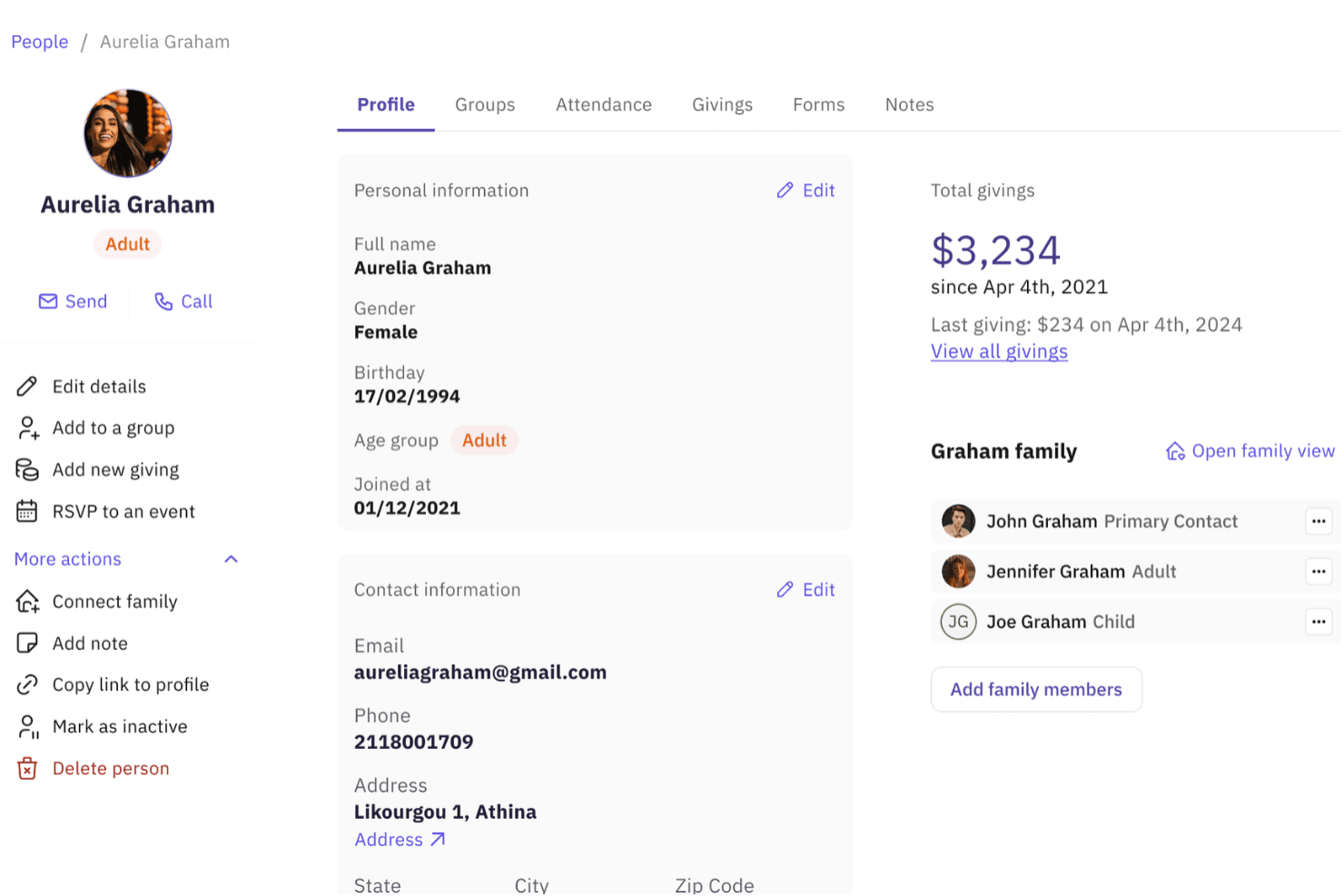
Gracely displays detailed member profiles with family, giving, and contact info. Gracely is a cloud-based church management platform that centralizes member records, giving, groups, events, and communications in one place—making it a practical fit for small-to-mid-sized churches that want to move beyond spreadsheets without overcomplicating their admin workflows.
Who Is Gracely Best For?
Gracely is a strong fit for small-to-mid-sized churches that want a single platform to manage members, giving, groups, and events without paying for features they'll never use.
Why I Picked Gracely
I picked Gracely as one of the best because it treats community as the core of church admin, not an afterthought. Group management lets leaders run their own ministries independently, with member discovery, join requests, and real-time group chat built in. I also love that member profiles pull together family connections, attendance history, group involvement, and giving records in one place, so I can see the full picture of someone's engagement without jumping between tools.
Gracely Key Features
- Online giving and contribution tracking: Accept one-time and recurring donations via card, ACH, Apple Pay, and Google Pay, with giving histories, fund management, pledges, and tax statements included.
- Secure child check-in: Check in children using a mobile device, tablet, or kiosk; generate pickup codes; and print matching QR-code labels for children and guardians at pickup.
- Church accounting: Track fund balances, match bank activity, manage income and expense categories, and generate balance sheet and transaction detail reports.
- Custom forms builder: Build forms for registrations, volunteer sign-ups, and visitor intake, then link submissions directly to existing member profiles.
Gracely Integrations
Gracely offers native integrations with Stripe, Apple Pay, and Google Pay for online giving. No public API or broader integration catalog is documented, so churches needing custom connections should verify compatibility.
Pros and Cons
Pros:
- Secure child check-in provides pickup codes and labels
- Group leaders manage ministries without admin access
- Unified member, family, attendance, and giving records
Cons:
- Reviewers cite limited event-management depth
- Reviewers want more flexible reporting
Learn more about Gracely:
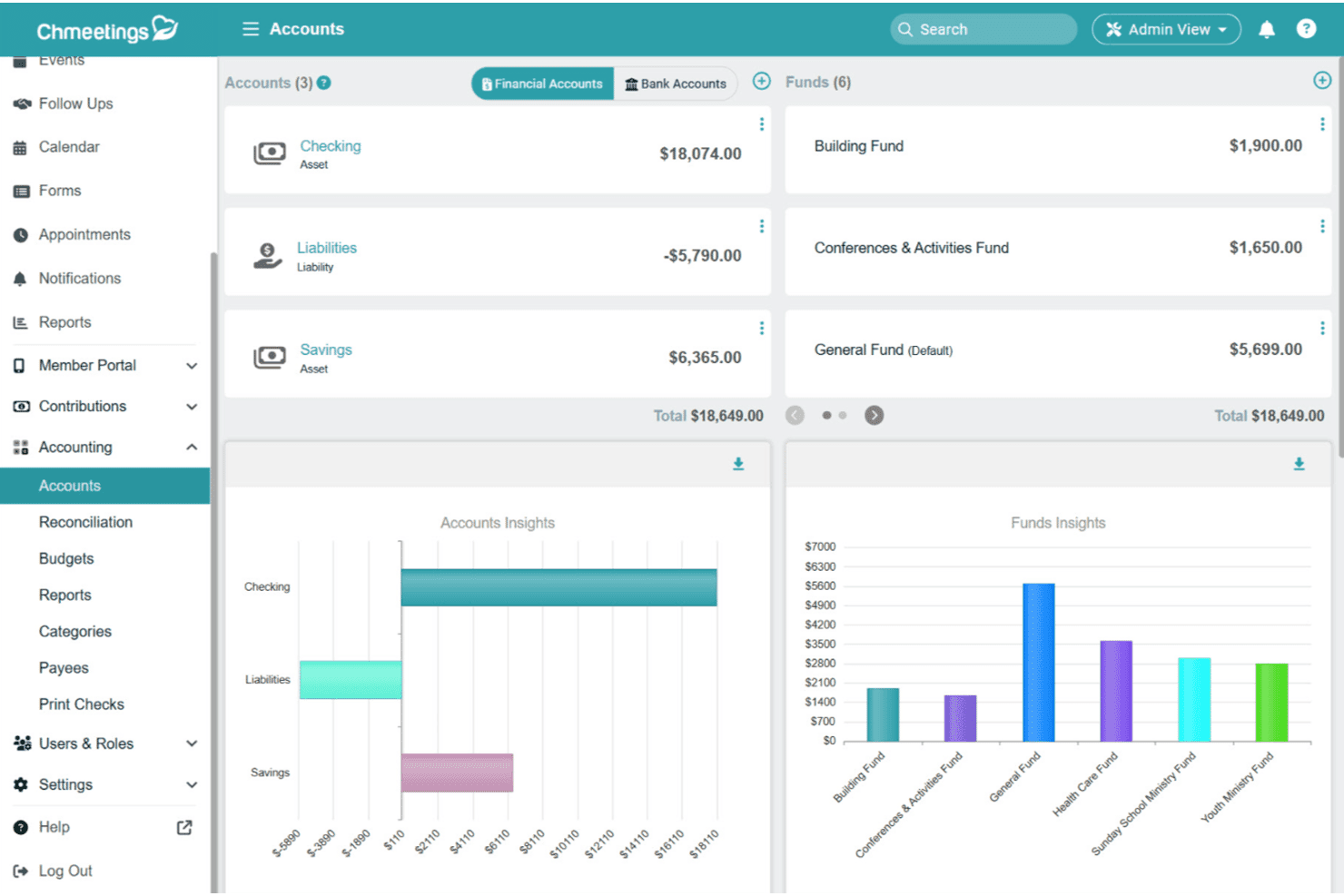
ChMeetings gives users a full financial overview via accounts and funds dashboards. ChMeetings is an all-in-one church management platform that handles member records, giving, events, volunteer scheduling, and accounting in a single system—making it a strong fit for churches that need more than the basics from their software.
Who Is ChMeetings Best For?
ChMeetings is a great fit for churches serving multilingual or internationally diverse congregations that need a full-featured management platform with broad language support.
Why I Picked ChMeetings
I've included ChMeetings in my top picks because it's the only church management platform I've seen that offers the app in 26 languages, making it genuinely usable for multilingual or internationally diverse congregations. I particularly like that the AI Writing Assistant can translate email content directly inside the platform, so communicating with members across language barriers doesn't require a separate tool. The member portal and self-service profiles work the same way regardless of the language your congregation uses.
ChMeetings Key Features
- Built-in accounting: Track fund balances, expenses, and budgets, and generate financial statements directly within the platform.
- Automated tasks: Trigger communications, group assignments, and follow-ups for events like new attendees, first-time givers, and birthdays.
- Child check-in with security codes: Print matching parent and child labels with security codes and display custom profile fields like allergies on name tags.
- Online giving with multiple payment methods: Accept one-time or recurring gifts via card, Apple Pay, Google Pay, and ACH through a hosted donation page.
ChMeetings Integrations
ChMeetings documents 11 native integrations, including Stripe, PayPal, MailChimp, Twilio, Clickatell, and Zeffy. It also offers a REST API for custom integrations and connects with 9,000+ apps through Zapier.
Pros and Cons
Pros:
- Combines giving, events, and accounting
- Documents migration from Breeze
- Supports 26 app languages
Cons:
- Reports may not meet every need
- Text messaging availability varies by region
Learn more about ChMeetings: Best for all-in-one platform
- 30-day free trial available
- From $58/month
Visit WebsiteCustomer Rating:4.8/5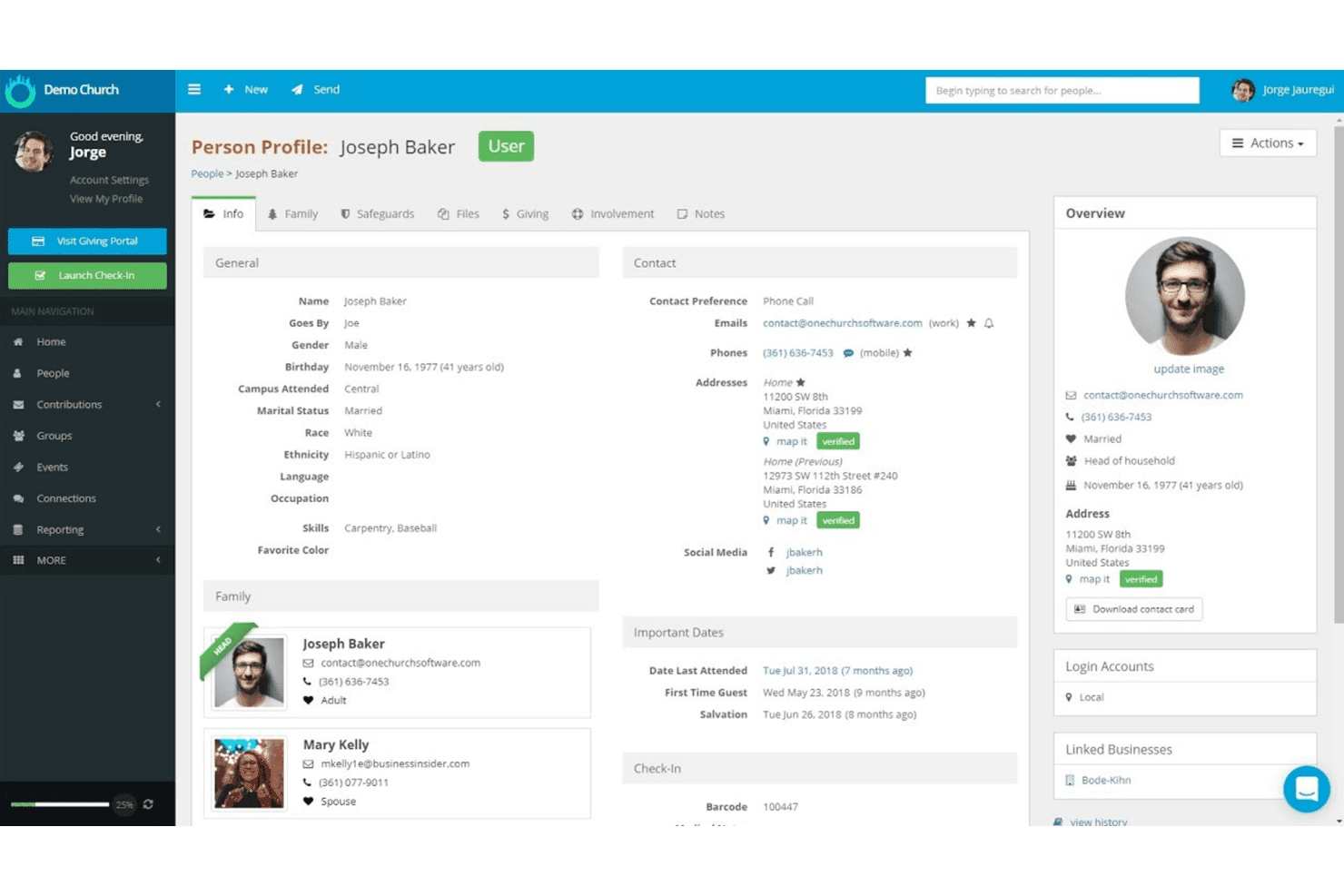
One Church Software displays detailed member profiles with contact and family info. One Church Software is a church management platform that brings member records, giving, volunteer coordination, event check-in, and communications together in one place—making it a strong fit for churches that want to replace a simpler tool like Breeze without juggling multiple systems.
Who Is One Church Software Best For?
One Church Software is a strong fit for growing churches that need member management, giving, volunteer coordination, and communications in one place rather than patching together separate tools.
Why I Picked One Church Software
One Church Software earns its spot on my shortlist because it genuinely replaces the need for separate tools rather than just adding another layer. I appreciate how member profiles, giving, volunteer scheduling, and child check-in all live in the same system, so switching from Breeze doesn't mean rebuilding your workflow across platforms. The service planning module is particularly strong, letting me schedule volunteers, collect availability, and send serving requests by text or email from one place.
One Church Software Key Features
- Member self-service portal: Congregation members can update their own profiles, view giving history, sign up for events, and manage small group participation.
- AI-assisted reporting: Ask plain-language questions to generate reports and insights from your church's data without building queries manually.
- Workflow automation: Build automated workflows triggered by form submissions, query results, or scheduled reports to handle emails, SMS, group promotions, and task assignments.
- Background screening integration: Order and manage staff and volunteer background checks, including national criminal database re-verification, directly within the platform.
One Church Software Integrations
One Church Software offers native integrations with Plaid, Google Calendar, iCal, Protect My Ministry, YouTube, Vimeo, PraiseCharts, and SongSelect. Its API and webhooks support custom integrations, while no integration marketplace is documented.
Pros and Cons
Pros:
- Reviewers report quick chat support
- Volunteer scheduling and service plans stay together
- Giving batches post directly into accounting
Cons:
- Mobile check-in printing favors Brother printers
- Breeze attendance history may not transfer
Learn more about One Church Software: Best for integrated giving tools
- Free plan + 30-day trial + demo available
- From $72/month
Visit WebsiteCustomer Rating:4.7/5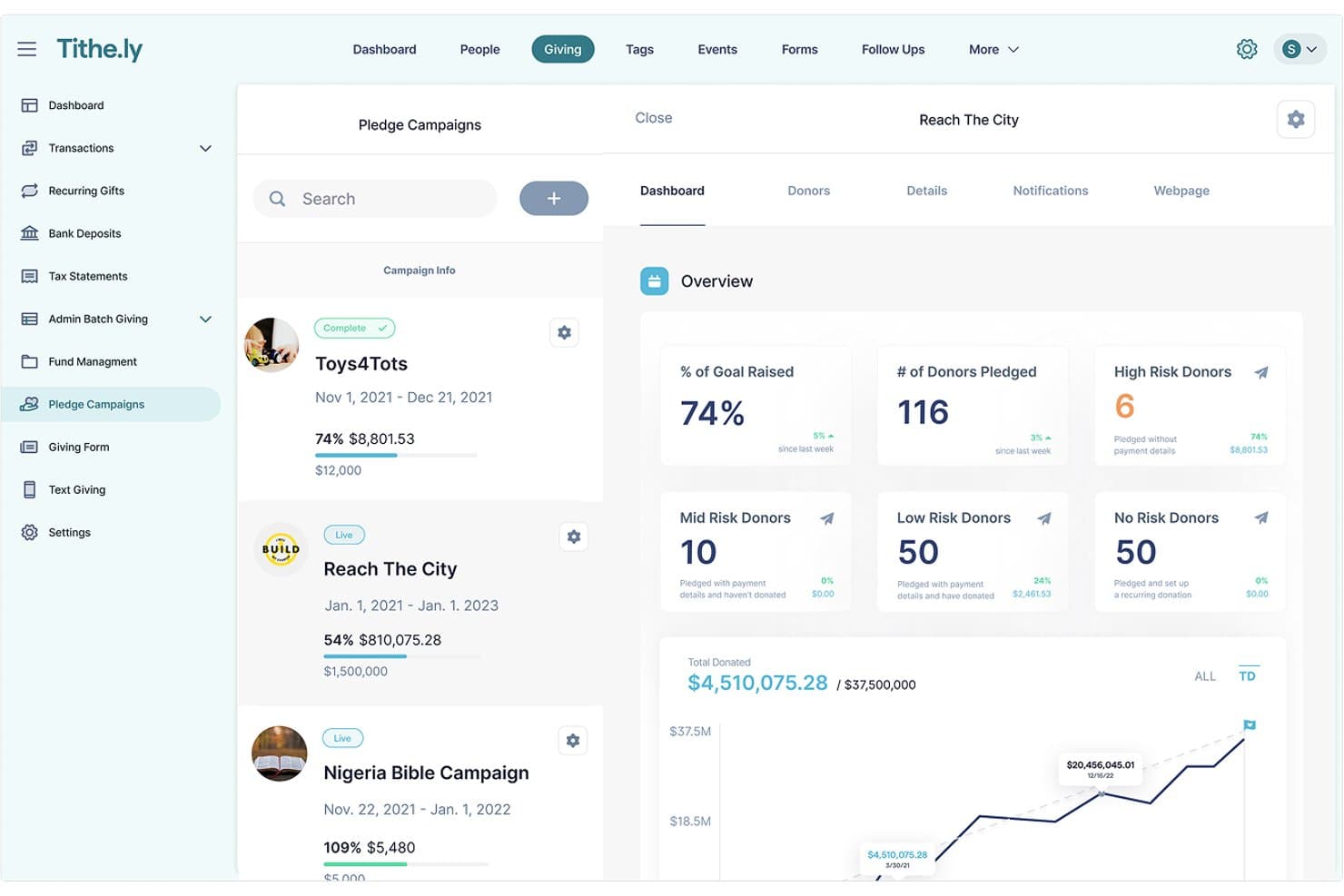
Tithe.ly tracks pledge campaign progress and donor risk levels. Tithely Church Management brings together member records, giving, volunteer scheduling, event check-in, and communications in one platform—making it a natural fit for churches that want to move beyond basic administration and manage more of their ministry in one place.
Who Is Tithely Best For?
Tithely Church Management is a strong fit for churches that want giving, member management, and ministry coordination in one place rather than stitching together separate tools.
Why I Picked Tithely
I picked Tithely as one of the best because its giving tools aren't bolted on as an afterthought—they're woven directly into member records, so when someone gives, that activity connects to their profile automatically. I appreciate that you can run giving reports filtered by fund, date, payment type, and giver type, then pull contribution statements and end-of-year tax receipts without leaving the platform. Text-to-give is also built in, letting donors text an amount to a dedicated number for instant contributions during a service.
Tithely Key Features
- Kids' check-in with security codes: Print parent and child name tags and use unique security codes to verify authorized pickup at the end of a service.
- Volunteer scheduling with automatic reminders: Assign volunteers to specific roles for services and events, then let the system send reminders automatically.
- Automated workflows: Set up triggers for tasks like birthday emails, group assignments, and member follow-ups without manual effort each time.
- Multi-site account management: Add campuses or locations under one account, each with its own giving page, banking details, and administrator access.
Tithe.ly Integrations
Tithely Church Management has documented integrations with QuickBooks Online, MinistrySafe, Planning Center Online, Salesforce, Rock RMS, and FellowshipOne. API availability isn't publicly documented, so custom integrations may require vendor confirmation.
Pros and Cons
Pros:
- Reviewers praise member tracking and giving reports
- Child pickup uses unique security codes
- Giving activity connects directly to member profiles
Cons:
- Breeze-origin accounts can’t access Groups
- Breeze People records don’t directly sync
 Best for unified system at one price
- Free plan + free demo available
- From $69.99/month
Visit WebsiteCustomer Rating:4.8/5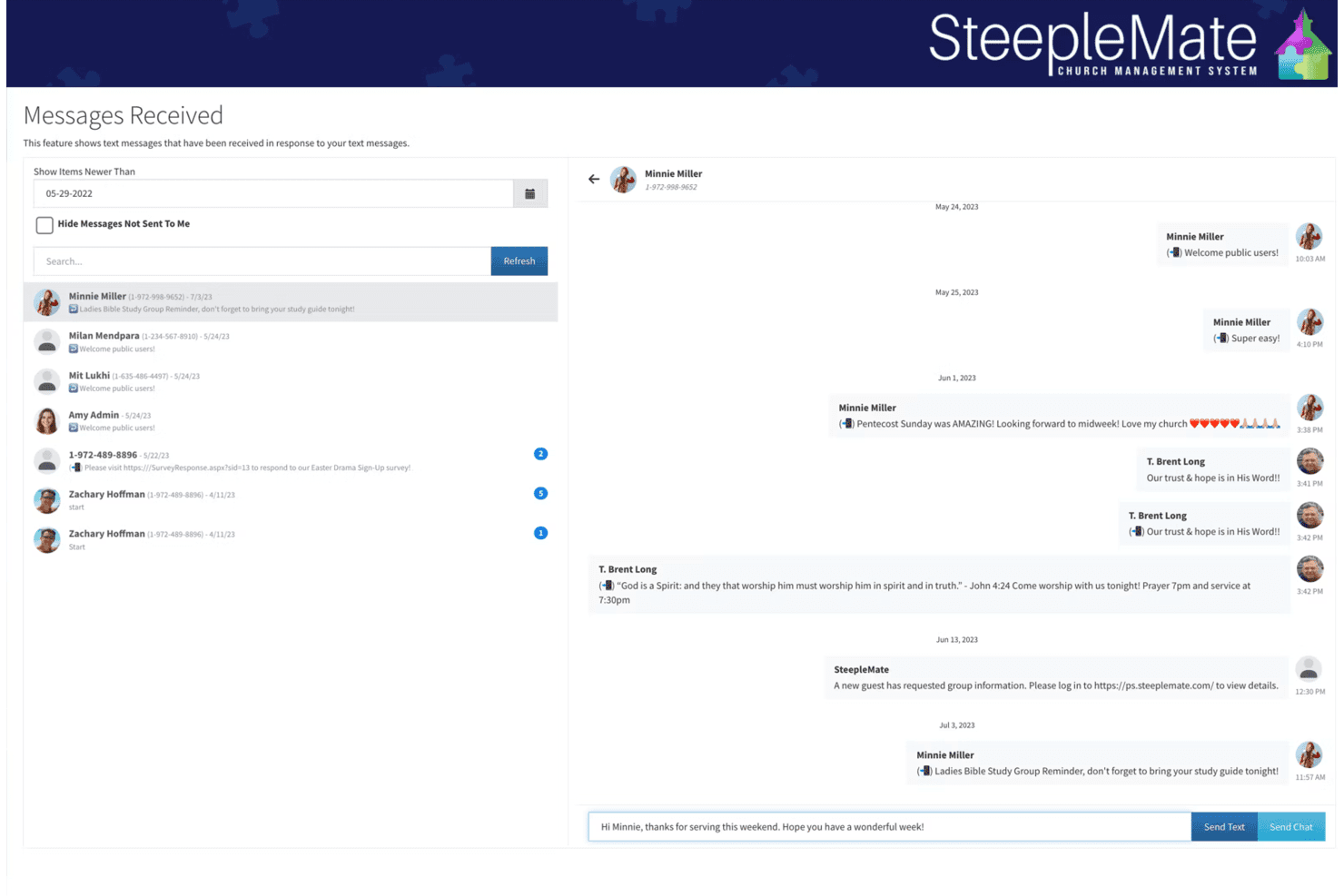
SteepleMate lets users view and reply to member text messages. SteepleMate is a unified church management system that brings member records, giving, attendance, communications, and ministry tools into one fixed-price suite—appealing to churches that want to replace fragmented tools without managing per-feature or per-member pricing.
Who Is SteepleMate Best For?
SteepleMate is a strong fit for small to mid-sized churches that want member records, giving, communications, and ministry tools in one place without paying per feature or per member.
Why I Picked SteepleMate
I've included SteepleMate in my top picks because it's the rare system that bundles member records, giving, attendance, communications, and ministry tools into one flat-rate plan. I appreciate that CareTracks lets you build multi-step follow-up workflows triggered by real events, like a first-time guest visit or a form submission, without needing a separate automation tool. The Finance module handles text giving, recurring donations, pledges, and year-end statements all in one place, so you're not stitching together multiple subscriptions to cover the basics.
SteepleMate Key Features
- Church directory and member profiles: Store unlimited member and guest records with contact history, family links, custom fields, and milestones in one place.
- Child check-in: Let families use a self-service kiosk or mobile option to check in, with authorized-guardian check-out and real-time attendance visibility for staff.
- Sermon management: Organize sermons by title, scripture reference, tags, and category, and log when and where each sermon was delivered.
- Academics module: Manage Sunday School and Bible study classes with enrollment, attendance tracking, lesson planning, and a family payment portal for tuition and lunch accounts.
SteepleMate Integrations
SteepleMate has two documented native integrations: QuickBooks Online for gift accounting and Google Translate for website translation. No API or additional named third-party integrations are documented, so its connectivity is narrower than many CHMS alternatives.
Pros and Cons
Pros:
- Donor records connect recurring gifts and statements
- CareTracks assign guest follow-up tasks
- Family-linked profiles connect attendance histories
Cons:
- Volunteer tasks require the full website on mobile
- Bulk member edits feel cumbersome
Learn more about SteepleMate: Best for nonprofit integration
- Free demo available
- Pricing upon request
Visit WebsiteCustomer Rating:3.5/5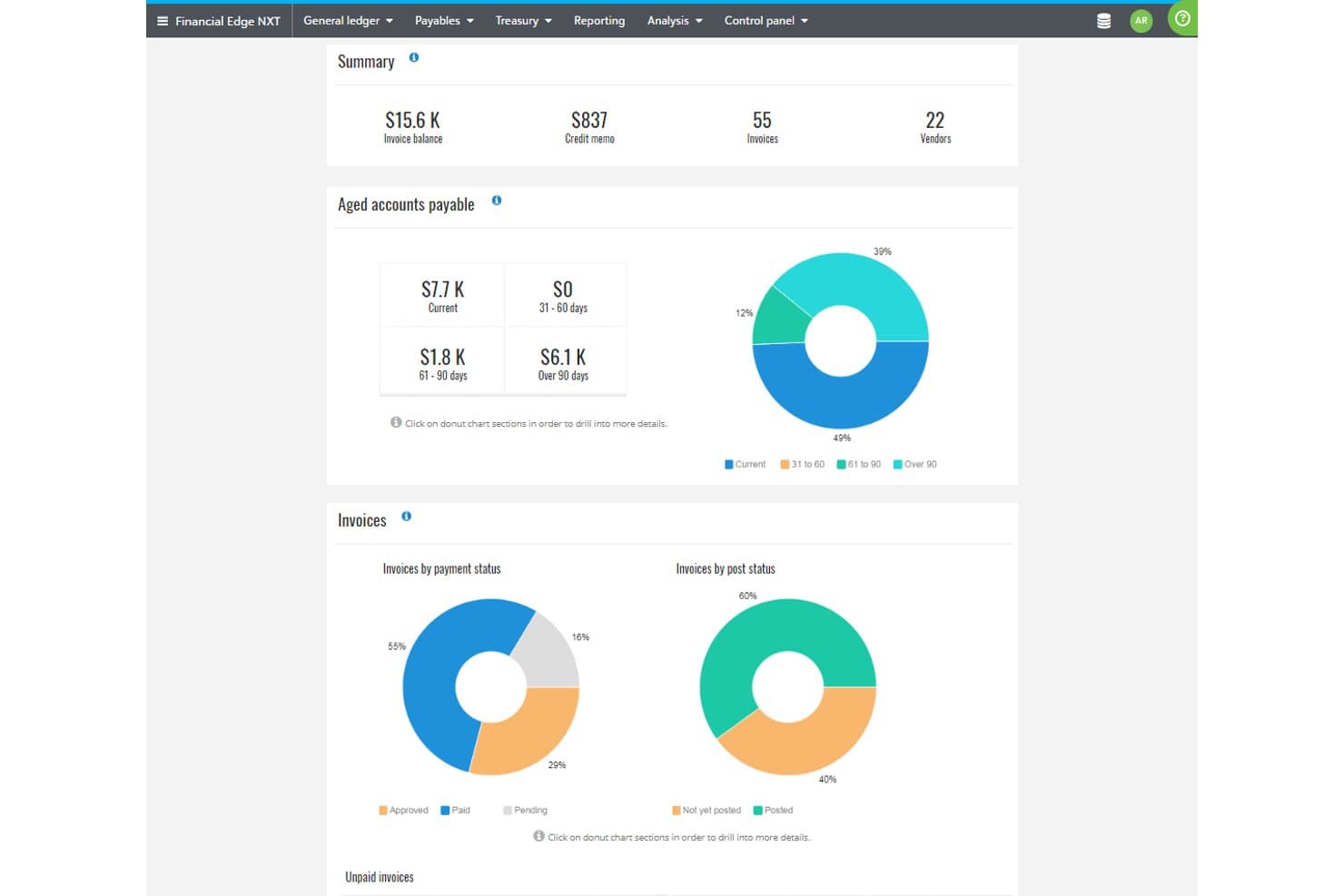
Blackbaud tracks payables, invoices, and vendor balances in one dashboard. Blackbaud is a nonprofit-focused software company whose church management platform offered congregant tracking, giving, and volunteer tools—though the product was discontinued in January 2024, making it a legacy option for churches researching their alternatives.
Who Is Blackbaud Best For?
Blackbaud Church Management suits churches already embedded in the broader Blackbaud nonprofit ecosystem—though the product was discontinued in January 2024, making it unavailable to new or existing users.
Why I Picked Blackbaud
I've included Blackbaud in my top picks because it's the rare church management option built by a company with decades of nonprofit software expertise, making it a natural fit for congregations already operating within the broader Blackbaud ecosystem. Its church platform historically connected giving, bookkeeping, and payment processing directly into Blackbaud Financial Management. That said, Blackbaud Church Management was discontinued in January 2024 and is no longer available to new or existing users.
Blackbaud Key Features
- Congregant management: Track individual and household records, group memberships, and volunteer roles in one centralized system.
- Integrated giving and bookkeeping: Process online and offline donations, scan checks, and post transactions directly to Blackbaud Financial Management.
- Secure child check-in: Manage child safety workflows with a dedicated check-in feature tied to your church's event and attendance records.
- Drag-and-drop email designer: Build and send congregation emails without any HTML knowledge using a visual email creation tool.
Blackbaud Integrations
Blackbaud Church Management had documented native integrations with Blackbaud Financial Management and Blackbaud for Outlook. Blackbaud also listed Microsoft Power Automate templates, but API availability was not stated; the product is discontinued.
Pros and Cons
Pros:
- Managed small groups and volunteers
- Included secure child check-in
- Historically supported online and offline giving
Cons:
- Product and data are inaccessible
- Discontinued on January 22, 2024

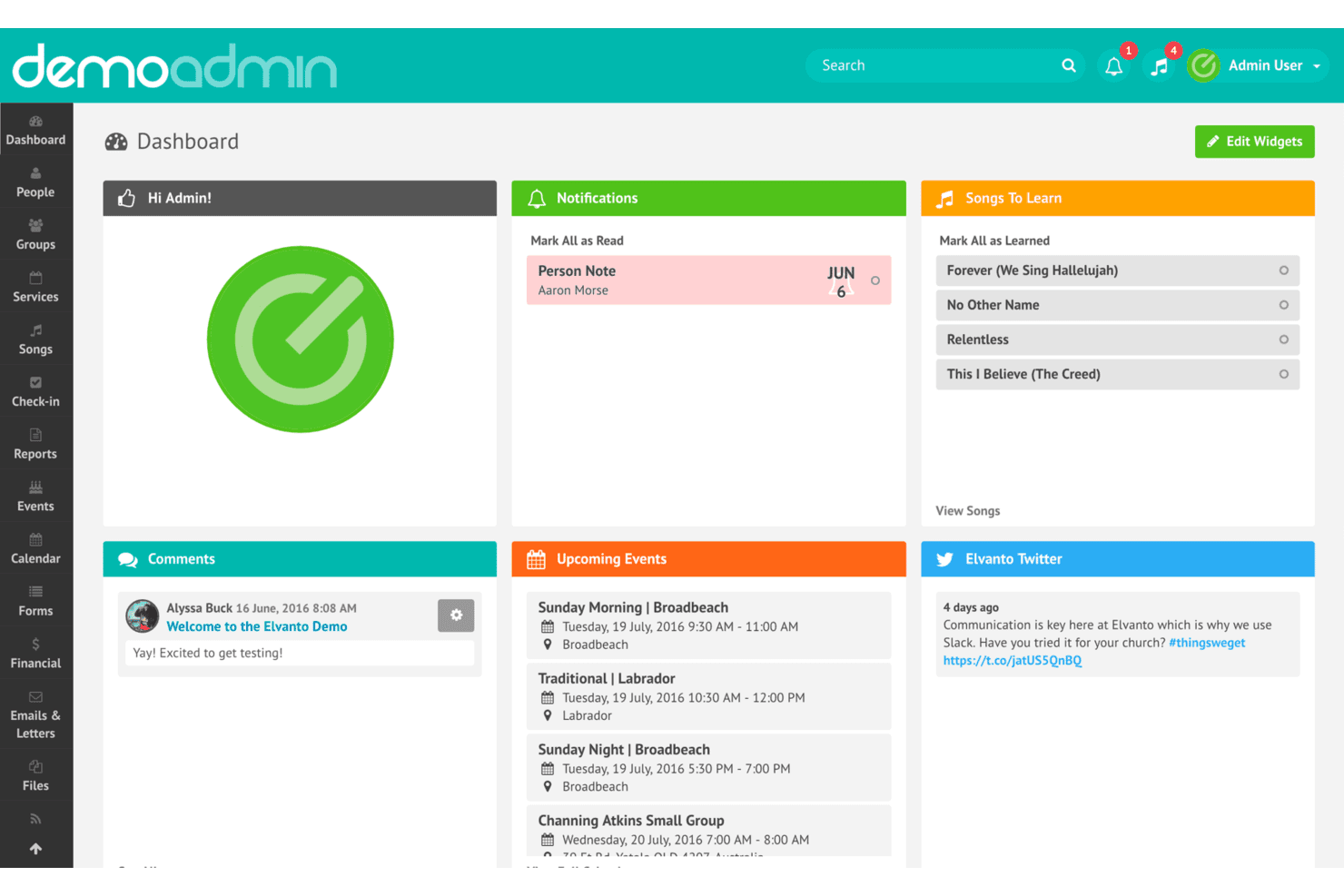
Elvanto's dashboard centralizes notifications, events, and songs for admins. Elvanto is a cloud-based church management platform from Tithe.ly that brings member records, volunteer scheduling, child check-in, service planning, and giving tracking under one roof—making it a strong fit for churches that want to manage most of their operations without juggling multiple tools.
Who Is Elvanto Best For?
Elvanto is a strong fit for mid-sized churches that want to manage member records, volunteer scheduling, child check-in, and giving in one place without paying for separate tools.
Why I Picked Elvanto
I picked Elvanto as one of the best because it brings more church operations under one roof than almost any other platform I've looked at. I appreciate that service planning, volunteer scheduling, and child check-in aren't separate modules you pay extra for—they're all included, and they talk to each other. For example, I can build a full service run sheet, auto-schedule volunteers based on their availability, and run security-code-based child check-in from the same account.
Elvanto Key Features
- People Flows: Step-by-step follow-up workflows that track individuals through church processes like new member onboarding or pastoral care.
- Multi-congregation management: Manage multiple campuses or congregations from a single Elvanto account with per-campus settings.
- Custom forms with data sync: Build forms, embed them on your church website, and have submitted data automatically update member records.
- Role-based access control: Restrict what each user can see and do based on their role within the church.
Elvanto Integrations
Elvanto offers documented integrations with Tithe.ly for giving and SongSelect for importing worship content. It also supports Google Calendar and provides an API for custom integrations, though Elvanto support doesn't develop or troubleshoot custom-coded integrations.
Pros and Cons
Pros:
- Multi-campus records give leaders shared oversight
- Custom reports support ministry-specific oversight
- Brings records, worship, and check-in together
Cons:
- Rotating weekly teams can complicate volunteer rosters
- Initial configuration can take weeks of adjustment
Learn more about Elvanto:
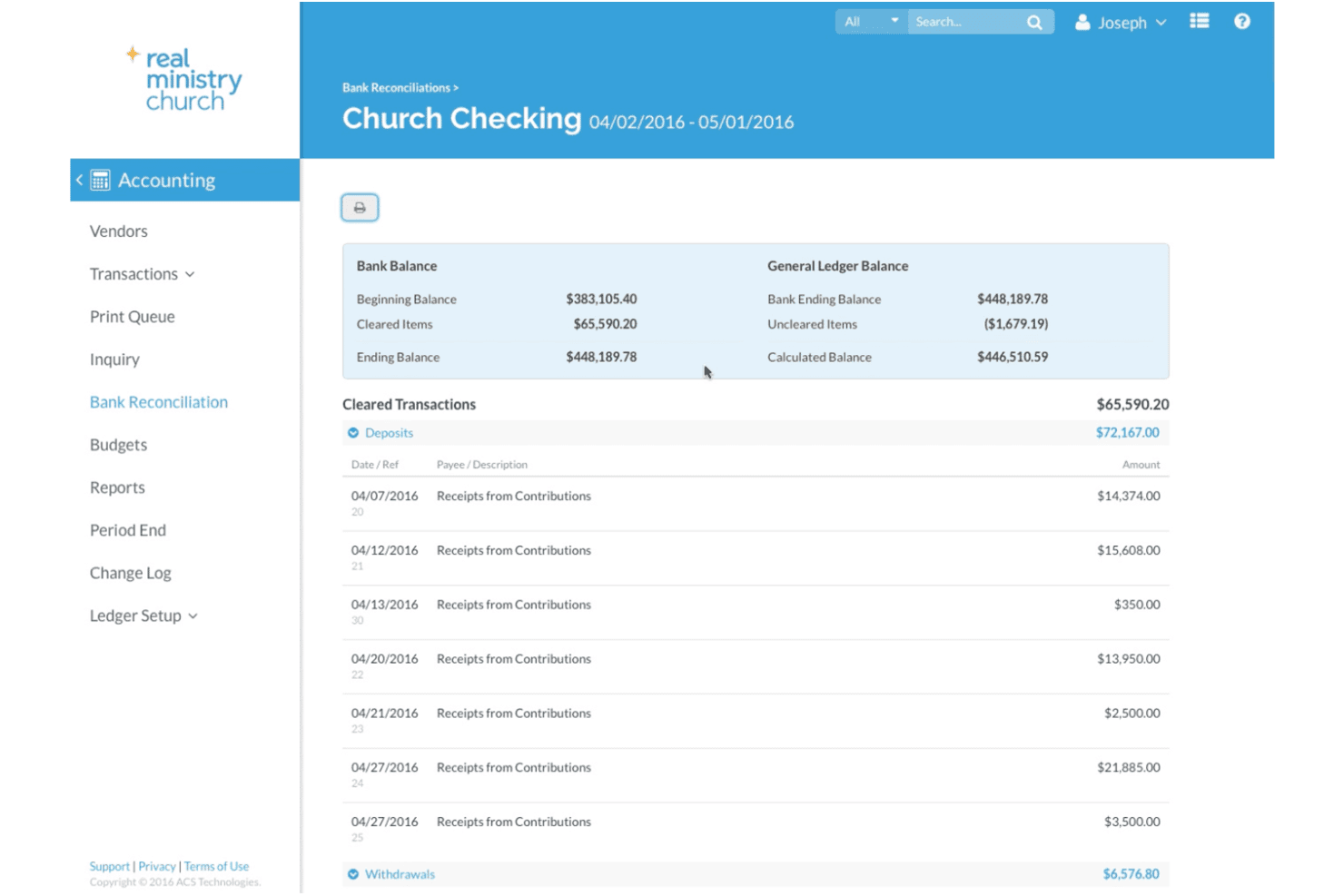
Realm helps churches reconcile bank accounts with detailed transaction records. Realm is a church management platform from ACS Technologies that unifies member profiles, giving, groups, volunteer coordination, and event check-in for churches that want one connected system for staff and congregation alike.
Who Is Realm Best For?
Realm is a strong fit for churches that want their staff and congregation connected through a single platform, especially those prioritizing mobile engagement and member-driven participation.
Why I Picked Realm
Realm earns its spot on my shortlist because of how well it brings staff and congregation together through a single mobile-first experience. I appreciate that members can check in to events, manage their giving, update their profiles, and connect with groups all from the Connect app on iOS or Android. The Shepherd app also gives pastors on-the-go access to directories, pastoral notes, and messages, so ministry doesn't stop at the office door.
Realm Key Features
- Custom profile fields: Create up to 75 custom fields to capture member information specific to your church's needs.
- Pathways workflow automation: Set up guided processes for welcome ministries, membership, discipleship, and volunteer training with automated follow-up triggers.
- Volunteer scheduling with conflict visibility: View a volunteer's serving preferences, last served date, and scheduling conflicts before making assignments.
- Multi-campus administration: Manage location-specific data access, compare trends across campuses, and share content, reports, and events across all sites.
Realm Integrations
Realm lists 11 native integrations, including Vanco, Planning Center People, Constant Contact, Verified First, Engiven, Growth Method, Go Method, Yearli, Nelco, and BoxCast. Public API availability isn't documented.
Pros and Cons
Pros:
- Volunteer schedules surface conflicts before assignments
- Giving histories pair with useful reports
- Member directory keeps family records together
Cons:
- Some members struggle with app adoption
- Children’s kiosk setup challenges occasional volunteers
Learn more about Realm: Best for real-time insights
- Free demo available
- From $6,000/year (billed annually)
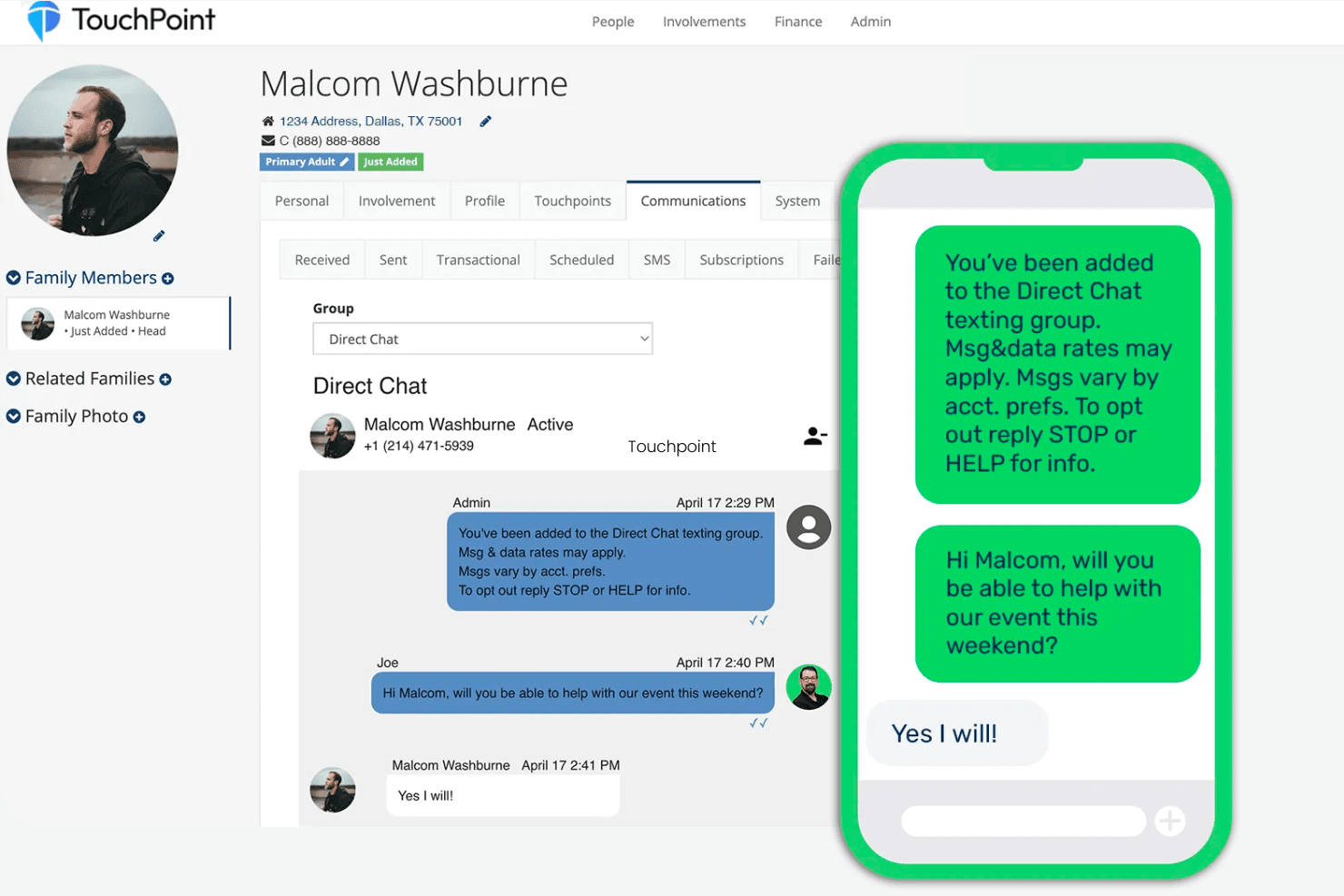
TouchPoint lets users send and track two-way SMS conversations with members. TouchPoint is a church management system built for congregations that have outgrown simpler tools, unifying member records, giving, check-in, volunteer scheduling, and workflow automation in one platform.
Who Is TouchPoint Best For?
TouchPoint is a strong fit for mid-to-large congregations with multiple campuses or complex ministries that need enterprise-grade data, automation, and reporting in one system.
Why I Picked TouchPoint
I picked TouchPoint as one of the best Breeze alternatives because its engagement scoring gives ministry teams something genuinely rare: a live, weekly-refreshed view of where every member stands across a 12-week trend. I love that staff can search directly by engagement score to identify people who may be drifting, then trigger a Process Builder workflow that automatically assigns a follow-up task, sends a text, and tracks progress, all without leaving the platform. That kind of real-time, actionable insight is what makes TouchPoint stand out for churches that have outgrown Breeze's simpler data model.
TouchPoint Key Features
- Process Builder: Create automated ministry workflows that enroll members, assign follow-up tasks, and send emails or texts based on triggers like attendance, involvement changes, or elapsed time.
- Member self-service profiles: Congregants can update their own permitted profile details through the TouchPoint mobile app or their online account.
- Multi-campus database: Assign campus designations to people and involvements within a single shared database, then filter searches, membership, and contribution reports by campus.
- Custom SQL and Python reporting: Build reports and role-specific homepage widgets beyond the standard report library using SQL, Python, and HTML.
TouchPoint Integrations
TouchPoint documents integrations with Twilio, Powered By Text, Protect My Ministry, MinistrySafe, Solertiae, and Cass Commercial Bank. It also provides REST, OData, Push Post, Swagger, and MCP APIs for custom integrations.
Pros and Cons
Pros:
- Campus filters unify ministry and contribution reporting
- Automated follow-ups connect tasks, texts, and progress
- Weekly engagement scores flag drifting members
Cons:
- Volunteer scheduling calendars need further polish
- Breeze reviewers report easier setup and administration
Learn more about Touchpoint: Best for customizable solutions
- Free trial + free demo available
- From $50/month
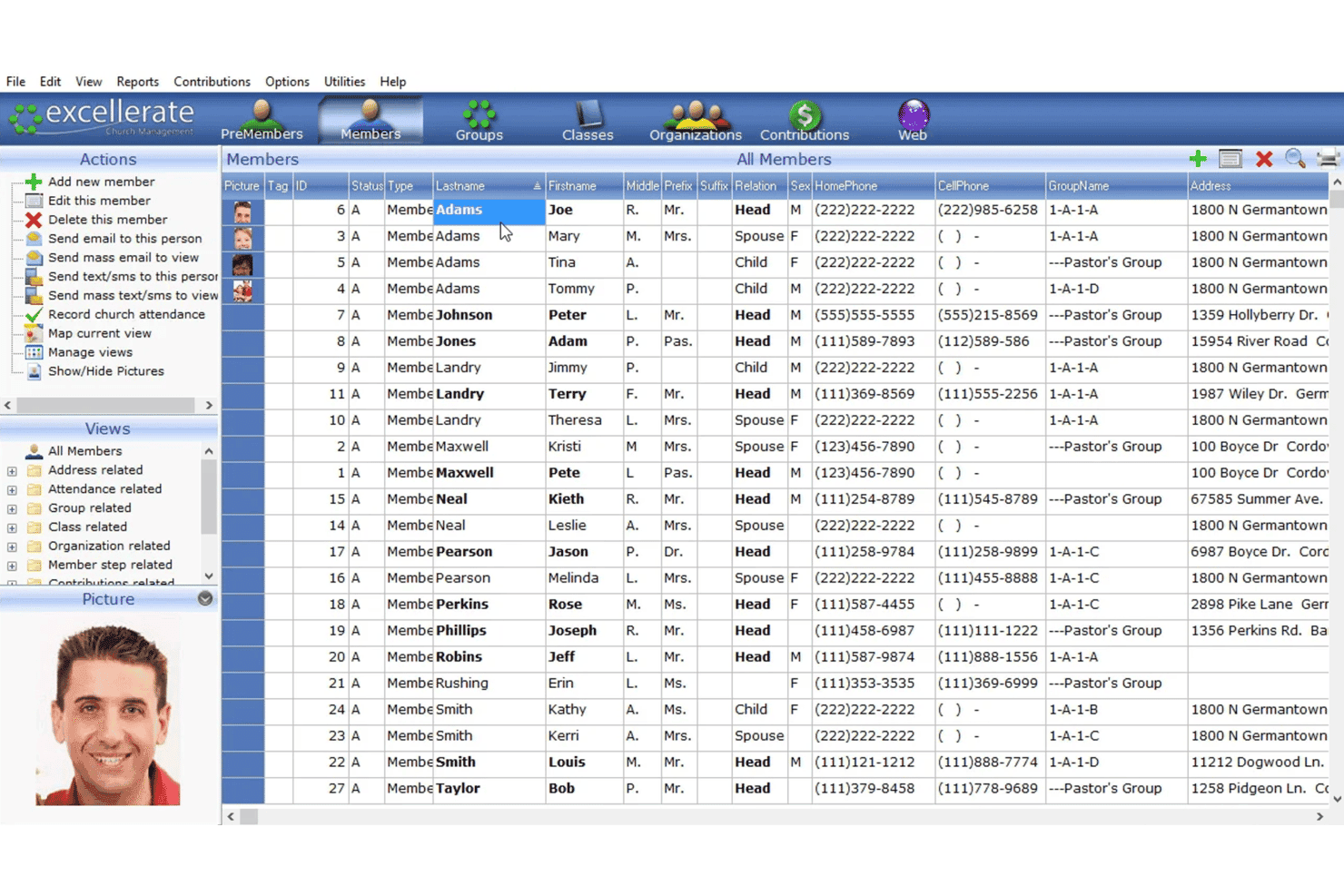
Excellerate displays a full member list with contact and group details. Excellerate's Atom Cloud is a church management platform that lets you centralize member records, track giving, manage small groups, and handle check-in—all in one place, with deep customization options to match how your church actually operates.
Who Is Excellerate Best For?
Excellerate's Atom Cloud is a strong fit for churches that need a highly adaptable church management system and want to tailor member records, reports, and workflows to match how they actually operate.
Why I Picked Excellerate
I picked Excellerate because its Atom Cloud platform lets you shape the system around how your church actually works, not the other way around. I love that you can add custom fields to member records, build your own report layouts, and configure your church's structure and views from the ground up. In practice, that means a church tracking spiritual gifts, personality profiles, and ministry involvement alongside giving and attendance can do it all in one place, without workarounds.
Excellerate Key Features
- Contribution tracking and statements: Record individual gifts by fund, track campaign pledges, and generate year-end donor statements directly from member records.
- Offline check-in: Run the full check-in process without an internet connection, with child-safety labels and security receipts for pickup.
- Follow-up workflow automation: Set up triggered sequences for new visitors or ministry interest, with progress tracked through dashboard alerts and reports.
- Member Portal: Give members self-service access to update their information, view giving statements, and sign up for groups, classes, and events.
Excellerate Integrations
Native integrations are not clearly documented. Atom Cloud connects to Jotform and Google Forms through webhook workflows, with Google Apps Script required for Google Forms; a general-purpose API is not documented.
Pros and Cons
Pros:
- Support reviewers cite accurate, responsive phone help
- Giving reports cut year-end statement work
- Custom fields and reports fit local workflows
Cons:
- Complex customization can benefit from SQL knowledge
- Donation batches can require extra mouse work
Learn more about Excellerate:
Alte alternative la Breeze ChMS
Iată câteva alternative suplimentare la Breeze ChMS care nu au ajuns pe lista mea scurtă, dar care merită totuși analizate:
- 11GracelyBest for task-based volunteer planning
- 12ChurchTracBest for affordability
- 13RakletBest for community engagement tools
- 14SubsplashBest for media integration
- 15Fellowship OneBest for large congregations
- 16PowerChurchBest for desktop-based management
How I Evaluate Breeze ChMS Alternatives
I first check that each tool covers what Breeze handles—member records, online giving, check-in, and group messaging. Then I look at differentiators like mobile apps, automation, and multi-site support that set one platform apart from another.
Core Functionality (Table Stakes For This List)
When I'm selecting tools for my list, I rank each one on a scale from 0 (does not offer the functionality) to 5 (excels in this area) for each core functionality listed below. Then, I calculate the tool's total score into a percentage. Each tool needs to achieve a minimum total score of 65% to be considered for inclusion.
- Membership Database: I look for household linking, custom fields, and tags that let a church admin pull up a family record and see every related member, group, and note in one view.
- Online Giving: Each tool should handle recurring donations, multiple fund designations, and year-end tax statements so treasurers aren't manually building reports every January.
- Attendance & Check-In: I evaluate whether the platform supports secure children's check-in with parent matching and printed name tags, not just a manual headcount log.
- Groups & Volunteers: Scheduling volunteers for Sunday morning serving teams with reminders and swap requests is a real weekly need, so I check how each tool handles assignments.
- Mass Communication: The ability to send segmented emails and texts matters—like messaging only small group leaders or first-time guests from the past month.
- Event Registration: I look for sign-up forms that collect payments and set capacity limits, which churches need for retreats, VBS, and community outreach events.
Once I have a list of tools that meet the criteria, I consider what sets each platform apart.
Differentiating Factors (What Sets Vendors Apart)
Here's how I compare and contrast different vendors:
Standout Features
Workflow automation is a big differentiator. I look for tools that trigger follow-up sequences automatically—like sending a welcome email to a first-time guest and assigning a pastor to connect that same week. A branded church mobile app also adds real value by giving congregants one place for giving, event sign-ups, and sermon access without bouncing between platforms. For growing churches with multiple campuses, I evaluate whether the platform supports campus-level data segmentation and separate reporting so each location can operate with its own team permissions.
Beyond Features
Pricing structure matters a lot here. I check whether a platform charges per-user fees that punish churches for adding volunteer accounts, or offers flat-rate plans that scale with your congregation. Data migration is another factor I weigh—switching from Breeze means moving years of giving records, tags, and member notes, so I look for guided import tools or dedicated migration support. I also evaluate integrations with tools churches already use, like QuickBooks for bookkeeping or ProPresenter for Sunday services, since a disconnected tech stack creates extra work for small admin teams.
De ce să căutați o alternativă la Breeze ChMS?
Deși Breeze ChMS este o alegere bună pentru gestionarea unei comunități religioase, există mai multe motive pentru care unii utilizatori caută soluții alternative. Este posibil să căutați o alternativă la Breeze ChMS deoarece…
- Aveți nevoie de funcții mai avansate de raportare
- Echipa dumneavoastră are nevoie de asistență multilingvă
- Căutați funcții mai bune pentru aplicația mobilă
- Aveți nevoie de integrare cu anumite instrumente terțe
- Comunitatea dumneavoastră religioasă se extinde și are nevoie de soluții scalabile
- Doriți mai multe opțiuni de personalizare
Dacă vă regăsiți în oricare dintre aceste situații, ați ajuns în locul potrivit. Lista mea conține mai multe opțiuni de software pentru gestionarea comunităților religioase, mai potrivite pentru echipele care se confruntă cu aceste provocări în utilizarea Breeze ChMS și caută soluții alternative.
Funcțiile principale ale Breeze ChMS
Iată câteva dintre funcțiile principale ale Breeze ChMS, pentru a vă ajuta să comparați ceea ce oferă soluțiile alternative:
- Gestionarea persoanelor: Stocați informații nelimitate despre membri și urmăriți date personalizate, păstrând astfel o bază de date organizată.
- Organizarea grupurilor: Atribuiți cu ușurință membri grupurilor și trimiteți mesaje, simplificând comunicarea în cadrul echipei.
- Gestionarea donațiilor: Urmăriți donațiile și oferiți opțiuni de donații online și prin mesaje text, facilitând contribuțiile enoriașilor.
- Programarea evenimentelor: Gestionați prezența și organizați eficient evenimentele cu ajutorul instrumentelor integrate.
- Programarea voluntarilor: Atribuiți voluntari și trimiteți mementouri automate, asigurându-vă că toată lumea își cunoaște responsabilitățile.
- Mesagerie: Trimiteți e-mailuri și mesaje text direct din Breeze, menținându-i pe toți informați și conectați.
- Migrarea datelor: Transferați datele existente în Breeze fără costuri suplimentare, făcând schimbarea simplă și lipsită de probleme.
- Înregistrări și plăți online: Creați formulare personalizate pentru înscrierea la evenimente și procesați plățile fără probleme.
- Sincronizarea calendarelor: Integrați Google Calendar și Apple Calendar pentru a păstra toate programele într-un singur loc.
- Tipărirea ecusoanelor cu nume: Generați etichete personalizate pentru participanții la evenimente, îmbunătățind organizarea și securitatea