

Gestionarea unei biserici poate fi o provocare, mai ales când vine vorba despre gestionarea finanțelor și a contabilității. Este posibil ca Fyle să nu răspundă nevoilor dumneavoastră specifice, fie din cauza funcțiilor limitate, fie din cauza problemelor de compatibilitate cu modul de lucru al echipei dumneavoastră.
Din experiența mea, găsirea software-ului potrivit poate face o diferență uriașă. De aceea, am analizat și testat diverse alternative la Fyle, ținând cont de provocările dumneavoastră unice.
Vă voi prezenta cele mai bune opțiuni disponibile, concentrându-mă pe soluții potrivite pentru managerii de biserici ca dumneavoastră. Veți găsi informații despre funcții, ușurință în utilizare și elementele care diferențiază fiecare instrument. Haideți să explorăm alternativele care ar putea răspunde mai bine nevoilor comunității dumneavoastră.
Ce este Fyle?
Fyle este un software de contabilitate pentru biserici, conceput pentru a simplifica gestionarea financiară pentru managerii și administratorii bisericilor. Este utilizat de obicei de echipele financiare și liderii bisericilor care trebuie să urmărească cheltuielile și să gestioneze eficient bugetele. Urmărirea cheltuielilor, gestionarea chitanțelor și raportarea în timp real ajută la organizarea finanțelor și la luarea unor decizii informate. În general, Fyle oferă o modalitate simplă de a menține sub control finanțele bisericii dumneavoastră.
Tabel comparativ al alternativelor la Fyle
Acest tabel comparativ prezintă prețurile și opțiunile de testare gratuită pentru principalele mele alternative la Fyle, pentru a vă ajuta să găsiți o soluție potrivită pentru bugetul și nevoile afacerii dumneavoastră.
Sorted by: Default
| Tool | Starting Price | Website | |
|---|---|---|---|
Best for digital church giving | 4.8 out of 5 | $72/month Free plan + 30-day trial + demo available | Website |
Best for small business accounting | 4.4 out of 5 | $27/month 1-month free trial available | Website |
Best for cloud-based church management | 4.4 out of 5 | $50/month 30-day free trial + free demo available | Website |
Best for integrated church solutions | 3.8 out of 5 | Pricing upon request Free trial + free demo available | Website |
Best for church community engagement | Not rated | Pricing upon request Free trial available | Website |
Best for desktop accounting | Not rated | $20/user/month 14-day free trial available | Website |
Best for church administrative tasks | Not rated | $445 one-time Free demo available | Website |
Best for user-friendly church management | Not rated | Pricing upon request Free plan available | Website |
Best for affordable church management | 4.8 out of 5 | $29/month 30-day free trial + demo available | Website |
Best for church event management | 4.6 out of 5 | $12/month Free plan available | Book Demo |


Why Trust Our Software Recommendations
6,700+
Reviews
20
Industry experts
16+
Evaluation factors
14
Years
Our team has been testing and reviewing software since 2012. As church leaders ourselves, we know how difficult—and important—it is to choose the right software.
For this guide, we evaluated tools using hands-on testing and independent research, scoring tools using our selection criteria.
Our reviews reflect our human editorial judgment, not a sales pitch.
Recenzii ale celor mai bune alternative la Fyle
Mai jos sunt prezentate rezumatele mele detaliate ale celor mai bune alternative la Fyle care au ajuns pe lista scurtă. Recenziile mele oferă o analiză detaliată a funcțiilor principale, avantajelor și dezavantajelor, integrărilor și cazurilor de utilizare ideale pentru fiecare instrument, pentru a vă ajuta să îl găsiți pe cel mai potrivit pentru dumneavoastră.
 Best for digital church giving
- Free plan + 30-day trial + demo available
- From $72/month
Visit WebsiteCustomer Rating:4.8/5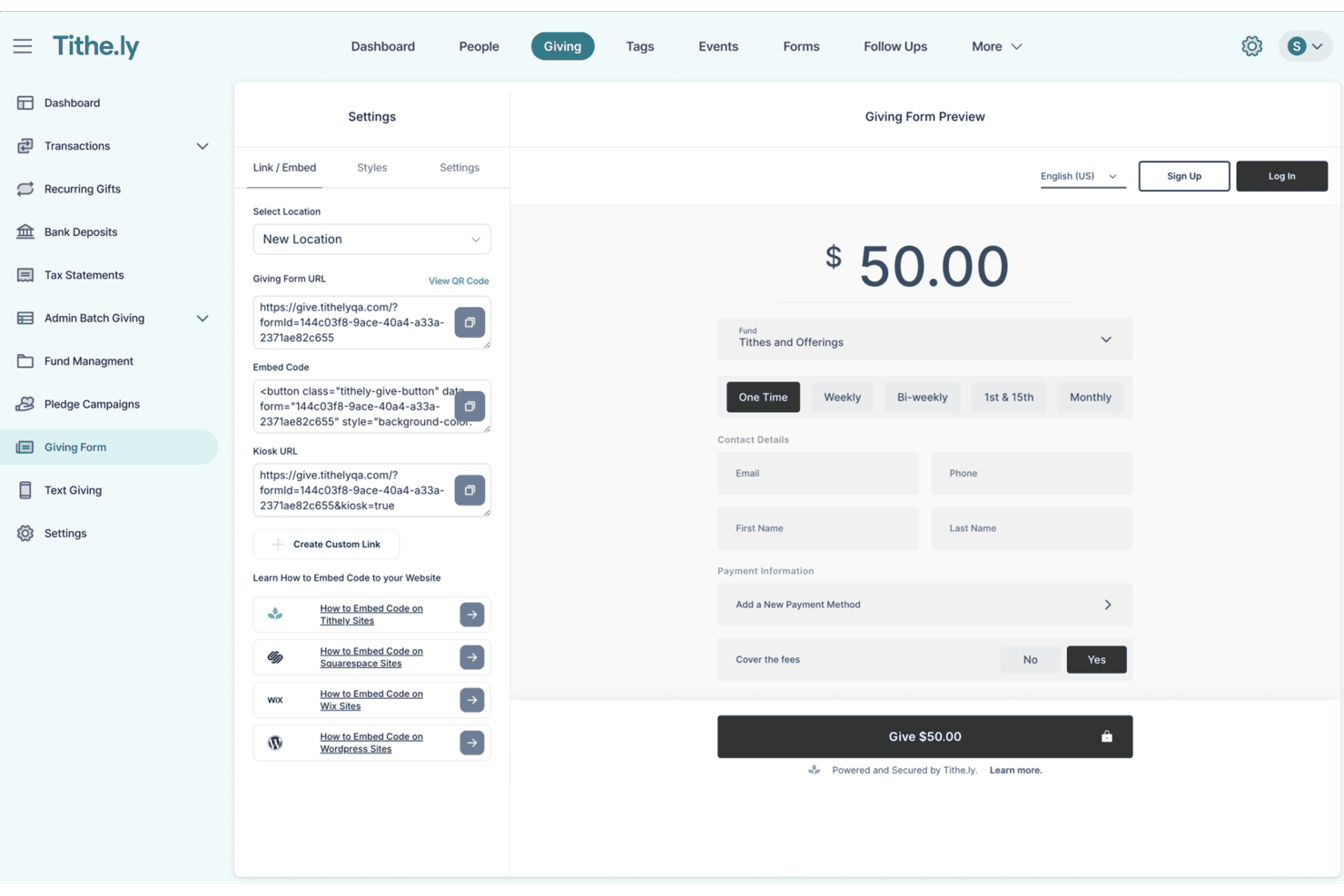
Tithe.ly lets users embed a giving form directly into their website. Tithe.ly is a church management platform built for congregations that want to consolidate giving, communications, member management, and events in one place.
Who Is Tithe.ly Best For?
Tithe.ly is a strong fit for church leaders and administrators who want to manage giving, member records, and communications from a single platform.
Why I Picked Tithe.ly
I picked Tithe.ly as one of the best because it's purpose-built for digital church giving, making it one of the few platforms that centralizes online donations, text giving, and recurring gifts in one place. I especially like how donors can give directly through a church's website, app, or even a text message, which removes friction and keeps contributions consistent week to week.
Tithe.ly Key Features
- Online giving portal: Donors can give directly through your church's website using a built-in giving page.
- Text-to-give: Congregation members can submit donations via SMS without downloading an app or visiting a website.
- Recurring gift scheduling: Donors can set up automatic recurring contributions on a weekly, monthly, or custom cadence.
- Donor management database: Church administrators can view giving history, track donor records, and manage contact information in one place.
Tithe.ly Integrations
Tithe.ly doesn't have any native integrations documented for expense management, accounting, corporate cards, or reimbursement workflows.
Pros and Cons
Pros:
- Reviewers praise volunteer-friendly navigation and support
- Recurring gifts support predictable contributions
- Combines church giving and administration
Cons:
- No approvals, card reconciliation, or reimbursements
- No expense tracking or receipt capture
 2Best for small business accounting
Xero
- 1-month free trial available
- From $27/month
Visit WebsiteCustomer Rating:4.4/5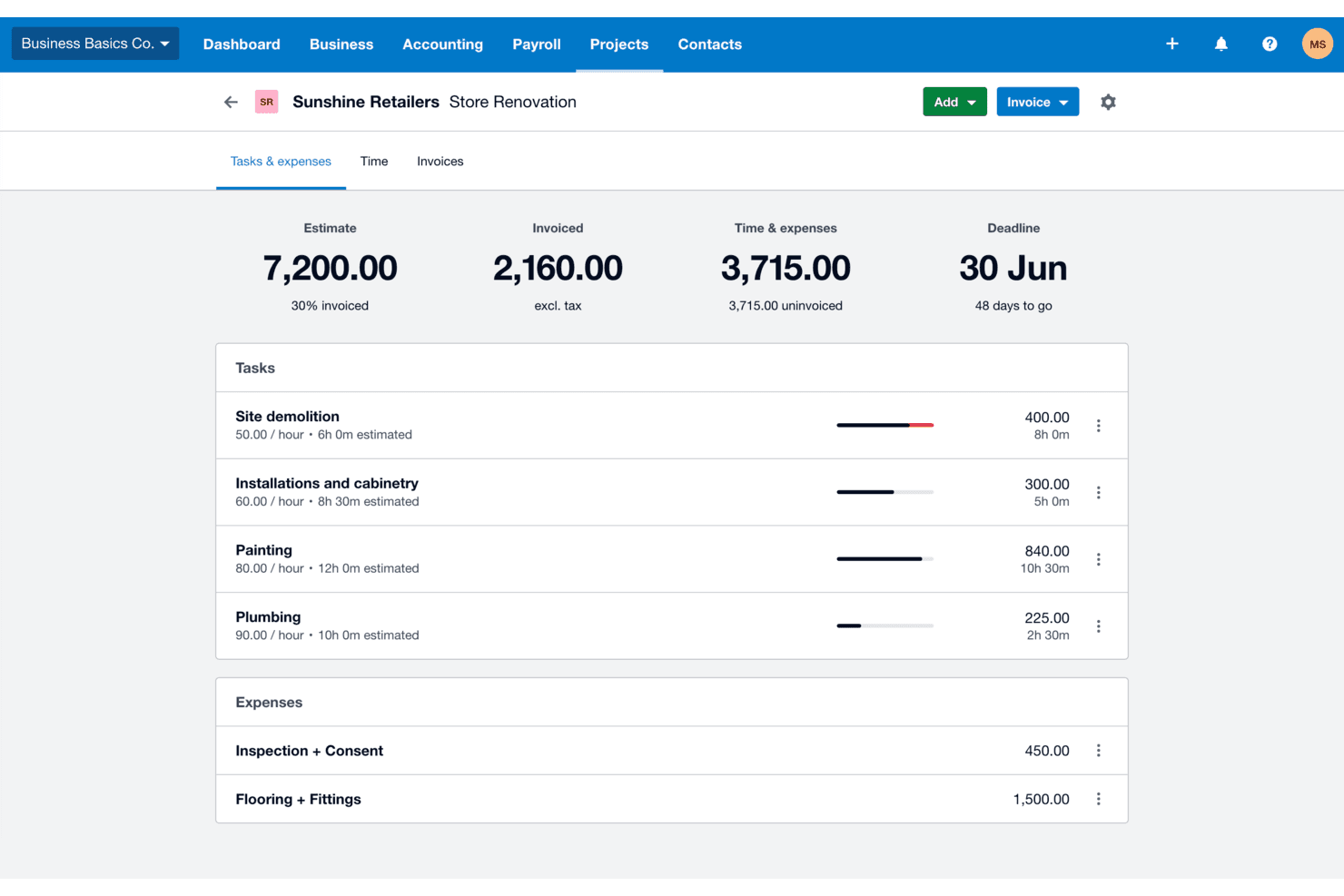
Xero lets users track project tasks, expenses, and invoicing in one view. Xero is a small business accounting platform that handles invoicing, bank reconciliation, expense tracking, and cash-flow reporting—making it a practical fit for church administrators who need to manage day-to-day finances without a dedicated finance team.
Who Is Xero Best For?
Xero is a strong fit for church administrators and small ministry teams who need a full accounting backbone—invoicing, bank reconciliation, and financial reporting—in one place.
Why I Picked Xero
I picked Xero as one of the best because it handles the full accounting backbone that small church offices genuinely need: invoicing, bank reconciliation, and financial reporting in a single platform. I particularly like that approved expense claims automatically create a bill in Xero, keeping your general ledger current without manual journal entries. The Established plan also includes mileage claims and receipt analysis, so staff can photograph receipts in the Xero Me app and have the date, amount, and merchant details extracted automatically.
Xero Key Features
- Bank reconciliation: Xero matches imported bank statement lines to transactions, including expense claims, and suggests matches based on bank rules or prior reconciliations.
- Tracking categories: Organize income and expenses by program, grant, or restricted fund using tracking categories, each with its own budget.
- Multi-currency claims: Staff can submit expense claims in a currency other than the organization's base currency, with the exchange rate displayed at submission.
- Role-based bill approvals: Assign separate roles for creating and approving bills, with duplicate-bill flagging built into the accounts payable workflow.
Xero Integrations
Xero lists over 1,000 marketplace integrations, including Expensify, Dext, ApprovalMGR, ClearSpend AI, and Uber for expense and approval workflows. Its Accounting API and webhooks support custom integrations.
Pros and Cons
Pros:
- Accounting reports keep ministry finances in view
- Receipt photos support recorded expense tracking
- Bank reconciliation matches statement lines to claims
Cons:
- Claim approvals lack configurable multi-step routing
- Expense claims require a plan that includes Expenses
 Best for cloud-based church management
- 30-day free trial + free demo available
- From $50/month
Visit WebsiteCustomer Rating:4.4/5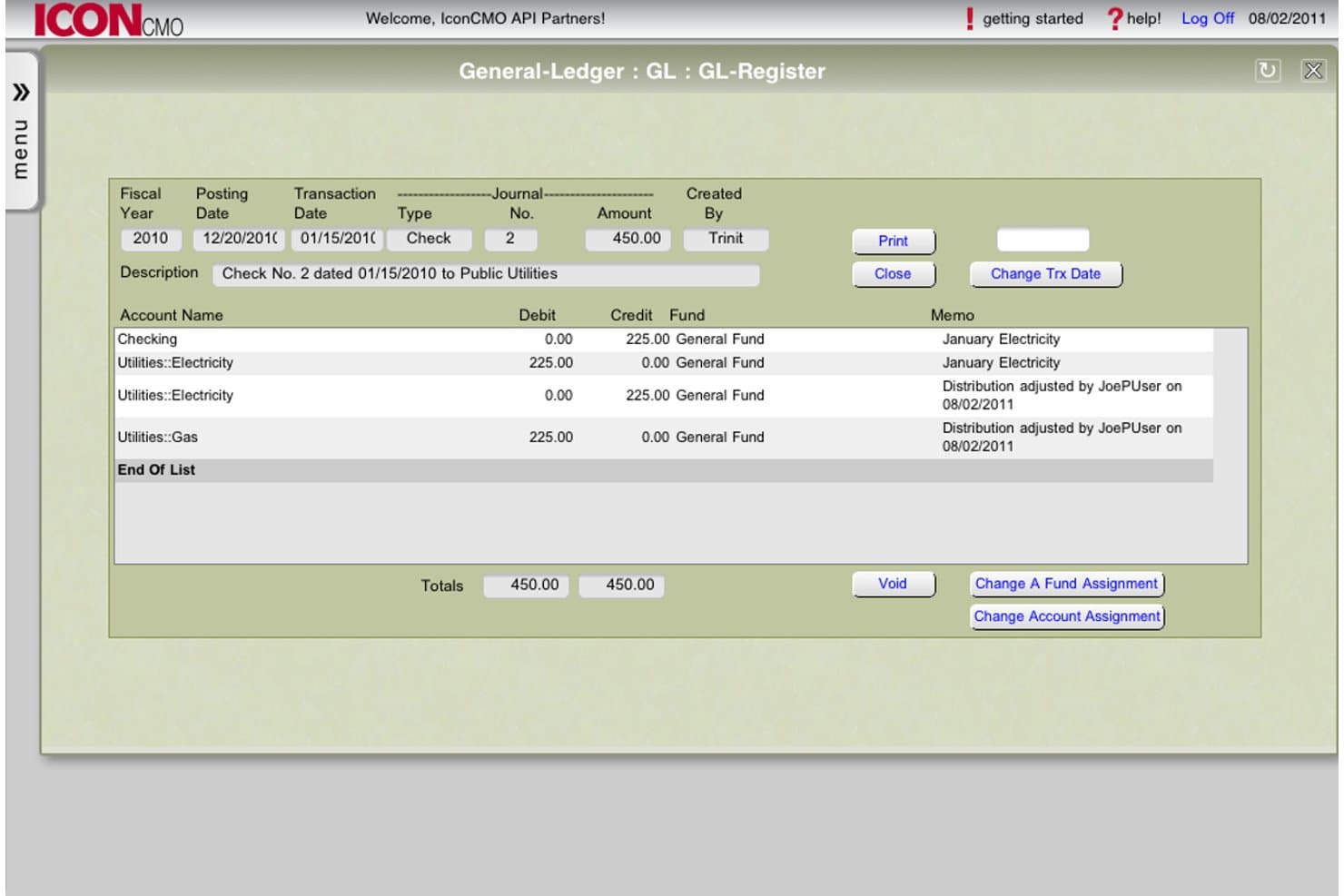
IconCMO lets users view and adjust GL register transaction details. IconCMO is a web-based church management platform built for churches that need to handle membership, donations, and fund accounting in one place.
Who Is IconCMO Best For?
IconCMO is a strong fit for churches and faith-based organizations that need membership, donation tracking, and fund accounting in one cloud-based platform.
Why I Picked IconCMO
I picked IconCMO as one of the best because it's built entirely in the cloud, meaning your team can access membership records, donation histories, and fund accounting from anywhere without managing local installs. I especially appreciate how it handles fund accounting: you can track revenue and expenses by individual fund, run FASB-compliant reports for your board, and automatically post donations directly to your accounting system. The checkbook management also lets you track credit-card expenses by fund, which keeps spending tied to the right ministry budget without manual journal entries after the fact.
IconCMO Key Features
- Pledge tracking: Monitor pledges across custom date ranges, including multi-year giving campaigns linked to specific funds.
- Role-based user permissions: Set Read, Read/Write, or No Access levels for membership and accounting areas independently for each user.
- Bank transaction importing: Import bank transactions and match them to existing entries or create new records directly in the system.
- FASB-compliant financial reporting: Generate audit-ready financial statements for each fund or across all accounting funds combined.
IconCMO Integrations
Documented native integrations include Vanco, Kotapay, Yearli, and Paperless Transactions; BILL is listed as an integration, but its function isn't specified. IconCMO also offers JSON- and XML-based web services for custom integrations.
Pros and Cons
Pros:
- Reviewers praise responsive, knowledgeable support
- Cloud access supports distributed church teams
- Church records and fund accounting stay together
Cons:
- Card charges require manual entry
- No receipt capture or expense approvals
Learn more about IconCMO: 4Best for integrated church solutions
ACS
- Free trial + free demo available
- Pricing upon request
Visit WebsiteCustomer Rating:3.8/5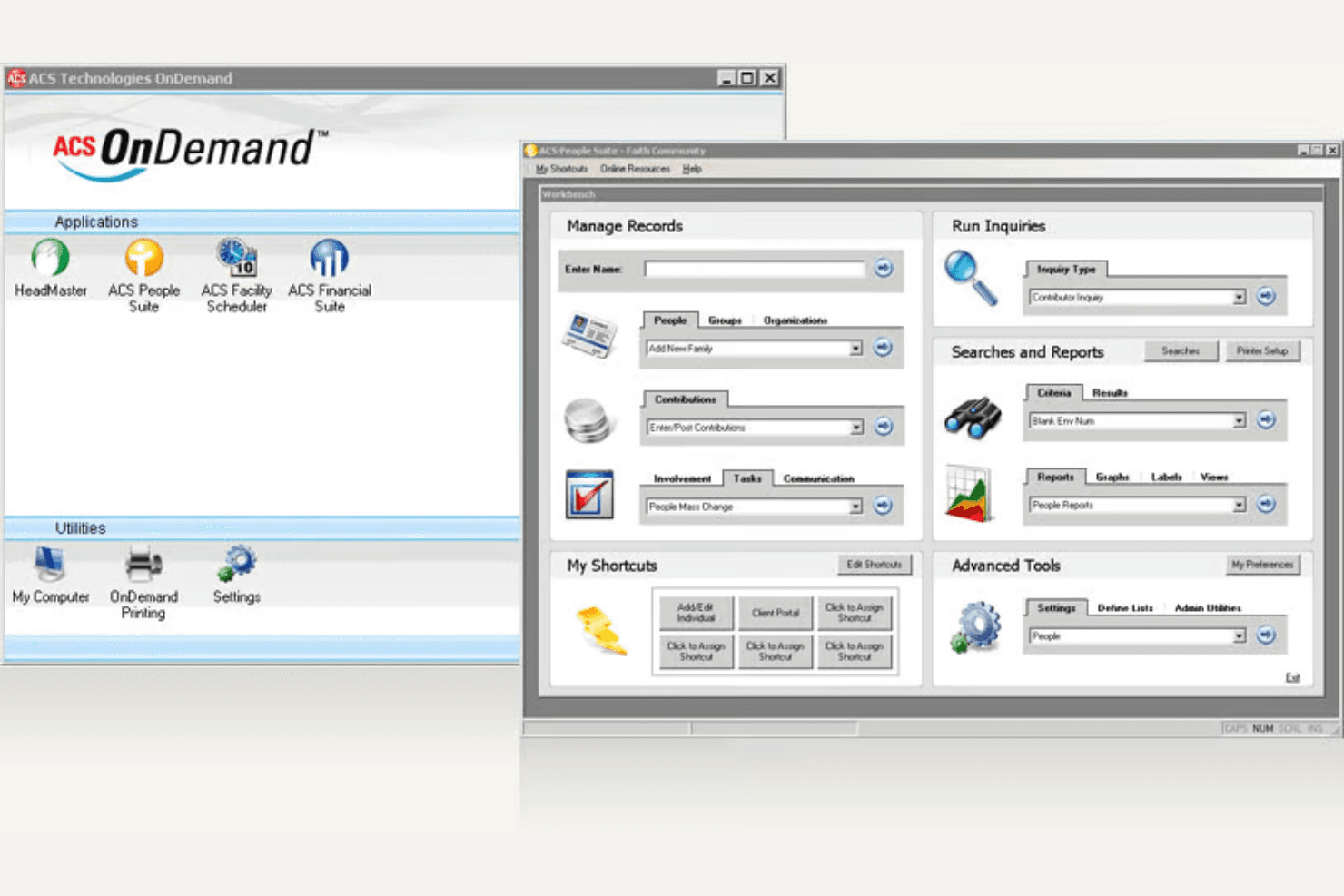
ACS OnDemand centralizes church management apps in one dashboard. Realm by ACS Technologies is a church management platform that brings member data, giving, fund accounting, and payroll together in one place—making it a natural fit for churches that want to manage finances and ministry operations without juggling separate systems.
Who Is ACS Best For?
Realm is a strong fit for churches that want member management, giving, and fund accounting in one connected platform.
Why I Picked ACS
I picked Realm by ACS Technologies because it's one of the few platforms that connects member data, giving, and fund accounting in a single system. I appreciate how giving funds link directly to General Ledger accounts, so contribution batches post as deposits without manual rekeying. Realm's accounting also handles invoices, vendor tracking, and bank and credit-card reconciliation against the GL, keeping church finances in one place rather than spread across separate tools.
ACS Key Features
- Fund accounting: Track income and expenses across multiple funds, departments, and campuses using a double-entry nonprofit accounting system.
- Payroll management: Process staff payroll, track time and PTO, print checks, and post payroll directly to the General Ledger.
- Bank and credit card reconciliation: Reconcile bank and credit card accounts against General Ledger transactions to keep church finances accurate.
- Role-based access controls: Assign staff and leaders different permission levels to manage who can view or edit sensitive financial and member data.
ACS Integrations
Realm offers native integrations with Vanco, Engiven, Nelco, Yearli, and Planning Center People; Constant Contact also syncs contact lists. API availability for custom integrations isn’t documented.
Pros and Cons
Pros:
- Invoice and check tracking supports church finance
- Reviewers value finance and ministry data together
- Fund accounting separates departmental church expenses
Cons:
- No documented spend-policy enforcement or receipt automation
- No dedicated expense-report approval chain
Learn more about ACS:
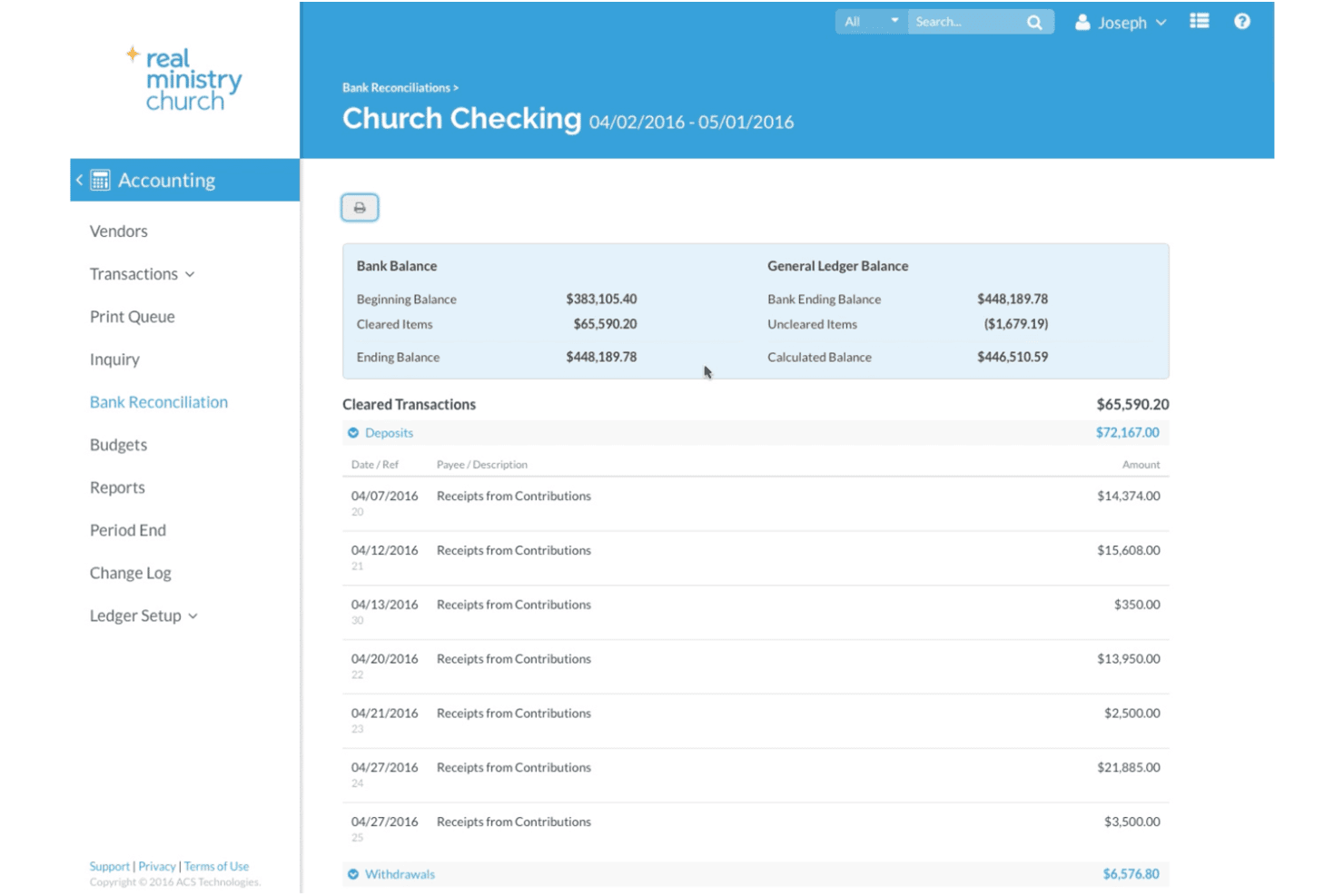
Realm streamlines church bank reconciliation with ledger balances. Realm is a church management platform built by ACS Technologies that brings together member profiles, giving, communications, and accounting tools to help church administrators manage their congregation in one place.
Who Is Realm Best For?
Realm is a strong fit for church administrators and pastoral staff who want to manage member engagement, giving, and community communications in one place.
Why I Picked Realm
I picked Realm as one of the best because it's built specifically around how churches engage their congregations, not just track transactions. I love that the newsfeed, group messaging, event registration, and member-managed profiles all live in one place, so your staff isn't juggling separate tools to keep people connected. The Connect mobile app lets members give, RSVP to events, and message their small group from their phone, which keeps participation high without adding work for your team.
Realm Key Features
- Contribution batch management: Staff can record cash and check donations, scan checks, and post batches directly to the general ledger.
- Fund accounting with account segments: Realm Accounting tracks departments and campuses as account segments across transactions, budgets, and financial reports.
- Bank and credit card reconciliation: Staff can compare bank and credit card statements against general ledger transactions to verify account balances.
- Vendor and invoice management: Staff can manage vendor records, track invoices, queue checks, and print them individually or in batches.
Realm Integrations
Realm offers native integrations with Vanco, Engiven, Nelco, Yearli, Planning Center People, Constant Contact, and BoxCast. These connections focus on giving, payroll tax filing, church management, and communications rather than expense workflows; API availability isn’t documented.
Pros and Cons
Pros:
- Vendor and invoice tracking supports church bookkeeping
- Giving records feed church financial reporting
- Congregation engagement tools connect groups and events
Cons:
- No employee reimbursements or spend approvals
- No receipt capture or expense reporting
Learn more about Realm:
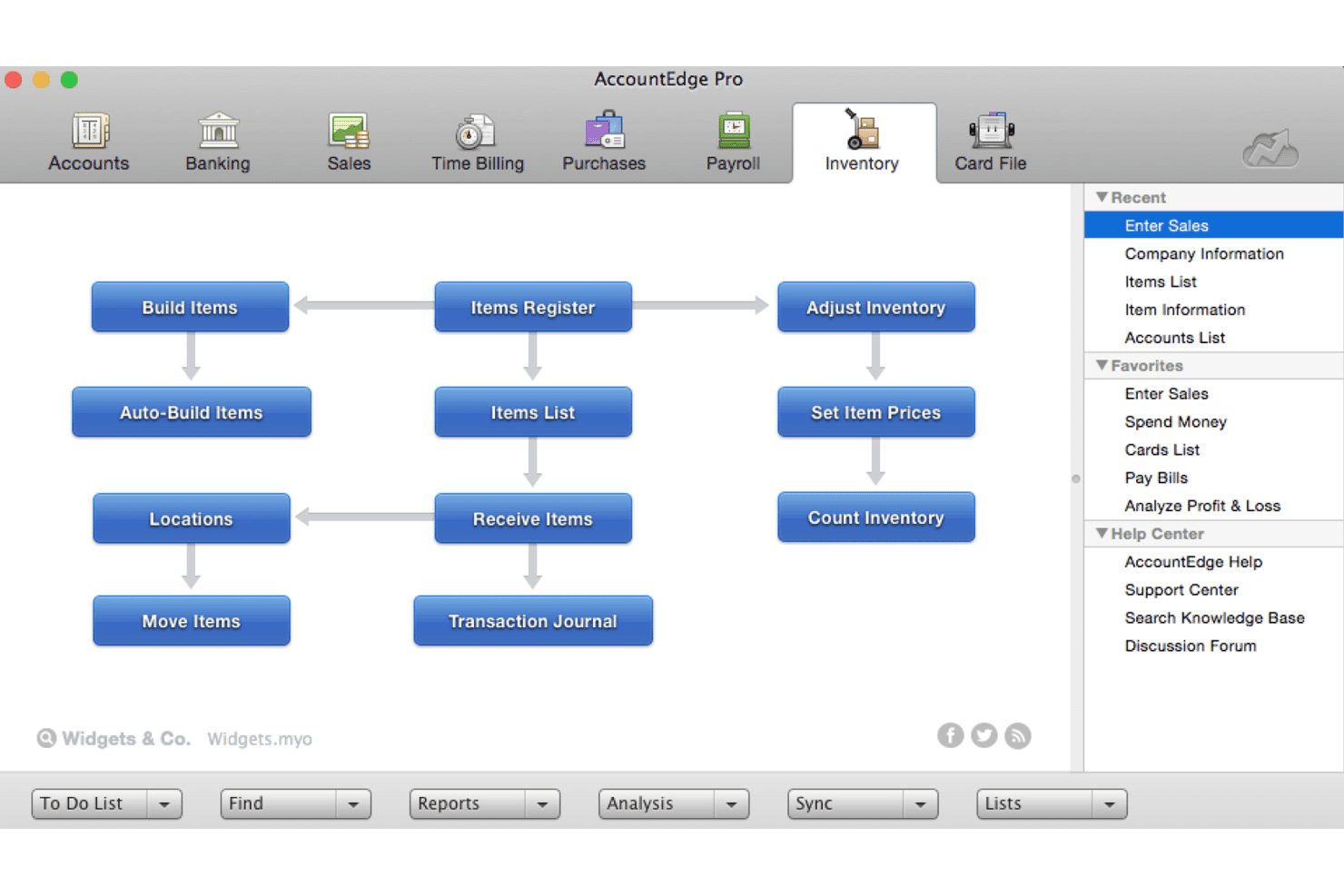
AccountEdge Pro's Inventory module organizes stock management workflows. AccountEdge is desktop accounting software for small businesses that handles general ledger, payroll, inventory, and expense tracking—making it a practical option for churches that want locally installed bookkeeping without relying on the cloud.
Who Is AccountEdge Best For?
AccountEdge suits small business owners who prefer locally installed accounting software over cloud-based tools and want to manage bookkeeping, payroll, and inventory in one place.
Why I Picked AccountEdge
I picked AccountEdge as one of the best because it's the only desktop-first option on this list, which matters if your church operates without reliable internet or prefers keeping financial data off the cloud. AccountEdge's general ledger, payroll, and inventory tools all run locally on Mac or Windows, so your books stay intact regardless of connectivity. I also appreciate the mileage reimbursement tracking, which lets you log odometer readings and trip details directly against employee records.
AccountEdge Key Features
- Bank feeds: Connect bank and credit card accounts via Plaid to automatically sync transactions into your books.
- Document attachment: Attach receipts, images, and files directly to purchase transactions and vendor records.
- User access controls: Create user IDs and restrict access to specific functions, windows, and employee data by person or role.
- Power BI export: Export company file data to Microsoft Power BI to build custom financial reports and dashboards.
AccountEdge Integrations
AccountEdge offers native integrations with Plaid, Microsoft Power BI, Square, and Shopify. It also supports Dropbox, UPS, Microsoft Office, SurePayroll, and Zapier.
Pros and Cons
Pros:
- Mileage logs track reimbursable employee trips
- Offline-capable accounting keeps records accessible
- Reviewers praise dependable bookkeeping and inventory
Cons:
- No approval routing or spend-policy enforcement
- No automated receipt extraction or expense capture
Learn more about AccountEdge: Best for church administrative tasks
- Free demo available
- From $445 one-time
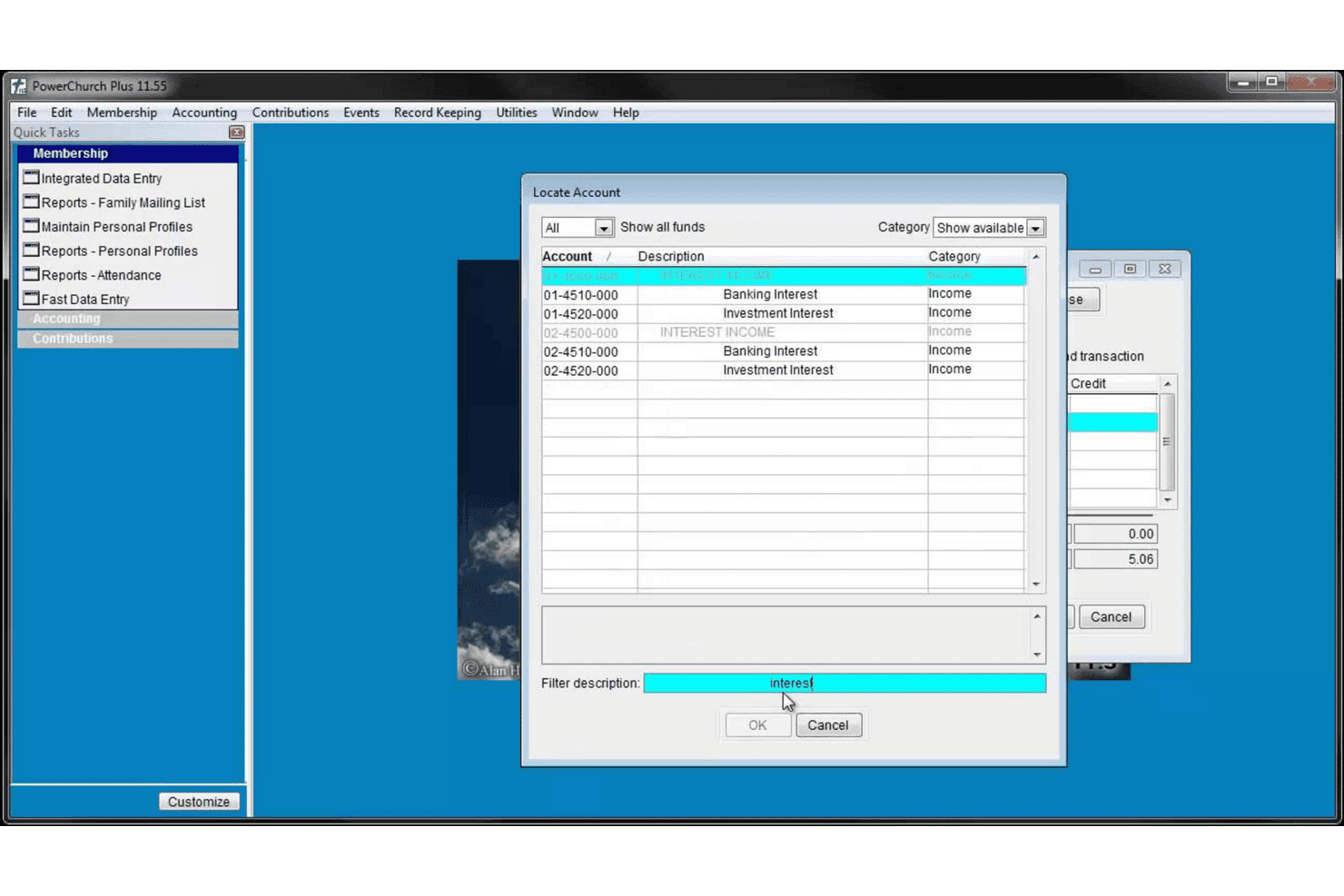
PowerChurch Plus lets users locate and filter accounts by description. PowerChurch Plus is a church administration platform that handles membership, contributions, fund accounting, payroll, and accounts payable in one place—making it a practical fit for church finance chairs and administrators managing the full range of back-office operations.
Who Is PowerChurch Plus Best For?
PowerChurch Plus is a strong fit for church administrators and finance chairs who need membership, contributions, and fund accounting managed in one place.
Why I Picked PowerChurch Plus
I picked PowerChurch Plus as one of the best because it's purpose-built for church administrative tasks in a way that general accounting tools simply aren't. I appreciate how membership, contributions, and fund accounting all connect in one place, so a finance chair can run accounts payable, track donor pledges, and generate financial reports without toggling between programs. The fund accounting module tracks restricted gifts against FASB 117 guidelines, which matters when your congregation designates funds for specific ministries.
PowerChurch Plus Key Features
- Payroll processing: Configure church-specific payroll settings—including Social Security exemptions and pre-tax deductions—and let the system calculate withholding automatically.
- Accounts payable: Maintain vendor payment histories, record handwritten or printed computer checks, and set up recurring payments for regular bills.
- Pledge tracking: Record member pledges and faith promises, monitor pledge progress over time, and print or email pledge statements.
- Attendance tracking: Log attendance across services, classes, and meetings, then review trends through built-in reports and graphs.
PowerChurch Plus Integrations
PowerChurch Plus has a native Google Calendar sync and a documented Vanco Payment Solutions workflow for importing online contributions. It also supports recording background checks through Protect My Ministry, while API availability isn’t documented.
Pros and Cons
Pros:
- Membership and giving connect with financial reporting
- Accounts payable supports recurring bills and checks
- Church-specific fund accounting tracks restricted gifts
Cons:
- No approval routing or reimbursements
- No receipt capture or expense reports
Learn more about PowerChurch Plus: Best for user-friendly church management
- Free plan available
- Pricing upon request
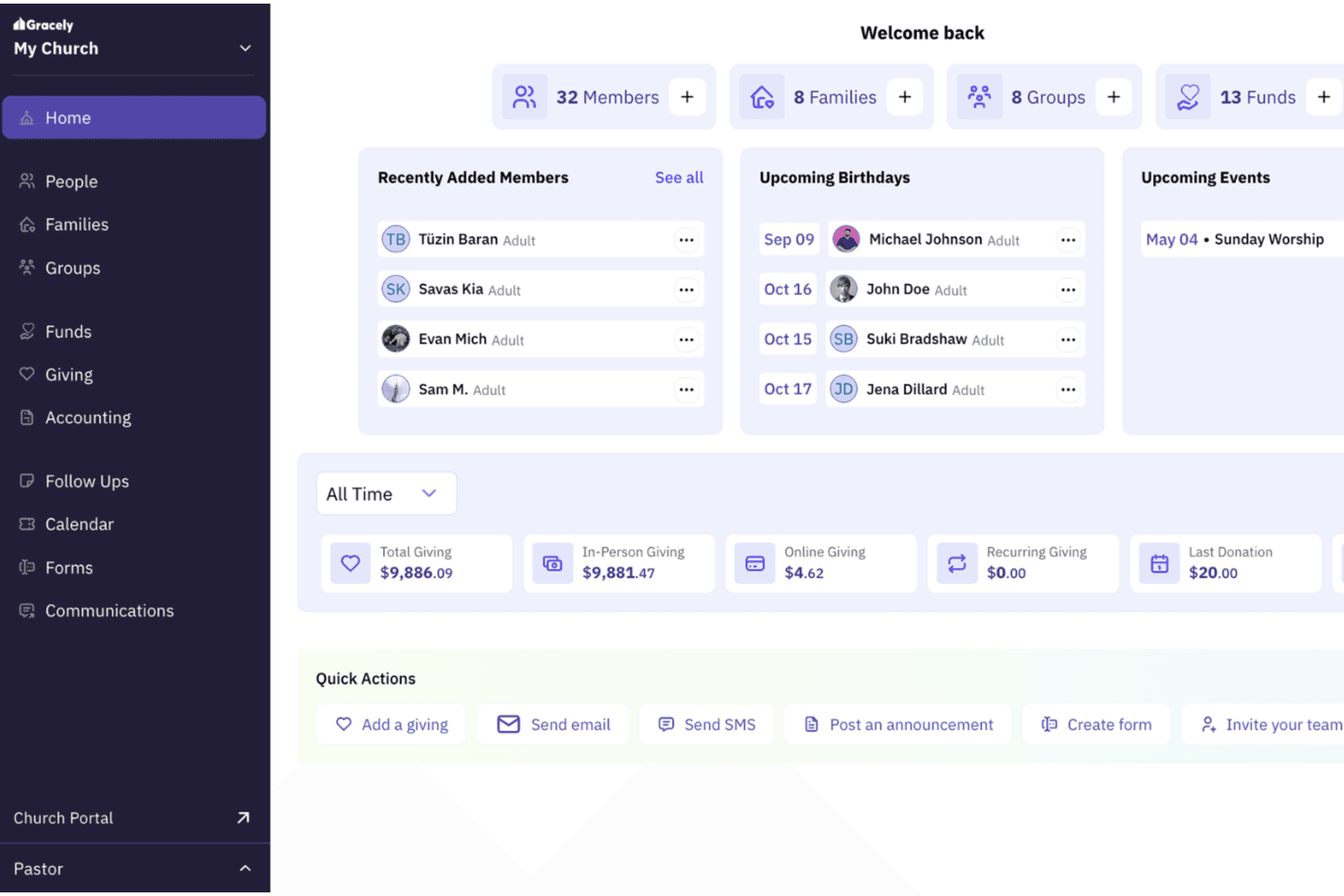
Gracely gives churches a central dashboard to manage members, giving, and events. Gracely is an all-in-one church management platform that brings member records, online giving, church communications, and basic accounting together for small congregations looking to move away from spreadsheets and disconnected tools.
Who Is Gracely Best For?
Gracely suits small congregations that want to manage members, giving, and communications in one place without juggling multiple tools.
Why I Picked Gracely
I picked Gracely as one of the best because it's built specifically for church administration in a way that keeps everything connected. I appreciate how member records, online giving, and contribution tracking all live in one place, so there's no toggling between separate tools to reconcile donation records or pull giving statements. The built-in accounting register lets me log church expenses directly alongside giving data, keeping financial records organized without needing a separate bookkeeping platform.
Gracely Key Features
- Online and recurring giving: Members can set up one-time or recurring donations via credit card, ACH, Apple Pay, or Google Pay directly through the app or church website.
- Funds and campaign tracking: Organize donations by designated fund or campaign and monitor pledge commitments and progress over time.
- Volunteer scheduling: Assign volunteers to specific roles and events, with visibility into who has confirmed their attendance.
- Member self-service portal: Members can update their own contact details and family information through the mobile app or church portal without contacting an administrator.
Gracely Integrations
Gracely offers documented native integrations with Stripe and PayPal for online giving. Mailchimp, QuickBooks, and Checkr are listed as coming soon, and no API availability is stated.
Pros and Cons
Pros:
- Support helps churches transition between systems
- Reviewers report quick setup for church staff
- Church giving and bookkeeping stay together
Cons:
- No approvals, card matching, or reimbursements
- No receipt capture or expense reports
Learn more about Gracely: Best for affordable church management
- 30-day free trial + demo available
- From $29/month
Visit WebsiteCustomer Rating:4.8/5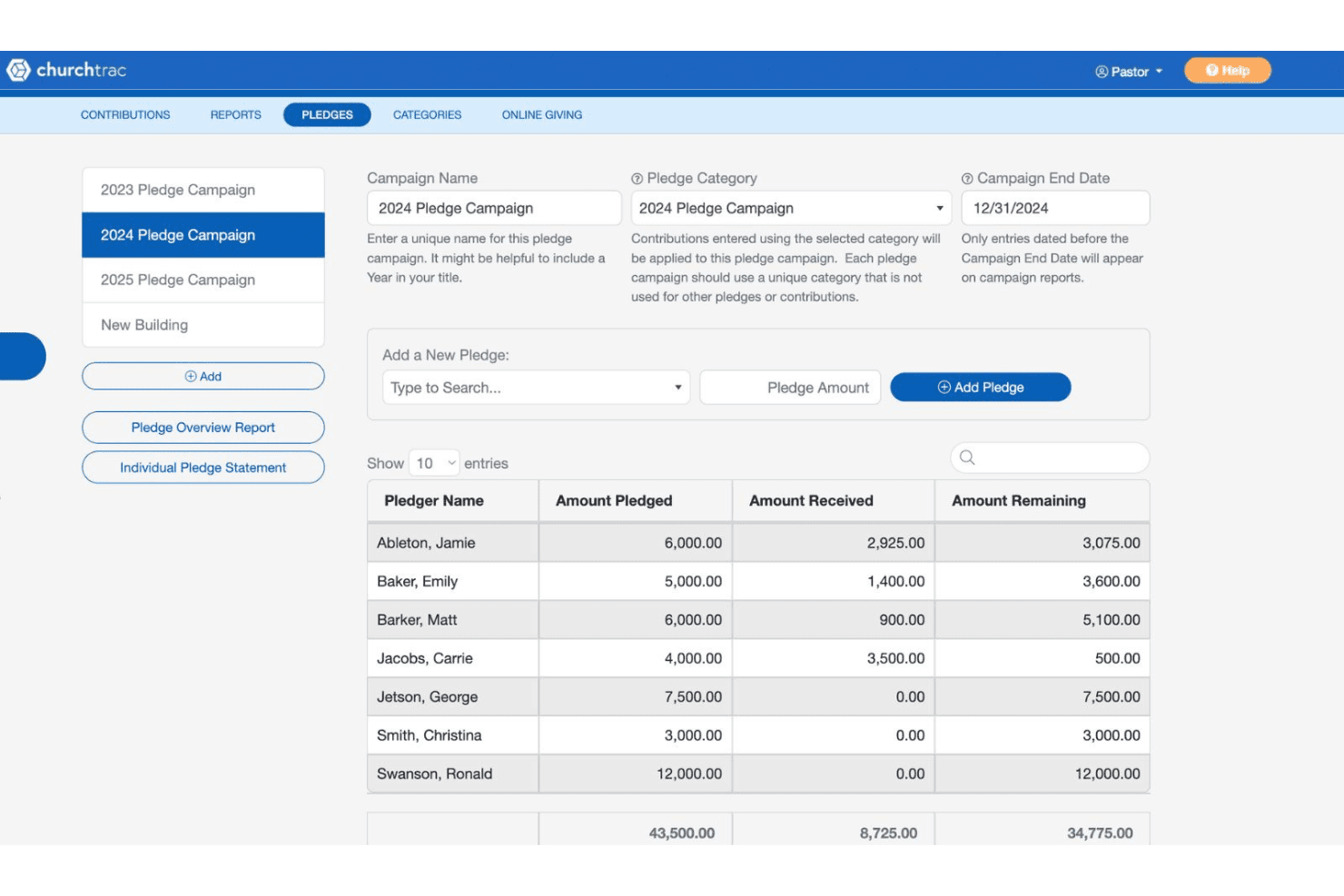
ChurchTrac lets users track pledge campaigns and giving progress. ChurchTrac is an all-in-one church management platform that combines fund accounting, giving tracking, member administration, and budgeting tools built specifically for small to mid-sized congregations managing their finances without a dedicated accounting team.
Who Is ChurchTrac Best For?
ChurchTrac is a strong fit for small to mid-sized congregations that need an all-in-one platform to manage giving, fund accounting, and church administration under one affordable subscription.
Why I Picked ChurchTrac
I picked ChurchTrac as one of the best because its fund accounting is purpose-built for how churches actually manage money, tracking designated and restricted funds across multiple bank accounts without requiring a dedicated accountant. I especially like that you can attach receipts directly to register transactions and use Bank Link to pull in credit card and bank activity for review and categorization. Budget-versus-actual reporting flags overspent categories by period, which keeps ministry spending visible without complex software.
ChurchTrac Key Features
- Fund tracking across multiple accounts: Designate and track restricted and unrestricted funds across separate bank accounts within a single accounting register.
- Giving management and donor statements: Record donations by cash, check, card, or ACH, then generate and email contribution statements directly to donors.
- Member database and directory: Store and manage member records, family information, and group assignments, with a shareable online or printed directory.
- Automated member follow-up: Trigger email or SMS workflows based on events like a first-time gift, group assignment, or member-status change.
ChurchTrac Integrations
ChurchTrac offers native integrations with Stripe, MinistrySafe, Google Analytics 4, SongSelect, and PraiseCharts. It has no documented API or direct QuickBooks and ERP sync, so expense connectivity relies on bank-file imports and Bank Link.
Pros and Cons
Pros:
- Receipt attachments keep expense records together
- Reviewers value built-in accounting and reconciliation
- Fund tracking separates designated ministry spending
Cons:
- Receipt capture requires manual entry
- No expense approval routing
Learn more about ChurchTrac:
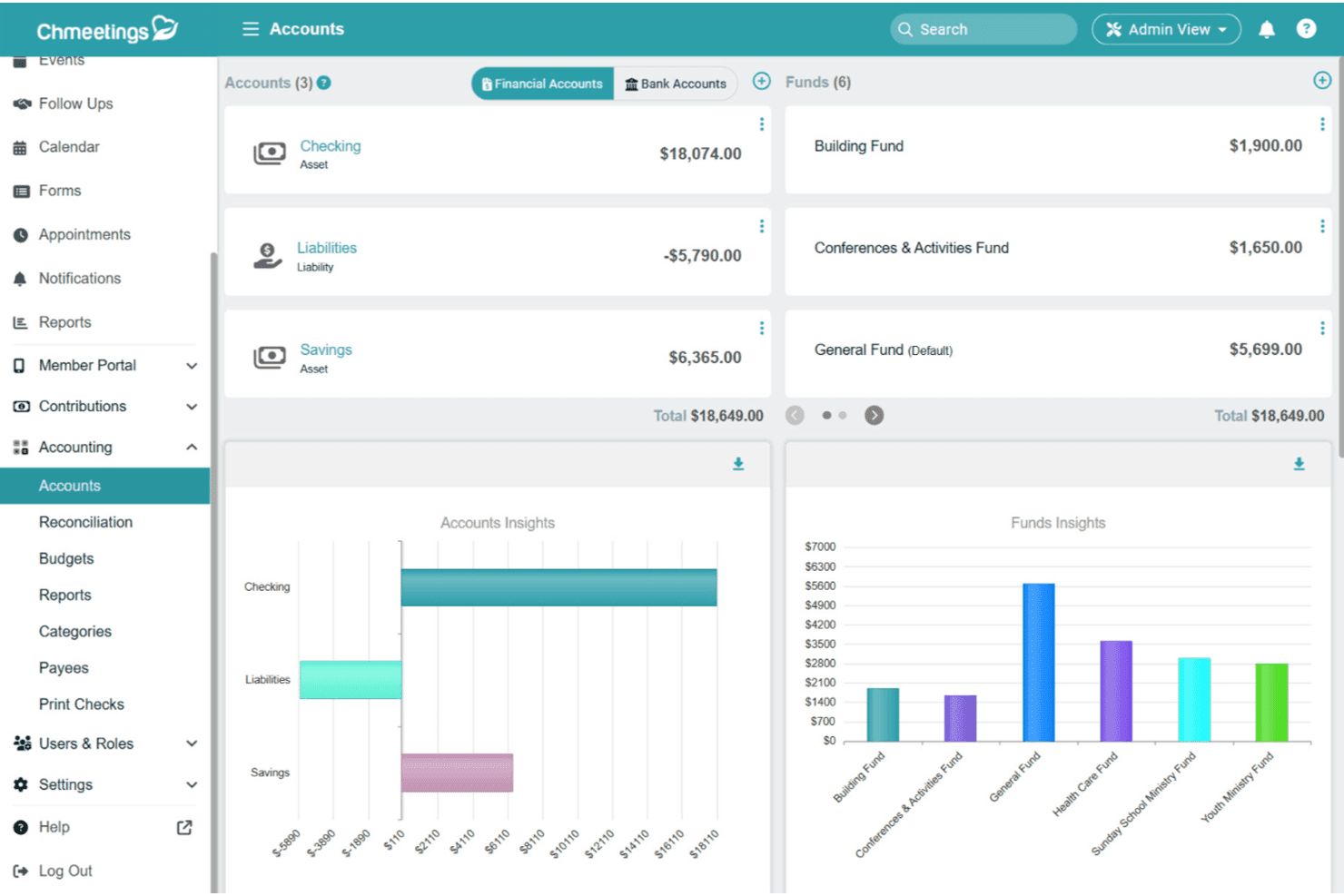
ChMeetings helps users track church finances across accounts and funds. ChMeetings is a church management platform that brings together member records, giving, communication, event coordination, and fund accounting—making it a practical choice for church administrators who want to handle finances and ministry operations in one place.
Who Is ChMeetings Best For?
ChMeetings is a strong fit for church administrators who need event coordination, member management, and fund accounting in a single platform.
Why I Picked ChMeetings
I picked ChMeetings as one of the best because it's the only tool on this list built specifically around how churches actually run events, from paid registrations with installment options and promo codes to room and resource booking that flags conflicts automatically. I love that event registration ties directly into attendance tracking and member records, so when someone signs up for a retreat, that data flows into their profile without any manual reconciliation. The shared calendar system, with embeddable views and subscription links, makes coordinating across ministries genuinely manageable.
ChMeetings Key Features
- Fund accounting: Track income, expenses, funds, categories, and payees within a built-in single-entry church accounting module.
- Bank transaction import: Link supported bank and credit card accounts to import and reconcile transactions against statements.
- Custom roles and permissions: Assign granular access controls so each staff member or volunteer sees only the financial data they need.
- Member self-service portal: Let members update their own details, view giving history, manage recurring donations, and register for events independently.
ChMeetings Integrations
ChMeetings connects with Stripe and PayPal, and supports Google Sheets and Power BI through its API. It also offers API access, webhooks, and Zapier, while QuickBooks Online, QuickBooks Desktop, and Quicken support data migration rather than live sync.
Pros and Cons
Pros:
- Reviews praise event and volunteer coordination
- Expense approvals update fund and budget records
- Church fund accounting tracks ministry expenses
Cons:
- No documented reimbursement payment processing or policy flags
- Receipt attachments require manual data entry
Learn more about ChMeetings:
Alte alternative la Fyle
Iată câteva alternative suplimentare la Fyle care nu au ajuns pe lista mea scurtă, dar care merită totuși luate în considerare:
- 11QuickBooks OnlineBest for comprehensive bookkeeping
- 12Sage IntacctBest for scalable cloud accounting
- 13BotkeeperBest for automated bookkeeping
- 14ZipBooksBest for intuitive financial insights
- 15SteepleMateBest for church-specific management needs
- 16MIP Fund AccountingBest for nonprofit fund accounting
How I Evaluate Fyle Alternatives
I split my evaluation into two layers: baseline capabilities a tool must have—like receipt capture, fund coding, and approval routing—and the differentiators that separate the best fits.
Core Functionality (Table Stakes For This List)
When I'm selecting tools for my list, I rank each one on a scale from 0 (does not offer the functionality) to 5 (excels in this area) for each core functionality listed below. Then, I calculate the tool's total score into a percentage. Each tool needs to achieve a minimum total score of 65% to be considered for inclusion.
- Receipt Capture & OCR: I check whether staff can snap a photo of a conference lunch receipt from their phone and have vendor name, amount, and date auto-extracted without manual entry.
- Fund & Ministry Allocation: Each expense should be taggable to specific funds, ministries, or programs—like coding a youth retreat bus rental to the youth ministry's restricted fund.
- Corporate Card Management: I evaluate whether church credit card transactions flow in automatically and match to uploaded receipts, reducing month-end reconciliation work for finance staff.
- Approval Workflows: Multi-step routing matters here—a worship ministry purchase might need sign-off from a department head first, then the business administrator, with thresholds driving the path.
- Accounting Software Integrations: I look for native connections to platforms churches actually use, whether that's QuickBooks, Xero, Aplos, or Sage Intacct, so expense data syncs without CSV juggling.
- Policy & Compliance Controls: Spending rules should be enforceable in the tool itself—flagging an over-limit purchase or logging a full audit trail that's ready for board review or annual audit prep.
Once I have a list of tools that meet this criteria, I consider what sets each platform apart.
Differentiating Factors (What Sets Vendors Apart)
Here's how I compare and contrast different vendors:
Standout Features
Mileage tracking is a big differentiator—pastors and staff regularly drive between campuses, hospitals, and member homes, so GPS-based capture saves real time over manual logging. I also look for volunteer reimbursement portals that let occasional users submit expenses without a full license. Multi-campus support matters for growing churches that need separate budgets and approval chains per location. Budget vs. actual reporting rounds things out, giving finance teams live visibility into whether a ministry is approaching its spending limit.
Beyond Features
Pricing structure matters here—I check whether vendors offer nonprofit discounts or free seats for volunteers, since churches often have dozens of occasional users alongside a small paid staff. Fund accounting ecosystem fit is another key consideration. A tool that connects natively with platforms like Planning Center or Aplos keeps financial data unified without manual exports. I also evaluate governance readiness, especially whether the platform produces audit trails and reports that satisfy board reviews and annual filing requirements.
De ce să căutați o alternativă la Fyle?
Deși Fyle este o alegere bună de software de contabilitate pentru biserici, există mai multe motive pentru care unii utilizatori caută soluții alternative. Este posibil să căutați o alternativă la Fyle deoarece…
- Aveți nevoie de instrumente de raportare mai avansate
- Echipa dumneavoastră are nevoie de suport pentru mai multe campusuri
- Căutați opțiuni de integrare mai bune
- Doriți o interfață mai ușor de utilizat
- Biserica dumneavoastră are nevoie de acces printr-o aplicație mobilă
- Căutați prețuri mai accesibile
Dacă vă regăsiți în oricare dintre aceste situații, ați ajuns în locul potrivit. Lista mea conține mai multe opțiuni de software de contabilitate pentru biserici, mai potrivite pentru echipele care se confruntă cu aceste provocări ale utilizării Fyle și caută soluții alternative.
Funcțiile principale ale Fyle
Iată câteva dintre funcțiile principale ale Fyle, pentru a vă ajuta să comparați și să evaluați ce oferă soluțiile alternative:
- Automatizarea cheltuielilor: Capturați rapid chitanțele prin mesaje text și automatizați extragerea datelor, eficientizând urmărirea cheltuielilor.
- Urmărirea cheltuielilor în timp real: Obțineți vizibilitate instantanee asupra cheltuielilor angajaților, permițând o supraveghere financiară mai bună.
- Reconcilierea cardurilor de credit: Simplificați corelarea chitanțelor cu tranzacțiile pentru evidențe financiare exacte.
- Monitorizarea conformității: Detectați automat încălcările politicilor pentru a asigura respectarea politicilor companiei.
- Integrări contabile: Sincronizați fără probleme cu platforme precum QuickBooks și NetSuite pentru a eficientiza procesele financiare.
- Accesibilitate mobilă: Accesați funcțiile din mers printr-o aplicație ușor de utilizat, rămânând conectați oriunde.
- Asistență bazată pe inteligență artificială: Utilizați inteligența artificială pentru codificarea și extragerea automată a datelor, reducând efortul manual.
- Rambursarea cheltuielilor angajaților: Utilizați un sistem eficient de plăți ACH pentru rambursări la timp, îmbunătățind satisfacția angajaților.
- Informații despre cheltuieli: Configurați bugete și urmăriți cheltuielile pentru a menține controlul asupra resurselor financiare.