

Gerir as finanças de uma igreja pode ser um desafio. Precisa de ferramentas eficientes para gerir donativos, acompanhar despesas e gerir orçamentos. O FreshBooks pode nem sempre corresponder às suas necessidades específicas, especialmente se procura funcionalidades específicas para a gestão de igrejas.
Com base na minha experiência, encontrar o software certo pode fazer uma grande diferença. Pode estar à procura de alternativas ao FreshBooks para melhor responder aos requisitos específicos da sua equipa ou para encontrar uma solução mais económica.
Neste artigo, vou partilhar alternativas devidamente pesquisadas que respondem especificamente às necessidades de contabilidade de igrejas. Terá uma análise imparcial de cada opção, ajudando-o a tomar uma decisão informada.
O que é o FreshBooks?
O FreshBooks é um software de contabilidade para igrejas concebido para simplificar a gestão financeira. É habitualmente utilizado por proprietários de pequenas empresas, trabalhadores independentes e profissionais que prestam serviços e que necessitam de ferramentas fáceis de utilizar para faturação e acompanhamento de despesas. Funcionalidades como a faturação, a gestão de despesas e o registo de horas ajudam a garantir operações financeiras eficientes. De um modo geral, o FreshBooks oferece valor ao tornar a contabilidade acessível e fácil de gerir para utilizadores sem conhecimentos financeiros avançados.
Why Trust Our Software Recommendations
6,700+
Reviews
20
Industry experts
16+
Evaluation factors
14
Years
Our team has been testing and reviewing software since 2012. As church leaders ourselves, we know how difficult—and important—it is to choose the right software.
For this guide, we evaluated tools using hands-on testing and independent research, scoring tools using our selection criteria.
Our reviews reflect our human editorial judgment, not a sales pitch.
Tabela de comparação das alternativas ao FreshBooks
Esta tabela de comparação resume os detalhes dos preços das minhas principais alternativas ao FreshBooks:
Score legend (out of 5)
- Excellent4.5–5
- Good4–4.4
- Average3–3.9
- Below average2–2.9
- Poor1–1.9
Sorted by: Default
| Tool | Starting Price | Website | |||||||
|---|---|---|---|---|---|---|---|---|---|
Best for church-specific management needs | Not rated | 3 | Not rated | 2 | Not rated | Not rated | Not rated | $72/month Free plan + 30-day trial + demo available | Website |
Best for unlimited free invoicing | 2.8 out of 5 | 3 | 3 | 3 | 3 | 3 | 2 | $15/month Free plan + free trial available | Website |
Best for creative project approvals | Not rated | 4 | Not rated | 2 | 1 | 3 | 2 | Pricing upon request Not available | Website |
Best for user privacy and data security | 3.8 out of 5 | 4 | 3 | 4 | 4 | 4 | 4 | $20/month Free plan + 14-day trial + demo available | Website |
Best for invoicing with inventory tracking | 3.0 out of 5 | 4 | 3 | 3 | 4 | 2 | 2 | $20/month 15-day free trial available | Website |
Best for unlimited user access | Not rated | 4 | 1 | 3 | 2 | Not rated | 2 | $50/month 30-day free trial + free demo available | Website |
Best for cost-effective church accounting | 2.8 out of 5 | 3 | 3 | 3 | 4 | 2 | 2 | $19/month Free plan + 30-day trial available | Website |
Best for nonprofits with global capabilities | 2.8 out of 5 | 4 | 1 | 3 | 2 | 3 | 4 | Pricing upon request Free demo available | Website |
Best for nonprofit grant and fund tracking | 3.3 out of 5 | 3 | 2 | 4 | 4 | 3 | 4 | Pricing upon request 30-day free trial + free demo available | Website |
Best for nonprofit financial management | 2.8 out of 5 | 4 | 3 | 4 | 3 | 1 | 2 | $79/month 15-day free trial + free demo available | Website |


Análises das melhores alternativas ao FreshBooks
Seguem-se os meus resumos detalhados das melhores alternativas ao FreshBooks que entraram na minha lista restrita. As minhas análises apresentam uma visão detalhada das principais funcionalidades, vantagens & desvantagens, integrações e casos de utilização ideais de cada ferramenta, para o ajudar a encontrar a melhor opção para si.
 Best for church-specific management needs
- Free plan + 30-day trial + demo available
- From $72/month
Visit WebsiteCustomer Rating:4.8/5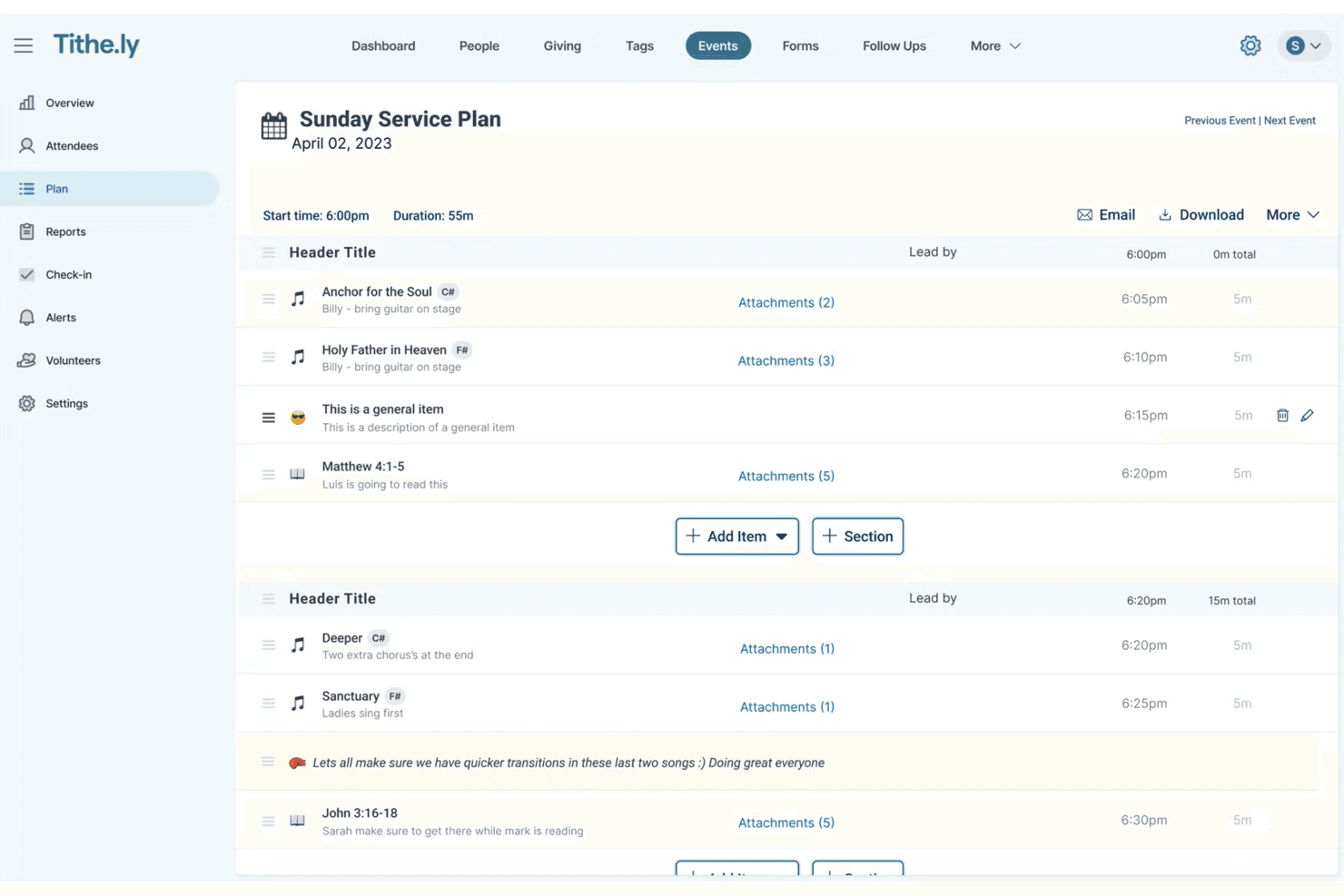
Tithe.ly lets users build detailed Sunday service run sheets with timings. Tithe.ly is a church management platform that brings together giving, donor records, people management, and event coordination—making it a natural fit for church leaders who want to organize ministry operations and track congregation giving in one place.
Who Is Tithe.ly Best For?
Tithe.ly is a strong fit for church leaders who want to manage congregants, track giving, and handle donor records all in one purpose-built platform.
Why I Picked Tithe.ly
I picked Tithe.ly because it's built from the ground up for church operations, not adapted from generic business software. I appreciate how it centralizes congregant records, giving history, and pledge campaigns in one place, so my team isn't toggling between spreadsheets and separate donor tools. The donor portal lets members view their full giving history and manage recurring gifts directly, while tax statement batches can be printed or emailed to the entire congregation in one workflow.
Tithe.ly Key Features
- Donor giving history portal: Congregants can log in to view their full giving history, filter by one-time or recurring gifts, and access older donation records.
- Pledge campaign management: Churches can create shareable pledge campaign pages where donors log in to view, edit, or adjust their pledges and manage recurring gifts.
- Bank deposit reports: Deposit summaries and transaction details are viewable with customizable fields, date-range filters, and a "Mark as Reconciled" action.
- Role-based user permissions: Account owners can assign Admin or Limited Access roles with product- and location-level sub-permissions for each team member.
Tithely Integrations
Tithely offers a documented native integration with Church Community Builder (CCB). It also supports CSV exports for manual transfer to Xero, but direct Xero integration isn't available.
Pros and Cons
Pros:
- Volunteers can learn workflows from help resources
- Pledge pages let donors adjust commitments
- Donor giving histories support member follow-up
Cons:
- Giving reports don’t replace business financial statements
- No invoicing, billable time, or expense tracking
 Best for unlimited free invoicing
- Free plan + free trial available
- From $15/month
Visit WebsiteCustomer Rating:4.6/5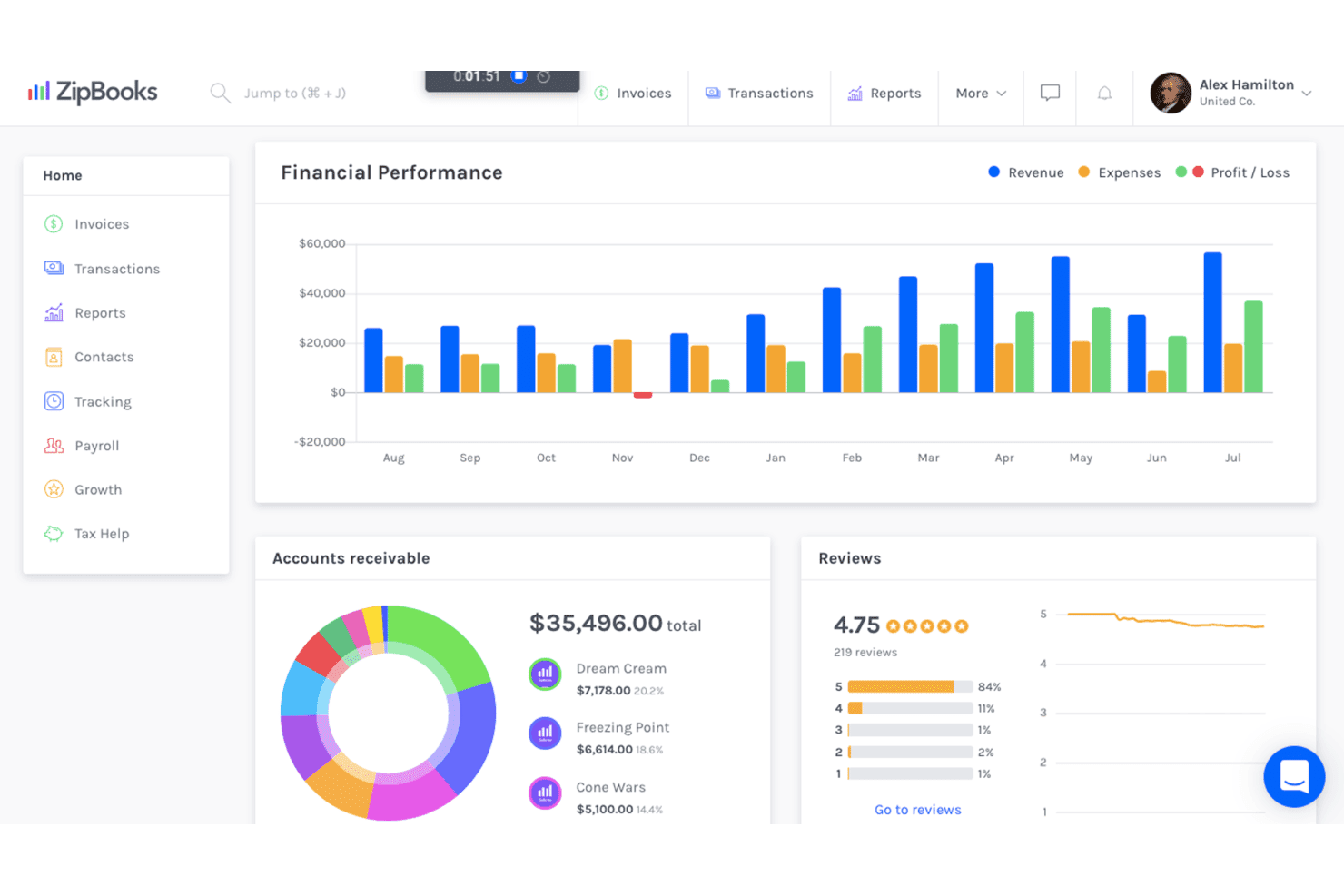
ZipBooks displays revenue, expenses, and profit on a financial dashboard. ZipBooks is cloud-based accounting software that covers invoicing, expense tracking, and financial reporting—making it a practical option for churches and small ministries that need clean bookkeeping without a steep learning curve or a large budget.
Who Is ZipBooks Best For?
ZipBooks is a solid pick for small ministries and solo church administrators who want free, unlimited invoicing without paying for features they'll never use.
Why I Picked ZipBooks
I picked ZipBooks as one of the best because its free Starter plan lets you send unlimited invoices without ever hitting a cap, which I think is genuinely rare. I love that you can brand each invoice with your logo and colors, track whether it's been sent, viewed, or paid, and collect payments through Square or PayPal, all without paying a monthly fee. When a ministry needs to bill for event registrations or facility rentals, that invoice status tracking means nothing slips through the cracks.
ZipBooks Key Features
- Time tracking: Log billable hours with a live timer or manual entry and assign time to specific customers, projects, or tasks.
- Bank reconciliation: Connect bank and credit card accounts to import transactions, then match and verify them against your bank statement.
- Transaction tagging: Tag expenses and income by customer, vendor, location, project, or custom label to filter and generate detailed reports.
- Recurring billing automation: Schedule invoices to send weekly, monthly, quarterly, or annually, with the option to auto-charge a customer's card on each cycle.
ZipBooks Integrations
ZipBooks offers native integrations with Gusto, PayPal, and Square. It also provides an HTTP API with JSON:API-formatted responses and JWT authentication for custom integrations.
Pros and Cons
Pros:
- Reports filter by project, location, and tags
- Tracked billable hours flow into invoices
- Unlimited invoices with viewed-and-paid tracking
Cons:
- Report detail can fall short for complex bookkeeping
- Associating project expenses with invoices can be difficult
Learn more about ZipBooks: Best for creative project approvals
- Not available
- Pricing upon request
Visit WebsiteCustomer Rating:4.3/5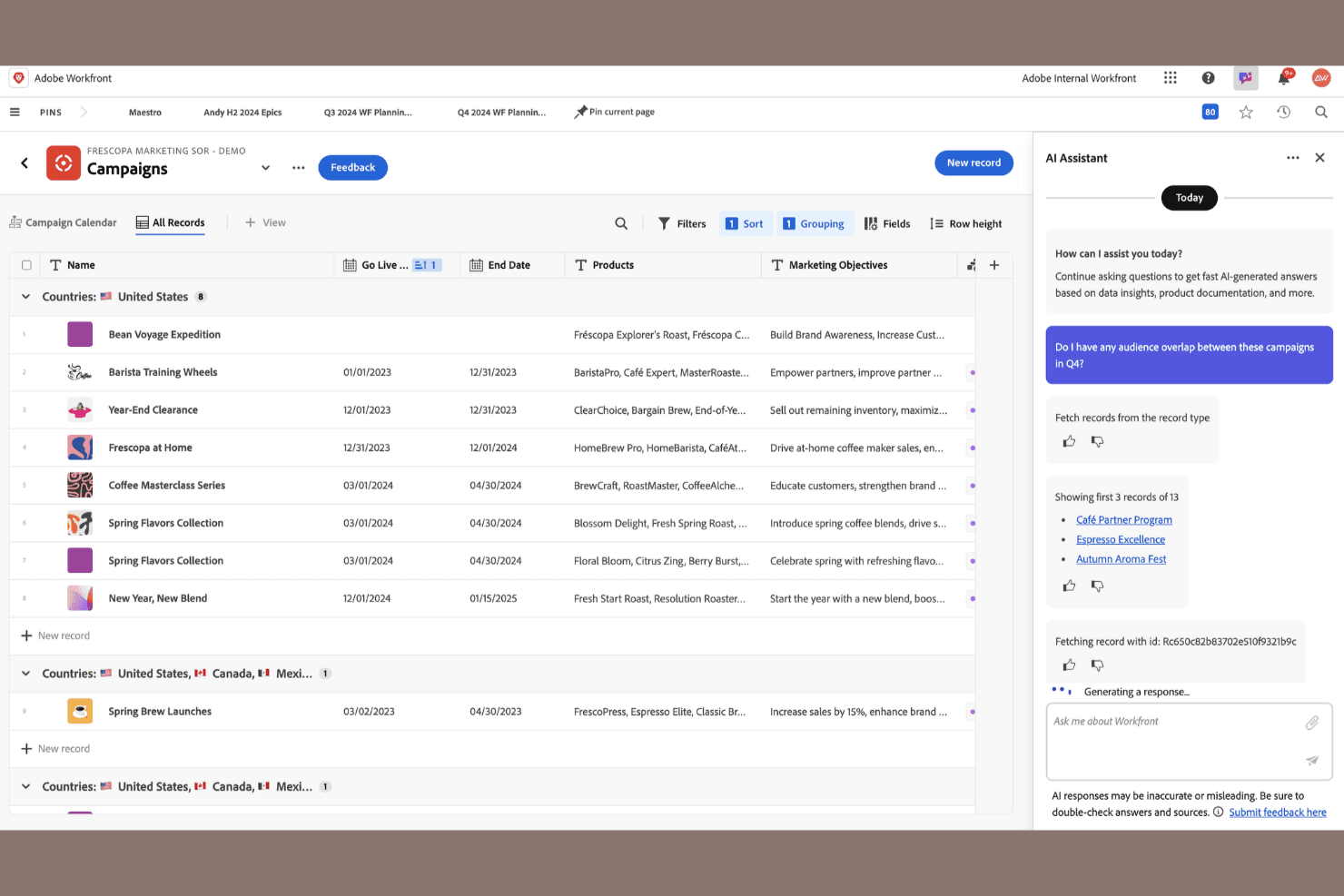
Adobe Workfront lets users manage campaigns with AI-powered insights. Adobe Workfront is an enterprise work management platform built for large, cross-functional teams that need to coordinate creative projects, track time and expenses, and manage approvals in one place.
Who Is Adobe Workfront Best For?
Adobe Workfront is built for large, cross-functional teams—particularly in creative, marketing, and agency environments—that need to coordinate complex projects and manage approvals at scale.
Why I Picked Adobe Workfront
I picked Adobe Workfront as one of the best because it handles creative project approvals better than almost any other tool I've seen. When your team is routing design assets, campaign materials, or branded content through multiple reviewers, Workfront lets you annotate directly on proofs, track version history, and log approver sign-offs without chasing anyone through email. Time and expenses can be tagged as billable at the task level, so project billing records stay accurate throughout the approval cycle.
Adobe Workfront Key Features
- Custom report builder: Create reports with selectable columns, filters, groupings, and charts to track project budgets, costs, revenues, and expenses.
- Role-based access levels: Assign users one of five built-in access levels—System Administrator, Standard, Light, Contributor, or External—with object-level sharing permissions.
- Adobe Creative Cloud integration: Connect directly with Creative Cloud apps to bring project tasks, feedback, and content handoffs into one workflow.
- Work intake and request management: Capture and route incoming work requests to the right teams or individuals through structured intake queues.
Adobe Workfront Integrations
Adobe Workfront offers native integrations with Adobe Creative Cloud, Adobe Experience Manager Assets, Box, Dropbox, Google Drive, Slack, and the Microsoft 365 ecosystem, including Microsoft Teams, OneDrive, and SharePoint. Its public API supports custom integrations.
Pros and Cons
Pros:
- Builds customizable project cost reports
- Routes creative proofs with visible approvals
- Tracks billable hours against project tasks
Cons:
- No recurring billing or tax reports
- Cannot create or send client invoices
Learn more about Adobe Workfront: Best for user privacy and data security
- Free plan + 14-day trial + demo available
- From $20/month
Visit WebsiteCustomer Rating:4.3/5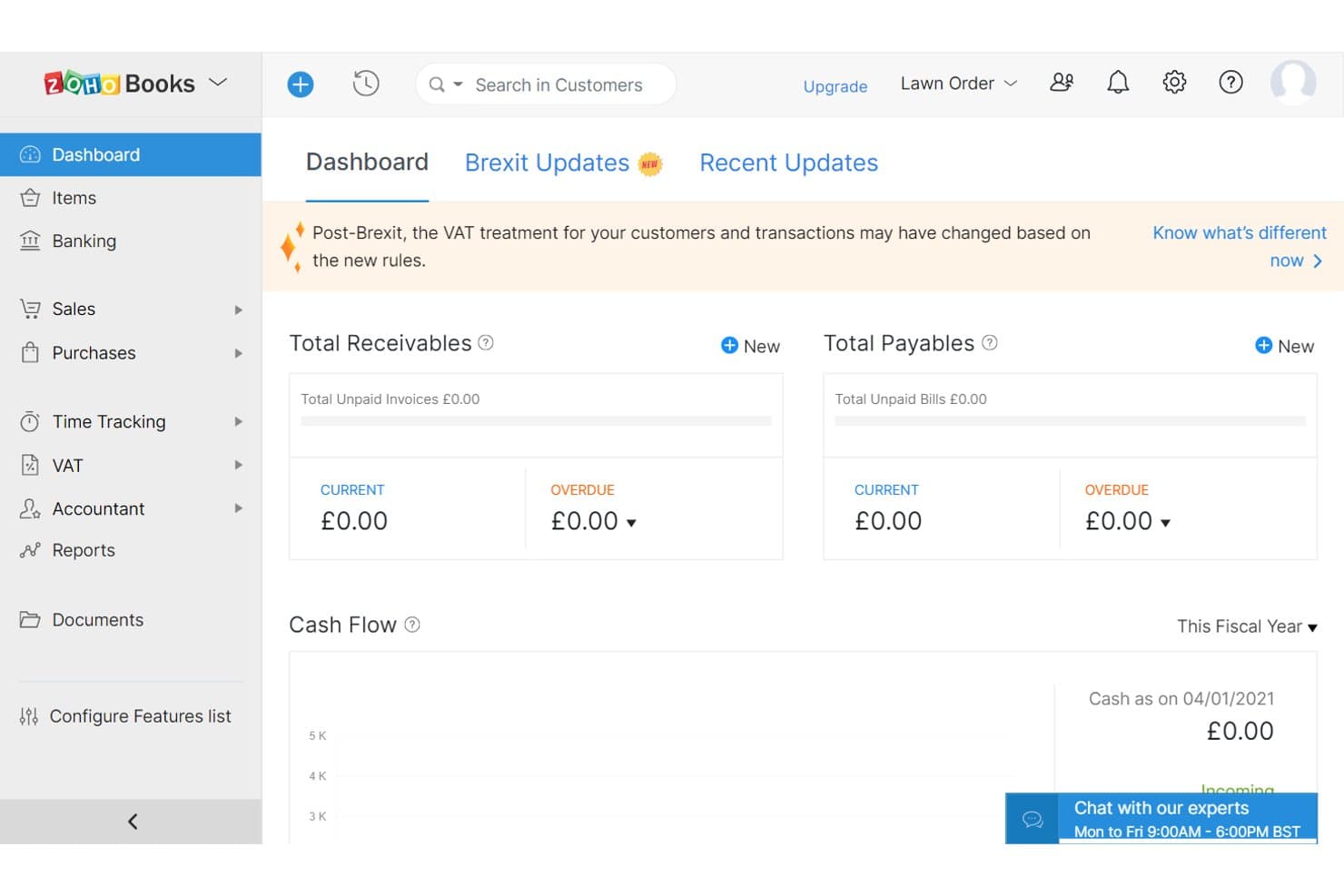
Zoho Books gives users a real-time financial overview dashboard. Zoho Books is a cloud accounting platform that handles invoicing, expense tracking, financial reporting, and multi-user access—making it a solid fit for churches and ministries that need a full-featured FreshBooks alternative with strong data security and a free entry point for smaller organizations.
Who Is Zoho Books Best For?
Zoho Books is a strong fit for small ministries and nonprofits that handle sensitive financial data and want enterprise-grade security without an enterprise price tag.
Why I Picked Zoho Books
I've included Zoho Books in my top picks because its security credentials are genuinely impressive for a cloud accounting platform. It holds ISO/IEC 27001, 27701, and SOC 2 Type 2 certifications, encrypts data at rest with AES-256, and limits employee access to your financial records on a strict need-to-know basis. I also appreciate that role-based permissions let you control exactly which team members see which modules, so sensitive donor or payroll data stays contained.
Zoho Books Key Features
- Recurring invoices: Set up invoices to repeat automatically on a schedule and trigger payment reminders without manual follow-up.
- Customer portal: Give clients a dedicated space to view invoices, make payments, track payment history, and approve timesheets.
- Multi-user access with custom roles: Assign standard or custom roles that control which modules and records each team member can view or edit.
- Financial reporting: Generate profit and loss, cash flow, and tax reports, with custom filters, prior-period comparisons, and scheduled delivery.
Zoho Books Integrations
Native integrations include Zoho CRM, Zoho Expense, Zoho Projects, Zoho Inventory, and Zoho Payments. Zoho Books also connects with more than 500 apps through an unspecified cloud integrator, offers a REST API with OAuth, and supports Zapier.
Pros and Cons
Pros:
- Broader accounting tools than FreshBooks
- Unified reports consolidate income and expenses
- Automated invoice reminders reduce follow-up work
Cons:
- Navigation can feel less intuitive than FreshBooks
- FreshBooks migration requires manual payment entry
Learn more about Zoho Books: Best for invoicing with inventory tracking
- 15-day free trial available
- From $20/month
Visit WebsiteCustomer Rating:4.7/5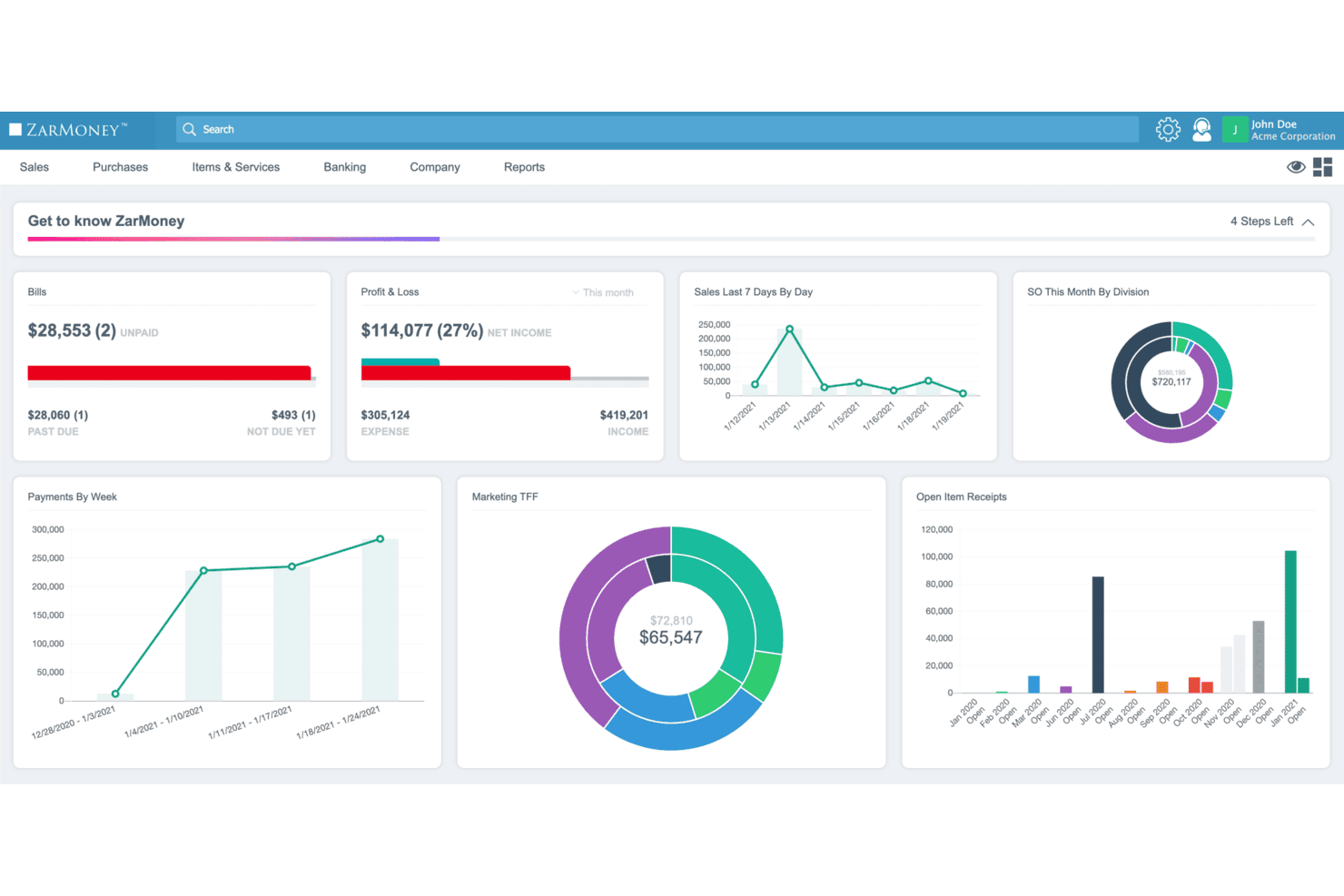
ZarMoney displays key financial metrics on a central dashboard. ZarMoney is a cloud-based accounting platform that handles invoicing, expense tracking, and inventory management—making it a practical fit for churches that sell merchandise, manage multiple locations, or need tighter control over financial operations.
Who Is ZarMoney Best For?
ZarMoney suits churches and ministries that sell merchandise or manage physical goods and need invoicing tied directly to inventory tracking.
Why I Picked ZarMoney
I picked ZarMoney as one of the best because it ties invoicing directly to inventory in a way most accounting tools don't. If your church sells merchandise or manages physical goods across multiple locations, ZarMoney tracks real-time stock levels and updates quantities as sales are recorded. You can also create pick lists, manage multiple warehouses, and convert sales orders to invoices upon delivery, keeping your financial records and stock counts in sync automatically.
ZarMoney Key Features
- Quotes and estimates: Create and send quotes or estimates, then convert them directly to invoices once a client approves.
- Bank reconciliation: Connect to 9,600+ financial institutions, import transactions, and match them against recorded entries automatically.
- Sales tax management: Calculate sales tax, assign tax zones to customers or locations, and generate tax-filing reports.
- Role-based user permissions: Set access controls by user role and restrict login by IP address, giving you precise control over who sees what.
ZarMoney Integrations
ZarMoney has native integrations with Google Calendar and Calendar on iPhone, plus integrations with Stripe, PayPal, and Plaid. Its REST API, webhooks, and OAuth 2.0 support custom integrations.
Pros and Cons
Pros:
- Customers praise straightforward setup and support
- Inventory tracks stock across multiple locations
- Branded invoices and quotes convert directly
Cons:
- Financial reports can lack useful detail
- No billable-time tracking for service work
Learn more about ZarMoney: Best for unlimited user access
- 30-day free trial + free demo available
- From $50/month
Visit WebsiteCustomer Rating:4.4/5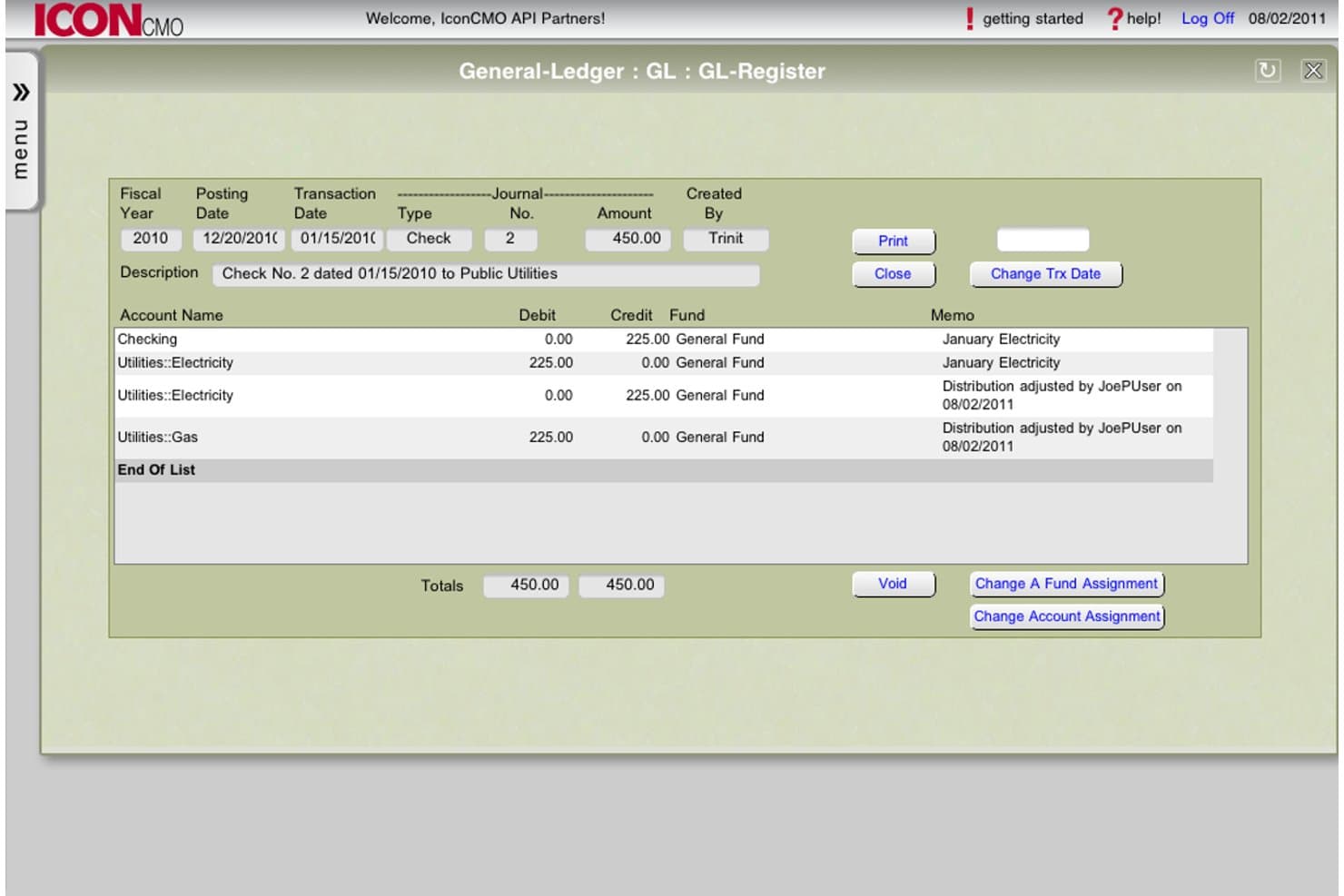
IconCMO lets users view and adjust GL journal entries by fund and account. Icon Church Management is church-specific accounting software that combines fund accounting, donation tracking, and membership management—making it a natural fit for churches that need to separate financial reporting from their general ministry operations.
Who Is IconCMO Best For?
IconCMO is a strong fit for churches and faith-based ministries that need fund accounting, donation tracking, and membership management in one place.
Why I Picked IconCMO
I picked IconCMO as one of the best because it's the only tool on this list built specifically around fund accounting and church membership management in one place. What I appreciate most is the unlimited user access on the Premium plan, which means your whole staff, finance committee, and department heads can log in simultaneously without worrying about seat limits. Each person gets individually configured Read, Read-Write, or No Access permissions by system area, and membership access is kept entirely separate from accounting access.
IconCMO Key Features
- Fund-based financial statements: Run a Statement of Activities or Statement of Financial Position for individual funds or all accounting funds combined.
- Donation and pledge tracking: Record contributions, manage pledges, and generate year-end donation statements with optional personalized thank-you notes.
- Electronic giving integration: Accept recurring, online, mobile, and text-to-give donations through payment processors including Vanco.
- Attendance tracking: Record and customize attendance data for services and ministry groups across your congregation.
IconCMO Integrations
IconCMO has documented connections with Vanco, Kotapay, Yearli, Constant Contact, Mailchimp, and Paperless Transactions. It also offers a web services API for custom integrations.
Pros and Cons
Pros:
- Permissioned access suits staff and volunteers
- Membership and contributions share financial context
- Fund reports support church budget oversight
Cons:
- Reviewers report difficulty tailoring financial reports
- No billable time or client expense tracking
Learn more about IconCMO: 7Best for cost-effective church accounting
Wave
- Free plan + 30-day trial available
- From $19/month
Visit WebsiteCustomer Rating:4.3/5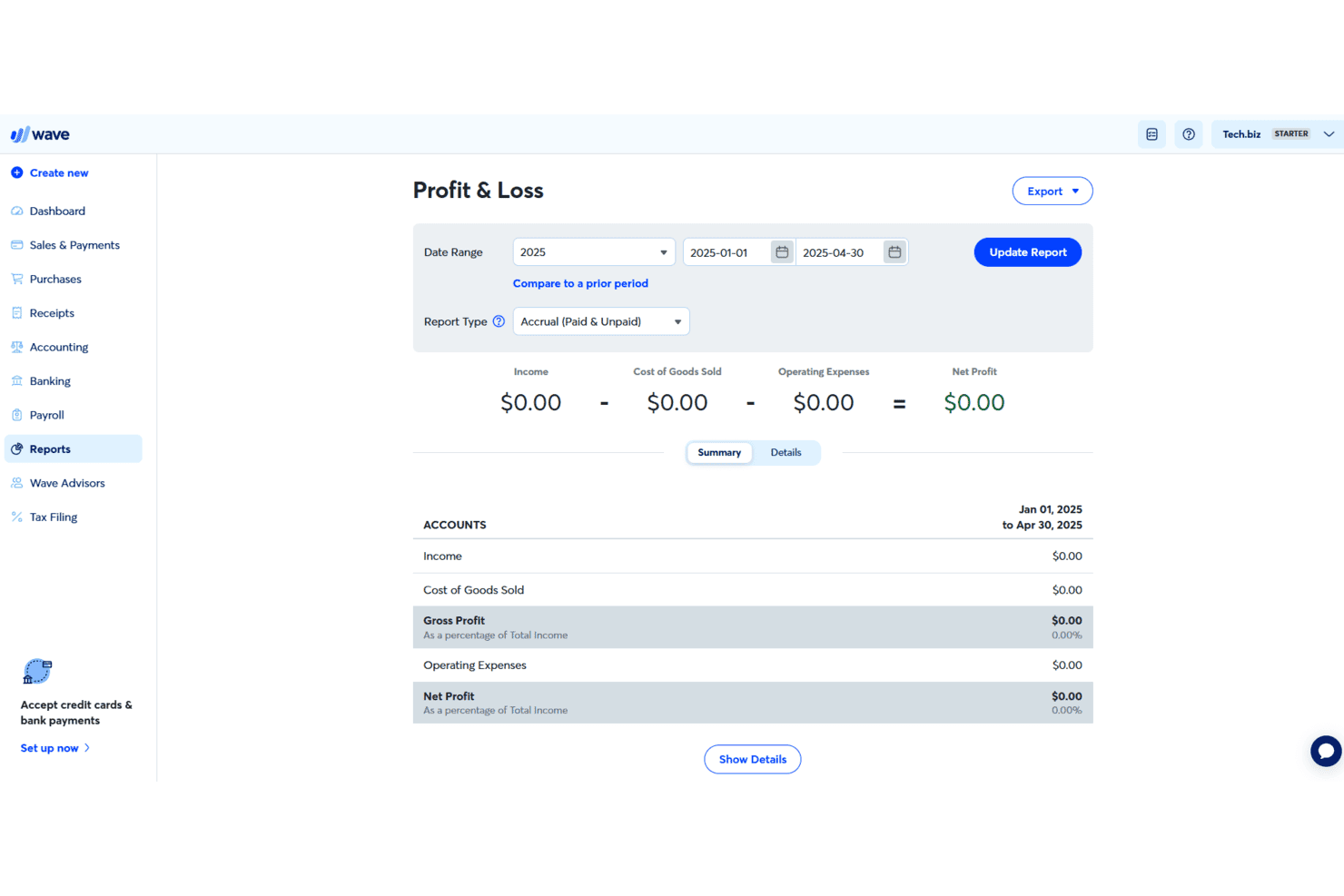
Wave lets users view Profit & Loss reports by date range and type. Wave is a small-business accounting and invoicing platform that appeals to smaller congregations looking to manage income, expenses, and financial reporting without the overhead of complex or costly software.
Who Is Wave Best For?
Wave suits small congregations that need straightforward income, expense, and invoicing tools without committing to a costly monthly subscription.
Why I Picked Wave
I picked Wave as one of the best because its free Starter plan covers unlimited invoices, bills, and bookkeeping records, making it one of the few FreshBooks alternatives that costs nothing for a small congregation to get started. I appreciate how the Pro plan adds automatic bank transaction imports and merging, so a volunteer treasurer can categorize church income and expenses without manual data entry. Custom transaction tags also let you track donation activity by fund or ministry area directly within the accounting workflow.
Wave Key Features
- Double-entry bookkeeping: Wave records all financial transactions using double-entry accounting, keeping your books audit-ready.
- Recurring invoice scheduling: Set a frequency, start date, end date, and time zone for each recurring invoice, with automatic or manual sending options.
- Role-based collaborator access: Invite team members as Admin, Editor, Payroll Manager, or Viewer, each with defined permissions across accounting, reports, and settings.
- Financial report export: Generate profit and loss, balance sheet, cash flow, and tax reports, then export them as CSV or PDF files.
Wave Integrations
Wave Pro lists 13+ integrations, including Google Sheets, MinuteDock, Swell Time Tracking, Capsule CRM, and Make.com. It also offers a GraphQL API for custom integrations.
Pros and Cons
Pros:
- Payments and invoice records connect to bookkeeping
- Recurring invoices schedule repeat customer billing
- Unlimited invoices support ongoing bookkeeping
Cons:
- Users report held or delayed customer payments
- No native billable-hour or mileage tracking
Learn more about Wave: Best for nonprofits with global capabilities
- Free demo available
- Pricing upon request
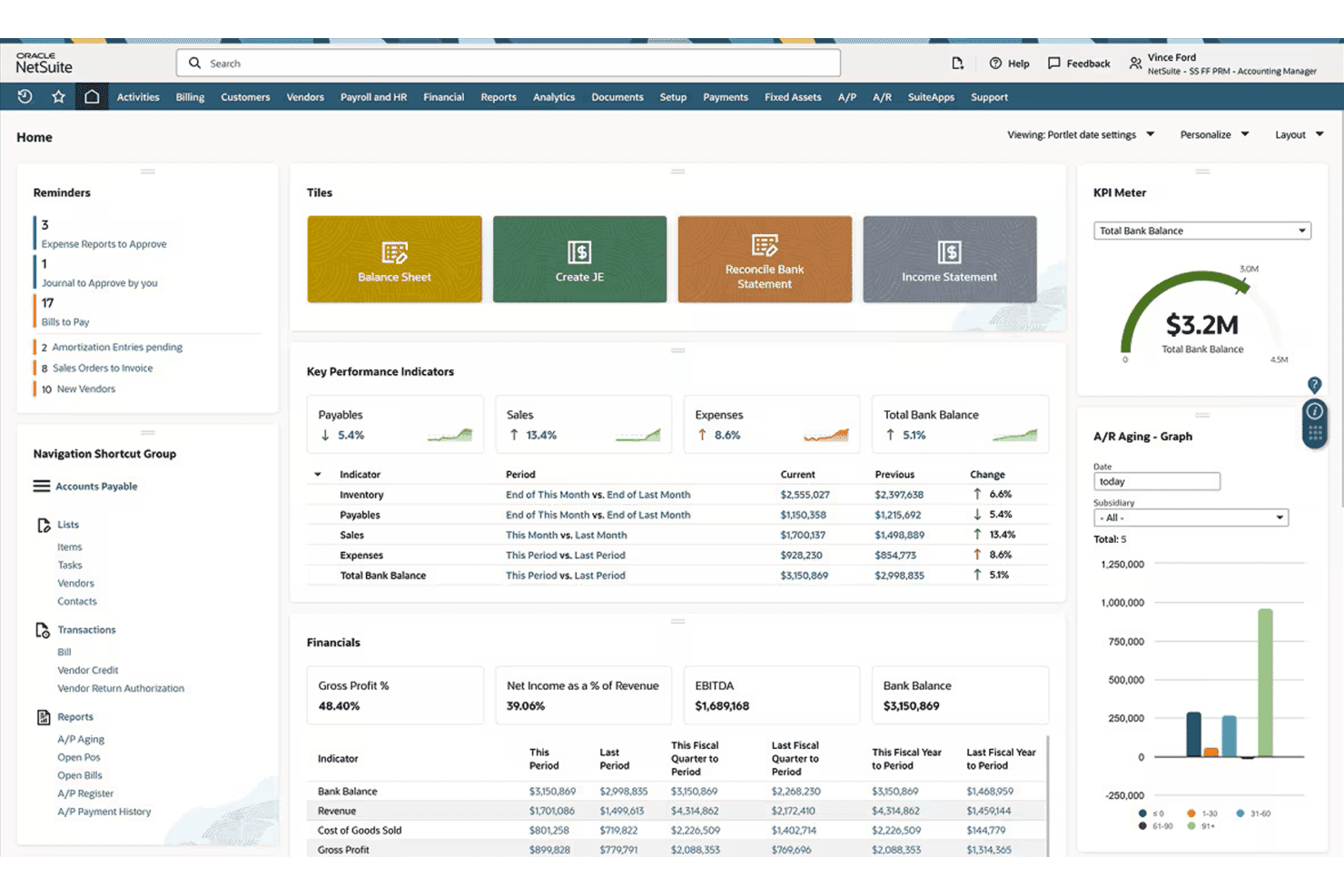
NetSuite's home dashboard centralizes KPIs, financials, and reminders. NetSuite is an enterprise-grade ERP platform that connects expense management, project accounting, and financial reporting in one system—making it a fit for larger or growing nonprofits that need more operational depth than a small business invoicing tool can offer.
Who Is NetSuite Best For?
NetSuite is a strong fit for growing nonprofits that manage multiple programs, grants, or global operations and need their expense tracking connected to a broader financial system.
Why I Picked NetSuite
I picked NetSuite as one of the best because it handles what few expense tools can: connecting expense tracking across multiple programs, grants, and global operations in one system. I particularly appreciate how expenses can be entered at the task level and tied directly to project budgets, which makes grant reporting far more precise than a simple spreadsheet or basic invoicing tool. For nonprofits operating across borders, the multicurrency and multilanguage support means expense reports don't have to be manually converted or reconciled.
NetSuite Key Features
- Mobile expense submission: Submit expense reports and upload receipt images directly from a mobile device after completing a job or task.
- Approval limit controls: Set expense limits and approval limits on employee records so reports exceeding a threshold route to a higher-level approver automatically.
- American Express card import: Automatically pull corporate American Express charges into NetSuite and add them to existing expense reports with editable fields.
- Role-based access restrictions: Restrict data and feature access down to the field level using employee roles, with a full audit trail logging user actions and timestamps.
NetSuite Integrations
NetSuite has one documented native integration with American Express for importing corporate card charges and generating approved payments. REST and SOAP APIs, custom REST endpoints, CSV import, and ODBC/JDBC access support custom connections.
Pros and Cons
Pros:
- Approval limits and audit trails support oversight
- Task-level expenses connect to project budgets
- Multicurrency expense workflows support global teams
Cons:
- Setup complexity can overwhelm smaller ministry teams
- Invoice creation and payment collection remain unclear
Learn more about NetSuite: Best for nonprofit grant and fund tracking
- 30-day free trial + free demo available
- Pricing upon request
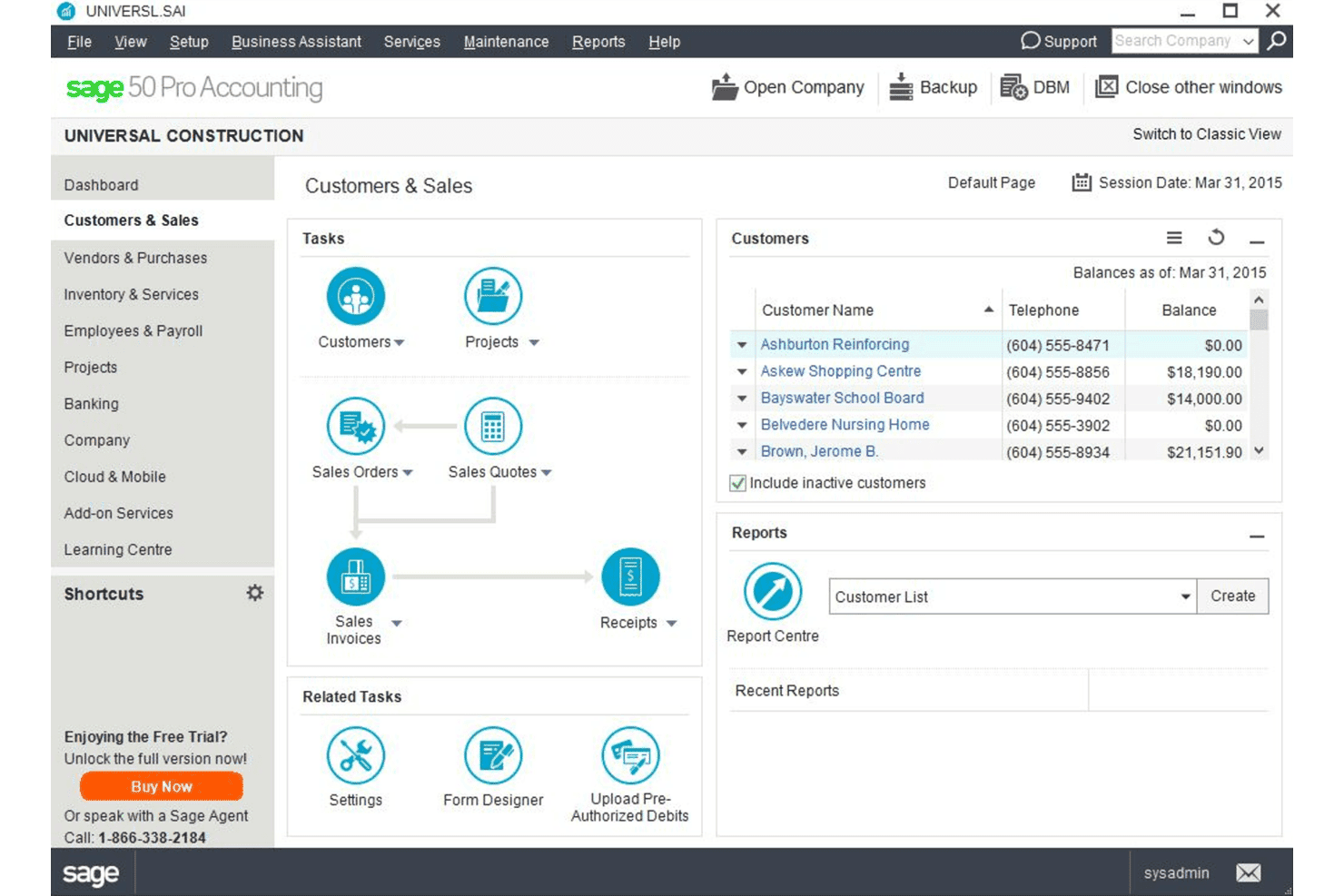
Sage 50 lets users manage customer balances and sales tasks in one view. Sage 50 is small business accounting software with deep invoicing, job costing, and financial reporting tools that may appeal to churches managing multiple projects, tracking ministry expenses, and filing tax reports.
Who Is Sage 50 Best For?
Sage 50 suits small businesses that need deep job costing, inventory tracking, and detailed financial reporting beyond what FreshBooks offers.
Why I Picked Sage 50
I picked Sage 50 as one of the best because it handles grant and fund tracking with a level of detail that FreshBooks simply doesn't offer. I love how job costing lets you assign costs across phases and cost codes, so tracking a restricted grant from receipt to expenditure is genuinely traceable. The over 150 financial reports, including cash flow and general ledger, mean I can pull an accurate picture of fund balances at any point in the year.
Sage 50 Key Features
- Automated bank reconciliation: Imports bank and credit card feeds and automatically matches transactions to invoices, clearing reconciled items and flagging unreconciled differences.
- Inventory management: Tracks stock quantities, costs, and purchase orders using FIFO, Average, or Specific Unit costing, with serialized tracking available on the Quantum plan.
- Recurring invoices and batch sending: Sets up recurring invoices and sends them to multiple customers at once, with automated payment reminders to follow up on outstanding balances.
- Multi-company consolidation: Consolidates any number of subsidiary companies into a single parent company with comparative reporting, available on Premium Accounting and higher plans.
Sage 50 Integrations
Sage 50 offers native integrations with Microsoft 365, Outlook, Excel, OneDrive, AutoEntry, Sage AP Automation, and EFT Direct. Sage Invoice Payments connects with Stripe and PayPal.
Pros and Cons
Pros:
- Invoice reminders flag overdue customer balances
- 150-plus reports support detailed financial review
- Job costing tracks phases, codes, and profitability
Cons:
- Receipt photos need a separate expense app
- Recurring invoices lack automatic payment collection
Learn more about Sage 50:
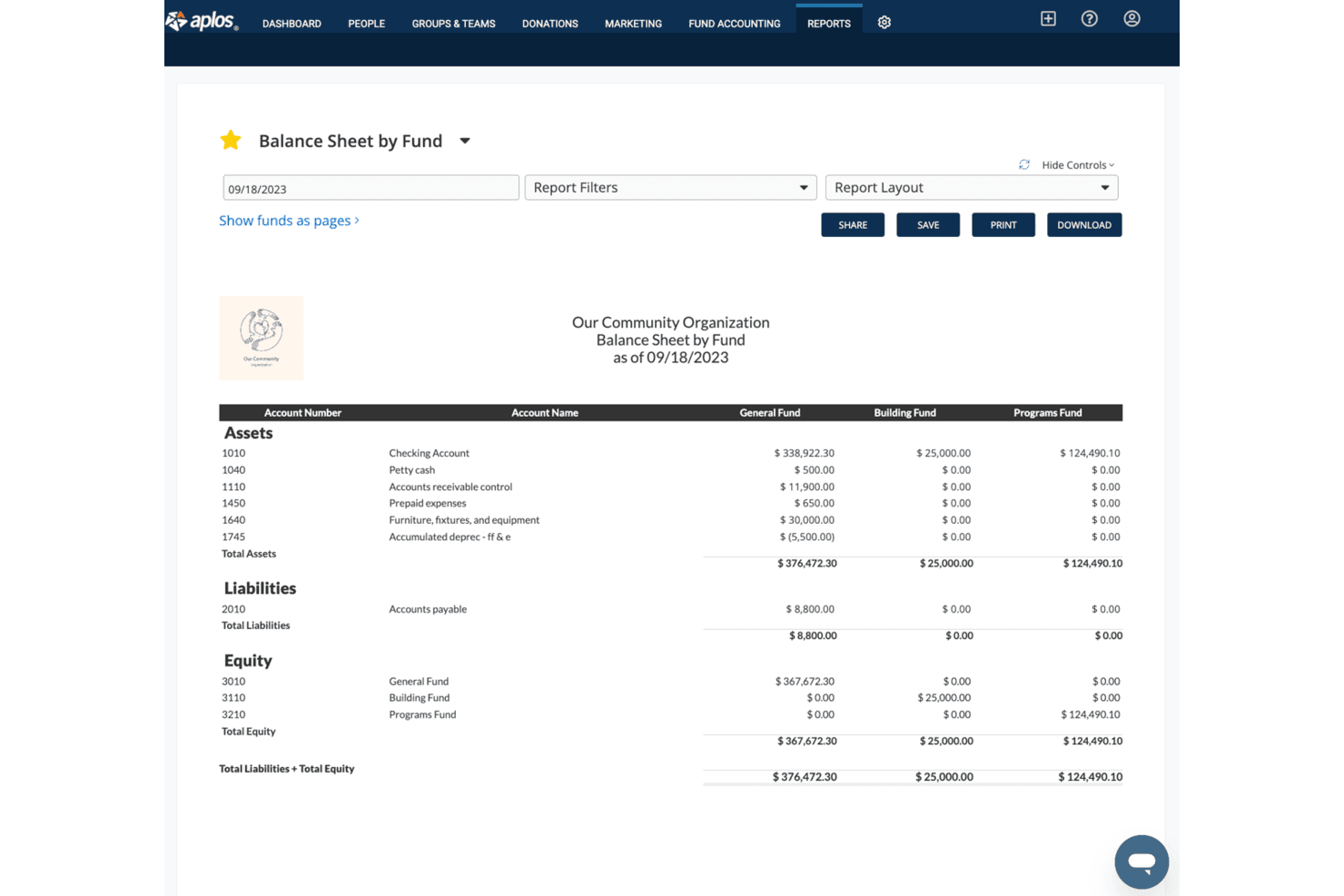
Aplos displays a balance sheet broken down by fund for nonprofits. Aplos is a fund accounting platform built specifically for nonprofits and churches, helping ministry teams track restricted gifts, manage donor records, and produce board-ready financial reports without needing a background in accounting.
Who Is Aplos Best For?
Aplos is a strong fit for nonprofits and churches that need fund accounting built around restricted gifts, donor records, and board-ready financial reporting.
Why I Picked Aplos
I picked Aplos as one of the best because it's the only tool on my list built specifically around fund accounting for nonprofits and churches. I love how it tracks restricted and unrestricted gifts separately, updating fund balances in real time so your board reports always reflect where donor dollars actually sit. You can generate a Balance Sheet by Fund or Income Statement by Fund without manual workarounds, which matters enormously when a grantmaker asks how their restricted contribution was spent.
Aplos Key Features
- Fund-based financial statements: Generates a Balance Sheet by Fund and Income Statement by Fund so you can see exactly where every dollar sits across your restricted and unrestricted accounts.
- Form 990 filing: Prepares and files Form 990-N and Form 990-EZ returns directly within the platform, reducing the manual work of year-end compliance.
- Donor portal (My Aplos): Gives donors a self-service account to review their giving history, manage recurring gifts, update payment details, and download contribution statements.
- Role-based user permissions: Assigns each team member a defined access level—from full-suite administrator to read-only auditor—with an uneditable activity log and transaction locking after reconciliation.
Aplos Integrations
Aplos documents integrations with Keela, Raisely, Ramp, Gusto, PEX, DonorElf, and Church Community Builder, plus an API for custom connections. For nonprofits replacing FreshBooks, Ramp, Keela, and Raisely are the most relevant.
Pros and Cons
Pros:
- Volunteers can handle routine bookkeeping
- Board-ready statements support grant accountability
- Fund reports clarify restricted gift balances
Cons:
- Online invoice payments require full balances
- No client-linked billable time tracking
Learn more about Aplos:
Outras alternativas ao FreshBooks
Eis algumas alternativas adicionais ao FreshBooks que não entraram na minha lista restrita, mas que ainda vale a pena conhecer:
- 11ElexioBest for specialized church accounting solutions
- 12FlockBaseBest for affordable fund accounting
- 13PowerChurch PlusBest for all-in-one church management
How I Evaluate FreshBooks Alternatives
I split every tool into two layers: baseline criteria like fund accounting and giving statements, and differentiators like clergy payroll that separate one option from another.
Core Functionality (Table Stakes For This List)
When I'm selecting tools for my list, I rank each one on a scale from 0 (does not offer the functionality) to 5 (excels in this area) for each core functionality listed below. Then, I calculate the tool's total score into a percentage. Each tool needs to achieve a minimum total score of 55% to be considered for inclusion.
- Fund Accounting: I check whether a tool can separate restricted, unrestricted, and designated funds—like tracking a building campaign apart from the general operating budget.
- Contribution & Donation Tracking: Each tool should let you record tithes, offerings, and pledges at the individual donor level and tie each gift to a specific fund or campaign.
- Tax-Compliant Giving Statements: I look for automated year-end statement generation that includes the required tax language so your treasurer isn't manually assembling receipts every January.
- Expense & Vendor Management: The platform should handle vendor records, bill payments, and categorized expenses across ministries so you can track what each department actually spends.
- Financial Reporting: Reports need to go beyond a basic profit-and-loss view—I evaluate whether a tool produces a statement of activities, statement of financial position, and budget vs. actual by fund.
- Payroll & Clergy Compensation: I consider whether the platform supports clergy-specific tax needs like housing allowance designation, either natively or through a tightly connected payroll integration.
Once I have a list of tools that meet this criteria, I consider what sets each platform apart.
Differentiating Factors (What Sets Vendors Apart)
Here's how I compare and contrast different vendors:
Standout Features
An online giving portal that feeds directly into fund accounting saves hours of manual entry—I look for tools where a Sunday text-to-give donation automatically lands in the right fund. Multi-campus budgeting matters too, especially for churches managing separate ministry spending lines. I also evaluate board reporting features, since finance committees and elder boards typically need plain-English financial summaries rather than full ledger exports.
Beyond Features
Pricing transparency matters when your budget comes from tithes—I check whether a platform charges per donor or per transaction, since those costs add up fast during a capital campaign. Integration with church management systems like Planning Center or Breeze is another factor I evaluate, because disconnected giving and membership data creates duplicate work. I also consider how easy the tool is for a volunteer treasurer to pick up, including whether it ships with a church-specific chart of accounts.
Por que procurar uma alternativa ao FreshBooks?
Embora o FreshBooks seja uma boa escolha de software de contabilidade para igrejas, existem vários motivos pelos quais alguns utilizadores procuram soluções alternativas. Pode estar à procura de uma alternativa ao FreshBooks porque…
- Precisa de funcionalidades especializadas de contabilidade para igrejas
- O FreshBooks não oferece suporte para várias moedas nos donativos
- A sua equipa necessita de uma melhor integração com ferramentas de gestão de igrejas
- Precisa de capacidades de elaboração de relatórios mais avançadas
- O FreshBooks não oferece suporte adequado para a contabilidade por fundos
- A sua equipa precisa de opções de preços mais acessíveis
Se alguma destas situações lhe é familiar, veio ao sítio certo. A minha lista contém várias opções de software de contabilidade para igrejas mais adequadas a equipas que enfrentam estes desafios com o FreshBooks e procuram soluções alternativas.
Principais funcionalidades do FreshBooks
Eis algumas das principais funcionalidades do FreshBooks, para o ajudar a comparar o que as soluções alternativas oferecem:
- Faturação: Crie faturas personalizáveis com opções de faturação recorrente.
- Pagamentos: Aceite pagamentos online para melhorar o fluxo de caixa.
- Registo de tempo: Automatize o registo das horas faturáveis.
- Gestão de despesas: Registe despesas e recibos para a preparação de impostos.
- Gestão de clientes: Organize as informações dos clientes e gira projetos.
- Registo de quilometragem: Registe automaticamente a quilometragem para efeitos de dedução.
- Relatórios contabilísticos: Gere relatórios financeiros, como demonstrações de resultados.
- Orçamentos e propostas: Crie propostas detalhadas e converta-as em faturas.
- Gestão de projetos: Facilite a colaboração da equipa e a definição de prazos para os projetos.
- Acesso móvel: Utilize aplicações para iOS e Android para gerir tudo em qualquer lugar.