

As ferramentas de gestão financeira de igrejas com IA são plataformas de software que utilizam inteligência artificial para ajudar as igrejas a acompanhar donativos, gerir orçamentos e gerar relatórios financeiros com menos esforço manual.
Se procura formas de simplificar as finanças da sua igreja, melhorar a transparência ou tomar decisões mais informadas com dados em tempo real, estas ferramentas foram concebidas para si.
Nesta lista, encontrará opções adequadas a igrejas de diferentes dimensões e com necessidades distintas, para que possa escolher uma solução que apoie a missão do seu ministério e mantenha as suas finanças organizadas em 2026.
Why Trust Our Software Recommendations
6,700+
Reviews
20
Industry experts
16+
Evaluation factors
14
Years
Our team has been testing and reviewing software since 2012. As church leaders ourselves, we know how difficult—and important—it is to choose the right software.
For this guide, we evaluated tools using hands-on testing and independent research, scoring tools using our selection criteria.
Our reviews reflect our human editorial judgment, not a sales pitch.
Tabela de comparação de ferramentas de gestão financeira de igrejas com IA
Esta tabela de comparação resume os detalhes dos preços das minhas principais escolhas de ferramentas de gestão financeira de igrejas com IA:
| Tool | Best For | Trial Info | Price | ||
|---|---|---|---|---|---|
| 1 | Best for simplifying financial reporting with AI-assisted donation insights | 30-day free trial + free demo available | From $72/month | Website | |
| 2 | Best for streamlining contribution tracking with AI-assisted donation insights | Free trial available | From $72/month | Website | |
| 3 | Best for donor engagement analytics | Free plan available | From 2.9% + $0.30 per donation | Website | |
| 4 | Best with AI-powered people search | Free demo available | Pricing upon request | Website | |
| 5 | Best for bringing together giving and member data with AI-enhanced insights | Free trial + free demo available | Pricing upon request | Website | |
| 6 | Best for combining operational and giving data with AI-supported insights | Free plan + 30-day free trial available | From $15/20 members/month | Website | |
| 7 | Best for organizing contribution data into AI-supported financial reports | Free demo available | From $$73.32/month (billed annually) | Website | |
| 8 | Best for gaining AI-assisted visibility into financial activity across churches | Free demo available | Pricing upon request | Website | |
| 9 | Best for AI analysis of member engagement and giving analytics | Free demo available | Pricing upon request | Website |


Avaliações das melhores ferramentas de gestão financeira de igrejas com IA
Abaixo encontrará os meus resumos detalhados das melhores ferramentas de gestão financeira de igrejas com IA que entraram na minha lista. As minhas avaliações apresentam uma análise detalhada das funcionalidades, capacidades e integrações de cada plataforma, para o ajudar a encontrar a melhor opção para si.
 Best for simplifying financial reporting with AI-assisted donation insights
- 30-day free trial + free demo available
- From $72/month
Visit WebsiteCustomer Rating:4.8/5
Breeze ChMS combines donations, reporting, members, and events. Breeze ChMS is a church management software platform designed for churches that want to handle donation tracking, financial reporting, member management, and event scheduling in one system.
Who Is Breeze ChMS Best For?
Small to mid-sized churches seeking straightforward donation and financial management.
Why I Picked Breeze ChMS
I picked Breeze ChMS for its ability to quickly generate detailed financial reports and donation summaries with AI-assisted insights. I like how the platform automatically categorizes gifts and flags unusual giving patterns, which helps my team stay on top of trends. I also use its customizable reporting tools to break down giving by fund, donor, or event without extra manual work.
Breeze ChMS Key Features
- Batch donation entry: Enter multiple gifts at once for faster processing.
- Recurring giving management: Set up and track automated recurring donations from members.
- Role-based access controls: Assign permissions to staff and volunteers based on their responsibilities.
- Fund-specific tracking: Monitor giving and balances for individual funds or campaigns.
Breeze ChMS Integrations
Breeze ChMS offers native integrations with QuickBooks Online, Mailchimp, and Planning Center. An API is available for custom integrations.
Pros and Cons
Pros:
- Fund tracking provides clear visibility across campaigns
- Recurring giving management improves donation consistency
- Financial reporting tools simplify donation tracking
Cons:
- Not ideal for highly complex multi-entity structures
- Limited advanced reporting customization
Learn more about Breeze ChMS: Best for streamlining contribution tracking with AI-assisted donation insights
- Free trial available
- From $72/month
Visit WebsiteCustomer Rating:4.8/5
Tithe.ly offers giving, donor management, tracking, and reporting. Tithe.ly is a church financial management platform that offers digital giving, contribution tracking, donor management, and reporting tools designed specifically for faith-based organizations.
Who Is Tithe.ly Best For?
Churches and ministries of any size needing digital giving and automated contribution tracking.
Why I Picked Tithe.ly
I picked Tithe.ly as one of the best because I can automate contribution tracking and generate AI-powered donation insights right from the dashboard. I like how the platform syncs giving data across online, mobile, and in-person channels, so my team never has to reconcile records manually. I also use its batch deposit tools and detailed donor profiles to keep our financial records organized and audit-ready.
Tithe.ly Key Features
- Event registration management: Track attendance and payments for church events.
- Custom giving forms: Create branded online giving pages for specific funds.
- Multi-campus support: Manage finances and giving across multiple church locations.
- Automated tax receipt generation: Send year-end giving statements to donors automatically.
Tithe.ly Integrations
Tithe.ly offers native integrations with QuickBooks Online, Planning Center, Elvanto, Church Community Builder, and Breeze ChMS. An API is available for custom integrations.
Pros and Cons
Pros:
- Automated tax receipts simplify donor communications
- Custom giving forms support targeted fundraising efforts
- Multi-channel giving sync reduces manual reconciliation
Cons:
- Limited anomaly detection for complex or irregular donation patterns
- AI-assisted insights are basic and not highly customizable
 Best for donor engagement analytics
- Free plan available
- From 2.9% + $0.30 per donation
Visit WebsiteCustomer Rating:4.8/5
Givelify combines mobile giving, donation tracking, and analytics. Givelify is a digital giving and donation management platform for churches and nonprofits that combines mobile giving, donation tracking, and real-time donor analytics.
Who Is Givelify Best For?
Churches and faith-based organizations that want to track and analyze donor engagement through digital giving.
Why I Picked Givelify
I picked Givelify as one of the best because its donor engagement analytics let me see giving trends and donor activity in real time. I use its dashboard to track individual and group giving patterns, which helps my team identify active and lapsed donors. The platform’s mobile giving app also makes it easy for our congregation to give from anywhere, and I can quickly generate reports to share with leadership.
Givelify Key Features
- Mobile giving app: Lets donors give through a dedicated iOS and Android app.
- Custom campaign creation: Allows you to set up and manage multiple giving campaigns.
- Automated donation receipts: Send IRS-compliant receipts to donors automatically.
- Admin dashboard: Provides centralized access to manage donations and donor records.
Givelify Integrations
Integrations include Shelby Next, Shelby Arena, Power Church, Servant Keeper, ACS Realm, and ACS People.
Pros and Cons
Pros:
- Automated receipts simplify compliance and recordkeeping
- Mobile giving app increases accessibility for contributors
- Donor engagement analytics highlight giving trends clearly
Cons:
- Lacks deeper AI-driven segmentation for complex donor analysis
- AI insights focus more on engagement than financial forecasting
Learn more about Givelify: Best with AI-powered people search
- Free demo available
- Pricing upon request
Visit WebsiteCustomer Rating:4/5
Pushpay combines digital giving, donor management, and data tools. Pushpay is a church financial management platform that combines digital giving, donor management, and AI-driven data tools for churches and ministries.
Who Is Pushpay Best For?
Churches and ministries seeking a digital giving and donor management platform with advanced AI-powered search capabilities.
Why I Picked Pushpay
I picked Pushpay as one of the best because its AI-powered people search lets me quickly locate donor and member records, even with incomplete information. I use its digital giving dashboard to track contributions in real time. The platform’s automation tools help my team organize donor data and generate detailed financial reports without manual sorting.
Pushpay Key Features
- Mobile giving app: Accepts donations through a branded mobile app for iOS and Android.
- Recurring giving setup: Lets donors schedule automatic recurring gifts directly from their account.
- Batch donation entry: Allows entry of multiple donations at once for simplified processing.
- Custom financial reports: Generates detailed, customizable reports on giving and donor activity.
Pushpay Integrations
Pushpay offers native integrations with Church Community Builder, QuickBooks, Shelby Systems, Rock RMS, and Planning Center. An API is available for custom integrations.
Pros and Cons
Pros:
- Custom financial reports provide detailed giving insights
- Mobile giving app supports flexible donation experiences
- AI-powered people search improves donor record accuracy
Cons:
- Batch donation entry can be unintuitive for new users
- Limited native integrations compared to similar tools
Learn more about Pushpay: Best for bringing together giving and member data with AI-enhanced insights
- Free trial + free demo available
- Pricing upon request
Visit WebsiteCustomer Rating:4.1/5
Realm combines giving, directories, events, reporting, and analytics. Realm is a church management software platform that combines giving management, member directories, event tracking, and reporting with AI-driven analytics for faith-based organizations.
Who Is Realm Best For?
Churches and faith-based organizations seeking unified management of giving, membership, and engagement data.
Why I Picked Realm
I picked Realm as one of the best because with it, I can connect all our giving records, pledges, and member engagement data in one place and use AI-powered analytics to spot trends in both financial and participation patterns. I like how the platform lets me drill into donor histories and automate recurring giving management. My team uses its real-time dashboards to monitor giving campaigns and member involvement side by side.
Realm Key Features
- Batch contribution entry: Enter multiple donations at once for faster processing.
- Fund management: Track and manage multiple designated funds within the platform.
- Role-based access controls: Set permissions for staff and volunteers by role.
- Automated tax statement generation: Create and send year-end giving statements to donors.
Realm Integrations
Native integrations are not clearly documented.
Pros and Cons
Pros:
- Fund management supports structured financial tracking
- Real-time dashboards improve financial visibility
- Combines giving and member data for unified insights
Cons:
- Limited customization in reporting outputs
- Native integrations not publicly listed
 Best for combining operational and giving data with AI-supported insights
- Free plan + 30-day free trial available
- From $15/20 members/month

Planning Center combines giving, people, events, volunteers, and tracking. Planning Center is a church management platform that brings together giving, people management, event scheduling, volunteer coordination, and financial tracking in one system.
Who Is Planning Center Best For?
Multi-ministry churches and faith-based organizations that need to manage giving, events, and operations in one platform.
Why I Picked Planning Center
I picked Planning Center because I can connect giving data with attendance, volunteer schedules, and event registrations in one place. The AI-powered dashboards help me spot trends in both donations and participation. I use its reporting tools to drill into specific ministries or campaigns, so my team can make data-driven decisions about resource allocation.
Planning Center Key Features
- Batch donation entry: Enter multiple donations at once for faster processing.
- Automated donor statements: Generate and send year-end giving statements automatically.
- Role-based permissions: Control access to sensitive financial and member data by user role.
- Fund management: Track giving across multiple funds and campaigns within the platform.
Planning Center Integrations
Planning Center offers native integrations with QuickBooks Online, Mailchimp, and Church Community Builder, and provides an API for custom integrations.
Pros and Cons
Pros:
- Role-based permissions protect sensitive financial data
- AI-supported dashboards surface operational insights
- Unified platform connects giving, events, and member data
Cons:
- Batch donation entry can slow down high-volume processing
- Reporting exports lack deeper customization options
Learn more about Planning Center: Best for organizing contribution data into AI-supported financial reports
- Free demo available
- From $$73.32/month (billed annually)

Servant Keeper offers contribution tracking, donor records, and reporting. Servant Keeper is a church management software platform that offers contribution tracking, donor database management, financial reporting, and AI-supported data organization for churches and ministries.
Who Is Servant Keeper Best For?
Church administrators and finance teams who need to organize and report on contribution data for small to mid-sized congregations.
Why I Picked Servant Keeper
I picked Servant Keeper because I can organize detailed contribution records and quickly generate AI-supported financial reports for our church board meetings. I like how the tool lets me tag and categorize donations, then use its reporting engine to break down giving by fund, donor, or campaign. My team uses its batch entry and audit trail features to keep our records accurate and ready for review.
Servant Keeper Key Features
- Cloud-based access: Manage financial data securely from any device.
- Automated recurring giving: Set up and track scheduled donations for members.
- Customizable user permissions: Control access levels for staff and volunteers.
- Integrated pledge tracking: Monitor and report on pledge commitments throughout the year.
Servant Keeper Integrations
Servant Keeper offers native integrations with QuickBooks, Vanco, and Constant Contact. An API is available for custom integrations.
Pros and Cons
Pros:
- Pledge tracking helps monitor donor commitments
- Custom permissions improve data access control
- Contribution tracking supports detailed financial reporting
Cons:
- Limited ability to scale AI insights across large data sets
- AI capabilities are minimal and rely heavily on manual setup
Learn more about Servant Keeper: Best for gaining AI-assisted visibility into financial activity across churches
- Free demo available
- Pricing upon request

ShelbyNext combines accounting, contributions, reporting, and fund management. ShelbyNext is a church financial management platform that combines multi-location accounting, contribution tracking, AI-powered reporting, and fund management in one system.
Who Is ShelbyNext Best For?
Finance and operations teams at multi-campus churches needing centralized oversight of contributions and expenses.
Why I Picked ShelbyNext
I picked ShelbyNext because I can use its AI-powered dashboards to monitor giving, expenses, and budgets across multiple locations in real time. I like how the platform lets me drill into detailed transaction histories and set up custom alerts for unusual financial activity. My team uses its fund accounting features to keep designated funds separate and compliant.
ShelbyNext Key Features
- Batch contribution entry: Enter multiple donations at once for faster processing.
- Recurring giving management: Set up and track automated recurring donations from members.
- Role-based access controls: Assign permissions to staff and volunteers based on their responsibilities.
- Automated tax statement generation: Create and send year-end giving statements to donors.
ShelbyNext Integrations
Native integrations are not clearly documented. An API is available for custom integrations.
Pros and Cons
Pros:
- Customizable fund and campaign tracking
- Multi-campus support for complex church structures
- AI-powered dashboards highlight giving and attendance trends
Cons:
- Reporting exports lack advanced customization
- Batch donation entry can be cumbersome
Learn more about ShelbyNext: Best for AI analysis of member engagement and giving analytics
- Free demo available
- Pricing upon request

FellowshipOne combines member management, giving, events, and reporting. FellowshipOne is a church management software platform that combines member database management, contribution tracking, event scheduling, and reporting with AI-driven analytics for engagement and giving.
Who Is FellowshipOne Best For?
Churches and ministries seeking to analyze member engagement and giving patterns using AI-driven insights.
Why I Picked FellowshipOne
I picked FellowshipOne because I can use its AI-powered analytics to spot trends in member engagement and giving patterns across different ministries. I like how the platform visualizes attendance and contribution data, letting me drill into specific groups or individuals. My team uses its reporting tools to identify shifts in donor behavior and target follow-up efforts where they're needed most.
FellowshipOne Key Features
- Batch contribution entry: Enter multiple donations at once for faster processing.
- Fund accounting: Track designated funds and restricted giving within the platform.
- Automated tax statement generation: Create and send year-end giving statements to donors.
- Role-based access controls: Assign permissions to staff and volunteers based on their responsibilities.
FellowshipOne Integrations
FellowshipOne offers native integrations with QuickBooks, Church Community Builder, and ShelbyNext.
Pros and Cons
Pros:
- Reporting tools provide visibility into donor behavior
- Fund accounting supports restricted donation tracking
- Analytics connect engagement and giving patterns
Cons:
- Batch entry workflows can be inefficient
- Limited flexibility in report customization
Learn more about FellowshipOne: Best for automated bank reconciliation
- Free trial available
- From $38/month
Visit WebsiteCustomer Rating:4/5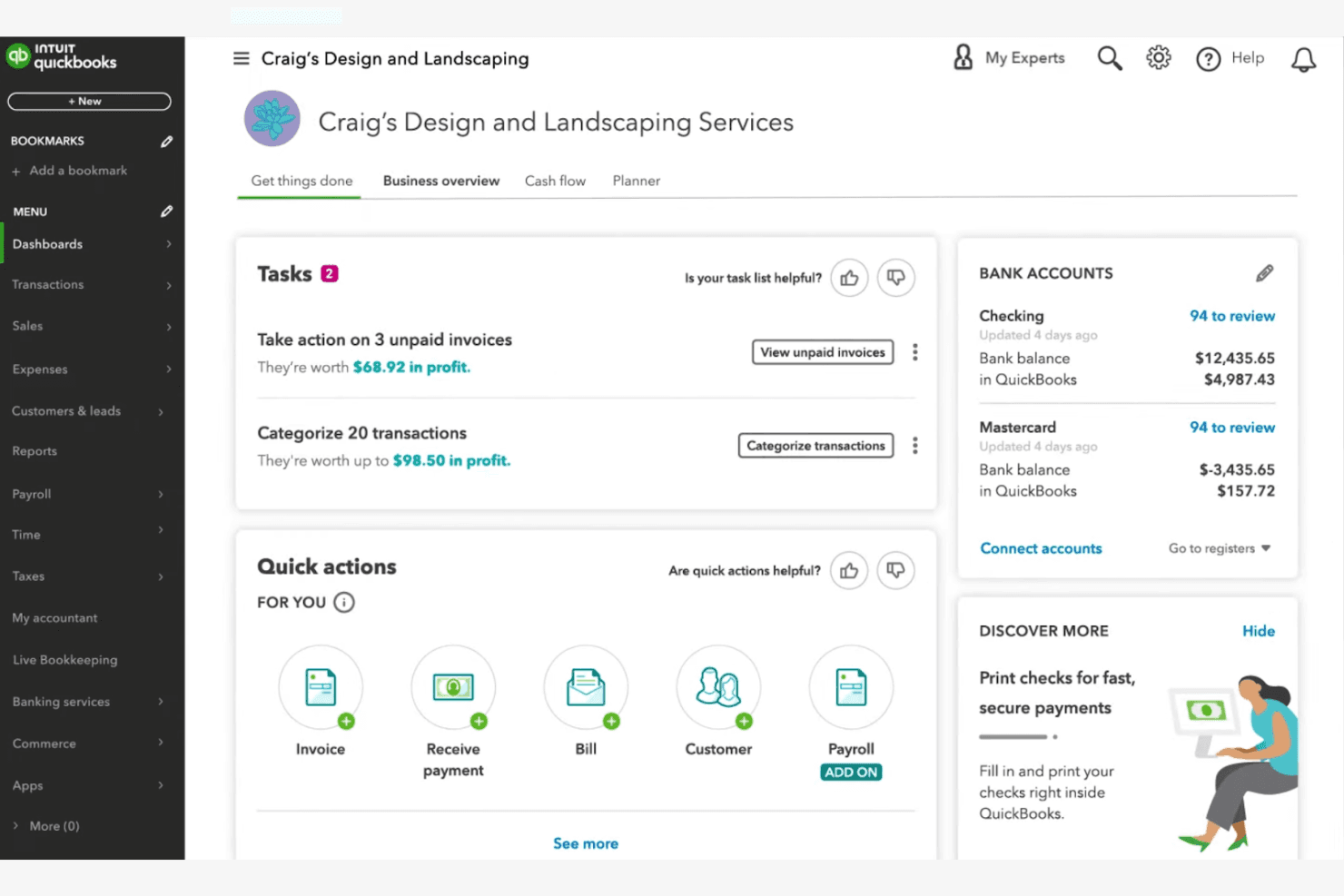
QuickBooks Online surfaces tasks, invoices, and bank balances on one dashboard. QuickBooks Online is a cloud-based accounting platform that brings AI-assisted bookkeeping, fund tracking, automated bank reconciliation, and financial reporting to churches and nonprofits managing ministry finances.
Who Is QuickBooks Online Best For?
It's a strong fit for church bookkeepers and finance directors at small-to-mid-sized congregations who already have a working knowledge of accounting fundamentals.
Why I Picked QuickBooks Online
I picked QuickBooks Online because its AI-powered bank reconciliation cuts through one of the most time-consuming tasks in church finance. Intuit Intelligence automatically flags anomalies and resolves mismatched transactions across ministry accounts, which saves significant manual review time. The Advanced tier also pairs reconciliation with cash flow forecasting and Finance AI, so the data from your reconciled books feeds directly into budget planning.
QuickBooks Online Key Features
- Fund tracking and class/location tagging: Supports segmented tracking for different church ministries and funds using classes and locations.
- Custom board and donor reporting: Generates specialized reports tailored for church boards, donors, and annual filings.
- Multi-user access with role controls: Allows unique user IDs and tiered permissions for staff and volunteers managing finances.
- Integration with donor and fundraising tools: Connects with platforms like DonorPerfect, Fundly, and Kindful for streamlined import of giving data.
QuickBooks Online Integrations
QuickBooks Online offers native integrations with DonorPerfect, Fundly, Kindful, Method:Donor, and Expensify. An API is available for custom integrations.
Pros and Cons
Pros:
- Multi-user access supports staff and volunteer roles
- Automated cash flow forecasting aids budget planning
- AI-powered bank reconciliation saves hours weekly
Cons:
- Clergy tax handling requires third-party workarounds
- No native church-specific fund accounting structure
Learn more about QuickBooks Online:
Outras ferramentas de gestão financeira de igrejas com IA
Eis algumas opções adicionais de ferramentas de gestão financeira de igrejas com IA que não entraram na minha lista, mas que ainda vale a pena conhecer:
- 11BlackbaudBest for applying AI-powered predictive analytics to donor forecasting and fundraising strategy
How I Evaluate AI Church Financial Management Tools
I don't include a tool just because it labels itself "AI"—it needs to do something meaningful, like flagging a budget variance across ministry funds or forecasting a seasonal giving dip before it hits cash flow. I evaluate each option on two levels: the core functionality it must have to qualify and the differentiating factors that separate a good fit from a great one.
Core Functionality (Table Stakes For This List)
When I'm selecting tools for my list, I rank each one on a scale from 0 (does not offer the functionality) to 5 (excels in this area) for each core functionality listed below. Then, I calculate the tool's total score into a percentage. Each tool needs to achieve a minimum total score of 55% to be considered for inclusion.
- AI-Powered Fund Accounting: I look for tools that use AI to categorize transactions into restricted, unrestricted, and designated funds—like automatically sorting a building campaign gift from general tithes.
- Automated Contribution Management: Each tool should handle tithe and offering tracking with AI-assisted donor matching, so duplicate records from online and in-person giving don't pile up at year-end.
- Predictive Financial Forecasting: I evaluate whether AI forecasting goes beyond static reports to model scenarios like projected summer giving dips or the financial impact of launching a new campus.
- Anomaly & Fraud Detection: The tool should flag unusual activity across ministry accounts, such as a spike in petty cash withdrawals or an expense that falls outside normal patterns for a department.
- Intelligent Reporting & Insights: Board-ready financial summaries that AI generates on demand matter here—I check whether pastors and treasurers can pull meaningful reports without needing an accounting background.
- Church-Specific Integrations: Connections to ChMS platforms, online giving tools, and payroll systems familiar with clergy compensation are what I look for, since church finance doesn't operate in a vacuum.
Once I have a list of tools that meet the criteria, I consider what sets each platform apart.
Differentiating Factors (What Sets Vendors Apart)
Here's how I compare and contrast different vendors:
Standout Features
Natural language querying is a big differentiator—I want to see whether a volunteer treasurer can type "What did we spend on missions last quarter?" and get a clear answer without digging through reports. AI donor retention insights also carry weight, especially when a tool can surface lapsed givers and suggest re-engagement timing based on historical patterns. Smart budget recommendations round things out, where the AI proposes ministry allocations informed by seasonal giving cycles and past spend.
Beyond Features
Clergy-specific tax handling matters a lot here—I check whether a platform supports housing allowances and dual-status compensation, since getting this wrong creates real headaches at year-end. Volunteer-friendly onboarding is another priority. Many churches rely on part-time bookkeepers or lay treasurers, so I evaluate whether someone without an accounting background can navigate the system after a short setup. Donor privacy also weighs in, particularly role-based access that keeps individual giving records visible only to authorized staff.
Como escolher ferramentas de gestão financeira de igrejas com IA
É fácil ficar preso a longas listas de funcionalidades e estruturas de preços complexas. Para o ajudar a manter o foco enquanto avalia o seu processo específico de seleção de software, eis uma lista de verificação dos fatores a ter em conta:
| Fator | O que considerar |
| Escalabilidade | A ferramenta será capaz de acompanhar o crescimento da sua igreja, as necessidades de vários polos ou os picos sazonais de donativos sem custos ou complexidade adicionais? |
| Integrações | Estabelece ligação nativa às suas ferramentas de contabilidade, gestão de donativos ou comunicação, ou precisará de soluções alternativas? |
| Personalização | Pode adaptar os relatórios, as funções dos utilizadores e os fluxos de trabalho aos processos financeiros e às estruturas de aprovação específicos da sua igreja? |
| Facilidade de utilização | Os funcionários e voluntários com diferentes níveis de conhecimentos tecnológicos conseguirão navegar no sistema e utilizá-lo com confiança? |
| Implementação e integração inicial | Quanto tempo será necessário para migrar os dados, formar a sua equipa e começar a utilizar o sistema? Existem recursos ou apoio para a integração inicial? |
| Custo | Todos os custos são claros, incluindo a configuração, o apoio e os complementos? O preço é adequado ao seu orçamento e à utilização prevista? |
| Medidas de segurança | A ferramenta disponibiliza acesso baseado em funções, registos de auditoria e encriptação de dados para proteger informações financeiras e de donativos sensíveis? |
| Disponibilidade do apoio | Consegue contactar o apoio quando precisa dele, especialmente durante períodos críticos de elaboração de relatórios ou do fecho do exercício? |
O que são as ferramentas de gestão financeira de igrejas com IA?
As ferramentas de gestão financeira de igrejas com IA são um tipo de software de contabilidade para igrejas concebido para ajudar as igrejas a gerir as finanças, acompanhar a atividade das doações online e melhorar a administração financeira, dedicando menos tempo ao trabalho manual. Embora sejam frequentemente descritas como ferramentas de IA, a maioria disponibiliza atualmente funcionalidades apoiadas por IA, como informações para relatórios e reconhecimento de padrões, refletindo uma área em crescimento e evolução nos sistemas de gestão de igrejas.
Estas ferramentas combinam normalmente capacidades de contabilidade completas com elementos de um sistema de gestão de igrejas, proporcionando aos líderes dos ministérios uma forma centralizada de gerir fundos restritos, relatórios e tarefas contabilísticas diárias.
Podem substituir as folhas de cálculo tradicionais ao permitirem acompanhar doações, gerir processos de pagamentos e elaborar relatórios financeiros, sendo especialmente valiosas para igrejas pequenas que necessitam de sistemas fáceis de utilizar para simplificar as operações, mantendo a precisão e a transparência.
Funcionalidades
Ao selecionar ferramentas de gestão financeira de igrejas com IA, tenha em atenção as seguintes funcionalidades essenciais:
- Acompanhamento de doações: Regista e categoriza automaticamente os donativos por doador, fundo e campanha, facilitando a monitorização dos padrões de contribuição e a elaboração de declarações de contribuições.
- Contabilidade por fundos: Separa e gere vários fundos ou contas no mesmo sistema, garantindo a conformidade com as normas financeiras aplicáveis às organizações sem fins lucrativos e a elaboração de relatórios claros.
- Relatórios com tecnologia de IA: Utiliza inteligência artificial para gerar relatórios financeiros, destacar tendências e fornecer informações úteis para os líderes da igreja e as equipas financeiras.
- Reconciliação automatizada: Faz corresponder as transações bancárias aos registos efetuados, reduzindo o trabalho manual e minimizando os erros nos registos financeiros.
- Gestão de compromissos de donativos: Acompanha os compromissos de contribuição dos membros, monitoriza o progresso em relação aos objetivos e envia lembretes ou atualizações aos doadores conforme necessário.
- Permissões baseadas em funções: Permite aos administradores definir diferentes níveis de acesso para funcionários e voluntários, protegendo dados financeiros sensíveis e promovendo a responsabilização.
- Introdução em lote: Permite introduzir rapidamente várias doações ou transações de uma só vez, poupando tempo durante períodos ou eventos de maior volume de contribuições.
- Registos de auditoria: Mantém um registo detalhado de todas as alterações e transações, promovendo a transparência e simplificando auditorias ou revisões.
- Configuração de contribuições recorrentes: Permite aos doadores agendar contribuições automáticas, melhorando a regularidade das receitas da igreja e simplificando a gestão dos doadores.
- Capacidades de integração: Liga-se a ferramentas de contabilidade, comunicação e gestão de doadores para otimizar os fluxos de trabalho e reduzir a duplicação da introdução de dados.
Vantagens
A implementação de ferramentas de gestão financeira de igrejas com IA proporciona várias vantagens para a sua equipa e organização. Eis algumas das que pode esperar:
- Maior precisão financeira: O acompanhamento automatizado das doações e a reconciliação reduzem os erros manuais e garantem que os seus registos estão sempre atualizados.
- Relatórios e informações mais rápidos: Os relatórios com tecnologia de IA fornecem dados financeiros em tempo real e análises de tendências, ajudando os líderes a tomar decisões informadas rapidamente.
- Maior transparência: Os registos de auditoria e a contabilidade clara por fundos promovem a responsabilização e facilitam a partilha de informações financeiras com a congregação ou o conselho.
- Poupança de tempo para os funcionários: A introdução em lote, a configuração de contribuições recorrentes e os fluxos de trabalho automatizados libertam tempo dos funcionários e voluntários para o trabalho ministerial e a ação comunitária.
- Maior envolvimento dos doadores: A gestão de compromissos de donativos e as integrações de comunicação ajudam a acompanhar os compromissos e a manter os doadores informados e reconhecidos.
- Maior segurança dos dados: As permissões baseadas em funções e os controlos de acesso seguros protegem as informações financeiras e dos doadores contra acessos não autorizados.
- Escalabilidade para o crescimento: As ferramentas flexíveis e as capacidades de integração permitem que os seus processos financeiros cresçam com a sua igreja, quer adicione novos polos quer expanda os ministérios.
Custos e preços
A seleção de ferramentas de gestão financeira de igrejas com IA exige uma compreensão dos vários modelos de preços e planos disponíveis. Os custos variam consoante as funcionalidades, o tamanho da equipa, os complementos e outros fatores. A tabela abaixo resume os planos comuns, os respetivos preços médios e as funcionalidades normalmente incluídas nas soluções de ferramentas de gestão financeira de igrejas com IA:
Tabela de comparação de planos para ferramentas de gestão financeira de igrejas com IA
| Tipo de plano | Preço médio | Funcionalidades comuns |
| Plano gratuito | $0 | Acompanhamento básico de donativos, relatórios limitados, acesso para um único utilizador e suporte por e-mail. |
| Plano pessoal | $10-$30/mês | Gestão de donativos e promessas de doação, contabilidade simples de fundos, relatórios básicos com IA e integrações limitadas. |
| Plano empresarial | $40-$100/mês | Acesso para vários utilizadores, análises avançadas baseadas em IA, introdução em lote, permissões baseadas em funções e integrações com ferramentas de contabilidade. |
| Plano empresarial de grande dimensão | $150-$400/mês | Suporte para vários campus, fluxos de trabalho personalizados, suporte premium, segurança avançada e acesso completo à API. |
Perguntas frequentes sobre ferramentas de gestão financeira de igrejas com IA
Eis algumas respostas a perguntas comuns sobre ferramentas de gestão financeira de igrejas com IA:
Como é que a IA melhora a gestão financeira das igrejas?
A IA melhora a gestão financeira das igrejas ao automatizar tarefas de rotina, como o acompanhamento de donativos, a reconciliação bancária e a geração de relatórios. Isto reduz os erros manuais, poupa tempo à equipa e fornece aos líderes informações em tempo real para uma melhor tomada de decisões.
As ferramentas de gestão financeira de igrejas com IA conseguem lidar com vários fundos ou campus?
Sim, a maioria das ferramentas de gestão financeira de igrejas com IA oferece suporte para a contabilidade de fundos e a gestão de vários campus. Isto permite acompanhar orçamentos, donativos e despesas separados para cada fundo ou localização, mantendo tudo organizado num único sistema.
Estas ferramentas são suficientemente seguras para dados financeiros e de doadores sensíveis?
Sim, as ferramentas reputadas de gestão financeira de igrejas com IA utilizam encriptação, permissões baseadas em funções e registos de auditoria para proteger dados sensíveis. Verifique sempre a conformidade com as normas de privacidade e informe-se sobre as certificações de segurança antes de escolher uma solução.
Que tipo de suporte está disponível para a integração inicial e a resolução de problemas?
A maioria dos fornecedores disponibiliza recursos para a integração inicial, como vídeos de formação, visitas guiadas ao produto e webinars. O suporte contínuo inclui frequentemente conversação em direto, assistência por e-mail ou telefone, bem como acesso a uma base de conhecimentos ou comunidade de utilizadores.
Como é que estas ferramentas se integram com outros softwares para igrejas?
Muitas ferramentas de gestão financeira de igrejas com IA oferecem integrações com plataformas de contabilidade, sistemas de gestão de doadores e ferramentas de comunicação. Verifique se o software que já utiliza é compatível ou se é possível criar integrações personalizadas através de APIs.