

Evenementen in je kerk beheren kan overweldigend zijn—van het coördineren van inschrijvingen tot het afhandelen van communicatie: je voelt je al snel overspoeld. Daar komt de juiste evenementregistratiesoftware om de hoek kijken. Deze verlicht de werklast en vereenvoudigt alles, van aanmeldingen tot het bijhouden van de aanwezigheid.
Uit mijn ervaring blijkt dat het vinden van de juiste oplossing de manier waarop je team evenementregistraties beheert volledig kan veranderen. Ik heb verschillende opties getest en beoordeeld om je een onbevooroordeeld overzicht te geven van de beste oplossingen op de markt.
In dit artikel ontdek je oplossingen voor evenementregistratiesoftware die inspelen op jouw unieke uitdagingen. Ik bespreek de functies, voor- en nadelen en prijzen van elk systeem, zodat je een weloverwogen keuze voor je kerk kunt maken.
Waarom u onze softwareaanbevelingen kunt vertrouwen
6,700+
Reviews
20
Industry experts
16+
Evaluation factors
14
Years
Ons team test en beoordeelt software sinds 2012. Als kerkleiders weten we zelf hoe moeilijk — en belangrijk — het is om de juiste software te kiezen.
Voor deze gids hebben we tools geëvalueerd met behulp van praktijktests en onafhankelijk onderzoek, waarbij we tools beoordeelden aan de hand van onze selectiecriteria.
Onze reviews weerspiegelen ons menselijke redactionele oordeel, geen verkooppraatje.
Vergelijkingstabel voor evenementregistratiesoftware
Deze vergelijkingstabel vat de prijsgegevens samen van mijn selectie van de beste hulpmiddelen voor merkmonitoring:
| Tool | Best For | Trial Info | Price | ||
|---|---|---|---|---|---|
| 1 | Beste voor het beheren van meerdere diensttijden | Gratis proefversie + gratis demo beschikbaar | Vanaf $399/evenement | Website | |
| 2 | Beste voor besloten evenementen | Gratis abonnement + gratis demo beschikbaar | Vanaf $24/maand (jaarlijks gefactureerd) | Website | |
| 3 | Beste voor hybride evenementen | Gratis demo beschikbaar | Prijzen op aanvraag | Website | |
| 4 | Het beste voor de betrokkenheid van deelnemers | Gratis demo beschikbaar | Prijzen op aanvraag | Website | |
| 5 | Beste voor grootschalige conferenties | Gratis demo beschikbaar | Prijs op aanvraag | Website | |
| 6 | Het meest geschikt voor zakelijke evenementenprogramma's met een vaste vergoeding | Gratis demo beschikbaar | Vanaf $11,800/jaar (jaarlijks gefactureerd) | Website | |
| 7 | Beste voor registratie bij aankomst op locatie en het printen van badges | Gratis proefversie beschikbaar | Vanaf $7,500/evenement | Website | |
| 8 | Het beste voor het organiseren van virtuele evenementen | Gratis demo beschikbaar | Vanaf $499/gebruiker/maand (jaarlijks gefactureerd) | Website | |
| 9 | Beste voor virtuele vakbeurzen | Gratis demo beschikbaar | Prijzen op aanvraag | Website | |
| 10 | Beste voor data-analyse | Gratis demo beschikbaar | Prijs op aanvraag | Website |


Beoordelingen van de beste evenementregistratiesoftware
Hieronder vind je mijn gedetailleerde samenvattingen van de beste evenementregistratiesoftware die op mijn selectie staat. Mijn beoordelingen bieden een gedetailleerd overzicht van de belangrijkste functies, voor- en nadelen, integraties en ideale gebruikssituaties van elk hulpmiddel, zodat je de beste optie voor jouw behoeften kunt vinden.
 Beste voor het beheren van meerdere diensttijden
- Gratis proefversie + gratis demo beschikbaar
- Vanaf $399/evenement

Church RSVP toont een scherm voor het beheren van evenementmomenten met registratie van zittypen. Church RSVP is een platform voor evenementenbeheer dat speciaal is ontworpen voor kerken en bedieningen om alles te organiseren, van wekelijkse diensten tot meerdaagse conferenties. Het vereenvoudigt complexe administratieve taken, zoals het werven van vrijwilligers en de registratie voor VBS, en zorgt er tegelijkertijd voor dat u de zitplaatslimiet nooit overschrijdt.
Voor wie is Church RSVP het meest geschikt?
Church RSVP is geschikt voor kerken en bedieningen die een speciale tool nodig hebben om evenementregistraties te beheren, meerdere diensten te coördineren en de opkomst bij geloofsgerichte bijeenkomsten bij te houden.
Waarom ik voor Church RSVP heb gekozen
Het beheren van meerdere diensttijden is een veelvoorkomende uitdaging voor kerken en daarom heb ik Church RSVP voor deze lijst gekozen. Gemeenteleden kunnen tijdens de registratie hun gewenste diensttijd selecteren, waardoor de actuele aantallen aanwezigen voor elke sessie automatisch worden bijgewerkt. Dit is vooral nuttig voor feestdagendiensten of speciale evenementen waarbij u de opkomst over meerdere begintijden moet verdelen om overbevolking te voorkomen. Deze focus op flexibele planning maakt Church RSVP bijzonder nuttig voor bedieningen met meerdere bijeenkomsten per week.
Belangrijkste functies van Church RSVP
Enkele andere functies die Church RSVP nuttig maken voor evenementregistratie zijn:
- Aanpasbare registratieformulieren: Maak formulieren met velden die zijn afgestemd op de behoeften van uw evenement, zoals namen van deelnemers, contactgegevens of speciale verzoeken.
- Geautomatiseerde bevestigingsmails: Stuur direct bevestigingsberichten naar registranten, zodat deelnemers weten dat hun plaats is gereserveerd.
- Dashboard voor aanwezigheidsregistratie: Houd realtime opkomstcijfers bij en bekijk historische gegevens voor elk evenement of elke dienst.
- Beheer van vrijwillige aanmeldingen: Laat vrijwilligers zich registreren voor specifieke rollen of diensten, zodat het eenvoudiger wordt om de personeelsbezetting voor evenementen te coördineren.
Integraties van Church RSVP
Integraties zijn niet openbaar vermeld.
Pros and Cons
Pros:
- Deelnemers laten kiezen tussen fysiek en online
- Geautomatiseerde bevestigingen en herinneringen bieden
- Onbeperkte registraties zonder extra kosten mogelijk maken
Cons:
- Geen ingebouwde betalingsverwerking voor betaalde evenementen
- Geen communicatie met deelnemers buiten e-mailherinneringen
Learn more about Church RSVP: Beste voor besloten evenementen
- Gratis abonnement + gratis demo beschikbaar
- Vanaf $24/maand (jaarlijks gefactureerd)
Visit WebsiteCustomer Rating:4.8/5
RSVPify coördineert het gastenbeheer voor besloten evenementen. RSVPify is een tool voor evenementenbeheer die zeer geschikt is voor kerken en geloofsorganisaties die besloten evenementen of evenementen op uitnodiging organiseren. Het is ideaal voor het beheren van RSVP's voor bijeenkomsten zoals kerkelijke diners, leiderschapsvergaderingen, retraites, bruiloften, doopplechtigheden en speciale bedieningsactiviteiten, met hulpmiddelen voor gastenlijsten, aanpassingen en communicatie.
Waarom ik voor RSVPify heb gekozen: RSVPify werkt goed voor kerkevenementen waarbij controle over de gastenlijst en persoonlijke accenten belangrijk zijn. Kerken kunnen aangepaste evenementpagina's maken, RSVP's bijhouden en gegevens van deelnemers beheren, zoals maaltijdvoorkeuren of zitplaatsbehoeften. Geautomatiseerde herinneringen helpen het aantal afwezigen te verminderen, terwijl de aanpassingsmogelijkheden van het platform het eenvoudig maken om een gastvrije, georganiseerde ervaring voor gemeenteleden en genodigden te creëren.
Belangrijkste functies en integraties:
Functies omvatten zitplaatsindelingen met slepen en neerzetten, herinneringen voor evenementen en mogelijkheden om gasten in te checken. RSVPify maakt het eenvoudig om maaltijdvoorkeuren te beheren en gedetailleerde gastenprofielen te maken. Het platform maakt ook realtime updates van je evenement mogelijk.
Integraties omvatten Stripe, Mailchimp, Google Analytics, Zapier, PayPal en meer.
Pros and Cons
Pros:
- Ideaal voor besloten evenementen
- Ondersteunt maaltijdvoorkeuren
- Eenvoudig beheer van gastenlijsten
Cons:
- Beperkt geschikt voor grootschalige evenementen
- Beperkte aanpassingsmogelijkheden voor het ontwerp
Learn more about RSVPify: Beste voor hybride evenementen
- Gratis demo beschikbaar
- Prijzen op aanvraag
Visit WebsiteCustomer Rating:4.8/5
Whova beheert evenementregistraties en de betrokkenheid van deelnemers. Whova is eventregistratiesoftware die is ontworpen voor organisatoren van evenementen die hybride evenementen beheren. Het biedt oplossingen voor het beheren van registraties, de betrokkenheid van deelnemers en evenementmarketing, van conferenties tot workshops.
Waarom ik voor Whova koos: Whova blinkt uit in het beheren van hybride evenementen en biedt functies zoals gepersonaliseerde registratie, mogelijkheden om te netwerken met andere deelnemers en het afdrukken van badges op aanvraag en op locatie. Het biedt tools voor het aanmaken van verschillende tickettypen en het efficiënt verwerken van betalingen. De software ondersteunt ook het hosten van virtuele evenementen, waardoor deze veelzijdig inzetbaar is voor verschillende evenementformaten. Deelnemers hebben toegang tot evenementmateriaal en kunnen deelnemen aan livepeilingen om hun algehele ervaring te verbeteren.
Belangrijkste functies en integraties:
Functies omvatten netwerkmogelijkheden, livepeilingen en het hosten van virtuele sessies. Whova biedt eenvoudige aanpassingsmogelijkheden voor registratieformulieren en het beheer van ticketverkoop. Het platform maakt gedetailleerde rapportage en analyses mogelijk om het succes van evenementen te volgen.
Integraties omvatten Eventbrite, Constant Contact, Cvent, RegFox en Zapier.
Pros and Cons
Pros:
- Hybride evenementen eenvoudig beheren
- Aanpasbare registratieformulieren
- Ondersteunt virtuele sessies
Cons:
- Beperkte aanpassingsmogelijkheden voor huisstijl
- Beperkte offlineondersteuning
Learn more about Whova: Het beste voor de betrokkenheid van deelnemers
- Gratis demo beschikbaar
- Prijzen op aanvraag
Visit WebsiteCustomer Rating:4.6/5
EventMobi verhoogt de betrokkenheid van deelnemers bij fysieke en virtuele evenementen. EventMobi is een platform voor evenementenbeheer dat zeer geschikt is voor kerken en geloofsorganisaties die boeiende, interactieve evenementenervaringen willen creëren. Het is geschikt voor zowel fysieke als virtuele kerkevenementen, zoals conferenties, leiderschapstrainingen, jeugdbijeenkomsten en bedieningsevenementen met meerdere sessies.
Waarom ik EventMobi heb gekozen: EventMobi onderscheidt zich voor kerken door de sterke focus op de betrokkenheid van deelnemers. Kerken kunnen interactieve agenda's, live peilingen en aankondigingen in de app gebruiken om deelnemers gedurende het hele evenement op de hoogte en betrokken te houden. Aanpasbare evenementapps maken gepersonaliseerde programma's, sessie-inhoud en informatie over sprekers mogelijk, terwijl tools voor realtime feedback kerkelijke leiders helpen begrijpen wat de meeste weerklank vond. Ingebouwde analyses maken het eenvoudiger om de betrokkenheid te meten en toekomstige kerkevenementen te verbeteren.
Belangrijkste functies en integraties:
Functies omvatten aanpasbare branding, systemen voor publieksreacties en gamificatie-elementen. Je kunt de live Q&A- en chatfuncties van EventMobi gebruiken om interactie te stimuleren. Het platform biedt ook sessietracking om de aanwezigheid te monitoren.
Integraties omvatten Salesforce Campaigns, Marketo, HubSpot, Mailchimp en meer.
Pros and Cons
Pros:
- Effectief voor interactie met deelnemers
- Ondersteunt gepersonaliseerde evenementervaringen
- Verzamelen van realtime feedback
Cons:
- Beperkte aanpassingsmogelijkheden voor de mobiele app
- Mogelijk zijn extra middelen nodig voor grote evenementen
Learn more about EventMobi: Beste voor grootschalige conferenties
- Gratis demo beschikbaar
- Prijs op aanvraag
Visit WebsiteCustomer Rating:4.4/5
Cvent vereenvoudigt complexe conferentie- en evenementactiviteiten. Cvent is een evenementenbeheerplatform dat zeer geschikt is voor kerken en geloofsorganisaties die grootschalige conferenties, congressen en meerdaagse bijeenkomsten organiseren. Het biedt krachtige tools voor registratie, marketing, locatie-inkoop en betrokkenheid van deelnemers, waardoor het ideaal is voor complexe kerkevenementen met meerdere sessies, programmalijnen en grote aantallen deelnemers.
Waarom ik voor Cvent heb gekozen: Cvent is zeer geschikt voor grote kerkelijke conferenties en evenementen van kerkgenootschappen, omdat het locatie-inkoop, evenementdiagrammen en groepsbeheer ondersteunt. Dit is handig voor het coördineren van aanbiddingssessies, workshops en gastsprekers. Het platform ondersteunt ook groepsboekingen en reiscoördinatie, wat nuttig is voor regionale of nationale kerkevenementen. Analyses na afloop helpen kerkleiders om de opkomst, betrokkenheid en algehele impact van het evenement te evalueren, terwijl ingebouwde tools voor betrokkenheid de ervaring van deelnemers vóór, tijdens en na het evenement verbeteren.
Belangrijkste functies en integraties:
Functies omvatten evenementwebsites in de huisstijl, geautomatiseerde marketing en sprekerbeheer. Je kunt tools voor inchecken op locatie gebruiken om de toegang tot het evenement te vereenvoudigen. Het platform biedt ook mobiele evenementenapps voor netwerken.
Integraties omvatten Salesforce CRM, Marketo, HubSpot, Microsoft Dynamics en meer.
Pros and Cons
Pros:
- Geavanceerde functies voor locatie-inkoop
- Effectief voor grootschalige evenementen
- Geïntegreerde mobiele evenementenapps
Cons:
- Complex installatieproces
- Beperkte aanpassingsmogelijkheden zonder extra kosten
Learn more about Cvent: Het meest geschikt voor zakelijke evenementenprogramma's met een vaste vergoeding
- Gratis demo beschikbaar
- Vanaf $11,800/jaar (jaarlijks gefactureerd)
Visit WebsiteCustomer Rating:4.8/5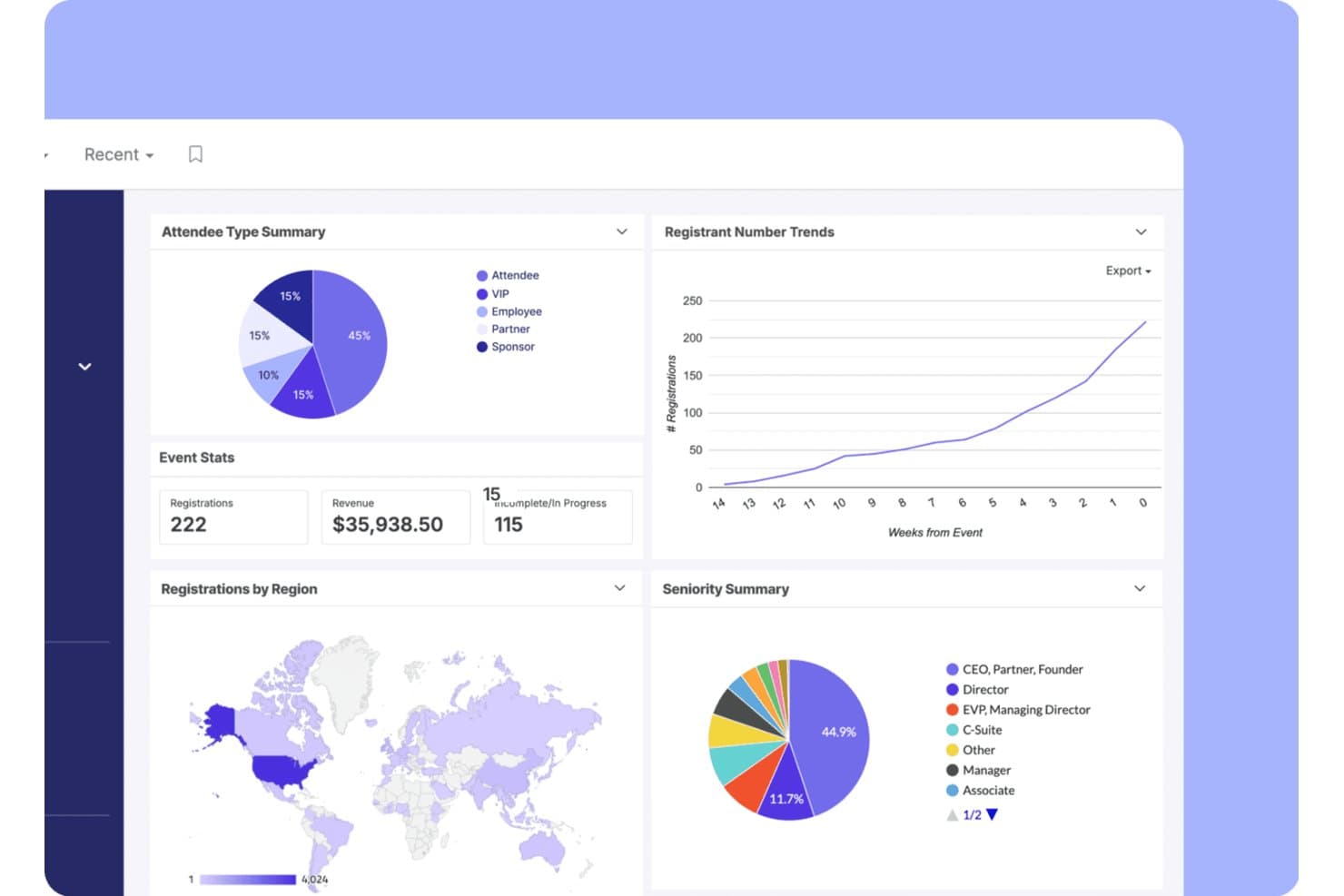
Swoogo houdt registraties, omzet en trends onder deelnemers bij in één dashboard. Swoogo is een enterpriseplatform voor evenementenregistratie, gebaseerd op een licentiemodel met een vaste jaarlijkse vergoeding. Het biedt onbeperkte evenementen, evenementwebsites in de eigen huisstijl, voorwaardelijke registratieformulieren, inchecken op locatie en uitgebreide CRM-integraties.
Voor wie is Swoogo het meest geschikt?
Swoogo is zeer geschikt voor grote kerken en denominatieve organisaties die professionele conferenties en leiderschapstoppen organiseren met speciaal evenementpersoneel.
Waarom ik voor Swoogo koos
Swoogo staat op mijn shortlist omdat het licentiemodel met een vaste vergoeding echt is ontworpen voor organisaties die op grote schaal evenementen organiseren. Ik vind het geweldig dat onbeperkte evenementen en onbeperkte registraties zijn inbegrepen voor één jaarlijkse prijs. Daardoor betaalt een denominatieve organisatie die een leiderschapstop, een regionale conferentie en een reeks kleinere bijeenkomsten organiseert hetzelfde tarief, ongeacht het volume. De bouwer voor voorwaardelijke registraties behoort tot de beste in zijn klasse: onbeperkte registratietypen, onbeperkte logische regels en goedkeuringsworkflows maken het mogelijk om in één formulier afzonderlijke registratiepaden voor sprekers, sponsors en algemene deelnemers te creëren.
Belangrijkste functies van Swoogo
- Go Onsite-app voor inchecken op locatie: Een mobiele app voor inchecken op locatie met het scannen van QR-codes, het afdrukken van badges op aanvraag, een zelfbedieningskioskmodus en het in realtime volgen van aanwezigen.
- Rapportage over meerdere evenementen: Een aanpasbare rapportbouwer met meer dan 15 ingebouwde rapporten, realtime dashboards en vergelijkingen van trends over meerdere evenementen, die kunnen worden gedeeld met gebruikers die Swoogo niet gebruiken.
- Geautomatiseerde e-mailreeksen: Een e-mailbouwer met slepen-en-neerzettenfunctionaliteit die communicatie vóór en na evenementen activeert op basis van het registratietype, gedrag en workflowregels.
- Ingebouwde CRM-synchronisatie: Tweerichtingsintegratie van gegevens met Salesforce, HubSpot en Marketo, waarmee registratie- en aanwezigheidsgegevens worden doorgestuurd zonder handmatige CSV-exports.
Swoogo-integraties
Swoogo biedt meer dan 30 integraties, waaronder Salesforce, HubSpot, Marketo, Zoom, ON24, Stripe, Avalara en Google Analytics. Het biedt ook een REST API, webhooks en Zapier voor aangepaste koppelingen.
Pros and Cons
Pros:
- Onbeperkte registraties zonder extra kosten
- Voorwaardelijke registratiebouwer die tot de beste in zijn klasse behoort
- Rapportage en dashboards over meerdere evenementen
Cons:
- Geen integraties met kerkbeheersystemen
- Geen werkstromen voor het inchecken van kinderen of gezinnen
Learn more about Swoogo: Beste voor registratie bij aankomst op locatie en het printen van badges
- Gratis proefversie beschikbaar
- Vanaf $7,500/evenement
Visit WebsiteCustomer Rating:4.7/5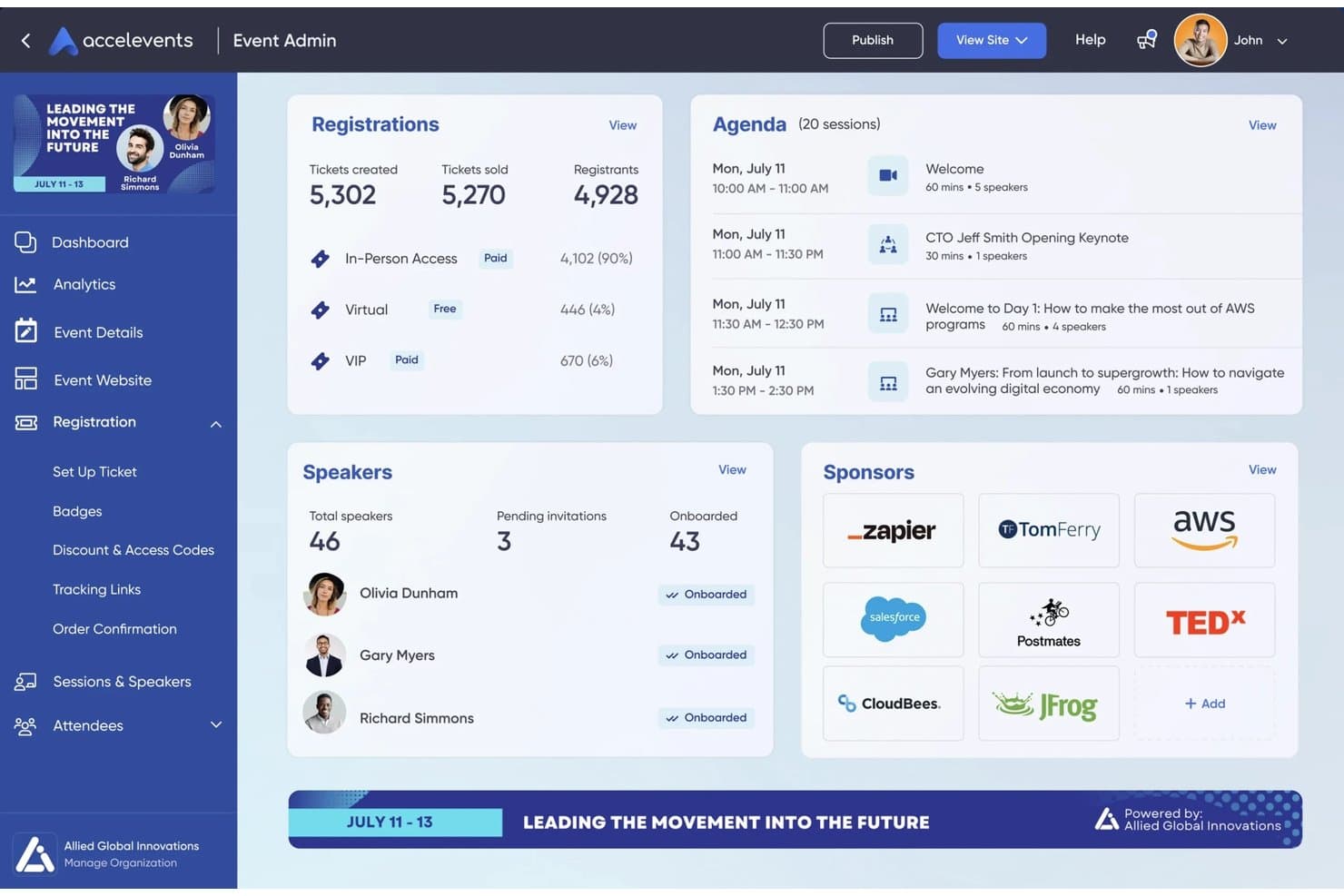
Accelevents centraliseert evenementregistraties, agenda, sprekers en sponsors in één dashboard. Accelevents is een platform voor evenementregistratie en -beheer dat ticketverkoop, aangepaste registratieformulieren, betalingsverwerking, registratie bij aankomst op locatie, badges printen en rapportage van deelnemersgegevens in één systeem combineert.
Voor wie is Accelevents het meest geschikt?
Accelevents is zeer geschikt voor professionele evenemententeams en non-profitorganisaties die grootschalige conferenties, beurzen of fondsenwervingsactiviteiten organiseren en behoefte hebben aan betrouwbare registratie bij aankomst op locatie en het printen van badges.
Waarom ik Accelevents heb gekozen
Accelevents staat op mijn voorkeurslijst vanwege de manier waarop het omgaat met de praktische realiteit van een groot evenement: honderden mensen snel door de deur krijgen en naar de juiste sessies leiden. Ik vind het geweldig dat de iPad-kioskconfiguratie badges in ongeveer 3 seconden afdrukt en in de offlinemodus werkt, zodat een instabiele wifi-verbinding op de locatie je rij voor registratie bij aankomst niet ophoudt. Met de badge-ontwerper kun je ook voorwaardelijke afbeeldingen en dynamische tekst instellen op basis van registratieantwoorden. Daardoor kunnen VIP-deelnemers, exposanten en deelnemers met algemene toegang allemaal verschillende, printklare badges krijgen vanuit één werkstroom.
Belangrijkste functies van Accelevents
- Bouwer voor aangepaste registratieformulieren: Maak onbeperkt veel registratiepaden met voorwaardelijke logica, routeringsregels, goedkeuringsworkflows en aangepaste velden op ticketniveau.
- Hulpmiddelen voor stille veilingen en donaties: Organiseer stille veilingen waarbij deelnemers via sms kunnen bieden en verzamel geïntegreerde donaties rechtstreeks binnen het afrekenproces voor evenementregistratie.
- Natieve CRM-synchronisatie: Maak een bidirectionele verbinding met Salesforce, HubSpot en Marketo om deelnemersgegevens actueel te houden in je marketing- en verkoopsystemen.
- Registratie per sessie: Houd aanwezigheid bij en beheer de capaciteit op het niveau van individuele sessies, met ondersteuning voor het bijhouden van studiepunten voor permanente educatie.
Integraties van Accelevents
Accelevents biedt native integraties met Salesforce, HubSpot, Marketo, Salesforce Pardot, NetForum AMS, Novi AMS, Protech, Zoom, Google Analytics en Google Tag Manager. Het biedt ook REST API's, webhooks en Zapier-connectiviteit voor aangepaste verbindingen.
Pros and Cons
Pros:
- Badges op locatie afdrukken in ongeveer drie seconden
- Zelfbedieningsregistratie bij aankomst werkt in de offlinemodus
- Gecombineerde werkstroom voor registratie, veilingen en donaties
Cons:
- Geen native integratie met een kerkbeheersysteem
- Geen registratie bij aankomst voor gezinnen of kindveiligheidsfuncties
Learn more about Accelevents: Het beste voor het organiseren van virtuele evenementen
- Gratis demo beschikbaar
- Vanaf $499/gebruiker/maand (jaarlijks gefactureerd)
Visit WebsiteCustomer Rating:4.5/5
Bizzabo ondersteunt virtuele evenementen met betrokkenheid en analyses. Bizzabo is een veelzijdig platform voor evenementenbeheer dat zeer geschikt is voor kerken en geloofsorganisaties die virtuele, hybride of fysieke evenementen organiseren. Het helpt kerkelijke teams bij het plannen en uitvoeren van onlineconferenties, leiderschapstoppen, trainingssessies en livestreambijeenkomsten, met tools voor registratie, betrokkenheid en het bijhouden van prestaties.
Waarom ik voor Bizzabo heb gekozen: Bizzabo werkt goed voor kerken omdat het virtuele, hybride en fysieke evenementen binnen één platform ondersteunt, waardoor zowel lokale als op afstand aangesloten gemeenten gemakkelijk kunnen worden bereikt. Kerken kunnen livestreams, interactieve aanbiddingssessies, panelgesprekken en workshops organiseren en deelnemers betrekken via peilingen en Q&A. Aanpasbare evenementpagina's helpen een consistente huisstijl te behouden, en gedetailleerde analyses stellen kerkleiders in staat om de aanwezigheid, deelname en algehele betrokkenheid bij evenementen van elke omvang te meten.
Opvallende functies en integraties:
Functies omvatten aanpasbare opties voor huisstijl, netwerkmogelijkheden en automatisering van e-mailcampagnes. Je kunt de realtime functies voor publieksbetrokkenheid gebruiken om deelnemers actief betrokken te houden. Het platform biedt ook uitgebreide rapportagemogelijkheden voor analyses na afloop van het evenement.
Integraties omvatten Salesforce Campaigns, Marketo, HubSpot, Google Analytics en meer.
Pros and Cons
Pros:
- Effectief voor grote virtuele evenementen
- Gedetailleerde prestatieanalyses
- Realtime publieksbetrokkenheid
Cons:
- De kwaliteit van de ondersteuning kan wisselend zijn
- Beperkte flexibiliteit in het ontwerp
Learn more about Bizzabo: Beste voor virtuele vakbeurzen
- Gratis demo beschikbaar
- Prijzen op aanvraag
Visit WebsiteCustomer Rating:4.7/5
vFairs organiseert meeslepende virtuele vakbeurzen. vFairs is een virtueel evenementenplatform dat zeer geschikt is voor kerken en geloofsgebaseerde organisaties die online conferenties, bedieningsexpo's, trainingsevenementen en grote virtuele bijeenkomsten organiseren. Het helpt kerken meeslepende digitale ervaringen te creëren met tools voor netwerken, het hosten van sessies en het betrekken van deelnemers in een visueel interactieve omgeving.
Waarom ik vFairs heb gekozen: vFairs werkt goed voor kerkevenementen die baat hebben bij een meer meeslepende virtuele opzet, zoals bedieningsbeurzen, leiderschapsconferenties of wereldwijde bijeenkomsten. Het platform ondersteunt interactieve virtuele stands, die kerken kunnen gebruiken voor bedieningen, zendingswerk, sponsors of bronnen, evenals live webinars voor preken, workshops en paneldiscussies. Netwerklounges en chatfuncties stimuleren verbinding en gemeenschap onder deelnemers, terwijl ingebouwde analyses kerkleiders helpen de betrokkenheid te meten en het succes van virtuele evenementen te evalueren.
Belangrijkste functies en integraties:
Functies omvatten aanpasbare virtuele lobby's, spelelementen en mogelijkheden voor livestreaming. Je kunt virtuele stands instellen met downloads van bronnen en video's. Het platform ondersteunt ook meertalige opties om een wereldwijd publiek te bereiken.
Integraties omvatten Salesforce CRM, Zoom, Marketo, HubSpot en meer.
Pros and Cons
Pros:
- Ideaal voor virtuele vakbeurzen
- Biedt interactieve stands voor exposanten
- Ondersteunt meertalige evenementen
Cons:
- Complexe configuratie voor 3D-omgevingen en stands
- Meertalige configuraties kunnen begeleiding vereisen
Learn more about vFairs:

RainFocus houdt evenementprestaties op grote schaal bij. RainFocus is een platform voor evenementenbeheer dat zeer geschikt is voor kerken en geloofsorganisaties die grote conferenties, congressen of meerdaagse bedieningsevenementen organiseren. Het biedt hulpmiddelen voor registratie, betrokkenheid van deelnemers en het bijhouden van prestaties, waardoor kerkelijke teams complexe evenementen met meerdere sessies, programmalijnen en activiteiten kunnen beheren.
Waarom ik RainFocus heb gekozen: RainFocus is een goede keuze voor kerkevenementen waarvoor gedetailleerde inzichten in aanwezigheid en betrokkenheid nodig zijn. Het platform biedt geavanceerde analyses waarmee het gedrag en de deelname van bezoekers in realtime kunnen worden gevolgd. Kerken kunnen rapporten aanpassen om de populariteit van sessies, betrokkenheidsniveaus en de algehele effectiviteit van evenementen te evalueren. Dankzij de ondersteuning voor complexe evenementstructuren en gepersonaliseerde ervaringen voor deelnemers kunnen kerkleiders gegevens gebruiken om toekomstige conferenties en grootschalige bijeenkomsten te verbeteren.
Opvallende functies en integraties:
Functies omvatten aanpasbare dashboards, realtime gegevensvisualisatie en geavanceerde rapportagetools. Je kunt meerdere evenementen beheren vanuit één interface. Het platform ondersteunt ook gepersonaliseerde contentlevering om de betrokkenheid van deelnemers te vergroten.
Integraties omvatten Salesforce CRM, Marketo, HubSpot, Slack, Zoom en meer.
Pros and Cons
Pros:
- Gedetailleerde data-analyse beschikbaar
- Ondersteunt complexe evenementstructuren
- Realtime bijhouden van betrokkenheid
Cons:
- Complex datamodel en complexe machtigingsconfiguratie
- Beheer van meerdere evenementen kan ondersteuning vereisen
Learn more about RainFocus:
Andere evenementregistratiesoftware
Hier zijn enkele aanvullende opties voor evenementregistratiesoftware die mijn selectie niet hebben gehaald, maar die toch de moeite waard zijn om te bekijken:
- 11RegFoxBeste voor budgetvriendelijke prijzen
- 12BrushfireBeste voor geloofsgebaseerde kampen en retraite-inschrijvingen
- 13EventbriteIdeaal voor kleine tot middelgrote evenementen
- 14EventleafMeest geschikt voor het inchecken bij evenementen voor professionele ontwikkeling
- 15EventzillaBeste voor aanpasbare registratie
- 16Webex EventsIdeaal voor volledig conferentiebeheer
- 17TicketbudBeste voor flexibele ticketverkoop
- 18Cvent SplashIdeaal voor evenementpagina's met een huisstijl
- 19Planning Center RegistrationsHet meest geschikt voor registratieworkflows voor kerkelijke suites
- 20SplashIdeaal voor evenementenprogramma's die met marketingtechnologie zijn geïntegreerd
Hoe ik software voor evenementenregistratie beoordeel
Ik verdeel mijn beoordeling in twee lagen: basisvereisten waaraan elke tool moet voldoen—zoals gezinsregistratie, ChMS-synchronisatie en betalingsverwerking—en de onderscheidende factoren die de beste tools onderscheiden.
Basisfunctionaliteit (Vereisten voor deze lijst)
Wanneer ik tools voor mijn lijst selecteer, beoordeel ik elke tool op een schaal van 0 (biedt de functionaliteit niet aan) tot 5 (blink uit op dit gebied) voor elke onderstaande basisfunctionaliteit. Vervolgens bereken ik de totaalscore van de tool als percentage. Elke tool moet een minimale totaalscore van 65% behalen om in aanmerking te komen voor opname.
- Formulieren voor evenementenregistratie: Ik zoek naar flexibele formulierbouwers die omgaan met de realiteit van kerkelijke programma's—zoals sessieselectie voor VBS, capaciteitslimieten voor retraites en wachtlijsten voor populaire kleine groepen.
- Betalingsverwerking: Elke tool moet het innen van evenementenkosten ondersteunen. Ik controleer daarnaast op extra mogelijkheden, zoals betalingsregelingen voor kampkosten, optionele donatie-opties en kortings- of beurscodes.
- ChMS-integratie: Of een platform nu synchroniseert met Planning Center, Breeze of een ander ChMS, ik beoordeel hoe goed registratiegegevens in bestaande ledenprofielen terechtkomen zonder handmatige invoer.
- Beheer van deelnemers & gezinnen: Een ouder die drie kinderen inschrijft voor een weekendretraite heeft registratie op gezinsniveau, velden voor voogden, medische informatie en digitale toestemmingsverklaringen nodig—dus naar al deze mogelijkheden zoek ik.
- Geautomatiseerde communicatie: Ik controleer of bevestigingsmails, herinneringen aan evenementen en opvolging na evenementen automatisch kunnen worden geactiveerd, in plaats van dat medewerkers elke e-mail handmatig moeten versturen.
- Inchecken & aanwezigheidsregistratie: Veilig inchecken van kinderen met bijbehorende ophaallabels is erg belangrijk, evenals digitale presentieregistratie voor lessen, diensten en programma's door de week.
Zodra ik een lijst heb met tools die aan deze criteria voldoen, bekijk ik wat elk platform onderscheidt.
Onderscheidende factoren (Wat leveranciers onderscheidt)
Zo vergelijk ik verschillende leveranciers:
Opvallende functies
Ondersteuning voor terugkerende evenementen is erg belangrijk wanneer je kerk wekelijks kleine groepen of meerweekse lessen organiseert waarvoor doorlopende deelnemerslijsten nodig zijn. Ik kijk ook naar de planning van vrijwilligers—vrijwilligers kunnen toewijzen en informeren vanuit dezelfde plek waar je registraties beheert, bespaart coördinatoren veel tijd. Fondsenwervingsfuncties zijn ook het beoordelen waard, vooral voor kampen of zendingsreizen waarbij gezinnen mogelijk behoefte hebben aan prijzen volgens het principe "betaal wat je kunt" of sponsormogelijkheden om evenementen toegankelijk te maken.
Meer dan functies alleen
Het prijsmodel is belangrijk wanneer je met een kerkbudget werkt—ik controleer of een platform kortingen voor non-profitorganisaties, gratis abonnementen of redelijke transactiekosten biedt die niet ten koste gaan van de inkomsten uit kampen of retraites. Gegevensbeveiliging en naleving van veiligheidsvoorschriften voor kinderen wegen ook zwaar mee, vooral PCI-DSS-naleving en veilige incheckprocedures die de persoonlijke en medische informatie van minderjarigen beschermen. Ik beoordeel ook de ondersteuning bij de ingebruikname, omdat veel kerkenteams afhankelijk zijn van vrijwilligers met beperkte technische ervaring die toegankelijke trainingsmaterialen nodig hebben om aan de slag te kunnen.
De beste evenementregistratiesoftware kiezen
Het is gemakkelijk om verstrikt te raken in lange functielijsten en ingewikkelde prijsstructuren. Om je te helpen gefocust te blijven tijdens het doorlopen van jouw unieke softwareselectieproces, vind je hier een checklist met factoren om rekening mee te houden:
| Factor | Waar je op moet letten |
|---|---|
| FactorSchaalbaarheid | Waar je op moet lettenGroeit de software mee met je evenementen? Houd rekening met het aantal deelnemers dat je nu en in de toekomst verwacht. Zoek naar hulpmiddelen die een groter volume aankunnen. |
| FactorIntegraties | Waar je op moet lettenKan de software worden gekoppeld aan je bestaande hulpmiddelen? Controleer de compatibiliteit met CRM-systemen, marketingplatforms en betalingsproviders die je al gebruikt. |
| FactorAanpasbaarheid | Waar je op moet lettenKun je de software aanpassen aan jouw behoeften? Zorg ervoor dat je formulieren, huisstijl en gebruikerservaringen kunt aanpassen aan de specifieke vereisten van je evenement. |
| FactorGebruiksgemak | Waar je op moet lettenIs de software gebruiksvriendelijk voor je team? Beoordeel de interface en navigatie. Test de software met niet-technische gebruikers om zeker te weten dat deze toegankelijk is. |
| FactorImplementatie en ingebruikname | Waar je op moet lettenHoe snel kun je aan de slag? Zoek naar duidelijke processen voor ingebruikname, trainingsmateriaal en klantenondersteuning voor hulp tijdens de installatie. |
| FactorKosten | Waar je op moet lettenPast de software binnen je budget? Vergelijk prijsplannen en houd rekening met eventuele extra kosten voor functies of ondersteuning. Beoordeel of de waarde overeenkomt met de prijs. |
| FactorBeveiligingsmaatregelen | Waar je op moet lettenBeschermt de software je gegevens? Zorg ervoor dat deze voldoet aan de regelgeving voor gegevensbescherming en versleuteling en veilige betalingsverwerking biedt. |
| FactorBeschikbaarheid van ondersteuning | Waar je op moet lettenKrijg je hulp wanneer dat nodig is? Controleer de beschikbaarheid van klantenondersteuning, waaronder livechat, telefonische ondersteuning en reactietijden op vragen. |
Wat is software voor evenementregistratie?
De beste softwareoplossingen voor evenementregistratie zijn hulpmiddelen waarmee organisatoren aanmeldingen voor evenementen, gegevens van deelnemers en betalingsverwerking kunnen beheren. Evenementplanners, marketeers en coördinatoren gebruiken deze hulpmiddelen doorgaans om het evenementenbeheer te vereenvoudigen en de ervaringen van deelnemers te verbeteren. Aanpasbare registratieformulieren, betalingsgateways en rapportagefuncties helpen bij efficiënte evenementenplanning, gegevensbeheer en financiële transacties. Deze hulpmiddelen bieden waarde door tijd te besparen, fouten te verminderen en de algemene organisatie van evenementen te verbeteren.
Functies
Let bij het kiezen van software voor evenementregistratie op de volgende belangrijke functies:
- Aanpasbare registratieformulieren: Hiermee kun je de registratiestroom van je evenement afstemmen, waardoor de gebruikerservaring en het verzamelen van gegevens worden verbeterd.
- Betalingsverwerking: Maakt veilige transacties mogelijk en biedt meerdere betalingsopties om tegemoet te komen aan verschillende voorkeuren van deelnemers.
- Rapportage en analyses: Bieden inzicht in de prestaties van evenementen, zodat je datagestuurde beslissingen kunt nemen voor toekomstige evenementen.
- Deelnemersbeheer: Vereenvoudigt het bijhouden en organiseren van informatie over deelnemers, waardoor communicatie en logistiek gemakkelijker te beheren zijn.
- Integratiemogelijkheden: Maak verbinding met hulpmiddelen zoals CRM- en marketingplatforms om werkstromen te organiseren en de consistentie van gegevens te verbeteren.
- Mobiele toegang: Maakt beheer onderweg en het inchecken van deelnemers mogelijk, waardoor de flexibiliteit en efficiëntie tijdens evenementen toenemen.
- E-mail automatisering: Verstuurt automatische bevestigingsmails en herinneringen, zodat deelnemers tijdig informatie ontvangen zonder handmatig werk.
- Ondersteuning voor virtuele evenementen: Biedt hulpmiddelen voor het organiseren van online evenementen, waaronder livestreaming en interactieve functies, om het bereik van je evenement te vergroten.
- Beveiligingsmaatregelen: Zorgen voor gegevensbescherming en naleving van regelgeving, waardoor informatie over deelnemers en transacties wordt beschermd.
- Netwerkfuncties: Bevorderen interactie tussen deelnemers via functies zoals chat en forums, waardoor de betrokkenheid en waarde van het evenement toenemen.
Voordelen
Het implementeren van de beste software voor evenementregistratie biedt verschillende voordelen voor je team en je bedrijf. Hier zijn enkele voordelen waar je naar kunt uitkijken:
- Tijdsbesparing: Geautomatiseerde registratie- en betalingsprocessen maken tijd vrij voor je team, zodat het zich op andere taken voor de evenementenplanning kan richten.
- Verbeterde nauwkeurigheid: Vermindert fouten bij handmatige gegevensinvoer door informatie over deelnemers rechtstreeks via aanpasbare formulieren te verzamelen.
- Verbeterde deelnemerservaring: Biedt eenvoudige registratie en communicatie, waardoor tevredenheid en betrokkenheid toenemen.
- Datagestuurde inzichten: Biedt gedetailleerde analyses en rapportages, zodat je het succes van evenementen kunt evalueren en weloverwogen beslissingen kunt nemen.
- Schaalbaarheid: Ondersteunt evenementen van verschillende omvang, zodat je evenementen kunt uitbreiden zonder van software te hoeven veranderen.
- Verbeterde beveiliging: Beschermt gevoelige gegevens van deelnemers via veilige betalingsgateways en naleving van normen voor gegevensbescherming.
- Betere communicatie: Automatisering van e-mailherinneringen en updates zorgt ervoor dat deelnemers tijdig informatie ontvangen en vermindert handmatige opvolging.
Kosten en prijzen
Voor het selecteren van de beste software voor evenementregistratie is inzicht nodig in de verschillende beschikbare prijsmodellen en abonnementen. De kosten variëren afhankelijk van functies, teamgrootte, uitbreidingen en meer. De onderstaande tabel geeft een overzicht van veelvoorkomende abonnementen, hun gemiddelde prijzen en de gebruikelijke functies die zijn inbegrepen in de beste softwareoplossingen voor evenementregistratie:
Vergelijkingstabel voor abonnementen van de beste software voor evenementregistratie
| Type abonnement | Gemiddelde prijs | Veelvoorkomende functies |
|---|---|---|
| Type abonnementGratis abonnement | Gemiddelde prijs$0 | Veelvoorkomende functiesBasisregistratieformulieren, beperkte rapportage en basisondersteuning via e-mail |
| Type abonnementPersoonlijk abonnement | Gemiddelde prijs$9-$30/gebruiker/maand | Veelvoorkomende functiesAanpasbare formulieren, basisanalyses, ondersteuning via e-mail en betalingsverwerking |
| Type abonnementZakelijk abonnement | Gemiddelde prijs$50-$100/gebruiker/maand | Veelvoorkomende functiesGeavanceerde analyses, integraties met CRM-hulpmiddelen, prioriteitsondersteuning en aanpasbare huisstijl |
| Type abonnementAbonnement voor grote ondernemingen | Gemiddelde prijs$150-$499/gebruiker/maand | Veelvoorkomende functiesVolledige aanpassing, een toegewezen accountmanager, gedetailleerde analyses en ondersteuning voor meerdere evenementen. |
Veelgestelde vragen over de beste software voor evenementregistratie
Hier vindt u antwoorden op enkele veelgestelde vragen over software voor evenementregistratie:
Wat is het verschil tussen software voor evenementregistratie en software voor evenementenbeheer?
Tools voor evenementregistratie richten zich op het beheren van aanmeldingen en betalingen van deelnemers, terwijl software voor evenementenbeheer uitgebreidere functionaliteiten omvat, zoals planning, locatiebeheer en evenementenmarketing. Als u alles-in-één-beheertools nodig hebt, kunt u een platform voor evenementenbeheer overwegen. Voor eenvoudige registratiebehoeften kan een registratietool volstaan.
Kan software voor evenementregistratie internationale evenementen verwerken?
Ja, veel oplossingen ondersteunen internationale evenementen door meertalige opties aan te bieden en meerdere valuta te verwerken. Controleer of de software die u overweegt deze functies biedt, vooral als u van plan bent internationale evenementen te organiseren. Dit zorgt voor probleemloze transacties en een betere ervaring voor internationale deelnemers.
Hoe veilig is software voor evenementregistratie?
De meeste software voor evenementregistratie bevat beveiligingsmaatregelen zoals gegevensversleuteling en veilige betalingsgateways. Controleer altijd of de software voldoet aan relevante regelgeving voor gegevensbescherming, zoals de AVG, om de informatie van uw deelnemers te beschermen en mogelijke juridische problemen te voorkomen. Vraag de leverancier naar hun specifieke beveiligingsprotocollen.
Kan ik het uiterlijk van mijn evenementregistratiepagina aanpassen?
Ja, op de meeste platforms kunt u de registratiepagina aanpassen aan uw huisstijl. Meestal kunt u kleuren, logo’s en de indeling aanpassen. Deze aanpassingen helpen de consistentie van uw merk te behouden en geven uw evenement een professionele uitstraling. Controleer voordat u een platform kiest in hoeverre u het uiterlijk kunt aanpassen.