

Bestuursbeheersoftware voor non-profitorganisaties is een digitaal platform waarmee je bestuur vergaderingen kan organiseren, documenten kan delen en bestuurstaken op één plek kan beheren. Als je zoekt naar manieren om je bestuur verbonden, geïnformeerd en gefocust op de missie te houden—vooral met beperkte tijd en middelen—is het essentieel om de juiste software te vinden.
Deze lijst helpt je toonaangevende opties te vergelijken, zodat je de juiste bestuursoplossing kunt kiezen die aansluit bij de behoeften van je organisatie, je leiderschap ondersteunt en de impact van je missie versterkt.
Waarom u onze softwareaanbevelingen kunt vertrouwen
6,700+
Reviews
20
Industry experts
16+
Evaluation factors
14
Years
Ons team test en beoordeelt software sinds 2012. Als kerkleiders weten we zelf hoe moeilijk — en belangrijk — het is om de juiste software te kiezen.
Voor deze gids hebben we tools geëvalueerd met behulp van praktijktests en onafhankelijk onderzoek, waarbij we tools beoordeelden aan de hand van onze selectiecriteria.
Onze reviews weerspiegelen ons menselijke redactionele oordeel, geen verkooppraatje.
Vergelijkingstabel: bestuursbeheersoftware voor non-profitorganisaties
Deze vergelijkingstabel vat de prijsgegevens van mijn belangrijkste keuzes voor bestuursbeheersoftware voor non-profitorganisaties samen.
| Tool | Best For | Trial Info | Price | ||
|---|---|---|---|---|---|
| 1 | Beste keuze voor realtime samenwerkingstools | Gratis proefperiode + gratis demo beschikbaar | Prijs op aanvraag | Website | |
| 2 | Het beste voor gecentraliseerd delen van documenten | Gratis proefperiode van 14 dagen beschikbaar | Vanaf $20.99/gebruiker/maand (jaarlijks gefactureerd) | Website | |
| 3 | Het beste voor geavanceerde analyse en rapportage | Gratis demo beschikbaar | Prijzen op aanvraag | Website | |
| 4 | Beste voor AI-gestuurde agenda- en notulencreatie | Gratis demo beschikbaar | Prijs op aanvraag | Website | |
| 5 | Best voor veilige virtuele vergaderingen | Gratis proefversie beschikbaar | Prijzen op aanvraag | Website | |
| 6 | Het beste voor geautomatiseerde vergaderwerkstromen | 30 dagen gratis proefperiode + gratis demo beschikbaar | Vanaf $165/bestuur/maand | Website | |
| 7 | Beste voor toegewijde klantenondersteuning | Gratis proefversie beschikbaar | Prijs op aanvraag | Website | |
| 8 | Het beste voor wereldwijde bestuursbehoeften | Gratis demo beschikbaar | Prijzen op aanvraag | Website | |
| 9 | Beste voor een intuïtieve gebruikersinterface | Gratis demo beschikbaar | Vanaf $49/maand | Website | |
| 10 | Beste met onbeperkte gebruikerstoegang | Gratis proefperiode van 30 dagen + gratis demo beschikbaar | Vanaf $9.99/gebruiker/maand | Website |


Beoordelingen van de beste bestuursbeheersoftware voor non-profitorganisaties
Hieronder vind je mijn gedetailleerde samenvattingen van bestuursbeheersoftware voor non-profitorganisaties die in mijn selectie terechtkwam. In mijn beoordelingen bekijk ik de functies, beste gebruiksscenario’s en prijzen van elk platform in detail, zodat je de beste optie voor je organisatie kunt vinden.
 Beste keuze voor realtime samenwerkingstools
- Gratis proefperiode + gratis demo beschikbaar
- Prijs op aanvraag
Visit WebsiteCustomer Rating:4.7/5
OnBoard helpt besturen zich voor te bereiden, te vergaderen en samen te werken in één overzichtelijke werkruimte. OnBoard onderscheidt zich voor non-profitorganisaties die realtime samenwerking tijdens bestuursvergaderingen en documentbeoordelingen willen verbeteren. Het platform is gebouwd voor organisaties die bestuursleden betrokken willen houden en willen laten samenwerken, of ze nu in dezelfde ruimte zijn of op afstand werken. De live annotatie- en discussietools van OnBoard helpen teams snel beslissingen te nemen en ervoor te zorgen dat iedereen op één lijn zit.
Waarom ik voor OnBoard koos
Wat mij aantrok in OnBoard is de focus op realtime samenwerkingstools die non-profitbesturen helpen efficiënter samen te werken. Het platform biedt live documentannotatie, zodat bestuursleden tijdens vergaderingen samen agenda's en rapporten kunnen markeren. Ik waardeer de ingebouwde discussiethreads, waarmee gebruikers rechtstreeks op documenten opmerkingen kunnen plaatsen en vragen kunnen stellen zonder van platform te wisselen. Deze functies maken OnBoard een sterke keuze voor non-profitorganisaties die bestuursbetrokkenheid hoog willen houden en besluitvorming transparant willen maken.
Belangrijkste functies van OnBoard
Enkele andere functies in OnBoard die non-profitorganisaties waardevol kunnen vinden, zijn:
- Bouwer voor bestuursboeken: Hiermee kunt u vergadermateriaal samenvoegen tot één georganiseerd digitaal bestuursboek.
- Elektronische handtekeningen: Hiermee kunnen bestuursleden documenten veilig binnen het platform ondertekenen.
- Gedetailleerde machtigingen: Hiermee kunt u de toegang tot gevoelige documenten en vergadermateriaal voor verschillende gebruikers beheren.
- Vergaderanalyses: Biedt inzicht in bestuursbetrokkenheid en deelname aan vergaderingen via ingebouwde analysetools.
OnBoard-integraties
Integraties omvatten Microsoft 365, Docusign, Zoom, Microsoft Teams en Google Workspace.
Pros and Cons
Pros:
- Gedetailleerde gebruikersmachtigingen voor gevoelig materiaal
- Vergaderanalyses om bestuursbetrokkenheid bij te houden
- Bouwer voor bestuursboeken voor georganiseerde vergadervoorbereiding
Cons:
- Af en toe vertragingen bij het synchroniseren met de agenda
- De prijzen zijn niet transparant op de website
Learn more about OnBoard: Het beste voor gecentraliseerd delen van documenten
- Gratis proefperiode van 14 dagen beschikbaar
- Vanaf $20.99/gebruiker/maand (jaarlijks gefactureerd)
Visit WebsiteCustomer Rating:4.8/5
Boardable zorgt ervoor dat een klein non-profitbestuur op één lijn blijft met agenda's en taken. Als je non-profitorganisatie een centrale plek nodig heeft om bestuursdocumenten en communicatie te organiseren, is Boardable het bekijken waard. Dit platform is ontworpen voor organisaties die agenda's, notulen en bestanden toegankelijk willen houden voor bestuursleden in één beveiligde hub. Boardable helpt bij het vereenvoudigen van het delen van documenten en de voorbereiding van vergaderingen, vooral voor teams die meerdere commissievergaderingen of deelnemers op afstand beheren.
Waarom ik voor Boardable heb gekozen
Ik heb voor Boardable gekozen omdat het een gerichte oplossing biedt voor non-profitorganisaties die behoefte hebben aan gecentraliseerd delen van documenten. Met het platform kun je bestuursmappen, agenda's en vergadernotulen opslaan, organiseren en verspreiden in een beveiligde, doorzoekbare opslagplaats. Ik waardeer hoe het documentencentrum van Boardable bestuursleden vanaf elk apparaat toegang geeft tot de meest recente bestanden, waardoor verwarring over e-mailbijlagen of verouderde versies wordt verminderd. Dankzij de toestemmingsinstellingen kun je bovendien beheren wie gevoelige informatie kan bekijken of bewerken, wat vooral belangrijk is voor non-profitbesturen die vertrouwelijke informatie verwerken.
Belangrijkste functies van Boardable
Enkele andere functies van Boardable die nuttig kunnen zijn voor non-profitorganisaties zijn:
- Vergaderplanner: Hiermee kun je vergadertijden coördineren door bestuursleden te peilen en automatisch de beste optie te vinden.
- Elektronische handtekeningen: Hiermee kunnen bestuursleden documenten veilig binnen het platform ondertekenen, waardoor vertragingen door papierwerk worden beperkt.
- Taakbeheer: Wijst actiepunten toe aan personen of commissies en houdt de voortgang tussen vergaderingen bij.
- Stemmingen en peilingen: Maakt beveiligd stemmen binnen het platform over moties of besluiten mogelijk, waarbij de resultaten worden vastgelegd voor toekomstig gebruik.
Integraties van Boardable
Integraties zijn onder andere beschikbaar met Zoom, Microsoft Teams, Google Drive, Microsoft OneDrive, Google Agenda, Outlook en meer.
Pros and Cons
Pros:
- Ingebouwde elektronische handtekening voor bestuursgoedkeuringen
- Stem- en peilingsfuncties binnen het platform
- Vergaderingen plannen met agenda-integraties
Cons:
- Beperkte aanpassingsmogelijkheden voor agendasjablonen
- Geen ingebouwde fondsenwerving of donorbeheer
Learn more about Boardable: Het beste voor geavanceerde analyse en rapportage
- Gratis demo beschikbaar
- Prijzen op aanvraag

Diligent ondersteunt complexe bestuursprocessen met beveiliging, analyses en audittrajecten. Non-profitbestuurders die dieper willen ingaan op de prestaties van het bestuur en trends op het gebied van bestuurstoezicht, kunnen Diligent bijzonder nuttig vinden. Dit platform onderscheidt zich door zijn geavanceerde analyse- en rapportagetools, waarmee besturen betrokkenheid, naleving en besluitvormingspatronen kunnen volgen. Diligent is geschikt voor organisaties die bestuursgegevens willen omzetten in bruikbare inzichten voor beter toezicht en meer transparantie.
Waarom ik voor Diligent heb gekozen
Voor non-profitbesturen die verder willen gaan dan basisrapportage, biedt Diligent geavanceerde analyses waarmee leiders datagestuurde beslissingen kunnen nemen. Het platform biedt aanpasbare dashboards en uitgebreide rapportagetools, zodat je bestuursbetrokkenheid, aanwezigheid en stemgedrag in de loop der tijd kunt volgen. Ik heb Diligent gekozen omdat de analysemogelijkheden het mogelijk maken trends te visualiseren en verbeterpunten op het gebied van bestuurstoezicht en naleving te identificeren. Deze mogelijkheden zijn bijzonder waardevol voor organisaties die aan belanghebbenden verantwoording en transparantie moeten aantonen.
Belangrijkste functies van Diligent
Enkele andere functies die Diligent nuttig maken voor non-profitbesturen zijn:
- Veilig delen van documenten: Hiermee kun je documenten en ander bestuursmateriaal uploaden, organiseren en verspreiden met gedetailleerde toegangsrechten.
- Vergaderagendabouwer: Hiermee kun je rechtstreeks binnen het platform agenda's maken, bewerken en delen.
- Verzamelen van elektronische handtekeningen: Hiermee kunnen bestuursleden documenten elektronisch ondertekenen voor snellere goedkeuringen.
- Toegang via mobiele app: Biedt een speciale mobiele app waarmee bestuursleden overal materiaal kunnen bekijken en kunnen deelnemen.
Integraties van Diligent
Integraties zijn niet openbaar beschikbaar.
Pros and Cons
Pros:
- Geavanceerde analyses voor het volgen van bestuursbetrokkenheid
- Aanpasbare dashboards voor rapportage over bestuurstoezicht
- Offline toegang voor annotaties in documenten
Cons:
- Complexe documentnavigatie
- Voor de beheerdersconfiguratie is ondersteuning van de leverancier nodig
Learn more about Diligent: Beste voor AI-gestuurde agenda- en notulencreatie
- Gratis demo beschikbaar
- Prijs op aanvraag
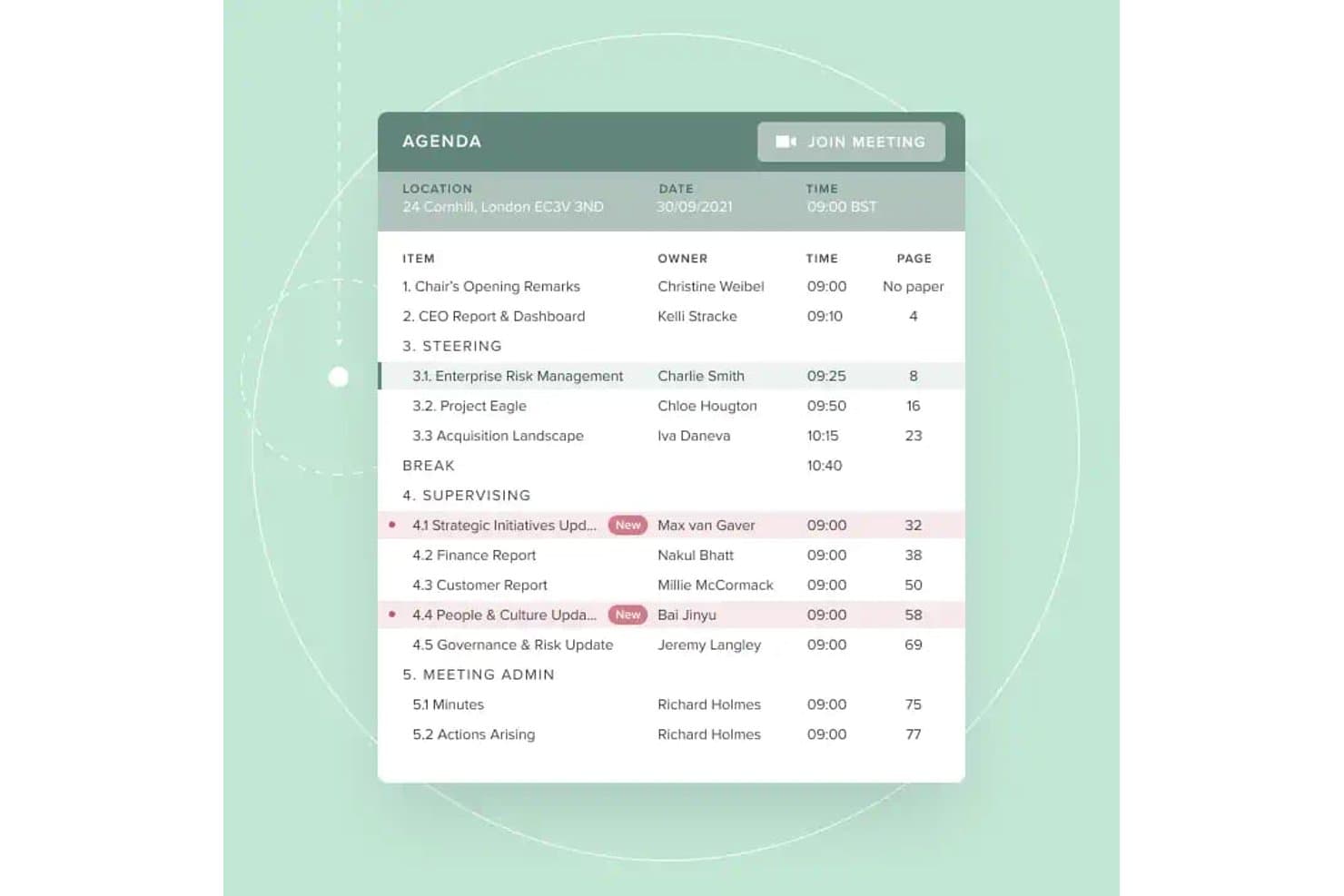
Board Intelligence biedt een gestructureerde digitale agendaweergave met verantwoordelijken voor agendapunten, tijdstippen, paginaverwijzingen en een directe knop 'Deelnemen aan vergadering' voor eenvoudigere bestuursvergaderingen. Board Intelligence is een platform voor bestuursbeheer dat agendaplanning, het samenstellen van bestuursstukken, met AI ondersteunde notulen, veilige documentdistributie en analyses van bestuursprestaties gedurende de volledige governancecyclus omvat.
Voor wie is Board Intelligence het meest geschikt?
Het is zeer geschikt voor governanceteams en bedrijfssecretarissen bij middelgrote tot grote non-profitorganisaties die meerdere besturen of commissies beheren met complexe rapportagecycli.
Waarom ik voor Board Intelligence heb gekozen
Board Intelligence staat op mijn shortlist omdat de door AI aangestuurde hulpmiddelen voor agenda's en notulen de administratieve werklast voor governanceteams echt verminderen. Ik vind het geweldig hoe de AI-notulist vergadertranscripten omzet in verzorgde conceptnotulen, terwijl de agendaplanner elk agendapunt rechtstreeks koppelt aan de strategische prioriteiten van de organisatie. In de praktijk kan mijn team een volledig, gestructureerd bestuursstukkenpakket samenstellen zonder het tijdens elke vergadercyclus vanaf nul te moeten opbouwen.
Belangrijkste functies van Board Intelligence
- Bestuursportaal: Distribueert digitale bestuursstukken veilig en geeft gebruikers direct toegang op verschillende apparaten.
- AI voor rapporten schrijven: Genereert duidelijke, voor het bestuur geschikte rapporten uit notities of documenten, rechtstreeks binnen Microsoft 365.
- Actiepuntenvolger: Legt actiepunten van het bestuur vast en volgt de voortgang tussen vergaderingen voor volledige verantwoordelijkheid.
- Eenmalige aanmelding: Hiermee kunnen gebruikers inloggen met bestaande bedrijfsgegevens, zodat veilige toegang eenvoudiger wordt.
Integraties van Board Intelligence
Board Intelligence integreert rechtstreeks met Microsoft 365, waaronder Microsoft Word via de invoegtoepassing voor AI-rapportage. Het kan agenda-uitnodigingen verzenden naar Outlook en andere belangrijke agendaplatforms.
Pros and Cons
Pros:
- Geautomatiseerde ondersteuning door AI bij het opstellen van agenda's en notulen
- Ondersteunt gedetailleerde toestemmingsbeheer voor documenten
- Sterke governanceworkflows voor non-profitbesturen
Cons:
- Ontbreekt aan een native mobiele app voor bestuursleden
- Kan overweldigend zijn voor beginnende gebruikers
Learn more about Board Intelligence: Best voor veilige virtuele vergaderingen
- Gratis proefversie beschikbaar
- Prijzen op aanvraag

Ideals Board ondersteunt wereldwijde besturen met veilige toegang en meertalige hulpmiddelen. Als je non-profitorganisatie privacy en vertrouwelijkheid tijdens bestuursvergaderingen moet prioriteren, is Ideals Board ontworpen met veilige virtuele samenwerking in gedachten. Het is vooral nuttig voor organisaties die gevoelige discussies of documenten behandelen en biedt geavanceerde beveiligingsfuncties die verder gaan dan standaardvideoconferenties. Met Ideals Board kun je virtuele vergaderingen organiseren, bestanden delen en bestuursactiviteiten beheren, terwijl je gegevens beschermd blijven.
Waarom ik Ideals Board heb gekozen
Beveiliging is vaak een belangrijke zorg voor besturen van non-profitorganisaties, vooral wanneer vergaderingen vertrouwelijke onderwerpen of gevoelige documenten omvatten. Ideals Board onderscheidt zich door de focus op veilige virtuele vergaderingen, met functies zoals versleutelde videoconferenties en gedetailleerde toegangscontroles voor deelnemers. Ik heb Ideals Board gekozen omdat je hiermee kunt beheren wie tijdens vergaderingen kan deelnemen, materialen kan bekijken of delen. Dat is essentieel voor organisaties met strenge privacyvereisten. Deze op beveiliging gerichte hulpmiddelen helpen non-profitorganisaties om vertrouwen en naleving te behouden tijdens samenwerking op afstand.
Belangrijkste functies van Ideals Board
Andere functies die Ideals Board nuttig maken voor besturen van non-profitorganisaties zijn onder meer:
- Documenten delen: Hiermee kun je bestuursdocumenten en bestanden veilig uploaden, organiseren en verspreiden.
- Agenda voor vergaderingen opstellen: Hiermee kun je voor elke vergadering gestructureerde agenda's maken en delen.
- Stemmen en peilingen: Maakt stemmen en besluitvorming tijdens virtuele sessies in realtime mogelijk.
- Audittrail: Houdt alle gebruikersacties en documentwijzigingen bij voor verantwoording.
Integraties van Ideals Board
Integraties zijn niet openbaar beschikbaar.
Pros and Cons
Pros:
- End-to-endversleuteling voor alle virtuele vergaderingen
- Audittrail registreert elke gebruikersactie
- Automatische quorumregistratie voor stemmingen
Cons:
- Beperkte offlinefunctionaliteit voor browsers
- Ontbreekt geavanceerde prestatieanalyses
Learn more about Ideals Board: Het beste voor geautomatiseerde vergaderwerkstromen
- 30 dagen gratis proefperiode + gratis demo beschikbaar
- Vanaf $165/bestuur/maand

BoardPro ondersteunt bestuursvergaderingen met stemmingen, notulen en het bijhouden van actiepunten. BoardPro is ontworpen voor non-profitorganisaties die werkstromen willen automatiseren en willen overstappen op een papierloze bestuursvergadering. Het is vooral nuttig voor organisaties die handmatige administratieve taken zoals het opstellen van agenda's, het maken van notulen en het bijhouden van actiepunten willen verminderen. Met BoardPro kunt u vergaderingen georganiseerd houden en ervoor zorgen dat opvolging niet tussen wal en schip valt.
Waarom ik voor BoardPro koos
BoardPro onderscheidt zich voor non-profitorganisaties die repetitieve vergadertaken willen automatiseren en bestuursactiviteiten soepel willen laten verlopen. De geautomatiseerde agendabouwer en tools voor het maken van notulen helpen u vergaderingen voor te bereiden en besluiten vast te leggen zonder handmatig werk. Ik vind het prettig dat BoardPro ook actiepunten bijhoudt en herinneringen verstuurt, zodat er tussen vergaderingen niets verloren gaat. Deze automatiseringen van werkstromen maken het voor non-profitbesturen eenvoudiger om georganiseerd te blijven en zich op hun missie te richten.
Belangrijkste functies van BoardPro
Enkele andere functies die BoardPro biedt voor non-profitbesturen zijn:
- Documentarchief: Slaat bestuursdocumenten en vergadermateriaal op een centrale, doorzoekbare locatie op.
- Bouwer voor bestuurspakketten: Voegt alle vergaderdocumenten samen in één georganiseerd bestuurspakket voor eenvoudige verspreiding.
- Besluitenregister: Legt bestuursbesluiten vast en houdt deze bij voor toekomstig gebruik en verantwoording.
- Verklaringen inzake belangenverstrengeling: Hiermee kunnen bestuursleden belangenverstrengelingen binnen het platform melden en beheren.
Integraties van BoardPro
Integraties zijn niet openbaar beschikbaar.
Pros and Cons
Pros:
- Automatiseert het documenteren van notulen
- Het besluitenregister houdt bestuursbesluiten bij
- Verklaringen inzake belangenverstrengeling zijn ingebouwd
Cons:
- Beperkte opties voor documentopmaak
- Geen ingebouwde functie voor videoconferenties
Learn more about BoardPro.com: Beste voor toegewijde klantenondersteuning
- Gratis proefversie beschikbaar
- Prijs op aanvraag

Aprio versterkt bestuursbeheer met vergaderbeheer en het bijhouden van naleving. Non-profitbesturen die tijdens hun volledige softwaretraject praktische ondersteuning willen, kunnen Aprio een uitstekende keuze vinden. Het platform is ontworpen voor organisaties die naast veilig documentbeheer en vergadertools waarde hechten aan responsieve, persoonlijke klantenservice. Aprio helpt teams met vertrouwen door bestuursbeheer te navigeren, vooral wanneer technische begeleiding of ondersteuning bij de introductie een prioriteit is.
Waarom ik voor Aprio koos
Voor non-profitleiders die bij elke stap betrouwbare hulp willen, springt de toegewijde klantenondersteuning van Aprio eruit. Het platform biedt ondersteuning bij de introductie en doorlopende training, waardoor teams nieuwe processen en functies gemakkelijker kunnen invoeren. Ik koos voor Aprio omdat het ondersteuningsteam telefonisch, per e-mail en via livechat beschikbaar is, zodat bestuursleden snel antwoorden kunnen krijgen wanneer er problemen ontstaan. Dit serviceniveau is vooral waardevol voor organisaties met beperkte IT-middelen of organisaties die nog niet bekend zijn met software voor bestuursbeheer.
Belangrijkste functies van Aprio
Enkele andere functies die Aprio nuttig maken voor non-profitbesturen zijn:
- Samensteller van bestuursmappen: Hiermee kunt u vergadermateriaal samenstellen en verspreiden in één georganiseerd bestand.
- Stemmen en enquêtes: Hiermee kunnen bestuursleden rechtstreeks binnen het platform over voorstellen stemmen of enquêtes invullen.
- Agendasynchronisatie: Integreert vergaderschema's met persoonlijke agenda's voor eenvoudigere planning.
- Versiebeheer van documenten: Houdt wijzigingen bij en bewaart een geschiedenis van documentupdates.
Integraties van Aprio
Integraties zijn niet openbaar beschikbaar.
Pros and Cons
Pros:
- Liveondersteuning beschikbaar per telefoon en chat
- Keuze uit locaties voor internationale gegevensopslag
- Inclusief onkostenrapportage voor bestuursleden
Cons:
- Geen openbare lijst van ingebouwde integraties
- Ontbreekt aan ingebouwde sjablonen voor bestuursenquêtes
Learn more about Aprio : Het beste voor wereldwijde bestuursbehoeften
- Gratis demo beschikbaar
- Prijzen op aanvraag

BoardWorks toont een dashboard voor vergaderbeheer met planningen en agenda’s. Non-profitorganisaties met internationale activiteiten of complexe bestuursbehoeften kunnen Computershare’s BoardWorks bijzonder relevant vinden. Dit platform is ontworpen om organisaties te helpen bestuursactiviteiten in meerdere landen en regelgevingsomgevingen te beheren. Het is een sterke keuze voor leiders die wereldwijde naleving, het veilig delen van documenten en meertalige bestuurscommunicatie moeten coördineren.
Waarom ik voor BoardWorks koos
Voor het beheren van non-profitbesturen met leden of activiteiten in meerdere landen onderscheidt Computershare BoardWorks zich door zijn mogelijkheden voor wereldwijd bestuur. Het platform ondersteunt meertalige interfaces en biedt hulpmiddelen voor het omgaan met regiospecifieke nalevingsvereisten, wat essentieel is voor organisaties die zich door verschillende wettelijke kaders bewegen. Ik koos voor Computershare omdat het non-profitorganisaties in staat stelt documenten veilig te delen en vergaderingen over landsgrenzen heen te coördineren zonder in te leveren op beveiliging of naleving van regelgeving. Deze functies maken het platform zeer geschikt voor non-profitorganisaties die toezicht en communicatie op internationale schaal moeten handhaven.
Belangrijkste functies van BoardWorks
Enkele andere functies die Computershare BoardWorks nuttig maken voor non-profitbesturen zijn:
- Offline toegangsmodus: Stelt bestuursleden in staat documenten en vergadermateriaal te bekijken zonder internetverbinding.
- Hulpmiddelen voor stemmingen en besluiten: Maakt veilig digitaal stemmen en het bijhouden van bestuursbesluiten mogelijk.
- Annotaties en notities maken: Stelt gebruikers in staat rechtstreeks in bestuursdocumenten privé- of gedeelde notities toe te voegen.
- Agenda-integratie: Synchroniseert bestuursvergaderingen en evenementen met externe agendatools voor eenvoudiger plannen.
Integraties van BoardWorks
De integraties omvatten Microsoft 365 en Docusign.
Pros and Cons
Pros:
- Meertalige ondersteuning voor internationale bestuursleden
- Offline toegang tot bestuursmateriaal
- Aanmeldingen met biometrische en tweefactorauthenticatie
Cons:
- Dubbele agenda-items tijdens updates
- Beperkte trainingsbronnen specifiek voor non-profitorganisaties
Learn more about BoardWorks: Beste voor een intuïtieve gebruikersinterface
- Gratis demo beschikbaar
- Vanaf $49/maand

Easy Board start bestuursworkflows snel op met veilige toegang tot vergaderingen. Voor non-profitbestuurders die bestuursportaalsoftware willen die voor iedereen gemakkelijk te gebruiken is, stelt Easy Board eenvoud centraal in het ontwerp. Het platform is ontwikkeld voor organisaties die bestuursleden snel moeten inwerken en vergaderingen, documenten en communicatie toegankelijk willen houden zonder technische obstakels. De intuïtieve interface helpt teams zich te richten op samenwerking en bestuur in plaats van op het navigeren door complexe software.
Waarom ik voor Easy Board heb gekozen
Wanneer ik op zoek ben naar bestuursbeheersoftware die non-profitorganisaties snel kunnen invoeren, let ik goed op hoe de interface gebruikers met uiteenlopende technische vaardigheden ondersteunt. Easy Board valt op door het overzichtelijke dashboard, dat vergaderingen, documenten en communicatie op een gemakkelijk te navigeren manier organiseert. Ik heb voor Easy Board gekozen omdat de agendaopbouwer met slepen en neerzetten en de gecentraliseerde documentbibliotheek bestuursleden helpen te vinden wat ze nodig hebben zonder verwarring. Deze functies maken het een sterke keuze voor organisaties die de trainingstijd willen beperken en iedereen betrokken willen houden.
Belangrijkste functies van Easy Board
Enkele andere functies die Easy Board praktisch maken voor non-profitbesturen zijn:
- RSVP- en aanwezigheidsregistratie: Hiermee kunt u uitnodigingen voor vergaderingen beheren en bijhouden wie van plan is aanwezig te zijn.
- Elektronische handtekeningen: Hiermee kunnen bestuursleden documenten elektronisch ondertekenen binnen het platform.
- Discussieonderwerpen: Ondersteunt doorlopende gesprekken die aan specifieke vergaderingen of documenten zijn gekoppeld.
- Op rollen gebaseerde machtigingen: Geeft u controle over bestuursrollen en over wat elke gebruiker kan bekijken of bewerken.
Integraties van Easy Board
Integraties zijn niet openbaar beschikbaar.
Pros and Cons
Pros:
- Agendaopbouwer met slepen en neerzetten voor vergaderingen
- RSVP-registratie voor aanwezigheid bij vergaderingen
- Discussieonderwerpen gekoppeld aan specifieke documenten
Cons:
- Geen ingebouwde iOS- of Android-apps
- Handmatige reorganisatie van pdf-bestanden is vaak vereist
Learn more about Easy Board: Beste met onbeperkte gebruikerstoegang
- Gratis proefperiode van 30 dagen + gratis demo beschikbaar
- Vanaf $9.99/gebruiker/maand

BoardCloud beschermt bestuursbestanden en versnelt vergaderingen met AI-transcriptie. BoardCloud is een platform voor bestuursbeheer, ontwikkeld voor non-profitorganisaties die grote of groeiende teams bij hun bestuursprocessen moeten betrekken. Het is zeer geschikt voor organisaties die onbeperkte gebruikerstoegang willen zonder zich zorgen te hoeven maken over extra kosten naarmate hun bestuur of commissies groeien. BoardCloud helpt je bij het beheren van vergaderingen en samenwerken via de flexibele interface voor bestuurssoftware.
Waarom ik voor BoardCloud heb gekozen
Voor non-profitorganisaties die veel mensen bij hun bestuursprocessen moeten betrekken, is de onbeperkte gebruikerstoegang van BoardCloud een groot voordeel. Je kunt zoveel bestuursleden, commissieleden of vrijwilligers toevoegen als je nodig hebt, zonder je zorgen te hoeven maken over een limiet of extra kosten. Ik waardeer het dat BoardCloud dit ondersteunt met functies zoals op groepen gebaseerde machtigingen en beheer van gebruikers in bulk, zodat je grote teams efficiënt kunt organiseren. Dit maakt het een praktische keuze voor organisaties met veranderende of complexe bestuursstructuren.
Belangrijkste functies van BoardCloud
Naast de onbeperkte gebruikerstoegang biedt BoardCloud verschillende andere functies voor besturen van non-profitorganisaties:
- Agendaopsteller: Hiermee kun je vergaderagenda's voor je bestuur maken, bewerken en delen.
- Documentenopslag: Slaat bestuursdocumenten, beleidsdocumenten en vergadermateriaal op één centrale locatie op.
- Stemmingen en besluiten: Biedt hulpmiddelen voor het uitvoeren van veilige online stemmingen en het bijhouden van bestuursbesluiten.
- Vergaderkalender: Toont komende vergaderingen en deadlines voor alle bestuursleden.
Integraties van BoardCloud
Integraties omvatten Microsoft Teams, Zoom en SharePoint.
Pros and Cons
Pros:
- Ondersteunt privéhosting op een lokale server
- Realtime gesynchroniseerde weergave van de vergaderagenda
- Geautomatiseerde generatie van PDF's van bestuursdocumenten
Cons:
- Brengt kosten per gigabyte in rekening voor extra opslaggebruik
- De mobiele app heeft geen administratieve functies
Learn more about BoardCloud:
Andere bestuursbeheersoftware voor non-profitorganisaties
Hier zijn enkele aanvullende opties voor bestuursbeheersoftware voor non-profitorganisaties die mijn selectie niet hebben gehaald, maar toch het bekijken waard zijn:
- 11Nasdaq Directors DeskHet beste voor nalevingsbeheer
- 12My Board ViewHet beste voor aanpasbare agendasjablonen
- 13BoardlogicHet beste met gedetailleerde toegangscontroles
Hoe ik software voor bestuursbeheer voor non-profitorganisaties beoordeel
Ik deel mijn beoordeling op in basiscriteria—zoals of een platform daadwerkelijk bestuursstukken en digitaal stemmen kan beheren—en onderscheidende factoren die tools voor behoeften op het gebied van kerkelijk bestuur van elkaar onderscheiden.
Kernfunctionaliteit (basisvereisten voor deze lijst)
Wanneer ik tools voor mijn lijst selecteer, beoordeel ik elk hulpmiddel op een schaal van 0 (biedt de functionaliteit niet) tot 5 (is uitstekend op dit gebied) voor elke hieronder vermelde kernfunctionaliteit. Vervolgens zet ik de totaalscore van de tool om in een percentage. Elke tool moet een minimale totaalscore van 55% behalen om in aanmerking te komen voor opname.
- Beheer van bestuursvergaderingen: Ik controleer of een tool de volledige levenscyclus van vergaderingen ondersteunt—het opstellen van agenda's, het samenstellen van bestuursstukken, het vastleggen van notulen en het bijhouden van actiepunten—zodat vrijwillige secretarissen niet alles handmatig bij elkaar hoeven te brengen.
- Beveiligde documentopslag: Statuten, financiële overzichten en beleidsmanuals hebben een afgeschermde opslaglocatie met versiebeheer nodig. Daarom beoordeel ik hoe elk platform bestuursdocumenten organiseert, beschermt en archiveert.
- Stemmingen & goedkeuringen: Ik let op digitale moties, werkstromen voor besluiten en ondersteuning voor elektronische handtekeningen, waarmee besturen tussen vergaderingen door besluiten kunnen nemen—zoals het goedkeuren van een huurcontract voor een gebouw zonder een speciale vergadering bijeen te roepen.
- Beheer van leden & commissies: Elke tool moet profielen van bestuursleden, zittingsperioden en commissie-indelingen bijhouden, zodat leiderschapsoverdrachten tijdens jaarlijkse verkiezingen geen hiaten in de informatievoorziening veroorzaken.
- Beveiligde berichtenuitwisseling & samenwerking: Ik beoordeel of het platform communicatiekanalen biedt die uitsluitend voor het bestuur toegankelijk zijn en gescheiden zijn van algemene kerkelijke e-mail, zodat ouderlingen een privéruimte hebben voor gevoelige pastorale gesprekken.
- Naleving van regels voor non-profitbestuur: Functies zoals verklaringen van belangenverstrengeling, het bijhouden van beleidsbevestigingen en auditklare exportbestanden zijn hier belangrijk, vooral voor besturen die verantwoording afleggen aan denominaties of wettelijke rapportages moeten indienen.
Zodra ik een lijst heb met tools die aan de criteria voldoen, kijk ik naar wat elk platform onderscheidt.
Onderscheidende factoren (waarmee leveranciers zich onderscheiden)
Zo vergelijk ik verschillende leveranciers met elkaar:
Opvallende functies
Ik let op integratie met kerkbeheersystemen zoals Planning Center of Breeze, waarmee besturen rapporten over giften en ledengegevens rechtstreeks in vergadermateriaal kunnen opnemen. Functies voor besloten vergaderingen zijn ook belangrijk—ouderenbesturen behandelen regelmatig vertrouwelijke pastorale beoordelingen of personeelskwesties, dus een speciale privéwerkruimte met beperkte toegang is een echte verbetering. Een mobiele app maakt het geheel compleet, omdat vrijwillige bestuursleden bestuursstukken vaak tussen diensten door of onderweg bekijken.
Meer dan functies alleen
Prijs is hier belangrijker dan in de meeste categorieën—kerkbesturen werken met krappe budgetten, dus ik controleer of leveranciers kortingen voor non-profitorganisaties of modellen met een vast tarief aanbieden die je niet benadelen wanneer je vrijwillige leden toevoegt. Ook de ingebruikname weeg ik zorgvuldig mee, omdat bestuursleden regelmatig wisselen en niet altijd technisch onderlegd zijn. Een platform met begeleide installatie en kant-en-klare sjablonen voor bestuur bespaart tijdens jaarlijkse overdrachten weken aan administratief werk. Beveiliging verdient eveneens aandacht, met name versleuteling en rolgebaseerde toegang om gevoelige personeels- en financiële gegevens te beschermen.
Zo kies je bestuursbeheersoftware voor non-profitorganisaties
Het is gemakkelijk om verstrikt te raken in lange lijsten met functies en complexe prijsstructuren. Om je te helpen gefocust te blijven terwijl je jouw unieke softwareselectieproces doorloopt, vind je hier een controlelijst met factoren om rekening mee te houden:
| Factor | Waar je op moet letten |
|---|---|
| FactorSchaalbaarheid | Waar je op moet lettenOndersteunt de software je bestuur als het groeit of verandert? Let op gebruikerslimieten, opslag en toekomstige uitbreiding. |
| FactorIntegraties | Waar je op moet lettenKan het systeem verbinding maken met je bestaande hulpmiddelen, zoals e-mail, agenda’s of documentopslag? Controleer of er ingebouwde integraties zijn en niet alleen API-opties. |
| FactorAanpasbaarheid | Waar je op moet lettenKun je werkstromen, machtigingen of sjablonen aanpassen aan de unieke bestuursbehoeften van je organisatie? |
| FactorGebruiksgemak | Waar je op moet lettenKunnen bestuursleden met elk niveau van technische vaardigheid het platform vol vertrouwen navigeren en gebruiken? |
| FactorImplementatie en ingebruikname | Waar je op moet lettenHoe lang duurt het voordat je aan de slag kunt? Vraag naar ondersteuning bij migratie, trainingsmateriaal en hulp bij de ingebruikname. |
| FactorKosten | Waar je op moet lettenZijn de prijsniveaus duidelijk en voorspelbaar? Let op verborgen kosten, kosten per gebruiker of extra kosten voor ondersteuning of opslag. |
| FactorBeveiligingsmaatregelen | Waar je op moet lettenBiedt het platform versleuteling, toegangscontroles en SOC-conforme auditlogboeken om gevoelige bestuursgegevens te beschermen? |
| FactorNalevingsvereisten | Waar je op moet lettenHelpt de software je te voldoen aan de normen voor bestuur van non-profitorganisaties, HIPAA-gegevensprivacy of archiefbeheer die relevant zijn voor jouw regio? |
Wat is bestuursbeheersoftware voor non-profitorganisaties?
Bestuursbeheersoftware voor non-profitorganisaties is een digitaal platform dat is ontworpen om non-profitorganisaties te helpen bij het organiseren, communiceren over en documenteren van bestuursactiviteiten. Deze tools centraliseren het plannen van vergaderingen, het delen van documenten, beveiligde berichten en het bijhouden van gegevens, waardoor bestuursleden gemakkelijker kunnen samenwerken en hun bestuurlijke verantwoordelijkheden kunnen vervullen. Door administratieve taken te centraliseren, ondersteunt bestuursbeheersoftware transparantie, naleving en effectieve besluitvorming binnen non-profitbesturen.
Functies
Let bij het selecteren van bestuursbeheersoftware voor non-profitorganisaties op de volgende belangrijke functies:
- Vergaderingen plannen: Hiermee kunt u aankomende vergaderingen instellen, beheren en bestuursleden op de hoogte brengen, vaak met agendasynchronisatie en het bijhouden van aanmeldingen.
- Documentbeheer: Biedt een beveiligde omgeving om bestuursstukken, agenda's, notulen en ondersteunend materiaal te uploaden, te ordenen en te delen.
- Beveiligde berichten: Maakt vertrouwelijke communicatie tussen bestuursleden binnen het platform mogelijk, waardoor er minder afhankelijkheid is van e-mail.
- Stemmingen en besluiten: Vergemakkelijkt digitaal stemmen over voorstellen en houdt de uitkomsten van besluiten bij voor een nauwkeurige verslaglegging.
- Op rollen gebaseerde machtigingen: Hiermee kunt u de toegang tot gevoelige documenten en functies beheren op basis van de rol of commissietoewijzing van elke gebruiker.
- Notulen en acties bijhouden: Biedt hulpmiddelen om notulen van vergaderingen vast te leggen, actiepunten toe te wijzen en opvolgingstaken te bewaken.
- Audittrail: Houdt een gedetailleerd logboek bij van gebruikersactiviteiten, documentwijzigingen en bestuursbesluiten om transparantie en naleving van de AVG te waarborgen.
- Agenda-integratie: Synchroniseert bestuursvergaderingen en deadlines met externe agendatools, zodat iedereen op één lijn blijft.
- Offline toegang: Hiermee kunnen bestuursleden belangrijke documenten en vergadermateriaal bekijken, zelfs zonder internetverbinding.
- Ondersteuning voor elektronische handtekeningen: Hiermee kunnen bestuursleden documenten elektronisch ondertekenen, waardoor goedkeuringen sneller verlopen en er minder papierwerk nodig is.
Voordelen
Het implementeren van bestuursbeheersoftware voor non-profitorganisaties biedt verschillende voordelen voor uw team en uw organisatie. Hier zijn enkele voordelen waar u naar kunt uitkijken:
- Gecentraliseerde informatie: Alle bestuursdocumenten, vergadermaterialen en communicatie worden op één beveiligde locatie opgeslagen, zodat ze gemakkelijk toegankelijk zijn.
- Verbeterd bestuur: Ingebouwde nalevingscontrole, audittrails en digitaal stemmen helpen uw bestuur te voldoen aan wettelijke en rapportagevereisten.
- Betere samenwerking: Beveiligde berichten, documentannotaties en gedeelde agenda's maken het voor bestuursleden gemakkelijker om tussen vergaderingen door samen te werken.
- Tijdsbesparing: Geautomatiseerde planning, agendasjablonen en hulpmiddelen voor elektronische handtekeningen verminderen handmatig administratief werk voor medewerkers en vrijwilligers.
- Meer transparantie: Op rollen gebaseerde machtigingen en gedetailleerde activiteitenlogboeken zorgen ervoor dat bestuursacties en -besluiten zichtbaar en controleerbaar zijn.
- Betere gegevensbeveiliging: Versleuteling, toegangscontroles en het beveiligd delen van documenten beschermen gevoelige bestuursinformatie tegen ongeautoriseerde toegang.
- Meer betrokkenheid: Gebruiksvriendelijke interfaces en mobiele toegang helpen bestuursleden geïnformeerd en betrokken te blijven, ongeacht hun locatie.
Kosten en prijzen
Bij het selecteren van bestuursbeheersoftware voor non-profitorganisaties is inzicht in de verschillende beschikbare prijsmodellen en abonnementen vereist. De kosten variëren op basis van functies, teamgrootte, extra opties en meer. De onderstaande tabel bevat een samenvatting van veelvoorkomende abonnementen, hun gemiddelde prijzen en de typische functies die zijn inbegrepen in oplossingen voor bestuursbeheersoftware voor non-profitorganisaties:
Vergelijkingstabel van abonnementen
| Type abonnement | Gemiddelde prijs | Veelvoorkomende functies |
|---|---|---|
| Type abonnementGratis abonnement | Gemiddelde prijs$0 | Veelvoorkomende functiesBasisplanning van vergaderingen, beperkte documentopslag, eenvoudig gebruikersbeheer en e-mailmeldingen. |
| Type abonnementPersoonlijk abonnement | Gemiddelde prijs$5-$15/gebruiker/maand | Veelvoorkomende functiesDocumenten delen, agenda-integratie, beveiligde berichten en basishulpmiddelen voor stemmingen. |
| Type abonnementZakelijk abonnement | Gemiddelde prijs$20-$40/gebruiker/maand | Veelvoorkomende functiesGeavanceerde machtigingen, audittrails, ondersteuning voor elektronische handtekeningen, nalevingscontrole en mobiele toegang. |
| Type abonnementOndernemingsabonnement | Gemiddelde prijs$50-$100/gebruiker/maand | Veelvoorkomende functiesAangepaste werkstromen, speciale ondersteuning, geavanceerde beveiliging, ondersteuning voor meerdere talen en integratie met externe systemen. |
Software voor bestuursbeheer voor non-profitorganisaties: veelgestelde vragen
Hier vindt u antwoorden op veelgestelde vragen over software voor bestuursbeheer voor non-profitorganisaties:
Kan software voor bestuursbeheer helpen bij nalevingsvereisten voor non-profitorganisaties?
Ja, veel oplossingen voor bestuursbeheer bevatten functies zoals audittrails, digitale stemregistraties en veilige documentopslag om non-profitorganisaties te helpen voldoen aan normen voor bestuur en naleving. Deze hulpmiddelen kunnen de jaarlijkse rapportage vereenvoudigen en ervoor zorgen dat de handelingen van uw bestuur goed worden gedocumenteerd.
Hoe zorgen non-profitorganisaties voor gegevensbeveiliging bij het gebruik van software voor bestuursbeheer?
Non-profitorganisaties moeten op zoek gaan naar software die versleuteling, op rollen gebaseerde toegangscontroles en regelmatige beveiligingsaudits biedt. Het is ook belangrijk om het privacybeleid van de leverancier voor gegevens te bekijken en te bevestigen dat gevoelige bestuursinformatie wordt beschermd tegen ongeoorloofde toegang.
Waar moeten we rekening mee houden bij het introduceren van nieuwe bestuursleden in de software?
Bied toegang tot trainingsmateriaal zoals videotutorials, productrondleidingen en helpcentra. Kies software met een intuïtieve interface en ondersteuning bij de introductie, zodat nieuwe leden snel vertrouwd raken met de software, ongeacht hun technische achtergrond.
Is het mogelijk om software voor bestuursbeheer te integreren met andere hulpmiddelen voor non-profitorganisaties?
Ja, veel platforms bieden integraties met e-mail-, agenda- en documentopslaghulpmiddelen. Controleer of de software verbinding kan maken met uw bestaande systemen om dubbel werk te voorkomen en de workflow van uw bestuur efficiënt te houden.
Hoe kiezen we het juiste prijsplan voor onze non-profitorganisatie?
Beoordeel de omvang van uw bestuur, de benodigde functies en uw budget. Begin indien mogelijk met een gratis proefperiode of demo en vergelijk wat bij elk prijsniveau is inbegrepen. Let op kortingen voor non-profitorganisaties en controleer voordat u zich vastlegt of er geen verborgen kosten zijn.