

Als je net begint met donateursbeheer, kunnen gratis tools een enorme verbetering zijn ten opzichte van handmatige manieren om giften bij te houden.
- Je hoeft donatiegegevens niet langer samen te voegen uit spreadsheets, e-mails en oude strookjes van cheques.
- Vergeten bedankbriefjes te versturen behoort tot het verleden.
- Het maken van een jaaroverzicht van giften is verfrissend eenvoudig.
De meesten van ons in middelgrote kerken combineren meerdere functies, en zonder de juiste tools om het proces te ondersteunen raakt donateursbeheer gemakkelijk ondergesneeuwd.
Maar dat hoeft niet jouw verhaal te zijn.
Ik heb een lijst samengesteld met gratis tools voor donateursbeheer die de hele ervaring kunnen vereenvoudigen: van het bijhouden van giften en het genereren van rapporten tot het onderhouden van donorrelaties. Ze zijn eenvoudig te gebruiken, verrassend krachtig en, het beste van alles, volledig gratis.
Waarom u onze softwareaanbevelingen kunt vertrouwen
6,700+
Reviews
20
Industry experts
16+
Evaluation factors
14
Years
Ons team test en beoordeelt software sinds 2012. Als kerkleiders weten we zelf hoe moeilijk — en belangrijk — het is om de juiste software te kiezen.
Voor deze gids hebben we tools geëvalueerd met behulp van praktijktests en onafhankelijk onderzoek, waarbij we tools beoordeelden aan de hand van onze selectiecriteria.
Onze reviews weerspiegelen ons menselijke redactionele oordeel, geen verkooppraatje.
Vergelijkingstabel van gratis software voor donateursbeheer
Hier zijn de basiskosten van elk van de tools die mijn overzicht hebben gehaald:
| Tool | Best For | Trial Info | Price | ||
|---|---|---|---|---|---|
| 1 | Bedst til tilbagevendende donationer | Gratis løsning tilgængelig | Fra $150/måned | Website | |
| 2 | Bedst uden gebyrer | Gratis plan tilgængelig | Priser oplyses efter forespørgsel | Website | |
| 3 | Bedst til eventtilmelding | Gratis prøveperiode tilgængelig | Fra $25/måned | Website | |
| 4 | Bedst til kirker | 30 dages gratis prøveperiode tilgængelig | Fra $15/måned | Website | |
| 5 | Bedst til små nonprofitorganisationer | Gratis plan tilgængelig | Fra $49/måned | Website | |
| 6 | Bedst til indsamlingsarrangementer | Gratis abonnement tilgængeligt | Gratis at bruge (med drikkepenge fra donorer) | Website | |
| 7 | Bedst til social fundraising | 30 dages gratis prøveperiode + gratis plan tilgængelig | Fra $29/måned (faktureret årligt) | Website | |
| 8 | Bedst til personlige kampagner | Gratis plan tilgængelig | Fra 2.9% + $0.30 pr. transaktion | Website | |
| 9 | Bedst til ubegrænsede formularer | Gratis demo tilgængelig | Fra $59/måned | Website | |
| 10 | Bedst til nem integration | Gratis plan + gratis demo tilgængelig | Fra $99/måned | Website |


Beoordelingen van de beste gratis software voor donateursbeheer
Hieronder vind je mijn uitgebreide samenvattingen van de beste gratis software voor donateursbeheer die mijn overzicht hebben gehaald. In mijn beoordelingen bespreek ik de belangrijkste functies, voor- en nadelen, integraties en ideale gebruikssituaties van elke tool in detail, zodat je de beste optie voor jouw situatie kunt vinden. Sommige van deze tools bieden een volledig gratis versie, terwijl andere een gratis proefperiode aanbieden. In elke beoordeling heb ik een opmerking toegevoegd over wat gratis is.
 Het beste voor terugkerende donaties
- Gratis abonnement beschikbaar
- Vanaf $150/maand
Visit WebsiteCustomer Rating:4.8/5
Helpt non-profitorganisaties bij het beheren van donaties en het stimuleren van terugkerende bijdragen. DonorBox is fondsenwervingssoftware voor non-profitorganisaties, met tools voor donatiebeheer en terugkerende giften. Het is gericht op organisaties die hun fondsenwervingsprocessen willen stroomlijnen en de betrokkenheid van donateurs willen vergroten door middel van terugkerende donaties.
Waarom ik DonorBox heb gekozen: Het gratis aanbod van DonorBox is ideaal voor het beheren van terugkerende donaties, zodat je eenvoudig regelmatige bijdragen kunt instellen en automatiseren. Je kunt donatieformulieren aanpassen aan de huisstijl van je organisatie. Het platform ondersteunt meerdere betaalmethoden, wat het donateurs gemakkelijk maakt. Deze functies sluiten aan bij de USP dat het platform het beste is voor terugkerende donaties.
Opvallende functies & integraties:
Functies omvatten aanpasbare donatieformulieren die op je website kunnen worden ingesloten. Het platform biedt tools voor het beheren van donateursprofielen en het bijhouden van de donatiegeschiedenis. Je hebt ook toegang tot gedetailleerde analyses om de prestaties van je fondsenwervingsinspanningen te beoordelen.
Integraties omvatten Salesforce, Mailchimp, QuickBooks, Stripe, PayPal, Zapier, Double the Donation, Google Analytics, Apple Pay en Plaid.
Wat is gratis? DonorBox biedt een gratis abonnement dat altijd beschikbaar blijft met essentiële fondsenwervingstools, maar er kunnen beperkingen gelden voor geavanceerde functies en aanpassingsmogelijkheden.
Pros and Cons
Pros:
- Sterke functies voor terugkerende donaties
- Ondersteuning voor meerdere betaalmethoden
- Aanpasbare donatieformulieren
- Gedetailleerde tools voor donateursbeheer
- Geschikt voor non-profitorganisaties van elke omvang
Cons:
- Beperkte geavanceerde functies
- Basisrapportagetools
- Enige complexiteit bij de installatie
- Beperkingen voor aanpassingen
- Beperkte opties in het gratis abonnement
Learn more about Donorbox: Beste keuze zonder kosten
- Gratis abonnement beschikbaar
- Prijzen op aanvraag
Visit WebsiteCustomer Rating:4.9/5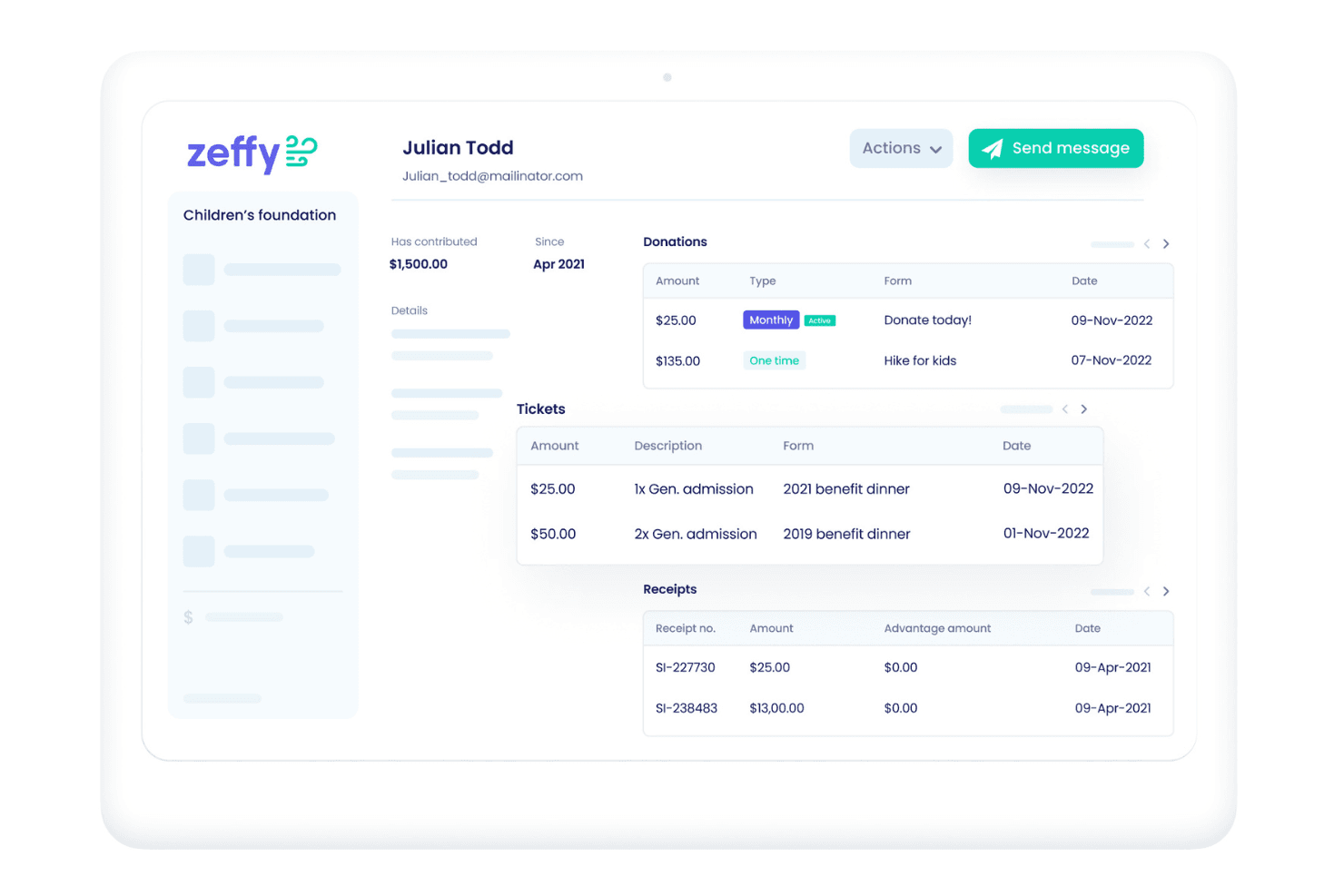
Helpt non-profitorganisaties bij het beheren van donaties en campagnes zonder kosten. Zeffy is een platform voor donorbeheer met donorprofielen, het bijhouden van giften en toezeggingen, segmentatie en rapportage; elke functie is inbegrepen, zonder limieten voor contacten of teamleden en zonder betaald abonnement, plus integraties met QuickBooks, WordPress en Zapier.
Voor wie is Zeffy het meest geschikt?
Zeffy is geschikt voor kleine non-profitorganisaties en fondsenwervingsteams van kerken die giften en donateurs willen bijhouden voor medewerkers en vrijwilligers, zonder abonnements- of gebruikerslimieten.
Waarom ik voor Zeffy koos
Ik koos Zeffy als beste keuze zonder kosten, omdat elke functie is inbegrepen, zonder kosten of limieten voor contacten en teamleden. Ik gebruik de EN/OF-filters om gerichte donateurslijsten samen te stellen en toezeggingen aan fondsenwervingscampagnes te koppelen.
Belangrijkste functies van Zeffy
- Donateurprofielen: Bekijk contactgegevens, samenvattingen van giften, lidmaatschapsstatus en aangepaste velden.
- Giften bijhouden: Leg eenmalige, terugkerende, offline giften en giften in natura vast.
- Rapportage: Gebruik de Data-assistent voor visuele samenvattingen en rapporten die kunnen worden geëxporteerd.
- Integraties: Maak rechtstreeks verbinding met QuickBooks, voeg een WordPress-plug-in toe of koppel via Zapier meer dan 1.000 tools.
Integraties van Zeffy
Zeffy heeft een rechtstreekse integratie met QuickBooks en een WordPress-plug-in, plus verbindingen met meer dan 1.000 tools via Zapier, waaronder Salesforce, Mailchimp en Google Sheets. Het biedt ook een openbare API en webhooks voor aangepaste integraties.
Wat is gratis?
Zeffy is gratis te gebruiken en heeft geen proefperiode met een tijdslimiet. Elke functie is inbegrepen, zonder limieten voor contacten of teamleden, en er is geen betaald abonnement.
Pros and Cons
Pros:
- Onbeperkt aantal contacten en teamleden
- Gecombineerde filters stellen nauwkeurige donorsegmenten samen
- Geefgeschiedenissen worden samengevoegd over verschillende fondsenwervingsactiviteiten
Cons:
- Prompts voor donateurfooien kunnen bijdragers in verwarring brengen
- Contactmachtigingen bieden geen alleen-lezen toegang
Learn more about Zeffy: 3Beste voor evenementregistratie
Qgiv
- Gratis proefperiode beschikbaar
- Vanaf $25/maand
Visit WebsiteCustomer Rating:4.7/5
Ondersteunt non-profitorganisaties met tools voor donaties, evenementen en peer-to-peerfondsenwerving. Qgiv is een fondsenwervingsplatform voor non-profitorganisaties en biedt tools voor donatiebeheer, evenementregistratie en peer-to-peerfondsenwerving. Het is bedoeld voor non-profitorganisaties die hun fondsenwervingsinspanningen willen verbeteren met gebruiksvriendelijke functies voor evenementregistratie en -beheer.
Waarom ik Qgiv heb gekozen: Het gratis aanbod van Qgiv is ideaal voor evenementregistratie en biedt essentiële tools om evenementen efficiënt te beheren. Je kunt aangepaste registratieformulieren maken en deelnemers eenvoudig bijhouden. Het platform ondersteunt zowel online als fysieke evenementen, waardoor het veelzijdig is voor verschillende soorten bijeenkomsten. Deze functies sluiten aan bij de USP dat het platform het beste is voor evenementregistratie.
Opvallende functies & integraties:
Functies omvatten aanpasbare donatieformulieren die kunnen worden afgestemd op je specifieke fondsenwervingsbehoeften. Het platform biedt uitgebreide analyses en rapportages om het succes van je campagnes te volgen. Het biedt ook tools voor peer-to-peerfondsenwerving, waarmee supporters hun eigen fondsenwervingspagina's kunnen maken.
Integraties omvatten Salesforce, Mailchimp, QuickBooks, Google Analytics, Constant Contact, Facebook, Twitter, Eventbrite, Authorize.Net en PayPal.
Wat is gratis? Qgiv biedt een gratis proefperiode van beperkte duur, waarmee gebruikers de functies kunnen verkennen, met enkele beperkingen voor geavanceerde functionaliteiten en het aantal gebruikers.
Pros and Cons
Pros:
- Sterke tools voor evenementregistratie
- Aanpasbare registratieformulieren
- Ondersteunt online en fysieke evenementen
- Uitgebreide analyses en rapportages
- Veelzijdig voor verschillende soorten evenementen
Cons:
- Beperkte proefperiode
- Beperkingen voor geavanceerde functies
- Enige complexiteit bij de installatie
- Basistools voor rapportage
- Beperkte aanpassingsmogelijkheden
Learn more about Qgiv: Beste voor kerken
- Gratis proefperiode van 30 dagen beschikbaar
- Vanaf $15/maand
Visit WebsiteCustomer Rating:4.7/5
Helpt kerken bij het plannen van diensten, beheren van leden en coördineren van evenementen. Planning Center is software voor kerkbeheer die is ontworpen voor religieuze organisaties en tools biedt voor dienstenplanning, ledenbeheer en evenementencoördinatie. Het helpt kerken hun activiteiten te beheren en effectief met hun geloofsgemeenschappen te communiceren.
Waarom ik Planning Center heb gekozen: Het gratis aanbod van Planning Center is afgestemd op kerken en biedt essentiële tools voor het beheren van diensten en evenementen. Je kunt je dienstroosters organiseren en vrijwilligers efficiënt coördineren. Het platform ondersteunt ledenbeheer, zodat je de gegevens van je geloofsgemeenschap kunt bijhouden. Deze functies ondersteunen de USP dat het de beste keuze is voor kerken.
Opvallende functies & integraties:
Functies omvatten dienstenplanning, waarmee je kerkdiensten effectief kunt organiseren en inplannen. Je kunt ook vrijwilligersroosters beheren en zorgen voor een soepele coördinatie. De software biedt tools voor evenementbeheer, waarmee je kerkelijke evenementen naadloos kunt plannen en uitvoeren.
Integraties omvatten QuickBooks, Mailchimp, Planning Center Online, Stripe, Google Calendar, ProPresenter, Worship Planning, SongSelect, Elvanto en Facebook.
Wat is gratis? Planning Center biedt een tijdelijk gratis proefabonnement, waarmee kerken de functies kunnen verkennen, met enkele beperkingen wat betreft het aantal gebruikers en de functionaliteit.
Pros and Cons
Pros:
- Ideaal voor kerkelijke activiteiten
- Efficiënte planning van vrijwilligers
- Uitgebreide dienstenplanning
- Eenvoudig evenementbeheer
- Goede tools voor ledenbeheer
Cons:
- Beperkte proefperiode
- Elementaire rapportagetools
- Beperkingen op het aantal gebruikers
- Enige complexiteit bij het instellen
- Beperkte geavanceerde functies
Learn more about Planning Center: Beste voor kleine non-profitorganisaties
- Gratis abonnement beschikbaar
- Vanaf $49/maand
Visit WebsiteCustomer Rating:4.7/5
Ideaal voor het beheren van leden en evenementen en het vergroten van de betrokkenheid binnen de community. Raklet is software voor leden- en communitybeheer, ideaal voor kleine non-profitorganisaties. Het biedt tools voor ledenbeheer, communitybetrokkenheid en evenementorganisatie. Dit platform is ontworpen om je te helpen donorinformatie te beheren en de betrokkenheid binnen je community te vergroten.
Waarom ik Raklet heb gekozen: Het gratis aanbod van Raklet is perfect voor kleine non-profitorganisaties die essentiële tools voor donorbeheer nodig hebben. Het omvat functies zoals ledenbeheer, CRM-mogelijkheden en tools voor communitybetrokkenheid. Je hebt ook toegang tot een mobiele app met eigen huisstijl, wat uitstekend geschikt is voor kleinere teams. Deze functies sluiten aan bij de USP dat het platform het beste is voor kleine non-profitorganisaties.
Opvallende functies & integraties:
Functies omvatten digitale ledenkaarten, een aanpasbare websitebouwer en geautomatiseerde verlenging van lidmaatschappen. Je kunt ledengegevens beheren met CRM-tools en je community betrekken via discussieforums. Raklet ondersteunt ook evenementorganisatie, waardoor het eenvoudiger wordt om evenementen te plannen en te beheren.
Integraties omvatten Zapier, Mailchimp, PayPal, Stripe, QuickBooks, Google Calendar, Eventbrite, Slack, Salesforce en HubSpot.
Wat is gratis? Raklet biedt een gratis abonnement voor altijd met essentiële functies voor kleine non-profitorganisaties, waaronder ledenbeheer en tools voor communitybetrokkenheid. Er gelden beperkingen voor het aantal gebruikers en functies in vergelijking met betaalde abonnementen.
Pros and Cons
Pros:
- Eenvoudig in gebruik
- Effectieve klantenondersteuning
- Mobiele apps met eigen huisstijl
- Talrijke integratiemogelijkheden
- Geschikt voor kleine teams
Cons:
- Beperkte aanpassingsmogelijkheden
- Kosten voor geavanceerde functies
- Gebruikerslimiet bij het gratis abonnement
- Basisfuncties in de gratis versie
- Beperkte opslagmogelijkheden
Learn more about Raklet: Beste voor fondsenwervingsevenementen
- Gratis abonnement beschikbaar
- Gratis te gebruiken (met fooien van donateurs)
Visit WebsiteCustomer Rating:4.4/5
Helpt bij het organiseren van evenementen met tools voor registratie, ticketverkoop en het bijhouden van gegevens. DoJiggy is een fondsenwervingsplatform voor non-profitorganisaties en gemeenschapsorganisaties. Het helpt gebruikers bij het organiseren en beheren van fondsenwervingsevenementen en biedt tools voor evenementregistratie, ticketverkoop en het bijhouden van donaties.
Waarom ik voor DoJiggy heb gekozen: De gratis versie van DoJiggy is afgestemd op fondsenwervingsevenementen en biedt essentiële functies zoals evenementregistratie en donatiebeheer. Je kunt eenvoudig evenementen opzetten en beheren zonder extra kosten. Het platform biedt aanpasbare evenementenpagina's, zodat je een unieke ervaring voor je donateurs kunt creëren. Deze functies maken het een uitstekende keuze voor het beheren en promoten van fondsenwervingsevenementen.
Belangrijkste functies & integraties:
Functies omvatten ticketverkoop voor evenementen, fondsenwerving van persoon tot persoon en veilingbeheer. Je kunt evenementenpagina's met een eigen huisstijl maken en donaties in realtime volgen. Het platform ondersteunt ook terugkerende donaties, zodat je de betrokkenheid van donateurs kunt behouden.
Integraties omvatten PayPal, Stripe, Authorize.Net, QuickBooks, Salesforce, Mailchimp, Constant Contact, Google Analytics, Facebook en Twitter.
Wat is gratis? DoJiggy biedt een blijvend gratis abonnement met essentiële functies voor het beheren van fondsenwervingsevenementen, hoewel het beperkingen kan hebben op geavanceerde functionaliteiten in vergelijking met betaalde abonnementen.
Pros and Cons
Pros:
- Eenvoudige evenementopzet
- Aanpasbare evenementenpagina's
- Donaties in realtime bijhouden
- Ondersteunt fondsenwerving van persoon tot persoon
- Opties voor terugkerende donaties
Cons:
- Beperkte geavanceerde functies
- Elementaire rapportagetools
- Enige complexiteit bij het instellen
- Beperkte aanpassingsmogelijkheden
- Beperkingen bij het gebruik van het gratis abonnement
Learn more about DoJiggy: Beste voor sociale fondsenwerving
- 30 dagen gratis proefperiode + gratis abonnement beschikbaar
- Vanaf $29/maand (jaarlijks gefactureerd)
Visit WebsiteCustomer Rating:4.7/5
Helpt fondsenwerving te stimuleren via campagnes, delen op sociale media en betrokkenheid. GiveButter is een fondsenwervingsplatform voor non-profitorganisaties en particulieren, met tools voor donatiebeheer en het opzetten van campagnes. Het richt zich op gebruikers die hun fondsenwervingsinspanningen willen verbeteren via sociale media en peer-to-peer-betrokkenheid.
Waarom ik GiveButter heb gekozen: Het gratis aanbod van GiveButter is ideaal voor sociale fondsenwerving en biedt tools waarmee je sociale media kunt inzetten om een groter publiek te bereiken. Je kunt aantrekkelijke campagnes met multimedia-inhoud maken om meer donateurs aan te trekken. Het platform ondersteunt peer-to-peer-fondsenwerving, waardoor supporters je campagnes kunnen delen en promoten. Deze functies sluiten aan bij de USP dat het platform het beste is voor sociale fondsenwerving.
Opvallende functies & integraties:
Functies omvatten aanpasbare donatieformulieren met de mogelijkheid om video's en afbeeldingen toe te voegen voor aantrekkelijkere campagnes. Het platform biedt realtime donatietracking en analyses om je fondsenwervingsinspanningen te volgen. Je kunt ook sms-om-te-donerenfuncties gebruiken om donateurs rechtstreeks op hun mobiele apparaten te bereiken.
Integraties omvatten Salesforce, Mailchimp, QuickBooks, Facebook, Twitter, Google Analytics, PayPal, Stripe, Zapier en Eventbrite.
Wat is gratis? GiveButter biedt een gratis abonnement voor altijd zonder platformkosten, maar voor bepaalde betaalmethoden kunnen transactiekosten van toepassing zijn.
Pros and Cons
Pros:
- Sterke integratie met sociale media
- Aantrekkelijke multimedia-opties voor campagnes
- Realtime donatietracking
- Effectieve peer-to-peer-tools
- Goed voor het betrekken van jongere donateurs
Cons:
- Transactiekosten voor sommige betalingen
- Beperkte geavanceerde functies
- Elementaire rapportagetools
- Enige complexiteit bij het instellen
- Beperkingen in aanpassingsmogelijkheden
Learn more about Givebutter: Het beste voor persoonlijke campagnes
- Gratis abonnement beschikbaar
- Vanaf 2.9% + $0.30 per transactie
Visit WebsiteCustomer Rating:3.2/5
Gebruikt door individuen om geld in te zamelen voor persoonlijke behoeften en behoeften van de gemeenschap. GoFundMe is een crowdfundingplatform dat voornamelijk door individuen en kleine groepen wordt gebruikt om geld in te zamelen voor persoonlijke doelen en noodgevallen. Het wordt veel gebruikt door mensen die geld moeten inzamelen voor persoonlijke behoeften, medische kosten en gemeenschapsprojecten.
Waarom ik voor GoFundMe heb gekozen: Het gratis aanbod van GoFundMe is ideaal voor persoonlijke campagnes dankzij de gebruiksvriendelijke opzet en het ontbreken van platformkosten voor organisatoren. Je kunt eenvoudig een campagnepagina maken en deze delen met je netwerk. Het platform ondersteunt snelle opnames, zodat je toegang hebt tot het geld zodra het binnenkomt. Deze functies maken het perfect voor mensen die snel geld moeten inzamelen voor persoonlijke behoeften.
Belangrijkste functies & integraties:
Functies omvatten een eenvoudige campagneopzet, waarmee je binnen enkele minuten een inzamelingspagina kunt maken. Het platform biedt tools voor het delen via sociale media om je te helpen een breder publiek te bereiken. Het biedt ook realtime donatietracking, zodat je de voortgang van je campagne kunt volgen.
Integraties omvatten Facebook, Twitter, PayPal, Stripe, Google Analytics, Mailchimp, QuickBooks, Instagram, LinkedIn en Constant Contact.
Wat is gratis? GoFundMe biedt een gratis abonnement zonder einddatum en zonder platformkosten voor organisatoren, maar voor donaties gelden transactiekosten.
Pros and Cons
Pros:
- Snelle campagneopzet
- Geen platformkosten
- Eenvoudige opties om te delen
- Realtime donatietracking
- Ideaal voor persoonlijk gebruik
Cons:
- Transactiekosten voor donaties
- Beperkte aanpassingsmogelijkheden
- Basistools voor rapportage
- Enige complexiteit bij de opzet
- Beperkingen op toegang tot geld


Helpt non-profitorganisaties bij het beheren van donaties en het opzetten van aangepaste fondsenwervingscampagnes. GivingFuel is een fondsenwervingsplatform voor non-profitorganisaties, dat tools biedt voor donatiebeheer en het opzetten van campagnes. Het is bedoeld voor organisaties die hun fondsenwervingsinspanningen willen verbeteren met aanpasbare donatieformulieren en campagnes.
Waarom ik GivingFuel heb gekozen: Het gratis aanbod van GivingFuel is ideaal voor organisaties die onbeperkte formulieren nodig hebben, omdat je meerdere donatieformulieren kunt maken en beheren zonder extra kosten. Je kunt deze formulieren aanpassen aan je merk en de behoeften van je campagne. Het platform ondersteunt zowel eenmalige als terugkerende donaties, wat helpt om donateurs betrokken te houden. Deze functies sluiten aan bij de unieke propositie dat het platform het beste is voor onbeperkte formulieren.
Opvallende functies & integraties:
Functies omvatten aanpasbare donatieformulieren die kunnen worden afgestemd op de behoeften van je campagne. Je kunt donaties volgen met gedetailleerde analyses en rapporten. Het platform biedt ook fondsenwervingstools voor peer-to-peer, waarmee supporters hun eigen fondsenwervingspagina's kunnen maken.
Integraties omvatten QuickBooks, Salesforce, Mailchimp, Google Analytics, Facebook, Twitter, Eventbrite, Stripe, PayPal en Authorize.Net.
Wat is gratis? GivingFuel biedt een plan dat altijd gratis blijft, met essentiële fondsenwervingstools en onbeperkte donatieformulieren, hoewel het mogelijk enkele functiebeperkingen heeft in vergelijking met betaalde plannen.
Pros and Cons
Pros:
- Onbeperkte donatieformulieren
- Aanpasbare merkopties
- Ondersteunt terugkerende donaties
- Gedetailleerde analyses en rapporten
- Fondsenwervingstools voor peer-to-peer
Cons:
- Beperkte geavanceerde functies
- Basisrapportagetools
- Enige complexiteit bij het instellen
- Beperkingen in het gebruik van het gratis plan
- Beperkte aanpassingsmogelijkheden
Learn more about GivingFuel: 10Beste voor eenvoudige integraties
Funraise
- Gratis abonnement + gratis demo beschikbaar
- Vanaf $99/maand

Helpt non-profitorganisaties bij het beheren van donaties, het uitvoeren van campagnes en het betrekken van supporters. Funraise is een fondsenwervingsplatform voor non-profitorganisaties, met tools voor donatiebeheer, het opzetten van campagnes en relatiebeheer voor donateurs. Het is bedoeld voor organisaties die hun fondsenwervingsinspanningen willen verbeteren met intuïtieve tools en eenvoudige integratiemogelijkheden.
Waarom ik voor Funraise heb gekozen: De gratis versie van Funraise biedt essentiële functies die eenvoudige integraties mogelijk maken, waardoor het gemakkelijk is om verbinding te maken met andere tools die je mogelijk al gebruikt. Je hebt toegang tot basisfuncties voor donatiebeheer en kunt campagnes maken zonder extra kosten. Het platform ondersteunt peer-to-peer-fondsenwerving, waardoor supporters hun eigen pagina's kunnen maken. Deze functies sluiten aan bij de unieke waardepropositie dat Funraise het beste is voor eenvoudige integraties.
Opvallende functies & integraties:
Functies omvatten aanpasbare donatieformulieren die kunnen worden afgestemd op de behoeften van je campagne. Het platform biedt uitgebreide analyses en rapportages om het succes van je fondsenwervingsinspanningen te volgen. Het biedt ook tools voor peer-to-peer-fondsenwerving, waarmee supporters hun netwerken kunnen betrekken.
Integraties omvatten Salesforce, Mailchimp, QuickBooks, Facebook, Google Analytics, Stripe, PayPal, Zapier, Double the Donation en Eventbrite.
Wat is gratis? Funraise biedt een gratis abonnement dat voor altijd geldig is, met essentiële fondsenwervingstools, hoewel het mogelijk beperkingen heeft op geavanceerde functies en het aantal gebruikers in vergelijking met betaalde abonnementen.
Pros and Cons
Pros:
- Eenvoudig integratieproces
- Aanpasbare donatieformulieren
- Ondersteunt peer-to-peer-fondsenwerving
- Uitgebreide analysetools
- Goed voor kleine non-profitorganisaties
Cons:
- Beperkte geavanceerde functies
- Basisrapportagetools
- Enige complexiteit bij het instellen
- Beperkingen op het aantal gebruikers
- Beperkte aanpassingsmogelijkheden
Learn more about Funraise:
Andere software voor donateursbeheer
Hier zijn enkele aanvullende opties voor software voor donateursbeheer die ook gratis abonnementen of proefversies aanbieden. Hoewel deze tools mijn overzicht niet hebben gehaald, zijn ze zeker het bekijken waard:
- 11Continue to GiveBeste voor kerkelijke donaties
- 12EleoBeste voor donorbetrokkenheid
- 13MonkeyPodIdeaal voor vrijwilligersbeheer
Hoe ik gratis software voor donorbeheer beoordeel
Eerst bepaal ik wat als gratis geldt. Voor software voor donorbeheer betekent dat een permanent gratis abonnement—geen proefperiode—omdat het bijhouden van tienden, het genereren van eindejaarsverklaringen en het beheren van toezeggingen behoeften zijn die het hele jaar door bestaan. Vervolgens beoordeel ik tools op twee niveaus: kernfunctionaliteit die een plek op de lijst verdient, en onderscheidende factoren die het ene platform van het andere onderscheiden.
Kernfunctionaliteit (basisvereisten voor deze lijst)
Naast mijn vereisten voor een gratis aanbod gebruik ik ook een scoresysteem om tools voor mijn lijst te selecteren. Zo werkt het:
Ik beoordeel elke tool op een schaal van 0 (biedt de functionaliteit niet) tot 5 (blink uit op dit gebied) voor elke hieronder vermelde kernfunctionaliteit. Vervolgens zet ik de totaalscore van de tool om in een percentage. Elke tool moet een minimale totaalscore van 65% behalen om in aanmerking te komen voor opname.
- Donor- en ledenbestand: Ik zoek naar een gecentraliseerd registratiesysteem waarin elk donorprofiel contactgegevens, gezinsrelaties en een volledige geefgeschiedenis bevat—zodat je de geschiedenis van een gezin kunt opvragen voordat je een bezoek in het kader van relatiebeheer aflegt.
- Bijdragen bijhouden: Elke tool moet het mogelijk maken om eenmalige giften, terugkerende tienden en bijdragen aan specifieke fondsen vast te leggen, waarbij aan elke invoer de datum, methode en bestemming worden gekoppeld.
- Belastingbewijzen en verklaringen: Ik controleer of je eindejaarsverklaringen van bijdragen in batches kunt genereren en versturen, aangezien het handmatig opstellen van individuele ontvangstbewijzen voor honderden leden voor de meeste kerkelijke kantoren onaanvaardbaar is.
- Rapporten en analyses over giften: De tool moet kant-en-klare rapporten bieden over geeftrends, fondstotalen en donorbehoud, zodat je financiële team of vrijwillige penningmeester updates voor het bestuur kan voorbereiden zonder ruwe gegevens naar een spreadsheet te exporteren.
- Donorsegmentatie: Ik beoordeel hoe elk platform je laat filteren of tags laat toevoegen aan donoren—bijvoorbeeld door mensen die voor het eerst geven te groeperen voor een welkomstmail of donoren te identificeren die zijn afgehaakt en vorig jaar wel gaven, maar dit kwartaal niet meer.
- Integratie voor online geven: Of het platform nu ingebouwd is of met een betalingsverwerker is verbonden, het moet digitale bijdragen automatisch naar donorprofielen synchroniseren, zodat je team online giften niet elke week handmatig hoeft af te stemmen.
Als ik een lijst heb met tools die aan de criteria voldoen, kijk ik naar wat elk platform onderscheidt.
Onderscheidende factoren (waarmee leveranciers zich onderscheiden)
Zo vergelijk ik verschillende leveranciers:
Opvallende functies
Geautomatiseerde bedankmails na elke gift besparen je administratieve team het opstellen van afzonderlijke bevestigingen elke zondag. Ik let ook op beheer van toezeggingen, omdat het bijhouden van toezeggingen tegenover daadwerkelijke giften tijdens een bouwcampagne je precies laat zien waar opvolging nodig is. Een portaal voor donoren biedt ook echte meerwaarde—wanneer leden kunnen inloggen om hun geefgeschiedenis te bekijken en hun eigen belastingverklaringen te downloaden, vermindert dat het aantal verzoeken aan het kantoor tijdens het belastingseizoen.
Meer dan functies
De kosten voor betalingsverwerking zijn belangrijker dan de meeste kerken beseffen—het verschil tussen platforms kan oplopen bij honderden wekelijkse giften. Ik beoordeel ook hoe elke tool verbinding maakt met de bredere technische kerkomgeving, vooral of geefgegevens zonder handmatige exports synchroniseren met je ChMS of boekhoudsoftware zoals QuickBooks. Limieten van gratis abonnementen voor het aantal donorprofielen of maandelijkse transacties zijn het waard om vroeg te controleren, aangezien een groeiende gemeente van 150 personen die limieten sneller kan bereiken dan verwacht.
Gratis software voor donateursbeheer kiezen
Complexe functielijsten en prijsstructuren kunnen het lastig maken om te bepalen wat je nu precies krijgt bij gratis software voor donateursbeheer. Om je te helpen gefocust te blijven tijdens het selecteren van software, zijn hier enkele factoren om rekening mee te houden:
| Factor | Waar je op moet letten |
Omvang van het gratis aanbod | Controleer wat inbegrepen is bij het gratis abonnement. Dekt het je basisbehoeften zonder dat je meteen moet upgraden? |
Schaalbaarheid | Ga na of de software met je organisatie kan meegroeien. Kan deze meer donateurs en grotere campagnes verwerken naarmate je organisatie groeit? |
Integraties | Zoek naar tools die eenvoudig verbinding maken met je bestaande systemen, zoals e-mailmarketing- of boekhoudsoftware, om tijd te besparen. |
Gebruiksgemak | Zorg ervoor dat de software gebruiksvriendelijk is. Kan je team deze snel leren gebruiken en er zonder uitgebreide training mee navigeren? |
Aanpasbaarheid | Bepaal of je de software kunt aanpassen aan je huisstijl en campagnebehoeften. Biedt deze aanpasbare formulieren en rapporten? |
Ondersteuning | Controleer welk niveau van klantenondersteuning beschikbaar is. Is er 24/7 hulp of zijn er nuttige hulpmiddelen zoals handleidingen en forums? |
Beveiliging | Zorg ervoor dat donateursgegevens worden beschermd. Voldoet de software aan regelgeving voor gegevensbescherming en biedt deze veilige betalingsverwerking? |
Rapportage | Beoordeel de rapportagemogelijkheden. Kun je eenvoudig inzichtelijke rapporten genereren om donoractiviteit en campagnesucces bij te houden en te analyseren? |
Wat is gratis software voor donateursbeheer?
Software voor donorbeheer is een hulpmiddel waarmee organisaties donorgegevens en donaties kunnen bijhouden en beheren. Gratis aanbiedingen omvatten doorgaans basisfuncties, met opties voor proefperiodes met een beperkte looptijd of gratis abonnementen voor onbeperkte tijd met beperkingen. Voor teams met beperkte budgetten kan donorsoftware voor kleinere non-profitorganisaties de kernfunctionaliteit bieden die zij nodig hebben.
Professionals bij non-profitorganisaties, fondsenwervers en kerkbeheerders gebruiken deze hulpmiddelen vaak om donorrelaties te onderhouden en fondsenwervingsactiviteiten te organiseren. Velen gebruiken ook software voor subsidiebeheer om subsidieaanvragen en nalevingsvereisten bij te houden. Het volgen van donaties, aanpasbare formulieren en rapportagemogelijkheden helpen bij het beheren van donorgegevens, het organiseren van campagnes en het analyseren van fondsenwervingsresultaten.
Functies van gratis software voor donorbeheer
We bespreken de functies die doorgaans in software voor donorbeheer te vinden zijn en welke daarvan meestal inbegrepen zijn bij gratis versus betaalde abonnementen.
Functies van software voor donorbeheer die doorgaans gratis zijn
- Donaties bijhouden: Helpt je inkomende donaties en donorgegevens bij te houden, waardoor het eenvoudiger wordt om de financiën te beheren.
- Aanpasbare formulieren: Hiermee kun je donatieformulieren maken die passen bij de huisstijl en behoeften van je organisatie.
- Basisrapportage: Levert eenvoudige rapporten waarmee je inzicht krijgt in donoractiviteit en campagneprestaties.
- Donorprofielen: Slaat donorgegevens op één plek op, zodat je gegevens eenvoudig kunt bekijken en bijwerken.
- Online doneren: Stelt donoren in staat om via je website bijdragen te leveren, waardoor je bereik groter wordt.
- E-mailbevestigingen: Stuurt automatisch bedankmails naar donoren, wat de betrokkenheid van donoren versterkt.
- Mobiele toegang: Hiermee kun je onderweg donorgegevens beheren en biedt het je team flexibiliteit.
Functies van software voor donorbeheer waarvoor doorgaans moet worden betaald
- Geavanceerde analyses: Biedt diepgaande inzichten en trends om je te helpen fondsenwervingsinspanningen strategisch te plannen en te optimaliseren.
- Evenementenbeheer: Biedt hulpmiddelen om evenementen te organiseren en te volgen, waardoor je fondsenwervingsactiviteiten worden versterkt.
- Fondsenwerving tussen gelijken: Stelt supporters in staat hun eigen fondsenwervingspagina's te maken, waardoor het bereik van je campagne groter wordt.
- Integratie met CRM: Maakt verbinding met je bestaande CRM-systemen voor een naadloze informatiestroom.
- Terugkerende donaties: Automatiseert regelmatige bijdragen, zodat je verzekerd bent van consistente steun van donoren.
- Aanpasbare dashboards: Hiermee kun je dashboards aanpassen om de meest relevante gegevens voor je organisatie weer te geven.
- Campagnes via meerdere kanalen: Ondersteunt fondsenwerving via verschillende platforms, waardoor je bereikpotentieel toeneemt.
Voordelen van gratis software voor donorbeheer
Het implementeren van gratis software voor donorbeheer biedt verschillende voordelen voor je team en je organisatie. Hier zijn enkele voordelen waar je naar kunt uitkijken:
- Kosteneffectieve oplossing: Je kunt donoren beheren zonder geld uit te geven, waardoor middelen beschikbaar blijven voor andere prioriteiten.
- Betere organisatie: Houd alle donorgegevens op één plek bij, zodat je ze eenvoudiger kunt openen en beheren.
- Verbeterde donorbetrokkenheid: Functies zoals e-mailbevestigingen helpen relaties met je supporters te onderhouden.
- Flexibiliteit en gemak: Met mobiele toegang kun je donaties overal beheren, wat je team gemak biedt.
- Groter bereik: Met functies voor online doneren kun je donaties van een breder publiek accepteren, waardoor je fondsenwervingspotentieel toeneemt.
- Basisinzichten: Toegang tot basisrapportage helpt je donorgedrag en campagneprestaties te begrijpen en geeft richting aan toekomstige inspanningen.
- Aanpassingsmogelijkheden: Met aanpasbare formulieren kun je donatiepagina's afstemmen op de behoeften en huisstijl van je organisatie.
Kosten en prijzen van gratis software voor donorbeheer
Ik begrijp dat je naar dit artikel bent gekomen op zoek naar de beste opties voor software voor donorbeheer die gratis beschikbaar zijn. Omdat gratis abonnementen echter slechts beperkte functies bieden, is de kans groot dat je je abonnement in de toekomst moet uitbreiden.
De onderstaande tabel vat veelvoorkomende abonnementen, hun gemiddelde prijzen en de typische functies die in oplossingen voor donorbeheer zijn inbegrepen samen:
Vergelijkingstabel van abonnementen voor donormanagementsoftware
| Abonnementstype | Gemiddelde prijs | Veelvoorkomende functies |
| Gratis abonnement | $0 | Basisregistratie van donateurs, eenvoudige rapportage en online donatieformulieren. |
| Persoonlijk abonnement | $5-$25/gebruiker/maand | Aanpasbare donatieformulieren, e-mailbevestigingen en basisanalyses. |
| Zakelijk abonnement | $30-$75/gebruiker/maand | Geavanceerde rapportage, evenementenbeheer en integratie met CRM-systemen. |
| Abonnement voor grote organisaties | $100+/gebruiker/maand | Aangepaste dashboards, campagnes via meerdere kanalen en speciale klantenondersteuning. |
Veelgestelde vragen over gratis donormanagementsoftware
Hier zijn enkele antwoorden op veelgestelde vragen over gratis donormanagementsoftware:
Is er een gratis CRM voor non-profitorganisaties?
Ja, er zijn gratis CRM-opties voor non-profitorganisaties. Deze CRM-systemen bieden vaak basisfuncties voor donormanagement, zoals het bijhouden van donaties en het beheren van donateursprofielen. Ze zijn ideaal voor kleinere organisaties met beperkte budgetten die donorrelaties effectief moeten beheren zonder kosten te maken.
Welke software wordt gebruikt om donaties bij te houden?
Gratis donormanagementsoftware wordt vaak gebruikt om donaties bij te houden. Deze tools helpen u om donateurgegevens vast te leggen en bijdragen in de loop der tijd te volgen. Ze bieden essentiële functies voor het volgen van donaties en rapportage, die cruciaal zijn voor het bijhouden van nauwkeurige financiële administratie.
Kan gratis donormanagementsoftware terugkerende donaties verwerken?
Sommige oplossingen voor gratis donormanagementsoftware ondersteunen inderdaad terugkerende donaties. Met deze functie kunt u geautomatiseerde bijdragen instellen, zodat er een gestage geldstroom van uw supporters ontstaat. Dit is een waardevolle functie voor organisaties die een consistente betrokkenheid van donateurs willen behouden.
Hoe veilig is gratis donormanagementsoftware?
Gratis donormanagementsoftware biedt doorgaans basisbeveiligingsfuncties om donateursgegevens te beschermen. Het is echter belangrijk om te controleren of de software voldoet aan de regelgeving voor gegevensbescherming en veilige betalingsverwerking biedt om informatie te beveiligen.
Kan ik gratis donormanagementsoftware integreren met andere tools?
Veel gratis tools voor donormanagement bieden beperkte integratiemogelijkheden met andere softwareoplossingen. Controleer of de software verbinding kan maken met uw bestaande systemen, zoals tools voor e-mailmarketing of boekhouding, om werkprocessen te stroomlijnen en de efficiëntie te verbeteren.
Zijn er limieten aan het aantal donateurs dat ik met gratis software kan beheren?
Gratis donormanagementsoftware heeft vaak limieten voor het aantal donateurs of contacten dat u kunt beheren. Deze beperkingen verschillen per aanbieder. Daarom is het belangrijk om de voorwaarden van het gratis abonnement te bekijken om er zeker van te zijn dat het aan de behoeften van uw organisatie voldoet.