

Geefplatforms zijn online hulpmiddelen waarmee je kerk of non-profitorganisatie donaties van supporters kan inzamelen, beheren en volgen. Als je op zoek bent naar de beste geefplatforms, zoek je waarschijnlijk naar een veilig en gebruiksvriendelijk donatieplatform dat aansluit bij de behoeften en het budget van je bediening. Veel moderne fondsenwervingsoplossingen ondersteunen fondsenwerving door non-profitorganisaties met functies zoals campagnepagina's, crowdfunding en geïntegreerde fondsenwervingssoftware, zodat je effectiever geld kunt inzamelen. Met zoveel beschikbare opties is het belangrijk om een platform te vinden dat de ervaring van donateurs verbetert, met je bestaande systemen kan worden geïntegreerd en je langetermijndoelen ondersteunt. Deze lijst helpt je de beste opties voor 2026 te vergelijken, zodat je een weloverwogen beslissing kunt nemen en je kunt richten op wat het belangrijkst is: je gemeenschap dienen.
Waarom u onze softwareaanbevelingen kunt vertrouwen
6,700+
Reviews
20
Industry experts
16+
Evaluation factors
14
Years
Ons team test en beoordeelt software sinds 2012. Als kerkleiders weten we zelf hoe moeilijk — en belangrijk — het is om de juiste software te kiezen.
Voor deze gids hebben we tools geëvalueerd met behulp van praktijktests en onafhankelijk onderzoek, waarbij we tools beoordeelden aan de hand van onze selectiecriteria.
Onze reviews weerspiegelen ons menselijke redactionele oordeel, geen verkooppraatje.
Vergelijkingstabel van geefplatforms
In deze vergelijkingstabel staan de prijsgegevens van mijn belangrijkste selectie van geefplatforms samengevat:
| Tool | Best For | Trial Info | Price | ||
|---|---|---|---|---|---|
| 1 | Ideaal voor fondsenwerving door non-profitorganisaties zonder kosten | Gratis abonnement beschikbaar | Prijzen op aanvraag | Website | |
| 2 | Beste met ondersteuning voor directe ACH en digitale portemonnees | Gratis demo beschikbaar | Prijs op aanvraag | Website | |
| 3 | Beste voor beheer van meerdere campagnes | Gratis abonnement beschikbaar | Vanaf $0/maand | Website | |
| 4 | Beste voor analyses van donorbehoud | Gratis demo beschikbaar | Vanaf $40/maand (jaarlijks gefactureerd) | Website | |
| 5 | Beste voor functionaliteit voor doneren via SMS | Een gratis proefversie van 30 dagen is beschikbaar | Vanaf $72/maand | Website | |
| 6 | Beste mobiele donatie-ervaring | Gratis abonnement beschikbaar | Vanaf 2.9% + $0.30 per donatie | Website | |
| 7 | Ideaal voor aanpasbare donatieformulieren | Gratis abonnement beschikbaar | Vanaf $99/maand | Website | |
| 8 | Het beste voor evenementgerichte functies voor fondsenwerving | Gratis proefperiode van 30 dagen + gratis abonnement beschikbaar | Vanaf $29/maand (jaarlijks gefactureerd) | Website | |
| 9 | Ideaal voor onbeperkte fondsenwervingscampagnes | Gratis abonnement beschikbaar | Vanaf $0/maand | Website | |
| 10 | Ideaal voor integratie met livestream-evenementen | Gratis abonnement beschikbaar | Gratis te gebruiken | Website |


Beoordelingen van geefplatforms
Hieronder vind je mijn uitgebreide samenvattingen van de geefplatforms die mijn selectie hebben gehaald. In mijn beoordelingen bespreek ik de functies, de beste gebruikssituaties en de prijzen van elk platform in detail, zodat je het beste platform voor jouw situatie kunt vinden.
 Ideaal voor fondsenwerving door non-profitorganisaties zonder kosten
- Gratis abonnement beschikbaar
- Prijzen op aanvraag
Visit WebsiteCustomer Rating:4.9/5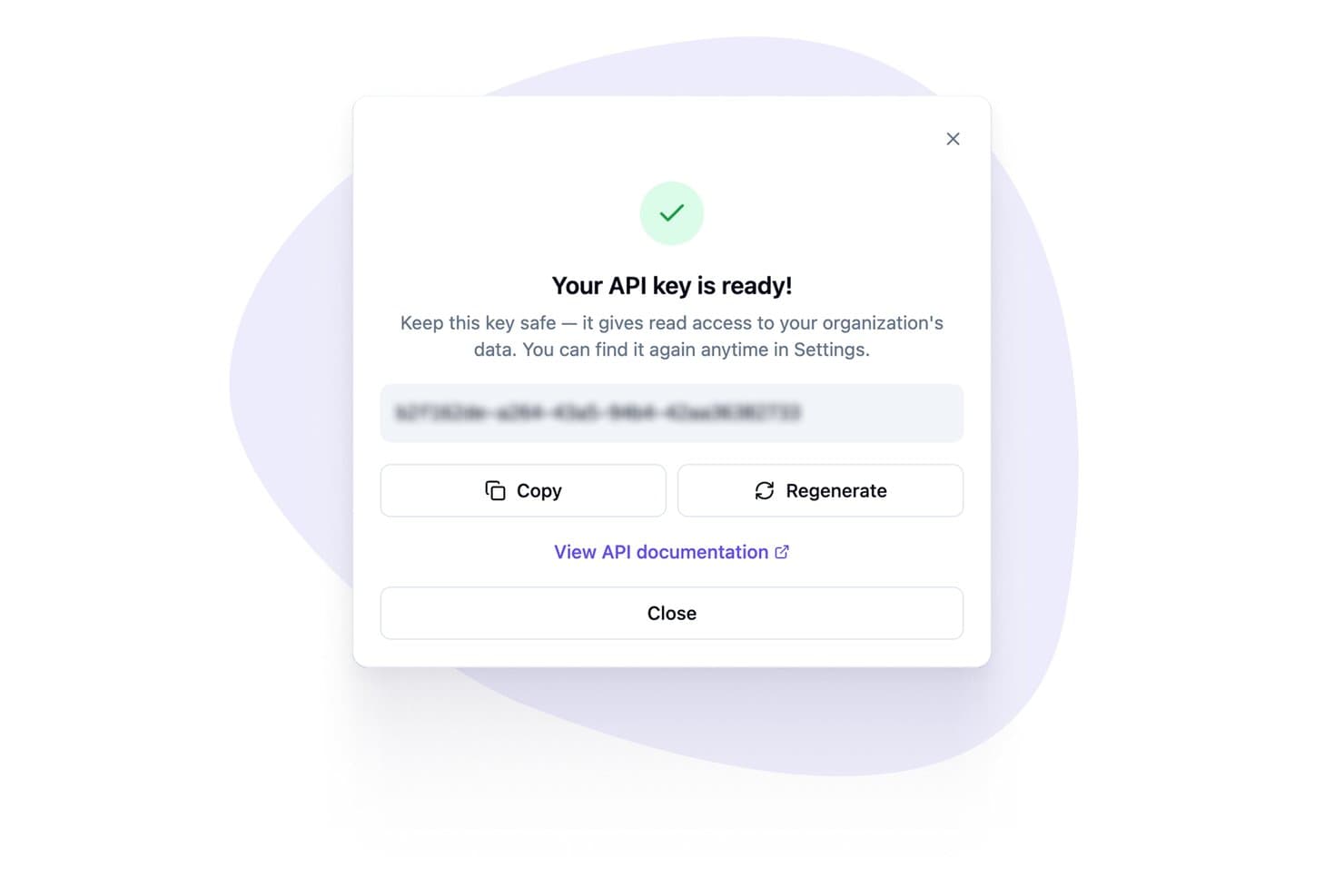
Zeffy genereert API-sleutels voor platformintegraties. Zeffy is een alles-in-éénplatform voor fondsenwerving door non-profitorganisaties dat online donatieformulieren, terugkerende giften, evenementticketing, loterijen, veilingen, lidmaatschappen, peer-to-peer-campagnes en donorbeheer in één tool combineert.
Voor wie is Zeffy het meest geschikt?
Zeffy is zeer geschikt voor non-profitorganisaties en liefdadigheidsinstellingen die elke ingezamelde euro willen behouden zonder platform- of verwerkingskosten te betalen.
Waarom ik voor Zeffy heb gekozen
Zeffy staat op mijn shortlist omdat het het enige donatieplatform is dat ik heb gevonden dat non-profitorganisaties echt niets in rekening brengt en de verwerkingskosten van Stripe volledig dekt in plaats van deze door te berekenen. Elke euro die een geloofsgemeenschap inzamelt via online donatieformulieren, campagnes voor terugkerende giften of peer-to-peer-fondsenwerving blijft bij de organisatie. Ik vind het vooral prettig dat donoren hun terugkerende giften zelf kunnen beheren via een donorportaal en bedragen en afschrijfdata kunnen aanpassen zonder tussenkomst van medewerkers.
Belangrijkste functies van Zeffy
- Peer-to-peer-fondsenwervingscampagnes: Ondersteuners maken persoonlijke of teamfondsenwervingspagina's die worden samengevoegd met een centraal campagnedoel, met voortgangsregistratie en zichtbaarheid van ranglijsten.
- Evenementticketing met inchecken via QR-code: Maak evenementformulieren in de huisstijl met meerdere tickettypen, verstuur scanbare e-tickets en check bezoekers in via een mobiele QR-scan.
- Ingebouwde tools voor e-mail en nieuwsbrieven: Maak en verstuur gerichte e-mails naar gesegmenteerde donorlijsten met behulp van een editor met slepen-en-neerzetten, inclusief registratie van opens en klikken voor elke verzending.
- Integratie met QuickBooks Online: Synchroniseert toekomstige uitbetalingen van Zeffy automatisch als stortingen die rechtstreeks in je QuickBooks-account aan specifieke campagnes of fondsen zijn gekoppeld.
Integraties van Zeffy
Zeffy heeft native integraties met QuickBooks en WordPress, plus een openbare API, webhooks en viaSocket voor aangepaste connectiviteit. Het platform vermeldt koppelingen met meer dan 1.000 tools, waaronder Salesforce, Google Sheets en Mailchimp via Zapier.
Pros and Cons
Pros:
- Tijdige uitbetalingen worden door veel beoordelaars van non-profitorganisaties gemeld
- Donorgeschiedenissen ondersteunen rapportages over giften aan het einde van het jaar
- Fondsenwervingsactiviteiten en donorgeschiedenissen blijven bij elkaar
Cons:
- Optionele bijdragen bij het afrekenen brengen donoren soms in verwarring
- Beperkte controle over de vormgeving van formulieren en e-mails
Learn more about Zeffy: Beste met ondersteuning voor directe ACH en digitale portemonnees
- Gratis demo beschikbaar
- Prijs op aanvraag
Visit WebsiteCustomer Rating:4.5/5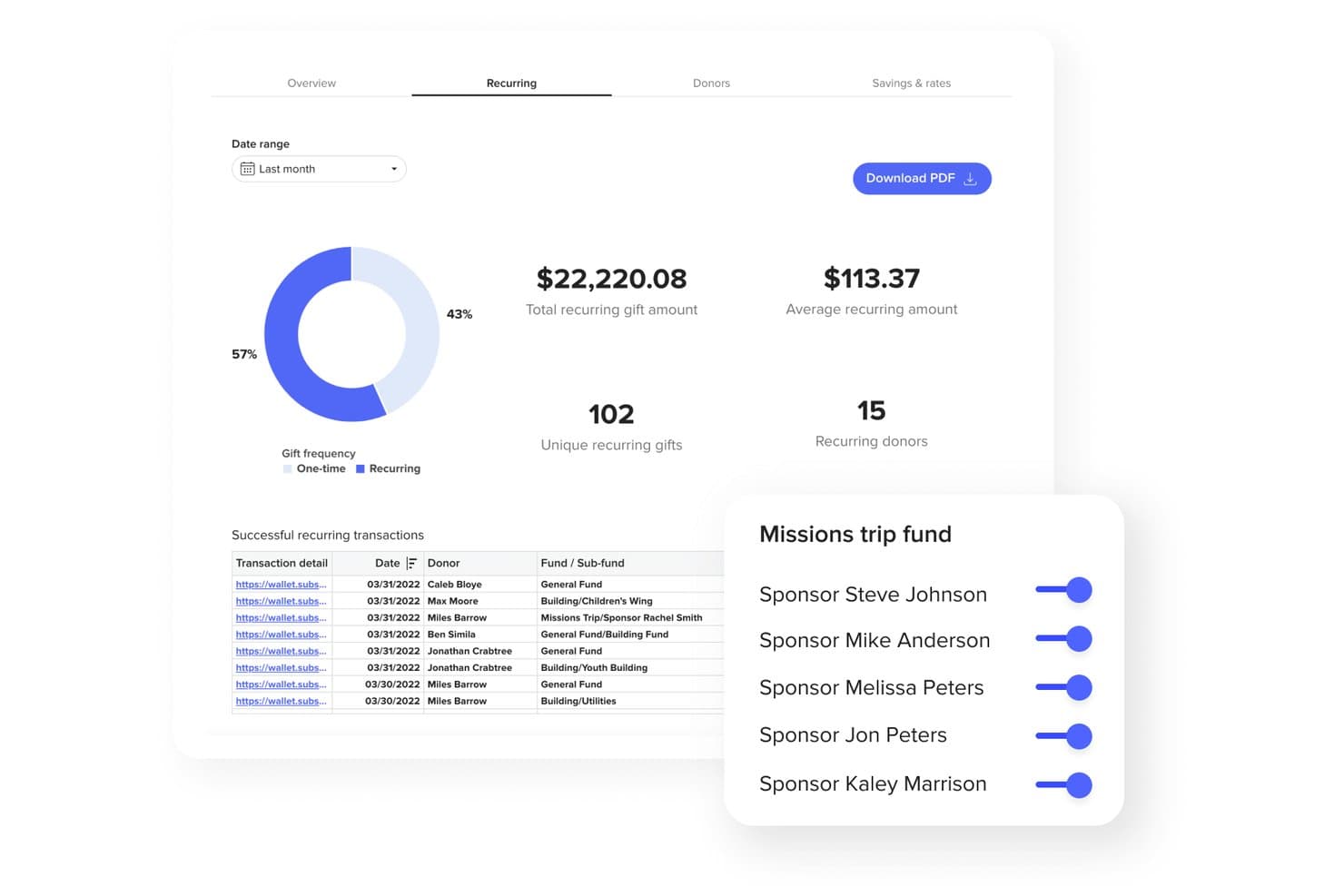
Subsplash biedt een dashboard voor terugkerende giften met transactiegegevens, donorstatistieken en tools voor het beheer van fondssponsoring. Subsplash is een kerkelijk geefplatform dat online donaties, donaties via mobiele apps, sms-donaties en NFC-tapdonaties ondersteunt, naast donorbeheer, fondsbeheer, geautomatiseerde belastingoverzichten en verwerking van meerdere betaalmethoden, waaronder ACH, kaarten, digitale portemonnees en giften in aandelen of crypto.
Voor wie is Subsplash het meest geschikt?
Subsplash is een sterke keuze voor kerken van elke omvang die geefmogelijkheden, app- en mediatools willen bundelen in één geloofsgericht platform.
Waarom ik voor Subsplash koos
Subsplash staat op mijn shortlist vanwege de manier waarop het betalingssnelheid en flexibiliteit combineert. Met directe ACH en realtime bankverificatie worden donaties sneller verwerkt, en met Apple Pay en Google Pay kunnen gemeenteleden binnen enkele seconden een gift doen. Ik ben ook enthousiast over Subsplash Tap, een op NFC gebaseerde tool waarmee donateurs eenvoudig hun telefoon aantikken om direct te geven, zonder dat ze een app hoeven te downloaden of een QR-code nodig hebben.
Belangrijkste functies van Subsplash
- Korte codes voor sms-donaties: Maakt geven via sms mogelijk met speciale kerkelijke trefwoorden en directe donaties via tekstberichten.
- Dashboard voor donorbeheer: Houdt de geefgeschiedenis, terugkerende giften en realtime analyses bij voor het monitoren van bijdragen.
- Campagnes en toezeggingen bijhouden: Hiermee kunnen kerken fondsenwervingscampagnes met doelstellingen starten en toezeggingen van donateurs beheren.
- Geautomatiseerde generatie van belastingoverzichten: Maakt automatisch jaaroverzichten van giften die voldoen aan de IRS-vereisten en levert deze aan donateurs.
Integraties van Subsplash
Subsplash biedt native integraties met Subsplash ChMS en Rock RMS. Er is een API beschikbaar voor aangepaste integraties.
Pros and Cons
Pros:
- Ondersteunt donaties in aandelen, crypto en via DAF
- NFC-tapdonaties zonder app-download
- Door AI aangestuurde waarschuwingen voor inactieve donateurs inbegrepen
Cons:
- De rapportage is minder diepgaand dan die van gespecialiseerde geefplatforms
- Platformbundel omvat meer dan alleen geefmogelijkheden
 Beste voor beheer van meerdere campagnes
- Gratis abonnement beschikbaar
- Vanaf $0/maand
Visit WebsiteCustomer Rating:4.8/5
Anedot-dashboard met overzichten van donatietotalen, inkomsten en maandelijkse trends. Meerdere fondsenwervingsinspanningen tegelijk beheren kan ingewikkeld worden, maar Anedot is ontwikkeld om dat proces voor kerken en non-profitorganisaties te vereenvoudigen. Met dit platform kun je meerdere campagnes tegelijkertijd uitvoeren, elk met een eigen donatiepagina en tracking. Het is zeer geschikt voor organisaties die seizoensgebonden inzamelingsacties, speciale projecten of doorlopende geefinitiatieven combineren.
Waarom ik voor Anedot koos
Wanneer je meerdere fondsenwervingscampagnes tegelijk moet beheren, onderscheidt Anedot zich door de mogelijkheden voor campagnebeheer. Met het platform kun je meerdere donatiepagina's maken en aanpassen, elk met een eigen huisstijl en tracking, zodat je de inspanningen gescheiden en georganiseerd kunt houden. Ik vind het prettig dat je de prestaties van elke campagne afzonderlijk kunt volgen, waardoor het gemakkelijker wordt om te zien wat werkt en waarop je je aandacht moet richten. Deze opzet is vooral handig voor kerken en bedieningen die seizoensgebonden oproepen, kapitaalcampagnes of speciale projecten naast reguliere giften uitvoeren.
Belangrijkste functies van Anedot
Naast de hulpmiddelen voor campagnebeheer biedt Anedot verschillende andere functies die het vermelden waard zijn:
- Geven via sms: Laat donateurs geven door een eenvoudig sms-bericht te sturen.
- Insluitbare donatieformulieren: Voeg rechtstreeks aanpasbare geefformulieren toe aan je website of landingspagina's.
- ACH- en kaartverwerking: Accepteer donaties via creditcard, betaalkaart of ACH-bankoverschrijving.
- Donateursportaal: Geef supporters toegang om hun terugkerende giften en betalingsgegevens te beheren.
Integraties van Anedot
Integraties omvatten HubSpot, Planning Center, RumbleUp, ActiveCampaign, SendGrid, Salesforce, Mailchimp, QuickBooks Online, Zapier en meer.
Pros and Cons
Pros:
- Onbeperkt aantal campagnes met afzonderlijke donatiepagina's
- Geven via sms inbegrepen zonder extra kosten
- Donateursportaal voor zelfstandig beheer van giften
Cons:
- Beperkte mogelijkheden voor donateursegmentatie en tagging
- Rapportage-export alleen beschikbaar in CSV-formaat
Learn more about Anedot: Beste voor analyses van donorbehoud
- Gratis demo beschikbaar
- Vanaf $40/maand (jaarlijks gefactureerd)
Visit WebsiteCustomer Rating:4.7/5
Bloomerang richt zich op het verbeteren van donorbehoud met inzichten in betrokkenheid. Als uw team de loyaliteit van donateurs wil begrijpen en verbeteren, biedt Bloomerang analyses die specifiek zijn ontwikkeld voor donorbehoud. Dit platform is ontworpen voor kerken en non-profitorganisaties die geefpatronen willen volgen en donateurs met een verhoogd risico op vertrek willen identificeren. De focus op bruikbare inzichten voor donorbehoud helpt leiders om relaties te versterken en langdurige steun in stand te houden.
Waarom ik voor Bloomerang heb gekozen
Analyses van donorbehoud vormen de kern van wat Bloomerang waardevol maakt voor kerken en non-profitorganisaties. Het platform houdt belangrijke statistieken bij, zoals het donorbehoudpercentage, het herwinningspercentage en de betrokkenheid van donateurs, zodat u een duidelijk beeld krijgt van hoe goed u duurzame relaties opbouwt. Ik waardeer het dat Bloomerang donateurs die zijn afgehaakt uitlicht en gerichte vervolgstappen voorstelt, zodat u kunt handelen voordat de steun afneemt. Deze analysegestuurde functies helpen u uw inspanningen te richten op de gebieden die het belangrijkst zijn voor langdurige giften.
Belangrijkste functies van Bloomerang
Andere functies die Bloomerang nuttig maken voor geefplatforms zijn onder meer:
- Online donatieformulieren: Maak donatieformulieren in uw huisstijl die op uw website kunnen worden ingesloten.
- E-mailmarketingtools: Verstuur nieuwsbrieven, oproepen tot donatie en geautomatiseerde bedankberichten rechtstreeks vanuit het platform.
- Tijdlijn van relaties: Bekijk een chronologisch overzicht van de interacties en geefactiviteiten van elke donateur.
- Mobiele app: Krijg toegang tot donateursgegevens en beheer contacten vanaf uw telefoon of tablet.
Integraties van Bloomerang
Integraties omvatten QuickBooks, DonorSearch, Mailchimp, Constant Contact, Amilia, Verified First, Zapier en meer.
Pros and Cons
Pros:
- Dashboard voor donorbehoud wordt in realtime bijgewerkt
- Ingebouwde e-mailmarketing voor communicatie met donateurs
- Tijdlijn van relaties houdt alle interacties met donateurs bij
Cons:
- Geen ingebouwde functionaliteit voor doneren via sms
- De aangepaste rapportbouwer heeft beperkte filtermogelijkheden
Learn more about Bloomerang: Beste voor functionaliteit voor doneren via SMS
- Een gratis proefversie van 30 dagen is beschikbaar
- Vanaf $72/maand
Visit WebsiteCustomer Rating:4.8/5
GivingTools helpt non-profitorganisaties donaties te innen en tegelijkertijd de transactiekosten laag te houden. Als het laag houden van transactiekosten een topprioriteit is voor uw kerk of non-profitorganisatie, is GivingTools speciaal met u in gedachten ontworpen. Dit platform biedt enkele van de laagste verwerkingskosten die beschikbaar zijn, waardoor het eenvoudiger wordt om elke donatie maximaal te benutten. Het is een praktische keuze voor organisaties die hun giften verder willen laten reiken zonder essentiële functies op te offeren.
Waarom ik voor GivingTools heb gekozen
Voor organisaties die transactiekosten willen minimaliseren, biedt GivingTools een unieke aanpak die zich onderscheidt van andere geefplatforms. Het platform ondersteunt bankoverschrijvingen via ACH met uiterst lage verwerkingskosten en stelt donateurs zelfs in staat om de transactiekosten zelf te betalen. Ik waardeer het dat GivingTools transparante kostenstructuren biedt en u de mogelijkheid geeft om zowel eenmalige als terugkerende giften te accepteren zonder verborgen kosten. Dit maakt het een uitstekende keuze voor kerken en bedieningen die de impact van elke donatie willen maximaliseren.
Belangrijkste functies van GivingTools
Enkele andere functies die GivingTools aantrekkelijk maken voor kerken en bedieningen zijn:
- Toezeggingscampagnes: Stel meermaandelijkse of jaarlijkse toezeggingscampagnes in en beheer deze voor kapitaalcampagnes of speciale projecten.
- Aanpasbare geefformulieren: Ontwerp donatieformulieren met uw eigen huisstijl, velden en lay-outopties.
- Integratie van fysieke donaties: Registreer en volg contante giften en giften per cheque naast online donaties.
- PDF-bonnen: Genereer en verstuur automatisch PDF-bonnen voor elke donatie.
Integraties van GivingTools
Integraties omvatten QuickBooks, Mailchimp, Zapier en meer.
Pros and Cons
Pros:
- Donateurs kunnen de verwerkingskosten zelf betalen
- Ondersteunt het bijhouden van fysieke en online donaties
- Aanpasbare formulieren met huisstijl en velden
Cons:
- Geen mobiele app voor donorbeheer
- Geen prompts voor donateurs om een eenmalige gift te upgraden naar een terugkerende gift
 Beste mobiele donatie-ervaring
- Gratis abonnement beschikbaar
- Vanaf 2.9% + $0.30 per donatie
Visit WebsiteCustomer Rating:4.8/5
Met Givelify kunnen donateurs snel geven via een mobielgerichte donatie-app. Als je op zoek bent naar een geefplatform dat mobiele donaties prioriteit geeft, is Givelify ontworpen met smartphonegebruikers in gedachten. Kerken en geloofsorganisaties die geven snel en toegankelijk willen maken voor hun geloofsgemeenschappen, zullen de appgerichte aanpak bijzonder nuttig vinden. Givelify pakt de uitdaging van spontane en terugkerende donaties aan door het donatieproces snel, intuïtief en overal beschikbaar te maken.
Waarom ik voor Givelify koos
Mobielgerichte donaties zijn waar Givelify echt in uitblinkt, waardoor het een sterke keuze is voor organisaties die donateurs willen bereiken waar ze zijn—op hun telefoon. Met de speciale mobiele app van het platform kunnen donateurs in slechts enkele tikken geven, of ze nu thuis zijn, tijdens een dienst of onderweg. Ik waardeer hoe Givelify functies zoals terugkerende donaties en locatiegebaseerde donatieherinneringen ondersteunt, die kerken en bedieningen helpen om consistente steun aan te moedigen. Voor elke groep die prioriteit geeft aan een soepele mobiele donatie-ervaring, biedt Givelify hulpmiddelen die rechtstreeks in deze behoefte voorzien.
Belangrijkste functies van Givelify
Enkele andere functies die Givelify aantrekkelijk maken als geefplatform zijn:
- Dashboard voor het volgen van donaties: Bekijk en beheer alle donatieactiviteiten in een centraal dashboard.
- Aanpasbare donatielinks: Maak unieke donatielinks voor specifieke campagnes of evenementen.
- Directe donatiebewijzen: Stuur donateurs direct na elke gift automatisch gegenereerde bewijzen.
- Beheer van meerdere accounts: Beheer meerdere organisaties of campussen vanuit één Givelify-account.
Givelify-integraties
Integraties omvatten Shelby Next, Shelby Arena, Power Church, Servant Keeper, ACS Realm en ACS People.
Pros and Cons
Pros:
- De mobiele app ondersteunt spontane donaties tijdens evenementen
- Locatiegebaseerde herinneringen moedigen donaties ter plaatse aan
- Beheer van meerdere campussen vanuit één account
Cons:
- Geen ingebouwde functies voor kaartverkoop voor evenementen
- Beperkte mogelijkheden voor huisstijl van donatiepagina's
Learn more about Givelify: Ideaal voor aanpasbare donatieformulieren
- Gratis abonnement beschikbaar
- Vanaf $99/maand
Visit WebsiteCustomer Rating:4.4/5
Met Donately kunnen organisaties herkenbare donatieformulieren maken voor online geven. Als je donatieformulieren nodig hebt die aansluiten bij de huisstijl en werkwijze van je kerk of organisatie, geeft Donately je volledige controle over de aanpassingsmogelijkheden. Dit platform is ontworpen voor kerken en non-profitorganisaties die elk aspect van de geefervaring willen afstemmen, van formuliervelden tot ingesloten widgets. Het is zeer geschikt voor leiders die een soepel, herkenbaar donatieproces willen creëren voor websites, e-mails en campagnes.
Waarom ik voor Donately koos
Wat Donately onderscheidt, is de focus op aanpasbare donatieformulieren. Dat is essentieel voor organisaties die een consistente huisstijl willen behouden en specifieke donateursgegevens willen verzamelen. Je kunt formuliervelden, kleuren en indelingen aanpassen aan de website of campagne van je kerk. Ik vind het prettig dat je met Donately formulieren ook rechtstreeks in je website kunt insluiten of als zelfstandige pagina's kunt delen, waardoor je flexibel bent in de manier waarop je donaties inzamelt. Dankzij dit aanpassingsniveau kun je een geefervaring creëren die persoonlijk aanvoelt en aansluit bij de identiteit van je organisatie.
Belangrijkste functies van Donately
Andere functies die Donately nuttig maken voor kerken en non-profitorganisaties zijn onder meer:
- Beheer van terugkerende donaties: Stel automatische terugkerende giften van donateurs in en beheer deze.
- Dashboard voor het volgen van donaties: Bekijk realtime donatiegegevens en trends in een centraal dashboard.
- Geven via sms: Laat donateurs geven door een eenvoudig sms-bericht te versturen.
- Fondsenwervingspagina's voor teams: Maak gezamenlijke fondsenwervingscampagnes met meerdere teamleden en beheer deze.
Integraties van Donately
Integraties zijn onder meer HubSpot, Salesforce, Mailchimp, Slack, Webflow, QuickBooks Online, Google Analytics, Constant Contact, Monday.com en meer.
Pros and Cons
Pros:
- Aangepaste formulierbouwer ondersteunt geavanceerde veldlogica
- Realtime dashboard voor het volgen van donaties beschikbaar
- Fondsenwervingspagina's voor teams voor groepscampagnes
Cons:
- ACH-bankoverschrijvingen alleen bij hogere abonnementen
- Geen donateursportaal voor zelfbeheer
Learn more about Donately: Het beste voor evenementgerichte functies voor fondsenwerving
- Gratis proefperiode van 30 dagen + gratis abonnement beschikbaar
- Vanaf $29/maand (jaarlijks gefactureerd)
Visit WebsiteCustomer Rating:4.7/5
Givebutter ondersteunt evenementgerichte fondsenwerving met live-evenementen en campagnes via persoonlijke netwerken. Givebutter onderscheidt zich voor organisaties die fondsenwerving willen combineren met live- of virtuele evenementen. Non-profitorganisaties, kerken en gemeenschapsgroepen die donateurs willen betrekken via evenementen met ticketverkoop, veilingen of campagnes voor fondsenwerving via persoonlijke netwerken zullen de evenementgerichte functies bijzonder nuttig vinden. Het platform helpt teams om evenementregistratie, ticketverkoop en het live volgen van donaties allemaal op één plek te beheren.
Waarom ik voor Givebutter heb gekozen
Als het gaat om evenementgerichte fondsenwerving biedt Givebutter een pakket hulpmiddelen dat moeilijk te evenaren is voor kerken en non-profitorganisaties die live- of virtuele evenementen organiseren. Met het platform kun je aangepaste evenementenpagina's maken met ingebouwde ticketverkoop, registratie en het live volgen van donaties. Ik vind het handig dat je veilingen kunt organiseren, teams voor fondsenwerving via persoonlijke netwerken kunt beheren en tijdens je evenement realtime donatieoverzichten kunt weergeven. Deze functies maken Givebutter een sterke keuze voor organisaties die donaties willen stimuleren met interactieve, evenementgerichte campagnes.
Belangrijkste functies van Givebutter
Enkele andere functies die Givebutter aantrekkelijk maken als geefplatform zijn:
- Doneren via sms: Donateurs kunnen geven door een eenvoudig sms-bericht te sturen.
- Aanpasbare donatieformulieren: Maak formulieren in de huisstijl van je organisatie, passend bij de uitstraling en identiteit ervan.
- Geautomatiseerde bedankberichten: Stuur donateurs na elke gift gepersonaliseerde bedankberichten.
- Fondsenwervingspagina's voor teams: Stel fondsenwervingspagina's voor groepen in voor gezamenlijke campagnes.
Integraties van Givebutter
Integraties zijn onder andere beschikbaar met Bloomerang, Double the Donation, Canva, Constant Contact, DonorSearch, HubSpot, monday.com, QuickBooks Online, Salesforce en meer.
Pros and Cons
Pros:
- Ticketverkoop en registratie voor evenementen zijn ingebouwd
- Hulpmiddelen voor fondsenwerving via persoonlijke netwerken ondersteunen teams
- Live donatieoverzicht wordt tijdens evenementen weergegeven
Cons:
- Voor ACH-donaties zijn handmatige verificatiestappen vereist
- Opties voor terugkerende donaties bieden weinig geavanceerde instellingen
Learn more about Givebutter: Ideaal voor onbeperkte fondsenwervingscampagnes
- Gratis abonnement beschikbaar
- Vanaf $0/maand

Give Lively stelt non-profitorganisaties in staat om online fondsen te werven zonder platformkosten. Give Lively biedt een kosteloos fondsenwervingsplatform voor non-profitorganisaties die onbeperkte campagnes willen voeren zonder maandelijkse kosten. Het is zeer geschikt voor kerken en organisaties die donaties willen maximaliseren en online fondsenwerving willen ondersteunen zonder zich zorgen te maken over platformkosten. Als je flexibele hulpmiddelen nodig hebt om je fondsenwervingsdoelen te bereiken met transparante prijzen, onderscheidt Give Lively zich door zijn inzet voor gratis toegang.
Waarom ik voor Give Lively heb gekozen
Ik koos voor Give Lively omdat het geen beperkingen stelt aan het aantal fondsenwervingscampagnes dat je kunt voeren, wat zeldzaam is onder donatieplatforms. Je kunt gedurende het jaar zoveel campagnes, donatiepagina's en peer-to-peer-fondsenwervingscampagnes creëren als je bediening of non-profitorganisatie nodig heeft. Het platform ondersteunt ook teamfondsenwerving en evenemententicketing, waardoor het eenvoudig is om meerdere initiatieven tegelijk te beheren. Deze flexibiliteit is vooral nuttig voor kerken en organisaties die regelmatig of seizoensgebonden inzamelingsacties organiseren.
Belangrijkste functies van Give Lively
Andere functies die Give Lively tot een sterke keuze voor donatieplatforms maken, zijn onder meer:
- Doneren via sms: Donateurs kunnen doneren door een aangepast trefwoord te sms'en, waardoor mobiel doneren snel en toegankelijk is.
- Donatiewidget: Voeg een donatieformulier rechtstreeks toe aan je website, zodat supporters je site nooit hoeven te verlaten om te doneren.
- Supportersportaal: Donateurs kunnen hun terugkerende giften beheren, hun donatiegeschiedenis bekijken en hun betaalgegevens bijwerken in een zelfbedieningsportaal.
- Integraties met Salesforce en Mailchimp: Synchroniseer donateursgegevens en communicatie met populaire CRM- en e-mailmarketingtools.
Integraties van Give Lively
Integraties omvatten Salesforce, Double the Donation, PayPal, Venmo, Apple Pay, Google Pay, DAFpay, Zapier en meer.
Pros and Cons
Pros:
- Onbeperkte fondsenwervingscampagnes en donatiepagina's
- Ondersteunt doneren via sms en evenemententicketing
- Donateursportaal voor het beheren van terugkerende giften
Cons:
- Geen directe telefonische ondersteuning voor gebruikers
- Uitbetalingen alleen via Stripe of PayPal
Learn more about Give Lively: 10Ideaal voor integratie met livestream-evenementen
Pledge
- Gratis abonnement beschikbaar
- Gratis te gebruiken

Pledge stelt bedrijven in staat om programma's voor werknemers- en bedrijfsdonaties te beheren. Pledge is ontworpen voor organisaties die geven rechtstreeks willen verbinden aan livestreams en virtuele evenementen. Kerken, non-profitorganisaties en organisatoren van evenementen kunnen de tools gebruiken om donatieformulieren en realtime fondsenwervingsbalken te integreren in platforms zoals Zoom, Twitch en YouTube. Deze aanpak helpt teams om digitale bijeenkomsten om te zetten in interactieve fondsenwervingsmogelijkheden zonder het verloop van hun evenementen te verstoren.
Waarom ik voor Pledge koos
Voor organisaties die livestreams willen omzetten in fondsenwervingsmomenten, biedt Pledge een directe manier om doneren te integreren in digitale evenementen. Het platform biedt donatiebalken en widgets die werken met Zoom, Twitch, YouTube en andere streamingdiensten, zodat kijkers kunnen geven zonder het evenement te verlaten. Ik waardeer ook dat Pledge realtime fondsenwervingsthermometers en zichtbare erkenning van donateurs ondersteunt, wat helpt om het publiek betrokken te houden. Deze functies maken het een sterke keuze voor kerken en non-profitorganisaties die digitale deelname willen verbinden met directe mogelijkheden om te geven.
Belangrijkste functies van Pledge
Enkele andere functies die Pledge nuttig maken als geefplatform zijn:
- Doneren via sms: Donateurs kunnen bijdragen door een sms-bericht met een unieke code te versturen.
- Aanpasbare donatiepagina's: Maak donatiepagina's in de huisstijl, afgestemd op de behoeften van je organisatie.
- Integratie van werkgeversbijdragen: Maak verbinding met programma's voor bedrijfsbijdragen om de impact van donaties te vergroten.
- Ondersteuning voor meerdere valuta: Accepteer donaties in verschillende valuta voor internationale campagnes.
Pledge-integraties
Integraties omvatten Zoom, Shopify, Mailchimp, Slack, Constant Contact, Salesforce, Apple Pay, Bloomerang, Discord en meer.
Pros and Cons
Pros:
- Livestream-donatiebalken werken met grote platforms
- Functie voor doneren via sms ondersteunt mobiel geven
- Ondersteuning voor meerdere valuta voor internationale donateurs
Cons:
- Geen ingebouwde functionaliteit voor evenemententicketing
- Rapportagetools beschikken niet over geavanceerde filters voor segmentatie
Learn more about Pledge:
Andere geefplatforms
Hier zijn enkele aanvullende opties voor geefplatforms die mijn selectie niet hebben gehaald, maar die toch de moeite waard zijn om te bekijken:
- 11GoFundMe ProBeste optie voor tools voor peer-to-peerfondsenwerving
- 12GivingToolsBeste voor lage transactiekosten
- 13DonorsChooseIdeaal voor projectgerichte fondsenwerving
- 14DonorboxIdeaal voor integratie met livestream-evenementen
Related Reviews
Hoe ik geefplatforms beoordeel
Ik beoordeel geefplatforms op twee niveaus: essentiële vereisten, zoals terugkerende donaties en fondsbestemming, en onderscheidende factoren—zoals geven via sms en synchronisatie met een ChMS—die belangrijk zijn voor jouw kerk.
Essentiële functionaliteit (basisvereisten voor deze lijst)
Bij het selecteren van tools voor mijn lijst beoordeel ik elke tool op een schaal van 0 (biedt de functionaliteit niet aan) tot 5 (blink uit op dit gebied) voor elke hieronder genoemde essentiële functionaliteit. Vervolgens bereken ik de totaalscore van de tool als percentage. Elke tool moet een minimale totaalscore van 65% behalen om in aanmerking te komen voor opname.
- Online en terugkerende giften: Ik controleer of donateurs zelf terugkerende schema's kunnen instellen en beheren—zoals bedragen aanpassen vóór een kapitaalcampagne of pauzeren tijdens een sabbatical.
- Geefmogelijkheden via meerdere kanalen: Een platform moet geven via meer dan alleen een webformulier ondersteunen. Ik let op geven via sms, mobiele apps, kioskmodi en QR-codes die tijdens een live zondagse dienst werken.
- Donateurbeheer en overzichten: Ik beoordeel hoe elk platform de individuele geefgeschiedenis bijhoudt en eindejaarsverklaringen voor bijdragen genereert die je financiële team kan versturen zonder handmatige opmaak.
- Tracking van fondsen en bestemmingen: Kerken beheren meerdere fondsen tegelijk—algemene tienden, bouwcampagnes, zendingen en hulpverlening. Ik let op duidelijke rapportage per fonds en de mogelijkheid om donateurs bij het afrekenen een bestemming te laten kiezen.
- Betalingsverwerking en betaalmethoden: Elk platform moet zowel kaartbetalingen als ACH-betalingen kunnen verwerken met een PCI-conforme infrastructuur. Ik controleer ook op opties zoals Apple Pay, Google Pay of door donateurs betaalde verwerkingskosten.
- Integraties met ChMS en boekhouding: Geefgegevens moeten doorstromen naar je bestaande systemen. Ik let op native synchronisatie met platforms zoals Planning Center, Breeze of QuickBooks, zodat gegevens over bijdragen consistent blijven zonder handmatige invoer.
Nadat ik een lijst heb samengesteld met tools die aan deze criteria voldoen, kijk ik naar wat elk platform onderscheidt.
Onderscheidende factoren (wat aanbieders van elkaar onderscheidt)
Zo vergelijk ik verschillende aanbieders met elkaar:
Opvallende functies
Hulpmiddelen voor toezeggingen en campagnes zijn belangrijk wanneer je kerk een bouwfonds of zendingsactie start—ik zoek naar platforms waarmee je doelen kunt instellen, toezeggingen kunt bijhouden en de voortgang in realtime aan je gemeente kunt tonen. Inzichten en analyses over giften onderscheiden goede platforms ook van geweldige platforms, vooral meldingen over donateurs die zijn afgehaakt en predikanten helpen leden opnieuw te betrekken voordat ze afhaken. Ik controleer ook op opties voor door donateurs betaalde kosten, waarmee gevers de verwerkingskosten kunnen dragen zodat elke euro je gemeentebudget ten goede komt.
Meer dan functies
Prijsstelling en kostenstructuur verdienen nauwkeurige aandacht—ik beoordeel of een platform vaste maandtarieven, transactiekosten of beide in rekening brengt, omdat die balans verschuift afhankelijk van het geefvolume van je gemeente. De omvang en schaalbaarheid van de kerk zijn ook belangrijk. Een nieuwe kerk met 200 leden heeft andere behoeften dan een organisatie met meerdere locaties die rapportage per locatie onder één account nodig heeft. Ik houd ook rekening met de beschikbaarheid van ondersteuning, met name in het weekend en op zondag, omdat problemen met geven tijdens een live dienst niet tot maandagochtend kunnen wachten.
Hoe kies je geefplatforms?
Het is gemakkelijk om te verdwalen in lange lijsten met functies en ingewikkelde prijsstructuren. Om je te helpen gefocust te blijven terwijl je je unieke softwareselectieproces doorloopt, vind je hier een checklist met factoren om rekening mee te houden:
| Factor | Waar je op moet letten |
|---|---|
| FactorSchaalbaarheid | Waar je op moet lettenKan het platform de groei van het aantal donateurs, campagnes of het donatievolume verwerken zonder grote verstoringen of extra kosten? |
| FactorIntegraties | Waar je op moet lettenKan het platform standaard worden gekoppeld aan je kerkbeheersysteem, boekhoudsoftware of e-mailmarketingtools? Controleer de compatibiliteit met je bestaande systemen. |
| FactorAanpasbaarheid | Waar je op moet lettenKun je donatieformulieren, ontvangstbewijzen en communicatie met donateurs aanpassen aan de huisstijl en werkprocessen van je bediening? |
| FactorGebruiksgemak | Waar je op moet lettenKunnen medewerkers en vrijwilligers donaties en rapportages beheren zonder uitgebreide training of technische ondersteuning? |
| FactorImplementatie en ingebruikname | Waar je op moet lettenHoe lang duurt het om het platform in te stellen, gegevens te migreren en je team op te leiden? Zoek naar duidelijke hulpmiddelen en ondersteuning voor de ingebruikname. |
| FactorKosten | Waar je op moet lettenZijn alle kosten transparant, waaronder transactiekosten, maandelijkse kosten en kosten voor aanvullende functies? Vergelijk de totale eigendomskosten, niet alleen de basisprijs. |
| FactorBeveiligingsmaatregelen | Waar je op moet lettenBiedt het platform PCI-compliance, gegevensversleuteling en fraudepreventie om de gegevens van donateurs te beschermen? |
| FactorBeschikbaarheid van ondersteuning | Waar je op moet lettenWelke ondersteuningskanalen worden aangeboden (chat, telefoon, e-mail) en zijn deze beschikbaar tijdens de belangrijkste uren van je bediening? |
Wat zijn geefplatforms?
Geefplatforms zijn online hulpmiddelen waarmee kerken en non-profitorganisaties donaties van individuen of groepen kunnen inzamelen, beheren en bijhouden. Deze platforms ondersteunen verschillende geefmethoden, zoals eenmalige giften, terugkerende donaties en geven via sms. Ze helpen organisaties ook bij het beheren van donateursgegevens, het genereren van ontvangstbewijzen en het analyseren van geeftrends, waardoor het eenvoudiger wordt om fondsenwervingsinspanningen te ondersteunen en relaties met donateurs te onderhouden.
Functies van geefplatforms
Let bij het selecteren van geefplatforms op de volgende belangrijke functies:
- Online verwerking van donaties: Accepteer giften via creditcards, betaalpassen en ACH-bankoverschrijvingen, zodat donateurs eenvoudig overal kunnen geven.
- Instellen van terugkerende giften: Stel donateurs in staat om automatische, doorlopende bijdragen te plannen met intervallen die zij zelf kiezen, zodat consistente financiële steun wordt bevorderd.
- Aanpasbare donatieformulieren: Ontwerp donatieformulieren en voorzie ze van de huisstijl van je organisatie, zodat ze bij de identiteit van je organisatie passen en de benodigde informatie van donateurs verzamelen.
- Hulpmiddelen voor donateursbeheer: Sla donateursprofielen op, orden en werk ze bij, houd de geefgeschiedenis bij en segmenteer supporters voor gerichte communicatie.
- Automatisch genereren van ontvangstbewijzen: Stuur donateurs na elke bijdrage direct fiscaal conforme ontvangstbewijzen en bedankberichten.
- Bijhouden van campagnes en evenementen: Maak meerdere fondsenwervingscampagnes of evenementen aan, beheer en volg ze, en houd voor elk daarvan de voortgang en betrokkenheid van donateurs bij.
- Rapportage en analyses: Krijg toegang tot dashboards en exporteerbare rapporten die geeftrends, het behoud van donateurs en campagneprestaties tonen.
- Functionaliteit voor geven via sms: Stel donateurs in staat om bij te dragen door een sms te sturen, als snelle en handige geefoptie.
- Integratiemogelijkheden: Maak verbinding met boekhoudsystemen, e-mailmarketing en kerkbeheersystemen om werkstromen en het delen van gegevens te vereenvoudigen.
- Beveiliging en naleving: Zorg ervoor dat donateursgegevens worden beschermd met versleuteling, PCI-naleving en maatregelen ter voorkoming van fraude.
Voordelen van geefplatforms
Het implementeren van geefplatforms biedt verschillende voordelen voor je team en je organisatie. Hier zijn enkele voordelen waar je naar kunt uitkijken:
- Meer flexibiliteit bij het geven: Ondersteun eenmalige, terugkerende en mobiele donaties, zodat mensen gemakkelijker kunnen geven op een manier die bij hun voorkeuren past.
- Gecentraliseerd donateursbeheer: Orden donateursgegevens, houd de geefgeschiedenis bij en segmenteer supporters voor meer gepersonaliseerde communicatie en relatiebeheer.
- Vereenvoudigde financiële administratie: Genereer automatisch ontvangstbewijzen, rapporten en analyses om de boekhouding te vereenvoudigen en de voortgang van fondsenwerving te bewaken.
- Meer betrokkenheid van donateurs: Gebruik aanpasbare formulieren, geautomatiseerde bedankberichten en het bijhouden van campagnes om sterkere relaties met je supporters op te bouwen.
- Verbeterde gegevensbeveiliging: Bescherm gevoelige donateursgegevens met versleuteling, PCI-naleving en ingebouwde hulpmiddelen ter voorkoming van fraude.
- Tijdbesparing voor medewerkers: Automatiseer handmatige taken zoals het genereren van ontvangstbewijzen, gegevensinvoer en rapportage, zodat je team tijd vrijmaakt voor impactvoller werk binnen de bediening.
- Eenvoudige integratie met bestaande systemen: Verbind geefgegevens met je boekhoudkundige hulpmiddelen, e-mailmarketing en kerkbeheersystemen voor een efficiëntere werkstroom.
Kosten en prijzen van geefplatforms
Bij het selecteren van geefplatforms is inzicht in de verschillende prijsmodellen en beschikbare abonnementen vereist. De kosten variëren op basis van functies, teamgrootte, uitbreidingen en meer. In de onderstaande tabel worden veelvoorkomende abonnementen, de gemiddelde prijzen en de gebruikelijke functies van oplossingen voor geefplatforms samengevat:
Vergelijkingstabel van abonnementen voor geefplatforms
| Type abonnement | Gemiddelde prijs | Veelvoorkomende functies |
|---|---|---|
| Type abonnementGratis abonnement | Gemiddelde prijs$0 | Veelvoorkomende functiesBasisverwerking van online donaties, beperkt donateursbeheer, standaardrapportage en basisondersteuning. |
| Type abonnementPersoonlijk abonnement | Gemiddelde prijs$10–$30/maand | Veelvoorkomende functiesAanpasbare donatieformulieren, terugkerende giften, basale integraties en ondersteuning via e-mail. |
| Type abonnementZakelijk abonnement | Gemiddelde prijs$50–$150/maand | Veelvoorkomende functiesGeavanceerd donateursbeheer, campagnebeheer, geven via sms, verbeterde rapportage en telefonische ondersteuning. |
| Type abonnementEnterprise-abonnement | Gemiddelde prijs$200–$500/maand | Veelvoorkomende functiesAangepaste integraties, geavanceerde beveiliging, toegewijd accountbeheer, prioriteitsondersteuning en API-toegang. |
Veelgestelde vragen over geefplatforms
Hier vindt u antwoorden op veelgestelde vragen over geefplatforms:
Hoe gaan geefplatforms om met terugkerende donaties?
Met geefplatforms kunnen donateurs automatische, geplande giften instellen met intervallen die zij zelf kiezen. Dit helpt kerken en non-profitorganisaties om blijvende ondersteuning te behouden en vermindert administratief werk doordat de betalingsverwerking en het genereren van ontvangstbewijzen worden geautomatiseerd.
Kunnen geefplatforms worden geïntegreerd met kerkbeheersoftware of boekhoudsoftware?
Ja, de meeste geefplatforms bieden integraties met populaire tools voor kerkbeheer en boekhouding. Hierdoor kunt u donateursgegevens synchroniseren, de geefgeschiedenis bijhouden en financiële rapportages vereenvoudigen zonder handmatige gegevensinvoer.
Welke beveiligingsmaatregelen gebruiken geefplatforms om donateursgegevens te beschermen?
Geefplatforms gebruiken doorgaans versleuteling, PCI-naleving en fraudedetectietools om gevoelige gegevens te beschermen. Controleer altijd of het platform van uw keuze voldoet aan de branchenormen voor gegevensbeveiliging en privacy.
Zijn er kosten verbonden aan het gebruik van geefplatforms?
Ja, de meeste platforms brengen transactiekosten, maandelijkse abonnementskosten of beide in rekening. Sommige rekenen ook extra kosten voor premiumfuncties of integraties. Bekijk alle prijsgegevens om uw totale kosten te begrijpen.
Hoe snel zijn donaties beschikbaar nadat ze zijn gedaan?
De meeste geefplatforms storten het geld binnen enkele werkdagen op de bankrekening van uw organisatie. De verwerkingstijden kunnen variëren afhankelijk van het platform en de betaalmethode. Controleer daarom de uitbetalingsschema’s voordat u een oplossing kiest.