

De salarisadministratie van een kerk beheren kan een uitdaging zijn. Je hebt misschien te maken met complexe belastingregels, uiteenlopende personeelsfuncties of beperkte budgetten. Als Deel niet aan je unieke behoeften voldoet, ben je niet de enige. Veel kerkbeheerders zijn op zoek naar alternatieven die specifiek op hun vereisten zijn afgestemd.
In mijn ervaring maakt het vinden van de juiste software een wereld van verschil. Ik heb verschillende alternatieven voor Deel beoordeeld om je te helpen de beste keuze te vinden. Je ontdekt opties die gespecialiseerde functies bieden, inspelen op verschillende geografische behoeften en naleving van specifieke regelgeving waarborgen.
Dit artikel leidt je langs de beste opties en richt zich op wat elk daarvan tot een geschikte keuze voor jouw kerk maakt. Laten we het perfecte hulpmiddel vinden om je team te ondersteunen en je salarisadministratie te vereenvoudigen.
Waarom u onze softwareaanbevelingen kunt vertrouwen
6,700+
Reviews
20
Industry experts
16+
Evaluation factors
14
Years
Ons team test en beoordeelt software sinds 2012. Als kerkleiders weten we zelf hoe moeilijk — en belangrijk — het is om de juiste software te kiezen.
Voor deze gids hebben we tools geëvalueerd met behulp van praktijktests en onafhankelijk onderzoek, waarbij we tools beoordeelden aan de hand van onze selectiecriteria.
Onze reviews weerspiegelen ons menselijke redactionele oordeel, geen verkooppraatje.
Wat is Deel?
Deel is salarisadministratiesoftware voor kerken waarmee betalingen aan kerkelijk personeel en naleving van regelgeving kunnen worden beheerd. Het wordt doorgaans gebruikt door kerkbeheerders en financiële teams die de salarisadministratie efficiënt moeten afhandelen.
De wereldwijde salarisadministratiemogelijkheden, het beheer van naleving en de gebruiksvriendelijke interface van Deel helpen bij het beheren van uiteenlopende salarisbehoeften en het navigeren door complexe regelgeving. Al met al biedt Deel een waardevolle oplossing voor kerken die hun salarisadministratieve taken willen vereenvoudigen en nauwkeurigheid in financieel beheer willen waarborgen.
Vergelijkingstabel van alternatieven voor Deel
Deze vergelijkingstabel vat de prijsgegevens van mijn belangrijkste keuzes uit de alternatieven voor Deel samen:
| Tool | Best For | Trial Info | Price | ||
|---|---|---|---|---|---|
| 1 | Het beste voor het betalen van missionarissen in meer dan 180 landen | Gratis demo beschikbaar | Vanaf $19/werknemer/maand | Website | |
| 2 | Beste keuze voor de indiensttreding van grensoverschrijdende teams | Gratis demonstratie beschikbaar | Vanaf $199/gebruiker/maand | Website | |
| 3 | Beste voor PEO-diensten | Gratis demo beschikbaar | Vanaf $8/gebruiker/maand | Website | |
| 4 | Het beste voor geautomatiseerde personeelsplanning | 30 dagen gratis proefperiode + gratis demo beschikbaar | Vanaf $50/maand | Website | |
| 5 | Ideaal voor Canadese kleine bedrijven | Gratis proefperiode van 30 dagen beschikbaar | Vanaf $2.50/maand | Website | |
| 6 | Ideaal voor automatische belastingaangiften | Gratis abonnement beschikbaar | Vanaf $16/gebruiker/maand | Website | |
| 7 | Het beste voor geautomatiseerde salarisverwerking | Gratis demo beschikbaar | Vanaf $49/maand + $6/gebruiker/maand | Website | |
| 8 | Beste voor integratie van kerkbeheer | Gratis demo downloaden | kosten vanaf $395 | Website | |
| 9 | Het beste voor non-profitorganisaties | Gratis demo beschikbaar | Vanaf $50/maand | Website | |
| 10 | Best voor aanpasbare kerkmodules | Gratis proefperiode + gratis demo beschikbaar | Vanaf $19/maand | Website |


Beoordelingen van de beste alternatieven voor Deel
Hieronder staan mijn uitgebreide samenvattingen van de beste alternatieven voor Deel die op mijn shortlist zijn beland. In mijn beoordelingen bespreek ik de belangrijkste functies, voor- & nadelen, integraties en ideale gebruiksscenario’s van elk hulpmiddel in detail, zodat je de beste optie voor jouw situatie kunt vinden.
 Het beste voor het betalen van missionarissen in meer dan 180 landen
- Gratis demo beschikbaar
- Vanaf $19/werknemer/maand
Visit WebsiteCustomer Rating:4.7/5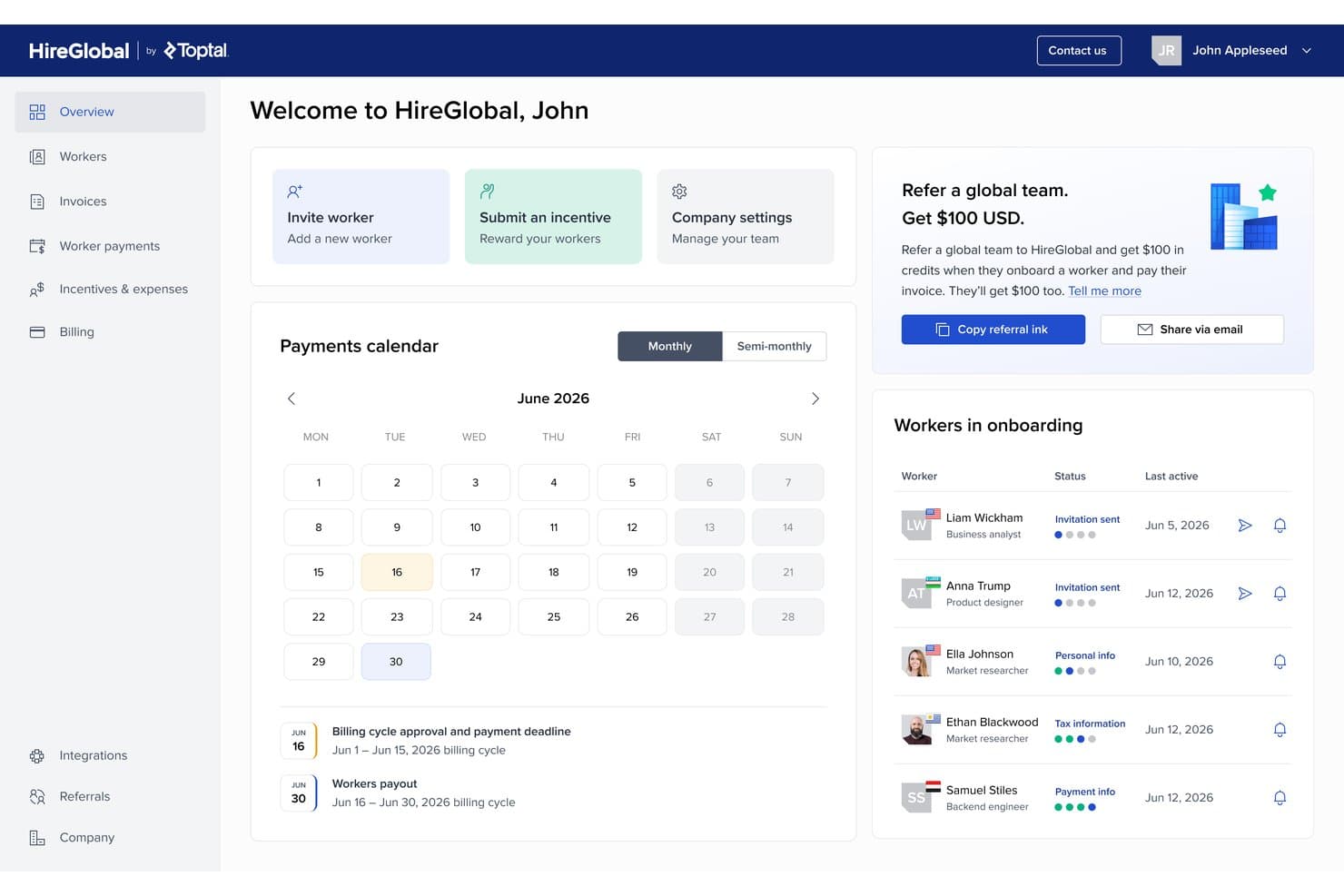
Het dashboard van HireGlobal centraliseert de indiensttreding van werknemers wereldwijd en de planning van loonbetalingen. HireGlobal is een loon- en HR-oplossing voor kerken en missiegedreven organisaties die complexe uitdagingen op het gebied van internationale betalingen, naleving en personeelsbeheer moeten aanpakken.
Voor wie is HireGlobal het meest geschikt?
HireGlobal is zeer geschikt voor kerken, ministeries en missieorganisaties die personeel en betalingen in meerdere landen beheren.
Waarom HireGlobal een goede concurrent van Deel is
Ik heb HireGlobal opgenomen in mijn beste keuzes omdat ik heb gezien hoe goed het loon- en HR-beheer voor zendingswerk wereldwijd afhandelt. Ik waardeer het dat mijn team missionarissen in meer dan 180 landen kan betalen en tegelijkertijd kan voldoen aan complexe internationale regelgeving. Met HireGlobal kunnen we zowel personeelsbetalingen als grensoverschrijdende HR-taken eenvoudig op één plek beheren.
Belangrijkste functies van HireGlobal
- Loonverwerking in meerdere valuta: Verwerk lonen in talrijke valuta zonder handmatige omrekeningen of berekeningen.
- Geïntegreerd documentbeheer: Bewaar contracten, identiteitsdocumenten en nalevingsgegevens rechtstreeks in het platform.
- Geautomatiseerde belastingberekeningen: Bereken en houd automatisch landspecifieke belastingen in voor teamleden wereldwijd.
- Aanpasbare toegangsrechten: Stel toegangsniveaus in voor medewerkers, vrijwilligers en beheerders om gevoelige HR-gegevens te beschermen.
Integraties van HireGlobal
HireGlobal biedt een ingebouwde integratie met TopTracker.
Pros and Cons
Pros:
- Ondersteunt loonverwerking in meer dan 180 landen
- Centraliseert HR en naleving voor missionarissen
- Verwerkt betalingen in meerdere valuta automatisch
Cons:
- Beperkte documentatie over ingebouwde integraties
- Prijsdetails zijn niet publiekelijk beschikbaar
Learn more about HireGlobal: Beste keuze voor de indiensttreding van grensoverschrijdende teams
- Gratis demonstratie beschikbaar
- Vanaf $199/gebruiker/maand
Visit WebsiteCustomer Rating:5/5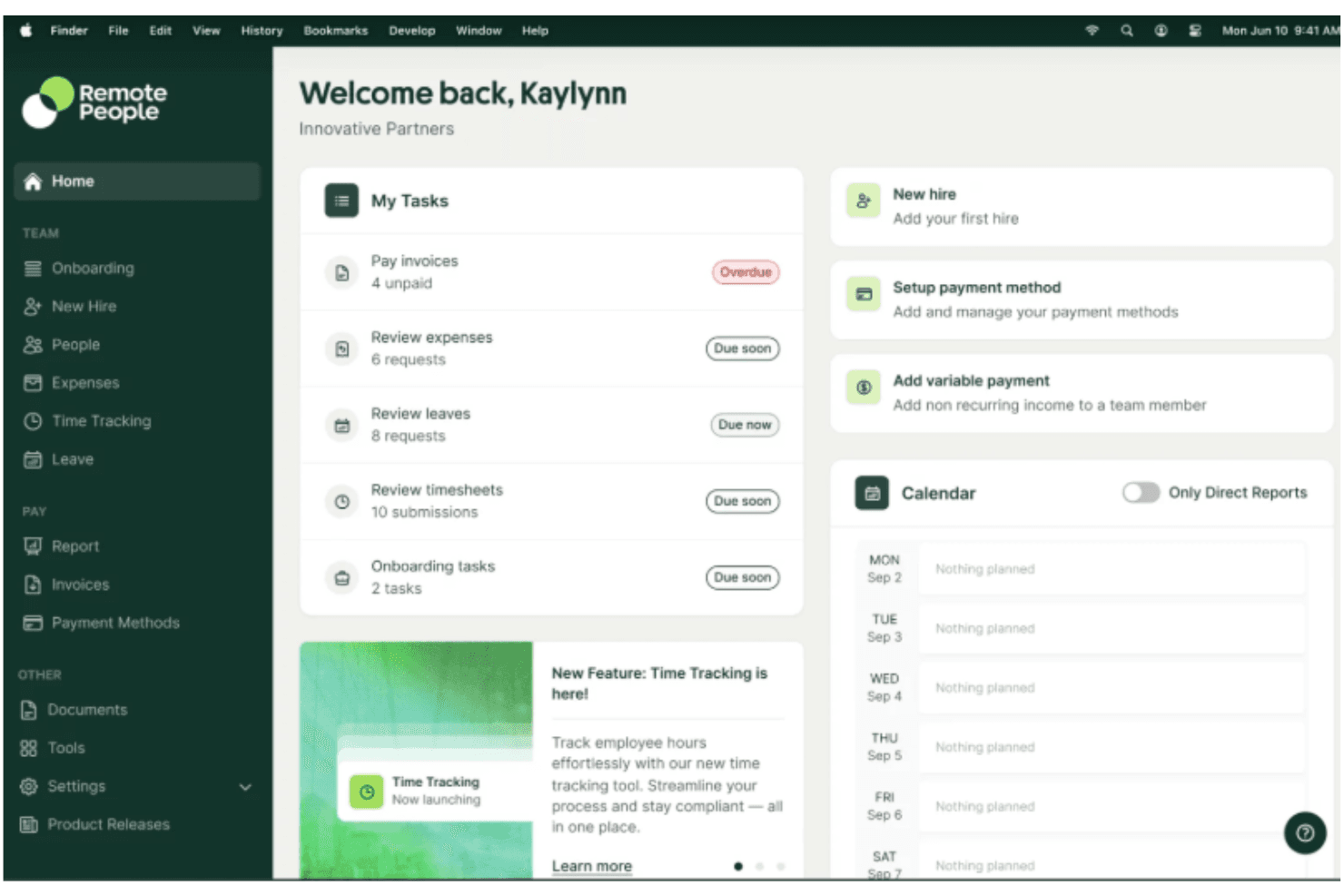
RemotePeople biedt volledige wereldwijde wervingsdiensten, waaronder het zoeken, screenen en opstellen van kandidatenlijsten in meer dan 150 landen. RemotePeople helpt organisaties bij het beheren en ondersteunen van internationale teams met HR- en compliance-uitdagingen. Als je mensen over de grens in dienst neemt, kan dit platform de indiensttreding, contracten en het doorlopende beheer van externe medewerkers vereenvoudigen.
Voor wie is RemotePeople het meest geschikt?
HR-leiders en operationele teams die verspreide, wereldwijde personeelsbestanden in meerdere landen en rechtsgebieden beheren.
Waarom RemotePeople een goede concurrent van Deel is
Grensoverschrijdende indiensttreding is waar RemotePeople naar mijn mening echt uitblinkt. Het platform is gebouwd rond een venster van 48 uur voor indiensttreding—wat betekent dat een nieuwe medewerker in een ander land binnen een dag na de start een conform contract kan hebben ondertekend en bij de arbeidsvoorwaarden kan zijn aangemeld. Ik waardeer ook dat RemotePeople de volledige wervingsprocedure op één plek afhandelt: interne recruiters zoeken kandidaten en voeren de eerste selectie uit, waarna ze hen rechtstreeks doorsturen naar de EOR-werkstroom voor indiensttreding op dezelfde dag. Voor teams die in meer dan 150 landen personeel aannemen zonder lokale entiteiten op te zetten, is die volledig geïntegreerde verbinding tussen werving en conforme indienstneming iets wat Deel niet op dezelfde manier biedt.
Belangrijkste functies van RemotePeople
- Wereldwijde salarisverwerking: Verwerk salarissen voor werknemers en opdrachtnemers in meer dan 150 landen en in lokale valuta.
- Lokaal afgestemd beheer van arbeidsvoorwaarden: Stel landspecifieke arbeidsvoorwaardenpakketten samen en beheer deze, waaronder zorgverzekeringen en pensioenregelingen.
- Toezicht op naleving: Volg wijzigingen in lokale arbeidswetgeving en markeer automatisch welke contract- of beleidsupdates nodig zijn.
- Beheer van opdrachtnemers: Werf externe opdrachtnemers aan, betaal hen en beheer hen op basis van lokaal conforme overeenkomsten.
Integraties van RemotePeople
Ingebouwde integraties zijn niet duidelijk gedocumenteerd.
Pros and Cons
Pros:
- Automatiseert de indiensttreding voor multinationale teams
- Biedt ingebouwde waarborgen voor naleving bij het aannemen van personeel
- Ondersteunt salarisverwerking voor externe werknemers wereldwijd
Cons:
- Beperkte aanpassingsmogelijkheden voor rapporten en analyses
- Geen mobiele app beschikbaar voor beheerders
Learn more about RemotePeople: Beste voor PEO-diensten
- Gratis demo beschikbaar
- Vanaf $8/gebruiker/maand
Visit WebsiteCustomer Rating:4.6/5
Justworks biedt salarisadministratie en HR-beheer via geïntegreerde PEO-diensten. Justworks biedt salarisadministratie- en HR-tools voor bedrijven die werknemers, arbeidsvoorwaarden en compliance op één platform willen beheren. Als concurrent van Deel biedt het ook PEO-diensten waarmee bedrijven salarisadministratie, HR-beheer en werknemersvoordelen kunnen regelen zonder deze processen intern te hoeven beheren. Het platform wordt vaak gebruikt door kleine tot middelgrote bedrijven die ondersteuning zoeken bij personeelsbeheer en salarisadministratie.
Waarom ik voor Justworks heb gekozen
Ik heb Justworks gekozen als een sterke concurrent van Deel, omdat de PEO-diensten bedrijven helpen om salarisadministratie, HR-beheer en werknemersvoordelen via één aanbieder te beheren. Dankzij deze opzet kunnen bedrijven belastingaangiften voor de salarisadministratie en compliance-taken regelen zonder deze processen intern te hoeven beheren. Justworks biedt ook beheer van werknemersvoordelen en HR-tools die het personeelsbeheer naast de salarisadministratie ondersteunen.
Belangrijkste functies van Justworks
Naast PEO-diensten biedt Justworks:
- HR-tools: Biedt een bedrijfsdirectory en agendasynchronisatie om je team georganiseerd en geïnformeerd te houden.
- Tijdregistratie: Biedt digitale prikklokken en aanwezigheidsrapporten om gewerkte uren nauwkeurig vast te leggen.
- Onboarding van werknemers: Vereenvoudigt het onboardingproces met eenvoudige configuratie en documentopslag.
Integraties van Justworks
Integraties zijn onder meer QuickBooks, Xero, BambooHR, JazzHR, Guideline en Mineral. Er is ook een API beschikbaar voor aangepaste integraties.
Pros and Cons
Pros:
- Eenvoudige onboardingworkflow voor nieuwe medewerkers
- Snelle antwoorden van het ondersteuningsteam op vragen over salarisadministratie
- Centraliseert salarisadministratie, HR en beheer van zorgverzekeringen
Cons:
- Rapportagetools bieden beperkte diepgaande bedrijfsinzichten
- Hogere maandelijkse prijs per werknemer
Learn more about Justworks: Het beste voor geautomatiseerde personeelsplanning
- 30 dagen gratis proefperiode + gratis demo beschikbaar
- Vanaf $50/maand
Visit WebsiteCustomer Rating:4.5/5
TimeTrex helpt bij de dienstenplanning met een gedetailleerd aanwezigheidsdashboard. TimeTrex levert een cloudgebaseerd platform voor organisaties die behoefte hebben aan betrouwbaar personeelsbeheer dat verder gaat dan alleen salarisadministratie. Ik denk dat middelgrote bedrijven en HR-teams zullen waarderen hoe het tijdregistratie, planning en compliance-taken op één plek vereenvoudigt.
Voor wie is TimeTrex het meest geschikt?
TimeTrex is geschikt voor operationeel managers en kerkbeheerders die grote, uiteenlopende personeelsroosters en terugkerende diensten op meerdere locaties moeten coördineren.
Waarom TimeTrex een goede concurrent van Deel is
Automatisering van roosters is waar TimeTrex zijn plek op deze lijst echt verdient. Ik vind het prettig hoe het beschikbaarheidssjablonen en patronen voor terugkerende diensten gebruikt om roosters automatisch in te vullen, waardoor het handmatige werk van het wekelijks opnieuw opbouwen van personeelsroosters afneemt. Mijn team kan regels voor geschiktheid instellen op basis van kwalificaties of certificeringen, zodat altijd de juiste mensen aan de juiste functies worden toegewezen. In de praktijk betekent dit minder last-minute chaos wanneer er gaten in de bezetting ontstaan—TimeTrex signaleert conflicten automatisch voordat het rooster überhaupt wordt gepubliceerd.
Belangrijkste functies van TimeTrex
- Salarisverwerking: Bereken en verwerk salarissen rechtstreeks binnen het platform, inclusief inhoudingen, belastingen en nettoloon.
- Dienstenplanning: Stel personeelsroosters op en publiceer ze met hulpmiddelen voor slepen en neerzetten en regels voor het toewijzen van diensten.
- Verlofopbouw bijhouden: Bouw automatisch vakantie-, ziekte- en andere verlofsaldi op basis van configureerbaar beleid op.
- Beperkingen voor inklokken: Beperk wanneer en waar werknemers kunnen inklokken op basis van locatie, apparaat of geplande diensttijden.
Integraties van TimeTrex
TimeTrex biedt native integraties met QuickBooks, Sage en ADP, en levert een API voor aangepaste integraties.
Pros and Cons
Pros:
- Geavanceerde opties voor biometrische tijdregistratie
- Aangepaste regels voor het handhaven van aanwezigheidsbeleid
- Realtimewaarschuwingen en -beheer voor overuren
Cons:
- De gebruikersinterface voelt verouderd aan
- De mobiele app heeft gemelde betrouwbaarheidsproblemen
Learn more about TimeTrex: 5Ideaal voor Canadese kleine bedrijven
Xero
- Gratis proefperiode van 30 dagen beschikbaar
- Vanaf $2.50/maand
Visit WebsiteCustomer Rating:4.4/5
Xero stroomlijnt de Canadese salarisadministratie met automatisering en compliancefuncties. Xero is online boekhoudsoftware die is ontworpen voor kleine bedrijven en tools voor salarisadministratie en financieel beheer biedt. Eigenaren van kleine bedrijven en accountants gebruiken het voornamelijk om financiën en salarisadministratie efficiënt te beheren.
Waarom het een goed alternatief voor Deel is: Xero biedt functies voor salarisadministratie die specifiek zijn afgestemd op Canadese kleine bedrijven, waardoor het een sterke optie is als je in Canada actief bent. De geautomatiseerde salarisverwerking zorgt voor nauwkeurige en tijdige betalingen aan je team.
De compliancefuncties van Xero helpen je moeiteloos te voldoen aan de Canadese belastingregels. De financiële rapportagefuncties van de software bieden inzicht in de financiële gezondheid van je bedrijf, wat bijdraagt aan betere besluitvorming.
Belangrijkste functies en integraties:
Functies omvatten het bijhouden van uitgaven, facturering en bankafstemming. Met het bijhouden van uitgaven houd je je uitgaven in de gaten, terwijl je met facturering je facturatie efficiënt kunt beheren. Bankafstemming vereenvoudigt het vergelijken van je financiële administratie met bankafschriften.
Integraties zijn onder andere PayPal, Stripe, Square, HubSpot, Shopify, Mailchimp, Vend, Squarespace, WooCommerce en Microsoft 365.
Pros and Cons
Pros:
- Afgestemd op Canadese bedrijven
- Gedetailleerde financiële rapportage
- Eenvoudige bankafstemming
Cons:
- Basisfuncties van de mobiele app
- Beperkte schaalbaarheid voor grote bedrijven
 6Ideaal voor automatische belastingaangiften
WAVE
- Gratis abonnement beschikbaar
- Vanaf $16/gebruiker/maand

WAVE biedt tools voor salarisadministratie, belastingaangiften, facturering en boekhouding. WAVE is online salaris- en boekhoudsoftware voor kleine bedrijven, met tools voor het beheren van salarisadministratie, facturering en boekhouding. Het wordt voornamelijk gebruikt door eigenaren van kleine bedrijven en accountants om financiële taken te stroomlijnen.
Waarom het een goed alternatief voor Deel is: WAVE verzorgt automatisch belastingaangiften, waardoor het belastingseizoen minder stressvol is voor je team. De salarisfuncties zorgen ervoor dat je medewerkers nauwkeurig en op tijd worden betaald.
De factureringsmogelijkheden van WAVE helpen je om facturatie efficiënt te beheren. Daarnaast bieden de boekhoudtools een uitgebreide oplossing voor het bijhouden van je financiële gegevens.
Opvallende functies & integraties:
Functies zijn onder andere het scannen van bonnetjes, het bijhouden van uitgaven en cashflowbeheer. Met het scannen van bonnetjes kun je je bonnetjes moeiteloos digitaliseren en organiseren. Met het bijhouden van uitgaven kun je je uitgaven monitoren en budgetten beheren. Cashflowbeheer biedt inzicht in je financiële gezondheid en ondersteunt betere besluitvorming.
Integraties zijn onder andere QuickBooks, PayPal, Shopify, Etsy, Stripe, Zapier, Square, HubSpot, Mailchimp en Google Workspace.
Pros and Cons
Pros:
- Uitgebreide boekhoudtools
- Efficiënt factureringssysteem
- Eenvoudig bonnetjes scannen
Cons:
- Beperkte klantenondersteuning
- Basisrapportagemogelijkheden
Learn more about WAVE: Het beste voor geautomatiseerde salarisverwerking
- Gratis demo beschikbaar
- Vanaf $49/maand + $6/gebruiker/maand

Gusto automatiseert salarisadministratie en arbeidsvoorwaarden met ingebouwde belastingcompliance. Gusto is salaris- en HR-software voor kleine tot middelgrote bedrijven, met tools voor salarisadministratie, arbeidsvoorwaarden en HR-beheer. Het wordt gebruikt door bedrijfseigenaren en HR-teams om werknemersgerelateerde taken efficiënt te beheren.
Waarom het een goed alternatief voor Deel is: Gusto biedt geautomatiseerde salarisverwerking, waardoor de salarisadministratie voor je team eenvoudiger wordt. Het zorgt voor nauwkeurige en tijdige betalingen, waardoor de benodigde handmatige inspanning afneemt.
De belastingcompliance-tools van Gusto helpen je zonder gedoe aan de regelgeving te voldoen. Daarnaast biedt de functie voor het beheren van arbeidsvoorwaarden een uitgebreide oplossing voor het afhandelen van werknemersvoordelen.
Opvallende functies & integraties:
Functies omvatten het inwerken van werknemers, tijdregistratie en prestatiebeoordelingen. Het inwerken van werknemers helpt je het proces voor het verwelkomen van nieuwe medewerkers te stroomlijnen. Met tijdregistratie kun je de gewerkte uren van werknemers nauwkeurig bijhouden. Prestatiebeoordelingen bieden een gestructureerde manier om de prestaties van je team te evalueren.
Integraties omvatten QuickBooks, Xero, TSheets, Deputy, Clover, Trainual, Expensify, Shopify, HubSpot en Zoom.
Pros and Cons
Pros:
- Uitgebreid beheer van arbeidsvoorwaarden
- Efficiënt inwerken van werknemers
- Nauwkeurige tijdregistratie
Cons:
- Beperkte geavanceerde rapportage
- Kan complex zijn voor beginners
Learn more about Gusto: Beste voor integratie van kerkbeheer
- Gratis demo downloaden
- kosten vanaf $395

PowerChurch Plus combineert tools voor boekhouding, evenementen en het bijhouden van leden. PowerChurch Plus is software voor kerkbeheer die is ontworpen om kerken te helpen bij het beheren van hun administratieve taken, waaronder boekhouding, ledenbeheer en evenementenbeheer. Het wordt voornamelijk gebruikt door kerkbeheerders en financiële teams om de activiteiten van de kerk te stroomlijnen.
Waarom het een goed alternatief voor Deel is: PowerChurch Plus biedt sterke integratie voor kerkbeheer, waardoor het een geschikt alternatief is als je kerk een uitgebreide oplossing nodig heeft. Met de boekhoudfuncties kun je de financiën effectief beheren.
Met de tools voor ledenbeheer houd je je gemeente eenvoudig bij. Daarnaast kun je met de mogelijkheden voor evenementenbeheer kerkelijke activiteiten efficiënt organiseren.
Belangrijkste functies & integraties:
Functies omvatten het bijhouden van bijdragen, aanwezigheidsbeheer en aanpasbare rapporten. Met het bijhouden van bijdragen kun je donaties nauwkeurig controleren en registreren. Met aanwezigheidsbeheer houd je de deelname van leden aan diensten en evenementen bij. Aanpasbare rapporten bieden inzichten die zijn afgestemd op de behoeften van je kerk.
Integraties omvatten QuickBooks, Vanco, PayPal, Realm, Planning Center, Church Community Builder, ACS Technologies, FellowshipOne, Shelby Systems en EasyTithe.
Pros and Cons
Pros:
- Uitgebreide tools voor kerkbeheer
- Sterke boekhoudfuncties
- Nauwkeurig bijhouden van bijdragen
Cons:
- Beperkte functies van de mobiele app
- Complex installatieproces
Learn more about PowerChurch Plus:

CDM+ combineert salarisadministratie, boekhouding en het bijhouden van donaties voor non-profitorganisaties. CDM+ is software voor kerkbeheer die salarisadministratie-, ledenbeheer- en boekhoudoplossingen biedt die zijn afgestemd op kerken en non-profitorganisaties. Kerkbeheerders en financiële teams gebruiken het om verschillende administratieve taken efficiënt af te handelen.
Waarom het een goed alternatief voor Deel is: CDM+ biedt gespecialiseerde functies voor non-profitorganisaties, waardoor het ideaal is als je kerk een oplossing nodig heeft die verder gaat dan eenvoudige salarisadministratie. Met de tools voor ledenbeheer houd je eenvoudig je gemeenteleden bij.
De boekhoudfuncties van de software bieden uitgebreide mogelijkheden voor financieel beheer. Daarnaast ondersteunt CDM+ het bijhouden van donaties, wat bijdraagt aan financiële transparantie en rapportage.
Belangrijkste functies & integraties:
Functies omvatten evenementenbeheer, aanwezigheidsregistratie en aanpasbare rapportage. Met evenementenbeheer organiseer en coördineer je kerkevenementen. Met aanwezigheidsregistratie houd je deelname aan diensten en activiteiten bij. Aanpasbare rapportage biedt inzichten die zijn afgestemd op je specifieke behoeften.
Integraties omvatten QuickBooks, Mailchimp, Vanco, PayPal, Realm, Planning Center, Church Community Builder, ACS Technologies, FellowshipOne en Shelby Systems.
Pros and Cons
Pros:
- Uitgebreid financieel beheer
- Uitstekende registratie van donaties
- Efficiënte tools voor ledenbeheer
Cons:
- Vereist technische kennis
- Beperkte schaalbaarheid
Learn more about CDM+: Best voor aanpasbare kerkmodules
- Gratis proefperiode + gratis demo beschikbaar
- Vanaf $19/maand

Church Windows past modules voor financiën, evenementen en leden aan. Church Windows is kerkbeheersoftware die is ontworpen om kerken te helpen hun administratieve taken te beheren, waaronder ledenadministratie, boekhouding en evenementenplanning. De software wordt gebruikt door kerkbeheerders en financiële teams om kerkelijke activiteiten te stroomlijnen.
Waarom het een goed alternatief voor Deel is: Church Windows biedt aanpasbare kerkmodules, waarmee je de software kunt afstemmen op je specifieke behoeften. Met de functies voor ledenbeheer kun je je gemeente effectief bijhouden.
De boekhoudmogelijkheden bieden uitgebreide hulpmiddelen voor financieel beheer van je kerk. Bovendien helpen de functies voor evenementenplanning bij het organiseren en coördineren van kerkelijke activiteiten.
Opvallende functies & integraties:
Functies omvatten het bijhouden van donaties, aanwezigheidsbeheer en coördinatie van vrijwilligers. Met het bijhouden van donaties kun je bijdragen nauwkeurig controleren en registreren. Met aanwezigheidsbeheer kun je de deelname van leden aan diensten en evenementen bijhouden. De coördinatie van vrijwilligers biedt hulpmiddelen om vrijwilligersactiviteiten efficiënt te beheren en te organiseren.
Integraties omvatten QuickBooks, Vanco, PayPal, Realm, Planning Center, Church Community Builder, ACS Technologies, FellowshipOne, Shelby Systems en EasyTithe.
Pros and Cons
Pros:
- Aanpasbare modules
- Efficiënte evenementenplanning
- Sterk ledenbeheer
Cons:
- Complex installatieproces
- Basale gebruikersinterface
Learn more about Church Windows:
Andere alternatieven voor Deel
Hier zijn enkele aanvullende alternatieven voor Deel die mijn shortlist niet hebben gehaald, maar die toch de moeite waard zijn om te bekijken:
- 11PaylocityHet beste voor functies voor wereldwijde salarisadministratie
- 12QuickBooks PayrollIdeaal voor bescherming tegen belastingboetes
- 13OnPayHet beste voor compliance bij kleine bedrijven
- 14Patriot PayrollBeste voor ondersteuning vanuit de VS
Hoe ik concurrenten van Deel beoordeel
Wanneer een kerk een zendeling in Kenia moet betalen of in het buitenland een parttime aanbiddingsleider in dienst wil nemen, deel ik mijn beoordeling op in basisvereisten en onderscheidende factoren.
Kernfunctionaliteit (basisvereisten voor deze lijst)
Bij het selecteren van tools voor mijn lijst beoordeel ik elke tool op een schaal van 0 (biedt de functionaliteit niet aan) tot 5 (blink uit op dit gebied) voor elke hieronder vermelde kernfunctionaliteit. Vervolgens bereken ik de totaalscore van de tool als percentage. Elke tool moet een minimale totaalscore van 65% behalen om in aanmerking te komen voor opname.
- Wereldwijde loonverwerking: Ik controleer in hoeveel landen een platform loonverwerking ondersteunt, aangezien kerken met zendelingen in meerdere regio's één plek nodig hebben om alles te beheren.
- Beheer van opdrachtnemers: Gastmuzikanten, retraitebegeleiders en evenementenmedewerkers hebben allemaal conforme overeenkomsten nodig. Daarom beoordeel ik hoe elke tool het onboarden en betalen van opdrachtnemers afhandelt.
- Diensten voor formeel werkgeverschap: Voor kerken die bedieningsmedewerkers aannemen in landen waar ze geen juridische entiteit hebben, kijk ik naar het aantal regio's dat een platform met een eigen infrastructuur voor formeel werkgeverschap ondersteunt.
- Naleving en belastingafhandeling: Het vermogen van elk platform om lokale belastingaangiften te automatiseren en regiospecifieke documenten te genereren is belangrijk, vooral voor geestelijken met unieke belastingclassificaties.
- Voordelenadministratie: Ik beoordeel of een tool je in staat stelt om vanuit één dashboard zorgverzekeringen, pensioenregelingen en toelagen aan medewerkers in verschillende landen aan te bieden.
- Betalingen in meerdere valuta: Ondersteuning voor zendelingen verloopt vaak via tientallen valuta, dus ik kijk naar het aantal valuta dat een platform ondersteunt en welke uitbetalingsmethoden beschikbaar zijn.
Zodra ik een lijst heb met tools die aan deze criteria voldoen, kijk ik naar wat elk platform onderscheidt.
Onderscheidende factoren (wat leveranciers van elkaar onderscheidt)
Zo vergelijk ik verschillende leveranciers:
Opvallende functies
Ondersteuning voor belastingen van geestelijken is een belangrijk onderscheidend kenmerk. Ik zoek naar platforms die classificaties voor huisvestingstoelagen en belastingkwesties met een dubbele status zonder handmatige omwegen afhandelen. Consolidatie van meerdere entiteiten is ook belangrijk wanneer een denominatie vanuit één account de loonverwerking voor meerdere campussen of aangesloten bedieningen uitvoert. Ik beoordeel hoe elke tool toelagen voor zendelingen beheert, aangezien op ondersteuning gebaseerde beloning en variabele toelagenschema's andere workflows vereisen dan standaard salarisbetalingen.
Meer dan functies
De prijsstructuur is belangrijk voor kerken, dus ik controleer of een platform kortingen voor non-profitorganisaties of flexibele prijzen per gebruiker biedt die geschikt zijn voor seizoensgebonden zendingsmedewerkers. Ik beoordeel ook hoe elke tool verbinding maakt met kerkspecifieke software zoals Planning Center of Aplos, aangezien de meeste bedieningen hier al op vertrouwen voor donorbeheer en fondsboekhouding. Gegevensbeveiliging is een andere belangrijke overweging: zendelingen in gevoelige regio's hebben platforms nodig met op rollen gebaseerde toegangscontroles en sterke versleuteling om personeelsinformatie te beschermen.
Waarom zoeken naar een alternatief voor Deel?
Hoewel Deel een goede keuze is voor salarisadministratiesoftware voor kerken, zijn er verschillende redenen waarom sommige gebruikers op zoek gaan naar alternatieve oplossingen. Misschien zoek je een alternatief voor Deel omdat…
- Je meer kerkspecifieke functies nodig hebt
- Je team betere lokale ondersteuning nodig heeft
- Je met Deel tegen budgettaire beperkingen aanloopt
- Je een eenvoudigere gebruikersinterface nodig hebt
- Je organisatie offline toegang nodig heeft
Als een van deze punten je bekend voorkomt, ben je hier aan het juiste adres. Mijn lijst bevat verschillende opties voor salarisadministratiesoftware voor kerken die beter geschikt zijn voor teams die met deze uitdagingen van Deel te maken hebben en op zoek zijn naar alternatieve oplossingen.
Belangrijkste functies van Deel
Hier zijn enkele van de belangrijkste functies van Deel, zodat je kunt vergelijken wat alternatieve oplossingen te bieden hebben:
- Wereldwijd payrollbeheer: Beheer de salarisadministratie in meer dan 130 landen en zorg ervoor dat je team nauwkeurig en op tijd wordt betaald.
- Naleving van lokale wetgeving: Voldoe aan de lokale arbeidswetgeving en beperk de risico's voor je organisatie.
- Integratie met HR-informatiesystemen: Integreer met verschillende HR-systemen, stroomlijn je HR-processen en verbeter de efficiëntie.
- Beheer van contractanten: Beheer internationale contractanten moeiteloos en ondersteun je externe medewerkers effectief.
- In- en uitdiensttreding: Vereenvoudig het proces van in- en uitdiensttreding en bespaar je team tijd en moeite.
- Centrum voor naleving: Krijg toegang tot een speciaal centrum voor updates over regelgeving en risicobeheer, zodat je organisatie goed geïnformeerd blijft.
- Prestatiebewaking: Houd de prestaties van medewerkers in de gaten en evalueer deze, zodat je betere beslissingen kunt nemen.
- Ondersteuning voor werken op afstand: Bied uitgebreide ondersteuning aan bedrijven met medewerkers op afstand en zorg voor soepele bedrijfsvoering.
- PEO-diensten: Krijg toegang tot diensten van een professionele werkgeversorganisatie voor uitgebreid HR-beheer.
- Gebruiksvriendelijke interface: Profiteer van een platform dat eenvoudig te navigeren is en de productiviteit van je team verhoogt.