

Å drive en kirke innebærer en lang liste med ansvarsområder – planlegging av gudstjenester, koordinering av frivillige og kirkestab, oppfølging av meldinger og å sørge for at alle føler seg ivaretatt. Det er mye å holde styr på, og det kan fort tappe deg for både tid og energi.
Derfor har jeg fulgt nøye med på verktøy som faktisk gjør arbeidsbelastningen mindre. Noen av disse plattformene kan overta rutinemessig administrativt arbeid og menighetsarbeid, organisere informasjon på en tydeligere måte og hjelpe deg med å holde kontakten med fellesskapet på en mer personlig måte.
I denne veiledningen deler jeg KI-verktøyene for kirker av høy kvalitet som utmerket seg for meg etter at jeg testet ulike alternativer. Jeg går gjennom hva hvert verktøy tilbyr, hvordan det kan hjelpe med daglige oppgaver, samt styrkene og begrensningene du bør vurdere når du sammenligner dem.
Hvorfor du kan stole på våre programvareanbefalinger
6,700+
Reviews
20
Industry experts
16+
Evaluation factors
14
Years
Teamet vårt har testet og anmeldt programvare siden 2012. Vi er selv kirkeledere, så vi vet hvor vanskelig og hvor viktig det er å velge riktig programvare.
I denne guiden har vi vurdert verktøyene gjennom praktisk testing og uavhengig research og gitt dem poeng ut fra våre utvelgelseskriterier.
Anmeldelsene våre bygger på vår egen redaksjonelle vurdering. De er ikke et salgsargument.
Sammenligningstabell for KI-verktøy for kirker
Denne sammenligningstabellen oppsummerer prisopplysningene for mine beste utvalgte KI-verktøy for kirker:
| Tool | Best For | Trial Info | Price | ||
|---|---|---|---|---|---|
| 1 | Best for live multilingual sermon translation | Free trial available | From $150/month | Website | |
| 2 | Best for member Q&A automation | 60-day free trial available | From $99/month | Website | |
| 3 | Best for AI-based multi-channel workflows | Free demo available | Pricing upon request | Website | |
| 4 | Best for AI-driven biblical research | 30-day free trial | From $9.99/month | Website | |
| 5 | Best for smart AI data synchronization | Free demo available | Pricing upon request | Website | |
| 6 | Best for AI-assisted sermon preparation | Free trial available | From $39/month | Website | |
| 7 | Best for conversational AI | Free plan available | From $5/month | Website | |
| 8 | Best for generating sermon insights with AI | Free expert consultation available | Pricing upon request | Website | |
| 9 | Best for AI-powered church leadership insights | Free demo available | From $27/month | Website | |
| 10 | Best for integrating AI tools with your existing systems | Free plan available | From $65/month | Website |


Anmeldelser av de beste KI-verktøyene for kirker
Nedenfor finner du mine detaljerte sammendrag av de beste KI-verktøyene for kirker som kom med på kortlisten min. Anmeldelsene mine gir en detaljert gjennomgang av de viktigste funksjonene, fordeler & ulemper, integrasjoner og ideelle bruksområder for hvert verktøy, slik at du kan finne det beste alternativet for deg.
 Best for live multilingual sermon translation
- Free trial available
- From $150/month

OneAccord’s AI-powered translation app enables real-time multilingual communication for churches, helping congregations connect seamlessly across languages during services and group sessions. OneAccord is a church AI platform that provides live sermon translation, real-time audio monitoring, and browser-based congregation access for multilingual and hybrid worship environments.
Who Is OneAccord Best For?
Church leaders and tech teams who need AI-powered tools for multilingual worship services and accessible online congregation participation.
Why I Picked OneAccord
I picked OneAccord as one of the best because I can deliver live multilingual sermon translation to my congregation without extra hardware or complex setup. My team uses its AI-powered translation to reach people in their native languages during worship. I like that listeners can access real-time translations directly from their own devices, making it easy to include everyone in the service.
OneAccord Key Features
- Real-time audio quality monitoring: Track and manage audio clarity during live services from a central dashboard.
- Browser-based congregation access: Attendees join and listen to translations using any web browser on their devices.
- Custom branding options: Add your church’s logo and colors to the listening interface for a consistent experience.
OneAccord Integrations
Native integrations are not clearly documented. OneAccord provides an API for custom integrations.
Pros and Cons
Pros:
- Analytics dashboard tracks listener engagement
- Browser-based access supports multilingual congregation participation
- Custom branding maintains consistent church experience
Cons:
- No built-in video streaming support
- Limited documentation for advanced setup
Learn more about OneAccord:
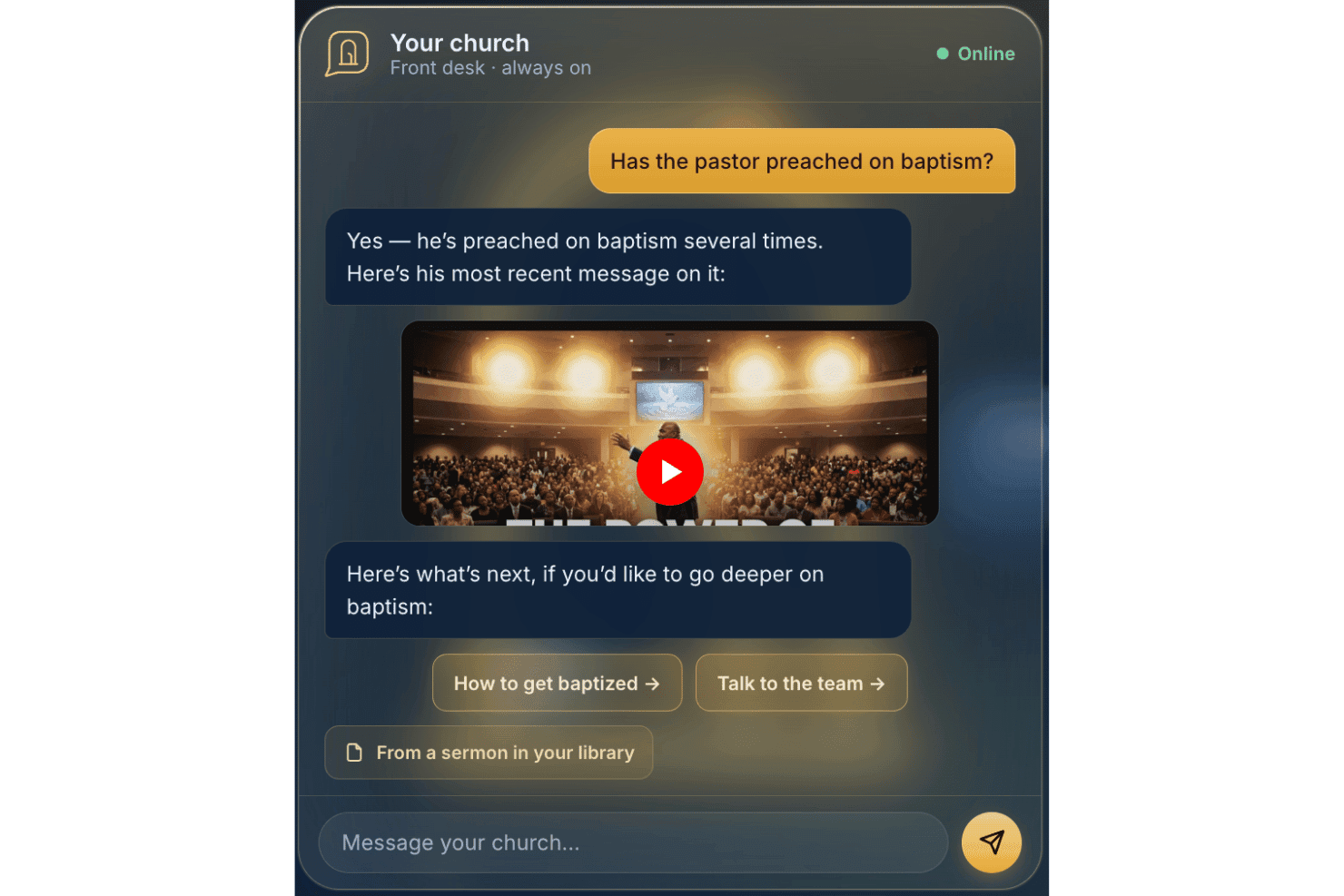
AskMyChurch offers a 24/7 AI-powered church answering service. AskMyChurch is a church AI assistant that answers member questions from your own published content, indexes your pastor's sermons, and routes sensitive conversations to your pastoral care team.
Who Is AskMyChurch Best For?
It's a strong fit for churches of any size that field a high volume of repeated member questions but don't have staff available to answer them around the clock.
Why I Picked AskMyChurch
I picked AskMyChurch because it answers only from your church's own published content, then runs a second-pass grounding check before sending any response. If it can't find a supported answer, it says so rather than guessing. I also like Canon, which indexes your pastor's sermons and links each answer to the exact minute it was said, so members get a grounded, citable response rooted in your church's actual teaching.
AskMyChurch Key Features
- Crisis gate: Detects distress signals and routes them to the 988 Suicide & Crisis Lifeline and your care team before any AI response.
- Themes reporting: Tracks anonymous question topics and surfaces trending member concerns each week.
- Plain-English topic controls: Lets you set boundaries for topics the AI should hand off to staff using simple dashboard commands.
- Multilingual support: Offers member Q&A automation in both English and Spanish out of the box.
AskMyChurch Integrations
Native integrations are not publicly documented. Content is ingested from your public website and sermon media, but there are no advertised connections to other church management or communication platforms.
Pros and Cons
Pros:
- Supports member Q&A in English and Spanish
- Routes sensitive topics to pastoral staff
- Answers only from your church’s content
Cons:
- Mobile app and SMS support not available
- Does not connect with church management software
Learn more about AskMyChurch: Best for AI-based multi-channel workflows
- Free demo available
- Pricing upon request
Visit WebsiteCustomer Rating:4.5/5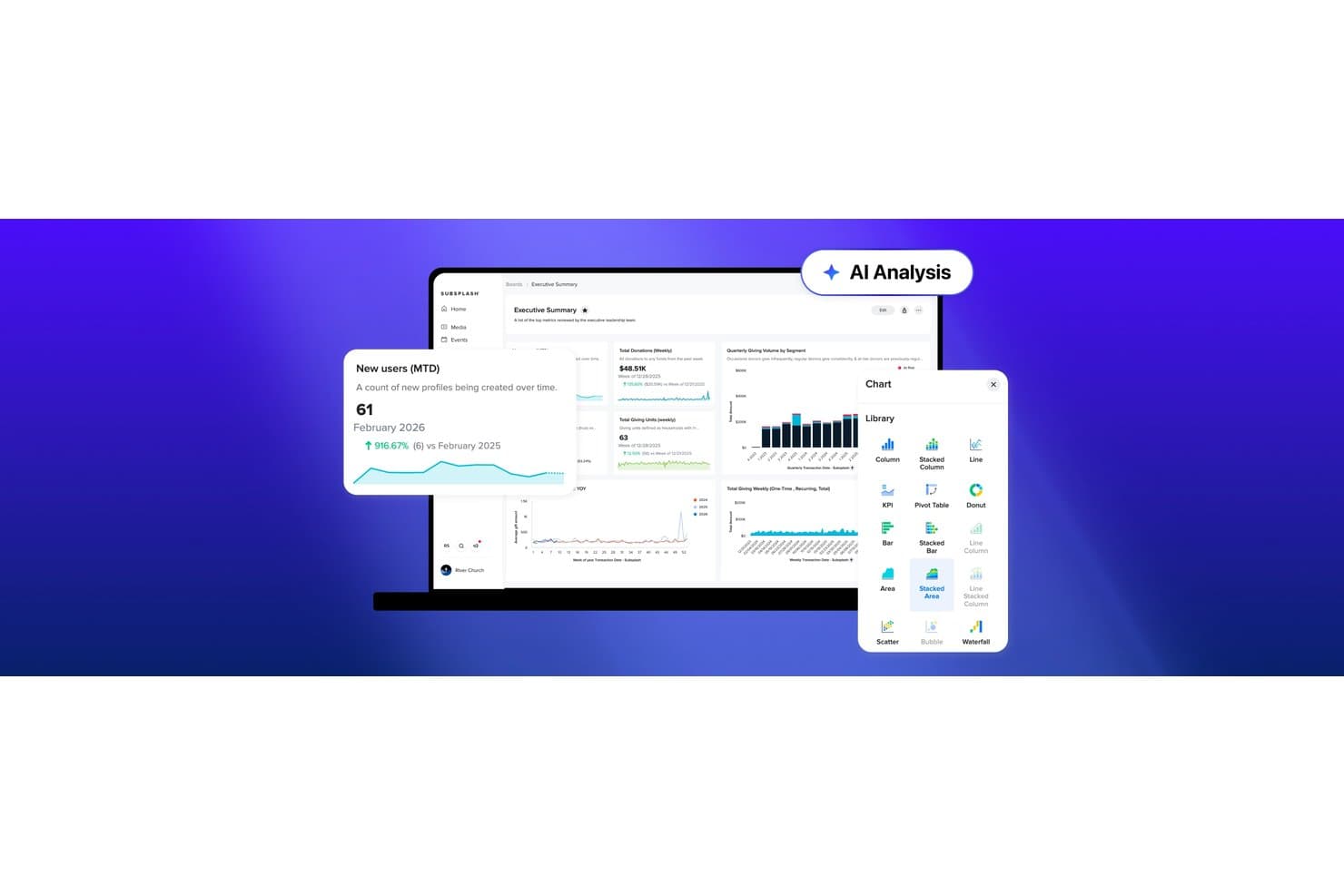
Subsplash offers an AI Analysis feature with an analytics dashboard displaying new user metrics, donation totals, giving trends, and a chart library with multiple visualization options. Subsplash is an all-in-one church platform that combines mobile apps, giving, live streaming, church management, and AI tools for sermon repurposing, workflow automation, and congregant engagement.
Who Is Subsplash Best For?
Subsplash suits growing churches that need one platform to coordinate communications, media, giving, and ministry operations across staff, volunteers, and congregation members.
Why I Picked Subsplash
Subsplash earns its spot on my shortlist because of how its Workflows feature uses AI to generate full ministry processes in seconds. I can describe a volunteer onboarding process or a new visitor follow-up sequence, and Subsplash drafts the entire Kanban board, checklists, and automated emails. What I especially like is that those emails fire automatically the moment a card moves to a new stage, reaching people across app, email, and SMS without any manual intervention.
Subsplash Key Features
- Pulpit AI media repurposing: Instantly creates sermon clips, discipleship materials, and social posts from uploaded sermons.
- Centralized people database: Stores all congregant, donor, and volunteer records in one integrated platform.
- Trends AI dashboards: Generates live data visualizations for giving, attendance, and group engagement.
- Multi-channel event publishing: Schedules and distributes events across website, app, and messaging channels simultaneously.
Subsplash Integrations
Subsplash offers native integrations with Planning Center, Zapier, Breeze, MortarStone, and more, and provides an API for custom integrations.
Pros and Cons
Pros:
- Trends dashboards surface giving and attendance data
- Pulpit AI converts sermons into social content
- AI Workflows generate full ministry processes instantly
Cons:
- No scripture-aware doctrinal guardrails built in
- AI toolset is newer and still maturing
 Best for AI-driven biblical research
- 30-day free trial
- From $9.99/month
Visit WebsiteCustomer Rating:4.5/5
Logos Bible Software enriches scripture study and improves sermon preparation. Logos Bible Software is designed for pastors, theologians, and scholars who need dedicated tools for biblical research and study. It offers an extensive library and AI-driven search capabilities that enhance scripture study and sermon preparation.
Why I picked Logos Bible Software: It provides advanced biblical research tools with features like AI-powered search and scripture analysis. You can access a vast library of resources to deepen your understanding of the Bible. The software also offers tools for sermon preparation, helping you craft insightful messages. These features make it a helpful tool for anyone serious about biblical study.
Standout Features & Integrations:
Features include an extensive digital library, sermon preparation tools, and a customizable study environment. These features help you explore biblical texts in depth. The software's intuitive interface makes it easy to navigate and utilize its resources effectively.
Integrations include BibleWorks, Evernote, Microsoft Word, Dropbox, OneDrive, Kindle, Zotero, Scrivener, Google Drive, and Microsoft PowerPoint.
Pros and Cons
Pros:
- Supports detailed scripture study
- Advanced AI-powered search capabilities
- Access to extensive biblical resources
Cons:
- Requires significant storage space
- Learning curve for beginners
Learn more about Logos Bible Software: Best for smart AI data synchronization
- Free demo available
- Pricing upon request

Church Community Builder organizes members, events, and group information. Church Community Builder is an AI cloud-based church management system that helps you organize and share key information about your congregation. It’s designed to help your team keep membership data, events, and group details in one place and ensure updates flow where you need them.
Why I picked Church Community Builder: Church Community Builder syncs member details, so updates people make show up in your records right away, and it sends event and group updates to the channels your congregation already uses. It creates pages for events and groups automatically, keeping information consistent across locations. Members can update their own contact details, which reduces manual data cleanup.
Standout Features & Integrations:
Features include automatic syncing of member information so your records stay current, event data flowing from your management system straight to your website or app, and group search with filters and map view so your people can find the right community. These options help you keep your congregation informed and involved.
Integrations include The Church Co website builder and the Members Portal that syncs with Church Community Builder, events pages through The Church Co integration, and group pages via The Church Co integration.
Pros and Cons
Pros:
- Group search with map filters
- Automatic event page creation
- Easy syncing of member updates
Cons:
- The interface can feel busy
- Can take time to learn all tools
Learn more about Church Community Builder:

Pulpit AI supports sermon writing and strengthens research and organization. Pulpit AI is tailored for pastors and church leaders who seek to enhance their sermon preparation process. It offers AI-driven tools to assist with sermon writing, research, and organization, making it a valuable asset for sermon development.
Why I picked Pulpit AI: It provides sermon preparation support with features like AI-assisted sermon outlines and research tools. You can quickly generate sermon drafts and access relevant biblical resources.
Standout Features & Integrations:
Features include AI-assisted sermon outlines, research tools, and sermon organization capabilities. These features help you craft well-structured sermons efficiently. The platform's intuitive design ensures that you can focus on delivering impactful messages. In addition, you can repurpose your sermons to be shared on social media or your church’s website as video clips, discussion questions, devotionals, blogs, and more.
Integrations include Subsplash and CrowdVibe.
Pros and Cons
Pros:
- Extensive discipleship-oriented capabilities
- Access to relevant biblical resources
- AI-assisted sermon outline creation
Cons:
- Requires time to learn features
- Limited to sermon-related tasks
Learn more about Pulpit AI:

ChatGPT powers conversational AI and enables interactive chat experiences. Chat GPT is an AI tool designed for developers and businesses seeking to implement conversational AI solutions. It offers natural language processing capabilities that facilitate interactive and intelligent chat experiences for users.
Why I picked Chat GPT: It provides conversational AI with features like context-aware responses and language generation. You can create chatbots that understand and respond to user queries in a human-like manner. The tool's ability to handle complex conversations makes it a valuable resource for customer service and engagement. These functionalities make it ideal for businesses looking to enhance their communication strategies.
Standout Features & Integrations:
Features include natural language processing, context-aware responses, and language generation capabilities. These features help you create engaging and intelligent chat experiences. The platform's user-friendly interface allows you to implement AI solutions with ease.
Integrations include Slack, Microsoft Teams, Zoom, Facebook Messenger, WhatsApp, Google Assistant, Amazon Alexa, Zendesk, Salesforce, and Shopify.
Pros and Cons
Pros:
- Enhances communication strategies
- Supports natural language processing
- Provides context-aware conversational responses
Cons:
- Limited to conversational tasks
- Does “Hallucinate” requiring manual fact-checking
Learn more about Chat GPT: Best for generating sermon insights with AI
- Free expert consultation available
- Pricing upon request

AI for Churches automates ministry tasks and supports sermon preparation. AI for Churches is designed for church leaders looking to integrate AI into their ministries. It helps automate routine tasks and provides insights for sermon preparation and congregation engagement.
Why I picked AI for Churches: It excels in sermon analysis, offering features like SermonSpark, which generates sermon ideas and outlines based on bible verses. The AI Tech Coach feature guides your team on how to use generative AI effectively. AI for Churches also provides clear AI strategies, helping you implement AI without compromising your church's values. These offerings make it a strong choice for enhancing sermon-related tasks.
Standout Features & Integrations:
Features include sermon idea generation, AI coaching for staff, and tools for congregation engagement. These features help you focus more on pastoral care and ministry while AI tools save time by handling routine tasks. The platform's AI guidance ensures your team uses technology confidently.
Integrations are not listed at this time.
Pros and Cons
Pros:
- Enhances congregation engagement
- AI-driven sermon preparation tools
- Custom AI strategies for churches
Cons:
- Requires initial setup and learning
- Limited to AI-specific functions
Learn more about AI for Churches: Best for AI-powered church leadership insights
- Free demo available
- From $27/month

AI for Church Leaders offers leadership insights and strengthens community engagement. AI for Church Leaders is tailored for church administrators and leaders seeking AI-driven insights to enhance their leadership roles. It focuses on providing analytical tools and resources to improve decision-making and community engagement.
Why I picked AI for Church Leaders: It offers leadership insights through features like AI-driven analytics and dashboards. These tools help you understand congregation trends and improve engagement strategies. The platform also includes coaching resources to guide you in implementing AI effectively. These insights and tools make it ideal for leaders aiming to enhance their strategic decision-making.
Standout Features & Integrations:
Features include AI-driven analytics, leadership coaching resources, and community engagement tools. These features help you make informed decisions and boost your leadership effectiveness. The platform’s coaching resources ensure you maximize the benefits of AI.
Integrations are not listed at this time.
Pros and Cons
Pros:
- Includes coaching for AI implementation
- Offers AI-driven analytics tools
- Provides detailed leadership insights
Cons:
- Limited customization options
- May require time to learn features
Learn more about AI for Church Leaders: Best for integrating AI tools with your existing systems
- Free plan available
- From $65/month

Church.tech supports church operations and improves communication with tech tools. Church.tech is a platform tailored for churches seeking to integrate technology into their operations. It offers tools for managing church activities, enhancing communication, and improving overall efficiency through AI-driven solutions.
Why I picked Church.tech: It excels in tech integration, offering AI features like automated scheduling and communication tools that sync with your existing systems. The platform provides insights into member engagement, helping you tailor your outreach efforts. Its tech integration capabilities ensure that your church's digital ecosystem is cohesive. These features make it a great choice for churches looking to merge technology with ministry.
Standout Features & Integrations:
Features include automated scheduling, communication tools, and member engagement insights. These features help you manage church activities efficiently. The platform's ability to sync with existing systems enhances its utility.
Integrations include Planning Center, Tithe.ly, Breeze, Slack, Google Calendar, Microsoft Outlook, Zoom, Mailchimp, QuickBooks, and Microsoft Teams.
Pros and Cons
Pros:
- Useful member engagement insights
- Automated scheduling features
- Strong tech integration capabilities
Cons:
- Limited customization options
- May require technical expertise
Learn more about Church.tech:
Andre KI-verktøy for kirker
Her er noen flere KI-verktøy for kirker som ikke kom med på kortlisten min, men som likevel er verdt å se nærmere på:
- 11Pastors.aiBest for turning sermons into AI-generated study and shareable content
- 12Sermon ShotsBest for AI-generated sermon illustrations
- 13Dall-EBest for polished church visuals using AI
- 14Church AI NowBest for AI assistants for church communication and admin
- 15Doctrinally AIBest for syncing entire YouTube sermon libraries
- 16Claude CodeBest for AI coding assistance
- 17LovableBest for creative AI-generated design tasks
- 18WisprFlowBest for AI-driven communication
- 19AI Church ToolsBest for church-specific AI solutions
- 20Canva Magic AIBest for AI-enhanced design
How I Evaluate Church AI Tools
To make this list, a tool has to do more than slap an AI label on basic church management—it needs to deliver real, usable AI value for tasks like sermon prep, congregant follow-ups, or worship planning. I split my evaluation into two layers: the core functionality a tool must have to qualify, and the differentiating factors that separate good options from great ones.
Core Functionality (Table Stakes For This List)
When I'm selecting tools for my list, I rank each one on a scale from 0 (does not offer the functionality) to 5 (excels in this area) for each core functionality listed below. Then, I calculate the tool's total score into a percentage. Each tool needs to achieve a minimum total score of 55% to be considered for inclusion.
- AI Sermon & Content Creation: I check whether the tool can draft sermon outlines, generate discussion guides, or repurpose a Sunday message into devotionals and social posts.
- Intelligent Member Engagement: Automated follow-ups matter here—things like first-time visitor messages, birthday outreach, or re-engagement prompts for inactive members.
- Ministry-Specific AI Assistance: I look for AI that understands scripture context and pastoral tone, not generic chatbot responses stripped of theological awareness.
- AI-Driven Data & Insights: Tools should surface trends in giving, attendance, or engagement—like flagging a drop in small group participation before leaders notice it.
- Worship & Service Planning AI: I evaluate whether the AI helps build service orders, suggest songs based on sermon themes, or auto-generate presentation slides.
- Administrative Automation: Scheduling volunteers, sending donation receipts, coordinating event logistics—I look for AI that handles these recurring tasks without constant manual input.
Once I have a list of tools that meet the criteria, I consider what sets each platform apart.
Differentiating Factors (What Sets Vendors Apart)
Here's how I compare and contrast different vendors:
Standout Features
Scripture-aware guardrails are a big one—I look for AI that flags theologically questionable outputs before they reach a congregation. Voice and video AI also stands out, especially tools that auto-clip sermon highlights into short-form videos for social media. Prayer and care tracking is another differentiator I evaluate, where AI routes prayer requests to the right ministry team and prompts pastoral follow-ups so nobody falls through the cracks.
Beyond Features
Data privacy matters deeply here—congregants share sensitive prayer requests and giving information, so I check whether a vendor is transparent about how that data interacts with AI models. Integration with existing church tech stacks is another priority. A tool that syncs with platforms like Planning Center or ProPresenter saves hours of duplicate work each week. I also evaluate pricing structures, since most churches run on tight budgets and need plans that scale from a small plant to a multi-site ministry without surprise costs.
Slik velger du KI-verktøy for kirker
Det er lett å gå seg vill i lange funksjonslister og komplekse prisstrukturer. For å hjelpe deg med å holde fokus når du går gjennom den unike prosessen med å velge programvare, får du her en sjekkliste over faktorer du bør ha i tankene:
| Faktor | Hva du bør vurdere |
|---|---|
| FaktorSkalerbarhet | Hva du bør vurdereKan verktøyet vokse sammen med kirken din? Vurder fremtidig utvidelse og om verktøyet kan håndtere økte datamengder og flere brukere uten ytelsesproblemer. |
| FaktorIntegrasjoner | Hva du bør vurdereKan det kobles til de nåværende systemene dine? Kontroller kompatibiliteten med eksisterende programvare, for eksempel plattformer for planlegging og kommunikasjon, for å unngå avbrudd i arbeidsflyten |
| FaktorTilpasningsmuligheter | Hva du bør vurdereKan du tilpasse det til behovene dine? Se etter muligheter for å justere innstillinger og arbeidsflyter slik at de samsvarer med kirkens unike prosesser, uten at du trenger tekniske ferdigheter. |
| FaktorBrukervennlighet | Hva du bør vurdereEr det brukervennlig for alle teammedlemmer? Vurder om ansatte uten teknisk erfaring enkelt kan navigere i verktøyet og utføre oppgaver uten omfattende opplæring. |
| FaktorImplementering og introduksjon | Hva du bør vurdereHvor raskt kan du begynne å bruke det? Vurder tiden og ressursene som kreves for oppsettet, inkludert opplæring og tilgjengelig støtte for en smidig overgang. |
| FaktorKostnad | Hva du bør vurderePasser det inn i budsjettet ditt? Sammenlign prisplaner og vurder de totale kostnadene, inkludert eventuelle skjulte gebyrer eller kostnader for ekstra funksjoner eller støtte. |
| FaktorSikkerhetstiltak | Hva du bør vurdereHvordan beskytter det dataene dine? Sørg for at verktøyet overholder personvernregler og tilbyr kryptering, sikkerhetskopier og kontroller for brukertilgang. |
Hva er KI-verktøy for kirker?
KI-verktøy for kirker er programvareløsninger som bruker kunstig intelligens til å hjelpe kirker med å administrere driften og engasjere lokalsamfunnene sine. Disse verktøyene brukes ofte av kirkeledere, administratorer og frivillige til å automatisere oppgaver, forbedre kommunikasjonen og styrke beslutningstakingen.
Funksjoner som forberedelse av prekener, engasjement i menigheten og administrasjon av donasjoner bidrar til administrativ effektivitet og involvering i lokalsamfunnet. Alt i alt gir disse verktøyene kirker muligheten til å drive mer effektivt og få bedre kontakt med medlemmene sine.
Funksjoner
Når du velger KI-verktøy for kirker, bør du se etter følgende viktige funksjoner:
- Hjelp til forberedelse av prekener: Tilbyr KI-drevne disposisjoner og verktøy for undersøkelser som hjelper pastorer med å utforme meningsfulle prekener på en effektiv måte.
- Analyser av menighetens engasjement: Gir innsikt i medlemmenes atferd og preferanser for å forbedre involveringen i lokalsamfunnet og oppsøkende arbeid.
- Sporing av donasjoner: Bruker KI til å overvåke og analysere donasjonsmønstre, slik at kirker kan administrere økonomien sin effektivt.
- Automatisert kommunikasjon: Sender personlig tilpassede meldinger og oppdateringer til medlemmer gjennom ulike kanaler, noe som forbedrer kommunikasjonen.
- Tilpassbare samtaleroboter: Legger til rette for interaksjon i sanntid med besøkende og medlemmer, og gir umiddelbar støtte og informasjon.
- Verktøy for planlegging av arrangementer: Automatiserer planleggingen og administrasjonen av kirkelige arrangementer, slik at ressurser og tid brukes effektivt.
- Ressurser for bibelstudier: Tilbyr KI-assisterte verktøy for dypere analyse og studier av Bibelen, og støtter pedagogisk og åndelig utvikling.
- Språkbehandlingsfunksjoner: Gjør det mulig å forstå og generere menneskelignende tekst, noe som forbedrer interaksjoner og innholdsproduksjon.
- Koordinering av frivillige: Hjelper med å administrere og organisere frivillig innsats, slik at oppgaver tildeles og følges opp på en effektiv måte.
Fordeler
Implementering av KI-verktøy for kirker gir flere fordeler for teamet og virksomheten din. Her er noen av fordelene du kan se frem til:
- Forbedret effektivitet: Automatiserer rutineoppgaver som planlegging og kommunikasjon, slik at teamet ditt kan fokusere på viktigere aktiviteter.
- Økt engasjement: Bruker analyser til å forstå medlemmenes preferanser, slik at du kan tilpasse det oppsøkende arbeidet for bedre kontakt med lokalsamfunnet.
- Bedre økonomistyring: Sporer og analyserer donasjonsmønstre ved hjelp av KI, noe som sikrer effektiv økonomisk oppfølging og planlegging.
- Effektivisert forberedelse av prekener: Tilbyr KI-drevne verktøy som hjelper med å utforme prekener, og sparer pastorer for tid og arbeid under utviklingen av budskapet.
- Støtte i sanntid: Tilbyr tilpassbare samtaleroboter som gir umiddelbar hjelp til medlemmer og besøkende, noe som øker tilfredsheten.
- Bedre beslutningsgrunnlag: Gir datadrevet innsikt i kirkens drift og medlemmenes atferd, og veileder strategisk planlegging og handlinger.
- Optimalisering av ressurser: Hjelper med å koordinere arrangementer og frivillig innsats, slik at ressursene brukes effektivt.
Kostnader og priser
Valg av KI-verktøy for kirker krever en forståelse av de ulike prismodellene og abonnementene som er tilgjengelige. Kostnadene varierer basert på funksjoner, teamstørrelse, tilleggstjenester og mer. Tabellen nedenfor oppsummerer vanlige abonnementer, gjennomsnittsprisene deres og typiske funksjoner som er inkludert i løsninger med KI-verktøy for kirker:
Sammenligningstabell for KI-verktøy for kirker
| Abonnementstype | Gjennomsnittspris | Vanlige funksjoner |
|---|---|---|
| AbonnementstypeGratisabonnement | Gjennomsnittspris$0 | Vanlige funksjonerGrunnleggende forberedelse av prekener, begrensede kommunikasjonsverktøy og minimale analyser. |
| AbonnementstypePersonlig abonnement | Gjennomsnittspris$5-$25/bruker/måned | Vanlige funksjonerForbedrede prekenverktøy, grunnleggende sporing av donasjoner og engasjementsfunksjoner på begynnernivå. |
| AbonnementstypeForretningsabonnement | Gjennomsnittspris$30-$75/bruker/måned | Vanlige funksjonerAvanserte analyser, komplett kommunikasjonspakke og omfattende administrasjon av donasjoner. |
| AbonnementstypeVirksomhetsabonnement | Gjennomsnittspris$100-$200/bruker/måned | Vanlige funksjonerTilpassede integrasjoner, personlig tilpasset støtte og komplett pakke med KI-drevne funksjoner. |
Vanlige spørsmål om KI-verktøy for kirken
Her er noen svar på vanlige spørsmål om KI-verktøy for kirken:
Kan KI-verktøy for kirken håndtere personvernproblemer?
Ja, mange KI-verktøy for kirken har innebygde funksjoner for å ivareta personvernet. Se etter verktøy som overholder personvernforordninger som GDPR eller CCPA. De bør tilby kryptering, tilgangskontroller og regelmessige sikkerhetsrevisjoner. Sørg for at teamet ditt forstår disse funksjonene og hvordan de brukes effektivt. Du kan også vurdere å la en juridisk ekspert gjennomgå personvernerklæringen for verktøyet for å sikre at den oppfyller menighetens krav. På denne måten kan du holde menighetens data trygge og opprettholde tilliten.
Kan disse KI-verktøyene håndtere oppgaver for flere menigheter eller avdelinger uten å skape forvirring?
Ja, de fleste plattformer deler menigheter inn i separate arbeidsområder, slik at hvert team holder orden. Hver gruppe kan administrere sine egne oppgaver uten å forstyrre de andre. Du kan konfigurere tillatelser slik at bare de riktige personene ser bestemt informasjon. Dette bidrar til å redusere sammenblandinger i travle uker. Det holder også kommunikasjonen ryddigere og enklere å følge.