

Det kan være utfordrende å administrere et menighetssamfunn, særlig når det gjelder å holde alle i kontakt. Du kan ha problemer med utdaterte kontaktlister eller ineffektiv kommunikasjon. Det er her en app for kirkens medlemsregister kommer til nytte. Den hjelper deg med å organisere og få tilgang til medlemsinformasjon på en enkel måte.
Etter min erfaring kan disse appene gjøre hverdagen enklere ved å spare tid og redusere stress. Jeg tester og vurderer programvare uavhengig, med fokus på det som virkelig betyr noe for deg og teamet ditt. I denne artikkelen deler jeg mine beste anbefalinger for apper til kirkens medlemsregister og fremhever fordelene og funksjonene deres. Du får tydelig og objektiv innsikt som hjelper deg med å velge riktig verktøy for menigheten din.
Why Trust Our Software Recommendations
6,700+
Reviews
20
Industry experts
16+
Evaluation factors
14
Years
Our team has been testing and reviewing software since 2012. As church leaders ourselves, we know how difficult—and important—it is to choose the right software.
For this guide, we evaluated tools using hands-on testing and independent research, scoring tools using our selection criteria.
Our reviews reflect our human editorial judgment, not a sales pitch.
Sammenligningstabell: App for kirkens medlemsregister
Denne sammenligningstabellen oppsummerer prisopplysningene for mine beste anbefalinger av apper til kirkens medlemsregister.
| Tool | Best For | Trial Info | Price | ||
|---|---|---|---|---|---|
| 1 | Best for growing churches | Free plan available + 30-day free trial | From $12/month | Website | |
| 2 | Best for automated member workflows | 30-day free trial | From $58/month | Website | |
| 3 | Best for people and group management | 30-day free trial | From $19/month (billed annually) | Website | |
| 4 | Best for multimedia integration | Free demo available | From $99/month | Website | |
| 5 | best for an all-in-one custom branded mobile app | Free 30-day trial | From USD $89/mo | Website | |
| 6 | Best for user-friendly interface | Free plan + free demo available | From $72/month | Website | |
| 7 | best for mobile-first church engagement | Free demo available | from $149/month | Website | |
| 8 | Best for instant directory updates | 30-day free trial | From $9.99/month | Website | |
| 9 | Best for integration with other tools | 30-day free trial + free demo available | From $15/month | Website | |
| 10 | Staff track and update member profiles in the mobile app instantly. | Free 30-day trial | from $49/month | Website |


Anmeldelser av de beste appene for kirkens medlemsregister
Nedenfor finner du mine detaljerte sammendrag av de beste appene for kirkens medlemsregister som kom med på kortlisten. Anmeldelsene mine gir en grundig gjennomgang av de viktigste funksjonene, fordelene & ulempene, integrasjonene og ideelle bruksområdene for hvert verktøy, slik at du kan finne det beste alternativet for deg.
 Best for growing churches
- Free plan available + 30-day free trial
- From $12/month
Visit WebsiteCustomer Rating:4.9/5
ChMeetings lets you manage and search detailed member records with contact information, groups, and ministries in one place. ChMeetings is a church management tool designed to help ministries keep people, events, and giving organized in one place. It offers a digital platform where you can manage member records, plan gatherings, and handle contributions with less effort.
Why I picked ChMeetings: I picked ChMeetings because it lets you build detailed member profiles with family and group information while making data easy to search and report on. It also ties people’s records to events and giving, so you can see who’s involved, where they serve, and how they support your ministry financially—all in one place.
Standout features & integrations:
Features include service planning, where you can prepare church services with scripture, songs, and notes all laid out in clear sections. Messaging tools also make it simple to send announcements, newsletters, or reminders directly to members through email, text, or push notifications.
Integrations include Stripe, PayPal, BlueSnap, Paystack, MailChimp, Twilio, SMS Global, Clickatell, Eazismspro, Zeffy, and Zapier. There's also the ChMeetings API for custom integrations.
Pros and Cons
Pros:
- Built-in donation and pledge options
- Strong event and attendance tracking
- Detailed member and family profiles
Cons:
- Reporting options can feel restrictive
- Limited customization for complex needs
Learn more about ChMeetings: Best for automated member workflows
- 30-day free trial
- From $58/month
Visit WebsiteCustomer Rating:4.8/5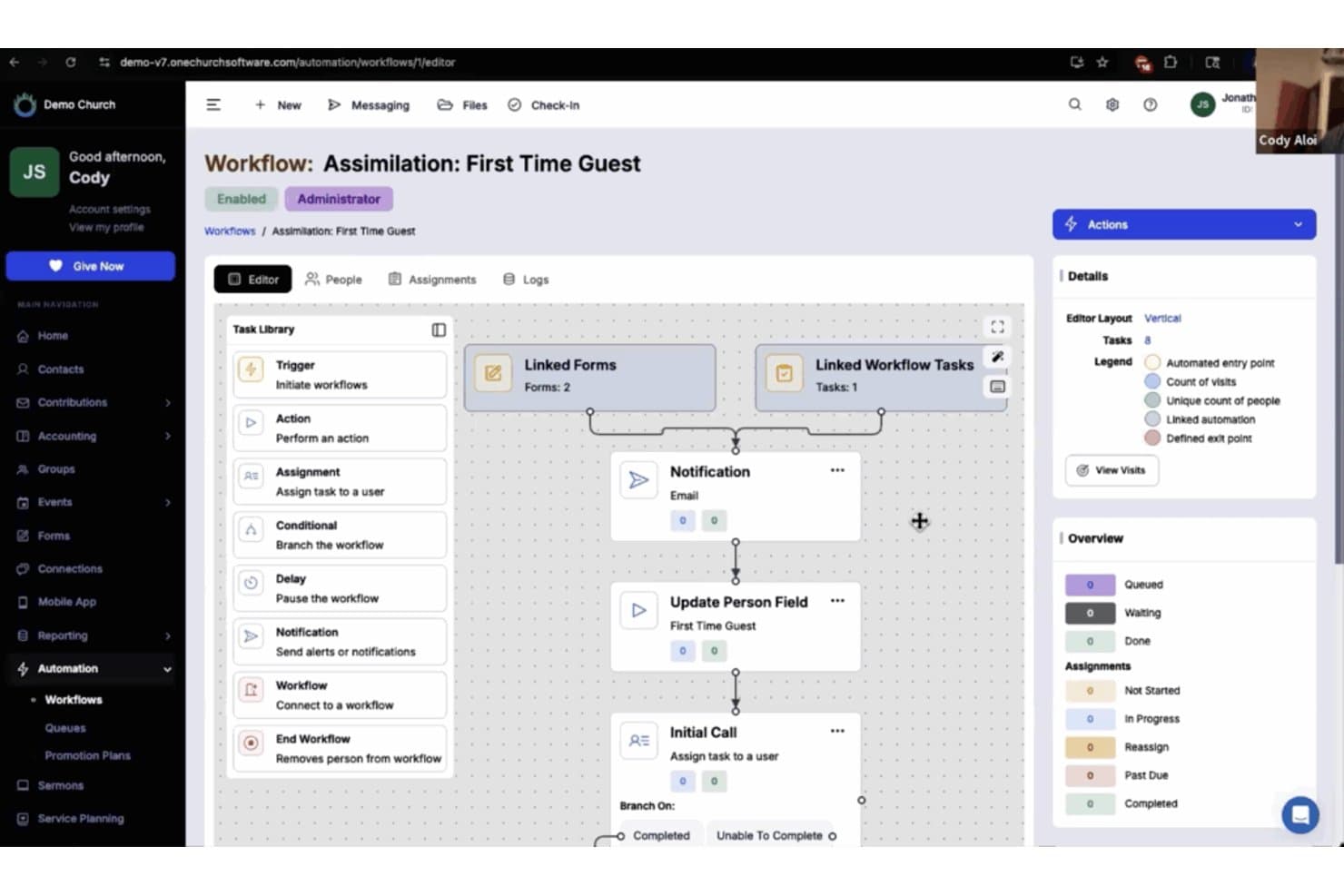
One Church Software offers an automated workflow builder for managing first-time guest assimilation with linked forms, notifications, and task assignments. One Church Software is a church management platform that centralizes member directories, household profiles, small group organization, communication tools, and giving into a single system.
Who Is One Church Software Best For?
It's a strong fit for church administrators and membership coordinators who need to manage a growing congregation across multiple ministries from one platform.
Why I Picked One Church Software
One Church Software earns its spot on my shortlist because of how well its Automation Suite handles the unglamorous work of member follow-up. I love that I can build triggered workflows to automatically send texts, assign tasks, and route new visitors through a care sequence without manual steps. When a guest submits a connection card, One Church fires off a follow-up email, notifies a pastor, and schedules a check-in visit, all without touching a keyboard.
One Church Software Key Features
- Printable directory export: Generate up-to-date print or PDF directories for easy sharing with congregants who prefer physical copies.
- Integrated child check-in: Manage event attendance and child safety with built-in check-in tied directly to family profiles.
- Volunteer scheduling tools: Assign, schedule, and track volunteers for serving teams and ministry roles directly within the platform.
- Event and small group signups: Allow members to browse, register, and join events or small groups straight from the directory interface.
One Church Software Integrations
One Church Software offers native integrations with Mailchimp, Square, Pushpay, and PraiseCharts, and provides an API for custom integrations.
Pros and Cons
Pros:
- Supports full family relationship mapping
- Built-in check-in ties attendance to directory profiles
- Handles member care sequences automatically
Cons:
- Directory search filters fewer than rival platforms
- Mobile app has limited self-service features
Learn more about One Church Software: Best for people and group management
- 30-day free trial
- From $19/month (billed annually)
Visit WebsiteCustomer Rating:4.8/5
Gracely’s individual profile view gives church leaders a complete picture of each person, combining contact details, group involvement, giving history, and custom fields in one organized record. Gracely is an all-in-one church management software designed to help you manage members, organize events, and track giving. It provides an advanced platform to support your ministry, making it easier for you to focus on what truly matters.
Why I picked Gracely: Gracely offers detailed people and group management features. You can effortlessly organize contacts and groups, access personal details, and even track attendance. This allows you to maintain a well-organized directory and foster a sense of belonging among your members. Additionally, the software's church portal feature empowers members to update their profiles, view giving history, and stay connected, ultimately deepening their connection to the church community.
Standout features & integrations:
Features include online giving and contributions tracking, which simplifies the process of tithing and donation management. The communication tools also keep your congregation connected and engaged, allowing you to send personalized emails or SMS to members.
Integrations include Stripe, SendGrid, PayPal, Google Calendar, Google Pay, and Apple Pay.
Pros and Cons
Pros:
- Visitor and engagement tracking
- Group and event management
- Personalized SMS and email messaging
- User-friendly interface
- Detailed mobile app
Cons:
- Limited customer support
- Occasional technical issues
- Challenging setup process
- Potential learning curve
- Limited reporting features
Learn more about Gracely:

Subsplash Church App shares sermons, manages events, and boosts engagement. Subsplash Church App is a digital platform designed for churches to manage multimedia content and member engagement. It serves church leaders by providing tools to share sermons, manage events, and communicate with the congregation.
Why I picked Subsplash Church App: It excels in multimedia integration, allowing you to share sermons, videos, and podcasts effortlessly. You can create a custom app to connect with your community through various media channels. The platform supports live streaming, enabling you to broadcast services in real-time. With its focus on multimedia, your church can engage members creatively and effectively.
Standout features & integrations:
Features include a giving platform that simplifies donations and tithes for your congregation. The app offers event management tools to help you organize and promote church activities. It also provides push notifications to keep your community informed about important updates.
Integrations include Planning Center, Mailchimp, CCB, YouTube, Vimeo, and Facebook Live.
Pros and Cons
Pros:
- Event management tools
- Integrated giving platform
- Live streaming support
- Custom app creation
- Strong multimedia capabilities
Cons:
- Limited support options
- Basic customization options
- Requires internet access
- Limited offline features
- Higher learning curve
Learn more about Subsplash Church App: best for an all-in-one custom branded mobile app
- Free 30-day trial
- From USD $89/mo

Tithe.ly Custom Church App features an intuitive layout editor for customizing app pages. Tithe.ly Custom Church App is a dynamic tool designed to enhance the engagement and management of church communities. With features like online giving, event planning, and member tracking, it provides a comprehensive solution for churches to stay connected with their congregations.
Why I Picked
What makes Tithe.ly Custom Church App stand out as a church directory app is its robust member tracking feature. This allows you to maintain detailed records of your congregation, ensuring that you have access to vital information whenever needed. It enhances your ability to engage with members by keeping everyone informed and connected.
Another reason I chose Tithe.ly is its event planning capabilities, which integrate seamlessly with the member directory. You can create and manage events while keeping track of attendance and participation. This feature supports your church's mission by facilitating community involvement and fostering a sense of belonging among members.
Standout Features
Features include an interactive prayer wall, which allows members to share prayer requests and support one another in real-time. The in-app giving feature provides a convenient way for members to contribute financially to the church's mission. Additionally, the app's sermon streaming and archives enable members to access sermons at their convenience, fostering spiritual growth and engagement.
Integrations
Integrations include Online Giving Form, Mobile Giving App, Text Giving, Pledge Campaigns, Giving Insights Dashboard, Messaging, Groups, Background Checks, Service Planning, Events & Check-In, Worship Team Tools, and Website Creation.
Pros and Cons
Pros:
- Drag-and-drop setup reduces need for external developers
- Combines giving, media, events and groups in one app hub
- Enables branded mobile communication with congregation in real time
Cons:
- Subscription cost continues whether usage stays low or grows
- App lives inside vendor’s container unless additional deployment fees paid
Learn more about Tithe.ly Custom Church App: Best for user-friendly interface
- Free plan + free demo available
- From $72/month

Breeze helps churches manage members, communication, and event schedules. Breeze Online Church Directory is a church management tool designed for small to medium-sized churches. It helps users manage member information, communication, and event scheduling efficiently.
Why I picked Breeze Online Church Directory: Its user-friendly interface makes it easy for your team to navigate and manage church data. You can quickly update member profiles and track attendance. The app also offers customizable fields to fit your church's unique needs. With its simple design, onboarding new users becomes a breeze.
Standout features & integrations:
Features include the ability to track donations and generate giving reports, helping you manage church finances. The app supports event management, allowing you to schedule and promote events effortlessly. It also offers a child check-in system for enhanced security during services.
Integrations include QuickBooks, Mailchimp, Google Calendar, and Planning Center for seamless data synchronization and communication.
Pros and Cons
Pros:
- Effective attendance tracking
- Simple onboarding process
- Quick member profile updates
- Customizable fields
- Easy navigation
Cons:
- Limited customer support options
- Requires internet access
- Basic reporting tools
- No free version
- Limited advanced features
Learn more about Breeze Online Church Directory: best for mobile-first church engagement
- Free demo available
- from $149/month

Pushpay offers many ways to boost your member engagement. The Pushpay Church App is a versatile tool designed to enhance church management and community engagement. It offers a range of features that cater to the needs of congregations, helping to foster a connected and active church community.
Why I Picked
I picked the Pushpay Church App as a top choice for a church directory app because of its custom mobile apps feature. These tailored applications foster community engagement and communication among church members, offering a personalized experience that helps keep everyone connected. The ability to create custom apps means you can align the app with your church's specific needs, enhancing the sense of belonging among members.
Another reason for my choice is the app's insights and analytics feature. This provides actionable data to monitor church health and member engagement, allowing you to identify disengaged members and make informed decisions. By having access to these insights, you can better understand your congregation's needs and work towards creating a more vibrant and involved community.
Standout Features - Descriptive Format
Features include a giving platform that simplifies online donations and promotes increased generosity among congregants. The church management software streamlines operations and provides insights into church health and member engagement. Additionally, the app offers event management tools, facilitating the planning and execution of church events, which are crucial for community building and engagement.
Integrations
Integrations include ChurchStaq, ParishStaq, Resi, Quickbooks, Planning Center, Text-Em-All, Fellowship One, SecureSearch, Virtus, VisitorReach, Church Data Connect, and Clearstream.
Pros and Cons
Pros:
- Encourages consistent giving through mobile engagement.
- Simplifies event and volunteer coordination.
- Provides insights for data-driven ministry decisions.
Cons:
- Limited customization for directory fields.
- Customer support response time can be slow.
Learn more about Pushpay Church App: Best for instant directory updates
- 30-day free trial
- From $9.99/month

Instant Church Directory helps churches manage directories and communicate easily. Instant Church Directory is an online tool that helps churches create and maintain member directories. It serves church administrators and members by providing tools for easy directory management and communication.
Why I picked Instant Church Directory: It offers instant updates, allowing you to keep your directory current without delay. The platform provides both online and printable directory options. You can upload member photos and contact information in real-time. With its intuitive interface, your team can manage updates effortlessly.
Standout features & integrations:
Features include a user-friendly mobile app that lets members access the directory anytime. The platform supports a secure login system to protect member data. It also offers customizable directory layouts to suit your church's preferences.
Integrations include options to export data for mailing labels and communication, but specific named integrations are not listed.
Pros and Cons
Pros:
- Customizable layouts
- Secure login system
- Real-time photo uploads
- Online and printable options
- Instant directory updates
Cons:
- Limited support options
- Internet access required
- Basic customization options
- No named third-party integrations
- Limited advanced features
Learn more about Instant Church Directory: Best for integration with other tools
- 30-day free trial + free demo available
- From $15/month

Planning Center People helps churches manage member data and engagement. Planning Center People is a church management software that helps churches organize member data and communications. It is primarily used by church administrators to manage member information and enhance engagement.
Why I picked Planning Center People: It excels in integration capabilities, allowing you to connect with various church tools for a cohesive management experience. You can easily track attendance, manage groups, and communicate with members. The software's integration with other Planning Center products ensures a seamless workflow across different church activities. Its flexibility in connecting with multiple tools makes it a valuable asset for comprehensive church management.
Standout features & integrations:
Features include a detailed member profile system that helps you keep track of personal and family information. The app offers customizable workflows to streamline your church's processes. You can also set up automated actions for tasks like sending welcome emails to new members.
Integrations include Planning Center Check-Ins, Planning Center Giving, Planning Center Services, Mailchimp, and QuickBooks.
Pros and Cons
Pros:
- Flexible management tools
- Detailed member profiles
- Automated task actions
- Customizable workflows
- Excellent integration options
Cons:
- Limited support options
- Basic customization options
- Limited offline features
- Learning curve for new users
- Requires internet access
Learn more about Planning Center People: Staff track and update member profiles in the mobile app instantly.
- Free 30-day trial
- from $49/month

ACS Realm offers a multi-device view of its interface, showcasing accessibility on various platforms. Realm by ACS Technologies Group, Inc. is an all-in-one church management tool that empowers ministry leaders to engage their members and streamline operations. It handles member profiles, contributions, attendance, volunteer scheduling, and communication so church teams can focus more on ministry and less on logistics.
Why I picked Realm:
This tool fits churches that want a unified platform for staff and congregants without juggling separate systems. It works especially well for ministries that prioritise mobile access—for pastors on the move and congregants that expect self-service. On the trade-off side, very small churches may find some features more than they need and might prefer a simpler, lower-cost option. Consider alternatives if your focus is purely giving or check-in and you don’t need full member management.
Standout features and integrations:
Features include detailed member profiles with custom fields, mobile giving and giving history, volunteer and event scheduling tools, automated attendance tracking, and a unified communication feed.
Integrations include online giving platforms, church accounting systems, background-check vendors, mobile apps for members, and event management systems.
Pros and Cons
Pros:
- Enables mobile giving and self-service member engagement.
- Offers unified database so information is consistent across staff and volunteers.
- Includes volunteer scheduling and event tools in one ecosystem.
Cons:
- Some ministry-specific workflows may require additional configuration.
- Multi-campus or very large churches may need to verify scale and pricing fit.
Learn more about ACS Realm:
Andre apper for kirkens medlemsregister
Her er noen flere alternativer for apper til kirkens medlemsregister som ikke kom med på kortlisten, men som likevel er verdt å undersøke:
- 11Ministry OneBest for custom app features
- 12Online Church DirectoryBest for secure data storage
- 13DirectorySpot for ChurchesBest for mobile directory access
- 14Aware3 Church AppBest for digital communication
- 15Go Church AppBest for keeping members informed
- 16ChurchSpring DirectoryBest website & ChMS combo
- 17Church Directory (Church Work LLC)Best for comprehensive member profiles
- 18The Church ConnectoryBest for easy member management
- 19My Church DirectoryBest for customizable directories
- 20Church Directory AppBest for simple navigation
- 21ChurchTracBest for budget-friendly options
How I Evaluate Church Directory Apps
I evaluate church directory apps in two layers—core must-haves like member profiles and privacy controls, and differentiators like ChMS integration and mobile access that separate standout tools.
Core Functionality (Table Stakes For This List)
When I'm selecting tools for my list, I rank each one on a scale from 0 (does not offer the functionality) to 5 (excels in this area) for each core functionality listed below. Then, I calculate the tool's total score into a percentage. Each tool needs to achieve a minimum total score of 65% to be considered for inclusion.
- Member Profiles & Photos: I check whether each profile supports a photo, contact details, and custom fields—like baptism date or membership status—that reflect how churches actually track their people.
- Household & Family Grouping: Families attend church together, so I look for tools that link spouses, children, and dependents into household units with shared addresses and relationship labels.
- Congregant Self-Service Access: I evaluate whether members can log in from a phone or browser to look up fellow congregants and update their own contact info without calling the church office.
- Privacy & Permission Controls: Church members need to choose what they share, so I look at whether a tool lets individuals hide their phone number or address while keeping their name visible.
- Group & Ministry Segmentation: I check for the ability to filter the directory by small groups, worship teams, or youth ministry rosters so leaders can quickly find the people in their area of service.
- Directory Communication Tools: The ability to call, text, or email someone directly from their directory listing matters, so I evaluate whether the app supports in-context outreach to individuals and groups.
Once I have a list of tools that meet the criteria, I consider what sets each platform apart.
Differentiating Factors (What Sets Vendors Apart)
Here's how I compare and contrast different vendors:
Standout Features
A printable directory export is something I always check for—many churches still hand photo directories to homebound members or older congregants who prefer paper. I also look at whether members can browse and sign up for small groups or events directly from the directory. Volunteer scheduling tied to directory profiles is another differentiator, letting a kids' ministry coordinator manage serving rosters without jumping to a separate tool.
Beyond Features
ChMS ecosystem integration matters a lot—if your church already runs on Planning Center or Breeze, a directory app that syncs natively saves hours of duplicate data entry. I also evaluate onboarding support, since the person setting up the directory is often a part-time admin or volunteer, not an IT professional. Pricing structure deserves attention too. Some vendors charge per member, which penalizes growing churches, while others offer flat-rate plans that scale with your congregation.
Slik velger du en app for kirkens medlemsregister
Det er lett å gå seg vill i lange funksjonslister og kompliserte prismodeller. For å hjelpe deg med å holde fokus mens du går gjennom den unike prosessen med å velge programvare, får du her en sjekkliste over faktorer du bør ha i bakhodet:
| Faktor | Hva du bør vurdere |
| Skalerbarhet | Kan appen vokse sammen med menigheten din? Vurder hvor mange medlemmer den kan håndtere, og hvor enkelt du kan legge til nye brukere eller funksjoner etter hvert som menigheten vokser. |
| Integrasjoner | Kan den kobles til de eksisterende systemene dine? Sjekk kompatibilitet med verktøy som kalendere, e-postplattformer og økonomiprogramvare for å unngå at informasjonen blir liggende i separate siloer. |
| Tilpasningsmuligheter | Kan du tilpasse appen etter menighetens behov? Se etter muligheter for å tilpasse felt, oppsett og rapporter slik at de samsvarer med arbeidsprosessene dine. |
| Brukervennlighet | Er appen intuitiv for alle brukere? Evaluer grensesnittet og navigasjonen. Et komplekst verktøy kan bremse innføringen og kreve mer opplæring. |
| Implementering og oppstart | Hvor raskt kan du komme i gang? Vurder tiden det tar å sette opp løsningen, tilgjengelige opplæringsressurser og eventuell støtte under overgangsfasen. |
| Kostnad | Passer prisen inn i budsjettet ditt? Sammenlign abonnementer og vurder skjulte kostnader som brukerbegrensninger eller ekstra moduler. En lav startkostnad kan føre til høyere utgifter senere. |
| Sikkerhetstiltak | Hvordan beskytter appen medlemsdata? Se etter kryptering, tilgangskontroller og samsvar med regelverk for databeskyttelse for å sikre at informasjonen forblir trygg. |
| Tilgjengelig kundestøtte | Får du hjelpen du trenger? Sjekk om kundestøtte er tilgjengelig når du trenger det, og gjennom de kanalene du foretrekker, for eksempel telefon, chat eller e-post. |
Hva er en app for kirkens medlemsregister?
En app for kirkens medlemsregister er et digitalt verktøy som er utviklet for å hjelpe kirker med å administrere og organisere kontaktinformasjon om medlemmer. Kirkeledere, administratorer og frivillige bruker vanligvis disse verktøyene til å vedlikeholde nøyaktige medlemsregistre og legge til rette for kommunikasjon i menigheten. Oppdateringer i sanntid, sikker datalagring og funksjoner for mobiltilgang bidrar til å holde medlemsinformasjonen oppdatert og tilgjengelig. Alt i alt forenkler disse verktøyene administrasjonen av medlemsregisteret og styrker engasjementet i fellesskapet.
Funksjoner i appen for kirkens medlemsregister
Når du velger en app for kirkens medlemsregister, bør du se etter følgende viktige funksjoner:
- Oppdateringer i sanntid: Denne funksjonen gjør det mulig å holde medlemsinformasjonen oppdatert, slik at alle har tilgang til de nyeste kontaktopplysningene.
- Sikker datalagring: Beskytter sensitiv medlemsinformasjon gjennom kryptering og tilgangskontroller, og ivaretar personvern og sikkerhet.
- Mobiltilgang: Gjør det mulig for brukere å se og oppdatere medlemsregisteret mens de er på farten, noe som gir fleksibilitet og brukervennlighet.
- Tilpassbare maler: Gjør det mulig å tilpasse medlemsregisterets utseende og felter etter kirkens unike behov.
- Integrasjonsmuligheter: Kobler seg til andre verktøy, for eksempel kalendere og e-postplattformer, og legger til rette for sømløs datahåndtering.
- Arrangementshåndtering: Hjelper med å organisere og promotere kirkeaktiviteter, slik at menigheten holdes informert og engasjert.
- Opplasting av bilder: Gir et personlig preg ved å inkludere bilder av medlemmer i medlemsregisteret, noe som gjør det lettere å kjenne igjen hverandre og skaper sterkere tilknytning.
- Push-varsler: Holder medlemmene informert om viktige oppdateringer og arrangementer, og forbedrer kommunikasjonen i kirken.
- Støtte for nettbaserte gaver: Forenkler gaveprosessen og gjør det enkelt for medlemmer å bidra økonomisk til kirken.
- Tilpassede appfunksjoner: Gir mulighet til å lage en merkevaretilpasset app som gjenspeiler kirkens identitet og fellesskap.
Fordeler med appen for kirkens medlemsregister
Implementering av en app for kirkens medlemsregister gir flere fordeler for teamet og virksomheten. Her er noen av fordelene du kan se frem til:
- Forbedret kommunikasjon: Oppdateringer i sanntid og push-varsler holder menigheten informert og knyttet sammen.
- Økt sikkerhet: Sikker datalagring beskytter medlemsinformasjonen og sikrer personvern og tillit.
- Bedre tilgjengelighet: Mobiltilgang gjør det mulig for brukere å se og oppdatere medlemsregistre hvor som helst, noe som gir brukervennlighet og fleksibilitet.
- Personlig tilpasset opplevelse: Tilpassbare maler og bildeopplastinger gjør det mulig å tilpasse medlemsregisteret etter kirkens behov og styrke fellesskapet.
- Effektiv administrasjon: Integrasjonsmuligheter og verktøy for arrangementshåndtering effektiviserer administrative oppgaver og sparer tid og arbeid.
- Økt engasjement: Støtte for nettbaserte gaver og tilpassede appfunksjoner oppmuntrer medlemmene til deltakelse og involvering.
- Kostnadseffektiv løsning: Sentralisering av administrasjonen av medlemsregisteret reduserer behovet for flere verktøy og optimaliserer ressurser og budsjett.
Kostnader og priser for appen for kirkens medlemsregister
Valg av app for kirkens medlemsregister krever en forståelse av de ulike prismodellene og abonnementene som er tilgjengelige. Kostnadene varierer basert på funksjoner, teamstørrelse, tillegg og mer. Tabellen nedenfor oppsummerer vanlige abonnementer, gjennomsnittsprisene deres og typiske funksjoner som er inkludert i løsninger for apper for kirkens medlemsregister:
Sammenligningstabell for abonnementer til appen for kirkens medlemsregister
| Abonnementstype | Gjennomsnittspris | Vanlige funksjoner |
| Gratisabonnement | $0 | Grunnleggende administrasjon av medlemsregisteret, begrensede medlemsprofiler og mobiltilgang. |
| Personlig abonnement | $5-$25/ bruker/måned | Oppdateringer i sanntid, sikker datalagring og tilpassbare maler. |
| Forretningsabonnement | $50-$100/ måned | Integrasjonsmuligheter, arrangementshåndtering og bildeopplastinger. |
| Enterprise-abonnement | $100-$25/ måned | Tilpassede appfunksjoner, støtte for nettbaserte gaver og avanserte sikkerhetstiltak. |
Vanlige spørsmål om kirkeregisterapper
Her er noen svar på vanlige spørsmål om kirkeregisterapper: