

Donasjonsplattformer er nettbaserte verktøy som hjelper kirken eller ideelle organisasjonen din med å samle inn, administrere og følge opp donasjoner fra støttespillere. Hvis du leter etter de beste donasjonsplattformene, ser du sannsynligvis etter en sikker og brukervennlig plattform for donasjoner som passer behovene og budsjettet til virksomheten din. Mange moderne innsamlingsløsninger støtter innsamling for ideelle organisasjoner gjennom funksjoner som kampanjesider, folkefinansiering og integrert innsamlingsprogramvare, utviklet for å hjelpe deg med å samle inn penger mer effektivt. Med så mange tilgjengelige alternativer er det viktig å finne en plattform som forbedrer giveropplevelsen, integreres med de eksisterende systemene dine og støtter de langsiktige målene dine. Denne listen hjelper deg med å sammenligne de beste alternativene for 2026, slik at du kan ta en informert beslutning og fokusere på det som betyr mest – å tjene lokalsamfunnet ditt.
Why Trust Our Software Recommendations
6,700+
Reviews
20
Industry experts
16+
Evaluation factors
14
Years
Our team has been testing and reviewing software since 2012. As church leaders ourselves, we know how difficult—and important—it is to choose the right software.
For this guide, we evaluated tools using hands-on testing and independent research, scoring tools using our selection criteria.
Our reviews reflect our human editorial judgment, not a sales pitch.
Sammenligningstabell for donasjonsplattformer
Denne sammenligningstabellen oppsummerer prisopplysningene for mine utvalgte donasjonsplattformer:
| Tool | Best For | Trial Info | Price | ||
|---|---|---|---|---|---|
| 1 | Best for zero-fee nonprofit fundraising | Free plan available | Pricing upon request | Website | |
| 2 | Best with instant ACH and digital wallet support | Free demo available | Pricing upon request | Website | |
| 3 | Best for multi-campaign management | Free plan available | From $0/month | Website | |
| 4 | Best for donor retention analytics | Free demo available | From $40/month (billed annually) | Website | |
| 5 | Best for text-to-give functionality | 30-day free trial available | From $72/month | Website | |
| 6 | Best for mobile donation experience | Free plan available | From 2.9% + $0.30 per donation | Website | |
| 7 | Best for customizable donation forms | Free plan available | From $99/month | Website | |
| 8 | Best for event-based fundraising features | 30-day free trial + free plan available | From $29/month (billed annually) | Website | |
| 9 | Best for unlimited fundraising campaigns | Free plan available | From $0/month | Website | |
| 10 | Best for integrating with livestream events | Free plan available | Free to use | Website |


Anmeldelser av donasjonsplattformer
Nedenfor finner du mine detaljerte sammendrag av donasjonsplattformene som kom med på kortlisten min. Anmeldelsene mine gir et detaljert innblikk i funksjonene, de beste bruksområdene og prisene for hver plattform, slik at du kan finne den beste for deg.
 Best for zero-fee nonprofit fundraising
- Free plan available
- Pricing upon request
Visit WebsiteCustomer Rating:4.9/5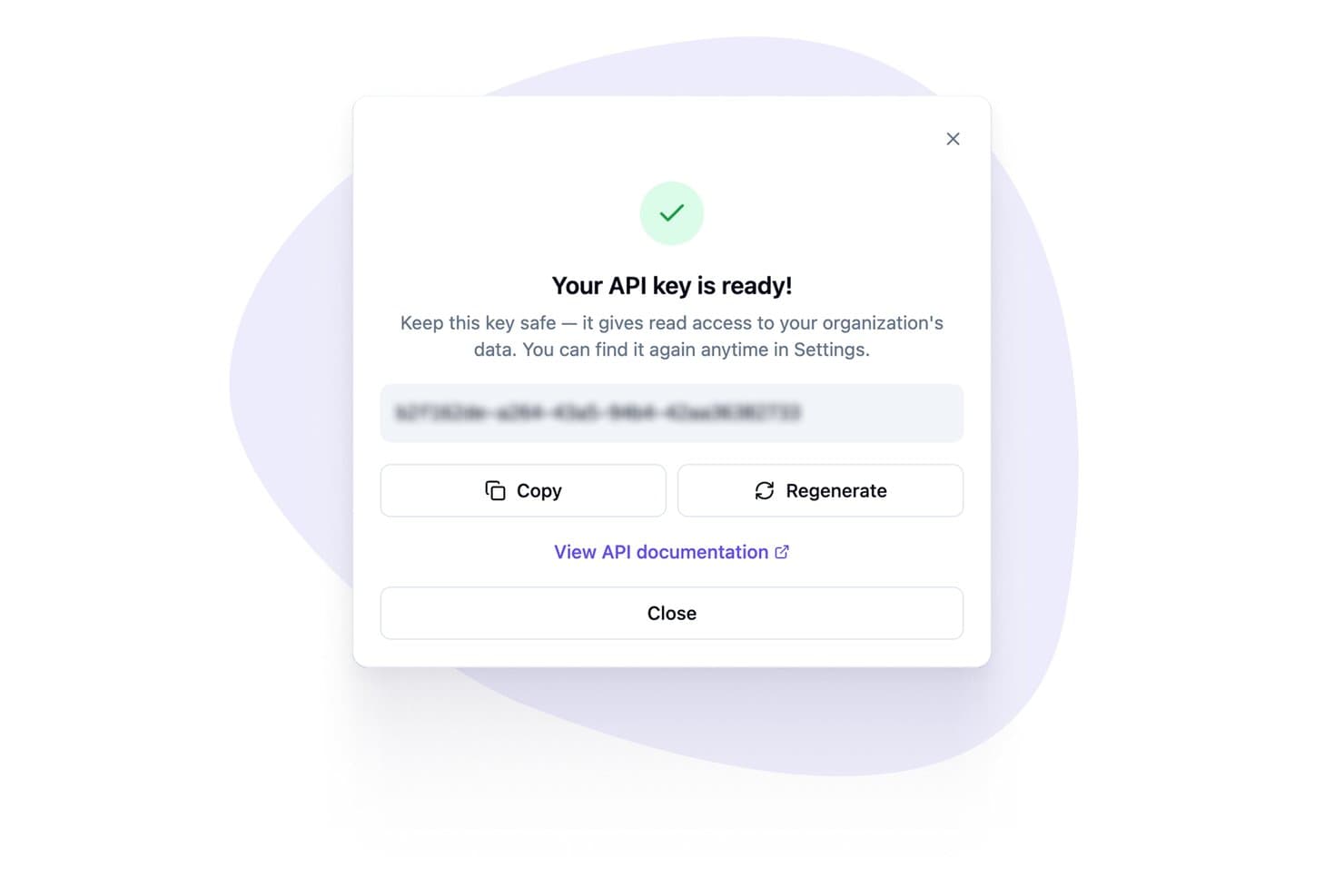
Zeffy generates API keys for platform integrations. Zeffy is an all-in-one nonprofit fundraising platform that combines online donation forms, recurring giving, event ticketing, raffles, auctions, memberships, peer-to-peer campaigns, and donor management in a single tool.
Who Is Zeffy Best For?
Zeffy is a strong fit for nonprofits and charitable organizations that want to keep every dollar raised without paying platform or processing fees.
Why I Picked Zeffy
Zeffy earns its spot on my shortlist because it's the only giving platform I've found that truly charges nonprofits nothing, covering Stripe processing fees entirely rather than passing them along. Every dollar a congregation raises through online donation forms, recurring giving campaigns, or peer-to-peer fundraisers stays with the ministry. I especially like that donors can self-manage their recurring gifts through a donor portal, adjusting amounts and charge dates without staff involvement.
Zeffy Key Features
- Peer-to-peer fundraising campaigns: Supporters create personal or team fundraising pages that roll up to a central campaign goal, with progress tracking and leaderboard visibility.
- Event ticketing with QR code check-in: Build branded event forms with multiple ticket types, send scannable e-tickets, and check attendees in via mobile QR scan.
- Built-in email and newsletter tools: Create and send targeted emails to segmented donor lists using a drag-and-drop builder, with open and click tracking on each send.
- QuickBooks Online integration: Automatically syncs future Zeffy payouts as deposits mapped to specific campaigns or funds directly in your QuickBooks account.
Zeffy Integrations
Zeffy has native integrations with QuickBooks and WordPress, plus a public API, webhooks, and viaSocket for custom connectivity. It lists connections to 1,000+ tools, including Salesforce, Google Sheets, and Mailchimp through Zapier.
Pros and Cons
Pros:
- Fundraising activity and donor histories stay together
- Donor histories support year-end giving reports
- Timely payouts reported by many nonprofit reviewers
Cons:
- Limited control over form and email appearance
- Optional checkout contributions sometimes confuse donors
Learn more about Zeffy: Best with instant ACH and digital wallet support
- Free demo available
- Pricing upon request
Visit WebsiteCustomer Rating:4.5/5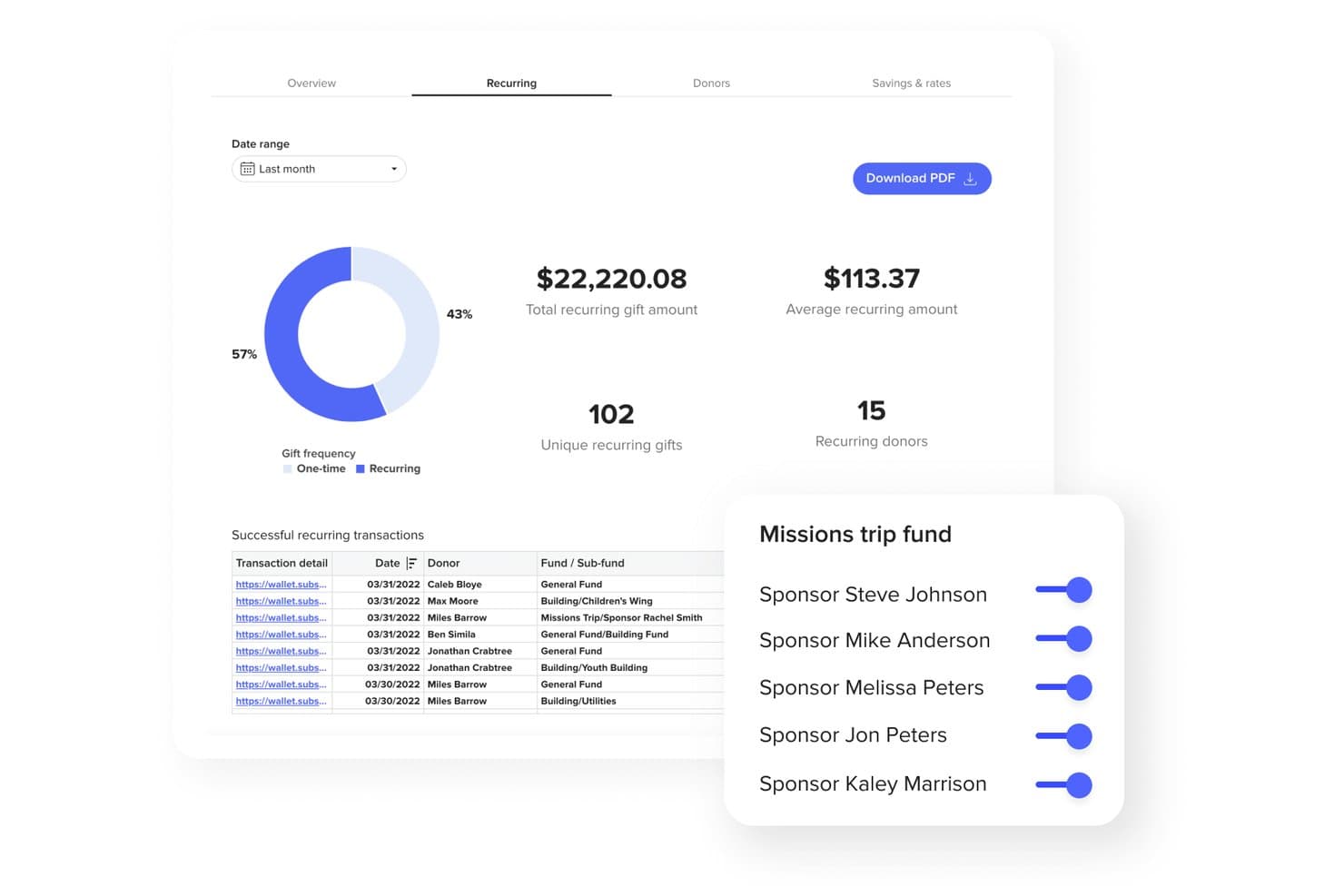
Subsplash offers a recurring giving dashboard with transaction details, donor stats, and fund sponsorship management tools. Subsplash is a church giving platform that supports online, mobile app, text-to-give, and NFC tap donations alongside donor management, fund tracking, automated tax statements, and multi-payment processing including ACH, cards, digital wallets, and stock or crypto gifts.
Who Is Subsplash Best For?
Subsplash is a strong fit for churches of any size that want to consolidate giving, app, and media tools into a single faith-focused platform.
Why I Picked Subsplash
Subsplash earns its spot on my shortlist because of how it handles payment speed and flexibility. Instant ACH with real-time bank verification means donations clear faster, and Apple Pay and Google Pay let congregants complete a gift in seconds. I also like Subsplash Tap, an NFC-based tool where donors simply tap their phone to give instantly, with no app download or QR code required.
Subsplash Key Features
- Text-to-give shortcodes: Enables giving by SMS with dedicated church keywords and instant text-based donations.
- Donor management dashboard: Tracks giver history, recurring gifts, and real-time analytics for contribution monitoring.
- Campaigns and pledge tracking: Lets churches launch goal-driven fundraising campaigns and manage donor commitments.
- Automated tax statement generation: Automatically creates and delivers IRS-compliant annual giving statements to donors.
Subsplash Integrations
Subsplash offers native integrations with Subsplash ChMS and Rock RMS. An API is available for custom integrations.
Pros and Cons
Pros:
- AI-driven lapsed donor alerts included
- NFC tap-to-give without an app download
- Supports stock, crypto, and DAF giving
Cons:
- Platform bundle extends beyond giving features
- Reporting depth lags behind dedicated giving tools
 Best for multi-campaign management
- Free plan available
- From $0/month
Visit WebsiteCustomer Rating:4.8/5
Anedot dashboard showing donation totals, revenue, and monthly trends overviews. Managing multiple fundraising efforts at once can get complicated, but Anedot is built to simplify that process for churches and nonprofits. This platform lets you run several campaigns simultaneously, each with its own donation page and tracking. It’s a strong fit for organizations juggling seasonal drives, special projects, or ongoing giving initiatives.
Why I Picked Anedot
When you need to manage several fundraising campaigns at once, Anedot stands out for its multi-campaign management capabilities. The platform lets you create and customize multiple donation pages, each with its own branding and tracking, so you can keep efforts separate and organized. I like that you can monitor performance for each campaign individually, making it easier to see what’s working and where to focus your attention. This setup is especially helpful for churches and ministries running seasonal appeals, capital campaigns, or special projects alongside regular giving.
Anedot Key Features
In addition to its campaign management tools, Anedot offers several other features worth noting:
- Text-to-Give: Allow donors to give by sending a simple text message.
- Embeddable Donation Forms: Add customizable giving forms directly to your website or landing pages.
- ACH and Card Processing: Accept donations via credit card, debit card, or ACH bank transfer.
- Donor Portal: Give supporters access to manage their recurring gifts and payment information.
Anedot Integrations
Integrations include HubSpot, Planning Center, RumbleUp, ActiveCampaign, SendGrid, Salesforce, Mailchimp, QuickBooks Online, Zapier, and more.
Pros and Cons
Pros:
- Donor portal for self-service giving management
- Text-to-give included at no extra cost
- Unlimited campaigns with separate donation pages
Cons:
- Reporting exports only available in CSV format
- Limited donor segmentation and tagging options
Learn more about Anedot: Best for donor retention analytics
- Free demo available
- From $40/month (billed annually)
Visit WebsiteCustomer Rating:4.7/5
Bloomerang focuses on improving donor retention with engagement insights. If your team wants to understand and improve donor loyalty, Bloomerang offers analytics built specifically for donor retention. This platform is designed for churches and nonprofits that want to track giving patterns and identify at-risk donors. Its focus on actionable retention insights helps leaders strengthen relationships and sustain long-term support.
Why I Picked Bloomerang
Donor retention analytics are at the heart of what makes Bloomerang valuable for churches and nonprofits. The platform tracks key metrics like donor retention rate, recapture rate, and donor engagement, giving you a clear picture of how well you’re building lasting relationships. I appreciate how Bloomerang highlights lapsed donors and suggests targeted follow-up actions, so you can act before support drops off. These analytics-driven features help you focus your efforts where they matter most for long-term giving.
Bloomerang Key Features
Some other features that make Bloomerang useful for giving platforms include:
- Online Giving Forms: Create branded donation forms that can be embedded on your website.
- Email Marketing Tools: Send newsletters, appeals, and automated thank-you messages directly from the platform.
- Constituent Timeline: View a chronological history of each donor’s interactions and giving activity.
- Mobile App: Access donor data and manage contacts from your phone or tablet.
Bloomerang Integrations
Integrations include QuickBooks, DonorSearch, Mailchimp, Constant Contact, Amilia, Verified First, Zapier, and more.
Pros and Cons
Pros:
- Constituent timeline tracks all donor interactions
- Built-in email marketing for donor outreach
- Donor retention dashboard updates in real time
Cons:
- Custom report builder has restricted filtering options
- No built-in text-to-give functionality
Learn more about Bloomerang: Best for text-to-give functionality
- 30-day free trial available
- From $72/month
Visit WebsiteCustomer Rating:4.7/5
GivingTools helps nonprofits collect donations while keeping transaction costs low. If keeping transaction costs low is a top priority for your church or nonprofit, GivingTools is designed with you in mind. This platform offers some of the lowest processing fees available, making it easier to maximize every donation. It’s a practical choice for organizations that want to stretch their giving dollars further without sacrificing essential features.
Why I Picked GivingTools
For organizations that want to minimize transaction fees, GivingTools offers a unique approach that stands out among giving platforms. The platform supports ACH bank transfers with ultra-low processing rates and even allows donors to cover transaction fees themselves. I appreciate that GivingTools provides transparent fee structures and lets you accept both one-time and recurring gifts without hidden costs. This makes it a strong fit for churches and ministries focused on maximizing the impact of every donation.
GivingTools Key Features
Some other features that make GivingTools appealing for churches and ministries include:
- Pledge Campaigns: Set up and manage multi-month or annual pledge drives for capital campaigns or special projects.
- Customizable Giving Forms: Design donation forms with your own branding, fields, and layout options.
- Physical Donation Integration: Record and track cash and check gifts alongside online donations.
- PDF Receipts: Automatically generate and send PDF receipts for every donation.
GivingTools Integrations
Integrations include QuickBooks, Mailchimp, Zapier, and more.
Pros and Cons
Pros:
- Customizable forms with branding and fields
- Supports physical and online donation tracking
- Donors can cover processing fees themselves
Cons:
- No recurring gift upgrade prompts for donors
- No mobile app for donor management
 Best for mobile donation experience
- Free plan available
- From 2.9% + $0.30 per donation
Visit WebsiteCustomer Rating:4.8/5
Givelify lets donors give quickly through a mobile-focused donation app. If you’re looking for a giving platform that prioritizes mobile donations, Givelify is designed with smartphone users in mind. Churches and faith-based organizations that want to make giving quick and accessible for their congregations will find its app-centered approach especially helpful. Givelify addresses the challenge of spontaneous and recurring giving by making the donation process fast, intuitive, and available from anywhere.
Why I Picked Givelify
Mobile-first giving is where Givelify truly shines, making it a strong fit for organizations that want to meet donors where they are—on their phones. The platform’s dedicated mobile app allows donors to give in just a few taps, whether they’re at home, in a service, or on the go. I appreciate how Givelify supports features like recurring giving and location-based donation prompts, which help churches and ministries encourage consistent support. For any group prioritizing a smooth mobile donation experience, Givelify offers tools that directly address this need.
Givelify Key Features
Some other features that make Givelify appealing for giving platforms include:
- Donation Tracking Dashboard: View and manage all donation activity in a centralized dashboard.
- Customizable Giving Links: Create unique giving links for specific campaigns or events.
- Instant Donation Receipts: Send automated receipts to donors immediately after each gift.
- Multi-Account Management: Manage multiple organizations or campuses from a single Givelify account.
Givelify Integrations
Integrations include Shelby Next, Shelby Arena, Power Church, Servant Keeper, ACS Realm, and ACS People.
Pros and Cons
Pros:
- Multi-campus management from a single account
- Location-based prompts encourage in-person donations
- Mobile app supports spontaneous giving during events
Cons:
- Limited branding options for donation pages
- No built-in event ticketing features
Learn more about Givelify: Best for customizable donation forms
- Free plan available
- From $99/month
Visit WebsiteCustomer Rating:4.4/5
Donately lets organizations create branded donation forms for online giving. If you need donation forms that match your ministry’s branding and workflow, Donately gives you full control over customization. This platform is designed for churches and nonprofits that want to tailor every aspect of the giving experience, from form fields to embedded widgets. It’s a strong fit for leaders who want to create a smooth, branded donation process across websites, emails, and campaigns.
Why I Picked Donately
What sets Donately apart is its focus on customizable donation forms, which is essential for organizations that want to maintain consistent branding and gather specific donor information. You can adjust form fields, colors, and layouts to match your church’s website or campaign needs. I like that Donately also lets you embed forms directly into your site or share them as standalone pages, giving you flexibility in how you collect donations. This level of customization helps you create a giving experience that feels personal and aligned with your ministry’s identity.
Donately Key Features
Some other features that make Donately useful for churches and nonprofits include:
- Recurring Donation Management: Set up and manage automated recurring gifts from donors.
- Donation Tracking Dashboard: View real-time donation data and trends in a centralized dashboard.
- Text-to-Give Functionality: Allow donors to give by sending a simple text message.
- Team Fundraising Pages: Create and manage collaborative fundraising campaigns with multiple team members.
Donately Integrations
Integrations include HubSpot, Salesforce, Mailchimp, Slack, Webflow, QuickBooks Online, Google Analytics, Constant Contact, Monday.com, and more.
Pros and Cons
Pros:
- Team fundraising pages for group campaigns
- Real-time donation tracking dashboard available
- Custom form builder supports advanced field logic
Cons:
- No donor portal for self-service management
- ACH bank transfer only on higher plans
Learn more about Donately: Best for event-based fundraising features
- 30-day free trial + free plan available
- From $29/month (billed annually)
Visit WebsiteCustomer Rating:4.7/5
Givebutter supports event-driven fundraising with live and peer campaigns. Givebutter stands out for organizations that want to combine fundraising with live or virtual events. Nonprofits, churches, and community groups looking to engage donors through ticketed events, auctions, or peer-to-peer campaigns will find its event-focused features especially useful. The platform helps teams manage event registration, ticket sales, and live donation tracking all in one place.
Why I Picked Givebutter
When it comes to event-based fundraising, Givebutter offers a toolkit that’s hard to match for churches and nonprofits hosting live or virtual events. The platform lets you create custom event pages with ticketing, registration, and live donation tracking built in. I like that you can run auctions, manage peer-to-peer fundraising teams, and display real-time donation feeds during your event. These features make Givebutter a strong choice for organizations that want to energize giving through interactive, event-driven campaigns.
Givebutter Key Features
Some other features that make Givebutter appealing for giving platforms include:
- Text-to-Donate: Donors can give by sending a simple text message.
- Customizable Donation Forms: Build branded forms to match your organization’s look and feel.
- Automated Thank-You Messages: Send personalized acknowledgments to donors after each gift.
- Team Fundraising Pages: Set up group fundraising pages for collaborative campaigns.
Givebutter Integrations
Integrations include Bloomerang, Double the Donation, Canva, Constant Contact, DonorSearch, HubSpot, monday.com, QuickBooks Online, Salesforce, and more.
Pros and Cons
Pros:
- Live donation feed displays during events
- Peer-to-peer fundraising tools support teams
- Event ticketing and registration are built in
Cons:
- Recurring donation options lack advanced controls
- ACH donations require manual verification steps
Learn more about Givebutter:

Give Lively enables nonprofits to fundraise online without platform fees. Give Lively offers a no-cost fundraising platform designed for nonprofit organizations that want unlimited campaigns without monthly fees. It’s a strong fit for churches and organizations looking to maximize donations and support online fundraising without worrying about platform costs. If you need flexible tools to reach your fundraising goals with transparent pricing, Give Lively stands out for its commitment to free access.
Why I Picked Give Lively
I chose Give Lively because it removes limits on the number of fundraising campaigns you can run, which is rare among giving platforms. You can create as many campaigns, donation pages, and peer-to-peer fundraisers as your ministry or nonprofit needs throughout the year. The platform also supports team fundraising and event ticketing, making it easy to manage multiple initiatives at once. This flexibility is especially helpful for churches and organizations that run frequent or seasonal giving drives.
Give Lively Key Features
Some other features that make Give Lively a strong choice for giving platforms include:
- Text-to-Donate: Donors can give by texting a custom keyword, making mobile giving quick and accessible.
- Donation Widget: Add a donation form directly to your website so supporters never have to leave your site to give.
- Supporter Portal: Donors can manage their recurring gifts, view donation history, and update payment information in a self-service portal.
- Integrations with Salesforce and Mailchimp: Sync donor data and communications with popular CRM and email marketing tools.
Give Lively Integrations
Integrations include Salesforce, Double the Donation, PayPal, Venmo, Apple Pay, Google Pay, DAFpay, Zapier, and more.
Pros and Cons
Pros:
- Donor portal for managing recurring gifts
- Supports text-to-donate and event ticketing
- Unlimited fundraising campaigns and donation pages
Cons:
- Payouts only through Stripe or PayPal
- No direct phone support for users
Learn more about Give Lively:

Pledge enables companies to manage employee and corporate giving programs. Pledge is designed for organizations that want to connect giving directly to livestreams and virtual events. Churches, nonprofits, and event hosts can use its tools to embed donation forms and real-time fundraising overlays into platforms like Zoom, Twitch, and YouTube. This approach helps teams turn digital gatherings into interactive fundraising opportunities without disrupting the flow of their events.
Why I Picked Pledge
For organizations that want to turn livestreams into fundraising moments, Pledge offers a direct way to embed giving into digital events. The platform provides donation overlays and widgets that work with Zoom, Twitch, YouTube, and other streaming services, so viewers can give without leaving the event. I appreciate that Pledge also supports real-time fundraising thermometers and on-screen donor recognition, which help keep audiences engaged. These features make it a strong fit for churches and nonprofits looking to connect digital participation with immediate giving opportunities.
Pledge Key Features
Some other features that make Pledge useful for giving platforms include:
- Text-to-Donate: Donors can contribute by sending a text message with a unique code.
- Customizable Donation Pages: Create branded donation pages tailored to your organization’s needs.
- Matching Gifts Integration: Connect with corporate matching gift programs to increase donation impact.
- Multi-Currency Support: Accept donations in various currencies for international campaigns.
Pledge Integrations
Integrations include Zoom, Shopify, Mailchimp, Slack, Constant Contact, Salesforce, Apple Pay, Bloomerang, Discord, and more.
Pros and Cons
Pros:
- Multi-currency support for international donors
- Text-to-donate feature supports mobile giving
- Livestream donation overlays work with major platforms
Cons:
- Reporting tools lack advanced segmentation filters
- No built-in event ticketing functionality
Learn more about Pledge:
Andre donasjonsplattformer
Her er noen flere alternativer for donasjonsplattformer som ikke kom med på kortlisten min, men som likevel er verdt å se nærmere på:
- 11GoFundMe ProBest for peer-to-peer fundraising tools
- 12GivingToolsBest for low transaction fees
- 13DonorsChooseBest for project-based fundraising
- 14DonorboxBest for integrating with livestream events
- 15BetterWorldBest for auction and raffle fundraising
- 16GiveSendGoBest for faith-based fundraising support
How I Evaluate Giving Platforms
I evaluate giving platforms in two layers: core requirements like recurring donations and fund designation, and differentiators—like text-to-give and ChMS sync—that matter to your church.
Core Functionality (Table Stakes For This List)
When I'm selecting tools for my list, I rank each one on a scale from 0 (does not offer the functionality) to 5 (excels in this area) for each core functionality listed below. Then, I calculate the tool's total score into a percentage. Each tool needs to achieve a minimum total score of 65% to be considered for inclusion.
- Online & Recurring Giving: I check whether donors can set up their own recurring schedules and manage them—things like adjusting amounts before a capital campaign or pausing during a sabbatical.
- Multi-Channel Giving Options: A platform should support giving beyond just a web form. I look for text-to-give, mobile apps, kiosk modes, and QR codes that work during a live Sunday service.
- Donor Management & Statements: I evaluate how each platform tracks individual giving history and generates year-end contribution statements that your finance team can send out without manual formatting.
- Fund & Designation Tracking: Churches run multiple funds at once—general tithes, building campaigns, missions, benevolence. I look for clear per-fund reporting and the ability to let donors choose designations at checkout.
- Payment Processing & Methods: Each platform should handle both card and ACH payments with PCI-compliant infrastructure. I also check for options like Apple Pay, Google Pay, or donor-covered processing fees.
- ChMS & Accounting Integrations: Giving data needs to flow into your existing systems. I look for native sync with platforms like Planning Center, Breeze, or QuickBooks so contribution records stay consistent without manual entry.
Once I have a list of tools that meet this criteria, I consider what sets each platform apart.
Differentiating Factors (What Sets Vendors Apart)
Here's how I compare and contrast different vendors:
Standout Features
Pledge and campaign tools matter when your church launches a building fund or missions drive—I look for platforms that let you set goals, track commitments, and show real-time progress to your congregation. Giving insights and analytics also separate good platforms from great ones, especially lapsed-donor alerts that help pastors re-engage members before they drift. I also check for donor-covered fee options, which let givers absorb processing costs so every dollar reaches your ministry budget.
Beyond Features
Pricing and fee structure deserve close attention—I evaluate whether a platform charges flat monthly rates, per-transaction fees, or both, since that balance shifts depending on your congregation's giving volume. Church size and scalability also matter. A 200-member church plant has different needs than a multi-campus organization that requires campus-level reporting under one account. I also consider support availability, particularly weekend and Sunday coverage, because giving issues during a live service can't wait until Monday morning.
Slik velger du donasjonsplattformer
Det er lett å gå seg vill i lange lister over funksjoner og kompliserte prisstrukturer. For å hjelpe deg med å holde fokus mens du går gjennom den unike prosessen med å velge programvare, får du her en sjekkliste over faktorer du bør ha i tankene:
| Faktor | Hva du bør vurdere |
|---|---|
| FaktorSkalerbarhet | Hva du bør vurdereVil plattformen håndtere vekst i antall givere, kampanjer eller innsamlingsvolum uten større avbrudd eller ekstra kostnader? |
| FaktorIntegrasjoner | Hva du bør vurdereKan den kobles direkte til verktøyene dine for kirkens administrasjon, regnskap eller e-postmarkedsføring? Sjekk at den er kompatibel med de eksisterende systemene dine. |
| FaktorTilpasningsmuligheter | Hva du bør vurdereKan du tilpasse donasjonsskjemaer, kvitteringer og kommunikasjon med givere slik at de passer merkevaren og arbeidsflytene til virksomheten din? |
| FaktorBrukervennlighet | Hva du bør vurdereVil ansatte og frivillige kunne administrere donasjoner og rapportering uten omfattende opplæring eller teknisk støtte? |
| FaktorImplementering og oppstart | Hva du bør vurdereHvor lang tid vil det ta å sette opp løsningen, flytte data og lære opp teamet ditt? Se etter tydelige ressurser og støtte for oppstartsprosessen. |
| FaktorKostnad | Hva du bør vurdereEr alle gebyrer tydelige, inkludert transaksjonskostnader, månedlige kostnader og kostnader for tilleggstjenester? Sammenlign de totale eierkostnadene, ikke bare grunnprisen. |
| FaktorSikkerhetstiltak | Hva du bør vurdereTilbyr plattformen PCI-samsvar, datakryptering og forebygging av svindel for å beskytte giveropplysninger? |
| FaktorTilgjengelig kundestøtte | Hva du bør vurdereHvilke støttekanaler tilbys (chat, telefon, e-post), og er de tilgjengelige i de viktigste arbeidstidene for virksomheten din? |
Hva er donasjonsplattformer?
Plattformer for givertjenester er nettbaserte verktøy som gjør det mulig for kirker og ideelle organisasjoner å samle inn, administrere og følge opp donasjoner fra enkeltpersoner eller grupper. Disse plattformene støtter en rekke givermetoder, som engangsgaver, regelmessige donasjoner og gaver via tekstmelding. De hjelper også organisasjoner med å administrere giverinformasjon, generere kvitteringer og analysere givetrender, noe som gjør det enklere å støtte innsamlingsarbeid og opprettholde giverrelasjoner.
Funksjoner i plattformer for givertjenester
Når du velger plattformer for givertjenester, bør du se etter følgende viktige funksjoner:
- Behandling av nettbaserte donasjoner: Ta imot gaver via kredittkort, debetkort og ACH-bankoverføringer, slik at givere enkelt kan gi uansett hvor de befinner seg.
- Oppsett av regelmessige gaver: La givere planlegge automatiske, løpende bidrag med intervaller de selv velger, noe som støtter jevn økonomisk støtte.
- Tilpassbare donasjonsskjemaer: Utform og merk donasjonsskjemaer slik at de samsvarer med organisasjonens identitet, og samle inn informasjonen du trenger fra giverne.
- Verktøy for giveradministrasjon: Lagre, organisere og oppdatere giverprofiler, følg med på giverhistorikk og grupper støttespillere for målrettet kommunikasjon.
- Automatisk generering av kvitteringer: Send umiddelbart ut kvitteringer som oppfyller skattekrav, samt takkemeldinger til givere etter hvert bidrag.
- Oppfølging av kampanjer og arrangementer: Opprett, administrer og følg med på flere innsamlingskampanjer eller arrangementer, og følg utviklingen og giverengasjementet for hver av dem.
- Rapportering og analyse: Få tilgang til oversikter og rapporter som kan eksporteres, og som viser givetrender, giverlojalitet og kampanjeresultater.
- Funksjonalitet for gaver via tekstmelding: Gjør det mulig for givere å bidra ved å sende en tekstmelding, og tilby et raskt og praktisk alternativ for å gi.
- Integrasjonsmuligheter: Koble til systemer for regnskap, e-postmarkedsføring og kirkestyring for å forenkle arbeidsflyter og datadeling.
- Sikkerhet og samsvar: Sørg for at giverdata beskyttes med kryptering, PCI-samsvar og tiltak mot svindel.
Fordeler med plattformer for givertjenester
Implementering av plattformer for givertjenester gir flere fordeler for teamet og virksomheten din. Her er noen av fordelene du kan se frem til:
- Større fleksibilitet for givere: Støtt engangsgaver, regelmessige gaver og mobile donasjoner, slik at det blir enklere for folk å gi på måter som passer deres preferanser.
- Sentralisert giveradministrasjon: Organiser giverinformasjon, følg med på giverhistorikk og grupper støttespillere for mer personlig kommunikasjon og oppfølging.
- Forenklet økonomioppfølging: Generer automatisk kvitteringer, rapporter og analyser for å forenkle regnskapsføringen og følge fremdriften i innsamlingsarbeidet.
- Bedre giverengasjement: Bruk tilpassbare skjemaer, automatiserte takkemeldinger og kampanjeoppfølging for å bygge sterkere relasjoner med støttespillerne dine.
- Bedre datasikkerhet: Beskytt sensitive giveropplysninger med kryptering, PCI-samsvar og verktøy mot svindel som er innebygd i plattformen.
- Tidsbesparelser for ansatte: Automatiser manuelle oppgaver som generering av kvitteringer, dataregistrering og rapportering, slik at teamet ditt får mer tid til menighetsarbeid med større effekt.
- Enkel integrasjon med eksisterende systemer: Koble giverdata til verktøyene dine for regnskap, e-postmarkedsføring og kirkestyring for en mer effektiv arbeidsflyt.
Kostnader og priser for plattformer for givertjenester
Ved valg av plattformer for givertjenester er det nødvendig å forstå de ulike prismodellene og tilgjengelige abonnementene. Kostnadene varierer basert på funksjoner, teamstørrelse, tillegg og mer. Tabellen nedenfor oppsummerer vanlige abonnementer, gjennomsnittsprisene deres og typiske funksjoner som er inkludert i løsninger for plattformer for givertjenester:
Sammenligningstabell for abonnementer for plattformer for givertjenester
| Abonnementstype | Gjennomsnittspris | Vanlige funksjoner |
|---|---|---|
| AbonnementstypeGratisabonnement | Gjennomsnittspris$0 | Vanlige funksjonerGrunnleggende behandling av nettbaserte donasjoner, begrenset giveradministrasjon, standardrapportering og grunnleggende brukerstøtte. |
| AbonnementstypePersonlig abonnement | Gjennomsnittspris$10–$30/måned | Vanlige funksjonerTilpassbare donasjonsskjemaer, regelmessige gaver, grunnleggende integrasjoner og brukerstøtte via e-post. |
| AbonnementstypeVirksomhetsabonnement | Gjennomsnittspris$50–$150/måned | Vanlige funksjonerAvansert giveradministrasjon, kampanjeoppfølging, gaver via tekstmelding, forbedret rapportering og brukerstøtte via telefon. |
| AbonnementstypeStorbedriftsabonnement | Gjennomsnittspris$200–$500/måned | Vanlige funksjonerTilpassede integrasjoner, avansert sikkerhet, dedikert kontoadministrasjon, prioritert brukerstøtte og API-tilgang. |
Vanlige spørsmål om donasjonsplattformer
Her er noen svar på vanlige spørsmål om donasjonsplattformer:
Hvordan håndterer donasjonsplattformer gjentakende donasjoner?
Donasjonsplattformer lar givere sette opp automatiske, planlagte gaver med intervaller de selv velger. Dette hjelper kirker og ideelle organisasjoner med å opprettholde jevn støtte og reduserer administrativt arbeid ved å automatisere betalingsbehandling og generering av kvitteringer.
Kan donasjonsplattformer integreres med administrasjonssystemer for kirker eller regnskapsprogramvare?
Ja, de fleste donasjonsplattformer tilbyr integrasjoner med populære verktøy for kirkeadministrasjon og regnskap. Dette lar deg synkronisere giverdata, følge med på giverhistorikk og forenkle økonomirapporteringen uten manuell dataregistrering.
Hvilke sikkerhetstiltak bruker donasjonsplattformer for å beskytte giverinformasjon?
Donasjonsplattformer bruker vanligvis kryptering, PCI-samsvar og verktøy for svindeloppdagelse for å beskytte sensitive data. Bekreft alltid at plattformen du velger, oppfyller bransjestandardene for datasikkerhet og personvern.
Er det gebyrer forbundet med å bruke donasjonsplattformer?
Ja, de fleste plattformer krever transaksjonsgebyrer, månedlige abonnementsgebyrer eller begge deler. Noen har også ekstra kostnader for premiumfunksjoner eller integrasjoner. Gå gjennom alle prisopplysningene for å forstå de totale kostnadene.
Hvor raskt kan donasjoner benyttes etter at de er gitt?
De fleste donasjonsplattformer setter inn midlene på organisasjonens bankkonto innen noen få virkedager. Behandlingstidene kan variere avhengig av plattformen og betalingsmåten, så sjekk utbetalingsplanene før du velger en løsning.