

KI-baserte verktøy for økonomistyring i kirker er programvareplattformer som bruker kunstig intelligens til å hjelpe kirker med å holde oversikt over donasjoner, administrere budsjetter og generere økonomiske rapporter med mindre manuelt arbeid.
Hvis du ser etter måter å forenkle økonomien i kirken på, forbedre åpenheten eller ta bedre beslutninger basert på innsikt i sanntid, er disse verktøyene utviklet for deg.
I denne listen finner du alternativer som passer for kirker av ulik størrelse og med ulike behov, slik at du kan velge en løsning som støtter menighetens oppdrag og holder økonomien organisert i 2026.
Hvorfor du kan stole på våre programvareanbefalinger
6,700+
Reviews
20
Industry experts
16+
Evaluation factors
14
Years
Teamet vårt har testet og anmeldt programvare siden 2012. Vi er selv kirkeledere, så vi vet hvor vanskelig og hvor viktig det er å velge riktig programvare.
I denne guiden har vi vurdert verktøyene gjennom praktisk testing og uavhengig research og gitt dem poeng ut fra våre utvelgelseskriterier.
Anmeldelsene våre bygger på vår egen redaksjonelle vurdering. De er ikke et salgsargument.
Sammenligningstabell for KI-baserte verktøy for økonomistyring i kirker
Denne sammenligningstabellen oppsummerer prisopplysningene for mine beste utvalgte KI-baserte verktøy for økonomistyring i kirker:
| Tool | Best For | Trial Info | Price | ||
|---|---|---|---|---|---|
| 1 | Best for simplifying financial reporting with AI-assisted donation insights | Free demo available | From $72/month | Website | |
| 2 | Best for streamlining contribution tracking with AI-assisted donation insights | 30-day free trial available | From $72/month | Website | |
| 3 | Best for donor engagement analytics | Free plan available | From 2.9% + $0.30 per donation | Website | |
| 4 | Best with AI-powered people search | Free demo available | Pricing upon request | Website | |
| 5 | Best for bringing together giving and member data with AI-enhanced insights | Not available | Pricing upon request | Website | |
| 6 | Best for combining operational and giving data with AI-supported insights | Free plan + 30-day free trial available | From $15/20 members/month | Website | |
| 7 | Best for organizing contribution data into AI-supported financial reports | Free demo available | From $$73.32/month (billed annually) | Website | |
| 8 | Best for gaining AI-assisted visibility into financial activity across churches | Free demo available | Pricing upon request | Website | |
| 9 | Best for AI analysis of member engagement and giving analytics | Free demo available | Pricing upon request | Website |


Anmeldelser av de beste KI-baserte verktøyene for økonomistyring i kirker
Nedenfor finner du mine detaljerte oppsummeringer av de beste KI-baserte verktøyene for økonomistyring i kirker som kom med på listen min. I anmeldelsene ser jeg nærmere på funksjonene, egenskapene og integrasjonene til hver plattform for å hjelpe deg med å finne den beste løsningen for deg.
 Best for simplifying financial reporting with AI-assisted donation insights
- Free demo available
- From $72/month
Visit WebsiteCustomer Rating:4.8/5
Breeze ChMS combines donations, reporting, members, and events. Breeze ChMS is a church management software platform designed for churches that want to handle donation tracking, financial reporting, member management, and event scheduling in one system.
Who Is Breeze ChMS Best For?
Small to mid-sized churches seeking straightforward donation and financial management.
Why I Picked Breeze ChMS
I picked Breeze ChMS for its ability to quickly generate detailed financial reports and donation summaries with AI-assisted insights. I like how the platform automatically categorizes gifts and flags unusual giving patterns, which helps my team stay on top of trends. I also use its customizable reporting tools to break down giving by fund, donor, or event without extra manual work.
Breeze ChMS Key Features
- Batch donation entry: Enter multiple gifts at once for faster processing.
- Recurring giving management: Set up and track automated recurring donations from members.
- Role-based access controls: Assign permissions to staff and volunteers based on their responsibilities.
- Fund-specific tracking: Monitor giving and balances for individual funds or campaigns.
Breeze ChMS Integrations
Breeze ChMS offers native integrations with QuickBooks Online, Mailchimp, and Planning Center. An API is available for custom integrations.
Pros and Cons
Pros:
- Fund tracking provides clear visibility across campaigns
- Recurring giving management improves donation consistency
- Financial reporting tools simplify donation tracking
Cons:
- Not ideal for highly complex multi-entity structures
- Limited advanced reporting customization
Learn more about Breeze ChMS: Best for streamlining contribution tracking with AI-assisted donation insights
- 30-day free trial available
- From $72/month
Visit WebsiteCustomer Rating:4.8/5
Tithe.ly offers giving, donor management, tracking, and reporting. Tithe.ly is a church financial management platform that offers digital giving, contribution tracking, donor management, and reporting tools designed specifically for faith-based organizations.
Who Is Tithe.ly Best For?
Churches and ministries of any size needing digital giving and automated contribution tracking.
Why I Picked Tithe.ly
I picked Tithe.ly as one of the best because I can automate contribution tracking and generate AI-powered donation insights right from the dashboard. I like how the platform syncs giving data across online, mobile, and in-person channels, so my team never has to reconcile records manually. I also use its batch deposit tools and detailed donor profiles to keep our financial records organized and audit-ready.
Tithe.ly Key Features
- Event registration management: Track attendance and payments for church events.
- Custom giving forms: Create branded online giving pages for specific funds.
- Multi-campus support: Manage finances and giving across multiple church locations.
- Automated tax receipt generation: Send year-end giving statements to donors automatically.
Tithe.ly Integrations
Tithe.ly offers native integrations with QuickBooks Online, Planning Center, Elvanto, Church Community Builder, and Breeze ChMS. An API is available for custom integrations.
Pros and Cons
Pros:
- Automated tax receipts simplify donor communications
- Custom giving forms support targeted fundraising efforts
- Multi-channel giving sync reduces manual reconciliation
Cons:
- Limited anomaly detection for complex or irregular donation patterns
- AI-assisted insights are basic and not highly customizable
 Best for donor engagement analytics
- Free plan available
- From 2.9% + $0.30 per donation
Visit WebsiteCustomer Rating:4.8/5
Givelify combines mobile giving, donation tracking, and analytics. Givelify is a digital giving and donation management platform for churches and nonprofits that combines mobile giving, donation tracking, and real-time donor analytics.
Who Is Givelify Best For?
Churches and faith-based organizations that want to track and analyze donor engagement through digital giving.
Why I Picked Givelify
I picked Givelify as one of the best because its donor engagement analytics let me see giving trends and donor activity in real time. I use its dashboard to track individual and group giving patterns, which helps my team identify active and lapsed donors. The platform’s mobile giving app also makes it easy for our congregation to give from anywhere, and I can quickly generate reports to share with leadership.
Givelify Key Features
- Mobile giving app: Lets donors give through a dedicated iOS and Android app.
- Custom campaign creation: Allows you to set up and manage multiple giving campaigns.
- Automated donation receipts: Send IRS-compliant receipts to donors automatically.
- Admin dashboard: Provides centralized access to manage donations and donor records.
Givelify Integrations
Integrations include Shelby Next, Shelby Arena, Power Church, Servant Keeper, ACS Realm, and ACS People.
Pros and Cons
Pros:
- Automated receipts simplify compliance and recordkeeping
- Mobile giving app increases accessibility for contributors
- Donor engagement analytics highlight giving trends clearly
Cons:
- Lacks deeper AI-driven segmentation for complex donor analysis
- AI insights focus more on engagement than financial forecasting
Learn more about Givelify: Best with AI-powered people search
- Free demo available
- Pricing upon request
Visit WebsiteCustomer Rating:4/5
Pushpay combines digital giving, donor management, and data tools. Pushpay is a church financial management platform that combines digital giving, donor management, and AI-driven data tools for churches and ministries.
Who Is Pushpay Best For?
Churches and ministries seeking a digital giving and donor management platform with advanced AI-powered search capabilities.
Why I Picked Pushpay
I picked Pushpay as one of the best because its AI-powered people search lets me quickly locate donor and member records, even with incomplete information. I use its digital giving dashboard to track contributions in real time. The platform’s automation tools help my team organize donor data and generate detailed financial reports without manual sorting.
Pushpay Key Features
- Mobile giving app: Accepts donations through a branded mobile app for iOS and Android.
- Recurring giving setup: Lets donors schedule automatic recurring gifts directly from their account.
- Batch donation entry: Allows entry of multiple donations at once for simplified processing.
- Custom financial reports: Generates detailed, customizable reports on giving and donor activity.
Pushpay Integrations
Pushpay offers native integrations with Church Community Builder, QuickBooks, Shelby Systems, Rock RMS, and Planning Center. An API is available for custom integrations.
Pros and Cons
Pros:
- Custom financial reports provide detailed giving insights
- Mobile giving app supports flexible donation experiences
- AI-powered people search improves donor record accuracy
Cons:
- Batch donation entry can be unintuitive for new users
- Limited native integrations compared to similar tools
Learn more about Pushpay: Best for bringing together giving and member data with AI-enhanced insights
- Not available
- Pricing upon request
Visit WebsiteCustomer Rating:4.1/5
Realm combines giving, directories, events, reporting, and analytics. Realm is a church management software platform that combines giving management, member directories, event tracking, and reporting with AI-driven analytics for faith-based organizations.
Who Is Realm Best For?
Churches and faith-based organizations seeking unified management of giving, membership, and engagement data.
Why I Picked Realm
I picked Realm as one of the best because with it, I can connect all our giving records, pledges, and member engagement data in one place and use AI-powered analytics to spot trends in both financial and participation patterns. I like how the platform lets me drill into donor histories and automate recurring giving management. My team uses its real-time dashboards to monitor giving campaigns and member involvement side by side.
Realm Key Features
- Batch contribution entry: Enter multiple donations at once for faster processing.
- Fund management: Track and manage multiple designated funds within the platform.
- Role-based access controls: Set permissions for staff and volunteers by role.
- Automated tax statement generation: Create and send year-end giving statements to donors.
Realm Integrations
Native integrations are not clearly documented.
Pros and Cons
Pros:
- Fund management supports structured financial tracking
- Real-time dashboards improve financial visibility
- Combines giving and member data for unified insights
Cons:
- Limited customization in reporting outputs
- Native integrations not publicly listed
 Best for combining operational and giving data with AI-supported insights
- Free plan + 30-day free trial available
- From $15/20 members/month

Planning Center combines giving, people, events, volunteers, and tracking. Planning Center is a church management platform that brings together giving, people management, event scheduling, volunteer coordination, and financial tracking in one system.
Who Is Planning Center Best For?
Multi-ministry churches and faith-based organizations that need to manage giving, events, and operations in one platform.
Why I Picked Planning Center
I picked Planning Center because I can connect giving data with attendance, volunteer schedules, and event registrations in one place. The AI-powered dashboards help me spot trends in both donations and participation. I use its reporting tools to drill into specific ministries or campaigns, so my team can make data-driven decisions about resource allocation.
Planning Center Key Features
- Batch donation entry: Enter multiple donations at once for faster processing.
- Automated donor statements: Generate and send year-end giving statements automatically.
- Role-based permissions: Control access to sensitive financial and member data by user role.
- Fund management: Track giving across multiple funds and campaigns within the platform.
Planning Center Integrations
Planning Center offers native integrations with QuickBooks Online, Mailchimp, and Church Community Builder, and provides an API for custom integrations.
Pros and Cons
Pros:
- Role-based permissions protect sensitive financial data
- AI-supported dashboards surface operational insights
- Unified platform connects giving, events, and member data
Cons:
- Batch donation entry can slow down high-volume processing
- Reporting exports lack deeper customization options
Learn more about Planning Center: Best for organizing contribution data into AI-supported financial reports
- Free demo available
- From $$73.32/month (billed annually)

Servant Keeper offers contribution tracking, donor records, and reporting. Servant Keeper is a church management software platform that offers contribution tracking, donor database management, financial reporting, and AI-supported data organization for churches and ministries.
Who Is Servant Keeper Best For?
Church administrators and finance teams who need to organize and report on contribution data for small to mid-sized congregations.
Why I Picked Servant Keeper
I picked Servant Keeper because I can organize detailed contribution records and quickly generate AI-supported financial reports for our church board meetings. I like how the tool lets me tag and categorize donations, then use its reporting engine to break down giving by fund, donor, or campaign. My team uses its batch entry and audit trail features to keep our records accurate and ready for review.
Servant Keeper Key Features
- Cloud-based access: Manage financial data securely from any device.
- Automated recurring giving: Set up and track scheduled donations for members.
- Customizable user permissions: Control access levels for staff and volunteers.
- Integrated pledge tracking: Monitor and report on pledge commitments throughout the year.
Servant Keeper Integrations
Servant Keeper offers native integrations with QuickBooks, Vanco, and Constant Contact. An API is available for custom integrations.
Pros and Cons
Pros:
- Pledge tracking helps monitor donor commitments
- Custom permissions improve data access control
- Contribution tracking supports detailed financial reporting
Cons:
- Limited ability to scale AI insights across large data sets
- AI capabilities are minimal and rely heavily on manual setup
Learn more about Servant Keeper: Best for gaining AI-assisted visibility into financial activity across churches
- Free demo available
- Pricing upon request

ShelbyNext combines accounting, contributions, reporting, and fund management. ShelbyNext is a church financial management platform that combines multi-location accounting, contribution tracking, AI-powered reporting, and fund management in one system.
Who Is ShelbyNext Best For?
Finance and operations teams at multi-campus churches needing centralized oversight of contributions and expenses.
Why I Picked ShelbyNext
I picked ShelbyNext because I can use its AI-powered dashboards to monitor giving, expenses, and budgets across multiple locations in real time. I like how the platform lets me drill into detailed transaction histories and set up custom alerts for unusual financial activity. My team uses its fund accounting features to keep designated funds separate and compliant.
ShelbyNext Key Features
- Batch contribution entry: Enter multiple donations at once for faster processing.
- Recurring giving management: Set up and track automated recurring donations from members.
- Role-based access controls: Assign permissions to staff and volunteers based on their responsibilities.
- Automated tax statement generation: Create and send year-end giving statements to donors.
ShelbyNext Integrations
Native integrations are not clearly documented. An API is available for custom integrations.
Pros and Cons
Pros:
- Customizable fund and campaign tracking
- Multi-campus support for complex church structures
- AI-powered dashboards highlight giving and attendance trends
Cons:
- Reporting exports lack advanced customization
- Batch donation entry can be cumbersome
Learn more about ShelbyNext: Best for AI analysis of member engagement and giving analytics
- Free demo available
- Pricing upon request

FellowshipOne combines member management, giving, events, and reporting. FellowshipOne is a church management software platform that combines member database management, contribution tracking, event scheduling, and reporting with AI-driven analytics for engagement and giving.
Who Is FellowshipOne Best For?
Churches and ministries seeking to analyze member engagement and giving patterns using AI-driven insights.
Why I Picked FellowshipOne
I picked FellowshipOne because I can use its AI-powered analytics to spot trends in member engagement and giving patterns across different ministries. I like how the platform visualizes attendance and contribution data, letting me drill into specific groups or individuals. My team uses its reporting tools to identify shifts in donor behavior and target follow-up efforts where they're needed most.
FellowshipOne Key Features
- Batch contribution entry: Enter multiple donations at once for faster processing.
- Fund accounting: Track designated funds and restricted giving within the platform.
- Automated tax statement generation: Create and send year-end giving statements to donors.
- Role-based access controls: Assign permissions to staff and volunteers based on their responsibilities.
FellowshipOne Integrations
FellowshipOne offers native integrations with QuickBooks, Church Community Builder, and ShelbyNext.
Pros and Cons
Pros:
- Reporting tools provide visibility into donor behavior
- Fund accounting supports restricted donation tracking
- Analytics connect engagement and giving patterns
Cons:
- Batch entry workflows can be inefficient
- Limited flexibility in report customization
Learn more about FellowshipOne: Best for automated bank reconciliation
- Free trial available
- From $38/month
Visit WebsiteCustomer Rating:4/5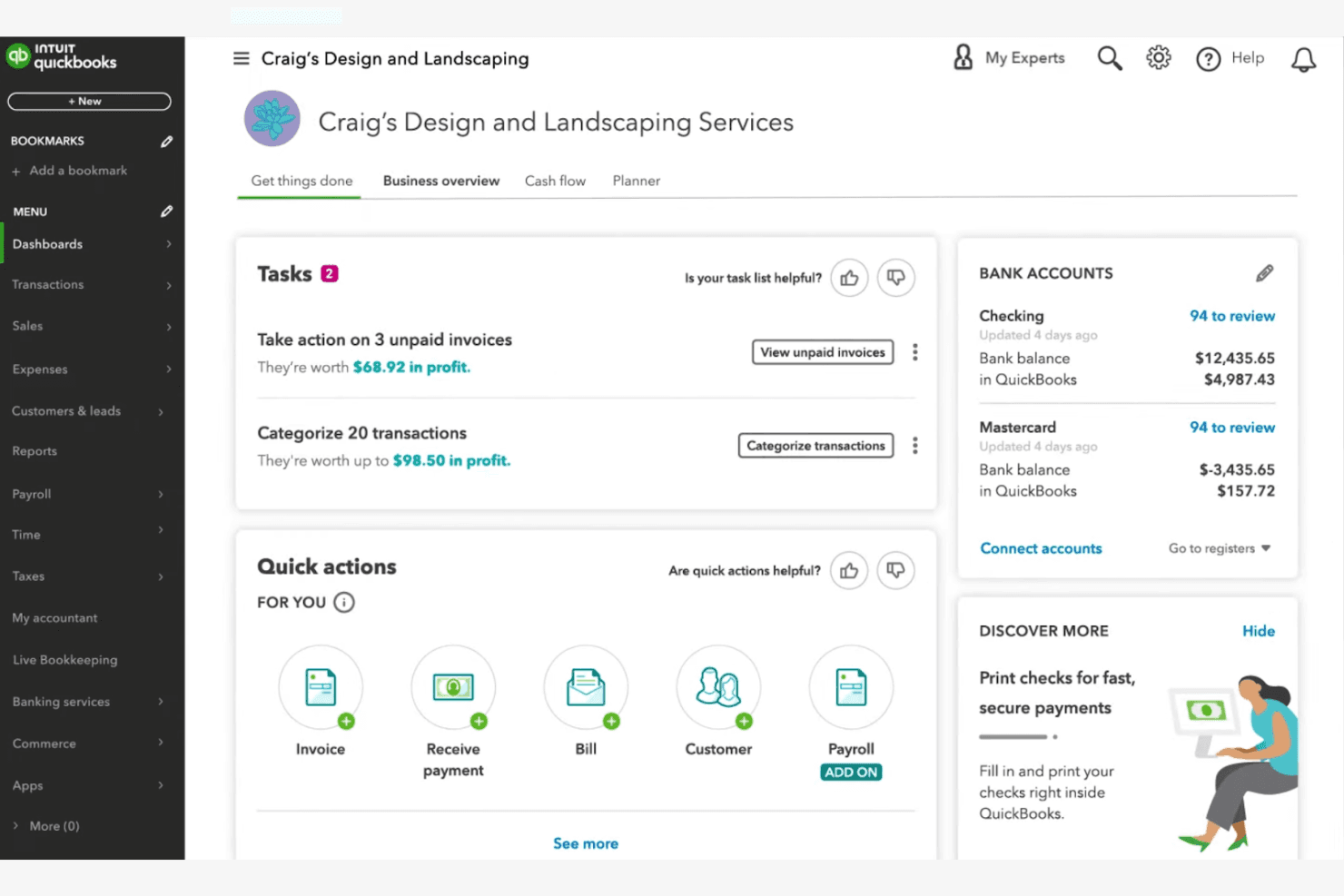
QuickBooks Online surfaces tasks, invoices, and bank balances on one dashboard. QuickBooks Online is a cloud-based accounting platform that brings AI-assisted bookkeeping, fund tracking, automated bank reconciliation, and financial reporting to churches and nonprofits managing ministry finances.
Who Is QuickBooks Online Best For?
It's a strong fit for church bookkeepers and finance directors at small-to-mid-sized congregations who already have a working knowledge of accounting fundamentals.
Why I Picked QuickBooks Online
I picked QuickBooks Online because its AI-powered bank reconciliation cuts through one of the most time-consuming tasks in church finance. Intuit Intelligence automatically flags anomalies and resolves mismatched transactions across ministry accounts, which saves significant manual review time. The Advanced tier also pairs reconciliation with cash flow forecasting and Finance AI, so the data from your reconciled books feeds directly into budget planning.
QuickBooks Online Key Features
- Fund tracking and class/location tagging: Supports segmented tracking for different church ministries and funds using classes and locations.
- Custom board and donor reporting: Generates specialized reports tailored for church boards, donors, and annual filings.
- Multi-user access with role controls: Allows unique user IDs and tiered permissions for staff and volunteers managing finances.
- Integration with donor and fundraising tools: Connects with platforms like DonorPerfect, Fundly, and Kindful for streamlined import of giving data.
QuickBooks Online Integrations
QuickBooks Online offers native integrations with DonorPerfect, Fundly, Kindful, Method:Donor, and Expensify. An API is available for custom integrations.
Pros and Cons
Pros:
- Multi-user access supports staff and volunteer roles
- Automated cash flow forecasting aids budget planning
- AI-powered bank reconciliation saves hours weekly
Cons:
- Clergy tax handling requires third-party workarounds
- No native church-specific fund accounting structure
Learn more about QuickBooks Online:
Andre KI-baserte verktøy for økonomistyring i kirker
Her er noen flere alternativer for KI-baserte verktøy for økonomistyring i kirker som ikke kom med på listen min, men som likevel er verdt å undersøke:
- 11BlackbaudBest for applying AI-powered predictive analytics to donor forecasting and fundraising strategy
How I Evaluate AI Church Financial Management Tools
I don't include a tool just because it labels itself "AI"—it needs to do something meaningful, like flagging a budget variance across ministry funds or forecasting a seasonal giving dip before it hits cash flow. I evaluate each option on two levels: the core functionality it must have to qualify and the differentiating factors that separate a good fit from a great one.
Core Functionality (Table Stakes For This List)
When I'm selecting tools for my list, I rank each one on a scale from 0 (does not offer the functionality) to 5 (excels in this area) for each core functionality listed below. Then, I calculate the tool's total score into a percentage. Each tool needs to achieve a minimum total score of 55% to be considered for inclusion.
- AI-Powered Fund Accounting: I look for tools that use AI to categorize transactions into restricted, unrestricted, and designated funds—like automatically sorting a building campaign gift from general tithes.
- Automated Contribution Management: Each tool should handle tithe and offering tracking with AI-assisted donor matching, so duplicate records from online and in-person giving don't pile up at year-end.
- Predictive Financial Forecasting: I evaluate whether AI forecasting goes beyond static reports to model scenarios like projected summer giving dips or the financial impact of launching a new campus.
- Anomaly & Fraud Detection: The tool should flag unusual activity across ministry accounts, such as a spike in petty cash withdrawals or an expense that falls outside normal patterns for a department.
- Intelligent Reporting & Insights: Board-ready financial summaries that AI generates on demand matter here—I check whether pastors and treasurers can pull meaningful reports without needing an accounting background.
- Church-Specific Integrations: Connections to ChMS platforms, online giving tools, and payroll systems familiar with clergy compensation are what I look for, since church finance doesn't operate in a vacuum.
Once I have a list of tools that meet the criteria, I consider what sets each platform apart.
Differentiating Factors (What Sets Vendors Apart)
Here's how I compare and contrast different vendors:
Standout Features
Natural language querying is a big differentiator—I want to see whether a volunteer treasurer can type "What did we spend on missions last quarter?" and get a clear answer without digging through reports. AI donor retention insights also carry weight, especially when a tool can surface lapsed givers and suggest re-engagement timing based on historical patterns. Smart budget recommendations round things out, where the AI proposes ministry allocations informed by seasonal giving cycles and past spend.
Beyond Features
Clergy-specific tax handling matters a lot here—I check whether a platform supports housing allowances and dual-status compensation, since getting this wrong creates real headaches at year-end. Volunteer-friendly onboarding is another priority. Many churches rely on part-time bookkeepers or lay treasurers, so I evaluate whether someone without an accounting background can navigate the system after a short setup. Donor privacy also weighs in, particularly role-based access that keeps individual giving records visible only to authorized staff.
Slik velger du KI-baserte verktøy for økonomistyring i kirker
Det er lett å gå seg vill i lange funksjonslister og komplekse prismodeller. For å hjelpe deg med å holde fokus mens du arbeider deg gjennom den unike prosessen med å velge programvare, får du her en sjekkliste over faktorer du bør ha i tankene:
| Faktor | Hva bør du vurdere? |
| Skalerbarhet | Vil verktøyet håndtere kirkens vekst, behov for flere campuser eller sesongbaserte økninger i givertall uten ekstra kostnader eller kompleksitet? |
| Integrasjoner | Kan det kobles direkte til regnskaps-, giveradministrasjons- eller kommunikasjonsverktøyene dine, eller trenger du alternative løsninger? |
| Tilpasningsmuligheter | Kan du tilpasse rapporter, brukerroller og arbeidsflyter slik at de samsvarer med kirkens unike økonomiske prosesser og godkjenningsstrukturer? |
| Brukervennlighet | Vil ansatte og frivillige med ulikt teknisk ferdighetsnivå kunne navigere i og bruke systemet på en trygg måte? |
| Implementering og oppstart | Hvor lang tid vil det ta å migrere data, lære opp teamet og komme i gang? Finnes det ressurser eller støtte for oppstartsprosessen? |
| Kostnad | Er alle gebyrer tydelige, inkludert oppsett, brukerstøtte og tilleggstjenester? Passer prisen med budsjettet og den forventede bruken? |
| Sikkerhetstiltak | Tilbyr verktøyet rollebasert tilgang, revisjonsspor og datakryptering for å beskytte sensitiv økonomisk informasjon og giverinformasjon? |
| Tilgjengelig brukerstøtte | Kan du få tak i brukerstøtte når du trenger det – særlig i kritiske rapporteringsperioder eller ved årsavslutning? |
Hva er KI-baserte verktøy for økonomistyring i kirker?
AI-baserte verktøy for økonomistyring i kirken er en type regnskapsprogramvare for kirker som er utviklet for å hjelpe kirker med å administrere økonomien, følge med på aktiviteten rundt nettbaserte donasjoner og forbedre økonomiforvaltningen med mindre tid brukt på manuelt arbeid. Selv om de ofte beskrives som AI-verktøy, tilbyr de fleste for øyeblikket AI-støttede funksjoner som innsikt i rapporter og mønstergjenkjenning, noe som gjenspeiler et voksende og stadig utviklende område innen systemer for kirkedrift.
Disse verktøyene kombinerer vanligvis alt-i-ett-funksjoner for bokføring med elementer fra et system for kirkedrift, og gir menighetsledere en sentralisert måte å håndtere øremerkede midler, rapportering og daglige regnskapsoppgaver på.
De kan erstatte tradisjonelle regneark ved å støtte sporing av donasjoner, prosesser for leverandørgjeld og økonomisk rapportering, noe som gjør dem spesielt verdifulle for små kirker som trenger brukervennlige systemer for å effektivisere driften samtidig som nøyaktighet og åpenhet opprettholdes.
Funksjoner
Når du velger AI-baserte verktøy for økonomistyring i kirken, bør du se etter følgende viktige funksjoner:
- Sporing av donasjoner: Registrerer og kategoriserer automatisk gaver etter giver, fond og kampanje, slik at det blir enkelt å følge med på givermønstre og generere bidragsoppgaver.
- Fondregnskap: Skiller mellom og administrerer flere fond eller kontoer i det samme systemet, slik at kravene til økonomiske standarder for ideelle organisasjoner overholdes og rapporteringen blir tydelig.
- AI-drevet rapportering: Bruker kunstig intelligens til å generere økonomiske rapporter, fremheve trender og gi handlingsrettet innsikt for kirkeledere og økonomiteam.
- Automatisk avstemming: Matcher banktransaksjoner med registrerte poster, reduserer manuelt arbeid og minimerer feil i økonomiske oppføringer.
- Administrasjon av givertilsagn: Følger opp medlemmenes givertilsagn, overvåker fremdriften mot mål og sender påminnelser eller oppdateringer til givere ved behov.
- Rollebaserte tillatelser: Gjør det mulig for administratorer å angi ulike tilgangsnivåer for ansatte og frivillige, beskytte sensitive økonomiske data og støtte ansvarlighet.
- Registrering i grupper: Gjør det mulig å registrere flere donasjoner eller transaksjoner samtidig, noe som sparer tid i travle perioder eller under arrangementer.
- Revisjonsspor: Opprettholder en detaljert logg over alle endringer og transaksjoner, støtter åpenhet og forenkler revisjoner eller gjennomganger.
- Oppsett av gjentakende gaver: Lar givere planlegge automatiske bidrag, noe som gir jevnere kirkeinntekter og forenkler giveradministrasjonen.
- Integrasjonsmuligheter: Kobler seg til verktøy for regnskap, kommunikasjon og giveradministrasjon for å optimalisere arbeidsflyter og redusere dobbeltregistrering av data.
Fordeler
Implementering av AI-baserte verktøy for økonomistyring i kirken gir flere fordeler for teamet og virksomheten din. Her er noen av fordelene du kan se frem til:
- Bedre økonomisk nøyaktighet: Automatisk sporing av donasjoner og avstemming reduserer manuelle feil og sikrer at oppføringene dine alltid er oppdaterte.
- Raskere rapportering og innsikt: AI-drevet rapportering leverer økonomiske data i sanntid og trendanalyser, slik at ledere raskt kan ta informerte beslutninger.
- Økt åpenhet: Revisjonsspor og tydelig fondregnskap støtter ansvarlighet og gjør det enklere å dele økonomisk informasjon med menigheten eller styret.
- Tidsbesparelser for ansatte: Registrering i grupper, oppsett av gjentakende gaver og automatiserte arbeidsflyter frigjør tid for ansatte og frivillige til menighetsarbeid og oppsøkende arbeid.
- Bedre giverengasjement: Administrasjon av givertilsagn og integrasjoner for kommunikasjon hjelper deg med å følge opp forpliktelser og holde giverne informert og verdsatt.
- Bedre datasikkerhet: Rollebaserte tillatelser og sikre tilgangskontroller beskytter sensitive økonomiske opplysninger og giverinformasjon mot uautorisert tilgang.
- Skalerbarhet for vekst: Fleksible verktøy og integrasjonsmuligheter gjør at de økonomiske prosessene kan vokse sammen med kirken, enten dere oppretter nye avdelinger eller utvider arbeidet.
Kostnader og priser
Ved valg av AI-baserte verktøy for økonomistyring i kirken er det nødvendig å forstå de ulike prismodellene og abonnementene som er tilgjengelige. Kostnadene varierer basert på funksjoner, teamstørrelse, tillegg og mer. Tabellen nedenfor oppsummerer vanlige abonnementer, gjennomsnittsprisene deres og typiske funksjoner som er inkludert i løsninger med AI-baserte verktøy for økonomistyring i kirken:
Sammenligningstabell for abonnementer for AI-baserte verktøy for økonomistyring i kirken
| Abonnementstype | Gjennomsnittspris | Vanlige funksjoner |
| Gratisabonnement | $0 | Grunnleggende sporing av donasjoner, begrenset rapportering, tilgang for én bruker og e-poststøtte. |
| Privatabonnement | $10-$30/måned | Håndtering av donasjoner og givertilsagn, enkel fondsregnskapsføring, grunnleggende AI-rapporter og begrensede integrasjoner. |
| Bedriftsabonnement | $40-$100/måned | Tilgang for flere brukere, avansert AI-drevet analyse, batchregistrering, rollebaserte tillatelser og integrasjoner med regnskapsverktøy. |
| Virksomhetsabonnement | $150-$400/måned | Støtte for flere campuser, tilpassede arbeidsflyter, førsteklasses kundestøtte, avansert sikkerhet og full API-tilgang. |
Vanlige spørsmål om AI-verktøy for økonomistyring i kirker
Her er noen svar på vanlige spørsmål om AI-verktøy for økonomistyring i kirker:
Hvordan forbedrer AI kirkens økonomistyring?
AI forbedrer kirkens økonomistyring ved å automatisere rutineoppgaver som sporing av donasjoner, bankavstemming og generering av rapporter. Dette reduserer manuelle feil, sparer de ansattes tid og gir ledere innsikt i sanntid for bedre beslutningstaking.
Kan AI-verktøy for økonomistyring i kirker håndtere flere fond eller campuser?
Ja, de fleste AI-verktøy for økonomistyring i kirker støtter fondsregnskapsføring og administrasjon av flere campuser. Dette lar deg spore separate budsjetter, donasjoner og utgifter for hvert fond eller hver lokasjon, samtidig som alt holdes organisert i ett system.
Er disse verktøyene sikre nok for sensitive økonomiske data og giverdata?
Ja, anerkjente AI-verktøy for økonomistyring i kirker bruker kryptering, rollebaserte tillatelser og revisjonsspor for å beskytte sensitive data. Kontroller alltid at løsningen overholder personvernstandarder, og spør om sikkerhetssertifiseringer før du velger en løsning.
Hva slags støtte er tilgjengelig for oppstart og feilsøking?
De fleste leverandører tilbyr ressurser for oppstart, for eksempel opplæringsvideoer, produktomvisninger og webinarer. Løpende støtte omfatter ofte chat i sanntid, hjelp via e-post eller telefon, samt tilgang til en kunnskapsbase eller et brukerfellesskap.
Hvordan integreres disse verktøyene med annen kirkeprogramvare?
Mange AI-verktøy for økonomistyring i kirker tilbyr integrasjoner med regnskapsplattformer, systemer for giveradministrasjon og kommunikasjonsverktøy. Kontroller om den eksisterende programvaren din støttes, eller om tilpassede integrasjoner er mulig via API-er.