

Å administrere et kirkesamfunn er ingen liten oppgave. Du møter utfordringer som å organisere arrangementer, holde oversikt over oppmøte og administrere donasjoner. Det er her alt-i-ett-programvare for kirkedrift kommer inn i bildet.
Hvis du har prøvd Planning Center og opplevd at det ikke dekker dine spesifikke behov, er du ikke alene. Mange kirkeledere ser etter alternativer med bedre tilpasningsmuligheter, andre funksjoner eller av hensyn til budsjettet.
Etter min erfaring kan det å finne riktig verktøy utgjøre en stor forskjell. Jeg skal lede deg gjennom mine beste anbefalinger av alternativer til Planning Center. Du vil oppdage alternativer som dekker ulike behov og preferanser, og som hjelper teamet ditt med å arbeide smidig og effektivt.
Hva er Planning Center?
Planning Center er en programvare for kirkedrift som er utviklet for å hjelpe kirker med å organisere og administrere aktivitetene sine. Den brukes vanligvis av kirkeadministratorer, pastorer og arrangementskoordinatorer som trenger en effektiv måte å håndtere planlegging, kommunikasjon og medlemsinformasjon på. Funksjoner som planlegging av frivillige, arrangementsplanlegging og oversikt over donasjoner gjør det enklere å organisere kirkens drift, engasjere menigheten og administrere ressurser effektivt. Alt i alt tilbyr Planning Center verdifulle verktøy som hjelper kirken med å fungere smidig og holde kontakten.
Sammenligningstabell over alternativer til Planning Center
Denne sammenligningstabellen oppsummerer prisdetaljene for mine beste utvalgte alternativer til Planning Center:
| Tool | Best For | Trial Info | Price | ||
|---|---|---|---|---|---|
| 1 | Best for church facility and space scheduling | Free demo available | From $99/month (billed annually) | Website | |
| 2 | Best for unified church engagement platform | Free demo available | Pricing upon request | Website | |
| 3 | Best for flexible event and group management | Free plan available + 30-day free trial | From $12/month | Website | |
| 4 | Best for workflow and process automations | 30-day free trial | From $58/month | Website | |
| 5 | Best for cost-effective giving solutions | 30-day free trial available | From $72/month | Website | |
| 6 | Best for membership engagement tools | Free plan available | From $49/month | Website | |
| 7 | Best for mobile app connectivity | Not available | Pricing upon request | Website | |
| 8 | Best for nonprofit fundraising | Free demo available | Pricing upon request | Website | |
| 9 | Best for comprehensive worship planning | 30-day free trial | From $50/month/account | Website | |
| 10 | Best for scalable church management | 30-day free trial | Pricing available upon request | Website |


Hvorfor du kan stole på våre programvareanbefalinger
6,700+
Reviews
20
Industry experts
16+
Evaluation factors
14
Years
Teamet vårt har testet og anmeldt programvare siden 2012. Vi er selv kirkeledere, så vi vet hvor vanskelig og hvor viktig det er å velge riktig programvare.
I denne guiden har vi vurdert verktøyene gjennom praktisk testing og uavhengig research og gitt dem poeng ut fra våre utvelgelseskriterier.
Anmeldelsene våre bygger på vår egen redaksjonelle vurdering. De er ikke et salgsargument.
Anmeldelser av de beste alternativene til Planning Center
\u003cspan style=\u0022font-weight: 400\u0022\u003eNedenfor finner du mine detaljerte sammendrag av de beste alternativene til Planning Center som kom med på kortlisten. Anmeldelsene mine gir en detaljert gjennomgang av de viktigste funksjonene, fordeler og ulemper, integrasjonene og ideelle bruksområdene for hvert verktøy, slik at du kan finne det som passer best for deg.\u003c/span\u003e
 Best for church facility and space scheduling
- Free demo available
- From $99/month (billed annually)
Visit WebsiteCustomer Rating:4.4/5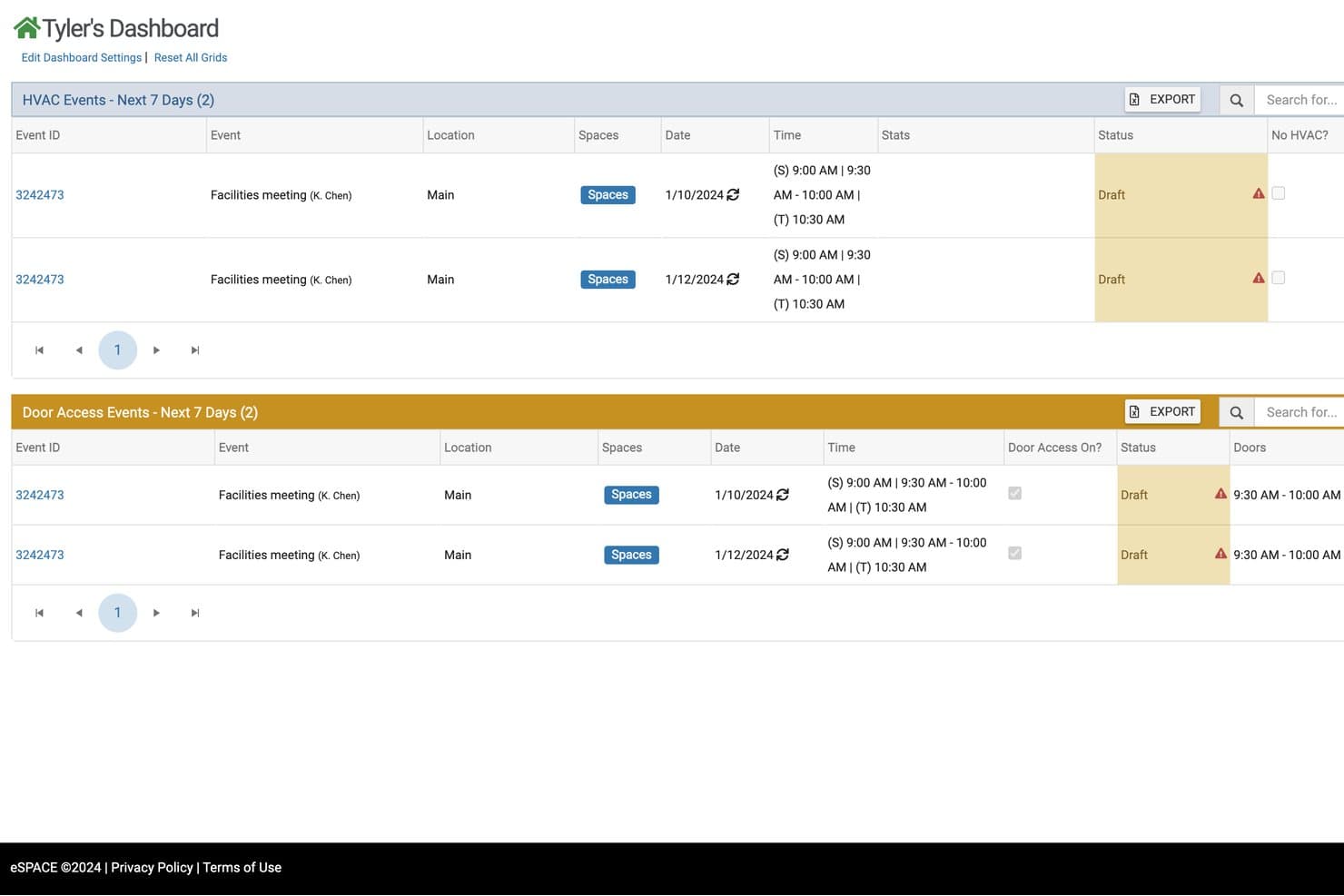
eSPACE tracks HVAC and door access events across upcoming facility bookings. eSPACE is church management software for churches that need to coordinate facilities, ministries, staff, and volunteers while reducing scheduling conflicts and administrative work.
Who Is eSPACE Best For?
Church leaders and facility teams that need one place to coordinate rooms, events, ministry activities, and facility requests.
Why eSPACE Is a Good Best Planning Center Alternatives Reviewed
I picked eSPACE because it is built for church facility and space scheduling. I use it to coordinate rooms, ministry activities, events, and facility requests in one place. That helps my team prevent scheduling conflicts when multiple ministries need the same space.
eSPACE Key Features
- Work order management: Create, assign, and track maintenance work orders.
- Preventive maintenance: Schedule recurring maintenance tasks by date or interval.
- Asset tracking: Record equipment details, locations, and maintenance history.
- Inventory controls: Set reorder thresholds for supplies and equipment.
eSPACE Integrations
eSPACE offers documented integrations with ACS, MinistryPlatform, ChurchTeams, TouchPoint, Rock RMS, Planning Center, DynaCal, Breeze, and One Church, plus facility integrations for HVAC, access control, and digital signage. It also provides Google Calendar API support and API access for custom integrations.
Pros and Cons
Pros:
- Supports multi-campus facility coordination
- Tracks work orders, assets, and preventive maintenance
- Combines room reservations with maintenance workflows
Cons:
- Calendar sorting and exports can frustrate teams
- Reservations require several steps and options
Learn more about eSPACE: Best for unified church engagement platform
- Free demo available
- Pricing upon request
Visit WebsiteCustomer Rating:4.5/5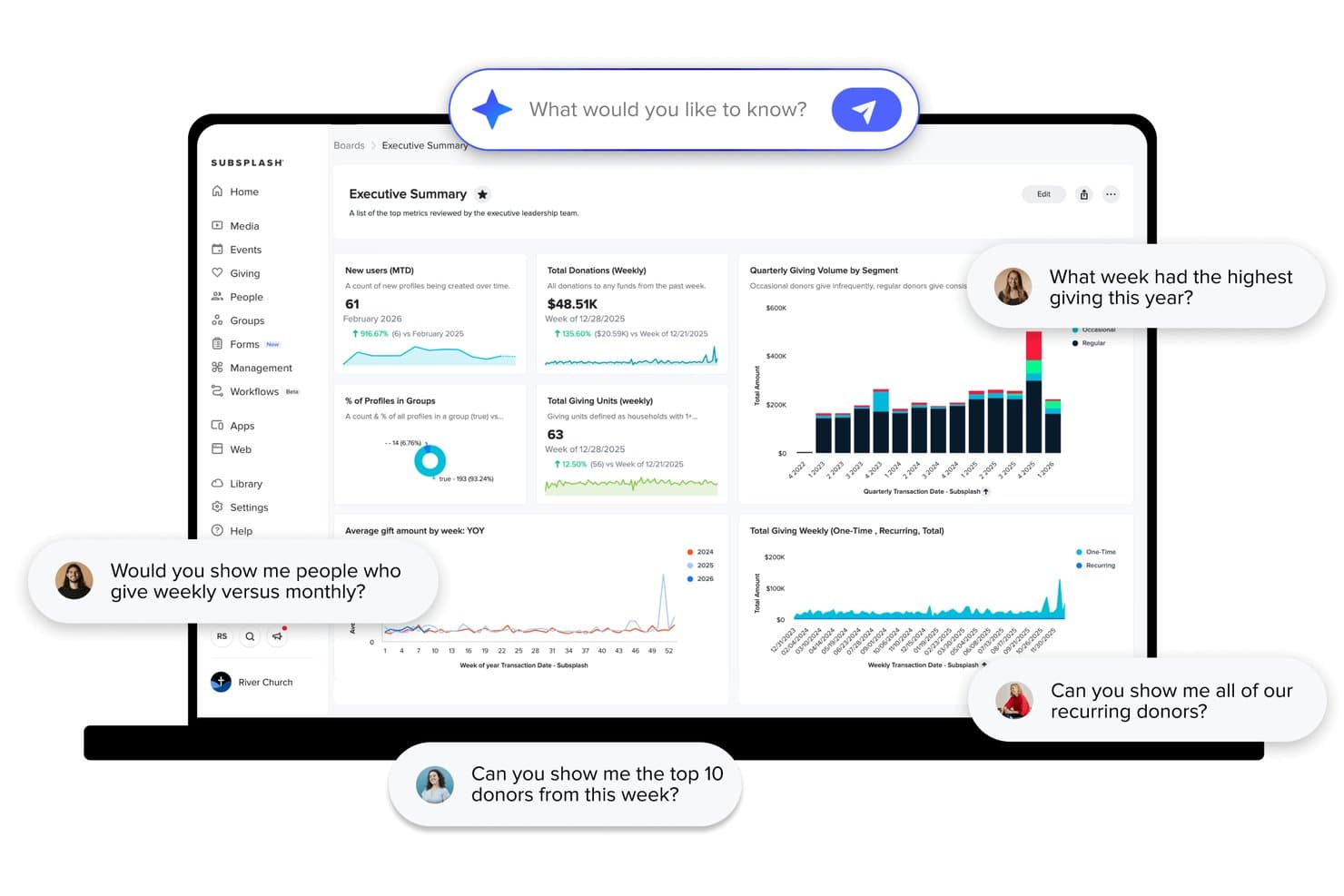
Subsplash offers an AI-powered analytics dashboard with giving trends, donor insights, and natural language query capabilities for church leadership teams. Subsplash is an all-in-one church platform that consolidates your app, website, giving, media, and member management into a single branded experience—built for churches that want to engage their congregation beyond Sunday.
Who Is Subsplash Best For?
Subsplash is a strong fit for mid-to-large churches that want to replace a patchwork of separate tools with one unified, custom-branded platform.
Why Subsplash Is a Good Best Planning Center Alternatives Reviewed
I've included Subsplash in my top picks because it solves a problem Planning Center doesn't: fragmentation. Where Planning Center splits your congregation's experience across seven mobile apps and five web dashboards, Subsplash delivers everything, including your custom-branded app, media hosting, live streaming, giving, and people management, through a single platform your church actually owns. I particularly like that Pulpit AI automatically generates sermon clips, discussion questions, and social posts, turning one Sunday message into a week's worth of engagement content.
Subsplash Key Features
- Mobile app and TV streaming: Publish sermons, events, and media to your own branded mobile and TV app so congregants engage from anywhere.
- People and household management: Organize member records with custom fields, household relationships, lifecycle tracking, and easy segmentation.
- Child check-in system: Track attendance and ensure security with child check-in workflows and printed name tags for kids and families.
- Workflow automations: Set up automated follow-ups and ministry processes for guests, new members, and discipleship steps.
Subsplash Integrations
Native integrations include YouTube, Vimeo, and Stripe. An API is available for custom integrations.
Pros and Cons
Pros:
- Online giving and recurring donations rated highly
- Pulpit AI turns sermons into weekly content
- Branded app covers giving, media, and groups
Cons:
- Customer support responsiveness is inconsistent
- Membership management rated noticeably lower than giving tools
 Best for flexible event and group management
- Free plan available + 30-day free trial
- From $12/month
Visit WebsiteCustomer Rating:4.9/5
ChMeetings centralizes all your church management activities, from events and people management to communication. ChMeetings is a church management software designed to help ministries organize and grow their communities. It provides tools for managing members, planning events, tracking attendance, and handling communication—all in one secure place.
Why it's a good Planning Center alternative: I picked ChMeetings because it focuses on flexible event and group management, custom data tracking, and strong administrative control. You can manage events from planning through follow-up, with detailed attendance, roles, and reminders. Its custom forms and fields let you capture the exact member details your ministry needs, making your data more useful and relevant.
Permissions and access levels are customizable too, so your team can collaborate while keeping sensitive information secure. These tools together make ChMeetings a reliable alternative for churches that want more control and flexibility over how they organize people and activities.
Standout features & integrations:
Features include people management tools that let you organize individuals into families or groups and tag them by ministries or participation levels. There’s also a communication center that enables group emails, push notifications, and SMS—all from within the same dashboard, ensuring every member stays informed.
Integrations include Stripe, PayPal, BlueSnap, Paystack, Twilio, MailChimp, SMS Global, Zeffy, and Clickatell.
Pros and Cons
Pros:
- Built-in SMS, email, and push messaging
- Strong event and attendance tracking tools
- Supports multi-campus coordination easily
Cons:
- No built-in website builder, just a member page builder
- Limited integration options compared to others
Learn more about ChMeetings: Best for workflow and process automations
- 30-day free trial
- From $58/month
Visit WebsiteCustomer Rating:4.8/5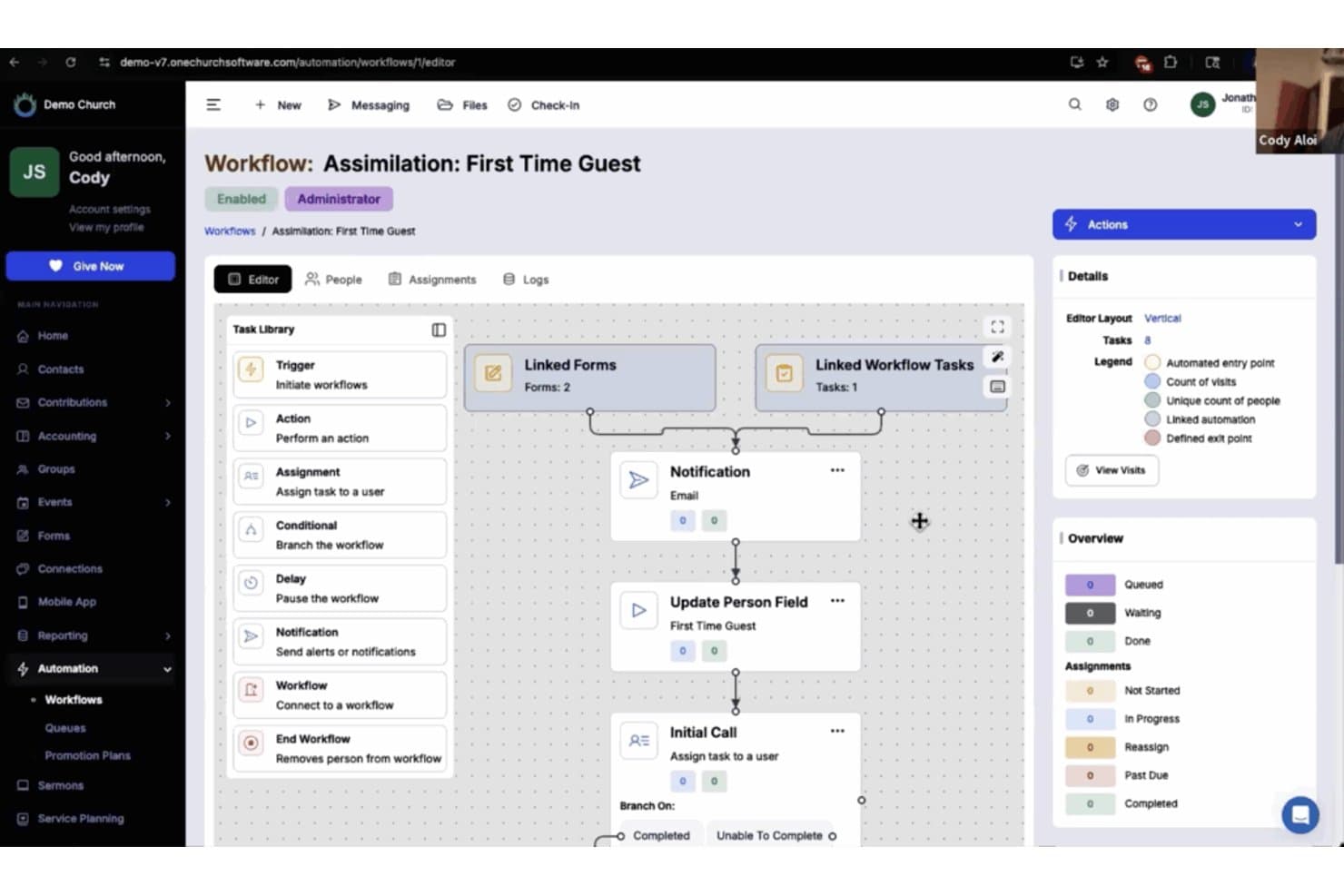
One Church Software offers an automated workflow builder for managing first-time guest assimilation with linked forms, notifications, and task assignments. One Church Software is an all-in-one church management platform built for churches that want to replace fragmented tools with a single system covering membership, giving, check-in, groups, communications, and service planning.
Who Is One Church Software Best For?
It's a strong fit for small to mid-sized churches whose admin teams are managing too many disconnected tools and need one configurable system to tie operations together.
Why One Church Software Is a Good Planning Center Alternative
I've included One Church Software in my top picks because its Automation Suite does something Planning Center simply doesn't: it lets you build multi-step workflows that trigger automatically based on form submissions, query results, or scheduled reports. I use it to automate visitor follow-up sequences and membership process steps, so nothing falls through the cracks between Sunday and the rest of the week. The query-based auto-send for reports is particularly useful, pushing data to the right people without anyone having to manually pull it.
One Church Software Key Features
- Membership database: Create detailed member and household profiles with custom fields and relationship tracking to keep congregant records organized.
- Integrated contributions and accounting: Manage donations, pledges, and financial records in the same platform for streamlined reporting and tax statement generation.
- Child check-in system: Enable secure child and family check-in with attendance logs, custom labels, and event registration tools.
- Multi-campus support: Organize multiple locations or ministries within one system, complete with campus-based permissions, settings, and reports.
One Church Software Integrations
One Church Software offers native integrations with Mailchimp, Square, Pushpay, and PraiseCharts, and provides an API for custom integrations.
Pros and Cons
Pros:
- Built-in accounting features
- Replaces multiple ministry management tools
- Handles multi-step follow-up workflows
Cons:
- Mobile app experience reported as inconsistent
- Service planning tools less developed
Learn more about One Church Software: Best for cost-effective giving solutions
- 30-day free trial available
- From $72/month
Visit WebsiteCustomer Rating:4.8/5
Tithe.ly simplifies digital donations with flexible giving and tracking. Tithe.ly is a digital giving platform designed for churches and ministries to simplify donation processes and enhance financial stewardship. Church leaders and financial administrators primarily use it to manage tithes and offerings.
Why it's a good Planning Center alternative: Tithe.ly offers an all-in-one solution for cost-effective giving solutions that make it easy for your congregation to donate online. Features like text giving, mobile app donations, and recurring giving options provide flexibility for your members.
Tithe.ly also includes a comprehensive dashboard to track donations and financial trends. This makes it an excellent choice for churches looking to optimize their giving strategies.
Standout features & integrations:
Features include event registration tools that allow your team to manage and track attendance for church events. The software provides a custom church app builder to enhance engagement with your congregation. Additionally, Tithe.ly offers a church management suite to help you organize and oversee church operations effectively. Members can give via credit card, ACH, text-to-give, or the mobile app, with recurring options supported.
Integrations include Planning Center, QuickBooks, Salesforce, Mailchimp, Google Calendar, CCB, ProPresenter, Pushpay, Vanco, and Givelify
Pros and Cons
Pros:
- Supports recurring giving
- Custom church app builder
- Effective event registration tools
Cons:
- Occasional technical issues
- Requires internet connection
 Best for membership engagement tools
- Free plan available
- From $49/month
Visit WebsiteCustomer Rating:4.7/5
Raklet boosts engagement with events, renewals, and analytics tools. Raklet is a membership management platform designed for organizations to engage and manage their communities effectively. Community managers and administrators use it to handle memberships, communication, and events.
Why it's a good Planning Center alternative: Raklet offers powerful membership engagement tools that keep your community active and connected. With features like automated membership renewals, event management, and email marketing, you can maintain a thriving community.
Raklet also provides detailed analytics to track engagement and growth. This makes it a great choice for organizations focused on boosting member interaction and retention.
Standout features & integrations:
Features include customizable membership plans that cater to different needs, a built-in CRM to manage member data, and an event management system to organize and track events efficiently. You can also use automated email campaigns to reach your audience and increase engagement.
Integrations include Stripe, PayPal, Mailchimp, Zapier, Eventbrite, Google Calendar, QuickBooks, Slack, Salesforce, and Zoom.
Pros and Cons
Pros:
- Built-in CRM
- Detailed analytics
- Automated renewals
Cons:
- Occasional technical issues
- Learning curve for new users
Learn more about Raklet:

Realm keeps the church connected through real-time mobile engagement. Realm is a church management software designed for church leaders and administrators to enhance community engagement and streamline operations. It focuses on member management, event planning, and communication.
Why it's a good Planning Center alternative: Realm excels in mobile app connectivity, providing your team and congregation with easy access to church information on the go. Its mobile app allows members to connect, give, and register for events using their smartphones.
The platform also supports real-time communication, helping you keep your community informed and engaged. This makes Realm an ideal choice for churches looking to leverage mobile technology for better connectivity.
Standout features & integrations:
Features include a built-in giving platform that simplifies donations and tracks contributions. The software provides event management tools to help you plan and coordinate church activities efficiently. Additionally, Realm offers a group management feature to organize and manage small groups and classes effectively.
Integrations include QuickBooks, Mailchimp, Planning Center, Google Calendar, Eventbrite, ProPresenter, Pushpay, Tithe.ly, Vanco, and Givelify.
Pros and Cons
Pros:
- Built-in giving platform
- Real-time communication features
- Strong mobile app connectivity
Cons:
- Basic customization options
- Learning curve for new users
 Best for nonprofit fundraising
- Free demo available
- Pricing upon request
Visit WebsiteCustomer Rating:3.5/5
Blackbaud strengthens donor relations with tools for giving and events. Blackbaud is a software solution tailored for nonprofit organizations, including churches, to manage their fundraising, financial management, and donor relationships. It's primarily used by development teams and financial officers to streamline operations and enhance donor engagement.
Why it's a good Planning Center alternative: Blackbaud provides specialized tools for nonprofit fundraising and donation management, making it easier for your team to connect with donors and raise funds effectively. Features like donor management, online giving, and event planning help you build and maintain strong relationships with your supporters.
The tool also offers comprehensive financial tracking, ensuring transparency and accountability. This makes Blackbaud an excellent choice for churches focused on fundraising and financial management.
Standout features & integrations:
Features include customizable dashboards that allow you to monitor key metrics and performance indicators at a glance. The platform offers grant management tools to help you track and report on funding opportunities. Additionally, Blackbaud provides a volunteer management system to organize and engage your volunteers effectively.
Integrations include Salesforce, QuickBooks, Microsoft Dynamics 365, Mailchimp, PayPal, Eventbrite, Constant Contact, Google Analytics, HubSpot, and Zoom.
Pros and Cons
Pros:
- Grant management tools
- Customizable dashboards
- Effective donor management
Cons:
- Occasional software updates
- Steep learning curve
 Best for comprehensive worship planning
- 30-day free trial
- From $50/month/account
Visit WebsiteCustomer Rating:3.5/5
Elvanto streamlines service planning with scheduling and music tools. Elvanto is a church management software designed for church leaders and worship teams to manage their operations and plan services efficiently. It focuses on worship planning, member management, and communication.
Why it's a good Planning Center alternative: Elvanto provides comprehensive worship planning tools, allowing your team to organize services with ease. Features like service scheduling, volunteer management, and music library access help streamline worship preparation.
The platform also supports detailed reporting and analytics, giving insights into church activities. This makes Elvanto a strong option for churches looking to enhance their worship planning processes.
Standout features & integrations:
Features include a built-in music library that supports worship planning by providing easy access to songs. The platform offers child check-in systems to ensure safety and track attendance. Additionally, Elvanto provides a member directory, helping you manage and communicate with your congregation effectively.
Integrations include Planning Center, Mailchimp, ProPresenter, SongSelect, Tithe.ly, Stripe, PayPal, Google Calendar, QuickBooks, and Xero.
Pros and Cons
Pros:
- Built-in music library
- Detailed reporting and analytics
- Comprehensive worship planning
Cons:
- Basic user interface
- Requires internet connection
Learn more about Elvanto: Best for scalable church management
- 30-day free trial
- Pricing available upon request

Fellowship One scales for any church and supports secure, efficient management. Fellowship One is a church management software designed to enhance efficiency for churches of all sizes. Church administrators and financial officers primarily use it to manage church operations and finances.
Why it's a good Planning Center alternative: Fellowship One provides scalable solutions, making it adaptable for both small and large congregations. Key features like streamlined financial processes, online giving options, and mobile access support efficient church management.
It also offers safety features like integrated background checks for staff and volunteers. Overall, Fellowship One provides a comprehensive management experience tailored to various church needs.
Standout features & integrations:
Features include online giving methods that increase donations, mobile apps for on-the-go management, and worship planning tools that help organize services. The software also provides accounting features that streamline financial processes and a mobile-optimized experience for congregants, enhancing their engagement with the church.
Integrations include QuickBooks, Mailchimp, Church Community Builder, Planning Center, ProPresenter, Eventbrite, Tithe.ly, Vanco, Pushpay, and Givelify.
Pros and Cons
Pros:
- Integrated background checks
- Streamlined financial processes
- Easy mobile access
Cons:
- Requires training for new users
- Limited customization options
Learn more about Fellowship One:
Andre alternativer til Planning Center
\u003cspan style=\u0022font-weight: 400\u0022\u003eHer er noen flere alternativer til Planning Center som ikke kom med på kortlisten min, men som likevel er verdt å undersøke:\u003c/span\u003e
- 11TouchpointBest for real-time engagement insights
- 12SeekerWorksBest for intuitive guest management
- 13ExcellerateBest for detailed attendance tracking
- 14GracelyBest for online giving and tracking
- 15MinistryPlatformBest for customizable church solutions
How I Evaluate Planning Center Alternatives
I split my evaluation into baseline criteria—like volunteer scheduling, giving tools, and service planning—and differentiators like mobile apps, pricing, and onboarding support.
Core Functionality (Table Stakes For This List)
When I'm selecting tools for my list, I rank each one on a scale from 0 (does not offer the functionality) to 5 (excels in this area) for each core functionality listed below. Then, I calculate the tool's total score into a percentage. Each tool needs to achieve a minimum total score of 55% to be considered for inclusion.
- Service & Worship Planning: I look for structured service builders where worship directors can arrange song sets, attach chord charts, and share media files with the team ahead of Sunday.
- Volunteer & Team Scheduling: Each tool should let coordinators schedule teams across recurring services, send automated availability requests, and handle last-minute swaps without a group text chain.
- Membership & People Database: I evaluate how each platform organizes households, tracks relationships, and stores custom profile data—like baptism dates or spiritual gift assessments—beyond a basic contact list.
- Online Giving & Contributions: Giving tools should support recurring donations, pledge tracking, and year-end contribution statements so your finance team isn't manually assembling tax receipts every January.
- Groups & Event Management: I check whether each tool handles small group organization, event registration, and family check-in workflows in a single system rather than requiring separate add-ons.
- Congregational Communication: The platform should include built-in email and SMS tools with audience segmentation, so you can message your youth group parents without blasting the entire congregation.
Once I have a list of tools that meet this criteria, I consider what sets each platform apart.
Differentiating Factors (What Sets Vendors Apart)
Here's how I compare and contrast different vendors:
Standout Features
A branded church mobile app makes a real difference—congregants can give, RSVP for events, and watch sermons without bouncing between platforms. I also evaluate workflow automations, like automated follow-ups for first-time guests or new member pathways that trigger without staff intervention. Reporting dashboards matter too. I look for tools that surface attendance trends and giving patterns so pastors can spot ministry health shifts before they become problems.
Beyond Features
Pricing structure matters a lot in this space. Many churches run on tight budgets, so I check whether platforms charge per module, per user, or per contact—and whether giving transaction fees eat into donations. Integration support is another big factor. Your worship team likely uses ProPresenter or a streaming tool, and your finance team needs data flowing into QuickBooks or a similar system. I also evaluate onboarding support, especially migration help for churches moving off Planning Center with years of member data.
Hvorfor se etter et alternativ til Planning Center?
Selv om Planning Center er et godt valg av programvare for kirkedrift, finnes det flere grunner til at noen brukere ser etter alternative løsninger. Det kan hende du ser etter et alternativ til Planning Center fordi …
- Du trenger rimeligere prisalternativer
- Teamet ditt trenger bedre tilpasningsmuligheter
- Du ønsker enklere verktøy for arrangementsplanlegging
- Kirken din trenger støtte for flere språk
- Du trenger tilgang uten nett i avsidesliggende områder
- Teamet ditt trenger flere integrasjonsalternativer
Hvis noe av dette høres kjent ut, har du kommet til rett sted. Listen min inneholder flere alternativer for kirkedrift som passer bedre for team som møter disse utfordringene med Planning Center og ser etter alternative løsninger.
Viktige funksjoner i Planning Center
Her er noen av de viktigste funksjonene i Planning Center, slik at du kan sammenligne hva alternative løsninger tilbyr. Hver modul – fra personer og kommunikasjon til donasjoner – kan tas i bruk i ditt eget tempo, avhengig av behovene i tjenesten din:
- Mennesker og kommunikasjon: Administrer en gratis medlemsdatabase og engasjer fellesskapet ditt.
- Arrangementsadministrasjon: Planlegg arrangementer, håndter påmeldinger og følg med på oppmøtet i kirken din.
- Gudstjenester og team: Planlegg gudstjenester, sett opp team og administrer digitale musikkressurser.
- Mobilapp og nettsted: Lag en tilpasset mobilapp og et nettsted for å engasjere menigheten din.
- Donasjoner: Administrer tiende og offergaver, og generer økonomiske rapporter for å holde oversikt over bidrag.
- Systemverktøy: Bruk et kontrollpanel og verktøy for oppgavehåndtering for effektiv drift av kirken.