

Gli strumenti di gestione finanziaria per chiese basati sull'intelligenza artificiale sono piattaforme software che utilizzano l'intelligenza artificiale per aiutare le chiese a monitorare le donazioni, gestire i bilanci e generare report finanziari con meno lavoro manuale.
Se stai cercando modi per semplificare le finanze della tua chiesa, migliorare la trasparenza o prendere decisioni migliori grazie a informazioni aggiornate in tempo reale, questi strumenti sono pensati per te.
In questo elenco troverai opzioni adatte a chiese di dimensioni ed esigenze diverse, così potrai scegliere una soluzione che sostenga la missione del tuo ministero e mantenga organizzate le tue finanze nel 2026.
Perché fidarsi dei nostri consigli sui software
6,700+
Reviews
20
Industry experts
16+
Evaluation factors
14
Years
Il nostro team testa e recensisce software dal 2012. In quanto leader ecclesiastici noi stessi, sappiamo quanto sia difficile — e importante — scegliere il software giusto.
Per questa guida, abbiamo valutato gli strumenti attraverso test pratici e ricerche indipendenti, assegnando un punteggio agli strumenti in base ai nostri criteri di selezione.
Le nostre recensioni riflettono il nostro giudizio editoriale umano, non un discorso di vendita.
Tabella comparativa degli strumenti di gestione finanziaria per chiese basati sull'intelligenza artificiale
Questa tabella comparativa riassume i dettagli sui prezzi degli strumenti di gestione finanziaria per chiese basati sull’intelligenza artificiale che ho selezionato tra i migliori:
| Tool | Best For | Trial Info | Price | ||
|---|---|---|---|---|---|
| 1 | Ideale per semplificare la rendicontazione finanziaria con approfondimenti sulle donazioni grazie all'IA | Demo gratuita disponibile | Da $72/mese | Website | |
| 2 | Ideale per ottimizzare il tracciamento dei contributi con approfondimenti sulle donazioni assistiti da IA | Prova gratuita di 30 giorni disponibile | Da $72/mese | Website | |
| 3 | Ideale per l’analisi dell’engagement dei donatori | Piano gratuito disponibile | A partire da 2.9% + $0.30 per donazione | Website | |
| 4 | La soluzione migliore con la ricerca delle persone basata sull'IA | Demo gratuita disponibile | Prezzi su richiesta | Website | |
| 5 | Ideale per riunire dati su donazioni e membri con approfondimenti potenziati dall'IA | Non disponibile | Prezzo su richiesta | Website | |
| 6 | Ideale per combinare dati operativi e sulle donazioni con informazioni basate sull'intelligenza artificiale | Piano gratuito + prova gratuita di 30 giorni disponibile | A partire da $15/20 membri/mese | Website | |
| 7 | Ideale per organizzare i dati delle contribuzioni in report finanziari supportati da AI | Demo gratuita disponibile | Da $73.32/mese (fatturato annualmente) | Website | |
| 8 | Ideale per ottenere visibilità sulle attività finanziarie delle chiese grazie all'intelligenza artificiale | Demo gratuita disponibile | Prezzo su richiesta | Website | |
| 9 | Ideale per analisi AI del coinvolgimento dei membri e delle donazioni | Demo gratuita disponibile | Prezzo su richiesta | Website |


Recensioni dei migliori strumenti di gestione finanziaria per chiese basati sull'intelligenza artificiale
Di seguito sono riportati i miei riepiloghi dettagliati dei migliori strumenti di gestione finanziaria per chiese basati sull’intelligenza artificiale che sono entrati nel mio elenco. Le mie recensioni offrono un’analisi dettagliata delle funzionalità, delle capacità e delle integrazioni di ciascuna piattaforma, per aiutarti a trovare quella più adatta a te.
 Ideale per semplificare la rendicontazione finanziaria con approfondimenti sulle donazioni grazie all'IA
- Demo gratuita disponibile
- Da $72/mese
Visit WebsiteCustomer Rating:4.8/5
Breeze ChMS unisce donazioni, rendicontazione, membri ed eventi. Breeze ChMS è una piattaforma software per la gestione delle chiese progettata per le comunità religiose che desiderano gestire la registrazione delle donazioni, la rendicontazione finanziaria, la gestione dei membri e la pianificazione degli eventi in un unico sistema.
Per chi è ideale Breeze ChMS?
Chiese di piccole e medie dimensioni che cercano una gestione semplice di donazioni e finanze.
Perché ho scelto Breeze ChMS
Ho scelto Breeze ChMS per la sua capacità di generare rapidamente report finanziari dettagliati e riepiloghi delle donazioni con approfondimenti assistiti dall'IA. Mi piace come la piattaforma categorizzi automaticamente le offerte e segnali schemi di donazione insoliti, aiutando il mio team a monitorare le tendenze. Utilizzo anche i suoi strumenti di reportistica personalizzabili per suddividere le donazioni per fondo, donatore o evento senza lavoro manuale aggiuntivo.
Caratteristiche principali di Breeze ChMS
- Inserimento donazioni in batch: Inserisci più offerte contemporaneamente per una gestione più veloce.
- Gestione delle donazioni ricorrenti: Imposta e monitora le donazioni ricorrenti automatiche dai membri.
- Controlli di accesso basati sui ruoli: Assegna permessi a staff e volontari in base alle responsabilità.
- Monitoraggio specifico per fondo: Controlla donazioni e saldi per singoli fondi o campagne.
Integrazioni di Breeze ChMS
Breeze ChMS offre integrazioni native con QuickBooks Online, Mailchimp e Planning Center. È disponibile un'API per integrazioni personalizzate.
Pros and Cons
Pros:
- Gli strumenti di reportistica semplificano la registrazione delle donazioni
- La gestione delle donazioni ricorrenti migliora la costanza delle offerte
- Il monitoraggio dei fondi offre una chiara visibilità tra le campagne
Cons:
- Personalizzazione avanzata dei report limitata
- Non ideale per strutture complesse con più entità
Learn more about Breeze ChMS: Ideale per ottimizzare il tracciamento dei contributi con approfondimenti sulle donazioni assistiti da IA
- Prova gratuita di 30 giorni disponibile
- Da $72/mese
Visit WebsiteCustomer Rating:4.8/5
Tithe.ly offre strumenti per donazioni, gestione dei donatori, tracciamento e reportistica. Tithe.ly è una piattaforma di gestione finanziaria per chiese che offre donazioni digitali, tracciamento dei contributi, gestione dei donatori e strumenti di reportistica progettati specificamente per organizzazioni di fede.
Per chi è ideale Tithe.ly?
Chiese e ministeri di qualsiasi dimensione che necessitano di donazioni digitali e tracciamento automatizzato dei contributi.
Perché ho scelto Tithe.ly
Ho scelto Tithe.ly tra i migliori perché posso automatizzare il tracciamento dei contributi e generare analisi sulle donazioni supportate dall'intelligenza artificiale direttamente dalla dashboard. Mi piace come la piattaforma sincronizzi i dati delle donazioni tra canali online, mobile e di persona, in modo che il mio team non debba mai riconciliare manualmente i registri. Utilizzo anche i suoi strumenti di deposito per lotti e i profili dettagliati dei donatori per mantenere i nostri registri finanziari organizzati e pronti per la verifica.
Funzionalità Principali di Tithe.ly
- Gestione della registrazione agli eventi: Traccia presenze e pagamenti per eventi in chiesa.
- Moduli di donazione personalizzati: Crea pagine di donazione online con il brand dedicate a fondi specifici.
- Supporto multi-campus: Gestisci finanze e donazioni tra diverse sedi della chiesa.
- Generazione automatica delle ricevute fiscali: Invia automaticamente ai donatori i rendiconti annuali delle donazioni.
Integrazioni di Tithe.ly
Tithe.ly offre integrazioni native con QuickBooks Online, Planning Center, Elvanto, Church Community Builder e Breeze ChMS. È disponibile un'API per integrazioni personalizzate.
Pros and Cons
Pros:
- Sincronizzazione delle donazioni multi-canale riduce la riconciliazione manuale
- Moduli di donazione personalizzati supportano campagne mirate
- Ricevute fiscali automatiche semplificano la comunicazione con i donatori
Cons:
- Le analisi assistite da IA sono basilari e poco personalizzabili
- Rilevamento limitato di anomalie in caso di donazioni complesse o irregolari
 Ideale per l’analisi dell’engagement dei donatori
- Piano gratuito disponibile
- A partire da 2.9% + $0.30 per donazione
Visit WebsiteCustomer Rating:4.8/5
Givelify combina donazioni mobili, tracciamento delle donazioni e analisi. Givelify è una piattaforma digitale per la gestione delle donazioni dedicata a chiese e organizzazioni non profit che unisce donazioni tramite mobile, tracciamento delle donazioni e analisi in tempo reale dell’impegno dei donatori.
A chi è più adatto Givelify?
Chiese e organizzazioni basate sulla fede che desiderano monitorare e analizzare il coinvolgimento dei donatori tramite donazioni digitali.
Perché ho scelto Givelify
Ho scelto Givelify tra i migliori perché le sue analisi sull’engagement dei donatori mi consentono di visualizzare in tempo reale le tendenze delle donazioni e l’attività dei donatori. Uso il suo pannello di controllo per tracciare i modelli di donazione individuali e di gruppo, il che aiuta il mio team a identificare i donatori attivi e inattivi. L’app mobile dedicata rende inoltre facile per la nostra congregazione donare da qualsiasi luogo e posso rapidamente generare report da condividere con la dirigenza.
Funzionalità principali di Givelify
- App per donazioni da mobile: Consente ai donatori di contribuire tramite un’app dedicata per iOS e Android.
- Creazione campagne personalizzate: Permette di configurare e gestire multiple campagne di raccolta fondi.
- Ricevute automatiche delle donazioni: Invia automaticamente ricevute conformi alle disposizioni IRS ai donatori.
- Pannello di amministrazione: Fornisce accesso centralizzato per gestire donazioni e registri dei donatori.
Integrazioni di Givelify
Le integrazioni includono Shelby Next, Shelby Arena, Power Church, Servant Keeper, ACS Realm e ACS People.
Pros and Cons
Pros:
- Le analisi dell’engagement dei donatori evidenziano chiaramente le tendenze delle donazioni
- L’app mobile rende le donazioni più accessibili per i contribuenti
- Le ricevute automatiche semplificano la conformità e la registrazione dei dati
Cons:
- Le analisi IA si concentrano più sull’engagement che sulla previsione finanziaria
- Manca una segmentazione approfondita basata sull’IA per analisi complesse dei donatori
Learn more about Givelify: La soluzione migliore con la ricerca delle persone basata sull'IA
- Demo gratuita disponibile
- Prezzi su richiesta
Visit WebsiteCustomer Rating:4/5
Pushpay combina donazioni digitali, gestione dei donatori e strumenti per i dati. Pushpay è una piattaforma di gestione finanziaria per chiese che combina donazioni digitali, gestione dei donatori e strumenti per i dati basati sull'IA per chiese e ministeri.
Per chi è più indicato Pushpay?
Chiese e ministeri alla ricerca di una piattaforma per le donazioni digitali e la gestione dei donatori con funzionalità avanzate di ricerca basate sull'IA.
Perché ho scelto Pushpay
Ho scelto Pushpay come una delle migliori soluzioni perché la sua ricerca delle persone basata sull'IA mi permette di trovare rapidamente i record di donatori e membri, anche con informazioni incomplete. Utilizzo la sua dashboard per le donazioni digitali per monitorare i contributi in tempo reale. Gli strumenti di automazione della piattaforma aiutano il mio team a organizzare i dati dei donatori e a generare report finanziari dettagliati senza dover effettuare selezioni manuali.
Funzionalità principali di Pushpay
- App per le donazioni da dispositivi mobili: accetta donazioni tramite un'app mobile personalizzata per iOS e Android.
- Configurazione delle donazioni ricorrenti: consente ai donatori di programmare donazioni ricorrenti automatiche direttamente dal proprio account.
- Inserimento cumulativo delle donazioni: consente di inserire più donazioni contemporaneamente per semplificare l'elaborazione.
- Report finanziari personalizzati: genera report dettagliati e personalizzabili sulle donazioni e sull'attività dei donatori.
Integrazioni di Pushpay
Pushpay offre integrazioni native con Church Community Builder, QuickBooks, Shelby Systems, Rock RMS e Planning Center. È disponibile un'API per le integrazioni personalizzate.
Pros and Cons
Pros:
- La ricerca delle persone basata sull'IA migliora l'accuratezza dei record dei donatori
- L'app per le donazioni da dispositivi mobili supporta esperienze di donazione flessibili
- I report finanziari personalizzati forniscono informazioni dettagliate sulle donazioni
Cons:
- Integrazioni native limitate rispetto a strumenti simili
- L'inserimento cumulativo delle donazioni può risultare poco intuitivo per i nuovi utenti
Learn more about Pushpay: Ideale per riunire dati su donazioni e membri con approfondimenti potenziati dall'IA
- Non disponibile
- Prezzo su richiesta
Visit WebsiteCustomer Rating:4.1/5
Realm combina donazioni, directory, eventi, reportistica e analisi. Realm è una piattaforma software per la gestione delle chiese che unisce la gestione delle donazioni, le directory dei membri, il monitoraggio degli eventi e la reportistica, con analisi basate su intelligenza artificiale per organizzazioni religiose.
A chi è più adatto Realm?
Chiese e organizzazioni religiose che cercano una gestione unificata dei dati su donazioni, membri e coinvolgimento.
Perché ho scelto Realm
Ho scelto Realm come uno dei migliori perché mi permette di collegare tutti i dati su donazioni, promesse di donazione e coinvolgimento dei membri in un unico luogo e di sfruttare analisi basate su intelligenza artificiale per identificare tendenze sia nei modelli finanziari che nella partecipazione. Apprezzo il fatto che la piattaforma mi consenta di approfondire lo storico dei donatori e di automatizzare la gestione delle donazioni ricorrenti. Il mio team utilizza i dashboard in tempo reale per monitorare in parallelo le campagne di raccolta fondi e il coinvolgimento dei membri.
Funzionalità principali di Realm
- Inserimento contributi in batch: Inserisci più donazioni contemporaneamente per una gestione più rapida.
- Gestione dei fondi: Monitora e gestisci più fondi designati all'interno della piattaforma.
- Controlli di accesso basati sui ruoli: Imposta i permessi per lo staff e i volontari in base al ruolo.
- Generazione automatica delle dichiarazioni fiscali: Crea e invia le dichiarazioni di donazione di fine anno ai donatori.
Integrazioni di Realm
Le integrazioni native non sono chiaramente documentate.
Pros and Cons
Pros:
- Combina dati su donazioni e membri per approfondimenti unificati
- Dashboard in tempo reale migliorano la visibilità finanziaria
- La gestione dei fondi supporta il monitoraggio finanziario strutturato
Cons:
- Integrazioni native non elencate pubblicamente
- Personalizzazione limitata nei report generati
 Ideale per combinare dati operativi e sulle donazioni con informazioni basate sull'intelligenza artificiale
- Piano gratuito + prova gratuita di 30 giorni disponibile
- A partire da $15/20 membri/mese

Planning Center riunisce donazioni, persone, eventi, volontari e monitoraggio. Planning Center è una piattaforma per la gestione delle chiese che riunisce donazioni, gestione delle persone, programmazione degli eventi, coordinamento dei volontari e monitoraggio finanziario in un unico sistema.
Per chi è più indicato Planning Center?
Chiese con più ministeri e organizzazioni basate sulla fede che devono gestire donazioni, eventi e attività operative in un'unica piattaforma.
Perché ho scelto Planning Center
Ho scelto Planning Center perché posso collegare i dati sulle donazioni con le presenze, i turni dei volontari e le iscrizioni agli eventi in un unico luogo. I pannelli di controllo basati sull'intelligenza artificiale mi aiutano a individuare le tendenze sia nelle donazioni sia nella partecipazione. Utilizzo gli strumenti di reportistica per analizzare in dettaglio specifici ministeri o campagne, così il mio team può prendere decisioni basate sui dati riguardo all'allocazione delle risorse.
Funzionalità principali di Planning Center
- Inserimento in batch delle donazioni: Inserisci più donazioni contemporaneamente per velocizzare l'elaborazione.
- Rendiconti automatici per i donatori: Genera e invia automaticamente i rendiconti annuali delle donazioni.
- Autorizzazioni basate sui ruoli: Controlla l'accesso ai dati finanziari e dei membri sensibili in base al ruolo dell'utente.
- Gestione dei fondi: Monitora le donazioni provenienti da più fondi e campagne all'interno della piattaforma.
Integrazioni di Planning Center
Planning Center offre integrazioni native con QuickBooks Online, Mailchimp e Church Community Builder, oltre a fornire un'API per le integrazioni personalizzate.
Pros and Cons
Pros:
- La piattaforma unificata collega dati su donazioni, eventi e membri
- I pannelli di controllo basati sull'intelligenza artificiale evidenziano informazioni operative
- Le autorizzazioni basate sui ruoli proteggono i dati finanziari sensibili
Cons:
- Le esportazioni dei report offrono opzioni di personalizzazione avanzata limitate
- L'inserimento in batch delle donazioni può rallentare l'elaborazione di grandi volumi
Learn more about Planning Center: Ideale per organizzare i dati delle contribuzioni in report finanziari supportati da AI
- Demo gratuita disponibile
- Da $73.32/mese (fatturato annualmente)

Servant Keeper offre monitoraggio delle contribuzioni, registri dei donatori e reportistica. Servant Keeper è una piattaforma di software per la gestione parrocchiale che offre il monitoraggio delle contribuzioni, la gestione del database dei donatori, la reportistica finanziaria e l'organizzazione dei dati supportata da AI per chiese e ministeri.
Per chi è più indicato Servant Keeper?
Per gli amministratori parrocchiali e i team finanziari che hanno bisogno di organizzare e redigere report sui dati delle contribuzioni per congregazioni di piccole e medie dimensioni.
Perché ho scelto Servant Keeper
Ho scelto Servant Keeper perché posso organizzare registri dettagliati delle offerte e generare rapidamente report finanziari supportati da AI per le riunioni del consiglio della nostra chiesa. Mi piace come lo strumento mi consente di etichettare e categorizzare le donazioni, per poi usare il suo motore di reportistica per suddividere le offerte per fondo, donatore o campagna. Il mio team usa le funzionalità di inserimento a lotti e traccia di controllo per mantenere i nostri registri accurati e pronti per la revisione.
Caratteristiche principali di Servant Keeper
- Accesso basato su cloud: Gestisci i dati finanziari in modo sicuro da qualsiasi dispositivo.
- Donazioni ricorrenti automatiche: Imposta e monitora le donazioni programmate dei membri.
- Permessi utente personalizzabili: Controlla i livelli di accesso per il personale e i volontari.
- Monitoraggio integrato delle promesse: Monitora e genera report sugli impegni delle promesse durante tutto l’anno.
Integrazioni di Servant Keeper
Servant Keeper offre integrazioni native con QuickBooks, Vanco e Constant Contact. È disponibile una API per integrazioni personalizzate.
Pros and Cons
Pros:
- Il monitoraggio delle contribuzioni supporta una reportistica finanziaria dettagliata
- I permessi personalizzati migliorano il controllo dell’accesso ai dati
- Il monitoraggio delle promesse aiuta a seguire gli impegni dei donatori
Cons:
- Le funzionalità AI sono minime e richiedono un'impostazione prevalentemente manuale
- Capacità limitata di estendere gli insight AI su grandi set di dati
Learn more about Servant Keeper: Ideale per ottenere visibilità sulle attività finanziarie delle chiese grazie all'intelligenza artificiale
- Demo gratuita disponibile
- Prezzo su richiesta

ShelbyNext combina contabilità, donazioni, reportistica e gestione dei fondi. ShelbyNext è una piattaforma di gestione finanziaria per chiese che combina contabilità multilocale, monitoraggio delle donazioni, reportistica potenziata dall'IA e gestione dei fondi in un unico sistema.
Per chi è ideale ShelbyNext?
Team finanza e operazioni di chiese multi-campus che necessitano di una supervisione centralizzata di donazioni e spese.
Perché ho scelto ShelbyNext
Ho scelto ShelbyNext perché posso utilizzare le sue dashboard basate su IA per monitorare in tempo reale offerte, spese e budget in più sedi. Mi piace come la piattaforma consenta di analizzare in dettaglio la cronologia delle transazioni e impostare avvisi personalizzati per attività finanziarie insolite. Il mio team utilizza le funzionalità di contabilità dei fondi per tenere separati e conformi i fondi designati.
Caratteristiche principali di ShelbyNext
- Inserimento in batch delle donazioni: Inserisci più donazioni contemporaneamente per una gestione più rapida.
- Gestione delle donazioni ricorrenti: Imposta e monitora donazioni automatiche e ricorrenti da parte dei membri.
- Controlli di accesso basati sui ruoli: Assegna permessi a staff e volontari in base alle loro responsabilità.
- Generazione automatica delle dichiarazioni fiscali: Crea e invia ai donatori le attestazioni delle donazioni di fine anno.
Integrazioni ShelbyNext
Le integrazioni native non sono chiaramente documentate. È disponibile una API per integrazioni personalizzate.
Pros and Cons
Pros:
- Dashboard potenziate dall'IA evidenziano tendenze nelle donazioni e nella partecipazione
- Supporto multi-campus per strutture ecclesiastiche complesse
- Monitoraggio personalizzabile di fondi e campagne
Cons:
- L'inserimento in batch delle donazioni può essere macchinoso
- Le esportazioni dei report mancano di personalizzazione avanzata
Learn more about ShelbyNext: Ideale per analisi AI del coinvolgimento dei membri e delle donazioni
- Demo gratuita disponibile
- Prezzo su richiesta

FellowshipOne combina la gestione dei membri, le donazioni, gli eventi e i report. FellowshipOne è una piattaforma di gestione per chiese che unisce la gestione della banca dati dei membri, il monitoraggio delle donazioni, la pianificazione degli eventi e la reportistica con analisi guidate dall’IA per il coinvolgimento e le donazioni.
Per chi è pensato FellowshipOne?
Chiese e ministeri che desiderano analizzare il coinvolgimento dei membri e i modelli di donazione grazie a insight supportati dall’intelligenza artificiale.
Perché ho scelto FellowshipOne
Ho scelto FellowshipOne perché posso usare le sue analisi basate sull’IA per identificare tendenze nel coinvolgimento dei membri e nei modelli di donazione tra i vari ministeri. Mi piace come la piattaforma visualizza i dati di presenze e contributi, permettendomi di approfondire su gruppi o individui specifici. Il mio team usa i suoi strumenti di reportistica per individuare cambiamenti nel comportamento dei donatori e indirizzare al meglio i nostri sforzi di follow-up dove servono di più.
Caratteristiche principali di FellowshipOne
- Inserimento in batch delle donazioni: Consente di inserire più donazioni contemporaneamente per una gestione più veloce.
- Contabilità per fondi: Monitora fondi vincolati e donazioni specifiche all’interno della piattaforma.
- Generazione automatica dei resoconti fiscali: Crea e invia le dichiarazioni di donazione di fine anno ai donatori.
- Controlli di accesso basati sui ruoli: Assegna permessi a staff e volontari in base alle loro responsabilità.
Integrazioni di FellowshipOne
FellowshipOne offre integrazioni native con QuickBooks, Church Community Builder e ShelbyNext.
Pros and Cons
Pros:
- Le analisi connettono il coinvolgimento e i modelli di donazione
- La contabilità per fondi consente di tracciare le donazioni vincolate
- Gli strumenti di reportistica offrono visibilità sul comportamento dei donatori
Cons:
- Personalizzazione dei report limitata
- I flussi di lavoro per l’inserimento in batch possono risultare inefficaci
Learn more about FellowshipOne: Ideale per la riconciliazione bancaria automatizzata
- Prova gratuita di 30 giorni
- A partire da $19/mese
Visit WebsiteCustomer Rating:4/5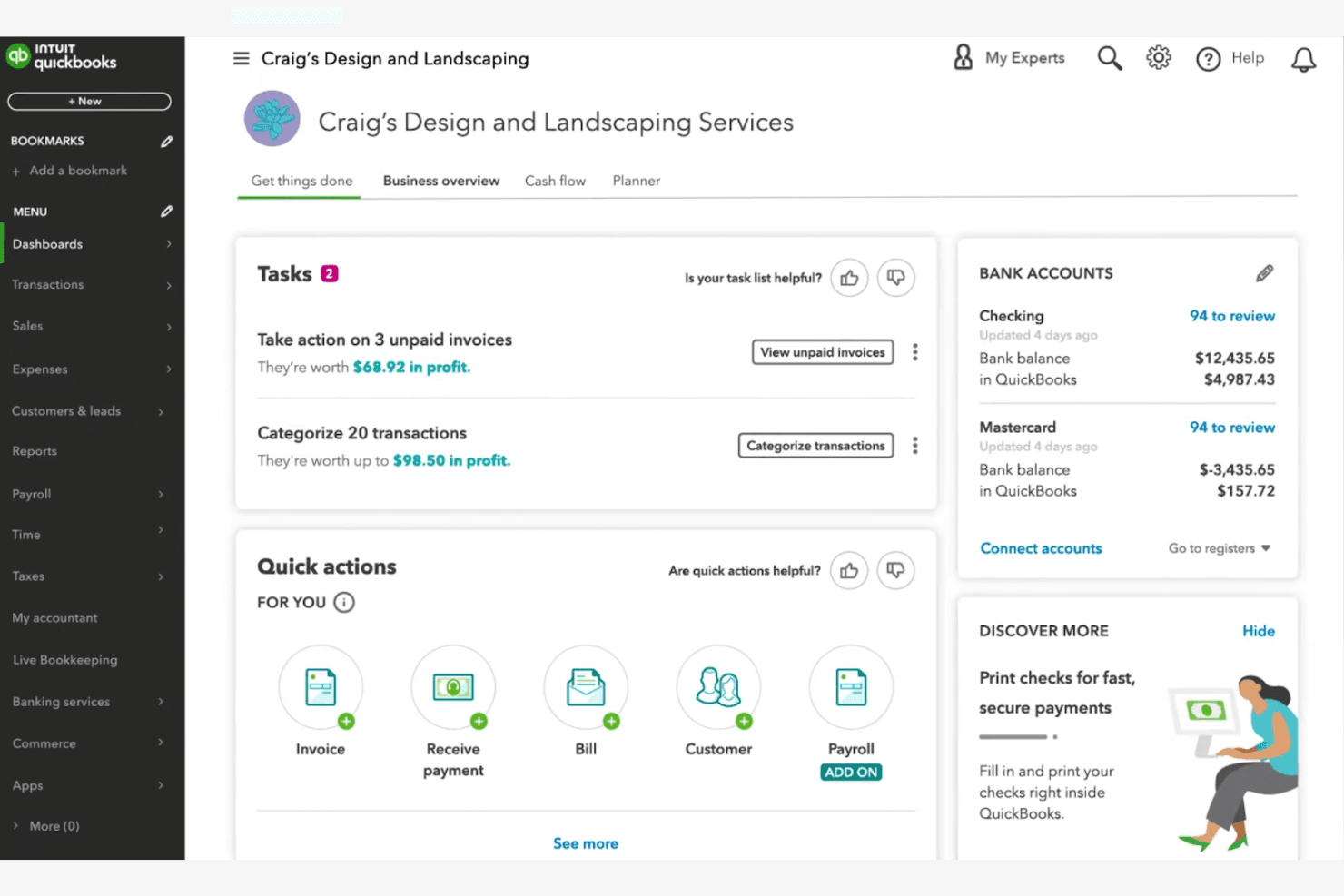
QuickBooks Online mostra attività, fatture e saldi bancari in un unico pannello di controllo. QuickBooks Online è una piattaforma contabile basata sul cloud che offre contabilità assistita dall'AI, monitoraggio dei fondi, riconciliazione bancaria automatizzata e report finanziari a chiese e organizzazioni non profit che gestiscono le finanze delle proprie attività ministeriali.
A chi è più adatto QuickBooks Online?
È particolarmente adatto a contabili e direttori finanziari di chiese appartenenti a congregazioni di piccole e medie dimensioni che possiedono già una conoscenza operativa dei principi fondamentali della contabilità.
Perché ho scelto QuickBooks Online
Ho scelto QuickBooks Online perché la sua riconciliazione bancaria basata sull'AI semplifica una delle attività più dispendiose in termini di tempo nella gestione finanziaria di una chiesa. Intuit Intelligence segnala automaticamente le anomalie e risolve le transazioni non corrispondenti tra i conti delle attività ministeriali, riducendo significativamente il tempo necessario per le verifiche manuali. Il piano Advanced abbina inoltre la riconciliazione alle previsioni del flusso di cassa e a Finance AI, così i dati dei libri contabili riconciliati confluiscono direttamente nella pianificazione del budget.
Funzionalità principali di QuickBooks Online
- Monitoraggio dei fondi e categorizzazione per classe/sede: Supporta il monitoraggio segmentato di diverse attività ministeriali e fondi della chiesa mediante classi e sedi.
- Report personalizzati per il consiglio e i donatori: Genera report specializzati adattati ai consigli della chiesa, ai donatori e agli adempimenti annuali.
- Accesso multiutente con controlli basati sui ruoli: Consente di creare ID utente univoci e autorizzazioni differenziate per il personale e i volontari che gestiscono le finanze.
- Integrazione con strumenti per donatori e raccolta fondi: Si collega a piattaforme come DonorPerfect, Fundly e Kindful per importare più facilmente i dati sulle donazioni.
Integrazioni di QuickBooks Online
QuickBooks Online offre integrazioni native con DonorPerfect, Fundly, Kindful, Method:Donor ed Expensify. È disponibile un'API per le integrazioni personalizzate.
Pros and Cons
Pros:
- La riconciliazione bancaria basata sull'AI fa risparmiare ore ogni settimana
- Le previsioni automatizzate del flusso di cassa aiutano a pianificare il budget
- L'accesso multiutente supporta i ruoli del personale e dei volontari
Cons:
- Nessuna struttura nativa di contabilità dei fondi specifica per le chiese
- La gestione delle imposte del clero richiede soluzioni alternative di terze parti
Learn more about QuickBooks Online:
Altri strumenti di gestione finanziaria per chiese basati sull'intelligenza artificiale
\u003cspan style=\u0022font-weight: 400;\u0022\u003eEcco alcune ulteriori opzioni di strumenti di gestione finanziaria per chiese basati sull’intelligenza artificiale che non sono entrate nel mio elenco, ma che vale comunque la pena esaminare:\u003c/span\u003e
- 11BlackbaudIdeale per applicare l'analitica predittiva basata su AI alle previsioni sui donatori e alla strategia di raccolta fondi
Come Valuto gli Strumenti AI per la Gestione Finanziaria delle Chiese
Non includo uno strumento solo perché si autodefinisce "AI"—deve offrire una funzione concreta, come segnalare una variazione di bilancio tra i fondi ministeriali o prevedere un calo stagionale delle donazioni prima che incida sulla liquidità. Valuto ogni opzione su due livelli: le funzionalità di base necessarie per qualificarsi e i fattori distintivi che separano una soluzione buona da una eccellente.
Funzionalità di Base (Requisiti Fondamentali per Questa Lista)
Quando seleziono gli strumenti per la mia lista, valuto ciascuno su una scala da 0 (non offre la funzionalità) a 5 (eccelle in quest'area) per ogni funzionalità di base elencata di seguito. Poi trasformo il punteggio totale dello strumento in una percentuale. Ogni strumento deve raggiungere un punteggio minimo totale del 55% per essere preso in considerazione.
- Contabilità dei Fondi Alimentata da AI: Cerco strumenti che utilizzino l'intelligenza artificiale per categorizzare le transazioni in fondi vincolati, non vincolati e designati—come l'assegnazione automatica di una donazione per una campagna edilizia rispetto alle decime generali.
- Gestione Automatizzata dei Contributi: Ogni strumento dovrebbe gestire il tracciamento di decime e offerte con abbinamento donatori assistito dall'AI, così da evitare che record duplicati da donazioni online e in presenza si accumulino a fine anno.
- Previsioni Finanziarie Predittive: Valuto se le previsioni AI vanno oltre i report statici per modellare scenari come i cali di donazioni estive previsti o l'impatto finanziario del lancio di un nuovo campus.
- Rilevamento di Anomalie e Frodi: Lo strumento deve segnalare attività insolite nei conti del ministero, come un picco nei prelievi di cassa minore o una spesa fuori dal normale per un reparto.
- Reportistica Intelligente e Analisi Approfondite: Sono fondamentali i riepiloghi finanziari pronti per il consiglio che l'AI genera su richiesta—verifico se pastori e tesorieri possono ottenere report significativi senza avere competenze contabili.
- Integrazioni Specifiche per le Chiese: Cerco collegamenti con piattaforme ChMS, strumenti di donazione online e sistemi di payroll che gestiscono le retribuzioni del clero, dato che la finanza ecclesiastica ha esigenze particolari.
Dopo aver stilato la lista degli strumenti che rispondono a questi criteri, considero cosa distingue ogni piattaforma.
Fattori Distintivi (Cosa Distingue i Fornitori)
Ecco come metto a confronto i diversi fornitori:
Funzionalità Che Spiccano
La ricerca in linguaggio naturale è un fattore distintivo importante—voglio verificare se un tesoriere volontario può digitare "Quanto abbiamo speso per le missioni l’ultimo trimestre?" e ottenere una risposta chiara senza dover scandagliare report. Anche le analisi AI sulla fidelizzazione dei donatori sono cruciali, specialmente quando uno strumento può individuare i donatori inattivi e suggerire il momento giusto per ricoinvolgerli in base ai modelli storici. Le raccomandazioni intelligenti per il budget completano il quadro, consentendo all'AI di proporre allocazioni ministeriali basate sui cicli stagionali di donazione e sulle spese passate.
Oltre le Funzionalità
La gestione fiscale specifica per il clero è davvero importante—controllo se una piattaforma supporta le indennità abitative e la doppia tassazione, perché sbagliare in questo campo causa notevoli problemi a fine anno. L’onboarding accessibile anche ai volontari è un’altra priorità. Molte chiese affidano la contabilità a segretari part-time o tesorieri laici, quindi valuto se chiunque, anche senza esperienza contabile, possa iniziare a usare il sistema dopo una breve configurazione. Anche la privacy dei donatori ha il suo peso, in particolare l’accesso basato sui ruoli che garantisce che i dati sulle donazioni siano visibili solo al personale autorizzato.
Come scegliere gli strumenti di gestione finanziaria per chiese basati sull'intelligenza artificiale
È facile perdersi tra lunghi elenchi di funzionalità e strutture di prezzo complesse. Per aiutarti a rimanere concentrato mentre affronti il tuo processo di selezione del software, ecco un elenco di fattori da tenere presenti:
| Fattore | Cosa considerare |
| Scalabilità | Lo strumento sarà in grado di gestire la crescita della tua chiesa, le esigenze di più sedi o i picchi stagionali delle donazioni senza costi o complessità aggiuntivi? |
| Integrazioni | Si collega nativamente ai tuoi strumenti di contabilità, gestione dei donatori o comunicazione, oppure dovrai ricorrere a soluzioni alternative? |
| Possibilità di personalizzazione | Puoi adattare report, ruoli utente e flussi di lavoro ai processi finanziari e alle strutture di approvazione specifici della tua chiesa? |
| Facilità d'uso | Il personale e i volontari con diversi livelli di competenza tecnologica riusciranno a navigare e utilizzare il sistema con sicurezza? |
| Implementazione e avvio | Quanto tempo servirà per migrare i dati, formare il tuo team e rendere operativo il sistema? Sono disponibili risorse o supporto per la fase di avvio? |
| Costo | Tutti i costi sono chiari, compresi configurazione, assistenza e componenti aggiuntivi? Il prezzo rientra nel tuo budget ed è adeguato all'utilizzo previsto? |
| Misure di sicurezza | Lo strumento offre accesso basato sui ruoli, registri di controllo e crittografia dei dati per proteggere le informazioni finanziarie e sui donatori sensibili? |
| Disponibilità dell'assistenza | Puoi contattare l'assistenza quando ne hai bisogno, soprattutto durante i periodi critici di reporting o la chiusura di fine anno? |
Cosa sono gli strumenti di gestione finanziaria per chiese basati sull'intelligenza artificiale?
Gli strumenti di gestione finanziaria delle chiese basati sull'AI sono un tipo di software di contabilità per chiese progettato per aiutare le chiese a gestire le finanze, monitorare l'attività delle donazioni online e migliorare la gestione responsabile delle risorse finanziarie, riducendo il tempo dedicato alle attività manuali. Sebbene siano spesso descritti come strumenti di AI, attualmente la maggior parte offre funzionalità supportate dall'AI, come approfondimenti nei report e riconoscimento degli schemi, riflettendo un'area in crescita ed evoluzione all'interno dei sistemi di gestione delle chiese.
Questi strumenti combinano in genere funzionalità complete di contabilità con elementi di un sistema di gestione della chiesa, offrendo ai responsabili dei ministeri un modo centralizzato per gestire fondi vincolati, report e attività contabili quotidiane.
Possono sostituire i tradizionali fogli di calcolo supportando il monitoraggio delle donazioni, la gestione dei debiti e la reportistica finanziaria, risultando particolarmente utili per le chiese di piccole dimensioni che necessitano di sistemi intuitivi per semplificare le operazioni mantenendo accuratezza e trasparenza.
Funzionalità
Quando selezioni gli strumenti di gestione finanziaria delle chiese basati sull'AI, presta attenzione alle seguenti funzionalità principali:
- Monitoraggio delle donazioni: Registra e categorizza automaticamente le donazioni in base al donatore, al fondo e alla campagna, facilitando il monitoraggio delle tendenze nelle offerte e la generazione delle ricevute delle donazioni.
- Contabilità per fondi: Separa e gestisce più fondi o conti all'interno dello stesso sistema, garantendo la conformità agli standard finanziari delle organizzazioni non profit e una reportistica chiara.
- Reportistica basata sull'AI: Utilizza l'intelligenza artificiale per generare report finanziari, evidenziare le tendenze e fornire informazioni utili per i responsabili della chiesa e i team finanziari.
- Riconciliazione automatizzata: Abbina le transazioni bancarie alle registrazioni effettuate, riducendo il lavoro manuale e minimizzando gli errori nei dati finanziari.
- Gestione degli impegni di donazione: Monitora gli impegni dei membri, verifica i progressi verso gli obiettivi e invia promemoria o aggiornamenti ai donatori secondo necessità.
- Autorizzazioni basate sui ruoli: Consente agli amministratori di impostare diversi livelli di accesso per il personale e i volontari, proteggendo i dati finanziari sensibili e favorendo la responsabilità.
- Inserimento in blocco: Consente di inserire rapidamente più donazioni o transazioni contemporaneamente, risparmiando tempo durante i periodi o gli eventi caratterizzati da un'elevata partecipazione alle donazioni.
- Tracce di controllo: Mantiene un registro dettagliato di tutte le modifiche e le transazioni, favorendo la trasparenza e semplificando audit o verifiche.
- Configurazione delle donazioni ricorrenti: Consente ai donatori di programmare contributi automatici, migliorando la regolarità delle entrate della chiesa e semplificando la gestione dei donatori.
- Funzionalità di integrazione: Si collega agli strumenti di contabilità, comunicazione e gestione dei donatori per ottimizzare i flussi di lavoro e ridurre la duplicazione dell'inserimento dei dati.
Vantaggi
L'implementazione di strumenti di gestione finanziaria delle chiese basati sull'AI offre diversi vantaggi al tuo team e alla tua organizzazione. Ecco alcuni dei vantaggi che puoi aspettarti:
- Maggiore accuratezza finanziaria: Il monitoraggio automatizzato delle donazioni e la riconciliazione riducono gli errori manuali e garantiscono che i dati siano sempre aggiornati.
- Report e approfondimenti più rapidi: La reportistica basata sull'AI fornisce dati finanziari in tempo reale e analisi delle tendenze, aiutando i responsabili a prendere rapidamente decisioni informate.
- Maggiore trasparenza: Le tracce di controllo e una contabilità chiara per fondi favoriscono la responsabilità e rendono più semplice condividere le informazioni finanziarie con la congregazione o il consiglio.
- Risparmio di tempo per il personale: L'inserimento in blocco, la configurazione delle donazioni ricorrenti e i flussi di lavoro automatizzati liberano tempo del personale e dei volontari da dedicare alle attività del ministero e alla sensibilizzazione.
- Maggiore coinvolgimento dei donatori: La gestione degli impegni di donazione e le integrazioni per la comunicazione aiutano a monitorare gli impegni e a mantenere i donatori informati e valorizzati.
- Maggiore sicurezza dei dati: Le autorizzazioni basate sui ruoli e i controlli di accesso sicuri proteggono le informazioni finanziarie e dei donatori sensibili dagli accessi non autorizzati.
- Scalabilità per la crescita: Gli strumenti flessibili e le funzionalità di integrazione consentono ai processi finanziari di crescere insieme alla chiesa, sia che vengano aggiunte nuove sedi sia che vengano ampliati i ministeri.
Costi e prezzi
La selezione degli strumenti di gestione finanziaria delle chiese basati sull'AI richiede la comprensione dei diversi modelli e piani tariffari disponibili. I costi variano in base alle funzionalità, alle dimensioni del team, agli strumenti aggiuntivi e ad altri fattori. La tabella seguente riassume i piani più comuni, i relativi prezzi medi e le funzionalità generalmente incluse nelle soluzioni di gestione finanziaria delle chiese basate sull'AI:
Tabella comparativa dei piani per gli strumenti di gestione finanziaria delle chiese basati sull'AI
| Tipo di piano | Prezzo medio | Funzionalità comuni |
| Piano gratuito | $0 | Monitoraggio di base delle donazioni, reportistica limitata, accesso per un singolo utente e assistenza via email. |
| Piano personale | $10-$30/mese | Gestione di donazioni e promesse di donazione, contabilità semplice dei fondi, report di base basati sull'IA e integrazioni limitate. |
| Piano aziendale | $40-$100/mese | Accesso multiutente, analisi avanzate basate sull'IA, inserimento in batch, autorizzazioni basate sui ruoli e integrazioni con strumenti di contabilità. |
| Piano aziendale | $150-$400/mese | Supporto per più campus, flussi di lavoro personalizzati, assistenza premium, sicurezza avanzata e accesso completo alle API. |
Domande frequenti sugli strumenti di gestione finanziaria delle chiese basati sull'IA
Ecco alcune risposte alle domande comuni sugli strumenti di gestione finanziaria delle chiese basati sull’IA:
In che modo l'IA migliora la gestione finanziaria delle chiese?
L’IA migliora la gestione finanziaria delle chiese automatizzando attività di routine come il monitoraggio delle donazioni, la riconciliazione bancaria e la generazione di report. Questo riduce gli errori manuali, fa risparmiare tempo al personale e fornisce ai responsabili informazioni in tempo reale per prendere decisioni migliori.
Gli strumenti di gestione finanziaria delle chiese basati sull'IA possono gestire più fondi o campus?
Sì, la maggior parte degli strumenti di gestione finanziaria delle chiese basati sull’IA supporta la contabilità dei fondi e la gestione di più campus. Ciò consente di monitorare budget, donazioni e spese separati per ogni fondo o sede, mantenendo tutto organizzato in un unico sistema.
Questi strumenti sono sufficientemente sicuri per i dati finanziari e dei donatori sensibili?
Sì, gli strumenti affidabili di gestione finanziaria delle chiese basati sull’IA utilizzano la crittografia, autorizzazioni basate sui ruoli e registri di controllo per proteggere i dati sensibili. Verifica sempre la conformità agli standard sulla privacy e chiedi informazioni sulle certificazioni di sicurezza prima di scegliere una soluzione.
Quale tipo di assistenza è disponibile per l'implementazione iniziale e la risoluzione dei problemi?
La maggior parte dei fornitori offre risorse per l’implementazione iniziale, come video di formazione, tour del prodotto e webinar. L’assistenza continuativa spesso include chat dal vivo, supporto via email o telefono, nonché l’accesso a una base di conoscenze o a una comunità di utenti.
Come si integrano questi strumenti con altri software per chiese?
Molti strumenti di gestione finanziaria delle chiese basati sull’IA offrono integrazioni con piattaforme di contabilità, sistemi di gestione dei donatori e strumenti di comunicazione. Verifica se il software esistente è supportato o se sono possibili integrazioni personalizzate tramite API.