

Il software per la gestione degli eventi della chiesa è uno strumento che ti aiuta a pianificare, promuovere e gestire gli eventi della chiesa, senza il caos. Riunisce tutto — pianificazione, registrazione, coordinamento dei volontari, comunicazione, definizione del budget e attività successive — in un unico luogo, così nulla sfugge al controllo.
Nel 2007 ero tirocinante pastorale presso una chiesa di nuova fondazione nell'Ontario meridionale, in Canada. Stavamo organizzando un festival comunitario di un'intera giornata presso un vicino complesso di edilizia popolare. L'evento in sé fu un enorme successo, ma il processo ci mise quasi in ginocchio. Eravamo molto prima che il "software per la gestione degli eventi" diventasse una realtà. Se avessimo avuto anche solo uno degli strumenti per la gestione degli eventi che ho recensito? Sarebbe stata una svolta! Purtroppo, il giorno dell'evento, i fogli per le iscrizioni scomparvero. I volontari dimenticarono i loro incarichi. Incontrammo problemi nell'ottenere i permessi dalla città.
Quell'esperienza mi ha insegnato qualcosa di importante: anche gli eventi più significativi vanno in pezzi senza sistemi solidi. Dal 2007 è cambiato molto. Ecco perché ho recensito i migliori strumenti software per la gestione degli eventi della chiesa disponibili oggi. Questi strumenti possono offrire al tuo team struttura, chiarezza e tranquillità, così i tuoi eventi saranno organizzati internamente e coinvolgenti per il pubblico.
Perché fidarsi dei nostri consigli sui software
6,700+
Reviews
20
Industry experts
16+
Evaluation factors
14
Years
Il nostro team testa e recensisce software dal 2012. In quanto leader ecclesiastici noi stessi, sappiamo quanto sia difficile — e importante — scegliere il software giusto.
Per questa guida, abbiamo valutato gli strumenti attraverso test pratici e ricerche indipendenti, assegnando un punteggio agli strumenti in base ai nostri criteri di selezione.
Le nostre recensioni riflettono il nostro giudizio editoriale umano, non un discorso di vendita.
Tabella comparativa: software per la gestione degli eventi della chiesa
Questa tabella comparativa riassume i dettagli dei prezzi delle mie migliori selezioni di software per la gestione degli eventi della chiesa.
| Tool | Best For | Trial Info | Price | ||
|---|---|---|---|---|---|
| 1 | Ideale per l'automazione delle attività legate agli eventi | Prova gratuita di 30 giorni | Da $58/mese | Website | |
| 2 | Ideale per ricorrenze evento personalizzate | Piano gratuito disponibile | Da $19/mese | Website | |
| 3 | Ideale per opzioni flessibili di registrazione agli eventi | Demo gratuita disponibile | Prezzi su richiesta | Website | |
| 4 | Ideale per pagine eventi personalizzate | Prova gratuita + demo gratuita disponibile | Da $399/evento | Website | |
| 5 | Il migliore per la gestione delle chiese tutto-in-uno | Piano gratuito disponibile | Da $12/mese (fatturazione mensile) | Website | |
| 6 | Ideale per integrare prenotazioni di location per eventi | Prova gratuita di 14 giorni + piano gratuito + demo gratuita disponibile | Da $22/mese (fatturazione annuale) | Website | |
| 7 | Ideale per eventi di raccolta fondi in chiesa | Prova gratuita su richiesta del cliente | Da $39/account/mese | Website | |
| 8 | Ideale per moduli di registrazione semplici da usare | Prova gratuita di 30 giorni disponibile | Da $72/mese | Website | |
| 9 | Ideale per il marketing degli eventi | Prova gratuita di 30 giorni | Da $99/mese/account | Website | |
| 10 | Ideale per la pianificazione degli eventi | Non disponibile | Prezzi su richiesta | Website |


Recensioni delle migliori soluzioni software per la gestione degli eventi della chiesa
Ecco una breve descrizione di ciascun sistema per la gestione degli eventi della chiesa, con il relativo caso d’uso principale, alcune funzionalità degne di nota e schermate che offrono una panoramica dell’interfaccia utente.
 Ideale per l'automazione delle attività legate agli eventi
- Prova gratuita di 30 giorni
- Da $58/mese
Visit WebsiteCustomer Rating:4.8/5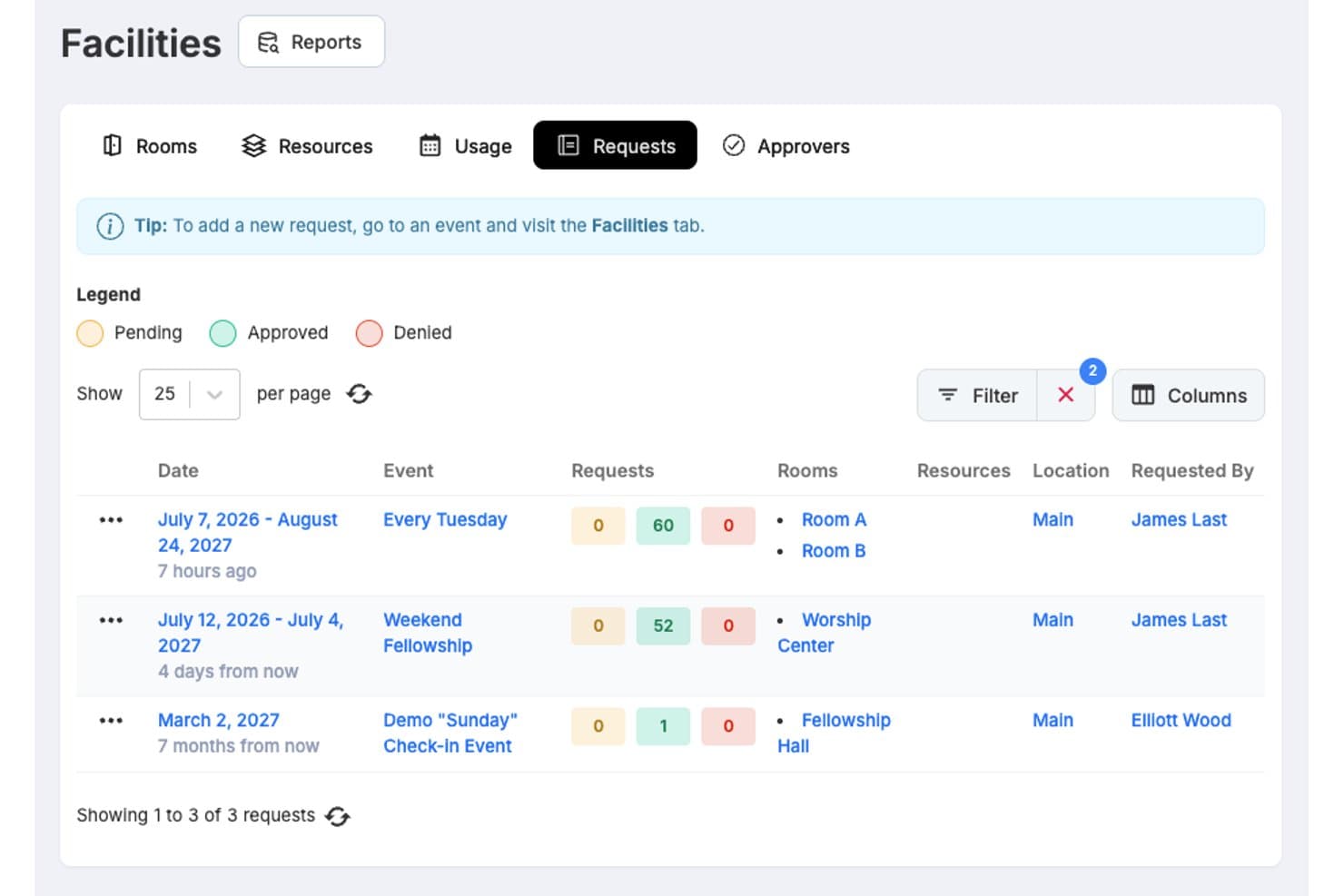
One Church Software offre una dashboard di richieste per le strutture che permette allo staff di visualizzare, filtrare e monitorare le richieste di prenotazione delle sale con stati di approvazione su più eventi. One Church Software è una piattaforma di gestione per chiese che unisce pianificazione di eventi, registrazioni online, check-in dei bambini, coordinamento volontari, prenotazione delle strutture, donazioni integrate e strumenti di comunicazione per i membri in un unico sistema.
Per Chi è Ideale One Church Software?
È particolarmente adatto ad amministratori di chiesa e coordinatori di eventi che gestiscono calendari di molteplici ministeri, team di volontari e comunicazioni con i membri da un'unica piattaforma.
Perché ho scelto One Church Software
One Church Software si guadagna il suo posto nella mia lista perché la Suite di Automazione è realmente costruita attorno al ciclo di vita degli eventi. Quando viene inviato un modulo di registrazione, posso avviare una sequenza completa: e-mail di conferma, assegnazione dei ruoli ai volontari e invio di un SMS di follow-up, tutto senza interventi manuali. Affido inoltre all'opzione 'Azioni Bulk Event' l'aggiornamento o lo spostamento di più eventi nei calendari ministeriali contemporaneamente, cosa che fa davvero risparmiare tempo durante periodi di alta richiesta come Pasqua o Natale.
Caratteristiche Principali di One Church Software
- Sicurezza check-in bambini: Permette di stampare tag di sicurezza abbinati per bambini e genitori, garantendo ritiri sicuri.
- Supporto multi-campus: Consente la gestione di calendari, risorse ed eventi su più sedi della chiesa.
- Accesso tramite app mobile: Offre a membri, staff e volontari accesso in movimento a orari e registrazioni per eventi.
- Gestione dei piccoli gruppi: Aiuta a organizzare, promuovere e tracciare le presenze per piccoli gruppi e corsi all'interno della piattaforma.
Integrazioni di One Church Software
One Church Software offre integrazioni native con Mailchimp, Square, Pushpay e PraiseCharts, e mette a disposizione una API per integrazioni personalizzate.
Pros and Cons
Pros:
- Riduce la coordinazione manuale degli eventi
- Include la stampa di tag di sicurezza abbinati
- Gestisce donazioni, eventi e persone in un'unica piattaforma
Cons:
- I report non sono molto approfonditi per analisi dettagliate sugli eventi
- L'app mobile può risultare incoerente per i volontari
Learn more about One Church Software: Ideale per ricorrenze evento personalizzate
- Piano gratuito disponibile
- Da $19/mese
Visit WebsiteCustomer Rating:4.8/5
Gracely mostra il tuo calendario eventi completo così puoi pianificare, gestire e monitorare tutti gli incontri della chiesa in un unico posto. Gracely è un software di gestione parrocchiale che ti aiuta a gestire varie operazioni della chiesa. Che si tratti di organizzare eventi o monitorare le donazioni, Gracely offre strumenti per semplificare i compiti amministrativi della tua chiesa.
Il suo strumento di gestione degli eventi ti permette di creare eventi con schemi di ricorrenza personalizzati—giornalieri, settimanali, mensili—e di controllare la capienza o aggiungere opzioni di pagamento come la biglietteria. Questo ti aiuta a organizzare messe, raccolte fondi o corsi su larga scala senza dover gestire strumenti separati. Gracely tiene traccia anche delle risposte RSVP e delle presenze in un unico posto, rendendo semplice l’analisi dei follow-up e del coinvolgimento.
La piattaforma offre anche funzionalità per il coordinamento dei volontari, integrate strettamente con la gestione degli eventi. Puoi assegnare squadre e ruoli ed evitare sovrapposizioni di programmazione durante la registrazione o il check‑in.
Learn more about Gracely: Ideale per opzioni flessibili di registrazione agli eventi
- Demo gratuita disponibile
- Prezzi su richiesta
Visit WebsiteCustomer Rating:4.5/5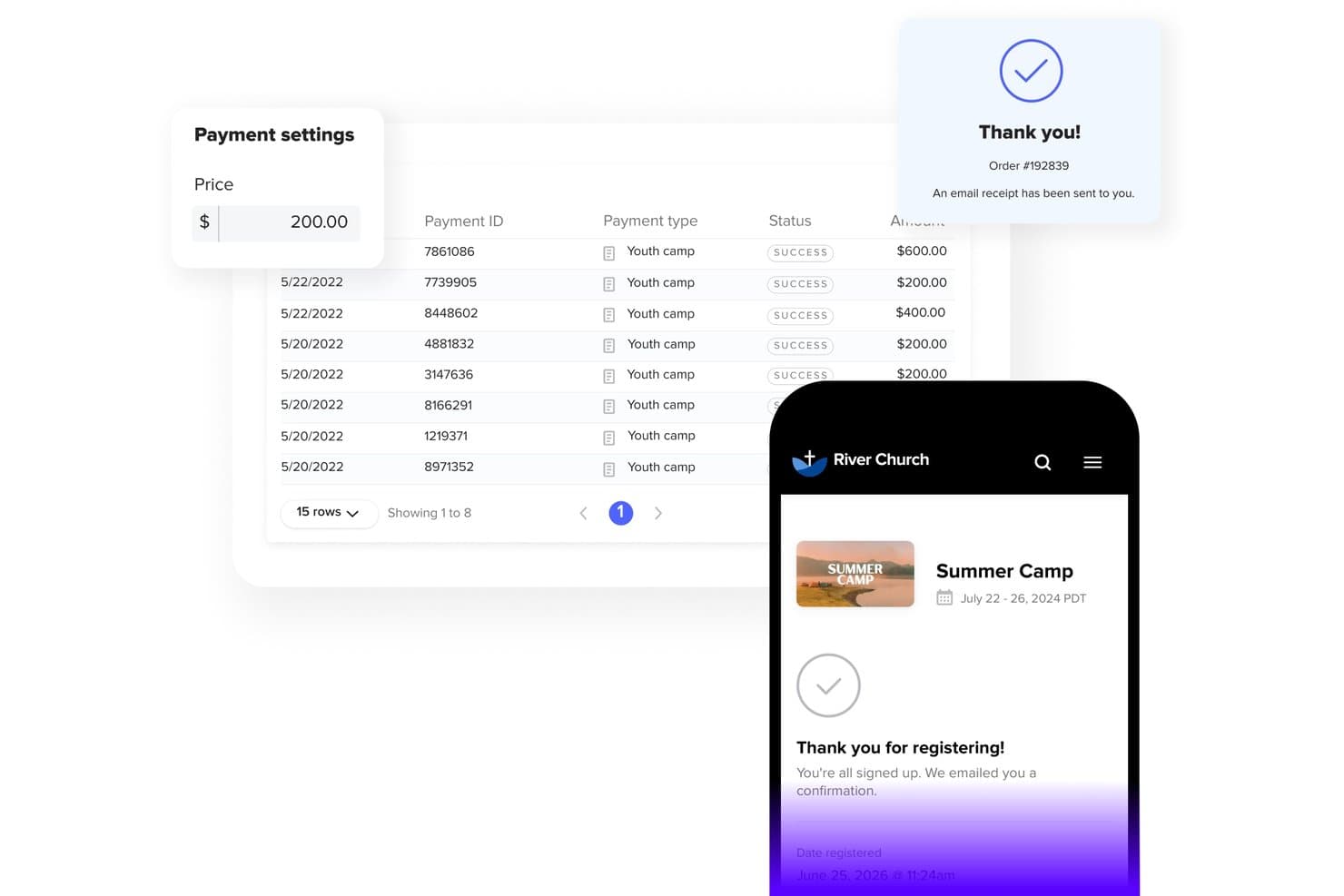
Subsplash offre la gestione dei pagamenti degli eventi con monitoraggio dei pagamenti, stati di completamento e un flusso mobile di conferma della registrazione per eventi della chiesa come il campo estivo. Subsplash è una piattaforma completa per il coinvolgimento della comunità ecclesiale che combina la registrazione agli eventi, le donazioni online, la gestione dei volontari, la registrazione dei bambini, le app per dispositivi mobili e gli strumenti di comunicazione con i membri in un'unica interfaccia.
Per chi è più indicato Subsplash?
Subsplash è particolarmente adatto agli amministratori di chiese e ai coordinatori di eventi di congregazioni in crescita che desiderano gestire la registrazione agli eventi, le donazioni e il coinvolgimento dei membri da un'unica piattaforma.
Perché ho scelto Subsplash
Ho scelto Subsplash come una delle soluzioni migliori perché le sue opzioni di registrazione agli eventi vanno ben oltre un semplice modulo di iscrizione. Mi piace il fatto che sia possibile creare diversi tipi di biglietto con prezzi distinti, generare codici sconto per chi si registra in anticipo o per il personale e consentire pagamenti parziali con promemoria automatici del saldo inviati nei giorni precedenti all'evento. Per una chiesa che organizza un ritiro o una conferenza di più giorni, questa funzione di pagamento rateale elimina da sola un ostacolo concreto alla registrazione delle persone.
Caratteristiche principali di Subsplash
- Sicurezza della registrazione dei bambini: Offre la registrazione dei bambini tramite postazioni AirPrint con PIN univoci per genitori e bambini, per una maggiore sicurezza.
- Accesso tramite app per dispositivi mobili: Pubblica gli eventi su un'app mobile personalizzata della chiesa, consentendo la registrazione e la comunicazione anche in mobilità.
- Supporto per più sedi: Consente di gestire eventi e comunicazioni tra più sedi della chiesa all'interno di un'unica interfaccia.
- Gestione dei piccoli gruppi: Include strumenti per creare, promuovere e monitorare la partecipazione a piccoli gruppi e attività ministeriali.
Integrazioni di Subsplash
Le integrazioni native non sono documentate in modo chiaro. È disponibile un'API per le integrazioni personalizzate.
Pros and Cons
Pros:
- L'app mobile personalizzata mantiene la congregazione connessa digitalmente
- Combina donazioni, contenuti multimediali ed eventi in un'unica interfaccia
- Registrazione dedicata dei bambini con PIN sicuri per genitori e bambini
Cons:
- Il calendario di Subsplash non può sincronizzarsi con calendari esterni come Google Calendar
- Il costruttore di siti web integrato è inferiore alle piattaforme web dedicate in termini di SEO
 Ideale per pagine eventi personalizzate
- Prova gratuita + demo gratuita disponibile
- Da $399/evento

Church RSVP consente ai partecipanti di scegliere sessioni fisiche, virtuali o ibride con monitoraggio della disponibilità in tempo reale. Per le chiese alla ricerca di una soluzione affidabile per la gestione degli eventi, Church RSVP offre una piattaforma intuitiva progettata per semplificare la complessità dell'organizzazione di eventi come i servizi di Pasqua e Natale. Questo strumento è ideale per amministratori e coordinatori di eventi che devono gestire più orari di servizio, monitorare la partecipazione e gestire eventi sia in presenza che virtuali senza difficoltà. Grazie a funzionalità che rispondono alle sfide della gestione della capienza e della comunicazione automatizzata, Church RSVP garantisce che la congregazione rimanga sempre informata e coinvolta.
Perché ho scelto Church RSVP
Ho scelto Church RSVP per la sua capacità di gestire eventi complessi con facilità, rendendolo una scelta convincente per la gestione degli eventi in chiesa. La funzionalità di multipli orari di servizio della piattaforma consente ai partecipanti di scegliere l'orario preferito, assicurando una gestione fluida della capienza per ogni evento. Inoltre, le opzioni di posti a sedere flessibili rispondono a varie esigenze, sia con ingresso libero che con posti riservati. Queste caratteristiche, unite alla possibilità di supportare eventi sia in presenza che online, fanno di Church RSVP uno strumento versatile per ogni chiesa che desidera migliorare la pianificazione e l'esecuzione degli eventi.
Caratteristiche principali di Church RSVP
Oltre alle caratteristiche salienti menzionate, ho riscontrato anche altre funzionalità che aumentano l'attrattiva di Church RSVP:
- Pagine eventi personalizzate: crea landing page personalizzate che riflettono lo stile unico della tua chiesa, complete di colori, loghi e contenuti ricchi.
- Notifiche personalizzabili: invia email di conferma e promemoria su misura, garantendo che i partecipanti siano sempre informati e coinvolti.
- Monitoraggio della capienza in tempo reale: controlla la disponibilità mano a mano che arrivano le conferme di partecipazione, prevenendo il sovraffollamento e assicurando una buona esperienza di evento.
- Collaborazione del team: aggiungi membri dello staff con livelli di accesso personalizzabili per gestire gli eventi in modo collaborativo.
Integrazioni di Church RSVP
Al momento, Church RSVP non indica integrazioni native.
Pros and Cons
Pros:
- Monitoraggio della capienza in tempo reale
- Supporta eventi in presenza e online
- Pagine di registrazione ottimizzate per dispositivi mobili
Cons:
- Nessun database centralizzato dei membri
- Nessuna gestione delle donazioni integrata
Learn more about Church RSVP: Il migliore per la gestione delle chiese tutto-in-uno
- Piano gratuito disponibile
- Da $12/mese (fatturazione mensile)
Visit WebsiteCustomer Rating:4.9/5
ChMeetings dispone di un calendario dinamico per la pianificazione e la gestione di vari eventi della chiesa. ChMeetings è un software di gestione delle chiese (ChMS) basato su cloud, progettato per aiutare le chiese negli Stati Uniti, in Canada, nel Regno Unito, in Australia e in Sudafrica a gestire le proprie operazioni in modo efficiente. Utilizzato da oltre 7.000 chiese in queste regioni, offre un'interfaccia intuitiva, supporto multilingue in 22 lingue e prezzi convenienti. Sia per piccole congregazioni che per grandi ministeri, ChMeetings semplifica l'amministrazione con un approccio tutto-in-uno.
Come soluzione per la gestione degli eventi della chiesa, ChMeetings ottimizza la pianificazione degli eventi, il monitoraggio delle presenze e il coordinamento dei volontari. Le chiese possono programmare i servizi, gestire le conferme di partecipazione (RSVP) e automatizzare i promemoria per garantire un'esecuzione fluida degli eventi. La piattaforma supporta anche donazioni online sicure, rendendo facile accettare e monitorare i contributi durante le raccolte fondi. Oltre alla gestione degli eventi, ChMeetings include strumenti avanzati come un'app mobile (con opzione di upgrade personalizzato) e moduli personalizzabili per registrazioni e sondaggi.
ChMeetings offre un piano gratuito limitato per un massimo di 50 persone, rendendolo adatto a chiese di tutte le dimensioni.
Learn more about ChMeetings: Ideale per integrare prenotazioni di location per eventi
- Prova gratuita di 14 giorni + piano gratuito + demo gratuita disponibile
- Da $22/mese (fatturazione annuale)
Visit WebsiteCustomer Rating:4.6/5
Widget Whatspot integrabile che mostra i dettagli della location e gli spazi disponibili per eventi. Whatspot è un sistema specializzato per la prenotazione di spazi e risorse che semplifica il modo in cui le organizzazioni gestiscono i loro ambienti fisici. Per le chiese che gestiscono più eventi contemporaneamente, elimina la confusione delle stanze doppio prenotate e dei calendari di affitto disorganizzati. Semplifica la gestione delle location per eventi offrendo un portale pubblico dove gli utenti possono consultare facilmente le disponibilità e riservare aree specifiche.
Per chi è ideale Whatspot?
È ideale per chiese di piccole e medie dimensioni che ospitano frequentemente eventi comunitari, affittano i propri spazi o desiderano un portale semplice in cui i vari ministeri possano prenotare le sale.
Perché ho scelto Whatspot
Mentre i software tradizionali per eventi si concentrano soprattutto sulla vendita dei biglietti agli iscritti, ho scelto Whatspot perché garantire la disponibilità della sede fisica è il primo passo fondamentale per ogni evento della chiesa. Si distingue come il migliore per integrare prenotazioni di spazi eventi, permettendo alle chiese di inserire un widget di prenotazione direttamente sul proprio sito web. Questo flusso di lavoro è particolarmente utile per le chiese che affittano palestre, sale riunioni o saloni comunitari alla comunità locale, perché automatizza la programmazione degli spazi senza bisogno di interventi continui da parte dello staff.
Funzionalità principali di Whatspot
Widget di prenotazione integrabile: Genera un frammento di codice HTML che permette di inserire il calendario delle disponibilità della location direttamente sul sito della chiesa.
Monitoraggio della disponibilità delle risorse: Mostra in tempo reale i calendari degli spazi per eventi come aule, centri congressi o campi all'aperto.
Workflow di approvazione: Permette agli amministratori della chiesa di esaminare, approvare o rifiutare le richieste di prenotazione pubblica della location prima che l'evento venga confermato sul calendario.
Regole di prenotazione personalizzabili: Consente allo staff di impostare parametri rigorosi su quanto tempo prima o per quanto tempo un ambiente può essere riservato da gruppi esterni o interni.
Integrazioni di Whatspot
Le integrazioni includono Google Calendar, Microsoft Outlook e Microsoft Teams.
Pros and Cons
Pros:
- Check-in facili tramite QR code
- Interfaccia pubblica chiara
- Previene le doppie prenotazioni
Cons:
- Nessun sistema di pagamento integrato
- Nessun sistema di biglietteria per i partecipanti
Learn more about Whatspot: Ideale per eventi di raccolta fondi in chiesa
- Prova gratuita su richiesta del cliente
- Da $39/account/mese
Visit WebsiteCustomer Rating:4.8/5
Puoi usare RSVPify per vendere biglietti per eventi di raccolta fondi. RSVPify è un software di gestione eventi per chiese, aziende e organizzazioni non profit che necessitano di un software per pianificare ed eseguire eventi in modo efficiente. Puoi utilizzarlo per la pianificazione degli eventi e il monitoraggio degli invitati, permettendoti di avere un'idea di quanti partecipanti aspettarti durante l'evento vero e proprio. RSVPify ti consente inoltre di creare moduli personalizzati di registrazione agli eventi e di prenotazione online per raccogliere le informazioni di contatto dei partecipanti e conoscere meglio il tuo pubblico prima dell'evento.
Generare fondi è fondamentale per la tua chiesa perché ti permette di offrire servizi alla tua congregazione e avviare programmi di sensibilizzazione per la tua comunità. RSVPify può aiutarti a vendere biglietti per eventi al fine di raccogliere fondi. Puoi usare RSVPify per vendere diverse tipologie di biglietti, come quelli VIP, così da massimizzare il potenziale delle attività di raccolta fondi. RSVPify offre anche l'opzione di raccogliere donazioni online per eventi specifici, dando ai membri della chiesa la libertà di scegliere quanto desiderano donare.
RSVPify si integra con altri strumenti di pianificazione eventi e comunicazione, inclusi Facebook, Slack, Salesforce e Gmail.
Learn more about RSVPify: Ideale per moduli di registrazione semplici da usare
- Prova gratuita di 30 giorni disponibile
- Da $72/mese
Visit WebsiteCustomer Rating:4.8/5
Tithe.ly consente di organizzare e programmare i piani dei servizi con dettagliate suddivisioni di canti e letture. Tithe.ly è un software di gestione parrocchiale progettato per supportare chiese di tutte le dimensioni con una suite di strumenti per l'amministrazione, la comunicazione, le donazioni e il coinvolgimento. Tra le sue numerose funzionalità, offre potenti capacità di gestione degli eventi che aiutano le chiese a pianificare e coordinare le attività in modo efficiente.
Gli strumenti di gestione eventi di Tithe.ly rendono più semplice l'organizzazione degli eventi parrocchiali offrendo moduli di registrazione intuitivi e opzioni di elaborazione dei pagamenti. Questo ti aiuta a gestire tutto, dalle iscrizioni dei volontari ai check-in dei bambini, assicurando che i tuoi eventi si svolgano senza intoppi dall'inizio alla fine. Gli strumenti di comunicazione integrati della piattaforma permettono di tenere facilmente informata la congregazione sulle attività imminenti tramite email e SMS, mentre il database dei membri consente di gestire efficacemente le informazioni dei partecipanti e il loro coinvolgimento. Queste funzionalità si combinano per fornire alle chiese una soluzione efficiente per organizzare eventi di successo mantenendo un forte legame con la propria comunità.
 Ideale per il marketing degli eventi
- Prova gratuita di 30 giorni
- Da $99/mese/account
Visit WebsiteCustomer Rating:4.5/5
Hopin offre una funzionalità di event builder che consente la personalizzazione degli eventi per renderli più attraenti per gli invitati. Hopin è un software di gestione per organizzare non solo eventi in presenza, ma anche eventi online e ibridi. Puoi utilizzarlo come centro di pianificazione per gestire il tuo evento nella sua interezza, dalla progettazione alla valutazione post-evento. Dispone di una funzione di analisi per aiutarti ad analizzare dati critici come le statistiche dei partecipanti, le trascrizioni delle chat e le registrazioni degli eventi, in modo da poter utilizzare i dati dell'evento per pianificare eventi futuri.
Per quanto il tuo evento possa essere straordinario, potrebbe trasformarsi in un disastro se non riesci a promuoverlo in modo efficace, ed è per questo che la funzione di marketing degli eventi di Hopin è fondamentale. Puoi usare Hopin per creare una splendida landing page in grado di promuovere il tuo evento ed aumentare la partecipazione, oppure per lanciare una campagna di email marketing. Include inoltre una funzione di gestione dei partecipanti per rinviare i biglietti, creare codici promo, emettere rimborsi e altre opzioni che possono aiutare a incrementare la partecipazione agli eventi.
Hopin si integra con altri straordinari strumenti di gestione eventi come Twitter, Mailchimp, GoFundMe, Figma e Slack.
Learn more about RingCentral Events: 10Ideale per la pianificazione degli eventi
Realm
- Non disponibile
- Prezzi su richiesta
Visit WebsiteCustomer Rating:4.1/5
Personalizza e gestisci gli eventi della tua chiesa con la piattaforma centralizzata di Realm. Realm è una piattaforma di gestione per chiese che offre un approccio tutto-in-uno per la gestione degli eventi, la pianificazione del ministero, la gestione dei donatori, dei volontari, la contabilità e altre operazioni. Come software per la gestione degli eventi, Realm dispone di strumenti per pianificare eventi, gestire le registrazioni e raccogliere pagamenti. Include anche funzionalità per impostare eventi ricorrenti, monitorare la partecipazione e gestire le conferme di presenza. Realm consente alle chiese di coordinare compiti legati agli eventi come l'assegnazione dei volontari, l'esecuzione di controlli dei precedenti e la personalizzazione dei chioschi per il check-in.
Il software facilita inoltre la comunicazione con i registranti agli eventi e permette la condivisione degli eventi sui siti web della chiesa e sui social media. Puoi consultare l'elenco dei partecipanti in qualsiasi momento per contattare o seguire direttamente una persona. Inoltre, Realm offre un'app mobile che supporta il check-in per gli eventi e fornisce accesso ai dettagli degli eventi per la comunità ecclesiale.
La piattaforma si integra con Growth Method, Constant Contact, Nelco, Go Method, Verified First, Vanco e altri.
Altre opzioni
- 11EventProIdeale per la gestione del noleggio di attrezzature e servizi
- 12SteepleMateIdeale per portali evento personalizzabili
- 13ArloIdeale per eventi educativi
- 14Swift EventsIdeale per eventi online della chiesa
- 15PowerChurch PlusIl miglior software per la gestione degli eventi della chiesa e il monitoraggio dei compiti
- 16ChurchTracIdeale per il monitoraggio delle presenze agli eventi
- 17eSPACELa migliore gestione delle strutture della chiesa per la pianificazione di eventi
- 18MinistryPlatformIdeale per grandi chiese
Strumenti software correlati:
- I 10 migliori software per la gestione dei volontari della chiesa
- I 10 migliori sistemi per la gestione dei dati della chiesa
- La nostra selezione di software all'avanguardia per la gestione della chiesa
Come valuto il software di gestione eventi per chiese
Dal check-in per il servizio domenicale fino all'iscrizione per la VBS e ai pagamenti dei ritiri, valuto ogni strumento partendo dai requisiti essenziali, per poi pesare i fattori distintivi che separano le soluzioni migliori dal resto.
Funzionalità di base (requisiti minimi per questa lista)
Quando seleziono gli strumenti per la mia lista, assegno a ciascuno un punteggio da 0 (non offre la funzionalità) a 5 (eccelle in quest'area) per ognuna delle funzionalità di base elencate di seguito. Poi converto il punteggio totale dello strumento in percentuale. Ogni strumento deve raggiungere un punteggio totale minimo del 65% per essere considerato.
- Pianificazione eventi & calendario: Verifico se posso pianificare servizi ricorrenti, gruppi infrasettimanali ed eventi singoli come battesimi o concerti, con regole di ricorrenza flessibili e viste calendario.
- Registrazione online & check-in: Gli strumenti dovrebbero permettere alle famiglie di iscriversi a eventi come la VBS o i ritiri online, e poi fare il check-in in sede tramite chioschi o dispositivi mobili con tracciamento delle presenze.
- Coordinamento volontari & squadre: Cerco la possibilità di creare squadre di servizio, assegnare ruoli come accoglienza o tecnico audio, e inviare promemoria di programmazione automatizzati, così i coordinatori non devono inseguire i partecipanti.
- Prenotazione strutture & risorse: Le prenotazioni di sale e risorse sono importanti—soprattutto per le chiese che condividono spazi tra ministeri giovanili, di culto e comunitari, dove le doppie prenotazioni creano veri problemi.
- Pagamenti eventi & donazioni: Valuto se la piattaforma gestisce le quote di iscrizione per campi o conferenze e se supporta donazioni legate agli eventi senza necessità di uno strumento di pagamento separato.
- Strumenti di comunicazione con i membri: La piattaforma dovrebbe offrire funzioni email o SMS per inviare promemoria degli eventi, cambiamenti last minute o follow-up a gruppi mirati come genitori o responsabili di piccoli gruppi.
Una volta raccolti gli strumenti che soddisfano questi criteri, considero cosa distingue ogni piattaforma dalle altre.
Fattori differenzianti (cosa distingue i fornitori)
Ecco come confronto e valuto i diversi fornitori:
Funzionalità distintive
La sicurezza nel check-in dei bambini è un grande elemento distintivo—cerco la corrispondenza dei tag genitore/figlio e avvisi sulle allergie che garantiscano la sicurezza dei bambini durante eventi come la VBS o i servizi domenicali. Il supporto multi-campus è importante per le chiese che coordinano calendari e risorse su diverse sedi. Un'app mobile dedicata aiuta i volontari a confermare i turni o a scambiare orari senza dover chiamare l'ufficio della chiesa. Valuto anche la gestione dei piccoli gruppi, perché le piattaforme che integrano le iscrizioni ai gruppi nei flussi degli eventi evitano ai coordinatori di usare sistemi separati.
Oltre le funzionalità
Verifico quanto ogni piattaforma si integri bene con i sistemi di gestione chiesa esistenti come Planning Center o Breeze, poiché sincronizzare dati dei membri e registri delle donazioni tra strumenti fa risparmiare ore di inserimento doppio. La struttura dei prezzi è un altro fattore chiave—le chiese vanno da piccoli gruppi di 50 persone a congregazioni multi-sede, quindi cerco piani che si adattino in base all'affluenza invece di vincolare i piccoli ministeri a tariffe enterprise. Anche le risorse formative contano, perché spesso i coordinatori di eventi sono volontari e non membri IT; piattaforme con videoteche e guide specifiche per il ministero aiutano le squadre a iniziare rapidamente.
Come scegliere il software per la gestione degli eventi della chiesa
Trovare il software giusto per la gestione degli eventi della chiesa può sembrare complicato, ma la scelta corretta può trasformare il tuo ministero. Lo strumento sbagliato, invece, potrebbe lasciare il tuo team frustrato o appesantito da inefficienze. Ecco a cosa dare la priorità per trovare uno strumento che funzioni davvero per la tua chiesa:
- Facilità d'uso: Se il software è troppo complicato, il tuo team non lo utilizzerà. Cerca un'interfaccia intuitiva che semplifichi il lavoro. Ad esempio, alcuni strumenti offrono funzionalità di trascinamento per configurare rapidamente gli eventi.
- Integrazione con gli strumenti esistenti: La tua chiesa si affida già a strumenti come un sistema di gestione della chiesa o un servizio di posta elettronica. Il software che scegli dovrebbe integrarsi perfettamente, così da farti risparmiare tempo e ridurre la frustrazione.
- Scalabilità: Con la crescita della tua chiesa cresceranno anche i tuoi eventi. Scegli un software in grado di gestire gruppi più numerosi, più sedi o ministeri in espansione senza rallentamenti.
- Assistenza e formazione: Un buon software non basta se non puoi utilizzarlo in modo efficace. Cerca aziende che offrano un'assistenza clienti affidabile, materiali di formazione o persino sessioni dal vivo per aiutare il tuo team a diventare operativo.
- Costo: La buona amministrazione delle risorse è fondamentale nel ministero. Confronta i prezzi, informati sui costi nascosti e verifica la disponibilità di sconti per le organizzazioni non profit o per i piani a lungo termine. Una piccola ricerca oggi può aiutarti a risparmiare sul budget in futuro.
Il software giusto per la gestione degli eventi della chiesa farà risparmiare tempo al tuo team, ridurrà lo stress e renderà più semplice la pianificazione degli eventi, lasciandoti libero di concentrarti su ciò che conta di più: il tuo ministero.
Tendenze nel software per la gestione degli eventi della chiesa
Il futuro del software per la gestione degli eventi della chiesa è entusiasmante, poiché gli strumenti stanno diventando più integrati e facili da usare che mai.
- Integrazioni potenziate: Strumenti che funzionano perfettamente con i sistemi di gestione della chiesa, i social media e le piattaforme di posta elettronica.
- Design orientato ai dispositivi mobili: Gestisci facilmente gli eventi dal tuo smartphone o tablet.
- Comunicazione automatizzata: Mantieni tutti aggiornati con promemoria e notifiche programmati.
- Analisi avanzate: Ottieni informazioni più approfondite sul successo del tuo evento grazie a report dettagliati.
- Strumenti per i volontari: Funzionalità migliori per la pianificazione e la comunicazione a supporto del tuo team.
- Personalizzazione: Adatta il software alle esigenze specifiche della tua chiesa per un'esperienza più personale.
Queste tendenze rendono più semplice che mai per i pastori gestire gli eventi e concentrarsi su ciò che conta di più: il ministero.
Che cos'è il software per la gestione degli eventi della chiesa?
Il software per la gestione degli eventi della chiesa è uno strumento che aiuta le chiese a pianificare, coordinare e realizzare gli eventi con maggiore efficienza e meno errori.
Gestisce aspetti logistici fondamentali come la pianificazione dei volontari, la registrazione dei partecipanti, la comunicazione, il budget e il seguito dopo l'evento, tutto in un unico luogo. A differenza degli strumenti generici per la pianificazione degli eventi, le piattaforme specifiche per le chiese sono progettate per supportare gli obiettivi del ministero, gli spazi multifunzionali, gli eventi ricorrenti e il coordinamento dei team. Il software giusto non rende soltanto più semplici da gestire i tuoi eventi: contribuisce a garantire che ogni attività di sensibilizzazione, celebrazione o incontro si svolga senza intoppi e produca un impatto duraturo.
Funzionalità del software per la gestione degli eventi della chiesa
Quando scegli un software per la gestione degli eventi della chiesa, presta attenzione alle seguenti funzionalità fondamentali:
Registrazione e monitoraggio dei membri: Gestisci le iscrizioni agli eventi e conserva registri dettagliati dei partecipanti. Questo ti permette di sapere esattamente chi parteciperà e di prevedere il numero di presenti, eventuali esigenze speciali o i visitatori abituali.
Integrazione del calendario: Sincronizza gli eventi della chiesa con i calendari digitali per mantenere tutti aggiornati. In questo modo, le persone possono ricevere aggiornamenti automatici sulle modifiche al programma o sulle attività imminenti, riducendo al minimo la confusione.
Pianificazione delle risorse: Coordina facilmente l'utilizzo di sale, attrezzature e volontari. Ad esempio, non prenoterai per errore due volte il santuario né rischierai di rimanere senza sedie per il brunch domenicale.
Strumenti di comunicazione: Invia e-mail, messaggi di testo o notifiche dell'app a partecipanti e volontari. Questo rende semplice condividere aggiornamenti sugli eventi, promemoria o annunci dell'ultimo minuto senza dover rincorrere le persone al telefono.
Gestione dei volontari: Monitora la disponibilità dei volontari, assegna i ruoli e coordina i turni. In questo modo non dovrai affannarti per coprire i posti vacanti e potrai abbinare le persone giuste alle attività giuste.
Personalizzazione dei moduli di registrazione: Crea moduli di iscrizione che raccolgano solo le informazioni necessarie per ogni evento. Puoi aggiungere domande specifiche, preferenze alimentari o domande sull'assistenza all'infanzia, tutto in un unico luogo.
Elaborazione dei pagamenti: Accetta in sicurezza online le quote degli eventi o le donazioni. Questo elimina la complicazione della gestione del contante e offre una traccia di controllo riutilizzabile per la contabilità o per i messaggi di ringraziamento.
Report e analisi: Visualizza a colpo d'occhio le presenze agli eventi, le tendenze della partecipazione e i dati finanziari. Queste informazioni ti aiutano a capire cosa funziona e dove potresti migliorare la prossima volta.
Funzionalità comuni dell'intelligenza artificiale per la gestione degli eventi della chiesa
Oltre alle funzionalità standard per la gestione degli eventi della chiesa elencate sopra, molte di queste soluzioni stanno integrando l'intelligenza artificiale con funzionalità come:
Monitoraggio automatizzato delle presenze: l'IA può riconoscere i partecipanti che ritornano e aggiornare i registri senza inserimento manuale, facendoti risparmiare tempo e riducendo al minimo le code al check-in.
Pianificazione intelligente delle comunicazioni: l'IA determina i momenti migliori per inviare promemoria o aggiornamenti, aumentando i tassi di apertura e assicurandosi che le persone non perdano informazioni importanti.
Abbinamento predittivo dei volontari: l'IA analizza le competenze e le attività passate per consigliare volontari per i ruoli in cui hanno maggiori probabilità di avere successo e sentirsi appagati.
Previsione dell'affluenza agli eventi: l'IA esamina i dati e le tendenze storiche per prevedere quante persone parteciperanno, aiutandoti a pianificare con maggiore precisione.
Raccomandazioni personalizzate sugli eventi: l'IA suggerisce ai membri eventi futuri pertinenti in base ai loro interessi e alle registrazioni passate, incoraggiando una maggiore partecipazione della comunità.
Vantaggi del software per la gestione degli eventi della chiesa
L'utilizzo di un software per la gestione degli eventi offre vantaggi significativi alla tua chiesa:
- Pianificazione semplificata: risparmia tempo e riduci lo stress grazie a flussi di lavoro ottimizzati.
- Comunicazione migliorata: assicurati che partecipanti e volontari siano sempre informati.
- Coordinamento efficiente dei volontari: organizza orari e attività in un unico luogo.
- Gestione centralizzata dei dati: accedi facilmente ai dettagli degli eventi senza dover cercare le informazioni.
- Trasparenza finanziaria: monitora le spese e le entrate con report chiari.
Adottando questo software, libererai tempo e risorse per concentrarti su ciò che conta di più: servire la tua congregazione e far crescere il tuo ministero.
Costi e prezzi del software per la gestione degli eventi della chiesa
Quando valuti un software per la gestione degli eventi della chiesa, comprendere i piani e i prezzi disponibili è fondamentale per fare la scelta giusta. Ecco le opzioni di piano più comuni, i relativi prezzi medi e le funzionalità, per aiutarti a decidere quale si adatta meglio alle tue esigenze.
| Tipo di piano | Prezzo medio | Funzionalità comuni | Ideale per... |
|---|---|---|---|
| Tipo di pianoGratuito | Prezzo medio$0 | Funzionalità comuniPianificazione di base degli eventi, registrazione dei partecipanti, strumenti di comunicazione limitati | Ideale per...Chiese di piccole dimensioni, nuove chiese |
| Tipo di pianoBase | Prezzo medio$10/mese | Funzionalità comuniPianificazione degli eventi, registrazione dei partecipanti, promemoria via e-mail, reportistica di base | Ideale per...Chiese di piccole e medie dimensioni |
| Tipo di pianoStandard | Prezzo medio$30/mese | Funzionalità comuniTutte le funzionalità del piano Base, gestione dei volontari, accesso da dispositivi mobili, reportistica avanzata | Ideale per...Chiese di medie dimensioni |
| Tipo di pianoPremium | Prezzo medio$60/mese | Funzionalità comuniTutte le funzionalità del piano Standard, modelli personalizzati, flussi di lavoro automatizzati, integrazione con altri strumenti | Ideale per...Chiese di grandi dimensioni, chiese con più sedi |
| Tipo di pianoAziendale | Prezzo medioPrezzo personalizzato | Funzionalità comuniTutte le funzionalità del piano Premium, assistenza dedicata, utenti illimitati, personalizzazione avanzata | Ideale per...Chiese molto grandi, esigenze complesse |
Ogni piano offre funzionalità diverse, pensate per le dimensioni e le esigenze della tua chiesa. Valuta quali funzionalità sono essenziali per le tue attività e scegli il piano che le supporta al meglio.
Domande frequenti sul software per la gestione degli eventi della chiesa
Il software per la gestione degli eventi della chiesa può gestire più eventi contemporaneamente?
Sì, la maggior parte dei software per la gestione degli eventi della chiesa può gestire più eventi contemporaneamente. Questi strumenti offrono in genere funzionalità come pannelli di controllo separati per ogni evento, consentendoti di gestire e monitorare ciascuno di essi senza confusione.
Quanto sono sicuri i dati archiviati nel software per la gestione degli eventi della chiesa?
La sicurezza dei dati è una priorità assoluta per la maggior parte dei fornitori di software per la gestione degli eventi della chiesa. Di solito utilizzano la crittografia, backup regolari e controlli di accesso sicuri per proteggere i tuoi dati. È sempre una buona idea verificare le misure di sicurezza specifiche del software che scegli.
Possiamo personalizzare i moduli di registrazione agli eventi in base alle nostre esigenze?
Molte soluzioni software per la gestione degli eventi della chiesa offrono moduli di registrazione personalizzabili. Questi moduli consentono di adattare i campi per raccogliere informazioni specifiche dai partecipanti, facilitando la gestione dei requisiti relativi ai singoli eventi.
Il software per la gestione degli eventi della chiesa supporta i pagamenti online?
Sì, molti strumenti per la gestione degli eventi della chiesa supportano i pagamenti online. Si integrano con i gestori dei pagamenti, consentendo ai partecipanti di pagare gli eventi direttamente tramite il software e rendendo il processo fluido ed efficiente sia per gli organizzatori sia per i partecipanti.
È disponibile una formazione per il personale della chiesa su come utilizzare il software?
La maggior parte dei fornitori offre diverse risorse per la formazione, tra cui tutorial video, webinar e articoli di assistenza. Alcuni forniscono anche sessioni di formazione dal vivo o un supporto dedicato per aiutare il vostro team a diventare operativo rapidamente.
Queste domande riguardano aspetti importanti del software per la gestione degli eventi della chiesa non discussi in precedenza e aiutano i pastori a prendere decisioni più consapevoli.