

Il software per la gestione delle spese ecclesiastiche ti aiuta a monitorare, approvare e rendicontare le spese del tuo ministero, così puoi amministrare le risorse con chiarezza e responsabilità. Se stai cercando il miglior software per la gestione delle spese ecclesiastiche, probabilmente devi conciliare la necessità di trasparenza finanziaria con la realtà di un organico limitato, il ricambio dei volontari e requisiti di rendicontazione complessi.
Lo strumento giusto può aiutarti a gestire i budget, automatizzare le approvazioni e mantenere la fiducia della tua congregazione, senza aumentare il carico amministrativo. In questa guida troverai un elenco ristretto, elaborato attraverso un'attenta ricerca, di soluzioni pensate per chiese grandi e piccole, così potrai confrontare le funzionalità e scegliere quella più adatta alle esigenze del tuo ministero.
Perché fidarsi dei nostri consigli sui software
6,700+
Reviews
20
Industry experts
16+
Evaluation factors
14
Years
Il nostro team testa e recensisce software dal 2012. In quanto leader ecclesiastici noi stessi, sappiamo quanto sia difficile — e importante — scegliere il software giusto.
Per questa guida, abbiamo valutato gli strumenti attraverso test pratici e ricerche indipendenti, assegnando un punteggio agli strumenti in base ai nostri criteri di selezione.
Le nostre recensioni riflettono il nostro giudizio editoriale umano, non un discorso di vendita.
Tabella comparativa dei software per la gestione delle spese ecclesiastiche
Questa tabella comparativa riassume i dettagli sui prezzi delle mie principali selezioni di software per la gestione delle spese ecclesiastiche:
| Tool | Best For | Trial Info | Price | ||
|---|---|---|---|---|---|
| 1 | Ideale per l'applicazione delle politiche di spesa | Dimostrazione gratuita disponibile | A partire da $11.99/utente/mese (fatturato annualmente) | Website | |
| 2 | Ideale per la gestione amministrativa completa di una chiesa con un budget limitato | Piano gratuito disponibile | A partire da $19/mese (con fatturazione annuale) | Website | |
| 3 | Ideale per l'acquisto delle scorte incentrato sugli approvvigionamenti | Prova gratuita di 90 giorni | A partire da $100/mese | Website | |
| 4 | Ideale per l'integrazione con strumenti contabili esistenti | Prova gratuita di 30 giorni | Da $30/mese | Website | |
| 5 | Ideale per flussi di lavoro di conformità automatizzati | Prova gratuita di 15 giorni | A partire da $79/mese | Website | |
| 6 | Ideale per la contabilità dei fondi integrata | Prova gratuita di 30 giorni + demo gratuita disponibile | Da $8/mese (fatturato annualmente) | Website | |
| 7 | Ideale per buste paga e stampa assegni | Prova gratuita di 14 giorni | Da $24/mese | Website | |
| 8 | Ideale per opzioni di implementazione desktop e online | Demo gratuita disponibile | Da $47/mese | Website | |
| 9 | Ideale con carte fisiche e virtuali integrate | Piano gratuito disponibile | A partire da $29/mese | Website | |
| 10 | Ideale per la rendicontazione finanziaria intuitiva | Prova gratuita di 30 giorni + piano gratuito + demo gratuita disponibile | Da $19/mese (fatturazione annuale) | Website |


Recensioni dei software per la gestione delle spese ecclesiastiche
Di seguito sono riportati i miei riepiloghi dettagliati dei software per la gestione delle spese ecclesiastiche inclusi nel mio elenco ristretto. Le mie recensioni offrono una panoramica dettagliata delle funzionalità, dei prezzi e delle integrazioni di ciascun software, per aiutarti a trovare quello più adatto a te.
 Ideale per l'applicazione delle politiche di spesa
- Dimostrazione gratuita disponibile
- A partire da $11.99/utente/mese (fatturato annualmente)
Visit WebsiteCustomer Rating:4.6/5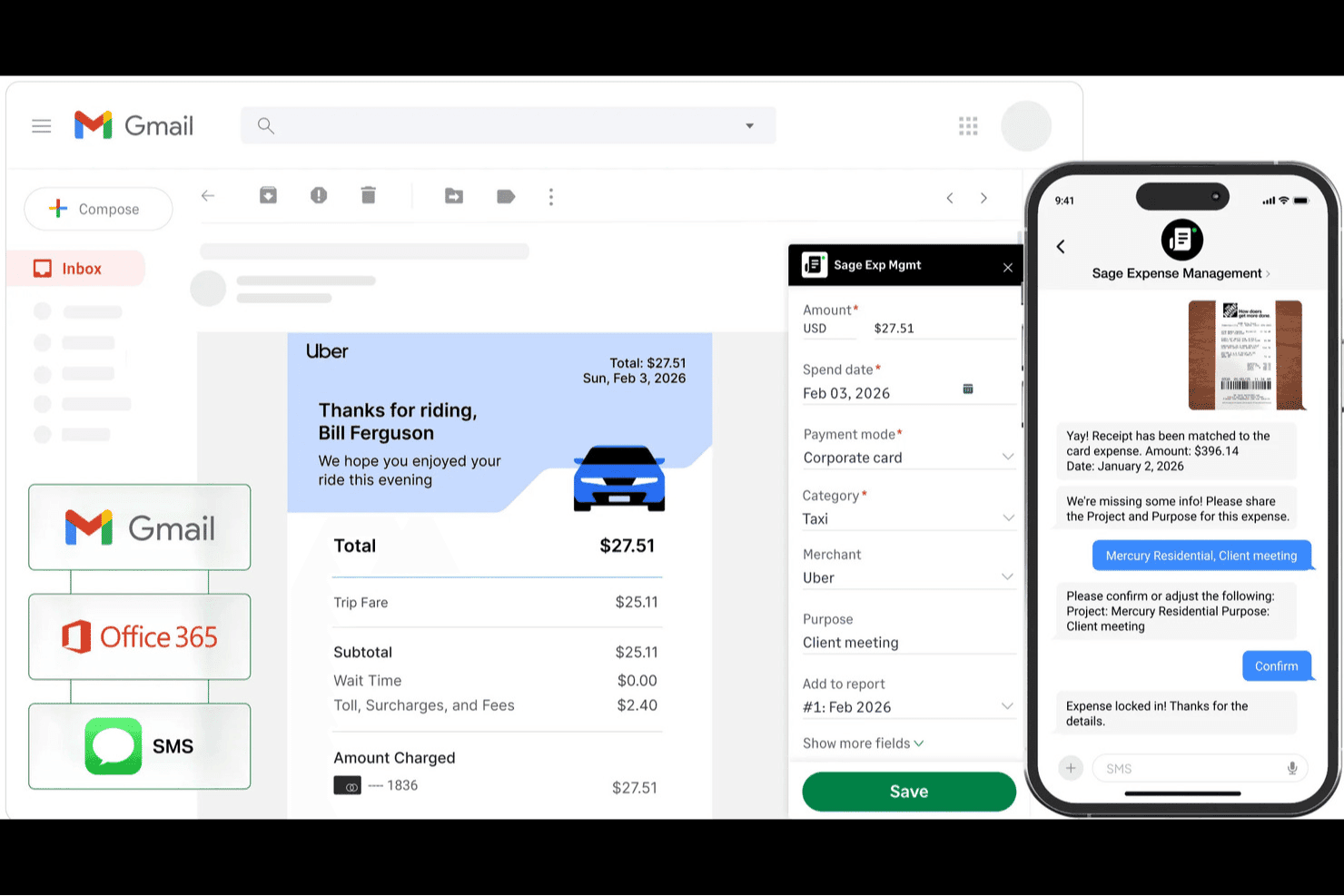
Sage Expense Management (in precedenza Fyle) aiuta i team delle chiese ad acquisire le ricevute, abbinare automaticamente le transazioni e monitorare le spese con dettagli categorizzati sugli acquisti. Sage Expense Management è una piattaforma per la gestione delle spese delle chiese con acquisizione delle ricevute basata sull'IA, flussi di approvazione multilivello, monitoraggio del budget in tempo reale per ministero o fondo, rimborsi ACH e integrazione avanzata con i sistemi contabili QuickBooks, Xero e Sage.
A chi è più adatto Sage Expense Management?
Sage Expense Management è particolarmente adatto agli amministratori finanziari delle chiese e ai pastori esecutivi che devono applicare politiche di spesa coerenti in più ministeri o campus.
Perché ho scelto Sage Expense Management
Ho scelto Sage Expense Management come una delle soluzioni migliori perché il suo motore delle politiche è stato realmente progettato per impedire che le spese vengano codificate erroneamente prima di arrivare all'ufficio finanziario. Gli amministratori possono rendere obbligatorie le etichette relative a fondo e ministero al momento dell'invio, così un volontario che acquista forniture per il Ministero dei giovani non può codificarle accidentalmente come Missioni. Apprezzo anche il fatto che il sistema possa instradare automaticamente le spese che violano le politiche all'approvatore corretto in base alla gerarchia della chiesa, con una traccia di controllo completa associata a ogni transazione.
Funzionalità principali di Sage Expense Management
- Acquisizione delle ricevute basata sul testo: Il personale e i volontari possono inviare tramite SMS una foto di una ricevuta per presentare una spesa, senza dover accedere a un'app.
- Avvisi al superamento delle soglie di budget: Gli amministratori impostano più soglie di avviso per reparto, progetto o fondo e le notifiche via email vengono inviate automaticamente quando la spesa si avvicina al limite.
- Rimborso ACH: Le spese approvate vengono pagate direttamente sui conti bancari del personale o dei volontari, singolarmente o in blocco, con monitoraggio dello stato sia per chi le invia sia per l'ufficio finanziario.
- Emissione di carte virtuali Amex: Gli amministratori possono emettere un numero illimitato di carte virtuali con controlli sulla spesa, utilizzando una linea di credito aziendale Amex esistente.
Integrazioni di Sage Expense Management
Sage Expense Management offre integrazioni native con QuickBooks Online, QuickBooks Desktop, Xero, Sage 50, Sage Intacct e Sage 300 CRE. La sua API supporta integrazioni personalizzate per i flussi di lavoro finanziari delle chiese.
Pros and Cons
Pros:
- I volontari inviano le ricevute tramite SMS
- Le etichette obbligatorie del ministero impediscono la codifica errata
- Gli approvatori mantengono tracce di controllo a livello di transazione
Cons:
- L'OCR delle ricevute interpreta talvolta in modo errato i dettagli delle transazioni
- Il monitoraggio dei fondi dipende dalle etichette personalizzate
Learn more about Sage Expense Management (formerly Fyle): Ideale per la gestione amministrativa completa di una chiesa con un budget limitato
- Piano gratuito disponibile
- A partire da $19/mese (con fatturazione annuale)
Visit WebsiteCustomer Rating:4.8/5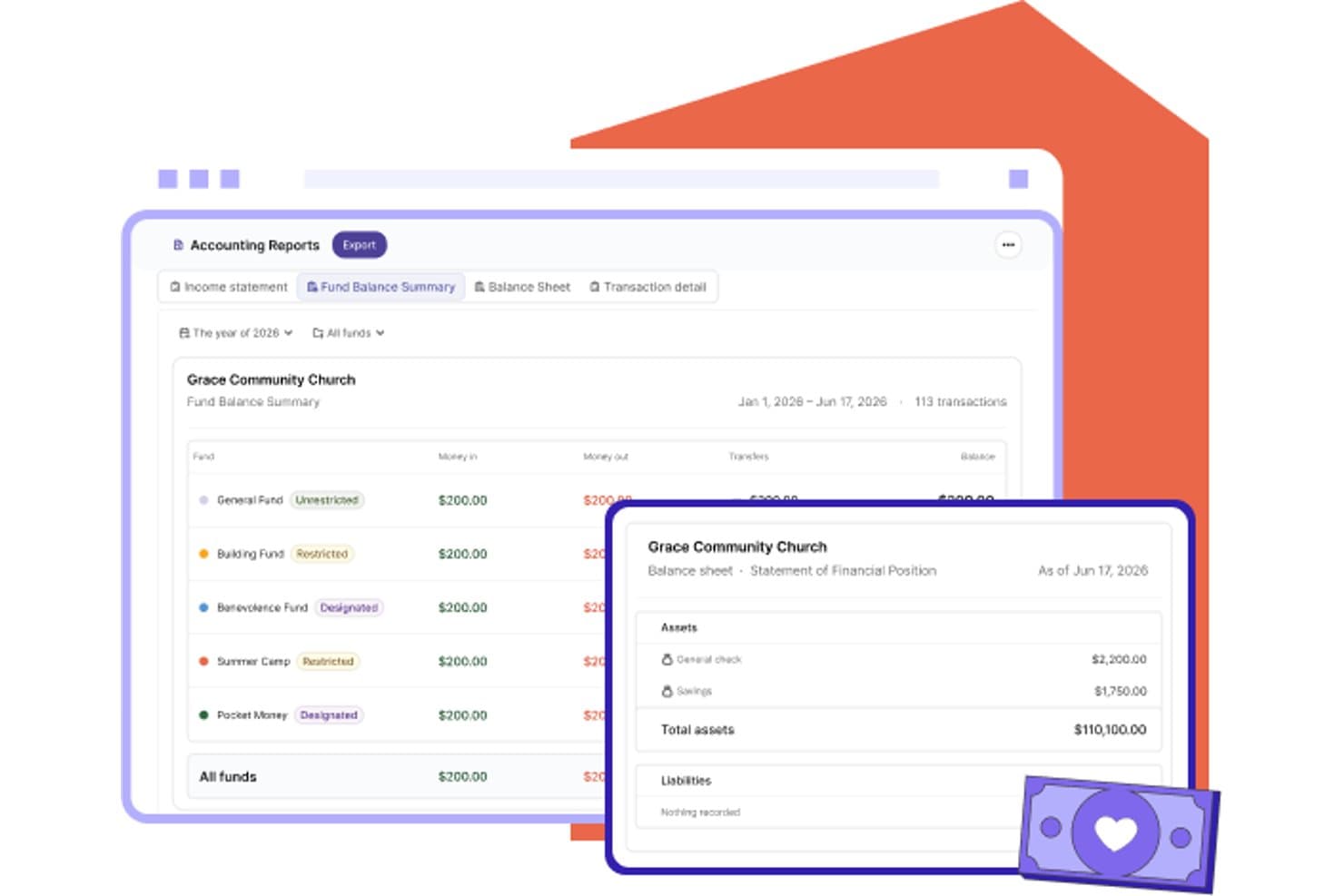
Gracely organizza i fondi della chiesa con riepiloghi dei saldi e rendiconti finanziari. Gracely è una piattaforma per la gestione delle chiese che combina la gestione dei membri, le donazioni online, le comunicazioni e un sistema di contabilità basato sui fondi per tenere traccia di entrate, spese e budget.
A chi è più adatto Gracely?
Gracely è adatto alle piccole chiese che desiderano gestire membri, donazioni e la contabilità di base dei fondi in un'unica piattaforma conveniente, senza dover gestire diversi strumenti.
Perché ho scelto Gracely
Ho incluso Gracely tra le mie scelte principali perché riunisce la gestione dei membri, le donazioni online e la contabilità basata sui fondi in un'unica piattaforma a un prezzo che le piccole chiese possono permettersi. Mi piace il fatto che le registrazioni delle spese e degli assegni consentano di assegnare un fondo, una categoria e un beneficiario a ogni transazione e che gli importi bancari importati possano essere suddivisi tra più fondi in un unico passaggio. I quattro report contabili integrati di Gracely sono progettati esplicitamente per le riunioni mensili del consiglio e le revisioni di fine anno.
Funzionalità principali di Gracely
- Donazioni online con tracciamento dei fondi: Accetta donazioni tramite carta di credito, ACH, Apple Pay e Google Pay, assegnando ogni donazione a un fondo specifico.
- Sincronizzazione delle transazioni bancarie: Importa le attività bancarie tramite Stripe Financial Connections e suddividi le singole transazioni tra più fondi e categorie prima di aggiungerle alla contabilità.
- Ruoli contabili personalizzati: Crea un ruolo di tesoriere o contabile con accesso limitato al modulo contabile, mantenendo separati i dati finanziari da quelli dei membri.
- Gestione dei membri e dei gruppi: Organizza le schede dei membri, i legami familiari e i gruppi nella stessa piattaforma che utilizzi per le donazioni e la gestione finanziaria.
Integrazioni di Gracely
Non risultano integrazioni native documentate per Gracely. QuickBooks, PayPal, Mailchimp e Checkr sono indicati come disponibili prossimamente, mentre la sincronizzazione bancaria utilizza Stripe Financial Connections.
Pros and Cons
Pros:
- Le registrazioni bancarie possono essere suddivise tra fondi e categorie
- Report pronti per il consiglio riassumono i saldi dei fondi
- I recensori apprezzano il supporto reattivo nella configurazione
Cons:
- Nessun flusso di approvazione delle spese documentato
- Nessuna acquisizione delle ricevute o gestione dei rimborsi documentata
Learn more about Gracely: Ideale per l'acquisto delle scorte incentrato sugli approvvigionamenti
- Prova gratuita di 90 giorni
- A partire da $100/mese
Visit WebsiteCustomer Rating:4.3/5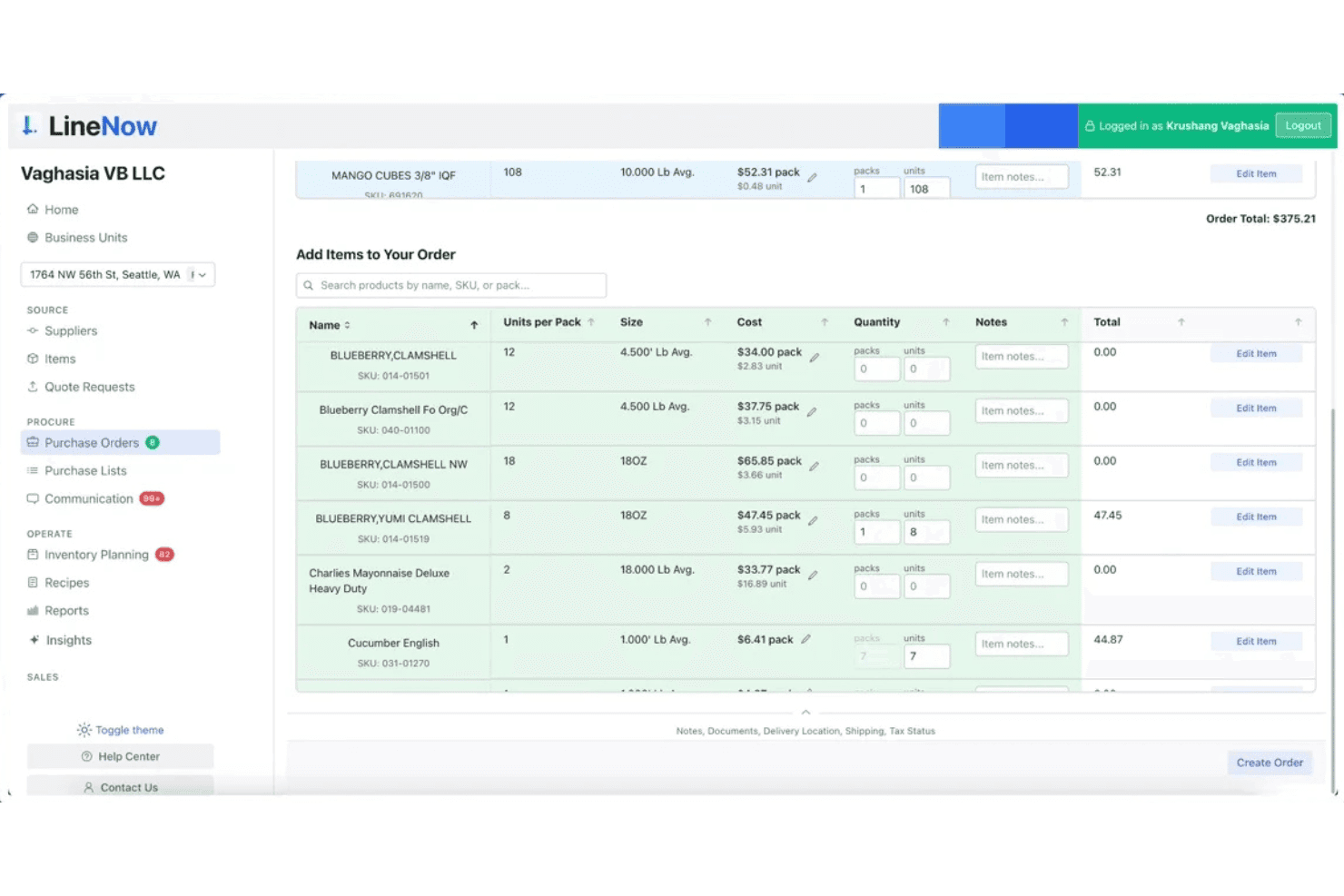
LineNow consente agli utenti di creare e gestire ordini di acquisto con ricerca degli articoli e dei prezzi. LineNow è una piattaforma per la gestione degli approvvigionamenti e degli ordini di acquisto che gestisce l'acquisto delle scorte, la comunicazione con i fornitori e il monitoraggio degli ordini in più sedi.
Per chi è più adatto LineNow?
LineNow è adatto a chiese e organizzazioni ministeriali che gestiscono l'acquisto delle scorte, come dispense alimentari, librerie o attività di ristorazione ministeriali, e desiderano uno strumento dedicato agli approvvigionamenti per gestire gli ordini ai fornitori e monitorare le scorte in più sedi.
Perché ho scelto LineNow
Ho incluso LineNow tra le mie scelte principali perché è progettato specificamente per l'acquisto delle scorte incentrato sugli approvvigionamenti, risultando particolarmente adatto alle chiese che gestiscono dispense alimentari, librerie ministeriali o attività di ristorazione. Mi piace il modo in cui la creazione degli ordini di acquisto basata sull'intelligenza artificiale genera automaticamente gli ordini a partire dai dati delle scorte, mentre gli strumenti di comunicazione con i fornitori consentono di inviare e monitorare gli ordini senza mai lasciare la piattaforma. Il supporto per più sedi permette a una chiesa che gestisce le scorte in diversi luoghi ministeriali di centralizzare tutti gli acquisti in un unico posto.
Funzionalità principali di LineNow
- Creazione degli ordini di acquisto basata sull'intelligenza artificiale: Genera automaticamente gli ordini di acquisto a partire dai dati aggiornati delle scorte, riducendo l'inserimento manuale per gli acquisti della libreria o della dispensa ministeriale.
- Monitoraggio dei prezzi dei fornitori: Monitora nel tempo i prezzi dei fornitori e segnala le variazioni, consentendo di individuare gli aumenti dei costi prima che incidano sul budget ministeriale.
- Flussi di lavoro per la ricezione: Registra le consegne in arrivo rispetto agli ordini di acquisto aperti, offrendo un resoconto chiaro di cosa è arrivato, quando e da chi.
- Autorizzazioni del team basate sui ruoli: Assegna diversi livelli di accesso a dipendenti e volontari, così solo le persone autorizzate possono creare, inviare o approvare gli ordini.
Integrazioni di LineNow
Le integrazioni includono QuickBooks, Xero, Square, Shopify, Toast, Clover, Lightspeed, Amazon e Faire.
Pros and Cons
Pros:
- Creazione rapida degli ordini ai fornitori con assistenza dell'intelligenza artificiale
- Centralizza gli acquisti per più sedi della chiesa
- Monitora nel tempo le variazioni dei prezzi dei fornitori
Cons:
- Nessun monitoraggio delle spese ministeriali o dei fondi
- Non dispone di flussi di lavoro per i rimborsi e per le approvazioni della chiesa
Learn more about LineNow: Ideale per l'integrazione con strumenti contabili esistenti
- Prova gratuita di 30 giorni
- Da $30/mese
Visit WebsiteCustomer Rating:4.4/5
QuickBooks aiuta le chiese a monitorare donazioni, spese e budget con report affidabili. QuickBooks è una piattaforma di contabilità ben nota che molte chiese utilizzano per gestire le finanze con strumenti familiari. È una soluzione solida per le chiese che desiderano un monitoraggio dettagliato di spese, donazioni e budget in un sistema affidabile dagli esperti contabili. Se la tua chiesa necessita di una supervisione finanziaria affidabile e di report dettagliati, QuickBooks può aiutarti a organizzare e monitorare ogni singolo dollaro.
Per chi è ideale QuickBooks?
QuickBooks si adatta a chiese di qualsiasi dimensione che desiderano gestire le finanze utilizzando flussi di lavoro contabili familiari e report dettagliati.
Perché ho scelto QuickBooks
Ho scelto QuickBooks perché si collega facilmente con una vasta gamma di altri strumenti di contabilità, tenuta della contabilità e finanza che molte chiese già utilizzano. Questo rende semplice sincronizzare i dati sulle spese, le donazioni e i budget con i conti bancari, i fornitori di buste paga e i processori di pagamenti. Ritengo questo particolarmente utile per le chiese che vogliono evitare l’inserimento manuale dei dati o la doppia gestione dei registri finanziari. Con QuickBooks, puoi mantenere le informazioni finanziarie della tua chiesa organizzate e aggiornate su più piattaforme.
Funzionalità principali di QuickBooks
Oltre alle sue capacità di integrazione, QuickBooks offre diverse funzionalità che supportano la gestione delle spese della chiesa:
- Monitoraggio dei fondi: Monitora separatamente i fondi designati e i conti vincolati per un controllo finanziario accurato della chiesa.
- Registrazione delle donazioni: Registra, categorizza e genera report sulle donazioni provenienti da diverse fonti all'interno della piattaforma.
- Piano dei conti personalizzabile: Configura e gestisci conti su misura per le categorie finanziarie e le esigenze di reportistica specifiche della chiesa.
- Transazioni ricorrenti automatizzate: Programma e automatizza le spese regolari come utenze, abbonamenti o pagamenti ai fornitori.
Integrazioni QuickBooks
Le integrazioni includono Amazon Business, PayPal, Square, Etsy, Amazon Seller e Gusto.
Pros and Cons
Pros:
- Si sincronizza con le principali piattaforme di donazioni e buste paga
- Offre una contabilità dettagliata dei fondi per le chiese
- Supporta l'inserimento di spese ricorrenti e programmate
Cons:
- Nessuna gestione integrata dei membri della chiesa
- Manca di funzioni per la gestione delle spese dei volontari
 Ideale per flussi di lavoro di conformità automatizzati
- Prova gratuita di 15 giorni
- A partire da $79/mese
Visit WebsiteCustomer Rating:4.5/5
Aplos è un software di contabilità cloud per chiese e organizzazioni non profit per gestire finanze e rendicontazione. Aplos è una piattaforma basata sul cloud creata per chiese e organizzazioni non profit che devono gestire le finanze con precisione e trasparenza. Si rivolge ai responsabili che desiderano semplificare contabilità, donazioni e rendicontazione in un unico luogo. Con funzionalità pensate per le organizzazioni di ispirazione religiosa, Aplos aiuta a mantenere i registri finanziari organizzati e conformi.
Per chi è più adatto Aplos?
Aplos è ideale per chiese e organizzazioni non profit di piccole e medie dimensioni che hanno bisogno di una contabilità specializzata e del monitoraggio delle donazioni.
Perché ho scelto Aplos
Ciò che distingue Aplos è il modo in cui automatizza le attività di conformità che altrimenti possono sopraffare i team finanziari delle chiese. Ho scelto Aplos perché offre flussi di lavoro integrati per il monitoraggio dei fondi vincolati, la preparazione di rendiconti di donazione conformi alle normative IRS e la gestione delle tracce di revisione—tutti elementi essenziali per le chiese che devono rispettare standard di rendicontazione rigorosi. La piattaforma supporta inoltre piani dei conti personalizzabili e transazioni ricorrenti automatizzate, contribuendo così a mantenere precisione e ridurre gli errori manuali. Queste funzionalità fanno di Aplos una scelta solida per le chiese che vogliono restare organizzate e in regola senza aggravio amministrativo aggiuntivo.
Funzionalità principali di Aplos
Altre funzioni che rendono Aplos utile per la gestione delle spese di chiesa includono:
- Strumenti di donazione online: Ricevi e monitora le donazioni tramite moduli online e portali personalizzabili.
- Modulo per la pianificazione di bilancio: Crea, gestisci e monitora più budget per diversi ministeri o fondi.
- Gestione dei pagamenti: Inserisci, pianifica e paga le fatture direttamente dalla piattaforma.
- Riconciliazione bancaria: Abbina le transazioni agli estratti conto per garantire la precisione dei registri finanziari.
Integrazioni di Aplos
Le integrazioni includono Keela, Raisely, Ramp, PEX, Gusto, DonorElf, Church Community Builder e Stripe.
Pros and Cons
Pros:
- Monitora promesse di donazione, offerte e cronologia dei donatori
- Strumenti per il budget di più ministeri o fondi
- Moduli di donazione online e registrazione agli eventi
Cons:
- La sincronizzazione bancaria può occasionalmente essere poco affidabile
- L'app mobile non offre tutte le funzionalità finanziarie
Learn more about Aplos: Ideale per la contabilità dei fondi integrata
- Prova gratuita di 30 giorni + demo gratuita disponibile
- Da $8/mese (fatturato annualmente)

ChurchTrac aiuta le chiese a gestire finanze, donazioni, budget e membri in un unico sistema. ChurchTrac offre una piattaforma dedicata alle chiese che desiderano gestire spese, donazioni e budget in un unico luogo. È progettata per quei ministeri che vogliono mantenere i registri finanziari organizzati gestendo al contempo dettagli su membri ed eventi. Questo strumento è ideale per i leader di chiesa che cercano un modo semplice per supervisionare sia le finanze che le attività quotidiane senza dover gestire più sistemi.
Per chi è meglio ChurchTrac?
ChurchTrac è adatto a chiese di piccole e medie dimensioni che vogliono una soluzione completa per gestire finanze, membri e attività di ministero.
Perché ho scelto ChurchTrac
Ho scelto ChurchTrac perché la sua contabilità dei fondi integrata è progettata specificamente per le esigenze uniche delle chiese. Grazie a strumenti dedicati per tracciare fondi destinati, puoi facilmente separare e rendicontare le donazioni vincolate e non vincolate. La piattaforma consente inoltre di gestire budget e generare rendiconti finanziari dettagliati pensati per la supervisione dei ministeri. Questo focus sulla contabilità dei fondi aiuta a garantire trasparenza e responsabilità per ogni dollaro affidato alla tua congregazione.
Funzionalità chiave di ChurchTrac
Oltre alle sue capacità di contabilità dei fondi, ChurchTrac offre diverse altre funzionalità pensate per supportare l'amministrazione della chiesa e le operazioni ministeriali:
- Gestione dei membri: Traccia dettagli di contatto, rapporti familiari, presenze e coinvolgimento di ogni persona nella tua congregazione.
- Pianificazione eventi: Crea, gestisci e condividi gli eventi della chiesa con strumenti calendario integrati e prenotazione di sale/risorse.
- Integrazione donazioni online: Accetta e traccia donazioni online direttamente all'interno della piattaforma, con registrazione automatica dei donatori.
- Gestione volontari: Organizza squadre di volontari, programma i servizi e comunica ruoli e incarichi ai partecipanti.
Integrazioni di ChurchTrac
Le integrazioni includono Mailchimp.
Pros and Cons
Pros:
- Genera dettagliati report finanziari e di budget
- Gestisce sia le spese che i dati sui membri
- Offre strumenti per donazioni online e gestione eventi
Cons:
- Non sono incluse funzionalità per l'elaborazione dei salari
- L'importazione dei dati finanziari storici è manuale
Learn more about ChurchTrac:

FlockBase è un software di contabilità per chiese per gestire finanze e registri dei membri. FlockBase è un software di contabilità per chiese pensato per le congregazioni che necessitano di una gestione finanziaria e una tenuta dei registri affidabili. Si rivolge alle chiese che cercano strumenti per gestire contributi, spese e dati dei membri in un'unica piattaforma. Grazie a funzionalità specifiche per le organizzazioni religiose, FlockBase aiuta a semplificare compiti finanziari complessi per i tesorieri e gli amministratori delle chiese.
Per chi è più adatto FlockBase?
FlockBase è ideale per chiese di piccole e medie dimensioni che necessitano di strumenti dedicati per la contabilità e la gestione delle buste paga nelle organizzazioni religiose.
Perché ho scelto FlockBase
Ciò che distingue FlockBase è la sua attenzione alla gestione delle buste paga e alla stampa degli assegni, aspetti spesso problematici per le chiese che devono gestire pagamenti a personale e fornitori. Il modulo integrato per le buste paga si occupa delle regole fiscali specifiche per il clero e genera i moduli fiscali necessari, permettendo di gestire le buste paga senza dover utilizzare un sistema separato. Apprezzo anche la possibilità di stampare assegni direttamente dalla piattaforma, facilitando il pagamento delle fatture e i rimborsi direttamente dai conti della chiesa. Queste funzionalità aiutano le chiese a mantenere pagamenti di salari e spese organizzati e conformi in un unico luogo.
Funzionalità principali di FlockBase
Oltre alla gestione delle buste paga e alla stampa degli assegni, FlockBase offre diverse altre funzionalità che supportano la gestione delle spese nelle chiese:
- Contabilità per fondi: Traccia i fondi designati separatamente per garantire una gestione e una rendicontazione corretta delle donazioni vincolate.
- Monitoraggio dei contributi: Registra, categorizza e rendiconta le donazioni dei membri sia per scopi fiscali che interni.
- Riconciliazione bancaria: Confronta le transazioni con gli estratti conto bancari per mantenere registri finanziari accurati.
- Report finanziari personalizzati: Genera report dettagliati su misura per le esigenze di consigli, comitati e leadership della chiesa.
Integrazioni di FlockBase
Le integrazioni native includono CSG Forte e QuickBooks.
Pros and Cons
Pros:
- Sviluppato appositamente per la contabilità dei fondi
- Buste paga integrate e conformi alle normative dell’IRS
- Molto conveniente per le chiese di piccole dimensioni
Cons:
- Personalizzazione dei report limitata
- La versione cloud manca di alcune funzionalità della versione desktop
Learn more about FlockBase: Ideale per opzioni di implementazione desktop e online
- Demo gratuita disponibile
- Da $47/mese

PowerChurch offre strumenti di gestione parrocchiale e contabilità per monitorare membri e finanze. PowerChurch offre un sistema di gestione parrocchiale e un software di contabilità progettati per le congregazioni che desiderano flessibilità nell’accesso ai propri dati. È ideale per le chiese che hanno bisogno sia di un monitoraggio finanziario sia della gestione dei membri all’interno di un unico sistema. Grazie alle funzionalità per gestire contributi, spese e presenze, PowerChurch aiuta i responsabili a mantenere le operazioni organizzate e trasparenti.
Per chi è ideale PowerChurch?
PowerChurch è adatto a chiese di piccole e medie dimensioni che desiderano opzioni sia desktop che online per gestire finanze e registri dei membri.
Perché ho scelto PowerChurch
Ciò che distingue PowerChurch è la sua flessibilità: può essere utilizzato sia come soluzione desktop che online, caratteristica rara tra gli strumenti di gestione delle spese parrocchiali. Questa doppia modalità di implementazione permette al tuo team di scegliere l’opzione più adatta alle preferenze tecnologiche e all’affidabilità della connessione internet della tua chiesa. Apprezzo che PowerChurch includa moduli contabili completi, così puoi gestire spese, monitorare contributi e occuparsi delle buste paga dalla stessa piattaforma. La possibilità di alternare l’accesso locale e cloud dà alle chiese maggiore controllo sui propri dati e flussi di lavoro.
Caratteristiche principali di PowerChurch
Altre funzionalità che aiutano le chiese a gestire spese e operazioni includono:
- Gestione dei conti da pagare: Inserisci, monitora e paga le bollette direttamente dal sistema.
- Monitoraggio dei contributi: Registra e genera report sulle donazioni dei membri, utili per scopi fiscali e di gestione delle offerte.
- Pianificazione eventi: Organizza e gestisci eventi parrocchiali, strutture e prenotazioni delle risorse.
- Report finanziari personalizzati: Genera stati finanziari dettagliati e report personalizzati per la direzione e i comitati.
Integrazioni di PowerChurch
Le integrazioni includono Vanco, SimpleTexting, Protect My Ministry, PowerChurch E-File e Constant Contact.
Pros and Cons
Pros:
- Offre sia implementazione desktop che cloud
- Gestisce cedolini e moduli fiscali specifici per il clero
- Monitora fondi vincolati e riservati
Cons:
- Non supporta multi-campus o gestione di più entità
- Non include uno storage documentale integrato
Learn more about PowerChurch: Ideale con carte fisiche e virtuali integrate
- Piano gratuito disponibile
- A partire da $29/mese

KleerCard è un software di gestione delle spese per chiese, con monitoraggio e controlli in tempo reale. KleerCard offre una piattaforma moderna di gestione delle spese progettata per chiese e organizzazioni religiose. È ideale per i responsabili che desiderano semplificare i controlli sulle spese, automatizzare la registrazione delle spese e gestire in tempo reale gli acquisti del personale. Con funzionalità pensate per la supervisione multiutente e la visibilità chiara delle transazioni, KleerCard aiuta le chiese a mantenere processi finanziari organizzati e trasparenti.
Per chi è migliore KleerCard?
KleerCard è adatto a chiese e ministeri che hanno bisogno di un controllo centralizzato sulle spese del personale e sulla registrazione delle spese.
Perché ho scelto KleerCard
Ciò che mi ha attirato verso KleerCard è la sua capacità di emettere sia carte fisiche che virtuali, offrendo alle chiese opzioni flessibili per gestire le spese di personale e volontari. Ho scelto KleerCard perché permette di impostare limiti di spesa, monitorare gli acquisti in tempo reale e disattivare istantaneamente le carte se necessario—tutto da un’unica dashboard. Questo livello di controllo è particolarmente utile per le chiese con più ministeri o eventi, dove diversi membri del team necessitano accesso ai fondi ma la supervisione è essenziale. Le funzionalità per la gestione delle carte di credito della piattaforma aiutano a ridurre il rischio di spese non autorizzate e semplificano notevolmente la riconciliazione.
Caratteristiche principali di KleerCard
Altre funzionalità che supportano la gestione finanziaria e la supervisione nelle chiese includono:
- Controlli personalizzati delle spese: Imposta limiti di transazione e restrizioni sui commercianti per ogni carta rilasciata a dipendenti o volontari.
- Acquisizione delle ricevute tramite app mobile: Carica e allega le ricevute alle transazioni direttamente da uno smartphone.
- Automatizzazione della categorizzazione delle spese: Assegna le spese a categorie specifiche o a budget di ministero per una tracciabilità e una reportistica più semplici.
- Monitoraggio delle transazioni in tempo reale: Visualizza e controlla l’attività delle carte man mano che avviene per mantenere supervisione e responsabilità.
Integrazioni di KleerCard
Le integrazioni includono QuickBooks Online, NetSuite, Sage, Aplos, ACS, Realm e Shelby.
Pros and Cons
Pros:
- Flussi di approvazione personalizzati per le politiche della chiesa
- Acquisizione e abbinamento automatico delle ricevute
- Si integra con le principali piattaforme contabili per chiese
Cons:
- Nessun sistema di rimborso integrato
- L'app mobile non offre tutti i controlli amministrativi
Learn more about KleerCard: 10Ideale per la rendicontazione finanziaria intuitiva
Gracely
- Prova gratuita di 30 giorni + piano gratuito + demo gratuita disponibile
- Da $19/mese (fatturazione annuale)

Gracely è una piattaforma semplice di gestione finanziaria per chiese e ministeri. Gracely offre una piattaforma di gestione finanziaria pensata per chiese e ministeri che desiderano una supervisione chiara e accessibile delle proprie finanze. È ideale per i responsabili che hanno bisogno di monitorare le spese, gestire i budget e generare report senza dover affrontare una curva di apprendimento complessa. Grazie alla sua attenzione alla semplicità, Gracely aiuta le chiese a mantenere i processi finanziari organizzati e trasparenti.
Per chi è più adatto Gracely?
Gracely è indicato per chiese e ministeri di piccole e medie dimensioni che desiderano un monitoraggio e una rendicontazione finanziaria semplice e diretta.
Perché ho scelto Gracely
Ciò che mi ha attirato di Gracely è il modo in cui rende la rendicontazione finanziaria accessibile ai responsabili di chiesa che potrebbero non avere una formazione contabile. La piattaforma offre dashboard visive e modelli di report personalizzabili, così puoi vedere rapidamente dove vengono destinati i fondi e come stanno andando i budget. Apprezzo anche il fatto che Gracely consenta di approfondire categorie di spesa specifiche ed esportare i report per riunioni di consiglio o revisioni. Queste funzionalità aiutano le chiese a mantenere la trasparenza, registri accurati e a prendere decisioni informate senza perdersi in complicati fogli di calcolo.
Funzionalità principali di Gracely
Altre funzionalità che aiutano le chiese a gestire le finanze e le operazioni includono:
- Importazione automatica dei movimenti bancari: Collega i conti correnti per importare e riconciliare automaticamente le transazioni all'interno della piattaforma.
- Strumenti per la creazione del budget: Crea e gestisci budget annuali o basati su progetti con categorie personalizzabili.
- Archiviazione documentale: Carica e organizza ricevute, fatture e documenti finanziari per un accesso rapido e la tracciabilità delle revisioni.
- Accesso multiutente: Invita membri dello staff o del team amministrativo con permessi personalizzabili per la collaborazione e la supervisione.
Integrazioni di Gracely
Al momento, Gracely non elenca integrazioni native.
Pros and Cons
Pros:
- Prezzo accessibile e fisso
- Team di supporto veloce e reattivo
- Processo semplice di importazione dei dati dei membri
Cons:
- Il processo di login per i membri è macchinoso
- La reportistica avanzata è poco approfondita
Learn more about Gracely:
Altri software per la gestione delle spese ecclesiastiche
Ecco alcune ulteriori opzioni di software per la gestione delle spese ecclesiastiche che non sono entrate nel mio elenco ristretto, ma che vale comunque la pena prendere in considerazione:
- 11ChMeetingsIdeale per la migrazione gratuita dei dati
- 12One Church SoftwareIdeale per funzionalità di automazione personalizzabili
- 13ExpensifyIdeale per la scansione automatica delle ricevute
- 14AmplifyIdeale per donazioni e contabilità integrate
Come valuto il software di gestione delle spese per le chiese
Valuto ogni strumento su due livelli: se gestisce la contabilità dei fondi e i budget ministeriali come base, poi cosa lo distingue per i team finanziari e i pastori che effettivamente gestiscono i registri contabili.
Funzionalità core (requisiti fondamentali per questa lista)
Quando seleziono gli strumenti per la mia lista, li valuto ciascuno su una scala da 0 (non offre la funzionalità) a 5 (eccelle in quest'area) per ogni funzionalità principale elencata di seguito. Successivamente calcolo il punteggio totale dello strumento in percentuale. Ogni strumento deve raggiungere un punteggio totale minimo del 55% per essere considerato per l'inclusione.
- Supporto contabilità a fondi: Verifico se uno strumento traccia le spese rispetto a fondi vincolati e non vincolati, come separare gli acquisti del fondo costruzione dai costi operativi generali.
- Rendicontazione delle spese & rimborso: Volontari e personale devono poter fotografare una ricevuta dopo un acquisto e inviarla per il rimborso senza dover imparare un sistema di contabilità.
- Emissione carte ministeriali & controlli: Cerco opzioni di carte fisiche o virtuali dove sia possibile impostare limiti di spesa per singola carta, come fissare un tetto alla carta di un pastore dei giovani per le forniture di un ritiro.
- Flussi di approvazione a più livelli: Inoltrare un acquisto del team di lode tramite un responsabile ministeriale prima che arrivi all’ufficio finanziario è importante, quindi valuto catene di approvazione configurabili.
- Integrazione con la contabilità della chiesa: Valuto come ogni strumento si sincronizza con le piattaforme già usate dalle chiese, come QuickBooks, Aplos o Realm, per evitare doppi inserimenti di dati.
- Monitoraggio del budget per ministero: Ogni ministero ha bisogno di una visibilità in tempo reale sul budget rimanente, quindi cerco un monitoraggio a livello di fondo che si aggiorni al momento delle transazioni.
Una volta ottenuta la lista degli strumenti che soddisfano questi criteri, considero cosa differenzia ciascuna piattaforma.
Fattori differenzianti (cosa distingue i fornitori)
Ecco come confronto e differenzio i vari fornitori:
Funzionalità distintive
Le chiese multi-campus hanno bisogno di segmentazione delle spese per sede, quindi cerco strumenti che consentano a ciascun campus di gestire le proprie carte e i propri budget con dati che confluiscono in una dashboard centrale. La rendicontazione per il consiglio e per la congregazione è un altro fattore che considero. Quando un comitato finanziario chiede un report di trasparenza trimestrale, output già pronti fanno risparmiare ore di formattazione manuale. Valuto anche quanto sia efficace l'app mobile per i volontari senza formazione finanziaria: se l’interfaccia è confusa, le ricevute rimangono non rendicontate.
Oltre le funzionalità
Il prezzo è importante perché la maggior parte delle chiese ha budget limitati. Valuto se una piattaforma addebita a utente, poiché aggiungere dieci responsabili di ministero e volontari non dovrebbe raddoppiare il costo. L'integrazione con l'ecosistema tecnologico della chiesa è altrettanto fondamentale. Se uno strumento si collega con Planning Center o Pushpay, il team finanziario ha piena visibilità senza passare da un sistema all'altro. Considero anche il supporto per l’onboarding, visto che molti tesorieri parrocchiali sono volontari che hanno bisogno di una configurazione guidata invece di una base conoscenze self-service.
Come scegliere il software per la gestione delle spese ecclesiastiche
È facile perdersi in lunghi elenchi di funzionalità e strutture tariffarie complesse. Per aiutarti a rimanere concentrato mentre affronti il tuo specifico processo di selezione del software, ecco una lista di fattori da tenere presenti:
| Fattore | Cosa considerare |
| Scalabilità | Il software supporterà la vostra chiesa mentre cresce, aggiunge sedi o amplia i ministeri? Verificate il supporto per più entità e limiti utente flessibili. |
| Integrazioni | Lo strumento si collega ai sistemi di contabilità, gestione paghe o gestione dei donatori già in uso? Confermate la disponibilità di integrazioni native e delle opzioni di sincronizzazione dei dati. |
| Personalizzazione | Potete adattare i flussi di lavoro, i processi di approvazione e la reportistica alla struttura e alle politiche della vostra chiesa? Evitate i sistemi rigidi che impongono soluzioni alternative. |
| Semplicità d'uso | Il personale e i volontari con diversi livelli di competenza tecnologica saranno in grado di utilizzare il sistema con sicurezza? Cercate una navigazione chiara e requisiti minimi di formazione. |
| Implementazione e avvio | Quanto tempo sarà necessario per rendere il sistema operativo? Informatevi sul supporto alla migrazione, sulle risorse formative e sui tempi tipici di avvio per chiese delle vostre dimensioni. |
| Costo | I livelli di prezzo sono trasparenti e prevedibili? Considerate il costo totale di proprietà, inclusi configurazione, assistenza ed eventuali componenti aggiuntivi di cui potreste aver bisogno. |
| Misure di sicurezza | Il software offre autorizzazioni basate sui ruoli, registri di controllo e crittografia dei dati? Assicuratevi che soddisfi gli standard della vostra chiesa in materia di privacy e gestione responsabile delle risorse. |
| Disponibilità dell'assistenza | Quali canali di assistenza sono disponibili e in quali orari? Valutate se avrete bisogno di supporto al di fuori dell'orario lavorativo o di un responsabile dedicato per i problemi urgenti. |
Che cos'è il software per la gestione delle spese della chiesa?
Il software per la gestione delle spese della chiesa è uno strumento digitale progettato per aiutare le chiese a monitorare le entrate, approvare e rendicontare le spese sostenute dai vari ministeri, dalle sedi e dagli eventi. Centralizza i dati sulle spese, supporta la definizione del budget e l'assegnazione dei fondi e garantisce la trasparenza finanziaria per la leadership e la comunità. Questi sistemi aiutano le chiese a mantenere la responsabilità finanziaria, semplificare i rimborsi e soddisfare i requisiti di conformità, adattandosi al contempo alle strutture finanziarie uniche e alle esigenze di supervisione delle organizzazioni religiose.
Funzionalità del software per la gestione delle spese della chiesa
Quando scegliete un software per la gestione delle spese della chiesa, prestate attenzione alle seguenti funzionalità principali:
- Monitoraggio delle spese: registrate, categorizzate e monitorate tutte le spese relative alla chiesa in un unico sistema centralizzato, semplificando la gestione delle uscite tra ministeri ed eventi.
- Contabilità per fondi: separate e monitorate i fondi vincolati, con destinazione specifica e non vincolati, per garantire la conformità alle intenzioni dei donatori e alle politiche della chiesa.
- Gestione del budget: definite, monitorate e modificate i budget per ministeri, dipartimenti o eventi, aiutando i responsabili a operare in modo trasparente e a prendere decisioni finanziarie consapevoli.
- Flussi di approvazione: indirizzate le richieste di spesa e i rimborsi attraverso iter di approvazione personalizzabili per mantenere il controllo ed evitare spese non autorizzate.
- Report finanziari: generate report dettagliati su spese, budget e saldi dei fondi per garantire trasparenza alla leadership, ai consigli direttivi e alla comunità.
- Allegati ai documenti: caricate e collegate ricevute, fatture e documenti giustificativi direttamente alle transazioni, per consultarli facilmente e prepararsi agli audit.
- Autorizzazioni basate sui ruoli: controllate l'accesso ai dati finanziari sensibili assegnando ruoli e autorizzazioni agli utenti in base alle responsabilità del personale o dei volontari.
- Riconciliazione bancaria: confrontate le transazioni registrate con gli estratti conto bancari per garantire la correttezza e individuare rapidamente le discrepanze.
- Funzionalità di integrazione: collegate il sistema ai sistemi di contabilità, gestione paghe e gestione dei donatori per semplificare il flusso dei dati e ridurre l'inserimento manuale.
- Accesso da dispositivi mobili: consentite al personale e ai volontari di inviare spese, approvazioni o ricevute dal telefono o dal tablet, supportando le attività del ministero anche fuori sede.
Vantaggi del software per la gestione delle spese della chiesa
L'implementazione di un software per la gestione delle spese della chiesa offre diversi vantaggi al vostro team e alla vostra organizzazione. Ecco alcuni dei benefici che potete aspettarvi:
- Maggiore trasparenza finanziaria: il monitoraggio e la rendicontazione centralizzati delle spese facilitano la condivisione di informazioni finanziarie chiare e accurate con la leadership e le congregazioni.
- Maggiore responsabilità nella gestione dei fondi: le funzionalità di contabilità per fondi aiutano a garantire che i fondi designati e vincolati siano utilizzati secondo le intenzioni dei donatori e le politiche della chiesa.
- Processi di approvazione più efficienti: i flussi di lavoro di approvazione personalizzabili riducono i colli di bottiglia e impediscono le spese non autorizzate, indirizzando le richieste attraverso i canali appropriati.
- Audit e conformità semplificati: l'allegato di documenti e le tracce di audit facilitano la preparazione agli audit e il rispetto dei requisiti normativi o confessionali.
- Una gestione del budget migliore: il monitoraggio del budget e gli avvisi in tempo reale aiutano i responsabili dei ministeri a prendere decisioni consapevoli e a evitare spese eccessive.
- Risparmio di tempo per il personale e i volontari: l'inserimento automatico dei dati, le integrazioni e l'accesso da dispositivi mobili riducono il lavoro manuale e liberano tempo per le attività dei ministeri.
- Scalabilità per le chiese in crescita: il supporto per più campus e più entità consente ai processi finanziari di crescere insieme ai ministeri e alle attività di sensibilizzazione della chiesa.
Costi e prezzi del software per la gestione delle spese della chiesa
La scelta di un software per la gestione delle spese della chiesa richiede la comprensione dei vari modelli di prezzo e dei piani disponibili. I costi variano in base alle funzionalità, alle dimensioni del team, agli strumenti aggiuntivi e ad altri fattori. La tabella seguente riassume i piani più comuni, i relativi prezzi medi e le funzionalità tipicamente incluse nelle soluzioni software per la gestione delle spese della chiesa:
Tabella comparativa dei piani per il software di gestione delle spese della chiesa
| Tipo di piano | Prezzo medio | Funzionalità comuni |
| Piano gratuito | $0 | Monitoraggio di base delle spese, utenti limitati, report semplici e inserimento manuale dei dati. |
| Piano personale | $12-$79/mese | Monitoraggio delle spese, contabilità di base per fondi, gestione del budget e flussi di lavoro di approvazione limitati. |
| Piano aziendale | $49-$129/mese | Contabilità avanzata per fondi, supporto per più campus, flussi di lavoro di approvazione personalizzati, integrazioni e report. |
| Piano per grandi aziende | $200+/mese | Gestione di più entità, sicurezza avanzata, onboarding personalizzato, assistenza dedicata e tracce di audit. |
Domande frequenti sul software per la gestione delle spese della chiesa
Ecco alcune risposte alle domande comuni sul software per la gestione delle spese della chiesa:
In che modo il software per la gestione delle spese della chiesa è diverso dal normale software per le spese aziendali?
Il software per la gestione delle spese della chiesa è progettato per le esigenze specifiche delle chiese, come la contabilità per fondi, le restrizioni dei donatori e la supervisione di più campus. Aiuta a monitorare i fondi designati, gestire i budget dei ministeri e garantire la conformità alle normative per le organizzazioni senza scopo di lucro, aspetti che gli strumenti aziendali standard potrebbero non supportare.
I volontari e il personale non finanziario possono utilizzare facilmente il software per la gestione delle spese della chiesa?
Sì, la maggior parte dei software per la gestione delle spese della chiesa è dotata di interfacce intuitive e flussi di lavoro semplici. Molte soluzioni offrono l’accesso da dispositivi mobili e autorizzazioni basate sui ruoli, rendendo facile per i volontari e il personale con poca esperienza contabile inviare spese e ricevute.
Quali tipi di spese possono essere monitorati con il software per la gestione delle spese della chiesa?
È possibile monitorare un’ampia gamma di spese, tra cui forniture per i ministeri, costi degli eventi, rimborsi al personale, manutenzione delle strutture e spese per le attività di sensibilizzazione. Il software consente di categorizzare le spese per fondo, reparto o progetto, migliorando la supervisione.
In che modo il software per la gestione delle spese della chiesa aiuta con gli audit e la conformità?
Questi strumenti archiviano ricevute, fatture e registri delle approvazioni insieme a ogni transazione, creando una traccia di audit chiara. Supportano inoltre la contabilità per fondi e la rendicontazione, facilitando la dimostrazione della conformità alle intenzioni dei donatori, alle politiche confessionali e alle normative per le organizzazioni senza scopo di lucro.
È possibile integrare il software per la gestione delle spese della chiesa con altri sistemi della chiesa?
Sì, molte soluzioni offrono integrazioni con piattaforme contabili, sistemi di gestione dei donatori e strumenti per le paghe. Ciò riduce l’inserimento manuale dei dati, mantiene coerenti i registri e contribuisce a conservare una visione finanziaria completa delle attività della chiesa.