

Gestionarea unei biserici poate fi copleșitoare, mai ales atunci când jonglați cu relațiile cu donatorii, planificarea evenimentelor și coordonarea voluntarilor. Programele CRM pentru organizații nonprofit pot fi de mare ajutor, ajutându-vă să organizați și să gestionați eficient aceste sarcini.
Din experiența mea, instrumentul CRM potrivit vă poate ușura munca și poate spori productivitatea echipei. Vă voi prezenta alegerile mele principale în materie de programe CRM pentru organizații nonprofit, oferindu-vă o imagine clară asupra a ceea ce oferă fiecare soluție.
Veți găsi recenzii imparțiale și documentate, care răspund nevoilor dumneavoastră specifice. Până la finalul acestui articol, veți avea o idee mai clară despre programul CRM care poate sprijini cel mai bine misiunea bisericii dumneavoastră.
Why Trust Our Software Recommendations
6,700+
Reviews
20
Industry experts
16+
Evaluation factors
14
Years
Our team has been testing and reviewing software since 2012. As church leaders ourselves, we know how difficult—and important—it is to choose the right software.
For this guide, we evaluated tools using hands-on testing and independent research, scoring tools using our selection criteria.
Our reviews reflect our human editorial judgment, not a sales pitch.
Tabel comparativ al programelor CRM pentru organizații nonprofit
Acest tabel comparativ prezintă un rezumat al detaliilor privind prețurile pentru selecția mea de top de programe CRM pentru organizații nonprofit:
Sorted by: Default
| Tool | Starting Price | Website | |
|---|---|---|---|
Best for zero-fee nonprofit fundraising | 4.9 out of 5 | Pricing upon request Free plan available | Website |
Best for schools and small teams | 4.7 out of 5 | $45/month 30-day free trial available | Website |
Best for custom nonprofit modules | 4.2 out of 5 | $31.10/user/month Free plan + free trial + free demo available | Website |
Best for peer to peer fundraising | 4.7 out of 5 | $29/month 30-day free trial + free plan available | Website |
Best for churches and faith groups | Not rated | $39.50/month 15-day free trial | Website |
Best for donor and event tracking | Not rated | $99/month Free demo available | Website |
Best for open source customization | Not rated | $15/month Free plan available | Website |
Best for all in one donor management | Not rated | Pricing upon request Free demo available | Website |
Best for managing memberships | Not rated | $119/month Free plan + 14-day trial + demo available | Website |
Best for arts and culture nonprofits | Not rated | Pricing upon request Free demo available | Website |


Recenzii ale celor mai bune programe CRM pentru organizații nonprofit
Mai jos sunt prezentate rezumatele mele detaliate ale celor mai bune programe CRM pentru organizații nonprofit care au ajuns pe lista mea scurtă. Recenziile mele oferă o analiză detaliată a principalelor funcții, avantajelor și dezavantajelor, integrărilor și cazurilor ideale de utilizare pentru fiecare instrument, pentru a vă ajuta să îl găsiți pe cel mai potrivit pentru dumneavoastră.
 Best for zero-fee nonprofit fundraising
- Free plan available
- Pricing upon request
Visit WebsiteCustomer Rating:4.9/5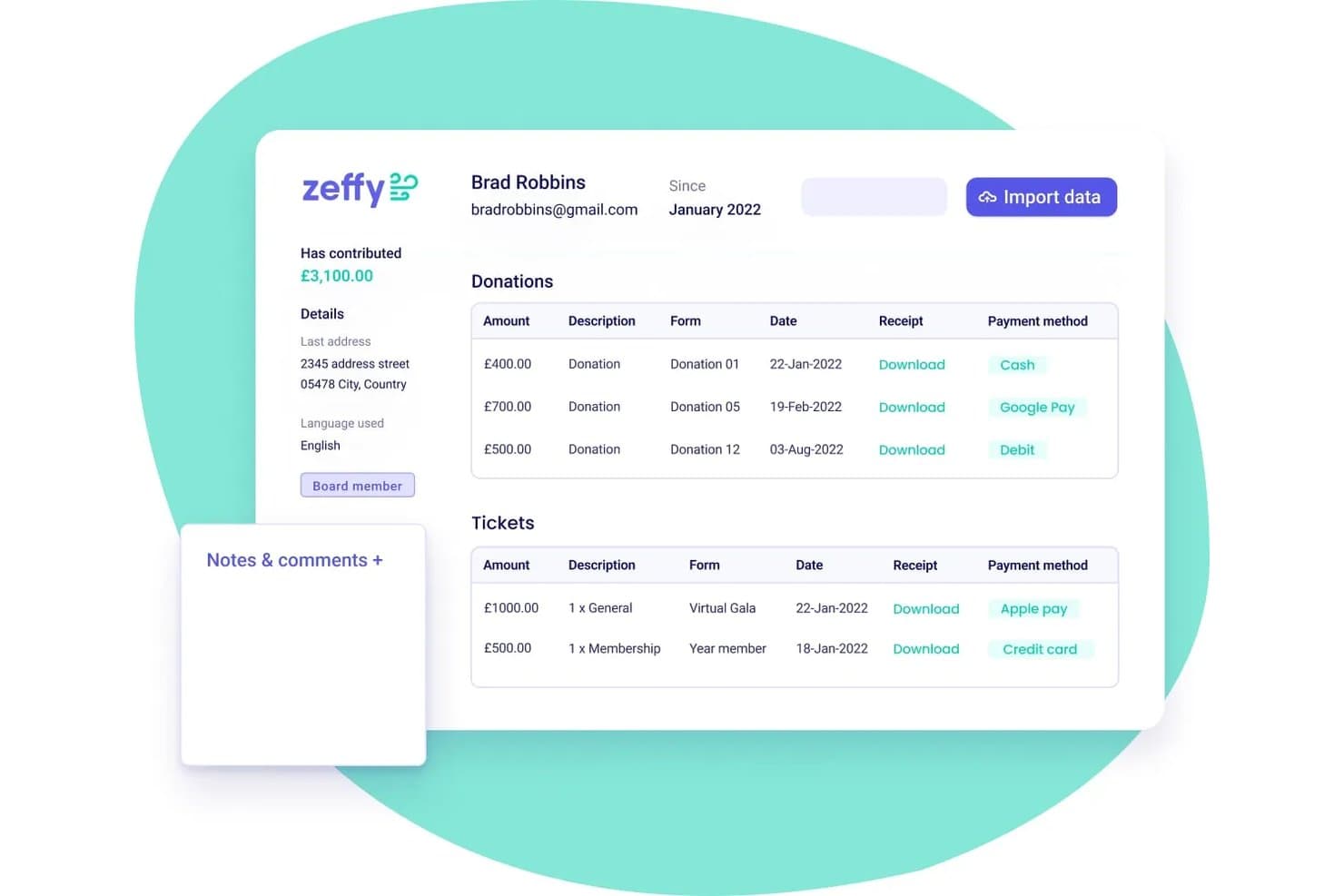
Zeffy tracks donor history, donations, and tickets in one profile. Zeffy is a nonprofit CRM and fundraising platform that brings together donor management, donation forms, ticketing, peer-to-peer campaigns, auctions, memberships, and email outreach in one zero-fee system.
Who Is Zeffy Best For?
Zeffy is a strong fit for small-to-mid-sized nonprofits and ministries that want to run fundraising campaigns, manage donor records, and process donations without paying platform or transaction fees.
Why I Picked Zeffy
I picked Zeffy as one of the best because no other platform on my list lets your ministry run donation campaigns, sell event tickets, manage peer-to-peer fundraising, and track donor records without paying a single platform or processing fee. I especially like that peer-to-peer campaigns roll up individual and team fundraising pages into one shared goal, with a live leaderboard your congregation can rally around. Donor records pull in giving history, pledges, memberships, and event registrations automatically, so your team sees the full picture in one place.
Zeffy Key Features
- Unified supporter records: Each contact profile pulls together donations, event tickets, memberships, shop orders, and peer-to-peer activity in one place.
- Saved contact filters: Segment donors by giving history, campaign, or custom properties and save filters as lists that update automatically as contacts qualify.
- QuickBooks Online sync: Zeffy pushes each payout to QuickBooks with a line-by-line breakdown by campaign or fund, mapped to your income accounts.
- Tap to Pay mobile app: Accept card payments, Apple Pay, and Google Pay directly on a smartphone at events, with built-in QR-code attendee check-in.
Zeffy Integrations
Zeffy connects with 1,000+ tools through native integrations, Zapier, and viaSocket, including QuickBooks, WordPress, ChatGPT, Mailchimp, Slack, Google Sheets, and Salesforce. Its public API supports custom integrations, with access to payments, contacts, and campaigns; Zapier is also supported.
Pros and Cons
Pros:
- Campaign and event setup earns reviewer praise
- Donor records connect giving, events, memberships
- Peer-to-peer teams rally around shared goals
Cons:
- Volunteer sign-ups require event-form workaround
- Optional checkout contributions confuse some donors
Learn more about Zeffy: Best for schools and small teams
- 30-day free trial available
- From $45/month
Visit WebsiteCustomer Rating:4.7/5
Little Green Light helps track donors and manage fundraising efforts. Little Green Light is a donor management software designed for nonprofits, focusing on managing donor information and tracking interactions. It serves organizations of various sizes, offering tools to analyze engagement and streamline fundraising efforts.
Why I picked Little Green Light: Little Green Light excels in managing donor data efficiently, providing nonprofits with the tools to track interactions and analyze engagement. The platform's intuitive interface and customizable tools cater to a wide range of nonprofit sectors. Users benefit from its transparent pricing and affordable subscription plans. The availability of free webinars and community support further enhances its appeal to nonprofits.
Standout features & integrations:
Features include tools for tracking donor interactions and analyzing engagement, which help your team understand donor behavior. The platform's intuitive interface makes it easy to manage donor data and streamline fundraising. It also offers customizable tools to fit the specific needs of your organization.
Integrations include Mailchimp, QuickBooks, Zapier, PayPal, Stripe, Google Sheets, Constant Contact, Eventbrite, WordPress, and Salesforce.
Pros and Cons
Pros:
- Free webinars available
- Supports various nonprofit sectors
- Transparent pricing
- Customizable tools
- Intuitive interface
Cons:
- Requires internet access
- Occasional data syncing issues
- Initial setup complexity
- Basic reporting options
- Limited advanced features
Learn more about Little Green Light: 3Best for custom nonprofit modules
Odoo
- Free plan + free trial + free demo available
- From $31.10/user/month (billed annually)
Visit WebsiteCustomer Rating:4.2/5
Odoo offers modular tools for CRM, accounting, and project tracking. Odoo's nonprofit modules are part of a comprehensive suite designed to cater to various nonprofit needs, including CRM, accounting, and project management. It serves organizations looking for a customizable and scalable solution to manage their operations efficiently.
Why I picked Odoo (Nonprofit Modules): Odoo's strength lies in its modular flexibility, allowing nonprofits to tailor the platform to their specific needs. You can add or remove modules like CRM, accounting, and project management as your organization grows. The built-in tools for donor management and fundraising are versatile, supporting a range of nonprofit activities. Its open-source nature provides you with the ability to customize features extensively.
Standout features & integrations:
Features include comprehensive project management tools that help your team organize tasks and deadlines. The platform also offers accounting modules to manage financial operations seamlessly. Additionally, you can utilize donor management tools to track and engage with supporters effectively.
Integrations include PayPal, Stripe, QuickBooks, Google Drive, Microsoft Office 365, Slack, Mailchimp, Salesforce, WooCommerce, and Zapier.
Pros and Cons
Pros:
- Versatile donor management
- Open-source accessibility
- Scalable for growing organizations
- Extensive customization options
- Modular flexibility
Cons:
- Requires internet access
- Occasional module compatibility issues
- Initial setup complexity
- Learning curve for new users
- Requires technical expertise
Learn more about Odoo: Best for peer to peer fundraising
- 30-day free trial + free plan available
- From $29/month (billed annually)
Visit WebsiteCustomer Rating:4.7/5
Givebutter offers fundraising, donor tools, events, and payment features. Givebutter is a nonprofit CRM providing a user-friendly fundraising platform for organizations looking to enhance donor management and engagement. It serves nonprofits of all sizes by offering tools for marketing, event management, and payment processing.
Why I picked Givebutter: Givebutter excels with its modern fundraising tools, including customizable donation forms and event management capabilities. It supports various payment methods like Venmo and text-to-donate, which cater to diverse donor preferences. The platform's advanced automation and donor insights allow your team to personalize engagement strategies effectively. Its built-in CRM helps track donor activity, making Givebutter a comprehensive solution for fundraising needs.
Standout features & integrations:
Features include advanced automation for managing donor interactions, customizable donation forms that enhance fundraising efforts, and event management tools to organize and execute successful events. The platform supports multiple payment methods, including Venmo and text-to-donate, to cater to your donors' preferences. Additionally, it offers donor insights to help you understand and engage with your supporters better.
Integrations include Salesforce, Mailchimp, Zapier, QuickBooks, Google Sheets, PayPal, Stripe, Slack, Eventbrite, and HubSpot.
Pros and Cons
Pros:
- Mobile access to features
- Built-in CRM for donor tracking
- Customizable engagement strategies
- Supports Venmo donations
- High-converting donation forms
Cons:
- Some features need refinement
- Requires internet access
- Learning curve for new users
- Occasional integration issues
- Limited advanced analytics
Learn more about Givebutter: Best for churches and faith groups
- 15-day free trial
- From $39.50/month (billed annually)

Aplos Donor Management helps churches track funds and engage donors. Aplos Donor Management is a cloud-based software designed for nonprofits and churches, focusing on fund accounting and donor engagement. It provides tools for tracking funds, managing transactions, and generating customizable reports.
Why I picked Aplos Donor Management: Aplos is notable for its focus on fund accounting, providing nonprofits with transparent financial management tools. The software's customizable reporting and automated donation processing improve your team's efficiency. With features like personalized donor communications and real-time fundraising tracking, Aplos enhances donor engagement. Its comprehensive support, including webinars and a support center, ensures you can maximize the software's potential.
Standout features & integrations:
Features include automated donation processing to streamline your financial tasks. The platform offers personalized donor communications to improve engagement. Real-time fundraising tracking helps your team monitor progress and make informed decisions.
Integrations include Keela, QuickBooks, PayPal, Stripe, Mailchimp, Constant Contact, Eventbrite, Salesforce, Google Analytics, and Xero.
Pros and Cons
Pros:
- Comprehensive support resources
- Personalized donor communications
- Real-time fundraising tracking
- Automated donation processing
- Strong fund accounting capabilities
Cons:
- Occasional integration issues
- Some learning curve
- Requires internet access
- Limited advanced features
- Initial setup complexity
Learn more about Aplos Donor Management: Best for donor and event tracking
- Free demo available
- From $99/month (billed annually)

Neon CRM helps track supporters, donations, and event activity. Neon CRM is a cloud-based tool that helps organizations manage fundraising, communications, and donor data in one place. It’s built for teams that need help keeping track of supporters, donations, and events.
Why I picked Neon CRM: Neon CRM helps your team manage donor and event data in a single system. You can track online and offline gifts, build custom reports, and run email campaigns tied to your contact records. It also includes tools for managing ticketed events, peer-to-peer fundraising, and volunteer activities. These features work together to help you keep up with every part of supporter engagement. If your work involves a lot of event planning and donor follow-ups, this setup keeps things organized.
Standout features & integrations:
Features include a built-in membership management tool that lets you handle renewals and benefits without leaving the platform. You can create online forms for donations, events, and surveys using a drag-and-drop editor. The system also logs every supporter interaction automatically, so your team always has the latest history.
Integrations include QuickBooks, Constant Contact, Mailchimp, Eventbrite, DonorSearch, Double the Donation, QuickBooks Online, Zapier, TrueGivers, and Gmail.
Pros and Cons
Pros:
- Handles ticketed and free events
- Custom reports update in real time
- Easy to set up peer campaigns
- Built-in tools for volunteer management
- Tracks both online and offline gifts
Cons:
- Needs better layout customization
- Setup takes longer without support
- Some tools feel buried in menus
- Limited options for dashboard views
- Can take time to learn workflows
Learn more about Neon CRM:

CiviCRM helps NGOs manage donors and automate admin tasks. CiviCRM is an open-source CRM system designed for non-profits, NGOs, and advocacy organizations. It helps manage donor information and automate administrative tasks for a wide range of users.
Why I picked CiviCRM: CiviCRM is unique in its ability to manage a large volume of donor data efficiently. It integrates with platforms like WordPress and Drupal, allowing your team to centralize communication efforts. Its open-source nature means you can customize it to fit your specific needs. The flexibility in hosting options further enhances its adaptability for different organizations.
Standout features & integrations:
Features include automated administrative tasks, centralized communication management, and extensive documentation for user support. It also offers customizable options through its open-source nature, making it adaptable to your specific needs. Additionally, CiviCRM provides a partner ecosystem to help you maximize its use.
Integrations include WordPress, Drupal, Joomla, Backdrop, Mailchimp, QuickBooks, Constant Contact, Eventbrite, PayPal, and Stripe.
Pros and Cons
Pros:
- Integrates with popular platforms
- Customizable features
- Extensive documentation
- Large user community
- Open-source flexibility
Cons:
- Frequent updates needed
- Steeper learning curve
- Complex setup process
- Limited customer support
- Requires technical expertise
Learn more about CiviCRM: Best for all in one donor management
- Free demo available
- Pricing upon request

CharityEngine offers donor, event, and advocacy tools for all org sizes. CharityEngine is an all-in-one nonprofit CRM designed to serve organizations of various sizes, including educational, healthcare, and social justice groups. It provides tools for donor management, advocacy, case management, email marketing, and event management, all aimed at improving fundraising and operational efficiency.
Why I picked CharityEngine: CharityEngine excels in offering a 360-degree view of donor interactions, which is crucial for strategic fundraising. Its advanced marketing automation and custom donation forms help tailor campaigns to your audience. The in-house payment processing feature ensures secure transactions, while robust reporting capabilities provide insights to guide your strategies. The platform's centralized system reduces the need for multiple integrations, saving you time and resources.
Standout features & integrations:
Features include advanced marketing automation that helps your team personalize outreach efforts. The platform provides custom donation forms to enhance fundraising campaigns. Additionally, its in-house payment processing ensures secure and efficient transactions.
Integrations include Salesforce, QuickBooks, Mailchimp, Constant Contact, PayPal, Stripe, Eventbrite, Google Analytics, Microsoft Dynamics, and WordPress.
Pros and Cons
Pros:
- In-house payment processing
- Customizable donation forms
- Advanced marketing automation
- Centralized platform
- Comprehensive donor management
Cons:
- Occasional integration issues
- Limited customization options
- Learning curve for complex features
- Requires internet access
- No disclosed pricing information
Learn more about Charity Engine: Best for managing memberships
- Free plan + 14-day trial + demo available
- From $119/month

Springly helps nonprofits manage members, events, and fundraising. Springly is an all-in-one nonprofit management software designed to assist organizations of all sizes with efficient membership management, fundraising, and event coordination. It caters to nonprofits looking to streamline operations and enhance member engagement through comprehensive tools for communication and data organization.
Why I picked Springly: Springly excels in managing memberships with features that simplify donor and volunteer tracking. Its tools for organizing contacts and managing events are tailored for nonprofits seeking to enhance engagement with their communities. The platform's easy data import and automatic updates ensure your team can maintain accurate records without hassle. Additionally, Springly's communication tools help boost member involvement and support fundraising efforts.
Standout features & integrations:
Features include donor and volunteer tracking, which helps your team maintain organized contact lists. The platform offers tools for payment processing and communication to enhance engagement with your community. It also includes fundraising and event management features to support your organization's activities.
Integrations include QuickBooks, PayPal, Stripe, Mailchimp, Google Analytics, Eventbrite, Zapier, Salesforce, Xero, and Slack.
Pros and Cons
Pros:
- High member engagement
- Customizable contact information
- Automatic updates
- Comprehensive event management
- Easy data import
Cons:
- Occasional integration issues
- Learning curve for new users
- Some features need refinement
- Requires internet access
- Limited advanced analytics
Learn more about Springly:

Tessitura is built for ticketing and CRM in arts and culture groups. Tessitura is a CRM and ticketing software tailored for arts and culture organizations, focusing on ticketing, fundraising, and customer relationship management. It serves theaters, museums, and other cultural institutions by providing tools to enhance patron engagement and streamline operations.
Why I picked Tessitura: Tessitura is designed specifically for arts and culture organizations, offering features that integrate ticketing and fundraising into a single platform. Its ability to manage memberships and subscriptions is key for organizations seeking to enhance patron loyalty. The software's comprehensive reporting tools provide insights into audience behavior, helping you tailor your strategies. Tessitura's unified platform reduces the need for multiple systems, saving your team time and effort.
Standout features & integrations:
Features include integrated ticketing and fundraising tools that help your team manage patron relationships. The software offers comprehensive reporting tools to provide insights into audience behavior. It also includes membership and subscription management to enhance patron loyalty and engagement.
Integrations include Salesforce, Mailchimp, Google Analytics, QuickBooks, Eventbrite, PayPal, Stripe, Slack, Microsoft Dynamics, and WordPress.
Pros and Cons
Pros:
- Membership management capabilities
- Membership management capabilities
- Membership management capabilities
- Comprehensive reporting tools
- Integrated ticketing and fundraising
Cons:
- No disclosed pricing information
- No disclosed pricing information
- No disclosed pricing information
- No disclosed pricing information
- No disclosed pricing information
Learn more about Tessitura:
Alte programe CRM pentru organizații nonprofit
Iată câteva opțiuni suplimentare de programe CRM pentru organizații nonprofit care nu au ajuns pe lista mea scurtă, dar care merită totuși verificate:
- 11VirtuousBest for large donor relationship tools
- 12StratusLIVEBest for Microsoft 365 integration
- 13KeelaBest for small nonprofits on budgets
- 14BloomerangBest for donor retention insights
- 15KindfulBest for intuitive user interface
- 16Salesforce Best for scalable solutions
- 17BlackbaudBest for large organizations
- 18DonorPerfectBest for customizable reports
Related Reviews
How I Evaluate Nonprofit CRM Software
I split my evaluation into baseline requirements—like member household tracking and donation statements—and differentiators that separate church-ready platforms from generic nonprofit tools.
Core Functionality (Table Stakes For This List)
When I'm selecting tools for my list, I rank each one on a scale from 0 (does not offer the functionality) to 5 (excels in this area) for each core functionality listed below. Then, I calculate the tool's total score into a percentage. Each tool needs to achieve a minimum total score of 55% to be considered for inclusion.
- Member & Household Management: I look for platforms that link individuals into family units, track attendance across services, and log spiritual milestones like baptisms or membership classes.
- Donation & Contribution Tracking: Each tool should record tithes, pledges, and designated fund gifts while generating year-end giving statements that members can use at tax time.
- Groups & Ministry Organization: I check whether you can create rosters for small groups, assign volunteer roles within ministry teams, and give group leaders access to manage their own members.
- Multi-Channel Communication: Reaching congregants through email, SMS, and app notifications matters, so I evaluate targeting options like filtering by group, attendance, or giving history.
- Event Registration & Check-In: From VBS signup forms to Sunday morning child check-in with printed name tags, I look at how each platform handles registration workflows and on-site arrivals.
- Online Giving Integration: I evaluate whether giving tools connect directly to member profiles, support recurring gifts and multi-fund designations, and offer mobile-friendly options like text-to-give.
Once I have a list of tools that meet this criteria, I consider what sets each platform apart.
Differentiating Factors (What Sets Vendors Apart)
Here's how I compare and contrast different vendors:
Standout Features
A branded church mobile app gives members one hub for sermons, giving, and event RSVPs. I compare how platforms handle this member-facing experience. Children's check-in is another area I evaluate closely—secure parent-child tag matching with allergy alerts and printed labels makes a real difference on Sunday mornings. Discipleship pathway tracking also matters because it lets pastors follow a congregant's journey through baptism, membership classes, and small group involvement.
Beyond Features
Pricing structure matters for churches running on tithes. I look at whether platforms offer attendance-based tiers or free plans for church plants with tight budgets. Integration with accounting tools like QuickBooks or Aplos is another factor I consider, since reconciling designated funds between your CRM and your books is a weekly task for most finance teams. I also evaluate onboarding support—migrating years of giving history and member records from spreadsheets or a legacy system can make or break your first month on a new platform.
Cum să alegeți un program CRM pentru organizații nonprofit
Este ușor să vă pierdeți în liste lungi de funcții și structuri complexe de prețuri. Pentru a vă ajuta să rămâneți concentrat pe parcursul procesului dumneavoastră unic de selectare a programului, iată o listă de verificare cu factorii de care trebuie să țineți cont:
| Factor | Aspecte de luat în considerare |
|---|---|
| FactorScalabilitate | Aspecte de luat în considerareVa evolua programul odată cu organizația dumneavoastră? Luați în considerare creșterea viitoare și asigurați-vă că instrumentul poate gestiona fără probleme volume mai mari de date și de utilizatori. |
| FactorIntegrări | Aspecte de luat în considerareSe conectează la instrumentele pe care le utilizați deja? Verificați compatibilitatea cu sistemele actuale, precum e-mailul, procesatoarele de plăți și platformele de gestionare a evenimentelor. |
| FactorPosibilități de personalizare | Aspecte de luat în considerarePuteți adapta programul pentru a răspunde nevoilor dumneavoastră? Căutați opțiuni pentru adaptarea fluxurilor de lucru și a interfețelor la procesele pe care le utilizați. |
| FactorUșurință în utilizare | Aspecte de luat în considerareEste programul intuitiv pentru echipa dumneavoastră? Evitați curbele de învățare abrupte alegând un instrument cu o interfață ușor de utilizat și o navigare clară. |
| FactorImplementare și integrare inițială | Aspecte de luat în considerareCât de repede puteți începe să îl utilizați? Luați în considerare timpul și resursele necesare pentru configurare, instruire și migrarea datelor. |
| FactorCost | Aspecte de luat în considerareSe încadrează în bugetul dumneavoastră? Evaluați planurile tarifare, inclusiv taxele ascunse sau costurile suplimentare pentru funcții și asistență extra. |
| FactorMăsuri de securitate | Aspecte de luat în considerareCum vă protejează datele? Asigurați-vă că programul oferă criptare solidă, actualizări regulate și respectă standardele de protecție a datelor. |
| FactorDisponibilitatea asistenței | Aspecte de luat în considerarePuteți obține ajutor atunci când aveți nevoie? Căutați un serviciu de asistență pentru clienți prompt, disponibil prin diverse canale, precum chat, e-mail și telefon. |
Ce este un program CRM pentru organizații nonprofit?
Un program CRM pentru organizații nonprofit este un instrument conceput pentru a ajuta organizațiile să gestioneze relațiile cu donatorii, eforturile de strângere de fonduri și comunicarea. Profesioniști precum responsabilii de dezvoltare, specialiștii în strângerea de fonduri și administratorii utilizează de obicei aceste instrumente pentru a spori implicarea și a îmbunătăți fidelizarea donatorilor. Funcții precum urmărirea donatorilor, gestionarea evenimentelor și instrumentele de comunicare ajută la organizarea datelor, planificarea campaniilor și menținerea relațiilor. În general, aceste instrumente oferă eficiență și organizare pentru susținerea misiunilor organizațiilor nonprofit.
Funcțiile programelor CRM pentru organizații nonprofit
Atunci când selectați un program CRM pentru organizații nonprofit, urmăriți următoarele funcții esențiale:
- Urmărirea donatorilor: Vă ajută să păstrați evidențe detaliate ale interacțiunilor și contribuțiilor donatorilor, ceea ce contribuie la construirea unor relații solide.
- Gestionarea evenimentelor: Sprijină planificarea și desfășurarea evenimentelor, permițându-vă să gestionați eficient logistica și să urmăriți participarea.
- Instrumente de comunicare: Facilitează interacțiunea constantă cu donatorii prin e-mailuri, buletine informative și mesaje personalizate.
- Automatizarea strângerii de fonduri: Simplifică procesul de donație și automatizează sarcini precum trimiterea chitanțelor și a mesajelor de mulțumire, economisind timp și efort.
- Rapoarte și analize: Oferă informații despre performanța activităților de strângere de fonduri și comportamentul donatorilor, contribuind la luarea unor decizii informate.
- Tablouri de bord personalizabile: Vă permit să adaptați interfața la nevoile și fluxurile de lucru specifice organizației dumneavoastră.
- Gestionarea voluntarilor: Ajută la organizarea, programarea și comunicarea cu voluntarii pentru a le îmbunătăți experiența.
- Procesarea plăților: Asigură gestionarea sigură și eficientă a donațiilor prin diverse metode de plată.
- Gestionarea membrilor: Ajută la urmărirea statutului membrilor, a reînnoirilor și a beneficiilor, sprijinind implicarea și fidelizarea acestora.
- Securitatea datelor: Protejează datele sensibile ale donatorilor și ale organizației prin criptare și conformitatea cu standardele de protecție a datelor.
Beneficiile software-ului CRM pentru organizații nonprofit
Implementarea software-ului CRM pentru organizații nonprofit oferă mai multe beneficii echipei și organizației dumneavoastră. Iată câteva dintre avantajele de care vă puteți bucura:
- Relații îmbunătățite cu donatorii: Prin urmărirea interacțiunilor și contribuțiilor, puteți construi legături mai solide cu susținătorii dumneavoastră.
- Activități de strângere de fonduri mai eficiente: Funcțiile de automatizare economisesc timp pentru sarcini precum trimiterea chitanțelor și gestionarea campaniilor, permițându-vă să vă concentrați asupra strategiei.
- Planificarea îmbunătățită a evenimentelor: Instrumentele de gestionare a evenimentelor ajută la organizarea și desfășurarea unor evenimente de succes, stimulând participarea și implicarea.
- Luarea unor decizii mai bune: Rapoartele și analizele oferă informații despre comportamentul donatorilor și performanța activităților de strângere de fonduri, orientându-vă strategiile.
- Securitate sporită: Funcțiile de securitate a datelor protejează informațiile sensibile, asigurând conformitatea cu standardele de protecție.
- Comunicare simplificată: Instrumentele de comunicare mențin donatorii implicați prin mesaje și actualizări personalizate, consolidând loialitatea.
Costurile și prețurile software-ului CRM pentru organizații nonprofit
Selectarea software-ului CRM pentru organizații nonprofit necesită înțelegerea diferitelor modele de preț și planuri disponibile. Costurile variază în funcție de funcții, dimensiunea echipei, suplimente și alți factori. Tabelul de mai jos prezintă pe scurt planurile obișnuite, prețurile lor medii și funcțiile incluse în mod normal în soluțiile software CRM pentru organizații nonprofit:
Tabel comparativ al planurilor pentru software CRM destinat organizațiilor nonprofit
| Tipul planului | Preț mediu | Funcții obișnuite |
|---|---|---|
| Tipul planuluiPlan gratuit | Preț mediu$0 | Funcții obișnuiteUrmărirea de bază a donatorilor, instrumente de comunicare limitate și raportare de bază. |
| Tipul planuluiPlan individual | Preț mediu$10-$30/utilizator/lună | Funcții obișnuiteUrmărirea avansată a donatorilor, gestionarea evenimentelor și instrumente standard de comunicare. |
| Tipul planuluiPlan pentru companii | Preț mediu$50-$100/utilizator/lună | Funcții obișnuiteRapoarte complete, automatizarea strângerii de fonduri și tablouri de bord personalizabile. |
| Tipul planuluiPlan pentru întreprinderi | Preț mediu$150-$300/utilizator/lună | Funcții obișnuiteSet complet de funcții, asistență dedicată și măsuri avansate de securitate. |
Întrebări frecvente despre software-ul CRM pentru organizații nonprofit
Iată câteva răspunsuri la întrebările frecvente despre software-ul CRM pentru organizații nonprofit:
Cum știu dacă organizația noastră nonprofit este pregătită să schimbe sistemul CRM?
Dacă baza de date actuală a donatorilor este greu de utilizat, personalul se bazează pe foi de calcul sau rapoartele sunt dificil de generat, poate fi momentul să evaluați un software CRM nou. Evaluați-vă nevoile și stabiliți dacă optimizarea sistemului actual sau schimbarea acestuia reprezintă alegerea potrivită pentru organizația dumneavoastră.
Cum se desfășoară procesul de selectare sau migrare a unui CRM?
Procesul implică stabilirea obiectivelor, cercetarea soluțiilor software, curățarea datelor, demonstrații oferite de furnizori și planificarea implementării. Veți beneficia de asistență de specialitate în fiecare etapă, asigurând o tranziție fără probleme și fără a vă copleși cu aspectele tehnice.
Ne puteți ajuta să ne curățăm și să ne organizăm datele?
Desigur! Ajutăm organizațiile nonprofit să își auditeze, să își curețe și să își structureze datele pentru a îmbunătăți segmentarea, raportarea și rezultatele activităților de strângere de fonduri. Organizarea corectă a datelor poate spori semnificativ eficiența CRM-ului dumneavoastră.
Oferiți instruire pentru echipele organizațiilor nonprofit?
Da! Oferim instruire CRM personalizată pentru personal, membri ai consiliului de administrație și voluntari, permițându-i echipei dumneavoastră să gestioneze cu încredere baza de date. Sunt disponibile și cursuri la cerere concepute pentru profesioniștii din organizațiile nonprofit.
Unde oferiți servicii? Colaborați cu organizații nonprofit din afara orașului Nashville?
Ne aflăm în Middle Tennessee, dar colaborăm cu organizații nonprofit din întreaga țară, atât virtual, cât și la sediul acestora. Indiferent dacă vă aflați în Nashville sau în altă parte a țării, suntem aici pentru a vă ajuta cu nevoile legate de CRM.
Cu ce software CRM lucrați?
Suntem specializați în platforme precum Little Green Light, EveryAction și Raiser's Edge. Totuși, oferim asistență și pentru diverse alte sisteme CRM, asigurându-vă că îl găsiți pe cel care se potrivește cel mai bine nevoilor și bugetului echipei dumneavoastră.