

Instrumentele AI pentru administrarea bisericii sunt platforme digitale care utilizează inteligența artificială pentru a automatiza, organiza și simplifica sarcini de administrare a bisericii, precum comunicarea, programarea, donațiile și implicarea membrilor. Dacă explorați utilizarea inteligenței artificiale pentru biserici, aceste instrumente pot contribui la reducerea sarcinilor administrative, îmbunătățirea coordonării și sprijinirea conducerii bisericii în gestionarea mai eficientă a activităților de slujire. Multe soluții includ funcții precum asistenți AI, chatboturi AI și alte sisteme AI care ajută la crearea de conținut, gestionarea rețelelor sociale și actualizarea site-ului bisericii. De asemenea, acestea pot sprijini îngrijirea pastorală, ucenicia și studiul biblic, permițând în același timp echipelor să genereze idei, să creeze materiale devoționale generate de AI și să optimizeze operațiunile zilnice. În această listă veți găsi soluții de încredere concepute pentru a răspunde nevoilor unice ale liderilor bisericii, astfel încât să vă puteți concentra asupra păstoririi congregației, menținând în același timp operațiunile fluente.
Why Trust Our Software Recommendations
6,700+
Reviews
20
Industry experts
16+
Evaluation factors
14
Years
Our team has been testing and reviewing software since 2012. As church leaders ourselves, we know how difficult—and important—it is to choose the right software.
For this guide, we evaluated tools using hands-on testing and independent research, scoring tools using our selection criteria.
Our reviews reflect our human editorial judgment, not a sales pitch.
Tabel comparativ: instrumente AI pentru administrarea bisericii
Acest tabel comparativ sintetizează detaliile privind prețurile pentru selecția mea de top de instrumente AI pentru administrarea bisericii:
Sorted by: Default
| Tool | Starting Price | Website | |
|---|---|---|---|
Best for privacy-first Q&A handling | Not rated | $99/month 60-day free trial available | Website |
Best for automated church member management | 4.6 out of 5 | $12/month Free plan available | Book Demo |
Best for digital church giving | 4.8 out of 5 | $72/month Free plan + 30-day trial + demo available | Website |
Best for service and volunteer scheduling | 4.2 out of 5 | $15/month Free plan + 30-day free trial + free demo available | Website |
Best for digital giving and donor insights | 4.0 out of 5 | Pricing upon request Free demo available | Website |
Best for searchable church member databases | Not rated | $73.32/month Free demo available | Website |
Best for AI-powered communication assistant | Not rated | $30/month Free demo available | Website |
Best for integrated church member and giving management | Not rated | Pricing upon request Free demo available | Website |
Best for AI -powered church administration | Not rated | $60/month Free plan + free demo available | Website |
Best for AI -assisted sermon preparation | Not rated | Pricing upon request Free plan available | Website |


Recenzii ale instrumentelor AI pentru administrarea bisericii
Mai jos sunt rezumatele mele detaliate ale instrumentelor AI pentru administrarea bisericii care au ajuns în selecția mea scurtă. Recenziile mele oferă o analiză detaliată a funcțiilor, capacităților și integrărilor fiecărei platforme, pentru a vă ajuta să o găsiți pe cea mai potrivită pentru dumneavoastră.
 Best for privacy-first Q&A handling
- 60-day free trial available
- From $99/month
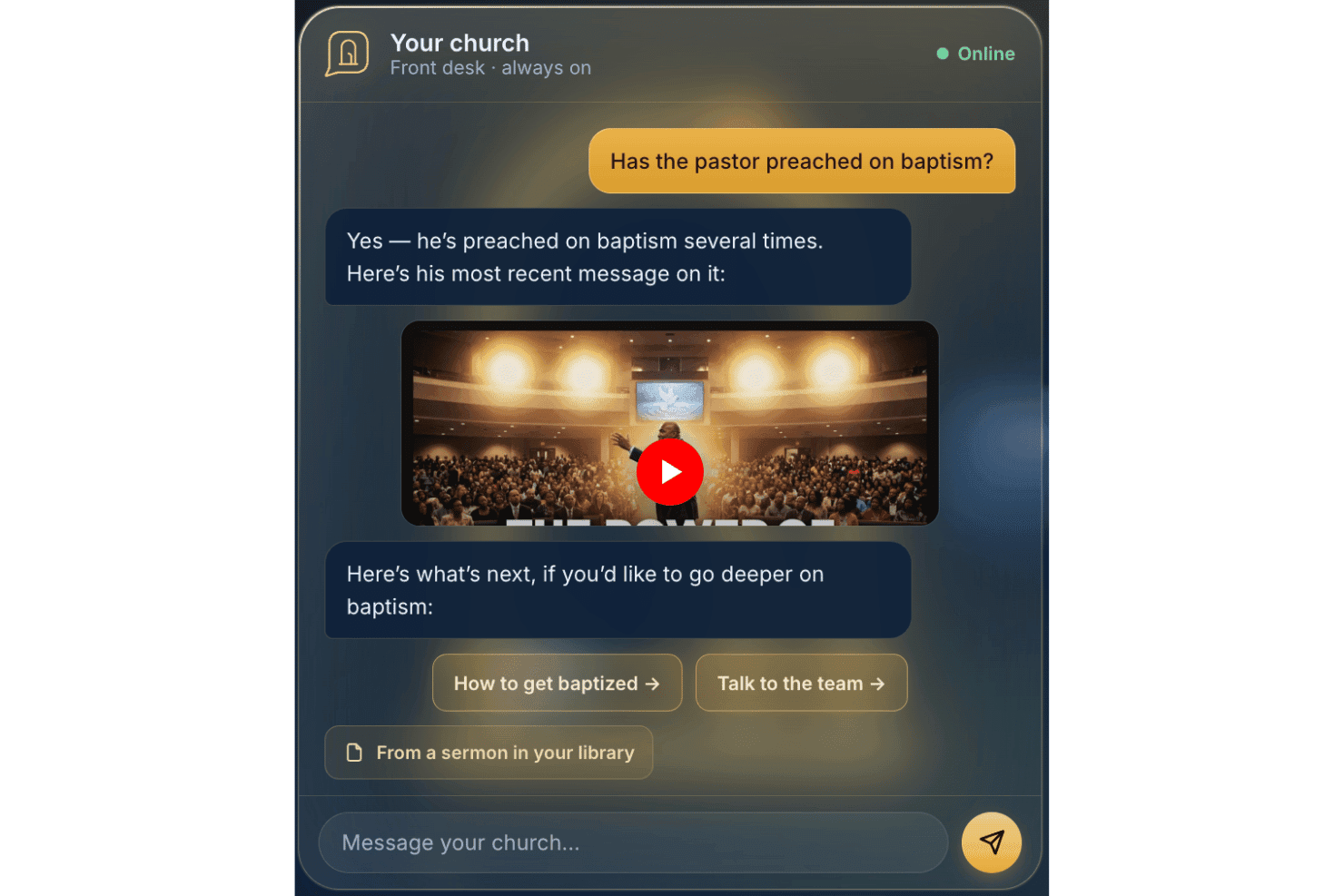
AskMyChurch offers a 24/7 AI-powered church answering service. AskMyChurch is an AI chatbot for church websites that answers visitor and member questions using the church's own published content, sermons, and videos, with built-in crisis routing, bilingual support, and anonymous-by-default privacy.
Who Is AskMyChurch Best For?
Churches of any size that want to answer visitor questions after hours without collecting personal data or requiring staff to monitor a chat inbox.
Why I Picked AskMyChurch
I picked AskMyChurch because its anonymous-by-default design genuinely stands out in church AI tools. Visitors can ask sensitive questions about grief, faith doubts, or mental health without creating accounts or being tracked. What I find particularly important is the hard crisis gate: when distress signals appear, it routes to 988 and the Crisis Text Line before any AI response is generated, which is a level of pastoral care responsibility I haven't seen built directly into other church chatbots.
AskMyChurch Key Features
- Canon (pastor's voice): Answers are sourced directly from the pastor’s sermons and cite the exact time the words were spoken.
- Dual-pass grounding check: Every response is verified twice against church content to prevent AI-generated hallucinations.
- Learning Loop: Weekly reports surface unanswered questions and recurring themes for church admins to review and address.
- Topic control: Admins can disable specific topics or redirect visitors using plain-English instructions in the dashboard.
AskMyChurch Integrations
Native integrations are not publicly documented. An API for custom integrations is not advertised.
Pros and Cons
Pros:
- AI highlights unanswered visitor topics
- Answers are grounded in pastor’s sermons
- Adapts responses to reflect church branding
Cons:
- Cannot manage donations or giving campaigns
- No member data or attendance management
Learn more about AskMyChurch: Best for automated church member management
- Free plan available
- From $12/month
Visit WebsiteCustomer Rating:4.6/5
ChMeetings event scheduler listing recurring weekly group meetings. ChMeetings offers a digital platform designed specifically for churches to manage members, events, and communication. It’s a practical choice for pastors and ministry leaders who want to centralize administrative tasks and keep track of church engagement. With features tailored for faith communities, ChMeetings helps streamline daily operations and support ministry growth.
Who Is ChMeetings Best For?
ChMeetings is a strong fit for church administrators and ministry leaders who need to manage member data, events, and communications in one place.
Why I Picked ChMeetings
I chose ChMeetings because it offers dedicated member management and event tracking tools designed for church contexts. The platform lets you organize member profiles, attendance, and group participation, making it easier to keep up with your congregation’s involvement. I also appreciate how event tracking is built in, so you can schedule, promote, and monitor church activities all in one place. These features help church leaders stay organized and responsive to the needs of their community.
ChMeetings Key Features
Some other features that make ChMeetings useful for church administration include:
- Mobile app access: Manage church data and communication from iOS and Android devices.
- Mass messaging: Send emails, SMS, or push notifications to individuals or groups.
- Donation tracking: Record, categorize, and report on giving and contributions.
- Custom forms: Create and distribute forms for registrations, surveys, or volunteer sign-ups.
ChMeetings Integrations
Integrations include Stripe, PayPal, Bluesnap, Paystack, Mailchimp, Twilio, SMS Global, Clickatell, Eazismspro, and more.
Pros and Cons
Pros:
- Built-in donation and pledge tracking
- Event check-in with QR code scanning
- Member directory supports custom fields and tags
Cons:
- No sermon or media library management
- No built-in worship planning tools
Learn more about ChMeetings: Best for digital church giving
- Free plan + 30-day trial + demo available
- From $72/month
Visit WebsiteCustomer Rating:4.8/5
Tithely app builder with sermon, events, and giving sections editor. If you’re looking for a digital giving and engagement platform built for churches, Tithely offers a focused solution. It’s designed for faith communities that want to simplify online giving, manage events, and connect with members from one dashboard. Tithely helps church leaders handle donations, communication, and administrative tasks in a way that fits modern ministry needs.
Who Is Tithely Best For?
Tithely suits small to mid-sized churches and ministries that want to centralize giving, communication, and member engagement.
Why I Picked Tithely
What drew me to Tithely is how it brings together giving, communication, and engagement tools in one platform designed specifically for churches. Its all-in-one approach means you can manage online and mobile giving, event registration, and member messaging without juggling multiple systems. I see real value in features like automated donation tracking and built-in text and email communication, which help streamline both financial and relational aspects of church administration. For ministries that want a unified solution to handle both donations and member engagement, Tithely stands out as a purpose-built choice.
Tithely Key Features
Some other features that make Tithely useful for church administration include:
- Custom church app builder: Create a branded mobile app for your church to share sermons, events, and announcements.
- Event management tools: Organize, promote, and track attendance for church events and activities.
- Volunteer management: Schedule, communicate with, and coordinate volunteers for various ministries and services.
- Digital check-in system: Track attendance and securely check in children or members for services and events.
Tithely Integrations
Integrations include QuickBooks, RockRMS, The StudioC, Engiven, Elvanto, Salesforce, MinistryPlatform, Shelby Systems, FellowshipOne, and more.
Pros and Cons
Pros:
- Digital check-in system for children’s ministry
- Event registration with attendee tracking included
- Custom church app builder for member engagement
Cons:
- Donation processing fees are higher than some
- No built-in accounting or payroll features
 Best for service and volunteer scheduling
- Free plan + 30-day free trial + free demo available
- From $15/month
Visit WebsiteCustomer Rating:4.2/5
Planning Center dashboard with scheduling, groups, registrants, and giving. If you’re looking for a flexible way to manage church operations, Planning Center offers a suite of modular tools designed for ministry teams of all sizes. It’s especially useful for churches that want to customize their workflows for events, volunteers, and communication. Planning Center helps you centralize scheduling, track attendance, and coordinate service planning in one place.
Who Is Planning Center Best For?
Planning Center suits churches of any size that need modular tools to manage events, volunteers, and member engagement.
Why I Picked Planning Center
What stands out to me about Planning Center is its modular approach, which lets you choose only the tools your church actually needs. I appreciate how you can add or remove modules for things like service planning, giving, check-ins, and groups, so your setup can grow or change as your ministry does. This flexibility means you’re not locked into a one-size-fits-all system, and you can tailor workflows for different teams or ministries. For churches that want to adapt their administration as needs shift, Planning Center’s modular design makes it a strong fit.
Planning Center Key Features
Some other features that make Planning Center useful for church administration include:
- People database: Manage detailed member profiles, track engagement, and organize households in one place.
- Automated workflows: Set up step-by-step processes for follow-ups, onboarding, or volunteer management.
- Resource booking: Reserve rooms, equipment, and facilities for events or meetings directly within the platform.
- Email and text messaging: Send targeted communications to individuals, groups, or your entire congregation.
Planning Center Integrations
Integrations include BoxCast, Checkr, Mailchimp, PraiseCharts, RehearsalMix, SongSelect, Clearstream, MinistrySafe, Protect My Ministry, and more.
Pros and Cons
Pros:
- Detailed member profiles with engagement tracking
- Automated workflows for follow-up and onboarding
- Built-in child check-in with security features
Cons:
- Reporting options are limited for custom needs
- No built-in accounting or donation management
Learn more about Planning Center: Best for digital giving and donor insights
- Free demo available
- Pricing upon request
Visit WebsiteCustomer Rating:4/5
Pushpay helps churches manage donations, giving statements, and donor engagement in one platform. Pushpay gives churches a way to manage digital giving and member engagement from one platform. If you’re looking for a solution that connects online donations, event registrations, and communication, Pushpay brings these tools together for your ministry. It’s designed for leaders who want to simplify administrative tasks and strengthen connections with their congregation.
Who Is Pushpay Best For?
Pushpay fits medium to large churches and ministries that need integrated digital giving and engagement tools.
Why I Picked Pushpay
I picked Pushpay because it brings digital giving and engagement into one unified platform, which is a core need for church administration today. The tool lets you manage online donations, recurring giving, and event registrations all in one place, so you don’t have to juggle multiple systems. I also appreciate how Pushpay’s communication tools help you reach your congregation through targeted messages and announcements. These features make it easier to keep your church connected and simplify the administrative side of ministry.
Pushpay Key Features
Some other features that make Pushpay useful for church administration include:
- Mobile app for members: Members can give, register for events, and receive updates directly from their phones.
- Donor management dashboard: Track giving history, manage donor profiles, and generate contribution statements in one place.
- Customizable forms: Create forms for prayer requests, volunteer sign-ups, or surveys tailored to your ministry’s needs.
- Automated receipt and thank-you messaging: Send personalized receipts and thank-you notes automatically after each donation.
Pushpay Integrations
Integrations include Planning Center, QuickBooks, Gusto, MortarStone, Engiven, StudioC, VisitorTap, Checkr, Mailchimp, and Resi.
Pros and Cons
Pros:
- Tracks donor engagement and giving trends
- Offers branded mobile app for congregations
- Supports recurring and one-time digital giving
Cons:
- Some integrations require additional fees
- Requires separate contract for live streaming
Learn more about Pushpay: Best for searchable church member databases
- Free demo available
- From $$73.32/month (billed annually)

Servant Keeper simplifies church administration with tools for giving, membership, and reporting. Servant Keeper offers church leaders a way to organize member data, track attendance, and manage contributions in one place. It’s designed for ministries that want to reduce manual data entry and improve record accuracy. If you’re looking for a solution that helps you keep up with growing administrative demands, Servant Keeper brings automation and clarity to your church office.
Who Is Servant Keeper Best For?
Servant Keeper suits churches and ministries of any size that need centralized member management and contribution tracking.
Why I Picked Servant Keeper
I chose Servant Keeper because it automates member management and reporting, which are central needs for church administration. The platform uses smart tools to track attendance, manage contributions, and generate detailed reports without manual effort. I appreciate how it lets you quickly search, filter, and update member records, making it easier to keep information accurate and up to date. These features help church leaders spend less time on paperwork and more time focusing on ministry.
Servant Keeper Key Features
Some other features that make Servant Keeper useful for church administration include:
- Custom group creation: Build and manage groups for ministries, classes, or events to organize communication and activities.
- Automated email and text messaging: Send targeted messages to individuals or groups directly from the platform.
- Volunteer scheduling: Assign, track, and communicate with volunteers for various church functions and events.
- Child check-in system: Provide a secure check-in and check-out process for children’s ministries and events.
Servant Keeper Integrations
Native integrations are not currently listed.
Pros and Cons
Pros:
- Automates group and volunteer management
- Offers secure child check-in functionality
- Tracks attendance and giving in one place
Cons:
- Lacks built-in online giving processing
- Initial setup can be time-consuming
Learn more about Servant Keeper: Best for AI-powered communication assistant
- Free demo available
- From $30/month

AI Church Now uses AI to simplify church administration, communication, and ministry workflows. If you’re looking for an AI-driven assistant to help manage church operations, Church AI Now offers a focused solution. This tool is designed for pastors and church leaders who want to automate communication, scheduling, and administrative tasks. It’s especially useful for ministries aiming to save time and reduce manual workload with AI-powered features.
Who Is Church AI Now Best For?
Church AI Now suits small to mid-sized churches and ministries that want to automate routine administration and communication tasks with AI.
Why I Picked Church AI Now
What drew me to Church AI Now is its focus on using AI to handle both church administration and communication in one platform. The tool’s AI-powered assistant can draft announcements, respond to member inquiries, and help schedule meetings or events, which directly supports busy church leaders. I also like that it automates repetitive tasks, freeing up time for more pastoral work. These features make it a strong fit for churches looking to modernize their administrative processes with AI-driven support.
Church AI Now Key Features
Some other features that make Church AI Now useful for church administration include:
- Volunteer management tools: Organize, schedule, and communicate with volunteers directly from the platform.
- Document storage and sharing: Upload, store, and share important church documents securely with staff and members.
- Event registration system: Manage sign-ups, RSVPs, and attendee lists for church events and programs.
- Customizable workflow automation: Set up automated processes for tasks like follow-ups, reminders, and approvals.
Church AI Now Integrations
Native integrations are not currently listed.
Pros and Cons
Pros:
- Centralizes document storage for staff access
- Handles volunteer scheduling and reminders
- AI drafts announcements and newsletters automatically
Cons:
- Lacks worship planning or music scheduling
- No built-in giving or donation tools
Learn more about Church AI Now: Best for integrated church member and giving management
- Free demo available
- Pricing upon request

FellowshipOne dashboard with attendance, giving, and interactions charts. If you’re searching for a church management system that prioritizes member engagement and ministry coordination, FellowshipOne is worth considering. It’s designed for churches that want to track attendance, manage groups, and communicate with members from a single platform. FellowshipOne helps address the challenge of keeping congregation data organized and accessible for both staff and volunteers.
Who Is FellowshipOne Best For?
FellowshipOne suits mid-sized to large churches that need advanced tools for managing member engagement and ministry operations.
Why I Picked FellowshipOne
What drew me to FellowshipOne is its focus on advanced member engagement tools, which are essential for churches looking to deepen relationships and track involvement. The platform offers detailed member profiles and group management features, making it easier to organize ministries and follow up with individuals. I also appreciate the built-in communication tools that let you send targeted messages to specific groups or members. These capabilities help churches stay connected with their congregation and ensure that no one falls through the cracks.
FellowshipOne Key Features
- Some other features that make FellowshipOne useful for church administration include:
- Attendance tracking: Monitor attendance for services, events, and small groups with detailed reporting.
- Volunteer management: Schedule, organize, and communicate with volunteers for various ministries and events.
- Contribution tracking: Record, manage, and report on donations and pledges from members.
- Event registration: Set up and manage online event sign-ups, including payment processing and attendee tracking.
FellowshipOne Integrations
Integrations include FellowshipOne Giving, FellowshipOne Financials, Protect My Ministry, High Ground Solutions, and more.
Pros and Cons
Pros:
- Includes built-in volunteer scheduling tools
- Offers automated workflows for ministry tasks
- Tracks detailed member and family profiles
Cons:
- Limited donor management and giving analytics
- No built-in worship planning functionality
Learn more about FellowshipOne: Best for AI -powered church administration
- Free plan + free demo available
- From $60/month

Church management dashboard setup for member stats and the giving totals tab display. Relius uses AI to help churches automate and personalize their administrative and engagement tasks. It’s designed for pastors, ministry leaders, and church staff who want to simplify communication, manage data, and improve member follow-up. If you’re looking for a modern platform that brings smart automation to church operations, Relius is worth a closer look.
Who Is Relius Best For?
Relius fits churches and ministry teams seeking AI -driven tools to automate administration and deepen member engagement.
Why I Picked Relius
What drew me to Relius is its focus on using AI to handle both church administration and member engagement in one platform. I see real value in its AI -powered communication tools, which help automate personalized follow-ups and reminders for members. Relius also offers smart data management features, letting you track attendance, giving, and member activity with minimal manual effort. For churches looking to modernize their operations and connect more intentionally with their congregation, Relius brings together automation and engagement in a way that’s hard to find elsewhere.
Relius Key Features
Some other features that make Relius useful for church administration include:
- Event management tools: Schedule, organize, and track church events with built-in RSVP and attendance tracking.
- Volunteer coordination: Assign roles, manage volunteer sign-ups, and communicate schedules directly within the platform.
- Donation tracking: Monitor giving patterns, generate contribution statements, and manage donor records securely.
- Document storage: Store, organize, and share important church documents and resources in a centralized digital library.
Relius Integrations
Native integrations are not currently listed.
Pros and Cons
Pros:
- Unlimited custom forms and fields
- Secure child check-in for events
- AI automates personalized member follow-ups
Cons:
- Volunteer scheduling lacks flexible options
- Mobile app features are basic
Learn more about Relius:

Gracely member profile with giving history, groups, and personal details. If you’re looking for an AI -driven platform to help your church communicate and engage more personally, Gracely is worth considering. It’s designed for pastors and ministry teams who want to automate outreach, follow-up, and member care. Gracely helps churches address the challenge of staying connected with congregants while managing busy ministry schedules.
Who Is Gracely Best For?
Gracely is a strong fit for pastors and church communication teams who want to automate personalized outreach and engagement.
Why I Picked Gracely
What drew me to Gracely is its focus on AI -powered church communication and engagement, which is a growing need for many ministries. The platform uses AI to help churches automate personalized messages, follow-ups, and reminders, so leaders can maintain meaningful connections without manual effort. I also like that Gracely offers tools for segmenting your congregation and scheduling outreach, making it easier to tailor communication to different groups. These features make Gracely a practical choice for churches that want to strengthen relationships and boost engagement through smart automation.
Gracely Key Features
Some other features that make Gracely useful for church administration include:
- AI -powered prayer request management: Collect, organize, and respond to prayer requests using automated workflows.
- Event and volunteer coordination: Schedule events and manage volunteer sign-ups directly within the platform.
- Analytics dashboard: Track engagement metrics and communication effectiveness with real-time reporting.
- Mobile app access: Manage communication and outreach from iOS and Android devices.
Gracely Integrations
Native integrations are not currently listed.
Pros and Cons
Pros:
- Event scheduling and volunteer sign-up tools
- Prayer request management with automated responses
- AI automates personalized member follow-up
Cons:
- Volunteer scheduling lacks advanced functionality
- No native integrations with other church tools
- Limited options for custom reporting
- Lacks sermon or media library management
- No built-in worship planning features
Learn more about Gracely:
Alte instrumente AI pentru administrarea bisericii
Iată câteva opțiuni suplimentare de instrumente AI pentru administrarea bisericii care nu au ajuns în selecția mea scurtă, dar merită totuși analizate:
- 11ChurchTracBest for all-in-one church management
- 12AplosBest for church accounting and fund tracking
- 13Church.techBest for AI -powered church operations
- 14ChurchSocial.AIBest for AI church community engagement
How I Evaluate AI Tools for Church Administration
Every tool on this list needs to deliver real AI value—not just a chatbot bolted onto a member database. I split my evaluation into core functionality every platform must have to qualify and differentiating factors that separate the best fit for your church from the rest of the pack.
Core Functionality (Table Stakes For This List)
When I'm selecting tools for my list, I rank each one on a scale from 0 (does not offer the functionality) to 5 (excels in this area) for each core functionality listed below. Then, I calculate the tool's total score into a percentage. Each tool needs to achieve a minimum total score of 55% to be considered for inclusion.
- AI-Powered Member Management: I look for tools that use AI to segment congregations, detect duplicate records, and enrich member profiles automatically rather than requiring manual data cleanup.
- Intelligent Donation Processing: The platform should track giving patterns and flag anomalies, like a sudden drop in recurring tithes, while automating year-end tax statements.
- AI Content Generation: I evaluate whether the tool can draft usable sermon outlines, weekly newsletters, or social media posts that feel relevant to the congregation's context.
- Smart Scheduling Automation: Volunteer coordination is a constant challenge, so I check how well AI assigns roles based on availability, skills, and past participation history.
- Predictive Engagement Analytics: I look for AI-driven dashboards that surface trends like declining attendance or at-risk members rather than just static headcount reports.
- Automated Communications: The tool should personalize outreach across email and SMS, such as sending targeted follow-ups to first-time visitors or lapsed members.
Once I have a list of tools that meet this criteria, I consider what sets each platform apart.
Differentiating Factors (What Sets Vendors Apart)
Here's how I compare and contrast different vendors:
Standout Features
AI pastoral care flags stand out to me because they help pastors catch members who may be slipping away before it's too late. I also evaluate sermon assistance tools—an AI that drafts outlines tied to your liturgical calendar or sermon series saves hours of weekly prep. For multicultural congregations, multilingual translation built into announcements and member communications removes a real barrier to inclusion.
Beyond Features
Data privacy matters more here than in most software categories—pastoral counseling notes and children's check-in records demand strict confidentiality, so I check how each vendor handles sensitive data and whether they use congregation information to train AI models. Integrations with tools like Planning Center, Pushpay, or ProPresenter also weigh heavily. And since many churches rely on part-time staff and rotating volunteers, I evaluate how quickly a non-technical user can get up and running without dedicated IT support.
Cum să alegeți instrumente AI pentru administrarea bisericii
Este ușor să vă pierdeți în liste lungi de funcții și structuri complexe de prețuri. Pentru a vă ajuta să rămâneți concentrat în timp ce parcurgeți procesul unic de selectare a software-ului, iată o listă de verificare a factorilor de care trebuie să țineți cont:
| Factor | Ce trebuie luat în considerare |
|---|---|
| FactorScalabilitate | Ce trebuie luat în considerareVa putea instrumentul să vă sprijine biserica pe măsură ce aceasta crește ca dimensiune, număr de activități de slujire sau număr de locații? Verificați limitele de utilizatori, limitele de date și opțiunile de upgrade. |
| FactorIntegrări | Ce trebuie luat în considerareSe conectează instrumentul la sistemele existente pentru contabilitate, comunicare sau donații? Confirmați integrările native și evitați introducerea manuală a datelor. |
| FactorPosibilități de personalizare | Ce trebuie luat în considerarePuteți adapta fluxurile de lucru, câmpurile și rapoartele pentru a corespunde proceselor și terminologiei unice ale bisericii dumneavoastră? Evitați sistemele rigide care vă obligă să vă adaptați. |
| FactorUșurință în utilizare | Ce trebuie luat în considerareVor putea angajații și voluntarii cu niveluri diferite de competențe tehnice să utilizeze instrumentul cu încredere? Căutați o navigare clară și cerințe minime de instruire. |
| FactorImplementare și configurare inițială | Ce trebuie luat în considerareCât timp va dura până când sistemul va fi funcțional? Întrebați despre asistența pentru migrare, resursele de instruire și durata obișnuită a configurării inițiale pentru biserici de dimensiunea dumneavoastră. |
| FactorCost | Ce trebuie luat în considerareSunt incluse în bugetul dumneavoastră toate funcțiile necesare? Fiți atenți la taxele suplimentare, upgrade-urile obligatorii sau prețurile per utilizator care ar putea crește costurile în timp. |
| FactorMăsuri de securitate | Ce trebuie luat în considerareCum protejează instrumentul datele sensibile despre membri și datele financiare? Căutați criptare, controale de acces și conformitate cu standardele de confidențialitate. |
| FactorDisponibilitatea asistenței | Ce trebuie luat în considerareAtunci când apar probleme, puteți contacta rapid serviciul de asistență? Verificați existența asistenței prin chat live, telefon sau în weekend, mai ales dacă vă bazați pe instrument pentru operațiunile de duminică. |
Ce sunt instrumentele AI pentru administrarea bisericii?
Instrumentele AI pentru administrarea bisericii sunt soluții software care utilizează inteligența artificială pentru a automatiza, organiza și îmbunătăți sarcinile de administrare a bisericii. Aceste instrumente ajută bisericile să gestioneze datele membrilor, să programeze voluntarii, să urmărească prezența, să proceseze donațiile și să comunice cu congregațiile. Prin utilizarea inteligenței artificiale, bisericile pot simplifica operațiunile de rutină, pot obține informații utile din date și se pot concentra mai mult asupra activității de slujire și implicării în comunitate.
Caracteristicile instrumentelor AI pentru administrarea bisericii
Atunci când selectați instrumente AI pentru administrarea bisericii, urmăriți următoarele caracteristici-cheie:
- Gestionarea membrilor: Centralizează profilurile membrilor și ale familiilor, urmărește implicarea și organizează informațiile de contact pentru o monitorizare și o comunicare mai ușoare.
- Urmărirea prezenței: Înregistrează prezența la slujbe, evenimente și grupuri mici, oferind informații despre tendințele participării și nivelurile de implicare.
- Programarea voluntarilor: Automatizează înscrierile voluntarilor, repartizarea turelor și mementourile, ajutând la coordonarea echipelor pentru evenimentele și activitățile bisericii.
- Procesarea donațiilor: Acceptă, înregistrează și raportează donațiile online și offline, inclusiv donațiile recurente și urmărirea angajamentelor de donație.
- Înscrierea la evenimente: Gestionează înscrierile, plățile și comunicarea pentru evenimentele, cursurile și programele bisericii.
- Comunicații automatizate: Trimite e-mailuri, mesaje text sau notificări în aplicație, direcționate către anumite grupuri sau persoane pe baza activității sau a nevoilor acestora.
- Raportare și analiză: Generează rapoarte personalizabile despre prezență, donații și implicare, folosind AI pentru a evidenția tendințele și a sugera acțiuni.
- Automatizarea fluxurilor de lucru: Simplifică sarcinile administrative de rutină, precum acțiunile ulterioare, aprobările și mementourile, reducând efortul manual.
- Posibilități de integrare: Se conectează cu alte sisteme ale bisericii, precum cele de contabilitate, site-urile web sau platformele de comunicare, pentru a asigura un transfer fluid al datelor.
- Securitate și permisiuni: Protejează datele sensibile prin controale de acces pentru utilizatori, criptare și respectarea standardelor de confidențialitate.
Beneficiile instrumentelor AI pentru administrarea bisericii
Implementarea instrumentelor AI pentru administrarea bisericii oferă mai multe beneficii echipei și organizației dumneavoastră. Iată câteva dintre avantajele de care vă puteți bucura:
- Economisirea timpului: Automatizarea sarcinilor de rutină, precum urmărirea prezenței și programarea voluntarilor, eliberează timpul personalului și al voluntarilor pentru activități pastorale și construirea relațiilor.
- Precizie îmbunătățită a datelor: Gestionarea centralizată a membrilor și introducerea automatizată a datelor reduc erorile și mențin evidențele actualizate.
- Implicare mai puternică: Comunicațiile direcționate și informațiile bazate pe AI vă ajută să vă conectați cu membrii și vizitatorii în moduri mai semnificative și mai prompte.
- Luarea unor decizii mai bune: Funcțiile de raportare și analiză oferă informații utile despre tendințele donațiilor, prezenței și implicării.
- Gestionarea simplificată a evenimentelor: Instrumentele integrate pentru înscrierea la evenimente și efectuarea plăților facilitează organizarea și urmărirea evenimentelor bisericii, atât pentru personal, cât și pentru participanți.
- Securitate sporită: Permisiunile integrate și funcțiile de protecție a datelor securizează informațiile sensibile despre membri și datele financiare.
- Scalabilitate: Sistemele flexibile se dezvoltă odată cu biserica dumneavoastră, oferind suport pentru activități, utilizatori și date suplimentare pe măsură ce nevoile evoluează.
Costurile și prețurile instrumentelor AI pentru administrarea bisericii
Selectarea instrumentelor AI pentru administrarea bisericii necesită înțelegerea diferitelor modele și planuri de preț disponibile. Costurile variază în funcție de caracteristici, dimensiunea echipei, suplimente și alți factori. Tabelul de mai jos rezumă planurile comune, prețurile medii și caracteristicile incluse de obicei în soluțiile bazate pe instrumente AI pentru administrarea bisericii:
Tabel comparativ al planurilor pentru instrumentele AI de administrare a bisericii
| Tipul planului | Preț mediu | Caracteristici comune |
|---|---|---|
| Tipul planuluiPlan gratuit | Preț mediu$0 | Caracteristici comuneGestionarea de bază a membrilor, urmărirea limitată a prezenței, înscriere simplă la evenimente și raportare de bază. |
| Tipul planuluiPlan personal | Preț mediu$10-$25/utilizator/lună | Caracteristici comuneGestionarea membrilor și voluntarilor, urmărirea prezenței, procesarea donațiilor și comunicarea prin e-mail. |
| Tipul planuluiPlan pentru organizații | Preț mediu$30-$60/utilizator/lună | Caracteristici comuneRaportare avansată, automatizarea fluxurilor de lucru, integrări, mesagerie de grup și securitate îmbunătățită. |
| Tipul planuluiPlan pentru întreprinderi | Preț mediu$75-$150/utilizator/lună | Caracteristici comuneFluxuri de lucru personalizate, asistență prioritară, analiză avansată, acces API și integrare inițială dedicată. |
Întrebări frecvente despre instrumentele AI pentru administrarea bisericii
Iată câteva răspunsuri la întrebările frecvente despre instrumentele AI pentru administrarea bisericii:
Cum ajută instrumentele AI la implicarea membrilor bisericii?
Instrumentele AI ajută prin analizarea prezenței, a tiparelor de comunicare și a tendințelor donațiilor pentru a identifica membrii care ar putea avea nevoie de urmărire sau încurajare. Astfel, liderii bisericii pot lua legătura cu aceștia într-un mod mai personal și se pot asigura că nimeni nu este neglijat.
Se pot integra instrumentele AI pentru administrarea bisericii cu software-ul nostru existent?
Da, majoritatea instrumentelor AI pentru administrarea bisericii oferă integrări cu platforme populare de contabilitate, comunicare și donații. Confirmați întotdeauna compatibilitatea cu sistemele actuale înainte de a lua o decizie.
Sunt instrumentele AI pentru administrarea bisericii sigure pentru datele sensibile?
Da, instrumentele AI de încredere utilizează criptarea, controale de acces și măsuri de conformitate pentru a proteja datele membrilor și datele financiare. Consultați întotdeauna politicile de securitate ale furnizorului și întrebați despre standardele de confidențialitate înainte de implementare.
Câtă instruire este necesară pentru utilizarea acestor instrumente?
Majoritatea instrumentelor AI pentru administrarea bisericii sunt concepute pentru a fi ușor de utilizat și includ resurse de inițiere, precum tutoriale, seminare web și asistență. Totuși, unele funcții avansate pot necesita instruire suplimentară pentru personal sau voluntari.