

Gestionarea salarizării unei biserici poate fi dificilă, mai ales dacă folosiți un instrument care nu se potrivește pe deplin nevoilor dumneavoastră. Este posibil să fiți nemulțumit de Paylocity, fie din cauza complexității, a costului sau a lipsei unor funcții specifice pentru gestionarea unei biserici.
Din experiența mea, software-ul potrivit poate face o diferență considerabilă. De aceea, am analizat și testat independent diverse alternative la Paylocity.
În acest articol, voi prezenta alegerile mele principale. Vă voi ajuta să găsiți o soluție care răspunde nevoilor dumneavoastră unice, indiferent dacă puneți accent pe ușurința în utilizare, accesibilitate sau funcții specifice pentru biserici. Haideți să explorăm opțiunile care vă pot face procesul de salarizare mai simplu și mai eficient.
Ce este Paylocity?
Paylocity este un software de salarizare pentru biserici, conceput pentru a ajuta la gestionarea eficientă a sarcinilor de salarizare. Este utilizat frecvent de specialiștii în resurse umane și de administratorii financiari din biserici și alte organizații, datorită capacității sale de a simplifica gestionarea salarizării.
Funcții precum depunerea automată a declarațiilor fiscale, virarea directă și autoservirea angajaților contribuie la reducerea volumului de muncă manuală și la îmbunătățirea preciziei. În general, Paylocity oferă valoare prin faptul că face procesarea salariilor mai ușor de gestionat pentru echipa dumneavoastră.
Why Trust Our Software Recommendations
6,700+
Reviews
20
Industry experts
16+
Evaluation factors
14
Years
Our team has been testing and reviewing software since 2012. As church leaders ourselves, we know how difficult—and important—it is to choose the right software.
For this guide, we evaluated tools using hands-on testing and independent research, scoring tools using our selection criteria.
Our reviews reflect our human editorial judgment, not a sales pitch.
Tabel comparativ al alternativelor la Paylocity
Acest tabel comparativ sintetizează detaliile privind prețurile pentru principalele mele alternative la Paylocity:
Sorted by: Default
| Tool | Starting Price | Website | |
|---|---|---|---|
Best for employee self-service automation | 4.5 out of 5 | Pricing upon request Free demo available | Book Demo |
Best for global payroll compliance | 4.8 out of 5 | $29/user/month Free demo available | Website |
Best for extensive benefits administration | 4.6 out of 5 | $79/user/month Free demo available | Website |
Best for global contractor and EOR hiring | 4.5 out of 5 | $399/user/month Not available | Book Demo |
Best for time and attendance tracking | 4.5 out of 5 | $50/month 30-day free trial | Website |
Best for digital giving solutions | 4.8 out of 5 | $72/month Free plan + 30-day trial + demo available | Website |
Best for accounting and invoicing | 4.4 out of 5 | $27/month 1-month free trial available | Website |
Best for church engagement tools | 4.8 out of 5 | $69.99/month Free plan + free demo available | Website |
Best for free invoicing and payments | Not rated | $40/month 30-day free trial | Website |
Best for small and medium businesses | Not rated | $49/month Not available | Website |


Recenzii ale celor mai bune alternative la Paylocity
Mai jos sunt prezentate rezumatele mele detaliate ale celor mai bune alternative la Paylocity care au ajuns pe lista mea scurtă. Recenziile mele oferă o privire detaliată asupra funcțiilor principale, avantajelor și dezavantajelor, integrărilor și cazurilor ideale de utilizare pentru fiecare instrument, pentru a vă ajuta să îl găsiți pe cel mai potrivit pentru dumneavoastră.
 Best for employee self-service automation
- Free demo available
- Pricing upon request
Visit WebsiteCustomer Rating:4.5/5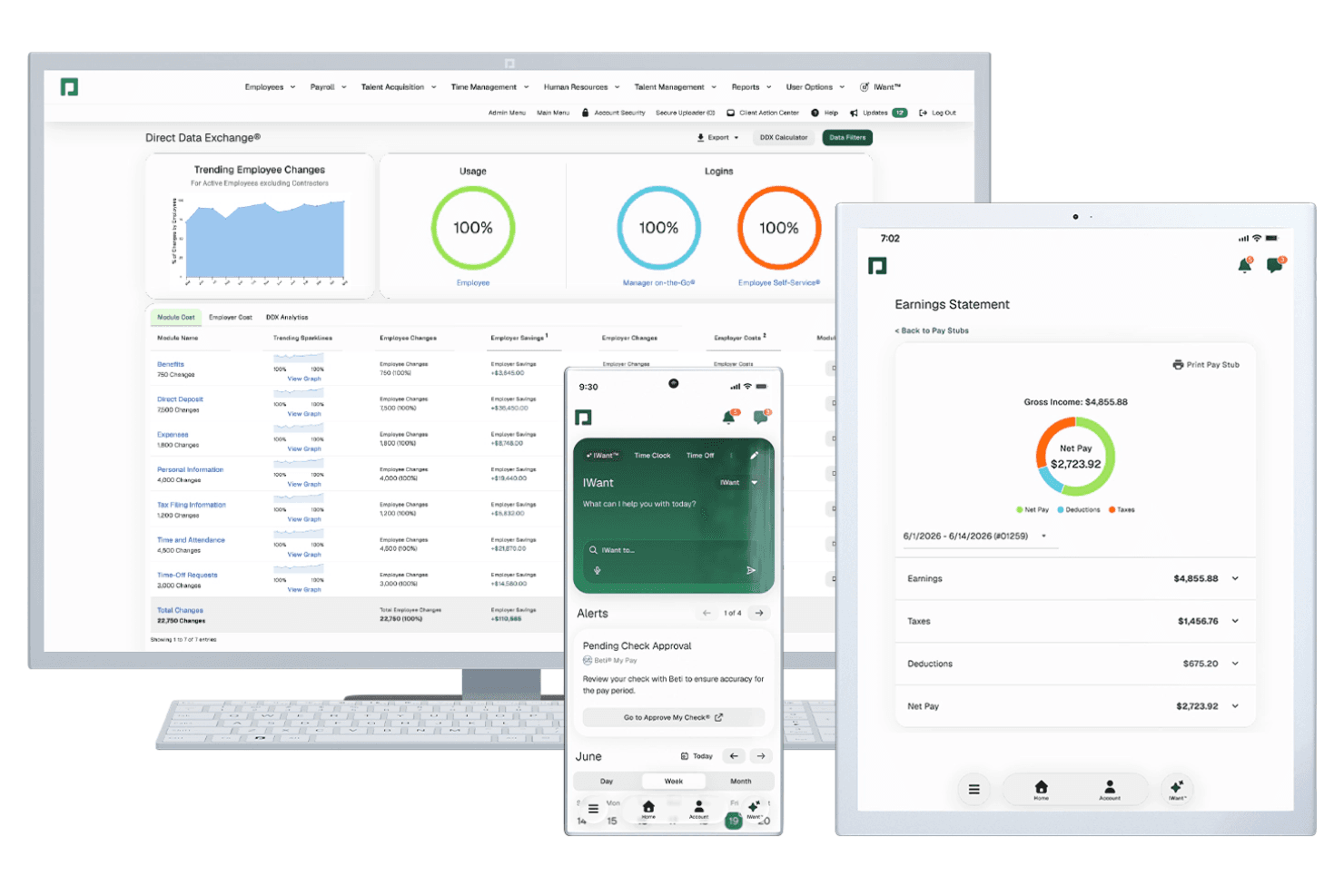
Paycom centralizes payroll, HR, and employee self-service in one platform. Paycom is a single-database HR and payroll platform that suits church administrators managing staff pay, benefits, and time tracking—especially those looking to reduce manual data entry and give employees direct access to their own payroll information.
Who Is Paycom Best For?
Paycom is a strong fit for church administrators who want staff to manage their own payroll data directly, reducing the back-and-forth with HR.
Why I Picked Paycom
I picked Paycom as one of the best because its employee self-service automation genuinely reduces the administrative load on whoever is running HR at your church. What I appreciate most is Beti, Paycom's payroll tool that identifies errors and notifies employees so they can correct pay issues before the payroll run is finalized. Pair that with Employee Self-Service, where staff can update direct deposit, manage benefits enrollment, and access pay stubs without looping in a church administrator, and you've got a system that handles the daily payroll grind with minimal back-and-forth.
Paycom Key Features
- Payroll Tax Management: Automatically calculates, remits, and files quarterly federal and state payroll tax returns, including Forms 941 and 940, by their due dates.
- Benefits Administration: Lets HR configure eligibility, waiting periods, and coverage levels while employees enroll via desktop or mobile and see estimated paycheck impact before confirming.
- Manager on-the-Go®: Gives managers a mobile interface to approve timecards, expense requests, schedule changes, and performance workflows without being at a desk.
- Direct Data Exchange®: Tracks how often employees interact with their own HR and payroll data and shows where self-service adoption is low so administrators can act on it.
Paycom Integrations
Paycom doesn't have any native integrations. It uses custom converters for new-client data imports and GL Concierge mapped reports for direct import into accounting software; no public API is documented.
Pros and Cons
Pros:
- Shared employee records reduce duplicate data entry
- Staff manage pay, benefits, and time-off
- Employees correct flagged payroll errors before submission
Cons:
- Initial setup can take substantial effort
- Custom reports can require hard-to-find filters
Learn more about Paycom: Best for global payroll compliance
- Free demo available
- From $29/user/month
Visit WebsiteCustomer Rating:4.8/5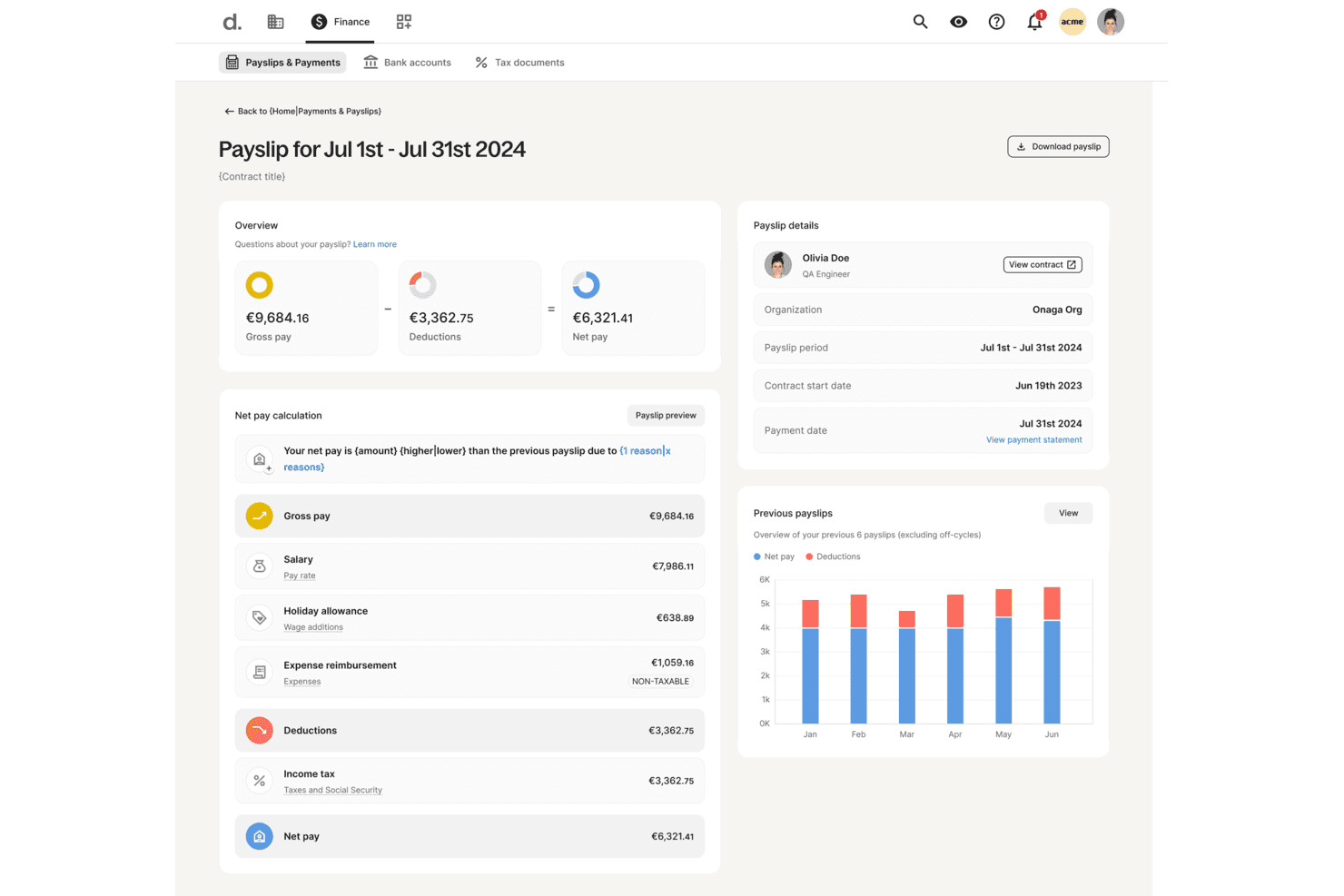
Deel Payroll displays a full payslip breakdown with net pay and deductions. Deel Payroll is a global payroll platform that lets HR teams and payroll administrators run, manage, and consolidate payroll across countries from a single dashboard—making it a practical option for ministries with international staff or multi-country operations.
Who Is Deel Payroll Best For?
Deel Payroll is a strong fit for organizations managing staff across multiple countries who need compliance and payments handled in one place.
Why I Picked Deel Payroll
I picked Deel Payroll because it handles global payroll compliance across 130+ countries from a single dashboard, which is genuinely difficult to replicate elsewhere. If your ministry has international staff or missionaries on payroll, Deel automatically applies local tax rules, statutory requirements, and filing obligations before each payroll run. I also appreciate that you can choose between self-serve and fully managed payroll by country, so your administrative team isn't forced into a one-size-fits-all setup.
Deel Payroll Key Features
- Payroll anomaly detection: Deel AI flags missing data, errors, and compliance risks in your payroll before you approve each run.
- Multi-currency payouts: Pay employees and contractors in local currencies using built-in FX and local payment rails, with optional crypto where supported.
- Audit-ready change log: Deel automatically records every change to worker personal, profile, and contractual information, including who made the change and before-and-after values.
- Off-cycle payroll runs: Process bonus payments, corrections, or other adjustments outside your standard pay schedule without disrupting regular payroll.
Deel Payroll Integrations
Deel Payroll claims 130+ native integrations, including Workday, BambooHR, HiBob, UKG, SAP SuccessFactors, NetSuite, Okta, and Azure AD. Its Global Payroll API supports custom integrations, while Workday provides documented two-way HR and payroll data sync.
Pros and Cons
Pros:
- Supports payroll across 130+ countries
- Automates compliance checks and documentation
- Consolidates international payroll and contractor payments
Cons:
- No documented clergy tax or housing-allowance tools
- Users report omitted pay and filing issues
Learn more about Deel Payroll: Best for extensive benefits administration
- Free demo available
- From $79/user/month
Visit WebsiteCustomer Rating:4.6/5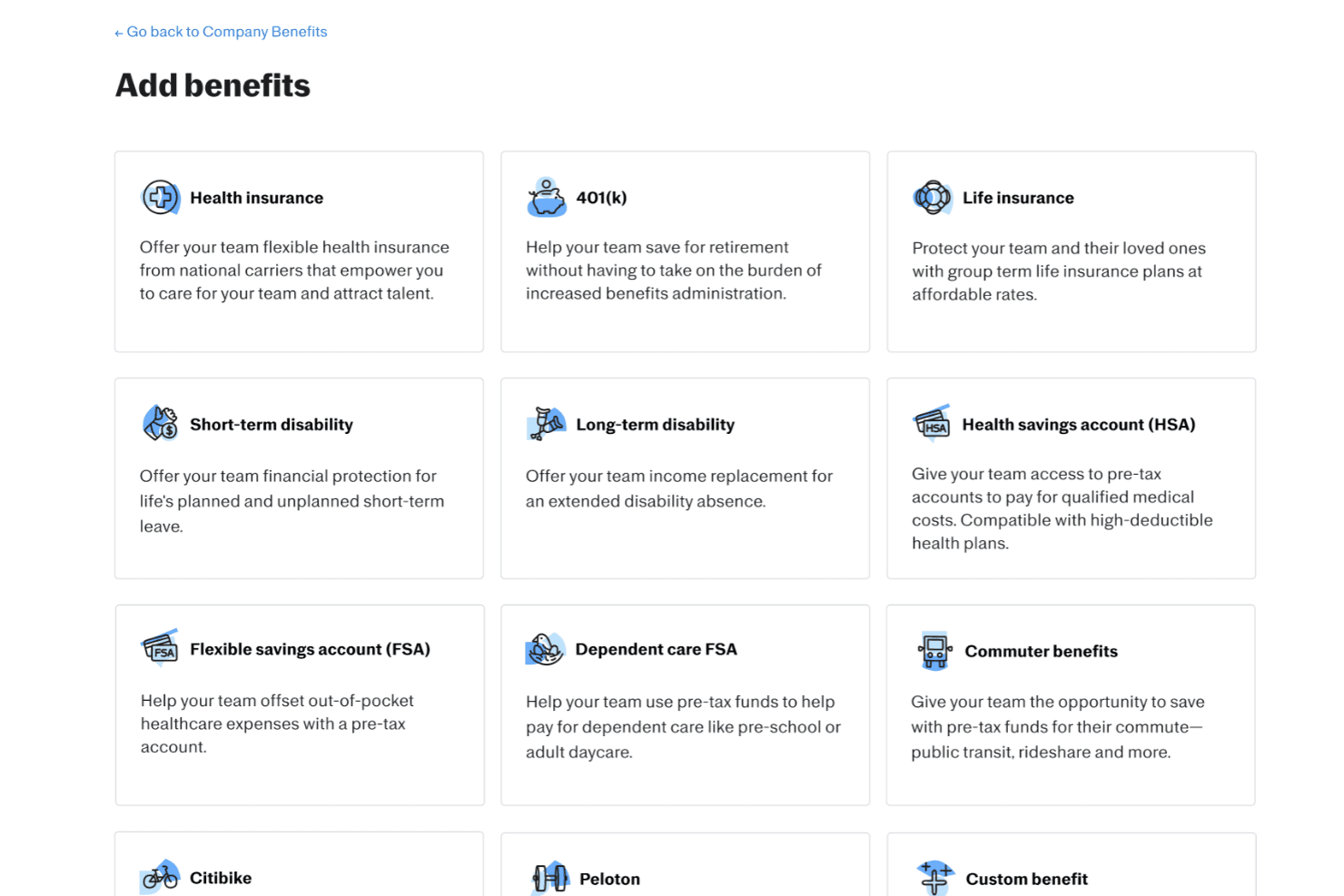
Justworks lets employers add benefits like health insurance and 401(k). Justworks is a PEO platform that bundles payroll, benefits, HR, and compliance tools in one place, making it a practical option for small churches and ministries that want to offload employer responsibilities without managing multiple systems.
Who Is Justworks Best For?
Justworks works well for small organizations that want to hand off payroll, benefits, and compliance to a single PEO rather than manage each function separately.
Why I Picked Justworks
I've included Justworks in my top picks because its PEO model gives small ministries access to benefits that would otherwise require a dedicated HR department to manage. I particularly appreciate how PEO Plus bundles medical, dental, and vision administration alongside HSA and FSA accounts, with carrier access through Aetna, UnitedHealthcare, and Kaiser. On top of that, the 401(k) is available even on the base PEO Basic plan, so your staff gets retirement coverage without needing a separate provider.
Justworks Key Features
- Multi-state payroll processing: Run payroll across multiple states with support for more than 4,000 tax localities, multiple pay rates, and custom payroll periods.
- Off-cycle and supplemental payments: Schedule off-cycle salary payments, bonuses, and commissions outside of standard payroll runs.
- Employee document center: Upload, assign, track, and store company and employee documents with signature collection and bulk download options.
- 24/7 human support: Reach a live support team by phone, email, or chat at any hour, with HR consulting resources included on all PEO plans.
Justworks Integrations
Justworks lists 30 integrations, including marketplace integrations with QuickBooks, Xero, Greenhouse Software, Lever, Checkr, 15Five, and Culture Amp. It also offers a Partner API for custom integrations.
Pros and Cons
Pros:
- Employees access pay and benefits in-app
- Supports payroll across 4,000+ tax localities
- PEO bundles benefits and HR consulting
Cons:
- Support follow-through is inconsistent
- Reported tax errors took weeks to resolve
Learn more about Justworks: Best for global contractor and EOR hiring
- Not available
- From $399/user/month
Visit WebsiteCustomer Rating:4.5/5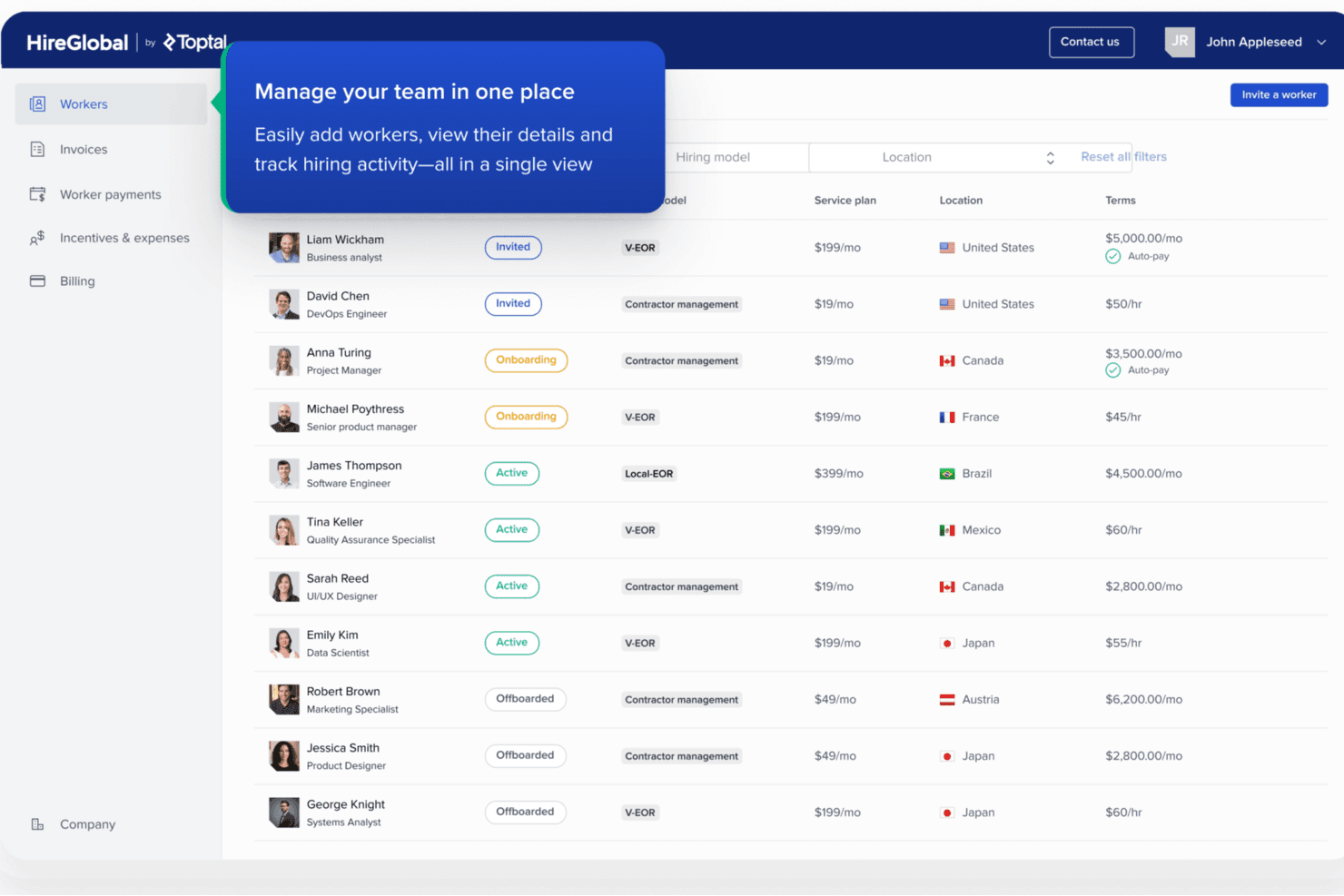
HireGlobal centralizes global worker management in a single dashboard. HireGlobal is a global employer of record service, powered by Toptal, that helps organizations hire and pay workers across 180+ countries without setting up local legal entities.
Who Is HireGlobal Best For?
HireGlobal is a strong fit for organizations hiring workers across multiple countries who need compliant employment and payroll without establishing local legal entities.
Why I Picked HireGlobal
I've included HireGlobal in my top picks because it's the strongest option on this list for hiring and paying workers across borders without setting up local legal entities in each country. Powered by Toptal, it covers employment compliance, payroll, and benefits in 180+ countries, so you can bring on international contractors or full-time employees without the legal overhead. I particularly appreciate how its migration process works: a dedicated expert handles data transfer and worker onboarding in one to two days at no cost.
HireGlobal Key Features
- Locally compliant employment contracts: HireGlobal generates contracts that meet local labor law requirements in each country where you hire.
- Statutory and employer-selected benefits facilitation: HireGlobal arranges legally required benefits and can coordinate additional employer-chosen benefits through its partner network.
- Termination and severance handling: HireGlobal manages compliant termination notices, severance payouts, and accrued benefits such as unused vacation days.
- SOC 2 Type 1 and Type 2 certified security: HireGlobal's platform uses AES-256 encryption and user-specific permissions to protect workforce data.
HireGlobal Integrations
HireGlobal doesn't have any native integrations. API availability for custom integrations isn't documented.
Pros and Cons
Pros:
- Reviewers praise fast payments and support
- Free migration includes expert-led data transfer
- Handles compliant hiring across 180+ countries
Cons:
- Clients supply hours; local partners handle employment કામગીરી
- Not designed for domestic payroll administration
Learn more about HireGlobal: Best for time and attendance tracking
- 30-day free trial
- From $50/month (billed annually)
Visit WebsiteCustomer Rating:4.5/5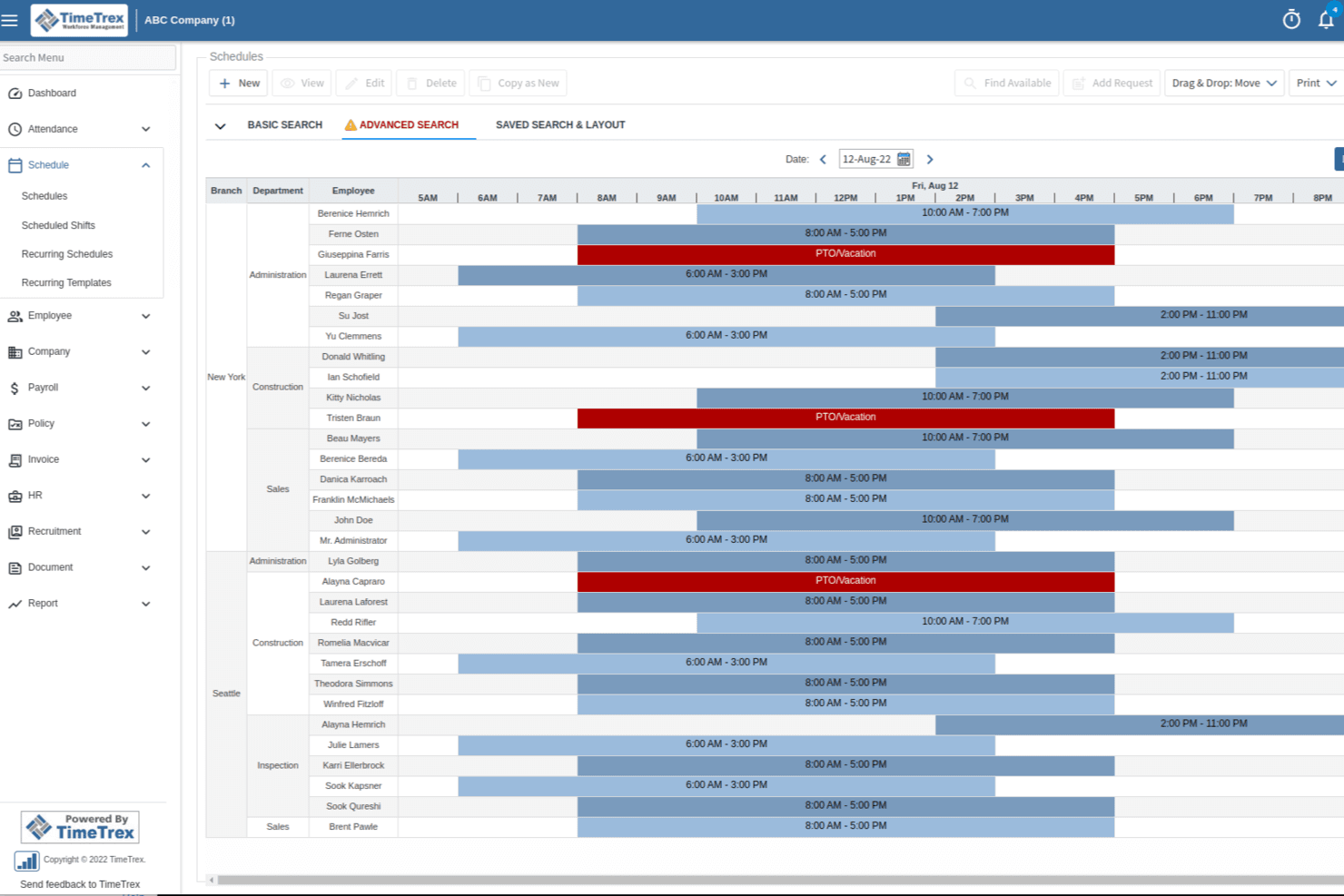
TimeTrex displays daily employee schedules across departments and branches. TimeTrex is a workforce management platform that combines time and attendance tracking, payroll processing, and employee scheduling—making it a practical option for church administrators who need tighter control over staff hours and pay runs without upgrading to a full HRIS.
Who Is TimeTrex Best For?
TimeTrex suits organizations that need precise time and attendance tracking paired with payroll processing, particularly those managing shift-based or hourly staff across multiple locations.
Why I Picked TimeTrex
I picked TimeTrex as one of the best because its time and attendance tracking is genuinely where it shines, especially for organizations managing shift-based staff across locations. Biometric facial recognition at clock-in and offline punch syncing mean hours are captured accurately even when connectivity is spotty. The payroll module pulls directly from that attendance data, so there's no manual transfer between systems when it's time to run pay.
TimeTrex Key Features
- Tax Wizard: A guided workflow that organizes payroll remittance events by due date and walks you through generating and reviewing tax forms and e-files.
- Employee scheduling: A built-in scheduling tool for creating and managing shifts, including AI-powered tools to help plan coverage.
- Leave and absence management: A centralized system for tracking time-off requests, balances, and their impact on scheduling.
- Customizable reports: A reporting tool that lets administrators build workforce reports tailored to their organization's specific data needs.
TimeTrex Integrations
TimeTrex lists integrations with ADP, Intuit QuickBooks, Sage, Paychex, and Ceridian. It also offers a REST/JSON API for custom integrations and configurable file exports for payroll or accounting systems.
Pros and Cons
Pros:
- Reviewers praise responsive payroll support
- Attendance data feeds payroll calculations
- Biometric punches and offline sync capture hours
Cons:
- Reviewers report cluttered navigation and difficult setup
- Tax filing and remittance require manual steps
Learn more about TimeTrex: Best for digital giving solutions
- Free plan + 30-day trial + demo available
- From $72/month
Visit WebsiteCustomer Rating:4.8/5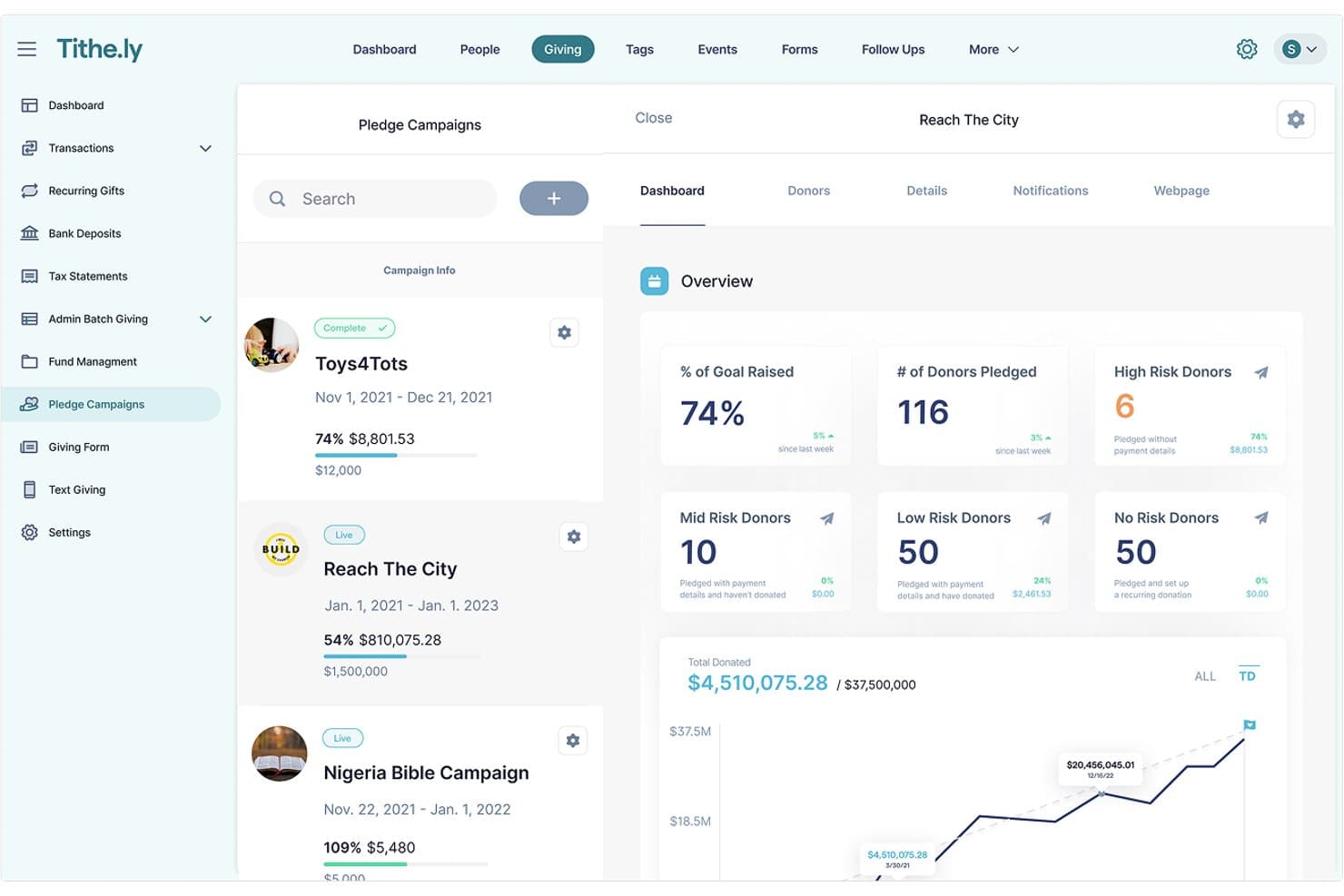
Tithe.ly tracks pledge campaigns with donor risk and goal metrics. Tithe.ly is a church management platform built for congregational administration, bringing together giving, member data, events, volunteer coordination, and service planning in one place.
Who Is Tithe.ly Best For?
Tithe.ly is a strong fit for churches and faith-based organizations that want to manage giving, membership, and ministry coordination in one place.
Why I Picked Tithe.ly
I picked Tithe.ly as one of the best because its digital giving tools go well beyond a basic donation button. I love how giving records link directly to member profiles, so your finance team can pull donor reports by fund, date, or giver type without jumping between systems. Real-time gift updates and built-in giving dashboards mean your leadership always has a live view of generosity trends across the congregation.
Tithe.ly Key Features
- Member database: Stores congregation profiles with contact details, household relationships, and giving records all linked in one place.
- Kid's check-in: Checks children in, prints parent and child name tags, and assigns unique pick-up security codes for each family.
- Volunteer scheduling: Assigns volunteers to service roles and events, then sends automated reminders to keep teams informed.
- Multi-campus support: Sets up separate campuses or ministries under one account, each with its own banking, giving page, and administrative access.
Tithe.ly Integrations
Tithe.ly lists integrations with QuickBooks Online, Planning Center Online, Church Community Builder, MinistryPlatform, Shelby, FellowshipOne, Elvanto, and RockRMS. An API is available for custom integrations.
Pros and Cons
Pros:
- Reviewers praise value for smaller churches
- Volunteers can coordinate events and services
- Church giving links directly to member records
Cons:
- No employee benefits or pay self-service
- No payroll processing or tax filing
 7Best for accounting and invoicing
Xero
- 1-month free trial available
- From $27/month
Visit WebsiteCustomer Rating:4.4/5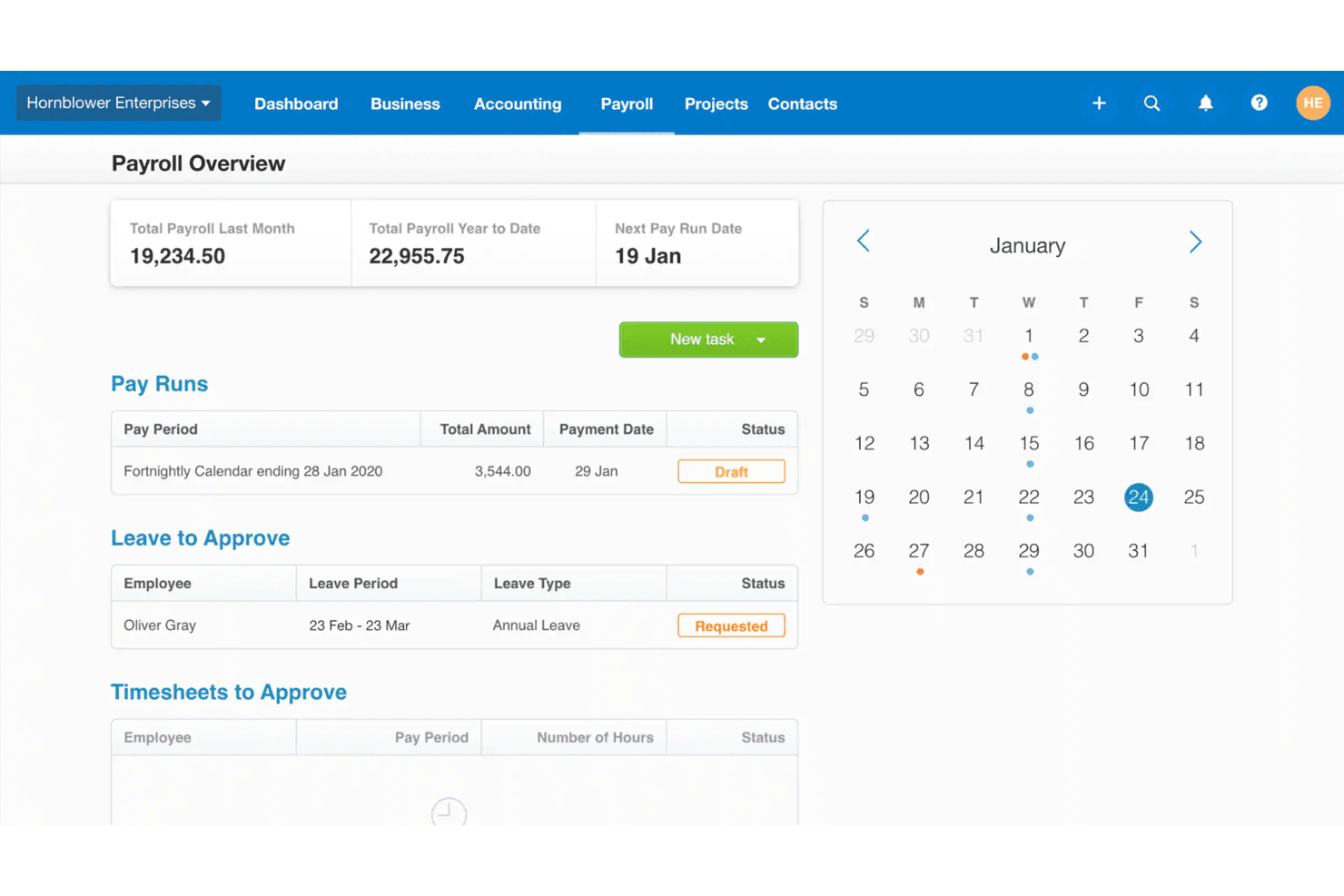
Xero gives businesses a full payroll overview in one dashboard. Xero is a cloud-based accounting platform that appeals to small church offices looking to manage invoicing, payroll, and financial reporting in one place, with payroll powered by Gusto as an optional add-on.
Who Is Xero Best For?
Xero suits small church offices that already manage accounting in the platform and want to add basic payroll without adopting a separate HR system.
Why I Picked Xero
I picked Xero as one of the best because it handles both accounting and payroll in one place, which is genuinely useful for small church offices tracking income, expenses, and staff pay together. I appreciate how payroll expenses and liabilities flow automatically into the Xero general ledger, so there's no manual reconciliation between payroll and your books. The built-in W-9 and 1099 management also makes contractor payments straightforward when your church relies on guest speakers or part-time ministry workers.
Xero Key Features
- Employee self-onboarding: Invite employees to enter their own personal, tax, and direct-deposit details, which you then review and approve before their setup is complete.
- Off-cycle payroll runs: Process bonus, correction, missed-pay, or early-pay runs outside your regular payroll schedule whenever you need them.
- Payroll history log: View a detailed record of changes to pay runs, payroll settings, and employee records, including the date and the user who made each change.
- Paid-time-off policy setup: Create multiple PTO and sick-leave policies with unlimited or hours-based accrual, configured to run automatically with each regular payroll.
Xero Integrations
Xero has 1,000+ marketplace integrations, including Stripe, Shopify, and Amazon FBA, plus native Gusto and Melio integrations. Its HTTP API, SDKs, and invoice-event webhooks support custom integrations.
Pros and Cons
Pros:
- Reviewers praise bank-feed matching and reconciliation
- Off-cycle runs cover missed and bonus pay
- Payroll costs post directly to the ledger
Cons:
- Reviewers report delays resolving support issues
- No native scheduling or timesheet capture
 Best for church engagement tools
- Free plan + free demo available
- From $69.99/month
Visit WebsiteCustomer Rating:4.8/5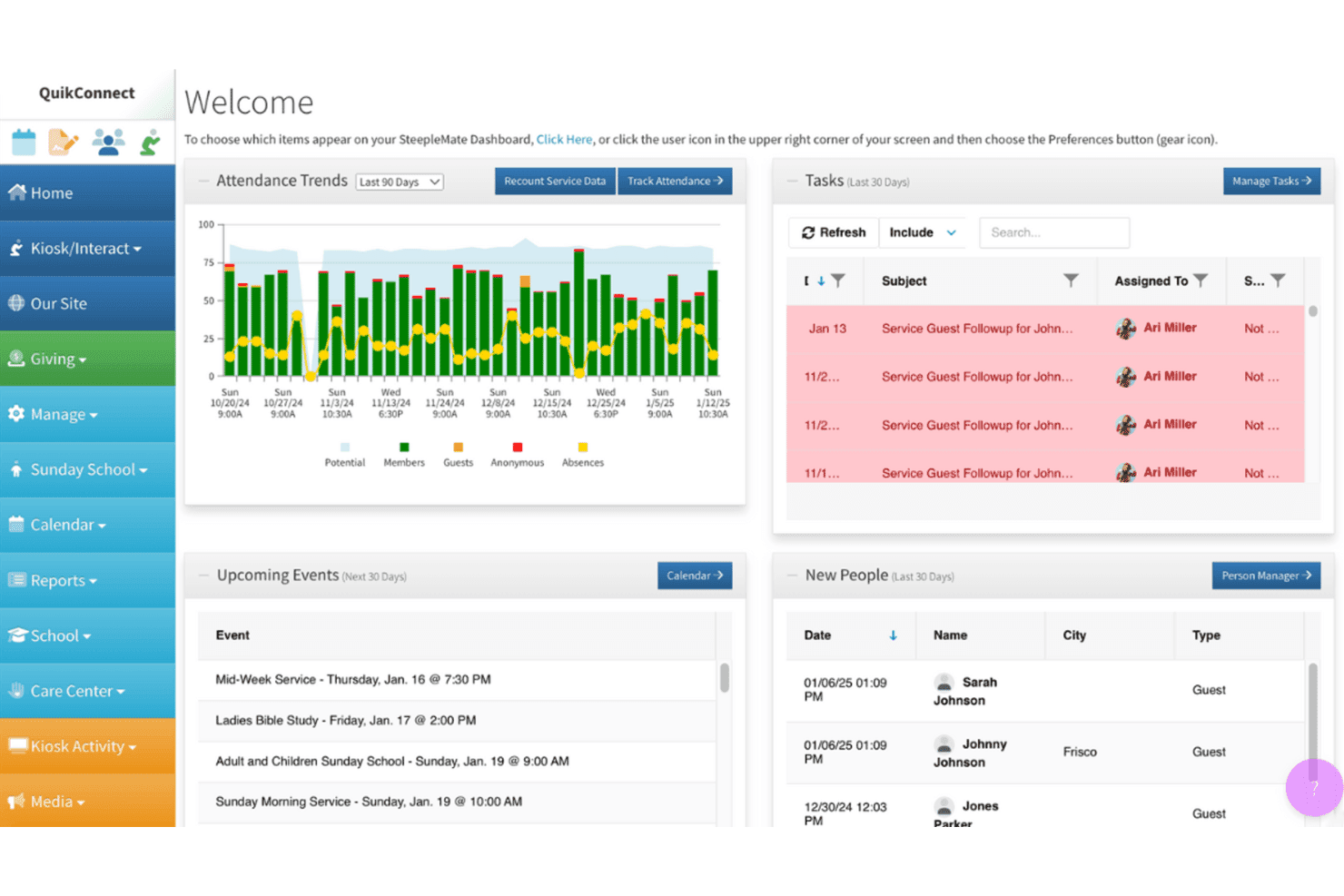
SteepleMate's dashboard tracks attendance, tasks, events, and new visitors. SteepleMate is a church management platform built for congregations that want to organize members, track engagement, manage giving, and run ministry operations from a single system.
Who Is SteepleMate Best For?
SteepleMate is a good fit for pastors and church administrators who want to manage congregant engagement, communications, and giving from one platform.
Why I Picked SteepleMate
I've included SteepleMate in my top picks because it's purpose-built around keeping congregants connected and engaged. I love how the People module centralizes member records, attendance tracking, and communication in one place, so nothing slips through the cracks between Sundays. The Reach tools let you extend that engagement beyond the building through a dynamic online presence. For church administrators juggling ministry and operations, that combination is genuinely useful.
SteepleMate Key Features
- Member records management: Store and organize detailed profiles for every congregant, including contact information, family connections, and ministry involvement.
- Giving and donation tracking: Record, categorize, and report on contributions to give church administrators a clear view of financial stewardship.
- Attendance tracking: Log and monitor attendance across services and events to identify engagement patterns within your congregation.
- Church academics management: Organize and administer educational programs, classes, and course enrollment for ministry training and discipleship initiatives.
SteepleMate Integrations
Native integrations are not clearly documented, and SteepleMate’s API availability is not stated.
Pros and Cons
Pros:
- Giving and education tools support ministry operations
- Responsive support helps church administrators
- Congregant records and attendance in one platform
Cons:
- No employee HR, benefits, or self-service
- No payroll processing or tax filing
Learn more about SteepleMate:
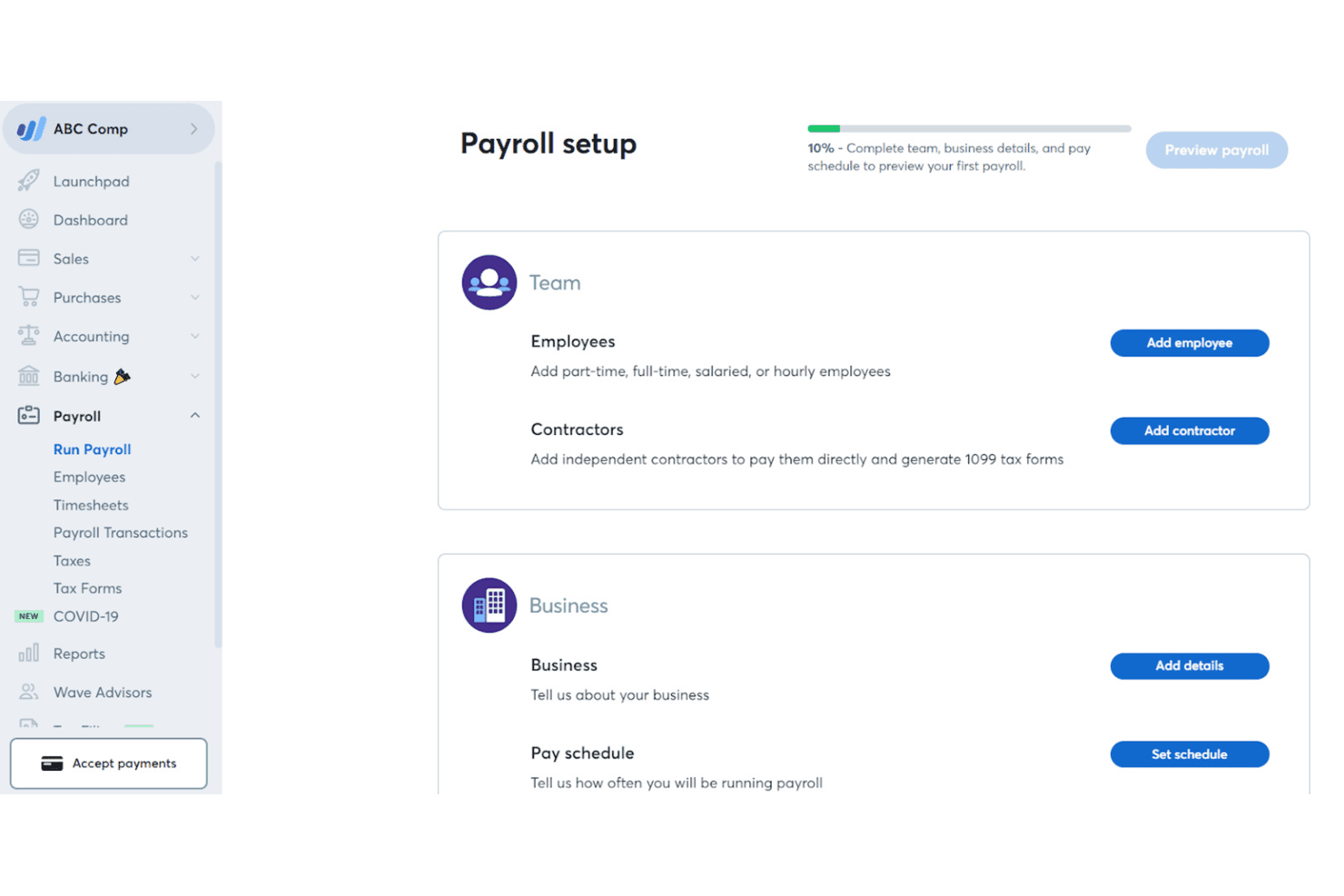
Wave guides users through payroll setup with a step-by-step checklist. Wave Payroll is small-business payroll software that may appeal to small church offices needing a simple, low-cost way to pay staff and contractors, automate basic tax filings, and keep payroll connected to everyday bookkeeping.
Who Is Wave Best For?
Wave Payroll is a good fit for very small church offices that already use Wave's free accounting and invoicing tools and want to keep payroll in the same ecosystem without paying for a larger platform.
Why I Picked Wave
I picked Wave as one of the best Paylocity alternatives because its invoicing and payment tools are genuinely built into the same platform as payroll, so a small church office can send a donation receipt, pay a contractor, and run payroll without switching systems. Wave lets you process direct deposits for staff, generate 1099-NEC forms for contractors, and collect payments through invoices, all under one login. I appreciate that it handles automatic federal and state payroll tax filings without requiring a separate accounting subscription.
Wave Key Features
- Employee portal: Employees can log in to view and download pay stubs and tax forms, and update their personal and direct-deposit information.
- Owner pay: Wave lets you run payroll to pay yourself as a business owner, alongside any staff or contractors on your payroll.
- Payroll journal entries: Wave automatically creates journal entries in Wave Accounting each time you run payroll, keeping your books current without manual data entry.
- 501(c)(3) tax exemption support: Eligible nonprofit employers can request that their applicable state tax exemption be applied directly to their business tax profile in Wave.
Wave Integrations
Wave Payroll offers native integrations with Wave Accounting, Wave Invoicing, and Wave Online Payments. It also provides a public API for custom integrations, although payroll-specific API capabilities aren’t documented.
Pros and Cons
Pros:
- Employees access pay stubs and tax forms
- Supports payroll for employees and contractors
- Straightforward payroll suits very small teams
Cons:
- Off-cycle payroll is limited to offboarding cases
- Employers must enter employee hours manually
Learn more about WAVE:
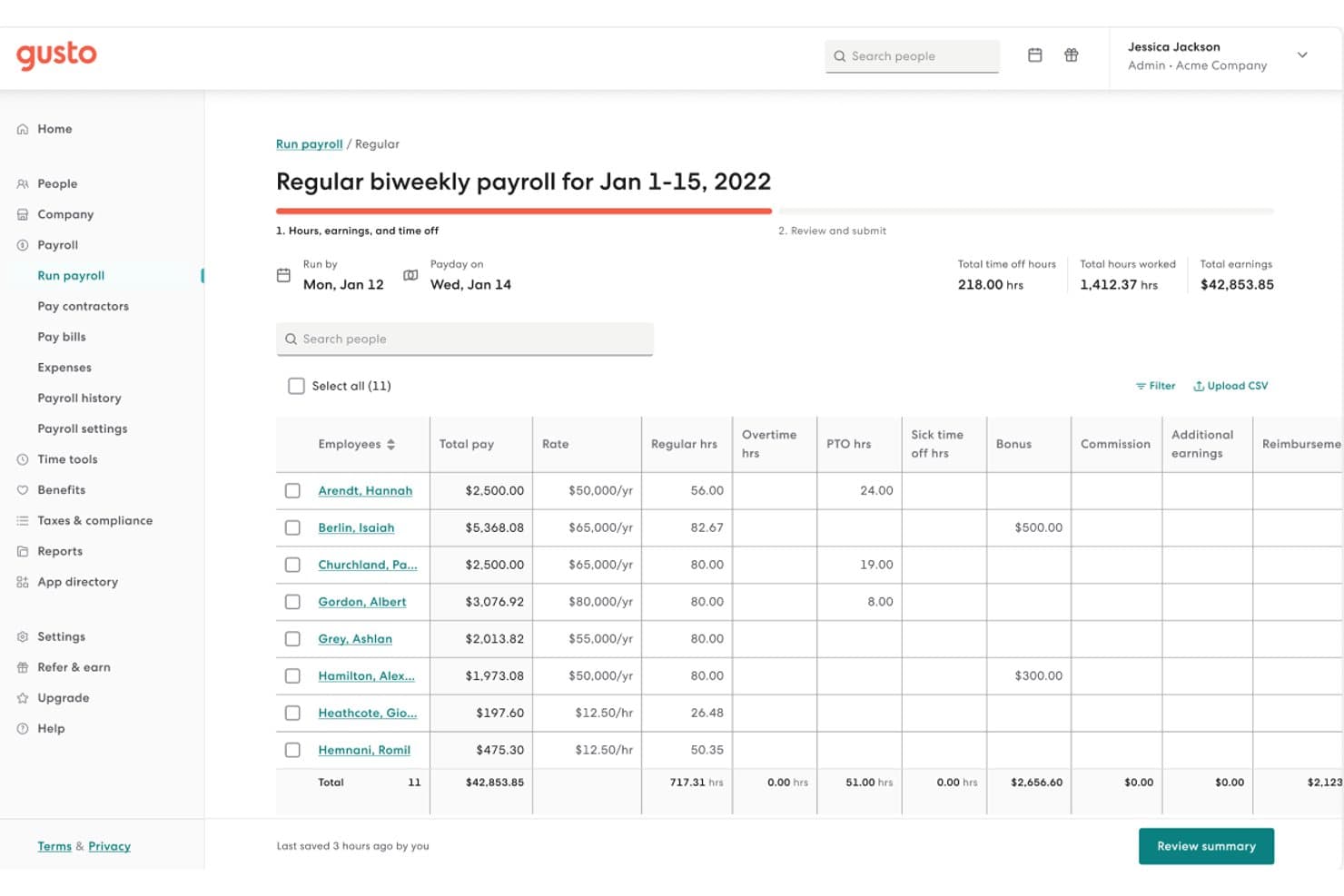
Gusto lets users review employee hours, pay rates, and earnings per payroll run. Gusto is a payroll and HR platform built for small to mid-sized organizations that want to automate payroll runs, tax filing, and benefits administration—including clergy housing allowance tracking—without the complexity of enterprise-level systems.
Who Is Gusto Best For?
Gusto fits small to mid-sized churches and ministries that want automated payroll, tax filing, and benefits administration without the complexity of an enterprise HR system.
Why I Picked Gusto
I picked Gusto as one of the best because it delivers exactly what small and medium-sized churches need: automated payroll with built-in clergy housing allowance tracking. I love that it uses a custom earning code to track the minister's housing allowance each pay period and correctly reports the annual total in W-2 Box 14. Gusto also runs payroll on autopilot, so your administrator isn't manually processing runs every cycle.
Gusto Key Features
- Payroll on AutoPilot: Set payroll to run automatically on a recurring schedule without manual processing each cycle.
- Off-cycle payroll: Run additional payroll outside the regular schedule to correct mistakes or issue extra pay at no additional fee.
- Employee self-service app: Employees can view paystubs, manage bank accounts, request time off, and enroll in benefits from the Gusto mobile app.
- Aplos accounting integration: Sync payroll and tax payment data directly to Aplos for fund-based accounting with per-employee account mapping.
Gusto Integrations
Gusto has 154 marketplace integrations, including Aplos, Checkr, Ascensus, and Betterment at Work. It also provides an API, OAuth2, webhooks, a React SDK, and prebuilt UI Flows for custom integrations.
Pros and Cons
Pros:
- Employee app gives staff paycheck access
- Off-cycle runs handle corrections and extra pay
- Automatic payroll reduces routine processing
Cons:
- Some reviewers report support delays and tax issues
- Limited depth for complex, larger workforces
Learn more about Gusto:
Alte alternative la Paylocity
Iată câteva alternative suplimentare la Paylocity care nu au ajuns pe lista mea scurtă, dar care merită totuși analizate:
- 11Fellowship OneBest for comprehensive church management
- 12PowerChurch PlusBest for church administration
- 13CDM+Best for nonprofit management
- 14Church WindowsBest for church financial management
- 15OnPayBest for small business HR integration
- 16Patriot PayrollBest for small business affordability
- 17BambooHRBest for small to medium HR teams
- 18One Church SoftwareBest for integrated church management
- 19WagepointBest for simple payroll processing
- 20MinistryWorksBest for church-specific payroll needs
How I Evaluate Paylocity Competitors
When a church admin faces housing allowance setup or dual-status minister filings, the tools on my list must clear baseline requirements first—then I evaluate what sets each apart.
Core Functionality (Table Stakes For This List)
When I'm selecting tools for my list, I rank each one on a scale from 0 (does not offer the functionality) to 5 (excels in this area) for each core functionality listed below. Then, I calculate the tool's total score into a percentage. Each tool needs to achieve a minimum total score of 55% to be considered for inclusion.
- Clergy Payroll Processing: I check whether a platform handles housing allowance designations and dual-status minister tax treatment natively or requires manual workarounds each pay run.
- Tax Filing & Compliance: Each tool needs to cover federal, state, and local filings along with year-end W-2 and 1099 generation, especially for nonprofit entities with mixed staff classifications.
- HR & Employee Management: I look for a core HRIS that stores employee records, manages onboarding documents, and keeps staff data organized across departments or ministry teams.
- Benefits & PTO Administration: Whether your church offers a denominational health plan or a third-party option, I evaluate how each tool handles enrollment, deductions, and PTO policy configuration.
- Time & Attendance Tracking: Hourly worship techs and part-time childcare workers need reliable clock-in options, so I look at timesheet capture, approval workflows, and payroll sync.
- Direct Deposit & Self-Service: Staff should be able to access pay stubs, tax documents, and update personal details on their own, so I evaluate each platform's employee portal and mobile access.
Once I have a list of tools that meet this criteria, I consider what sets each platform apart.
Differentiating Factors (What Sets Vendors Apart)
Here's how I compare and contrast different vendors:
Standout Features
I look for native integrations with ChMS platforms like Planning Center or Breeze so staff data stays in sync without manual entry. Multi-entity payroll matters too, especially for churches running several campuses or affiliated ministries under separate 501(c)(3) entities. Fund accounting sync is another feature I evaluate closely because payroll expenses often need to be allocated across multiple ministry budgets. Built-in background check workflows also stand out when a church needs recurring screening for children's ministry volunteers.
Beyond Features
Church-specific support expertise matters because a generic payroll rep often can't guide you through housing allowance setup or SECA tax questions. I evaluate whether a vendor's support team understands clergy tax law firsthand. Pricing structure is equally important since many churches run on tight budgets with a mix of full-time, part-time, and seasonal staff. I also consider how smooth the mid-year migration process is, especially whether a platform can reconcile prior wages and filings when switching away from Paylocity outside of January.
De ce să căutați o alternativă la Paylocity?
Deși Paylocity este o opțiune bună de software de salarizare pentru biserici, există mai multe motive pentru care unii utilizatori caută soluții alternative. Este posibil să aveți nevoie de o alternativă la Paylocity deoarece…
- Aveți nevoie de mai multe funcții specifice pentru biserici
- Echipa dumneavoastră întâmpină dificultăți în utilizarea interfețelor complexe
- Căutați opțiuni mai accesibile
- Aveți nevoie de un serviciu mai bun de asistență pentru clienți
- Aveți nevoie de un software care să se extindă odată cu dezvoltarea organizației
- Căutați funcții de integrare mai bune
Dacă vă regăsiți în oricare dintre aceste situații, ați ajuns în locul potrivit. Lista mea include mai multe opțiuni de software de salarizare pentru biserici, mai potrivite pentru echipele care se confruntă cu aceste probleme ale Paylocity și caută soluții alternative.
Funcțiile principale ale Paylocity
Iată câteva dintre funcțiile principale ale Paylocity, pentru a vă ajuta să comparați soluțiile alternative și ceea ce oferă acestea:
- Procesarea automată a salariilor: Gestionează eficient calculele și distribuirea salariilor, reducând erorile manuale pentru echipa dumneavoastră.
- Portal de autoservire pentru angajați: Le permite angajaților să acceseze în mod independent informațiile despre salarii, fluturașii de salariu și documentele fiscale.
- Monitorizarea timpului și a prezenței: Vă ajută să monitorizați orele lucrate de angajați și să gestionați fără probleme cererile de concediu.
- Gestionarea conformității fiscale: Automatizează calculele și declarațiile fiscale, asigurând conformitatea organizației cu reglementările.
- Instrumente de raportare și analiză: Oferă informații detaliate despre datele salariale și indicatorii forței de muncă pentru a sprijini luarea deciziilor.
- Acces mobil: Permite echipei dumneavoastră să gestioneze sarcinile de salarizare oriunde, printr-o interfață adaptată dispozitivelor mobile.
- Integrarea cu alte sisteme de resurse umane: Asigură un transfer fluent al datelor între funcțiile de salarizare și cele de resurse umane, sporind eficiența generală.
- Administrarea beneficiilor: Simplifică gestionarea beneficiilor angajaților, inclusiv înscrierea și monitorizarea acestora.
- Opțiuni de virare directă: Oferă depunerea sigură și la timp a salariilor angajaților direct în conturile lor bancare.
- Fluxuri de lucru personalizabile: Vă permit să adaptați procesele de salarizare pentru a răspunde nevoilor organizaționale specifice.