

O software para igrejas online é uma plataforma digital que ajuda a sua igreja a gerir os serviços religiosos, a estabelecer ligação com a sua comunidade e a tratar de tarefas administrativas importantes a partir de qualquer lugar. Se está à procura de ferramentas que facilitem a organização do ministério, permitam receber donativos online ou conduzir serviços híbridos e virtuais, está no sítio certo. Com tantas opções, é difícil saber qual a plataforma que realmente se adequa às suas necessidades e recursos. Esta lista irá ajudá-lo a encontrar a melhor solução para apoiar a sua congregação e permitir-lhe concentrar-se mais na sua vocação.
Why Trust Our Software Recommendations
6,700+
Reviews
20
Industry experts
16+
Evaluation factors
14
Years
Our team has been testing and reviewing software since 2012. As church leaders ourselves, we know how difficult—and important—it is to choose the right software.
For this guide, we evaluated tools using hands-on testing and independent research, scoring tools using our selection criteria.
Our reviews reflect our human editorial judgment, not a sales pitch.
Tabela comparativa de software para igrejas online
Esta tabela comparativa resume os detalhes de preços das minhas principais escolhas de software para igrejas online:
Sorted by: Default
| Tool | Starting Price | Website | |
|---|---|---|---|
Best for multilingual congregation management | 4.6 out of 5 | $12/month Free plan available | Book Demo |
Best for free unlimited member management | 4.8 out of 5 | $19/month Free plan + 30-day trial available | Website |
Best for online giving and church apps | 4.8 out of 5 | $72/month Free plan + 30-day trial + demo available | Website |
Best for simple church management | 4.8 out of 5 | $72/month 30-day free trial + free demo available | Website |
Best for church group management | 4.7 out of 5 | $37/month 30-day free trial available | Website |
Best for digital giving and engagement | 4.0 out of 5 | Pricing upon request Free demo available | Website |
Best for all-in-one church management | Not rated | $29/month 30-day free trial + free demo available | Website |
Best for church fund accounting | Not rated | $79/month 15-day free trial + free demo available | Website |
Best for growing church ministries | Not rated | $15/month Free plan + free demo available | Website |
Best for cloud-based church management | Not rated | $75/month Free plan + 7-day free trial available | Website |


Avaliações do melhor software para igrejas online
Seguem-se os meus resumos detalhados do melhor software para igrejas online incluído na minha seleção. As minhas avaliações apresentam uma análise detalhada das funcionalidades, integrações e melhores casos de utilização de cada plataforma, para o ajudar a encontrar a melhor opção para si.
 Best for multilingual congregation management
- Free plan available
- From $12/month
Visit WebsiteCustomer Rating:4.6/5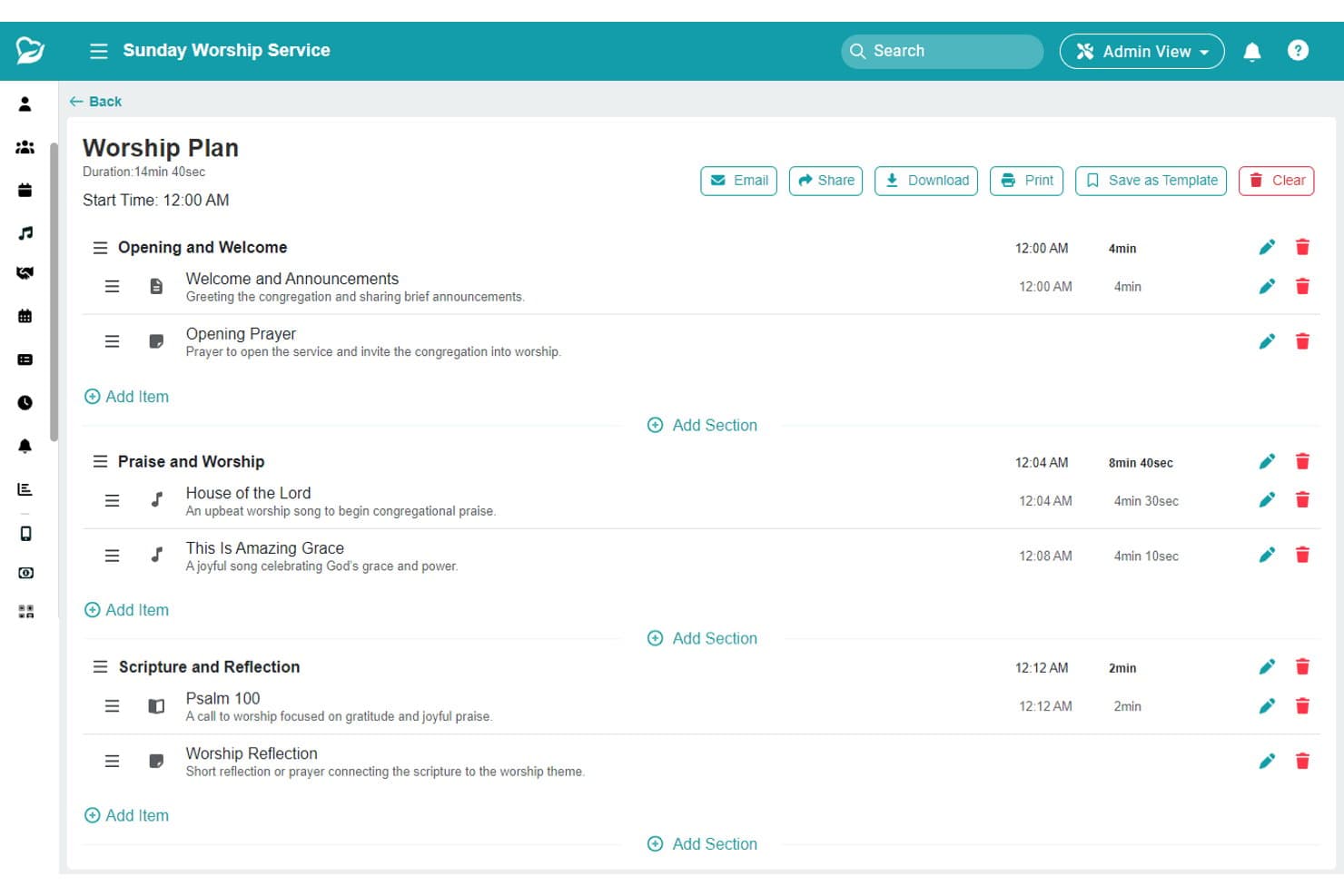
ChMeetings lets users build and time structured worship service plans. ChMeetings is a church management platform that combines member database management, online giving, event registration, volunteer scheduling, communication tools, and built-in accounting—with support for 22+ languages.
Who Is ChMeetings Best For?
ChMeetings is a strong fit for small-to-midsize churches serving diverse, multilingual congregations who need an all-in-one platform with built-in accounting and giving tools.
Why I Picked ChMeetings
ChMeetings earns its spot on my shortlist because it's the only church management platform I've seen that natively supports 22+ languages, making it a genuinely practical choice for multilingual congregations. I love that the AI-powered natural language search lets you pull segments like "Spanish-speaking members who haven't attended in 30 days" without building complex filters. The Member Portal also lets congregants self-serve in their own language, which reduces admin back-and-forth significantly.
ChMeetings Key Features
- Built-in accounting module: Track income, expenses, and budgets, reconcile bank accounts, print checks, and generate financial reports without a separate accounting tool.
- Child and family check-in: Check in children using QR codes, kiosk mode, or staff-assisted entry, with custom name tag printing included.
- Worship planning module: Build service orders with songs, scriptures, notes, and file attachments, then share or print handout sheets for your team.
- Automated messaging workflows: Set up date-based triggers and follow-up sequences across email, push notifications, and SMS to reach members at the right time.
ChMeetings Integrations
ChMeetings integrates with Stripe, PayPal, Square, Mailchimp, Plaid, and SMS providers including Twilio. It also offers an API, webhooks, an MCP connector for ChatGPT, Claude, and Gemini, plus Zapier.
Pros and Cons
Pros:
- AI-powered natural language search for reporting
- Includes built-in accounting module for churches
- Supports 22+ languages for member engagement
Cons:
- Branded church app costs extra monthly
- No native livestreaming functionality included
Learn more about ChMeetings: Best for free unlimited member management
- Free plan + 30-day trial available
- From $19/month (billed annually)
Visit WebsiteCustomer Rating:4.8/5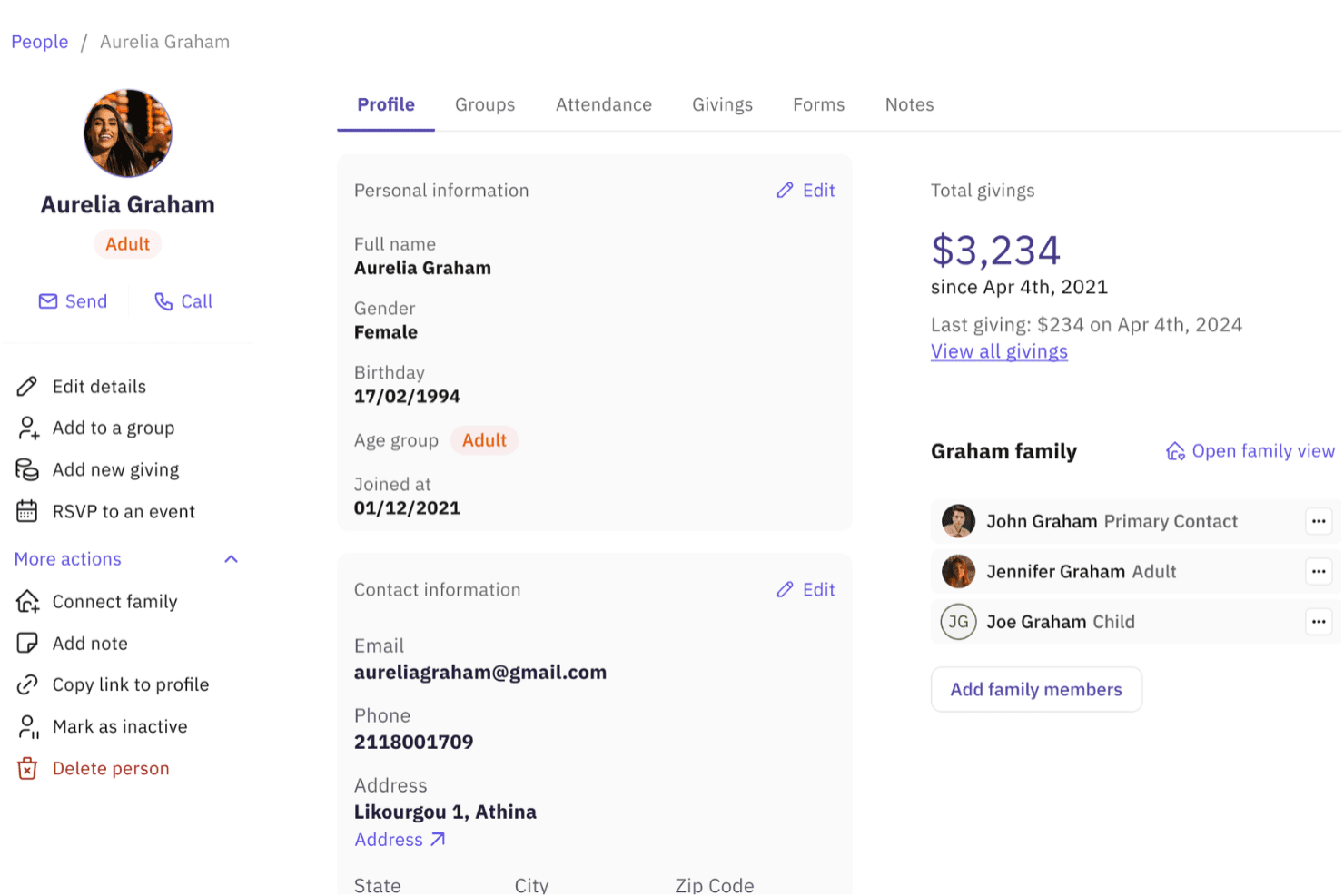
Gracely displays a detailed member profile page showing personal information, contact details, family connections, and giving history. Gracely is a cloud-based church management platform that combines member and family management, online giving, event coordination, volunteer scheduling, and congregant communication in one system.
Who Is Gracely Best For?
Gracely is a strong fit for small to mid-sized churches whose administrators need a full-featured management platform without the cost of per-member pricing models.
Why I Picked Gracely
Gracely earns its spot as one of the best on my shortlist because it's one of the very few church platforms that gives you truly unlimited member profiles at no cost. I like that this isn't just a basic contact list. Each profile supports family linking, custom fields, and follow-up tracking for pastoral care. In practice, I can segment and communicate with any subset of my congregation without hitting a paywall.
Gracely Key Features
- Church portal: Members can log in to view giving history, register for events, and update contact details.
- Online giving integrations: Supports Stripe, Apple Pay, Google Pay, and Zelle so congregants can give digitally.
- Custom forms builder: Create online forms for event sign-ups, volunteer registration, or surveys.
- Multiple calendars: Manage main calendar, birthdays, appointments, and follow-ups within the same platform.
Gracely Integrations
Gracely offers native integrations with Stripe and PayPal.
Pros and Cons
Pros:
- Multiple calendar views for pastoral scheduling
- Built-in children's check-in for Sunday services
- Unlimited member profiles on the free plan
Cons:
- Reporting tools lack advanced giving analytics
- Limited third-party software connectivity
Learn more about Gracely: Best for online giving and church apps
- Free plan + 30-day trial + demo available
- From $72/month
Visit WebsiteCustomer Rating:4.8/5
Tithe.ly offers donation tracking, donor management, and giving analytics. Tithe.ly is an online church software platform that brings together digital giving, church management, a custom-branded app, and website building in a single subscription.
Who Is Tithe.ly Best For?
Tithe.ly is a natural fit for small to mid-sized churches that want giving, ChMS, and a mobile app under one subscription without managing multiple vendors.
Why I Picked Tithe.ly
I picked Tithe.ly as one of the best because it's one of the few platforms where giving, church management, a custom church app, and a website all live under a single subscription. I especially like the Cover the Fees feature, which prompts donors to cover processing costs at checkout, and pledge campaigns that let churches track commitments over time. The automatic app builder also stands out: you configure it once, and it pulls in sermons, events, and giving without ongoing technical maintenance.
Tithe.ly Key Features
- People management: Store member profiles, track attendance, and organize contacts into groups directly within the ChMS.
- Text giving: Donors can give by texting a keyword to a dedicated number, with no app download required.
- Event registration: Build event pages with RSVP and ticketing tools that connect to your church's website or app.
- Sermon media hosting: Upload and publish sermon audio and video through Tithe.ly Media for on-demand congregation access.
Tithe.ly Integrations
Tithe.ly offers native integrations with QuickBooks Online, Rock RMS, Planning Center, Elvanto, Salesforce, MinistryPlatform, Shelby, FellowshipOne, Church Community Builder, Breeze, and more. An API is available for custom integrations.
Pros and Cons
Pros:
- Automatic year-end giving statements for donors
- Text-to-give needs no app download
- Built-in website builder for churches
Cons:
- Media storage costs extra on lower tiers
- Reporting filters can feel limited
 Best for simple church management
- 30-day free trial + free demo available
- From $72/month
Visit WebsiteCustomer Rating:4.8/5
Breeze offers online giving, pledge tracking, donor management, and reports. Breeze is a church management platform built around people tracking, giving management, event registration, attendance records, and congregant communication tools.
Who Is Breeze Best For?
Breeze is a natural fit for smaller congregations that need straightforward people and giving management without a steep administrative overhead.
Why I Picked Breeze
I picked Breeze as one of the best because its flat-rate, single-plan model removes the guesswork that frustrates so many church admins shopping for software. I really like that the people database lets you store unlimited contacts and automatically ties form submissions back to individual member profiles, so nothing lives in a spreadsheet somewhere. The free data migration service is a genuine differentiator: their import team moves your existing records in for you, which makes switching far less painful for a small staff.
Breeze Key Features
- Groups management: Create and manage small groups, Bible studies, and ministry teams, with members able to join directly through the church app.
- Event and facility scheduling: Build a central church calendar, assign rooms and resources, and sync events with service planning and check-in.
- Attendance and giving reporting: Generate reports on attendance trends and giving activity directly from the member database.
- Kids check-in with name tags: Check children into events and print security name tags from within the same platform.
Breeze Integrations
Breeze offers native integrations with Mailchimp and QuickBooks Desktop. It also integrates with Tithely Giving through third-party connectors. An API is available for custom integrations.
Pros and Cons
Pros:
- Volunteers can self-manage group membership
- Automated giving alerts for lapsed donors
- Free data migration handled by their team
Cons:
- Text messages have limited character counts
- Volunteer scheduling tools lack depth
Learn more about Breeze: Best for church group management
- 30-day free trial available
- From $37/month
Visit WebsiteCustomer Rating:4.7/5
Churchteams offers church management, communication, giving, and reporting. Churchteams is a church management platform that combines member tracking, group management, volunteer scheduling, event registration, giving, and built-in two-way texting.
Who Is Churchteams Best For?
Churchteams is a strong fit for growing churches that rely on group-based ministry and need texting built directly into their management workflow.
Why I Picked Churchteams
I picked Churchteams as one of the best because its texting isn't a bolt-on feature; it's woven directly into the platform's core workflows. I use the Text-to-Church feature to let first-time visitors text a keyword to check in, join a group, or give, without downloading an app or creating a login. The fact that texting, group management, and giving all trigger from a single keyword interaction is something I haven't seen handled this cleanly in other church management platforms.
Churchteams Key Features
- Volunteer scheduling: Build volunteer teams, assign roles, and send automated reminders directly from within the platform.
- Children's check-in: Run a secure, label-printing check-in system for kids ministry with customizable security codes.
- Follow-up automation: Set triggered workflows that automatically assign follow-up tasks to staff when someone takes a ministry step.
- Online giving: Accept one-time and recurring donations through a donor-covered fee model that keeps more funds in the church.
Churchteams Integrations
Churchteams offers a small set of native integrations, including eSPACE for facilities management, Protect My Ministry for background checks, and Google Maps.
Pros and Cons
Pros:
- Pricing scales by attendance not user count
- Text-to-Church requires no member login
- Group health reports track ministry trends automatically
Cons:
- No dedicated mobile app for staff
- No built-in calendar for events
Learn more about Churchteams: Best for digital giving and engagement
- Free demo available
- Pricing upon request
Visit WebsiteCustomer Rating:4/5
Pushpay offers online giving, donor management, fund tracking, and reporting. Pushpay is a church management and digital giving platform that combines mobile donations, a custom-branded church app, ChMS, and congregation communication tools in one place.
Who Is Pushpay Best For?
Pushpay is a strong fit for mid-to-large churches that want a custom-branded mobile app paired with an integrated digital giving experience.
Why I Picked Pushpay
I've included Pushpay in my top picks because its Everygift technology is something I haven't seen matched elsewhere. It automatically recovers failed transactions, prevents lapsed recurring gifts, and nudges offline donors to give digitally, all without staff intervention. I also like that giving data, attendance, and serving activity roll up into a single Insights dashboard, so I can spot disengagement before someone quietly drifts away from the church.
Pushpay Key Features
- Custom-branded church app: Build a white-label mobile app with your church's name, logo, and colors for iOS and Android.
- Text-to-give: Donors can complete a gift by texting a keyword to a dedicated number without opening the app.
- Push notifications: Send targeted messages to specific congregation segments based on giving history or group membership.
- Child check-in: Manage secure drop-off and pickup for children's ministry with label printing and guardian matching.
Pushpay Integrations
Pushpay offers integrations with ministry tools, including direct database integrations with Sage Intacct, Elvanto, Fellowship One, and more, plus connections with Mailchimp, Planning Center, Checkr, and Clearstream. An API is available for custom integrations, including third-party systems.
Pros and Cons
Pros:
- Giving app toggles to Spanish and Vietnamese
- Multi-campus fund accounting and giving analytics
- One-tap mobile giving feels like a fintech app
Cons:
- Annual contracts required before proving adoption rates
- App builder is harder than it used to be
Learn more about Pushpay: Best for all-in-one church management
- 30-day free trial + free demo available
- From $29/month

ChurchTrac offers fund accounting, budget tracking, and church finances. ChurchTrac is an all-in-one church management platform covering member management, giving, worship planning, check-in, accounting, events, and church communications in a single app.
Who Is ChurchTrac Best For?
ChurchTrac is a strong fit for small to mid-sized churches that need a full suite of management tools without the budget for enterprise-level software.
Why I Picked ChurchTrac
I've included ChurchTrac in my top picks because it genuinely delivers a full church management suite at a price point most small churches can actually afford. What I find compelling is the built-in fund accounting add-on, which covers bank syncing, budgeting, and check printing. I also like that Church Connect, the website, app, and member portal, is included in every plan at no extra cost, which other platforms charge separately for.
ChurchTrac Key Features
- People management: Store member profiles, manage your church directory, and send mass emails or texts directly from within the platform.
- Giving and contribution tracking: Record contributions, manage pledges, enable online and text giving, and generate contribution statements for members.
- Volunteer scheduling: Build and manage volunteer teams, assign roles, and coordinate service coverage across your ministry.
- Church automations: Set up automated tasks, scheduled reports, and recurring messages to reduce repetitive admin work.
ChurchTrac Integrations
ChurchTrac offers native integrations with Stripe, PraiseCharts, Mailchimp, and more.
Pros and Cons
Pros:
- Responsive customer support via phone and email
- Includes member portal at every tier
- Built-in fund accounting with bank syncing
Cons:
- Limited customization for complex church setups
- Interface feels dated versus newer competitors
Learn more about ChurchTrac: Best for church fund accounting
- 15-day free trial + free demo available
- From $79/month

Aplos offers nonprofit accounting, donation tracking, and financial reporting. Built for churches and nonprofits, Aplos is an online church management platform that covers fund accounting, donation management, contribution tracking, and member database management in a single system.
Who Is Aplos Best For?
Aplos is a natural fit for church administrators and treasurers who manage finances and member records without a formal accounting or IT background.
Why I Picked Aplos
I've included Aplos in my top picks because the accounting side is built specifically around nonprofit fund structures, not adapted from small business software. I can set up a budget by individual fund, then run a Statement of Financial Position that reflects how restricted and unrestricted funds are separated. Aplos also generates the reports you need at year-end, including a detailed transaction history by fund that holds up to donor or board scrutiny.
Aplos Key Features
- Contribution statements: Generate and email year-end giving statements to donors directly from recorded contribution data
- Event registration: Create event sign-up pages with attendance tracking and capacity limits for services or church programs
- Email newsletter tool: Design and send branded email campaigns to segmented contact lists from within the platform
- Contact tags: Assign custom tags to individuals or households to filter and group members for targeted outreach or reporting
Aplos Integrations
Aplos offers native integrations with Gusto, PEX, Ramp, Keela, Raisely, Church Community Builder, Bloomerang, PayPal, Donorelf, FACTS Management, and Sage Payroll. An open API is also available for custom integrations.
Pros and Cons
Pros:
- Co-founded by a CPA and executive pastor
- Tracks IRS fund restrictions automatically
- Uses church-specific language throughout the platform
Cons:
- Cannot record vendor credits in accounting
- Features gradually moved to higher-priced tiers
Learn more about Aplos: Best for growing church ministries
- Free plan + free demo available
- From $15/month

Planning Center offers attendance tracking, donor management, and workflows. Planning Center is a modular church management system that covers worship planning, volunteer scheduling, kids ministry check-in, group engagement, online giving, and event registration across a single connected platform.
Who Is Planning Center Best For?
Planning Center is a strong fit for mid-sized to large churches that need to coordinate multiple ministries across dedicated staff and volunteer teams.
Why I Picked Planning Center
Planning Center earns its spot on my shortlist because its modular app structure genuinely supports growing ministries. I love that you can start with just Services for worship scheduling and add apps like Check-Ins, Groups, or Giving as your ministry expands, without paying for what you don't need yet. The Services app in particular is something I find impressive, with its ability to assign songs, share chord charts, and send automated reminders to volunteers all in one place.
Planning Center Key Features
- People database: Store and manage detailed profiles for every member, including contact info, household relationships, and ministry involvement.
- Registrations: Build sign-up forms and manage event registration, including payments, headcounts, and attendee communications.
- Publishing: Create and manage a church website and branded mobile app directly within the platform.
- Music Stand app: Give musicians a digital stand for accessing sheet music, chord charts, and audio files during rehearsal or service.
Planning Center Integrations
Planning Center offers native integrations with Slack, Trello, Basecamp, Zendesk, GitHub, and more. It connects with Zapier and provides an open API for custom integrations.
Pros and Cons
Pros:
- Check-in system is the industry standard
- Automatic profile creation form activity
- Modular apps let you pay per need
Cons:
- No custom-branded mobile app for congregations
- No built-in accounting or fund management
Learn more about Planning Center: Best for cloud-based church management
- Free plan + 7-day free trial available
- From $75/month

Faith Teams offers member management, giving, events, messaging, and reports. Faith Teams is a church management platform that covers member and family records, contribution tracking, attendance, kids check-in, volunteer scheduling, and built-in email and text communication.
Who Is Faith Teams Best For?
Faith Teams is a strong fit for growing churches with active children's ministries and volunteer programs that need structured coordination tools alongside member management.
Why I Picked Faith Teams
Faith Teams earns its spot on my shortlist because every module, from attendance to contributions, feeds into one member record. I like that when attendance drops off for a regular member, staff can see it and log a follow-up call without leaving the platform. That direct connection between attendance data and pastoral action is what sets it apart from more generic management tools.
Faith Teams Key Features
- Small group management: Create and manage small groups, track member participation, and log notes on group activity from within each member profile.
- Event registration: Build registration forms for church events and track RSVPs directly inside the platform.
- Customizable reporting: Generate reports on giving trends, attendance patterns, and member activity using built-in filters and date ranges.
- Online giving forms: Set up branded giving pages that accept one-time or recurring donations without a third-party tool.
Faith Teams Integrations
Faith Teams offers a native integration with Tithely to sync online giving data into your church database. It also has a RESTful API for custom integrations, letting you connect Faith Teams with your own apps or existing church systems.
Pros and Cons
Pros:
- Built-in texting and email messaging
- Free data migration from previous software
- Flat-rate pricing covers all features included
Cons:
- Designed mainly for small to mid-sized churches
- Limited third-party native integrations available
Learn more about Faith Teams:
Outro software para igrejas online
Eis algumas opções adicionais de software para igrejas online que não foram incluídas na minha seleção, mas que ainda vale a pena conhecer:
- 11Church Online PlatformBest for online church streaming
- 12Church WindowsBest for church accounting and administration
- 13One Church SoftwareBest for church automation tools
- 14ProclaimBest for collaborative worship presentations
- 15MediaShoutBest for church worship presentations
- 16B1 ChurchBest for church membership
Critérios de seleção de software para igrejas online
Ao selecionar o melhor software para igrejas online a incluir nesta lista, considerei necessidades e dificuldades comuns dos compradores, como simplificar a comunicação com os membros e o acompanhamento dos donativos. Utilizei também o seguinte método para manter a minha avaliação estruturada e justa:
Core Functionality (25% of total score)
To be considered for inclusion in this list, each solution had to fulfill these common use cases:
- Manage member profiles and contact information
- Track attendance for services and events
- Schedule and coordinate volunteers
- Collect and track online donations
- Communicate with congregation via email or text
Additional Standout Features (25% of total score)
To help further narrow down the competition, I also looked for unique features, such as:
- Custom form builders for registrations and surveys
- Automated follow-up workflows for new guests
- Secure child check-in and pick-up systems
- Integration with live streaming or presentation tools
- Advanced reporting and analytics on engagement
Usability (10% of total score)
To get a sense of the usability of each system, I considered the following:
- Intuitive layout and navigation throughout the platform
- Minimal steps to complete core tasks
- Accessibility for leaders and volunteers with limited tech skills
- Visually clean and uncluttered dashboard
- Fast load times and responsive design
Onboarding (10% of total score)
To evaluate the onboarding experience for each platform, I considered the following:
- Clear training videos or step-by-step guides
- Availability of pre-built templates and checklists
- Easy access to interactive product tours or onboarding wizards
- Guided data import and migration assistance
- Post-purchase email or live chat onboarding support
Customer Support (10% of total score)
To assess each software provider’s customer support services, I considered the following:
- Availability of email, chat, and phone support
- Helpful online knowledge base or help center
- Quick response times to customer inquiries
- Ongoing training offerings like webinars
- Positive feedback from other church leaders
Value For Money (10% of total score)
To evaluate the value for money of each platform, I considered the following:
- Transparent and predictable pricing structure
- Range of features included for the cost
- Suitable lower-cost plans for small churches
- Free trial or demo available for evaluation
- Flexible plan options as churches grow
Customer Reviews (10% of total score)
To get a sense of overall customer satisfaction, I considered the following when reading customer reviews:
- High overall ratings for satisfaction
- Consistent positive comments on core features
- Reports of reliable software performance
- Praise for responsive customer support
- Honest feedback on limitations or frustrations
Como escolher software para igrejas online
É fácil ficar atolado em listas extensas de funcionalidades e estruturas de preços complexas. Para o ajudar a manter-se concentrado enquanto percorre o seu processo único de seleção de software, eis uma lista de verificação dos fatores a ter em conta:
| Fator | O que deve considerar |
| Escalabilidade | O software continuará a adequar-se ao seu ministério à medida que a sua igreja cresce ou expande novos ministérios? Procure soluções que permitam gerir um número crescente de membros, eventos e voluntários sem custos ou complexidade adicionais. |
| Integrações | Estabelece uma ligação fluida com as suas ferramentas de contabilidade, comunicação, apresentação ou donativos? Analise as integrações nativas específicas e tenha em conta as limitações se o seu fluxo de trabalho depender de plataformas de terceiros. |
| Personalização | Pode adaptar fluxos de trabalho, permissões e formulários à estrutura e às áreas ministeriais únicas da sua igreja? Evite ferramentas que o obriguem a seguir um processo rígido e igual para todos. |
| Facilidade de utilização | A plataforma é acessível tanto para funcionários como para voluntários? Peça uma demonstração e solicite a utilizadores reais que executem tarefas comuns, para verificar se existem passos desnecessários ou controlos difíceis de encontrar. |
| Implementação e integração inicial | Com que rapidez pode migrar dados e formar a sua equipa? Verifique os custos da integração inicial, o apoio em direto disponível, a ajuda na migração de dados e os recursos interativos. Evite surpresas no tempo necessário para a configuração após a compra. |
| Custo | Existem taxas ocultas de apoio, funcionalidades avançadas ou armazenamento? Compare os custos mensais reais, especialmente à medida que a sua base de dados cresce. Confirme o que está incluído e obtenha um contrato claro antes de assinar. |
| Medidas de segurança | Como são protegidos os dados dos membros e os registos financeiros? Procure permissões baseadas em funções, encriptação, registos de auditoria e políticas de privacidade claras. Pergunte sobre o acesso aos dados por parte da equipa de apoio e de fornecedores terceiros. |
| Disponibilidade do apoio | Pode obter ajuda fora do horário normal e aos fins de semana? Verifique se existe apoio por chat em direto, telefone e Internet, e se o nível da sua subscrição afeta os tempos de resposta ou o acesso à ajuda. |
O que é o software para igrejas online?
O software para igrejas online é uma plataforma de gestão de igrejas que ajuda as igrejas a gerir a comunicação, os registos dos membros, o agendamento de eventos, as doações online e a coordenação de voluntários num só lugar. Estas ferramentas ajudam a simplificar as tarefas administrativas, facilitando o trabalho da equipa e da equipa de apoio no serviço aos membros da igreja e na resposta às necessidades em constante evolução da igreja. Muitas plataformas também disponibilizam apoio por e-mail e novas funcionalidades regulares para ajudar as igrejas a melhorar o envolvimento e a simplificar as operações do dia a dia.
Funcionalidades do software para igrejas online
Ao selecionar um software para igrejas online, tenha em atenção as seguintes funcionalidades principais:
- Gestão de membros: Armazene, atualize e organize os dados de contacto, as ligações familiares e o histórico de envolvimento de todos os membros e visitantes.
- Agendamento de eventos: Planeie, promova e gira cultos, aulas e eventos ministeriais com confirmações de presença e integrações de calendários.
- Doações online: Aceite donativos através da Internet, de dispositivos móveis ou de mensagens de texto, registe o histórico de donativos e gere declarações de contribuições.
- Coordenação de voluntários: Agende voluntários, acompanhe a participação, comunique atribuições e gira as inscrições para as atividades da igreja.
- Ferramentas de comunicação: Envie e-mails de grupo, mensagens de texto, boletins informativos e anúncios para grupos específicos ou para toda a sua congregação. O software de comunicação para igrejas baseado em IA também pode ajudar a automatizar e personalizar esta comunicação.
- Acompanhamento da assistência: Registe a assistência aos cultos, eventos ou pequenos grupos e gere relatórios sobre o envolvimento da comunidade.
- Registo de entrada de crianças: Registe de forma segura a entrada e a saída de crianças dos programas para jovens, acompanhe alergias e imprima etiquetas de segurança para a recolha.
- Relatórios e análise: Gere relatórios visuais sobre donativos, assistência, horas de voluntariado e tendências de envolvimento para apoiar a tomada de decisões.
- Construtor de formulários: Crie formulários digitais para inscrições, pedidos de oração ou inquéritos e incorpore-os no seu site ou partilhe-os por e-mail.
- Permissões baseadas em funções: Defina níveis de acesso e permissões para funcionários, voluntários e líderes ministeriais, de modo a manter os dados sensíveis seguros.
Vantagens do software para igrejas online
A implementação de um software para igrejas online proporciona várias vantagens para a sua equipa e para a sua organização. Eis algumas das vantagens que pode esperar:
- Informação centralizada: Aceda aos dados dos membros, aos registos de assistência e aos horários dos voluntários a partir de uma única plataforma segura.
- Comunicação simplificada: Envie mensagens, atualizações e anúncios para grupos específicos ou para toda a sua congregação utilizando ferramentas de comunicação integradas.
- Melhor gestão dos donativos: Acompanhe facilmente as contribuições online, gere declarações de donativos e disponibilize opções simples de donativos para os seus membros.
- Coordenação eficiente de eventos: Gira calendários, confirmações de presença e inscrições de voluntários para eventos, aulas e cultos com menos esforço manual.
- Maior segurança dos dados: Proteja informações sensíveis e controle o acesso através de definições de permissões e armazenamento de dados encriptados.
- Melhores informações sobre o envolvimento: Utilize as funcionalidades de elaboração de relatórios para compreender a participação, os padrões de donativos e o impacto ministerial em toda a sua igreja.
- Integração simplificada de funcionários e voluntários: Tire partido de painéis fáceis de utilizar e de uma configuração orientada para reduzir o tempo de formação e acelerar a adoção.
Custos e preços do software para igrejas online
A seleção de um software para igrejas online requer uma compreensão dos vários modelos de preços e planos disponíveis. Os custos variam consoante as funcionalidades, o tamanho da equipa, os complementos e outros fatores. A tabela abaixo resume os planos comuns, os respetivos preços médios e as funcionalidades normalmente incluídas nas soluções de software para igrejas online:
Tabela de comparação de planos de software para igrejas online
| Tipo de plano | Preço médio | Funcionalidades comuns |
| Plano gratuito | $0–$20/mês | Gestão básica de membros, agendamento limitado de eventos, comunicações básicas e donativos online de nível inicial. |
| Plano pessoal | $20–$40/mês | Todas as funcionalidades gratuitas, tamanho moderado da base de dados de membros, comunicações avançadas, agendamento de voluntários e relatórios básicos. |
| Plano empresarial | $40–$100/mês | Base de dados completa de membros, gestão robusta de eventos, ferramentas integradas de donativos, relatórios e acesso multiutilizador. |
| Plano empresarial avançado | $100–$300/mês | Membros ilimitados, análise avançada, permissões personalizadas, apoio prioritário, integrações e apoio à integração. |
Perguntas frequentes sobre software de gestão de igrejas online
Eis algumas respostas a perguntas frequentes sobre software de gestão de igrejas online:
Como pode o software de gestão de igrejas online ajudar a gerir voluntários?
O software de gestão de igrejas online ajuda a agendar voluntários, acompanhar tarefas atribuídas e enviar lembretes para manter todos informados. Isto significa menos faltas e uma melhor comunicação entre os responsáveis das equipas e os voluntários, tornando as operações do ministério mais eficientes.
É difícil mudar para uma nova plataforma de software de gestão de igrejas online?
Não, a maioria das plataformas modernas oferece ferramentas de importação e integração orientada para ajudar a migrar os dados dos membros e a formar a equipa. Ainda assim, é aconselhável reservar tempo adicional para limpar os dados e incentivar os funcionários e voluntários a utilizar tutoriais interativos ou recursos de formação.
Os nossos membros podem fazer donativos online em segurança através de software para igrejas?
Sim, o software de gestão de igrejas online inclui normalmente portais seguros para donativos, com encriptação e medidas de proteção da privacidade. Muitas ferramentas oferecem vários métodos de doação — como cartão de crédito, ACH e donativos por mensagem de texto — para que os membros possam contribuir em segurança a partir de qualquer lugar.
E se os nossos funcionários ou voluntários não tiverem conhecimentos tecnológicos?
Muitas soluções foram concebidas para utilizadores sem conhecimentos técnicos, com painéis simples, disposições intuitivas e recursos de apoio, como tutoriais em vídeo e assistência por chat. Não se esqueça de consultar uma demonstração ao vivo e perguntar pelas opções de formação antes de efetuar a compra.
Que integrações devemos procurar num software para igrejas?
Procure software que se integre com o seu website, fornecedor de e-mail, sistema de contabilidade e ferramentas de apresentação. Isto permite um fluxo de trabalho mais eficiente e significa que passará menos tempo a introduzir dados manualmente ou a alternar entre sistemas.