

As ferramentas de IA para gestão de igrejas são soluções de software que utilizam inteligência artificial para ajudar as igrejas a organizar operações, envolver os membros e apoiar os objetivos do ministério. Se procura formas de conciliar a liderança espiritual com as exigências administrativas, estas ferramentas podem ajudá-lo a automatizar tarefas rotineiras, melhorar a comunicação e tomar decisões baseadas em dados.
Com recursos limitados e expectativas crescentes, escolher as ferramentas de IA certas pode libertar tempo para o acompanhamento pastoral e reforçar o impacto da sua igreja.
Nesta lista, encontrará opções de confiança para ajudar a gerir eventos, donativos, comunicação e muito mais, para que se possa concentrar em liderar bem a sua congregação.
Why Trust Our Software Recommendations
6,700+
Reviews
20
Industry experts
16+
Evaluation factors
14
Years
Our team has been testing and reviewing software since 2012. As church leaders ourselves, we know how difficult—and important—it is to choose the right software.
For this guide, we evaluated tools using hands-on testing and independent research, scoring tools using our selection criteria.
Our reviews reflect our human editorial judgment, not a sales pitch.
Resumo das melhores ferramentas de IA para gestão de igrejas
Este quadro comparativo resume os detalhes de preços das minhas principais escolhas de ferramentas de IA para gestão de igrejas, para o ajudar a encontrar a melhor opção para o seu orçamento e as necessidades da sua organização.
| Tool | Best For | Trial Info | Price | ||
|---|---|---|---|---|---|
| 1 | Best for AI answers sourced from church content | 60-day free trial available | From $99/month | Website | |
| 2 | Best for querying church data via your own AI | Free plan available | From $12/month | Website | |
| 3 | Best for live multilingual sermon translation | Free trial available | From $150/month | Website | |
| 4 | Best for digital giving and donation management | Free plan + 30-day free trial + free demo available | From $19/month | Website | |
| 5 | Best for volunteer scheduling coordination | Free plan + free demo available | From $15/month | Website | |
| 6 | Best with mobile-first engagement features | Free demo available | Pricing upon request | Website | |
| 7 | Best for website creation and management | 14-day free trial | From $29/month (billed annually) | Website | |
| 8 | Best for customizable data management | Free demo available | Pricing upon request | Website | |
| 9 | Best for transforming sermons into shareable content | Free trial available | From $39/month | Website | |
| 10 | Best for automated event scheduling workflows | Free plan available | From $65/month | Website |


Avaliações das ferramentas de IA para gestão de igrejas
Apresentamos abaixo os meus resumos detalhados das melhores ferramentas de IA para gestão de igrejas que entraram na minha seleção. As minhas avaliações oferecem uma análise detalhada das funcionalidades, dos melhores casos de utilização e das integrações de cada plataforma, para o ajudar a encontrar a melhor opção para a sua igreja.
 Best for AI answers sourced from church content
- 60-day free trial available
- From $99/month
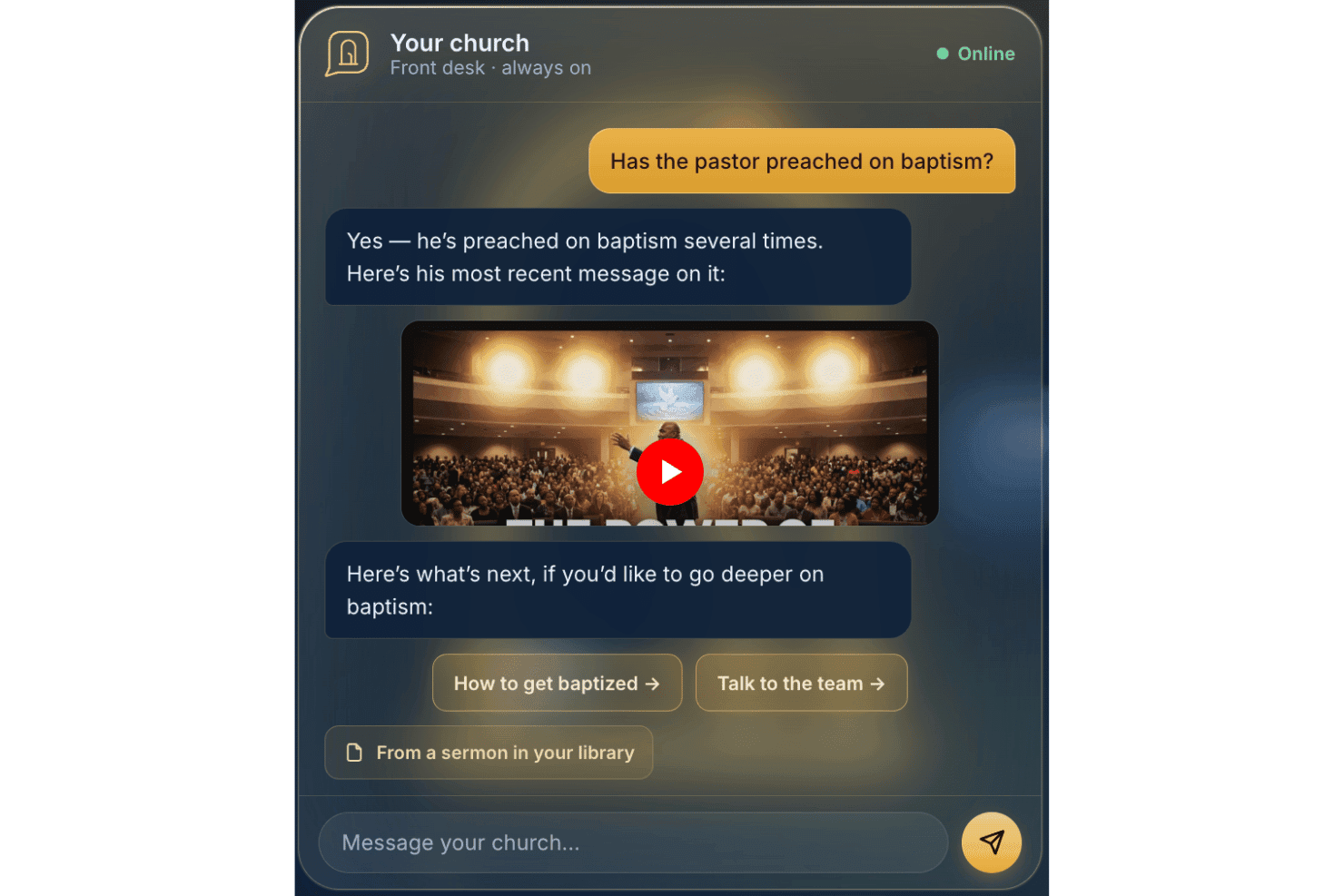
AskMyChurch offers a 24/7 AI-powered church answering service. Built for church websites, AskMyChurch is a congregant-facing AI assistant that answers questions sourced from your church's own pages, sermons, and videos, with a pastor-voice sermon citation feature and hard-wired crisis escalation routing.
Who Is AskMyChurch Best For?
AskMyChurch is a strong fit for small to mid-sized churches that field high volumes of repeat visitor questions but have limited administrative staff to answer them around the clock.
Why I Picked AskMyChurch
AskMyChurch earns its spot on my shortlist because of how seriously it takes the "sourced from church content" promise. The assistant runs a second verification pass after every answer to confirm it's grounded in what your church has actually published, and if it can't find the answer, it says so rather than guessing. I also like the Canon feature, which lets visitors ask questions from past sermons and get a cited, timestamped response linked to the exact minute the pastor said it.
AskMyChurch Key Features
- Hard-coded crisis gate: Urgent or distress messages route directly to crisis hotlines and church pastoral care before any AI response.
- Anonymous, no-login experience: Visitors can ask questions without creating an account or sharing personal information.
- Multilingual support: The assistant handles questions and crisis escalation in both English and Spanish.
- Plain English content controls: You can quickly update what the assistant should or should not answer directly from your dashboard.
AskMyChurch Integrations
Native integrations are not publicly documented. The assistant indexes your church website pages, sermons, and videos for content but does not advertise official integrations with external tools or platforms.
Pros and Cons
Pros:
- Built-in crisis routing with no plugin required
- Answers congregant inquiries around the clock
- Adapts responses to reflect church branding
Cons:
- Not designed for internal staff productivity
- No people records, giving, or event tools
Learn more about AskMyChurch: Best for querying church data via your own AI
- Free plan available
- From $12/month
Visit WebsiteCustomer Rating:4.6/5
ChMeetings lets users track church funds and account balances visually. ChMeetings is a church management platform that covers member records, giving, attendance, volunteer scheduling, worship planning, and communications—with a growing set of AI tools including an email writing assistant, natural language people search, and an MCP connector that links your live church data to external AI assistants like ChatGPT, Claude, and Gemini.
Who Is ChMeetings Best For?
ChMeetings is a strong fit for small-to-mid-sized churches that want a full church management backbone and the flexibility to query their own data through AI tools like ChatGPT or Claude.
Why I Picked ChMeetings
I picked ChMeetings because its MCP connector is unlike anything else I've seen in church management software. It lets your team query live church data—giving records, attendance, member notes—directly through ChatGPT, Claude, or Gemini using plain English. Ask "Who are our top donors this month?" and your AI assistant pulls the answer from real ChMeetings data. Pair that with AI-powered natural language people search, and I think you've got a genuinely flexible setup for staff who want to bring their own AI tools to the work.
ChMeetings Key Features
- AI email writing assistant: Drafts, re-tones, and translates email content directly inside the email designer from a plain-English prompt.
- Child check-in with QR scanning: Supports family check-in, QR code scanning, and name tag printing for secure attendance tracking.
- Worship service planning: Lets your team build service orders with songs, prayers, and sermon slots, manage a centralized song library, and schedule worship team members.
- Automated follow-up workflows: Triggers follow-up tasks for newcomers, absentees, and event attendees based on attendance data and custom date fields.
ChMeetings Integrations
ChMeetings integrates with Stripe, PayPal, Square, Mailchimp, Twilio, and Plaid, plus ChatGPT, Claude, Gemini, and Grok through its MCP connector. It offers a REST API and Zapier for custom integrations.
Pros and Cons
Pros:
- Multilingual support covers 26 languages
- Email writing assistant supports tone and translation
- Lets staff query live church data with AI
Cons:
- Lacks AI chatbot for member engagement
- No predictive analytics for giving or attendance
Learn more about ChMeetings: Best for live multilingual sermon translation
- Free trial available
- From $150/month

One Accord Translation offers real-time multilingual translation for church meetings, enabling live multi-language interpretation via a mobile app. OneAccord is an AI-powered church management platform that delivers live sermon translation, real-time audio monitoring, and browser-based congregation access for multilingual and hybrid worship environments.
Who Is OneAccord Best For?
Church leaders and tech teams who need AI-driven tools for multilingual worship and accessible, browser-based congregation participation.
Why I Picked OneAccord
I picked OneAccord as one of the best because I can deliver live multilingual sermon translation directly to my congregation. I like that it supports real-time speech recognition and translation for dozens of languages, so everyone can follow along. My team uses the browser-based interface to let attendees access translations on their own devices during services.
OneAccord Key Features
- Audio quality monitoring: Tracks and displays real-time audio levels and clarity during live events.
- Session recording: Records sermons and translations for later review or sharing.
- Admin dashboard: Centralizes control for managing events, users, and translation settings.
OneAccord Integrations
Native integrations are not clearly documented. An API is available for custom integrations.
Pros and Cons
Pros:
- Session recording with downloadable transcripts
- Custom branding supports consistent church experience across sessions
- Audio quality monitoring with instant alerts
Cons:
- No built-in event scheduling or calendar tools
- Pricing may be high for small churches
Learn more about OneAccord: Best for digital giving and donation management
- Free plan + 30-day free trial + free demo available
- From $19/month
Visit WebsiteCustomer Rating:4.8/5
Tithe.ly manages digital giving and organizes church donor records. If you’re looking for a platform that helps churches manage digital giving and member engagement, Tithely is worth a look. It’s designed for church leaders and finance teams who want to simplify online donations and track contributions. Tithe.ly addresses the challenge of managing multiple giving channels while keeping donor data organized and accessible.
Who Is Tithely Best For?
Tithely is a good fit for churches and ministries of any size that want to centralize and modernize their digital giving processes.
Why I Picked Tithely
What drew me to Tithely is how it specializes in digital giving and donation management for churches. The platform offers a suite of giving options, including text-to-give, mobile app giving, and recurring donation setup, which makes it easy for congregants to contribute in the way that suits them best. Additionally, it also balances digital giving with ethical considerations.
I also appreciate the built-in reporting tools that help church leaders track giving trends and donor giving patterns in real time. For churches that want to modernize their stewardship and make giving accessible from anywhere, Tithely’s focused features make it a strong choice.
Tithely Key Features
Some other features that make Tithely useful for church management include:
- Event registration and ticketing: Manage sign-ups and payments for church events directly within the platform.
- Custom church app builder: Create a branded mobile app for your church to engage members and share content. A
- utomated email and SMS communication: Send scheduled or triggered messages to keep your congregation informed.
- Member management dashboard: Organize, track, and update member profiles and engagement history in one place.
Tithely Integrations
Integrations include QuickBooks Online, RockRMS, Engiven, Elvanto, Salesforce, MinistryPlatform, Planning Center, and more.
Pros and Cons
Pros:
- Provides detailed giving and donor reports
- Offers branded church app creation
- Supports multiple digital giving methods
Cons:
- Limited customization options for forms
- Event management features are basic
 Best for volunteer scheduling coordination
- Free plan + free demo available
- From $15/month
Visit WebsiteCustomer Rating:4.2/5
Planning Center organizes church teams, schedules, and service planning. Planning Center offers a suite of cloud-based tools designed for churches that need to organize people, events, and resources. It’s especially useful for ministry leaders and administrators who want to coordinate teams, manage service planning, and centralize communication. If your church juggles multiple volunteers and complex schedules, Planning Center helps bring order and clarity to your operations.
Who Is Planning Center Best For?
Planning Center is a strong fit for churches of any size that need to coordinate volunteers, schedule services, and manage ministry teams.
Why I Picked Planning Center
What stands out to me about Planning Center is how purpose-built it is for coordinating volunteer schedules in a church context. The platform lets you create detailed service plans, assign roles, and send automated reminders to volunteers, which helps reduce confusion and last-minute changes. I also appreciate the way it tracks volunteer availability and preferences, making it easier to fill gaps and avoid scheduling conflicts.
For churches that rely on a large volunteer base, Planning Center brings structure and clarity to the entire coordination process.
Planning Center Key Features
Some other features that make Planning Center useful for church management include:
- People database: Store and organize member profiles, contact information, and family relationships in one place.
- Event registration: Set up custom registration forms for events, track attendance, and manage payments.
- Check-in system: Provide secure child check-in and check-out for children’s ministry and events.
- Resource management: Reserve rooms, equipment, and other resources for services and activities.
Planning Center Integrations
Integrations include Checkr, Mailchimp, PraiseCharts, RehearsalMix, SongSelect, Clearstream, MinistrySafe, Protect My Ministry, and more.
Pros and Cons
Pros:
- Secure check-in system for children’s ministry
- Service planning templates save setup time
- Automated volunteer reminders reduce no-shows
Cons:
- Requires separate modules for full functionality
- No built-in messaging chatbots
Learn more about Planning Center: Best with mobile-first engagement features
- Free demo available
- Pricing upon request
Visit WebsiteCustomer Rating:4/5
Pushpay combines digital giving, event management, and church engagement tools. Pushpay offers a digital giving and engagement platform designed for churches and faith-based organizations. It’s a strong option for leaders who want to connect with their congregations through mobile technology and digital communication tools. If you’re looking to simplify giving, manage events, and foster ongoing engagement, Pushpay addresses these needs in one platform.
Who Is Pushpay Best For?
Pushpay is a good fit for churches and ministries that prioritize mobile engagement and digital giving solutions.
Why I Picked Pushpay
What stands out to me about Pushpay is its focus on mobile-first engagement, which is increasingly important for churches looking to connect with members wherever they are. The platform offers a dedicated mobile app that supports digital giving, event sign-ups, and personalized communication, all from a smartphone.
I also like that Pushpay includes features for sending targeted messages and push notifications, making it easier for leaders to keep their congregation informed and engaged. For churches that want to prioritize mobile interaction and real-time connection, Pushpay’s approach fits well with modern ministry needs.
Pushpay Key Features
Some other features that make Pushpay useful for church management include:
- Donor management dashboard: Track giving history, manage donor profiles, and generate contribution statements from a centralized dashboard.
- Recurring giving setup: Allow members to schedule and manage recurring donations directly through the platform.
- Event registration tools: Create, promote, and manage sign-ups for church events, classes, and volunteer opportunities.
- Customizable reporting: Generate detailed reports on giving trends, engagement metrics, and event participation to support data-driven decisions.
Pushpay Integrations
Integrations include Planning Center, QuickBooks, Gusto, Mailchimp, Rock RMS, and more.
Pros and Cons
Pros:
- Automated donor communication tools included
- Branded church app creation is available
- Mobile app supports giving and event sign-ups
Cons:
- Limited AI features in standalone versions
- Requires manual verification of AI outputs
Learn more about Pushpay: Best for website creation and management
- 14-day free trial
- From $29/month (billed annually)

The Church Co builds church websites for content updates and online outreach. If your church wants a modern, easy-to-manage website, The Church Co is worth considering. This platform is designed for churches that need to keep their online presence current without relying on technical staff. It helps ministry teams quickly update content, share sermons, and connect with visitors online.
Who Is The Church Co Best For?
The Church Co is a good fit for small to mid-sized churches that want to manage and update their websites without technical expertise.
Why I Picked The Church Co
What drew me to The Church Co is how purpose-built it is for churches that want to create and manage their websites without technical barriers. The platform offers a drag-and-drop website builder, so ministry teams can quickly update pages, add sermons, and post events as needs change. I also appreciate the built-in sermon library and event calendar, which help churches keep their online presence fresh and relevant for members and visitors.
For leaders who want to focus on ministry rather than web development, The Church Co makes it simple to maintain a professional, engaging website.
The Church Co Key Features
Some other features that make The Church Co useful for church management include:
- Online giving integration: Connects with digital giving platforms so members can donate directly through your website.
- Prayer request system: Lets visitors and members submit prayer requests that can be managed and responded to by church staff.
- Volunteer sign-up forms: Provides customizable forms for recruiting and organizing volunteers for events and ministries.
- Blog and news posting: Allows churches to share updates, devotionals, and announcements with their congregation through a built-in blog.
The Church Co Integrations
Integrations include Planning Center, Tithely, Church Community Builder, Church Suite, Stripe, Google Analytics, and more.
Pros and Cons
Pros:
- Mobile-friendly templates for church websites
- Customizable prayer request and response tools
- Built-in sermon audio and video hosting
Cons:
- No built-in church management database (ChMS)
- No AI-powered content features
Learn more about The Church Co: Best for customizable data management
- Free demo available
- Pricing upon request

MinistryPlatform centralizes church data, events, and engagement tracking. If your church needs a flexible platform to manage complex data and ministry operations, MinistryPlatform is worth a closer look. This solution is designed for churches and ministries that want to centralize member information, events, and engagement tracking. MinistryPlatform appeals to leaders who need to organize, analyze, and act on data to support ministry growth and decision-making.
Who Is MinistryPlatform Best For?
MinistryPlatform is a good fit for large churches and multi-site ministries that need advanced data management and reporting capabilities.
Why I Picked MinistryPlatform
What stands out to me about MinistryPlatform is how deeply you can customize data fields, workflows, and reports to fit your church’s unique structure. This level of flexibility is especially valuable for churches with complex ministries or multi-campus operations that need to track a wide range of member details, engagement metrics, and ministry activities.
I also appreciate that MinistryPlatform lets you design custom dashboards and automate data-driven processes, so you can adapt the platform as your ministry grows or changes. For leaders who want to shape their church management system around their specific needs, MinistryPlatform offers a level of control that’s hard to find elsewhere.
MinistryPlatform Key Features
Some other features that make MinistryPlatform useful for church management include:
- Group management tools: Organize, track, and communicate with small groups, classes, and ministry teams from a central dashboard.
- Event management module: Schedule events, manage registrations, and coordinate resources for church activities and programs.
- Online giving integration: Connect with digital giving platforms to track donations and generate contribution statements.
- Mobile-friendly member portal: Give members access to their profiles, event sign-ups, and communication tools from any device.
MinistryPlatform Integrations
Integrations include Realm, MinistrySafe, Twilio, SendGrid, and more.
Pros and Cons
Pros:
- Member portal with mobile access features
- Advanced reporting and analytics for ministries
- Highly customizable data fields and workflows
Cons:
- Requires training for advanced customization
- Interface can feel dated compared to peers
Learn more about MinistryPlatform: Best for transforming sermons into shareable content
- Free trial available
- From $39/month

Pulpit AI turns sermons into shareable content for weekly church engagement. If you want to turn sermons into practical resources for your congregation, Pulpit AI offers a focused solution. This powerful tool is designed for pastors and church communicators who want to repurpose sermon content for broader engagement. It helps address the challenge of keeping your message accessible and relevant throughout the week.
Who Is Pulpit AI Best For?
Pulpit AI is a good fit for pastors and church communication teams who want to repurpose sermons into high-quality digital content for ongoing engagement.
Why I Picked Pulpit AI
What drew me to Pulpit AI is how it uses AI to turn sermons into a variety of shareable formats, like discussion guides, social media posts, and email summaries. This focus on content transformation helps churches keep their messages present in people’s lives beyond Sunday. I also appreciate that it automates the process, so you don’t have to manually rewrite or repackage your sermons each week.
For churches looking to extend the reach and impact of their teaching, these features make Pulpit AI a practical choice.
Pulpit AI Key Features
Some other features that make Pulpit AI useful for church management include:
- Bulk upload for sermon archives: Import multiple past sermons at once to generate content from your existing library.
- Multi-language support: Generate content in several languages to reach a broader audience.
- Content approval workflow: Review and approve generated materials before publishing or sharing.
- Team collaboration tools: Invite staff or volunteers to collaborate on editing and distributing sermon-based content.
Pulpit AI Integrations
Integration includes Subsplash.
Pros and Cons
Pros:
- Offers bulk upload for sermon archives
- Supports multi-language content generation
- Converts sermons into multiple content formats
Cons:
- Does not automate sermon transcription
- Lacks direct publishing to social media
Learn more about Pulpit AI: Best for automated event scheduling workflows
- Free plan available
- From $65/month

Church.tech helps churches manage events, sermons, and busy ministry schedules. Church.tech offers AI-driven solutions for churches looking to simplify event planning and coordination. This platform is a good fit for ministry leaders and administrators who manage busy calendars, sermons, and multiple activities. It helps reduce manual scheduling work and keeps everyone on the same page.
Who Is Church.tech Best For?
Church.tech is a good fit for church administrators and ministry teams who need to coordinate events and schedules across multiple groups or locations.
Why I Picked Church.tech
I chose Church.tech because its automated event scheduling workflows address a common challenge for church leaders: managing overlapping activities and busy calendars. The platform uses AI to suggest optimal times for events, reducing conflicts in daily ministry work.
I also appreciate that it can automatically notify team members and volunteers about schedule changes, keeping everyone informed. These features make it especially useful for churches with multiple ministries or frequent events.
Church.tech Key Features
Some other features that make Church.tech useful for church management include:
- Volunteer management tools: Assign, track, and communicate with volunteers for specific events or ongoing ministry needs.
- Resource booking system: Reserve rooms, equipment, and other resources directly within the platform to avoid double-booking.
- Customizable event templates: Create and reuse templates for recurring events, saving setup time for regular church activities.
- Attendance tracking: Monitor event participation and generate reports to help with follow-up and engagement.
Church.tech Integrations
Native integrations are not currently listed.
Pros and Cons
Pros:
- Has customizable event templates
- Provides volunteer management tools
- Automated scheduling for coordination work
Cons:
- No built-in donation or giving management
- Limited reporting options for financial tracking
Learn more about Church.tech:
Outras ferramentas de IA para gestão de igrejas
Eis algumas opções adicionais de ferramentas de IA para gestão de igrejas que não entraram na minha seleção, mas que vale a pena consultar:
- 11ChurchSocialBest for group communication automation
- 12Church Sync AIBest for AI-powered member engagement insights
- 13GlooBest with community connection integrations
- 14ReliusBest with AI-driven administrative task support
- 15Doctrinally AIBest for custom AI trained on church teachings
- 16CanvaBest for church presentation design
- 17ChatGPTBest for conversational content support
- 18OtterBest for automated meeting transcription
- 19Online GivingBest for digital donation processing
- 20MagaiBest for multi-model AI chatbot integration
How I Evaluate AI Tools for Church Management
I look for tools where AI does more than slap a chatbot on a member database—it should surface engagement patterns, draft ministry content, or automate follow-up in ways that save real staff hours. I split my evaluation into core functionality every tool needs to qualify and differentiating factors that separate one platform from the next.
Core Functionality (Table Stakes For This List)
When I'm selecting tools for my list, I rank each one on a scale from 0 (does not offer the functionality) to 5 (excels in this area) for each core functionality listed below. Then, I calculate the tool's total score into a percentage. Each tool needs to achieve a minimum total score of 65% to be considered for inclusion.
- AI Member Engagement Insights: I check whether the platform uses AI to flag attendance drops or giving changes and recommend follow-up steps, not just display static reports.
- Generative Content Creation: Tools should draft usable sermon outlines, devotionals, or newsletter copy from prompts—I evaluate output quality and theological tone control.
- Church Management Core Records: A solid member database with households, attendance, giving, and groups is the foundation. I look for how well the AI layer connects to these records.
- AI-Powered Communications & Outreach: I evaluate whether the tool personalizes email or SMS outreach using AI—like tailoring a new visitor follow-up sequence based on their first visit details.
- Intelligent Automation & Workflows: The platform should automate tasks like assigning volunteers to teams or triggering care reminders when a member misses several weeks in a row.
- Conversational AI Assistant: I look for an AI assistant that staff can query for quick answers—like pulling up a small group's attendance trend—or that congregants can use for prayer requests.
Once I have a list of tools that meet this criteria, I consider what sets each platform apart.
Differentiating Factors (What Sets Vendors Apart)
Here's how I compare and contrast different vendors:
Standout Features
Pastoral care intelligence is a major differentiator. I look for tools that detect attendance gaps or sentiment shifts and prompt staff to reach out before someone quietly drifts away. Predictive giving analytics also matter, especially for finance teams planning capital campaigns or forecasting year-end stewardship trends. Smart volunteer matching rounds things out by pairing congregants to serve based on spiritual gifts and availability rather than manual spreadsheet juggling.
Beyond Features
Data privacy matters more here than in most software categories. I evaluate how each vendor handles sensitive counseling notes and giving records, and whether congregant data stays out of public AI training sets. Theological guardrails are another big consideration—AI-generated content should respect your church's doctrinal positions, not produce off-brand theology your team has to constantly edit. I also check pricing structures to see if they scale fairly for smaller congregations or church plants running on tight budgets.
Como escolher ferramentas de IA para gestão de igrejas
É fácil perder-se em listas extensas de funcionalidades e estruturas de preços complexas. Para o ajudar a manter o foco enquanto analisa o seu processo específico de seleção de software, eis uma lista de verificação dos fatores a ter em conta:
| Fator | O que considerar |
|---|---|
| FatorEscalabilidade | O que considerarA ferramenta acompanhará o crescimento da sua igreja em número de membros, ministérios ou localizações? Verifique os limites de utilizadores, os limites de dados e as opções de atualização. |
| FatorIntegrações | O que considerarA ferramenta liga-se aos seus sistemas existentes, como software de contabilidade, e-mail ou apresentações? Confirme se existem integrações nativas, não apenas opções de API. |
| FatorPersonalização | O que considerarPode adaptar fluxos de trabalho, formulários ou painéis de controlo aos processos específicos da sua igreja? Evite ferramentas que o obriguem a utilizar modelos rígidos. |
| FatorFacilidade de utilização | O que considerarOs funcionários e voluntários com diferentes níveis de conhecimentos tecnológicos conseguirão utilizar a ferramenta com confiança? Procure uma navegação clara e requisitos mínimos de formação. |
| FatorImplementação e integração inicial | O que considerarQuanto tempo será necessário para começar a utilizar a ferramenta? Informe-se sobre o apoio à migração, os recursos de formação e a necessidade de recorrer a ajuda informática externa. |
| FatorCusto | O que considerarTodos os custos são transparentes, incluindo a configuração, as mensalidades e os complementos? Compare os níveis de preços e esteja atento a custos ocultos ou atualizações obrigatórias. |
| FatorMedidas de segurança | O que considerarComo protege a ferramenta os dados sensíveis dos membros e das doações? Procure encriptação, controlos de acesso e conformidade com as normas de privacidade. |
| FatorDisponibilidade do apoio | O que considerarQuando e como pode contactar o apoio se surgirem problemas? Verifique se existem opções de chat em direto, telefone ou e-mail, e se o apoio está incluído ou tem um custo adicional. |
O que são ferramentas de IA para a gestão de igrejas?
As ferramentas de IA para a gestão de igrejas são plataformas de software que utilizam inteligência artificial para automatizar, organizar e melhorar as tarefas administrativas e ministeriais numa igreja. Estas ferramentas ajudam a gerir dados dos ministérios da igreja, horários, comunicação, donativos e relatórios.
Ao tirar partido da IA, as igrejas podem reduzir o trabalho manual, melhorar a precisão e libertar funcionários e voluntários para se concentrarem mais no ministério e no envolvimento da comunidade.
Funcionalidades
Ao selecionar ferramentas de IA para a gestão de igrejas, esteja atento às seguintes funcionalidades essenciais:
- Agendamento automatizado: Utiliza IA para coordenar calendários, reservar salas e enviar lembretes relativos a cultos, reuniões e eventos, reduzindo a coordenação manual.
- Ferramentas inteligentes de comunicação: Automatiza notificações por e-mail, mensagem de texto ou aplicação para membros e voluntários, garantindo atualizações atempadas e reduzindo o número de mensagens não recebidas.
- Acompanhamento de donativos: Regista, categoriza e apresenta relatórios sobre ofertas, compromissos de donativos e donativos recorrentes, facilitando a supervisão financeira e o envolvimento dos doadores.
- Gestão de voluntários: Atribui voluntários a funções com base na disponibilidade e nas competências, acompanha as horas e automatiza o contacto posterior para futuras oportunidades.
- Gestão de documentos: Organiza, armazena e recupera documentos, políticas e formulários da igreja, utilizando IA para apresentar ficheiros relevantes quando necessário.
- Gestão da base de dados de membros: Mantém registos atualizados de membros, famílias e visitantes, com informações baseadas em IA para o envolvimento e o alcance comunitário.
- Análise da assiduidade: Acompanha os padrões de presença em cultos e eventos, utilizando IA para identificar tendências e assinalar alterações que possam exigir atenção pastoral.
- Automatização de tarefas: Trata de tarefas administrativas repetitivas, como a introdução de dados, a geração de imagens e o encaminhamento de fluxos de trabalho, libertando tempo dos funcionários.
- Apoio ao planeamento de eventos: Ajuda com a logística, as inscrições e a comunicação relativas a eventos da igreja, utilizando IA para antecipar necessidades e otimizar recursos.
- Controlos de segurança e privacidade: Utiliza IA para monitorizar o acesso, detetar atividades invulgares e garantir que os dados sensíveis são protegidos de acordo com as normas de privacidade.
Benefícios
A implementação de ferramentas baseadas em IA para a gestão de igrejas proporciona vários benefícios à sua equipa e à sua organização. Eis alguns dos benefícios que pode esperar:
- Redução da carga administrativa: A automatização do agendamento, da comunicação e da introdução de dados liberta funcionários e voluntários para tarefas mais centradas no ministério.
- Maior precisão: A gestão e os relatórios de dados baseados em IA minimizam os erros nos registos de membros, nos donativos e no acompanhamento da assiduidade.
- Tomada de decisões mais rápida: As análises em tempo real e as informações preditivas ajudam os líderes a reagir rapidamente às tendências de presença, donativos e envolvimento.
- Maior envolvimento dos membros: As ferramentas automatizadas de comunicação personalizada garantem que os membros e voluntários recebem atualizações e lembretes atempados.
- Melhor afetação de recursos: O agendamento e o planeamento de eventos baseados em IA otimizam a utilização das instalações, dos voluntários e dos orçamentos.
- Maior segurança dos dados: Os controlos de privacidade integrados e as funcionalidades de monitorização ajudam a proteger informações sensíveis dos membros e informações financeiras.
- Operações escaláveis: As ferramentas de IA adaptam-se ao crescimento da sua igreja, suportando membros, ministérios e localizações adicionais sem sobrecarregar a sua equipa.
Custos e preços
A seleção de ferramentas de IA para a gestão de igrejas requer uma compreensão dos vários modelos de preços e planos disponíveis. Os custos variam consoante as funcionalidades, o tamanho da equipa, os complementos, entre outros fatores. A tabela abaixo resume os planos comuns, os seus preços médios e as funcionalidades normalmente incluídas nas soluções de ferramentas de IA para a gestão de igrejas:
Tabela de comparação de planos para ferramentas de IA para a gestão de igrejas
| Tipo de plano | Preço médio | Funcionalidades comuns |
|---|---|---|
| Tipo de planoPlano gratuito | Preço médio$0 | Funcionalidades comunsGestão básica de membros, agendamento limitado, ferramentas de comunicação simples e relatórios básicos. |
| Tipo de planoPlano pessoal | Preço médio$5-$15/utilizador/mês | Funcionalidades comunsBase de dados de membros, agendamento de eventos, acompanhamento de donativos, notificações por e-mail e análises limitadas. |
| Tipo de planoPlano empresarial | Preço médio$20-$40/utilizador/mês | Funcionalidades comunsAutomatização avançada, gestão de voluntários, armazenamento de documentos, relatórios personalizados e opções de integração. |
| Tipo de planoPlano empresarial avançado | Preço médio$50-$100/utilizador/mês | Funcionalidades comunsFluxos de trabalho personalizados, segurança avançada, apoio prioritário, gestão de vários campus e acesso à API. |
Perguntas frequentes sobre ferramentas de IA para a gestão de igrejas
Eis algumas respostas a perguntas comuns sobre ferramentas de IA para a gestão de igrejas:
Como é que as ferramentas de IA ajudam as igrejas a poupar tempo?
As ferramentas de IA automatizam tarefas repetitivas, como o agendamento, a introdução de dados e o envio de lembretes. Isto reduz o trabalho manual do pessoal e dos voluntários, permitindo-lhes concentrarem-se mais no ministério e menos na administração.
As ferramentas de IA para a gestão de igrejas podem integrar-se com o software existente da igreja?
Sim, muitas ferramentas de IA oferecem integrações com sistemas de contabilidade, e-mail, apresentações e gestão de doadores. Verifique sempre a compatibilidade com o software atual antes de escolher uma ferramenta.
As ferramentas de IA para a gestão de igrejas são seguras?
Sim, a maioria das ferramentas de IA conceituadas utiliza encriptação, controlos de acesso e atualizações regulares de segurança para proteger dados sensíveis de membros e financeiros. Reveja sempre as políticas de segurança e as normas de conformidade de um fornecedor antes da implementação.
Que formação é necessária para utilizar ferramentas de IA para a gestão de igrejas?
A maioria das ferramentas foi concebida para ser fácil de utilizar e oferece recursos de integração, como tutoriais, webinars e centros de ajuda. Algumas podem exigir breves sessões de formação para o pessoal ou os voluntários, especialmente no caso de funcionalidades avançadas, como a utilização de chatbots de IA.
Como é que as ferramentas de IA apoiam o envolvimento dos membros?
As ferramentas de IA podem personalizar a comunicação, automatizar os acompanhamentos e acompanhar as tendências de participação. Isto ajuda a liderança da igreja a estabelecer uma ligação mais consistente com os membros e a responder atempadamente às suas necessidades.
O que devo considerar ao elaborar um orçamento para ferramentas de IA para a gestão de igrejas?
Considere o número de utilizadores, as funcionalidades necessárias, as necessidades de integração e os possíveis custos de complementos. Procure preços transparentes e pergunte por descontos para organizações sem fins lucrativos ou opções de teste gratuito.