
Gerir uma igreja traz consigo o seu próprio conjunto de desafios, especialmente no que diz respeito à contabilidade e à administração. Poderá estar à procura de alternativas ao Blackbaud se estiver a enfrentar problemas como custos elevados, interfaces complexas ou funcionalidades limitadas que não respondem às necessidades específicas da sua igreja.
Com base na minha experiência, encontrar o software certo pode fazer uma enorme diferença para a sua equipa. O software de contabilidade para igrejas pode simplificar as suas operações e melhorar a forma como gere os recursos da sua comunidade.
Neste artigo, partilharei as minhas principais escolhas de alternativas ao Blackbaud. Abordarei as funcionalidades, as vantagens e desvantagens e os preços de cada opção, para que possa tomar uma decisão informada que responda melhor às necessidades da sua igreja.
O que é o Blackbaud?
O Blackbaud é um software de contabilidade para igrejas concebido para ajudar a gerir tarefas financeiras e administrativas. É normalmente utilizado por administradores de igrejas, equipas financeiras e organizações sem fins lucrativos para gerir donativos, orçamentos e o envolvimento da comunidade. Funcionalidades como o acompanhamento de donativos, os relatórios financeiros e a gestão de membros ajudam a gerir os recursos de forma eficiente e a apoiar a comunidade. De um modo geral, o Blackbaud disponibiliza ferramentas valiosas para simplificar as operações da igreja.
Why Trust Our Software Recommendations
6,700+
Reviews
20
Industry experts
16+
Evaluation factors
14
Years
Our team has been testing and reviewing software since 2012. As church leaders ourselves, we know how difficult—and important—it is to choose the right software.
For this guide, we evaluated tools using hands-on testing and independent research, scoring tools using our selection criteria.
Our reviews reflect our human editorial judgment, not a sales pitch.
Tabela comparativa de alternativas ao Blackbaud
Esta tabela comparativa resume os detalhes dos preços das minhas principais escolhas de alternativas ao Blackbaud:
Score legend (out of 5)
- Excellent4.5–5
- Good4–4.4
- Average3–3.9
- Below average2–2.9
- Poor1–1.9
Sorted by: Default
| Tool | Starting Price | Website | |||||||
|---|---|---|---|---|---|---|---|---|---|
Best for zero-fee nonprofit fundraising | 3.5 out of 5 | 3 | 4 | 4 | 4 | 3 | 3 | Pricing upon request Free plan available | Website |
Best for digital giving options | 3.5 out of 5 | 3 | 3 | 4 | 3 | 4 | 4 | $72/month Free plan + 30-day trial + demo available | Website |
Best for donor engagement tools | 3.2 out of 5 | 4 | 2 | 3 | 2 | 4 | 4 | $125/month Free demo available | Website |
Best for affordability and ease | 3.5 out of 5 | 3 | 3 | 4 | 3 | 4 | 4 | $45/month 30-day free trial available | Website |
Best for integrated fundraising | 3.8 out of 5 | 4 | 3 | 4 | 4 | 4 | 4 | $125/month Free demo available | Website |
Best for church-specific accounting | 3.3 out of 5 | 3 | 4 | 4 | 2 | 3 | 4 | Pricing upon request Free trial + free demo available | Website |
Best for nonprofit engagement | 4.0 out of 5 | 4 | 4 | 4 | 4 | 4 | 4 | Pricing upon request Free demo available | Website |
Best for scalable solutions | 3.7 out of 5 | 3 | 4 | 5 | 2 | 5 | 3 | $15/month Free plan + free demo available | Website |
Best for church financial management | 3.5 out of 5 | 4 | 3 | 4 | 2 | 4 | 4 | Pricing upon request Free trial available | Website |
Best for cost-effective management | 3.0 out of 5 | 3 | 4 | 3 | 2 | 2 | 4 | $75/month Free plan + 7-day free trial available | Website |


Análises das melhores alternativas ao Blackbaud
Seguem-se os meus resumos detalhados das melhores alternativas ao Blackbaud que chegaram à minha lista restrita. As minhas análises apresentam uma visão detalhada das principais funcionalidades, vantagens & desvantagens, integrações e casos de utilização ideais de cada ferramenta, para ajudar a encontrar a melhor opção para si.
 Best for zero-fee nonprofit fundraising
- Free plan available
- Pricing upon request
Visit WebsiteCustomer Rating:4.9/5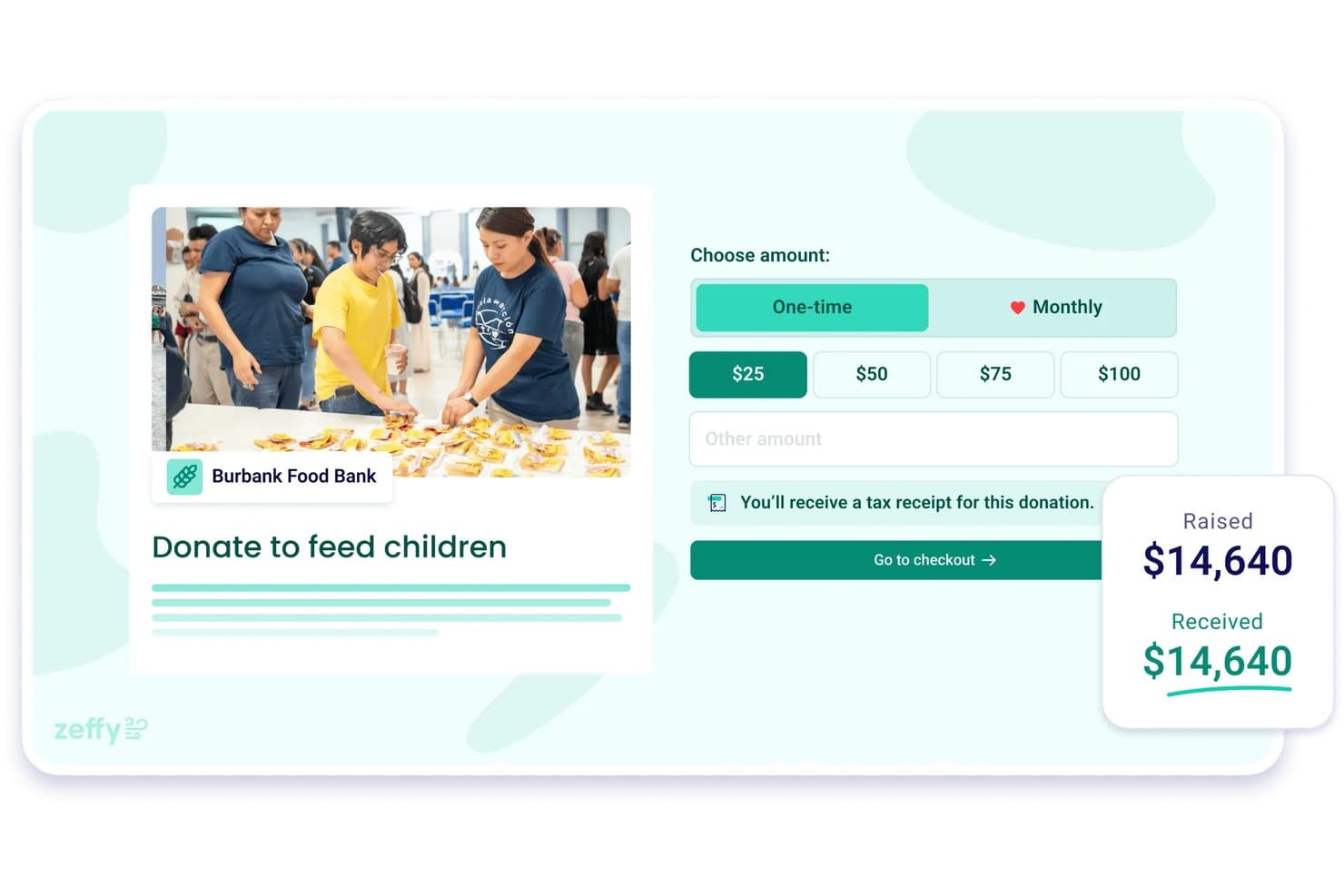
Zeffy lets users collect one-time or monthly donations with tax receipts. Zeffy is a zero-fee fundraising platform that appeals to small-to-mid-sized nonprofits and ministries that want to run donations, events, memberships, and peer-to-peer campaigns without paying subscription or processing fees.
Who Is Zeffy Best For?
Zeffy is a strong fit for small-to-mid-sized nonprofits and ministries that want to run donations, events, memberships, and campaigns without paying platform or processing fees.
Why I Picked Zeffy
I picked Zeffy as one of the best because its zero-fee model is genuinely rare: no subscription, no processing fees, and no per-contact charges, ever. What I find most compelling is how it handles peer-to-peer campaigns and event ticketing natively, so a church can run a fundraising walk or auction without stitching together separate tools. The recurring-giving dashboard also surfaces lapsed donors and projected annual revenue, giving development staff real visibility without paying for a premium tier.
Zeffy Key Features
- Constituent contact timeline: Each donor record displays a full history of donations, emails, event tickets, form submissions, notes, and lifetime giving in one view.
- Silent auction and raffle tools: Run online auctions with outbid alerts and automatic winner payments, or create raffles alongside other campaigns.
- QuickBooks sync: Payouts sync to QuickBooks by campaign and fund automatically, with setup taking under five minutes.
- AI data assistant: Ask plain-language questions about your donor data and get charts and summaries without building manual reports.
Zeffy Integrations
Zeffy offers native integrations with QuickBooks and WordPress. It also supports API and webhooks, plus viaSocket and Zapier connectivity.
Pros and Cons
Pros:
- Donor timelines surface giving history and follow-ups
- Reviewers report quick setup and responsive support
- Built-in auctions, raffles, and peer-to-peer campaigns
Cons:
- Lightweight CRM lacks wealth screening and moves management
- Donor checkout tips can confuse supporters
Learn more about Zeffy: Best for digital giving options
- Free plan + 30-day trial + demo available
- From $72/month
Visit WebsiteCustomer Rating:4.8/5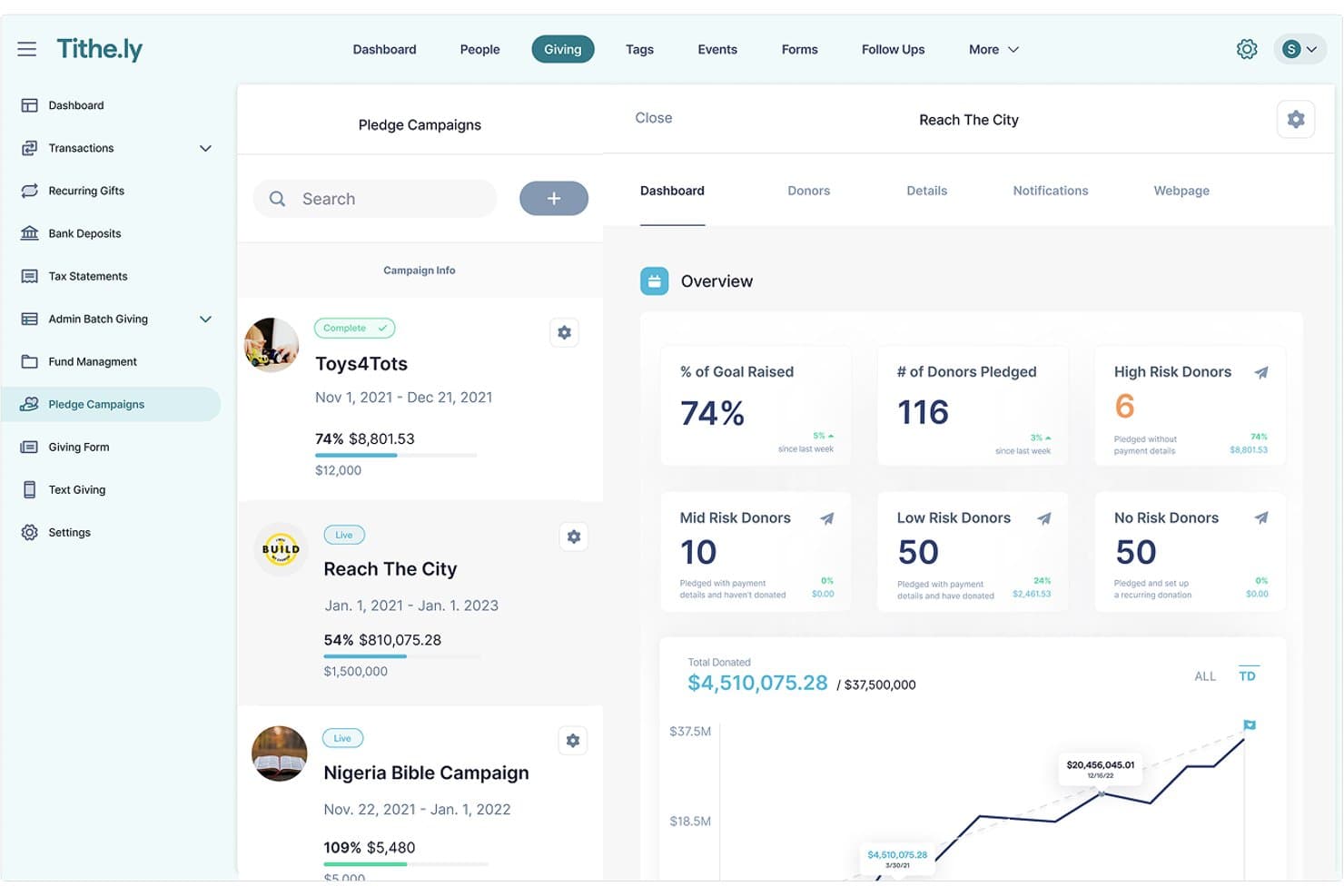
Tithe.ly tracks pledge campaign progress and donor risk levels. Tithe.ly Church Management is a church-focused platform that brings member records, giving, volunteer scheduling, and event management together in one place—making it a practical fit for smaller congregations that want to replace legacy software without a heavy price tag or long setup process.
Who Is Tithe.ly Best For?
Tithe.ly Church Management is a strong fit for smaller congregations that want an affordable, all-in-one platform to manage giving, people, and volunteers without a steep learning curve.
Why I Picked Tithe.ly
I picked Tithe.ly as one of the best because its digital giving options go deeper than a simple donate button. I particularly like how the platform supports multi-fund giving, pledge campaigns with live progress dashboards, and text-to-give, so a congregation can direct gifts to a building fund, a benevolence fund, and a missions fund all in one transaction. The giving dashboard updates in real time and ties directly to member profiles, which means I can see exactly who gave to which campaign without toggling between systems.
Tithe.ly Key Features
- Member directory: Maintains searchable member and family profiles with attendance records, custom fields, and tags to organize your congregation.
- Volunteer scheduling: Assigns volunteers to service roles, sends automated reminders, and lets volunteers confirm or decline shifts by email or in-app.
- Kids check-in: Checks children and families in for services and events, prints name tags, and generates unique security codes for child pickup.
- QuickBooks Online integration: Syncs giving data directly to QuickBooks Online for bookkeeping and financial reporting without manual re-entry.
Tithe.ly Integrations
Tithe.ly offers native integrations with QuickBooks Online, Rock RMS, Engiven, Elvanto, Church Community Builder, MinistrySafe, and CCLI SongSelect. It also lists Salesforce, MinistryPlatform, Shelby, FellowshipOne, and Planning Center Online; a public API isn’t documented.
Pros and Cons
Pros:
- Tagged attendance records support member follow-up
- Pledge dashboards track goals and donor progress
- Giving records connect directly with member profiles
Cons:
- Event and volunteer workflows feel limited
- Custom report formatting can take extra work
 Best for donor engagement tools
- Free demo available
- From $125/month (billed annually)
Visit WebsiteCustomer Rating:4.7/5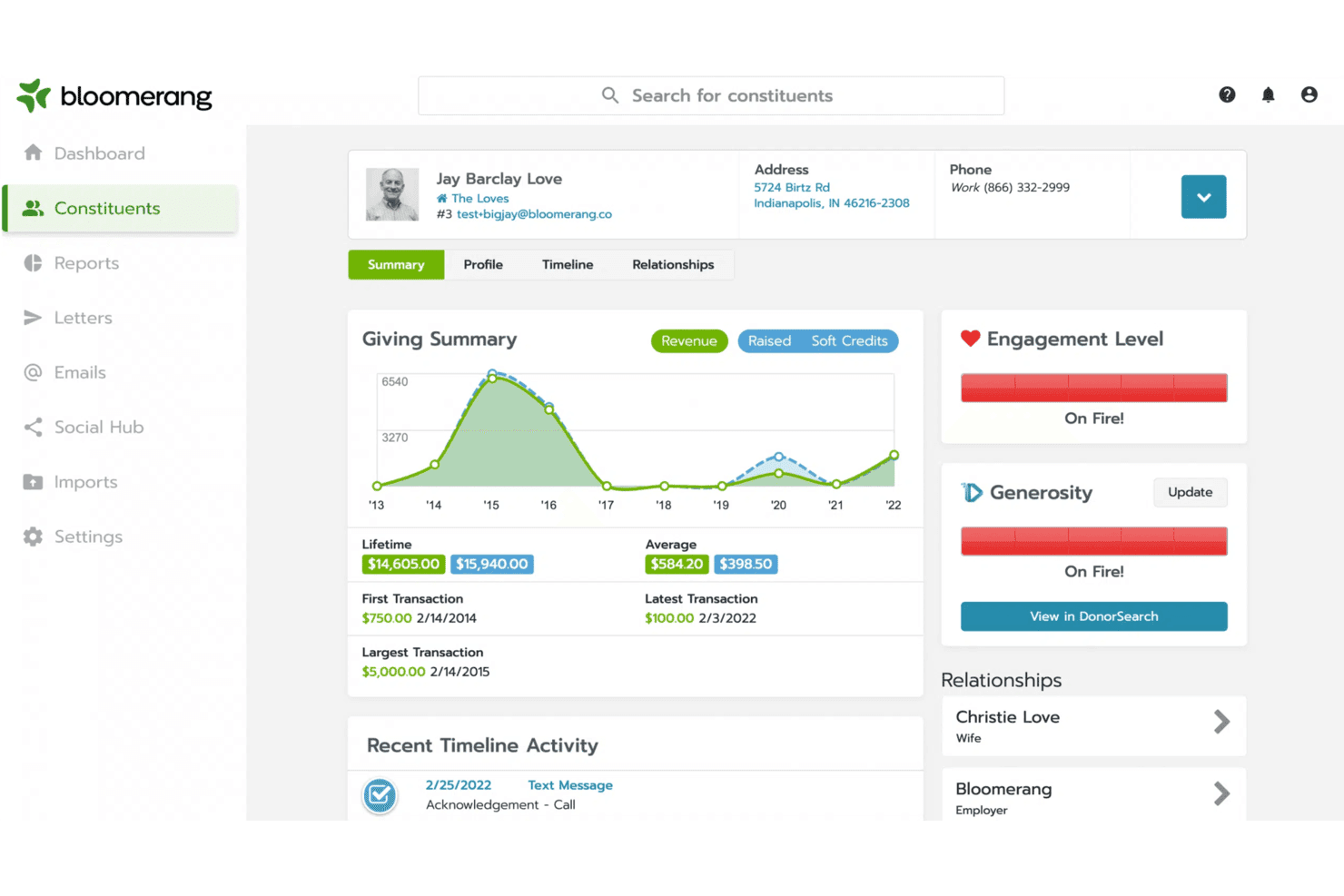
Bloomerang displays a donor's giving history and engagement level. Bloomerang is a nonprofit CRM built for organizations that want to deepen donor relationships, track giving history, and reduce donor lapse—making it a practical fit for churches managing supporter engagement and stewardship.
Who Is Bloomerang Best For?
Bloomerang is a strong fit for nonprofits and ministries that want to move away from complex legacy systems like Raiser's Edge and focus on building stronger, more personal donor relationships.
Why I Picked Bloomerang
I picked Bloomerang as one of the best because its donor engagement tools go deeper than basic contact management. I love how constituent timelines pull together giving history, interactions, and engagement patterns in one view, so I can spot a lapsing donor before they're gone. Dynamic donor groups let me build targeted outreach automatically, and the AI-assisted email campaigns mean I'm reaching the right people with the right message without manually sorting through records.
Bloomerang Key Features
- Constituent timelines: View a supporter's full donation history, interactions, and engagement activity together in a single chronological profile.
- Data hygiene tools: Automatically prevent duplicate records, update addresses nightly via NCOA, and keep your donor database clean.
- Role-based access controls: Customize permissions so staff and volunteers only see the information relevant to their role.
- QuickBooks integration: Sync donation transactions between Bloomerang and QuickBooks Online, with field-level mapping to your chart of accounts.
Bloomerang Integrations
Bloomerang offers integrations with QuickBooks Online, QuickBooks Desktop, Mailchimp, DonorSearch, and Constant Contact. It also provides REST and Bloomerang.js APIs for custom connections and supports Zapier.
Pros and Cons
Pros:
- Retention dashboards help spot donor lapses
- Raiser's Edge switchers report easier navigation
- Donor timelines clarify giving and engagement
Cons:
- Giving forms offer limited visual flexibility
- Complex reports can take extra steps
Learn more about Bloomerang: Best for affordability and ease
- 30-day free trial available
- From $45/month
Visit WebsiteCustomer Rating:4.7/5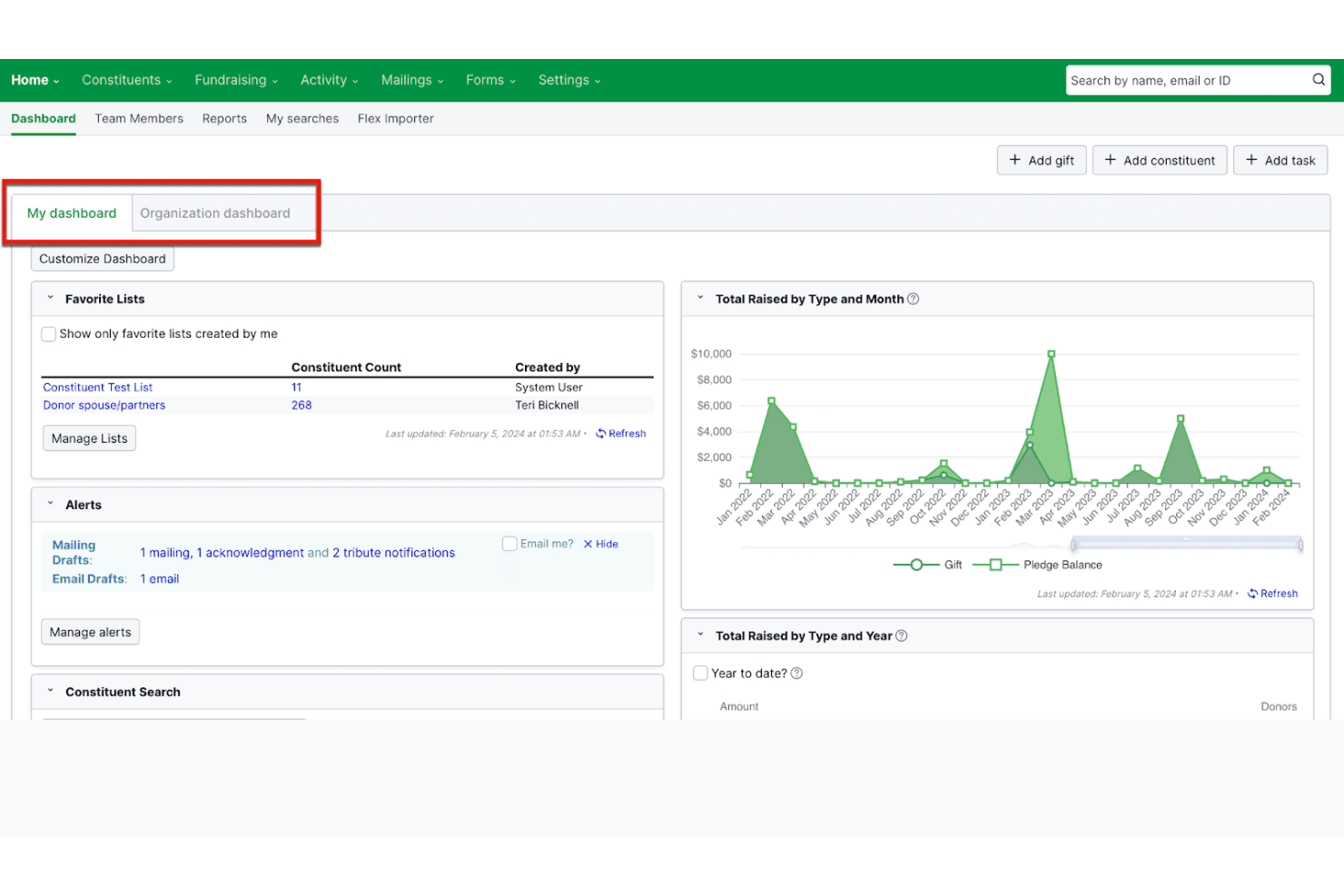
Little Green Light displays fundraising data on a customizable dashboard. Little Green Light is a cloud-based donor management platform built for small to mid-sized nonprofits that need an affordable, accessible way to track constituents, manage giving, and run fundraising campaigns without the complexity of enterprise-level systems.
Who Is Little Green Light Best For?
Little Green Light is a strong fit for small to mid-sized nonprofits whose development staff need an approachable donor management system without the cost or complexity of enterprise platforms.
Why I Picked Little Green Light
I picked Little Green Light as one of the best because it delivers a genuinely full-featured donor management system at a price point that doesn't punish small ministries. For $45/month, your team gets unlimited users, constituent profiles with full giving history and relationship tracking, and built-in acknowledgment tools that let you batch thank-you letters without a separate workflow. I also appreciate that every plan includes LGL Email with segmented lists and merge fields, so you can send personalized donor communications without bolting on another tool.
Little Green Light Key Features
- Flex Importer: Upload CSV or Excel files and map, preview, and review records before committing them to your database.
- Fundraising goals: Track major-gift asks and grant proposals with ask amounts, projections, tasks, assigned owners, and due dates.
- LGL Forms: Build unlimited embeddable online forms for donations, event registrations, membership enrollment, and volunteer sign-ups.
- Scheduled reports: Set reports to run automatically and email results to selected team members on a daily, weekly, or monthly schedule.
Little Green Light Integrations
Little Green Light offers native integrations with QuickBooks Online, Mailchimp, Constant Contact, Stripe, PayPal, DonorSearch, and Wealth Engine. It also supports custom integrations through its API and webhooks, plus Zapier.
Pros and Cons
Pros:
- Reviewers praise fundraising and board reports
- Batch acknowledgments ease donor follow-up
- Detailed donor histories support stewardship
Cons:
- No native peer-to-peer fundraising pages
- Basic donation forms limit branded giving
Learn more about Little Green Light: Best for integrated fundraising
- Free demo available
- From $125/month (billed annually)
Visit WebsiteCustomer Rating:4.4/5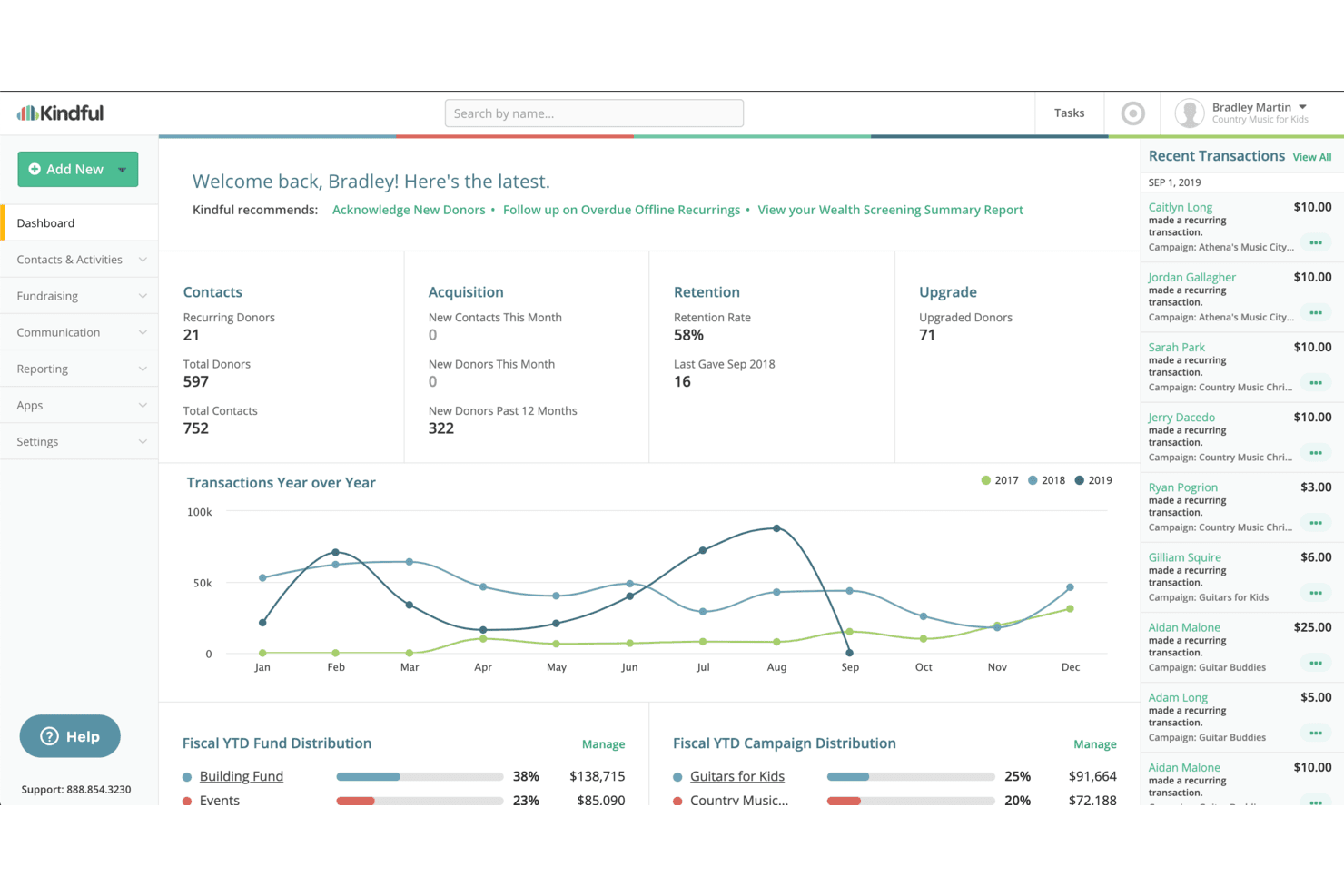
Kindful provides a central dashboard to track donors, retention, and transactions. Bloomerang is a nonprofit giving platform that unifies donor management, fundraising campaigns, and volunteer coordination—making it a strong fit for churches that want to manage giving, engage members, and run ministry events from one connected system.
Who Is Kindful Best For?
Kindful is a strong fit for nonprofits that want donor management, fundraising campaigns, and volunteer coordination connected in a single platform.
Why I Picked Kindful
I picked Kindful (now Bloomerang's giving platform) because it ties donor management and fundraising into one connected system rather than two separate tools you have to sync. I especially like its peer-to-peer fundraising engine, which lets supporters spin up their own campaign pages and share them through their networks, all feeding back into the same donor profiles your team already works from. Predictive donor signals surface who's ready to give again, upgrade to a monthly gift, or have a major-gift conversation, with specific reasons and suggested next steps built right in.
Kindful Key Features
- Volunteer-to-donor pipeline: Identifies volunteers who show donor potential and surfaces them as fundraising prospects directly within the platform.
- Nightly address updates: Automatically refreshes constituent mailing addresses overnight using NCOA data to keep your contact records accurate.
- Constituent timeline: Displays each supporter's full history of donations, interactions, and engagement in a single chronological view.
- Background check integration: Runs volunteer background checks through a built-in workflow without leaving the platform.
Kindful Integrations
Kindful offers seven documented native integrations, including QuickBooks, Mailchimp, Constant Contact, DonorSearch, Dataro, Amilia, and Verified First. It also supports custom connections through a REST API and Zapier.
Pros and Cons
Pros:
- Predictive donor signals guide timely donor outreach
- Peer-to-peer campaigns connect supporter outreach with gifts
- Unified donor histories simplify legacy fundraising workflows
Cons:
- Some legacy transitions disrupted established workflows
- Donation forms draw design and flexibility complaints
Learn more about Kindful: 6Best for church-specific accounting
ACS
- Free trial + free demo available
- Pricing upon request
Visit WebsiteCustomer Rating:3.8/5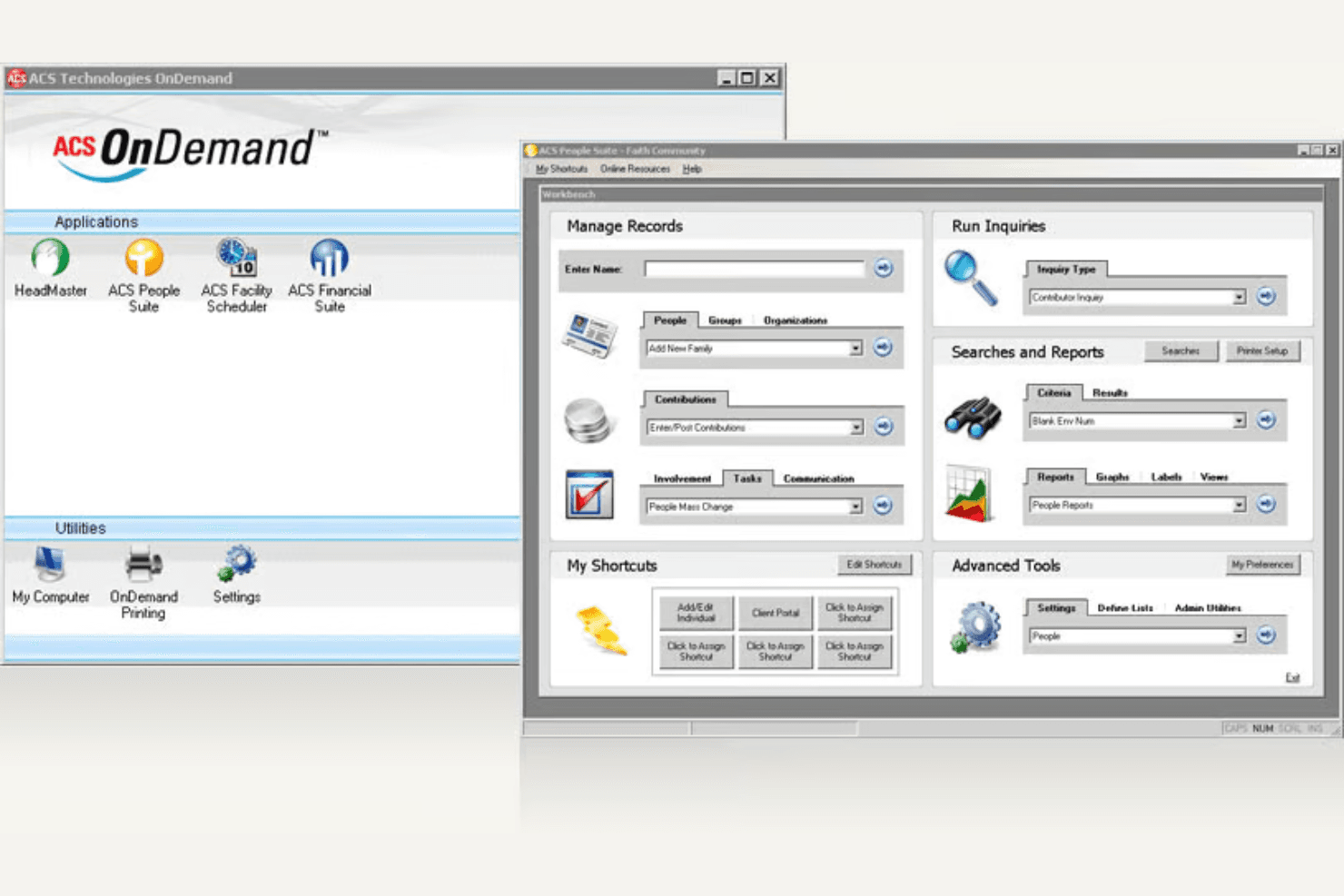
ACS centralizes church management tools in one dashboard. ACS is a church management platform built for congregations that need integrated accounting, member records, and giving tools all in one place.
Who Is ACS Best For?
ACS is a strong fit for churches that need dedicated fund accounting alongside member and giving records in one integrated system.
Why I Picked ACS
I picked ACS because its fund accounting depth is genuinely built for how churches handle money, not adapted from generic nonprofit software. I appreciate that ACS General Ledger manages multiple sets of books for separate funds like building, church, and school, with automatic fund balancing when transferring between them. ACS Contributions then ties directly into those books, so giving records flow into the right designated funds without manual re-entry.
ACS Key Features
- Multi-fund chart of accounts: ACS General Ledger manages separate books for distinct funds—like building, missions, and operations—within a single church organization.
- Pledge and gift tracking: ACS Contributions records single- and multi-year pledges, tracks progress, and allocates giving across multiple funds in one record.
- Payroll processing with tax forms: ACS Payroll calculates pay, posts to General Ledger, and produces W-2s, Form 941, and ACA forms for church employees.
- Purchase order budget controls: ACS Purchase Orders lets you set buyer approval limits and block orders that would push an account over its budget.
ACS Integrations
ACS has native integrations across its modules, including ACS People, ACS Contributions, ACS General Ledger, and ACS Accounts Payable. It also connects with Microsoft Excel, Microsoft Word, Microsoft Outlook, Constant Contact, HeadMaster, and Vanco.
Pros and Cons
Pros:
- Reviewers praise patient, knowledgeable support
- Member and giving records stay together
- Detailed fund accounting for designated church funds
Cons:
- Reviewers describe dated, confusing navigation
- Reports can be difficult to configure
Learn more about ACS:
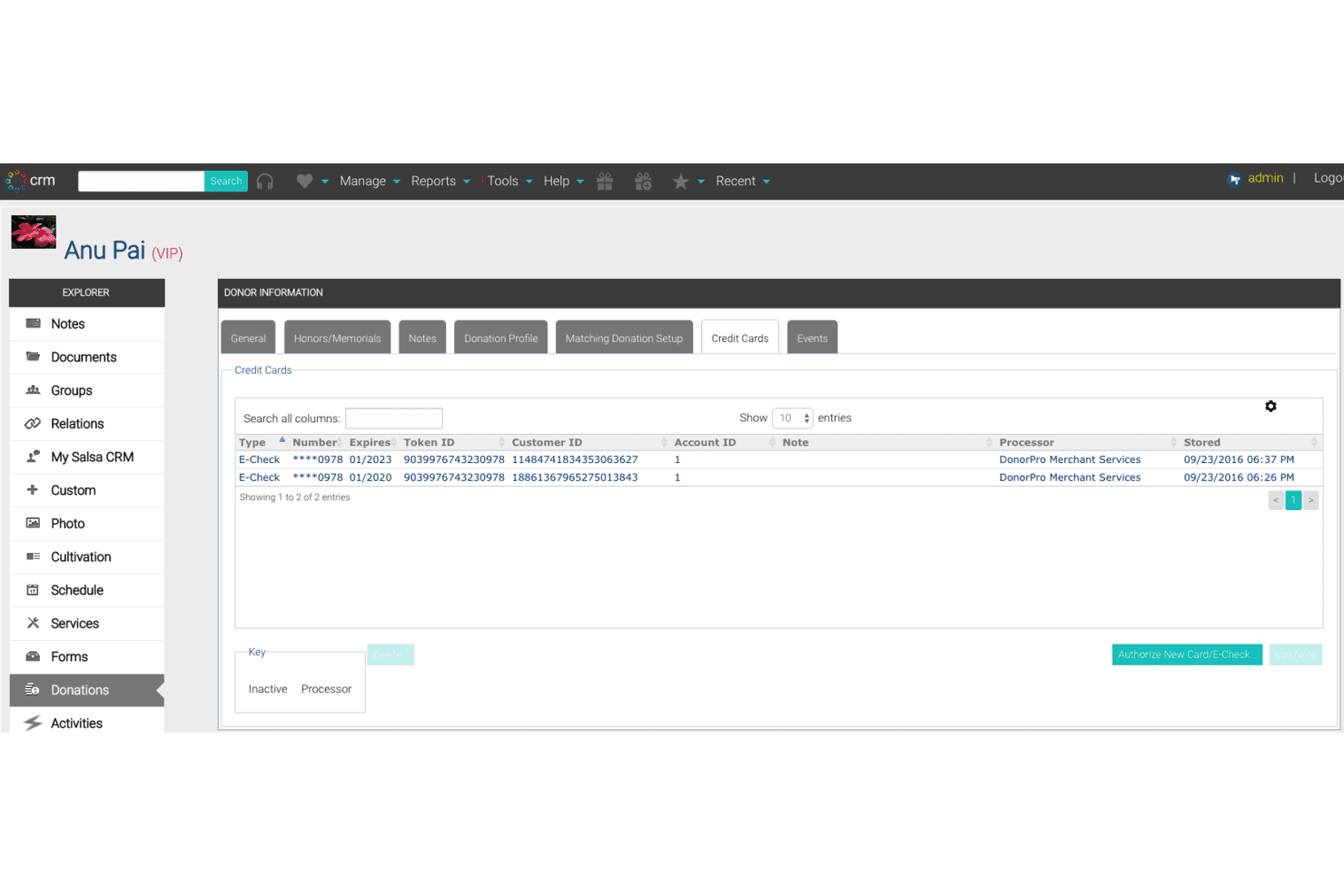
Salsa Labs lets users manage donor credit card and e-check records. Bonterra Fundraising and Engagement (formerly Salsa Labs) is a nonprofit-focused CRM and fundraising platform that centralizes donor records, campaigns, and giving tools—making it a strong fit for churches managing donor relationships, recurring giving, and multichannel engagement.
Who Is Salsa Labs Best For?
Bonterra Fundraising and Engagement is a strong fit for mid-market and enterprise nonprofits that need a unified platform for donor CRM, multichannel campaigns, and recurring giving.
Why I Picked Salsa Labs
I've included Bonterra Fundraising and Engagement (formerly Salsa Labs) in my top picks because it brings donor CRM and multichannel engagement into one unified platform built specifically for nonprofits. I particularly like how Bonterra Que uses AI to generate personalized donor stewardship recommendations directly from a contact record, so your team can act on giving history and relationship context without digging through reports. The Optimized Ask feature also recalculates suggested donation amounts daily based on each donor's contribution history, which I find genuinely useful for recurring giving campaigns.
Salsa Labs Key Features
- Moves management: Track donor cultivation stages, assigned solicitors, asks, projections, notes, and follow-ups within each contact record.
- Planned giving tracking: Record planned-gift types, committed amounts, associated contacts, and cultivation activity for major donor portfolios.
- Grant management: Log grant plans, status, deliverables, deadlines, documents, and likely award amounts to manage the full grant lifecycle.
- Multichannel outreach: Coordinate email, SMS/MMS, social, and direct-mail campaigns from a single platform with audience segmentation and automated supporter journeys.
Salsa Labs Integrations
Bonterra Fundraising and Engagement offers documented integrations with OneCause, DonorDrive, Mobilize, Salesforce, WealthEngine, Zoom Events, Google Sheets, Facebook Custom Audiences, Stripe, and PayPal. Its REST, bulk import, and export APIs support custom connections.
Pros and Cons
Pros:
- Moves management links asks, tasks, and follow-ups
- Daily ask recommendations support recurring giving
- AI-guided stewardship uses donor context
Cons:
- Fundraising dashboard refreshes nightly, not continuously
- Blackbaud migration lacks documented end-to-end support
Learn more about Salsa Labs: Best for scalable solutions
- Free plan + free demo available
- From $15/month
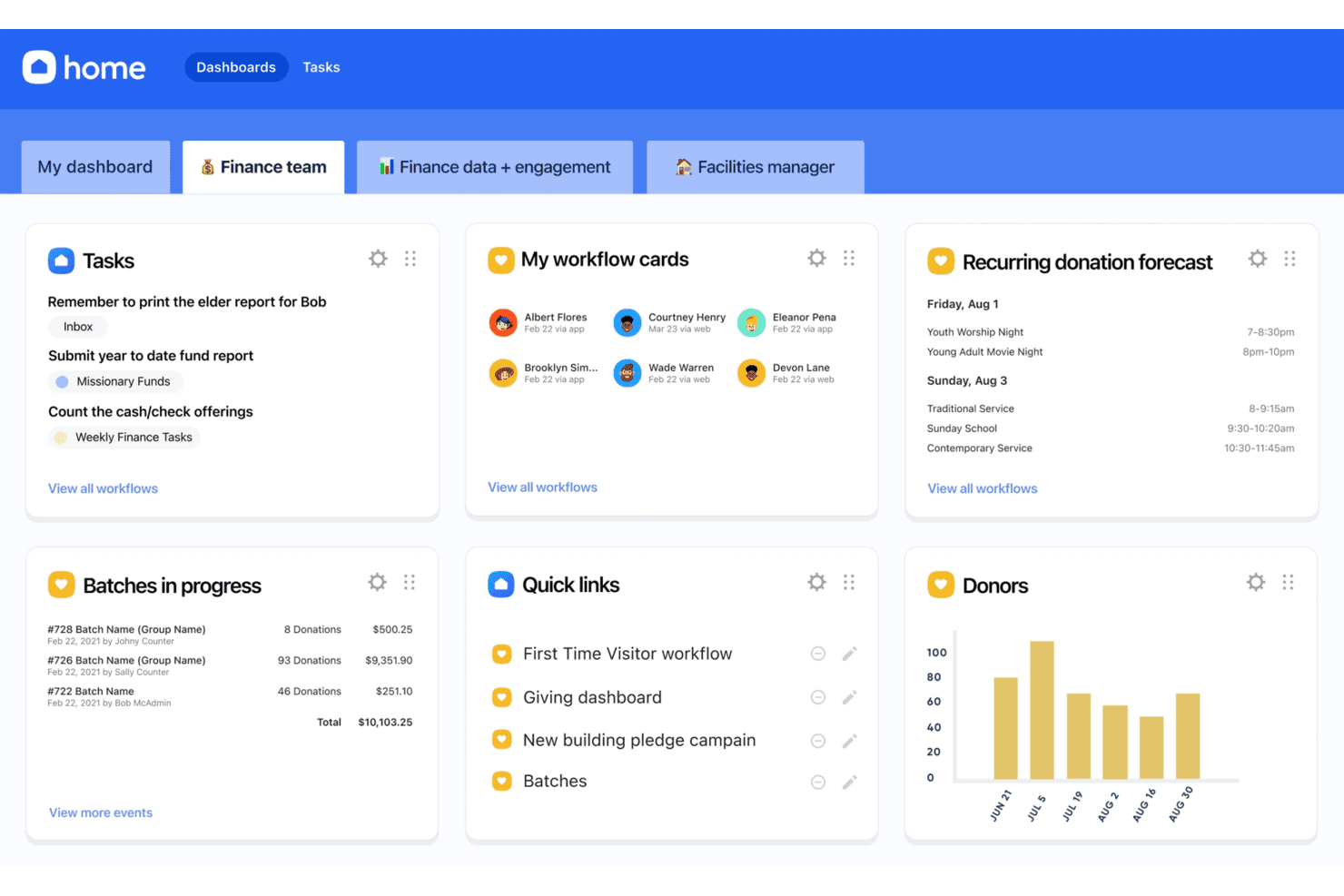
Planning Center centralizes finance tasks, donors, and batch giving on one dashboard. Planning Center Giving is a donation and giving management tool built specifically for churches, handling online and in-person donations, recurring giving, pledge campaigns, and donor records—all connected to the broader Planning Center ecosystem.
Who Is Planning Center Best For?
Planning Center Giving is a strong fit for churches that are already using—or planning to use—multiple Planning Center modules and want giving to connect directly with their people records and operations.
Why I Picked Planning Center
Planning Center Giving earns its spot on my shortlist because it's built to scale with your church, not against it. Subscription tiers move with your donation volume, from a free tier up to unlimited donations, so the platform grows as your congregation does. I also appreciate how pledge campaigns tie directly to funds and campuses, letting you track multi-site giving goals in one place without stitching together separate tools.
Planning Center Key Features
- Donor-covered fees: Gives donors in the United States the option to cover transaction processing costs at checkout, keeping more of each gift going to your church.
- Automatic card updates: Coordinates with banks to refresh expired card details so recurring donations keep processing without interrupting your giving flow.
- Role-based permissions: Assigns administrator, bookkeeper, counter, and reviewer roles with distinct access to batches, donor data, reports, and settings.
- CSV donation import: Lets you bring historical giving records into Planning Center Giving by uploading a formatted CSV file, supporting transitions from other platforms.
Planning Center Integrations
Planning Center has a native Stripe integration and marketplace integrations with Donorbox, Tithe.ly, Vanco, Mortar Stone, and Paperless Transactions. Its REST API, JSON:API, webhooks, OAuth applications, and personal access tokens support custom integrations.
Pros and Cons
Pros:
- Church-wide giving feels connected
- Pledge progress is visible to donors
- Giving records stay tied to church people
Cons:
- Failed recurring gifts aren't automatically retried
- Campaign tools stop at pledge tracking
Learn more about Planning Center:
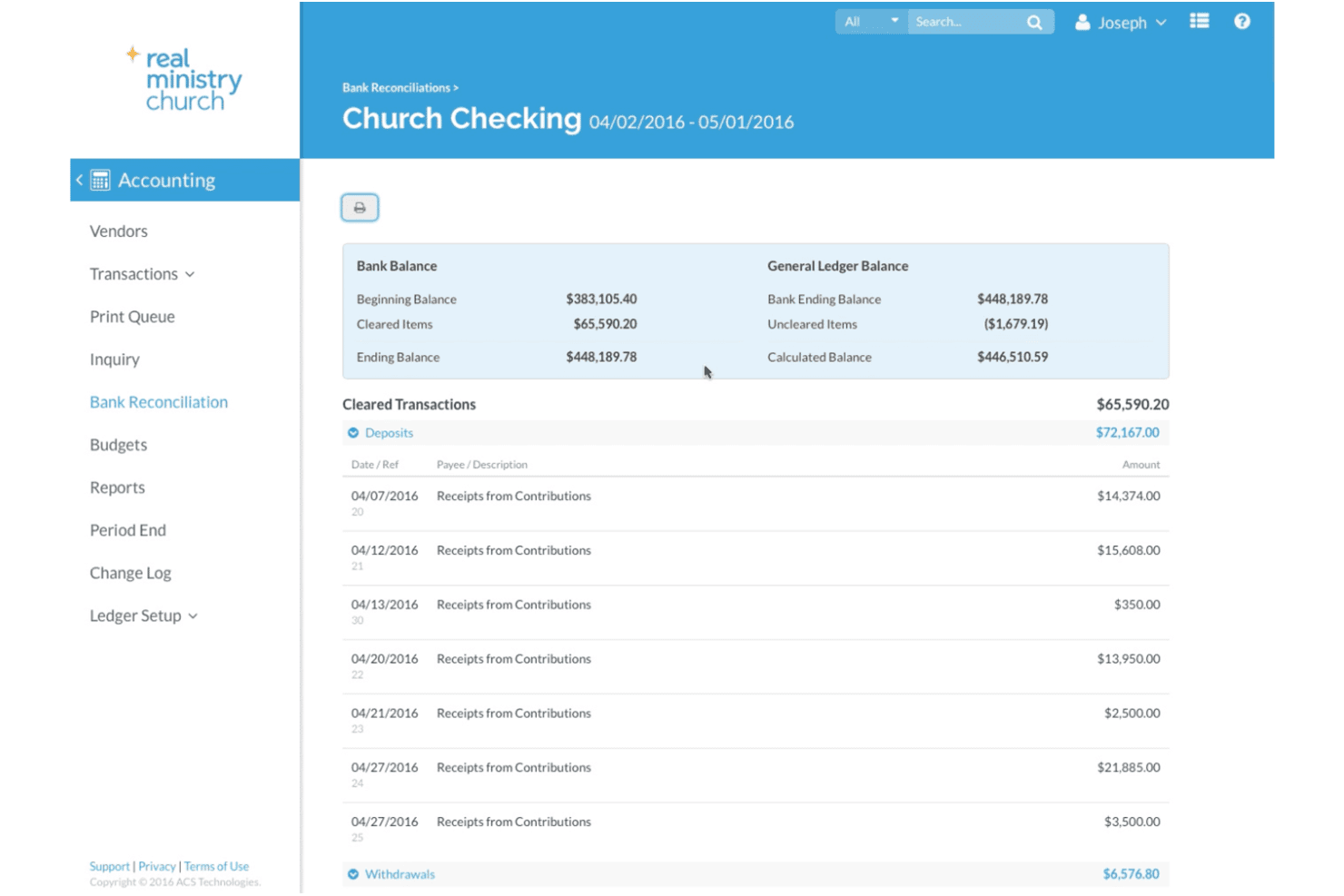
Realm helps churches reconcile bank accounts with detailed transaction records. Realm is church management software from ACS Technologies that brings member profiles, giving, contributions, and financial reporting together in one place—making it a strong fit for churches that want tighter control over both their congregation data and their finances.
Who Is Realm Best For?
Realm is a strong fit for churches that want giving, member records, and accounting managed in one place rather than across multiple disconnected tools.
Why I Picked Realm
I picked Realm as one of the best Blackbaud competitors because it's one of the few church management platforms that ties giving directly to a full accounting general ledger, so your finance team isn't reconciling two separate systems at month-end. I love that donor pledges, contribution histories, and batch entries all post straight to the ledger, and that donors can track their own giving statements through the Realm Connect app. That kind of financial visibility, built specifically for churches, is what sets Realm apart.
Realm Key Features
- Member and family profiles: Staff can manage contact details, family relationships, notes, service involvement, and group participation from a single member record.
- Pathway workflows: Staff can build multi-step follow-up processes for visitor onboarding, membership, discipleship, and volunteer training with delegation and notifications.
- Background check management: Staff can order and track background checks through the Verified First integration and run screening-status reports directly in Realm.
- Multi-campus administration: Multiply plan users can assign location-specific data access, share content across campuses, and review attendance and giving trends by location.
Realm Integrations
Realm offers native integrations with Vanco, Engiven, Constant Contact, Planning Center People, Verified First, BoxCast, Go Method, Growth Method, Nelco, and Yearli. Its integrations connect giving, donor communications, volunteer data, background checks, payroll, and church media.
Pros and Cons
Pros:
- Reviewers praise year-to-date and committee reports
- Member, giving, and event records stay together
- Giving posts directly to church accounting
Cons:
- No peer-to-peer campaign fundraising
- Some profile fields cannot be filtered
Learn more about Realm: Best for cost-effective management
- Free plan + 7-day free trial available
- From $75/month
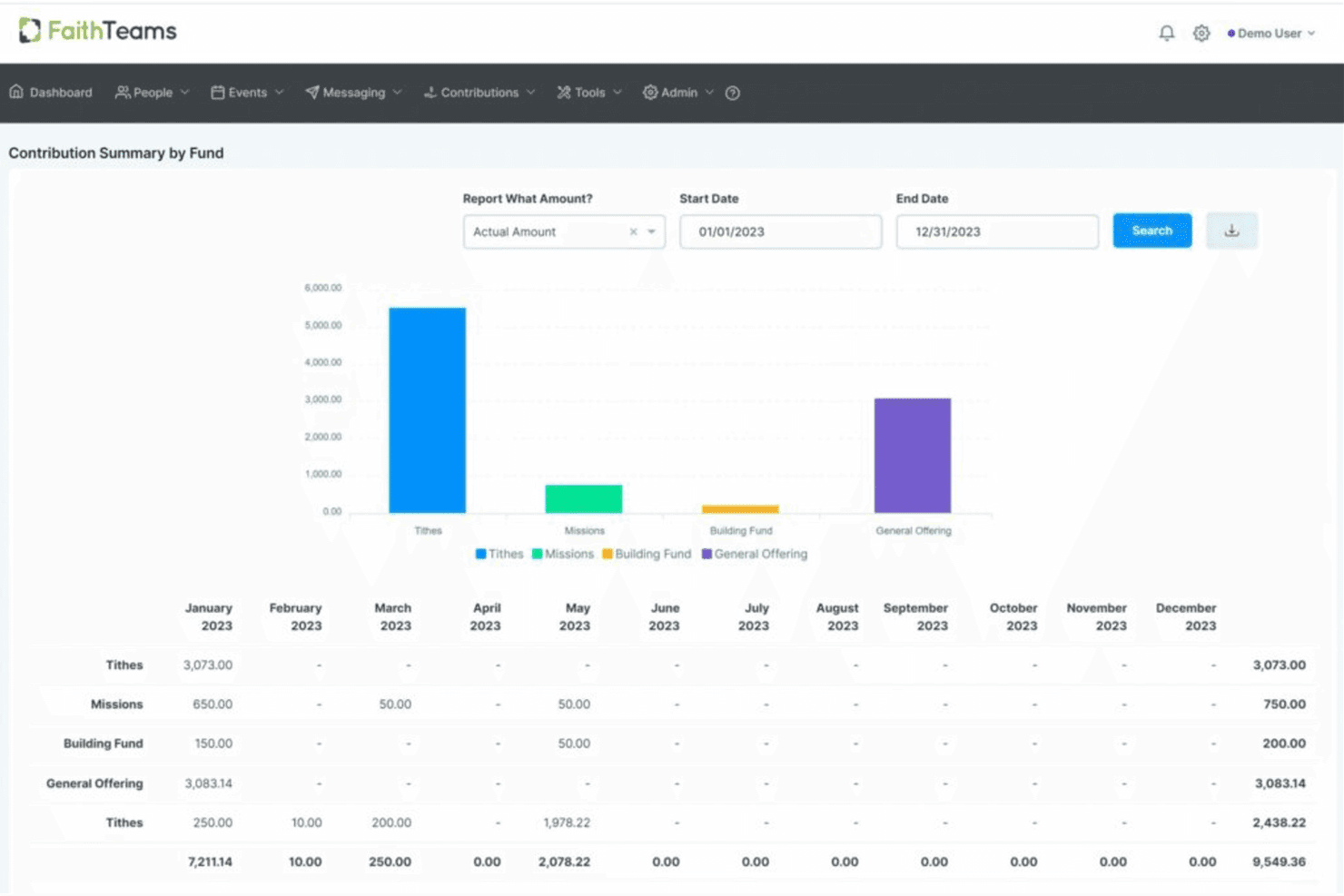
Faith Teams tracks annual giving totals across multiple funds by month. Faith Teams is an all-in-one church management platform that helps small and mid-sized congregations handle people records, giving, attendance, volunteer scheduling, and member communication without juggling multiple tools.
Who Is Faith Teams Best For?
Faith Teams is a strong fit for small and mid-sized churches that need people records, giving, and communication tools in one place without a large software budget.
Why I Picked Faith Teams
I picked Faith Teams as one of the best because it packs people records, online giving, attendance, volunteer scheduling, and guest follow-up into a single platform that stays well under $150/month regardless of congregation size. I appreciate how giving is woven directly into member profiles, so when someone gives by text, mobile app, or kiosk, that contribution lands automatically in their record without any manual reconciliation. The automated guest follow-up workflows are a real differentiator: tag someone as a guest and Faith Teams triggers a sequence of texts and emails without any extra setup on my end.
Faith Teams Key Features
- Kids check-in: Print child name tags and matching parent or guardian pickup tags directly from the attendance check-in screen.
- Role-based user permissions: Assign staff and volunteers specific access levels to control what each user can view or manage in the system.
- Two-way texting: Send group text blasts and receive replies through a live chat screen, with every conversation logged to the person's record.
- Digital forms: Build guest connect cards, event registrations, and trip sign-ups that can also collect registration fees directly through the form.
Faith Teams Integrations
Faith Teams supports integrations with YouTube, Vimeo, and Facebook for adding videos to Community+ pages. Native integrations, API access, and broader CRM connectivity aren’t clearly documented.
Pros and Cons
Pros:
- Support helps during data migration
- Tags help target member communications
- Reviewers praise straightforward contribution tracking
Cons:
- Volunteer reminders can be inconsistent
- Reviewers describe ministry reporting as basic
Learn more about Faith Teams:
Outras alternativas ao Blackbaud
Eis algumas alternativas adicionais ao Blackbaud que não chegaram à minha lista restrita, mas que ainda vale a pena consultar:
- 11DonorboxBest for simple recurring donation setup
- 12ChurchTracBest for all-in-one church solutions
- 13ChMeetingsBest for user-friendly accounting
- 14ChurchteamsBest for member engagement tools
- 15Fellowship OneBest for integrated service planning
- 16SteepleMateBest for small church needs
- 17MinistryPlatformBest for customizable church solutions
- 18GracelyBest for modern financial management
How I Evaluate Blackbaud Competitors
I look at two layers: whether a platform handles giving, member records, and fund accounting, then what sets it apart for things like multi-campus churches or Blackbaud migrations.
Core Functionality (Table Stakes For This List)
When I'm selecting tools for my list, I rank each one on a scale from 0 (does not offer the functionality) to 5 (excels in this area) for each core functionality listed below. Then, I calculate the tool's total score into a percentage. Each tool needs to achieve a minimum total score of 65% to be considered for inclusion.
- Member & Household Management: I check whether a platform links individuals into households, tracks attendance across services, and stores records like baptisms or membership dates.
- Online Giving & Donation Processing: Each tool should support recurring gifts, text-to-give or app-based giving, and generate year-end contribution statements for donors.
- Church Fund Accounting: I evaluate whether fund-based accounting is built in, including the ability to track restricted gifts, designated funds, and produce reports by fund.
- Groups & Volunteer Coordination: The platform should let you organize small groups and ministry teams, schedule volunteers into serving rotations, and send reminders before services.
- Congregational Communication: I look at whether pastors and staff can reach members through email, SMS, or app notifications, and segment messages by group or involvement.
- Event & Check-In Management: Secure child check-in with label printing and parent matching matters here, along with the ability to manage event registration for things like VBS or retreats.
Once I have a list of tools that meet this criteria, I consider what sets each platform apart.
Differentiating Factors (What Sets Vendors Apart)
Here's how I compare and contrast different vendors:
Standout Features
Multi-campus support is a big differentiator. I look at whether a platform lets you segment data by location while rolling up giving and attendance into a unified view. Worship planning tools also matter when they combine service scheduling, song libraries, and team assignments in one place rather than requiring a separate app. I evaluate donor analytics dashboards for giving trends and engagement scoring, since these help pastors spot members who may be disengaging before it becomes a pastoral care issue.
Beyond Features
Data migration matters a lot here. I check whether a vendor offers guided imports from legacy church management systems like Raiser's Edge or Shelby, since a painful migration can stall adoption for months. Pricing transparency is another factor I evaluate, particularly whether giving processing fees, mobile apps, and support are bundled or sold as add-ons. I also look at integration ecosystems, especially connections to worship tools like Planning Center or ProPresenter and accounting platforms like QuickBooks.
Por que motivo procurar uma alternativa ao Blackbaud?
Embora o Blackbaud seja uma boa opção de software de contabilidade para igrejas, existem vários motivos pelos quais alguns utilizadores procuram soluções alternativas. Poderá estar à procura de uma alternativa ao Blackbaud porque…
- Precisa de uma solução mais acessível
- Pretende opções de apoio ao cliente melhores
- Precisa de um software mais fácil de utilizar
- Procura mais possibilidades de personalização
- Necessita de melhores capacidades de integração
Se alguma destas situações lhe é familiar, veio ao lugar certo. A minha lista inclui várias opções de software de contabilidade para igrejas mais adequadas a equipas que enfrentam estes desafios com o Blackbaud e procuram soluções alternativas.
Principais funcionalidades do Blackbaud
Eis algumas das principais funcionalidades do Blackbaud, para ajudar a comparar e contrastar o que as soluções alternativas oferecem:
- Gestão de angariação de fundos: Ajuda a acompanhar e gerir donativos para reforçar os esforços de angariação de fundos.
- Relatórios financeiros: Disponibiliza ferramentas robustas de elaboração de relatórios para manter as suas finanças transparentes.
- Envolvimento dos doadores: Disponibiliza ferramentas para melhorar a comunicação e a criação de relações com os doadores.
- Gestão de matrículas: Simplifica o processo de gestão das matrículas dos estudantes pelas instituições de ensino.
- Informações baseadas em IA: Utiliza a IA para fornecer informações baseadas em dados, permitindo tomar decisões mais acertadas.
- Suporte abrangente: Disponibiliza formação extensiva e recursos de suporte através da Blackbaud University.
- Gestão de subsídios: Facilita a gestão eficiente de candidaturas a subsídios e do financiamento.
- Ecossistema flexível: Adapta-se ao crescimento e às necessidades específicas da sua organização.
- Ferramentas de responsabilidade social empresarial: Apoia iniciativas de responsabilidade social empresarial para reforçar o impacto social.
- Envolvimento da comunidade: Reforça a colaboração e a criação de uma comunidade na sua organização.