

Software voor onkostenbeheer voor kerken helpt je de uitgaven van je bediening bij te houden, goed te keuren en te rapporteren, zodat je middelen met duidelijkheid en verantwoordingsplicht kunt beheren. Als je op zoek bent naar de beste software voor onkostenbeheer voor kerken, moet je waarschijnlijk de behoefte aan financiële transparantie afwegen tegen de realiteit van een beperkt personeelsbestand, wisselingen onder vrijwilligers en complexe rapportagevereisten.
De juiste tool kan je helpen budgetten te beheren, goedkeuringen te automatiseren en het vertrouwen van je gemeente te behouden—zonder je administratieve werklast te verhogen. In deze gids vind je een zorgvuldig onderzochte shortlist van oplossingen voor grote en kleine kerken, zodat je functies kunt vergelijken en de beste oplossing voor de behoeften van je bediening kunt kiezen.
Waarom u onze softwareaanbevelingen kunt vertrouwen
6,700+
Reviews
20
Industry experts
16+
Evaluation factors
14
Years
Ons team test en beoordeelt software sinds 2012. Als kerkleiders weten we zelf hoe moeilijk — en belangrijk — het is om de juiste software te kiezen.
Voor deze gids hebben we tools geëvalueerd met behulp van praktijktests en onafhankelijk onderzoek, waarbij we tools beoordeelden aan de hand van onze selectiecriteria.
Onze reviews weerspiegelen ons menselijke redactionele oordeel, geen verkooppraatje.
Vergelijkingstabel voor software voor onkostenbeheer voor kerken
Deze vergelijkingstabel geeft een overzicht van de prijsgegevens van mijn belangrijkste selecties van software voor onkostenbeheer voor kerken:
| Tool | Best For | Trial Info | Price | ||
|---|---|---|---|---|---|
| 1 | Het beste voor het afdwingen van uitgavenbeleid | Gratis demo beschikbaar | Vanaf $11.99/gebruiker/maand (jaarlijks gefactureerd) | Website | |
| 2 | Het beste voor alles-in-één kerkbeheer met een klein budget | Gratis abonnement beschikbaar | Vanaf $19/maand (jaarlijks gefactureerd) | Website | |
| 3 | Het beste voor inkoopgerichte voorraadinkopen | Gratis proefperiode van 90 dagen | Vanaf $100/maand | Website | |
| 4 | Beste integratie met bestaande boekhoudkundige hulpmiddelen | 30 dagen gratis uitproberen | Vanaf $30/maand | Website | |
| 5 | Beste voor geautomatiseerde workflows voor naleving van regelgeving | 15 dagen gratis proefperiode | Vanaf $79/maand | Website | |
| 6 | Beste met ingebouwde fondsenadministratie | 30-daagse gratis proefperiode + gratis demo beschikbaar | Vanaf $8/maand (jaarlijks gefactureerd) | Website | |
| 7 | Ideaal voor salarisadministratie en het afdrukken van cheques | 14 dagen gratis proefperiode | Vanaf $24/maand | Website | |
| 8 | Het beste voor opties voor implementatie op een desktopcomputer en online | Gratis demo beschikbaar | Vanaf $47/maand | Website | |
| 9 | Ideaal met geïntegreerde fysieke en virtuele kaarten | Gratis abonnement beschikbaar | Vanaf $29 per maand | Website | |
| 10 | Beste voor gebruiksvriendelijke financiële rapportage | 30 dagen gratis uitproberen + gratis abonnement + gratis demo beschikbaar | Vanaf $19/maand (jaarlijks gefactureerd) | Website |


Beoordelingen van software voor onkostenbeheer voor kerken
Hieronder vind je mijn gedetailleerde samenvattingen van software voor onkostenbeheer voor kerken die op mijn shortlist is gekomen. Mijn beoordelingen geven een gedetailleerd beeld van de functies, prijzen en integraties van elke software, zodat je de beste oplossing voor jou kunt vinden.
 Het beste voor het afdwingen van uitgavenbeleid
- Gratis demo beschikbaar
- Vanaf $11.99/gebruiker/maand (jaarlijks gefactureerd)
Visit WebsiteCustomer Rating:4.6/5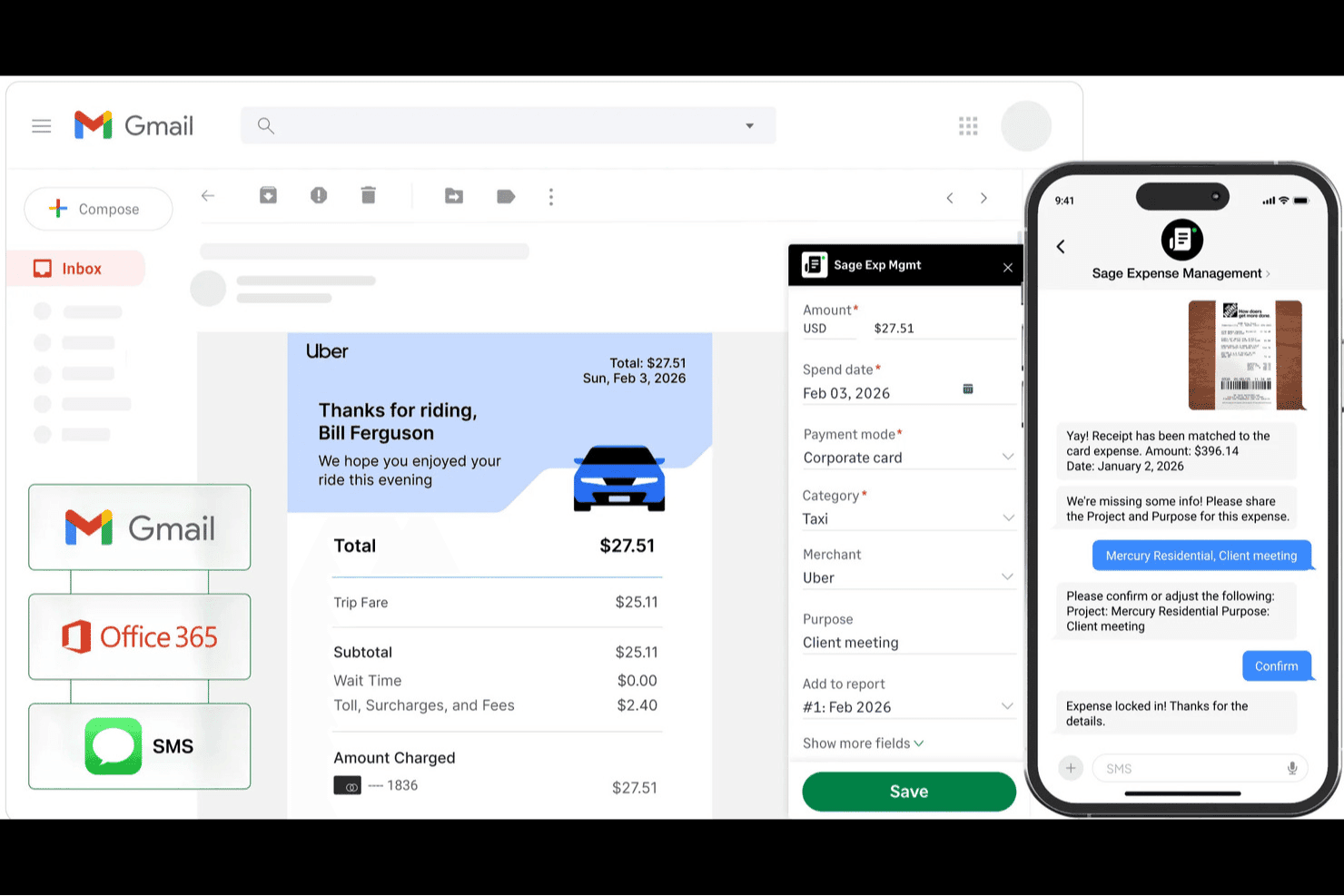
Sage Expense Management (voorheen Fyle) helpt kerkenteams bij het vastleggen van ontvangstbewijzen, het automatisch matchen van transacties en het bijhouden van uitgaven met gecategoriseerde bestedingsgegevens. Sage Expense Management is een platform voor onkostenbeheer voor kerken met door AI aangedreven ontvangstbewijscaptatie, goedkeuringsworkflows met meerdere niveaus, realtime budgetbewaking per bediening of fonds, ACH-vergoedingen en uitgebreide integratie met QuickBooks-, Xero- en Sage-boekhoudsystemen.
Voor wie is Sage Expense Management het meest geschikt?
Sage Expense Management is zeer geschikt voor financiële beheerders van kerken en uitvoerende predikanten die consistent uitgavenbeleid moeten afdwingen binnen meerdere bedieningen of campussen.
Waarom ik Sage Expense Management heb gekozen
Ik heb Sage Expense Management gekozen als een van de beste oplossingen, omdat de beleidsengine daadwerkelijk is ontworpen om verkeerd gecodeerde uitgaven te voorkomen voordat ze het financiële team bereiken. Beheerders kunnen fonds- en bedieningstags verplicht stellen bij het indienen, zodat een vrijwilliger die benodigdheden voor de jeugdbediening koopt, deze niet per ongeluk aan Zendingen kan toewijzen. Ik vind het ook prettig dat het systeem uitgaven die het beleid schenden automatisch naar de juiste goedkeurder kan doorsturen op basis van de hiërarchie van de kerk, met een volledig audittraject dat aan elke transactie is gekoppeld.
Belangrijkste functies van Sage Expense Management
- Ontvangstbewijscaptatie via tekstberichten: Medewerkers en vrijwilligers kunnen een foto van een ontvangstbewijs per sms indienen als onkostendeclaratie, zonder dat ze zich bij een app hoeven aan te melden.
- Waarschuwingen bij budgetdrempels: Beheerders stellen meerdere waarschuwingsdrempels in per afdeling, project of fonds, waarna automatisch e-mailmeldingen worden verzonden wanneer de uitgaven de limiet naderen.
- ACH-vergoeding: Goedgekeurde uitgaven worden rechtstreeks betaald op bankrekeningen van medewerkers of vrijwilligers, afzonderlijk of in bulk, met statusbewaking voor zowel de indiener als het financiële team.
- Uitgifte van virtuele Amex-kaarten: Beheerders kunnen een onbeperkt aantal virtuele kaarten uitgeven met bestedingslimieten, gekoppeld aan een bestaande zakelijke kredietlijn van Amex.
Integraties van Sage Expense Management
Sage Expense Management biedt eigen integraties met QuickBooks Online, QuickBooks Desktop, Xero, Sage 50, Sage Intacct en Sage 300 CRE. De API ondersteunt aangepaste integraties voor financiële workflows van kerken.
Pros and Cons
Pros:
- Vrijwilligers dienen ontvangstbewijzen per sms in
- Verplichte bedieningstags voorkomen verkeerde codering
- Goedkeurders behouden audittrajecten op transactieniveau
Cons:
- OCR van ontvangstbewijzen leest transactiegegevens soms verkeerd
- Fondsbewaking is afhankelijk van aangepaste tags
Learn more about Sage Expense Management (formerly Fyle): Het beste voor alles-in-één kerkbeheer met een klein budget
- Gratis abonnement beschikbaar
- Vanaf $19/maand (jaarlijks gefactureerd)
Visit WebsiteCustomer Rating:4.8/5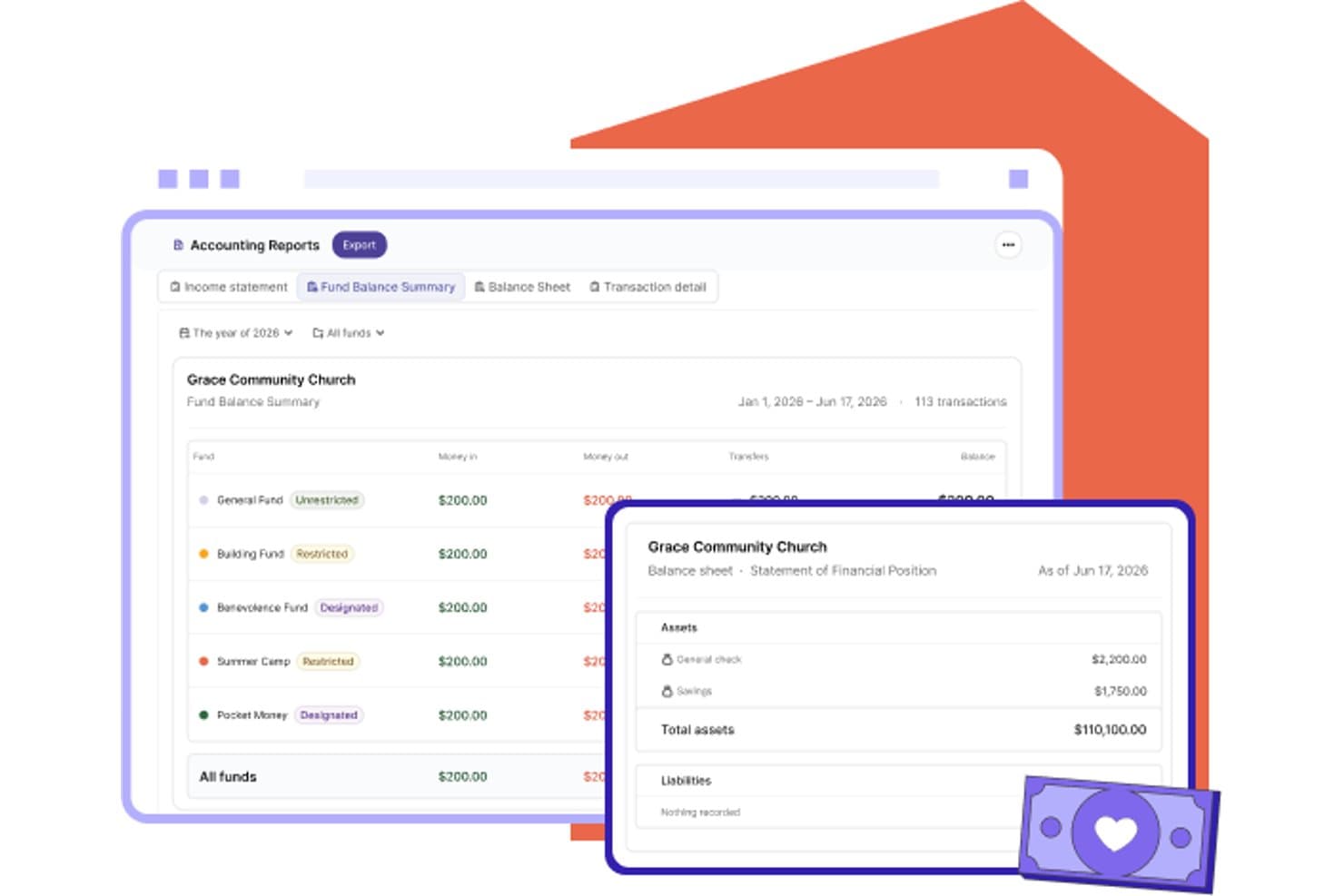
Gracely organiseert kerkfondsen met balanstotalen en financiële overzichten. Gracely is een kerkbeheerplatform dat ledenbeheer, online donaties, communicatie en een op fondsen gebaseerd boekhoudsysteem combineert voor het bijhouden van inkomsten, uitgaven en budgetten.
Voor wie is Gracely het meest geschikt?
Gracely is geschikt voor kleine kerken die ledenbeheer, donaties en eenvoudige fondsboekhouding in één betaalbaar platform willen onderbrengen zonder meerdere tools te hoeven combineren.
Waarom ik voor Gracely heb gekozen
Ik heb Gracely opgenomen in mijn topkeuzes omdat het ledenbeheer, online donaties en op fondsen gebaseerde boekhouding combineert in één platform tegen een prijs die kleine kerken daadwerkelijk kunnen betalen. Ik vind het handig dat je bij uitgaven- en cheque-invoer aan elke transactie een fonds, categorie en begunstigde kunt toewijzen, en dat bankimports in één stap over meerdere fondsen kunnen worden verdeeld. De vier ingebouwde boekhoudrapporten van Gracely zijn specifiek ontworpen voor maandelijkse bestuursvergaderingen en eindejaarscontroles.
Belangrijkste functies van Gracely
- Online donaties met fondsenregistratie: Accepteer donaties via creditcard, ACH, Apple Pay en Google Pay, waarbij elke gift aan een specifiek fonds wordt toegewezen.
- Synchronisatie van banktransacties: Importeer bankactiviteiten via Stripe Financial Connections en verdeel afzonderlijke transacties over meerdere fondsen en categorieën voordat je ze aan de boekhouding toevoegt.
- Aangepaste boekhoudrollen: Maak een rol voor een penningmeester of boekhouder met toegang die beperkt is tot de boekhoudmodule, zodat financiële gegevens gescheiden blijven van ledengegevens.
- Leden- en groepsbeheer: Organiseer ledengegevens, familieverbanden en groepen op hetzelfde platform dat je gebruikt voor donaties en financiën.
Integraties van Gracely
Er zijn geen oorspronkelijke integraties van Gracely gedocumenteerd. QuickBooks, PayPal, Mailchimp en Checkr worden vermeld als binnenkort beschikbaar, terwijl banksynchronisatie Stripe Financial Connections gebruikt.
Pros and Cons
Pros:
- Bankboekingen kunnen over fondsen en categorieën worden verdeeld
- Bestuursklare rapporten vatten fondssaldi samen
- Beoordelaars prijzen de responsieve ondersteuning bij de installatie
Cons:
- Geen gedocumenteerde workflows voor goedkeuring van uitgaven
- Geen gedocumenteerde registratie van bonnen of declaraties
Learn more about Gracely: Het beste voor inkoopgerichte voorraadinkopen
- Gratis proefperiode van 90 dagen
- Vanaf $100/maand
Visit WebsiteCustomer Rating:4.3/5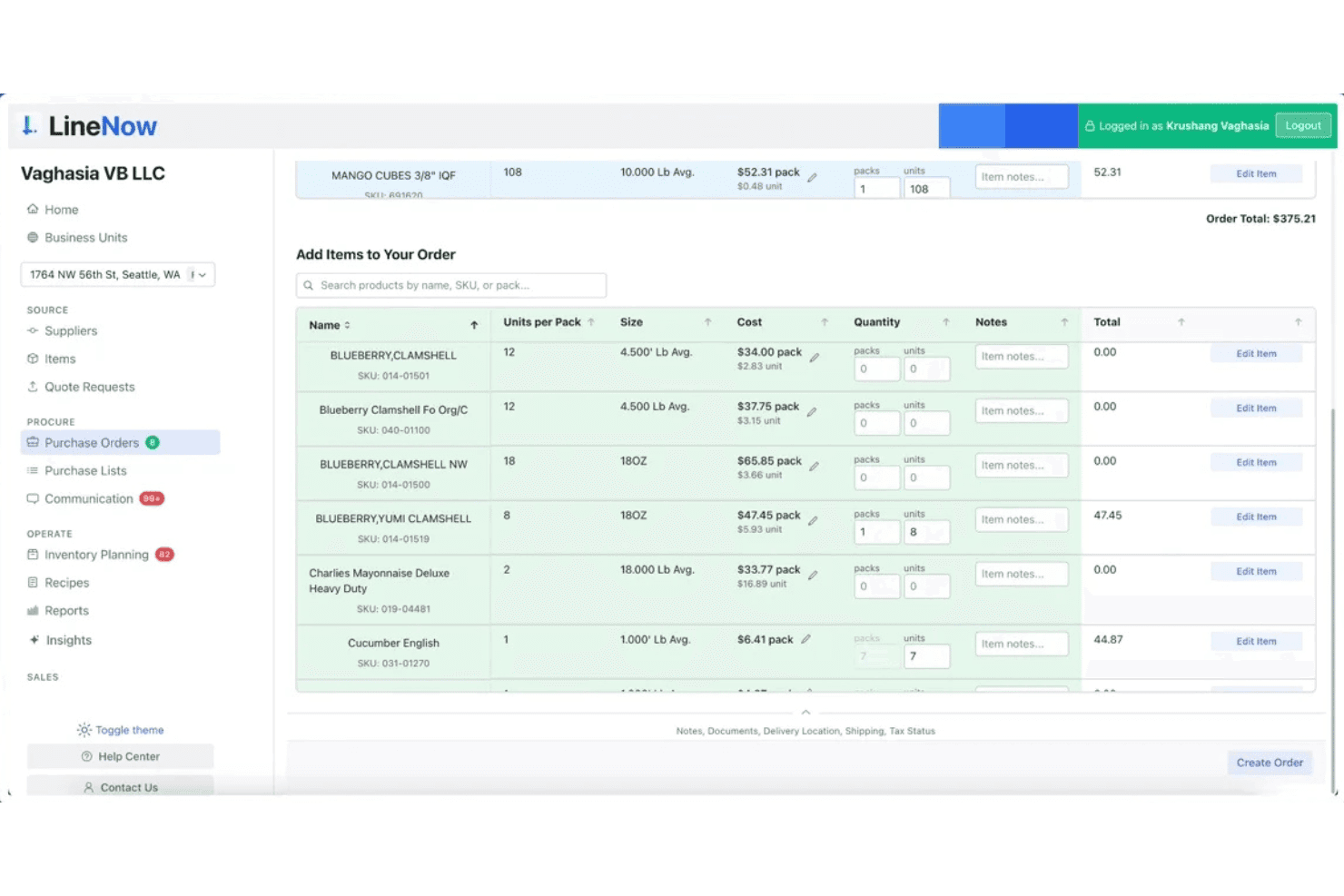
Met LineNow kunnen gebruikers inkooporders opstellen en beheren met zoeken naar artikelen en prijsinformatie. LineNow is een platform voor inkoop- en inkooporderbeheer dat voorraadinkopen, communicatie met leveranciers en ordertracking op meerdere locaties afhandelt.
Voor wie is LineNow het meest geschikt?
LineNow is geschikt voor kerken en bedieningsorganisaties die voorraadinkopen beheren—zoals voedselbanken, boekhandels of cafébedieningen—en een speciale inkooptool willen gebruiken om leveranciersorders af te handelen en voorraad op meerdere locaties te volgen.
Waarom ik voor LineNow heb gekozen
Ik heb LineNow opgenomen in mijn topkeuzes omdat het speciaal is ontwikkeld voor inkoopgerichte voorraadinkopen, waardoor het zeer geschikt is voor kerken met voedselbanken, boekhandelbedieningen of caféactiviteiten. Ik vind het prettig dat de door AI aangedreven PO-creatie automatisch inkooporders opstelt op basis van voorraadgegevens, en dat je met de communicatietools voor leveranciers orders kunt verzenden en volgen zonder het platform ooit te verlaten. Ondersteuning voor meerdere locaties betekent dat een kerk die voorraad op verschillende bedieningslocaties beheert, alle inkopen op één plek kan centraliseren.
Belangrijkste functies van LineNow
- Door AI aangedreven aanmaak van inkooporders: Stelt automatisch inkooporders op basis van je actuele voorraadgegevens, waardoor handmatige invoer voor inkopen van de bedieningswinkel of voedselbank wordt verminderd.
- Prijsregistratie van leveranciers: Houdt leveranciersprijzen in de loop der tijd bij en signaleert wijzigingen, zodat je prijsstijgingen kunt opmerken voordat ze gevolgen hebben voor het budget van je bediening.
- Ontvangstworkflows: Registreert binnenkomende leveringen tegen openstaande inkooporders, zodat je een duidelijk overzicht hebt van wat wanneer en van wie is aangekomen.
- Teamrechten op basis van rollen: Wijst verschillende toegangsniveaus toe aan medewerkers en vrijwilligers, zodat alleen de juiste personen orders kunnen aanmaken, verzenden of goedkeuren.
Integraties van LineNow
Integraties zijn onder andere QuickBooks, Xero, Square, Shopify, Toast, Clover, Lightspeed, Amazon en Faire.
Pros and Cons
Pros:
- Snelle aanmaak van leveranciersorders met AI-ondersteuning
- Centraliseert inkopen voor meerdere kerklocaties
- Houdt wijzigingen in leveranciersprijzen in de loop der tijd bij
Cons:
- Geen registratie van uitgaven per bediening of fonds
- Mist workflows voor declaraties en goedkeuringen binnen kerken
Learn more about LineNow: Beste integratie met bestaande boekhoudkundige hulpmiddelen
- 30 dagen gratis uitproberen
- Vanaf $30/maand
Visit WebsiteCustomer Rating:4.4/5
QuickBooks helpt kerken donaties, uitgaven en budgetten bij te houden met betrouwbare rapportages. QuickBooks is een bekend boekhoudplatform dat veel kerken gebruiken om hun financiën te beheren met vertrouwde hulpmiddelen. Het is zeer geschikt voor kerken die gedetailleerd inzicht willen in uitgaven, donaties en budgetten binnen een systeem dat door accountants wordt vertrouwd. Als uw kerk behoefte heeft aan betrouwbaar financieel toezicht en betrouwbare rapportages, kan QuickBooks u helpen elke euro te organiseren en te monitoren.
Voor wie is QuickBooks het meest geschikt?
QuickBooks is geschikt voor kerken van elke omvang die hun financiën willen beheren met vertrouwde boekhoudkundige workflows en gedetailleerde rapportages.
Waarom ik voor QuickBooks heb gekozen
Ik heb voor QuickBooks gekozen omdat het eenvoudig kan worden gekoppeld aan een breed scala aan andere boekhoudkundige, administratieve en financiële hulpmiddelen die veel kerken al gebruiken. Hierdoor kunt u uitgavendata, donaties en budgetten eenvoudig synchroniseren met uw bankrekeningen, salarisverwerkers en betalingsverwerkers. Ik vind dit vooral nuttig voor kerken die handmatige gegevensinvoer of het dubbel verwerken van financiële gegevens willen vermijden. Met QuickBooks kunt u de financiële informatie van uw kerk op meerdere platforms georganiseerd en actueel houden.
Belangrijkste functies van QuickBooks
Naast de integratiemogelijkheden biedt QuickBooks verschillende functies die het beheer van kerkelijke uitgaven ondersteunen:
- Fondsbeheer: Houd aangewezen fondsen en beperkte rekeningen afzonderlijk bij voor nauwkeurig financieel toezicht binnen de kerk.
- Donaties registreren: Registreer, categoriseer en rapporteer donaties uit meerdere bronnen binnen het platform.
- Aanpasbaar rekeningschema: Stel rekeningen in en beheer deze volgens financiële categorieën en rapportagebehoeften die specifiek zijn voor kerken.
- Geautomatiseerde terugkerende transacties: Plan en automatiseer regelmatige uitgaven, zoals nutsvoorzieningen, abonnementen of betalingen aan leveranciers.
Integraties van QuickBooks
Integraties omvatten Amazon Business, PayPal, Square, Etsy, Amazon Seller en Gusto.
Pros and Cons
Pros:
- Synchroniseert met belangrijke donatie- en salarisplatforms
- Biedt gedetailleerde fondsboekhouding voor kerken
- Ondersteunt terugkerende en geplande uitgavenregistraties
Cons:
- Geen ingebouwd beheer van kerklidmaatschappen
- Ontbreekt functies voor het bijhouden van vrijwilligersuitgaven
 Beste voor geautomatiseerde workflows voor naleving van regelgeving
- 15 dagen gratis proefperiode
- Vanaf $79/maand
Visit WebsiteCustomer Rating:4.5/5
Aplos is cloudboekhoudsoftware voor kerken en non-profitorganisaties om financiën en rapportage te beheren. Aplos is een cloudgebaseerd platform voor kerken en non-profitorganisaties die financiën nauwkeurig en transparant moeten beheren. Het spreekt leiders aan die boekhouding, donaties en rapportage op één plek willen vereenvoudigen. Met functies die zijn afgestemd op geloofsorganisaties helpt Aplos je financiële gegevens georganiseerd te houden en aan de regelgeving te laten voldoen.
Voor wie is Aplos het meest geschikt?
Aplos is geschikt voor kleine tot middelgrote kerken en non-profitorganisaties die gespecialiseerde boekhouding en het bijhouden van donaties nodig hebben.
Waarom ik voor Aplos heb gekozen
Wat Aplos onderscheidt, is de manier waarop het nalevingstaken automatiseert die financiële teams van kerken anders kunnen overweldigen. Ik heb voor Aplos gekozen omdat het ingebouwde workflows biedt voor het bijhouden van geoormerkte fondsen, het voorbereiden van IRS-conforme donatieoverzichten en het beheren van audittrajecten—allemaal essentieel voor kerken die aan strenge rapportagestandaarden moeten voldoen. Het platform ondersteunt ook aanpasbare rekeningschema's en geautomatiseerde terugkerende transacties, die helpen de nauwkeurigheid te behouden en handmatige fouten te verminderen. Deze functies maken Aplos een sterke keuze voor kerken die georganiseerd willen blijven en aan de regelgeving willen voldoen zonder extra administratieve belasting.
Belangrijkste functies van Aplos
Andere functies die Aplos nuttig maken voor het beheren van kerkelijke uitgaven zijn onder meer:
- Online donatietools: Accepteer en volg donaties via aanpasbare onlineformulieren en donatieportalen.
- Budgetmodule: Maak meerdere budgetten voor verschillende bedieningen of fondsen aan, beheer ze en houd ze in de gaten.
- Beheer van crediteuren: Voer facturen in, plan betalingen en betaal facturen rechtstreeks vanuit het platform.
- Bankafstemming: Stem transacties af met bankafschriften om ervoor te zorgen dat financiële gegevens nauwkeurig zijn.
Integraties van Aplos
Integraties zijn onder meer Keela, Raisely, Ramp, PEX, Gusto, DonorElf, Church Community Builder en Stripe.
Pros and Cons
Pros:
- Houdt toezeggingen, donaties en donateursgeschiedenis bij
- Budgettools voor meerdere bedieningen of fondsen
- Online donatieformulieren en evenementregistratie
Cons:
- Synchronisatie met banken kan soms onbetrouwbaar zijn
- De mobiele app heeft niet alle financiële functies
Learn more about Aplos: Beste met ingebouwde fondsenadministratie
- 30-daagse gratis proefperiode + gratis demo beschikbaar
- Vanaf $8/maand (jaarlijks gefactureerd)

ChurchTrac helpt kerken financiën, giften, budgetten en leden in één systeem te beheren. ChurchTrac biedt een speciaal platform voor kerken die uitgaven, giften en budgetten op één plek willen beheren. Het is ontworpen voor bedieningen die hun financiële administratie overzichtelijk willen houden en tegelijkertijd leden- en evenementgegevens willen beheren. Deze tool is aantrekkelijk voor kerkleiders die zowel toezicht willen houden op financiën als op de dagelijkse activiteiten, zonder meerdere systemen te hoeven combineren.
Voor wie is ChurchTrac het meest geschikt?
ChurchTrac is geschikt voor kleine tot middelgrote kerken die een alles-in-éénoplossing willen voor het beheren van financiën, leden en activiteiten binnen de bediening.
Waarom ik voor ChurchTrac koos
Ik koos voor ChurchTrac omdat de ingebouwde fondsenadministratie speciaal is ontworpen voor de unieke behoeften van kerken. Met speciale hulpmiddelen voor het bijhouden van geoormerkte fondsen kun je geoormerkte en niet-geoormerkte giften eenvoudig scheiden en rapporteren. Met het platform kun je ook budgetten beheren en gedetailleerde financiële overzichten genereren die zijn afgestemd op toezicht binnen de bediening. Deze focus op fondsenadministratie helpt transparantie en verantwoordingsplicht te waarborgen voor elke euro die je gemeente aan je toevertrouwt.
Belangrijkste functies van ChurchTrac
Naast de mogelijkheden voor fondsenadministratie biedt ChurchTrac verschillende andere functies ter ondersteuning van kerkelijke administratie en activiteiten binnen de bediening:
- Ledenbeheer: Houd contactgegevens, familierelaties, aanwezigheid en betrokkenheid bij voor iedereen in je gemeente.
- Evenementenplanning: Maak kerkelijke evenementen aan, beheer ze en deel ze met ingebouwde agendafuncties en reserveringen van ruimtes en middelen.
- Integratie voor online geven: Accepteer en houd online donaties rechtstreeks bij binnen het platform, met automatisch aangemaakte donateursgegevens.
- Vrijwilligersbeheer: Organiseer vrijwilligersteams, plan dienstrollen in en communiceer taken aan deelnemers.
Integraties van ChurchTrac
Integraties omvatten Mailchimp.
Pros and Cons
Pros:
- Genereert gedetailleerde financiële en budgetrapporten
- Beheert zowel uitgaven- als ledengegevens
- Biedt functies voor online geven en evenementen
Cons:
- Geen functies voor loonverwerking inbegrepen
- Het importeren van historische financiële gegevens verloopt handmatig
Learn more about ChurchTrac: Ideaal voor salarisadministratie en het afdrukken van cheques
- 14 dagen gratis proefperiode
- Vanaf $24/maand

FlockBase is boekhoudsoftware voor kerken voor het beheren van financiën en ledengegevens. FlockBase is boekhoudsoftware voor kerken, ontworpen voor gemeenten die behoefte hebben aan betrouwbaar financieel beheer en een goede administratie. Het programma is aantrekkelijk voor kerken die hulpmiddelen zoeken om bijdragen, uitgaven en ledengegevens op één plek te beheren. Met functies die zijn afgestemd op religieuze organisaties helpt FlockBase kerkpenningmeesters en beheerders om complexe financiële taken eenvoudiger te maken.
Voor welke kerken is FlockBase het meest geschikt?
FlockBase is geschikt voor kleine tot middelgrote kerken die speciale boekhoud- en salarisadministratietools voor religieuze organisaties nodig hebben.
Waarom ik voor FlockBase heb gekozen
Wat FlockBase onderscheidt, is de focus op salarisadministratie en het afdrukken van cheques. Dit zijn vaak knelpunten voor kerken die personeel en betalingen aan leveranciers beheren. De ingebouwde salarisadministratiemodule houdt rekening met belastingregels die specifiek gelden voor geestelijken en genereert belastingformulieren, zodat je de salarisadministratie kunt verwerken zonder een afzonderlijk systeem nodig te hebben. Ik vind het ook handig dat FlockBase het afdrukken van cheques rechtstreeks vanuit het platform ondersteunt, waardoor het eenvoudiger wordt om rekeningen en onkostenvergoedingen direct vanaf de rekeningen van je kerk te betalen. Deze functies helpen kerken om salarisbetalingen en uitgaven georganiseerd en volgens de regels op één plek te beheren.
Belangrijkste functies van FlockBase
Naast salarisadministratie en het afdrukken van cheques biedt FlockBase verschillende andere functies die het beheer van kerkelijke uitgaven ondersteunen:
- Fondsenadministratie: Beheer aangewezen fondsen afzonderlijk om een juiste besteding en rapportage van geoormerkte donaties te waarborgen.
- Registratie van bijdragen: Leg giften van leden vast, categoriseer deze en maak er rapportages over voor zowel belastingdoeleinden als interne doeleinden.
- Bankafstemming: Vergelijk transacties met bankafschriften om nauwkeurige financiële gegevens bij te houden.
- Aangepaste financiële rapporten: Genereer gedetailleerde rapporten die zijn afgestemd op de behoeften van kerkraden, commissies en de leiding.
Integraties van FlockBase
Ingebouwde integraties zijn CSG Forte en QuickBooks.
Pros and Cons
Pros:
- Speciaal ontwikkeld voor fondsenadministratie
- Geïntegreerde IRS-conforme salarisadministratie
- Zeer betaalbaar voor kleine kerken
Cons:
- Aanpassingsmogelijkheden voor rapportages zijn beperkt
- De cloudversie mist desktopfuncties
Learn more about FlockBase: Het beste voor opties voor implementatie op een desktopcomputer en online
- Gratis demo beschikbaar
- Vanaf $47/maand

PowerChurch biedt tools voor kerkbeheer en boekhouding om leden en financiën bij te houden. PowerChurch biedt een kerkbeheersysteem en boekhoudsoftware voor gemeenten die flexibiliteit willen in de manier waarop ze toegang krijgen tot hun gegevens. Het is geschikt voor kerken die zowel financiële registratie als ledenbeheer in één systeem nodig hebben. Met functies voor het beheren van bijdragen, uitgaven en aanwezigheid helpt PowerChurch kerkleiders om activiteiten georganiseerd en transparant te houden.
Voor wie is PowerChurch het meest geschikt?
PowerChurch is geschikt voor kleine tot middelgrote kerken die zowel opties voor gebruik op een desktopcomputer als online willen voor het beheren van financiën en ledengegevens.
Waarom ik voor PowerChurch heb gekozen
Wat PowerChurch onderscheidt, is de flexibiliteit om zowel als oplossing op een desktopcomputer als onlineoplossing te werken, wat zeldzaam is onder tools voor het beheren van kerkelijke uitgaven. Deze optie voor dubbele implementatie betekent dat je team de configuratie kan kiezen die past bij de technologische voorkeuren en internetbetrouwbaarheid van je kerk. Ik waardeer dat PowerChurch volledige boekhoudmodules bevat, zodat je uitgaven kunt beheren, bijdragen kunt bijhouden en de salarisadministratie vanaf hetzelfde platform kunt uitvoeren. De mogelijkheid om te schakelen tussen lokale toegang en toegang via een onlineomgeving geeft kerken meer controle over hun gegevens en werkprocessen.
Belangrijkste functies van PowerChurch
Andere functies die kerken helpen uitgaven en activiteiten te beheren zijn onder meer:
- Beheer van crediteuren: Voer facturen rechtstreeks in het systeem in, houd ze bij en betaal ze.
- Bijdragen bijhouden: Leg giften van leden vast en maak hierover rapporten voor belasting- en rentmeesterschapsdoeleinden.
- Evenementen plannen: Organiseer en beheer kerkevenementen, faciliteiten en reserveringen van middelen.
- Aangepaste financiële rapportage: Genereer gedetailleerde financiële overzichten en aangepaste rapporten voor leidinggevenden en commissies.
Integraties van PowerChurch
Integraties zijn onder meer Vanco, SimpleTexting, Protect My Ministry, PowerChurch E-File en Constant Contact.
Pros and Cons
Pros:
- Biedt zowel implementatie op een desktopcomputer als in een onlineomgeving
- Verwerkt salarisadministratie en belastingformulieren voor geestelijken
- Houdt geoormerkte en beperkte giftenfondsen bij
Cons:
- Geen ondersteuning voor meerdere campussen of entiteiten
- Bevat geen ingebouwde documentopslag
Learn more about PowerChurch: Ideaal met geïntegreerde fysieke en virtuele kaarten
- Gratis abonnement beschikbaar
- Vanaf $29 per maand

KleerCard is onkostensoftware voor kerken, met realtime bijhouden en controles. KleerCard biedt een modern platform voor onkostenbeheer, ontworpen voor kerken en geloofsorganisaties. Het spreekt leiders aan die uitgavencontroles willen vereenvoudigen, het bijhouden van onkosten willen automatiseren en aankopen door medewerkers in realtime willen beheren. Met functies die zijn afgestemd op toezicht door meerdere gebruikers en duidelijke inzage in transacties helpt KleerCard kerken om financiële processen georganiseerd en controleerbaar te houden.
Voor wie is KleerCard het meest geschikt?
KleerCard is geschikt voor kerken en bedieningen die gecentraliseerde controle over uitgaven door medewerkers en het bijhouden van onkosten nodig hebben.
Waarom ik voor KleerCard heb gekozen
Wat mij aantrok in KleerCard is de mogelijkheid om zowel fysieke als virtuele kaarten uit te geven, waardoor kerken flexibele opties hebben voor het beheren van onkosten van medewerkers en vrijwilligers. Ik heb voor KleerCard gekozen omdat je bestedingslimieten kunt instellen, aankopen in realtime kunt volgen en kaarten indien nodig direct kunt deactiveren—allemaal vanuit één dashboard. Dit controleniveau is vooral nuttig voor kerken met meerdere bedieningen of evenementen, waar verschillende teamleden toegang tot geld nodig hebben, maar toezicht essentieel is. De functies voor creditcardbeheer van het platform helpen het risico op ongeautoriseerde uitgaven te verkleinen en maken afstemming veel eenvoudiger.
Belangrijkste functies van KleerCard
Enkele andere functies die het financiële beheer en toezicht binnen kerken ondersteunen, zijn:
- Aangepaste bestedingscontroles: Stel transactielimieten en beperkingen voor handelaren in voor elke kaart die aan medewerkers of vrijwilligers wordt uitgegeven.
- Bonnetjes vastleggen via de mobiele app: Upload bonnetjes en voeg ze rechtstreeks vanaf een smartphone aan transacties toe.
- Geautomatiseerde categorisering van uitgaven: Wijs uitgaven toe aan specifieke categorieën of budgetten van bedieningen voor eenvoudiger bijhouden en rapportage.
- Realtime transactiemonitoring: Bekijk en controleer kaartactiviteiten terwijl ze plaatsvinden om toezicht en verantwoordingsplicht te behouden.
KleerCard-integraties
Integraties omvatten QuickBooks Online, NetSuite, Sage, Aplos, ACS, Realm en Shelby.
Pros and Cons
Pros:
- Aangepaste goedkeuringswerkstromen voor kerkelijk beleid
- Geautomatiseerde vastlegging en afstemming van bonnetjes
- Integreert met belangrijke boekhoudplatforms voor kerken
Cons:
- Geen ingebouwde verwerking van vergoedingen
- Mobiele app heeft niet alle beheerdersfuncties
Learn more about KleerCard: 10Beste voor gebruiksvriendelijke financiële rapportage
Gracely
- 30 dagen gratis uitproberen + gratis abonnement + gratis demo beschikbaar
- Vanaf $19/maand (jaarlijks gefactureerd)

Gracely is een eenvoudig platform voor financieel beheer voor kerken en religieuze organisaties. Gracely biedt een platform voor financieel beheer dat is ontworpen voor kerken en religieuze organisaties die behoefte hebben aan duidelijk en toegankelijk toezicht op hun financiën. Het platform is aantrekkelijk voor leiders die uitgaven willen bijhouden, budgetten willen beheren en rapporten willen genereren zonder een ingewikkelde leercurve. Dankzij de focus op eenvoud helpt Gracely kerken om financiële processen georganiseerd en transparant te houden.
Voor wie is Gracely het meest geschikt?
Gracely is geschikt voor kleine tot middelgrote kerken en religieuze organisaties die eenvoudige financiële registratie en rapportage willen.
Waarom ik voor Gracely heb gekozen
Wat mij aantrok in Gracely is hoe het financiële rapportage toegankelijk maakt voor kerkleiders die mogelijk geen achtergrond in boekhouding hebben. Het platform biedt visuele overzichten en aanpasbare rapportsjablonen, zodat je snel kunt zien waar het geld naartoe gaat en hoe de budgetten ervoor staan. Ik waardeer ook dat Gracely je de mogelijkheid biedt om specifieke uitgavencategorieën nader te bekijken en rapporten te exporteren voor bestuursvergaderingen of controles. Deze functies helpen kerken om transparantie en nauwkeurige administratie te behouden en weloverwogen beslissingen te nemen zonder te verdwalen in ingewikkelde rekenbladen.
Belangrijkste functies van Gracely
Andere functies die kerken helpen hun financiën en activiteiten te beheren zijn onder meer:
- Geautomatiseerde bankgegevensfeeds: Verbind bankrekeningen om transacties automatisch binnen het platform te importeren en af te stemmen.
- Hulpmiddelen voor het opstellen van budgetten: Stel jaarlijkse of projectgebonden budgetten op en beheer deze met aanpasbare categorieën.
- Documentopslag: Upload en organiseer kwitanties, facturen en financiële documenten zodat ze eenvoudig toegankelijk zijn en controlesporen beschikbaar blijven.
- Toegang voor meerdere gebruikers: Nodig medewerkers of leden van het financiële team uit met aanpasbare machtigingen voor samenwerking en toezicht.
Integraties van Gracely
Gracely vermeldt momenteel geen ingebouwde integraties.
Pros and Cons
Pros:
- Betaalbare prijs met vast tarief
- Snel en responsief ondersteuningsteam
- Eenvoudig proces voor het importeren van ledengegevens
Cons:
- Inlogproces voor leden is omslachtig
- Geavanceerde rapportage mist diepgang
Learn more about Gracely:
Andere software voor onkostenbeheer voor kerken
Hier zijn enkele aanvullende opties voor software voor onkostenbeheer voor kerken die mijn shortlist niet hebben gehaald, maar die toch het bekijken waard zijn:
- 11ChMeetingsBeste voor gratis gegevensmigratie
- 12One Church SoftwareBeste voor aanpasbare automatiseringsfuncties
- 13ExpensifyBeste voor het geautomatiseerd scannen van bonnen
- 14AmplifyIdeaal voor geïntegreerde giften en boekhouding
Hoe ik software voor onkostenbeheer voor kerken beoordeel
Ik beoordeel elke tool op twee niveaus: of deze in de basis fondsadministratie en budgetten voor bedieningen ondersteunt, en vervolgens wat de tool onderscheidt voor de financiële teams en voorgangers die de boekhouding daadwerkelijk beheren.
Basisfunctionaliteit (basisvereisten voor deze lijst)
Bij het selecteren van tools voor mijn lijst beoordeel ik elke tool op een schaal van 0 (biedt de functionaliteit niet) tot 5 (blink uit op dit gebied) voor elke onderstaande basisfunctionaliteit. Vervolgens bereken ik de totaalscore van de tool als percentage. Elke tool moet een minimale totaalscore van 55% behalen om in aanmerking te komen voor opname.
- Ondersteuning voor fondsadministratie: Ik controleer of een tool uitgaven bijhoudt voor geoormerkte en niet-geoormerkte fondsen, zoals het scheiden van aankopen voor het bouwfonds van algemene bedrijfskosten.
- Onkostendeclaraties & vergoedingen: Vrijwilligers en medewerkers moeten na een aankoopronde voor benodigdheden een foto van het bonnetje kunnen maken en deze ter vergoeding kunnen indienen zonder een boekhoudsysteem te hoeven leren.
- Uitgifte en beheer van kaarten voor bedieningen: Ik zoek naar fysieke of virtuele kaartopties waarbij je uitgavelimieten per kaart kunt instellen, zoals het beperken van de kaart van een jeugdvoorganger voor benodigdheden voor een retraite.
- Goedkeuringsworkflows met meerdere niveaus: Het is belangrijk dat een aankoop van een aanbiddingsteam via een leider van de bediening wordt geleid voordat deze de financiële afdeling bereikt. Daarom beoordeel ik configureerbare goedkeuringsketens.
- Integratie met kerkelijke boekhouding: Ik beoordeel hoe elke tool synchroniseert met platforms die kerken al gebruiken, zoals QuickBooks, Aplos of Realm, om dubbele gegevensinvoer te voorkomen.
- Budgetbewaking per bediening: Elke bediening heeft realtime inzicht nodig in het resterende budget. Daarom zoek ik naar tracking op fondsniveau die wordt bijgewerkt zodra transacties worden geboekt.
Zodra ik een lijst heb met tools die aan deze criteria voldoen, kijk ik naar wat elk platform onderscheidt.
Onderscheidende factoren (wat leveranciers onderscheidt)
Zo vergelijk ik verschillende leveranciers met elkaar:
Opvallende functies
Kerken met meerdere locaties hebben segmentatie van uitgaven per locatie nodig. Daarom zoek ik naar tools waarmee elke locatie de eigen kaarten en budgetten kan beheren en de gegevens tegelijkertijd naar een centraal dashboard kunnen worden samengevoegd. Rapportage voor het bestuur en de gemeente is een andere factor die ik meeweeg. Wanneer een financiële commissie om een transparantiekwartaalrapport vraagt, besparen vooraf gebouwde rapporten uren handmatig opmaakwerk. Ik kijk ook naar hoe goed de mobiele app werkt voor vrijwilligers zonder financiële opleiding, omdat een verwarrende interface betekent dat bonnetjes zich opstapelen zonder te worden gerapporteerd.
Meer dan functies
Prijs is hier belangrijk, omdat de meeste kerken met krappe budgetten werken. Ik beoordeel of een platform kosten per gebruiker in rekening brengt, want het toevoegen van tien leiders van bedieningen en vrijwilligers zou de kosten niet moeten verdubbelen. Integratie met de technische kerkomgeving is net zo belangrijk. Als een tool verbinding maakt met Planning Center of Pushpay, krijgt het financiële team volledig inzicht zonder tussen systemen te hoeven schakelen. Ik kijk ook naar de ondersteuning bij de ingebruikname, omdat veel kerkschatmeesters vrijwilligers zijn die hulp bij de installatie nodig hebben in plaats van alleen een kennisbank voor zelfbediening.
Software voor onkostenbeheer voor kerken kiezen
Het is gemakkelijk om verstrikt te raken in lange lijsten met functies en complexe prijsstructuren. Om je te helpen gefocust te blijven terwijl je jouw unieke softwareselectieproces doorloopt, vind je hier een checklist met factoren om rekening mee te houden:
| Factor | Waar moet u op letten? |
| Schaalbaarheid | Ondersteunt de software uw kerk wanneer deze groeit, locaties toevoegt of bedieningen uitbreidt? Controleer de ondersteuning voor meerdere entiteiten en flexibele gebruikerslimieten. |
| Integraties | Maakt de tool verbinding met uw bestaande systemen voor boekhouding, salarisadministratie of donateurbeheer? Controleer de native integraties en opties voor gegevenssynchronisatie. |
| Aanpasbaarheid | Kunnen werkstromen, goedkeuringsprocessen en rapportages worden aangepast aan de structuur en het beleid van uw kerk? Vermijd rigide systemen die omslachtige omwegen noodzakelijk maken. |
| Gebruiksgemak | Kunnen medewerkers en vrijwilligers met verschillende technische vaardigheden het systeem vol vertrouwen gebruiken? Let op duidelijke navigatie en minimale trainingsvereisten. |
| Implementatie en introductie | Hoe lang duurt het voordat u operationeel bent? Vraag naar ondersteuning bij migratie, trainingsmateriaal en gebruikelijke doorlooptijden voor de introductie bij kerken van uw omvang. |
| Kosten | Zijn de prijsniveaus transparant en voorspelbaar? Houd rekening met de totale eigendomskosten, waaronder installatie, ondersteuning en eventuele uitbreidingen die u nodig hebt. |
| Beveiligingsmaatregelen | Biedt de software op rollen gebaseerde rechten, controlelogboeken en gegevensversleuteling? Zorg ervoor dat de software voldoet aan de privacy- en rentmeesterschapsnormen van uw kerk. |
| Beschikbaarheid van ondersteuning | Welke ondersteuningskanalen worden aangeboden en op welke tijden? Bedenk of u hulp buiten kantooruren nodig hebt of een vaste accountmanager voor urgente problemen. |
Wat is software voor onkostenbeheer voor kerken?
Software voor onkostenbeheer voor kerken is een digitale tool die kerken helpt inkomsten bij te houden, uitgaven goed te keuren en hierover te rapporteren binnen bedieningen, locaties en evenementen. De software centraliseert onkostengegevens, ondersteunt budgettering en fondstoewijzing en zorgt voor financiële transparantie voor het leiderschap en de gemeente. Deze systemen helpen kerken verantwoording af te leggen, declaraties te vereenvoudigen en aan compliancevereisten te voldoen, terwijl ze zich aanpassen aan de unieke financiële structuren en toezichtbehoeften van geloofsorganisaties.
Functies van software voor onkostenbeheer voor kerken
Let bij het selecteren van software voor onkostenbeheer voor kerken op de volgende belangrijke functies:
- Onkostenregistratie: Leg alle kerkgerelateerde uitgaven vast, categoriseer ze en houd ze bij in één gecentraliseerd systeem. Zo wordt het eenvoudiger om uitgaven binnen bedieningen en evenementen te beheren.
- Fondsenboekhouding: Scheid aangewezen, beperkte en onbeperkte fondsen en houd ze bij om naleving van de bedoelingen van donateurs en het kerkbeleid te waarborgen.
- Budgetbeheer: Stel budgetten voor bedieningen, afdelingen of evenementen in, houd ze bij en pas ze aan. Zo blijven leiders verantwoording afleggen en kunnen zij weloverwogen financiële beslissingen nemen.
- Goedkeuringswerkstromen: Leid onkostendeclaraties en terugbetalingen via aanpasbare goedkeuringsketens om toezicht te behouden en ongeautoriseerde uitgaven te voorkomen.
- Financiële rapportage: Genereer gedetailleerde rapporten over uitgaven, budgetten en fondssaldi om transparantie te bieden aan het leiderschap, besturen en de gemeente.
- Documentbijlagen: Upload ontvangstbewijzen, facturen en ondersteunende documenten en koppel ze rechtstreeks aan transacties, zodat ze eenvoudig kunnen worden geraadpleegd en u klaar bent voor controles.
- Op rollen gebaseerde rechten: Beperk de toegang tot gevoelige financiële gegevens door gebruikersrollen en rechten toe te wijzen op basis van de verantwoordelijkheden van medewerkers of vrijwilligers.
- Bankafstemming: Vergelijk geregistreerde transacties met bankafschriften om de nauwkeurigheid te waarborgen en afwijkingen snel te signaleren.
- Integratiemogelijkheden: Maak verbinding met systemen voor boekhouding, salarisadministratie en donateurbeheer om de gegevensstroom te stroomlijnen en handmatige invoer te verminderen.
- Mobiele toegang: Geef medewerkers en vrijwilligers de mogelijkheid om onderweg vanaf hun telefoon of tablet uitgaven, goedkeuringen of ontvangstbewijzen in te dienen en zo het bedieningswerk te ondersteunen.
Voordelen van software voor onkostenbeheer voor kerken
De implementatie van software voor onkostenbeheer voor kerken biedt verschillende voordelen voor uw team en uw organisatie. Dit zijn enkele voordelen waar u naar kunt uitkijken:
- Verbeterde financiële transparantie: Gecentraliseerde registratie en rapportage van uitgaven maken het gemakkelijker om duidelijke, nauwkeurige financiële informatie te delen met leidinggevenden en gemeenten.
- Grotere verantwoording over fondsen: Functies voor fondsboekhouding helpen ervoor te zorgen dat aangewezen en beperkte fondsen worden gebruikt volgens de intentie van de donateur en het beleid van de kerk.
- Gestroomlijnde goedkeuringsprocessen: Aanpasbare goedkeuringsworkflows verminderen knelpunten en voorkomen ongeautoriseerde uitgaven door aanvragen via de juiste kanalen te routeren.
- Vereenvoudigde audits en naleving: Het toevoegen van documenten en audittrailregistraties maken het gemakkelijker om audits voor te bereiden en te voldoen aan wettelijke of denominationele vereisten.
- Beter budgetbeheer: Realtime budgettracking en waarschuwingen helpen leiders van bedieningen om weloverwogen beslissingen te nemen en te hoge uitgaven te voorkomen.
- Tijdsbesparing voor medewerkers en vrijwilligers: Geautomatiseerde gegevensinvoer, integraties en mobiele toegang verminderen handmatig werk en maken tijd vrij voor activiteiten van de bediening.
- Schaalbaarheid voor groeiende kerken: Ondersteuning voor meerdere campussen en entiteiten maakt het mogelijk dat uw financiële processen meegroeien met de bedieningen en outreachactiviteiten van uw kerk.
Kosten en prijzen van software voor uitgavenbeheer voor kerken
Bij het selecteren van software voor uitgavenbeheer voor kerken is inzicht in de verschillende beschikbare prijsmodellen en abonnementen vereist. De kosten variëren op basis van functies, teamgrootte, uitbreidingen en meer. De onderstaande tabel geeft een overzicht van veelvoorkomende abonnementen, hun gemiddelde prijzen en de typische functies die zijn opgenomen in softwareoplossingen voor uitgavenbeheer voor kerken:
Vergelijkingstabel voor abonnementen van software voor uitgavenbeheer voor kerken
| Type abonnement | Gemiddelde prijs | Veelvoorkomende functies |
| Gratis abonnement | $0 | Basisregistratie van uitgaven, beperkt aantal gebruikers, eenvoudige rapportage en handmatige gegevensinvoer. |
| Persoonlijk abonnement | $12-$79/maand | Registratie van uitgaven, basisfondsboekhouding, budgetbeheer en beperkte goedkeuringsworkflows. |
| Zakelijk abonnement | $49-$129/maand | Geavanceerde fondsboekhouding, ondersteuning voor meerdere campussen, aangepaste goedkeuringsworkflows, integraties en rapportage. |
| Enterprise-abonnement | $200+/maand | Beheer van meerdere entiteiten, geavanceerde beveiliging, aangepaste ingebruikname, toegewijde ondersteuning en audittrailregistraties. |
Veelgestelde vragen over software voor uitgavenbeheer voor kerken
Hier vindt u antwoorden op veelgestelde vragen over software voor uitgavenbeheer voor kerken:
Waarin verschilt software voor uitgavenbeheer voor kerken van reguliere software voor zakelijke uitgaven?
Software voor uitgavenbeheer voor kerken is ontworpen voor de unieke behoeften van kerken, zoals fondsboekhouding, donorbeperkingen en toezicht op meerdere campussen. De software helpt bij het volgen van aangewezen fondsen, het beheren van budgetten voor bedieningen en het waarborgen van naleving van regelgeving voor non-profitorganisaties, wat standaard zakelijke hulpmiddelen mogelijk niet ondersteunen.
Kunnen vrijwilligers en medewerkers zonder financiële achtergrond software voor uitgavenbeheer voor kerken gemakkelijk gebruiken?
Ja, de meeste software voor uitgavenbeheer voor kerken is ontwikkeld met gebruiksvriendelijke interfaces en eenvoudige workflows. Veel oplossingen bieden mobiele toegang en rolgebaseerde machtigingen, waardoor vrijwilligers en medewerkers met beperkte boekhoudervaring eenvoudig uitgaven en bonnen kunnen indienen.
Welke soorten uitgaven kunnen met software voor uitgavenbeheer voor kerken worden bijgehouden?
U kunt een breed scala aan uitgaven bijhouden, waaronder benodigdheden voor bedieningen, evenementkosten, vergoedingen voor medewerkers, onderhoud van faciliteiten en uitgaven voor gemeenschapswerk. Met de software kunt u uitgaven categoriseren op fonds, afdeling of project voor beter toezicht.
Hoe helpt software voor uitgavenbeheer voor kerken bij audits en naleving?
Deze hulpmiddelen bewaren bonnen, facturen en goedkeuringsgegevens naast elke transactie, waardoor een duidelijke audittrail ontstaat. Ze ondersteunen ook fondsboekhouding en rapportage, zodat het gemakkelijker wordt om naleving van de intentie van donateurs, denominationeel beleid en regelgeving voor non-profitorganisaties aan te tonen.
Is het mogelijk om software voor uitgavenbeheer voor kerken te integreren met andere kerksystemen?
Ja, veel oplossingen bieden integraties met boekhoudplatforms, systemen voor donorbeheer en salarisadministratietools. Dit vermindert handmatige gegevensinvoer, houdt gegevens consistent en helpt een volledig financieel overzicht van de activiteiten van uw kerk te behouden.