

Een goede communicatie-app voor kerken kan een enorme verbetering betekenen, maar de juiste vinden is niet eenvoudig. Met zoveel opties—die allemaal beloven je problemen op te lossen—is het moeilijk om te weten welke app daadwerkelijk voor jouw kerk werkt. Zonder de juiste tool kun je te maken krijgen met:
- Belangrijke berichten die verloren gaan in de hoeveelheid informatie, wat tot verwarring leidt.
- Weinig betrokkenheid omdat mensen updates missen of evenementen vergeten.
- Verspilde tijd doordat je meerdere platforms gebruikt om verschillende groepen te bereiken.
Ik heb dit zelf meegemaakt—het is frustrerend en vermoeiend. Deze problemen ontstaan wanneer kerken geen gecentraliseerde, doeltreffende manier hebben om met hun teams en gemeente te communiceren. Daarom heb ik deze lijst met de beste communicatie-apps voor kerken samengesteld. Met dit overzicht kun je de opties vergelijken, beoordelen en de beste tool voor de behoeften van jouw kerk vinden.
Waarom u onze softwareaanbevelingen kunt vertrouwen
6,700+
Reviews
20
Industry experts
16+
Evaluation factors
14
Years
Ons team test en beoordeelt software sinds 2012. Als kerkleiders weten we zelf hoe moeilijk — en belangrijk — het is om de juiste software te kiezen.
Voor deze gids hebben we tools geëvalueerd met behulp van praktijktests en onafhankelijk onderzoek, waarbij we tools beoordeelden aan de hand van onze selectiecriteria.
Onze reviews weerspiegelen ons menselijke redactionele oordeel, geen verkooppraatje.
Vergelijkingstabel van communicatie-apps voor kerken
In de onderstaande tabel vergelijk ik de prijsgegevens van mijn beste selectie communicatie-apps voor kerken.
| Tool | Best For | Trial Info | Price | ||
|---|---|---|---|---|---|
| 1 | Beste keuze voor live online betrokkenheid bij de kerk | Gratis abonnement + gratis demo beschikbaar | Vanaf $7.25/gebruiker/maand (jaarlijks gefactureerd) | Website | |
| 2 | Beste voor kerkcommunicatie via meerdere kanalen | Gratis demo beschikbaar | Prijzen zijn op aanvraag beschikbaar | Website | |
| 3 | Beste voor live AI-aangedreven preekvertaling | Gratis proefversie beschikbaar | Vanaf $150/maand | Website | |
| 4 | Het beste voor gecentraliseerde berichtplanning | Gratis proefversie beschikbaar | Vanaf $32.50/maand | Website | |
| 5 | Het beste voor geïntegreerde kerkcommunicatie | Gratis proefperiode van 30 dagen + gratis abonnement beschikbaar | Vanaf $12/maand | Website | |
| 6 | Ideaal voor gepersonaliseerde groepsberichten met 1-op-1-contact | Gratis proefperiode van 3 dagen beschikbaar | Vanaf $9.99/maand | Website | |
| 7 | Het beste voor gepersonaliseerde sms-communicatie in twee richtingen | Gratis proefperiode van 30 dagen beschikbaar | Vanaf $37/maand | Website | |
| 8 | Ideaal voor het organiseren van kerkgroepen | Gratis abonnement beschikbaar | Vanaf $19/maand | Website | |
| 9 | Het beste voor communicatie met kerkelijke donateurs | Gratis demo beschikbaar | Vanaf $67/maand/account | Website | |
| 10 | Het beste voor gepersonaliseerde e-mail- en sms-communicatie | Gratis proefperiode van 30 dagen beschikbaar | Vanaf $72/maand | Website |


Beoordelingen van de 10 beste communicatie-apps voor kerken
Hier volgt een korte beschrijving van elke communicatie-app voor kerken, met het beste gebruiksscenario van elke tool, enkele opvallende functies en schermafbeeldingen die een indruk geven van de gebruikersinterface.
 Beste keuze voor live online betrokkenheid bij de kerk
- Gratis abonnement + gratis demo beschikbaar
- Vanaf $7.25/gebruiker/maand (jaarlijks gefactureerd)
Visit WebsiteCustomer Rating:4.6/5
Gebruik Slack om je kanalen voor verschillende doeleinden te organiseren, zoals administratie, aanbidding of aankondigingen. Slack is een platform voor teamcommunicatie dat gesprekken in kanalen organiseert, directe berichten ondersteunt en integreert met een breed scala aan productiviteitstools voor kerkelijke communicatie.
Voor wie is Slack het meest geschikt?
Slack is zeer geschikt voor kerken met personeelsteams, leiders van bedieningen en vrijwilligers die behoefte hebben aan een centrale plek voor de dagelijkse coördinatie en realtime communicatie.
Waarom ik voor Slack heb gekozen
Slack staat op mijn shortlist omdat ik het geweldig vind hoe je met de kanalen speciale ruimtes kunt maken voor elke bediening, kleine groep of elk vrijwilligersteam—zo blijven live gesprekken georganiseerd zonder dat alles opgaat in één chatgesprek. Specifiek voor online kerkelijke betrokkenheid zijn spontane audio- en videogesprekken een functie waar ik steeds op terugkom. Je kunt er direct een starten voor audio of video, waardoor het eenvoudig is om spontaan gebedssessies te organiseren, na een dienst te evalueren of in realtime contact te leggen met een gemeentelid op afstand. Ik vind het ook prettig dat alles wat tijdens zo'n gesprek wordt gedeeld—links, bestanden, berichten—automatisch in Slack wordt opgeslagen, zodat er niets verloren gaat nadat het gesprek is afgelopen.
Belangrijkste functies van Slack
- Korte fragmenten: Neem rechtstreeks in een kanaal korte audio-, video- of schermopnamen op en deel ze voor asynchrone updates over de bediening.
- Canvas: Maak uitgebreide documenten in Slack en deel ze voor bijvoorbeeld preekaantekeningen, handleidingen voor vrijwilligers of vergaderagenda's.
- Workflowbouwer: Bouw automatiseringen zonder code om routinetaken uit te voeren, zoals het inwerken van nieuwe vrijwilligers of het versturen van wekelijkse herinneringen.
- Slack Connect: Nodig externe partners, gastsprekers of partnerbedieningen uit in je Slack-werkruimte voor veilige samenwerking.
Slack-integraties
Slack biedt standaardintegraties met Google Workspace, Microsoft 365, Zoom, Dropbox, Salesforce, GitHub, Trello, Asana en Box. Het maakt verbinding met Zapier en biedt een API voor aangepaste integraties.
Pros and Cons
Pros:
- Directe realtimeberichten voor snelle updates
- Tools voor het delen van bestanden en samenwerking
- Sterke mobiele app voor toegang onderweg
Cons:
- Kan overweldigend zijn voor niet-technische gebruikers
- Niet specifiek ontworpen voor kerken
Learn more about Slack: Beste voor kerkcommunicatie via meerdere kanalen
- Gratis demo beschikbaar
- Prijzen zijn op aanvraag beschikbaar
Visit WebsiteCustomer Rating:4.5/5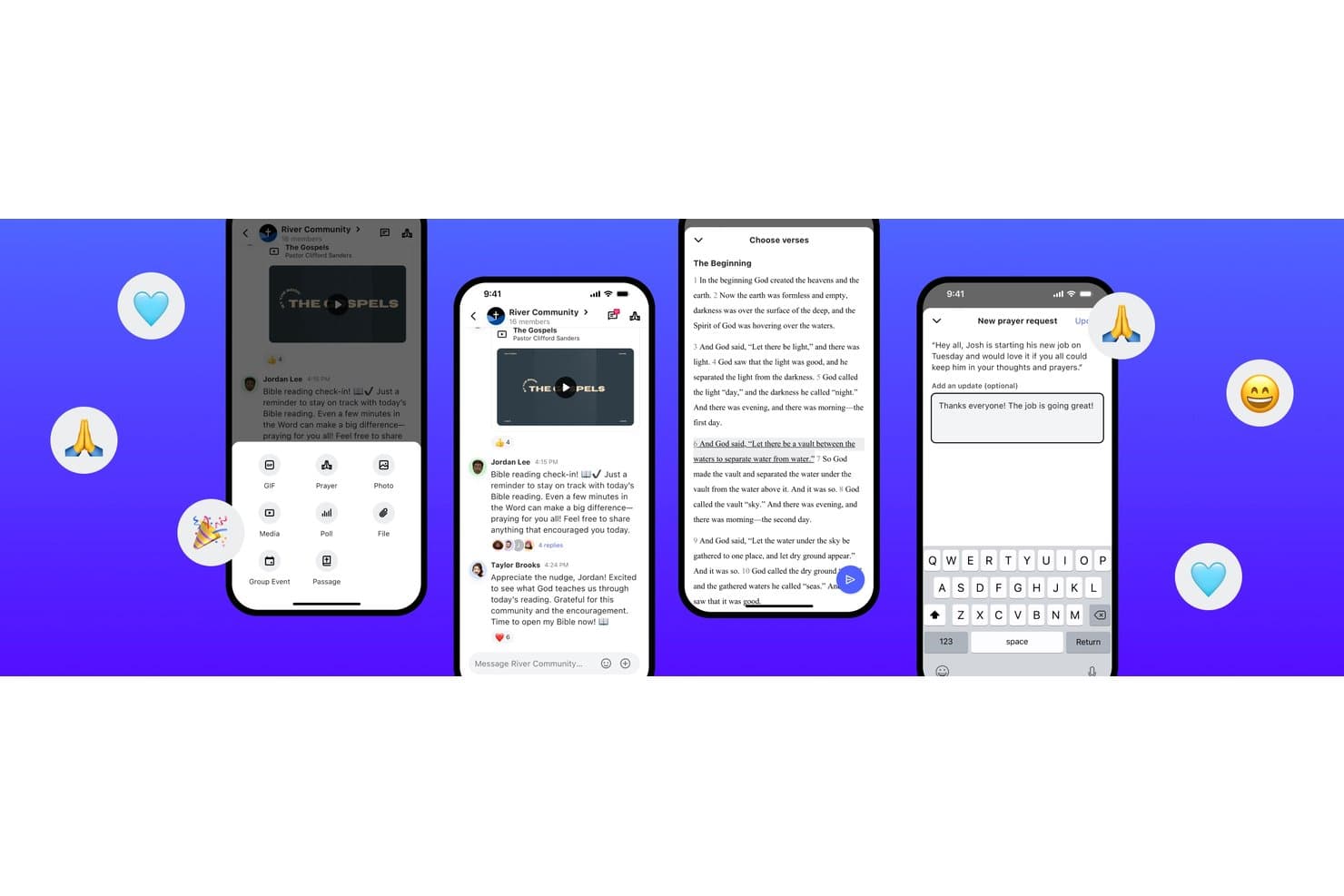
Subsplash biedt een speciaal voor kerken ontwikkeld berichtenplatform met groepschats, het delen van Bijbelpassages, gebedsverzoeken en uitgebreide mediatools voor communicatie binnen de gemeenschap. Subsplash is een alles-in-één kerkplatform dat een mobiele app met aangepaste huisstijl, e-mail- en sms-berichten, livestreaming, donaties en een ingebouwd kerkbeheersysteem combineert in één verbonden oplossing.
Voor wie is Subsplash het meest geschikt?
Subsplash is zeer geschikt voor middelgrote tot grote kerken die hun app, communicatie, donaties en ledenbeheer in één platform willen samenbrengen.
Waarom ik voor Subsplash heb gekozen
Ik heb voor Subsplash gekozen omdat de e-mail- en sms-berichten rechtstreeks zijn ingebouwd in hetzelfde platform dat de contactpersonen, groepen en donatiegeschiedenis van je gemeente beheert. Wanneer ik een bericht stuur naar mensen die voor het eerst een dienst bijwonen of naar een specifieke bedieningsgroep, gebruik ik een actuele, uniforme database in plaats van een handmatig geïmporteerde lijst. Met de functie Workflows kan ik ook opvolgsequenties automatiseren, zodat nieuwe gasten automatisch een welkomstbericht ontvangen zonder dat ik daar handmatig iets voor hoef te doen.
Belangrijkste functies van Subsplash
- Integratie voor digitale donaties: Leden kunnen rechtstreeks via de app of website tienden of donaties geven dankzij de ingebouwde betalingsverwerking.
- Preken- en mediacentrum: Upload, orden en deel audio- en videomateriaal van preken, zodat leden dit op aanvraag in de app kunnen bekijken.
- Planning van vrijwilligers: Coördineer en beheer vrijwilligersrollen, roosters en verzoeken voor evenementen of reguliere diensten.
- Evenementregistratie en inchecken: Houd aanwezigheid bij, beheer inschrijvingen voor evenementen en bied gezinnen veilige mogelijkheden om kinderen in te checken.
Integraties van Subsplash
Subsplash biedt ingebouwde integraties met Planning Center, Zapier, Breeze, MortarStone en meer, en biedt een API voor aangepaste integraties.
Pros and Cons
Pros:
- App, donaties en media verenigd in één platform
- Sterke hulpmiddelen voor mobiele donaties en terugkerende donaties
- Ingebouwde prekenbibliotheek in de app met gepersonaliseerde inhoud
Cons:
- De klantenservice reageert soms traag
- Functies voor ledenbeheer zijn beperkt
 Beste voor live AI-aangedreven preekvertaling
- Gratis proefversie beschikbaar
- Vanaf $150/maand

OneAccord helpt kerken duidelijk te communiceren over taalbarrières heen met live vertaling, meertalige chat en eenvoudige toegang tot sessies vanaf elk mobiel apparaat. OneAccord is een communicatie-app voor kerken die live AI-aangedreven vertaling voor preken en evenementen biedt, met realtime audio- en tekstvertaling in meer dan 50 talen.
Voor wie is OneAccord het meest geschikt?
OneAccord is geschikt voor kerken en bedieningen die tijdens live diensten en evenementen willen communiceren met meertalige gemeenten.
Waarom ik voor OneAccord heb gekozen
Ik heb OneAccord gekozen als een van de beste opties omdat ik tijdens diensten live AI-aangedreven preekvertaling rechtstreeks naar de apparaten van aanwezigen kan leveren. Mijn team gebruikt de realtime audio- en tekstvertaling om mensen die verschillende talen spreken te bereiken zonder extra hardware. Ik vind het prettig dat ik vertalingen voor preken, gebeden en mededelingen allemaal vanuit één dashboard kan beheren.
Belangrijkste functies van OneAccord
- Twee vertaalmodi: Uitzendmodus voor eenrichtingsvertaling in realtime naar de gemeente tijdens zondagse diensten, en gespreksmodus voor meertalige vertaling in kleine groepsgesprekken.
- Sprekersdashboard: Bekijk de vertaalstatus, betrokkenheid van het publiek en statistieken over de bezorging van berichten in realtime.
- Beheer van aangepaste woordenschat: Voeg kerkspecifieke termen en namen toe om de nauwkeurigheid van vertalingen te verbeteren.
- Geen download vereist: Gemeenteleden krijgen toegang tot live vertaling door een QR-code te scannen; er hoeft geen app te worden geïnstalleerd.
Integraties van OneAccord
Ingebouwde integraties zijn niet duidelijk gedocumenteerd. Er is een API beschikbaar voor aangepaste integraties.
Pros and Cons
Pros:
- Aanwezigen kunnen vertalingen openen op mobiele apparaten
- Aangepaste huisstijl met kerkspecifieke URL en interface
- Ondersteuning voor meerdere locaties voor gelijktijdige vertaling op verschillende campussen
Cons:
- Beperkte documentatie voor geavanceerde configuratie
- Het analysedashboard biedt geen exportmogelijkheden
Learn more about OneAccord: Het beste voor gecentraliseerde berichtplanning
- Gratis proefversie beschikbaar
- Vanaf $32.50/maand

De gecentraliseerde kalender van Communicate helpt kleine kerkelijke teams om alle communicatie in één georganiseerd overzicht te plannen, in te roosteren en te volgen. De app Communicate helpt kleine kerkelijke teams om al hun communicatie op één plek te organiseren. De app combineert tools voor berichten, middelenbeheer en planning in één centrale hub, waardoor leiders een duidelijk overzicht krijgen van elke aankondiging, campagne en update vanuit de bediening. Als communicatie-app voor kerken is de app ontworpen om chaos te verminderen en medewerkers te helpen gecoördineerd te blijven zonder meerdere tools te hoeven gebruiken.
Waarom ik Communicate heb gekozen
Ik heb Communicate gekozen omdat de app de communicatiekalender van je kerk centraliseert, zodat je live kunt zien wat gepland, actief of voltooid is. Dankzij de planner met slepen-en-neerzetten worden aankondigingen eenvoudig te organiseren voor kleine teams, terwijl herbruikbare sjablonen helpen om consistente berichtgeving via elk kanaal te behouden — allemaal binnen één duidelijke, gestructureerde tijdlijn.
Opvallende functies van Communicate
Communicate biedt een tijdlijnweergave waarmee je communicatiecampagnes eenvoudig kunt plannen of aanpassen. De gedeelde kalender van de tool geeft een live overzicht van alle actieve en voltooide berichten, zodat je medewerkers op schema blijven. De app bevat ook aanpasbare sjablonen en tools voor het dupliceren van campagnes, die tijd besparen bij het plannen van terugkerende updates, zoals herinneringen vanuit de bediening of aankondigingen van prekenseries. Bovendien maakt het mobielvriendelijke ontwerp het eenvoudig om onderweg communicatie te beheren.
Integraties van Communicate
Momenteel zijn er geen gepubliceerde integraties voor Communicate. De gecentraliseerde planningsfuncties kunnen echter de behoefte aan extra softwarekoppelingen verminderen, vooral voor kleinere teams die één alles-in-één hub willen.
Pros and Cons
Pros:
- Gecentraliseerde hub voor alle communicatie
- Eenvoudige planning van berichten met slepen-en-neerzetten
- Tijdbesparende sjablonen en tools voor duplicatie
Cons:
- Momenteel geen integraties beschikbaar
- Beperkte aanpassingsmogelijkheden voor grote teams
Learn more about Communicate: Het beste voor geïntegreerde kerkcommunicatie
- Gratis proefperiode van 30 dagen + gratis abonnement beschikbaar
- Vanaf $12/maand
Visit WebsiteCustomer Rating:4.6/5
ChMeetings heeft een uitgebreide module voor personenbeheer om ledengegevens en communicatie te organiseren. ChMeetings is een communicatie- en beheerplatform voor kerken dat berichten, evenementplanning, ledenmappen en vrijwilligerscoördinatie op één plek samenbrengt.
Voor wie is ChMeetings het meest geschikt?
ChMeetings is een goede keuze voor kleine tot middelgrote kerken die één platform nodig hebben om ledencommunicatie, groepen en evenementen te beheren zonder meerdere tools te hoeven combineren.
Waarom ik voor ChMeetings heb gekozen
ChMeetings staat op mijn shortlist omdat het elk communicatiekanaal dat je kerk nodig heeft vanuit één platform beheert. Ik vind het prettig dat je e-mails, sms-berichten, spraakberichten en pushmeldingen kunt versturen zonder de app te verlaten. Je kunt individuele leden, specifieke groepen of iedereen die voor een evenement is geregistreerd bereiken, allemaal vanuit dezelfde interface. Met de e-mailontwerper met slepen-en-neerzetten kan mijn team nieuwsbrieven en aankondigingen maken die er professioneel uitzien, terwijl de groepschatfunctie gesprekken met maximaal 200 deelnemers rechtstreeks in de mobiele app ondersteunt. Je kunt ook WhatsApp, Facebook Messenger, Viber en Telegram koppelen vanuit het profiel van een lid, zodat je mensen bereikt via de kanalen die ze al gebruiken.
Belangrijkste functies van ChMeetings
- Tools voor aanwezigheidsregistratie: Markeer automatisch leden die meerdere diensten missen, zodat je contact kunt opnemen voordat iemand ongemerkt afhaakt.
- Bouwer voor aangepaste formulieren: Maak rechtstreeks in het platform inschrijfformulieren voor evenementen, enquêtes en feedbackformulieren zonder een tool van derden.
- Vrijwilligersplanning: Wijs vrijwilligers specifieke rollen toe, stel herinneringen in en geef iedereen een duidelijk overzicht van waar ze elke week nodig zijn.
- Ledenportaal: Laat leden hun eigen contactgegevens bijwerken, zich registreren voor evenementen en online doneren via een zelfbedieningsinterface.
Integraties van ChMeetings
ChMeetings biedt ingebouwde integraties met WhatsApp, Facebook Messenger, Viber en Telegram voor directe communicatie vanuit ledenprofielen. Er is een API beschikbaar voor aangepaste integraties.
Pros and Cons
Pros:
- Directe pushmeldingen
- Ondersteuning voor communicatie tussen meerdere campussen
- Eenvoudige groepsberichten
Cons:
- Desktopversie minder intuïtief
- Geen ingebouwde livestreaming
Learn more about ChMeetings: 6Ideaal voor gepersonaliseerde groepsberichten met 1-op-1-contact
Fext
- Gratis proefperiode van 3 dagen beschikbaar
- Vanaf $9.99/maand

Organiseer contacten in slimme groepen voor gerichte, gepersonaliseerde sms-berichten—allemaal beheerd vanuit het eenvoudige mobiele dashboard van Fext. Fext is een communicatieapp voor kerken waarmee je groeps- en individuele sms-berichten kunt versturen, contacten kunt beheren en berichten kunt inplannen.
Voor wie is Fext het meest geschikt?
Fext is geschikt voor predikanten en kerkleiders die gemeenteleden rechtstreeks willen bereiken via gepersonaliseerde sms-berichten.
Waarom ik voor Fext heb gekozen
Fext kwam op mijn shortlist omdat het massaberichten en persoonlijk contact met elkaar verbindt. Wanneer ik een bericht naar mijn gemeente stuur, ontvangt iedereen het als een privébericht van persoon tot persoon vanaf mijn eigen nummer—geen groepschat en geen gesprek met de optie ‘allen beantwoorden’. Ik gebruik de tag
@firstom automatisch de voornaam van elk contact in te voegen, zodat een herinnering voor de zondag aan 300 leden nog steeds klinkt alsof ik het speciaal voor ieder van hen heb getypt. Antwoorden komen alleen bij mij binnen, waardoor pastorale gesprekken privé blijven en opvolging natuurlijk aanvoelt.Belangrijkste functies van Fext
- Berichtsjablonen: Sla vooraf geschreven berichten op en gebruik ze opnieuw met één tik, zodat terugkerende aankondigingen, zoals wekelijkse herinneringen aan de kerkdienst, niet telkens opnieuw hoeven te worden getypt.
- Media bijvoegen: Voeg rechtstreeks vanaf je iPhone afbeeldingen, video's en spraaknotities toe om context te geven aan elk bericht dat je verstuurt.
- Contacten importeren uit CSV: Upload een spreadsheet met contacten en zet deze om in georganiseerde groepen zonder handmatige gegevensinvoer.
- Groepen en individuele contacten combineren: Selecteer meerdere groepen en individuele contacten in één verzending, zodat je tegelijkertijd specifieke delen van je gemeente kunt bereiken.
Integraties van Fext
Natieve integraties zijn niet duidelijk gedocumenteerd. Er is een API beschikbaar voor aangepaste integraties.
Pros and Cons
Pros:
- Bijlagen vergroten de betrokkenheid bij berichten
- Eenvoudige installatie en import van contacten
- Herbruikbare sjablonen besparen wekelijks tijd
Cons:
- Geen integraties met andere tools
- Geen analyses of rapporten over betrokkenheid
Learn more about Fext: Het beste voor gepersonaliseerde sms-communicatie in twee richtingen
- Gratis proefperiode van 30 dagen beschikbaar
- Vanaf $37/maand
Visit WebsiteCustomer Rating:4.6/5
Mobiele interface van Text In Church met sms-communicatie in twee richtingen voor kerkcommunicatie en betrokkenheid van leden Text In Church is een communicatieplatform voor kerken, ontworpen voor gemeenten die sms-berichten, e-mailcommunicatie, opvolging van gasten en groepsaankondigingen op één plek willen beheren.
Voor wie is Text In Church het meest geschikt?
Text In Church is geschikt voor kleine tot middelgrote kerken die een speciale tool willen voor het opvolgen van gasten en het onderhouden van contact met hun gemeente.
Waarom ik voor Text In Church heb gekozen
Text In Church verdient een plek op mijn kandidatenlijst vanwege de manier waarop het omgaat met de gesprekken over en weer die kerkcommunicatie persoonlijk maken. Wanneer een gast die voor het eerst komt een digitale contactkaart invult, kan het platform automatisch een opvolgreeks starten. Wanneer die gast terug-sms't, ontstaat er een privégesprek tussen twee personen in plaats van een groepsgesprek. Ik waardeer ook de personalisatie van namen in uitgaande berichten, zodat sms-berichten niet als massaberichten overkomen. Voor een voorganger die de voorbereiding op zondag en de bediening doordeweeks moet combineren, is die combinatie van automatisering en echte communicatie in twee richtingen moeilijk te evenaren met een generieke berichtentool.
Belangrijkste functies van Text In Church
- Digitale contactkaarten: Verzamel contactgegevens van gasten via onbeperkte, aanpasbare digitale contactkaarten die op de website van je kerk kunnen worden geïntegreerd.
- Onbeperkte groepen: Organiseer contacten in segmenten—zoals levensgroepen, vrijwilligers of ouders—zodat je gerichte berichten naar specifieke doelgroepen kunt sturen.
- Geplande berichten: Schrijf en plan sms-berichten of e-mails vooraf in, zodat opvolgingen en aankondigingen op het juiste moment worden verstuurd zonder handmatige verzending.
- Geavanceerde analyses: Volg de prestaties van berichten en communicatieactiviteiten via ingebouwde rapportagedashboards.
Integraties van Text In Church
Text In Church biedt rechtstreekse integraties met Planning Center, Church Community Builder, Mailchimp, Rock RMS, Tithely Church Management, Elvanto en MinistrySafe. Het maakt ook verbinding met Zapier en biedt een open API voor aangepaste integraties.
Pros and Cons
Pros:
- Geautomatiseerde workflows stroomlijnen communicatieprocessen
- Sms-communicatie in twee richtingen vergroot de betrokkenheid van leden
- Uitgebreide integraties vergroten de veelzijdigheid van het platform
Cons:
- Er is beperkte informatie beschikbaar over de visuele interface
- De jaarlijkse prijs begint relatief hoog
Learn more about Text In Church: Ideaal voor het organiseren van kerkgroepen
- Gratis abonnement beschikbaar
- Vanaf $19/maand
Visit WebsiteCustomer Rating:4.8/5
Gracely biedt gepersonaliseerde e-mails en sms-berichten voor evenementcommunicatie en het opbouwen van samenwerkende gemeenschappen. Gracely is alles-in-één kerkbeheersoftware die is ontworpen om je te helpen leden te beheren, evenementen te organiseren, giften bij te houden en te communiceren met je kerkgemeenschap. Het is ontwikkeld om je bediening te ondersteunen door een platform te bieden voor interactie met je gemeente.
Waarom ik voor Gracely heb gekozen
Met Gracely kun je moeiteloos mensen en groepen organiseren en toegang krijgen tot persoonlijke gegevens en lidmaatschappen. Deze functie ondersteunt communicatie via gepersonaliseerde e-mails of sms-berichten, zodat je leden kunt betrekken en een gevoel van verbondenheid kunt bevorderen. In combinatie met de mogelijkheden van Gracely voor evenementenbeheer en aanwezigheidsregistratie kun je eenvoudig evenementen plannen en beheren en deelnemers via sms en e-mail op de hoogte houden.
Opvallende functies van Gracely
De communicatiefuncties van Gracely omvatten aanpasbaar formulierbeheer, waarmee workflows voor registraties, enquêtes en aanmeldingen worden gestroomlijnd. Dit bespaart tijd en vermindert papierwerk. De software biedt ook een kerkportaal waarmee leden profielen kunnen bijwerken, hun geschiedenis van giften kunnen bekijken en zich voor evenementen kunnen registreren, waardoor betrokkenheid en verbondenheid worden verdiept.
Integraties van Gracely
Integraties omvatten Stripe, SendGrid, PayPal, Google Pay, Apple Pay en Google Calendar.
Pros and Cons
Pros:
- Effectief voor het organiseren van kerkelijke evenementen en het bijhouden van aanwezigheid
- Maakt gepersonaliseerde communicatie mogelijk
- Verbetert het volgen van bezoekers en inspanningen voor betrokkenheid
Cons:
- Beperkte mogelijkheden voor offlinegebruik
- Ontbreekt aan geavanceerde analyses voor diepere inzichten
Learn more about Gracely: Het beste voor communicatie met kerkelijke donateurs
- Gratis demo beschikbaar
- Vanaf $67/maand/account
Visit WebsiteCustomer Rating:4.8/5
Gebruik Breeze om eindejaarsoverzichten van giften af te drukken en donateurs te bedanken voor hun steun aan je kerk. Breeze ChMS is kerkbeheersoftware die communicatietools, donateursbeheer, evenementenplanning en ledenlijstfuncties samenbrengt voor kerken die hun bereik en administratie willen centraliseren.
Voor wie is Breeze ChMS het meest geschikt?
Breeze ChMS is een goede keuze voor kleine tot middelgrote kerken die één alles-in-éénsysteem nodig hebben om hun gemeente, giftenadministratie en communicatie op één plek te beheren.
Waarom ik voor Breeze ChMS heb gekozen
Breeze ChMS staat op mijn favorietenlijst vanwege de manier waarop het donateursbeheer verbindt met directe communicatiehulpmiddelen. Ik vind het geweldig dat giftenoverzichten kunnen worden aangepast en rechtstreeks vanuit het platform naar donateurs kunnen worden gemaild—dus wanneer het belastingseizoen aan het einde van het jaar aanbreekt, hoeft mijn team geen gegevens te exporteren en tussen verschillende hulpmiddelen te schakelen om de overzichten te versturen. Het bijhouden van toezeggingscampagnes is ook ingebouwd, waardoor ik contact kan opnemen met donateurs op basis van de voortgang van hun toezegging. Met de editor voor e-mails met slepen-en-neerzetten en de hulpmiddelen voor SMS-berichten kan ik specifieke groepen mensen bereiken, zodat communicatie met donateurs geen algemene boodschap aan iedereen hoeft te zijn.
Belangrijkste functies van Breeze ChMS
- Persoonsprofielen: Bewaar en beheer gedetailleerde ledengegevens, waaronder contactinformatie, gezinsrelaties en aangepaste velden die je zelf definieert.
- Evenementregistratie: Laat gemeenteleden zich rechtstreeks via Breeze aanmelden voor evenementen, met ingebouwde aanwezigheidsregistratie.
- Inchecken van kinderen: Print naamkaartjes en kaartjes voor ouders bij het inchecken, met ondersteuning voor barcodescanners voor een snellere verwerking.
- Vrijwilligersbeheer: Organiseer en plan vrijwilligers binnen verschillende bedieningen, met de mogelijkheid om rollen en toewijzingen bij te houden.
Integraties van Breeze ChMS
Breeze ChMS biedt rechtstreekse integraties met Tithely, Mailchimp en Google Calendar. Breeze ChMS biedt ook een API voor aangepaste integraties.
Pros and Cons
Pros:
- Gebruiksvriendelijk systeem voor donateursbeheer
- Geautomatiseerde registratie van bijdragen en rapporten
- Ingebouwde e-mail- en SMS-berichten voor gevers
Cons:
- Geen ingebouwd beheer van evenementen of vrijwilligers
- Beperkte automatisering voor opvolging van donateurs
Learn more about Breeze ChMS: 10Het beste voor gepersonaliseerde e-mail- en sms-communicatie
Tithe.ly
- Gratis proefperiode van 30 dagen beschikbaar
- Vanaf $72/maand
Visit WebsiteCustomer Rating:4.8/5
Tithe.ly stelt kerkbeheerders en leiders in staat om nauwkeurige gegevens bij te houden van donateurs, hun contactgegevens en hun donatiegeschiedenis. Tithely is een communicatie- en beheerplatform voor kerken dat e-mail- en sms-berichten, ledenlijsten, evenementenbeheer en geefhulpmiddelen in één systeem samenbrengt.
Voor wie is Tithely het meest geschikt?
Tithely is geschikt voor kerken van elke omvang die één platform willen gebruiken om zowel de communicatie met de gemeente als de dagelijkse bedieningstaken te beheren.
Waarom ik voor Tithely heb gekozen
Ik heb Tithely gekozen als een van de beste opties vanwege de manier waarop de berichtfuncties rechtstreeks met je ledengegevens worden verbonden. Met de editor voor e-mails met slepen en neerzetten bouw je snel verzorgde e-mails die bij je huisstijl passen, en met samenvoegvelden kun je elk bericht eenvoudig personaliseren met de naam of groep van een lid. Ik vind het ook prettig dat je met groepstargeting sms'jes of e-mails kunt versturen naar specifieke rollen, kleine groepen of vrijwilligers zonder een lijst te exporteren of tussen apps te wisselen. Elk account bevat 250 gratis sms'jes per maand en je kunt berichten vooraf inplannen, zodat een herinnering voor zondag of een opvolgbericht voor een evenement precies op het juiste moment wordt verstuurd.
Belangrijkste functies van Tithely
- Aanpasbare tags: Organiseer leden in groepen zoals vrijwilligers, kleine groepen of deelnemers aan evenementen om de juiste mensen het juiste bericht te sturen.
- Geautomatiseerde workflows: Stel triggers in om verjaardagsmails te versturen, leden aan groepen toe te wijzen of opvolgtaken te beheren zonder handmatige invoer.
- Kindercheck-in: Print naamkaartjes voor ouders en kinderen, houd aanwezigheid bij en genereer unieke beveiligingscodes voor zondagsdiensten en evenementen.
- Openbare formulieren: Maak aanmeldings- en registratieformulieren die inzendingen automatisch koppelen aan bestaande ledenprofielen.
Tithely-integraties
Tithely biedt native integraties met QuickBooks, Elvanto en Breeze ChMS. Tithely biedt ook een API voor aangepaste integraties.
Pros and Cons
Pros:
- Eenvoudige financiële rapportage en transparantie
- Uitgebreide hulpmiddelen voor donateursbeheer
- Ondersteunt doneren via sms voor eenvoudige donaties
Cons:
- Beperkte mogelijkheden voor websiteaanpassingen
- Minder ontwerpmogelijkheden voor branding
Andere communicatie-apps voor kerken
Hier zijn nog enkele opties die niet in de toplijst zijn opgenomen.
- 11RealmIdeaal voor het verbinden van de hele kerkgemeenschap
- 12SteepleMateBest voor gepersonaliseerde berichten
- 13AplosHet beste voor gepersonaliseerde communicatie met leden
- 14Neon OneHet beste voor gemeenschapsbereik
- 15Planning CenterHet meest geschikt voor communicatie met kerkelijke vrijwilligers
- 16ElexioHet beste voor communicatie over kerkprojecten en -taken
- 17Servant KeeperHet beste voor ledenbeheer van kerken
- 18Church WindowsHet meest geschikt voor analyses van ledenbetrokkenheid
- 19ChurchTracIdeaal voor massale e-mails en sms-berichten
- 20TextmagicBeste voor tweerichtingscommunicatie
- 21One Church SoftwareIdeaal voor het automatiseren van communicatie
- 22MinistryPlatformBeste voor grote kerken
Hoe ik communicatieapps voor kerken beoordeel
Ik beoordeel deze platforms in twee lagen: de essentiële basisfuncties, zoals massaberichten en toepassingen voor leden, en de onderscheidende factoren die de beste hulpmiddelen voor verschillende kerkformaten en bedieningsmodellen van elkaar onderscheiden.
Kernfunctionaliteit (basisvereisten voor deze lijst)
Bij het selecteren van hulpmiddelen voor mijn lijst beoordeel ik elke tool op een schaal van 0 (biedt de functionaliteit niet aan) tot 5 (blink uit op dit gebied) voor elke hieronder vermelde kernfunctionaliteit. Vervolgens zet ik de totaalscore van de tool om in een percentage. Elke tool moet een minimale totaalscore van 65% behalen om in aanmerking te komen voor opname.
- Kanalen voor massaberichten: Ik controleer of een platform sms-berichten, e-mail en pushmeldingen in bulk ondersteunt, zodat kerken leden kunnen bereiken via de kanalen die zij dagelijks daadwerkelijk gebruiken.
- Segmentatie van de gemeente: Als je snel iedereen hetzelfde bericht stuurt, wordt het al gauw onoverzichtelijk. Ik zoek naar hulpmiddelen voor groepen en lijsten waarmee je doelgericht kunt communiceren op basis van bediening, campus of kenmerken van leden.
- Tweerichtingscommunicatie: Ik beoordeel of medewerkers echte gesprekken met leden kunnen voeren, bijvoorbeeld door gebedsverzoeken te behandelen of via de toepassing contact op te nemen met bezoekers die voor het eerst komen.
- Integratie met kerkbeheersystemen: Het platform moet synchroniseren met populaire kerkbeheersystemen zoals Planning Center, Breeze of Rock RMS, zodat je ledengegevens actueel blijven zonder handmatige imports.
- Coördinatie van vrijwilligers en groepen: Ik zoek naar ingebouwde mogelijkheden om bedieningsteams berichten te sturen, vrijwilligersdiensten te bevestigen en leiders van kleine groepen te coördineren zonder over te stappen naar een aparte toepassing.
- Mobiele ervaring voor leden: Je gemeente heeft een duidelijke, herkenbare plek nodig om updates te ontvangen, preken te bekijken en evenementinformatie te zien. Ik beoordeel de kwaliteit van de toepassing of gebruikersomgeving voor leden.
Zodra ik een lijst heb met hulpmiddelen die aan de criteria voldoen, kijk ik naar wat elk platform onderscheidt.
Onderscheidende factoren (wat leveranciers van elkaar onderscheidt)
Zo vergelijk ik verschillende leveranciers met elkaar:
Onderscheidende functies
Werkstromen voor gebedsverzoeken zijn een belangrijke onderscheidende factor. Ik zoek naar platforms waarop leden privé verzoeken kunnen indienen en medewerkers de opvolging kunnen toewijzen, zodat pastorale zorg georganiseerd blijft. Integratie met digitaal geven onderscheidt hulpmiddelen ook van elkaar: wanneer gemeenteleden tienden kunnen geven vanuit dezelfde toepassing waarin ze mededelingen lezen, blijft de betrokkenheid op één plek. Ik kijk ook of een platform een bibliotheek met preken en media bevat, zodat leden de boodschap van zondag opnieuw kunnen bekijken of doordeweekse meditaties kunnen openen zonder de toepassing te verlaten.
Meer dan functies
De totale eigendomskosten zijn belangrijk wanneer kerken afhankelijk zijn van tienden en donaties. Ik controleer of de prijs eerlijk meegroeit met de omvang van de gemeente en of er kortingen voor non-profitorganisaties of gratis abonnementen voor kleinere kerken bestaan. Gegevensprivacy is een andere belangrijke factor, vooral met betrekking tot minderjarigen. Ik beoordeel of platforms op rollen gebaseerde machtigingen en waarborgen voor ouderlijke toestemming bieden voor communicatie binnen het kinderwerk. Ook kijk ik naar ondersteuning bij de ingebruikname, omdat veel kerkbeheerders geen fulltime technische medewerkers zijn en baat hebben bij kerkspecifieke trainingsmiddelen en begeleiding bij de implementatie.
Een communicatie-app voor kerken kiezen
Houd tijdens je eigen, unieke softwareselectieproces rekening met de volgende punten:
- Gebruiksgemak: Een app voor kerkcommunicatie moet eenvoudig genoeg zijn voor zowel technisch onderlegde als minder technisch aangelegde gebruikers. Als vrijwilligers en medewerkers moeite hebben om de app te gebruiken, zal de communicatie niet verbeteren—het zorgt alleen maar voor frustratie. Zoek naar een app met een intuïtief ontwerp, een eenvoudige onboarding en zo min mogelijk benodigde training.
- Communicatie via meerdere kanalen: Kerken moeten mensen op verschillende manieren kunnen bereiken—sommigen geven de voorkeur aan sms-berichten, anderen aan e-mails, en weer anderen reageren het beste op meldingen in de app. Met de juiste app kun je berichten via meerdere kanalen vanaf één platform versturen. Met een app waarmee je bijvoorbeeld een herinnering voor zondag via e-mail, een gebedsverzoek via sms en een update over een evenement via een pushmelding kunt inplannen, blijft iedereen op de hoogte.
- Integratie met kerkbeheersoftware: Je communicatie-app moet geen extra, losstaand hulpmiddel aan je werkproces toevoegen. Als de app integreert met je kerkbeheersysteem (ChMS), kun je ledengegevens synchroniseren, opvolging automatiseren en gegevens overzichtelijk bijhouden. Wanneer er bijvoorbeeld een nieuw gezin bij de kerk komt, kan een geïntegreerde app hen automatisch toevoegen aan de mailinglijst van je kerk en aan meldingen voor kleine groepen.
- Schaalbaarheid en kosten: Veel kerken beginnen met een klein team, maar groeien na verloop van tijd. Je app moet met je kunnen meegroeien en flexibele prijzen en functies bieden die groei mogelijk maken. Sommige platforms rekenen per gebruiker, terwijl andere onbeperkte berichten aanbieden. Bedenk wat nu en in de toekomst het beste bij je budget past.
- Betrokkenheidsmeting en analyses: Je kunt communicatie niet verbeteren als je niet weet wat werkt. De beste apps bieden statistieken over betrokkenheid, waaronder hoeveel mensen berichten openen, op links klikken of zich aanmelden voor evenementen. Als weinig leden je wekelijkse e-mail openen, maar de meesten wel reageren op sms-berichten, weet je waarop je je inspanningen moet richten.
Door deze factoren in gedachten te houden, kun je een app voor kerkcommunicatie vinden die echt aansluit bij de behoeften van je bediening—zonder extra stress aan je takenpakket toe te voegen.
Trends in apps voor kerkcommunicatie in 2025
In 2025 zijn apps voor kerkcommunicatie aanzienlijk verder ontwikkeld. Ze richten zich op het vergroten van betrokkenheid, het stroomlijnen van processen en het integreren van innovatieve technologieën om aan de veranderende behoeften van geloofsgemeenschappen te voldoen.
Meer betrokkenheid van leden
- Gepersonaliseerde communicatie: Moderne apps bieden nu functies voor berichten op maat, waarmee kerken aangepaste inhoud naar verschillende groepen binnen de geloofsgemeenschap kunnen sturen. Zo ontvangen leden relevante informatie, wat de betrokkenheid en deelname vergroot.
- Interactieve functies: Door livepeilingen, vraag-en-antwoordsessies en feedbackformulieren in apps op te nemen, wordt realtime interactie tijdens diensten en evenementen mogelijk. Dit bevordert een meer inclusieve gemeenschapservaring.
Geavanceerde automatisering en AI-integratie
- Geautomatiseerde werkstromen: De opkomst van kunstmatige intelligentie (AI) en automatisering heeft ook zijn intrede gedaan in kerkbeheersoftware. Chatbots op basis van AI kunnen routinematige vragen afhandelen, terwijl geautomatiseerde werkstromen terugkerende administratieve taken stroomlijnen. Zo kunnen medewerkers van de kerk zich meer op de bediening richten.
- Voorspellende analyses: Sommige apps gebruiken nu AI om gegevens over aanwezigheid en betrokkenheid te analyseren. Zo kunnen leiders trends voorzien en weloverwogen beslissingen nemen over toekomstige programma's en initiatieven om mensen te bereiken.
Uitgebreid beheer van evenementen en vrijwilligers
- Geïntegreerde evenementenplanning: Geavanceerde functies voor evenementenbeheer, waaronder registratie, herinneringen en de toewijzing van middelen, zijn standaard geworden. Ze vereenvoudigen het planningsproces en zorgen ervoor dat kerkelijke activiteiten soepel verlopen.
- Hulpmiddelen voor vrijwilligerscoördinatie: Verbeterde hulpmiddelen voor het werven, inplannen en communiceren met vrijwilligers helpen processen te stroomlijnen, zodat alle rollen zijn ingevuld en vrijwilligers goed geïnformeerd zijn.
Nadruk op gegevensbeveiliging en privacy
- Robuuste beveiligingsmaatregelen: Door de toenemende zorgen over privacy implementeren apps nu geavanceerde beveiligingsprotocollen, zoals versleuteling en meervoudige verificatie, om gevoelige ledeninformatie te beschermen.
- Naleving van regelgeving: Het naleven van regelgeving voor gegevensbescherming is een prioriteit geworden. Functies waarmee kerken toestemming en het bewaren van gegevens effectief kunnen beheren, ondersteunen dit.
Deze trends weerspiegelen de inzet om technologie te benutten voor meer betrokkenheid binnen de gemeenschap, het stroomlijnen van administratieve taken en het behouden van het vertrouwen van geloofsgemeenschappen door robuuste maatregelen voor gegevensbeveiliging.
Wat is een app voor kerkcommunicatie?
Een communicatie-app voor kerken is een hulpmiddel waarmee voorgangers en kerkleiders op één plek contact kunnen houden met hun gemeente. De app vervangt verspreide e-mails, groepsberichten en gedrukte kerkbulletins door één platform voor het versturen van updates, het organiseren van evenementen en het beheren van groepen. Zie het als een digitaal prikbord, groepschat en evenementenplanner in één—waardoor het gemakkelijker wordt om iedereen op de hoogte te houden zonder gedoe.
Functies
Een goede communicatie-app voor kerken moet administratief werk van mijn bord halen, zodat ik me kan richten op wat belangrijk is—preken, onderwijzen en mensen begeleiden. De juiste app zorgt ervoor dat de communicatie soepel verloopt zonder dat ik die voortdurend hoef te beheren. Dit zijn de functies die dat mogelijk maken:
- Geautomatiseerde berichten: Ik kan sms'jes, e-mails en pushmeldingen van tevoren inplannen, zodat ik niet op het laatste moment nog herinneringen hoef te versturen.
- Tweerichtingscommunicatie: Mensen hebben een eenvoudige manier nodig om vragen te stellen, gebedsverzoeken te delen of zich aan te melden zonder het kerkelijk kantoor te bellen. Een goede app maakt dat eenvoudig.
- Evenementenbeheer: In plaats van handmatig de opkomst bij te houden, kan ik uitnodigingen versturen, aanmeldingen verzamelen en updates op één plek versturen.
- Coördinatie van vrijwilligers: Het organiseren van vrijwilligers kost te veel heen-en-weercommunicatie. Een app moet me helpen rollen toe te wijzen, herinneringen te versturen en aanwezigheid te bevestigen.
- Communicatie via meerdere kanalen: Sommige mensen controleren hun e-mail, anderen reageren op sms'jes en enkelen zijn afhankelijk van appmeldingen. Met een goed hulpmiddel kan ik iedereen bereiken op de manier die hun voorkeur heeft.
- Contactendatabase: Ik heb een actuele lijst nodig van leden, bezoekers en vrijwilligers. Een ingebouwde directory houdt alles georganiseerd.
- Groepsberichten: Kleine groepen, bedieningsteams en leiders hebben hun eigen communicatiekanalen nodig. Een goede app maakt dat eenvoudig.
- Aanpasbare meldingen: Als ik kan bepalen wie welke berichten ontvangt, stuur ik niet de hele kerk informatie die slechts enkelen nodig hebben.
- Integratie met kerksoftware: Wanneer mijn communicatietool samenwerkt met mijn kerkbeheersysteem, verspil ik geen tijd aan het bijwerken van gegevens op twee plaatsen.
- Berichtanalyses: Als ik weet hoeveel mensen berichten openen of op links klikken, kan ik zien wat werkt en wat niet.
Wanneer de communicatie soepel verloopt, breng ik mijn week niet door onder stapels e-mails of met het opsporen van vrijwilligers. Ik kan meer tijd besteden aan gebed, onderwijs en het goed leiden van mensen. Daarom is de juiste communicatie-app voor kerken niet alleen prettig om te hebben—het is noodzakelijk.
Voordelen
Een communicatie-app voor kerken maakt het gemakkelijker om de gemeente geïnformeerd, betrokken en verbonden te houden zonder extra administratief werk te creëren. Door communicatie te centraliseren, routinetaken te automatiseren en het bereik te verbeteren, stelt de juiste app voorgangers en kerkleiders in staat meer tijd aan de bediening te besteden en minder tijd aan het beheren van de logistiek. Dit zijn de belangrijkste voordelen:
- Vereenvoudigt communicatie: In plaats van te jongleren met e-mails, sms'jes en telefoongesprekken, wordt alles vanaf één platform beheerd, zodat berichten de juiste mensen op het juiste moment bereiken.
- Vergroot de betrokkenheid van leden: Gepersonaliseerde berichten, herinneringen aan evenementen en interactieve functies helpen leden de hele week betrokken te blijven en verbonden te blijven met het kerkelijk leven.
- Automatiseert administratieve taken: Ingeplande berichten, herinneringen voor vrijwilligers en aanmeldingen voor evenementen verminderen de handmatige werklast, waardoor medewerkers en vrijwilligers tijd krijgen voor betekenisvollere bediening.
- Verbetert bereik en opvolging: Of het nu gaat om het verwelkomen van bezoekers die voor het eerst komen of het opnieuw benaderen van inactieve leden, geautomatiseerde opvolghulpmiddelen zorgen ervoor dat niemand tussen wal en schip valt.
- Verbetert de coördinatie van evenementen en vrijwilligers: Dankzij ingebouwde planning, herinneringen en aanmeldingsfuncties verloopt het organiseren van kerkelijke activiteiten soepeler en wordt verwarring op het laatste moment voorkomen.
Een krachtige communicatie-app voor kerken maakt niet alleen de werkzaamheden eenvoudiger—het versterkt ook de relaties binnen de kerk. Door communicatiebarrières weg te nemen en dagelijkse taken te stroomlijnen, kunnen voorgangers en leiders zich richten op wat het belangrijkst is: hun mensen begeleiden.
Kosten en prijzen van communicatie-apps voor kerken
Bij het beoordelen van communicatie-apps voor kerken is het belangrijk om inzicht te hebben in de verschillende prijsplannen en beschikbare functies, zodat je kunt bepalen welke het beste aansluit bij de behoeften van jouw gemeente. Hieronder vind je een vergelijking van veelvoorkomende plantypen, hun gemiddelde prijzen, inbegrepen functies en ideale gebruikssituaties:
| Plantype | Gemiddelde prijs | Veelvoorkomende functies | Het meest geschikt voor... |
|---|---|---|---|
| PlantypeGratis abonnement | Gemiddelde prijs$0/maand | Veelvoorkomende functiesBasiscommunicatiemiddelen, beperkte ledencapaciteit, essentiële functies voor evenementenbeheer. | Het meest geschikt voor...Kleine kerken of kerken die nieuw zijn met communicatie-apps en basisfunctionaliteiten willen verkennen zonder financiële verplichtingen. |
| PlantypeBasisabonnement | Gemiddelde prijs$29–$50/maand | Veelvoorkomende functiesUitgebreidere communicatiefuncties, ledenlijst, evenementenplanning, beperkte aanpassingsmogelijkheden. | Het meest geschikt voor...Gemeenten die op zoek zijn naar basisinstrumenten met enige aanpassing om de betrokkenheid van leden te verbeteren. |
| PlantypeStandaardabonnement | Gemiddelde prijs$69–$100/maand | Veelvoorkomende functiesGeavanceerde communicatiemiddelen, media delen, vrijwilligersbeheer, integratie met andere kerkbeheersystemen. | Het meest geschikt voor...Middelgrote kerken die een balans zoeken tussen functionaliteit en kosten en meer geavanceerde functies nodig hebben. |
| PlantypePremiumabonnement | Gemiddelde prijs$100–$150/maand | Veelvoorkomende functiesUitgebreide functies, waaronder livestreaming, geavanceerde analyses, uitgebreide aanpassingsmogelijkheden en prioriteitsondersteuning. | Het meest geschikt voor...Grotere gemeenten die krachtige hulpmiddelen nodig hebben om uitgebreide activiteiten en communicatie efficiënt te beheren. |
| PlantypeAangepast bedrijfsabonnement | Gemiddelde prijsVarieert (doorgaans $150+/maand) | Veelvoorkomende functiesOp maat gemaakte oplossingen met volledige aanpassingsmogelijkheden, toegewijde ondersteuning, geavanceerde beveiligingsfuncties en schaalbare opties voor grote ledenbestanden. | Het meest geschikt voor...Megakerken of organisaties met specifieke behoeften die gepersonaliseerde oplossingen en toegewijde ondersteuning vereisen. |
Houd bij het kiezen van een abonnement rekening met de omvang van je kerk, specifieke communicatiebehoeften en budgettaire beperkingen, zodat de gekozen app aansluit bij je doelstellingen voor het gemeentewerk.
Veelgestelde vragen over kerkcommunicatie-apps
Hoe zorg ik ervoor dat mijn gemeente de app daadwerkelijk gebruikt?
Adoptie is essentieel voor de effectiviteit van elke kerkcommunicatie-app. De beste aanpak bestaat uit een combinatie van duidelijke communicatie, draagvlak bij de leiding en gebruiksgemak. Begin door de app tijdens een zondagsdienst te introduceren, de voordelen ervan uit te leggen en eenvoudige instructies te geven voor het downloaden en gebruiken ervan. Moedig leiders van kleine groepen en hoofden van bedieningen aan om het gebruik van de app voor te doen. Sommige apps bieden ingebouwde introductietools, zoals welkomstberichten of pop-uphandleidingen, waarmee nieuwe gebruikers snel vertrouwd raken met de functies. Herinner leden regelmatig aan de app—via mededelingen, sociale media of e-mail—om de waarde ervan te benadrukken en de betrokkenheid te vergroten.
Welke training hebben mijn medewerkers en vrijwilligers nodig om de app effectief te gebruiken?
De meeste kerkcommunicatie-apps zijn ontworpen met gebruiksgemak in gedachten, maar een beetje training kan een groot verschil maken. Medewerkers en vrijwilligers moeten op zijn minst begrijpen hoe ze berichten versturen, evenementen plannen, groepen beheren en ledenlijsten openen. Veel apps bieden trainingsmateriaal, zoals videohandleidingen, webinars of interactieve handleidingen. Het organiseren van een korte trainingssessie of het aanwijzen van een technisch onderlegde vrijwilliger als aanspreekpunt voor vragen kan de overgang soepeler laten verlopen. Het doel is om de training beperkt maar effectief te houden, zodat iedereen de app vol vertrouwen en zonder frustratie kan gebruiken.
Kan ik automatische herinneringen versturen voor kleine groepen, gebedsbijeenkomsten en vrijwilligersdiensten?
Ja, de meeste kerkcommunicatie-apps bevatten functies voor automatische berichten. Hiermee kun je vooraf herinneringen plannen voor bijeenkomsten van kleine groepen, gebedsbijeenkomsten en verplichtingen van vrijwilligers. Sommige platforms kunnen zelfs met agenda's worden geïntegreerd, zodat leden automatisch meldingen ontvangen over aankomende evenementen. Automatische herinneringen verminderen het aantal afwezigen en misverstanden en zorgen ervoor dat mensen op de hoogte blijven zonder dat medewerkers voortdurend handmatig hoeven op te volgen.
Vervangt een kerkcommunicatie-app de behoefte aan sociale media of e-mail?
Niet noodzakelijk. Een kerkcommunicatie-app vormt een aanvulling op andere communicatiekanalen en vervangt ze niet. Hoewel een app de betrokkenheid van leden en interne berichtgeving centraliseert, blijven sociale media nuttig om contact te leggen met mensen buiten de kerk en om betrokkenheid bij de gemeenschap te stimuleren. E-mail blijft waardevol voor formelere of langere communicatie. De beste aanpak is een strategie met meerdere kanalen: gebruik de app voor interne updates en groepscommunicatie, sociale media om contact te leggen met mensen buiten de kerk en betrokkenheid te stimuleren, en e-mail voor gedetailleerde berichten of nieuwsbrieven.
Zijn er nadelen aan het gebruik van een kerkcommunicatie-app waarvan ik op de hoogte moet zijn?
Hoewel kerkcommunicatie-apps veel voordelen bieden, zijn ze niet zonder uitdagingen.
- De invoering kan traag verlopen, vooral onder oudere leden of leden die weerstand bieden tegen nieuwe technologie.
- Sommige apps brengen doorlopende kosten met zich mee die niet binnen het budget van elke kerk passen.
- Er bestaat ook het risico dat leden worden overladen met meldingen, wat kan leiden tot minder betrokkenheid.
- Gegevensbeveiliging is een andere overweging—het is cruciaal om een platform met sterke privacybescherming te kiezen.
Om deze nadelen tot een minimum te beperken, moeten kerken de app geleidelijk introduceren, communicatiefuncties zorgvuldig gebruiken en ervoor zorgen dat de gegevens van leden veilig worden verwerkt.