

AI-kerkcommunicatiesoftware maakt gebruik van kunstmatige intelligentie om kerken te helpen bij het beheren van berichten, bereik en betrokkenheid via meerdere kanalen. Als u op zoek bent naar manieren om contact te maken met uw gemeente, routinematige communicatie te automatiseren of uw team georganiseerd te houden, kunnen deze AI-hulpmiddelen u helpen uw doelen te bereiken zonder uw werklast te verhogen.
Met zoveel beschikbare opties is het belangrijk om software te vinden die aansluit bij de behoeften van uw bediening, uw missie ondersteunt en u helpt duidelijk te communiceren—of u nu contact zoekt met bezoekers, vrijwilligers coördineert of berichten deelt met uw kerkfamilie. Deze gids helpt u de beste AI-platforms voor kerkcommunicatie te vergelijken, zodat u een weloverwogen keuze voor uw bediening kunt maken.
Waarom u onze softwareaanbevelingen kunt vertrouwen
6,700+
Reviews
20
Industry experts
16+
Evaluation factors
14
Years
Ons team test en beoordeelt software sinds 2012. Als kerkleiders weten we zelf hoe moeilijk — en belangrijk — het is om de juiste software te kiezen.
Voor deze gids hebben we tools geëvalueerd met behulp van praktijktests en onafhankelijk onderzoek, waarbij we tools beoordeelden aan de hand van onze selectiecriteria.
Onze reviews weerspiegelen ons menselijke redactionele oordeel, geen verkooppraatje.
Vergelijkingstabel van AI-kerkcommunicatiesoftware
Deze vergelijkingstabel vat de prijsdetails samen van mijn beste selecties voor AI-kerkcommunicatiesoftware:
| Tool | Best For | Trial Info | Price | ||
|---|---|---|---|---|---|
| 1 | Het beste voor automatisering van vragen en antwoorden van leden | Gratis proefperiode van 60 dagen beschikbaar | Vanaf $99/maand | Website | |
| 2 | Het beste voor live meertalige preekvertaling | Gratis proefversie beschikbaar | Vanaf $150/maand | Website | |
| 3 | Het beste voor geïntegreerde sms- en e-mailcommunicatie | Gratis proefperiode van 30 dagen beschikbaar | Vanaf $72/maand | Website | |
| 4 | Beste voor verbondenheid binnen kleine groepen | Gratis abonnement + gratis proefperiode van 30 dagen beschikbaar | Vanaf $15/20 leden/maand | Website | |
| 5 | Beste voor nieuwsfeed- en chatfuncties | Gratis demo beschikbaar | Prijs op aanvraag | Website | |
| 6 | Best voor het automatisch genereren van hulpmiddelen voor preken | Gratis proefversie beschikbaar | Vanaf $39/maand | Website | |
| 7 | Het beste met AI-aangedreven hulpmiddelen voor preekinhoud | Gratis abonnement beschikbaar | Vanaf $65/maand | Website | |
| 8 | Beste voor het plannen van berichten op sociale media | Gratis proefperiode + gratis demo beschikbaar | Vanaf $15/maand | Website | |
| 9 | Het beste voor het genereren van geloofsgerichte boodschappen | Gratis abonnement beschikbaar | Vanaf $49/per maand | Website | |
| 10 | Het beste voor sms-communicatie binnen grote kerken | Gratis proefperiode van 30 dagen beschikbaar | Vanaf $29/maand | Website |


Beoordelingen van AI-kerkcommunicatiesoftware
Hieronder vindt u mijn gedetailleerde samenvattingen van de beste AI-kerkcommunicatiesoftware die in mijn selectie is opgenomen. Mijn beoordelingen bieden een gedetailleerd overzicht van de functies, beste gebruiksscenario’s en integraties van elk platform, zodat u de beste optie voor u kunt vinden.
 Het beste voor automatisering van vragen en antwoorden van leden
- Gratis proefperiode van 60 dagen beschikbaar
- Vanaf $99/maand
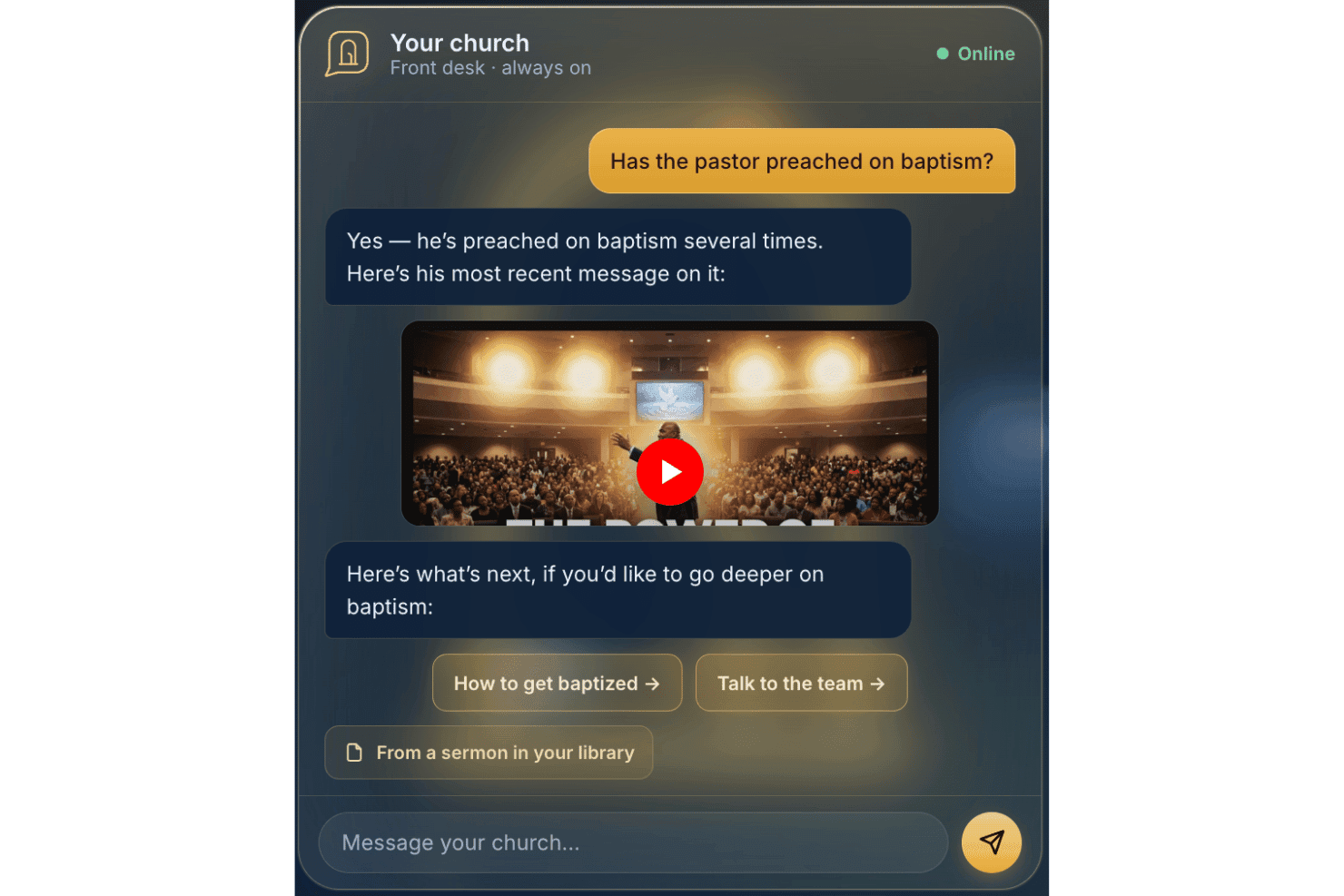
AskMyChurch biedt een 24/7 door AI aangedreven beantwoording voor kerken. AskMyChurch is een AI-chatbot voor kerkwebsites die vragen van leden en bezoekers beantwoordt met behulp van de eigen gepubliceerde content, preken en video's van de kerk, met ingebouwde crisismeldingsroutering en overdracht aan pastorale zorg.
Voor wie is AskMyChurch het meest geschikt?
Kerken met kleine administratieve teams die veel tijd van medewerkers besteden aan het telefonisch of per e-mail beantwoorden van steeds dezelfde vragen van bezoekers en leden, halen het meeste uit AskMyChurch.
Waarom ik voor AskMyChurch heb gekozen
AskMyChurch staat op mijn voorkeurslijst omdat het een dagelijks probleem voor kerkmedewerkers oplost: steeds dezelfde vragen beantwoorden over aanbiddingstijden, parkeren en doop, week na week. Ik vind het geweldig dat de antwoorden uitsluitend zijn gebaseerd op de eigen website en preken van de kerk, waarbij telkens een bronvermelding wordt getoond, zodat het systeem nooit zelf een geloofsleer verzint of verder gaat dan wat de kerk heeft gepubliceerd. Ook de crisisroutering valt bij mij op: berichten die op nood of wanhoop wijzen, worden doorgestuurd naar de 988-hulplijn en je pastorale team voordat de AI überhaupt reageert.
Belangrijkste functies van AskMyChurch
- Meertalige ondersteuning: De assistent kan vragen zowel in het Engels als in het Spaans beantwoorden.
- Standaard anoniem: Gebruikers hoeven geen account aan te maken of hun naam op te geven om vragen te stellen.
- Leerlus: Wekelijkse inzichten over veelvoorkomende thema's en hiaten worden beschikbaar gesteld voor beoordeling door medewerkers.
- Widget in de huisstijl: Elke assistent wordt rechtstreeks in de website van je kerk ingebed en sluit volledig aan op je huisstijl.
Integraties van AskMyChurch
Ingebouwde integraties zijn niet openbaar gedocumenteerd.
Pros and Cons
Pros:
- Beantwoordt alleen vragen op basis van content die eigendom is van de kerk
- Ingebouwde functies voor crisis- en gebedsescalatie
- Anoniem, registratie door gebruikers niet vereist
Cons:
- Geen tools voor uitgaande communicatie of berichten
- Mist functies voor ledensegmentatie en opvolging
Learn more about AskMyChurch: Het beste voor live meertalige preekvertaling
- Gratis proefversie beschikbaar
- Vanaf $150/maand

One Accord Translation biedt realtime meertalige vertaling voor kerkelijke bijeenkomsten, waardoor live vertolking in meerdere talen via een mobiele app mogelijk wordt gemaakt. OneAccord is een AI-communicatieplatform voor kerken dat realtime preekvertaling, monitoring van audiokwaliteit en browsergebaseerde toegang voor gemeenteleden biedt voor live erediensten.
Voor wie is OneAccord het meest geschikt?
Leiders van kerken en technologieteams die AI-aangedreven hulpmiddelen nodig hebben voor meertalige communicatie en betrokkenheid bij live erediensten.
Waarom ik voor OneAccord heb gekozen
Ik heb OneAccord gekozen als een van de beste oplossingen omdat ik live meertalige preekvertaling rechtstreeks naar de apparaten van gemeenteleden kan leveren. Mijn team gebruikt de AI-aangedreven audio- en tekstvertaling om tegelijkertijd mensen in meerdere talen te bereiken. Ik vind het prettig dat luisteraars in realtime kunnen meeluisteren, of ze nu in de kerkzaal zijn of op afstand deelnemen.
Belangrijkste functies van OneAccord
- Monitoring van audiokwaliteit: Controleert en rapporteert voortdurend over de helderheid van live audio tijdens diensten.
- Browsergebaseerde toegang voor gemeenteleden: Hiermee kunnen aanwezigen vanaf elk apparaat met een webbrowser deelnemen en luisteren.
- Sprekeridentificatie: Onderscheidt meerdere sprekers voor nauwkeurige vertaling en transcriptie.
- Opname van sessies: Legt audiosessies vast en slaat ze op zodat ze later kunnen worden teruggeluisterd of gedeeld.
Integraties van OneAccord
Ingebouwde integraties zijn niet duidelijk gedocumenteerd. OneAccord biedt een API voor aangepaste integraties.
Pros and Cons
Pros:
- Monitoring van live audiokwaliteit tijdens diensten
- Sprekeridentificatie voor nauwkeurige transcripties
- Sessies opnemen om ze later terug te luisteren of te delen
Cons:
- Beperkte openbare informatie over prijsniveaus
- Voor het instellen van de API kan technische expertise nodig zijn
Learn more about OneAccord: Het beste voor geïntegreerde sms- en e-mailcommunicatie
- Gratis proefperiode van 30 dagen beschikbaar
- Vanaf $72/maand
Visit WebsiteCustomer Rating:4.7/5
Tithely vereenvoudigt kerkcommunicatie voor sms en e-mail. Als je op zoek bent naar een manier om de digitale communicatie van je kerk te stroomlijnen, biedt Tithely een platform dat is ontworpen voor geloofsgemeenschappen. Deze tool is bedoeld voor kerken die zowel hun sms- als e-mailcommunicatie vanaf één plek willen beheren. Het helpt bedieningsteams om leden op de hoogte, betrokken en verbonden te houden zonder meerdere systemen te hoeven gebruiken.
Voor wie is Tithely het meest geschikt?
Tithely is een goede keuze voor kerken en bedieningsteams die hun sms- en e-mailcommunicatie met hun gemeenten willen centraliseren.
Waarom ik voor Tithely heb gekozen
Wat opvalt aan Tithely is dat het zowel sms- als e-mailberichten samenbrengt op één platform, iets wat zeldzaam is onder communicatietools voor kerken. Ik heb voor deze tool gekozen omdat deze integratie betekent dat je je gemeente via hun voorkeurskanaal kunt bereiken zonder tussen verschillende systemen te hoeven schakelen. Met Tithely kun je berichten plannen, je doelgroep segmenteren en de bezorging van zowel sms'jes als e-mails volgen vanuit één dashboard. Deze geïntegreerde aanpak helpt kerken om hun communicatie georganiseerd en consistent te houden, vooral bij het coördineren van evenementen, herinneringen of dringende updates.
Belangrijkste functies van Tithely
Andere functies die Tithely nuttig maken voor kerkcommunicatie zijn onder meer:
- Berichtsjablonen: Maak vooraf geschreven berichten voor terugkerende updates of aankondigingen en gebruik ze opnieuw.
- Tweerichtingsberichten: Geef ontvangers de mogelijkheid om rechtstreeks op sms'jes of e-mails te antwoorden voor meer interactieve communicatie.
- Contactbeheer: Organiseer, importeer en segmenteer de contactgegevens van je gemeente binnen het platform.
- Geautomatiseerde verjaardags- en jubileumberichten: Plan gepersonaliseerde felicitaties om belangrijke data met leden te vieren.
Integraties van Tithely
Integraties omvatten QuickBooks Online, RockRMS, Engiven, Elvanto, Salesforce, MinistryPlatform, Shelby Systems, FellowshipOne en meer.
Pros and Cons
Pros:
- Combineert sms en e-mail in één dashboard
- Omvat tweerichtingsberichten voor reacties van leden
- Biedt geautomatiseerde verjaardags- en jubileumberichten
Cons:
- Mist geavanceerde analyses voor prestaties
- Ondersteunt geen korte sms-codes
 Beste voor verbondenheid binnen kleine groepen
- Gratis abonnement + gratis proefperiode van 30 dagen beschikbaar
- Vanaf $15/20 leden/maand

Planning Center Groups beheert groepscommunicatie en evenementen. Als je op zoek bent naar een manier om kerkelijke kleine groepen te organiseren en te ondersteunen, biedt Planning Center Groups een gerichte oplossing. Dit platform is ontworpen voor bedieningsleiders die groepscommunicatie, evenementen en de betrokkenheid van leden op één plek willen beheren. Het helpt kerken om het groepsleven verbonden en georganiseerd te houden, vooral wanneer bedieningen groeien of diverser worden.
Voor wie is Planning Center het meest geschikt?
Planning Center Groups is geschikt voor kerkleiders en bedieningsteams die meerdere kleine groepen binnen hun gemeente moeten coördineren, met elkaar moeten communiceren en beheren.
Waarom ik voor Planning Center koos
Wat mij aantrok in Planning Center Groups is de manier waarop het de verbondenheid binnen kleine groepen centraal stelt in de kerkelijke communicatie. Met het platform kun je groepsdirectories aanmaken, ledenlijsten beheren en gerichte berichten naar groepsleden sturen, allemaal vanuit één dashboard. Ik waardeer hoe het de planning van evenementen en het bijhouden van aanwezigheid ondersteunt, waardoor leiders het groepsleven georganiseerd en betrokken kunnen houden. Deze functies maken het een sterke keuze voor kerken die diepere relaties en consistente communicatie binnen hun kleine groepen willen stimuleren.
Belangrijkste functies van Planning Center
Enkele andere functies die Planning Center Groups nuttig maken voor kerkelijke communicatie zijn:
- Aanpasbare inschrijfformulieren voor groepen: Maak inschrijfformulieren aan en beheer ze, zodat mensen eenvoudig lid kunnen worden van groepen.
- Delen van bronnen: Upload en verspreid studiemateriaal, documenten of aankondigingen rechtstreeks onder groepsleden.
- Geautomatiseerde herinneringen: Plan herinneringen voor aankomende bijeenkomsten of evenementen en verstuur ze, zodat iedereen op de hoogte blijft.
- Toegang via mobiele app: Geef leiders en leden de mogelijkheid om groepen te beheren, te communiceren en bronnen vanaf hun telefoon te openen.
Integraties van Planning Center
Integraties zijn onder andere BoxCast, Checkr, Mailchimp, PraiseCharts, RehearsalMix, SongSelect, Clearstream en meer.
Pros and Cons
Pros:
- Ondersteunt groepsberichten en aankondigingen
- Biedt evenementplanning met RSVP-registratie
- Biedt het delen van bronnen voor studiemateriaal
Cons:
- Beperkte automatisering voor vervolgeberichten
- Ontbreekt aan geavanceerde analyses voor groepsbetrokkenheid
Learn more about Planning Center:

Realm faciliteert berichten, updates en betrokkenheid bij de gemeenschap. Realm is een kerkbeheerplatform dat is ontworpen voor gemeenten die communicatie en betrokkenheid bij de gemeenschap willen centraliseren. Als je op zoek bent naar een oplossing die groepsberichten, evenementencoördinatie en ledenupdates op één plek combineert, is Realm het overwegen waard. Het is vooral nuttig voor kerken die leden via digitale kanalen verbonden en geïnformeerd willen houden.
Voor wie is Realm het meest geschikt?
Realm is een goede keuze voor kerkleiders en communicatieteams die voortdurende betrokkenheid en gesprekken binnen hun gemeenten willen stimuleren.
Waarom ik voor Realm koos
Wat mij opvalt aan Realm is hoe het nieuwsfeed- en chatfuncties samenbrengt op een manier die vertrouwd aanvoelt voor iedereen die sociale media heeft gebruikt. Met het platform kun je aankondigingen plaatsen, updates delen en groepsgesprekken starten, allemaal binnen een beveiligde kerkelijke omgeving. Ik waardeer het dat leden rechtstreeks op berichten kunnen reageren, deze kunnen beoordelen en ermee kunnen communiceren, wat helpt om een gevoel van gemeenschap en voortdurende betrokkenheid te creëren. Deze functies maken Realm vooral nuttig voor kerken die iedereen tussen diensten en evenementen door verbonden en geïnformeerd willen houden.
Belangrijkste functies van Realm
Naast de nieuwsfeed- en chatmogelijkheden biedt Realm verschillende andere functies die kerkcommunicatie en -beheer ondersteunen:
- Tools voor evenementbeheer: Plan evenementen, beheer RSVP's en communiceer updates rechtstreeks binnen het platform met deelnemers.
- Pushmeldingen: Stuur realtime waarschuwingen naar de mobiele apparaten van leden voor dringende aankondigingen of herinneringen.
- Documenten delen: Upload en verspreid bestanden, zoals nieuwsbrieven of vergadernotulen, naar specifieke groepen of de hele gemeente.
- Op rollen gebaseerde machtigingen: Beheer de toegang tot communicatietools en gevoelige informatie op basis van gebruikersrollen binnen de kerk.
Realm-integraties
Integraties omvatten Constant Contact, de mobiele app Realm Connect en meer.
Pros and Cons
Pros:
- De nieuwsfeed houdt leden in realtime op de hoogte
- RSVP's voor evenementen zijn geïntegreerd met communicatietools
- Op rollen gebaseerde machtigingen beschermen gevoelige informatie
Cons:
- Geen geautomatiseerde opvolgingsworkflows voor gasten
- Beperkte integraties met externe tools
Learn more about Realm: Best voor het automatisch genereren van hulpmiddelen voor preken
- Gratis proefversie beschikbaar
- Vanaf $39/maand

Pulpit AI zet preken om in studiegidsen, vragen en berichten. Als je op zoek bent naar een manier om preken om te zetten in uiteenlopende hulpmiddelen voor bediening, biedt Pulpit AI een gerichte oplossing. Dit platform is ontworpen voor predikanten en kerkleiders die preekinhoud opnieuw willen inzetten voor onderwijs, evangelisatie en discipelschap. Het helpt je tijd te besparen door automatisch Bijbelstudiegidsen, discussievragen en berichten voor sociale media te genereren op basis van de uitgeschreven tekst of audio van je preek.
Voor wie is Pulpit AI het meest geschikt?
Pulpit AI is een goede keuze voor predikanten en bedieningsteams die snel studiemateriaal, discussiegidsen en digitale inhoud willen maken op basis van de wekelijkse preken.
Waarom ik voor Pulpit AI heb gekozen
Wat Pulpit AI onderscheidt, is de mogelijkheid om automatisch een breed scala aan op preken gebaseerde hulpmiddelen te genereren met minimale inspanning. Ik heb ervoor gekozen omdat het je uitgeschreven preektekst of audio omzet in studiegidsen, vragen voor kleine groepen en inhoud voor sociale media, in slechts een paar klikken. Dit is vooral nuttig voor predikanten die de impact van hun wekelijkse boodschappen willen vergroten zonder uren te besteden aan het handmatig creëren van inhoud. De focus van het platform op het opnieuw inzetten van preken maakt het zeer geschikt voor kerken die hun inspanningen op het gebied van discipelschap willen uitbreiden door AI te gebruiken.
Belangrijkste functies van Pulpit AI
Andere functies die Pulpit AI nuttig maken voor kerkcommunicatie zijn onder meer:
- Exportopties voor meerdere indelingen: Download gegenereerde hulpmiddelen als Word-documenten, pdf's of tekstbestanden om ze eenvoudig te delen.
- Hulpmiddelen voor inhoudsbewerking: Pas door AI gegenereerd materiaal snel aan voordat je het verspreidt.
- Bibliotheek met hulpmiddelen: Bewaar en organiseer alle eerdere hulpmiddelen voor preken op één doorzoekbare locatie.
- Samenwerking: Nodig medewerkers of vrijwilligers uit om gegenereerde inhoud samen te beoordelen, te bewerken en te beheren.
Integraties van Pulpit AI
De integratie omvat Subsplash.
Pros and Cons
Pros:
- Zet preken om in meerdere indelingen voor hulpmiddelen
- Biedt bewerkingsfuncties voor door AI gegenereerde inhoud
- Bewaart alle gegenereerde hulpmiddelen in een doorzoekbare bibliotheek
Cons:
- Beperkte oorspronkelijke integraties met kerkplatforms
- Geen ingebouwde planning of agenda voor preken
Learn more about Pulpit AI: Het beste met AI-aangedreven hulpmiddelen voor preekinhoud
- Gratis abonnement beschikbaar
- Vanaf $65/maand

Church.tech helpt predikanten om met AI sneller preken te genereren en te delen. Als je op zoek bent naar AI-ondersteuning bij het voorbereiden van preken en kerkelijke communicatie, biedt Church.tech een gerichte oplossing. Dit platform is ontworpen voor predikanten en leiders binnen de bediening die inhoud willen genereren, organiseren en delen met minder handmatig werk dan bij een algemene ChatGPT-prompt nodig zou zijn. Het is vooral nuttig voor kerken die hun communicatie fris en relevant willen houden en tegelijkertijd tijd willen besparen bij het wekelijks creëren van inhoud.
Voor wie is Church.tech het meest geschikt?
Church.tech is geschikt voor predikanten en bedieningsteams in kerken van elke omvang die het maken van preken en digitale communicatie willen stroomlijnen.
Waarom ik voor Church.tech heb gekozen
Ik heb voor Church.tech gekozen omdat de AI-aangedreven hulpmiddelen voor preekinhoud voorzien in een echte behoefte van predikanten die betekenisvolle boodschappen willen creëren zonder elke week helemaal opnieuw te beginnen. Het platform biedt het genereren van preekideeën en het automatisch maken van schema's, waarmee leiders tijd besparen en geïnspireerd blijven. Ik waardeer ook dat Church.tech hulpmiddelen bevat om een prekenserie om te zetten in nieuwsbrieven en berichten voor sociale media, waardoor het eenvoudiger wordt om je gemeente via verschillende kanalen betrokken te houden. Deze functies maken het een sterke keuze voor kerken die hun communicatie willen moderniseren met AI-ondersteunde inhoud.
Belangrijkste functies van Church.tech
Andere functies die Church.tech nuttig maken voor kerkelijke communicatie zijn onder andere:
- AI-aangedreven beheer van gebedsverzoeken: Organiseert en categoriseert binnenkomende gebedsverzoeken automatisch, zodat opvolging en registratie eenvoudiger worden.
- Inhoudsplanning: Hiermee kun je berichten, overdenkingen en aankondigingen plannen en op specifieke tijdstippen laten versturen.
- Hulpmiddelen voor vrijwilligerscommunicatie: Biedt gerichte opties voor communicatie met vrijwilligersteams en bedieningsgroepen.
- Bronnenbibliotheek: Slaat eerdere preken, sjablonen en media-items op en organiseert deze, zodat ze snel toegankelijk en opnieuw te gebruiken zijn.
Integraties van Church.tech
Er zijn momenteel geen eigen integraties vermeld.
Pros and Cons
Pros:
- Automatiseert de omzetting van preken naar overdenkingen
- Genereert fragmenten voor sociale media op meerdere platforms
- Levert nauwkeurige vertalingen in de moedertaal
Cons:
- Geen ingebouwde hulpmiddelen voor digitaal geven
- Vereist externe videohostingdiensten
Learn more about Church.tech: Beste voor het plannen van berichten op sociale media
- Gratis proefperiode + gratis demo beschikbaar
- Vanaf $15/maand

ChurchSocial stroomlijnt het plannen en inroosteren van berichten op sociale media voor kerken. Als u op zoek bent naar een manier om de online aanwezigheid van uw kerk te beheren en te automatiseren, biedt ChurchSocial een gerichte oplossing. Dit platform is ontworpen voor bedieningsteams en communicatieverantwoordelijken die berichten op meerdere kanalen willen plannen, inroosteren en coördineren. Het is vooral nuttig voor kerken die hun communicatie consistent en actueel willen houden zonder elke week extra handmatig werk te hoeven doen.
Voor wie is ChurchSocial het meest geschikt?
ChurchSocial is een goede keuze voor communicatieteams van kerken en coördinatoren van sociale media die berichten op meerdere platforms moeten plannen en automatiseren.
Waarom ik voor ChurchSocial heb gekozen
Ik heb voor ChurchSocial gekozen omdat de tools voor het plannen van berichten speciaal zijn ontwikkeld voor de communicatiebehoeften van kerken. Met het platform kunt u berichten voor meerdere socialemediakanalen vanuit één dashboard maken, plannen en beheren. Dat is vooral handig om de communicatie van uw kerk georganiseerd en consistent te houden. Ik waardeer ook dat ChurchSocial een inhoudskalender en goedkeuringsprocessen bevat, zodat teams campagnes kunnen plannen en ervoor kunnen zorgen dat berichten aansluiten bij de doelen van de bediening. Deze functies maken het een sterke optie voor kerken die online actief willen blijven zonder meerdere tools of handmatige plaatsingen te moeten combineren.
Belangrijkste functies van ChurchSocial
Enkele andere functies die ChurchSocial nuttig maken voor communicatie binnen kerken zijn:
- Door AI aangedreven inhoudssuggesties: Het platform beveelt ideeën voor berichten en bijschriften aan die zijn afgestemd op kerkelijke evenementen en thema's.
- Afbeeldingen- en mediabibliotheek: Sla afbeeldingen, foto's en video's op, orden ze en gebruik ze opnieuw voor toekomstige berichten.
- Tools voor teamsamenwerking: Wijs rollen toe, deel concepten en communiceer binnen het platform om de berichtgeving te coördineren.
- Analysedashboard: Houd betrokkenheidsstatistieken en de prestaties van berichten bij op alle gekoppelde socialemediakanalen.
ChurchSocial-integraties
Integraties zijn onder andere Pushpay, Planning Center, Tithely en meer.
Pros and Cons
Pros:
- AI stelt inhoudsideeën voor kerkelijke berichten voor
- Centrale kalender voor alle geplande inhoud
- Mediabibliotheek voor het opslaan van herbruikbare afbeeldingen en video's
Cons:
- Geen ingebouwde e-mail- of SMS-berichten
- Ontbreekt aan functies voor preek- of eredienstplanning
Learn more about ChurchSocial: Het beste voor het genereren van geloofsgerichte boodschappen
- Gratis abonnement beschikbaar
- Vanaf $49/per maand

ChurchCopy genereert preken, overdenkingen en aankondigingen. Als je op zoek bent naar AI-aangedreven teksten die zijn afgestemd op kerkelijke communicatie, dan is ChurchCopy voor jou ontworpen. Deze tool helpt voorgangers, leiders van bedieningen en kerkelijk personeel bij het maken van boodschappen die geloofsgerichte waarden en taal weerspiegelen. De tool is ontwikkeld ter ondersteuning van iedereen die preken, overdenkingen, aankondigingen of outreachcontent wil genereren die aansluit bij een christelijk publiek.
Voor wie is ChurchCopy het meest geschikt?
ChurchCopy is geschikt voor voorgangers, bedieningsteams en kerkelijke communicatiemedewerkers die snel en consistent geloofsgerichte geschreven content willen genereren.
Waarom ik voor ChurchCopy koos
Wat mij aantrok in ChurchCopy is de focus op het genereren van boodschappen die aansluiten bij christelijke waarden en taal, iets wat de meeste generieke AI-schrijftools niet kunnen bieden. Ik koos ervoor omdat het speciaal voor kerken is ontwikkeld, met sjablonen en prompts voor preken, overdenkingen en aankondigingen vanuit de bediening. De AI van het platform is getraind om geloofsgerichte context te begrijpen, zodat je content krijgt die authentiek en passend aanvoelt voor je gemeente. Dit maakt het een sterke keuze voor kerkelijke leiders die theologische integriteit willen behouden en tegelijkertijd tijd willen besparen op communicatietaken.
Belangrijkste functies van ChurchCopy
Andere functies die ChurchCopy nuttig maken voor kerkelijke communicatie zijn onder meer:
- Tools voor het hergebruiken van content: Zet preken of overdenkingen met een paar klikken om in socialmediaberichten, e-mails of nieuwsbrieven.
- Aanpassing van toon en stijl: Kies uit verschillende tooninstellingen om aan te sluiten bij de communicatiestijl of doelgroep van je kerk.
- Integratie van Bijbelteksten: Voeg automatisch relevante Bijbelverzen toe aan gegenereerde content.
- Content in bulk genereren: Maak tegelijkertijd meerdere contentitems voor verschillende kanalen of campagnes.
Integraties van ChurchCopy
Er worden momenteel geen oorspronkelijke integraties vermeld.
Pros and Cons
Pros:
- Automatisch invoegen van Bijbelteksten in gegenereerde content
- Content in bulk genereren voor meerdere kanalen
- Tools voor het hergebruiken van content voor nieuwsbrieven en berichten
Cons:
- Geen ingebouwde functies voor evenementen of agenda's
- Geen mobiele app voor bewerken onderweg
Learn more about ChurchCopy: Het beste voor sms-communicatie binnen grote kerken
- Gratis proefperiode van 30 dagen beschikbaar
- Vanaf $29/maand

Clearstream coördineert kerkelijke communicatie soepel. Clearstream is een kerkelijk sms-platform voor bedieningen die snel en betrouwbaar met grote groepen moeten communiceren. Het is ontworpen voor kerkleiders en communicatieteams die massale sms-berichten, de opvolging van gasten en groepsberichten vanuit één plek willen beheren. Als je op zoek bent naar een oplossing voor communicatie op grote schaal die kan worden geïntegreerd met populaire kerkbeheersystemen, is Clearstream zeker het bekijken waard.
Voor wie is Clearstream het meest geschikt?
Clearstream is een goede keuze voor communicatieteams van kerken en leiders van bedieningen die grote hoeveelheden sms-berichten naar grote gemeenten of meerdere locaties moeten sturen.
Waarom ik voor Clearstream heb gekozen
Wat mij aantrok in Clearstream is dat het speciaal is ontwikkeld voor het versturen van grote hoeveelheden sms-berichten naar kerkgemeenschappen. Het platform ondersteunt speciale korte codes en lange codes, waardoor je duizenden mensen tegelijk betrouwbaar kunt bereiken zonder problemen met de bezorging. Ik waardeer ook de geavanceerde hulpmiddelen voor lijstbeheer en het plannen van berichten, waarmee je contacten kunt ordenen per locatie, bediening of groep en communicatie vooraf kunt plannen. Deze functies maken Clearstream bijzonder geschikt voor kerken die berichten over meerdere diensten, evenementen of locaties moeten coördineren.
Belangrijkste functies van Clearstream
Andere functies die Clearstream nuttig maken voor kerkcommunicatie zijn onder meer:
- Postvak IN voor tweerichtings-sms'jes: Beheer inkomende berichten van leden en gasten en reageer erop vanuit een gecentraliseerd bedieningspaneel.
- Geautomatiseerde werkstromen: Stel automatiseringen op basis van trefwoorden in om vervolgberichten, formulieren of volgende stappen te activeren.
- Digitale contactkaarten: Verzamel gegevens van gasten en gebedsverzoeken via aanpasbare onlineformulieren die aan je sms-nummer zijn gekoppeld.
- Berichtanalyses: Houd bezorgingspercentages, responspercentages en betrokkenheidsstatistieken bij voor elk verzonden bericht.
Integraties van Clearstream
Integraties zijn onder meer beschikbaar met Planning Center, Rock RMS, Breeze, Slack, Mailchimp, Simple en meer.
Pros and Cons
Pros:
- Ondersteunt massale sms-berichten naar een onbeperkt aantal contacten
- Biedt digitale contactkaarten voor het verzamelen van gegevens
- Maakt tweerichtings-sms'en met berichtgeschiedenis mogelijk
Cons:
- Beperkingen aan de omvang van groepsberichten voor zeer grote kerken
- Beschikt niet over functies voor het plannen van vrijwilligers
Learn more about Clearstream:
Andere AI-kerkcommunicatiesoftware
Hier zijn enkele aanvullende opties voor AI-kerkcommunicatiesoftware die mijn selectie niet hebben gehaald, maar toch het bekijken waard zijn:
- 11Church Central CloudIdeaal voor gecentraliseerd beheer van kerkelijke communicatie
- 12Doctrinally AIHet beste voor directe antwoorden met bronverwijzingen
- 13EZ TextingHet beste voor aangepaste SMS-automatiseringsworkflows
- 14Text In ChurchBeste voor geautomatiseerde workflows voor de opvolging van gasten
- 15CommunicateIdeaal voor communicatieplanning op basis van campagnes
Hoe ik AI-software voor kerkcommunicatie evalueer
Elke tool op deze lijst moet meer doen dan alleen een AI-label plakken op eenvoudige e-mailcampagnes—ik zoek naar platforms waarop AI daadwerkelijk samenvattingen van preken opstelt, je gemeente segmenteert en vervolgberichten personaliseert zonder extra personeelsuren. Ik deel mijn beoordeling op in kernfunctionaliteiten die elke tool moet bieden en onderscheidende factoren die goede opties van uitstekende opties onderscheiden.
Kernfunctionaliteiten (basisvereisten voor deze lijst)
Bij het selecteren van tools voor mijn lijst beoordeel ik elke tool op een schaal van 0 (biedt de functionaliteit niet) tot 5 (blinkt uit op dit gebied) voor elke hieronder genoemde kernfunctionaliteit. Vervolgens zet ik de totaalscore van de tool om naar een percentage. Elke tool moet een minimale totaalscore van 55% behalen om in aanmerking te komen voor opname.
- Generatie van AI-inhoud: Ik controleer of de AI kerkspecifieke inhoud kan opstellen, zoals samenvattingen van preken, wekelijkse nieuwsbrieven en berichten op sociale media—niet alleen algemene marketingteksten.
- Berichten via meerdere kanalen: Elke tool moet ten minste drie kanalen (e-mail, SMS, sociale media, pushberichten of een app) verenigen, zodat teams niet tussen platforms hoeven te wisselen om leden te bereiken.
- Segmentatie van de gemeente: Ik zoek naar AI-ondersteunde groepering op basis van betrokkenheid bij bedieningen, aanwezigheidspatronen of levensfase—zoals het automatisch identificeren van bezoekers die voor het eerst komen voor gerichte welkomstberichten.
- Personalisatie en automatisering: Geautomatiseerde werkstromen zijn hierbij belangrijk, bijvoorbeeld een vervolgbericht activeren wanneer een lid meerdere weken afwezig is of gepersonaliseerde overdenkingen per kleine groep versturen.
- Betrokkenheidsanalyses: Het platform moet AI-gestuurde inzichten in de prestaties van berichten bieden en leden met een verhoogd risico signaleren, en niet alleen openingspercentages rapporteren.
- Integratie met kerkplatforms: Ik beoordeel hoe goed elke tool synchroniseert met populaire kerkbeheersystemen zoals Planning Center, Breeze of Rock RMS voor nauwkeurige ledengegevens.
Zodra ik een lijst heb met tools die aan deze criteria voldoen, kijk ik naar wat elk platform onderscheidt.
Onderscheidende factoren (wat leveranciers onderscheidt)
Zo vergelijk ik verschillende leveranciers met elkaar:
Opvallende functies
Het hergebruiken van preken als inhoud is een belangrijke factor—ik zoek naar tools die een preekopname kunnen omzetten in blogberichten, fragmenten voor sociale media en overdenkingen voor doordeweeks, zonder handmatige bewerking. Training op het gebied van merk en communicatiestijl is ook belangrijk, omdat een algemene AI-toon niet passend aanvoelt in een kerkelijke context. Met de beste tools kun je de AI de theologische taal en communicatiestijl van je kerk aanleren. Voor multiculturele gemeenten beoordeel ik meertalige vertaling die aankondigingen en outreach aanpast aan verschillende talen.
Meer dan functies alleen
Gegevensprivacy weegt hier extra zwaar—gebedsverzoeken en pastorale gesprekken zijn uiterst gevoelig. Daarom beoordeel ik hoe elke leverancier omgaat met gegevens van gemeenteleden en of deze worden gebruikt om AI-modellen van derden te trainen. Ook de geschiktheid voor verschillende denominaties is belangrijk. Een tool die is opgebouwd rond evangelische werkprocessen kan vreemd aanvoelen voor een liturgische kerk. Tot slot kijk ik naar ondersteuning bij het inwerken van teams die sterk op vrijwilligers leunen, omdat de meeste kerkelijke communicatiemedewerkers geen fulltime marketingprofessionals zijn en behoefte hebben aan toegankelijke trainingsbronnen.
AI-kerkcommunicatiesoftware kiezen
Het is gemakkelijk om verstrikt te raken in lange lijsten met functies en complexe prijsstructuren. Om u te helpen gefocust te blijven terwijl u uw unieke softwareselectieproces doorloopt, bijvoorbeeld wat betreft de relevantie van AI voor kerken, vindt u hier een overzicht met factoren om rekening mee te houden:
| Factor | Waar u op moet letten |
|---|---|
| FactorSchaalbaarheid | Waar u op moet lettenKan de software de groei van uw kerk, nieuwe bedieningen of meerdere locaties aan zonder grote upgrades of extra kosten? |
| FactorIntegraties | Waar u op moet lettenMaakt de tool rechtstreeks verbinding met uw bestaande kerkbeheersysteem, systemen voor giften of agendasystemen, of hebt u omwegen nodig? |
| FactorAanpasbaarheid | Waar u op moet lettenKunt u communicatiesjablonen, gebruikersrollen en werkprocessen aanpassen aan de unieke structuur en behoeften van uw bediening? |
| FactorGebruiksgemak | Waar u op moet lettenKunnen medewerkers en vrijwilligers met uiteenlopende technische vaardigheden het systeem snel leren gebruiken, of is voortdurende hulp nodig? |
| FactorImplementatie en introductie | Waar u op moet lettenHoe lang duurt het om aan de slag te gaan en welke ondersteuning of hulpmiddelen biedt de leverancier voor gegevensmigratie en training? |
| FactorKosten | Waar u op moet lettenZijn er verborgen kosten, gebruikerslimieten of verplichte uitbreidingen die uw budget kunnen beïnvloeden wanneer uw behoeften in de loop der tijd veranderen? |
| FactorBeveiligingsmaatregelen | Waar u op moet lettenBiedt de software voldoende gegevensbescherming, toegangsbeheer voor gebruikers en naleving van privacystandaarden die relevant zijn voor uw bediening? |
| FactorBeschikbaarheid van ondersteuning | Waar u op moet lettenWelke ondersteuningskanalen worden aangeboden (chat, telefoon, e-mail) en zijn deze beschikbaar tijdens de drukste momenten van uw kerk of alleen tijdens standaarduren? |
Wat is AI-communicatiesoftware voor kerken?
AI-communicatiesoftware voor kerken is een digitaal platform dat kunstmatige intelligentie gebruikt om kerken te helpen hun communicatie met leden en bezoekers te beheren, automatiseren en personaliseren. Deze tools ondersteunen taken zoals het versturen van groepsberichten, het inplannen van aankondigingen en het analyseren van betrokkenheid, zodat kerkleiders hun gemeente efficiënter en relevanter kunnen bereiken.
Functies van AI-communicatiesoftware voor kerken
Let bij het selecteren van AI-communicatiesoftware voor kerken op de volgende belangrijke functies:
- Geautomatiseerde berichten: Verstuur automatisch e-mails, sms-berichten of appmeldingen naar groepen of personen op basis van planningen, triggers of acties van leden.
- Door AI gegenereerde suggesties voor inhoud: Genereer conceptberichten, aankondigingen of herinneringen aan evenementen met behulp van kunstmatige intelligentie om tijd te besparen en de communicatiekwaliteit te verbeteren.
- Evenementen plannen en herinneringen: Maak, beheer en promoot kerkevenementen en verstuur tegelijkertijd geautomatiseerde herinneringen naar deelnemers.
- Beheer van de ledenlijst: Sla contactgegevens, groepslidmaatschappen en communicatievoorkeuren van alle leden op, orden en werk deze bij.
- Analyse en betrokkenheidsregistratie: Houd openingspercentages van berichten, responspercentages en de algehele betrokkenheid bij om communicatiestrategieën te verfijnen.
- Toegangsbeheer op basis van rollen: Wijs machtigingen toe aan medewerkers en vrijwilligers, zodat de juiste personen toegang hebben tot de juiste communicatietools en gegevens.
- Aanpasbare sjablonen: Gebruik en pas vooraf gemaakte sjablonen voor veelvoorkomende berichten, nieuwsbrieven of uitnodigingen voor evenementen aan om consistentie te behouden en tijd te besparen.
- Communicatie via meerdere kanalen: Bereik je gemeente via e-mail, sms, pushmeldingen of berichten in de app vanuit één platform.
- Integratie met kerkbeheersystemen: Verbind communicatietools met je bestaande kerkdatabase, agenda of platform voor donaties voor een naadloze gegevensstroom.
- Geautomatiseerde opvolging van gasten: Activeer gepersonaliseerde vervolgberichten voor bezoekers of nieuwe leden op basis van hun interacties of aanwezigheid.
Voordelen van AI-communicatiesoftware voor kerken
De implementatie van AI-communicatiesoftware voor kerken biedt verschillende voordelen voor je team en je organisatie. Hier zijn enkele voordelen waar je naar kunt uitkijken:
- Gecentraliseerd communicatiebeheer: Houd alle berichten, aankondigingen en herinneringen op één plek georganiseerd, waardoor verwarring en gemiste updates worden verminderd.
- Tijdsbesparing: Automatiseer routinematige berichten en vervolgberichten, zodat medewerkers en vrijwilligers hier minder tijd aan besteden.
- Gepersonaliseerde benadering: Gebruik door AI gegenereerde suggesties voor inhoud en geautomatiseerde opvolging van gasten om berichten af te stemmen op individuele leden en bezoekers.
- Verbeterde registratie van betrokkenheid: Houd openingspercentages, reacties en deelname bij om beter te begrijpen wat aanslaat bij je gemeente.
- Consistente berichtgeving: Benut aanpasbare sjablonen en planningstools om ervoor te zorgen dat elke communicatie aansluit bij de toon en timing van je kerk.
- Verbeterde gegevensnauwkeurigheid: Integreer met je kerkbeheersysteem om ledeninformatie actueel te houden en fouten door handmatige invoer te verminderen.
- Schaalbaar voor groei: Pas de software eenvoudig aan naarmate je kerk groeit door nieuwe groepen, locaties of bedieningen toe te voegen zonder je communicatieproces volledig te herzien.
Kosten en prijzen van AI-communicatiesoftware voor kerken
Bij het selecteren van AI-communicatiesoftware voor kerken is inzicht nodig in de verschillende beschikbare prijsmodellen en abonnementen. De kosten variëren op basis van functies, teamgrootte, uitbreidingen en meer. De onderstaande tabel geeft een overzicht van veelvoorkomende abonnementen, hun gemiddelde prijzen en de typische functies die zijn inbegrepen in oplossingen voor AI-communicatiesoftware voor kerken:
Vergelijkingstabel van abonnementen voor AI-communicatiesoftware voor kerken
| Abonnementstype | Gemiddelde prijs | Veelvoorkomende functies |
|---|---|---|
| AbonnementstypeGratis abonnement | Gemiddelde prijs$0 | Veelvoorkomende functiesBasisgroepsberichten, een beperkt aantal contacten, eenvoudige evenementenplanning en basisanalyses. |
| AbonnementstypePersoonlijk abonnement | Gemiddelde prijs$5-$25/gebruiker/maand | Veelvoorkomende functiesRuimere berichtlimieten, beheer van ledenlijsten, aanpasbare sjablonen en ondersteuning per e-mail. |
| AbonnementstypeZakelijk abonnement | Gemiddelde prijs$30-$75/gebruiker/maand | Veelvoorkomende functiesBerichten via meerdere kanalen, door AI aangestuurde contentsuggesties, integratiemogelijkheden en geavanceerde analyses. |
| AbonnementstypeBedrijfsabonnement | Gemiddelde prijs$100-$250+/maand | Veelvoorkomende functiesOnbeperkt aantal gebruikers, ondersteuning voor meerdere campussen, persoonlijke onboarding, geavanceerde beveiliging en ondersteuning met prioriteit. |
Veelgestelde vragen over AI-software voor kerkcommunicatie
Hier vindt u antwoorden op veelgestelde vragen over AI-software voor kerkcommunicatie:
Hoe verbetert AI de communicatie binnen een kerk?
AI verbetert de communicatie binnen een kerk door routinetaken te automatiseren, gepersonaliseerde content voor te stellen en betrokkenheidsgegevens te analyseren. Hierdoor kunnen leiders tijdige en relevante berichten versturen en wordt de handmatige inspanning verminderd die nodig is om leden geïnformeerd en verbonden te houden.
Kan AI-software voor kerkcommunicatie worden geïntegreerd met ons bestaande kerkbeheersysteem?
Ja, de meeste AI-software voor kerkcommunicatie kan worden geïntegreerd met populaire kerkbeheersystemen. Dankzij integratie kunt u ledengegevens synchroniseren, updates automatiseren en werkprocessen stroomlijnen. Controleer echter altijd de compatibiliteit met uw huidige hulpmiddelen voordat u tot aankoop overgaat.
Is het moeilijk om medewerkers en vrijwilligers te leren werken met AI-software voor kerkcommunicatie?
Nee, de meeste platforms zijn ontworpen met gebruiksvriendelijke interfaces en bieden hulpmiddelen voor onboarding, zoals handleidingen, sjablonen en ondersteuning. Sommige gebruikers hebben echter mogelijk extra tijd of training nodig, vooral als ze minder vertrouwd zijn met technologie.
Op welke beveiligingsmaatregelen moet ik letten bij AI-software voor kerkcommunicatie?
Let op functies zoals gegevensversleuteling, toegangsbeheer voor gebruikers en naleving van privacynormen. Deze beveiligingsmaatregelen helpen gevoelige ledeninformatie te beschermen en zorgen ervoor dat uw kerk aan wettelijke en ethische verantwoordelijkheden voldoet.
Hoe weet ik of mijn kerk AI-aangestuurde communicatietools nodig heeft?
Als uw team veel tijd besteedt aan handmatige berichtgeving, moeite heeft om leden betrokken te houden of de communicatie op grote schaal wil personaliseren, kunnen AI-aangestuurde tools helpen. Houd bij uw beslissing rekening met de omvang van uw kerk, de hoeveelheid communicatie en uw groeiplannen.