

AI-verktøy for kirkeforvaltning er digitale plattformer som bruker kunstig intelligens til å automatisere, organisere og forenkle oppgaver innen kirkedrift, som kommunikasjon, planlegging, givertjenester og medlemsengasjement. Hvis du utforsker bruken av AI i kirker, kan disse verktøyene bidra til å redusere administrative byrder, forbedre koordineringen og støtte kirkeledelsen i å håndtere menighetsarbeidet mer effektivt. Mange løsninger har funksjoner som AI-assistenter, AI-chatboter og andre AI-systemer som hjelper med innholdsproduksjon, sosiale medier og oppdateringer på kirkens nettsted. De kan også støtte sjelesorg, disippelgjøring og bibelstudier, samtidig som de gjør det mulig for team å idémyldre, lage AI-genererte andakter og optimalisere den daglige driften. I denne listen finner du pålitelige løsninger som er utviklet for å møte kirkelederes unike behov, slik at du kan fokusere på å lede menigheten samtidig som driften går smidig.
Hvorfor du kan stole på våre programvareanbefalinger
6,700+
Reviews
20
Industry experts
16+
Evaluation factors
14
Years
Teamet vårt har testet og anmeldt programvare siden 2012. Vi er selv kirkeledere, så vi vet hvor vanskelig og hvor viktig det er å velge riktig programvare.
I denne guiden har vi vurdert verktøyene gjennom praktisk testing og uavhengig research og gitt dem poeng ut fra våre utvelgelseskriterier.
Anmeldelsene våre bygger på vår egen redaksjonelle vurdering. De er ikke et salgsargument.
Sammenligningstabell: AI-verktøy for kirkeforvaltning
Denne sammenligningstabellen oppsummerer prisdetaljene for mine utvalgte AI-verktøy for kirkeforvaltning:
| Tool | Best For | Trial Info | Price | ||
|---|---|---|---|---|---|
| 1 | Best for privacy-first Q&A handling | 60-day free trial available | From $99/month | Website | |
| 2 | Best for automated church member management | Free plan available + 30-day free trial | From $12/month | Website | |
| 3 | Best for digital church giving | 30-day free trial available | From $72/month | Website | |
| 4 | Best for service and volunteer scheduling | Free plan available | From $15/month | Website | |
| 5 | Best for digital giving and donor insights | Free demo available | Pricing upon request | Website | |
| 6 | Best for searchable church member databases | Free demo available | From $$73.32/month (billed annually) | Website | |
| 7 | Best for AI-powered communication assistant | Free demo available | From $30/month | Website | |
| 8 | Best for integrated church member and giving management | Free demo available | Pricing upon request | Website | |
| 9 | Best for AI -powered church administration | Free plan + free demo available | From $60/month | Website | |
| 10 | Best for AI -assisted sermon preparation | 30-day free trial + free plan + free demo available | From $19/month (billed annually) | Website |


Omtaler av AI-verktøy for kirkeforvaltning
Nedenfor finner du mine detaljerte sammendrag av AI-verktøyene for kirkeforvaltning som kom med på utvalgslisten. Omtalene mine gir en detaljert gjennomgang av funksjonene, egenskapene og integrasjonene til hver plattform, slik at du kan finne den som passer best for deg.
 Best for privacy-first Q&A handling
- 60-day free trial available
- From $99/month
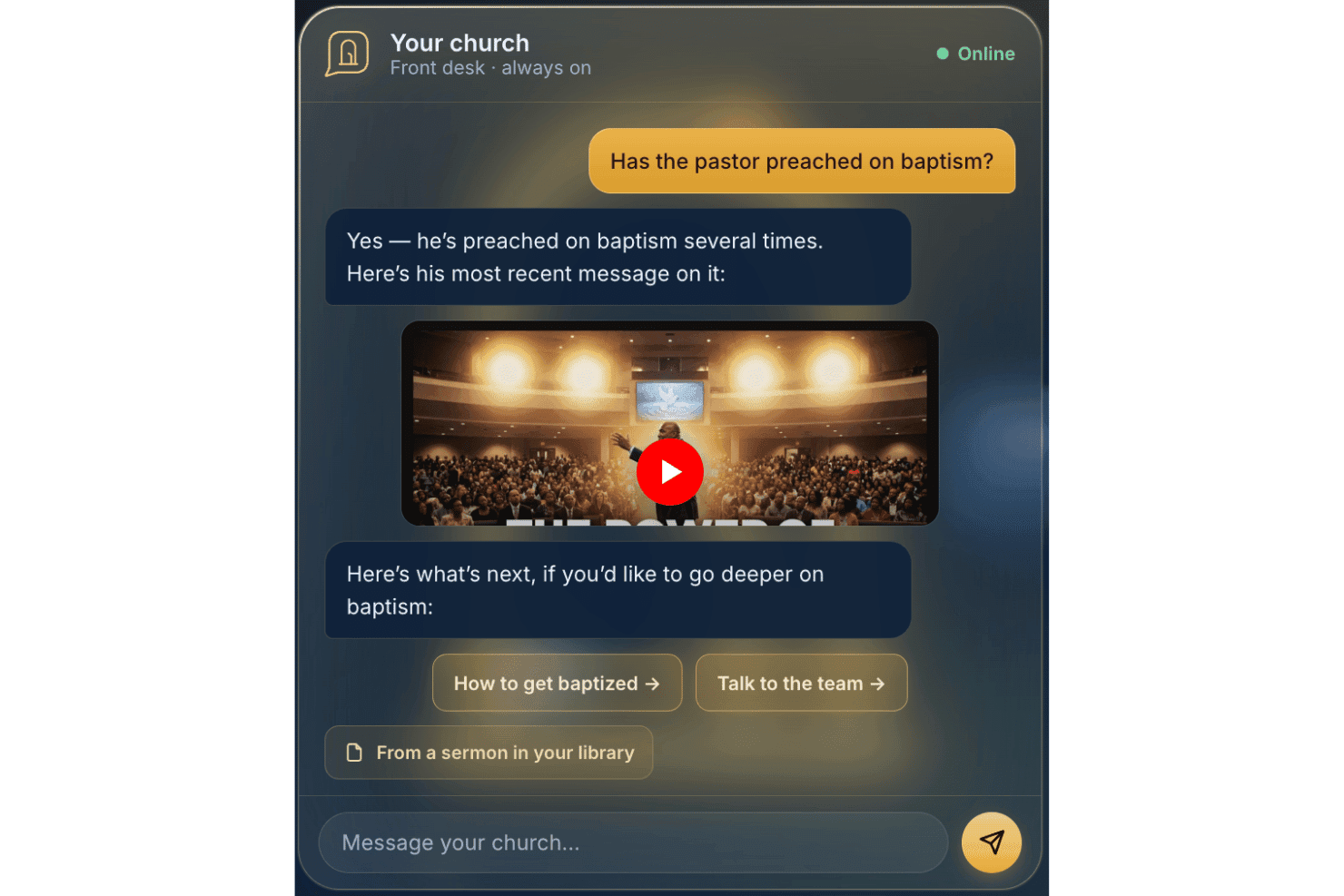
AskMyChurch offers a 24/7 AI-powered church answering service. AskMyChurch is an AI chatbot for church websites that answers visitor and member questions using the church's own published content, sermons, and videos, with built-in crisis routing, bilingual support, and anonymous-by-default privacy.
Who Is AskMyChurch Best For?
Churches of any size that want to answer visitor questions after hours without collecting personal data or requiring staff to monitor a chat inbox.
Why I Picked AskMyChurch
I picked AskMyChurch because its anonymous-by-default design genuinely stands out in church AI tools. Visitors can ask sensitive questions about grief, faith doubts, or mental health without creating accounts or being tracked. What I find particularly important is the hard crisis gate: when distress signals appear, it routes to 988 and the Crisis Text Line before any AI response is generated, which is a level of pastoral care responsibility I haven't seen built directly into other church chatbots.
AskMyChurch Key Features
- Canon (pastor's voice): Answers are sourced directly from the pastor’s sermons and cite the exact time the words were spoken.
- Dual-pass grounding check: Every response is verified twice against church content to prevent AI-generated hallucinations.
- Learning Loop: Weekly reports surface unanswered questions and recurring themes for church admins to review and address.
- Topic control: Admins can disable specific topics or redirect visitors using plain-English instructions in the dashboard.
AskMyChurch Integrations
Native integrations are not publicly documented. An API for custom integrations is not advertised.
Pros and Cons
Pros:
- AI highlights unanswered visitor topics
- Answers are grounded in pastor’s sermons
- Adapts responses to reflect church branding
Cons:
- Cannot manage donations or giving campaigns
- No member data or attendance management
Learn more about AskMyChurch: Best for automated church member management
- Free plan available + 30-day free trial
- From $12/month
Visit WebsiteCustomer Rating:4.9/5
ChMeetings event scheduler listing recurring weekly group meetings. ChMeetings offers a digital platform designed specifically for churches to manage members, events, and communication. It’s a practical choice for pastors and ministry leaders who want to centralize administrative tasks and keep track of church engagement. With features tailored for faith communities, ChMeetings helps streamline daily operations and support ministry growth.
Who Is ChMeetings Best For?
ChMeetings is a strong fit for church administrators and ministry leaders who need to manage member data, events, and communications in one place.
Why I Picked ChMeetings
I chose ChMeetings because it offers dedicated member management and event tracking tools designed for church contexts. The platform lets you organize member profiles, attendance, and group participation, making it easier to keep up with your congregation’s involvement. I also appreciate how event tracking is built in, so you can schedule, promote, and monitor church activities all in one place. These features help church leaders stay organized and responsive to the needs of their community.
ChMeetings Key Features
Some other features that make ChMeetings useful for church administration include:
- Mobile app access: Manage church data and communication from iOS and Android devices.
- Mass messaging: Send emails, SMS, or push notifications to individuals or groups.
- Donation tracking: Record, categorize, and report on giving and contributions.
- Custom forms: Create and distribute forms for registrations, surveys, or volunteer sign-ups.
ChMeetings Integrations
Integrations include Stripe, PayPal, Bluesnap, Paystack, Mailchimp, Twilio, SMS Global, Clickatell, Eazismspro, and more.
Pros and Cons
Pros:
- Built-in donation and pledge tracking
- Event check-in with QR code scanning
- Member directory supports custom fields and tags
Cons:
- No sermon or media library management
- No built-in worship planning tools
Learn more about ChMeetings: Best for digital church giving
- 30-day free trial available
- From $72/month
Visit WebsiteCustomer Rating:4.7/5
Tithely app builder with sermon, events, and giving sections editor. If you’re looking for a digital giving and engagement platform built for churches, Tithely offers a focused solution. It’s designed for faith communities that want to simplify online giving, manage events, and connect with members from one dashboard. Tithely helps church leaders handle donations, communication, and administrative tasks in a way that fits modern ministry needs.
Who Is Tithely Best For?
Tithely suits small to mid-sized churches and ministries that want to centralize giving, communication, and member engagement.
Why I Picked Tithely
What drew me to Tithely is how it brings together giving, communication, and engagement tools in one platform designed specifically for churches. Its all-in-one approach means you can manage online and mobile giving, event registration, and member messaging without juggling multiple systems. I see real value in features like automated donation tracking and built-in text and email communication, which help streamline both financial and relational aspects of church administration. For ministries that want a unified solution to handle both donations and member engagement, Tithely stands out as a purpose-built choice.
Tithely Key Features
Some other features that make Tithely useful for church administration include:
- Custom church app builder: Create a branded mobile app for your church to share sermons, events, and announcements.
- Event management tools: Organize, promote, and track attendance for church events and activities.
- Volunteer management: Schedule, communicate with, and coordinate volunteers for various ministries and services.
- Digital check-in system: Track attendance and securely check in children or members for services and events.
Tithely Integrations
Integrations include QuickBooks, RockRMS, The StudioC, Engiven, Elvanto, Salesforce, MinistryPlatform, Shelby Systems, FellowshipOne, and more.
Pros and Cons
Pros:
- Digital check-in system for children’s ministry
- Event registration with attendee tracking included
- Custom church app builder for member engagement
Cons:
- Donation processing fees are higher than some
- No built-in accounting or payroll features
 Best for service and volunteer scheduling
- Free plan available
- From $15/month
Visit WebsiteCustomer Rating:4.7/5
Planning Center dashboard with scheduling, groups, registrants, and giving. If you’re looking for a flexible way to manage church operations, Planning Center offers a suite of modular tools designed for ministry teams of all sizes. It’s especially useful for churches that want to customize their workflows for events, volunteers, and communication. Planning Center helps you centralize scheduling, track attendance, and coordinate service planning in one place.
Who Is Planning Center Best For?
Planning Center suits churches of any size that need modular tools to manage events, volunteers, and member engagement.
Why I Picked Planning Center
What stands out to me about Planning Center is its modular approach, which lets you choose only the tools your church actually needs. I appreciate how you can add or remove modules for things like service planning, giving, check-ins, and groups, so your setup can grow or change as your ministry does. This flexibility means you’re not locked into a one-size-fits-all system, and you can tailor workflows for different teams or ministries. For churches that want to adapt their administration as needs shift, Planning Center’s modular design makes it a strong fit.
Planning Center Key Features
Some other features that make Planning Center useful for church administration include:
- People database: Manage detailed member profiles, track engagement, and organize households in one place.
- Automated workflows: Set up step-by-step processes for follow-ups, onboarding, or volunteer management.
- Resource booking: Reserve rooms, equipment, and facilities for events or meetings directly within the platform.
- Email and text messaging: Send targeted communications to individuals, groups, or your entire congregation.
Planning Center Integrations
Integrations include BoxCast, Checkr, Mailchimp, PraiseCharts, RehearsalMix, SongSelect, Clearstream, MinistrySafe, Protect My Ministry, and more.
Pros and Cons
Pros:
- Detailed member profiles with engagement tracking
- Automated workflows for follow-up and onboarding
- Built-in child check-in with security features
Cons:
- Reporting options are limited for custom needs
- No built-in accounting or donation management
Learn more about Planning Center: Best for digital giving and donor insights
- Free demo available
- Pricing upon request
Visit WebsiteCustomer Rating:4/5
Pushpay helps churches manage donations, giving statements, and donor engagement in one platform. Pushpay gives churches a way to manage digital giving and member engagement from one platform. If you’re looking for a solution that connects online donations, event registrations, and communication, Pushpay brings these tools together for your ministry. It’s designed for leaders who want to simplify administrative tasks and strengthen connections with their congregation.
Who Is Pushpay Best For?
Pushpay fits medium to large churches and ministries that need integrated digital giving and engagement tools.
Why I Picked Pushpay
I picked Pushpay because it brings digital giving and engagement into one unified platform, which is a core need for church administration today. The tool lets you manage online donations, recurring giving, and event registrations all in one place, so you don’t have to juggle multiple systems. I also appreciate how Pushpay’s communication tools help you reach your congregation through targeted messages and announcements. These features make it easier to keep your church connected and simplify the administrative side of ministry.
Pushpay Key Features
Some other features that make Pushpay useful for church administration include:
- Mobile app for members: Members can give, register for events, and receive updates directly from their phones.
- Donor management dashboard: Track giving history, manage donor profiles, and generate contribution statements in one place.
- Customizable forms: Create forms for prayer requests, volunteer sign-ups, or surveys tailored to your ministry’s needs.
- Automated receipt and thank-you messaging: Send personalized receipts and thank-you notes automatically after each donation.
Pushpay Integrations
Integrations include Planning Center, QuickBooks, Gusto, MortarStone, Engiven, StudioC, VisitorTap, Checkr, Mailchimp, and Resi.
Pros and Cons
Pros:
- Tracks donor engagement and giving trends
- Offers branded mobile app for congregations
- Supports recurring and one-time digital giving
Cons:
- Some integrations require additional fees
- Requires separate contract for live streaming
Learn more about Pushpay: Best for searchable church member databases
- Free demo available
- From $$73.32/month (billed annually)

Servant Keeper simplifies church administration with tools for giving, membership, and reporting. Servant Keeper offers church leaders a way to organize member data, track attendance, and manage contributions in one place. It’s designed for ministries that want to reduce manual data entry and improve record accuracy. If you’re looking for a solution that helps you keep up with growing administrative demands, Servant Keeper brings automation and clarity to your church office.
Who Is Servant Keeper Best For?
Servant Keeper suits churches and ministries of any size that need centralized member management and contribution tracking.
Why I Picked Servant Keeper
I chose Servant Keeper because it automates member management and reporting, which are central needs for church administration. The platform uses smart tools to track attendance, manage contributions, and generate detailed reports without manual effort. I appreciate how it lets you quickly search, filter, and update member records, making it easier to keep information accurate and up to date. These features help church leaders spend less time on paperwork and more time focusing on ministry.
Servant Keeper Key Features
Some other features that make Servant Keeper useful for church administration include:
- Custom group creation: Build and manage groups for ministries, classes, or events to organize communication and activities.
- Automated email and text messaging: Send targeted messages to individuals or groups directly from the platform.
- Volunteer scheduling: Assign, track, and communicate with volunteers for various church functions and events.
- Child check-in system: Provide a secure check-in and check-out process for children’s ministries and events.
Servant Keeper Integrations
Native integrations are not currently listed.
Pros and Cons
Pros:
- Automates group and volunteer management
- Offers secure child check-in functionality
- Tracks attendance and giving in one place
Cons:
- Lacks built-in online giving processing
- Initial setup can be time-consuming
Learn more about Servant Keeper: Best for AI-powered communication assistant
- Free demo available
- From $30/month

AI Church Now uses AI to simplify church administration, communication, and ministry workflows. If you’re looking for an AI-driven assistant to help manage church operations, Church AI Now offers a focused solution. This tool is designed for pastors and church leaders who want to automate communication, scheduling, and administrative tasks. It’s especially useful for ministries aiming to save time and reduce manual workload with AI-powered features.
Who Is Church AI Now Best For?
Church AI Now suits small to mid-sized churches and ministries that want to automate routine administration and communication tasks with AI.
Why I Picked Church AI Now
What drew me to Church AI Now is its focus on using AI to handle both church administration and communication in one platform. The tool’s AI-powered assistant can draft announcements, respond to member inquiries, and help schedule meetings or events, which directly supports busy church leaders. I also like that it automates repetitive tasks, freeing up time for more pastoral work. These features make it a strong fit for churches looking to modernize their administrative processes with AI-driven support.
Church AI Now Key Features
Some other features that make Church AI Now useful for church administration include:
- Volunteer management tools: Organize, schedule, and communicate with volunteers directly from the platform.
- Document storage and sharing: Upload, store, and share important church documents securely with staff and members.
- Event registration system: Manage sign-ups, RSVPs, and attendee lists for church events and programs.
- Customizable workflow automation: Set up automated processes for tasks like follow-ups, reminders, and approvals.
Church AI Now Integrations
Native integrations are not currently listed.
Pros and Cons
Pros:
- Centralizes document storage for staff access
- Handles volunteer scheduling and reminders
- AI drafts announcements and newsletters automatically
Cons:
- Lacks worship planning or music scheduling
- No built-in giving or donation tools
Learn more about Church AI Now: Best for integrated church member and giving management
- Free demo available
- Pricing upon request

FellowshipOne dashboard with attendance, giving, and interactions charts. If you’re searching for a church management system that prioritizes member engagement and ministry coordination, FellowshipOne is worth considering. It’s designed for churches that want to track attendance, manage groups, and communicate with members from a single platform. FellowshipOne helps address the challenge of keeping congregation data organized and accessible for both staff and volunteers.
Who Is FellowshipOne Best For?
FellowshipOne suits mid-sized to large churches that need advanced tools for managing member engagement and ministry operations.
Why I Picked FellowshipOne
What drew me to FellowshipOne is its focus on advanced member engagement tools, which are essential for churches looking to deepen relationships and track involvement. The platform offers detailed member profiles and group management features, making it easier to organize ministries and follow up with individuals. I also appreciate the built-in communication tools that let you send targeted messages to specific groups or members. These capabilities help churches stay connected with their congregation and ensure that no one falls through the cracks.
FellowshipOne Key Features
- Some other features that make FellowshipOne useful for church administration include:
- Attendance tracking: Monitor attendance for services, events, and small groups with detailed reporting.
- Volunteer management: Schedule, organize, and communicate with volunteers for various ministries and events.
- Contribution tracking: Record, manage, and report on donations and pledges from members.
- Event registration: Set up and manage online event sign-ups, including payment processing and attendee tracking.
FellowshipOne Integrations
Integrations include FellowshipOne Giving, FellowshipOne Financials, Protect My Ministry, High Ground Solutions, and more.
Pros and Cons
Pros:
- Includes built-in volunteer scheduling tools
- Offers automated workflows for ministry tasks
- Tracks detailed member and family profiles
Cons:
- Limited donor management and giving analytics
- No built-in worship planning functionality
Learn more about FellowshipOne: Best for AI -powered church administration
- Free plan + free demo available
- From $60/month

Church management dashboard setup for member stats and the giving totals tab display. Relius uses AI to help churches automate and personalize their administrative and engagement tasks. It’s designed for pastors, ministry leaders, and church staff who want to simplify communication, manage data, and improve member follow-up. If you’re looking for a modern platform that brings smart automation to church operations, Relius is worth a closer look.
Who Is Relius Best For?
Relius fits churches and ministry teams seeking AI -driven tools to automate administration and deepen member engagement.
Why I Picked Relius
What drew me to Relius is its focus on using AI to handle both church administration and member engagement in one platform. I see real value in its AI -powered communication tools, which help automate personalized follow-ups and reminders for members. Relius also offers smart data management features, letting you track attendance, giving, and member activity with minimal manual effort. For churches looking to modernize their operations and connect more intentionally with their congregation, Relius brings together automation and engagement in a way that’s hard to find elsewhere.
Relius Key Features
Some other features that make Relius useful for church administration include:
- Event management tools: Schedule, organize, and track church events with built-in RSVP and attendance tracking.
- Volunteer coordination: Assign roles, manage volunteer sign-ups, and communicate schedules directly within the platform.
- Donation tracking: Monitor giving patterns, generate contribution statements, and manage donor records securely.
- Document storage: Store, organize, and share important church documents and resources in a centralized digital library.
Relius Integrations
Native integrations are not currently listed.
Pros and Cons
Pros:
- Unlimited custom forms and fields
- Secure child check-in for events
- AI automates personalized member follow-ups
Cons:
- Volunteer scheduling lacks flexible options
- Mobile app features are basic
Learn more about Relius: 10Best for AI -assisted sermon preparation
Gracely
- 30-day free trial + free plan + free demo available
- From $19/month (billed annually)

Gracely member profile with giving history, groups, and personal details. If you’re looking for an AI -driven platform to help your church communicate and engage more personally, Gracely is worth considering. It’s designed for pastors and ministry teams who want to automate outreach, follow-up, and member care. Gracely helps churches address the challenge of staying connected with congregants while managing busy ministry schedules.
Who Is Gracely Best For?
Gracely is a strong fit for pastors and church communication teams who want to automate personalized outreach and engagement.
Why I Picked Gracely
What drew me to Gracely is its focus on AI -powered church communication and engagement, which is a growing need for many ministries. The platform uses AI to help churches automate personalized messages, follow-ups, and reminders, so leaders can maintain meaningful connections without manual effort. I also like that Gracely offers tools for segmenting your congregation and scheduling outreach, making it easier to tailor communication to different groups. These features make Gracely a practical choice for churches that want to strengthen relationships and boost engagement through smart automation.
Gracely Key Features
Some other features that make Gracely useful for church administration include:
- AI -powered prayer request management: Collect, organize, and respond to prayer requests using automated workflows.
- Event and volunteer coordination: Schedule events and manage volunteer sign-ups directly within the platform.
- Analytics dashboard: Track engagement metrics and communication effectiveness with real-time reporting.
- Mobile app access: Manage communication and outreach from iOS and Android devices.
Gracely Integrations
Native integrations are not currently listed.
Pros and Cons
Pros:
- Event scheduling and volunteer sign-up tools
- Prayer request management with automated responses
- AI automates personalized member follow-up
Cons:
- Volunteer scheduling lacks advanced functionality
- No native integrations with other church tools
- Limited options for custom reporting
- Lacks sermon or media library management
- No built-in worship planning features
Learn more about Gracely:
Andre AI-verktøy for kirkeforvaltning
Her er noen flere AI-verktøy for kirkeforvaltning som ikke kom med på utvalgslisten min, men som likevel er verdt å se nærmere på:
- 11ChurchTracBest for all-in-one church management
- 12AplosBest for church accounting and fund tracking
- 13Church.techBest for AI -powered church operations
- 14ChurchSocial.AIBest for AI church community engagement
How I Evaluate AI Tools for Church Administration
Every tool on this list needs to deliver real AI value—not just a chatbot bolted onto a member database. I split my evaluation into core functionality every platform must have to qualify and differentiating factors that separate the best fit for your church from the rest of the pack.
Core Functionality (Table Stakes For This List)
When I'm selecting tools for my list, I rank each one on a scale from 0 (does not offer the functionality) to 5 (excels in this area) for each core functionality listed below. Then, I calculate the tool's total score into a percentage. Each tool needs to achieve a minimum total score of 55% to be considered for inclusion.
- AI-Powered Member Management: I look for tools that use AI to segment congregations, detect duplicate records, and enrich member profiles automatically rather than requiring manual data cleanup.
- Intelligent Donation Processing: The platform should track giving patterns and flag anomalies, like a sudden drop in recurring tithes, while automating year-end tax statements.
- AI Content Generation: I evaluate whether the tool can draft usable sermon outlines, weekly newsletters, or social media posts that feel relevant to the congregation's context.
- Smart Scheduling Automation: Volunteer coordination is a constant challenge, so I check how well AI assigns roles based on availability, skills, and past participation history.
- Predictive Engagement Analytics: I look for AI-driven dashboards that surface trends like declining attendance or at-risk members rather than just static headcount reports.
- Automated Communications: The tool should personalize outreach across email and SMS, such as sending targeted follow-ups to first-time visitors or lapsed members.
Once I have a list of tools that meet this criteria, I consider what sets each platform apart.
Differentiating Factors (What Sets Vendors Apart)
Here's how I compare and contrast different vendors:
Standout Features
AI pastoral care flags stand out to me because they help pastors catch members who may be slipping away before it's too late. I also evaluate sermon assistance tools—an AI that drafts outlines tied to your liturgical calendar or sermon series saves hours of weekly prep. For multicultural congregations, multilingual translation built into announcements and member communications removes a real barrier to inclusion.
Beyond Features
Data privacy matters more here than in most software categories—pastoral counseling notes and children's check-in records demand strict confidentiality, so I check how each vendor handles sensitive data and whether they use congregation information to train AI models. Integrations with tools like Planning Center, Pushpay, or ProPresenter also weigh heavily. And since many churches rely on part-time staff and rotating volunteers, I evaluate how quickly a non-technical user can get up and running without dedicated IT support.
Slik velger du AI-verktøy for kirkeforvaltning
Det er lett å gå seg vill i lange funksjonslister og komplekse prismodeller. For å hjelpe deg med å holde fokus mens du går gjennom din unike prosess for valg av programvare, får du her en sjekkliste over faktorer du bør ha i tankene:
| Faktor | Hva du bør vurdere |
|---|---|
| FaktorSkalerbarhet | Hva du bør vurdereVil verktøyet støtte kirken når den vokser i størrelse, antall tjenester eller lokasjoner? Sjekk brukerbegrensninger, datagrenser og muligheter for oppgradering. |
| FaktorIntegrasjoner | Hva du bør vurdereKobler verktøyet seg til de eksisterende systemene deres for regnskap, kommunikasjon eller givertjenester? Bekreft innebygde integrasjoner og unngå manuell dataregistrering. |
| FaktorTilpasningsmuligheter | Hva du bør vurdereKan dere tilpasse arbeidsflyter, felt og rapporter slik at de samsvarer med kirkens unike prosesser og begreper? Unngå rigide systemer som tvinger dere til å tilpasse dere. |
| FaktorBrukervennlighet | Hva du bør vurdereVil ansatte og frivillige med ulik teknisk kompetanse kunne bruke verktøyet på en trygg måte? Se etter tydelig navigasjon og minimale opplæringskrav. |
| FaktorImplementering og innføring | Hva du bør vurdereHvor lang tid vil det ta å komme i gang? Spør om støtte til migrering, opplæringsressurser og vanlige tidsrammer for innføring i kirker av deres størrelse. |
| FaktorKostnad | Hva du bør vurdereEr alle nødvendige funksjoner inkludert i budsjettet deres? Vær oppmerksom på tilleggskostnader, nødvendige oppgraderinger eller brukerbasert prising som kan øke kostnadene over tid. |
| FaktorSikkerhetstiltak | Hva du bør vurdereHvordan beskytter verktøyet sensitive medlems- og økonomidata? Se etter kryptering, tilgangskontroller og samsvar med personvernstandarder. |
| FaktorTilgang på brukerstøtte | Hva du bør vurdereKan dere raskt få kontakt med brukerstøtte når problemer oppstår? Sjekk om det tilbys chat i sanntid, telefon eller brukerstøtte i helgene, spesielt hvis dere er avhengige av verktøyet til søndagsdriften. |
Hva er KI-verktøy for kirkeadministrasjon?
KI-verktøy for kirkeadministrasjon er programvareløsninger som bruker kunstig intelligens til å automatisere, organisere og forbedre oppgaver innen kirkedrift. Disse verktøyene hjelper kirker med å administrere medlemsdata, planlegge frivillige, føre oversikt over oppmøte, behandle donasjoner og kommunisere med menigheten. Ved å ta i bruk KI kan kirker forenkle rutinemessig drift, få innsikt fra data og fokusere mer på tjeneste og engasjement i lokalsamfunnet.
Funksjoner i KI-verktøy for kirkeadministrasjon
Når du velger KI-verktøy for kirkeadministrasjon, bør du se etter følgende viktige funksjoner:
- Medlemsadministrasjon: Samler medlems- og familieprofiler på ett sted, følger opp engasjement og organiserer kontaktinformasjon for enkel oppfølging og kontakt.
- Oppmøteføring: Registrerer oppmøte på gudstjenester, arrangementer og smågrupper, og gir innsikt i trender for deltakelse og engasjement.
- Planlegging av frivillige: Automatiserer påmeldinger for frivillige, tildeling av vakter og påminnelser, slik at det blir enklere å koordinere team til arrangementer og tjenester.
- Behandling av donasjoner: Tar imot, registrerer og rapporterer om gaver på nett og utenom nett, inkludert regelmessige donasjoner og oppfølging av givertilsagn.
- Påmelding til arrangementer: Håndterer påmeldinger, betalinger og kommunikasjon for kirkelige arrangementer, kurs og programmer.
- Automatisert kommunikasjon: Sender målrettede e-poster, tekstmeldinger eller appvarsler til bestemte grupper eller enkeltpersoner basert på aktivitet eller behov.
- Rapportering og analyse: Genererer tilpassbare rapporter om oppmøte, givertjeneste og engasjement, og bruker KI til å fremheve trender og foreslå tiltak.
- Automatisering av arbeidsflyter: Effektiviserer rutinemessige administrative oppgaver, som oppfølging, godkjenninger og påminnelser, og reduserer behovet for manuelt arbeid.
- Integrasjonsmuligheter: Kobler seg til andre kirkesystemer, som regnskap, nettsteder eller kommunikasjonsplattformer, slik at data flyter sømløst.
- Sikkerhet og tillatelser: Beskytter sensitive data med tilgangskontroller for brukere, kryptering og samsvar med personvernstandarder.
Fordeler med KI-verktøy for kirkeadministrasjon
Implementering av KI-verktøy for kirkeadministrasjon gir flere fordeler for teamet og virksomheten deres. Her er noen av fordelene dere kan se frem til:
- Tidsbesparelser: Automatisering av rutineoppgaver som oppmøteføring og planlegging av frivillige frigjør tid for ansatte og frivillige til tjeneste og relasjonsbygging.
- Bedre datanøyaktighet: Sentralisert medlemsadministrasjon og automatisert dataregistrering reduserer feil og holder opplysningene oppdatert.
- Større engasjement: Målrettet kommunikasjon og KI-drevet innsikt hjelper dere med å komme i kontakt med medlemmer og besøkende på mer meningsfulle og tidsriktige måter.
- Bedre beslutningstaking: Funksjoner for rapportering og analyse gir handlingsrettet informasjon om trender innen givertjeneste, oppmøte og engasjement.
- Forenklet arrangementshåndtering: Integrerte verktøy for påmelding og betaling gjør det enklere for både ansatte og deltakere å organisere og følge opp kirkelige arrangementer.
- Forbedret sikkerhet: Innebygde tillatelser og funksjoner for databeskyttelse sikrer sensitive medlems- og økonomiske opplysninger.
- Skalerbarhet: Fleksible systemer vokser sammen med kirken og støtter flere tjenester, brukere og større datamengder etter hvert som behovene utvikler seg.
Kostnader og priser for AI-verktøy for kirkeadministrasjon
Når du velger AI-verktøy for kirkeadministrasjon, må du forstå de ulike prismodellene og abonnementene som er tilgjengelige. Kostnadene varierer basert på funksjoner, teamstørrelse, tillegg og mer. Tabellen nedenfor oppsummerer vanlige abonnementer, gjennomsnittsprisene deres og typiske funksjoner som er inkludert i løsninger med AI-verktøy for kirkeadministrasjon:
Sammenligningstabell for abonnementer med AI-verktøy for kirkeadministrasjon
| Abonnementstype | Gjennomsnittspris | Vanlige funksjoner |
|---|---|---|
| AbonnementstypeGratisplan | Gjennomsnittspris$0 | Vanlige funksjonerGrunnleggende medlemsadministrasjon, begrenset fremmøtesporing, enkel arrangementsregistrering og grunnleggende rapportering. |
| AbonnementstypePersonlig plan | Gjennomsnittspris$10-$25/bruker/måned | Vanlige funksjonerAdministrasjon av medlemmer og frivillige, fremmøtesporing, behandling av donasjoner og e-postkommunikasjon. |
| AbonnementstypeBedriftsplan | Gjennomsnittspris$30-$60/bruker/måned | Vanlige funksjonerAvansert rapportering, automatisering av arbeidsflyter, integrasjoner, gruppemeldinger og forbedret sikkerhet. |
| AbonnementstypeVirksomhetsplan | Gjennomsnittspris$75-$150/bruker/måned | Vanlige funksjonerTilpassede arbeidsflyter, prioritert brukerstøtte, avansert analyse, API-tilgang og dedikert onboarding. |
Vanlige spørsmål om AI-verktøy for kirkeadministrasjon
Her er noen svar på vanlige spørsmål om AI-verktøy for kirkeadministrasjon:
Hvordan bidrar AI-verktøy til engasjement blant kirkens medlemmer?
AI-verktøy bidrar ved å analysere fremmøte, kommunikasjonsmønstre og givertendenser for å identifisere medlemmer som kan trenge oppfølging eller oppmuntring. Dette gjør det mulig for kirkeledere å ta mer personlig kontakt og sikre at ingen blir oversett.
Kan AI-verktøy for kirkeadministrasjon integreres med den eksisterende programvaren vår?
Ja, de fleste AI-verktøy for kirkeadministrasjon tilbyr integrasjoner med populære plattformer for regnskap, kommunikasjon og givertjenester. Bekreft alltid kompatibiliteten med de nåværende systemene dine før du tar en beslutning.
Er AI-verktøy for kirkeadministrasjon sikre for sensitive data?
Ja, anerkjente AI-verktøy bruker kryptering, tilgangskontroller og tiltak for å oppfylle krav for å beskytte medlems- og økonomiske data. Gå alltid gjennom leverandørens sikkerhetspolicyer og spør om personvernstandarder før implementering.
Hvor mye opplæring trengs for å bruke disse verktøyene?
De fleste AI-verktøy for kirkeadministrasjon er utviklet for å være enkle å bruke, med introduksjonsressurser som veiledninger, webinarer og brukerstøtte. Enkelte avanserte funksjoner kan imidlertid kreve ekstra opplæring for ansatte eller frivillige.