

Programvare for AI-basert kirkemarkedsføring bruker kunstig intelligens til å hjelpe kirker med å automatisere oppsøkende arbeid, tilpasse kommunikasjon og analysere engasjement på tvers av digitale kanaler. Hvis du leter etter måter å komme i kontakt med menigheten på, tiltrekke deg nye besøkende eller håndtere kommunikasjonsarbeidet i menigheten med begrensede ressurser, kan disse verktøyene hjelpe deg med å få til mer med mindre.
I denne listen finner du pålitelige alternativer som støtter oppfølging av gjester, promotering av arrangementer, strømming av gudstjenester og datadrevet beslutningstaking – slik at du kan konsentrere deg om menighetsarbeidet mens teknologien håndterer detaljene.
Why Trust Our Software Recommendations
6,700+
Reviews
20
Industry experts
16+
Evaluation factors
14
Years
Our team has been testing and reviewing software since 2012. As church leaders ourselves, we know how difficult—and important—it is to choose the right software.
For this guide, we evaluated tools using hands-on testing and independent research, scoring tools using our selection criteria.
Our reviews reflect our human editorial judgment, not a sales pitch.
Sammenligningstabell: AI-programvare for kirkemarkedsføring
Denne sammenligningstabellen oppsummerer prisdetaljene for mine beste utvalgte AI-verktøy for kirkemarkedsføring.
| Tool | Best For | Trial Info | Price | ||
|---|---|---|---|---|---|
| 1 | Best for sermon clip scheduling to social media | Free plan available | From $15/month | Website | |
| 2 | Best for AI-driven giving and member data insights | Free demo available | Pricing upon request | Website | |
| 3 | Best for one sermon fueling a full content week | 14-day free trial | Pricing upon request | Website | |
| 4 | Best for multilingual sermon content repurposing | 14-day free trial | From $63/month | Website | |
| 5 | Best for sermon-to-social content on a lean team | Free trial + free demo available | From $15/month | Website | |
| 6 | Best for AI analytics across giving and attendance | Free demo available | Pricing upon request | Website | |
| 7 | Best for ministry-tuned AI sermon content creation | Free plan available | From $65/month | Website | |
| 8 | Best for AI content built around ministry guardrails | Free plan available | From $49/month | Website | |
| 9 | Best for AI-driven member outreach at scale | Free demo available | Pricing upon request | Website | |
| 10 | Best for guest follow-up and member outreach | Free plan available | From £9/month | Website |


Anmeldelser av den beste AI-programvaren for kirkemarkedsføring
Nedenfor finner du mine detaljerte oppsummeringer av den beste AI-programvaren for kirkemarkedsføring som kom med på kortlisten min. Anmeldelsene mine gir en grundig gjennomgang av funksjonene, de beste bruksområdene og integrasjonene til hver plattform, slik at du kan finne den som passer best for deg.
 Best for sermon clip scheduling to social media
- Free plan available
- From $15/month
Visit WebsiteCustomer Rating:4.6/5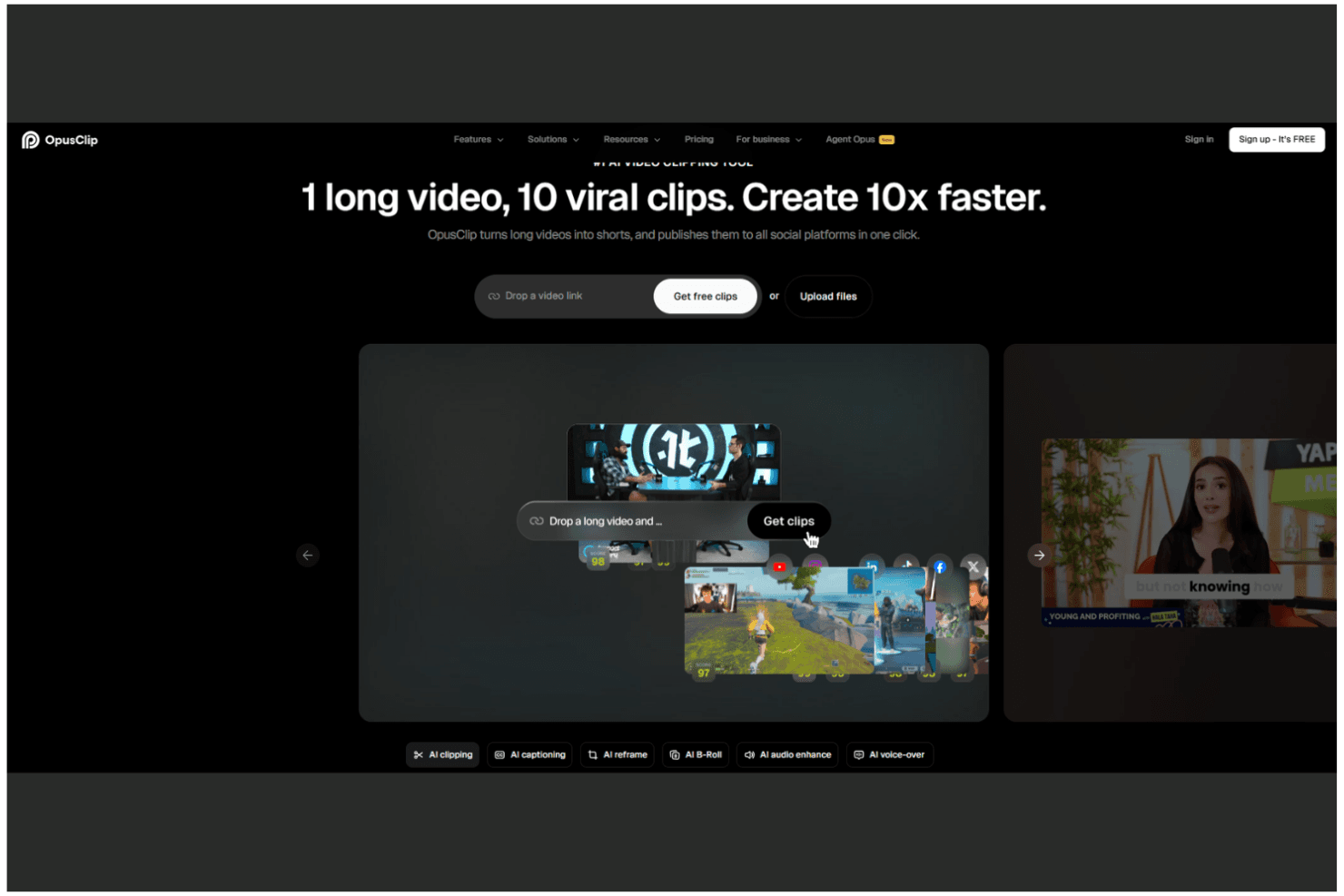
OpusClip turns long videos into viral short clips in one click. OpusClip is an AI video clipping tool that automatically repurposes long-form sermon recordings into short, platform-ready clips with captions, B-roll, and scheduling for social media channels.
Who Is OpusClip Best For?
OpusClip is a strong fit for church media coordinators whose primary job is turning weekly sermon recordings into ready-to-post short-form video content for social media.
Why I Picked OpusClip
I picked OpusClip as one of the best because it does one thing exceptionally well: turning a full-length sermon recording into multiple publish-ready short clips without manual editing. I love how the AI Clipping engine scans the entire sermon and surfaces the highest-engagement moments automatically, while AI Animated Captions layer on accurate, styled text across 20-plus languages. The AI Producer feature takes it further, assembling a complete short-form video with B-roll, motion design, and music from a single raw recording.
OpusClip Key Features
- AI filler and silence removal: Automatically detects and cuts filler words like "um" and "uh," plus awkward pauses, from sermon recordings before clips are generated.
- Multi-language caption generation: Produces animated captions in 20-plus languages, making sermon clips accessible to multilingual congregations.
- Team workspace: Shared credits, brand templates, and up to 10 seats let church media teams collaborate on clip production from a single account.
- Social media scheduler: Schedules and auto-posts clips directly to YouTube Shorts, TikTok, Instagram Reels, Facebook, LinkedIn, and X from within the platform.
OpusClip Integrations
OpusClip connects with YouTube, Google Drive, Vimeo, Zoom, StreamYard, Riverside, TikTok, Instagram, Facebook, LinkedIn, and X for video imports and social publishing. Pro includes Adobe Premiere Pro and DaVinci Resolve exports; Business adds an API for custom integrations.
Pros and Cons
Pros:
- Team workspace for easy collaboration
- AI-generated multi-language captions add accessibility
- Auto-converts sermons into social-ready clips
Cons:
- No audience segmentation or personalization options
- No email or SMS marketing features
Learn more about OpusClip: Best for AI-driven giving and member data insights
- Free demo available
- Pricing upon request
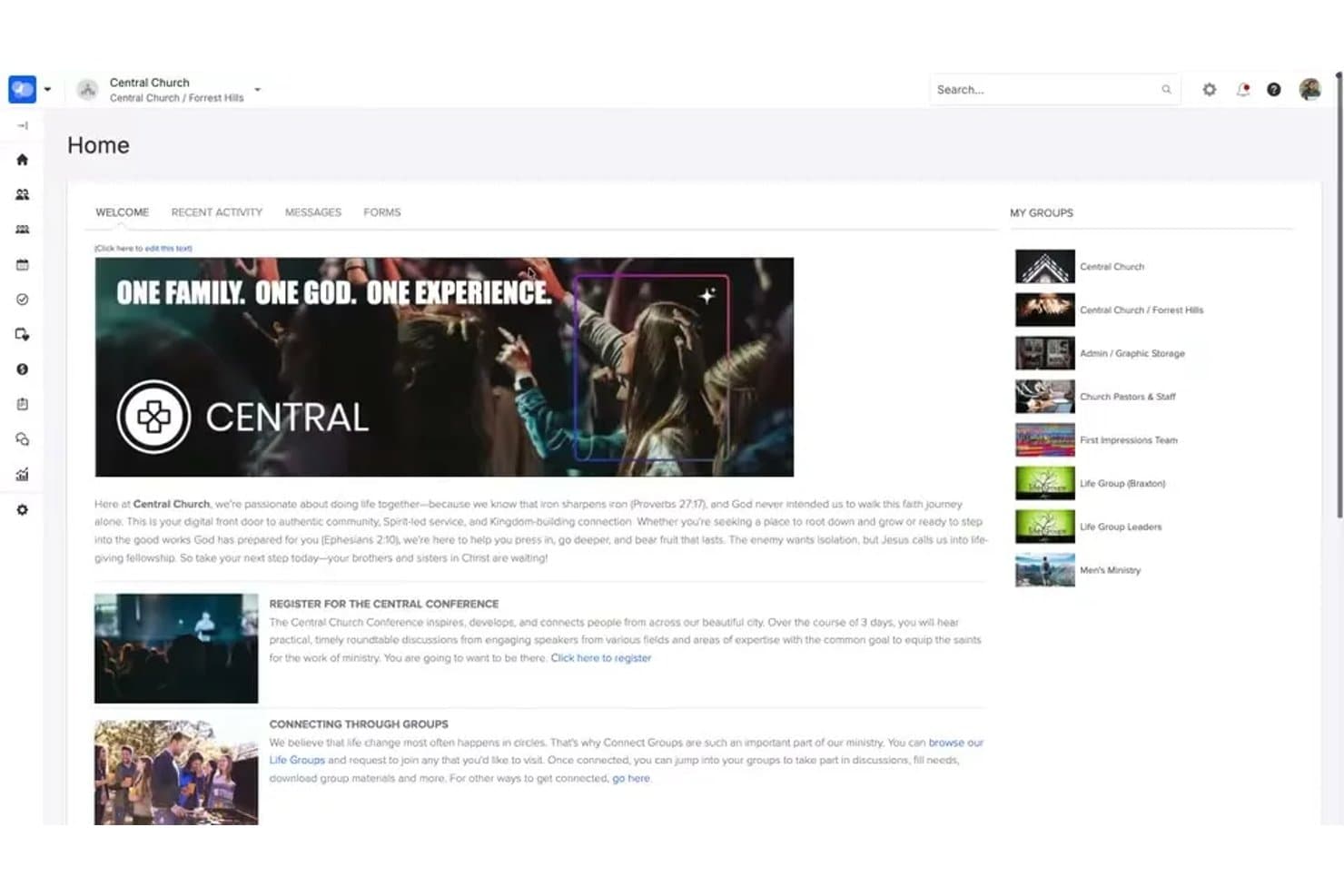
ChurchStaq centralizes member groups and church communications in one hub. ChurchStaq is an integrated church management platform by Pushpay that combines digital giving, member data, communications, group tools, and a custom-branded church app with AI-powered people search and giving analysis.
Who Is ChurchStaq Best For?
ChurchStaq is a strong fit for pastors and ministry leaders at mid-size to large churches who want giving data, member insights, and communication tools in one place.
Why I Picked ChurchStaq
I picked ChurchStaq as one of the best because its AI-driven giving and member data tools give ministry leaders a level of congregational intelligence I haven't seen elsewhere. The AI People Search lets you pull segmented lists using plain-English queries, like finding first-time givers from the past quarter or families with missing contact info. Pair that with AI Giving Data Analysis, which generates instant trend charts from natural language questions, and you have a genuinely sharp picture of where your congregation stands.
ChurchStaq Key Features
- Mailchimp sync: Bidirectionally syncs contacts, groups, and saved searches from ChurchStaq member profiles into Mailchimp for email marketing campaigns.
- Automated follow-up processes: Triggers communication sequences via email, SMS, and push notifications based on actions like guest check-ins or volunteer interest form submissions.
- Branded church app: A custom-branded mobile app that delivers announcements, push notifications, sermon media, events, and in-app giving to congregation members.
- Lapsed-giver re-engagement workflows: Automatically flags at-risk donors and initiates giving recovery sequences to help you reconnect with members who've stopped giving.
ChurchStaq Integrations
ChurchStaq offers 80+ documented integrations, including Mailchimp, Resi, Clearstream, Planning Center, Rock RMS, QuickBooks Online, Nurture.io, MortarStone, Fishhook, and Gusto. API access supports custom integrations.
Pros and Cons
Pros:
- Strong dashboarding for giving and attendance
- Automated lapsed-giver and guest follow-ups
- Natural language AI for member segmentation
Cons:
- Cannot repurpose sermon or media content
- No AI content generation or social publishing
Learn more about ChurchStaq: Best for one sermon fueling a full content week
- 14-day free trial
- Pricing upon request
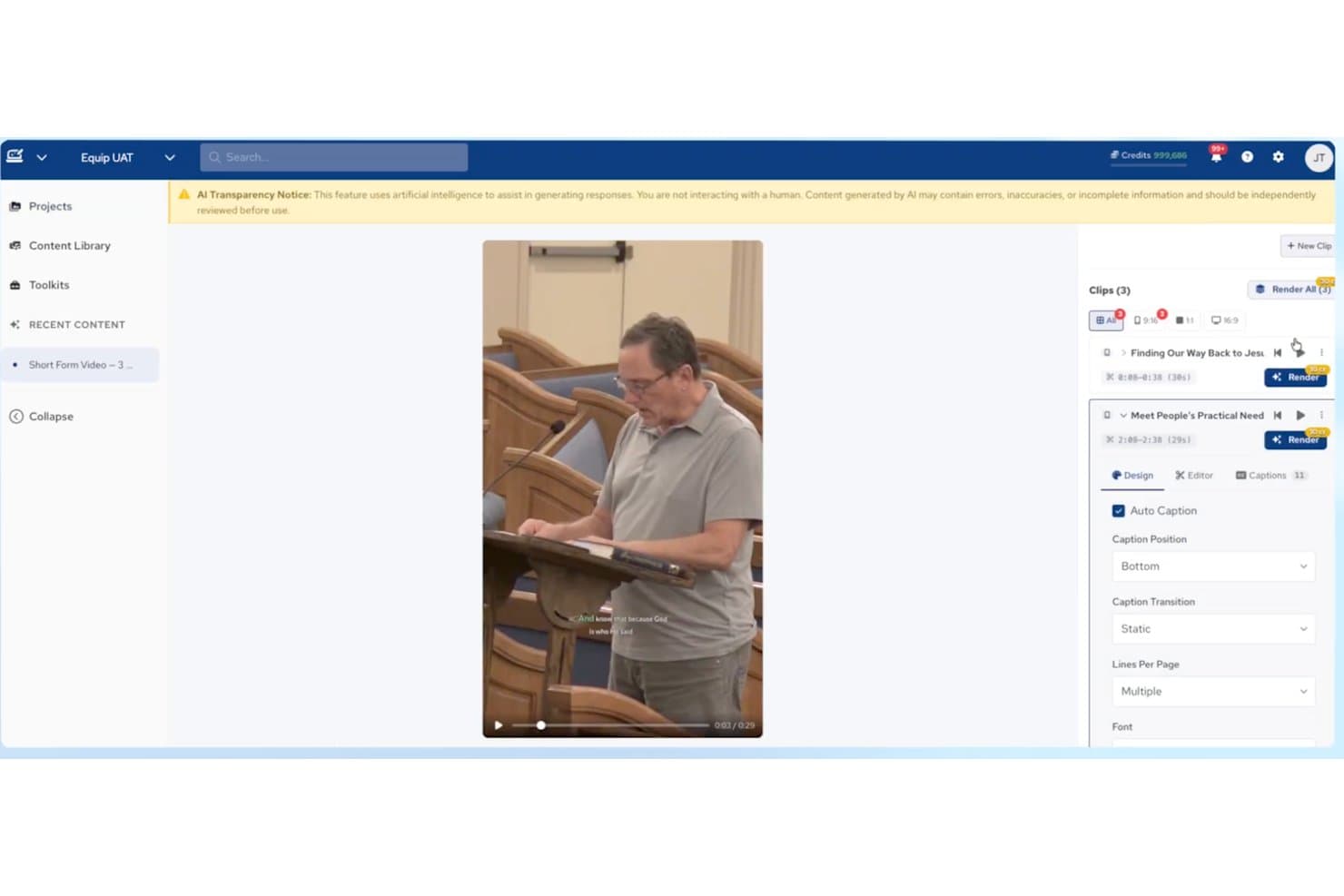
Amplify auto-generates captions and short clips from sermon videos. Amplify is an AI-powered church marketing and content platform from Ministry Brands that generates sermon-based social posts, emails, devotionals, short-form video clips, and multilingual content from a single sermon upload.
Who Is Amplify Best For?
Amplify is a strong fit for churches that want to stretch a single Sunday sermon into a full week of social posts, emails, devotionals, and short-form video without hiring a larger content team.
Why I Picked Amplify
I've included Amplify in my top picks because its Equip AI module does something I genuinely haven't seen elsewhere: it turns a single uploaded sermon into social posts, devotionals, email campaigns, short-form video clips, and small group guides in one pipeline. The series plan generator is a standout for me—paste in one message or theme, and Equip maps out a full multi-week preaching series with derivative content for each week. Its voice learning feature also trains on your pastor's specific preaching style, so generated copy sounds like your team wrote it, not a generic AI.
Amplify Key Features
- 30+ language dubbing: Re-voices full sermon videos in 30+ languages without re-recording a single word.
- Bible AI chat: An in-platform AI assistant grounded in Scripture for theological research and content queries.
- Keyword opt-in segmentation: Congregation members self-select into topic-based groups, enabling targeted follow-up messaging.
- Draft-to-publish team workflow: Role-based content review and approval process with commenting lets staff and volunteers collaborate before anything goes live.
Amplify Integrations
Amplify has native integrations across its own ecosystem, including People, Giving, Website, Mobile App, Streaming, and Communications. Equip also connects with Amplify Streaming for livestream imports and the Website and Communications modules for publishing generated content; third-party integrations aren’t clearly documented.
Pros and Cons
Pros:
- Privacy policy excludes data from AI model training
- Multilingual dubbing for video and written content
- Generates full week of content from sermons
Cons:
- Lacks direct social media publishing integrations
- No AI-powered audience segmentation features
Learn more about Amplify: Best for multilingual sermon content repurposing
- 14-day free trial
- From $63/month
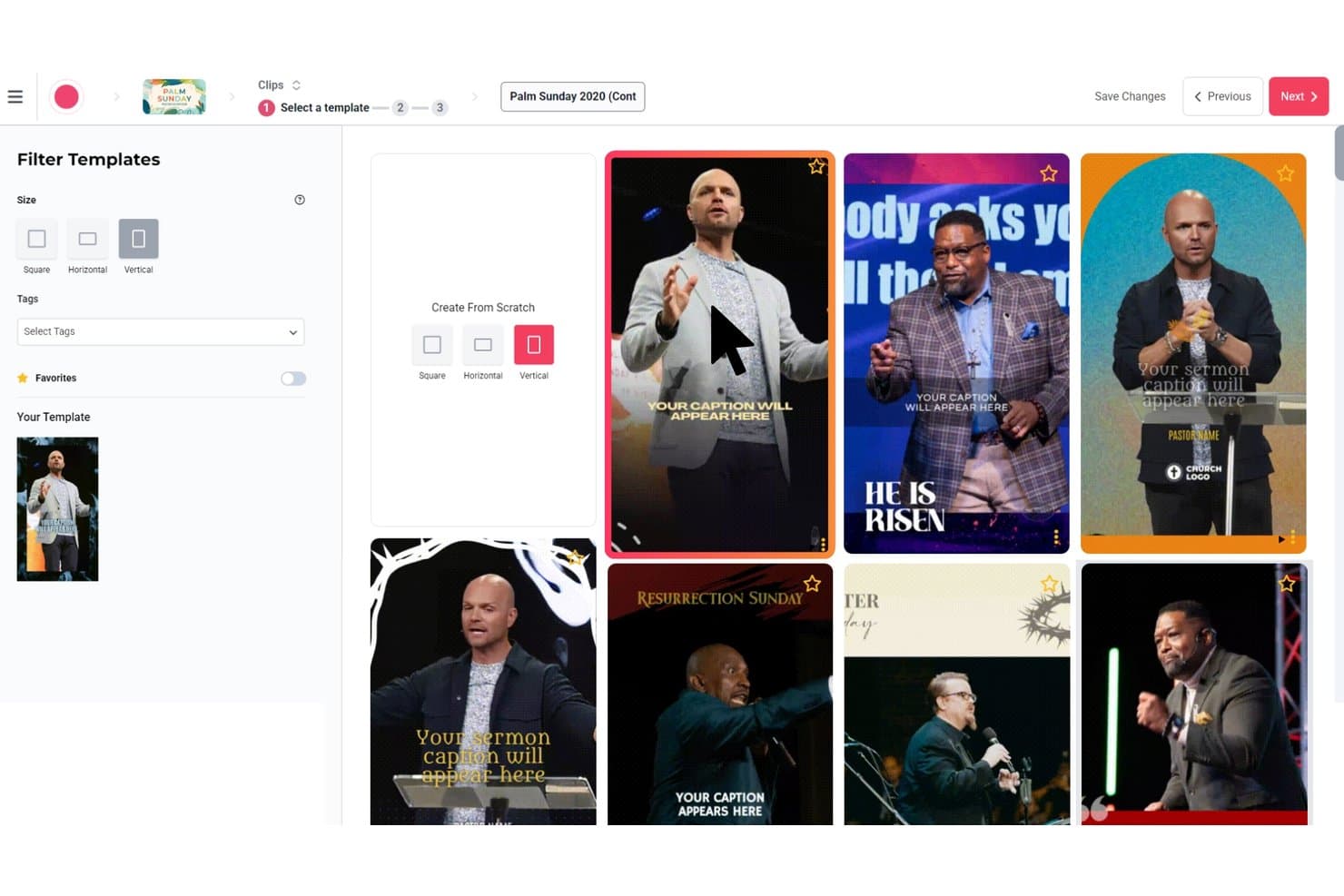
Sermon Shots lets users pick vertical video templates for sermon clips. Sermon Shots is a sermon repurposing platform that uses AI to transform uploaded sermon videos into clips, captions, devotionals, blog posts, discussion guides, quote graphics, and multilingual dubbed content.
Who Is Sermon Shots Best For?
Sermon Shots is a strong fit for churches and ministries that need to turn a single sermon upload into a full week's worth of multilingual, multi-format content without a large media team.
Why I Picked Sermon Shots
Sermon Shots earns its spot on my shortlist because of what it does with multilingual content: one sermon upload can generate dubbed video in 33 languages and translated written assets in 40+ languages, which is genuinely rare in church tech. I also love the denomination and Bible version settings, which ensure that AI-generated devotionals, discussion guides, and blog posts use your church's preferred scripture translation and theological language. The AI Camera Crew is another standout, automatically tracking and reframing the pastor in vertical video without a dedicated editor.
Sermon Shots Key Features
- 5-day devotional series generator: Converts a single sermon into five daily devotional readings, each with Bible passages, reflection questions, and extracted quotes.
- Direct social publishing: Post clips and quote images directly to Facebook and Instagram from the Sermon Shots dashboard without downloading or manually uploading files.
- SermonSend pages: Builds shareable, custom-branded sermon landing pages with embedded clips, devotionals, summaries, and reflections that can be linked to your church's domain.
- Make.com and Zapier integrations: Connect Sermon Shots to external email tools, websites, or social platforms to build automated weekly content distribution workflows.
Sermon Shots Integrations
Sermon Shots offers native integrations with Resi.io, Switcher, WordPress, Facebook, and Instagram, plus documented connections with Church Visuals, Remix, and StreamingChurch.tv. It also provides an API, Make.com integration, and Zapier.
Pros and Cons
Pros:
- Directly publishes sermon content to social media
- AI generates denomination-aware devotionals and guides
- Turns sermons into multilingual clips and blogs
Cons:
- Cannot segment or personalize outreach audiences
- No email, SMS, or analytics features
Learn more about Sermon Shots: Best for sermon-to-social content on a lean team
- Free trial + free demo available
- From $15/month
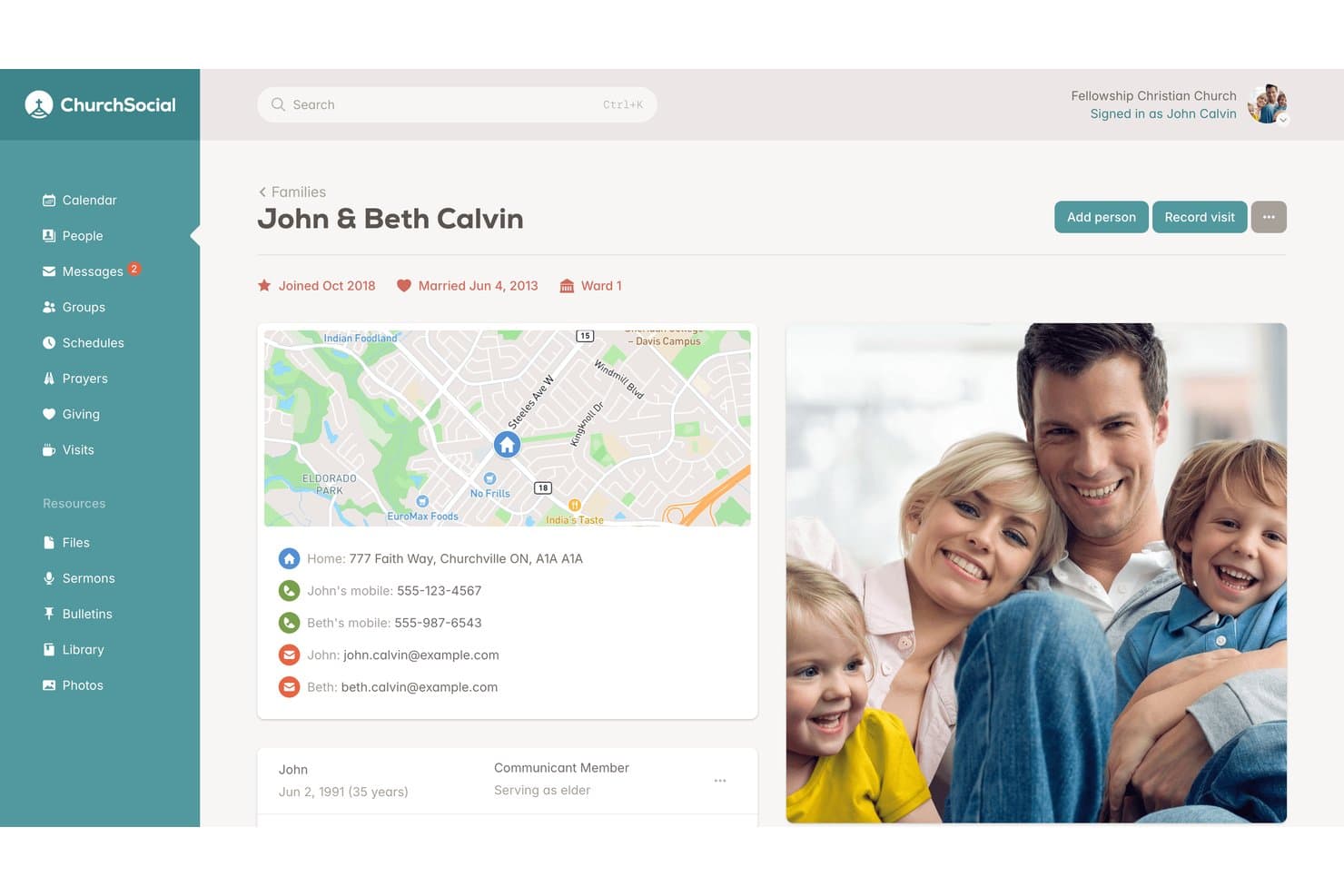
ChurchSocial centralizes family profiles with contact details and member roles. ChurchSocial is a ministry-focused social media management and AI content platform that handles social scheduling, AI caption writing, and sermon-to-social repurposing across Facebook, Instagram, TikTok, YouTube, X, and Google Business Profile.
Who Is ChurchSocial Best For?
ChurchSocial is a strong fit for small and mid-sized churches with lean communications teams that need to turn one weekly sermon into a full slate of social content fast.
Why I Picked ChurchSocial
I picked ChurchSocial as one of the best because its Sermon Studio turns a single upload into a full week of content, which is exactly what a lean communications team needs. Upload a sermon recording, and the AI transcribes it, cuts clips by letting you edit the transcript directly, tracks the speaker automatically, and generates animated subtitles—all without a video editor. On top of that, you get a blog post, newsletter draft, and small group guide from the same session.
ChurchSocial Key Features
- AI caption writer: Generates social media captions from a prompt or uploaded sermon content, giving your team a starting point instead of a blank page.
- Multi-platform social scheduler: Plans, schedules, and auto-publishes posts across Facebook, Instagram, TikTok, YouTube, X, and Google Business Profile from one visual calendar.
- Church calendar sync: Connects with Planning Center, Pushpay/CCB, and Tithely/Breeze to pull upcoming events directly into your content calendar.
- AI-generated graphics: Applies your church's branding to customizable templates and generates images matched to your content topic inside the Design Studio add-on.
ChurchSocial Integrations
ChurchSocial offers native integrations with Planning Center, Pushpay/Church Community Builder, and Tithely/Breeze for church calendar syncing. It also references Zapier for extending workflows, but it doesn’t natively send email or SMS messages.
Pros and Cons
Pros:
- Transcript-based video clip editing saves hours
- Ministry-language AI makes posts sound pastoral
- Transforms one sermon into full content package
Cons:
- Lacks audience segmentation and personalization features
- No built-in email or SMS sending
Learn more about ChurchSocial: Best for AI analytics across giving and attendance
- Free demo available
- Pricing upon request
Visit WebsiteCustomer Rating:4.5/5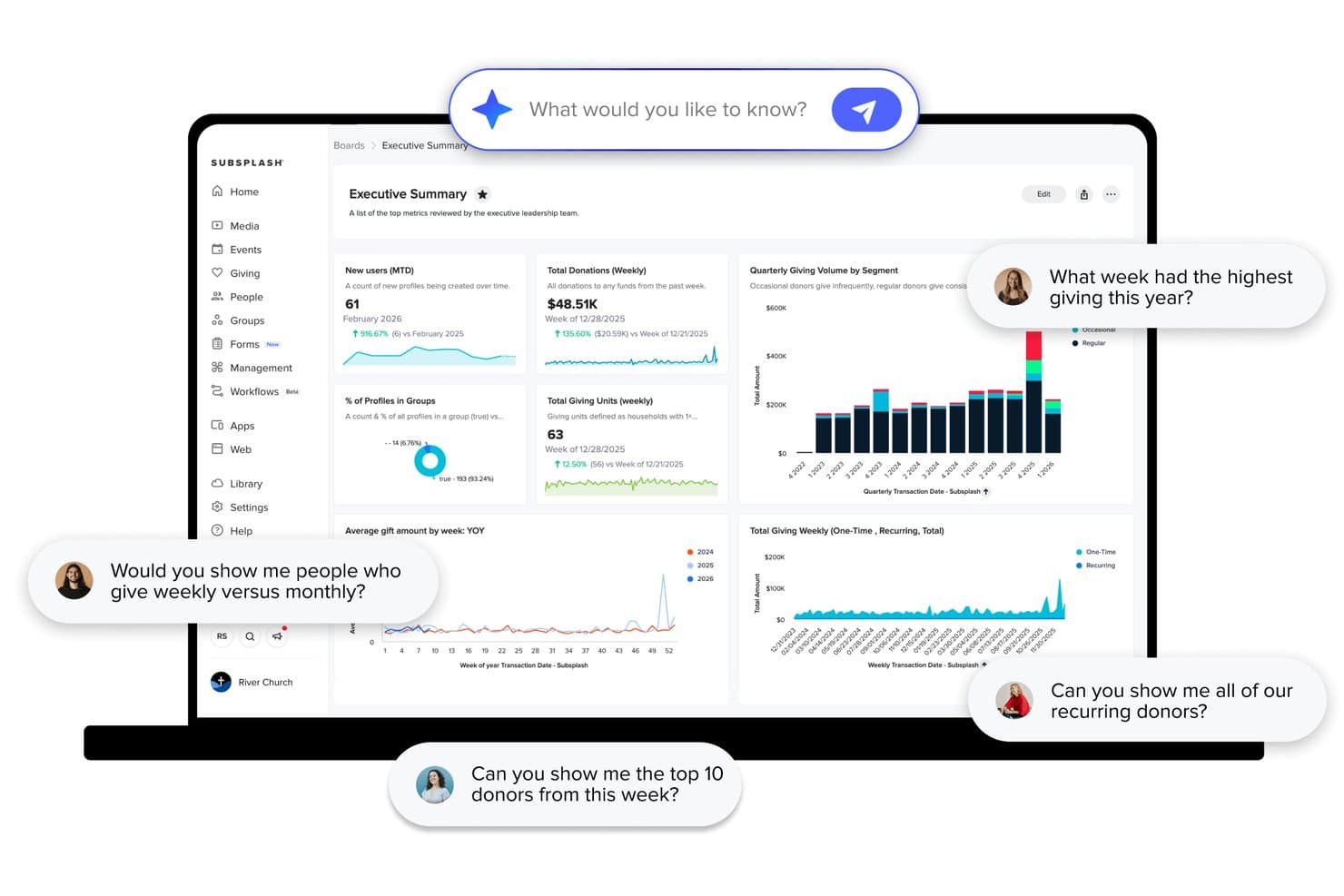
Subsplash lets users query giving data and donor insights using AI. Subsplash is an all-in-one church platform that combines AI-powered sermon repurposing, multi-channel messaging, giving tools, ChMS, media hosting, and analytics into a single system.
Who Is Subsplash Best For?
Subsplash is a strong fit for established churches that want one platform to handle giving, attendance tracking, and AI-driven analytics without stitching together multiple tools.
Why I Picked Subsplash
Subsplash earns its spot on my shortlist because Trends AI connects giving data, attendance records, and engagement metrics into one dashboard your team can actually query in plain language. I picked it specifically for how it links those data streams: ask something like "which services had the highest first-time giving this quarter" and get a clear answer, no spreadsheet required. Pulpit AI adds another layer, turning one sermon upload into 20+ content assets automatically.
Subsplash Key Features
- Pulpit AI sermon assistant: Helps pastors refine outlines and find scripture references, illustrations, and practical applications before a sermon is delivered.
- Group-based push notification targeting: Sends push notifications to specific audience segments like volunteers, new guests, or small group members within the church app.
- Workflows task management: A Kanban-style tool that auto-creates follow-up cards for staff when someone submits a connect card or volunteer application form.
- SongSelect integration: Pulls from 100,000+ worship songs directly into the service planning module for seamless order-of-service building.
Subsplash Integrations
Subsplash integrates with Planning Center, Breeze, Rock RMS, Ministry Platform, StudioC, MortarStone, Engiven, and SongSelect. Enterprise and Pro Package plans support custom API integrations, and Zapier is also available.
Pros and Cons
Pros:
- Dashboard supports natural language data queries
- AI analytics link giving, media, and attendance
- Repurposes sermons into 20+ content assets
Cons:
- AI content limited to sermon-based material
- No direct social media publishing feature
 Best for ministry-tuned AI sermon content creation
- Free plan available
- From $65/month
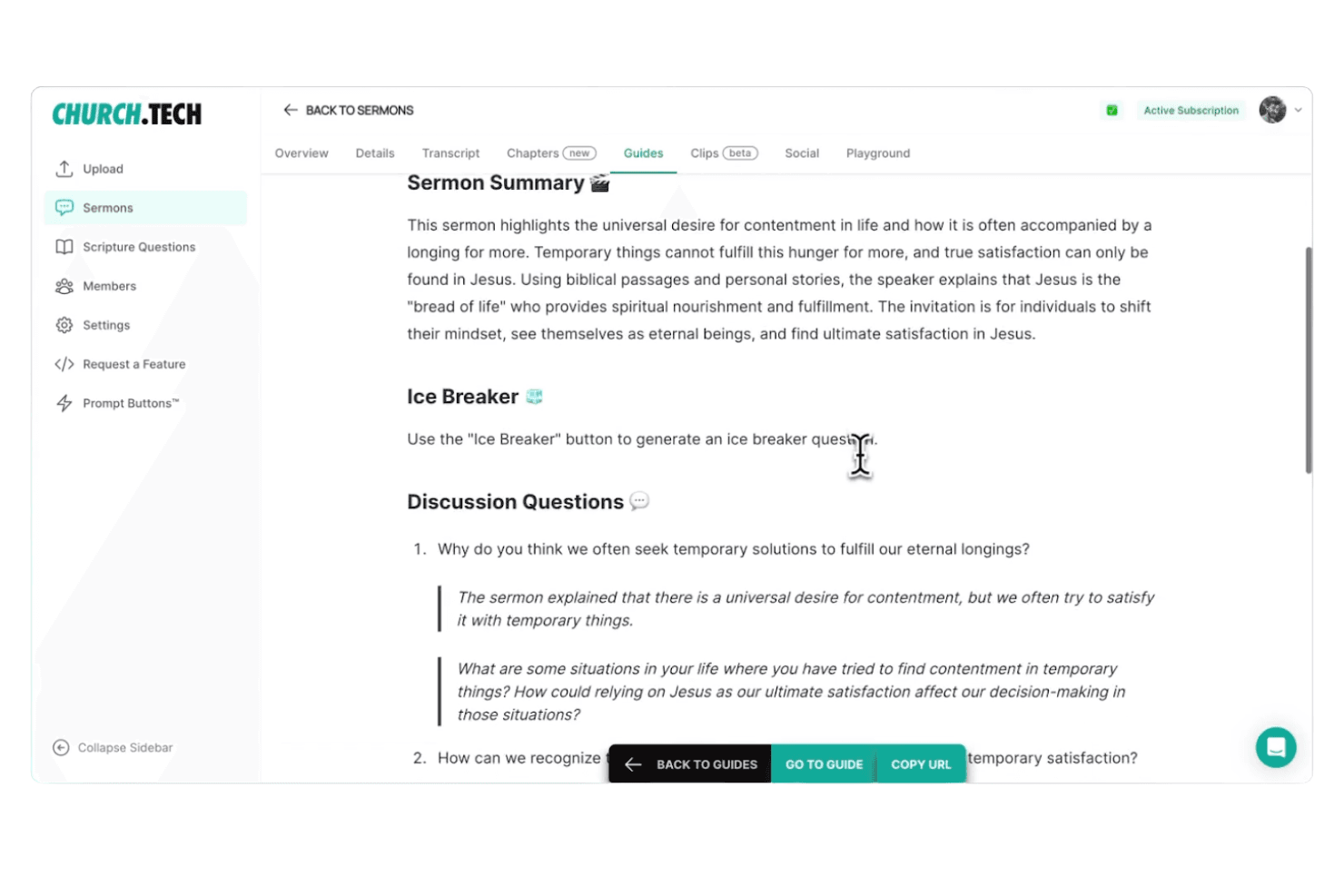
Church.tech helps pastors create, manage, and distribute sermon content using AI-powered tools. Church.tech is a ministry-focused AI content platform that turns sermon audio, video, or notes into social media posts, video clips, quote graphics, devotionals, discussion guides, and email-ready content across multiple channels.
Who Is Church.tech Best For?
Church.tech is a strong fit for communications directors and media coordinators at mid-to-large churches who need to produce a high volume of sermon-based content across multiple channels each week.
Why I Picked Church.tech
I picked Church.tech as one of the best because no other tool on this list turns a single sermon into a full week of ministry content as automatically. Upload your sermon audio or video once, and the platform generates social posts, quote graphics, devotionals, small group discussion guides, and an email-ready synopsis simultaneously. I especially like the Sermon Playground on the Pro plan, which lets you generate unlimited content variations from one sermon input.
Church.tech Key Features
- Ministry Tools library: A catalog of 100+ AI tools covering announcements, group leader messaging, event promotion, kids' ministry content, and church administration.
- Faith-safe guardrails: Built-in content filters ensure all AI-generated output stays theologically consistent and aligned with your church's voice.
- Clip editor: An in-platform video editor for refining AI-generated social clips into vertical, horizontal, or square formats for each platform.
- Team collaboration workspace: Multiple staff members and volunteers can create and manage content together without any technical or editing skills required.
Church.tech Integrations
Documented connections include Facebook, Instagram Reels, TikTok, YouTube Shorts, Google, Gmail, Apple Mail, and Microsoft 365. API access is listed for custom integrations; Planning Center, HubSpot, and Mailchimp apply to broader Gloo Workspace modules.
Pros and Cons
Pros:
- Volunteer teams can produce content easily
- Built with faith-safe AI guardrails
- Sermon uploads instantly create multiple content types
Cons:
- Email sending requires outside tools or upgrades
- Lacks built-in congregation segmentation tools
Learn more about Church.tech:
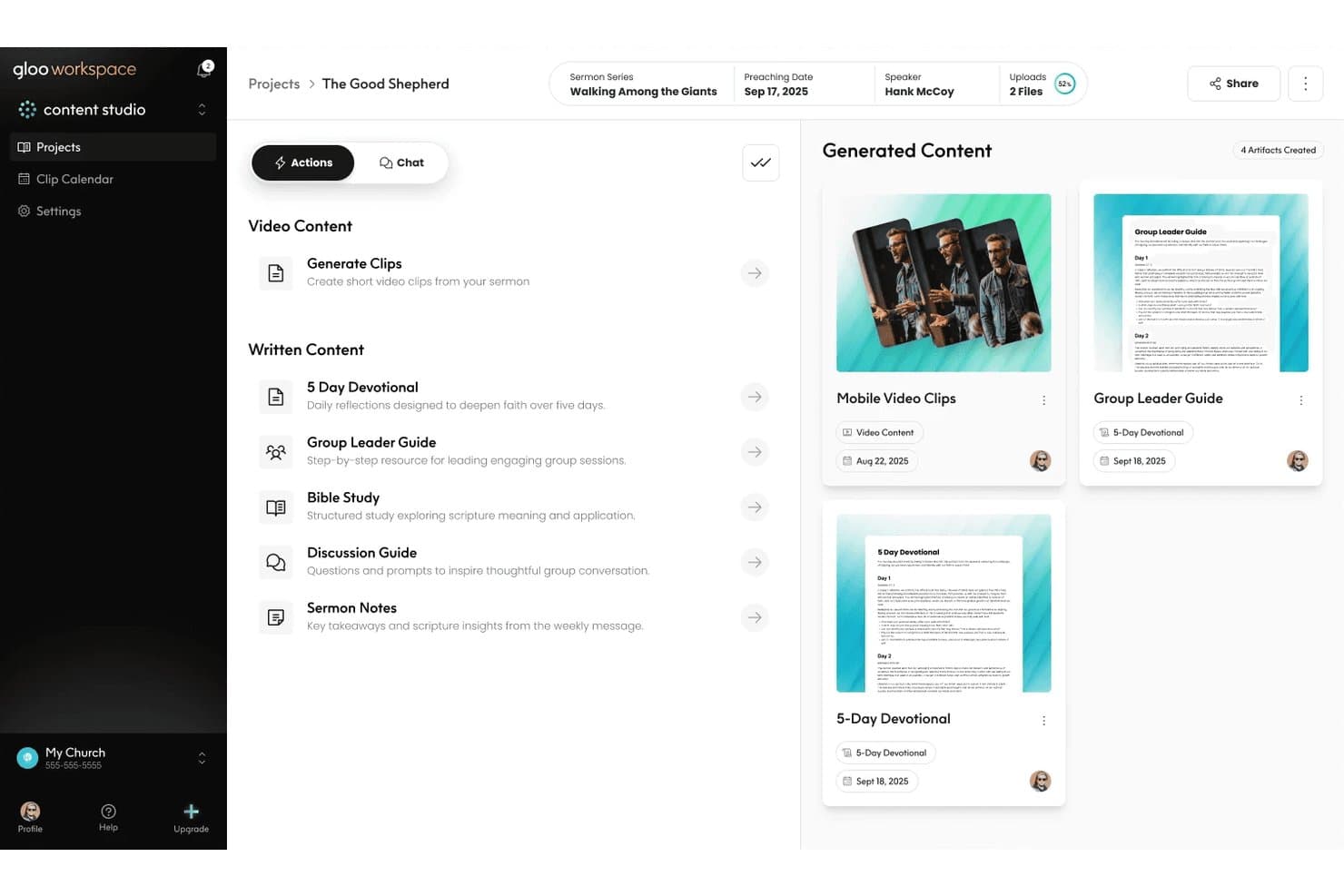
Gloo auto-generates devotionals, guides, and clips from sermons. Gloo is a ministry-specific AI workspace that combines sermon repurposing, multi-channel congregation messaging, AI-assisted pastoral workflows, and church health analytics into one platform.
Who Is Gloo Best For?
Gloo is a strong fit for churches that want AI content tools built within clear ministry and theological boundaries.
Why I Picked Gloo
Gloo earns its spot on my shortlist because it's the only AI workspace I've seen that applies explicit faith guardrails across every content output, from sermon clips to pastoral care drafts. Upload a single sermon, and Content Studio auto-generates social clips, devotionals, discussion guides, and a kids' version, all filtered through ministry-aligned AI. Ministry Chat adds another layer, giving pastors access to frontier models tuned specifically for theological context.
Gloo Key Features
- Keyword-triggered workflow automation: Set up automated SMS response sequences that activate when congregation members text a specific word, like "CONNECT" or "GIVE."
- Multi-channel broadcast messaging: Send one-to-many SMS and email blasts to your entire congregation or segmented contact groups from a single dashboard.
- Congregation health assessments: Distribute wellbeing and ministry health surveys—developed with partners like Barna—directly to members via text or email.
- National benchmarking dashboard: Compare your church's attendance, engagement, and health metrics against similar ministries using Gloo's Insights module.
Gloo Integrations
Gloo Workspace integrates with Planning Center, Church Community Builder, Rock RMS, MinistryPlatform, Mailchimp, HubSpot, and Google Workspace. Asana, Slack, and Canva are listed as coming soon.
Pros and Cons
Pros:
- Benchmarks ministry metrics against national data
- Repurposes sermons into multiple content types
- Keeps AI content within ministry boundaries
Cons:
- No predictive analytics for engagement insights
- Free messaging credits recently reduced sharply
Learn more about Gloo: Best for AI-driven member outreach at scale
- Free demo available
- Pricing upon request
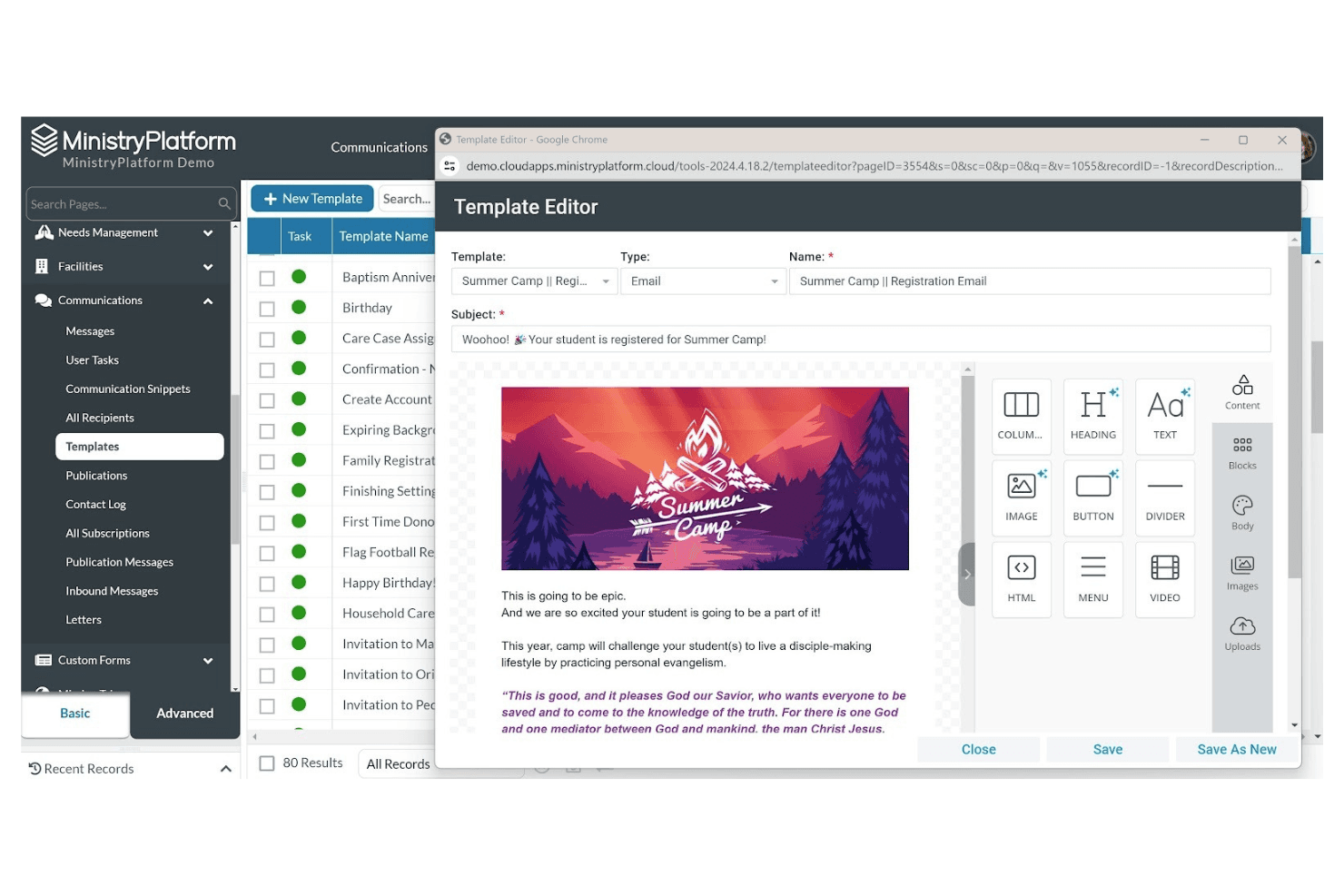
Ministry Platform lets users design and manage email templates visually. If you’re looking for a church management system that adapts to your ministry’s unique needs, Ministry Platform is worth considering. This platform is designed for churches and faith-based organizations that want to centralize member data, track engagement, and manage events. Ministry Platform helps you organize complex information so you can better connect with your congregation and support your ministry goals.
Who Is Ministry Platform Best For?
Ministry Platform is a good fit for mid-sized to large churches that need flexible tools to manage member data, events, and engagement.
Why I Picked Ministry Platform
I picked Ministry Platform because its customizable member management tools let you tailor the system to your church’s unique outreach and engagement needs. You can create custom fields, workflows, and reports to track everything from visitor follow-up to volunteer participation. This flexibility means you’re not locked into a one-size-fits-all approach and can adapt the platform as your ministry grows or changes. For churches that want to personalize their marketing and communication strategies based on detailed member data, Ministry Platform offers a strong foundation.
Ministry Platform Key Features
Some other features that make Ministry Platform useful for church marketing teams include:
- Event management tools: Schedule, promote, and track attendance for church events and outreach activities.
- Integrated email and SMS messaging: Send targeted communications directly from the platform to specific groups or individuals.
- Online giving and donation tracking: Accept and monitor contributions through digital giving tools connected to member records.
- Volunteer management: Organize, schedule, and communicate with volunteers for ministry programs and special events.
Ministry Platform Integrations
Integrations include Realm Accounting, Growth Method, Verified First, MinistrySafe, Intulse, Twilio, MortarStone, SendGrid, eSPACE, and iDonate.
Pros and Cons
Pros:
- Integrated online giving and donation tracking
- Built-in event registration and follow-up tools
- Customizable member profiles for targeted outreach
Cons:
- Requires separate tools for website management
- No built-in AI-driven marketing automation
Learn more about Ministry Platform:
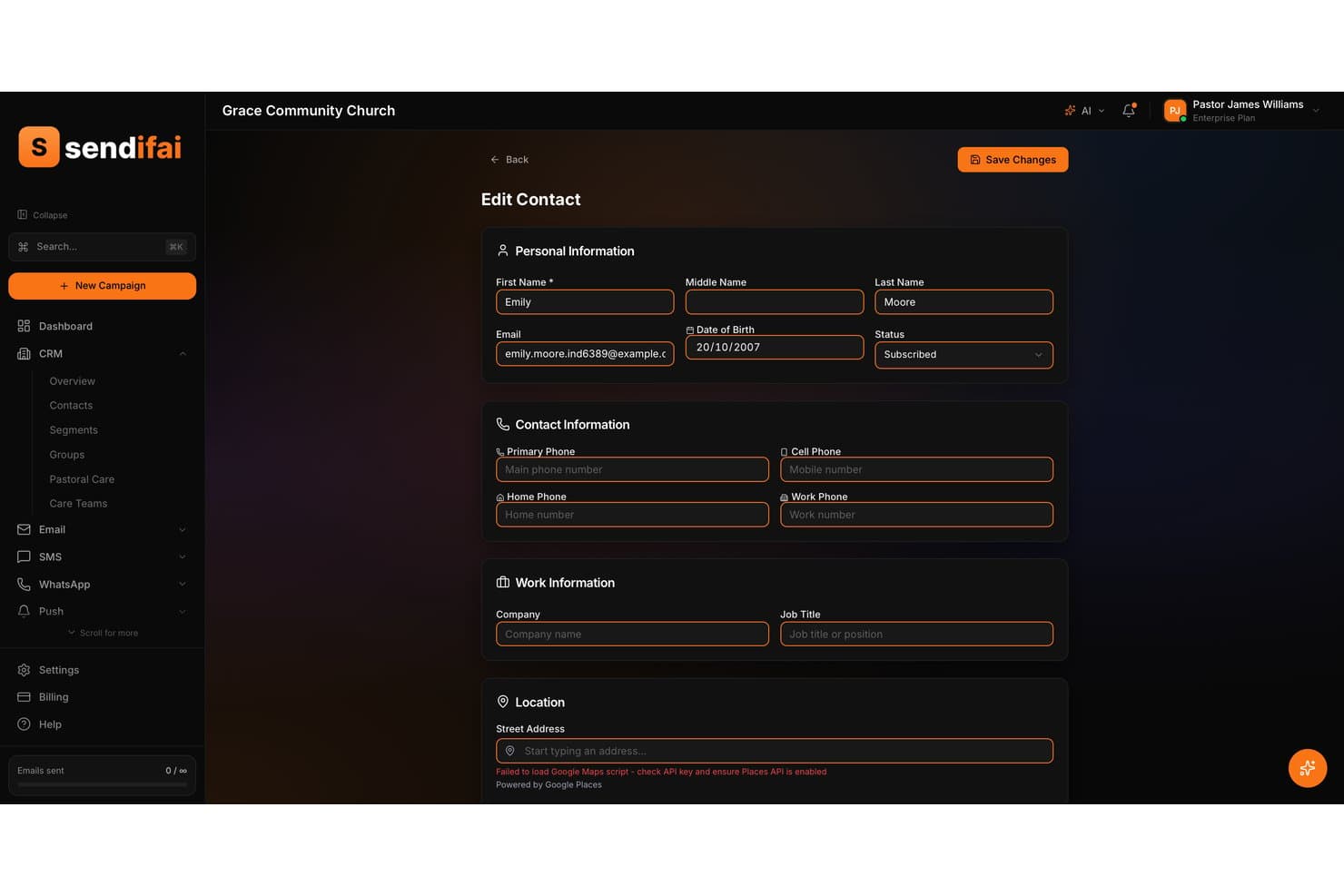
Sendifai lets users manage detailed church contact profiles and records. sendifai is a church-first AI marketing platform that combines CRM, multi-channel messaging (email, SMS, and WhatsApp), guest follow-up automation, congregation segmentation, and an AI assistant called Isla for generating ministry-specific campaign content.
Who Is sendifai Best For?
sendifai is a strong fit for church communications teams and pastoral staff who want a purpose-built CRM with guest follow-up automation and multi-channel outreach in one place.
Why I Picked sendifai
I picked sendifai as one of the best because no other tool on this list handles guest follow-up with the same intentionality. When a first-time visitor checks in, sendifai automatically triggers a welcome sequence across email, SMS, and WhatsApp, so no one slips through the cracks between Sunday and the following week. Its AI assistant, Isla, drafts the care notes and follow-up messages in a tone that actually sounds pastoral, not promotional.
sendifai Key Features
- Household relationship mapping: Links family members together in a single profile so you can view and message an entire household at once.
- Proactive Insights engine: Analyzes contact and campaign data daily to surface churn risks, engagement opportunities, and optimization recommendations.
- Visual workflow builder: Lets you design multi-channel automations with trigger-based logic, conditional branching, and A/B testing in a single drag-and-drop interface.
- Modular add-on pricing: Each feature set—email, SMS, giving, events—has its own free tier and can be scaled independently so you only pay for what your church actually uses.
sendifai Integrations
sendifai doesn't have any native integrations. It uses Stripe Connect for giving payouts, but integrations with Planning Center, YouTube, Canva, Meta Business Suite, or other church marketing tools aren't clearly documented.
Pros and Cons
Pros:
- Supports household relationship mapping for families
- Offers advanced multi-channel outreach in one platform
- Includes guest follow-up automation and care notes
Cons:
- No native third-party app or media tool connections
- Sermon repurposing workflow is undocumented and unverified
Learn more about sendifai:
Annen AI-programvare for kirkemarkedsføring
Her er noen flere alternativer for AI-programvare for kirkemarkedsføring som ikke kom med på kortlisten min, men som likevel er verdt å se nærmere på:
- 11ChurchSocial.AIBest for automating social media posts
- 12Quso.aiBest with AI-powered content scheduling
- 13Tithe.lyBest for all-in-one church messaging and giving
- 14Text In ChurchBest for AI-powered guest follow-up texting
- 15Pulpit AIBest for sermon-to-devotional and small group content
- 16Pastors.aiBest for turning sermons into multilingual clips
- 17ClearstreamBest for SMS and email congregation outreach
How I Evaluate AI Church Marketing Software
Every tool on this list needs to do more than slap an AI label on basic email scheduling—I look for platforms that actually help a church team turn a Sunday sermon into a week's worth of social posts, emails, and outreach without extra staff. I split my evaluation into core functionality every tool must deliver and differentiating factors that separate good options from great ones.
Core Functionality (Table Stakes For This List)
When I'm selecting tools for my list, I rank each one on a scale from 0 (does not offer the functionality) to 5 (excels in this area) for each core functionality listed below. Then, I calculate the tool's total score into a percentage. Each tool needs to achieve a minimum total score of 55% to be considered for inclusion.
- AI-Powered Content Generation: I evaluate whether a tool can draft real church content—like Easter invite emails or small group promos—with usable output, not just generic marketing copy.
- Multi-Channel Distribution: Each tool should let your team push content to email, SMS, and social from one place instead of copying and pasting between platforms.
- Sermon & Media Repurposing: I look for AI that takes a full sermon recording and turns it into shareable clips, quote graphics, or blog-ready transcripts automatically.
- Congregation Segmentation & Personalization: The tool should target messages by group—new visitors get a welcome series while long-time members see volunteer opportunities.
- Church-Specific Templates & Context: I check for ready-made templates built around ministry needs like sermon series launches, baptism announcements, or giving campaigns.
- Engagement Analytics: Reporting should show which outreach drives real action, like event sign-ups or first-time visits, so your team knows what's working.
Once I have a list of tools that meet the criteria, I consider what sets each platform apart.
Differentiating Factors (What Sets Vendors Apart)
Here's how I compare and contrast different vendors:
Standout Features
Brand voice training is a big one—I look for AI that learns your church's specific tone so a youth ministry post sounds different from a seniors' newsletter without manual rewriting. Scripture-aware AI also matters because a misquoted verse erodes trust fast. I evaluate whether the tool can pull and cite references accurately in context. Visitor follow-up automation rounds things out, triggering personalized welcome sequences the moment a guest fills out a connect card.
Beyond Features
I check whether a tool integrates with the church tech stack your team already relies on—platforms like Planning Center or Breeze—so member data flows into campaigns without manual exports. Pricing structure matters too, since most churches run on tight budgets; I look for plans that scale by congregation size rather than per-seat models built for corporate teams. Data privacy is another factor I weigh, especially how each vendor handles sensitive congregant information and whether member data is used to train external AI models.
Slik velger du AI-programvare for kirkemarkedsføring
Det er lett å gå seg vill i lange funksjonslister og komplekse prisstrukturer. For å hjelpe deg med å holde fokus mens du går gjennom den unike prosessen med å velge programvare, har vi laget en sjekkliste over faktorer du bør ha i tankene:
| Faktor | Hva bør du vurdere? |
|---|---|
| FaktorSkalerbarhet | Hva bør du vurdere?Vil programvaren støtte kirken din når den vokser, oppretter nye avdelinger eller utvider det digitale oppsøkende arbeidet? |
| FaktorIntegrasjoner | Hva bør du vurdere?Kan den kobles direkte til de eksisterende systemene dine for kirkedrift, givertjenester eller kommunikasjon? |
| FaktorTilpasningsmuligheter | Hva bør du vurdere?Kan du tilpasse arbeidsflyter, merkevareprofil og meldinger slik at de passer til menighetens unike behov og uttrykk? |
| FaktorBrukervennlighet | Hva bør du vurdere?Vil ansatte og frivillige med ulike tekniske ferdighetsnivåer kunne bruke plattformen på en trygg måte? |
| FaktorImplementering og oppstart | Hva bør du vurdere?Hvor lang tid vil det ta å komme i gang, og hvilke ressurser eller hvilken opplæring er tilgjengelig for å hjelpe deg? |
| FaktorKostnad | Hva bør du vurdere?Er prisnivåene tydelige, og samsvarer de med budsjettet ditt og forventet bruk over tid? |
| FaktorSikkerhetstiltak | Hva bør du vurdere?Tilbyr leverandøren datakryptering, brukertillatelser og samsvar med personvernstandarder? |
| FaktorTilgjengelig kundestøtte | Hva bør du vurdere?Hvilke støttekanaler tilbys, og er de tilgjengelige i menighetens travleste perioder? |
Hva er AI-programvare for kirkemarkedsføring?
AI-programvare for kirkemarkedsføring er en kategori digitale verktøy som bruker kunstig intelligens til å hjelpe kirker med å automatisere, tilpasse og håndtere oppsøkende arbeid og kommunikasjon.
Disse plattformene støtter oppgaver som planlegging av meldinger, segmentering av målgrupper, generering av innhold og sporing av engasjement på tvers av kanaler. Ved å ta i bruk AI kan kirker nå lokalsamfunnene sine mer effektivt og tilpasse kommunikasjonen for å komme bedre i kontakt med medlemmer og besøkende.
Funksjoner
Når du velger programvare for AI-basert kirkemarkedsføring, bør du se etter følgende nøkkelfunksjoner:
- AI-drevet innholdsgenerering: Opprett automatisk e-poster, innlegg i sosiale medier eller kunngjøringer ved hjelp av kunstig intelligens, tilpasset kirkens tone og kommunikasjonsbehov.
- Målgruppesegmentering: Grupper medlemmer og besøkende basert på demografi, interesser eller engasjementshistorikk for å sende målrettet kommunikasjon.
- Automatisert kampanjeplanlegging: Konfigurer gjentakende eller engangskampanjer som sender meldinger på optimale tidspunkter uten manuell inngripen.
- Kommunikasjon i flere kanaler: Administrer og send kommunikasjon via e-post, SMS og sosiale medier fra ett enkelt kontrollpanel.
- Engasjementsanalyse: Følg med på åpningsrater, klikk og svar for å måle effektiviteten av kommunikasjonsinnsatsen.
- Verktøy for arrangementspromotering: Opprett, planlegg og markedsfør kirkelige arrangementer med innebygde funksjoner for påmelding og påminnelser.
- Integrasjon med kirkens administrasjonssystemer: Synkroniser data med den eksisterende medlemsdatabasen, donasjonsplattformen eller frivilligplanleggeren for en samlet arbeidsflyt.
- Verktøy for personalisering: Bruk AI til å tilpasse meldinger med navn, interesser eller tidligere interaksjoner for å skape en mer meningsfull forbindelse.
- Kontroller for samsvar og personvern: Sørg for at kommunikasjonen oppfyller standarder for databeskyttelse, og la mottakerne administrere innstillingene sine.
- Mallbibliotek: Få tilgang til ferdige maler for vanlig kirkekommunikasjon, slik at du sparer tid og sikrer enhetlighet i kommunikasjonsinnsatsen.
Fordeler
Implementering av programvare for AI-basert kirkemarkedsføring gir flere fordeler for teamet og virksomheten din. Her er noen av fordelene du kan se frem til:
- Tidsbesparelser: Automatiser repetitive kommunikasjonsoppgaver, som å planlegge meldinger og segmentere målgrupper, slik at du frigjør tid for ansatte og frivillige.
- Personlig kommunikasjon: Bruk AI-drevne verktøy til å tilpasse meldinger basert på medlemmenes interesser, engasjement eller demografi for å skape sterkere forbindelser.
- Forbedret sporing av engasjement: Få tilgang til sanntidsanalyse for å se hvilke meldinger som treffer målgruppen, og juster tilnærmingen for bedre resultater.
- Enhetlig kommunikasjon i flere kanaler: Administrer e-post, SMS og kommunikasjon i sosiale medier fra én plattform, slik at budskapet forblir enhetlig.
- Datadrevet beslutningstaking: Utnytt rapporterings- og analysefunksjoner til å styre markedsføringsstrategiene og ressursfordelingen.
- Skalerbar kommunikasjon: Utvid enkelt kommunikasjonsinnsatsen etter hvert som kirken vokser, uten å øke den manuelle arbeidsmengden.
- Forbedret arrangementspromotering: Markedsfør arrangementer med automatiserte påminnelser og påmeldingsverktøy, noe som øker deltakelsen og reduserer det administrative arbeidet.
Kostnader og priser
Valg av programvare for AI-basert kirkemarkedsføring krever en forståelse av de ulike prismodellene og abonnementene som er tilgjengelige. Kostnadene varierer basert på funksjoner, teamstørrelse, tillegg og mer. Tabellen nedenfor oppsummerer vanlige abonnementer, gjennomsnittsprisene deres og typiske funksjoner som er inkludert i løsninger for AI-basert kirkemarkedsføring:
Sammenligningstabell for programvare for AI-basert kirkemarkedsføring
| Abonnementstype | Gjennomsnittspris | Vanlige funksjoner |
|---|---|---|
| AbonnementstypeGratis abonnement | Gjennomsnittspris$0 | Vanlige funksjonerGrunnleggende meldingsverktøy, begrenset målgruppesegmentering, enkel analyse og tilgang til et mallbibliotek. |
| AbonnementstypePersonlig abonnement | Gjennomsnittspris$10-$25/måned | Vanlige funksjonerKommunikasjon i flere kanaler, grunnleggende automatisering, målgruppesegmentering og begrensede integrasjonsmuligheter. |
| AbonnementstypeBedriftsabonnement | Gjennomsnittspris$30-$75/måned | Vanlige funksjonerAvansert automatisering, AI-drevet innholdsgenerering, detaljert analyse, verktøy for arrangementspromotering og integrasjon med kirkens administrasjonssystemer. |
| AbonnementstypeAbonnement for store virksomheter | Gjennomsnittspris$100-$300/måned | Vanlige funksjonerTilpassede arbeidsflyter, prioritert brukerstøtte, avanserte sikkerhetstiltak, ubegrenset antall brukere og dedikert hjelp med oppstart. |
Vanlige spørsmål om AI-programvare for markedsføring av kirker
Her er noen svar på vanlige spørsmål om AI-programvare for markedsføring av kirker:
Kan AI-programvare for markedsføring av kirker integreres med mitt eksisterende system for kirkeforvaltning?
Ja, de fleste plattformer for AI-programvare for markedsføring av kirker tilbyr integrasjoner med populære systemer for kirkeforvaltning. Dette lar deg synkronisere medlemsdata, automatisere kommunikasjon og unngå dobbeltregistrering av data, slik at arbeidsflytene dine blir mer effektive.
Er AI-programvare for markedsføring av kirker vanskelig å sette opp for ansatte uten teknisk erfaring?
Nei, mange plattformer er utviklet med brukervennlige grensesnitt og tilbyr ressurser for oppstart, som veiledninger, maler og direkte brukerstøtte. Dette hjelper ansatte og frivillige med ulike tekniske ferdigheter med å komme raskt og trygt i gang.
Hvordan hjelper AI-programvare for markedsføring av kirker med å markedsføre arrangementer?
AI-programvare for markedsføring av kirker kan automatisere påminnelser om arrangementer, målrette invitasjoner mot bestemte grupper og holde oversikt over påmeldinger. Disse funksjonene bidrar til å øke oppmøtet og redusere den manuelle innsatsen som kreves for å organisere og markedsføre kirkelige arrangementer.
Hvilke sikkerhetstiltak bør jeg se etter i AI-programvare for markedsføring av kirker?
Se etter funksjoner som datakryptering, brukertillatelser og samsvar med personvernstandarder som GDPR. Disse sikkerhetstiltakene bidrar til å beskytte sensitiv medlemsinformasjon og sikre at kirken oppfyller juridiske krav.
Kan jeg tilpasse meldinger ved hjelp av AI-programvare for markedsføring av kirker?
Ja, de fleste plattformer bruker AI til å tilpasse meldinger basert på medlemmenes navn, interesser eller engasjementshistorikk. Dette gjør kommunikasjonen mer relevant og meningsfull for hver enkelt mottaker.