

Gli strumenti di IA per la gestione delle chiese sono soluzioni software che utilizzano l'intelligenza artificiale per aiutare le chiese a organizzare le attività, coinvolgere i membri e sostenere gli obiettivi pastorali. Se cerchi modi per conciliare la leadership spirituale con le esigenze amministrative, questi strumenti possono aiutarti ad automatizzare le attività di routine, migliorare la comunicazione e prendere decisioni basate sui dati.
Con risorse limitate e aspettative sempre maggiori, scegliere gli strumenti di IA giusti può liberare tempo da dedicare all'assistenza pastorale e rafforzare l'impatto della tua chiesa.
In questo elenco troverai opzioni affidabili per aiutarti a gestire eventi, donazioni, comunicazioni e altro ancora, così potrai concentrarti sulla guida efficace della tua comunità.
Perché fidarsi dei nostri consigli sui software
6,700+
Reviews
20
Industry experts
16+
Evaluation factors
14
Years
Il nostro team testa e recensisce software dal 2012. In quanto leader ecclesiastici noi stessi, sappiamo quanto sia difficile — e importante — scegliere il software giusto.
Per questa guida, abbiamo valutato gli strumenti attraverso test pratici e ricerche indipendenti, assegnando un punteggio agli strumenti in base ai nostri criteri di selezione.
Le nostre recensioni riflettono il nostro giudizio editoriale umano, non un discorso di vendita.
Riepilogo dei migliori strumenti di IA per la gestione delle chiese
Questa tabella comparativa riassume i dettagli dei prezzi delle mie selezioni dei migliori strumenti di IA per la gestione delle chiese, per aiutarti a trovare quello più adatto al tuo budget e alle esigenze della tua organizzazione.
| Tool | Best For | Trial Info | Price | ||
|---|---|---|---|---|---|
| 1 | Ideale per risposte AI basate sul contenuto della chiesa | Prova gratuita di 60 giorni disponibile | Da $99/mese | Website | |
| 2 | Ideale per interrogare i dati della chiesa tramite la propria IA | Piano gratuito disponibile OPPURE prova gratuita di 30 giorni | A partire da $12/mese | Website | |
| 3 | Ideale per la traduzione simultanea dei sermoni in più lingue | Prova gratuita disponibile | Da $150/mese | Website | |
| 4 | Ideale per le donazioni digitali e la gestione delle offerte | Prova gratuita di 30 giorni disponibile | Da $72/mese | Website | |
| 5 | Ideale per il coordinamento della pianificazione dei volontari | Prova gratuita di 30 giorni disponibile | Da $15/mese | Website | |
| 6 | Ottimale per le funzionalità di coinvolgimento incentrate sul mobile | Demo gratuita disponibile | Prezzo su richiesta | Website | |
| 7 | Ideale per la creazione e gestione di siti web | Prova gratuita di 14 giorni | Da $29/mese (fatturazione annuale) | Website | |
| 8 | Ideale per gestione dati personalizzabile | Demo gratuita disponibile | Prezzo su richiesta | Website | |
| 9 | Ideale per trasformare i sermoni in contenuti condivisibili | Prova gratuita disponibile | Da $39/mese | Website | |
| 10 | Ideale per flussi di lavoro automatizzati nella programmazione degli eventi | Disponibile un piano gratuito | Da $65/mese | Website |


Recensioni degli strumenti di IA per la gestione delle chiese
Di seguito trovi i miei riepiloghi dettagliati dei migliori strumenti di IA per la gestione delle chiese inclusi nella mia selezione. Le mie recensioni offrono una panoramica approfondita delle funzionalità, dei migliori casi d’uso e delle integrazioni di ciascuna piattaforma, per aiutarti a trovare quella più adatta alla tua chiesa.
 Ideale per risposte AI basate sul contenuto della chiesa
- Prova gratuita di 60 giorni disponibile
- Da $99/mese
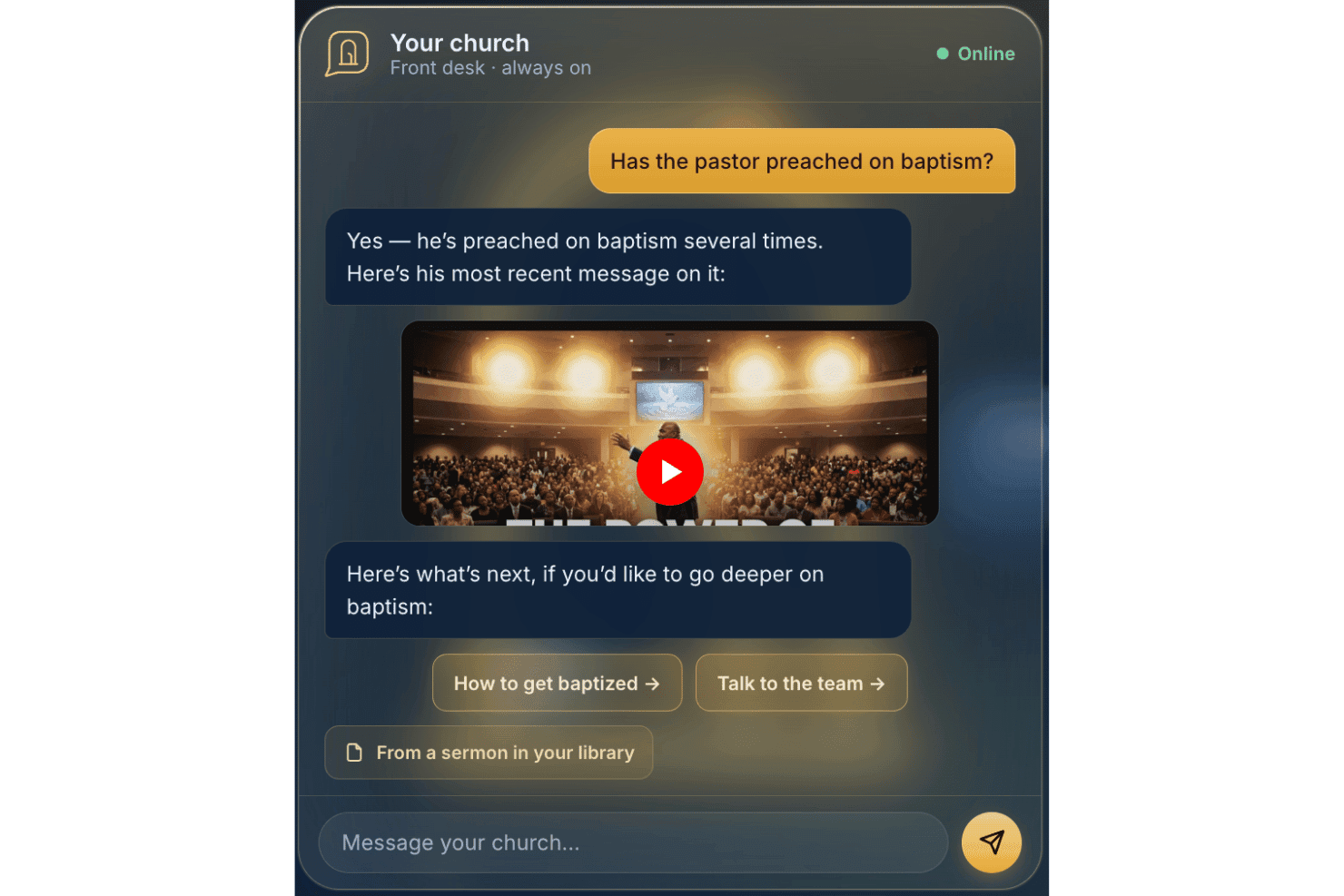
AskMyChurch offre un servizio di risposta AI per le chiese attivo 24/7. Ideato per i siti web delle chiese, AskMyChurch è un assistente AI rivolto ai fedeli che risponde alle domande utilizzando le informazioni provenienti dalle pagine della vostra chiesa, dai sermoni e dai video, con una funzione di citazione dei sermoni in stile pastorale e un instradamento rigido alle linee di supporto in caso di crisi.
Per chi è AskMyChurch?
AskMyChurch è la soluzione ideale per chiese di piccole e medie dimensioni che ricevono numerose domande ripetitive dai visitatori ma dispongono di poco personale amministrativo per rispondere 24 ore su 24.
Perché ho scelto AskMyChurch
AskMyChurch si guadagna un posto nella mia lista ristretta per la serietà con cui rispetta la promessa di 'risposte tratte dal contenuto della chiesa'. L'assistente esegue un secondo controllo di verifica dopo ogni risposta per confermare che sia basata su ciò che la vostra chiesa ha effettivamente pubblicato, e se non trova la risposta lo comunica invece di indovinare. Mi piace anche la funzione Canon, che permette ai visitatori di fare domande sui sermoni passati e ricevere una risposta citata con il minuto esatto in cui il pastore lo ha detto.
Funzionalità principali di AskMyChurch
- Instradamento alle linee di crisi integrato: I messaggi urgenti o di disagio vengono inoltrati direttamente alle linee di supporto per crisi e all’assistenza pastorale della chiesa prima di qualsiasi risposta AI.
- Esperienza anonima, senza login: I visitatori possono fare domande senza creare un account o condividere informazioni personali.
- Supporto multilingue: L’assistente gestisce domande e segnalazioni di crisi sia in inglese che in spagnolo.
- Controlli sui contenuti in italiano semplice: È possibile aggiornare rapidamente cosa dovrebbe o non dovrebbe rispondere l’assistente direttamente dalla dashboard.
Integrazioni di AskMyChurch
Le integrazioni native non sono documentate pubblicamente. L’assistente indicizza le pagine del sito della vostra chiesa, i sermoni e i video come contenuto ma non pubblicizza integrazioni ufficiali con strumenti o piattaforme esterne.
Pros and Cons
Pros:
- Adatta le risposte per riflettere il branding della chiesa
- Risponde alle domande dei fedeli 24 ore su 24
- Instradamento alle linee di crisi integrato senza bisogno di plugin
Cons:
- Nessun archivio di persone, strumenti per donazioni o per eventi
- Non progettato per la produttività del personale interno
Learn more about AskMyChurch: Ideale per interrogare i dati della chiesa tramite la propria IA
- Piano gratuito disponibile OPPURE prova gratuita di 30 giorni
- A partire da $12/mese
Visit WebsiteCustomer Rating:4.9/5
ChMeetings consente agli utenti di monitorare visivamente i fondi della chiesa e i saldi dei conti. ChMeetings è una piattaforma di gestione ecclesiale che comprende anagrafiche dei membri, donazioni, presenze, pianificazione dei volontari, pianificazione del culto e comunicazioni, con un insieme crescente di strumenti di intelligenza artificiale, tra cui un assistente per la scrittura delle email, la ricerca delle persone in linguaggio naturale e un connettore MCP che collega i dati in tempo reale della tua chiesa ad assistenti IA esterni come ChatGPT, Claude e Gemini.
Per chi è più adatto ChMeetings?
ChMeetings è particolarmente adatto alle chiese di piccole e medie dimensioni che desiderano una solida piattaforma completa per la gestione ecclesiale e la flessibilità di interrogare i propri dati tramite strumenti di intelligenza artificiale come ChatGPT o Claude.
Perché ho scelto ChMeetings
Ho scelto ChMeetings perché il suo connettore MCP è diverso da qualsiasi altra soluzione che abbia visto nei software per la gestione ecclesiale. Permette al tuo team di interrogare i dati in tempo reale della chiesa, come registri delle donazioni, presenze e note sui membri, direttamente tramite ChatGPT, Claude o Gemini usando un linguaggio semplice. Chiedi 'Chi sono i nostri principali donatori questo mese?' e il tuo assistente IA recupera la risposta dai dati reali di ChMeetings. Se aggiungi la ricerca delle persone in linguaggio naturale basata sull'IA, penso che tu abbia a disposizione una configurazione davvero flessibile per il personale che desidera usare i propri strumenti di intelligenza artificiale per il lavoro.
Funzionalità principali di ChMeetings
- Assistente IA per la scrittura delle email: Redige, modifica il tono e traduce i contenuti delle email direttamente all'interno dell'editor delle email a partire da un'istruzione in linguaggio semplice.
- Registrazione dei bambini con scansione QR: Supporta la registrazione delle famiglie, la scansione dei codici QR e la stampa dei cartellini identificativi per un monitoraggio sicuro delle presenze.
- Pianificazione delle funzioni religiose: Permette al tuo team di creare ordini della funzione con canti, preghiere e interventi per il sermone, gestire una libreria centralizzata dei canti e programmare i membri del team di culto.
- Flussi di lavoro automatizzati per il ricontatto: Attiva attività di ricontatto per i nuovi arrivati, gli assenti e i partecipanti agli eventi in base ai dati sulle presenze e ai campi data personalizzati.
Integrazioni di ChMeetings
ChMeetings si integra con Stripe, PayPal, Square, Mailchimp, Twilio e Plaid, oltre che con ChatGPT, Claude, Gemini e Grok tramite il suo connettore MCP. Offre un'API REST e Zapier per integrazioni personalizzate.
Pros and Cons
Pros:
- Consente al personale di interrogare i dati in tempo reale della chiesa con l'IA
- L'assistente per la scrittura delle email supporta tono e traduzione
- Il supporto multilingue comprende 26 lingue
Cons:
- Nessuna analisi predittiva per donazioni o presenze
- Manca un chatbot IA per il coinvolgimento dei membri
Learn more about ChMeetings: Ideale per la traduzione simultanea dei sermoni in più lingue
- Prova gratuita disponibile
- Da $150/mese

One Accord Translation offre traduzione multilingue in tempo reale per le riunioni di chiesa, consentendo l'interpretazione dal vivo in più lingue tramite un'app mobile. OneAccord è una piattaforma di gestione parrocchiale basata sull'intelligenza artificiale che offre traduzione simultanea dei sermoni, monitoraggio audio in tempo reale e accesso via browser per la congregazione in contesti di culto multilingue e ibridi.
Per chi è ideale OneAccord?
Per i responsabili e i team tecnici delle chiese che necessitano di strumenti guidati dall'IA per il culto multilingue e la partecipazione accessibile della congregazione tramite browser.
Perché ho scelto OneAccord
Ho scelto OneAccord tra le migliori soluzioni perché posso offrire la traduzione dei sermoni in più lingue in tempo reale direttamente alla mia congregazione. Mi piace perché supporta il riconoscimento vocale e la traduzione istantanea in decine di lingue, così tutti possono seguire facilmente. Il mio team sfrutta l'interfaccia via browser per consentire ai partecipanti di accedere alle traduzioni sui propri dispositivi durante i servizi.
Funzionalità principali di OneAccord
- Monitoraggio qualità audio: Analizza e mostra i livelli e la chiarezza dell'audio in tempo reale durante gli eventi dal vivo.
- Registrazione delle sessioni: Registra sermoni e traduzioni per revisione o condivisione successiva.
- Dashboard amministratore: Centralizza il controllo per la gestione di eventi, utenti e impostazioni di traduzione.
Integrazioni di OneAccord
Le integrazioni native non sono chiaramente documentate. È disponibile una API per integrazioni personalizzate.
Pros and Cons
Pros:
- Monitoraggio qualità audio con notifiche istantanee
- Personalizzazione grafica per un'esperienza coerente tra le sessioni
- Registrazione delle sessioni con trascrizioni scaricabili
Cons:
- Il prezzo potrebbe essere alto per le chiese più piccole
- Nessuno strumento integrato per la programmazione eventi o calendario
Learn more about OneAccord: Ideale per le donazioni digitali e la gestione delle offerte
- Prova gratuita di 30 giorni disponibile
- Da $72/mese
Visit WebsiteCustomer Rating:4.8/5
Tithe.ly gestisce le offerte digitali e organizza i dati dei donatori della chiesa. Se stai cercando una piattaforma che aiuti le chiese a gestire le donazioni digitali e il coinvolgimento dei membri, Tithely merita attenzione. È progettata per i leader di chiesa e i team finanziari che desiderano semplificare le donazioni online e monitorare i contributi. Tithe.ly affronta la sfida di gestire diversi canali di donazione mantenendo i dati dei donatori organizzati e accessibili.
Per chi è più indicato Tithely?
Tithely è adatto a chiese e ministeri di qualsiasi dimensione che vogliono centralizzare e modernizzare i loro processi di donazione digitale.
Perché ho scelto Tithely
Quello che mi ha colpito di Tithely è la specializzazione nella gestione delle donazioni digitali per le chiese. La piattaforma offre una serie di opzioni per le offerte, tra cui donazione tramite SMS, app mobile e attivazione di donazioni ricorrenti, rendendo facile per i membri supportare nel modo per loro più comodo. Inoltre, bilancia la digitalizzazione delle offerte con considerazioni etiche.
Apprezzo anche gli strumenti di reportistica integrati che aiutano i leader delle chiese a monitorare in tempo reale l’andamento delle donazioni e le abitudini dei donatori. Per le chiese che vogliono modernizzare la gestione delle offerte e rendere la donazione accessibile ovunque, le funzionalità mirate di Tithely ne fanno una scelta solida.
Caratteristiche principali di Tithely
Altre funzionalità che rendono Tithely utile per la gestione della chiesa includono:
- Registrazione eventi e biglietteria: Gestisci iscrizioni e pagamenti per gli eventi della chiesa direttamente dalla piattaforma.
- Costruttore di app personalizzate per la chiesa: Crea un’app mobile con il marchio della tua chiesa per coinvolgere i membri e condividere contenuti.
- Comunicazione automatizzata via email e SMS: Invia messaggi programmati o automatici per tenere informata la congregazione.
- Dashboard per la gestione dei membri: Organizza, monitora e aggiorna i profili e la cronologia di partecipazione dei membri in un unico luogo.
Integrazioni di Tithely
Le integrazioni includono QuickBooks Online, RockRMS, Engiven, Elvanto, Salesforce, MinistryPlatform, Planning Center e altro ancora.
Pros and Cons
Pros:
- Supporta diversi metodi di donazione digitale
- Permette la creazione di app personalizzate per la chiesa
- Fornisce report dettagliati sulle donazioni e sui donatori
Cons:
- Le funzionalità di gestione eventi sono basilari
- Opzioni di personalizzazione dei moduli limitate
 Ideale per il coordinamento della pianificazione dei volontari
- Prova gratuita di 30 giorni disponibile
- Da $15/mese
Visit WebsiteCustomer Rating:4.7/5
Planning Center organizza team, orari e pianificazione dei servizi della chiesa. Planning Center offre una suite di strumenti basati su cloud progettati per le chiese che devono organizzare persone, eventi e risorse. È particolarmente utile per i responsabili di ministero e gli amministratori che desiderano coordinare i team, gestire la pianificazione dei servizi e centralizzare la comunicazione. Se la tua chiesa gestisce molti volontari e orari complessi, Planning Center aiuta a portare ordine e chiarezza nelle tue operazioni.
Per chi è ideale Planning Center?
Planning Center è adatto a chiese di qualsiasi dimensione che hanno bisogno di coordinare volontari, pianificare servizi e gestire i team del ministero.
Perché ho scelto Planning Center
Quello che mi colpisce di Planning Center è quanto sia appositamente costruito per coordinare i turni dei volontari nel contesto di una chiesa. La piattaforma consente di creare piani dettagliati per i servizi, assegnare ruoli e inviare promemoria automatici ai volontari, riducendo così confusioni e cambiamenti dell’ultimo minuto. Apprezzo anche il modo in cui tiene traccia della disponibilità e delle preferenze dei volontari, facilitando la copertura delle necessità e la prevenzione di conflitti di programmazione.
Per le chiese che si affidano a una vasta base di volontari, Planning Center porta struttura e chiarezza all’intero processo di coordinamento.
Funzionalità principali di Planning Center
Altre funzionalità che rendono Planning Center utile per la gestione della chiesa includono:
- Database delle persone: Conserva e organizza i profili dei membri, i dati di contatto e le relazioni familiari in un unico luogo.
- Registrazione eventi: Crea moduli di registrazione personalizzati per eventi, monitora la partecipazione e gestisci i pagamenti.
- Sistema di check-in: Offre un check-in e check-out sicuro per il ministero dei bambini e gli eventi.
- Gestione delle risorse: Prenota sale, attrezzature e altre risorse per servizi e attività.
Integrazioni di Planning Center
Le integrazioni includono Checkr, Mailchimp, PraiseCharts, RehearsalMix, SongSelect, Clearstream, MinistrySafe, Protect My Ministry e altro ancora.
Pros and Cons
Pros:
- I promemoria automatici dei volontari riducono le assenze
- I modelli di pianificazione dei servizi fanno risparmiare tempo di configurazione
- Sistema di check-in sicuro per il ministero dei bambini
Cons:
- Nessun chatbot integrato per la messaggistica
- Richiede moduli separati per la piena funzionalità
Learn more about Planning Center: Ottimale per le funzionalità di coinvolgimento incentrate sul mobile
- Demo gratuita disponibile
- Prezzo su richiesta
Visit WebsiteCustomer Rating:4/5
Pushpay combina donazioni digitali, gestione degli eventi e strumenti per il coinvolgimento della chiesa. Pushpay offre una piattaforma digitale per le donazioni e il coinvolgimento, progettata per chiese e organizzazioni religiose. È un'opzione valida per i leader che desiderano connettersi con le proprie congregazioni attraverso la tecnologia mobile e gli strumenti di comunicazione digitale. Se desideri semplificare le donazioni, gestire gli eventi e favorire un coinvolgimento continuo, Pushpay risponde a queste esigenze in un'unica piattaforma.
A chi è più adatto Pushpay?
Pushpay è adatto a chiese e ministeri che danno priorità al coinvolgimento mobile e alle soluzioni per le donazioni digitali.
Perché ho scelto Pushpay
Ciò che mi colpisce di Pushpay è la sua attenzione al coinvolgimento incentrato sul mobile, sempre più importante per le chiese che desiderano connettersi con i propri membri ovunque si trovino. La piattaforma offre un'app mobile dedicata che supporta le donazioni digitali, le iscrizioni agli eventi e la comunicazione personalizzata, tutto dallo smartphone.
Apprezzo inoltre il fatto che Pushpay includa funzionalità per l'invio di messaggi mirati e notifiche push, facilitando il compito dei leader nel tenere informata e coinvolta la propria congregazione. Per le chiese che desiderano dare priorità all'interazione mobile e alla connessione in tempo reale, l'approccio di Pushpay si adatta bene alle esigenze dei ministeri moderni.
Funzionalità principali di Pushpay
Altre funzionalità che rendono Pushpay utile per la gestione della chiesa includono:
- Dashboard per la gestione dei donatori: Tieni traccia dello storico delle donazioni, gestisci i profili dei donatori e genera le dichiarazioni dei contributi da una dashboard centralizzata.
- Configurazione delle donazioni ricorrenti: Consenti ai membri di programmare e gestire le donazioni ricorrenti direttamente tramite la piattaforma.
- Strumenti per la registrazione agli eventi: Crea, promuovi e gestisci le iscrizioni a eventi, corsi e opportunità di volontariato della chiesa.
- Report personalizzabili: Genera report dettagliati sulle tendenze delle donazioni, sulle metriche di coinvolgimento e sulla partecipazione agli eventi per supportare decisioni basate sui dati.
Integrazioni di Pushpay
Le integrazioni includono Planning Center, QuickBooks, Gusto, Mailchimp, Rock RMS e altre.
Pros and Cons
Pros:
- L'app mobile supporta le donazioni e le iscrizioni agli eventi
- È disponibile la creazione di un'app della chiesa con marchio personalizzato
- Strumenti automatizzati per la comunicazione con i donatori inclusi
Cons:
- Richiede la verifica manuale dei risultati dell'intelligenza artificiale
- Funzionalità di intelligenza artificiale limitate nelle versioni autonome
Learn more about Pushpay: Ideale per la creazione e gestione di siti web
- Prova gratuita di 14 giorni
- Da $29/mese (fatturazione annuale)

The Church Co crea siti per chiese per aggiornamenti di contenuti e outreach online. Se la tua chiesa desidera un sito web moderno e facile da gestire, The Church Co è una soluzione da prendere in considerazione. Questa piattaforma è pensata per le chiese che vogliono mantenere aggiornata la loro presenza online senza doversi affidare a personale tecnico. Aiuta i team ministeriali ad aggiornare rapidamente i contenuti, condividere sermoni e connettersi con i visitatori online.
A chi è più adatto The Church Co?
The Church Co è indicato per chiese di piccole e medie dimensioni che desiderano gestire e aggiornare il proprio sito senza competenze tecniche.
Perché ho scelto The Church Co
Ciò che mi ha colpito di The Church Co è quanto sia progettato appositamente per le chiese che vogliono creare e gestire il proprio sito senza barriere tecniche. La piattaforma offre un costruttore di siti web drag-and-drop, così i team ministeriali possono aggiornare rapidamente le pagine, aggiungere sermoni e pubblicare eventi al variare delle esigenze. Apprezzo anche la libreria interna di sermoni e il calendario eventi, che aiutano le chiese a mantenere la loro presenza online fresca e interessante per membri e visitatori.
Per i responsabili che desiderano concentrarsi sul ministero piuttosto che sullo sviluppo web, The Church Co rende semplice mantenere un sito professionale e coinvolgente.
Caratteristiche principali di The Church Co
Altre funzionalità che rendono The Church Co utile per la gestione della chiesa includono:
- Integrazione con donazioni online: Si collega a piattaforme di donazione digitale così i membri possono donare direttamente dal sito.
- Sistema di richieste di preghiera: Permette ai visitatori e membri di inviare richieste di preghiera che possono essere gestite e cui si può rispondere da parte dello staff della chiesa.
- Moduli di iscrizione per volontari: Fornisce moduli personalizzabili per il reclutamento e l'organizzazione di volontari per eventi e ministeri.
- Pubblicazione di blog e notizie: Permette alle chiese di condividere aggiornamenti, meditazioni e annunci con la congregazione tramite un blog integrato.
Integrazioni di The Church Co
Le integrazioni includono Planning Center, Tithely, Church Community Builder, Church Suite, Stripe, Google Analytics e altro.
Pros and Cons
Pros:
- Hosting integrato di audio e video dei sermoni
- Strumenti personalizzabili per richieste e risposte di preghiera
- Template per siti di chiese ottimizzati per dispositivi mobili
Cons:
- Nessuna funzione di contenuto basata su AI
- Nessun database gestionale di chiesa (ChMS) integrato
Learn more about The Church Co: Ideale per gestione dati personalizzabile
- Demo gratuita disponibile
- Prezzo su richiesta

MinistryPlatform centralizza dati della chiesa, eventi e monitoraggio del coinvolgimento. Se la tua chiesa ha bisogno di una piattaforma flessibile per gestire dati complessi e operazioni ministeriali, MinistryPlatform merita un approfondimento. Questa soluzione è progettata per chiese e ministeri che desiderano centralizzare le informazioni sui membri, gli eventi e il monitoraggio del coinvolgimento. MinistryPlatform è ideale per i leader che devono organizzare, analizzare e agire sui dati a supporto della crescita e delle decisioni ministeriali.
Per chi è più adatto MinistryPlatform?
MinistryPlatform è adatto a grandi chiese e ministeri multi-sede che necessitano di avanzate capacità di gestione e reportistica dei dati.
Perché ho scelto MinistryPlatform
Ciò che mi colpisce di MinistryPlatform è la possibilità di personalizzare profondamente i campi dati, i flussi di lavoro e i report per adattarli alla struttura unica della tua chiesa. Questo livello di flessibilità è particolarmente prezioso per le chiese con ministeri complessi o operazioni su più campus che devono monitorare una vasta gamma di dettagli sui membri, metriche di coinvolgimento e attività ministeriali.
Apprezzo anche il fatto che MinistryPlatform consenta di progettare cruscotti personalizzati e automatizzare i processi basati sui dati, così da poter adattare la piattaforma man mano che il ministero cresce o cambia. Per i leader che vogliono modellare il proprio sistema di gestione parrocchiale sulle proprie esigenze specifiche, MinistryPlatform offre un livello di controllo difficile da trovare altrove.
Funzionalità principali di MinistryPlatform
Altre funzioni che rendono MinistryPlatform utile per la gestione della chiesa includono:
- Strumenti di gestione gruppi: Organizza, monitora e comunica con piccoli gruppi, classi e team del ministero da un cruscotto centrale.
- Modulo di gestione eventi: Pianifica eventi, gestisci iscrizioni e coordina le risorse per attività e programmi della chiesa.
- Integrazione per donazioni online: Collegati con piattaforme di donazione digitale per monitorare le offerte e generare le ricevute delle contribuzioni.
- Portale membri ottimizzato per mobile: Offri ai membri l'accesso ai propri profili, iscrizione agli eventi e strumenti di comunicazione da qualsiasi dispositivo.
Integrazioni di MinistryPlatform
Le integrazioni includono Realm, MinistrySafe, Twilio, SendGrid e altro ancora.
Pros and Cons
Pros:
- Campi dati e flussi di lavoro altamente personalizzabili
- Reportistica e analisi avanzata per i ministeri
- Portale membri con funzionalità di accesso mobile
Cons:
- L'interfaccia può sembrare datata rispetto ai concorrenti
- Richiede formazione per la personalizzazione avanzata
Learn more about MinistryPlatform: Ideale per trasformare i sermoni in contenuti condivisibili
- Prova gratuita disponibile
- Da $39/mese

Pulpit AI trasforma i sermoni in contenuti condivisibili per il coinvolgimento settimanale della chiesa. Se vuoi trasformare i sermoni in risorse pratiche per la tua congregazione, Pulpit AI offre una soluzione mirata. Questo potente strumento è pensato per pastori e responsabili della comunicazione nelle chiese che desiderano riutilizzare il contenuto dei sermoni per un coinvolgimento più ampio. Aiuta ad affrontare la sfida di mantenere il messaggio accessibile e rilevante durante tutta la settimana.
Per chi è ideale Pulpit AI?
Pulpit AI è adatto a pastori e team di comunicazione delle chiese che vogliono trasformare i sermoni in contenuti digitali di alta qualità per un coinvolgimento continuo.
Perché ho scelto Pulpit AI
Ciò che mi ha attirato di Pulpit AI è il modo in cui utilizza l'intelligenza artificiale per trasformare i sermoni in una varietà di formati condivisibili, come guide di discussione, post per i social media e riassunti per email. Questo focus sulla trasformazione dei contenuti aiuta le chiese a mantenere vivo il loro messaggio nella vita delle persone oltre la domenica. Apprezzo anche l’automazione del processo, così non si deve riscrivere o riorganizzare manualmente i sermoni ogni settimana.
Per le chiese che desiderano ampliare la portata e l’impatto dei propri insegnamenti, queste funzionalità rendono Pulpit AI una scelta pratica.
Funzionalità principali di Pulpit AI
Altre caratteristiche che rendono Pulpit AI utile per la gestione della chiesa includono:
- Caricamento in blocco per archivi di sermoni: Importa più sermoni passati in una volta sola per generare contenuti dalla tua libreria esistente.
- Supporto multilingue: Genera contenuti in diverse lingue per raggiungere un pubblico più ampio.
- Workflow di approvazione dei contenuti: Revisiona e approva i materiali generati prima di pubblicarli o condividerli.
- Strumenti di collaborazione per il team: Invita collaboratori o volontari a lavorare insieme sull'editing e la distribuzione dei contenuti basati sui sermoni.
Integrazioni di Pulpit AI
L'integrazione include Subsplash.
Pros and Cons
Pros:
- Converte i sermoni in diversi formati di contenuto
- Supporta la generazione di contenuti multilingue
- Offre il caricamento in blocco per archivi di sermoni
Cons:
- Manca la pubblicazione diretta sui social media
- Non automatizza la trascrizione dei sermoni
Learn more about Pulpit AI: Ideale per flussi di lavoro automatizzati nella programmazione degli eventi
- Disponibile un piano gratuito
- Da $65/mese

Church.tech aiuta le chiese a gestire eventi, sermoni e agende ministeriali impegnative. Church.tech offre soluzioni guidate dall'IA per le chiese che desiderano semplificare la pianificazione e il coordinamento degli eventi. Questa piattaforma è adatta a responsabili di ministeri e amministratori che gestiscono calendari intensi, sermoni e numerose attività. Aiuta a ridurre il lavoro manuale di programmazione e garantisce che tutti siano aggiornati.
Per chi è più adatto Church.tech?
Church.tech si rivolge ad amministratori di chiese e team ministeriali che devono coordinare eventi e orari tra più gruppi o sedi.
Perché ho scelto Church.tech
Ho scelto Church.tech perché i suoi flussi di lavoro automatizzati per la programmazione degli eventi risolvono una sfida comune per i leader delle chiese: gestire attività sovrapposte e calendari impegnativi. La piattaforma utilizza l’IA per suggerire i momenti migliori per gli eventi, riducendo i conflitti nelle attività ministeriali quotidiane.
Apprezzo anche il fatto che possa notificare automaticamente i membri del team e i volontari sulle modifiche agli orari, tenendo tutti informati. Queste funzionalità lo rendono particolarmente utile per chiese con più ministeri o eventi frequenti.
Funzionalità principali di Church.tech
Altre funzionalità che rendono Church.tech utile per la gestione della chiesa includono:
- Strumenti per la gestione dei volontari: Assegna, traccia e comunica con i volontari per eventi specifici o per le esigenze continue del ministero.
- Sistema di prenotazione delle risorse: Prenota sale, attrezzature e altre risorse direttamente sulla piattaforma per evitare doppie prenotazioni.
- Modelli di eventi personalizzabili: Crea e riutilizza modelli per eventi ricorrenti, risparmiando tempo nell’organizzazione delle attività regolari della chiesa.
- Monitoraggio delle presenze: Monitora la partecipazione agli eventi e genera report utili per il follow-up e il coinvolgimento.
Integrazioni di Church.tech
Attualmente non sono elencate integrazioni native.
Pros and Cons
Pros:
- Programmazione automatizzata per il coordinamento
- Offre strumenti per la gestione dei volontari
- Ha modelli di eventi personalizzabili
Cons:
- Opzioni di reportistica limitate per il monitoraggio finanziario
- Nessuna gestione integrata delle donazioni o offerte
Learn more about Church.tech:
Altri strumenti di IA per la gestione delle chiese
Ecco alcune ulteriori opzioni di strumenti di IA per la gestione delle chiese che non sono entrate nella mia selezione, ma che vale comunque la pena prendere in considerazione:
- 11ChurchSocialIdeale per l'automazione della comunicazione di gruppo
- 12Church Sync AIIdeale per approfondimenti sul coinvolgimento dei membri basati sull'IA
- 13GlooIdeale per integrazioni con connessioni comunitarie
- 14ReliusIdeale per il supporto alle attività amministrative con l'IA
- 15Doctrinally AIIdeale per un'IA personalizzata addestrata sulle dottrine della chiesa
Come valuto gli strumenti AI per la gestione della chiesa
Cerco strumenti in cui l’IA faccia molto più che aggiungere un chatbot al database dei membri: deve individuare modelli di coinvolgimento, redigere contenuti ministeriali o automatizzare il follow-up in modi che risparmino davvero ore di lavoro al personale. Divido la mia valutazione in funzionalità di base che ogni strumento deve possedere e fattori distintivi che differenziano una piattaforma dall’altra.
Funzionalità di base (Requisiti fondamentali per questa lista)
Quando seleziono gli strumenti per la mia lista, valuto ciascuno su una scala da 0 (non offre la funzionalità) a 5 (eccelle in quest’area) per ogni funzionalità di base elencata di seguito. Calcolo poi il punteggio totale dello strumento in percentuale. Ogni strumento deve ottenere un punteggio totale minimo del 65% per essere preso in considerazione.
- Approfondimenti AI sul coinvolgimento dei membri: Verifico se la piattaforma utilizza l’IA per segnalare cali di presenze o variazioni nelle donazioni e raccomandare passi successivi, non solo mostrare report statici.
- Creazione di contenuti generativi: Gli strumenti dovrebbero redigere bozze di prediche, devozionali o newsletter a partire da prompt—valuto la qualità dei risultati e il controllo del tono teologico.
- Registri centrali della gestione della chiesa: Una solida anagrafica dei membri con nuclei familiari, presenze, donazioni e gruppi è la base. Mi interessa vedere quanto bene lo strato IA si connette a questi dati.
- Comunicazioni e attività di sensibilizzazione potenziate dall’IA: Valuto se lo strumento personalizza email o SMS usando l’IA—ad esempio, adattando la sequenza di follow-up di un nuovo visitatore in base ai dettagli della sua prima visita.
- Automazione intelligente e workflow: La piattaforma dovrebbe automatizzare attività come assegnare volontari ai team o attivare promemoria di assistenza quando un membro manca per diverse settimane consecutive.
- Assistente AI conversazionale: Cerco un assistente AI che il personale possa interrogare per risposte rapide—come recuperare l’andamento della presenza in un piccolo gruppo—oppure che i congreganti possano usare per richieste di preghiera.
Una volta individuati gli strumenti che soddisfano questi criteri, considero cosa rende unica ogni piattaforma.
Fattori distintivi (Cosa distingue i fornitori)
Ecco come confronto e metto a confronto i diversi fornitori:
Caratteristiche distintive
L’intelligenza per la cura pastorale è un vero elemento di differenziazione. Cerco strumenti che rilevino assenze o cambiamenti di sentiment e avvisino il personale di contattare qualcuno prima che si allontani silenziosamente. Anche le analisi predittive delle donazioni contano, soprattutto per i team finanziari che pianificano campagne o stimano le tendenze della gestione delle risorse a fine anno. L’abbinamento intelligente dei volontari completa il quadro, assegnando i membri del gruppo in base ai loro doni spirituali e alla disponibilità anziché affidarsi a fogli di calcolo manuali.
Oltre le funzionalità
La privacy dei dati è ancora più importante qui che in molte altre categorie software. Valuto come ogni fornitore gestisca note sensibili di consulenza e registri di donazione e se i dati dei congreganti vengano esclusi dai set di addestramento pubblici dell’IA. Anche i paletti teologici sono fondamentali: i contenuti generati dall’IA dovrebbero rispettare le posizioni dottrinali della chiesa, evitando di produrre teologie fuori linea che il vostro team dovrebbe correggere costantemente. Controllo anche le strutture di prezzo per vedere se sono eque e scalabili per comunità più piccole o nuove chiese con budget ridotti.
Come scegliere gli strumenti di IA per la gestione delle chiese
È facile perdersi in lunghi elenchi di funzionalità e strutture tariffarie complesse. Per aiutarti a rimanere concentrato mentre affronti il tuo esclusivo processo di selezione del software, ecco una lista di fattori da tenere presenti:
| Fattore | Cosa considerare |
|---|---|
| FattoreScalabilità | Cosa considerareLo strumento supporterà la vostra chiesa mentre cresce in termini di membri, ministeri o sedi? Verificate i limiti per gli utenti, i limiti di dati e le possibilità di aggiornamento. |
| FattoreIntegrazioni | Cosa considerareLo strumento si connette ai sistemi esistenti, come software di contabilità, posta elettronica o presentazione? Verificate la presenza di integrazioni native, non solo di opzioni API. |
| FattorePersonalizzazione | Cosa considerareÈ possibile adattare flussi di lavoro, moduli o dashboard ai processi specifici della vostra chiesa? Evitate gli strumenti che vi costringono a utilizzare modelli rigidi. |
| FattoreFacilità d’uso | Cosa considerareIl personale e i volontari con diversi livelli di competenza tecnologica riusciranno a utilizzare lo strumento con sicurezza? Cercate una navigazione chiara e requisiti di formazione minimi. |
| FattoreImplementazione e avviamento | Cosa considerareQuanto tempo servirà per iniziare a utilizzarlo? Informatevi sul supporto per la migrazione, sulle risorse formative e sulla necessità di ricorrere ad assistenza IT esterna. |
| FattoreCosto | Cosa considerareTutti i costi sono trasparenti, inclusi configurazione, canoni mensili e componenti aggiuntivi? Confrontate i livelli di prezzo e prestate attenzione ai costi nascosti o agli aggiornamenti obbligatori. |
| FattoreMisure di sicurezza | Cosa considerareIn che modo lo strumento protegge i dati sensibili dei membri e delle donazioni? Cercate crittografia, controlli degli accessi e conformità agli standard sulla privacy. |
| FattoreDisponibilità dell’assistenza | Cosa considerareQuando e come è possibile contattare l’assistenza in caso di problemi? Verificate la disponibilità di chat dal vivo, telefono o posta elettronica e se l’assistenza è inclusa o a pagamento. |
Cosa sono gli strumenti di AI per la gestione delle chiese?
Gli strumenti di AI per la gestione delle chiese sono piattaforme software che utilizzano l’intelligenza artificiale per automatizzare, organizzare e potenziare le attività amministrative e ministeriali all’interno di una chiesa. Questi strumenti aiutano a gestire i dati dei ministeri della chiesa, la programmazione, le comunicazioni, le donazioni e la reportistica.
Sfruttando l’AI, le chiese possono ridurre il lavoro manuale, migliorare la precisione e permettere al personale e ai volontari di dedicare più tempo al ministero e al coinvolgimento della comunità.
Funzionalità
Quando selezionate strumenti di AI per la gestione delle chiese, prestate attenzione alle seguenti funzionalità principali:
- Programmazione automatizzata: utilizza l’AI per coordinare i calendari, prenotare le sale e inviare promemoria per funzioni, riunioni ed eventi, riducendo il coordinamento manuale.
- Strumenti di comunicazione intelligenti: automatizza le notifiche via posta elettronica, SMS o app per membri e volontari, garantendo aggiornamenti tempestivi e riducendo i messaggi persi.
- Monitoraggio delle donazioni: registra, categorizza e produce report su offerte, impegni di donazione e donazioni ricorrenti, semplificando il controllo finanziario e il coinvolgimento dei donatori.
- Gestione dei volontari: assegna i volontari ai ruoli in base alla disponibilità e alle competenze, tiene traccia delle ore e automatizza i promemoria per future opportunità.
- Gestione dei documenti: organizza, archivia e recupera documenti, regolamenti e moduli della chiesa, utilizzando l’AI per individuare i file pertinenti quando necessario.
- Gestione del database dei membri: mantiene aggiornati i dati di membri, famiglie e visitatori, offrendo analisi basate sull’AI per il coinvolgimento e la sensibilizzazione.
- Analisi delle presenze: monitora i modelli di partecipazione a funzioni ed eventi, utilizzando l’AI per identificare le tendenze e segnalare cambiamenti che potrebbero richiedere l’attenzione pastorale.
- Automazione delle attività: gestisce attività amministrative ripetitive come l’inserimento dei dati, la generazione di immagini e l’instradamento dei flussi di lavoro, liberando tempo al personale.
- Supporto alla pianificazione degli eventi: assiste nella logistica, nella registrazione e nelle comunicazioni per gli eventi della chiesa, utilizzando l’AI per anticipare le esigenze e ottimizzare le risorse.
- Controlli di sicurezza e privacy: utilizza l’AI per monitorare gli accessi, rilevare attività insolite e garantire la protezione dei dati sensibili in conformità agli standard sulla privacy.
Vantaggi
L’implementazione di strumenti basati sull’AI per la gestione delle chiese offre diversi vantaggi al vostro team e alla vostra organizzazione. Ecco alcuni dei vantaggi che potete aspettarvi:
- Riduzione del carico di lavoro amministrativo: l’automazione della programmazione, delle comunicazioni e dell’inserimento dei dati libera il personale e i volontari, permettendo loro di dedicarsi maggiormente alle attività ministeriali.
- Maggiore precisione: la gestione e la reportistica dei dati basate sull’AI riducono al minimo gli errori nei registri dei membri, nelle donazioni e nel monitoraggio delle presenze.
- Processo decisionale più rapido: le analisi in tempo reale e le informazioni predittive aiutano i responsabili a reagire rapidamente alle tendenze relative a presenze, donazioni e coinvolgimento.
- Maggiore coinvolgimento dei membri: gli strumenti di comunicazione automatizzati e personalizzati garantiscono che membri e volontari ricevano aggiornamenti e promemoria tempestivi.
- Migliore assegnazione delle risorse: la programmazione e la pianificazione degli eventi basate sull’AI ottimizzano l’utilizzo delle strutture, dei volontari e dei budget.
- Maggiore sicurezza dei dati: i controlli integrati sulla privacy e le funzionalità di monitoraggio aiutano a proteggere le informazioni sensibili sui membri e sulle finanze.
- Attività scalabili: gli strumenti di AI si adattano alla crescita della vostra chiesa, supportando un numero maggiore di membri, ministeri e sedi senza sovraccaricare il team.
Costi e prezzi
La selezione degli strumenti di intelligenza artificiale per la gestione delle chiese richiede una conoscenza dei vari modelli e piani tariffari disponibili. I costi variano in base alle funzionalità, alle dimensioni del team, ai componenti aggiuntivi e ad altro ancora. La tabella seguente riassume i piani più comuni, i relativi prezzi medi e le funzionalità tipicamente incluse nelle soluzioni di intelligenza artificiale per la gestione delle chiese:
Tabella comparativa dei piani per gli strumenti di intelligenza artificiale per la gestione delle chiese
| Tipo di piano | Prezzo medio | Funzionalità comuni |
|---|---|---|
| Tipo di pianoPiano gratuito | Prezzo medio$0 | Funzionalità comuniGestione di base dei membri, programmazione limitata, semplici strumenti di comunicazione e reportistica di base. |
| Tipo di pianoPiano personale | Prezzo medio$5-$15/utente/mese | Funzionalità comuniDatabase dei membri, programmazione degli eventi, monitoraggio delle donazioni, notifiche via e-mail e analisi limitate. |
| Tipo di pianoPiano aziendale | Prezzo medio$20-$40/utente/mese | Funzionalità comuniAutomazione avanzata, gestione dei volontari, archiviazione dei documenti, report personalizzati e opzioni di integrazione. |
| Tipo di pianoPiano avanzato | Prezzo medio$50-$100/utente/mese | Funzionalità comuniFlussi di lavoro personalizzati, sicurezza avanzata, assistenza prioritaria, gestione di più campus e accesso alle API. |
Domande frequenti sugli strumenti di intelligenza artificiale per la gestione delle chiese
Ecco alcune risposte alle domande comuni sugli strumenti di intelligenza artificiale per la gestione delle chiese:
In che modo gli strumenti di intelligenza artificiale aiutano le chiese a risparmiare tempo?
Gli strumenti di intelligenza artificiale automatizzano attività ripetitive come la programmazione, l’inserimento dei dati e l’invio di promemoria. Ciò riduce il lavoro manuale per il personale e i volontari, consentendo loro di concentrarsi maggiormente sul ministero e meno sull’amministrazione.
Gli strumenti di intelligenza artificiale per la gestione delle chiese possono integrarsi con i software ecclesiastici esistenti?
Sì, molti strumenti di intelligenza artificiale offrono integrazioni con sistemi di contabilità, posta elettronica, presentazione e gestione dei donatori. Verifica sempre la compatibilità con il software attuale prima di scegliere uno strumento.
Gli strumenti di intelligenza artificiale per la gestione delle chiese sono sicuri?
Sì, la maggior parte degli strumenti di intelligenza artificiale affidabili utilizza la crittografia, i controlli degli accessi e aggiornamenti regolari della sicurezza per proteggere i dati sensibili dei membri e quelli finanziari. Esamina sempre le politiche di sicurezza e gli standard di conformità del fornitore prima dell’implementazione.
Quale formazione è necessaria per utilizzare gli strumenti di gestione delle chiese basati sull'intelligenza artificiale?
La maggior parte degli strumenti è progettata per essere facile da usare e offre risorse per l’avvio, come tutorial, webinar e centri assistenza. Alcuni potrebbero richiedere brevi sessioni di formazione per il personale o i volontari, soprattutto per le funzionalità avanzate come l’utilizzo dei chatbot basati sull’intelligenza artificiale.
In che modo gli strumenti di intelligenza artificiale favoriscono il coinvolgimento dei membri?
Gli strumenti di intelligenza artificiale possono personalizzare la comunicazione, automatizzare i promemoria e monitorare le tendenze relative alle presenze. Ciò aiuta la dirigenza della chiesa a mantenere un contatto più costante con i membri e a rispondere tempestivamente alle loro esigenze.
Cosa devo considerare quando preparo il budget per gli strumenti di gestione delle chiese basati sull'intelligenza artificiale?
Considera il numero di utenti, le funzionalità necessarie, le esigenze di integrazione e i potenziali costi dei componenti aggiuntivi. Cerca prezzi trasparenti e informati su eventuali sconti per organizzazioni senza scopo di lucro o opzioni di prova gratuita.