

Gestire una comunità ecclesiale può essere impegnativo, soprattutto quando si tratta di mantenere tutti in contatto. Potresti avere difficoltà con elenchi di contatti obsoleti o con una comunicazione inefficiente. È qui che un'app per l'elenco della chiesa può rivelarsi utile. Ti aiuta a organizzare e consultare facilmente le informazioni sui membri.
In base alla mia esperienza, queste app possono semplificarti la vita facendoti risparmiare tempo e riducendo lo stress. Provo e recensisco i software in modo indipendente, concentrandomi su ciò che conta davvero per te e il tuo team. In questo articolo condividerò le mie migliori scelte tra le app per l'elenco della chiesa, mettendone in evidenza vantaggi e funzionalità. Troverai informazioni chiare e imparziali che ti aiuteranno a scegliere lo strumento giusto per la tua comunità.
Perché fidarsi dei nostri consigli sui software
6,700+
Reviews
20
Industry experts
16+
Evaluation factors
14
Years
Il nostro team testa e recensisce software dal 2012. In quanto leader ecclesiastici noi stessi, sappiamo quanto sia difficile — e importante — scegliere il software giusto.
Per questa guida, abbiamo valutato gli strumenti attraverso test pratici e ricerche indipendenti, assegnando un punteggio agli strumenti in base ai nostri criteri di selezione.
Le nostre recensioni riflettono il nostro giudizio editoriale umano, non un discorso di vendita.
Tabella comparativa: app per l'elenco della chiesa
Questa tabella comparativa riassume i dettagli dei prezzi delle mie migliori selezioni di app per l’elenco della chiesa.
| Tool | Best For | Trial Info | Price | ||
|---|---|---|---|---|---|
| 1 | Ideale per chiese in crescita | Piano gratuito disponibile | Da $12/mese (fatturato mensilmente) | Website | |
| 2 | Ideale per flussi di lavoro automatizzati sui membri | Prova gratuita di 30 giorni | Da $58/mese | Website | |
| 3 | Ideale per l’integrazione multimediale | Demo gratuita disponibile | Da $99/mese | Website | |
| 4 | ideale per un'app mobile personalizzata tutto in uno con branding | Prova gratuita di 30 giorni | Da USD $89/mese | Website | |
| 5 | Ideale per l'interfaccia facile da usare | Piano gratuito + demo gratuita disponibile | A partire da $72/mese | Website | |
| 6 | ideale per il coinvolgimento mobile-first della chiesa | Demo gratuita disponibile | da $149/mese | Website | |
| 7 | Ideale per aggiornamenti immediati degli elenchi | Prova gratuita di 30 giorni | A partire da $9.99/mese | Website | |
| 8 | Ideale per l'integrazione con altri strumenti | Prova gratuita di 30 giorni + demo gratuita disponibile | Da $15/mese | Website | |
| 9 | Lo staff aggiorna e traccia i profili dei membri nell'app mobile istantaneamente. | Prova gratuita di 30 giorni | da $49/mese | Website | |
| 10 | Ideale per funzionalità app personalizzate | piano gratuito disponibile | da $0/mese | Website |


Recensioni delle migliori app per l'elenco della chiesa
Di seguito trovi i miei riepiloghi dettagliati delle migliori app per l’elenco della chiesa incluse nella mia selezione. Le mie recensioni offrono una panoramica dettagliata delle funzionalità principali, dei pro e & contro, delle integrazioni e dei casi d’uso ideali di ogni strumento, per aiutarti a trovare quello più adatto a te.
 Ideale per chiese in crescita
- Piano gratuito disponibile
- Da $12/mese (fatturato mensilmente)
Visit WebsiteCustomer Rating:4.9/5
ChMeetings ti permette di gestire e cercare archivi dettagliati dei membri con informazioni di contatto, gruppi e ministeri in un unico posto. ChMeetings è uno strumento di gestione per chiese progettato per aiutare i ministeri a tenere persone, eventi e donazioni organizzati in un unico posto. Offre una piattaforma digitale in cui è possibile gestire i dati dei membri, pianificare incontri e gestire le donazioni con meno sforzo.
Perché ho scelto ChMeetings: Ho scelto ChMeetings perché consente di creare profili dettagliati dei membri con informazioni su famiglie e gruppi, rendendo i dati facili da cercare e da esportare in report. Inoltre, collega le informazioni delle persone a eventi e donazioni, così puoi vedere chi è coinvolto, dove serve e come sostiene finanziariamente il tuo ministero — tutto in un unico posto.
Funzionalità principali & integrazioni:
Le funzionalità includono la pianificazione dei servizi religiosi, dove puoi preparare le funzioni con letture bibliche, canti e note ben suddivise in sezioni chiare. Gli strumenti di messaggistica consentono anche di inviare facilmente annunci, newsletter o promemoria direttamente ai membri tramite email, SMS o notifiche push.
Le integrazioni includono Stripe, PayPal, BlueSnap, Paystack, MailChimp, Twilio, SMS Global, Clickatell, Eazismspro, Zeffy e Zapier. È disponibile anche l’API di ChMeetings per integrazioni personalizzate.
Pros and Cons
Pros:
- Profili dettagliati di membri e famiglie
- Solido monitoraggio di eventi e presenze
- Opzioni integrate per donazioni e promesse di offerta
Cons:
- Personalizzazione limitata per esigenze complesse
- Le opzioni di reportistica possono risultare limitanti
Learn more about ChMeetings: Ideale per flussi di lavoro automatizzati sui membri
- Prova gratuita di 30 giorni
- Da $58/mese
Visit WebsiteCustomer Rating:4.8/5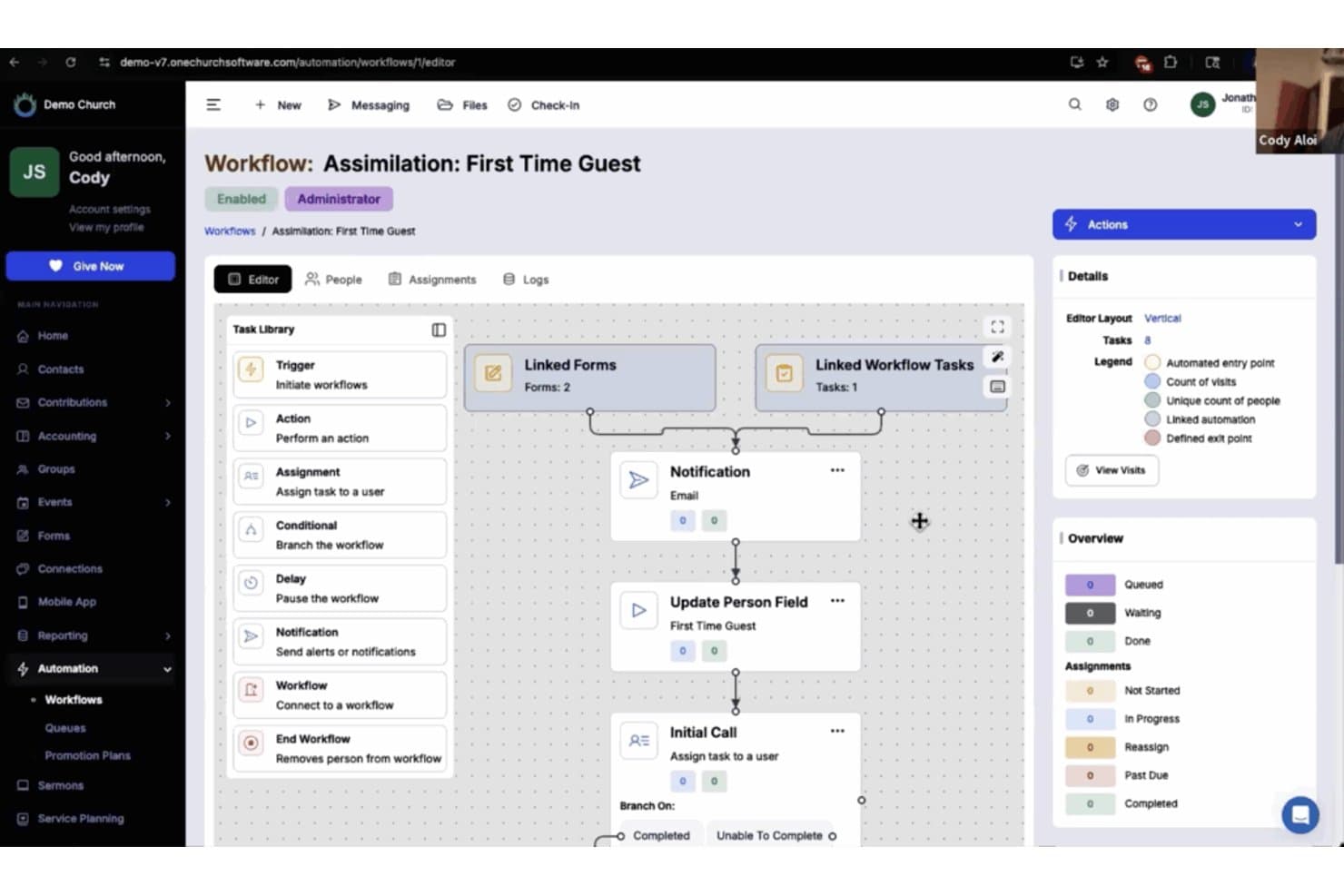
One Church Software offre un generatore di flussi di lavoro automatizzati per gestire l'integrazione dei nuovi ospiti con moduli collegati, notifiche e assegnazione di compiti. One Church Software è una piattaforma di gestione parrocchiale che centralizza gli elenchi dei membri, i profili delle famiglie, l'organizzazione dei piccoli gruppi, gli strumenti di comunicazione e le offerte in un unico sistema.
Per chi è ideale One Church Software?
È particolarmente indicato per amministratori di chiesa e coordinatori dei membri che devono gestire una congregazione in crescita attraverso molteplici ministeri su un'unica piattaforma.
Perché ho scelto One Church Software
One Church Software si è guadagnato un posto nella mia lista perché la sua Automation Suite gestisce egregiamente il lavoro meno visibile del follow-up con i membri. Mi piace poter costruire flussi di lavoro attivati automaticamente per inviare SMS, assegnare compiti e indirizzare i nuovi visitatori in un percorso di cura senza interventi manuali. Quando un ospite compila una scheda di contatto, One Church invia una mail di follow-up, avvisa un pastore e pianifica una visita di controllo, tutto senza dover toccare la tastiera.
Funzionalità principali di One Church Software
- Esportazione dell'elenco stampabile: Genera elenchi aggiornati in formato cartaceo o PDF da condividere facilmente con i membri che preferiscono copie fisiche.
- Check-in integrato per i bambini: Gestisci la partecipazione agli eventi e la sicurezza dei bambini con il check-in integrato collegato direttamente ai profili familiari.
- Strumenti per la pianificazione dei volontari: Assegna, pianifica e monitora i volontari dei team di servizio e dei ruoli nei ministeri direttamente dalla piattaforma.
- Iscrizioni a eventi e piccoli gruppi: Consenti ai membri di navigare, iscriversi e partecipare a eventi o piccoli gruppi direttamente dall'interfaccia dell'elenco.
Integrazioni di One Church Software
One Church Software offre integrazioni native con Mailchimp, Square, Pushpay e PraiseCharts, e fornisce un'API per integrazioni personalizzate.
Pros and Cons
Pros:
- Gestisce automaticamente le sequenze di cura dei membri
- Il check-in integrato collega le presenze ai profili dell'elenco
- Supporta la mappatura completa delle relazioni familiari
Cons:
- L'app mobile offre funzionalità limitate di self-service
- I filtri di ricerca dell'elenco sono inferiori rispetto alle piattaforme concorrenti
Learn more about One Church Software: Ideale per l’integrazione multimediale
- Demo gratuita disponibile
- Da $99/mese

Subsplash Church App permette di condividere sermoni, gestire eventi e aumentare il coinvolgimento. Subsplash Church App è una piattaforma digitale progettata per le chiese, pensata per gestire contenuti multimediali e il coinvolgimento dei membri. Aiuta i leader delle chiese offrendo strumenti per condividere sermoni, gestire eventi e comunicare con la congregazione.
Perché ho scelto Subsplash Church App: Si distingue per l’integrazione multimediale, consentendo di condividere facilmente sermoni, video e podcast. Puoi creare un’app personalizzata per connetterti con la tua comunità attraverso diversi canali media. La piattaforma supporta la trasmissione in diretta, permettendo di trasmettere i servizi in tempo reale. Grazie all’attenzione verso il multimediale, la tua chiesa può coinvolgere i membri in modo creativo ed efficace.
Funzionalità e integrazioni principali:
Funzionalità includono una piattaforma per le donazioni che semplifica offerte e decime per la congregazione. L’app mette a disposizione strumenti di gestione degli eventi per aiutarti a organizzare e promuovere le attività della chiesa. Inoltre, offre notifiche push per tenere aggiornata la tua comunità sulle informazioni più importanti.
Le integrazioni includono Planning Center, Mailchimp, CCB, YouTube, Vimeo e Facebook Live.
Pros and Cons
Pros:
- Potenti funzionalità multimediali
- Creazione app personalizzata
- Supporto allo streaming live
- Piattaforma donazioni integrata
- Strumenti di gestione eventi
Cons:
- Curva di apprendimento più elevata
- Funzionalità offline limitate
- Richiede connessione internet
- Opzioni di personalizzazione basilari
- Assistenza limitata
Learn more about Subsplash Church App: ideale per un'app mobile personalizzata tutto in uno con branding
- Prova gratuita di 30 giorni
- Da USD $89/mese

Tithe.ly Custom Church App offre un editor di layout intuitivo per personalizzare le pagine dell'app. Tithe.ly Custom Church App è uno strumento dinamico progettato per migliorare il coinvolgimento e la gestione delle comunità ecclesiastiche. Con funzionalità come le donazioni online, la pianificazione di eventi e il monitoraggio dei membri, offre una soluzione completa per permettere alle chiese di restare connesse con le proprie congregazioni.
Perché l'ho scelto
Ciò che distingue Tithe.ly Custom Church App come app per directory della chiesa è la sua solida funzione di monitoraggio dei membri. Questo permette di mantenere registri dettagliati della congregazione, assicurando l'accesso a informazioni essenziali quando necessario. Migliora la capacità di coinvolgere i membri tenendo tutti informati e connessi.
Un altro motivo per cui ho scelto Tithe.ly sono le sue capacità di pianificazione degli eventi, che si integrano perfettamente con la directory dei membri. Puoi creare e gestire eventi tenendo traccia della partecipazione. Questa funzione supporta la missione della tua chiesa facilitando il coinvolgimento della comunità e rafforzando il senso di appartenenza tra i membri.
Funzionalità principali
Le funzionalità includono un muro delle preghiere interattivo, che permette ai membri di condividere richieste di preghiera e sostenersi reciprocamente in tempo reale. La funzione di donazione in-app offre un modo comodo per contribuire finanziariamente alla missione della chiesa. Inoltre, lo streaming dei sermoni e gli archivi dell'app consentono ai membri di accedere ai sermoni in qualsiasi momento, favorendo la crescita spirituale e il coinvolgimento.
Integrazioni
Le integrazioni includono modulo di donazione online, app per donazioni da mobile, donazione tramite SMS, campagne di promesse, dashboard di analisi delle donazioni, messaggistica, gruppi, controlli dei precedenti, pianificazione dei servizi, eventi & check-in, strumenti per il team di culto e creazione di siti web.
Pros and Cons
Pros:
- Consente comunicazione mobile personalizzata con la congregazione in tempo reale
- Combina donazioni, media, eventi e gruppi in un unico hub dell'app
- Configurazione drag-and-drop che riduce la necessità di sviluppatori esterni
Cons:
- L'app resta nel contenitore del fornitore a meno che non si paghino commissioni aggiuntive per il deploy
- Il costo dell'abbonamento continua sia se l'utilizzo è basso sia se cresce
Learn more about Tithe.ly Custom Church App: Ideale per l'interfaccia facile da usare
- Piano gratuito + demo gratuita disponibile
- A partire da $72/mese

Breeze aiuta le chiese a gestire membri, comunicazione e programmazione degli eventi. Breeze Online Church Directory è uno strumento di gestione parrocchiale pensato per chiese di piccole e medie dimensioni. Aiuta gli utenti a gestire le informazioni dei membri, la comunicazione e la pianificazione degli eventi in modo efficiente.
Perché ho scelto Breeze Online Church Directory: La sua interfaccia intuitiva rende semplice per il tuo team navigare e gestire i dati della chiesa. Puoi aggiornare rapidamente i profili dei membri e monitorare la presenza. L'app offre anche campi personalizzabili per adattarsi alle esigenze specifiche della tua comunità. Grazie al suo design semplice, introdurre nuovi utenti è davvero facile.
Caratteristiche e integrazioni di rilievo:
Le funzionalità includono la possibilità di tracciare le donazioni e generare rapporti sulle offerte, aiutandoti nella gestione delle finanze della chiesa. L'app supporta la gestione degli eventi, permettendoti di programmare e promuovere eventi con facilità. Offre anche un sistema di check-in per i bambini per una maggiore sicurezza durante i servizi.
Le integrazioni includono QuickBooks, Mailchimp, Google Calendar e Planning Center per una sincronizzazione e comunicazione dei dati senza soluzione di continuità.
Pros and Cons
Pros:
- Navigazione semplice
- Campi personalizzabili
- Aggiornamenti rapidi dei profili membri
- Processo di onboarding semplice
- Monitoraggio presenze efficace
Cons:
- Funzionalità avanzate limitate
- Nessuna versione gratuita
- Strumenti di reportistica di base
- Richiede accesso a Internet
- Opzioni di supporto clienti limitate
Learn more about Breeze Online Church Directory: ideale per il coinvolgimento mobile-first della chiesa
- Demo gratuita disponibile
- da $149/mese

Pushpay offre molti modi per aumentare il coinvolgimento dei membri. L'app Pushpay per le chiese è uno strumento versatile progettato per migliorare la gestione della chiesa e il coinvolgimento della comunità. Offre una gamma di funzionalità che rispondono alle esigenze delle congregazioni, aiutando a favorire una comunità connessa e attiva.
Perché l'ho scelta
Ho scelto l'app Pushpay per le chiese come una delle migliori app per l'elenco dei membri della chiesa grazie alla sua funzionalità di app mobile personalizzate. Queste applicazioni su misura favoriscono il coinvolgimento e la comunicazione tra i membri della chiesa, offrendo un'esperienza personalizzata che aiuta a mantenere tutti connessi. La possibilità di creare app personalizzate permette di adattare l'app alle esigenze specifiche della tua chiesa, rafforzando il senso di appartenenza tra i membri.
Un altro motivo della mia scelta è la funzione di analisi e statistiche dell'app. Questa offre dati utili per monitorare la salute della chiesa e il coinvolgimento dei membri, permettendo di identificare i membri meno attivi e prendere decisioni informate. L'accesso a queste informazioni consente di comprendere meglio le esigenze della congregazione e lavorare per creare una comunità più vivace e partecipativa.
Caratteristiche principali - Formato descrittivo
Le funzionalità includono una piattaforma per le donazioni che semplifica le offerte online e promuove una maggiore generosità tra i congregati. Il software di gestione della chiesa ottimizza le operazioni e fornisce approfondimenti sulla salute della chiesa e sul coinvolgimento dei membri. Inoltre, l'app offre strumenti per la gestione degli eventi, facilitando la pianificazione e l'esecuzione degli eventi della chiesa, fondamentali per la costruzione della comunità e il coinvolgimento.
Integrazioni
Le integrazioni includono ChurchStaq, ParishStaq, Resi, Quickbooks, Planning Center, Text-Em-All, Fellowship One, SecureSearch, Virtus, VisitorReach, Church Data Connect e Clearstream.
Pros and Cons
Pros:
- Fornisce dati utili per decisioni ministeriali basate sui dati.
- Semplifica la gestione di eventi e volontari.
- Favorisce donazioni regolari tramite l'app mobile.
Cons:
- I tempi di risposta dell'assistenza clienti possono essere lenti.
- Personalizzazione limitata dei campi dell'elenco membri.
Learn more about Pushpay Church App: Ideale per aggiornamenti immediati degli elenchi
- Prova gratuita di 30 giorni
- A partire da $9.99/mese

Instant Church Directory aiuta le chiese a gestire gli elenchi e comunicare con facilità. Instant Church Directory è uno strumento online che aiuta le chiese a creare e mantenere elenchi dei membri. Serve sia agli amministratori che ai membri della chiesa, offrendo strumenti per una gestione e comunicazione dell'elenco facili ed efficaci.
Perché ho scelto Instant Church Directory: Offre aggiornamenti istantanei, permettendoti di mantenere il tuo elenco sempre aggiornato senza ritardi. La piattaforma fornisce sia opzioni di elenco online che stampabili. Puoi caricare foto dei membri e informazioni di contatto in tempo reale. Grazie all'interfaccia intuitiva, il tuo team può gestire facilmente gli aggiornamenti.
Funzionalità principali & integrazioni:
Funzionalità includono un'app mobile facile da usare che permette ai membri di accedere all'elenco in qualsiasi momento. La piattaforma supporta un sistema di login sicuro per proteggere i dati dei membri. Offre anche layout personalizzabili per adattarsi alle preferenze della tua chiesa.
Le integrazioni includono opzioni per esportare i dati per etichette di spedizione e comunicazione, ma non sono elencate integrazioni specifiche per nome.
Pros and Cons
Pros:
- Aggiornamenti istantanei degli elenchi
- Opzioni online e stampabili
- Caricamento foto in tempo reale
- Sistema di login sicuro
- Layout personalizzabili
Cons:
- Funzionalità avanzate limitate
- Nessuna integrazione di terze parti nominata
- Opzioni di personalizzazione basilari
- Richiesto accesso a Internet
- Opzioni di supporto limitate
Learn more about Instant Church Directory: Ideale per l'integrazione con altri strumenti
- Prova gratuita di 30 giorni + demo gratuita disponibile
- Da $15/mese

Planning Center People aiuta le chiese a gestire i dati e il coinvolgimento dei membri. Planning Center People è un software di gestione parrocchiale che aiuta le chiese a organizzare i dati dei membri e le comunicazioni. Viene utilizzato principalmente dagli amministratori parrocchiali per gestire le informazioni dei membri e aumentare il coinvolgimento.
Perché ho scelto Planning Center People: Si distingue per le sue capacità di integrazione, permettendo di collegarsi a diversi strumenti parrocchiali per un'esperienza di gestione coerente. È possibile tracciare facilmente la presenza, gestire i gruppi e comunicare con i membri. L'integrazione del software con altri prodotti Planning Center garantisce un flusso di lavoro senza interruzioni tra le varie attività della chiesa. La sua flessibilità nel collegarsi a più strumenti lo rende una risorsa preziosa per la gestione parrocchiale completa.
Funzionalità e integrazioni principali:
Le funzionalità includono un sistema dettagliato di profili dei membri che aiuta a tenere traccia delle informazioni personali e familiari. L'app offre flussi di lavoro personalizzabili per ottimizzare i processi della tua chiesa. Puoi inoltre impostare azioni automatiche per attività come l'invio di email di benvenuto ai nuovi membri.
Le integrazioni includono Planning Center Check-Ins, Planning Center Giving, Planning Center Services, Mailchimp e QuickBooks.
Pros and Cons
Pros:
- Ottime opzioni di integrazione
- Flussi di lavoro personalizzabili
- Azioni automatiche per le attività
- Profili dei membri dettagliati
- Strumenti di gestione flessibili
Cons:
- Richiede accesso a Internet
- Curva di apprendimento per i nuovi utenti
- Funzionalità offline limitate
- Opzioni base di personalizzazione
- Opzioni di supporto limitate
Learn more about Planning Center People: Lo staff aggiorna e traccia i profili dei membri nell'app mobile istantaneamente.
- Prova gratuita di 30 giorni
- da $49/mese

ACS Realm offre una visualizzazione multi-dispositivo della sua interfaccia, mostrando l’accessibilità su varie piattaforme. Realm di ACS Technologies Group, Inc. è uno strumento tutto-in-uno per la gestione delle chiese che permette ai leader di ministero di coinvolgere i membri e semplificare le operazioni. Gestisce profili dei membri, contributi, presenze, programmazione dei volontari e comunicazione, così i team della chiesa possono concentrarsi di più sul ministero e meno sulla logistica.
Perché ho scelto Realm:
Questo strumento è adatto alle chiese che desiderano una piattaforma unificata per staff e congregazione senza dover gestire sistemi separati. Funziona particolarmente bene per i ministeri che danno priorità all'accesso mobile—sia per i pastori in movimento che per i membri che si aspettano l'autonomia. Dal lato dei compromessi, le chiese molto piccole potrebbero trovare alcune funzionalità più ampie del necessario e preferire una soluzione più semplice ed economica. Valuta alternative se il tuo unico interesse è la donazione o il check-in e non hai bisogno della gestione completa dei membri.
Funzionalità e integrazioni di rilievo:
Le funzionalità includono profili dettagliati dei membri con campi personalizzati, donazioni da mobile e storico delle offerte, strumenti per la programmazione di volontari ed eventi, tracciamento automatico delle presenze e un feed di comunicazione unificato.
Le integrazioni includono piattaforme per le donazioni online, sistemi di contabilità per chiese, fornitori per i controlli dei precedenti penali, app mobili per i membri e sistemi di gestione eventi.
Pros and Cons
Pros:
- Include strumenti per la programmazione dei volontari e degli eventi all’interno di un solo ecosistema.
- Offre un database unificato così che le informazioni siano coerenti tra staff e volontari.
- Consente donazioni da mobile e coinvolgimento autonomo dei membri.
Cons:
- Chiese multi-campus o di grandi dimensioni dovrebbero verificare la scalabilità e la compatibilità del prezzo.
- Alcuni flussi di lavoro specifici per il ministero potrebbero richiedere ulteriori configurazioni.
Learn more about ACS Realm: Ideale per funzionalità app personalizzate
- piano gratuito disponibile
- da $0/mese

Ministry One aiuta le chiese a connettersi, gestire eventi e supportare le donazioni. Ministry One è una piattaforma di app per chiese progettata per aiutare le chiese a connettersi con la propria congregazione tramite un'app mobile personalizzata. Serve leader e membri della chiesa offrendo strumenti per la comunicazione, le donazioni e la gestione degli eventi.
Perché ho scelto Ministry One: Offre funzionalità personalizzabili che ti permettono di adattare l'app alle esigenze specifiche della tua chiesa. Puoi creare un'app con il tuo marchio che rifletta l'identità e la comunità della tua chiesa. La piattaforma supporta le donazioni online, rendendo facile e comodo donare per i membri. Il suo focus sulla personalizzazione assicura che la tua app sia in linea con gli obiettivi e lo stile del tuo ministero.
Funzionalità principali e integrazioni:
Le funzionalità includono lo streaming dei sermoni, così la tua congregazione può guardare o ascoltare i messaggi quando preferisce. L'app offre strumenti per l'iscrizione agli eventi che semplificano la partecipazione alle attività della chiesa. Supporta inoltre le notifiche push per tenere i membri aggiornati su novità ed eventi.
Le integrazioni includono Planning Center, Pushpay, PayPal, YouTube, Vimeo e Facebook Live.
Pros and Cons
Pros:
- App altamente personalizzabile
- Supporta le donazioni online
- Streaming dei sermoni disponibile
- Strumenti per la registrazione agli eventi
- Notifiche push incluse
Cons:
- Richiede accesso a internet
- Curva di apprendimento per i nuovi utenti
- Funzionalità offline limitate
- Opzioni di personalizzazione di base
- Opzioni di supporto limitate
Learn more about Ministry One:
Altre app per l'elenco della chiesa
Ecco alcune ulteriori opzioni di app per l’elenco della chiesa che non sono entrate nella mia selezione, ma che vale comunque la pena prendere in considerazione:
- 11Online Church DirectoryIdeale per l’archiviazione sicura dei dati
- 12DirectorySpot for ChurchesIdeale per l'accesso mobile all'elenco dei membri
- 13Aware3 Church AppIdeale per la comunicazione digitale
- 14Go Church AppIdeale per tenere informati i membri
- 15ChurchSpring DirectoryMigliore combinazione sito web e ChMS
- 16Church Directory (Church Work LLC)Ideale per profili membri completi
- 17The Church ConnectoryIdeale per la gestione semplice dei membri
- 18My Church DirectoryIdeale per elenchi personalizzabili
- 19Church Directory AppIdeale per la navigazione semplice
- 20ChurchTracIdeale per soluzioni economiche
- 21GracelyIdeale per la gestione di persone e gruppi
Come Valuto le App per l'Elenco dei Membri di una Chiesa
Valuto le app per l'elenco dei membri di una chiesa su due livelli: i requisiti fondamentali come i profili dei membri e i controlli sulla privacy, e i fattori distintivi come l'integrazione con ChMS e l'accesso mobile che distinguono gli strumenti migliori.
Funzionalità di Base (Requisiti Fondamentali per Questa Lista)
Quando seleziono gli strumenti per la mia lista, valuto ciascuno su una scala da 0 (non offre la funzionalità) a 5 (eccelle in quest'area) per ogni funzionalità di base elencata di seguito. Poi calcolo il punteggio totale dello strumento trasformandolo in una percentuale. Ogni strumento deve raggiungere un punteggio totale minimo del 65% per essere preso in considerazione.
- Profili dei Membri & Foto: Controllo se ogni profilo supporta una foto, dettagli di contatto e campi personalizzati—come la data del battesimo o lo stato di appartenenza—che riflettono come le chiese gestiscono effettivamente i loro membri.
- Raggruppamento in Nuclei Familiari: Le famiglie frequentano la chiesa insieme, quindi cerco strumenti che colleghino coniugi, figli e dipendenti in unità familiari con indirizzi condivisi ed etichette per le relazioni.
- Accesso Self-Service per i Fedeli: Valuto se i membri possono accedere dal telefono o dal browser per cercare altri membri e aggiornare i propri dati di contatto senza dover chiamare l'ufficio della chiesa.
- Controlli di Privacy & Permessi: I membri della chiesa devono poter scegliere cosa condividere, quindi verifico se uno strumento permette agli individui di nascondere il numero di telefono o l'indirizzo mantenendo visibile il nome.
- Segmentazione di Gruppi & Ministeri: Controllo la possibilità di filtrare l'elenco per piccoli gruppi, team di lode o elenchi del ministero giovanile, in modo che i responsabili possano trovare rapidamente le persone della loro area di servizio.
- Strumenti di Comunicazione dell'Elenco: La possibilità di chiamare, inviare messaggi o email direttamente dalla scheda nell'elenco è importante, quindi valuto se l'app supporta l'impegno diretto con individui e gruppi all'interno del contesto.
Una volta che ho una lista di strumenti che soddisfano i criteri, considero cosa distingue ogni piattaforma.
Fattori Differenzianti (Cosa Distingue i Fornitori)
Ecco come confronto e differenzio i vari fornitori:
Funzionalità Distintive
Controllo sempre la possibilità di esportare un elenco stampabile—molte chiese distribuiscono ancora elenchi fotografici ai membri anziani o a chi preferisce la carta. Guardo anche se i membri possono consultare e iscriversi a piccoli gruppi o eventi direttamente dall'elenco. La programmazione dei volontari collegata ai profili dell'elenco rappresenta un altro elemento distintivo, permettendo a un coordinatore del ministero per bambini di gestire i turni senza dover passare a un altro strumento.
Oltre le Funzionalità
L'integrazione con l'ecosistema ChMS è molto importante—se la tua chiesa utilizza già Planning Center o Breeze, un'app per l'elenco che si sincronizza nativamente fa risparmiare ore di inserimento doppio dei dati. Valuto anche il supporto all'avvio, poiché chi configura l'elenco è spesso un amministratore part-time o volontario, non un professionista IT. Anche la struttura dei prezzi merita attenzione. Alcuni fornitori addebitano per ogni membro, penalizzando le chiese in crescita, mentre altri offrono piani a tariffa fissa che si adattano alle dimensioni della congregazione.
Come scegliere un'app per l'elenco della chiesa
È facile perdersi in lunghi elenchi di funzionalità e strutture tariffarie complesse. Per aiutarti a rimanere concentrato mentre affronti il tuo specifico processo di selezione del software, ecco un elenco dei fattori da tenere presenti:
| Fattore | Cosa considerare |
| Scalabilità | L'app può crescere insieme alla tua chiesa? Considera il numero di membri che può gestire e quanto è facile aggiungere nuovi utenti o funzionalità man mano che la tua chiesa si espande. |
| Integrazioni | Si collega ai sistemi che già utilizzi? Verifica la compatibilità con strumenti come calendari, piattaforme di posta elettronica e software finanziari per evitare informazioni isolate. |
| Personalizzazione | Puoi adattare l'app alle esigenze della tua chiesa? Cerca opzioni per personalizzare campi, layout e report in modo che siano in linea con i tuoi processi. |
| Facilità d'uso | L'app è intuitiva per tutti gli utenti? Valuta l'interfaccia e la navigazione. Uno strumento complesso potrebbe rallentarne l'adozione e richiedere più formazione. |
| Implementazione e avvio | Quanto rapidamente puoi iniziare? Considera i tempi di configurazione, le risorse formative disponibili e l'eventuale assistenza fornita durante la fase di transizione. |
| Costo | Il prezzo rientra nel tuo budget? Confronta i piani e considera i costi nascosti, come i limiti sul numero di utenti o i moduli aggiuntivi. Un costo iniziale ridotto potrebbe comportare spese più elevate. |
| Misure di sicurezza | In che modo l'app protegge i dati dei membri? Cerca crittografia, controlli degli accessi e conformità alle normative sulla protezione dei dati per garantire la sicurezza delle informazioni. |
| Disponibilità dell'assistenza | Avrai l'aiuto di cui hai bisogno? Verifica che l'assistenza sia disponibile quando ti serve e tramite i canali che preferisci, come telefono, chat o posta elettronica. |
Che cos'è un'app per l'elenco della chiesa?
L'app per la directory della chiesa è uno strumento digitale progettato per aiutare le chiese a gestire e organizzare le informazioni di contatto dei membri. I responsabili della chiesa, gli amministratori e i volontari utilizzano generalmente questi strumenti per mantenere directory accurate e facilitare la comunicazione all'interno della congregazione. Gli aggiornamenti in tempo reale, l'archiviazione sicura dei dati e le funzionalità di accesso da dispositivi mobili aiutano a mantenere aggiornate e accessibili le informazioni sui membri. Nel complesso, questi strumenti semplificano la gestione della directory e migliorano il coinvolgimento della comunità.
Funzionalità dell'app per la directory della chiesa
Quando selezioni un'app per la directory della chiesa, presta attenzione alle seguenti funzionalità chiave:
- Aggiornamenti in tempo reale: questa funzionalità consente di mantenere aggiornate le informazioni sui membri, assicurando che tutti abbiano accesso ai dati di contatto più recenti.
- Archiviazione sicura dei dati: protegge le informazioni sensibili dei membri tramite crittografia e controlli di accesso, preservando privacy e sicurezza.
- Accesso da dispositivi mobili: consente agli utenti di visualizzare e aggiornare la directory ovunque si trovino, offrendo flessibilità e praticità.
- Modelli personalizzabili: consente di adattare l'aspetto e i campi della directory alle esigenze specifiche della propria chiesa.
- Funzionalità di integrazione: si collega ad altri strumenti, come calendari e piattaforme di posta elettronica, facilitando una gestione fluida dei dati.
- Gestione degli eventi: aiuta a organizzare e promuovere le attività della chiesa, mantenendo la congregazione informata e coinvolta.
- Caricamento di foto: aggiunge un tocco personale includendo le foto dei membri nella directory, migliorando il riconoscimento e il senso di connessione.
- Notifiche push: mantiene i membri informati sugli aggiornamenti e sugli eventi importanti, migliorando la comunicazione all'interno della chiesa.
- Supporto alle donazioni online: semplifica il processo di donazione, rendendo più facile per i membri contribuire finanziariamente alla chiesa.
- Funzionalità personalizzate dell'app: offre la possibilità di creare un'app con il proprio marchio, che rifletta l'identità e la comunità della chiesa.
Vantaggi dell'app per la directory della chiesa
L'implementazione di un'app per la directory della chiesa offre diversi vantaggi al tuo team e alla tua organizzazione. Ecco alcuni dei vantaggi che puoi aspettarti:
- Comunicazione migliorata: gli aggiornamenti in tempo reale e le notifiche push mantengono la congregazione informata e connessa.
- Sicurezza potenziata: l'archiviazione sicura dei dati protegge le informazioni dei membri, garantendo privacy e fiducia.
- Maggiore accessibilità: l'accesso da dispositivi mobili consente agli utenti di visualizzare e aggiornare le directory ovunque si trovino, offrendo praticità e flessibilità.
- Esperienza personalizzata: i modelli personalizzabili e il caricamento di foto aiutano ad adattare la directory alle esigenze della chiesa e a promuovere la comunità.
- Gestione efficiente: le funzionalità di integrazione e gli strumenti di gestione degli eventi semplificano le attività amministrative, facendo risparmiare tempo e fatica.
- Maggiore coinvolgimento: il supporto alle donazioni online e le funzionalità personalizzate dell'app incoraggiano la partecipazione e il coinvolgimento dei membri.
- Soluzione conveniente: centralizzare la gestione della directory riduce la necessità di utilizzare più strumenti, ottimizzando risorse e budget.
Costi e prezzi dell'app per la directory della chiesa
La scelta di un'app per la directory della chiesa richiede la comprensione dei vari modelli e piani tariffari disponibili. I costi variano in base alle funzionalità, alle dimensioni del team, ai componenti aggiuntivi e ad altri fattori. La tabella seguente riassume i piani più comuni, i relativi prezzi medi e le funzionalità generalmente incluse nelle soluzioni per app di directory della chiesa:
Tabella comparativa dei piani per l'app della directory della chiesa
| Tipo di piano | Prezzo medio | Funzionalità comuni |
| Piano gratuito | $0 | Gestione di base della directory, profili dei membri limitati e accesso da dispositivi mobili. |
| Piano personale | $5-$25/ utente/mese | Aggiornamenti in tempo reale, archiviazione sicura dei dati e modelli personalizzabili. |
| Piano aziendale | $50-$100/ mese | Funzionalità di integrazione, gestione degli eventi e caricamento di foto. |
| Piano enterprise | $100-$25/ mese | Funzionalità personalizzate dell'app, supporto alle donazioni online e protezioni di sicurezza avanzate. |
Domande frequenti sull'app della directory della chiesa
Ecco alcune risposte alle domande comuni sulle app per directory della chiesa: