

Gli strumenti di IA per l'amministrazione della chiesa sono piattaforme digitali che utilizzano l'intelligenza artificiale per automatizzare, organizzare e semplificare attività di gestione della chiesa come la comunicazione, la programmazione, le donazioni e il coinvolgimento dei membri. Se stai valutando l'uso dell'IA nelle chiese, questi strumenti possono contribuire a ridurre gli oneri amministrativi, migliorare il coordinamento e supportare la leadership della chiesa nella gestione delle attività ministeriali in modo più efficace. Molte soluzioni includono funzionalità come assistenti IA, chatbot IA e altri sistemi di IA che aiutano nella creazione di contenuti, nella gestione dei social media e negli aggiornamenti del sito web della tua chiesa. Possono inoltre supportare l'assistenza pastorale, il discepolato e lo studio biblico, consentendo ai team di fare brainstorming, creare devozionali generati dall'IA e ottimizzare le operazioni quotidiane. In questo elenco troverai soluzioni affidabili progettate per soddisfare le esigenze specifiche dei leader della chiesa, così potrai concentrarti sulla guida pastorale della tua congregazione mantenendo al contempo le operazioni fluide.
Perché fidarsi dei nostri consigli sui software
6,700+
Reviews
20
Industry experts
16+
Evaluation factors
14
Years
Il nostro team testa e recensisce software dal 2012. In quanto leader ecclesiastici noi stessi, sappiamo quanto sia difficile — e importante — scegliere il software giusto.
Per questa guida, abbiamo valutato gli strumenti attraverso test pratici e ricerche indipendenti, assegnando un punteggio agli strumenti in base ai nostri criteri di selezione.
Le nostre recensioni riflettono il nostro giudizio editoriale umano, non un discorso di vendita.
Tabella comparativa: strumenti di IA per l'amministrazione della chiesa
Questa tabella comparativa riassume i dettagli sui prezzi della mia selezione dei migliori strumenti di IA per l’amministrazione della chiesa:
| Tool | Best For | Trial Info | Price | ||
|---|---|---|---|---|---|
| 1 | Ideale per la gestione Q&A orientata alla privacy | Prova gratuita di 60 giorni disponibile | Da $99/mese | Website | |
| 2 | Ideale per la gestione automatizzata dei membri della chiesa | Piano gratuito disponibile | Da $12/mese (fatturazione mensile) | Website | |
| 3 | Ideale per le donazioni digitali in chiesa | Prova gratuita di 30 giorni disponibile | Da $72/mese | Website | |
| 4 | Ideale per la pianificazione dei servizi e dei volontari | Prova gratuita di 30 giorni disponibile | Da $15/mese | Website | |
| 5 | Ideale per donazioni digitali e approfondimenti sui donatori | Demo gratuita disponibile | Prezzo su richiesta | Website | |
| 6 | Ideale per database di membri della chiesa facilmente ricercabili | Demo gratuita disponibile | Da $73.32/mese (fatturato annualmente) | Website | |
| 7 | Ideale come assistente alla comunicazione basato su IA | Demo gratuita disponibile | Da $30/mese | Website | |
| 8 | Ideale per la gestione integrata dei membri e delle donazioni della chiesa | Demo gratuita disponibile | Prezzo su richiesta | Website | |
| 9 | Ideale per l'amministrazione ecclesiastica potenziata dall'IA | Piano gratuito + demo gratuita disponibile | Da $60/mese | Website | |
| 10 | Ideale per la preparazione dei sermoni assistita dall'IA | Prova gratuita di 30 giorni + piano gratuito + demo gratuita disponibile | Da $19/mese (fatturato annualmente) | Website |


Recensioni degli strumenti di IA per l'amministrazione della chiesa
Di seguito trovi i miei riepiloghi dettagliati degli strumenti di IA per l’amministrazione della chiesa che sono entrati nella mia selezione. Le mie recensioni offrono uno sguardo approfondito sulle funzionalità, le capacità e le integrazioni di ciascuna piattaforma per aiutarti a trovare quella più adatta a te.
 Ideale per la gestione Q&A orientata alla privacy
- Prova gratuita di 60 giorni disponibile
- Da $99/mese
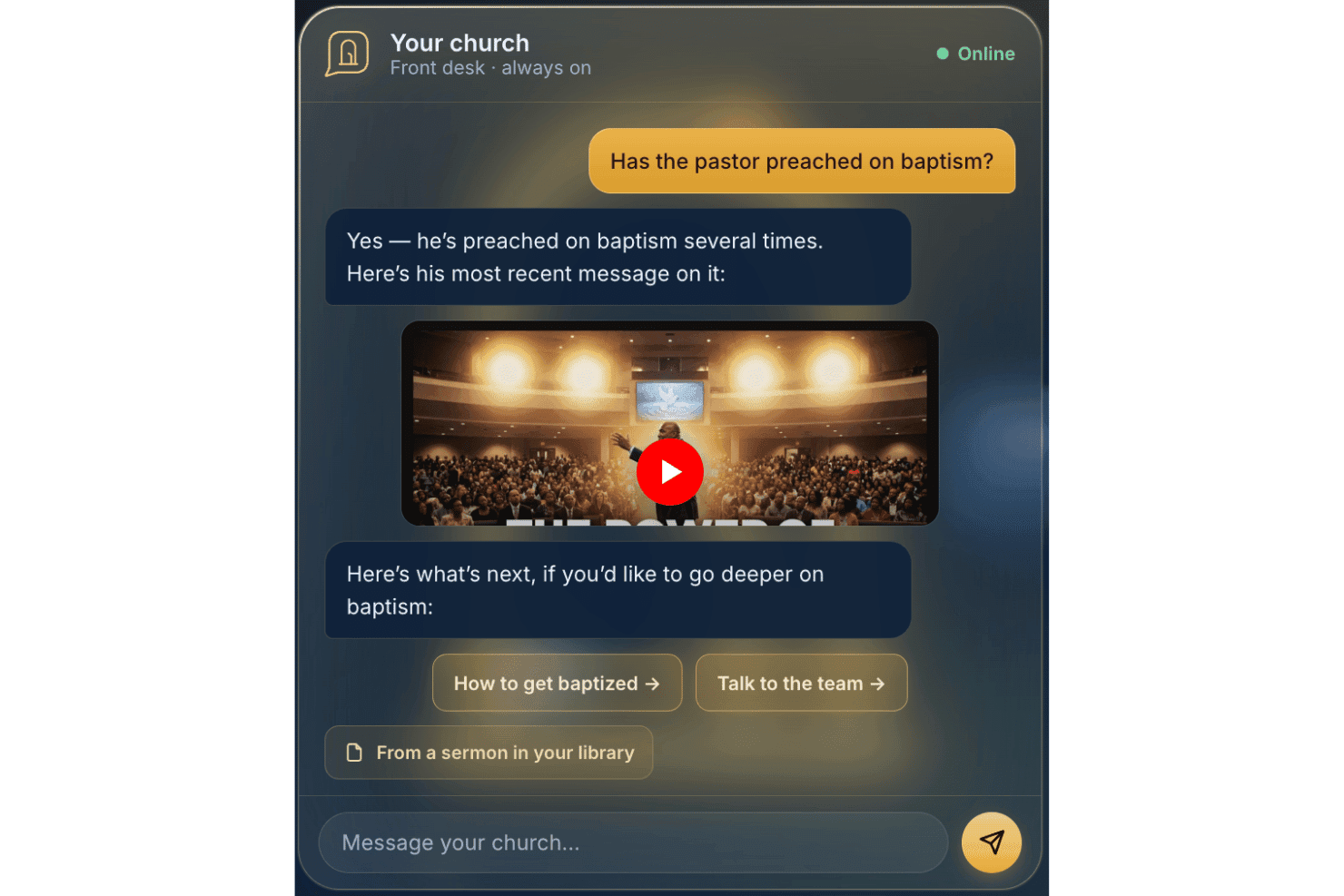
AskMyChurch offre un servizio di risposta per le chiese, attivo 24/7 e alimentato da AI. AskMyChurch è un chatbot AI per siti web delle chiese che risponde alle domande di visitatori e membri utilizzando i contenuti pubblicati dalla chiesa, sermoni e video, con inoltro integrato in caso di crisi, supporto bilingue e privacy anonima per impostazione predefinita.
Per chi è meglio AskMyChurch?
Chiese di qualsiasi dimensione che vogliono rispondere alle domande dei visitatori fuori orario senza raccogliere dati personali o richiedere al personale di monitorare una casella chat.
Perché ho scelto AskMyChurch
Ho scelto AskMyChurch perché il suo design anonimo per impostazione predefinita si distingue davvero tra gli strumenti AI per le chiese. I visitatori possono porre domande sensibili su lutto, dubbi sulla fede o salute mentale senza creare account o essere tracciati. Ciò che trovo particolarmente importante è il rigido blocco in caso di crisi: quando compaiono segnali di disagio, il sistema reindirizza a 988 e alla Crisis Text Line prima che venga generata qualsiasi risposta AI, un livello di responsabilità pastorale che non ho visto integrato direttamente in altri chatbot per chiese.
Caratteristiche principali di AskMyChurch
- Canon (voce del pastore): Le risposte provengono direttamente dai sermoni del pastore e riportano l'esatto momento in cui sono state pronunciate le parole.
- Controllo a doppio passaggio dell'attendibilità: Ogni risposta viene verificata due volte rispetto ai contenuti della chiesa per prevenire allucinazioni AI.
- Learning Loop: Rapporti settimanali evidenziano le domande senza risposta e i temi ricorrenti affinché gli amministratori della chiesa possano rivederli e affrontarli.
- Controllo degli argomenti: Gli amministratori possono disabilitare specifici argomenti o reindirizzare i visitatori utilizzando istruzioni in italiano semplice dalla dashboard.
Integrazioni di AskMyChurch
Le integrazioni native non sono documentate pubblicamente. Un'API per integrazioni personalizzate non è pubblicizzata.
Pros and Cons
Pros:
- Adatta le risposte per riflettere il marchio della chiesa
- Le risposte si basano sui sermoni del pastore
- L'AI evidenzia i temi dei visitatori ancora senza risposta
Cons:
- Nessuna gestione dati membri o presenza
- Non può gestire donazioni o campagne di raccolta fondi
Learn more about AskMyChurch: Ideale per la gestione automatizzata dei membri della chiesa
- Piano gratuito disponibile
- Da $12/mese (fatturazione mensile)
Visit WebsiteCustomer Rating:4.9/5
Pianificatore eventi di ChMeetings che mostra le riunioni di gruppo settimanali ricorrenti. ChMeetings offre una piattaforma digitale progettata specificamente per le chiese per gestire membri, eventi e comunicazioni. È una scelta pratica per pastori e responsabili di ministeri che desiderano centralizzare le attività amministrative e monitorare il coinvolgimento della comunità. Con funzionalità pensate per le comunità religiose, ChMeetings aiuta a semplificare le operazioni quotidiane e supportare la crescita del ministero.
A Chi È Destinato ChMeetings?
ChMeetings è particolarmente adatto ad amministratori di chiesa e responsabili di ministeri che devono gestire dati dei membri, eventi e comunicazioni in un unico posto.
Perché Ho Scelto ChMeetings
Ho scelto ChMeetings perché offre strumenti dedicati per la gestione dei membri e il monitoraggio degli eventi pensati per il contesto ecclesiale. La piattaforma permette di organizzare i profili dei membri, la presenza e la partecipazione ai gruppi, facilitando il monitoraggio del coinvolgimento della congregazione. Apprezzo anche che il monitoraggio degli eventi sia integrato, così puoi programmare, promuovere e tenere sotto controllo le attività della chiesa in un unico posto. Queste funzionalità aiutano i leader a rimanere organizzati e reattivi ai bisogni della comunità.
Caratteristiche Principali di ChMeetings
Altre funzionalità che rendono ChMeetings utile per l'amministrazione della chiesa includono:
- Accesso tramite app mobile: Gestisci i dati della chiesa e le comunicazioni da dispositivi iOS e Android.
- Messaggistica di massa: Invia email, SMS o notifiche push a singoli o gruppi.
- Monitoraggio delle donazioni: Registra, categorizza e genera report sulle offerte e sui contributi.
- Moduli personalizzati: Crea e distribuisci moduli per iscrizioni, sondaggi o adesioni di volontari.
Integrazioni di ChMeetings
Le integrazioni includono Stripe, PayPal, Bluesnap, Paystack, Mailchimp, Twilio, SMS Global, Clickatell, Eazismspro e altro ancora.
Pros and Cons
Pros:
- L'elenco dei membri supporta campi e tag personalizzati
- Check-in agli eventi con scansione QR code
- Monitoraggio integrato di donazioni e promesse
Cons:
- Nessuno strumento integrato per la pianificazione del culto
- Nessuna gestione di sermoni o libreria multimediale
Learn more about ChMeetings: Ideale per le donazioni digitali in chiesa
- Prova gratuita di 30 giorni disponibile
- Da $72/mese
Visit WebsiteCustomer Rating:4.7/5
Builder dell'app Tithely con editor per sermoni, eventi e sezioni di donazione. Se stai cercando una piattaforma digitale per le donazioni e il coinvolgimento costruita per le chiese, Tithely offre una soluzione mirata. È progettata per le comunità religiose che desiderano semplificare le donazioni online, gestire eventi e connettersi con i membri da un'unica dashboard. Tithely aiuta i responsabili delle chiese a gestire donazioni, comunicazioni e attività amministrative in modo adatto alle esigenze del ministero moderno.
Per chi è pensato Tithely?
Tithely è adatto a chiese e ministeri di piccole e medie dimensioni che vogliono centralizzare donazioni, comunicazioni e coinvolgimento dei membri.
Perché ho scelto Tithely
Ciò che mi ha colpito di Tithely è come riunisca strumenti di donazione, comunicazione e coinvolgimento in un'unica piattaforma progettata specificamente per le chiese. Il suo approccio 'tutto in uno' permette di gestire donazioni online e da mobile, registrazione agli eventi e messaggistica ai membri senza utilizzare più sistemi diversi. Vedo un reale valore in funzionalità come il tracciamento automatico delle donazioni e la comunicazione integrata via SMS ed email, che aiutano a snellire sia gli aspetti finanziari che quelli relazionali dell'amministrazione ecclesiastica. Per i ministeri che desiderano una soluzione unificata per gestire donazioni e coinvolgimento dei membri, Tithely si distingue come una scelta progettata appositamente.
Caratteristiche principali di Tithely
Altre funzionalità che rendono Tithely utile per l'amministrazione delle chiese includono:
- Creazione di app personalizzate per chiese: Crea un'app mobile personalizzata per la tua chiesa per condividere sermoni, eventi e avvisi.
- Strumenti di gestione eventi: Organizza, promuovi e monitora la partecipazione agli eventi e alle attività della chiesa.
- Gestione volontari: Pianifica, comunica e coordina i volontari per i diversi ministeri e servizi.
- Sistema digitale di check-in: Tieni traccia delle presenze ed effettua check-in sicuri di bambini o membri durante servizi ed eventi.
Integrazioni Tithely
Le integrazioni includono QuickBooks, RockRMS, The StudioC, Engiven, Elvanto, Salesforce, MinistryPlatform, Shelby Systems, FellowshipOne e altri.
Pros and Cons
Pros:
- Creazione di app personalizzate per il coinvolgimento dei membri
- Registrazione agli eventi con monitoraggio dei partecipanti inclusi
- Sistema digitale di check-in per il ministero dell’infanzia
Cons:
- Nessuna funzione integrata di contabilità o gestione stipendi
- Le commissioni di elaborazione delle donazioni sono più alte rispetto ad altri
 Ideale per la pianificazione dei servizi e dei volontari
- Prova gratuita di 30 giorni disponibile
- Da $15/mese
Visit WebsiteCustomer Rating:4.7/5
Dashboard di Planning Center con programmazione, gruppi, iscritti e donazioni. Se stai cercando un modo flessibile per gestire le operazioni della chiesa, Planning Center offre una suite di strumenti modulari pensati per i team ministeriali di qualsiasi dimensione. È particolarmente utile per le chiese che desiderano personalizzare i propri flussi di lavoro per eventi, volontari e comunicazioni. Planning Center ti aiuta a centralizzare la programmazione, tracciare le presenze e coordinare la pianificazione dei servizi in un unico posto.
Per chi è più adatto Planning Center?
Planning Center è adatto a chiese di qualsiasi dimensione che necessitano di strumenti modulari per gestire eventi, volontari e il coinvolgimento dei membri.
Perché ho scelto Planning Center
Ciò che mi colpisce di Planning Center è il suo approccio modulare, che ti permette di scegliere solo gli strumenti di cui la tua chiesa ha veramente bisogno. Apprezzo il fatto che si possano aggiungere o rimuovere moduli per la pianificazione dei servizi, le donazioni, i check-in e i gruppi, così la configurazione può crescere o cambiare in base alle necessità del ministero. Questa flessibilità significa che non sei vincolato a un sistema unico per tutti, e puoi adattare i flussi di lavoro ai diversi team o ministeri. Per le chiese che vogliono adattare l’amministrazione man mano che le esigenze cambiano, il design modulare di Planning Center lo rende una scelta valida.
Funzionalità principali di Planning Center
Altre funzionalità che rendono Planning Center utile per l'amministrazione della chiesa includono:
- Database delle persone: Gestisci profili dettagliati dei membri, monitora il coinvolgimento e organizza le famiglie in un unico posto.
- Flussi di lavoro automatici: Imposta processi passo dopo passo per follow-up, onboarding o gestione dei volontari.
- Prenotazione delle risorse: Prenota stanze, attrezzature e strutture per eventi o riunioni direttamente dalla piattaforma.
- Email e messaggi di testo: Invia comunicazioni mirate a singoli, gruppi o all'intera congregazione.
Integrazioni di Planning Center
Le integrazioni includono BoxCast, Checkr, Mailchimp, PraiseCharts, RehearsalMix, SongSelect, Clearstream, MinistrySafe, Protect My Ministry e altro ancora.
Pros and Cons
Pros:
- Check-in dei bambini integrato con funzionalità di sicurezza
- Flussi di lavoro automatici per follow-up e onboarding
- Profili dettagliati dei membri con monitoraggio del coinvolgimento
Cons:
- Nessuna gestione aziendale o delle donazioni integrata
- Le opzioni di reportistica sono limitate per esigenze personalizzate
Learn more about Planning Center: Ideale per donazioni digitali e approfondimenti sui donatori
- Demo gratuita disponibile
- Prezzo su richiesta
Visit WebsiteCustomer Rating:4/5
Pushpay aiuta le chiese a gestire donazioni, dichiarazioni di donazione e l’engagement dei donatori su un’unica piattaforma. Pushpay offre alle chiese un modo per gestire donazioni digitali e l’engagement dei membri da un’unica piattaforma. Se stai cercando una soluzione che connetta donazioni online, iscrizioni agli eventi e comunicazione, Pushpay riunisce questi strumenti per il tuo ministero. È progettato per leader che desiderano semplificare i compiti amministrativi e rafforzare i legami con la propria congregazione.
Per chi è più indicato Pushpay?
Pushpay è adatto a chiese e ministeri di medie e grandi dimensioni che necessitano di strumenti integrati per donazioni digitali e coinvolgimento dei membri.
Perché ho scelto Pushpay
Ho scelto Pushpay perché integra donazioni digitali e interazione in un’unica piattaforma, un’esigenza fondamentale per l’amministrazione delle chiese di oggi. Lo strumento ti permette di gestire donazioni online, ricorrenti e iscrizioni agli eventi tutto in un unico luogo, evitando di dover utilizzare sistemi diversi. Apprezzo anche come gli strumenti di comunicazione di Pushpay ti aiutino a raggiungere la congregazione attraverso messaggi e annunci mirati. Queste funzionalità semplificano il mantenimento dei contatti e gli aspetti amministrativi del ministero.
Funzionalità chiave di Pushpay
Altre funzionalità che rendono Pushpay utile per la gestione della chiesa includono:
- App mobile per i membri: I membri possono donare, iscriversi agli eventi e ricevere aggiornamenti direttamente dai loro telefoni.
- Dashboard per la gestione dei donatori: Monitora la cronologia delle donazioni, gestisci i profili dei donatori e genera dichiarazioni dei contributi in un unico posto.
- Moduli personalizzabili: Crea moduli per richieste di preghiera, iscrizioni dei volontari o sondaggi su misura per le esigenze del tuo ministero.
- Ricevute e messaggi di ringraziamento automatizzati: Invia automaticamente ricevute personalizzate e biglietti di ringraziamento dopo ogni donazione.
Integrazioni Pushpay
Le integrazioni includono Planning Center, QuickBooks, Gusto, MortarStone, Engiven, StudioC, VisitorTap, Checkr, Mailchimp e Resi.
Pros and Cons
Pros:
- Supporta donazioni digitali ricorrenti e singole
- Offre un’app mobile con marchio personalizzato per le congregazioni
- Tiene traccia dell’engagement dei donatori e delle tendenze di donazione
Cons:
- È necessario un contratto separato per lo streaming dal vivo
- Alcune integrazioni richiedono costi aggiuntivi
Learn more about Pushpay: Ideale per database di membri della chiesa facilmente ricercabili
- Demo gratuita disponibile
- Da $73.32/mese (fatturato annualmente)

Servant Keeper semplifica l'amministrazione della chiesa con strumenti per donazioni, gestione dei membri e reportistica. Servant Keeper offre ai responsabili delle chiese un modo per organizzare i dati dei membri, monitorare la partecipazione e gestire le contribuzioni tutto in un unico luogo. È pensato per i ministeri che desiderano ridurre l'inserimento manuale dei dati e migliorare l'accuratezza dei registri. Se stai cercando una soluzione che ti aiuti a stare al passo con le crescenti esigenze amministrative, Servant Keeper porta automazione e chiarezza nel tuo ufficio parrocchiale.
A chi è più adatto Servant Keeper?
Servant Keeper si adatta a chiese e ministeri di qualsiasi dimensione che necessitano di una gestione centralizzata dei membri e del monitoraggio delle donazioni.
Perché ho scelto Servant Keeper
Ho scelto Servant Keeper perché automatizza la gestione dei membri e la creazione di report, che sono esigenze centrali dell'amministrazione ecclesiastica. La piattaforma utilizza strumenti intelligenti per monitorare la partecipazione, gestire le contribuzioni e generare report dettagliati senza sforzi manuali. Apprezzo come permetta di cercare, filtrare e aggiornare rapidamente i dati dei membri, rendendo più semplice mantenere le informazioni precise e aggiornate. Queste funzionalità aiutano i responsabili delle chiese a passare meno tempo sulla burocrazia e più tempo concentrati sul ministero.
Principali funzionalità di Servant Keeper
Altre funzionalità che rendono Servant Keeper utile per l'amministrazione delle chiese includono:
- Creazione di gruppi personalizzati: Crea e gestisci gruppi per ministeri, classi o eventi per organizzare comunicazioni e attività.
- Email e messaggi di testo automatici: Invia messaggi mirati a individui o gruppi direttamente dalla piattaforma.
- Pianificazione dei volontari: Assegna, monitora e comunica con i volontari per varie funzioni o eventi nella chiesa.
- Sistema di check-in per bambini: Fornisce un processo sicuro di check-in e check-out per i ministeri e gli eventi dedicati ai bambini.
Integrazioni di Servant Keeper
Le integrazioni native non sono attualmente elencate.
Pros and Cons
Pros:
- Monitora partecipazione e donazioni in un unico luogo
- Offre funzione sicura di check-in per bambini
- Automatizza la gestione di gruppi e volontari
Cons:
- La configurazione iniziale può richiedere tempo
- Non dispone di gestione delle donazioni online integrata
Learn more about Servant Keeper: Ideale come assistente alla comunicazione basato su IA
- Demo gratuita disponibile
- Da $30/mese

AI Church Now utilizza l’intelligenza artificiale per semplificare l’amministrazione, la comunicazione e i flussi di lavoro ministeriali della chiesa. Se cerchi un assistente guidato dall’IA per aiutare a gestire le operazioni della chiesa, Church AI Now offre una soluzione mirata. Questo strumento è pensato per pastori e responsabili di chiesa che desiderano automatizzare comunicazioni, pianificazione e attività amministrative. È particolarmente utile per ministeri che vogliono risparmiare tempo e ridurre il lavoro manuale grazie a funzionalità basate sull’intelligenza artificiale.
Per chi è più adatto Church AI Now?
Church AI Now è ideale per chiese e ministeri di piccole e medie dimensioni che desiderano automatizzare le attività amministrative e di comunicazione di routine tramite l’IA.
Perché ho scelto Church AI Now
Ciò che mi ha colpito di Church AI Now è il suo focus sull’utilizzo dell’IA per gestire sia l’amministrazione che la comunicazione della chiesa su un’unica piattaforma. L’assistente intelligente può redigere annunci, rispondere alle domande dei membri e aiutare a pianificare incontri o eventi, supportando direttamente i leader di chiesa più impegnati. Apprezzo anche che automatizzi le attività ripetitive, liberando tempo per il lavoro pastorale. Queste caratteristiche lo rendono una soluzione adatta per le chiese che vogliono modernizzare i propri processi amministrativi con il supporto dell’IA.
Caratteristiche principali di Church AI Now
Altre funzionalità che rendono Church AI Now utile per l’amministrazione della chiesa includono:
- Strumenti di gestione dei volontari: Organizza, pianifica e comunica con i volontari direttamente dalla piattaforma.
- Archiviazione e condivisione documenti: Carica, archivia e condividi in sicurezza i documenti importanti della chiesa con dipendenti e membri.
- Sistema di registrazione agli eventi: Gestisci iscrizioni, conferme di presenza e liste dei partecipanti ad eventi e programmi della chiesa.
- Automazione dei flussi di lavoro personalizzabile: Imposta processi automatizzati per attività come i follow-up, i promemoria e le approvazioni.
Integrazioni di Church AI Now
Attualmente non sono elencate integrazioni native.
Pros and Cons
Pros:
- L’IA redige automaticamente annunci e newsletter
- Gestisce la pianificazione e i promemoria dei volontari
- Centralizza l’archiviazione documentale per il personale
Cons:
- Assenza di strumenti integrati per offerte o donazioni
- Manca la pianificazione del culto o della musica
Learn more about Church AI Now: Ideale per la gestione integrata dei membri e delle donazioni della chiesa
- Demo gratuita disponibile
- Prezzo su richiesta

Dashboard di FellowshipOne con grafici di presenze, donazioni e interazioni. Se stai cercando un sistema di gestione per chiese che dia priorità al coinvolgimento dei membri e al coordinamento dei ministeri, FellowshipOne merita considerazione. È progettato per le chiese che desiderano tracciare la partecipazione, gestire gruppi e comunicare con i membri da un'unica piattaforma. FellowshipOne aiuta ad affrontare la sfida di mantenere i dati della congregazione organizzati e accessibili sia per lo staff che per i volontari.
Per chi è più adatto FellowshipOne?
FellowshipOne è adatto a chiese di medie e grandi dimensioni che necessitano di strumenti avanzati per la gestione dell'engagement dei membri e delle operazioni ministeriali.
Perché ho scelto FellowshipOne
Ciò che mi ha colpito di FellowshipOne è il suo focus su strumenti avanzati per il coinvolgimento dei membri, essenziali per le chiese che vogliono approfondire le relazioni e tracciare la partecipazione. La piattaforma offre profili dettagliati dei membri e funzioni di gestione dei gruppi, facilitando l'organizzazione dei ministeri e il follow-up con i singoli. Apprezzo anche gli strumenti di comunicazione integrati che permettono di inviare messaggi mirati a gruppi o membri specifici. Queste capacità aiutano le chiese a mantenere la connessione con la congregazione e a garantire che nessuno venga trascurato.
Caratteristiche principali di FellowshipOne
- Altre caratteristiche che rendono FellowshipOne utile per l'amministrazione della chiesa includono:
- Tracciamento delle presenze: Monitora la partecipazione ai servizi, agli eventi e ai gruppi piccoli con report dettagliati.
- Gestione dei volontari: Pianifica, organizza e comunica con i volontari per vari ministeri ed eventi.
- Tracciamento delle donazioni: Registra, gestisci e genera report su donazioni e promesse fatte dai membri.
- Registrazione agli eventi: Configura e gestisci le iscrizioni online agli eventi, inclusi pagamenti e monitoraggio dei partecipanti.
Integrazioni di FellowshipOne
Le integrazioni includono FellowshipOne Giving, FellowshipOne Financials, Protect My Ministry, High Ground Solutions e altre.
Pros and Cons
Pros:
- Traccia profili dettagliati di membri e famiglie
- Offre flussi di lavoro automatizzati per le attività ministeriali
- Include strumenti integrati per la programmazione dei volontari
Cons:
- Manca una funzionalità integrata per la pianificazione dei servizi religiosi
- Gestione dei donatori e analisi delle donazioni limitate
Learn more about FellowshipOne: Ideale per l'amministrazione ecclesiastica potenziata dall'IA
- Piano gratuito + demo gratuita disponibile
- Da $60/mese

Configurazione della dashboard di gestione della chiesa per statistiche sui membri e visualizzazione della scheda dei totali delle donazioni. Relius utilizza l'IA per aiutare le chiese ad automatizzare e personalizzare le attività amministrative e di coinvolgimento. È pensato per pastori, responsabili di ministeri e personale della chiesa che desiderano semplificare la comunicazione, gestire i dati e migliorare il follow-up dei membri. Se stai cercando una piattaforma moderna che porti automazione intelligente nelle operazioni della chiesa, Relius merita sicuramente attenzione.
A Chi È Rivolto Relius?
Relius si adatta a chiese e team di ministero che cercano strumenti basati sull'IA per automatizzare l'amministrazione e approfondire il coinvolgimento dei membri.
Perché Ho Scelto Relius
Ciò che mi ha attratto di Relius è il suo focus sull'uso dell'IA per gestire sia l'amministrazione della chiesa che il coinvolgimento dei membri su un'unica piattaforma. Vedo un grande valore nei suoi strumenti di comunicazione con IA, che aiutano ad automatizzare follow-up personalizzati e promemoria per i membri. Relius offre anche funzioni intelligenti di gestione dei dati, permettendo di tracciare la presenza, le donazioni e l'attività dei membri con pochissimo sforzo manuale. Per le chiese che vogliono modernizzare le proprie operazioni e connettersi in modo più intenzionale con la congregazione, Relius rappresenta un connubio tra automazione e coinvolgimento difficile da trovare altrove.
Funzionalità Principali di Relius
Altre funzionalità che rendono Relius utile per la gestione amministrativa della chiesa includono:
- Strumenti per la gestione degli eventi: Pianifica, organizza e monitora gli eventi della chiesa con RSVP integrato e tracciamento delle presenze.
- Coordinamento dei volontari: Assegna ruoli, gestisci le iscrizioni dei volontari e comunica i calendari direttamente sulla piattaforma.
- Monitoraggio delle donazioni: Tieni sotto controllo le modalità di donazione, genera rendiconti dei contributi e gestisci in modo sicuro gli archivi dei donatori.
- Archiviazione dei documenti: Archivia, organizza e condividi i documenti e le risorse importanti della chiesa in una biblioteca digitale centralizzata.
Integrazioni di Relius
Le integrazioni native non sono attualmente elencate.
Pros and Cons
Pros:
- L'IA automatizza i follow-up personalizzati dei membri
- Check-in sicuro dei bambini per gli eventi
- Moduli e campi personalizzati illimitati
Cons:
- Le funzionalità dell'app mobile sono basilari
- La programmazione dei volontari non offre opzioni flessibili
Learn more about Relius: 10Ideale per la preparazione dei sermoni assistita dall'IA
Gracely
- Prova gratuita di 30 giorni + piano gratuito + demo gratuita disponibile
- Da $19/mese (fatturato annualmente)

Profilo membro Gracely con cronologia delle donazioni, gruppi e dettagli personali. Se stai cercando una piattaforma basata sull'IA per aiutare la tua chiesa a comunicare e coinvolgere i membri in modo più personale, Gracely merita attenzione. È progettata per pastori e team ministeriali che vogliono automatizzare il contatto, il follow-up e la cura pastorale. Gracely aiuta le chiese ad affrontare la sfida di rimanere connesse con i propri membri gestendo al contempo agende ministeriali molto intense.
A chi è più adatto Gracely?
Gracely è particolarmente indicato per pastori e team di comunicazione che desiderano automatizzare il coinvolgimento e il contatto personalizzato con i membri.
Perché ho scelto Gracely
Ciò che mi ha colpito di Gracely è la sua attenzione alla comunicazione e al coinvolgimento ecclesiastico supportati dall'IA, rispondendo a un'esigenza sempre più sentita da molte comunità cristiane. La piattaforma utilizza l'intelligenza artificiale per aiutare le chiese ad automatizzare messaggi personalizzati, follow-up e promemoria, così i leader possono mantenere relazioni significative senza sforzi manuali. Apprezzo anche la possibilità offerta da Gracely di segmentare la congregazione e programmare le comunicazioni, facilitando la personalizzazione verso diversi gruppi. Queste caratteristiche rendono Gracely una soluzione pratica per le chiese che desiderano rafforzare le relazioni e aumentare il coinvolgimento attraverso un'automazione intelligente.
Funzionalità principali di Gracely
Altre funzionalità che rendono Gracely utile per l'amministrazione della chiesa includono:
- Gestione delle richieste di preghiera tramite IA: Raccogli, organizza e rispondi alle richieste di preghiera grazie a flussi di lavoro automatizzati.
- Coordinamento di eventi e volontari: Pianifica eventi e gestisci le iscrizioni dei volontari direttamente dalla piattaforma.
- Cruscotto di analisi: Monitora metriche di coinvolgimento ed efficacia della comunicazione con report in tempo reale.
- Accesso da app mobile: Gestisci comunicazioni e contatti da dispositivi iOS e Android.
Integrazioni Gracely
Attualmente non sono elencate integrazioni native.
Pros and Cons
Pros:
- L'IA automatizza il follow-up personalizzato dei membri
- Gestione delle richieste di preghiera con risposte automatiche
- Strumenti per programmare eventi e iscrivere volontari
Cons:
- Nessuna funzione integrata per la pianificazione del culto
- Manca la gestione di sermoni o librerie multimediali
- Opzioni limitate per report personalizzati
- Nessuna integrazione nativa con altri strumenti per chiese
- La programmazione dei volontari non offre funzionalità avanzate
Learn more about Gracely:
Altri strumenti di IA per l'amministrazione della chiesa
Ecco alcune ulteriori opzioni di strumenti di IA per l’amministrazione della chiesa che non sono entrate nella mia selezione, ma che vale comunque la pena prendere in considerazione:
- 11ChurchTracIdeale per la gestione tutto-in-uno delle chiese
- 12Church.techIdeale per operazioni parrocchiali potenziate dall'IA
- 13ChurchSocial.AIIdeale per il coinvolgimento della comunità della chiesa tramite l'IA
Come Valuto gli Strumenti AI per l'Amministrazione delle Chiese
Ogni strumento in questo elenco deve offrire un reale valore aggiunto tramite l'IA—non solo un chatbot integrato in un database di membri. Suddivido la mia valutazione in funzionalità di base che ogni piattaforma deve necessariamente possedere e fattori distintivi che differenziano la soluzione migliore per la tua chiesa dal resto delle opzioni disponibili.
Funzionalità di Base (Requisiti Minimi per Questa Lista)
Quando seleziono gli strumenti per la mia lista, assegno a ciascuno un punteggio da 0 (non offre la funzionalità) a 5 (eccelle in questa area) per ogni caratteristica di base elencata di seguito. Poi, converto il punteggio totale in una percentuale. Ogni strumento deve raggiungere un punteggio totale minimo del 55% per poter essere preso in considerazione.
- Gestione dei Membri Basata su IA: Cerco strumenti che usino l'IA per segmentare la congregazione, rilevare record duplicati e arricchire automaticamente i profili dei membri invece di richiedere una pulizia manuale dei dati.
- Elaborazione Intelligente delle Donazioni: La piattaforma dovrebbe monitorare i modelli di donazione e segnalare anomalie, come un improvviso calo delle decime ricorrenti, automatizzando anche le dichiarazioni fiscali di fine anno.
- Generazione di Contenuti con IA: Valuto se lo strumento può redigere bozze di scalette per sermoni, newsletter settimanali o post per i social media che risultino pertinenti per il contesto della congregazione.
- Automazione Intelligente della Pianificazione: Il coordinamento dei volontari è una sfida costante, quindi verifico quanto efficacemente l'IA assegna i ruoli in base alla disponibilità, alle competenze e alla cronologia delle partecipazioni precedenti.
- Analisi Predittiva del Coinvolgimento: Cerco dashboard alimentate dall'IA che evidenzino tendenze come la diminuzione della partecipazione o i membri a rischio, invece di semplici rapporti statici sul numero di presenti.
- Comunicazioni Automatizzate: Lo strumento dovrebbe personalizzare i contatti tramite email e SMS, come l'invio di follow-up mirati ai visitatori per la prima volta o ai membri inattivi.
Quando ho una lista di strumenti che soddisfano questi criteri, considero cosa rende unica ogni piattaforma.
Fattori Distintivi (Cosa Rende Unico Ogni Fornitore)
Ecco come confronto e metto in risalto i diversi fornitori:
Funzionalità Distintive
I segnali di cura pastorale basati su IA attirano la mia attenzione perché aiutano i pastori a individuare membri che potrebbero allontanarsi prima che sia troppo tardi. Valuto anche gli strumenti di supporto per la preparazione dei sermoni—un'IA che redige scalette in linea con il calendario liturgico o una serie di sermoni fa risparmiare ore di preparazione settimanale. Per le congregazioni multiculturali, la traduzione multilingue integrata negli annunci e nelle comunicazioni con i membri abbatte un vero ostacolo all'inclusione.
Oltre le Funzionalità
La privacy dei dati conta più qui che nella maggior parte delle altre categorie di software—le note relative al supporto pastorale e i registri di accesso dei bambini richiedono la massima riservatezza, quindi verifico come ogni fornitore gestisce i dati sensibili e se utilizza le informazioni della congregazione per addestrare i modelli di IA. Anche le integrazioni con strumenti come Planning Center, Pushpay o ProPresenter sono molto rilevanti. E poiché molte chiese si affidano a personale part-time e volontari a rotazione, valuto quanto velocemente un utente non tecnico possa iniziare a lavorare senza il supporto di un IT dedicato.
Come scegliere gli strumenti di IA per l'amministrazione della chiesa
È facile perdersi in lunghi elenchi di funzionalità e strutture tariffarie complesse. Per aiutarti a rimanere concentrato mentre affronti il tuo specifico processo di selezione del software, ecco un elenco di fattori da tenere presenti:
| Fattore | Cosa considerare |
|---|---|
| FattoreScalabilità | Cosa considerareLo strumento supporterà la vostra chiesa mentre cresce in termini di dimensioni, ministeri o sedi? Verificate i limiti degli utenti, i limiti dei dati e le opzioni di aggiornamento. |
| FattoreIntegrazioni | Cosa considerareLo strumento si collega ai sistemi esistenti per la contabilità, la comunicazione o le donazioni? Verificate le integrazioni native ed evitate l'inserimento manuale dei dati. |
| FattorePersonalizzazione | Cosa considerarePotete adattare flussi di lavoro, campi e report per riflettere i processi e la terminologia specifici della vostra chiesa? Evitate sistemi rigidi che vi costringono ad adattarvi. |
| FattoreFacilità d'uso | Cosa considerareIl personale e i volontari con diversi livelli di competenza tecnologica saranno in grado di utilizzare lo strumento con sicurezza? Cercate una navigazione chiara e requisiti di formazione minimi. |
| FattoreImplementazione e avviamento | Cosa considerareQuanto tempo occorrerà per essere operativi? Informatevi sul supporto alla migrazione, sulle risorse per la formazione e sulle tempistiche tipiche di avviamento per chiese delle vostre dimensioni. |
| FattoreCosto | Cosa considerareTutte le funzionalità necessarie rientrano nel vostro budget? Fate attenzione ai costi aggiuntivi, agli aggiornamenti obbligatori o ai prezzi per utente che potrebbero aumentare nel tempo. |
| FattoreMisure di sicurezza | Cosa considerareIn che modo lo strumento protegge i dati sensibili dei membri e quelli finanziari? Cercate crittografia, controlli degli accessi e conformità agli standard sulla privacy. |
| FattoreDisponibilità dell'assistenza | Cosa considerareQuando si verificano problemi, potete contattare rapidamente l'assistenza? Verificate la disponibilità di chat dal vivo, supporto telefonico o durante il fine settimana, soprattutto se utilizzate lo strumento per le attività della domenica. |
Cosa sono gli strumenti di IA per l'amministrazione delle chiese?
Gli strumenti di IA per l'amministrazione delle chiese sono soluzioni software che utilizzano l'intelligenza artificiale per automatizzare, organizzare e migliorare le attività di gestione della chiesa. Questi strumenti aiutano le chiese a gestire i dati dei membri, programmare i volontari, monitorare le presenze, elaborare le donazioni e comunicare con le congregazioni. Sfruttando l'IA, le chiese possono semplificare le operazioni di routine, ottenere informazioni utili dai dati e concentrarsi maggiormente sul ministero e sul coinvolgimento della comunità.
Funzionalità degli strumenti di IA per l'amministrazione delle chiese
Quando scegliete gli strumenti di IA per l'amministrazione delle chiese, prestate attenzione alle seguenti funzionalità chiave:
- Gestione dei membri: centralizza i profili dei membri e delle famiglie, monitora il coinvolgimento e organizza le informazioni di contatto per facilitare i contatti successivi e le attività di sensibilizzazione.
- Monitoraggio delle presenze: registra le presenze ai servizi, agli eventi e ai piccoli gruppi, fornendo informazioni utili sulle tendenze di partecipazione e sui livelli di coinvolgimento.
- Programmazione dei volontari: automatizza le iscrizioni dei volontari, l'assegnazione dei turni e i promemoria, contribuendo a coordinare i team per eventi e ministeri.
- Elaborazione delle donazioni: accetta, registra e produce report sulle donazioni online e offline, comprese le donazioni ricorrenti e il monitoraggio degli impegni di donazione.
- Registrazione agli eventi: gestisce le iscrizioni, i pagamenti e le comunicazioni per eventi, corsi e programmi della chiesa.
- Comunicazioni automatizzate: invia e-mail, messaggi di testo o notifiche dell'app mirati a gruppi specifici o singoli individui in base all'attività o alle esigenze.
- Report e analisi: genera report personalizzabili su presenze, donazioni e coinvolgimento, utilizzando l'IA per evidenziare le tendenze e suggerire azioni.
- Automazione dei flussi di lavoro: semplifica le attività amministrative di routine, come i contatti successivi, le approvazioni e i promemoria, riducendo il lavoro manuale.
- Capacità di integrazione: si collega ad altri sistemi della chiesa, come quelli per la contabilità, i siti web o le piattaforme di comunicazione, per garantire un flusso regolare dei dati.
- Sicurezza e autorizzazioni: protegge i dati sensibili con controlli degli accessi degli utenti, crittografia e conformità agli standard sulla privacy.
Vantaggi degli strumenti di IA per l'amministrazione delle chiese
L'implementazione di strumenti di IA per l'amministrazione delle chiese offre diversi vantaggi al vostro team e alla vostra organizzazione. Ecco alcuni dei vantaggi che potete aspettarvi:
- Risparmio di tempo: automatizzare attività di routine come il monitoraggio delle presenze e la programmazione dei volontari libera ore del personale e dei volontari, che possono essere dedicate al ministero e alla costruzione di relazioni.
- Maggiore accuratezza dei dati: la gestione centralizzata dei membri e l'inserimento automatizzato dei dati riducono gli errori e mantengono aggiornati i record.
- Maggiore coinvolgimento: le comunicazioni mirate e le informazioni utili basate sull'IA aiutano a entrare in contatto con membri e visitatori in modo più significativo e tempestivo.
- Processo decisionale migliore: le funzionalità di report e analisi forniscono informazioni utili per agire sulle tendenze relative a donazioni, presenze e coinvolgimento.
- Gestione semplificata degli eventi: gli strumenti integrati per la registrazione agli eventi e i pagamenti rendono più semplice per il personale e i partecipanti organizzare e monitorare gli eventi della chiesa.
- Maggiore sicurezza: le autorizzazioni integrate e le funzionalità di protezione dei dati salvaguardano le informazioni sensibili dei membri e quelle finanziarie.
- Scalabilità: i sistemi flessibili crescono insieme alla vostra chiesa, supportando ulteriori ministeri, utenti e dati con l'evolversi delle vostre esigenze.
Costi e prezzi degli strumenti di IA per l'amministrazione della chiesa
La selezione degli strumenti di IA per l'amministrazione della chiesa richiede la comprensione dei vari modelli di prezzo e dei piani disponibili. I costi variano in base alle funzionalità, alle dimensioni del team, ai componenti aggiuntivi e ad altri fattori. La tabella seguente riassume i piani più comuni, i relativi prezzi medi e le funzionalità tipicamente incluse nelle soluzioni di strumenti di IA per l'amministrazione della chiesa:
Tabella comparativa dei piani per gli strumenti di IA per l'amministrazione della chiesa
| Tipo di piano | Prezzo medio | Funzionalità comuni |
|---|---|---|
| Tipo di pianoPiano gratuito | Prezzo medio$0 | Funzionalità comuniGestione di base dei membri, monitoraggio limitato delle presenze, registrazione semplice agli eventi e report di base. |
| Tipo di pianoPiano personale | Prezzo medio$10-$25/utente/mese | Funzionalità comuniGestione di membri e volontari, monitoraggio delle presenze, elaborazione delle donazioni e comunicazioni via e-mail. |
| Tipo di pianoPiano aziendale | Prezzo medio$30-$60/utente/mese | Funzionalità comuniReport avanzati, automazione dei flussi di lavoro, integrazioni, messaggistica di gruppo e sicurezza avanzata. |
| Tipo di pianoPiano per grandi organizzazioni | Prezzo medio$75-$150/utente/mese | Funzionalità comuniFlussi di lavoro personalizzati, assistenza prioritaria, analisi avanzate, accesso all'API e avviamento dedicato. |
Domande frequenti sugli strumenti di IA per l'amministrazione della chiesa
Ecco alcune risposte alle domande comuni sugli strumenti di IA per l’amministrazione della chiesa:
In che modo gli strumenti di IA aiutano a coinvolgere i membri della chiesa?
Gli strumenti di IA analizzano le presenze, i modelli di comunicazione e le tendenze nelle donazioni per identificare i membri che potrebbero aver bisogno di un seguito o di incoraggiamento. Ciò consente ai responsabili della chiesa di contattarli in modo più personale e di assicurarsi che nessuno venga trascurato.
Gli strumenti di IA per l'amministrazione della chiesa possono integrarsi con il software che già utilizziamo?
Sì, la maggior parte degli strumenti di IA per l’amministrazione della chiesa offre integrazioni con piattaforme diffuse di contabilità, comunicazione e gestione delle donazioni. Verifica sempre la compatibilità con i sistemi attuali prima di prendere una decisione.
Gli strumenti di IA per l'amministrazione della chiesa sono sicuri per i dati sensibili?
Sì, gli strumenti di IA affidabili utilizzano la crittografia, i controlli di accesso e misure di conformità per proteggere i dati dei membri e quelli finanziari. Esamina sempre le politiche di sicurezza del fornitore e informati sugli standard di privacy prima dell’implementazione.
Quanta formazione è necessaria per utilizzare questi strumenti?
La maggior parte degli strumenti di IA per l’amministrazione della chiesa è progettata per essere facile da usare e offre risorse per l’avviamento, come tutorial, webinar e assistenza. Tuttavia, alcune funzionalità avanzate possono richiedere una formazione aggiuntiva per il personale o i volontari.