

Las herramientas de IA para la gestión de iglesias son soluciones de software que utilizan inteligencia artificial para ayudar a las iglesias a organizar sus operaciones, involucrar a sus miembros y respaldar los objetivos del ministerio. Si buscas formas de equilibrar el liderazgo espiritual con las exigencias administrativas, estas herramientas pueden ayudarte a automatizar tareas rutinarias, mejorar la comunicación y tomar decisiones basadas en datos.
Con recursos limitados y expectativas cada vez mayores, elegir las herramientas de IA adecuadas puede liberar tiempo para la atención pastoral y fortalecer el impacto de tu iglesia.
En esta lista encontrarás opciones confiables que te ayudarán a gestionar eventos, donaciones, comunicación y mucho más, para que puedas concentrarte en liderar bien a tu congregación.
Por qué confiar en nuestras recomendaciones de software
6,700+
Reviews
20
Industry experts
16+
Evaluation factors
14
Years
Nuestro equipo lleva probando y evaluando software desde 2012. Como líderes eclesiásticos, sabemos lo difícil —y lo importante— que es elegir el software adecuado.
Para esta guía, evaluamos las herramientas mediante pruebas prácticas e investigación independiente, puntuando las herramientas según nuestros criterios de selección.
Nuestras reseñas reflejan nuestro criterio editorial humano, no un discurso de ventas.
Resumen de las mejores herramientas de IA para la gestión de iglesias
Esta tabla comparativa resume los detalles de precios de mis principales selecciones de herramientas de IA para la gestión de iglesias, para ayudarte a encontrar la mejor opción según tu presupuesto y las necesidades de tu organización.
| Tool | Best For | Trial Info | Price | ||
|---|---|---|---|---|---|
| 1 | La mejor opción para respuestas de IA basadas en contenido de la iglesia | Prueba gratuita de 60 días disponible | Desde $99/mes | Website | |
| 2 | Ideal para consultar los datos de la iglesia mediante su propia IA | Plan gratuito disponible O prueba gratuita de 30 días | Desde 12 $/mes | Website | |
| 3 | Ideal para traducción de sermones multilingües en vivo | Prueba gratuita disponible | Desde $150/mes | Website | |
| 4 | Ideal para donaciones digitales y gestión de donativos | Prueba gratuita de 30 días disponible | Desde $72/mes | Website | |
| 5 | Ideal para la coordinación de horarios de voluntarios | Prueba gratuita de 30 días disponible | Desde $15/mes | Website | |
| 6 | Ideal para funciones de interacción centradas en dispositivos móviles | Demostración gratuita disponible | Precio bajo consulta | Website | |
| 7 | Ideal para la creación y gestión de sitios web | Prueba gratuita de 14 días | Desde $29/mes (facturado anualmente) | Website | |
| 8 | Ideal para la gestión personalizada de datos | Demostración gratuita disponible | Precio a consultar | Website | |
| 9 | Ideal para transformar sermones en contenido compartible | Prueba gratuita disponible | Desde $39/mes | Website | |
| 10 | Ideal para flujos de trabajo automatizados de programación de eventos | Plan gratuito disponible | Desde $65/mes | Website |


Reseñas de herramientas de IA para la gestión de iglesias
A continuación se presentan mis resúmenes detallados de las mejores herramientas de IA para la gestión de iglesias que llegaron a mi selección. Mis reseñas ofrecen un análisis detallado de las funciones, los mejores casos de uso y las integraciones de cada plataforma para ayudarte a encontrar la mejor opción para tu iglesia.
 La mejor opción para respuestas de IA basadas en contenido de la iglesia
- Prueba gratuita de 60 días disponible
- Desde $99/mes
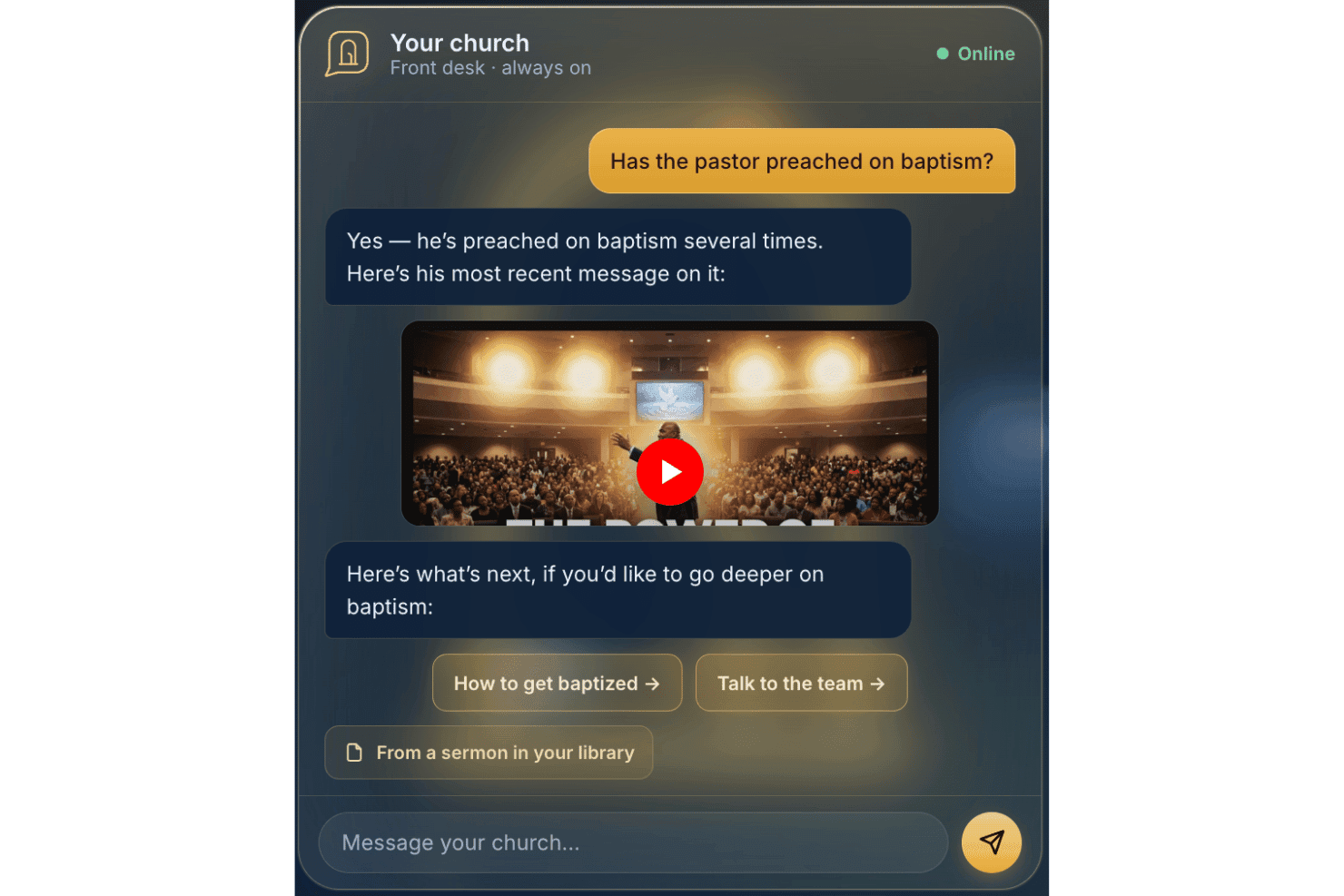
AskMyChurch ofrece un servicio de respuestas con IA para iglesias las 24 horas del día, los 7 días de la semana. Diseñado para sitios web de iglesias, AskMyChurch es un asistente de IA dirigido a los congregantes que responde preguntas utilizando la información extraída de las propias páginas, sermones y videos de la iglesia, con una función de citas de sermones con voz de pastor y un sistema rígido de derivación para casos de crisis.
¿Para Quién Es AskMyChurch?
AskMyChurch es ideal para iglesias pequeñas o medianas que reciben un gran volumen de preguntas recurrentes de visitantes, pero cuentan con poco personal administrativo disponible para responderlas las 24 horas.
Por Qué Elegí AskMyChurch
AskMyChurch merece un lugar en mi lista porque toma muy en serio la promesa de 'información extraída de contenido de la iglesia'. El asistente realiza una segunda comprobación después de cada respuesta para confirmar que realmente está basada en lo que su iglesia ha publicado, y si no puede encontrar la respuesta, lo indica en vez de adivinar. También me gusta la función Canon, que permite a los visitantes formular preguntas sobre sermones pasados y recibir una respuesta citada, con sello de tiempo y enlace al minuto exacto en que el pastor lo dijo.
Características Clave de AskMyChurch
- Derivación codificada para crisis: Los mensajes urgentes o de angustia se envían directamente a líneas de ayuda para crisis y al cuidado pastoral de la iglesia antes de cualquier respuesta de IA.
- Experiencia anónima y sin inicio de sesión: Los visitantes pueden hacer preguntas sin necesidad de crear una cuenta o compartir información personal.
- Soporte multilingüe: El asistente gestiona preguntas y derivaciones de crisis tanto en inglés como en español.
- Controles de contenido en lenguaje simple: Puede actualizar rápidamente qué temas debe o no debe responder el asistente, directamente desde su panel de control.
Integraciones de AskMyChurch
Las integraciones nativas no están documentadas públicamente. El asistente indexa las páginas, sermones y videos del sitio web de su iglesia para obtener contenido, pero no anuncia integraciones oficiales con herramientas o plataformas externas.
Pros and Cons
Pros:
- Adapta las respuestas para reflejar la identidad de la iglesia
- Responde consultas de congregantes todo el día
- Derivación a crisis incorporada sin necesidad de plugin
Cons:
- Sin registros de personas, donativos o herramientas de eventos
- No está diseñado para la productividad del personal interno
Learn more about AskMyChurch: Ideal para consultar los datos de la iglesia mediante su propia IA
- Plan gratuito disponible O prueba gratuita de 30 días
- Desde 12 $/mes
Visit WebsiteCustomer Rating:4.9/5
ChMeetings permite a los usuarios realizar un seguimiento visual de los fondos y los saldos de las cuentas de la iglesia. ChMeetings es una plataforma de gestión eclesial que abarca los registros de miembros, las donaciones, la asistencia, la programación de voluntarios, la planificación del culto y las comunicaciones, con un conjunto cada vez mayor de herramientas de IA, incluido un asistente para redactar correos electrónicos, una búsqueda de personas en lenguaje natural y un conector MCP que vincula los datos activos de su iglesia con asistentes de IA externos como ChatGPT, Claude y Gemini.
¿Para quién es más adecuado ChMeetings?
ChMeetings es una excelente opción para iglesias pequeñas y medianas que desean una base completa de gestión eclesial y la flexibilidad de consultar sus propios datos mediante herramientas de IA como ChatGPT o Claude.
Por qué elegí ChMeetings
Elegí ChMeetings porque su conector MCP no se parece a nada que haya visto en otro software de gestión eclesial. Permite que su equipo consulte datos activos de la iglesia —registros de donaciones, asistencia y notas de los miembros— directamente a través de ChatGPT, Claude o Gemini usando un lenguaje sencillo. Pregunte '¿Quiénes son nuestros principales donantes este mes?' y su asistente de IA obtiene la respuesta de los datos reales de ChMeetings. Si a eso le añadimos la búsqueda de personas mediante lenguaje natural impulsada por IA, creo que se obtiene una configuración realmente flexible para el personal que desea incorporar sus propias herramientas de IA al trabajo.
Características principales de ChMeetings
- Asistente de IA para redactar correos electrónicos: Redacta, modifica el tono y traduce el contenido de los correos electrónicos directamente dentro del diseñador de correos a partir de una indicación en inglés sencillo.
- Registro de niños mediante escaneo de códigos QR: Admite el registro familiar, el escaneo de códigos QR y la impresión de etiquetas con nombres para realizar un seguimiento seguro de la asistencia.
- Planificación de servicios de culto: Permite que su equipo cree órdenes de servicio con canciones, oraciones y espacios para sermones, gestione una biblioteca centralizada de canciones y programe a los miembros del equipo de culto.
- Flujos de trabajo automatizados de seguimiento: Activa tareas de seguimiento para recién llegados, personas ausentes y asistentes a eventos según los datos de asistencia y los campos de fecha personalizados.
Integraciones de ChMeetings
ChMeetings se integra con Stripe, PayPal, Square, Mailchimp, Twilio y Plaid, además de ChatGPT, Claude, Gemini y Grok mediante su conector MCP. Ofrece una API REST y Zapier para integraciones personalizadas.
Pros and Cons
Pros:
- Permite al personal consultar los datos activos de la iglesia mediante IA
- El asistente para redactar correos electrónicos admite el tono y la traducción
- La asistencia multilingüe abarca 26 idiomas
Cons:
- No ofrece análisis predictivos para las donaciones o la asistencia
- Carece de un chatbot de IA para la interacción con los miembros
Learn more about ChMeetings: Ideal para traducción de sermones multilingües en vivo
- Prueba gratuita disponible
- Desde $150/mes

One Accord Translation ofrece traducción multilingüe en tiempo real para reuniones de iglesias, permitiendo interpretación en varios idiomas en vivo mediante una aplicación móvil. OneAccord es una plataforma de gestión de iglesias impulsada por IA que ofrece traducción de sermones en vivo, monitoreo de audio en tiempo real y acceso para la congregación desde el navegador, diseñada para entornos de culto multilingües e híbridos.
¿Para quién es mejor OneAccord?
Líderes de iglesias y equipos técnicos que necesitan herramientas basadas en inteligencia artificial para el culto multilingüe y la participación de la congregación a través del navegador.
Por qué elegí OneAccord
Elegí OneAccord como uno de los mejores porque puedo ofrecer traducción en vivo de sermones multilingües directamente a mi congregación. Me gusta que admite reconocimiento de voz y traducción en tiempo real para decenas de idiomas, así todos pueden seguir el mensaje. Mi equipo usa la interfaz basada en el navegador para que los asistentes puedan acceder a las traducciones desde sus propios dispositivos durante los servicios.
Principales características de OneAccord
- Monitoreo de la calidad de audio: Rastrea y muestra niveles y claridad de audio en tiempo real durante eventos en vivo.
- Grabación de sesiones: Graba sermones y traducciones para revisión posterior o para compartir.
- Panel de administración: Centraliza el control para administrar eventos, usuarios y configuraciones de traducción.
Integraciones de OneAccord
Las integraciones nativas no están claramente documentadas. Hay una API disponible para integraciones personalizadas.
Pros and Cons
Pros:
- Monitoreo de calidad de audio con alertas instantáneas
- Personalización de marca que permite una experiencia consistente de iglesia en todas las sesiones
- Grabación de sesiones con transcripciones descargables
Cons:
- El precio puede ser alto para iglesias pequeñas
- Sin herramientas integradas de programación de eventos ni calendario
Learn more about OneAccord: Ideal para donaciones digitales y gestión de donativos
- Prueba gratuita de 30 días disponible
- Desde $72/mes
Visit WebsiteCustomer Rating:4.8/5
Tithe.ly gestiona donaciones digitales y organiza los registros de donantes de la iglesia. Si buscas una plataforma que ayude a las iglesias a gestionar las donaciones digitales y el compromiso de los miembros, Tithely merece la pena considerar. Está diseñada para líderes de iglesia y equipos financieros que desean simplificar las donaciones en línea y hacer seguimiento de las contribuciones. Tithely aborda el desafío de gestionar múltiples canales de donación mientras mantiene los datos de los donantes organizados y accesibles.
¿Para quién es mejor Tithely?
Tithely es una buena opción para iglesias y ministerios de cualquier tamaño que quieran centralizar y modernizar sus procesos de donaciones digitales.
Por qué elegí Tithely
Lo que me atrajo de Tithely es cómo se especializa en las donaciones digitales y la gestión de donativos para iglesias. La plataforma ofrece un conjunto de opciones para donar, como dar por mensaje de texto, donaciones a través de una app móvil y la configuración de donaciones recurrentes, lo que facilita que los miembros contribuyan de la manera que más les convenga. Además, también busca equilibrar las donaciones digitales con consideraciones éticas.
También valoro las herramientas de informes integradas que ayudan a los líderes de iglesia a rastrear tendencias en las donaciones y patrones de contribución en tiempo real. Para iglesias que desean modernizar su administración y hacer que las donaciones sean accesibles desde cualquier lugar, las funciones específicas de Tithely lo convierten en una opción sólida.
Características clave de Tithely
Otras características que hacen útil a Tithely para la gestión eclesiástica incluyen:
- Registro y venta de entradas para eventos: Gestiona inscripciones y pagos de eventos de la iglesia directamente dentro de la plataforma.
- Constructor de apps personalizadas para iglesias: Crea una aplicación móvil con la marca de tu iglesia para involucrar a los miembros y compartir contenido.
- Automatización de correos electrónicos y SMS: Envía mensajes programados o automáticos para mantener informada a tu congregación.
- Panel de gestión de miembros: Organiza, rastrea y actualiza perfiles e historial de participación de los miembros en un solo lugar.
Integraciones de Tithely
Las integraciones incluyen QuickBooks Online, RockRMS, Engiven, Elvanto, Salesforce, MinistryPlatform, Planning Center y más.
Pros and Cons
Pros:
- Admite múltiples métodos de donación digital
- Permite crear una app personalizada para iglesias
- Ofrece informes detallados de donaciones y donantes
Cons:
- Las funciones de gestión de eventos son básicas
- Opciones de personalización limitadas para formularios
 Ideal para la coordinación de horarios de voluntarios
- Prueba gratuita de 30 días disponible
- Desde $15/mes
Visit WebsiteCustomer Rating:4.7/5
Planning Center organiza equipos de la iglesia, horarios y la planificación de servicios. Planning Center ofrece una suite de herramientas basadas en la nube diseñadas para iglesias que necesitan organizar personas, eventos y recursos. Es especialmente útil para líderes ministeriales y administradores que desean coordinar equipos, gestionar la planificación de servicios y centralizar la comunicación. Si tu iglesia coordina múltiples voluntarios y horarios complejos, Planning Center ayuda a aportar orden y claridad a tus operaciones.
¿Para quién es mejor Planning Center?
Planning Center es ideal para iglesias de cualquier tamaño que necesiten coordinar voluntarios, programar servicios y gestionar equipos ministeriales.
Por qué elegí Planning Center
Lo que destaca de Planning Center es lo específicamente diseñado que está para coordinar los horarios de los voluntarios en el contexto de la iglesia. La plataforma permite crear planes de servicio detallados, asignar roles y enviar recordatorios automáticos a los voluntarios, lo que ayuda a reducir la confusión y los cambios de último momento. También valoro la forma en que rastrea la disponibilidad y las preferencias de los voluntarios, facilitando cubrir ausencias y evitando conflictos de programación.
Para iglesias que dependen de una gran base de voluntarios, Planning Center aporta estructura y claridad a todo el proceso de coordinación.
Características clave de Planning Center
Otras características que hacen útil a Planning Center para la gestión de iglesias incluyen:
- Base de datos de personas: Almacena y organiza perfiles de miembros, información de contacto y relaciones familiares en un solo lugar.
- Registro de eventos: Crea formularios de inscripción personalizados para eventos, registra la asistencia y gestiona los pagos.
- Sistema de registro de entrada: Ofrece ingreso y salida segura de niños para el ministerio infantil y eventos.
- Gestión de recursos: Reserva salas, equipos y otros recursos para servicios y actividades.
Integraciones de Planning Center
Las integraciones incluyen Checkr, Mailchimp, PraiseCharts, RehearsalMix, SongSelect, Clearstream, MinistrySafe, Protect My Ministry y más.
Pros and Cons
Pros:
- Recordatorios automáticos a voluntarios reducen ausencias
- Plantillas de planificación de servicios ahorran tiempo de configuración
- Sistema de registro de entrada seguro para el ministerio infantil
Cons:
- No incluye chatbots de mensajería integrados
- Requiere módulos separados para funcionalidad completa
Learn more about Planning Center: Ideal para funciones de interacción centradas en dispositivos móviles
- Demostración gratuita disponible
- Precio bajo consulta
Visit WebsiteCustomer Rating:4/5
Pushpay combina donaciones digitales, gestión de eventos y herramientas de interacción para iglesias. Pushpay ofrece una plataforma digital de donaciones e interacción diseñada para iglesias y organizaciones religiosas. Es una opción sólida para los líderes que quieren conectar con sus congregaciones mediante tecnología móvil y herramientas de comunicación digital. Si buscas simplificar las donaciones, gestionar eventos y fomentar la interacción continua, Pushpay satisface estas necesidades en una sola plataforma.
¿Para quién es más adecuado Pushpay?
Pushpay es una buena opción para iglesias y ministerios que dan prioridad a la interacción móvil y a las soluciones de donaciones digitales.
Por qué elegí Pushpay
Lo que más destaca de Pushpay es su enfoque en la interacción centrada en dispositivos móviles, cada vez más importante para las iglesias que buscan conectar con sus miembros estén donde estén. La plataforma ofrece una aplicación móvil específica compatible con las donaciones digitales, las inscripciones a eventos y la comunicación personalizada, todo desde un teléfono inteligente.
También me gusta que Pushpay incluya funciones para enviar mensajes dirigidos y notificaciones automáticas, lo que facilita que los líderes mantengan informada y conectada a su congregación. Para las iglesias que quieren priorizar la interacción móvil y la conexión en tiempo real, el enfoque de Pushpay se adapta bien a las necesidades de los ministerios modernos.
Funciones principales de Pushpay
Otras funciones que hacen que Pushpay sea útil para la gestión de iglesias incluyen:
- Panel de gestión de donantes: Consulta el historial de donaciones, gestiona los perfiles de los donantes y genera estados de contribuciones desde un panel centralizado.
- Configuración de donaciones recurrentes: Permite a los miembros programar y gestionar donaciones recurrentes directamente a través de la plataforma.
- Herramientas de registro de eventos: Crea, promociona y gestiona inscripciones para eventos de la iglesia, clases y oportunidades de voluntariado.
- Informes personalizables: Genera informes detallados sobre tendencias de donaciones, métricas de interacción y participación en eventos para respaldar decisiones basadas en datos.
Integraciones de Pushpay
Las integraciones incluyen Planning Center, QuickBooks, Gusto, Mailchimp, Rock RMS y muchas más.
Pros and Cons
Pros:
- La aplicación móvil admite donaciones e inscripciones a eventos
- Permite crear una aplicación de iglesia con su propia marca
- Incluye herramientas automatizadas de comunicación con donantes
Cons:
- Requiere la verificación manual de los resultados de AI
- Funciones de AI limitadas en las versiones independientes
Learn more about Pushpay: Ideal para la creación y gestión de sitios web
- Prueba gratuita de 14 días
- Desde $29/mes (facturado anualmente)

The Church Co crea sitios web para iglesias enfocados en actualizaciones de contenido y alcance en línea. Si tu iglesia quiere un sitio web moderno y fácil de gestionar, The Church Co merece ser considerada. Esta plataforma está diseñada para iglesias que necesitan mantener su presencia en línea actualizada sin depender de personal técnico. Ayuda a los equipos ministeriales a actualizar rápidamente el contenido, compartir sermones y conectar con los visitantes en línea.
¿Para quién es ideal The Church Co?
The Church Co es adecuada para iglesias pequeñas y medianas que desean gestionar y actualizar sus sitios web sin necesidad de conocimientos técnicos.
Por qué elegí The Church Co
Lo que me llamó la atención de The Church Co es lo específica que es para iglesias que desean crear y administrar sus sitios web sin barreras técnicas. La plataforma ofrece un creador de sitios web de arrastrar y soltar, así los equipos ministeriales pueden actualizar rápidamente páginas, añadir sermones y publicar eventos según cambien las necesidades. También valoro la biblioteca de sermones integrada y el calendario de eventos, que ayudan a las iglesias a mantener una presencia en línea fresca y relevante para los miembros y los visitantes.
Para los líderes que quieren centrarse en el ministerio en lugar del desarrollo web, The Church Co hace sencillo mantener un sitio web profesional y atractivo.
Funciones clave de The Church Co
Otras características que hacen a The Church Co útil para la gestión de iglesias incluyen:
- Integración de donaciones en línea: Se conecta con plataformas de donaciones digitales para que los miembros puedan donar directamente a través del sitio web.
- Sistema de peticiones de oración: Permite a los visitantes y miembros enviar peticiones de oración que el personal de la iglesia puede gestionar y responder.
- Formularios de inscripción de voluntarios: Proporciona formularios personalizables para reclutar y organizar voluntarios para eventos y ministerios.
- Publicación de blog y noticias: Permite a las iglesias compartir actualizaciones, devocionales y anuncios con su congregación a través de un blog integrado.
Integraciones de The Church Co
Las integraciones incluyen Planning Center, Tithely, Church Community Builder, Church Suite, Stripe, Google Analytics, y más.
Pros and Cons
Pros:
- Alojamiento integrado de audio y video de sermones
- Herramientas personalizables para peticiones y respuestas de oración
- Plantillas adaptadas a móviles para sitios web de iglesias
Cons:
- No tiene funciones de contenido con IA
- No cuenta con base de datos de gestión administrativa de iglesias (ChMS)
Learn more about The Church Co: Ideal para la gestión personalizada de datos
- Demostración gratuita disponible
- Precio a consultar

MinistryPlatform centraliza los datos de la iglesia, eventos y el seguimiento de la participación. Si tu iglesia necesita una plataforma flexible para gestionar datos complejos y operaciones ministeriales, MinistryPlatform merece una mirada más cercana. Esta solución está diseñada para iglesias y ministerios que desean centralizar la información de sus miembros, eventos y el seguimiento de la participación. MinistryPlatform resulta atractiva para los líderes que necesitan organizar, analizar y actuar sobre los datos para apoyar el crecimiento del ministerio y la toma de decisiones.
¿Para quién es mejor MinistryPlatform?
MinistryPlatform es una buena opción para iglesias grandes y ministerios con múltiples sedes que necesitan capacidades avanzadas de gestión y reporte de datos.
Por qué elegí MinistryPlatform
Lo que más destaco de MinistryPlatform es el nivel de personalización profunda que permite en los campos de datos, flujos de trabajo e informes para adaptarse a la estructura única de tu iglesia. Este grado de flexibilidad es especialmente valioso para iglesias con ministerios complejos o con operaciones multicampus que necesitan hacer seguimiento a una amplia variedad de detalles de los miembros, métricas de participación y actividades ministeriales.
También valoro que MinistryPlatform permita diseñar paneles personalizados y automatizar procesos basados en datos, por lo que puedes adaptar la plataforma a medida que tu ministerio crece o cambia. Para los líderes que desean moldear su sistema de gestión eclesiástica en torno a sus necesidades específicas, MinistryPlatform ofrece un nivel de control difícil de encontrar en otras opciones.
Características clave de MinistryPlatform
Otras características que hacen que MinistryPlatform sea útil para la gestión de iglesias incluyen:
- Herramientas de gestión de grupos: Organiza, haz seguimiento y comunícate con pequeños grupos, clases y equipos ministeriales desde un panel centralizado.
- Módulo de gestión de eventos: Programa eventos, gestiona inscripciones y coordina recursos para las actividades y programas de la iglesia.
- Integración con donaciones en línea: Conéctate con plataformas de donaciones digitales para rastrear contribuciones y generar resúmenes de donativos.
- Portal de miembros compatible con dispositivos móviles: Brinda a los miembros acceso a sus perfiles, inscripciones a eventos y herramientas de comunicación desde cualquier dispositivo.
Integraciones de MinistryPlatform
Las integraciones incluyen Realm, MinistrySafe, Twilio, SendGrid y más.
Pros and Cons
Pros:
- Campos de datos y flujos de trabajo altamente personalizables
- Reportes y análisis avanzados para ministerios
- Portal de miembros con acceso desde móviles
Cons:
- La interfaz puede parecer anticuada comparada con otras opciones
- Requiere capacitación para la personalización avanzada
Learn more about MinistryPlatform: Ideal para transformar sermones en contenido compartible
- Prueba gratuita disponible
- Desde $39/mes

Pulpit AI convierte los sermones en contenido compartible para el compromiso semanal en la iglesia. Si deseas convertir sermones en recursos prácticos para tu congregación, Pulpit AI ofrece una solución enfocada. Esta poderosa herramienta está diseñada para pastores y comunicadores de iglesias que quieren reutilizar el contenido de los sermones para un mayor alcance. Ayuda a abordar el desafío de mantener tu mensaje accesible y relevante durante toda la semana.
¿Para quién es mejor Pulpit AI?
Pulpit AI es ideal para pastores y equipos de comunicación de iglesias que desean transformar los sermones en contenido digital de alta calidad para un compromiso constante.
Por qué elegí Pulpit AI
Lo que me atrajo de Pulpit AI es cómo utiliza la inteligencia artificial para convertir sermones en una variedad de formatos compartibles, como guías de discusión, publicaciones en redes sociales y resúmenes por correo electrónico. Este enfoque en la transformación de contenido ayuda a las iglesias a mantener sus mensajes presentes en la vida de las personas más allá del domingo. También valoro que automatiza el proceso, por lo que no tienes que reescribir o volver a empaquetar manualmente tus sermones cada semana.
Para las iglesias que buscan ampliar el alcance y el impacto de su enseñanza, estas funciones hacen que Pulpit AI sea una opción práctica.
Funciones clave de Pulpit AI
Otras características que hacen que Pulpit AI sea útil para la gestión de la iglesia incluyen:
- Carga masiva de archivos para archivos de sermones: Importa varios sermones pasados a la vez para generar contenido a partir de tu biblioteca existente.
- Soporte multilingüe: Genera contenido en varios idiomas para llegar a una audiencia más amplia.
- Flujo de aprobación de contenido: Revisa y aprueba los materiales generados antes de publicar o compartir.
- Herramientas de colaboración en equipo: Invita al personal o voluntarios a colaborar en la edición y distribución de contenido basado en sermones.
Integraciones de Pulpit AI
La integración incluye Subsplash.
Pros and Cons
Pros:
- Convierte sermones en múltiples formatos de contenido
- Admite generación de contenido multilingüe
- Ofrece carga masiva de archivos para archivos de sermones
Cons:
- Carece de publicación directa en redes sociales
- No automatiza la transcripción de sermones
Learn more about Pulpit AI: Ideal para flujos de trabajo automatizados de programación de eventos
- Plan gratuito disponible
- Desde $65/mes

Church.tech ayuda a las iglesias a gestionar eventos, sermones y calendarios ocupados de ministerios. Church.tech ofrece soluciones impulsadas por IA para iglesias que desean simplificar la planificación y coordinación de eventos. Esta plataforma es ideal para líderes ministeriales y administradores que gestionan calendarios ocupados, sermones y múltiples actividades. Ayuda a reducir el trabajo manual de programación y mantiene a todos en sintonía.
¿Para quién es mejor Church.tech?
Church.tech es adecuado para administradores de iglesias y equipos ministeriales que necesitan coordinar eventos y horarios entre varios grupos o ubicaciones.
Por qué elegí Church.tech
Elegí Church.tech porque sus flujos de trabajo automatizados para la programación de eventos abordan un desafío común para los líderes de iglesias: gestionar actividades superpuestas y calendarios apretados. La plataforma utiliza IA para sugerir horarios óptimos para los eventos, reduciendo conflictos en el trabajo ministerial diario.
También valoro que pueda notificar automáticamente a los miembros del equipo y voluntarios sobre cambios en el horario, manteniendo a todos informados. Estas características lo hacen especialmente útil para iglesias con varios ministerios o eventos frecuentes.
Características clave de Church.tech
Otras funciones que hacen que Church.tech sea útil para la gestión de iglesias incluyen:
- Herramientas de gestión de voluntarios: Asigna, supervisa y comunícate con voluntarios para eventos específicos o necesidades ministeriales continuas.
- Sistema de reserva de recursos: Reserva salas, equipos y otros recursos directamente en la plataforma para evitar reservas dobles.
- Plantillas de eventos personalizables: Crea y reutiliza plantillas para eventos recurrentes, ahorrando tiempo de configuración para actividades regulares de la iglesia.
- Control de asistencia: Monitorea la participación en eventos y genera informes para facilitar el seguimiento y la participación.
Integraciones de Church.tech
Actualmente no se mencionan integraciones nativas.
Pros and Cons
Pros:
- Programación automatizada para coordinación de actividades
- Incluye herramientas de gestión de voluntarios
- Plantillas de eventos personalizables
Cons:
- Opciones limitadas de reportes para el seguimiento financiero
- No incluye gestión de donaciones o aportaciones integrada
Learn more about Church.tech:
Otras herramientas de IA para la gestión de iglesias
Estas son algunas opciones adicionales de herramientas de IA para la gestión de iglesias que no llegaron a mi selección, pero que aún vale la pena consultar:
- 11ChurchSocialIdeal para automatización de la comunicación grupal
- 12Church Sync AIIdeal para obtener información sobre el compromiso de los miembros impulsada por IA
- 13GlooMejor con integraciones para conexión comunitaria
- 14ReliusIdeal para apoyo de tareas administrativas impulsadas por IA
- 15Doctrinally AIIdeal para una IA personalizada entrenada con las enseñanzas de la iglesia
Cómo Evalúo las Herramientas de IA para la Gestión de Iglesias
Busco herramientas donde la IA haga más que agregar un chatbot a una base de datos de miembros: debe identificar patrones de participación, redactar contenido ministerial o automatizar seguimientos de manera que realmente ahorren horas al personal. Divido mi evaluación en funcionalidades básicas que toda herramienta debe tener y factores diferenciadores que distinguen una plataforma de otra.
Funcionalidad Básica (Requisitos para Esta Lista)
Al seleccionar herramientas para mi lista, califico cada una en una escala de 0 (no ofrece la funcionalidad) a 5 (sobresale en este aspecto) para cada funcionalidad básica listada a continuación. Luego, calculo la puntuación total de la herramienta como un porcentaje. Cada herramienta debe lograr una puntuación mínima total del 65% para ser considerada.
- Información de Participación de Miembros mediante IA: Verifico si la plataforma usa IA para señalar caídas en la asistencia o cambios en las donaciones y recomienda pasos de seguimiento, no solo muestra informes estáticos.
- Creación de Contenido Generativo: Las herramientas deben redactar esquemas de sermones, devocionales o boletines a partir de instrucciones; valoro la calidad de los resultados y el control del tono teológico.
- Registros Básicos de Gestión de Iglesias: Una base de datos sólida de miembros con hogares, asistencia, donaciones y grupos es fundamental. Veo qué tan bien la capa de IA se conecta con estos registros.
- Comunicaciones y Alcance Impulsados por IA: Evalúo si la herramienta personaliza mensajes de correo electrónico o SMS usando IA, por ejemplo, una secuencia de seguimiento a nuevos visitantes ajustada a los detalles de su primera visita.
- Automatización e Inteligencia en Flujos de Trabajo: La plataforma debe automatizar tareas como asignar voluntarios a equipos o generar recordatorios de cuidado cuando un miembro falta varias semanas seguidas.
- Asistente Conversacional de IA: Busco un asistente de IA al que el personal pueda consultar para respuestas rápidas, como tendencias de asistencia de un grupo pequeño, o que los congregantes puedan usar para solicitudes de oración.
Una vez que tengo una lista de herramientas que cumplen con este criterio, considero qué distingue a cada plataforma.
Factores Diferenciadores (Qué Distingue a los Proveedores)
Así es como comparo y contrasto diferentes proveedores:
Características Destacadas
La inteligencia pastoral es un diferenciador importante. Busco herramientas que detecten ausencias o cambios de ánimo y avisen al personal para que contacten antes de que alguien se aleje silenciosamente. Los análisis predictivos de donaciones también importan, especialmente para equipos de finanzas que planifican campañas de capital o estiman tendencias de mayordomía al cierre del año. El emparejamiento inteligente de voluntarios es otro aspecto clave, ya que asigna servidores según dones espirituales y disponibilidad en vez de depender del manejo manual de hojas de cálculo.
Más Allá de las Funciones
La privacidad de los datos importa aquí más que en la mayoría de las categorías de software. Evalúo cómo cada proveedor maneja notas confidenciales de asesoramiento y registros de donaciones, y si los datos de los congregantes no se usan en conjuntos públicos de entrenamiento de IA. Los límites teológicos también son fundamentales: el contenido generado por IA debe respetar las posiciones doctrinales de tu iglesia y no producir teología fuera de lo deseado que tu equipo deba corregir constantemente. También reviso las estructuras de precios para comprobar si son justas para congregaciones pequeñas o iglesias en crecimiento con presupuestos ajustados.
Cómo elegir herramientas de IA para la gestión de iglesias
Es fácil perderse entre largas listas de funciones y complejas estructuras de precios. Para ayudarte a mantener la atención mientras avanzas en tu proceso único de selección de software, aquí tienes una lista de factores que debes tener en cuenta:
| Factor | Qué considerar |
|---|---|
| FactorEscalabilidad | Qué considerar¿La herramienta será compatible con el crecimiento de su iglesia en número de miembros, ministerios o ubicaciones? Compruebe los límites de usuarios, los topes de datos y las opciones de actualización. |
| FactorIntegraciones | Qué considerar¿La herramienta se conecta con sus sistemas actuales, como los de contabilidad, correo electrónico o software de presentaciones? Confirme que existan integraciones nativas, no solo opciones de API. |
| FactorPersonalización | Qué considerar¿Puede adaptar los flujos de trabajo, formularios o paneles a los procesos particulares de su iglesia? Evite las herramientas que le obliguen a utilizar plantillas rígidas. |
| FactorFacilidad de uso | Qué considerar¿El personal y los voluntarios con distintos niveles de conocimientos tecnológicos podrán utilizar la herramienta con confianza? Busque una navegación clara y requisitos mínimos de capacitación. |
| FactorImplementación e incorporación | Qué considerar¿Cuánto tiempo llevará ponerla en funcionamiento? Pregunte por el soporte para la migración, los recursos de capacitación y si necesitará ayuda externa de TI. |
| FactorCosto | Qué considerar¿Son transparentes todos los costos, incluidos la configuración, las tarifas mensuales y los complementos? Compare los niveles de precios y esté atento a cargos ocultos o actualizaciones obligatorias. |
| FactorMedidas de seguridad | Qué considerar¿Cómo protege la herramienta los datos confidenciales de los miembros y las donaciones? Busque cifrado, controles de acceso y cumplimiento de las normas de privacidad. |
| FactorDisponibilidad del soporte | Qué considerar¿Cuándo y cómo puede ponerse en contacto con el soporte si surgen problemas? Compruebe si hay opciones de chat en vivo, teléfono o correo electrónico, y si el soporte está incluido o tiene un costo adicional. |
¿Qué son las herramientas de IA para la gestión de iglesias?
Las herramientas de IA para la gestión de iglesias son plataformas de software que utilizan inteligencia artificial para automatizar, organizar y mejorar las tareas administrativas y ministeriales dentro de una iglesia. Estas herramientas ayudan a gestionar los datos del ministerio de la iglesia, la programación, la comunicación, las donaciones y los informes.
Al aprovechar la IA, las iglesias pueden reducir el trabajo manual, mejorar la precisión y liberar al personal y a los voluntarios para que se concentren más en el ministerio y la participación comunitaria.
Características
Al seleccionar herramientas de IA para la gestión de iglesias, preste atención a las siguientes características clave:
- Programación automatizada: Utiliza la IA para coordinar calendarios, reservar salas y enviar recordatorios sobre servicios, reuniones y eventos, reduciendo la coordinación manual.
- Herramientas inteligentes de comunicación: Automatizan los avisos por correo electrónico, mensaje de texto o aplicación para miembros y voluntarios, garantizando actualizaciones oportunas y reduciendo los mensajes no recibidos.
- Seguimiento de donaciones: Registra, categoriza y genera informes sobre donaciones, compromisos y donaciones recurrentes, facilitando la supervisión financiera y la relación con los donantes.
- Gestión de voluntarios: Asigna voluntarios a funciones según su disponibilidad y habilidades, registra las horas y automatiza el seguimiento para futuras oportunidades.
- Gestión de documentos: Organiza, almacena y recupera documentos, políticas y formularios de la iglesia, utilizando la IA para mostrar los archivos relevantes cuando sea necesario.
- Gestión de la base de datos de miembros: Mantiene actualizados los registros de miembros, familias y visitantes, con información basada en IA para la participación y el alcance comunitario.
- Análisis de asistencia: Realiza un seguimiento de los patrones de asistencia a servicios y eventos, utilizando la IA para identificar tendencias y señalar cambios que puedan requerir atención pastoral.
- Automatización de tareas: Gestiona tareas administrativas repetitivas, como la introducción de datos, la generación de imágenes y el direccionamiento de flujos de trabajo, liberando tiempo del personal.
- Asistencia para la planificación de eventos: Ayuda con la logística, las inscripciones y la comunicación de los eventos de la iglesia, utilizando la IA para anticipar necesidades y optimizar recursos.
- Controles de seguridad y privacidad: Utiliza la IA para supervisar el acceso, detectar actividades inusuales y garantizar que los datos confidenciales estén protegidos de acuerdo con las normas de privacidad.
Beneficios
La implementación de herramientas basadas en IA para la gestión de iglesias ofrece varios beneficios para su equipo y su organización. Estos son algunos de los que puede esperar:
- Reducción de la carga administrativa: Automatizar la programación, la comunicación y la introducción de datos libera al personal y a los voluntarios para realizar más tareas centradas en el ministerio.
- Mayor precisión: La gestión de datos y los informes basados en IA minimizan los errores en los registros de miembros, las donaciones y el seguimiento de la asistencia.
- Toma de decisiones más rápida: Los análisis en tiempo real y la información predictiva ayudan a los líderes a responder rápidamente a las tendencias de asistencia, donaciones y participación.
- Mayor participación de los miembros: Las herramientas automatizadas de comunicación personalizada garantizan que los miembros y voluntarios reciban actualizaciones y recordatorios oportunos.
- Mejor asignación de recursos: La programación y la planificación de eventos basadas en IA optimizan el uso de las instalaciones, los voluntarios y los presupuestos.
- Mayor seguridad de los datos: Los controles de privacidad integrados y las funciones de supervisión ayudan a proteger la información confidencial de los miembros y la información financiera.
- Operaciones escalables: Las herramientas de IA se adaptan a medida que crece su iglesia, admitiendo más miembros, ministerios y ubicaciones sin sobrecargar a su equipo.
Costos y precios
Seleccionar herramientas de IA para la gestión de iglesias requiere comprender los diversos modelos de precios y planes disponibles. Los costos varían según las funciones, el tamaño del equipo, los complementos y otros factores. La tabla a continuación resume los planes comunes, sus precios promedio y las funciones típicas incluidas en las soluciones de herramientas de IA para la gestión de iglesias:
Tabla comparativa de planes para herramientas de IA para la gestión de iglesias
| Tipo de plan | Precio promedio | Funciones comunes |
|---|---|---|
| Tipo de planPlan gratuito | Precio promedio$0 | Funciones comunesGestión básica de miembros, programación limitada, herramientas sencillas de comunicación e informes básicos. |
| Tipo de planPlan personal | Precio promedio$5-$15/usuario/mes | Funciones comunesBase de datos de miembros, programación de eventos, seguimiento de donaciones, notificaciones por correo electrónico y análisis limitado. |
| Tipo de planPlan empresarial | Precio promedio$20-$40/usuario/mes | Funciones comunesAutomatización avanzada, gestión de voluntarios, almacenamiento de documentos, informes personalizados y opciones de integración. |
| Tipo de planPlan empresarial avanzado | Precio promedio$50-$100/usuario/mes | Funciones comunesFlujos de trabajo personalizados, seguridad avanzada, asistencia prioritaria, gestión de múltiples sedes y acceso a la API. |
Preguntas frecuentes sobre las herramientas de IA para la gestión de iglesias
Estas son algunas respuestas a preguntas frecuentes sobre las herramientas de IA para la gestión de iglesias:
¿Cómo ayudan las herramientas de IA a las iglesias a ahorrar tiempo?
Las herramientas de IA automatizan tareas repetitivas como la programación, la introducción de datos y el envío de recordatorios. Esto reduce el trabajo manual del personal y los voluntarios, lo que les permite centrarse más en el ministerio y menos en la administración.
¿Pueden las herramientas de IA para la gestión de iglesias integrarse con el software eclesiástico existente?
Sí, muchas herramientas de IA ofrecen integraciones con sistemas de contabilidad, correo electrónico, presentaciones y gestión de donantes. Comprueba siempre la compatibilidad con tu software actual antes de elegir una herramienta.
¿Son seguras las herramientas de IA para la gestión de iglesias?
Sí, la mayoría de las herramientas de IA de buena reputación utilizan cifrado, controles de acceso y actualizaciones de seguridad periódicas para proteger los datos confidenciales de los miembros y la información financiera. Revisa siempre las políticas de seguridad y las normas de cumplimiento del proveedor antes de implementarlas.
¿Qué capacitación se necesita para utilizar las herramientas de IA para la gestión de iglesias?
La mayoría de las herramientas están diseñadas para facilitar su uso y ofrecen recursos de incorporación como tutoriales, seminarios web y centros de ayuda. Algunas pueden requerir breves sesiones de capacitación para el personal o los voluntarios, especialmente para funciones avanzadas como el uso de chatbots de IA.
¿Cómo apoyan las herramientas de IA la participación de los miembros?
Las herramientas de IA pueden personalizar la comunicación, automatizar los seguimientos y realizar un seguimiento de las tendencias de asistencia. Esto ayuda al liderazgo de la iglesia a conectar con los miembros de manera más constante y responder a sus necesidades oportunamente.
¿Qué debo tener en cuenta al presupuestar herramientas de IA para la gestión de iglesias?
Ten en cuenta el número de usuarios, las funciones necesarias, las necesidades de integración y los posibles costos de los complementos. Busca precios transparentes y pregunta por descuentos para organizaciones sin fines de lucro u opciones de prueba gratuita.