

Gestionar una comunidad de una iglesia puede ser complicado, especialmente cuando se trata de mantener a todos conectados. Es posible que tengas dificultades con listas de contactos desactualizadas o una comunicación ineficiente. Ahí es donde una aplicación de directorio de iglesias resulta útil. Te ayuda a organizar y acceder fácilmente a la información de los miembros.
Según mi experiencia, estas aplicaciones pueden hacerte la vida más sencilla al ahorrar tiempo y reducir el estrés. Pruebo y analizo el software de forma independiente, centrándome en lo que realmente importa para ti y tu equipo. En este artículo, compartiré mis principales opciones de aplicaciones de directorio de iglesias, destacando sus ventajas y funciones. Encontrarás información clara e imparcial que te ayudará a elegir la herramienta adecuada para tu comunidad.
Por qué confiar en nuestras recomendaciones de software
6,700+
Reviews
20
Industry experts
16+
Evaluation factors
14
Years
Nuestro equipo lleva probando y evaluando software desde 2012. Como líderes eclesiásticos, sabemos lo difícil —y lo importante— que es elegir el software adecuado.
Para esta guía, evaluamos las herramientas mediante pruebas prácticas e investigación independiente, puntuando las herramientas según nuestros criterios de selección.
Nuestras reseñas reflejan nuestro criterio editorial humano, no un discurso de ventas.
Tabla comparativa: aplicación de directorio de iglesias
Esta tabla comparativa resume los detalles de precios de mi selección de las mejores aplicaciones de directorio de iglesias.
| Tool | Best For | Trial Info | Price | ||
|---|---|---|---|---|---|
| 1 | Mejor para iglesias en crecimiento | Plan gratuito disponible | Desde $12/mes (facturado mensualmente) | Website | |
| 2 | Ideal para flujos de trabajo automatizados de miembros | Prueba gratuita de 30 días | Desde $58/mes | Website | |
| 3 | Ideal para integración multimedia | Demostración gratuita disponible | Desde $99/mes | Website | |
| 4 | ideal para una app móvil personalizada y todo en uno para la iglesia | Prueba gratuita de 30 días | Desde USD $89/mes | Website | |
| 5 | La mejor por su interfaz fácil de usar | Plan gratuito + demo gratuita disponible | Desde $72/mes | Website | |
| 6 | mejor para el compromiso con la iglesia orientado al móvil | Demostración gratuita disponible | desde $149/mes | Website | |
| 7 | Ideal para actualizaciones instantáneas del directorio | Prueba gratuita de 30 días | Desde $9.99/mes | Website | |
| 8 | Mejor para integrarse con otras herramientas | Prueba gratuita de 30 días + demostración gratuita disponible | Desde $15/mes | Website | |
| 9 | El personal puede rastrear y actualizar perfiles de miembros instantáneamente en la aplicación móvil. | Prueba gratuita de 30 días | desde $49/mes | Website | |
| 10 | La mejor para funciones personalizables de la app | plan gratis disponible | desde $0/mes | Website |


Análisis de las mejores aplicaciones de directorio de iglesias
A continuación, encontrarás mis resúmenes detallados de las mejores aplicaciones de directorio de iglesias que llegaron a mi lista. Mis análisis ofrecen una visión detallada de las funciones principales, ventajas y desventajas, integraciones y casos de uso ideales de cada herramienta para ayudarte a encontrar la mejor opción para ti.
 Mejor para iglesias en crecimiento
- Plan gratuito disponible
- Desde $12/mes (facturado mensualmente)
Visit WebsiteCustomer Rating:4.9/5
ChMeetings te permite administrar y buscar registros detallados de miembros con información de contacto, grupos y ministerios en un solo lugar. ChMeetings es una herramienta de gestión para iglesias diseñada para ayudar a los ministerios a mantener organizadas en un solo lugar a las personas, los eventos y las donaciones. Ofrece una plataforma digital donde puedes administrar registros de miembros, planificar reuniones y gestionar donativos con menos esfuerzo.
Por qué elegí ChMeetings: Elegí ChMeetings porque permite crear perfiles detallados de miembros con información de familia y grupos, facilitando la búsqueda y generación de informes de datos. Además, conecta los registros de las personas con eventos y donaciones, para que puedas ver quién está involucrado, dónde sirve y cómo apoya financieramente a tu ministerio, todo en un solo lugar.
Características destacadas e integraciones:
Características incluyen la planificación de servicios, donde puedes preparar cultos con escrituras, canciones y notas organizadas en secciones claras. Las herramientas de mensajería también facilitan el envío de anuncios, boletines o recordatorios directamente a los miembros por correo electrónico, mensaje de texto o notificaciones push.
Integraciones incluyen Stripe, PayPal, BlueSnap, Paystack, MailChimp, Twilio, SMS Global, Clickatell, Eazismspro, Zeffy y Zapier. También está disponible la API de ChMeetings para integraciones personalizadas.
Pros and Cons
Pros:
- Perfiles detallados de miembros y familias
- Seguimiento sólido de eventos y asistencias
- Opciones integradas para donaciones y compromisos
Cons:
- Personalización limitada para necesidades complejas
- Las opciones de reportes pueden ser restrictivas
Learn more about ChMeetings: Ideal para flujos de trabajo automatizados de miembros
- Prueba gratuita de 30 días
- Desde $58/mes
Visit WebsiteCustomer Rating:4.8/5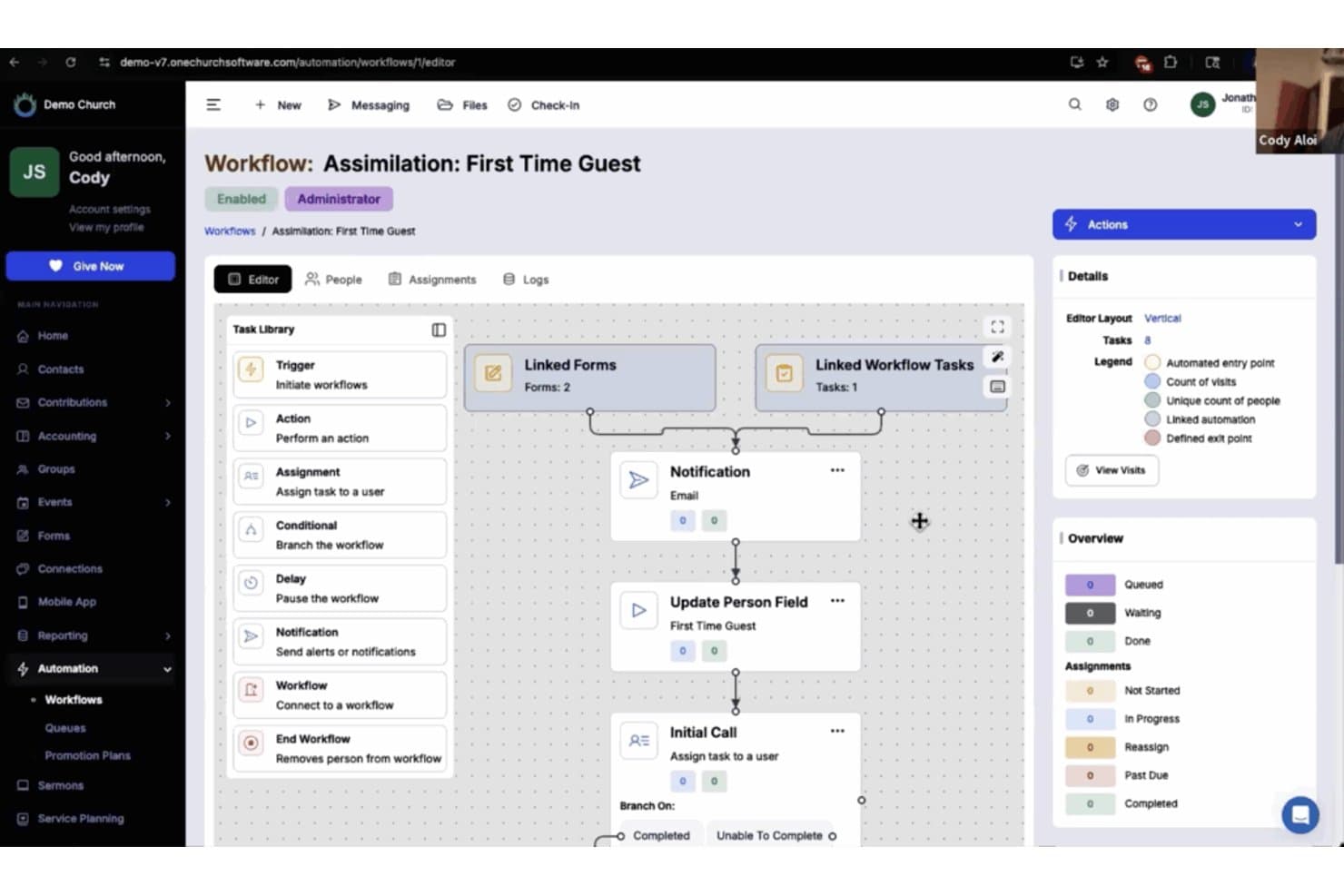
One Church Software ofrece un constructor de flujos de trabajo automatizados para gestionar la asimilación de nuevos visitantes con formularios enlazados, notificaciones y asignación de tareas. One Church Software es una plataforma de gestión eclesiástica que centraliza los directorios de miembros, perfiles de hogares, organización de pequeños grupos, herramientas de comunicación y donaciones en un solo sistema.
¿Para Quién es Mejor One Church Software?
Es ideal para administradores y coordinadores de membresía de iglesias que necesitan gestionar una congregación en crecimiento a través de múltiples ministerios desde una sola plataforma.
Por Qué Elegí One Church Software
One Church Software se gana su lugar en mi lista porque su Suite de Automatización maneja muy bien el trabajo poco visible de hacer seguimientos a los miembros. Me encanta que puedo crear flujos de trabajo desencadenados para enviar mensajes de texto automáticamente, asignar tareas y guiar a los nuevos visitantes por una secuencia de atención sin pasos manuales. Cuando un invitado envía una tarjeta de conexión, One Church envía un correo de seguimiento, notifica a un pastor y programa una visita de seguimiento, todo sin tocar el teclado.
Funciones Clave de One Church Software
- Exportación de directorio imprimible: Genere directorios actualizados en papel o PDF para compartir fácilmente con feligreses que prefieran copias físicas.
- Check-in infantil integrado: Gestione la asistencia a eventos y la seguridad infantil con un check-in incorporado vinculado a los perfiles familiares.
- Herramientas para programación de voluntarios: Asigne, programe y haga el seguimiento de voluntarios para equipos de servicio y roles ministeriales directamente en la plataforma.
- Inscripción a eventos y pequeños grupos: Permita que los miembros exploren, se registren y se unan a eventos o pequeños grupos directamente desde el directorio.
Integraciones de One Church Software
One Church Software ofrece integraciones nativas con Mailchimp, Square, Pushpay y PraiseCharts, y proporciona una API para integraciones personalizadas.
Pros and Cons
Pros:
- Gestiona de forma automática las secuencias de atención a miembros
- El check-in integrado vincula la asistencia a los perfiles del directorio
- Permite el mapeo completo de relaciones familiares
Cons:
- La aplicación móvil tiene funciones de autoservicio limitadas
- Los filtros de búsqueda del directorio son menos precisos que los de plataformas rivales
Learn more about One Church Software: Ideal para integración multimedia
- Demostración gratuita disponible
- Desde $99/mes

Subsplash Church App comparte sermones, gestiona eventos y fomenta la participación. Subsplash Church App es una plataforma digital diseñada para que las iglesias gestionen contenido multimedia y el compromiso de sus miembros. Sirve a los líderes de la iglesia al proporcionar herramientas para compartir sermones, gestionar eventos y comunicarse con la congregación.
Por qué elegí Subsplash Church App: Destaca por su integración multimedia, lo que te permite compartir sermones, videos y pódcast sin esfuerzo. Puedes crear una app personalizada para conectar con tu comunidad a través de varios canales multimedia. La plataforma admite transmisiones en vivo, lo que te permite emitir los servicios en tiempo real. Con su enfoque en contenido multimedia, tu iglesia puede interactuar con los miembros de manera creativa y efectiva.
Características e integraciones destacadas:
Las características incluyen una plataforma de donaciones que simplifica los diezmos y las donaciones para tu congregación. La app ofrece herramientas de gestión de eventos para ayudarte a organizar y promocionar actividades de la iglesia. También proporciona notificaciones push para mantener a tu comunidad informada sobre actualizaciones importantes.
Las integraciones incluyen Planning Center, Mailchimp, CCB, YouTube, Vimeo y Facebook Live.
Pros and Cons
Pros:
- Potentes capacidades multimedia
- Creación de app personalizada
- Soporte para transmisiones en vivo
- Plataforma de donaciones integrada
- Herramientas de gestión de eventos
Cons:
- Mayor curva de aprendizaje
- Funciones offline limitadas
- Requiere acceso a internet
- Opciones básicas de personalización
- Opciones de soporte limitadas
Learn more about Subsplash Church App: ideal para una app móvil personalizada y todo en uno para la iglesia
- Prueba gratuita de 30 días
- Desde USD $89/mes

La app personalizada de iglesia Tithe.ly ofrece un editor de diseño intuitivo para personalizar las páginas de la aplicación. La aplicación personalizada de iglesia Tithe.ly es una herramienta dinámica diseñada para potenciar la participación y la gestión de las comunidades eclesiásticas. Con funciones como donaciones en línea, planificación de eventos y seguimiento de miembros, ofrece una solución integral para que las iglesias mantengan la conexión con su congregación.
Por qué la elegí
Lo que hace que Tithe.ly Custom Church App destaque como app de directorio de iglesias es su robusta función de seguimiento de miembros. Esto te permite mantener registros detallados de los miembros de tu congregación, asegurando el acceso a información vital cuando se necesite. Mejora tu capacidad de interactuar con los miembros al mantener a todos informados y conectados.
Otra razón por la que elegí Tithe.ly es sus capacidades de planificación de eventos, que se integran perfectamente con el directorio de miembros. Puedes crear y gestionar eventos mientras monitoreas la asistencia y la participación. Esta función apoya la misión de tu iglesia al facilitar la participación comunitaria y fomentar el sentido de pertenencia entre los miembros.
Funciones destacadas
Incluye un muro de oración interactivo, que permite a los miembros compartir peticiones de oración y apoyarse en tiempo real. La función de donaciones dentro de la app ofrece una forma cómoda para que los miembros contribuyan financieramente a la misión de la iglesia. Además, la transmisión y archivo de sermones en la app permite que los miembros accedan a los sermones cuando les sea conveniente, promoviendo el crecimiento espiritual y la participación.
Integraciones
Las integraciones incluyen Formulario de Donación en Línea, App de Donaciones Móvil, Donaciones por Texto, Campañas de Promesas, Panel de Ideas de Donaciones, Mensajería, Grupos, Verificaciones de Antecedentes, Planificación de Servicios, Eventos y Registro, Herramientas para el Equipo de Alabanza y Creación de Sitios Web.
Pros and Cons
Pros:
- Permite comunicación móvil con la congregación en tiempo real y con marca propia
- Combina donaciones, medios, eventos y grupos en un solo centro de la app
- La configuración de arrastrar y soltar reduce la necesidad de desarrolladores externos
Cons:
- La app se aloja dentro del contenedor del proveedor a menos que se paguen tarifas adicionales de despliegue
- El costo de suscripción continúa tanto si el uso es bajo como si crece
Learn more about Tithe.ly Custom Church App: La mejor por su interfaz fácil de usar
- Plan gratuito + demo gratuita disponible
- Desde $72/mes

Breeze ayuda a las iglesias a gestionar miembros, comunicación y programación de eventos. Breeze Online Church Directory es una herramienta de gestión eclesiástica diseñada para iglesias pequeñas y medianas. Ayuda a los usuarios a administrar la información de los miembros, la comunicación y la programación de eventos de manera eficiente.
Por qué elegí Breeze Online Church Directory: Su interfaz fácil de usar permite que su equipo navegue y gestione los datos de la iglesia sin complicaciones. Puede actualizar rápidamente los perfiles de los miembros y hacer seguimiento de la asistencia. La aplicación también ofrece campos personalizables para adaptarse a las necesidades únicas de su congregación. Gracias a su diseño sencillo, la incorporación de nuevos usuarios es muy fácil.
Características e integraciones destacadas:
Las características incluyen la capacidad de rastrear donaciones y generar informes de aportaciones, ayudándole a administrar las finanzas de la iglesia. La app admite la gestión de eventos, permitiendo programar y promocionar actividades sin esfuerzo. También ofrece un sistema de registro de niños para mayor seguridad durante los servicios.
Las integraciones incluyen QuickBooks, Mailchimp, Google Calendar y Planning Center para una sincronización de datos y comunicación sin dificultades.
Pros and Cons
Pros:
- Navegación intuitiva
- Campos personalizables
- Actualizaciones rápidas de perfiles de miembros
- Proceso de incorporación sencillo
- Seguimiento de asistencia eficaz
Cons:
- Funcionalidades avanzadas limitadas
- No hay versión gratuita
- Herramientas de informes básicas
- Requiere acceso a internet
- Opciones limitadas de atención al cliente
Learn more about Breeze Online Church Directory: mejor para el compromiso con la iglesia orientado al móvil
- Demostración gratuita disponible
- desde $149/mes

Pushpay ofrece muchas maneras de aumentar el compromiso de tus miembros. La aplicación Pushpay Church es una herramienta versátil diseñada para mejorar la gestión de la iglesia y el compromiso de la comunidad. Ofrece una variedad de funciones que satisfacen las necesidades de las congregaciones, ayudando a fomentar una comunidad de iglesia conectada y activa.
Por qué la elegí
Elegí la aplicación Pushpay Church como una de las mejores opciones para un directorio de iglesia debido a su función de aplicaciones móviles personalizadas. Estas aplicaciones a medida fomentan el compromiso y la comunicación entre los miembros de la iglesia, ofreciendo una experiencia personalizada que ayuda a mantener a todos conectados. La posibilidad de crear aplicaciones personalizadas permite adaptar la app a las necesidades específicas de tu iglesia, reforzando el sentido de pertenencia entre los miembros.
Otra razón para mi elección es la función de análisis e informes de la aplicación. Esto proporciona datos accionables para monitorear la salud de la iglesia y el compromiso de los miembros, permitiéndote identificar a los miembros menos involucrados y tomar decisiones informadas. Al tener acceso a estos datos, puedes comprender mejor las necesidades de tu congregación y trabajar para crear una comunidad más vibrante y participativa.
Características destacadas - Formato descriptivo
Las funciones incluyen una plataforma de donaciones que simplifica las contribuciones en línea y promueve una mayor generosidad entre los congregantes. El software de gestión de iglesia optimiza las operaciones y proporciona información sobre la salud de la iglesia y el compromiso de los miembros. Además, la aplicación ofrece herramientas para la gestión de eventos, facilitando la planificación y ejecución de actividades de la iglesia, que son esenciales para la construcción y participación de la comunidad.
Integraciones
Las integraciones incluyen ChurchStaq, ParishStaq, Resi, Quickbooks, Planning Center, Text-Em-All, Fellowship One, SecureSearch, Virtus, VisitorReach, Church Data Connect y Clearstream.
Pros and Cons
Pros:
- Ofrece información para decisiones ministeriales basadas en datos.
- Simplifica la coordinación de eventos y voluntariado.
- Fomenta donaciones constantes mediante el compromiso móvil.
Cons:
- El tiempo de respuesta del soporte al cliente puede ser lento.
- Personalización limitada para campos del directorio.
Learn more about Pushpay Church App: Ideal para actualizaciones instantáneas del directorio
- Prueba gratuita de 30 días
- Desde $9.99/mes

Instant Church Directory ayuda a las iglesias a gestionar directorios y comunicarse fácilmente. Instant Church Directory es una herramienta en línea que ayuda a las iglesias a crear y mantener directorios de miembros. Sirve tanto a los administradores de la iglesia como a los miembros al proporcionar herramientas para una gestión y comunicación del directorio sencillas.
Por qué elegí Instant Church Directory: Ofrece actualizaciones instantáneas, lo que te permite mantener tu directorio al día sin demora. La plataforma proporciona opciones tanto en línea como imprimibles del directorio. Puedes cargar fotos de los miembros e información de contacto en tiempo real. Con su interfaz intuitiva, tu equipo puede gestionar actualizaciones sin esfuerzo.
Características e integraciones destacadas:
Características incluyen una aplicación móvil fácil de usar que permite a los miembros acceder al directorio en cualquier momento. La plataforma cuenta con un sistema de inicio de sesión seguro para proteger los datos de los miembros. También ofrece diseños de directorios personalizables para adaptarse a las preferencias de tu iglesia.
Las integraciones incluyen opciones para exportar datos para etiquetas de envío y comunicación, pero no se enumeran integraciones específicas por nombre.
Pros and Cons
Pros:
- Actualizaciones instantáneas del directorio
- Opciones en línea e imprimibles
- Carga de fotos en tiempo real
- Sistema de inicio de sesión seguro
- Diseños personalizables
Cons:
- Funciones avanzadas limitadas
- Sin integraciones nombradas de terceros
- Opciones básicas de personalización
- Se requiere acceso a Internet
- Opciones de soporte limitadas
Learn more about Instant Church Directory: Mejor para integrarse con otras herramientas
- Prueba gratuita de 30 días + demostración gratuita disponible
- Desde $15/mes

Planning Center People ayuda a las iglesias a gestionar los datos y la participación de los miembros. Planning Center People es un software de gestión para iglesias que ayuda a organizar los datos de los miembros y las comunicaciones. Está diseñado principalmente para que los administradores de iglesias gestionen la información de los miembros y fomenten la participación.
Por qué elegí Planning Center People: Destaca por sus capacidades de integración, permitiéndote conectar con varias herramientas para iglesias y así lograr una experiencia de gestión cohesiva. Puedes rastrear fácilmente la asistencia, administrar grupos y comunicarte con los miembros. La integración del software con otros productos de Planning Center garantiza un flujo de trabajo sin interrupciones entre las distintas actividades de la iglesia. Su flexibilidad para conectarse con múltiples herramientas lo convierte en un recurso valioso para la gestión integral de la iglesia.
Características e integraciones destacadas:
Las características incluyen un sistema detallado de perfiles de miembros que te ayuda a mantener registrada tanto la información personal como la familiar. La aplicación ofrece flujos de trabajo personalizables para optimizar los procesos de tu iglesia. También puedes configurar acciones automáticas para tareas como enviar correos electrónicos de bienvenida a nuevos miembros.
Las integraciones incluyen Planning Center Check-Ins, Planning Center Giving, Planning Center Services, Mailchimp y QuickBooks.
Pros and Cons
Pros:
- Excelentes opciones de integración
- Flujos de trabajo personalizables
- Acciones automatizadas para tareas
- Perfiles detallados de miembros
- Herramientas de gestión flexibles
Cons:
- Requiere acceso a internet
- Curva de aprendizaje para nuevos usuarios
- Funciones offline limitadas
- Opciones básicas de personalización
- Opciones de soporte limitadas
Learn more about Planning Center People: El personal puede rastrear y actualizar perfiles de miembros instantáneamente en la aplicación móvil.
- Prueba gratuita de 30 días
- desde $49/mes

ACS Realm ofrece una vista multidispositivo de su interfaz, mostrando la accesibilidad en varias plataformas. Realm de ACS Technologies Group, Inc. es una herramienta integral de gestión eclesiástica que permite a los líderes ministeriales involucrar a sus miembros y simplificar las operaciones. Gestiona perfiles de miembros, contribuciones, asistencia, programación de voluntarios y comunicación para que los equipos de la iglesia puedan centrarse más en el ministerio y menos en la logística.
Por qué elegí Realm:
Esta herramienta es adecuada para iglesias que desean una plataforma unificada para el personal y los congregantes sin tener que manejar sistemas separados. Funciona especialmente bien para los ministerios que priorizan el acceso móvil—para pastores en movimiento y congregantes que esperan autoservicio. En el lado negativo, las iglesias muy pequeñas pueden encontrar algunas funciones más de lo que necesitan y podrían preferir una opción más simple y económica. Considere alternativas si su enfoque es únicamente donaciones o registro de asistencia y no necesita una gestión completa de miembros.
Características e integraciones destacadas:
Características incluyen perfiles detallados de miembros con campos personalizados, donaciones móviles e historial de donaciones, herramientas para la programación de voluntarios y eventos, seguimiento automatizado de asistencia y un canal de comunicación unificado.
Integraciones incluyen plataformas de donaciones en línea, sistemas contables para iglesias, proveedores de verificación de antecedentes, aplicaciones móviles para miembros y sistemas de gestión de eventos.
Pros and Cons
Pros:
- Incluye programación de voluntarios y herramientas para eventos en un solo ecosistema.
- Ofrece una base de datos unificada para que la información sea coherente entre el personal y los voluntarios.
- Permite donaciones móviles y la participación de miembros en autoservicio.
Cons:
- Iglesias de varios campus o muy grandes deben verificar la escalabilidad y los costos.
- Algunos flujos de trabajo específicos del ministerio pueden requerir configuración adicional.
Learn more about ACS Realm: La mejor para funciones personalizables de la app
- plan gratis disponible
- desde $0/mes

Ministry One ayuda a las iglesias a conectar, gestionar eventos y facilitar donaciones. Ministry One es una plataforma de aplicaciones para iglesias diseñada para ayudar a las iglesias a conectar con su congregación a través de una aplicación móvil personalizada. Sirve tanto a líderes como a miembros de la iglesia ofreciendo herramientas para la comunicación, las donaciones y la gestión de eventos.
Por qué elegí Ministry One: Ofrece funciones personalizadas que te permiten adaptar la aplicación a las necesidades específicas de tu iglesia. Puedes crear una aplicación con tu marca que refleje la identidad y comunidad de tu iglesia. La plataforma admite donaciones en línea, facilitando así las contribuciones de los miembros. Su enfoque en la personalización asegura que tu aplicación esté alineada con los objetivos y el estilo de tu ministerio.
Características destacadas e integraciones:
Características incluyen la transmisión de sermones, lo que permite a tu congregación ver o escuchar mensajes cuando lo deseen. La aplicación proporciona herramientas de registro de eventos para simplificar la inscripción en las actividades de la iglesia. También ofrece notificaciones push para mantener a tus miembros informados sobre actualizaciones y eventos.
Integraciones incluyen Planning Center, Pushpay, PayPal, YouTube, Vimeo y Facebook Live.
Pros and Cons
Pros:
- Aplicación altamente personalizable
- Permite donaciones en línea
- Transmisión de sermones disponible
- Herramientas de registro de eventos
- Incluye notificaciones push
Cons:
- Requiere acceso a internet
- Curva de aprendizaje para nuevos usuarios
- Funciones limitadas sin internet
- Opciones básicas de personalización
- Opciones de soporte limitadas
Learn more about Ministry One:
Otras aplicaciones de directorio de iglesias
Estas son algunas opciones adicionales de aplicaciones de directorio de iglesias que no llegaron a mi lista, pero que aún merece la pena conocer:
- 11Online Church DirectoryLa mejor opción para almacenamiento seguro de datos
- 12DirectorySpot for ChurchesIdeal para acceso móvil al directorio
- 13Aware3 Church AppIdeal para la comunicación digital
- 14Go Church AppIdeal para mantener informados a los miembros
- 15ChurchSpring DirectoryMejor combinación de sitio web y ChMS
- 16Church Directory (Church Work LLC)Mejor para perfiles de miembros completos
- 17The Church ConnectoryIdeal para una gestión sencilla de los miembros
- 18My Church DirectoryIdeal para directorios personalizables
- 19Church Directory AppIdeal para una navegación sencilla
- 20ChurchTracMejor opción económica
- 21GracelyIdeal para la gestión de personas y grupos
Wie ich Kirchenverzeichnis-Apps bewerte
Ich bewerte Kirchenverzeichnis-Apps in zwei Ebenen – grundlegende Muss-Kriterien wie Mitgliederprofile und Datenschutzkontrollen sowie Unterscheidungsmerkmale wie ChMS-Integration und mobiler Zugriff, die herausragende Tools abheben.
Kernfunktionen (Mindestanforderungen für diese Liste)
Wenn ich Tools für meine Liste auswähle, bewerte ich jedes einzelne auf einer Skala von 0 (bietet die Funktion nicht an) bis 5 (überragt in diesem Bereich) für jede der unten aufgeführten Kernfunktionen. Anschließend berechne ich die Gesamtpunktzahl des Tools in Prozent. Jedes Tool muss mindestens eine Gesamtpunktzahl von 65 % erreichen, um berücksichtigt zu werden.
- Mitgliederprofile & Fotos: Ich prüfe, ob jedes Profil ein Foto, Kontaktdaten und benutzerdefinierte Felder unterstützt – wie Taufdatum oder Mitgliedschaftsstatus –, die widerspiegeln, wie Kirchen ihre Mitglieder tatsächlich erfassen.
- Haushalts- & Familienzuordnung: Familien besuchen gemeinsam die Kirche, daher achte ich darauf, dass Tools Ehepartner, Kinder und Abhängige als Haushaltsmitglieder mit gemeinsamen Adressen und Beziehungsbezeichnungen verknüpfen können.
- Selbstzugriff für Gemeindemitglieder: Ich bewerte, ob Mitglieder sich per Handy oder Browser einloggen können, um andere Gemeindemitglieder nachzuschlagen und ihre eigenen Kontaktdaten zu aktualisieren, ohne im Gemeindebüro anrufen zu müssen.
- Datenschutz- & Berechtigungskontrollen: Gemeindemitglieder müssen wählen können, was sie teilen. Deshalb schaue ich, ob ein Tool erlaubt, z.B. Telefonnummer oder Adresse auszublenden, aber den Namen sichtbar zu lassen.
- Gruppen- & Dienstbereichs-Segmentierung: Ich prüfe, ob das Verzeichnis nach Kleingruppen, Musikteams oder Jugendgruppen gefiltert werden kann, damit Leiter schnell die Personen im eigenen Dienstbereich finden.
- Kommunikationswerkzeuge im Verzeichnis: Die Möglichkeit, jemanden direkt aus dem Verzeichnis heraus anzurufen, zu schreiben oder eine E-Mail zu verschicken, ist wichtig. Daher bewerte ich, ob die App kontextbezogene Kontaktaufnahme mit einzelnen Personen und Gruppen unterstützt.
Wenn ich eine Liste von Tools habe, die diese Kriterien erfüllen, sehe ich mir an, wodurch sich die einzelnen Plattformen unterscheiden.
Unterscheidungsmerkmale (Was Anbieter einzigartig macht)
So vergleiche und unterscheide ich verschiedene Anbieter:
Herausragende Funktionen
Ein ausdruckbares Verzeichnis-Export ist etwas, wonach ich immer suche – viele Gemeinden geben älteren oder gebrechlichen Mitgliedern, die Papier bevorzugen, immer noch gedruckte Fotoverzeichnisse. Ich schaue mir auch an, ob Mitglieder direkt aus dem Verzeichnis Kleingruppen oder Veranstaltungen durchsuchen und sich dafür anmelden können. Zeitplanung von Freiwilligen, direkt an Profilen im Verzeichnis gekoppelt, ist ein weiteres Merkmal, das es beispielsweise Leitern der Kinderarbeit erlaubt, Dienstpläne zu verwalten, ohne ein separates Tool zu nutzen.
Mehr als nur Funktionen
ChMS-Ökosystem-Integration ist entscheidend – wenn Ihre Kirche bereits mit Planning Center oder Breeze arbeitet, spart eine Verzeichnis-App mit nativer Synchronisation viele Stunden doppelter Dateneingabe. Ich prüfe auch die Unterstützung beim Einrichten, da die Person, die das Verzeichnis anlegt, oft ehrenamtlich oder in Teilzeit arbeitet und kein IT-Profi ist. Auch die Preisstruktur verdient Beachtung: Manche Anbieter berechnen pro Mitglied, was wachsende Gemeinden benachteiligen kann, andere bieten Pauschalpreise an, die mit der Gemeindegröße skalieren.
Cómo elegir una aplicación de directorio de iglesias
Es fácil perderse entre largas listas de funciones y estructuras de precios complejas. Para ayudarte a mantener la concentración mientras avanzas en tu proceso único de selección de software, aquí tienes una lista de factores que debes tener en cuenta:
| Factor | Qué debes tener en cuenta |
| Escalabilidad | ¿Puede la aplicación crecer junto con tu iglesia? Ten en cuenta el número de miembros que puede gestionar y la facilidad con la que puedes añadir nuevos usuarios o funciones a medida que tu iglesia crece. |
| Integraciones | ¿Se conecta con tus sistemas actuales? Comprueba la compatibilidad con herramientas como calendarios, plataformas de correo electrónico y software financiero para evitar que la información quede aislada. |
| Personalización | ¿Puedes adaptar la aplicación a las necesidades de tu iglesia? Busca opciones para personalizar campos, diseños e informes de modo que se ajusten a tus procesos. |
| Facilidad de uso | ¿Es la aplicación intuitiva para todos los usuarios? Evalúa la interfaz y la navegación. Una herramienta compleja podría ralentizar su adopción y requerir más formación. |
| Implementación e incorporación | ¿Con qué rapidez puedes empezar? Ten en cuenta el tiempo de configuración, los recursos de formación disponibles y cualquier asistencia proporcionada durante la fase de transición. |
| Coste | ¿Se ajusta el precio a tu presupuesto? Compara los planes y ten en cuenta los costes ocultos, como los límites de usuarios o los módulos adicionales. Un coste inicial bajo podría acabar generando gastos más elevados. |
| Medidas de seguridad | ¿Cómo protege la aplicación los datos de los miembros? Busca cifrado, controles de acceso y cumplimiento de las normativas de protección de datos para garantizar que la información permanezca segura. |
| Disponibilidad de asistencia | ¿Tendrás la ayuda que necesitas? Comprueba si hay asistencia disponible cuando la necesites y a través de tus canales preferidos, como teléfono, chat o correo electrónico. |
¿Qué es una aplicación de directorio de iglesias?
La aplicación de directorio de la iglesia es una herramienta digital diseñada para ayudar a las iglesias a gestionar y organizar la información de contacto de sus miembros. Los líderes, administradores y voluntarios de la iglesia suelen utilizar estas herramientas para mantener directorios precisos y facilitar la comunicación dentro de la congregación. Las actualizaciones en tiempo real, el almacenamiento seguro de datos y las funciones de acceso móvil ayudan a mantener la información de los miembros actualizada y accesible. En general, estas herramientas simplifican la gestión del directorio y mejoran la participación de la comunidad.
Funciones de la aplicación de directorio de la iglesia
Al seleccionar una aplicación de directorio de la iglesia, presta atención a las siguientes funciones clave:
- Actualizaciones en tiempo real: Esta función permite mantener actualizada la información de los miembros, garantizando que todos tengan acceso a los datos de contacto más recientes.
- Almacenamiento seguro de datos: Protege la información confidencial de los miembros mediante cifrado y controles de acceso, manteniendo la privacidad y la seguridad.
- Acceso móvil: Permite a los usuarios consultar y actualizar el directorio desde cualquier lugar, ofreciendo flexibilidad y comodidad.
- Plantillas personalizables: Permite adaptar el aspecto y los campos del directorio para satisfacer las necesidades específicas de tu iglesia.
- Capacidades de integración: Se conecta con otras herramientas, como calendarios y plataformas de correo electrónico, facilitando una gestión de datos fluida.
- Gestión de eventos: Ayuda a organizar y promocionar las actividades de la iglesia, manteniendo informada y comprometida a la congregación.
- Carga de fotos: Añade un toque personal al incluir fotos de los miembros en el directorio, mejorando el reconocimiento y la conexión.
- Notificaciones automáticas: Mantiene informados a los miembros sobre actualizaciones y eventos importantes, mejorando la comunicación dentro de la iglesia.
- Compatibilidad con donaciones en línea: Simplifica el proceso de donación, facilitando que los miembros contribuyan económicamente a la iglesia.
- Funciones personalizadas de la aplicación: Ofrece la posibilidad de crear una aplicación con la imagen de marca que refleje la identidad y la comunidad de tu iglesia.
Beneficios de la aplicación de directorio de la iglesia
Implementar una aplicación de directorio de la iglesia ofrece varios beneficios para tu equipo y tu empresa. Estos son algunos de los que puedes esperar:
- Mejora de la comunicación: Las actualizaciones en tiempo real y las notificaciones automáticas mantienen informada y conectada a tu congregación.
- Mayor seguridad: El almacenamiento seguro de datos protege la información de los miembros, garantizando la privacidad y la confianza.
- Mayor accesibilidad: El acceso móvil permite a los usuarios consultar y actualizar los directorios desde cualquier lugar, ofreciendo comodidad y flexibilidad.
- Experiencia personalizada: Las plantillas personalizables y la carga de fotos ayudan a adaptar el directorio a las necesidades de tu iglesia y fomentan la comunidad.
- Gestión eficiente: Las capacidades de integración y las herramientas de gestión de eventos agilizan las tareas administrativas, ahorrando tiempo y esfuerzo.
- Mayor participación: La compatibilidad con donaciones en línea y las funciones personalizadas de la aplicación fomentan la participación y la implicación de tus miembros.
- Solución rentable: Centralizar la gestión del directorio reduce la necesidad de utilizar varias herramientas, optimizando los recursos y el presupuesto.
Costes y precios de la aplicación de directorio de la iglesia
Seleccionar una aplicación de directorio de la iglesia requiere comprender los distintos modelos de precios y planes disponibles. Los costes varían en función de las funciones, el tamaño del equipo, los complementos y otros factores. La siguiente tabla resume los planes habituales, sus precios medios y las funciones que suelen incluir las soluciones de aplicaciones de directorio de la iglesia:
Tabla comparativa de planes para la aplicación de directorio de la iglesia
| Tipo de plan | Precio medio | Funciones habituales |
| Plan gratuito | $0 | Gestión básica del directorio, perfiles de miembros limitados y acceso móvil. |
| Plan personal | $5-$25/ usuario/mes | Actualizaciones en tiempo real, almacenamiento seguro de datos y plantillas personalizables. |
| Plan empresarial | $50-$100/ mes | Capacidades de integración, gestión de eventos y carga de fotos. |
| Plan corporativo | $100-$25/ mes | Funciones personalizadas de la aplicación, compatibilidad con donaciones en línea y medidas de seguridad avanzadas. |
Preguntas frecuentes sobre la aplicación de directorio de la iglesia
Aquí tienes respuestas a preguntas frecuentes sobre la aplicación de directorio de la iglesia: