

Las herramientas de IA para la administración de iglesias son plataformas digitales que utilizan inteligencia artificial para automatizar, organizar y simplificar tareas de gestión eclesial como la comunicación, la programación, las donaciones y la participación de los miembros. Si estás explorando el uso de la IA para iglesias, estas herramientas pueden ayudar a reducir las cargas administrativas, mejorar la coordinación y apoyar al liderazgo de la iglesia en la gestión del trabajo ministerial de forma más eficaz. Muchas soluciones incluyen funciones como asistentes de IA, chatbots de IA y otros sistemas de IA que ayudan con la creación de contenido, las redes sociales y las actualizaciones del sitio web de tu iglesia. También pueden apoyar la atención pastoral, el discipulado y el estudio bíblico, al tiempo que permiten a los equipos generar ideas, crear devocionales generados por IA y optimizar las operaciones diarias. En esta lista, encontrarás soluciones confiables diseñadas para satisfacer las necesidades únicas de los líderes de iglesias, para que puedas centrarte en pastorear a tu congregación mientras mantienes las operaciones funcionando sin problemas.
Por qué confiar en nuestras recomendaciones de software
6,700+
Reviews
20
Industry experts
16+
Evaluation factors
14
Years
Nuestro equipo lleva probando y evaluando software desde 2012. Como líderes eclesiásticos, sabemos lo difícil —y lo importante— que es elegir el software adecuado.
Para esta guía, evaluamos las herramientas mediante pruebas prácticas e investigación independiente, puntuando las herramientas según nuestros criterios de selección.
Nuestras reseñas reflejan nuestro criterio editorial humano, no un discurso de ventas.
Tabla comparativa: herramientas de IA para la administración de iglesias
Esta tabla comparativa resume los detalles de precios de mi selección de las mejores herramientas de IA para la administración de iglesias:
| Tool | Best For | Trial Info | Price | ||
|---|---|---|---|---|---|
| 1 | El mejor para la gestión de preguntas y respuestas centrada en la privacidad | Prueba gratuita de 60 días disponible | Desde $99/mes | Website | |
| 2 | Mejor para la gestión automatizada de miembros de la iglesia | Plan gratuito disponible | Desde $12/mes (facturado mensualmente) | Website | |
| 3 | Mejor para donaciones digitales en iglesias | Prueba gratuita de 30 días disponible | Desde $72/mes | Website | |
| 4 | Ideal para la programación de servicios y voluntarios | Prueba gratuita de 30 días disponible | Desde $15/mes | Website | |
| 5 | Mejor para donaciones digitales e información sobre donantes | Demo gratuita disponible | Precio a consultar | Website | |
| 6 | Ideal para bases de datos de miembros de la iglesia con opción de búsqueda | Demo gratuita disponible | Desde $$73.32/mes (facturado anualmente) | Website | |
| 7 | Ideal como asistente de comunicación con IA | Demo gratuita disponible | Desde $30/mes | Website | |
| 8 | Ideal para la gestión integrada de miembros de la iglesia y donaciones | Demo gratuita disponible | Precio a consultar | Website | |
| 9 | Ideal para la administración de iglesias impulsada por IA | Plan gratuito + demo gratis disponible | Desde $60/mes | Website | |
| 10 | Mejor para preparación de sermones asistida por IA | Prueba gratuita de 30 días + plan gratis + demo gratuita disponible | Desde $19/mes (facturado anualmente) | Website |


Reseñas de herramientas de IA para la administración de iglesias
A continuación se presentan mis resúmenes detallados de las herramientas de IA para la administración de iglesias que llegaron a mi selección. Mis reseñas ofrecen un análisis detallado de las funciones, capacidades e integraciones de cada plataforma para ayudarte a encontrar la mejor opción para ti.
 El mejor para la gestión de preguntas y respuestas centrada en la privacidad
- Prueba gratuita de 60 días disponible
- Desde $99/mes
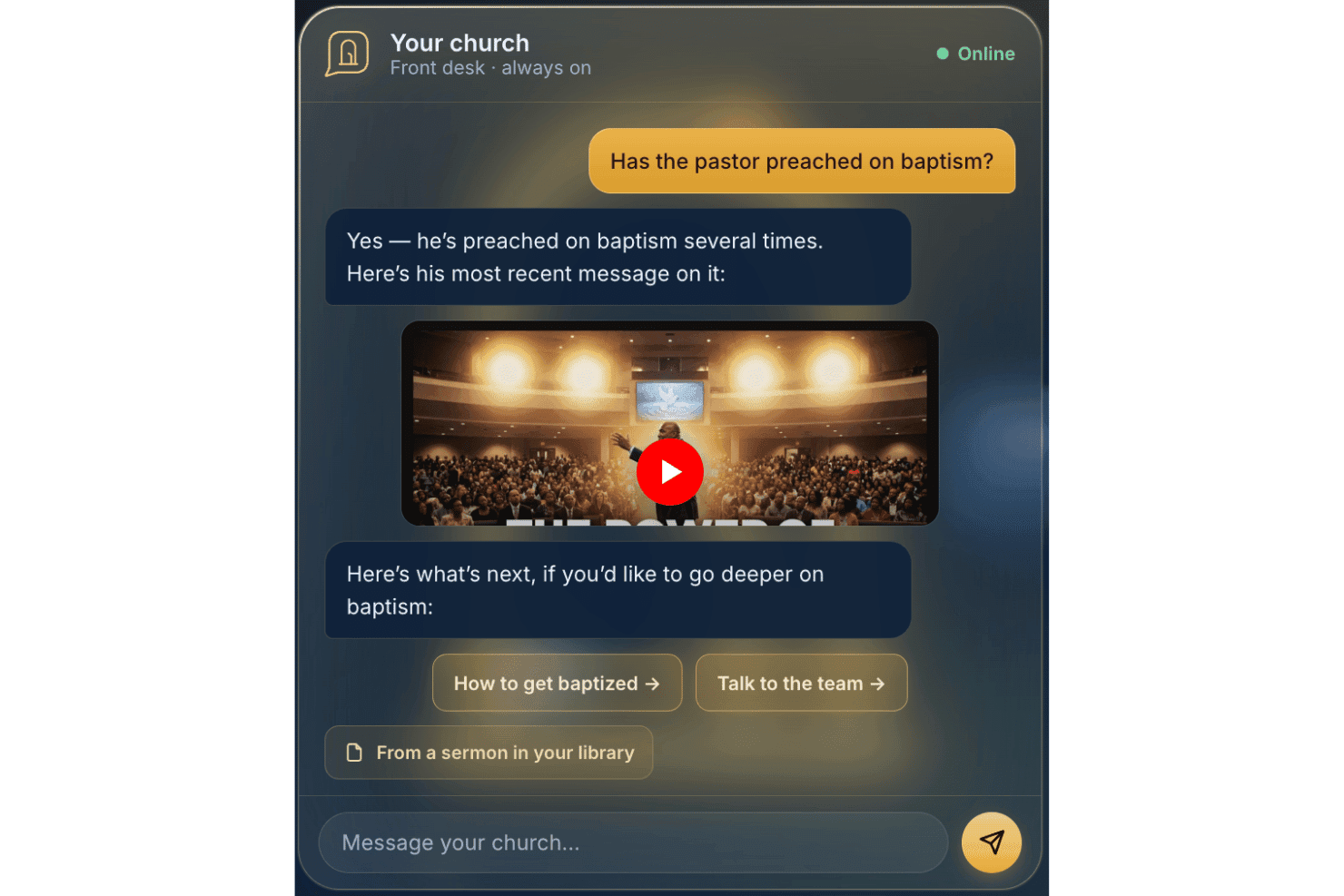
AskMyChurch ofrece un servicio de respuesta para iglesias impulsado por IA las 24 horas del día, los 7 días de la semana. AskMyChurch es un chatbot de IA para sitios web de iglesias que responde preguntas de visitantes y miembros usando el propio contenido publicado de la iglesia, sermones y videos, con rutas de crisis integradas, soporte bilingüe y privacidad anónima por defecto.
¿Para quién es mejor AskMyChurch?
Iglesias de cualquier tamaño que desean responder preguntas de visitantes fuera de horario sin recopilar datos personales ni requerir que el personal monitoree una bandeja de entrada de chat.
Por qué elegí AskMyChurch
Elegí AskMyChurch porque su diseño anónimo por defecto realmente destaca entre las herramientas de IA para iglesias. Los visitantes pueden hacer preguntas sensibles sobre duelo, dudas de fe o salud mental sin crear cuentas ni ser rastreados. Lo que encuentro especialmente importante es la barrera estricta en casos de crisis: cuando aparecen señales de angustia, redirige a 988 y a la Línea de Texto de Crisis antes de que se genere cualquier respuesta de IA, un nivel de responsabilidad pastoral que no he visto integrado directamente en otros chatbots de iglesia.
Principales características de AskMyChurch
- Canon (voz del pastor): Las respuestas se obtienen directamente de los sermones del pastor y citan el momento exacto en que se pronunciaron las palabras.
- Verificación doble de fundamentos: Cada respuesta se verifica dos veces con el contenido de la iglesia para evitar alucinaciones generadas por la IA.
- Bucle de aprendizaje: Informes semanales destacan preguntas sin respuesta y temas recurrentes para que los administradores de la iglesia los revisen y aborden.
- Control de temas: Los administradores pueden desactivar temas específicos o redirigir a los visitantes usando instrucciones en inglés sencillo desde el panel de control.
Integraciones de AskMyChurch
Las integraciones nativas no están documentadas públicamente. No se anuncia una API para integraciones personalizadas.
Pros and Cons
Pros:
- Adapta las respuestas para reflejar la identidad de la iglesia
- Las respuestas se basan en los sermones del pastor
- La IA resalta temas de visitantes sin respuesta
Cons:
- No administra datos de miembros ni asistencia
- No puede gestionar donaciones o campañas de recaudación
Learn more about AskMyChurch: Mejor para la gestión automatizada de miembros de la iglesia
- Plan gratuito disponible
- Desde $12/mes (facturado mensualmente)
Visit WebsiteCustomer Rating:4.9/5
Programador de eventos de ChMeetings mostrando reuniones grupales semanales recurrentes. ChMeetings ofrece una plataforma digital diseñada específicamente para iglesias para gestionar miembros, eventos y comunicaciones. Es una opción práctica para pastores y líderes de ministerios que desean centralizar las tareas administrativas y hacer seguimiento de la participación en la iglesia. Con funciones adaptadas para comunidades de fe, ChMeetings ayuda a optimizar las operaciones diarias y apoyar el crecimiento del ministerio.
¿Para Quién es Mejor ChMeetings?
ChMeetings es ideal para administradores de iglesias y líderes de ministerios que necesitan gestionar los datos de miembros, eventos y comunicaciones en un solo lugar.
Por Qué Elegí ChMeetings
Elegí ChMeetings porque ofrece herramientas dedicadas para la gestión de miembros y seguimiento de eventos diseñadas para contextos eclesiásticos. La plataforma permite organizar perfiles de miembros, asistencia y participación en grupos, facilitando el seguimiento del compromiso de la congregación. También valoro que el seguimiento de eventos esté integrado, lo que permite programar, promocionar y monitorear actividades de la iglesia, todo en un solo lugar. Estas funciones ayudan a los líderes eclesiásticos a mantenerse organizados y responder a las necesidades de su comunidad.
Funciones Clave de ChMeetings
Otras funciones que hacen a ChMeetings útil para la administración eclesiástica incluyen:
- Acceso desde aplicación móvil: Gestiona datos y comunicaciones de la iglesia desde dispositivos iOS y Android.
- Mensajería masiva: Envía correos electrónicos, SMS o notificaciones push a personas o grupos.
- Seguimiento de donaciones: Registra, categoriza e informa sobre ofrendas y contribuciones.
- Formularios personalizados: Crea y distribuye formularios para inscripciones, encuestas o registro de voluntarios.
Integraciones de ChMeetings
Las integraciones incluyen Stripe, PayPal, Bluesnap, Paystack, Mailchimp, Twilio, SMS Global, Clickatell, Eazismspro y más.
Pros and Cons
Pros:
- Directorio de miembros con campos y etiquetas personalizables
- Registro de asistencia a eventos con escaneo de código QR
- Seguimiento integrado de donaciones y promesas
Cons:
- Sin herramientas integradas para planificación de alabanzas
- Sin gestión de sermones ni biblioteca multimedia
Learn more about ChMeetings: Mejor para donaciones digitales en iglesias
- Prueba gratuita de 30 días disponible
- Desde $72/mes
Visit WebsiteCustomer Rating:4.7/5
Creador de apps Tithely con editor de las secciones de sermón, eventos y donaciones. Si buscas una plataforma digital de donaciones y participación creada para iglesias, Tithely ofrece una solución enfocada. Está diseñada para comunidades de fe que desean simplificar las donaciones en línea, gestionar eventos y conectar con sus miembros desde un solo panel. Tithely ayuda a los líderes de la iglesia a manejar donaciones, comunicación y tareas administrativas de una manera que se adapta a las necesidades ministeriales modernas.
¿Para quién es mejor Tithely?
Tithely es ideal para iglesias y ministerios pequeños a medianos que desean centralizar las donaciones, la comunicación y la participación de los miembros.
Por qué elegí Tithely
Lo que me atrajo de Tithely es cómo integra herramientas de donaciones, comunicación y participación en una sola plataforma diseñada específicamente para iglesias. Su enfoque todo en uno significa que puedes gestionar donaciones en línea y desde móvil, registros para eventos y mensajes a los miembros sin necesitar varios sistemas. Veo un gran valor en funciones como el seguimiento automático de donaciones y las comunicaciones integradas por texto y correo electrónico, que ayudan a optimizar tanto los aspectos financieros como relacionales de la administración de una iglesia. Para ministerios que buscan una solución unificada para gestionar las donaciones y el compromiso de los miembros, Tithely destaca como una opción hecha a medida.
Funciones clave de Tithely
Otras funciones que hacen que Tithely sea útil para la administración de iglesias incluyen:
- Creador personalizado de apps para iglesias: Crea una app móvil con la marca de tu iglesia para compartir sermones, eventos y anuncios.
- Herramientas de gestión de eventos: Organiza, promociona y haz seguimiento de la asistencia a eventos y actividades de la iglesia.
- Gestión de voluntarios: Programa, comunica y coordina voluntarios para diferentes ministerios y servicios.
- Sistema digital de registro: Haz seguimiento de la asistencia y registra de forma segura a niños o miembros para los servicios y eventos.
Integraciones de Tithely
Las integraciones incluyen QuickBooks, RockRMS, The StudioC, Engiven, Elvanto, Salesforce, MinistryPlatform, Shelby Systems, FellowshipOne y más.
Pros and Cons
Pros:
- Creador de apps personalizado para iglesias para el compromiso de los miembros
- Registro de eventos con seguimiento de asistentes incluido
- Sistema digital de registro para el ministerio de niños
Cons:
- No cuenta con funciones contables ni de nómina integradas
- Las comisiones por procesamiento de donaciones son más altas que en algunos casos
 Ideal para la programación de servicios y voluntarios
- Prueba gratuita de 30 días disponible
- Desde $15/mes
Visit WebsiteCustomer Rating:4.7/5
Panel de control de Planning Center con programación, grupos, inscritos y donaciones. Si buscas una forma flexible de gestionar las operaciones de la iglesia, Planning Center ofrece un conjunto de herramientas modulares diseñadas para equipos ministeriales de todos los tamaños. Es especialmente útil para iglesias que desean personalizar sus flujos de trabajo para eventos, voluntarios y comunicación. Planning Center te ayuda a centralizar la programación, rastrear la asistencia y coordinar la planificación de servicios en un solo lugar.
¿Para quién es mejor Planning Center?
Planning Center es ideal para iglesias de cualquier tamaño que necesitan herramientas modulares para gestionar eventos, voluntarios y la participación de los miembros.
Por qué elegí Planning Center
Lo que más destaco de Planning Center es su enfoque modular, que te permite elegir solo las herramientas que tu iglesia realmente necesita. Me gusta que puedas agregar o quitar módulos para cosas como la planificación de servicios, donaciones, registros y grupos, por lo que tu configuración puede crecer o cambiar a medida que lo hace tu ministerio. Esta flexibilidad significa que no estás atado a un sistema único para todos, y puedes adaptar los flujos de trabajo para diferentes equipos o ministerios. Para iglesias que desean adaptar su administración conforme cambian las necesidades, el diseño modular de Planning Center lo convierte en una excelente opción.
Funciones clave de Planning Center
Otras funciones que hacen útil a Planning Center para la administración de iglesias incluyen:
- Base de datos de personas: Gestiona perfiles detallados de miembros, realiza seguimiento de la participación y organiza familias en un solo lugar.
- Flujos de trabajo automatizados: Configura procesos paso a paso para seguimientos, incorporación o gestión de voluntarios.
- Reserva de recursos: Reserva salas, equipos e instalaciones para eventos o reuniones directamente en la plataforma.
- Correo electrónico y mensajería de texto: Envía comunicaciones dirigidas a individuos, grupos o a toda tu congregación.
Integraciones de Planning Center
Las integraciones incluyen BoxCast, Checkr, Mailchimp, PraiseCharts, RehearsalMix, SongSelect, Clearstream, MinistrySafe, Protect My Ministry, y más.
Pros and Cons
Pros:
- Registro infantil integrado con funciones de seguridad
- Flujos de trabajo automatizados para seguimiento e incorporación
- Perfiles de miembros detallados con seguimiento de la participación
Cons:
- No incluye gestión contable ni de donaciones
- Las opciones de informes son limitadas para necesidades personalizadas
Learn more about Planning Center: Mejor para donaciones digitales e información sobre donantes
- Demo gratuita disponible
- Precio a consultar
Visit WebsiteCustomer Rating:4/5
Pushpay ayuda a las iglesias a gestionar donaciones, estados de contribución y la participación de los donantes en una sola plataforma. Pushpay ofrece a las iglesias una forma de gestionar las donaciones digitales y el compromiso de los miembros desde una sola plataforma. Si buscas una solución que conecte donaciones en línea, inscripciones a eventos y comunicación, Pushpay reúne estas herramientas para tu ministerio. Está diseñado para líderes que desean simplificar las tareas administrativas y fortalecer las relaciones con su congregación.
¿Para quién es mejor Pushpay?
Pushpay es adecuado para iglesias y ministerios medianos y grandes que necesitan herramientas integradas de donaciones digitales y participación de miembros.
Por qué elegí Pushpay
Elegí Pushpay porque integra las donaciones digitales y la participación de miembros en una sola plataforma unificada, que es una necesidad fundamental para la administración de iglesias hoy en día. La herramienta permite gestionar donaciones en línea, donaciones recurrentes y registros a eventos todo en un mismo lugar, de modo que no tienes que manejar varios sistemas a la vez. También valoro cómo las herramientas de comunicación de Pushpay te ayudan a llegar a tu congregación con mensajes y anuncios segmentados. Estas funciones facilitan mantener conectada a tu iglesia y simplifican el aspecto administrativo del ministerio.
Características principales de Pushpay
Otras funciones que hacen útil a Pushpay para la administración de iglesias incluyen:
- Aplicación móvil para los miembros: Los miembros pueden donar, inscribirse en eventos y recibir actualizaciones directamente desde sus teléfonos.
- Panel de gestión de donantes: Haz el seguimiento del historial de donaciones, gestiona los perfiles de donantes y genera estados de contribución en un solo lugar.
- Formularios personalizables: Crea formularios para solicitudes de oración, inscripciones de voluntarios o encuestas adaptadas a las necesidades de tu ministerio.
- Mensajería y recibos automáticos de agradecimiento: Envía automáticamente recibos personalizados y notas de agradecimiento después de cada donación.
Integraciones de Pushpay
Las integraciones incluyen Planning Center, QuickBooks, Gusto, MortarStone, Engiven, StudioC, VisitorTap, Checkr, Mailchimp y Resi.
Pros and Cons
Pros:
- Admite donaciones digitales recurrentes y únicas
- Ofrece aplicación móvil personalizada para congregaciones
- Supervisa la participación de los donantes y las tendencias de donación
Cons:
- Requiere un contrato aparte para la transmisión en vivo
- Algunas integraciones requieren tarifas adicionales
Learn more about Pushpay: Ideal para bases de datos de miembros de la iglesia con opción de búsqueda
- Demo gratuita disponible
- Desde $$73.32/mes (facturado anualmente)

Servant Keeper simplifica la administración de iglesias con herramientas para donaciones, gestión de miembros e informes. Servant Keeper ofrece a los líderes de iglesias una forma de organizar los datos de los miembros, registrar la asistencia y gestionar las contribuciones en un solo lugar. Está diseñado para ministerios que desean reducir la entrada manual de datos y mejorar la precisión de los registros. Si buscas una solución que te ayude a mantenerte al día con las crecientes demandas administrativas, Servant Keeper aporta automatización y claridad a la oficina de tu iglesia.
¿Para quién es mejor Servant Keeper?
Servant Keeper es adecuado para iglesias y ministerios de cualquier tamaño que necesiten una gestión centralizada de miembros y seguimiento de contribuciones.
Por qué elegí Servant Keeper
Elegí Servant Keeper porque automatiza la gestión de miembros y los informes, que son necesidades centrales para la administración de iglesias. La plataforma utiliza herramientas inteligentes para seguir la asistencia, gestionar contribuciones y generar informes detallados sin esfuerzo manual. Aprecio que te permite buscar, filtrar y actualizar rápidamente los registros de los miembros, lo que facilita mantener la información precisa y actualizada. Estas funcionalidades ayudan a los líderes de la iglesia a dedicar menos tiempo al papeleo y más tiempo a enfocarse en el ministerio.
Funciones clave de Servant Keeper
Otras características que hacen que Servant Keeper sea útil para la administración de iglesias incluyen:
- Creación de grupos personalizada: Crea y gestiona grupos para ministerios, clases o eventos para organizar la comunicación y las actividades.
- Envío automatizado de correos electrónicos y mensajes de texto: Envía mensajes dirigidos a personas o grupos directamente desde la plataforma.
- Programación de voluntarios: Asigna, rastrea y comunícate con voluntarios para diversas funciones y eventos de la iglesia.
- Sistema de registro infantil: Proporciona un proceso seguro de entrada y salida para los ministerios y eventos infantiles.
Integraciones de Servant Keeper
Actualmente no se incluyen integraciones nativas.
Pros and Cons
Pros:
- Controla la asistencia y las donaciones en un solo lugar
- Ofrece registro infantil seguro
- Automatiza la gestión de grupos y voluntarios
Cons:
- La configuración inicial puede llevar tiempo
- Carece de procesamiento de donaciones en línea integrado
Learn more about Servant Keeper: Ideal como asistente de comunicación con IA
- Demo gratuita disponible
- Desde $30/mes

AI Church Now utiliza IA para simplificar la administración de la iglesia, la comunicación y los flujos de trabajo ministeriales. Si buscas un asistente impulsado por IA para ayudar a gestionar operaciones de la iglesia, Church AI Now ofrece una solución especializada. Esta herramienta está diseñada para pastores y líderes de iglesia que desean automatizar la comunicación, la programación y las tareas administrativas. Es especialmente útil para ministerios que buscan ahorrar tiempo y reducir el trabajo manual con funciones impulsadas por IA.
¿Para quién es mejor Church AI Now?
Church AI Now es adecuado para iglesias y ministerios pequeños y medianos que desean automatizar la administración rutinaria y las tareas de comunicación con IA.
Por qué elegí Church AI Now
Lo que me atrajo de Church AI Now es su enfoque en utilizar la IA para gestionar tanto la administración de la iglesia como la comunicación en una sola plataforma. El asistente impulsado por IA de la herramienta puede redactar anuncios, responder a consultas de los miembros y ayudar a programar reuniones o eventos, lo que apoya directamente a los líderes ocupados de la iglesia. También me gusta que automatiza tareas repetitivas, liberando tiempo para más trabajo pastoral. Estas características lo convierten en una opción sólida para iglesias que quieren modernizar sus procesos administrativos con el apoyo de la IA.
Características clave de Church AI Now
Otras características que hacen útil a Church AI Now para la administración de la iglesia incluyen:
- Herramientas de gestión de voluntarios: Organiza, programa y comunica con los voluntarios directamente desde la plataforma.
- Almacenamiento y compartición de documentos: Sube, almacena y comparte documentos importantes de la iglesia de forma segura con el personal y los miembros.
- Sistema de registro de eventos: Gestiona inscripciones, confirmaciones de asistencia y listas de participantes para eventos y programas de la iglesia.
- Automatización de flujos de trabajo personalizables: Configura procesos automáticos para tareas como seguimientos, recordatorios y aprobaciones.
Integraciones de Church AI Now
Actualmente no se enumeran integraciones nativas.
Pros and Cons
Pros:
- La IA redacta anuncios y boletines automáticamente
- Gestiona la programación y recordatorios para voluntarios
- Centraliza el almacenamiento de documentos para el acceso del personal
Cons:
- No cuenta con herramientas integradas de donaciones o recaudación
- Carece de planificación de cultos o programación musical
Learn more about Church AI Now: Ideal para la gestión integrada de miembros de la iglesia y donaciones
- Demo gratuita disponible
- Precio a consultar

Panel de FellowshipOne con gráficos de asistencia, donaciones e interacciones. Si buscas un sistema de gestión eclesiástica que priorice la participación de los miembros y la coordinación de los ministerios, FellowshipOne es una opción a considerar. Está diseñado para iglesias que desean realizar un seguimiento de la asistencia, gestionar grupos y comunicarse con los miembros desde una única plataforma. FellowshipOne ayuda a afrontar el reto de mantener los datos de la congregación organizados y accesibles tanto para el personal como para los voluntarios.
¿Para quién es mejor FellowshipOne?
FellowshipOne es ideal para iglesias medianas y grandes que necesitan herramientas avanzadas para gestionar la participación de los miembros y las operaciones ministeriales.
Por qué elegí FellowshipOne
Lo que me llamó la atención de FellowshipOne es su enfoque en herramientas avanzadas de participación, esenciales para las iglesias que buscan profundizar relaciones y hacer un seguimiento del involucramiento. La plataforma ofrece perfiles detallados de los miembros y funciones de gestión de grupos, lo que facilita organizar los ministerios y dar seguimiento a las personas. También valoro las herramientas de comunicación integradas que permiten enviar mensajes dirigidos a grupos o miembros específicos. Estas capacidades ayudan a las iglesias a mantenerse conectadas con su congregación y aseguran que nadie quede desatendido.
Funciones clave de FellowshipOne
- Otras funciones que hacen que FellowshipOne sea útil para la administración de la iglesia incluyen:
- Seguimiento de asistencia: Monitorea la asistencia a los servicios, eventos y grupos pequeños con informes detallados.
- Gestión de voluntarios: Programa, organiza y comunícate con los voluntarios de distintos ministerios y eventos.
- Seguimiento de contribuciones: Registra, gestiona e informa sobre donaciones y compromisos de los miembros.
- Registro de eventos: Configura y gestiona inscripciones a eventos en línea, incluyendo el procesamiento de pagos y el seguimiento de asistentes.
Integraciones de FellowshipOne
Las integraciones incluyen FellowshipOne Giving, FellowshipOne Financials, Protect My Ministry, High Ground Solutions, y más.
Pros and Cons
Pros:
- Permite el seguimiento detallado de perfiles de miembros y familias
- Ofrece flujos de trabajo automatizados para tareas ministeriales
- Incluye herramientas integradas para la programación de voluntarios
Cons:
- No incluye funcionalidad de planificación de cultos integrada
- Gestión limitada de donantes y análisis de donaciones
Learn more about FellowshipOne: Ideal para la administración de iglesias impulsada por IA
- Plan gratuito + demo gratis disponible
- Desde $60/mes

Configuración del panel de control de gestión de iglesia para estadísticas de miembros y visualización de la pestaña de totales de donaciones. Relius utiliza IA para ayudar a las iglesias a automatizar y personalizar sus tareas administrativas y de participación. Está diseñado para pastores, líderes ministeriales y personal de la iglesia que desean simplificar la comunicación, gestionar datos y mejorar el seguimiento de los miembros. Si buscas una plataforma moderna que lleve la automatización inteligente a las operaciones de la iglesia, Relius merece una mirada más cercana.
¿Para Quién Es Mejor Relius?
Relius se adapta a iglesias y equipos ministeriales que buscan herramientas impulsadas por IA para automatizar la administración y profundizar el compromiso de los miembros.
Por Qué Elegí Relius
Lo que me llamó la atención de Relius es su enfoque en utilizar IA para gestionar tanto la administración de la iglesia como la participación de los miembros en una sola plataforma. Veo un gran valor en sus herramientas de comunicación impulsadas por IA, que ayudan a automatizar seguimientos y recordatorios personalizados para los miembros. Relius también ofrece funciones inteligentes de gestión de datos, permitiendo rastrear asistencia, donaciones y actividad de los miembros con un esfuerzo manual mínimo. Para las iglesias que desean modernizar sus operaciones y conectar de manera más intencional con su congregación, Relius reúne automatización y compromiso de una forma difícil de encontrar en otras plataformas.
Funciones Clave de Relius
Otras funciones que hacen que Relius sea útil para la administración de iglesias incluyen:
- Herramientas de gestión de eventos: Programa, organiza y realiza un seguimiento de los eventos de la iglesia con confirmación de asistencia (RSVP) y control de asistencia integrados.
- Coordinación de voluntarios: Asigna roles, gestiona inscripciones de voluntarios y comunica los calendarios directamente dentro de la plataforma.
- Seguimiento de donaciones: Supervisa patrones de donación, genera estados de contribución y administra los registros de donantes de manera segura.
- Almacenamiento de documentos: Almacena, organiza y comparte documentos y recursos importantes de la iglesia en una biblioteca digital centralizada.
Integraciones de Relius
Actualmente no se enumeran integraciones nativas.
Pros and Cons
Pros:
- La IA automatiza seguimientos personalizados a miembros
- Registro seguro de niños para eventos
- Formularios y campos personalizados ilimitados
Cons:
- Las funciones de la app móvil son básicas
- La programación de voluntarios carece de opciones flexibles
Learn more about Relius: 10Mejor para preparación de sermones asistida por IA
Gracely
- Prueba gratuita de 30 días + plan gratis + demo gratuita disponible
- Desde $19/mes (facturado anualmente)

Perfil de miembro en Gracely con historial de ofrendas, grupos y detalles personales. Si buscas una plataforma impulsada por IA para ayudar a tu iglesia a comunicarse y conectar de manera más personal, Gracely es una opción a considerar. Está diseñada para pastores y equipos ministeriales que desean automatizar el alcance, el seguimiento y el cuidado de los miembros. Gracely ayuda a las iglesias a enfrentar el desafío de mantenerse conectadas con los congregantes mientras gestionan agendas ministeriales ocupadas.
¿Para quién es mejor Gracely?
Gracely es ideal para pastores y equipos de comunicación de iglesias que desean automatizar el alcance y la participación personalizada.
Por qué elegí Gracely
Lo que me llamó la atención de Gracely es su enfoque en la comunicación y el compromiso eclesiástico impulsados por IA, una necesidad cada vez mayor para muchos ministerios. La plataforma utiliza IA para ayudar a las iglesias a automatizar mensajes personalizados, seguimientos y recordatorios, de modo que los líderes puedan mantener conexiones significativas sin esfuerzo manual. También me gusta que Gracely ofrezca herramientas para segmentar la congregación y programar el alcance, lo que facilita adaptar la comunicación a diferentes grupos. Estas características hacen de Gracely una opción práctica para las iglesias que quieren fortalecer relaciones y mejorar el compromiso mediante una automatización inteligente.
Funciones clave de Gracely
Otras funcionalidades que hacen que Gracely sea útil para la administración de iglesias incluyen:
- Gestión de solicitudes de oración con IA: Recoge, organiza y responde a solicitudes de oración mediante flujos de trabajo automatizados.
- Coordinación de eventos y voluntarios: Programa eventos y gestiona inscripciones de voluntarios directamente en la plataforma.
- Panel de análisis: Haz un seguimiento de las métricas de participación y la efectividad de la comunicación con informes en tiempo real.
- Acceso desde aplicación móvil: Gestiona la comunicación y el alcance desde dispositivos iOS y Android.
Integraciones de Gracely
Actualmente no se indican integraciones nativas.
Pros and Cons
Pros:
- La IA automatiza el seguimiento personalizado de miembros
- Gestión de solicitudes de oración con respuestas automáticas
- Herramientas para programación de eventos y registro de voluntarios
Cons:
- Sin funciones integradas para la planificación de alabanza
- No gestiona sermones o biblioteca de medios
- Opciones limitadas para informes personalizados
- Sin integraciones nativas con otras herramientas de iglesia
- La programación de voluntarios carece de funciones avanzadas
Learn more about Gracely:
Otras herramientas de IA para la administración de iglesias
Estas son algunas opciones adicionales de herramientas de IA para la administración de iglesias que no llegaron a mi selección, pero que vale la pena consultar:
- 11ChurchTracIdeal para la gestión integral de iglesias
- 12Church.techLo mejor para operaciones eclesiásticas potenciadas por IA
- 13ChurchSocial.AIIdeal para la participación de la comunidad en iglesias con IA
Cómo evalúo las herramientas de IA para la administración de iglesias
Cada herramienta en esta lista debe aportar un valor real de IA—no solo ser un chatbot añadido a una base de datos de miembros. Divido mi evaluación en funcionalidades esenciales que toda plataforma debe tener para calificar y factores diferenciadores que distinguen cuál es la mejor opción para tu iglesia.
Funcionalidad esencial (requisitos básicos para esta lista)
Cuando selecciono herramientas para mi lista, califico cada una en una escala del 0 (no ofrece la funcionalidad) al 5 (destaca en esta área) para cada funcionalidad esencial que se enumera a continuación. Luego, calculo la puntuación total de la herramienta en porcentaje. Cada herramienta debe alcanzar una puntuación total mínima del 55% para ser considerada para su inclusión.
- Gestión de miembros impulsada por IA: Busco herramientas que utilicen IA para segmentar congregaciones, detectar registros duplicados y enriquecer perfiles de miembros automáticamente en vez de requerir limpieza manual de datos.
- Procesamiento inteligente de donaciones: La plataforma debe rastrear patrones de donaciones y señalar anomalías, como una caída repentina en los diezmos recurrentes, al tiempo que automatiza los certificados fiscales de fin de año.
- Generación de contenido por IA: Evalúo si la herramienta puede redactar bosquejos de sermones utilizables, boletines semanales o publicaciones en redes sociales que sean relevantes para el contexto de la congregación.
- Automatización inteligente de la programación: La coordinación de voluntarios es un desafío constante, así que reviso qué tan bien la IA asigna roles en base a disponibilidad, habilidades e historial de participación.
- Análisis predictivo de compromiso: Busco tableros impulsados por IA que destaquen tendencias como disminución de asistencia o miembros en riesgo, en lugar de solo reportes estáticos de conteo.
- Comunicaciones automatizadas: La herramienta debe personalizar el alcance a través de correo electrónico y SMS, como enviar seguimientos dirigidos a visitantes primerizos o miembros inactivos.
Una vez que tengo una lista de herramientas que cumplen este criterio, considero qué distingue a cada plataforma.
Factores diferenciadores (qué distingue a los proveedores)
Así es como comparo y contrasto los diferentes proveedores:
Características sobresalientes
Las alertas de cuidado pastoral por IA me llaman la atención porque ayudan a los pastores a detectar miembros que podrían estar alejándose antes de que sea demasiado tarde. También valoro las herramientas de asistencia para sermones—una IA que redacta bosquejos alineados con tu calendario litúrgico o serie de sermones ahorra horas de preparación semanal. Para congregaciones multiculturales, la traducción multilingüe integrada en los anuncios y en las comunicaciones con los miembros elimina una verdadera barrera de inclusión.
Más allá de las características
La privacidad de los datos es aún más importante aquí que en la mayoría de las categorías de software—notas de consejería pastoral y registros de registro de niños requieren estricta confidencialidad, así que reviso cómo cada proveedor gestiona los datos sensibles y si utiliza la información de la congregación para entrenar modelos de IA. También tienen gran peso las integraciones con herramientas como Planning Center, Pushpay o ProPresenter. Y como muchas iglesias dependen de personal a medio tiempo y voluntarios rotativos, evalúo qué tan rápido un usuario sin conocimientos técnicos puede comenzar a usar la herramienta sin necesidad de un soporte informático dedicado.
Cómo elegir herramientas de IA para la administración de iglesias
Es fácil perderse entre largas listas de funciones y estructuras de precios complejas. Para ayudarte a mantener la concentración mientras llevas a cabo tu proceso único de selección de software, aquí tienes una lista de factores que debes tener en cuenta:
| Factor | Qué considerar |
|---|---|
| FactorEscalabilidad | Qué considerar¿La herramienta ayudará a su iglesia a medida que crezca en tamaño, ministerios o ubicaciones? Compruebe los límites de usuarios, los topes de datos y las opciones de actualización. |
| FactorIntegraciones | Qué considerar¿La herramienta se conecta con sus sistemas actuales de contabilidad, comunicación o donaciones? Confirme las integraciones nativas y evite la introducción manual de datos. |
| FactorPersonalización | Qué considerar¿Puede adaptar los flujos de trabajo, los campos y los informes para que coincidan con los procesos y la terminología propios de su iglesia? Evite los sistemas rígidos que le obliguen a adaptarse. |
| FactorFacilidad de uso | Qué considerar¿El personal y los voluntarios con distintos niveles de conocimientos tecnológicos podrán utilizar la herramienta con confianza? Busque una navegación clara y requisitos mínimos de capacitación. |
| FactorImplementación e incorporación | Qué considerar¿Cuánto tiempo llevará ponerla en funcionamiento? Pregunte por la asistencia para la migración, los recursos de capacitación y los plazos habituales de incorporación para iglesias de su tamaño. |
| FactorCosto | Qué considerar¿Todas las funciones necesarias están incluidas en su presupuesto? Preste atención a las tarifas adicionales, las actualizaciones obligatorias o los precios por usuario que podrían aumentar los costos con el tiempo. |
| FactorMedidas de seguridad | Qué considerar¿Cómo protege la herramienta los datos confidenciales de los miembros y la información financiera? Busque cifrado, controles de acceso y cumplimiento de las normas de privacidad. |
| FactorDisponibilidad del soporte | Qué considerarCuando surjan problemas, ¿podrá comunicarse rápidamente con el soporte? Compruebe si ofrecen chat en vivo, asistencia telefónica o soporte durante los fines de semana, especialmente si depende de la herramienta para las operaciones del domingo. |
¿Qué son las herramientas de IA para la administración de iglesias?
Las herramientas de IA para la administración de iglesias son soluciones de software que utilizan inteligencia artificial para automatizar, organizar y mejorar las tareas de gestión de la iglesia. Estas herramientas ayudan a las iglesias a gestionar los datos de los miembros, programar voluntarios, hacer un seguimiento de la asistencia, procesar donaciones y comunicarse con las congregaciones. Al aprovechar la IA, las iglesias pueden simplificar las operaciones rutinarias, obtener información a partir de los datos y centrarse más en el ministerio y la participación de la comunidad.
Funciones de las herramientas de IA para la administración de iglesias
Al seleccionar herramientas de IA para la administración de iglesias, esté atento a las siguientes funciones clave:
- Gestión de miembros: Centraliza los perfiles de los miembros y sus familias, realiza un seguimiento de la participación y organiza la información de contacto para facilitar el seguimiento y la comunicación.
- Seguimiento de la asistencia: Registra la asistencia a servicios, eventos y grupos pequeños, proporcionando información sobre las tendencias de participación y los niveles de compromiso.
- Programación de voluntarios: Automatiza las inscripciones de voluntarios, la asignación de turnos y los recordatorios, ayudando a coordinar equipos para eventos y ministerios.
- Procesamiento de donaciones: Acepta, registra e informa sobre las donaciones en línea y fuera de línea, incluidas las donaciones recurrentes y el seguimiento de compromisos.
- Inscripción a eventos: Gestiona las inscripciones, los pagos y la comunicación para eventos, clases y programas de la iglesia.
- Comunicaciones automatizadas: Envía correos electrónicos, mensajes de texto o notificaciones de la aplicación dirigidos a grupos específicos o personas concretas según su actividad o necesidades.
- Informes y análisis: Genera informes personalizables sobre asistencia, donaciones y participación, utilizando la IA para destacar tendencias y sugerir acciones.
- Automatización de flujos de trabajo: Agiliza las tareas administrativas rutinarias, como seguimientos, aprobaciones y recordatorios, reduciendo el esfuerzo manual.
- Capacidades de integración: Se conecta con otros sistemas de la iglesia, como plataformas de contabilidad, sitios web o comunicación, para garantizar un flujo de datos adecuado.
- Seguridad y permisos: Protege los datos confidenciales mediante controles de acceso de usuarios, cifrado y cumplimiento de las normas de privacidad.
Beneficios de las herramientas de IA para la administración de iglesias
La implementación de herramientas de IA para la administración de iglesias ofrece varios beneficios para su equipo y su organización. Estos son algunos de los que puede esperar:
- Ahorro de tiempo: Automatizar tareas rutinarias como el seguimiento de la asistencia y la programación de voluntarios libera horas del personal y los voluntarios para el ministerio y la creación de relaciones.
- Mayor precisión de los datos: La gestión centralizada de miembros y la introducción automatizada de datos reducen los errores y mantienen los registros actualizados.
- Mayor participación: Las comunicaciones dirigidas y la información basada en IA le ayudan a conectar con miembros y visitantes de maneras más significativas y oportunas.
- Mejor toma de decisiones: Las funciones de informes y análisis proporcionan información práctica sobre las tendencias de donaciones, asistencia y participación.
- Gestión simplificada de eventos: Las herramientas integradas de inscripción y pago para eventos facilitan la organización y el seguimiento de los eventos de la iglesia tanto para el personal como para los asistentes.
- Mayor seguridad: Los permisos integrados y las funciones de protección de datos salvaguardan la información confidencial de los miembros y la información financiera.
- Escalabilidad: Los sistemas flexibles crecen junto con su iglesia y admiten ministerios, usuarios y datos adicionales a medida que evolucionan sus necesidades.
Costos y precios de las herramientas de IA para la administración de iglesias
Seleccionar herramientas de IA para la administración de iglesias requiere comprender los diversos modelos de precios y planes disponibles. Los costos varían según las funciones, el tamaño del equipo, los complementos y otros factores. La tabla siguiente resume los planes comunes, sus precios promedio y las funciones típicas incluidas en las soluciones de herramientas de IA para la administración de iglesias:
Tabla comparativa de planes de herramientas de IA para la administración de iglesias
| Tipo de plan | Precio promedio | Funciones comunes |
|---|---|---|
| Tipo de planPlan gratuito | Precio promedio$0 | Funciones comunesGestión básica de miembros, seguimiento limitado de la asistencia, registro sencillo de eventos e informes básicos. |
| Tipo de planPlan personal | Precio promedio$10-$25/usuario/mes | Funciones comunesGestión de miembros y voluntarios, seguimiento de la asistencia, procesamiento de donaciones y comunicaciones por correo electrónico. |
| Tipo de planPlan empresarial | Precio promedio$30-$60/usuario/mes | Funciones comunesInformes avanzados, automatización de flujos de trabajo, integraciones, mensajería grupal y seguridad mejorada. |
| Tipo de planPlan empresarial avanzado | Precio promedio$75-$150/usuario/mes | Funciones comunesFlujos de trabajo personalizados, asistencia prioritaria, análisis avanzados, acceso a API e incorporación personalizada. |
FAQ sobre herramientas de IA para la administración de iglesias
Estas son algunas respuestas a preguntas frecuentes sobre las herramientas de IA para la administración de iglesias:
¿Cómo ayudan las herramientas de IA a fomentar la participación de los miembros de la iglesia?
Las herramientas de IA ayudan mediante el análisis de la asistencia, los patrones de comunicación y las tendencias de donaciones para identificar a los miembros que podrían necesitar seguimiento o ánimo. Esto permite a los líderes de la iglesia comunicarse de manera más personal y garantizar que nadie quede desatendido.
¿Pueden las herramientas de IA para la administración de iglesias integrarse con nuestro software actual?
Sí, la mayoría de las herramientas de IA para la administración de iglesias ofrecen integraciones con plataformas populares de contabilidad, comunicación y donaciones. Confirme siempre la compatibilidad con sus sistemas actuales antes de tomar una decisión.
¿Son seguras las herramientas de IA para la administración de iglesias para los datos confidenciales?
Sí, las herramientas de IA de buena reputación utilizan cifrado, controles de acceso y medidas de cumplimiento para proteger los datos de los miembros y financieros. Revise siempre las políticas de seguridad del proveedor y pregunte por las normas de privacidad antes de la implementación.
¿Cuánta capacitación se necesita para utilizar estas herramientas?
La mayoría de las herramientas de IA para la administración de iglesias están diseñadas para facilitar su uso e incluyen recursos de incorporación, como tutoriales, seminarios web y asistencia. Sin embargo, algunas funciones avanzadas pueden requerir capacitación adicional para el personal o los voluntarios.