

Las herramientas de gestión financiera de iglesias con IA son plataformas de software que utilizan inteligencia artificial para ayudar a las iglesias a realizar un seguimiento de las donaciones, gestionar presupuestos y generar informes financieros con menos esfuerzo manual.
Si buscas formas de simplificar las finanzas de tu iglesia, mejorar la transparencia o tomar mejores decisiones con información en tiempo real, estas herramientas están diseñadas para ti.
En esta lista encontrarás opciones adecuadas para iglesias de distintos tamaños y con diferentes necesidades, para que puedas elegir una solución que respalde la misión de tu ministerio y mantenga tus finanzas organizadas en 2026.
Por qué confiar en nuestras recomendaciones de software
6,700+
Reviews
20
Industry experts
16+
Evaluation factors
14
Years
Nuestro equipo lleva probando y evaluando software desde 2012. Como líderes eclesiásticos, sabemos lo difícil —y lo importante— que es elegir el software adecuado.
Para esta guía, evaluamos las herramientas mediante pruebas prácticas e investigación independiente, puntuando las herramientas según nuestros criterios de selección.
Nuestras reseñas reflejan nuestro criterio editorial humano, no un discurso de ventas.
Tabla comparativa de herramientas de gestión financiera de iglesias con IA
Esta tabla comparativa resume los detalles de precios de mi selección de las mejores herramientas de gestión financiera de iglesias con IA:
| Tool | Best For | Trial Info | Price | ||
|---|---|---|---|---|---|
| 1 | Ideal para simplificar los informes financieros con conocimientos asistidos por IA sobre donaciones | Demo gratuita disponible | Desde $72/mes | Website | |
| 2 | Ideal para agilizar el seguimiento de contribuciones con análisis de donaciones asistidos por IA | Prueba gratuita de 30 días disponible | Desde $72/mes | Website | |
| 3 | Ideal para el análisis de participación de donantes | Plan gratuito disponible | Desde 2.9% + $0.30 por donación | Website | |
| 4 | La mejor con búsqueda de personas impulsada por IA | Demostración gratuita disponible | Precios disponibles previa solicitud | Website | |
| 5 | Ideal para reunir datos de donativos y miembros con información mejorada mediante IA | No disponible | Precios a consultar | Website | |
| 6 | Ideal para combinar datos operativos y de donaciones con análisis asistidos por AI | Plan gratuito + prueba gratuita de 30 días disponible | Desde $15/20 miembros/mes | Website | |
| 7 | Ideal para organizar datos de contribuciones en informes financieros respaldados por IA | Demostración gratuita disponible | Desde $73.32/mes (facturado anualmente) | Website | |
| 8 | Ideal para obtener visibilidad asistida por IA sobre la actividad financiera en todas las iglesias | Demo gratuita disponible | Precios bajo consulta | Website | |
| 9 | Ideal para el análisis con IA del compromiso de miembros y la analítica de donaciones | Demostración gratuita disponible | Precio a consultar | Website |


Opiniones sobre las mejores herramientas de gestión financiera de iglesias con IA
A continuación se incluyen mis resúmenes detallados de las mejores herramientas de gestión financiera de iglesias con IA que llegaron a mi lista. Mis opiniones ofrecen un análisis detallado de las características, capacidades e integraciones de cada plataforma para ayudarte a encontrar la mejor opción para ti.
 Ideal para simplificar los informes financieros con conocimientos asistidos por IA sobre donaciones
- Demo gratuita disponible
- Desde $72/mes
Visit WebsiteCustomer Rating:4.8/5
Breeze ChMS combina donaciones, informes, miembros y eventos. Breeze ChMS es una plataforma de software de gestión eclesiástica diseñada para iglesias que desean gestionar el seguimiento de donaciones, informes financieros, administración de miembros y programación de eventos en un solo sistema.
¿Para quién es mejor Breeze ChMS?
Iglesias pequeñas y medianas que buscan una gestión sencilla de donaciones y finanzas.
Por qué elegí Breeze ChMS
Elegí Breeze ChMS por su capacidad para generar rápidamente informes financieros detallados y resúmenes de donaciones con información asistida por IA. Me gusta cómo la plataforma categoriza automáticamente las donaciones y señala patrones inusuales de aportaciones, lo que ayuda a mi equipo a estar al tanto de las tendencias. También uso sus herramientas de reporte personalizables para desglosar donaciones por fondo, donante o evento sin trabajo manual adicional.
Características clave de Breeze ChMS
- Ingreso de donaciones por lote: Ingresa múltiples donaciones a la vez para un procesamiento más rápido.
- Gestión de donaciones recurrentes: Configura y realiza seguimiento de donaciones recurrentes automatizadas de miembros.
- Controles de acceso basados en roles: Asigna permisos al personal y voluntarios según sus responsabilidades.
- Seguimiento específico por fondo: Monitorea las donaciones y los saldos de fondos o campañas individuales.
Integraciones de Breeze ChMS
Breeze ChMS ofrece integraciones nativas con QuickBooks Online, Mailchimp y Planning Center. Se dispone de una API para integraciones personalizadas.
Pros and Cons
Pros:
- Las herramientas de informes financieros simplifican el seguimiento de donaciones
- La gestión de donaciones recurrentes mejora la consistencia de los aportes
- El seguimiento de fondos proporciona visibilidad clara a través de campañas
Cons:
- Personalización limitada de informes avanzados
- No es ideal para estructuras complejas de múltiples entidades
Learn more about Breeze ChMS: Ideal para agilizar el seguimiento de contribuciones con análisis de donaciones asistidos por IA
- Prueba gratuita de 30 días disponible
- Desde $72/mes
Visit WebsiteCustomer Rating:4.8/5
Tithe.ly ofrece donaciones, gestión de donantes, seguimiento e informes. Tithe.ly es una plataforma de gestión financiera para iglesias que ofrece donaciones digitales, seguimiento de contribuciones, gestión de donantes y herramientas de informes diseñadas específicamente para organizaciones religiosas.
¿Para quién es mejor Tithe.ly?
Iglesias y ministerios de cualquier tamaño que necesitan donaciones digitales y seguimiento automático de contribuciones.
Por qué elegí Tithe.ly
Elegí Tithe.ly como uno de los mejores porque puedo automatizar el seguimiento de contribuciones y generar análisis de donaciones impulsados por IA directamente desde el panel de control. Me gusta cómo la plataforma sincroniza los datos de donaciones entre los canales en línea, móvil y presencial, por lo que mi equipo nunca tiene que conciliar los registros manualmente. También uso sus herramientas de depósito por lote y los perfiles detallados de donantes para mantener nuestros registros financieros organizados y listos para auditorías.
Características clave de Tithe.ly
- Gestión de registro de eventos: Rastrea la asistencia y los pagos de los eventos de la iglesia.
- Formularios de donación personalizados: Crea páginas de donación en línea con la identidad de la iglesia para fondos específicos.
- Soporte para múltiples campus: Administra las finanzas y las donaciones en varias sedes de la iglesia.
- Generación automática de recibos fiscales: Envía automáticamente los estados de donación de fin de año a los donantes.
Integraciones de Tithe.ly
Tithe.ly ofrece integraciones nativas con QuickBooks Online, Planning Center, Elvanto, Church Community Builder y Breeze ChMS. Se dispone de una API para integraciones personalizadas.
Pros and Cons
Pros:
- La sincronización de donaciones multicanal reduce la conciliación manual
- Los formularios de donación personalizados apoyan campañas de recaudación de fondos dirigidas
- Los recibos fiscales automáticos simplifican la comunicación con los donantes
Cons:
- Los análisis asistidos por IA son básicos y no muy personalizables
- La detección de anomalías es limitada para patrones de donación complejos o irregulares
 Ideal para el análisis de participación de donantes
- Plan gratuito disponible
- Desde 2.9% + $0.30 por donación
Visit WebsiteCustomer Rating:4.8/5
Givelify combina donaciones móviles, seguimiento de donaciones y análisis. Givelify es una plataforma digital de donaciones y gestión de donativos para iglesias y organizaciones sin fines de lucro, que combina donaciones móviles, seguimiento de donaciones y análisis en tiempo real de los donantes.
¿Para quién es mejor Givelify?
Iglesias y organizaciones religiosas que desean monitorear y analizar la participación de los donantes mediante donaciones digitales.
Por qué elegí Givelify
Elegí Givelify como una de las mejores porque sus análisis de participación de donantes me permiten ver tendencias de donaciones y actividad de donantes en tiempo real. Utilizo su panel de control para rastrear patrones de donaciones individuales y grupales, lo que ayuda a mi equipo a identificar donantes activos y aquellos que han dejado de donar. La aplicación móvil de la plataforma también facilita que nuestra congregación pueda donar desde cualquier lugar, y puedo generar informes rápidamente para compartirlos con la dirección.
Características clave de Givelify
- Aplicación móvil para donaciones: Permite a los donantes contribuir a través de una app dedicada a iOS y Android.
- Creación de campañas personalizadas: Te permite configurar y gestionar múltiples campañas de donación.
- Recibos de donaciones automatizados: Envía automáticamente recibos compatibles con el IRS a los donantes.
- Panel de administración: Ofrece acceso centralizado para gestionar donaciones y registros de donantes.
Integraciones de Givelify
Incluye integraciones con Shelby Next, Shelby Arena, Power Church, Servant Keeper, ACS Realm y ACS People.
Pros and Cons
Pros:
- Los análisis de participación de donantes muestran claramente las tendencias de donaciones
- La app de donaciones móviles aumenta la accesibilidad para los contribuyentes
- Los recibos automatizados simplifican el cumplimiento y la gestión de registros
Cons:
- Los análisis de IA se centran más en la participación que en la previsión financiera
- Carece de segmentación avanzada impulsada por IA para análisis de donantes más complejos
Learn more about Givelify: La mejor con búsqueda de personas impulsada por IA
- Demostración gratuita disponible
- Precios disponibles previa solicitud
Visit WebsiteCustomer Rating:4/5
Pushpay combina donaciones digitales, gestión de donantes y herramientas de datos. Pushpay es una plataforma de gestión financiera para iglesias que combina donaciones digitales, gestión de donantes y herramientas de datos impulsadas por IA para iglesias y ministerios.
¿Para quién es mejor Pushpay?
Iglesias y ministerios que buscan una plataforma de donaciones digitales y gestión de donantes con capacidades avanzadas de búsqueda de personas impulsada por IA.
Por qué elegí Pushpay
Elegí Pushpay como una de las mejores opciones porque su búsqueda de personas impulsada por IA me permite localizar rápidamente los registros de donantes y miembros, incluso con información incompleta. Utilizo su panel de donaciones digitales para hacer un seguimiento de las contribuciones en tiempo real. Las herramientas de automatización de la plataforma ayudan a mi equipo a organizar los datos de los donantes y generar informes financieros detallados sin clasificación manual.
Características clave de Pushpay
- Aplicación móvil de donaciones: Acepta donaciones mediante una aplicación móvil de marca para iOS y Android.
- Configuración de donaciones recurrentes: Permite a los donantes programar donaciones recurrentes automáticas directamente desde su cuenta.
- Registro de donaciones por lotes: Permite registrar varias donaciones a la vez para simplificar el procesamiento.
- Informes financieros personalizados: Genera informes detallados y personalizables sobre las donaciones y la actividad de los donantes.
Integraciones de Pushpay
Pushpay ofrece integraciones nativas con Church Community Builder, QuickBooks, Shelby Systems, Rock RMS y Planning Center. Hay una API disponible para integraciones personalizadas.
Pros and Cons
Pros:
- La búsqueda de personas impulsada por IA mejora la precisión de los registros de donantes
- La aplicación móvil de donaciones permite experiencias de donación flexibles
- Los informes financieros personalizados proporcionan información detallada sobre las donaciones
Cons:
- Integraciones nativas limitadas en comparación con herramientas similares
- El registro de donaciones por lotes puede resultar poco intuitivo para los nuevos usuarios
Learn more about Pushpay: Ideal para reunir datos de donativos y miembros con información mejorada mediante IA
- No disponible
- Precios a consultar
Visit WebsiteCustomer Rating:4.1/5
Realm combina donativos, directorios, eventos, informes y análisis. Realm es una plataforma de software de gestión eclesiástica que combina la gestión de donativos, directorios de miembros, seguimiento de eventos e informes con análisis impulsados por IA para organizaciones religiosas.
¿Para quién es mejor Realm?
Iglesias y organizaciones religiosas que buscan una gestión unificada de los datos de donaciones, membresía y participación.
Por qué elegí Realm
Elegí Realm como uno de los mejores porque con él puedo conectar todos nuestros registros de donaciones, compromisos y datos de participación de miembros en un solo lugar y usar análisis impulsados por IA para detectar tendencias tanto en los patrones financieros como en la participación. Me gusta cómo la plataforma me permite profundizar en los historiales de donantes y automatizar la gestión de donaciones recurrentes. Mi equipo utiliza sus tableros en tiempo real para monitorear campañas de donativos y la participación de los miembros de manera simultánea.
Características clave de Realm
- Entrada de contribuciones por lote: Ingrese múltiples donaciones a la vez para un procesamiento más rápido.
- Gestión de fondos: Gestione y realice el seguimiento de múltiples fondos designados dentro de la plataforma.
- Controles de acceso basados en roles: Establezca permisos para el personal y voluntarios según su rol.
- Generación automatizada de declaraciones fiscales: Cree y envíe a los donantes sus declaraciones de donativos de fin de año.
Integraciones de Realm
Las integraciones nativas no están claramente documentadas.
Pros and Cons
Pros:
- Combina donativos y datos de miembros para ofrecer información unificada
- Los tableros en tiempo real mejoran la visibilidad financiera
- La gestión de fondos permite un seguimiento financiero estructurado
Cons:
- Las integraciones nativas no están listadas públicamente
- Personalización limitada en los informes generados
 Ideal para combinar datos operativos y de donaciones con análisis asistidos por AI
- Plan gratuito + prueba gratuita de 30 días disponible
- Desde $15/20 miembros/mes

Planning Center combina donaciones, personas, eventos, voluntarios y seguimiento. Planning Center es una plataforma de gestión eclesial que reúne las donaciones, la gestión de personas, la programación de eventos, la coordinación de voluntarios y el seguimiento financiero en un solo sistema.
¿Para quién es más adecuado Planning Center?
Iglesias con múltiples ministerios y organizaciones religiosas que necesitan gestionar las donaciones, los eventos y las operaciones en una sola plataforma.
Por qué elegí Planning Center
Elegí Planning Center porque puedo conectar los datos de donaciones con la asistencia, los horarios de los voluntarios y las inscripciones a eventos en un solo lugar. Los paneles con tecnología de AI me ayudan a detectar tendencias tanto en las donaciones como en la participación. Utilizo sus herramientas de generación de informes para profundizar en ministerios o campañas específicos, de modo que mi equipo pueda tomar decisiones basadas en datos sobre la asignación de recursos.
Funciones principales de Planning Center
- Introducción de donaciones por lotes: Introduce varias donaciones a la vez para procesarlas más rápidamente.
- Extractos automatizados de donantes: Genera y envía automáticamente los extractos anuales de donaciones.
- Permisos basados en roles: Controla el acceso a datos financieros y de miembros confidenciales según el rol del usuario.
- Gestión de fondos: Realiza un seguimiento de las donaciones de varios fondos y campañas dentro de la plataforma.
Integraciones de Planning Center
Planning Center ofrece integraciones nativas con QuickBooks Online, Mailchimp y Church Community Builder, además de una API para integraciones personalizadas.
Pros and Cons
Pros:
- La plataforma unificada conecta los datos de donaciones, eventos y miembros
- Los paneles asistidos por AI muestran información operativa relevante
- Los permisos basados en roles protegen los datos financieros confidenciales
Cons:
- Las exportaciones de informes ofrecen opciones limitadas de personalización avanzada
- La introducción de donaciones por lotes puede ralentizar el procesamiento de grandes volúmenes
Learn more about Planning Center: Ideal para organizar datos de contribuciones en informes financieros respaldados por IA
- Demostración gratuita disponible
- Desde $73.32/mes (facturado anualmente)

Servant Keeper ofrece seguimiento de contribuciones, registros de donantes e informes. Servant Keeper es una plataforma de software de gestión eclesiástica que ofrece seguimiento de contribuciones, gestión de bases de datos de donantes, informes financieros y organización de datos respaldada por IA para iglesias y ministerios.
¿Para quién es mejor Servant Keeper?
Para administradores de iglesias y equipos financieros que necesiten organizar y reportar datos de contribuciones para congregaciones pequeñas y medianas.
Por qué elegí Servant Keeper
Elegí Servant Keeper porque puedo organizar registros detallados de contribuciones y generar rápidamente informes financieros respaldados por IA para las reuniones del consejo de la iglesia. Me gusta cómo la herramienta permite etiquetar y categorizar donaciones, y luego usar su motor de informes para desglosar las donaciones por fondo, donante o campaña. Mi equipo utiliza las funciones de ingreso por lotes y rastro de auditoría para mantener nuestros registros precisos y listos para revisión.
Principales características de Servant Keeper
- Acceso basado en la nube: Gestione los datos financieros de manera segura desde cualquier dispositivo.
- Donaciones recurrentes automatizadas: Configure y realice un seguimiento de las donaciones programadas de los miembros.
- Permisos de usuario personalizables: Controle los niveles de acceso para el personal y los voluntarios.
- Seguimiento de promesas integrado: Supervise y genere informes sobre los compromisos de promesas a lo largo del año.
Integraciones de Servant Keeper
Servant Keeper ofrece integraciones nativas con QuickBooks, Vanco y Constant Contact. Hay una API disponible para integraciones personalizadas.
Pros and Cons
Pros:
- El seguimiento de contribuciones permite informes financieros detallados
- Permisos personalizados mejoran el control de acceso a los datos
- El seguimiento de promesas ayuda a monitorear los compromisos de los donantes
Cons:
- Las funciones de IA son mínimas y dependen en gran medida de la configuración manual
- Capacidad limitada para escalar los conocimientos de IA en grandes conjuntos de datos
Learn more about Servant Keeper: Ideal para obtener visibilidad asistida por IA sobre la actividad financiera en todas las iglesias
- Demo gratuita disponible
- Precios bajo consulta

ShelbyNext combina contabilidad, contribuciones, informes y gestión de fondos. ShelbyNext es una plataforma de gestión financiera para iglesias que combina contabilidad para múltiples ubicaciones, seguimiento de contribuciones, informes impulsados por IA y gestión de fondos en un solo sistema.
¿Para quién es mejor ShelbyNext?
Equipos de finanzas y operaciones de iglesias con múltiples campus que necesitan supervisión centralizada de contribuciones y gastos.
Por qué elegí ShelbyNext
Elegí ShelbyNext porque puedo usar sus paneles impulsados por IA para monitorear donaciones, gastos y presupuestos en varias ubicaciones en tiempo real. Me gusta cómo la plataforma me permite profundizar en historiales detallados de transacciones y configurar alertas personalizadas para actividades financieras inusuales. Mi equipo utiliza sus funciones de contabilidad de fondos para mantener fondos designados separados y en cumplimiento.
Características clave de ShelbyNext
- Entrada de contribuciones por lotes: Ingrese múltiples donaciones a la vez para un procesamiento más rápido.
- Gestión de donaciones recurrentes: Configure y realice el seguimiento de donaciones recurrentes automatizadas de los miembros.
- Controles de acceso basados en roles: Asigne permisos al personal y voluntarios según sus responsabilidades.
- Generación automática de declaraciones fiscales: Cree y envíe declaraciones de donaciones de fin de año a los donantes.
Integraciones de ShelbyNext
Las integraciones nativas no están claramente documentadas. Hay una API disponible para integraciones personalizadas.
Pros and Cons
Pros:
- Paneles con IA que resaltan tendencias de donaciones y asistencia
- Soporte multicampus para estructuras de iglesia complejas
- Seguimiento personalizable de fondos y campañas
Cons:
- La entrada de donaciones por lotes puede ser engorrosa
- Las exportaciones de informes carecen de personalización avanzada
Learn more about ShelbyNext: Ideal para el análisis con IA del compromiso de miembros y la analítica de donaciones
- Demostración gratuita disponible
- Precio a consultar

FellowshipOne combina la gestión de miembros, donaciones, eventos e informes. FellowshipOne es una plataforma de software de gestión eclesiástica que combina la administración de la base de datos de miembros, el seguimiento de contribuciones, la programación de eventos y la elaboración de informes con análisis impulsados por IA para el compromiso y las donaciones.
¿Para Quién es Mejor FellowshipOne?
Iglesias y ministerios que desean analizar el compromiso de sus miembros y los patrones de donación utilizando conocimientos impulsados por IA.
Por Qué Elegí FellowshipOne
Elegí FellowshipOne porque puedo usar sus análisis impulsados por IA para detectar tendencias en el compromiso de los miembros y los patrones de donación a través de diferentes ministerios. Me gusta cómo la plataforma visualiza los datos de asistencia y contribuciones, permitiéndome profundizar en grupos o personas específicas. Mi equipo utiliza sus herramientas de informes para identificar cambios en el comportamiento de los donantes y enfocar los esfuerzos de seguimiento donde más se necesita.
Funciones Clave de FellowshipOne
- Registro por lotes de contribuciones: Ingresa múltiples donaciones a la vez para un procesamiento más rápido.
- Contabilidad por fondos: Rastrea fondos designados y donaciones restringidas dentro de la plataforma.
- Generación automática de declaraciones fiscales: Crea y envía declaraciones de donaciones de fin de año a los donantes.
- Controles de acceso por roles: Asigna permisos al personal y voluntarios según sus responsabilidades.
Integraciones de FellowshipOne
FellowshipOne ofrece integraciones nativas con QuickBooks, Church Community Builder y ShelbyNext.
Pros and Cons
Pros:
- La analítica conecta el compromiso y los patrones de donación
- La contabilidad por fondos permite el seguimiento de donaciones restringidas
- Las herramientas de informes proporcionan visibilidad sobre el comportamiento de los donantes
Cons:
- Flexibilidad limitada en la personalización de informes
- Los flujos de trabajo de entrada por lotes pueden ser ineficientes
Learn more about FellowshipOne: Ideal para la conciliación bancaria automatizada
- Prueba gratuita de 30 días
- Desde $19/mes
Visit WebsiteCustomer Rating:4/5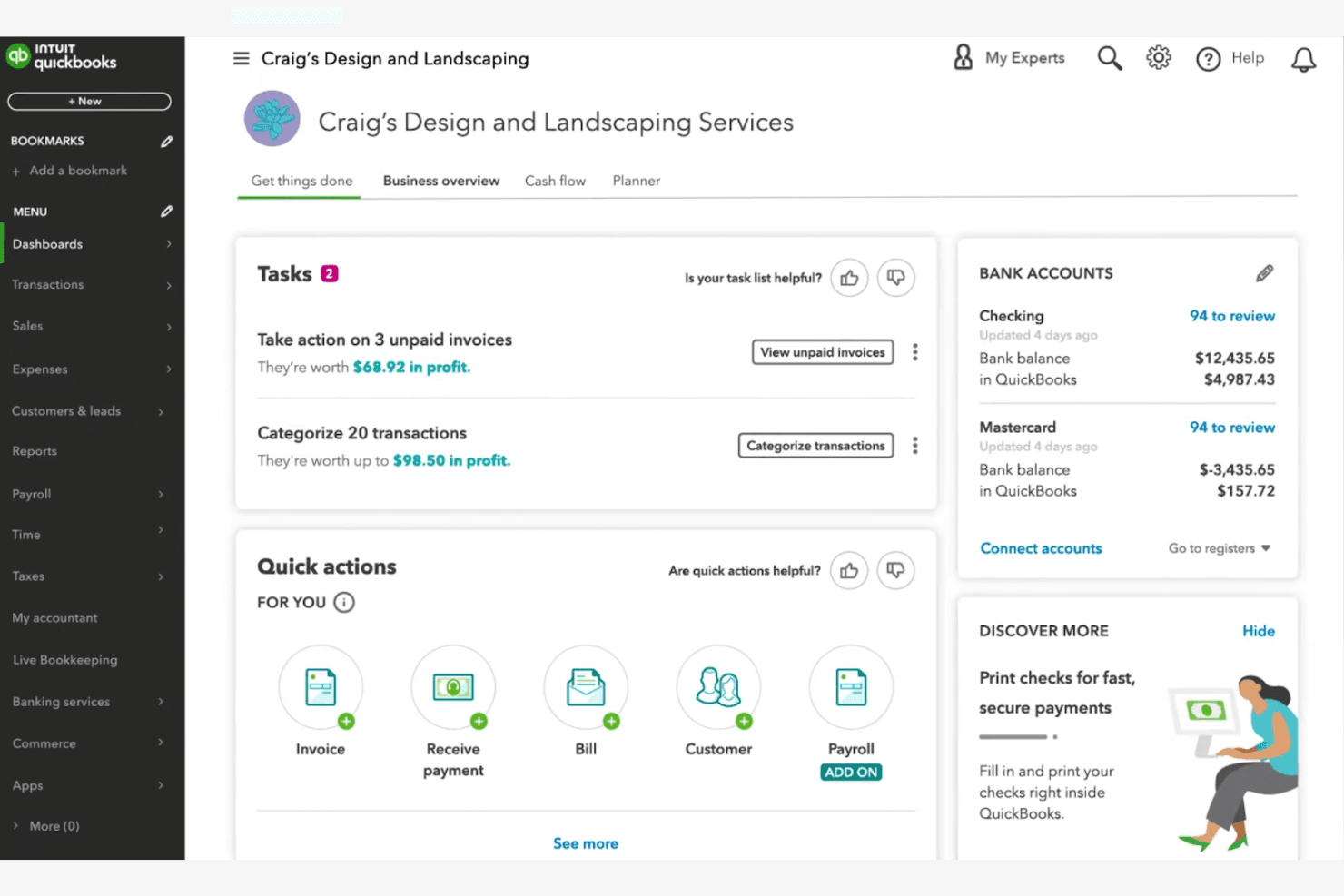
QuickBooks Online muestra tareas, facturas y saldos bancarios en un solo panel. QuickBooks Online es una plataforma de contabilidad basada en la nube que ofrece contabilidad asistida por AI, seguimiento de fondos, conciliación bancaria automatizada e informes financieros a iglesias y organizaciones sin fines de lucro que gestionan las finanzas de sus ministerios.
¿Para quién es más adecuado QuickBooks Online?
Es una opción sólida para contables y directores financieros de iglesias pequeñas y medianas que ya tienen conocimientos prácticos de los fundamentos de la contabilidad.
Por qué elegí QuickBooks Online
Elegí QuickBooks Online porque su conciliación bancaria impulsada por AI agiliza una de las tareas que más tiempo consumen en las finanzas de una iglesia. Intuit Intelligence marca automáticamente las anomalías y resuelve las transacciones que no coinciden entre las cuentas de los ministerios, lo que ahorra mucho tiempo de revisión manual. El nivel avanzado también combina la conciliación con la previsión del flujo de caja y la AI financiera, de modo que los datos de los libros conciliados se incorporan directamente a la planificación presupuestaria.
Características principales de QuickBooks Online
- Seguimiento de fondos y etiquetado por clase o ubicación: Admite el seguimiento segmentado de distintos ministerios y fondos de la iglesia mediante clases y ubicaciones.
- Informes personalizados para la junta y los donantes: Genera informes especializados adaptados a las juntas directivas de las iglesias, los donantes y las declaraciones anuales.
- Acceso multiusuario con controles de roles: Permite crear identificadores de usuario únicos y permisos por niveles para el personal y los voluntarios que gestionan las finanzas.
- Integración con herramientas de donaciones y recaudación de fondos: Se conecta con plataformas como DonorPerfect, Fundly y Kindful para agilizar la importación de datos de donaciones.
Integraciones de QuickBooks Online
QuickBooks Online ofrece integraciones nativas con DonorPerfect, Fundly, Kindful, Method:Donor y Expensify. También hay una API disponible para integraciones personalizadas.
Pros and Cons
Pros:
- La conciliación bancaria impulsada por AI ahorra horas cada semana
- La previsión automatizada del flujo de caja facilita la planificación presupuestaria
- El acceso multiusuario admite roles para el personal y los voluntarios
Cons:
- No cuenta con una estructura nativa de contabilidad de fondos específica para iglesias
- La gestión fiscal del clero requiere soluciones alternativas de terceros
Learn more about QuickBooks Online:
Otras herramientas de gestión financiera de iglesias con IA
Estas son algunas opciones adicionales de herramientas de gestión financiera de iglesias con IA que no llegaron a mi lista, pero que aún merece la pena conocer:
- 11BlackbaudIdeal para aplicar análisis predictivos impulsados por IA a la previsión de donantes y a la estrategia de recaudación de fondos
Cómo Evalúo las Herramientas de Gestión Financiera para Iglesias con IA
No incluyo una herramienta solo porque se autodenomine 'IA'—debe hacer algo significativo, como señalar una desviación presupuestaria entre fondos ministeriales o prever una baja estacional en las donaciones antes de que afecte el flujo de caja. Evalúo cada opción en dos niveles: la funcionalidad básica que debe tener para calificar y los factores diferenciadores que separan una opción adecuada de una excelente.
Funcionalidad Básica (Requisitos Fundamentales para Esta Lista)
Cuando selecciono herramientas para mi lista, califico cada una en una escala del 0 (no ofrece la funcionalidad) al 5 (destaca en esta área) para cada funcionalidad básica que aparece a continuación. Luego, convierto la puntuación total en un porcentaje. Cada herramienta necesita lograr una puntuación mínima total del 55% para ser considerada para la inclusión.
- Contabilidad de Fondos Impulsada por IA: Busco herramientas que utilicen IA para clasificar transacciones en fondos restringidos, no restringidos y designados—como separar automáticamente una donación para la campaña de construcción de los diezmos generales.
- Gestión Automatizada de Aportaciones: Cada herramienta debe gestionar el seguimiento de diezmos y ofrendas con emparejamiento de donantes asistido por IA, evitando así que los registros duplicados de donaciones en línea y presenciales se acumulen al final del año.
- Pronóstico Financiero Predictivo: Evalúo si las funciones de pronóstico basadas en IA van más allá de informes estáticos para modelar escenarios como posibles bajas de donaciones en verano o el impacto financiero de iniciar una nueva sede.
- Detección de Anomalías y Fraude: La herramienta debe identificar actividades inusuales en las cuentas del ministerio, como un aumento repentino en retiros de caja chica o un gasto que se sale de los patrones normales para un departamento.
- Reportes e Información Inteligentes: Aquí importan los resúmenes financieros listos para la junta generados por IA al instante—verifico si pastores y tesoreros pueden obtener informes útiles sin necesidad de tener formación contable.
- Integraciones Específicas para Iglesias: Busco conexiones con plataformas ChMS, herramientas de donaciones en línea y sistemas de nómina que comprendan la compensación al clero, ya que las finanzas eclesiásticas no funcionan en aislamiento.
Una vez que tengo una lista de herramientas que cumplen los criterios, considero qué distingue a cada plataforma.
Factores Diferenciadores (Qué Distingue a los Proveedores)
Así es como comparo y contrasto a los distintos proveedores:
Funciones Sobresalientes
La capacidad de realizar consultas en lenguaje natural es una gran diferencia—quiero comprobar si un tesorero voluntario puede escribir '¿Cuánto gastamos en misiones el último trimestre?' y obtener una respuesta clara sin tener que revisar reportes. Los análisis de retención de donantes con IA también son valiosos, especialmente cuando la herramienta puede identificar donantes inactivos y sugerir el mejor momento para recuperar su interés según patrones anteriores. Las recomendaciones inteligentes de presupuesto son otro punto clave, donde la IA sugiere asignaciones ministeriales basadas en los ciclos estacionales de donación y gastos anteriores.
Más Allá de las Funciones
El manejo fiscal específico del clero es muy importante aquí—verifico si la plataforma admite asignaciones para vivienda y compensación de doble estatus, ya que los errores en esto provocan verdaderos problemas a fin de año. La facilidad de incorporación para voluntarios es otra prioridad. Muchas iglesias dependen de contadores a tiempo parcial o tesoreros laicos, por lo que evalúo si alguien sin conocimientos contables puede navegar el sistema tras una breve configuración. La privacidad del donante también cuenta, especialmente el acceso basado en roles que mantiene la visibilidad de los registros de donaciones restringida solo al personal autorizado.
Cómo elegir herramientas de gestión financiera de iglesias con IA
Es fácil perderse entre largas listas de funciones y estructuras de precios complejas. Para ayudarte a mantener el enfoque mientras analizas tu proceso único de selección de software, aquí tienes una lista de factores que debes tener en cuenta:
| Factor | Qué tener en cuenta |
| Escalabilidad | ¿La herramienta podrá gestionar el crecimiento de tu iglesia, las necesidades de varios campus o los picos estacionales de donaciones sin costes ni complejidad adicionales? |
| Integraciones | ¿Se conecta de forma nativa con tus herramientas de contabilidad, gestión de donantes o comunicación, o necesitarás soluciones alternativas? |
| Personalización | ¿Puedes adaptar los informes, las funciones de usuario y los flujos de trabajo para que coincidan con los procesos financieros y las estructuras de aprobación únicos de tu iglesia? |
| Facilidad de uso | ¿El personal y los voluntarios con distintos niveles de conocimientos tecnológicos podrán navegar por el sistema y utilizarlo con confianza? |
| Implementación y puesta en marcha | ¿Cuánto tiempo llevará migrar los datos, formar a tu equipo y comenzar a utilizar el sistema? ¿Existen recursos o asistencia para la puesta en marcha? |
| Coste | ¿Son claras todas las tarifas, incluidas las de configuración, asistencia y complementos? ¿El precio se ajusta a tu presupuesto y al uso previsto? |
| Medidas de seguridad | ¿La herramienta ofrece acceso basado en roles, registros de auditoría y cifrado de datos para proteger la información financiera y de los donantes? |
| Disponibilidad de asistencia | ¿Puedes contactar con el servicio de asistencia cuando lo necesites, especialmente durante los periodos críticos de elaboración de informes o del cierre anual? |
¿Qué son las herramientas de gestión financiera de iglesias con IA?
Las herramientas de gestión financiera de iglesias con AI son un tipo de software de contabilidad para iglesias diseñado para ayudar a las iglesias a gestionar sus finanzas, realizar un seguimiento de la actividad de las donaciones en línea y mejorar la administración financiera dedicando menos tiempo al trabajo manual. Aunque a menudo se describen como herramientas de AI, actualmente la mayoría ofrece funciones compatibles con AI, como información para informes y reconocimiento de patrones, lo que refleja un área en crecimiento y evolución dentro de los sistemas de gestión de iglesias.
Estas herramientas suelen combinar capacidades de contabilidad integrales con elementos de un sistema de gestión de iglesias, proporcionando a los líderes ministeriales una forma centralizada de gestionar fondos restringidos, informes y tareas contables diarias.
Pueden sustituir a las hojas de cálculo tradicionales al facilitar el seguimiento de donaciones, los procesos de cuentas por pagar y los informes financieros, lo que las hace especialmente valiosas para las iglesias pequeñas que necesitan sistemas fáciles de usar para agilizar las operaciones y mantener la precisión y la transparencia.
Funciones
Al seleccionar herramientas de gestión financiera de iglesias con AI, presta atención a las siguientes funciones clave:
- Seguimiento de donaciones: Registra y categoriza automáticamente las donaciones por donante, fondo y campaña, lo que facilita supervisar los patrones de donación y generar certificados de aportaciones.
- Contabilidad de fondos: Separa y gestiona varios fondos o cuentas dentro del mismo sistema, garantizando el cumplimiento de las normas financieras para organizaciones sin ánimo de lucro y unos informes claros.
- Informes impulsados por AI: Utiliza inteligencia artificial para generar informes financieros, destacar tendencias y proporcionar información práctica a los líderes de la iglesia y los equipos financieros.
- Conciliación automatizada: Hace coincidir las transacciones bancarias con los asientos registrados, reduciendo el trabajo manual y minimizando los errores en los registros financieros.
- Gestión de compromisos de donación: Realiza un seguimiento de los compromisos de los miembros, supervisa el progreso hacia los objetivos y envía recordatorios o actualizaciones a los donantes cuando es necesario.
- Permisos basados en roles: Permite a los administradores establecer distintos niveles de acceso para el personal y los voluntarios, protegiendo los datos financieros confidenciales y favoreciendo la rendición de cuentas.
- Introducción por lotes: Permite introducir rápidamente varias donaciones o transacciones a la vez, ahorrando tiempo durante los periodos de donación o eventos con mayor actividad.
- Registros de auditoría: Mantiene un registro detallado de todos los cambios y transacciones, favoreciendo la transparencia y simplificando las auditorías o revisiones.
- Configuración de donaciones periódicas: Permite a los donantes programar aportaciones automáticas, mejorando la regularidad de los ingresos de la iglesia y simplificando la gestión de donantes.
- Capacidades de integración: Se conecta con herramientas de contabilidad, comunicación y gestión de donantes para optimizar los flujos de trabajo y reducir la duplicación de la introducción de datos.
Beneficios
La implementación de herramientas de gestión financiera de iglesias con AI ofrece varios beneficios para tu equipo y tu organización. Estos son algunos de los que puedes esperar:
- Mayor precisión financiera: El seguimiento automatizado de donaciones y la conciliación reducen los errores manuales y garantizan que tus registros estén siempre actualizados.
- Informes e información más rápidos: Los informes impulsados por AI proporcionan datos financieros en tiempo real y análisis de tendencias, ayudando a los líderes a tomar decisiones informadas con rapidez.
- Mayor transparencia: Los registros de auditoría y una contabilidad clara de los fondos favorecen la rendición de cuentas y facilitan compartir información financiera con la congregación o la junta directiva.
- Ahorro de tiempo para el personal: La introducción por lotes, la configuración de donaciones periódicas y los flujos de trabajo automatizados liberan tiempo del personal y los voluntarios para dedicarlo al ministerio y la labor de alcance.
- Mejor relación con los donantes: La gestión de compromisos de donación y las integraciones de comunicación ayudan a realizar un seguimiento de los compromisos y a mantener informados y valorados a los donantes.
- Mayor seguridad de los datos: Los permisos basados en roles y los controles de acceso seguros protegen la información financiera y de los donantes frente a accesos no autorizados.
- Escalabilidad para el crecimiento: Las herramientas flexibles y las capacidades de integración permiten que tus procesos financieros crezcan junto con tu iglesia, tanto si añades nuevos campus como si amplías los ministerios.
Costes y precios
Seleccionar herramientas de gestión financiera de iglesias con AI requiere comprender los distintos modelos de precios y planes disponibles. Los costes varían según las funciones, el tamaño del equipo, los complementos y otros factores. La siguiente tabla resume los planes habituales, sus precios medios y las funciones que suelen incluir las soluciones de herramientas de gestión financiera de iglesias con AI:
Tabla comparativa de planes para herramientas de gestión financiera de iglesias con AI
| Tipo de plan | Precio medio | Características habituales |
| Plan gratuito | $0 | Seguimiento básico de donaciones, informes limitados, acceso para un solo usuario y asistencia por correo electrónico. |
| Plan personal | $10-$30/mes | Gestión de donaciones y promesas, contabilidad sencilla de fondos, informes básicos de IA e integraciones limitadas. |
| Plan empresarial | $40-$100/mes | Acceso para varios usuarios, análisis avanzados con IA, introducción de datos por lotes, permisos basados en roles e integraciones con herramientas de contabilidad. |
| Plan empresarial avanzado | $150-$400/mes | Compatibilidad con varios campus, flujos de trabajo personalizados, asistencia premium, seguridad avanzada y acceso completo a la API. |
Preguntas frecuentes sobre las herramientas de gestión financiera de iglesias con IA
Estas son algunas respuestas a preguntas frecuentes sobre las herramientas de gestión financiera de iglesias con IA:
¿Cómo mejora la IA la gestión financiera de las iglesias?
La IA mejora la gestión financiera de las iglesias al automatizar tareas rutinarias como el seguimiento de donaciones, la conciliación bancaria y la generación de informes. Esto reduce los errores manuales, ahorra tiempo al personal y proporciona a los responsables información en tiempo real para tomar mejores decisiones.
¿Pueden las herramientas de gestión financiera de iglesias con IA gestionar varios fondos o campus?
Sí, la mayoría de las herramientas de gestión financiera de iglesias con IA admiten la contabilidad de fondos y la gestión de varios campus. Esto permite realizar un seguimiento de los presupuestos, las donaciones y los gastos por separado para cada fondo o ubicación, manteniendo todo organizado en un único sistema.
¿Son estas herramientas suficientemente seguras para los datos financieros y de donantes confidenciales?
Sí, las herramientas de gestión financiera de iglesias con IA de proveedores reconocidos utilizan cifrado, permisos basados en roles y registros de auditoría para proteger los datos confidenciales. Comprueba siempre el cumplimiento de las normas de privacidad y pregunta por las certificaciones de seguridad antes de elegir una solución.
¿Qué tipo de asistencia está disponible para la incorporación y la resolución de problemas?
La mayoría de los proveedores ofrecen recursos de incorporación, como vídeos de formación, demostraciones del producto y seminarios web. La asistencia continua suele incluir ayuda por chat en directo, correo electrónico o teléfono, además del acceso a una base de conocimientos o una comunidad de usuarios.
¿Cómo se integran estas herramientas con otros programas para iglesias?
Muchas herramientas de gestión financiera de iglesias con IA ofrecen integraciones con plataformas de contabilidad, sistemas de gestión de donantes y herramientas de comunicación. Comprueba si tu software actual es compatible o si es posible crear integraciones personalizadas mediante API.