

Yanlış kilise yayını yazılımını kullanmak gerçekten can sıkıcıdır:
- Hiç kullanılmayan özellikler için ödeme yaparsınız... üstelik gerçekten ihtiyacınız olan özelliklere sahip olmazsınız.
- Ses ve görüntü yine senkronunu kaybeder ve insanlar izlemeyi bırakmaya başlar.
- Yayın, özellikle kırsal bölgelerden izleyen üyelerde gecikir veya ara belleğe alınır.
Bu sorunlar, kiliseler için tasarlanmamış veya mevcut ekibimizin yönetemeyeceği kadar karmaşık araçlara güvendiğimizde ortaya çıkar.
Bu listedeki yayın araçlarının her biri ya sizin gibi hizmet ortamları için tasarlanmıştır ya da bu ortamlara oldukça uygundur.
Bu liste, yalnızca çalışan bir şey seçmenize yardımcı olacak; böylece ekibiniz zorlanmayacak, izleyicilerinizin ilgisi canlı kalacak ve siz de makinelere değil mesaja odaklanabileceksiniz.
Why Trust Our Software Recommendations
6,700+
Reviews
20
Industry experts
16+
Evaluation factors
14
Years
Our team has been testing and reviewing software since 2012. As church leaders ourselves, we know how difficult—and important—it is to choose the right software.
For this guide, we evaluated tools using hands-on testing and independent research, scoring tools using our selection criteria.
Our reviews reflect our human editorial judgment, not a sales pitch.
Karşılaştırma Tablosu: Kiliseler İçin Canlı Yayın Yazılımları
Score legend (out of 5)
- Excellent4.5–5
- Good4–4.4
- Average3–3.9
- Below average2–2.9
- Poor1–1.9
Sorted by: Default
| Tool | Starting Price | Website | |||||||
|---|---|---|---|---|---|---|---|---|---|
Best for simulcasting to 30+ platforms at once | 3.3 out of 5 | 4 | 2 | 5 | 4 | 3 | 2 | $19/month Free plan + free demo available | Website |
Best with branded mobile app streaming | Not rated | 4 | 3 | 3 | Not rated | 3 | 5 | Pricing upon request Free plan + free demo available | Website |
Best for browser-based multistream to 8+ destinations | 3.3 out of 5 | 4 | 3 | 5 | 3 | 2 | 3 | $44.99/month Free plan available | Website |
Best for multi-destination live production switching | 3.2 out of 5 | 4 | 1 | 5 | 5 | 3 | 1 | $34/month Free trial available | Website |
Best for building a custom production setup | 3.2 out of 5 | 5 | 1 | 4 | 5 | 3 | 1 | $60 one-time 60-day free trial | Website |
Best for churches streaming to any platform at once | 3.7 out of 5 | 4 | 2 | 5 | 3 | 4 | 4 | $99/month to $999/month 14-day free trial | Website |
Best for late-join rewind on enterprise streams | 3.5 out of 5 | 4 | 3 | 4 | 1 | 5 | 4 | $199/month 14-day free trial + free demo available | Website |
Best for multi-destination church broadcasting | Not rated | 4 | 3 | 5 | Not rated | 2 | 4 | Pricing upon request 30-day free trial | Website |
Best for single-Mac Apple worship production | 3.5 out of 5 | 5 | 2 | 4 | 5 | 4 | 1 | $69.99 per month 14-day free trial. | Website |
Best for iPhone-based giving and multi-camera worship | 3.5 out of 5 | 4 | 3 | 4 | 4 | 3 | 3 | $65/month 14-day free trial | Website |


Kiliseler İçin En İyi Canlı Yayın Yazılımları
Neredeyse her kilise yayınlarını iyileştirmek için çalışıyor ve bunun iyi bir nedeni var. Kapınızdan içeri giren ziyaretçilerin %83’ü kilisenizi ve ibadetinizi önce internette inceledi. Bu araçlar kilisenizin yayınlarını iyileştirmenize yardımcı olacak.
Doğru kilise yayını yazılımını bulmak şaşırtıcı derecede sinir bozucu olabilir. Cemaatinize çevrim içi ortamda iyi hizmet vermek istiyorsunuz, ancak işin teknik tarafı sürekli engel çıkarıyor.
-
Gönüllüler, anlamadıkları hantal arayüzler karşısında bunalıyor.
-
Yazılım sezgisel olmadığı için sürekli yeni ekip üyelerini eğitiyorsunuz.
-
Canlı yayın vaazın ortasında rastgele çöküyor ve hiç kimse bunu nasıl düzelteceğini bilmiyor.
-
Ses ve görüntü yine senkronunu kaybeder ve insanlar izlemeyi bırakmaya başlar.
-
Yayın, özellikle kırsal bölgelerden izleyen üyelerde gecikir veya ara belleğe alınır.
-
Hiç kullanmadığınız özellikler için ödeme yapıyor, ancak gerçekten ihtiyacınız olan özelliklere sahip olmuyorsunuz.
-
Her yeni kurulum veya güncelleme, yalnızca çalışır duruma getirmek için bütün bir cumartesi gününü alıyor.
-
Ekibiniz, sorun çıkaran ekipmanlarla ilgilenmekten tükenmiş hissediyor.
-
Siz vaaz verirken izleyiciler “Ses yok” diye mesaj atıyor.
-
Yayınınızı sürdürmeye mesajınızı hazırlamaktan daha fazla zaman harcıyorsunuz.
Bu sorunlar, kiliseler için tasarlanmamış veya mevcut ekibimizin yönetemeyeceği kadar karmaşık araçlara güvendiğimizde ortaya çıkar. Kilisenizin çevrim içi hizmetlerini yürütmek için tam zamanlı bir teknik direktöre ihtiyacınız olmamalı.
Bu nedenle kilise yayını yazılım araçlarını bir araya getirdiğim bu derlemeyi hazırladım. Her biri ya sizin gibi hizmet ortamları için tasarlanmıştır ya da bu ortamlara oldukça uygundur. Bu liste, yalnızca çalışan bir şey seçmenize yardımcı olacak; böylece ekibiniz zorlanmayacak, izleyicilerinizin ilgisi canlı kalacak ve siz de makinelere değil mesaja odaklanabileceksiniz.
 Best for simulcasting to 30+ platforms at once
- Free plan + free demo available
- From $19/month
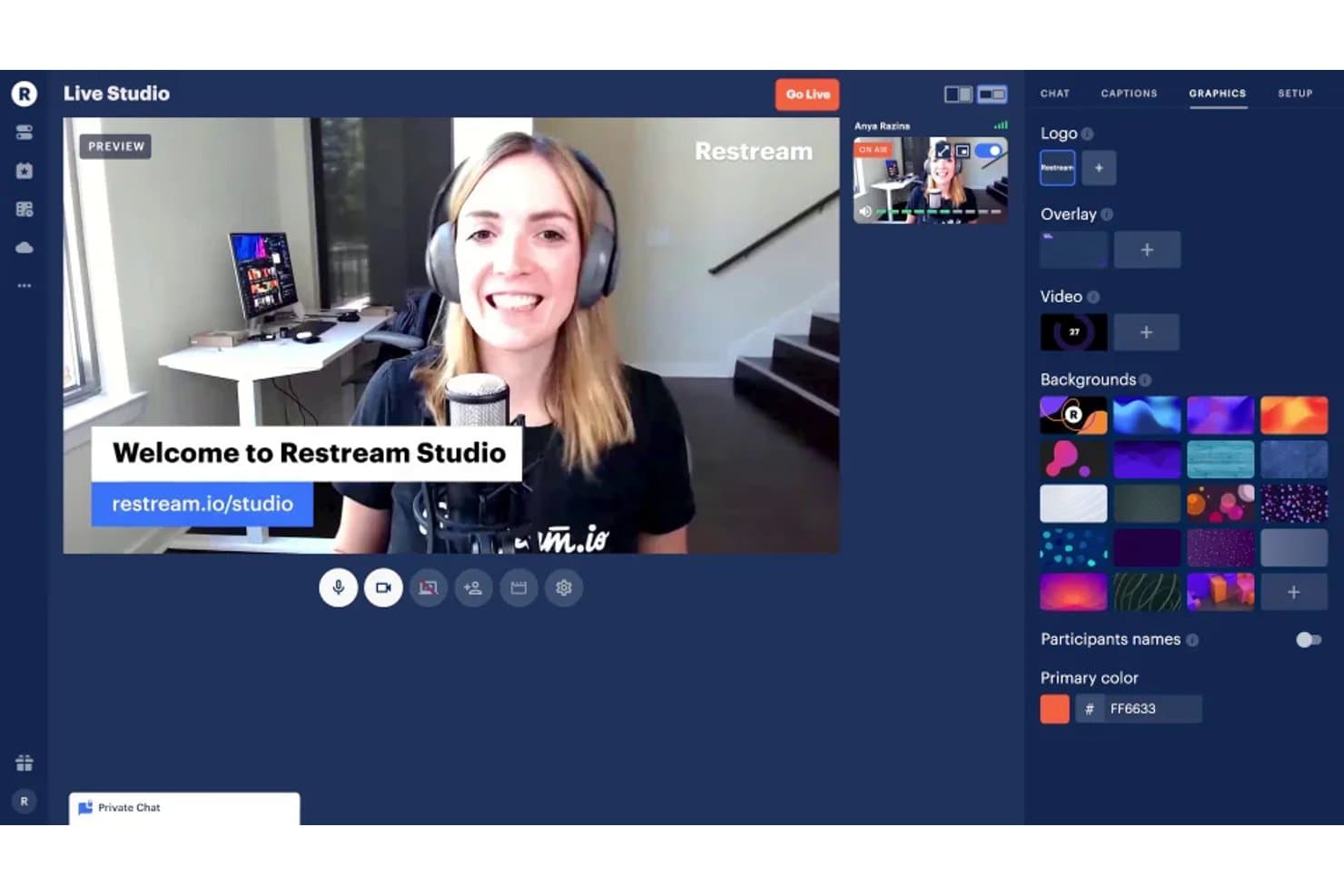
Restream Studio lets users customize live streams with graphics and backgrounds. Restream is a multistreaming platform that lets you broadcast one live feed simultaneously to 30+ destinations, including YouTube, Facebook, Instagram, and custom RTMP channels, using either a browser-based studio or an external encoder like OBS or vMix.
Who Is Restream Best For?
Restream is a strong fit for volunteer-run AV teams that need a no-install, browser-based way to push one Sunday service feed to multiple platforms at once.
Why I Picked Restream
I've included Restream in my top picks because it does one thing exceptionally well: it takes a single live feed and pushes it to 30+ destinations at once, including YouTube, Facebook, Instagram, and any custom RTMP channel. I love that this works through a browser-based Studio with no software to install, which is a real advantage for volunteer AV teams running Sunday services. Restream's per-channel controls also let you switch individual platforms on or off mid-stream without interrupting the rest.
Restream Key Features
- Combined chat dashboard: Aggregates viewer comments from all connected platforms into a single window so your team can monitor and respond without switching between tabs.
- Restream Events scheduling: Lets you schedule streams in advance and automatically announce them on YouTube, Facebook, and LinkedIn before you go live.
- AI-powered Clips add-on: Automatically identifies key moments from your stream, crops them to vertical format, adds captions, and prepares them for TikTok, Shorts, and Reels.
- External encoder compatibility: Works with OBS, vMix, Wirecast, and other professional encoders, so your existing production setup connects directly to Restream's distribution network.
Restream Integrations
Restream integrates with OBS, vMix, Wirecast, YouTube, Facebook, Instagram, TikTok, LinkedIn, and custom RTMP/SRT destinations. It also provides an API for custom integrations.
Pros and Cons
Pros:
- Combined chat supports cross-platform viewer responses
- Browser Studio suits rotating volunteer teams
- Reaches multiple congregations from one broadcast
Cons:
- No native prayer or giving workflows
- Recordings disappear before long-term sermon archiving
Learn more about Restream: Best with branded mobile app streaming
- Free plan + free demo available
- Pricing upon request
Visit WebsiteCustomer Rating:4.5/5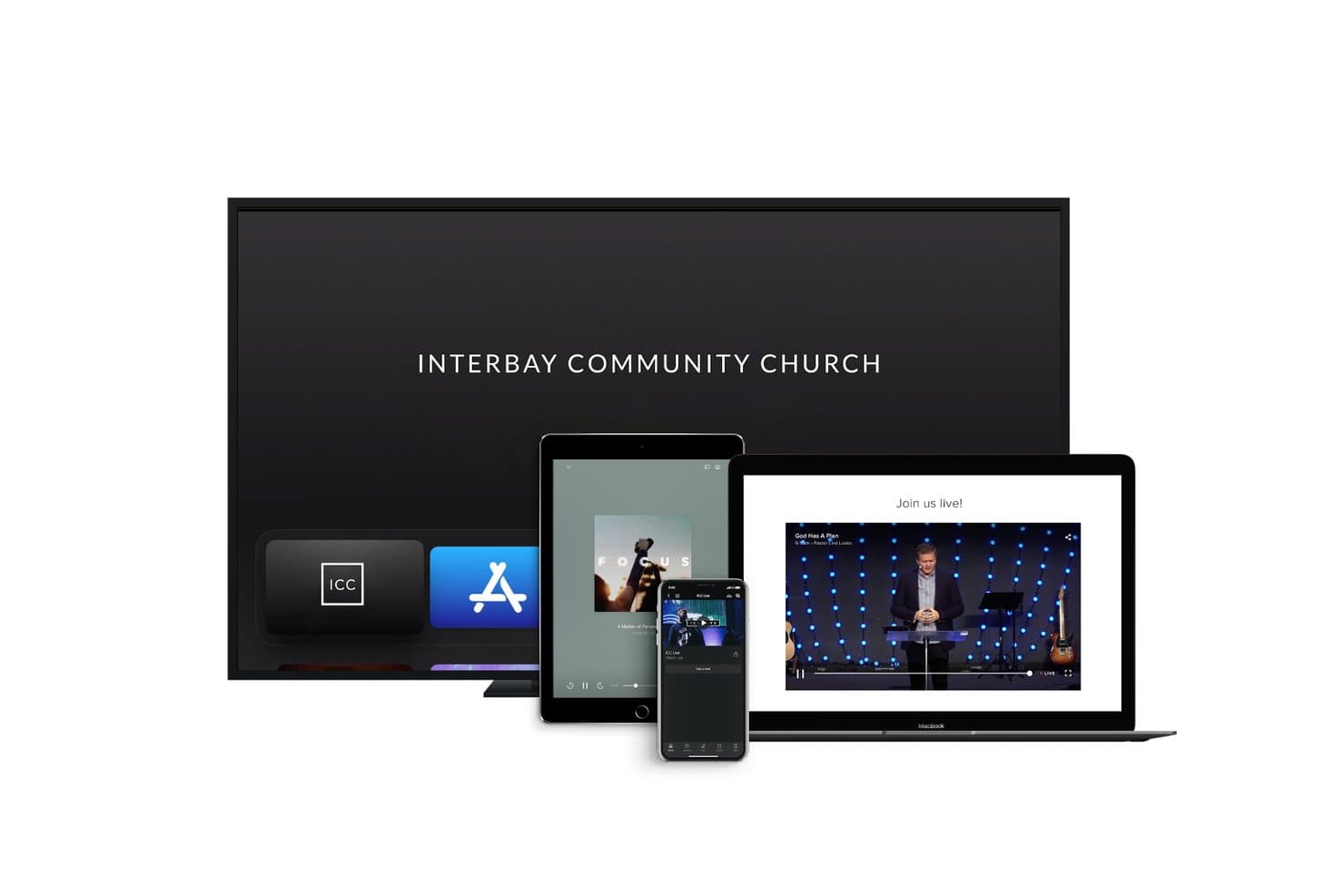
Subsplash offers multi-platform streaming capabilities for churches, enabling live services on TV, tablet, mobile, and desktop devices. Subsplash is a church-specific platform that combines live streaming, branded mobile and TV apps, media hosting, and integrated giving into one system.
Who Is Subsplash Best For?
Subsplash fits churches that want their streaming, giving, and media library inside a single branded app rather than scattered across third-party platforms.
Why I Picked Subsplash
Subsplash earns its spot on my shortlist because it delivers something most streaming tools don't: a fully branded church app that puts live services, sermon archives, and giving in one place under your church's name. I love that Live RS uses the SRT protocol, which holds a stable stream through up to 30% packet loss, making it a strong fit for churches streaming from rural campuses or LTE hotspots. Streams automatically archive into a searchable media library, complete with speaker tags, series organization, and podcast distribution to Apple and Spotify.
Subsplash Key Features
- Pulpit AI sermon repurposing: Converts sermon video, audio, or manuscripts into 20+ pieces of content, including captioned clips, social posts, small group guides, and recap emails.
- Multi-platform TV app distribution: Streams simultaneously to Apple TV, Roku, Fire TV, and Google TV alongside your branded mobile app.
- Live stream chat with follow-up tools: Lets viewers chat during services, with post-stream analytics that link chatters to profiles for pastoral follow-up.
- Recurring stream templates: Saves your stream setup so volunteers can launch weekly services without reconfiguring settings each time.
Subsplash Integrations
Subsplash integrates with Facebook Live, YouTube, Zoom, Church Online Platform, Planning Center, CCB, and Rock RMS. Enterprise plans add custom APIs and single sign-on for broader church system connectivity.
Pros and Cons
Pros:
- SRT helps maintain streams on unstable connections
- Automatic sermon archiving supports on-demand ministry
- Branded mobile and TV viewing experience
Cons:
- Chat requires viewer login and add-ons
- External tools handle switching and graphics
 Best for browser-based multistream to 8+ destinations
- Free plan available
- From $44.99/month
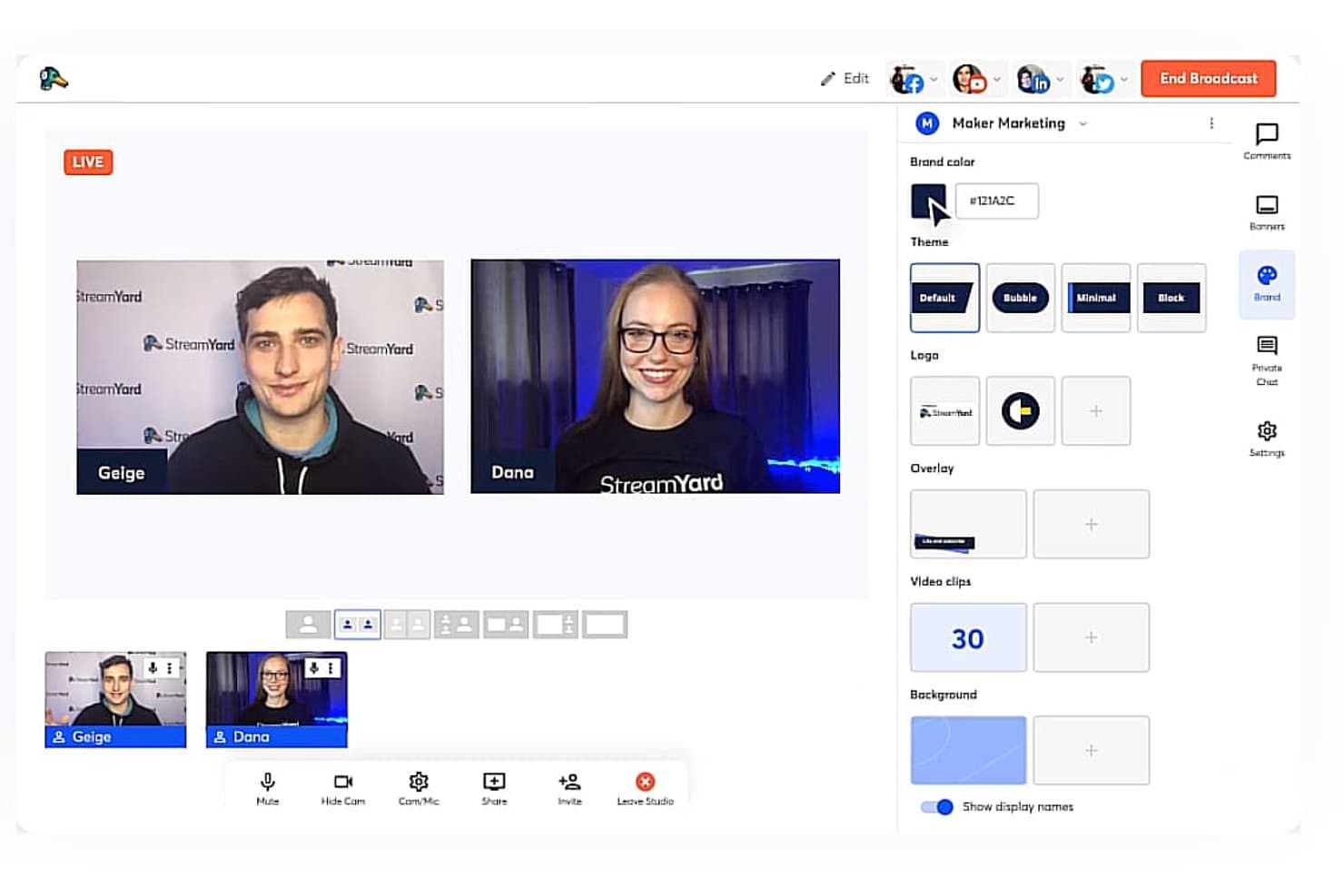
StreamYard lets churches brand and customize live broadcasts easily. StreamYard is a browser-based live streaming studio that lets you multistream to multiple platforms simultaneously, manage on-screen guests, apply branded overlays and layouts, and record services for on-demand replay.
Who Is StreamYard Best For?
StreamYard is a great fit for churches with rotating volunteer teams who need a low-barrier, browser-based setup to go live across multiple platforms every week.
Why I Picked StreamYard
I picked StreamYard as one of the best because it handles browser-based multistreaming to up to 10 destinations better than almost anything else I've seen, sending a single upload from your church to YouTube, Facebook, and your website simultaneously. I especially like the reusable "Worship Service" studio setup, where saved layouts for stage view, sermon close-ups, and slide screens give rotating volunteer teams a repeatable Sunday workflow. AI Clips also turns full-service recordings into captioned vertical shorts automatically, so one livestream feeds your archive, your podcast, and your social channels.
StreamYard Key Features
- On-Air hosted watch page: A branded landing page where viewers can register, watch your service live, and chat, with the option to embed it on your church website.
- Multi-Aspect Ratio Streaming (MARS): Sends a landscape stream to YouTube and a portrait stream to Instagram or TikTok simultaneously from one broadcast.
- Per-participant local recording: Saves separate audio and video tracks for each person on screen, making post-service podcast editing significantly easier.
- Pre-recorded content playback: Plays pre-recorded video as if it's live, supporting up to 8 hours of scheduled content on the Business plan.
StreamYard Integrations
StreamYard offers native integrations with YouTube, Facebook, Instagram, LinkedIn, Brightcove, Twitch, and Kick, plus custom RTMP connectivity for Vimeo, TikTok, Dacast, Amazon Live, and website players.
Pros and Cons
Pros:
- AI Clips repurpose services into shorts
- Saved worship layouts simplify rotating teams
- Browser-based volunteer setup needs little hardware
Cons:
- On-Air chat offers no individual moderation
- Layout switching lacks broadcast-grade production depth
Learn more about StreamYard: Best for multi-destination live production switching
- Free trial available
- From $34/month (billed annually)
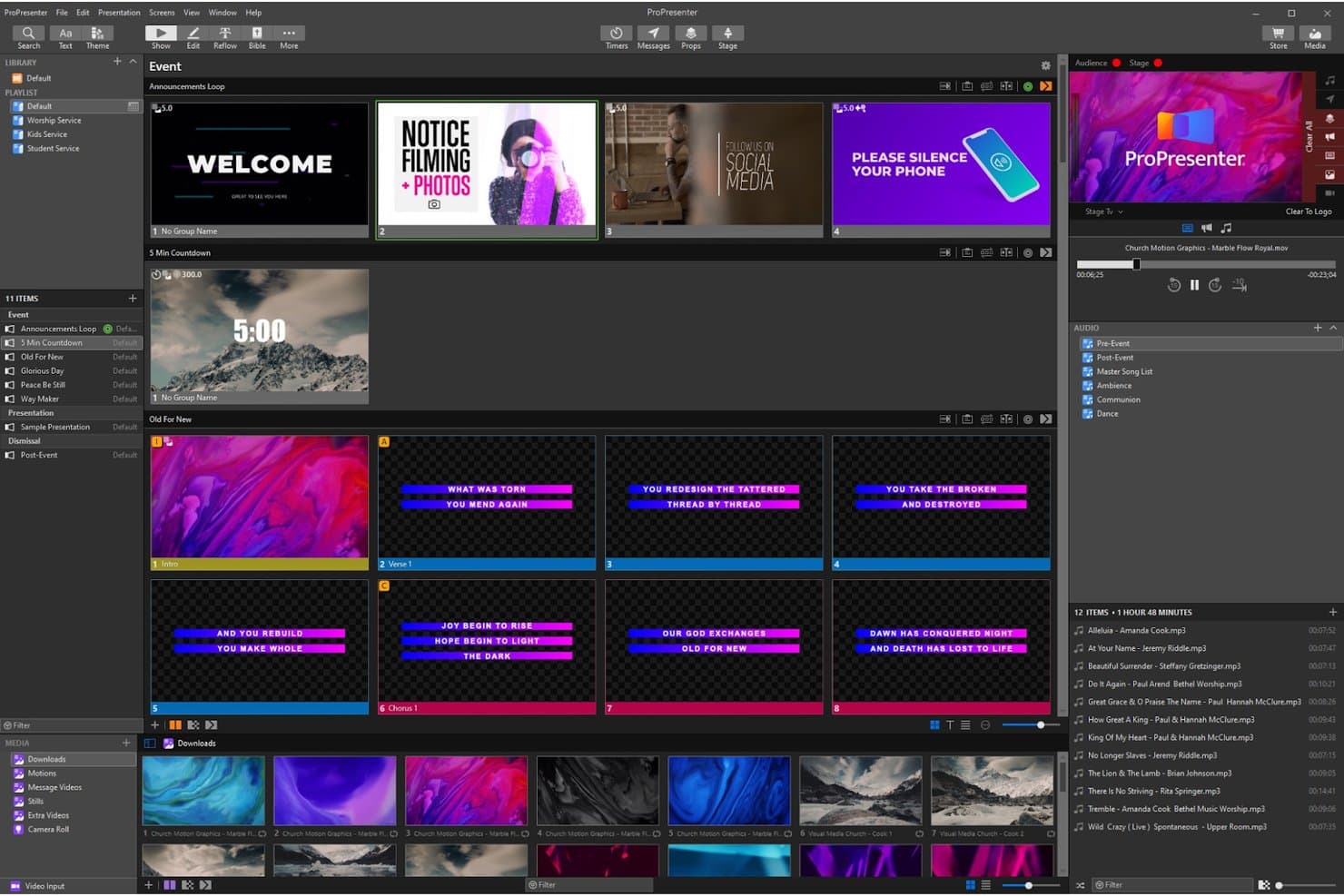
Wirecast supports church presentation workflows with multi-panel slide management. Wirecast is a live production and streaming software for Mac and Windows that handles multi-camera mixing, graphics layering, and simultaneous multi-platform broadcasting from a single desktop setup.
Who Is Wirecast Best For?
Wirecast is a strong fit for church media directors who already manage a dedicated AV setup and want professional-grade production switching with multi-platform distribution built in.
Why I Picked Wirecast
Wirecast earns its spot on my list because of how well it handles multi-destination live production switching, pushing a single stream to 10+ platforms at once through cloud multistreaming. I love that it supports up to 250 layers, stinger transitions, and NDI-based ProPresenter overlays, so your sermon graphics and lyrics feed directly into the broadcast without a separate capture card. Churches running weekend services to YouTube, Facebook, and ChurchStreaming.tv simultaneously will find this setup hard to replicate with lighter tools.
Wirecast Key Features
- Rendezvous remote guests: Invite up to 7 remote speakers or missionaries to join your broadcast live from any browser, no software download required.
- GPU-accelerated encoding: Offloads encoding to your graphics card via Intel QuickSync, Nvidia NVENC, or Apple H.264 to reduce CPU strain during services.
- VST3 audio plugin support: Apply professional audio processing plugins directly within Wirecast to polish your sermon audio before it hits the stream.
- Free trial with no time limit: Download the full Studio or Pro feature set and run unlimited broadcasts before purchasing, with a watermark on outputs until you subscribe.
Wirecast Integrations
Wirecast integrates with YouTube, Facebook Live, Twitch, Vimeo, LinkedIn Live, X/Twitter, ChurchStreaming.tv, Restream.io, Zoom Webinar, and custom RTMP/SRT destinations. It also supports ProPresenter overlays through NDI.
Pros and Cons
Pros:
- Graphics processing reduces production computer strain
- Browser guests join without software downloads
- Advanced switching for polished worship broadcasts
Cons:
- Reported crashes threaten unattended weekend broadcasts
- No native replay library or viewer engagement
Learn more about Wirecast:
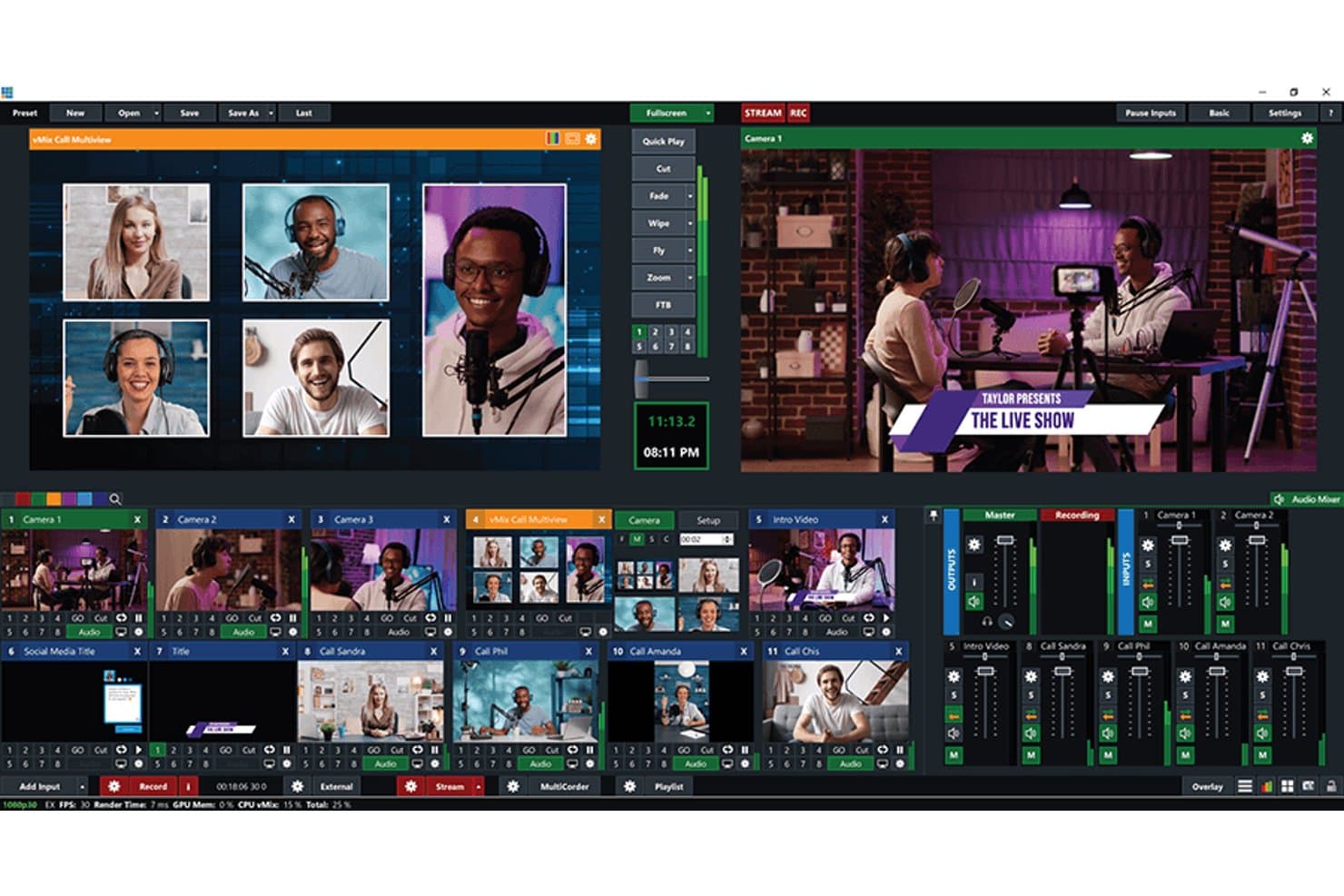
vMix supports multi-camera live streaming with video call guests on screen. vMix is a Windows-based live production and streaming software that handles camera switching, graphics overlays, multi-destination streaming, and local recording from a single PC.
Who Is vMix Best For?
vMix is the right fit for church media directors who want full production control and are comfortable building a custom setup around dedicated Windows hardware.
Why I Picked vMix
I picked vMix as one of the best because it's built for media directors who want to design their production setup from the ground up rather than fit into a pre-packaged solution. Running everything from one Windows PC, it handles live camera switching, NDI-based lyric overlays from ProPresenter, and simultaneous streaming to up to five platforms at once. I especially like how its Reference Systems guide takes the guesswork out of hardware selection, giving you a vetted build from a 4-camera laptop rig up to a 24-camera studio setup.
vMix Key Features
- vMix Call: Brings remote guests—like off-site speakers or members sharing testimonies—into your live production through a web browser, with up to 8 callers depending on your edition.
- LiveLAN: Streams your program feed to overflow rooms, lobbies, and nurseries over your local network without needing an additional streaming platform.
- MultiCorder: Records each camera as a separate file simultaneously, giving your team clean, isolated footage for post-service editing.
- vMix Social: Pulls in live chat from YouTube, Facebook, Twitch, and other platforms so operators can approve and display viewer comments as on-screen graphics.
vMix Integrations
vMix has documented integrations with ProPresenter, Zoom Meetings, Zoom Events, Zoom Sessions, Facebook Live, YouTube, Twitch, and Vimeo. It also supports NDI, SRT, OMT, custom RTMP destinations, and an API for custom control.
Pros and Cons
Pros:
- Detailed production controls suit trained operators
- Isolated camera files support sermon repurposing
- One PC handles switching, recording, and streaming
Cons:
- Rotating volunteers need substantial operator training
- Windows-only operation limits platform choice
Learn more about vMix: Best for churches streaming to any platform at once
- 14-day free trial
- From $99/month to $999/month
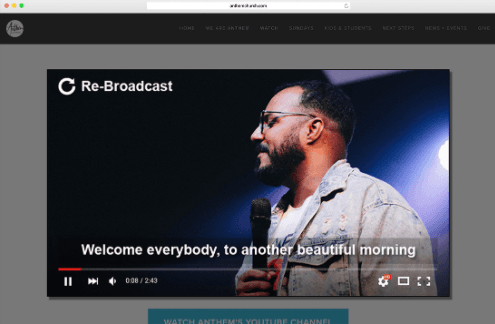
Boxcast is suitable for first-time and seasoned streamers. BoxCast is a cloud-based church streaming platform that handles live broadcasting, multi-platform simulcasting, on-demand video archiving, and automated scheduling from a single dashboard.
Who Is BoxCast Best For?
BoxCast is a strong fit for church media directors and volunteer AV teams who need to broadcast live services to multiple platforms at once without managing complex technical setups.
Why I Picked BoxCast
I picked BoxCast as one of the best because it handles multi-platform simulcasting in the cloud, meaning your Sunday service goes to YouTube, Facebook, X, and your church website in one shot without your team managing separate streams. I love that unlimited simulcast destinations come standard, so you're never paying per platform. BoxCast's automated scheduling also lets broadcasts start and stop on their own, which is a genuine relief when you're relying on volunteers.
BoxCast Key Features
- Stream Diagnostics: Real-time alerts flag issues like low bitrate, packet loss, and interrupted streams so you can catch problems before they affect your congregation.
- Adaptive bitrate transcoding: BoxCast generates up to four quality levels per stream so viewers on slower connections still get a smooth playback experience.
- On-demand video library: Recordings are automatically archived with trimming tools, chapter markers, and a Simulated Live option for replaying past services.
- BoxCast Sharing: An AI-assisted clipping tool that lets you pull short highlight clips from broadcasts to share on social media.
BoxCast Integrations
BoxCast integrates with ProPresenter, OBS, vMix, Wirecast, Facebook Live, YouTube Live, X, Vimeo, Tithe.ly, and PayPal. It also supports RTMP/SRT encoders, M3U8 exports, and an API for custom integrations.
Pros and Cons
Pros:
- Diagnostics flag bitrate and network failures
- Automated scheduling supports volunteer-led broadcasts
- Unlimited simulcasting reaches every channel
Cons:
- Multi-site tools offer limited advanced controls
- Proprietary hardware limits equipment flexibility
Learn more about Boxcast: Best for late-join rewind on enterprise streams
- 14-day free trial + free demo available
- From $199/month
StreamShark offers a live streaming platform for the best viewing experience. StreamShark is a live streaming platform built on multi-CDN delivery that handles live broadcasting, multiplatform distribution, DVR-enabled replay, and on-demand video hosting.
Who Is StreamShark Best For?
StreamShark is a strong fit for larger churches with a dedicated media team that needs enterprise-grade reliability and late-join rewind for online congregants.
Why I Picked StreamShark
I picked StreamShark as one of the best because its Live DVR rewind is the feature I keep coming back to for larger congregations. When someone joins a Sunday service 20 minutes late, they can rewind to the very beginning on the same player link, with no separate replay link needed. I also love that once the service ends, StreamShark automatically archives the stream and swaps the same embed to the trimmed on-demand recording, so your church website never needs updating.
StreamShark Key Features
- Multi-CDN live broadcasting: StreamShark routes your stream through 70+ edge locations across six continents for reliable delivery to large audiences.
- Multistreaming to social platforms: Send one stream simultaneously to Facebook, YouTube, LinkedIn, Twitch, and custom RTMP or SRT destinations from a single control screen.
- Moderated Q&A chat: A built-in Q&A mode holds viewer questions until a moderator approves them, letting your team control what appears on screen.
- Automatic video archiving: Every live stream is saved to a hosted video library with tagging, playlists, and embeddable links the moment the broadcast ends.
StreamShark Integrations
StreamShark offers native integrations with Facebook Live, YouTube, LinkedIn, and Twitch, plus custom RTMP/SRT destinations. It supports vMix, Epiphan, Matrox, and AWS Elemental encoders; no ProPresenter or church management integrations are documented.
Pros and Cons
Pros:
- Multi-CDN delivery supports large congregations
- Same link becomes trimmed replay
- Late joiners rewind to service start
Cons:
- Eight-hour DVR window limits long events
- No built-in worship production tools
Learn more about StreamShark: Best for multi-destination church broadcasting
- 30-day free trial
- Pricing upon request
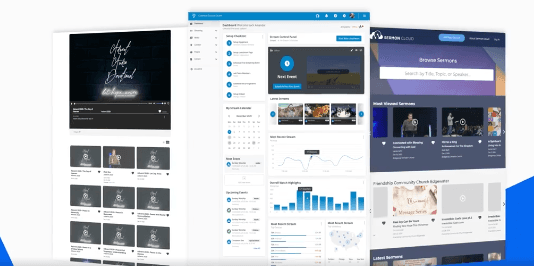
Churchstreaming.tv makes it easy to broadcast across various sources. Churchstreaming.tv is a cloud-based live streaming platform built specifically for churches, offering multi-destination broadcasting, adaptive video delivery, sermon archiving, and audience engagement tools like chat and prayer requests.
Who Is Churchstreaming.tv Best For?
Churchstreaming.tv is a solid fit for church media directors who need to push a single stream to multiple destinations simultaneously, from YouTube and Facebook to smart-TV apps like Roku and Apple TV.
Why I Picked Churchstreaming.tv
Churchstreaming.tv earns its spot on my shortlist because of how well it handles multi-destination broadcasting out of the box. I like that a single stream pushes simultaneously to your church website, YouTube, Facebook, Apple TV, and Roku, so Sunday's service reaches every viewer without extra effort. The built-in Sermon Cloud archive automatically tags messages by speaker, series, and Bible passage, making past services genuinely searchable for your congregation.
Churchstreaming.tv Key Features
- Adaptive quality streaming: The platform automatically adjusts video quality for each viewer based on their internet connection, serving options from audio-only up to 1080p.
- Sermon Cloud archive tagging: Past services are automatically tagged by speaker, series, Bible passage, and keyword, making them searchable on your church site and in search engines.
- Podcast and RSS feed management: Churchstreaming.tv generates and manages podcast feeds for your sermon library, with stats for subscriptions, listens, and downloads.
- Moderated prayer requests: Viewers can submit prayer requests directly from the live stream page, which your team can review and moderate before they're visible.
Churchstreaming.tv Integrations
Churchstreaming.tv supports integrations with YouTube, Facebook, Apple TV, Roku, FireTV, Church Online Platform, Clover Sites, Wirecast, OBS, and custom RTMP or HLS destinations. It also connects with the Ministry Brands Amplify suite.
Pros and Cons
Pros:
- Moderated prayer requests support pastoral follow-up
- Multi-destination broadcasting reaches scattered congregants
- Searchable sermon archives preserve weekly messages
Cons:
- External encoders handle all production switching
- Reliability complaints threaten Sunday service continuity
Learn more about Churchstreaming.tv: Best for single-Mac Apple worship production
- 14-day free trial.
- from $69.99 per month
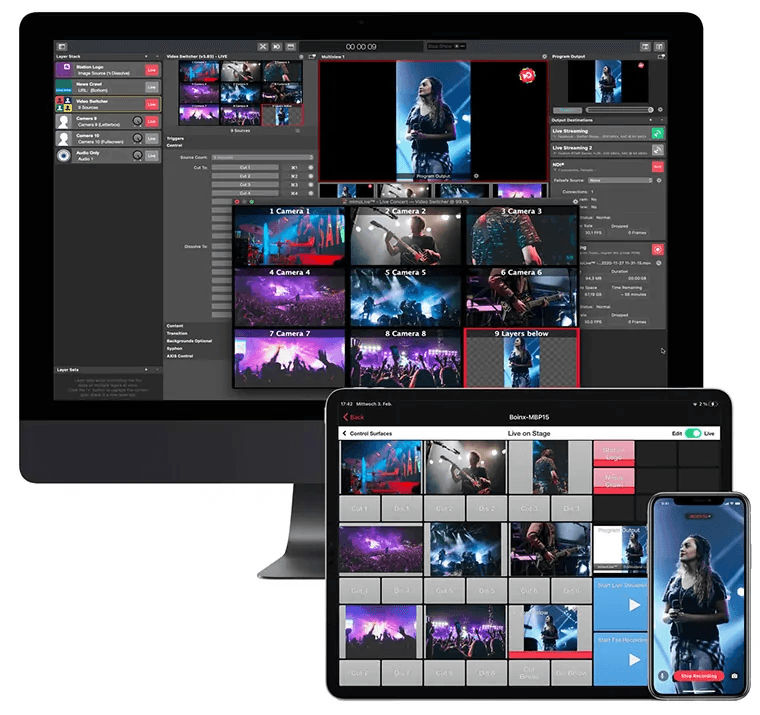
mimoLive is professional-grade event recording software for Macs. mimoLive is a macOS-only live production app that handles camera switching, graphics, multistreaming, ISO recording, and automation from a single Mac.
Who Is mimoLive Best For?
mimoLive is a strong fit for church media directors and volunteer AV teams running their entire production from a single Mac.
Why I Picked mimoLive
mimoLive earns its spot on my shortlist because it consolidates a full broadcast setup onto one Mac, which is exactly what a lean church AV team needs on a Sunday morning. I love that its layer-based production engine handles live camera switching, lower thirds, and chroma key simultaneously without extra hardware. Its NDI support means you can pull in PTZ camera feeds wirelessly, and the iPad Remote Surface lets a single volunteer manage the whole show from the pew.
mimoLive Key Features
- Simultaneous multistreaming: Stream to up to 6 destinations at once, each with its own codec, bitrate, and audio mix settings.
- Machine-learning background removal: Remove backgrounds from on-screen speakers without a green screen, using built-in ML processing.
- ISO recording: Capture each camera source as a separate local file alongside the program output, with date and time tokens in filenames.
- Live comments display: Pull in YouTube and Facebook comments to moderate and display on screen during a live service.
mimoLive Integrations
mimoLive integrates with Zoom, Microsoft Teams, Blackmagic ATEM and DeckLink, NDI devices, Elgato Stream Deck, X-keys, and Bitfocus Companion. Its HTTP API and WebSocket events support custom integrations, including ProPresenter workflows.
Pros and Cons
Pros:
- Monitors bitrate, dropped frames, and reconnections
- Captures isolated camera recordings for future editing
- Runs switching, graphics, and streaming on one Mac
Cons:
- Lacks native hosting, giving, and prayer tools
- Requires macOS for every production workstation
Learn more about mimoLive: Best for iPhone-based giving and multi-camera worship
- 14-day free trial
- From $65/month
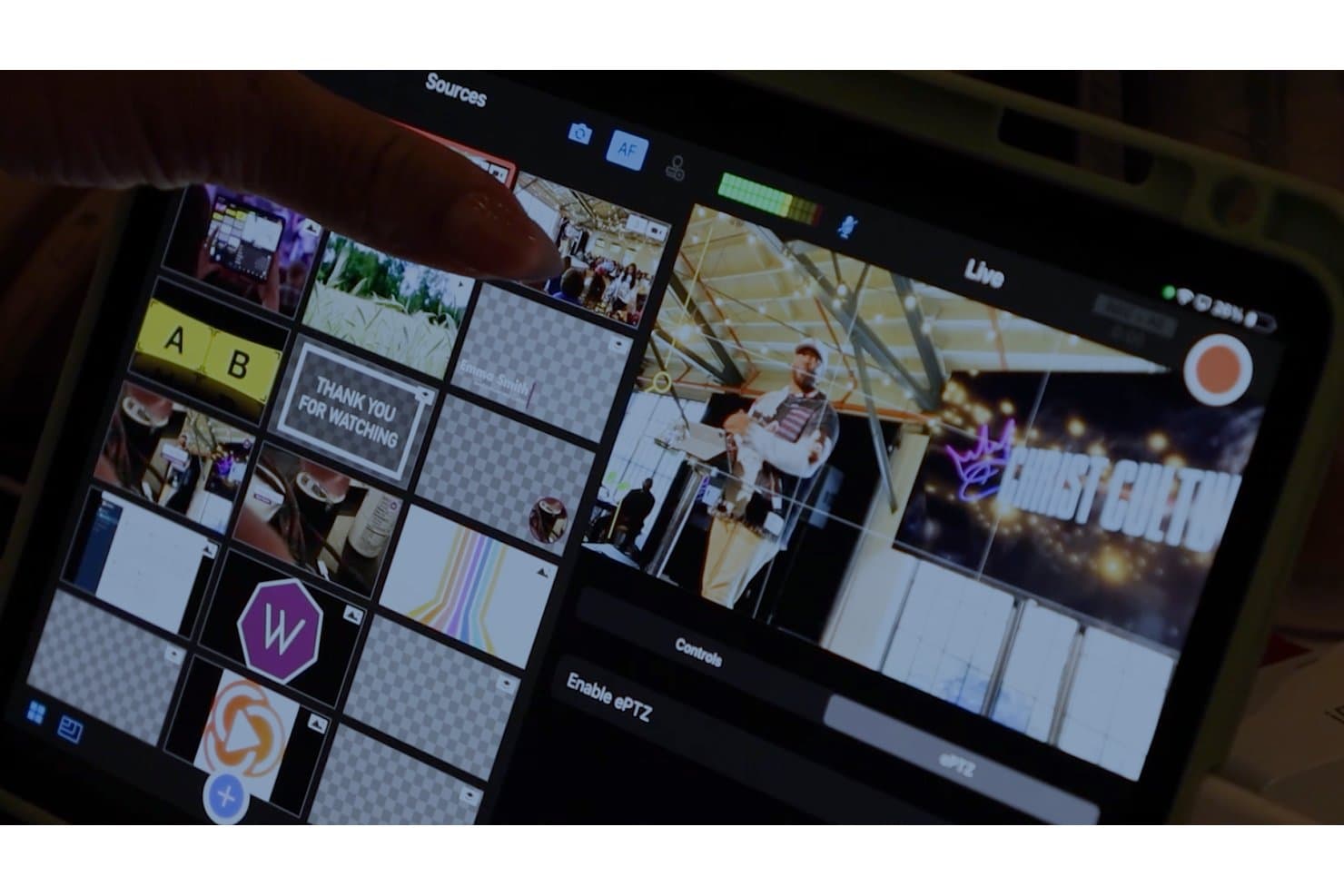
Switcher Studio lets churches manage live scenes and sources on iPad. Switcher Studio is an iPhone, iPad, and Mac-based live streaming app that combines multi-camera switching, multi-platform broadcasting, video hosting, and integrated giving tools in one subscription.
Who Is Switcher Studio Best For?
Switcher Studio is a strong fit for churches with volunteer-led AV teams who want a full production setup without dedicated hardware.
Why I Picked Switcher Studio
I've included Switcher Studio in my top picks because it's built specifically around the iPhone-and-iPad production setup that most volunteer-led church AV teams already have. I love that Scene Builder lets your team group cameras, graphics, and text into a single tap, so switching between worship and sermon views mid-service doesn't require a trained operator. The built-in giving integration with platforms like Tithe.ly and Givelify means donation prompts go out live, without a separate tool or a percentage cut taken from every gift.
Switcher Studio Key Features
- Director Mode: Records every camera angle simultaneously, so you can edit and produce a polished replay after the service ends.
- Multiview templates: Choose from 40+ picture-in-picture, split-screen, and grid layouts to display multiple camera angles in a single frame.
- Remote guest access: Invite up to five guests to join your stream from a browser link, no app download required.
- Social comment aggregation: Pulls Facebook and YouTube comments into one view, with the option to display them on screen during the live stream.
Switcher Studio Integrations
Switcher Studio offers native integrations with YouTube, Facebook, Twitch, Tithe.ly, Givelify, PayPal, Venmo, and Cash App. Custom RTMP connections support Instagram, TikTok, X, and LinkedIn.
Pros and Cons
Pros:
- Scene Builder simplifies worship-to-sermon switching
- Director Mode preserves every camera angle
- iPhone-based production suits volunteer teams
Cons:
- Audio mixing remains limited for complex services
- Apple hardware remains required for production
Learn more about Switcher Studio:
Diğer Seçenekler
- 11EcammBest for ProPresenter overlay in Mac worship production
- 12ResiBest for multi-campus stream failover
- 13Tithe.lyBest for streaming with real-time giving tools
- 14OBS StudioBest for zero-cost broadcast production setup
- 15DacastBest for max viewers at minimum monthly cost
- 16ChurchSpringBest for all-in-one website and streaming
- 17SermonCastBest for churches reaching homebound viewers on-demand
- 18Christian World MediaBest for church discovery via public streaming guide
- 19StreamlabsBest for OBS-based streaming on a free plan
How I Evaluate Church Streaming Software
I split my evaluation into three parts, giving the most weight to broadcasting services live and sending one stream to multiple channels. Next, I look for distinguishing features such as ProPresenter integration for lyrics. Finally, I consider support, onboarding, and pricing for volunteer teams.
Core Functionality (Table Stakes For This List)
When I'm selecting tools for my list, I score each one on a scale from 0 (does not offer the functionality) to 5 (excels in this area) for each core functionality listed below. I then convert the total into a percentage to help assess each tool's overall fit, with extra weight on any functionalities I’ve deemed essential.
- Live Broadcasting (Essential): I look for reliable live audio and video controls that suit the church’s setup, from a single-camera service to a multi-camera worship team.
- Multi-Platform Distribution (Essential): I check whether one stream can reach destinations such as the church website, YouTube, and Facebook at the same time.
- Production Switching: I evaluate how easily operators can switch camera angles and add lyrics or announcements during a service.
- On-Demand Replay: I look for an organized archive that lets viewers find and watch past services after they’ve aired.
- Viewer Engagement: I assess live chat and features such as prayer requests or giving prompts that help remote congregants participate.
- Stream Monitoring: I check for live stream-health indicators and connectivity or quality alerts that help operators respond during a broadcast.
Once I have a list of tools that meet the criteria, I consider what sets each platform apart.
Differentiating Factors (What Sets Vendors Apart)
Here's how I compare and contrast different vendors:
Standout Features
I look for ProPresenter integration because volunteer operators need lyrics and scripture overlays to trigger in sync with the worship set—without manually switching windows mid-service. NDI camera support is another priority; it lets churches add camera angles over a network instead of investing in a dedicated hardware switcher. I also check whether a platform offers built-in giving prompts during the live stream, since that removes the friction of directing viewers to a separate donation page.
Beyond Features
Volunteer usability matters most to me. I check whether a platform offers simplified operator views or quick-start modes, because rotating volunteers can't afford a learning curve every Sunday morning. I also evaluate vendor support responsiveness during weekend services—some providers like BoxCast and Resi offer church-specific support teams, while others rely on general ticketing that won't help mid-broadcast. Finally, I look at content ownership policies and sermon archive portability so your library isn't locked to one vendor if you switch.
Kilise Yayını Yazılımı Nasıl Seçilir?
Kendinize özgü yazılım seçim sürecinizi yürütürken aşağıdaki noktaları aklınızda bulundurun:
- Gönüllüler İçin Kullanım Kolaylığı: Çoğu kilise, ayinler sırasında teknolojiyi yönetmek için gönüllülere güvenir. Çok fazla teknik deneyimi olmayan kişiler için bile kurulumu ve kullanımı kolay olan bir yazılım seçin. Eğitim süresini en aza indirmek için sezgisel kontrollere, anlaşılır eğitimlere ve hızlı yanıt veren müşteri desteğine sahip araçları tercih edin.
- Yayın Kalitesi ve Güvenilirliği: Topluluğunuz için kesintili yükleme veya düşük ses kalitesinden daha can sıkıcı çok az şey vardır. İnternet hızları sınırlı olsa bile yüksek kaliteli video ve ses yayınına öncelik veren bir yazılım seçin. Bazı araçlar, kaliteyi bant genişliğine göre otomatik olarak ayarlayan uyarlanabilir yayın özelliği de sunar.
- Mevcut Araçlarla Entegrasyon: Yazılımınız kamera, mikrofon veya sunum yazılımı gibi hâlihazırda kullandığınız araçlarla sorunsuz çalışmalıdır. Maliyetli yükseltmelerden veya can sıkıcı geçici çözümlerden kaçınmak için mevcut kurulumunuzla uyumluluğu kontrol edin. Örneğin ProPresenter kullanıyorsanız yayın yazılımınızın bunu desteklediğinden emin olun.
- Kiliseler İçin Özel Özellikler: Her yayın aracı kiliseler düşünülerek tasarlanmamıştır. Vaaz kaplamaları, kutsal kitap slaytları veya YouTube ve Facebook gibi birden fazla platforma aynı anda yayın yapma seçenekleri gibi özellikleri arayın. Bu ek özellikler, çevrim içi izleyiciler için daha ilgi çekici bir ibadet deneyimi oluşturmanıza yardımcı olabilir.
- Kısıtlı Bütçeler İçin Uygun Fiyat: Küçük ve orta ölçekli birçok kilise sınırlı bütçelerle faaliyet gösterir. Fiyatlandırma planlarını dikkatle karşılaştırın ve ihtiyaç duyduğunuz özellikleri karşılayabileceğiniz bir fiyata sunan yazılımlara öncelik verin. Bazı sağlayıcılar kiliseler için özel indirimler veya planlar da sunar.
Bu hususları ön planda tutarak hizmetinizin ihtiyaçları için doğru kilise yayın yazılımını seçmeye daha hazırlıklı olacaksınız.
Kilise Yayın Yazılımlarındaki Eğilimler
Kilise yayın yazılımları, topluluklara daha iyi hizmet vermek ve kilise yöneticilerinin işleyişini kolaylaştırmak için gelişmiştir. Önemli eğilimler şunlardır:
- Gelişmiş Çoklu Platform Yayını: Araçlar artık YouTube ve Facebook gibi platformlara aynı anda yayın yapılmasına olanak tanıyarak ek çaba harcamadan erişimi genişletiyor.
- Entegre Bağış Özellikleri: Bazı yazılımlar yayın sırasında bağış yapma seçenekleri sunarak çevrim içi katılımcılar için ondalık verme işlemini kolaylaştırıyor ve kilisenin mali durumunu destekliyor.
- Özel Markalama İmkânları: Kilise logoları ve kişiselleştirilmiş öğeler ekleyebilme özelliği, dijital hizmetler genelinde tutarlı bir kimlik korunmasına yardımcı oluyor.
- Geliştirilmiş Kullanıcı Arayüzleri: Geliştiriciler sezgisel tasarımlara odaklanarak gönüllülerin yayınları asgari eğitimle yönetmesini kolaylaştırıyor.
- Gelişmiş Analizler: Ayrıntılı izleyici istatistiklerine erişim, kiliselerin çevrim içi kitlelerini daha etkili bir şekilde anlamasını ve onlarla etkileşim kurmasını sağlıyor.
- Mobil Uyumluluk: Mobil yayını desteklemek, hizmetlerin çeşitli cihazlardaki üyelere erişilebilir olmasını sağlayarak esnekliği artırıyor.
- Güvenlik Geliştirmeleri: Daha güçlü güvenlik önlemleri yayınları yetkisiz erişime karşı koruyarak topluluk üyeleri için güvenli bir izleme deneyimi sağlıyor.
Bu gelişmeler, erişilebilir, ilgi çekici ve güvenli çevrim içi ibadet deneyimlerine yönelik artan ihtiyacı karşılayarak kilise yöneticilerinin teknik zorluklara daha az, hizmete daha fazla odaklanmasına olanak tanıyor.
Kilise Yayın Yazılımı Nedir?
Kilise yayın yazılımı, kiliselerin ibadetlerini çevrim içi canlı yayınlamasını ve insanların her yerden ibadet edebilmesini sağlayan bir araçtır. Bu, mabedinize açılan dijital bir pencere oluşturmak gibidir; hasta olan, seyahat eden veya uzakta bulunan üyelerin bağlantıda kalmasını kolaylaştırır. Genellikle canlı video, daha sonra izlemek üzere kayıt ve YouTube veya Facebook gibi platformlarda yayın yapma araçları gibi özellikleri içerir. Doğru kurulumla çevrim içi yayın yapmanın stresini azaltır ve kiliselerin hizmete odaklanmasına yardımcı olur.
Kilise Yayın Yazılımının Özellikleri
Kilise yayın yazılımı kullanmak, işleyişi kolaylaştırarak hizmete odaklanmanız için size zaman kazandırabilir. Doğru araçlarla teknik sorunları çözmeye daha az, insanlarla bağlantı kurmaya daha fazla zaman ayırabilir ve topluluğunuza çevrim içi olarak etkili bir şekilde ulaşabilirsiniz. Bunu yapmanıza yardımcı olmak için aramanız gereken en önemli özellikleri aşağıda bulabilirsiniz.
- Basit Kurulum: Hizmet vermeye daha fazla, sorun gidermeye daha az zaman ayırabilmeniz için kurulumu ve çalışır hâle getirilmesi kolay bir yazılım seçin.
- Kullanıcı Dostu Kontrol Paneli: Açık ve anlaşılır bir kontrol paneli, yayınları sizin ve gönüllülerinizin daha az stresle yönetmesini sağlar.
- Çoklu Platform Yayını: YouTube, Facebook veya web sitenize aynı anda yayın yapmanıza olanak tanıyan yazılımlar, ek çalışma gerektirmeden daha fazla kişiye ulaşmanıza yardımcı olur.
- Güvenilir Yayın Kalitesi: Yüksek kaliteli ve istikrarlı yayın, topluluğunuzun kesintisiz ibadet edebilmesini sağlar; bu da hizmetinizi olumlu yansıtır.
- Otomatik Zamanlama: Yayınları önceden planlamanıza olanak tanıyan araçları arayın; böylece her seferinde yayını canlı olarak yönetmeniz gerekmez.
- Mevcut Araçlarla Entegrasyon: Kameralarınız, mikrofonlarınız ve sunum araçlarınızla çalışan yazılımlar size zaman ve para kazandırır.
- Teknik Destek: Hızlı desteğe erişebilmek, sorunları çabucak çözmenizi ve yeniden insanlara odaklanmanızı sağlar.
- Özel Markalama: Kilisenizin logosunu ekleyebilme veya yayını özelleştirebilme özelliği, başkalarına ulaşırken hizmetinizin kimliğini güçlendirmenize yardımcı olur.
- Analizler ve İçgörüler: İzlenme istatistiklerini takip eden yazılımlar, kitlenizle ne kadar iyi bağlantı kurduğunuzu göstererek hizmet yaklaşımınızı geliştirmenize yardımcı olur.
- Uygun Fiyatlı Planlar: Bütçenize uygun bir araç bulmak, kaliteden ödün vermeden kaynaklarınızı diğer hizmet önceliklerine ayırmanıza olanak tanır.
Bu tür özelliklerle kilise yayın yazılımı, hizmetin teknik yönünü yönetmenize yardımcı olurken insanlara odaklanmak için size daha fazla zaman ve enerji kazandırabilir. Kilisenizin ihtiyaçlarına uygun araçları tercih edin; böylece daha anlamlı bir hizmet sunma yolunda ilerleyebilirsiniz.
Kilise Yayını Yazılımının Faydaları
Kilise yayını yazılımı, kiliselerin cemaatleriyle bağlantı kurmasına, teknik işlere harcanan zamandan tasarruf etmesine ve hizmetlerinin erişimini genişletmesine yardımcı olur. Çevrim içi ibadeti daha kolay ve etkili hâle getiren bir araçtır. Sunduğu başlıca faydalar şunlardır:
- Daha Geniş Kitleye Erişim: Yayın, ibadetlere yüz yüze katılamayan üyelerle hizmetleri paylaşmayı ve çevrim içi yeni izleyiciler çekmeyi kolaylaştırır.
- Geliştirilmiş Etkileşim: Canlı sohbet ve etkileşimli özellikler gibi araçlar, çevrim içi katılımcıların ibadetin bir parçası olduklarını hissetmelerine yardımcı olarak bir topluluk duygusu oluşturur.
- Basitleştirilmiş İşlemler: Kullanıcı dostu kontrol panelleri ve otomasyon seçenekleri sayesinde yayınları yönetmek daha az zaman alır, gönüllüler ve çalışanlar üzerindeki stresi azaltır.
- Maliyet Verimliliği: İyi bir yayın çözümü, maliyetli görsel-işitsel yükseltmelerden genellikle daha uygun fiyatlıdır ve hizmetlerinizi modernleştirmek için bütçe dostu bir yol sunar.
- Artan Bağış Fırsatları: Entegre bağış araçları, çevrim içi izleyicilerin katkıda bulunmasını kolaylaştırarak kilisenizin mali açıdan sürdürülebilir olmasına yardımcı olur.
Kilise yayını yazılımı yalnızca bir teknoloji aracı değildir; ekibinizi aşırı yüklemeden cemaatinize daha iyi hizmet etmenin ve hizmetlerinizi büyütmenin bir yoludur. Doğru sistemle, en önemli şeye, insanlarınıza özen göstermeye odaklanabilirsiniz.
Kilise Yayını Yazılımı Maliyetleri ve Fiyatlandırması
Kilise yayını yazılımı, farklı ihtiyaçlara ve bütçelere uyacak şekilde genellikle ücretsiz seçeneklerden premium çözümlere kadar çeşitli planlar sunar. Bu planlar, her büyüklükteki kilisenin ihtiyaç duymadığı araçlar için fazla ödeme yapmadan doğru özellikleri bulmasına yardımcı olmak üzere tasarlanmıştır. Aşağıda sunulan yaygın planların dökümü yer almaktadır:
| Plan Türü | Ortalama Fiyat | Yaygın Özellikler | Şunlar İçin En Uygun... |
|---|---|---|---|
| Plan TürüÜcretsiz Plan | Ortalama Fiyat$0/ay | Yaygın ÖzelliklerTemel canlı yayın, tek platformda yayın, sınırlı destek | Şunlar İçin En Uygun...Yayına yeni başlayan küçük kiliseler |
| Plan TürüTemel Plan | Ortalama Fiyat$20-$50/ay | Yaygın ÖzelliklerBirden fazla platformda yayın, kayıt, temel ekran üstü grafikler, analizler | Şunlar İçin En Uygun...Çevrim içi ibadetler için daha fazla esnekliğe ihtiyaç duyan kiliseler |
| Plan TürüStandart Plan | Ortalama Fiyat$50-$100/ay | Yaygın ÖzelliklerÖzel markalama, çoklu kamera desteği, zamanlama, ayrıntılı analizler | Şunlar İçin En Uygun...Çevrim içi erişimini genişleten orta büyüklükteki kiliseler |
| Plan TürüPremium Plan | Ortalama Fiyat$100-$300/ay | Yaygın ÖzelliklerUyarlanabilir yayın, entegrasyonlar, öncelikli destek gibi gelişmiş özellikler | Şunlar İçin En Uygun...Kendine ait yayın ekipleri bulunan daha büyük kiliseler |
| Plan TürüKurumsal Plan | Ortalama FiyatÖzel fiyatlandırma | Yaygın ÖzelliklerTam özelleştirme, sınırsız izleyici, gelişmiş güvenlik | Şunlar İçin En Uygun...Çok büyük kiliseler veya karmaşık ihtiyaçları olan kuruluşlar |
Her plan farklı ihtiyaç düzeylerine göre hazırlanmıştır; bu nedenle kilisenizin büyüklüğüne ve hedeflerine uygun olanı seçmeniz önemlidir. Yayın konusunda yeniyseniz küçük başlayın, ancak cemaatiniz çevrim içi ibadetlere büyük ölçüde güveniyorsa gelişmiş planları değerlendirin.
Kilise Yayını Yazılımı Hakkında Sıkça Sorulan Sorular
1. Yayın düzenimin ibadet tarzımızla uyumlu olmasını nasıl sağlayabilirim?
Kilise yayını yazılımı esnektir ve çeşitli ibadet tarzlarına uyum sağlayabilir. Özelleştirilebilir düzenler, kutsal kitap metni ekran üstü grafikleri ve çoklu kamera desteği sunan araçları arayın. Bu özellikler, yüz yüze ibadetlerinizin akışını ve havasını yansıtmanıza olanak tanıyarak cemaatiniz için çevrim içi kesintisiz bir deneyim oluşturur.
2. Kilisemiz içindeki birden fazla konuma aynı anda yayın yapmak mümkün mü?
Evet, birçok araç kiliseniz içindeki farklı ekranlara veya odalara yayın yapmanıza olanak tanır; bu işlem genellikle eş zamanlı yayın olarak adlandırılır. Bu özellik özellikle ek salonlar, birden fazla yerleşkesi bulunan kiliseler veya çocuk hizmetleri gibi özel gruplar için kullanışlıdır.
3. Kesintisiz yayın için ne tür bir internet hızına ihtiyacımız var?
Saniyede en az 5 Mbps yükleme hızına sahip kararlı bir internet bağlantısı, genellikle temel HD yayın için yeterlidir. 4K yayın yapmayı veya birden fazla platform özelliğini kullanmayı planlıyorsanız 10-20 Mbps'ye yakın bir hıza ihtiyacınız olabilir. Tutarlılığı sağlamak için bağlantınızı her zaman yayın yapmayı planladığınız günün saatinde test edin.
4. Kilise yayını yazılımı video kütüphanemizi yönetmemize yardımcı olabilir mi?
Birçok araç otomatik kaydetme, kategorilere ayırma ve isteğe bağlı içerik oluşturma olanağı gibi video yönetimi özellikleri sunar. Bu sayede geçmiş vaazları, Kutsal Kitap çalışmalarını veya özel etkinlikleri cemaatinizle düzenlemek ve paylaşmak kolaylaşır.
5. İngilizce konuşmayan kişiler için altyazı veya çeviri ekleme seçenekleri var mı?
Evet, bazı yazılımlar hizmetleri daha geniş bir kitle için erişilebilir hâle getirmek amacıyla otomatik altyazı veya çeviri araçları içerir. Bu, çok dilli cemaatlere sahip olan veya farklı topluluklara ulaşan kiliseler için faydalıdır.
Bu sorular, papazların yayın olanaklarını başlatırken veya geliştirirken karşılaşabilecekleri pratik endişeleri ele alarak kilisenizin ihtiyaçları için en iyi yazılım hakkında bilinçli kararlar vermenize yardımcı olur.