

Kilise yönetimi için yapay zekâ araçları; iletişim, planlama, bağış toplama ve üye etkileşimi gibi kilise yönetimi görevlerini otomatikleştirmek, düzenlemek ve basitleştirmek için yapay zekâ kullanan dijital platformlardır. Kiliseler için yapay zekâ kullanımını araştırıyorsanız bu araçlar, idari yükleri azaltmaya, koordinasyonu geliştirmeye ve kilise liderlerinin hizmet çalışmalarını daha etkili bir şekilde yönetmesine yardımcı olabilir. Birçok çözüm; içerik oluşturma, sosyal medya ve kilise web sitenizdeki güncellemeler konusunda yardımcı olan yapay zekâ asistanları, yapay zekâ sohbet robotları ve diğer yapay zekâ sistemleri gibi özellikler içerir. Ayrıca pastoral bakımı, öğrenciliği ve Kutsal Kitap çalışmasını desteklerken ekiplerin fikirler üzerinde beyin fırtınası yapmasına, yapay zekâ tarafından oluşturulan adanmışlık metinleri hazırlamasına ve günlük operasyonları optimize etmesine olanak tanıyabilirler. Bu listede, kilise liderlerinin kendine özgü ihtiyaçlarını karşılamak üzere tasarlanmış güvenilir çözümler bulacaksınız. Böylece operasyonların sorunsuz ilerlemesini sağlarken cemaatinize rehberlik etmeye odaklanabilirsiniz.
Why Trust Our Software Recommendations
6,700+
Reviews
20
Industry experts
16+
Evaluation factors
14
Years
Our team has been testing and reviewing software since 2012. As church leaders ourselves, we know how difficult—and important—it is to choose the right software.
For this guide, we evaluated tools using hands-on testing and independent research, scoring tools using our selection criteria.
Our reviews reflect our human editorial judgment, not a sales pitch.
Karşılaştırma Tablosu: Kilise Yönetimi için Yapay Zekâ Araçları
Bu karşılaştırma tablosu, kilise yönetimi için en iyi yapay zekâ araçları seçimlerimdeki fiyatlandırma ayrıntılarını özetlemektedir:
Sorted by: Default
| Tool | Starting Price | Website | |
|---|---|---|---|
Best for privacy-first Q&A handling | Not rated | $99/month 60-day free trial available | Website |
Best for automated church member management | 4.6 out of 5 | $12/month Free plan available | Book Demo |
Best for digital church giving | 4.8 out of 5 | $72/month Free plan + 30-day trial + demo available | Website |
Best for service and volunteer scheduling | 4.2 out of 5 | $15/month Free plan + 30-day free trial + free demo available | Website |
Best for digital giving and donor insights | 4.0 out of 5 | Pricing upon request Free demo available | Website |
Best for searchable church member databases | Not rated | $73.32/month Free demo available | Website |
Best for AI-powered communication assistant | Not rated | $30/month Free demo available | Website |
Best for integrated church member and giving management | Not rated | Pricing upon request Free demo available | Website |
Best for AI -powered church administration | Not rated | $60/month Free plan + free demo available | Website |
Best for AI -assisted sermon preparation | Not rated | Pricing upon request Free plan available | Website |


Kilise Yönetimi için Yapay Zekâ Araçları İncelemeleri
Aşağıda, kısa listeme giren kilise yönetimi için yapay zekâ araçlarına ilişkin ayrıntılı özetlerimi bulabilirsiniz. İncelemelerim, size en uygun seçeneği bulmanıza yardımcı olmak için her platformun özelliklerine, yeteneklerine ve entegrasyonlarına ayrıntılı bir bakış sunar.
 Best for privacy-first Q&A handling
- 60-day free trial available
- From $99/month
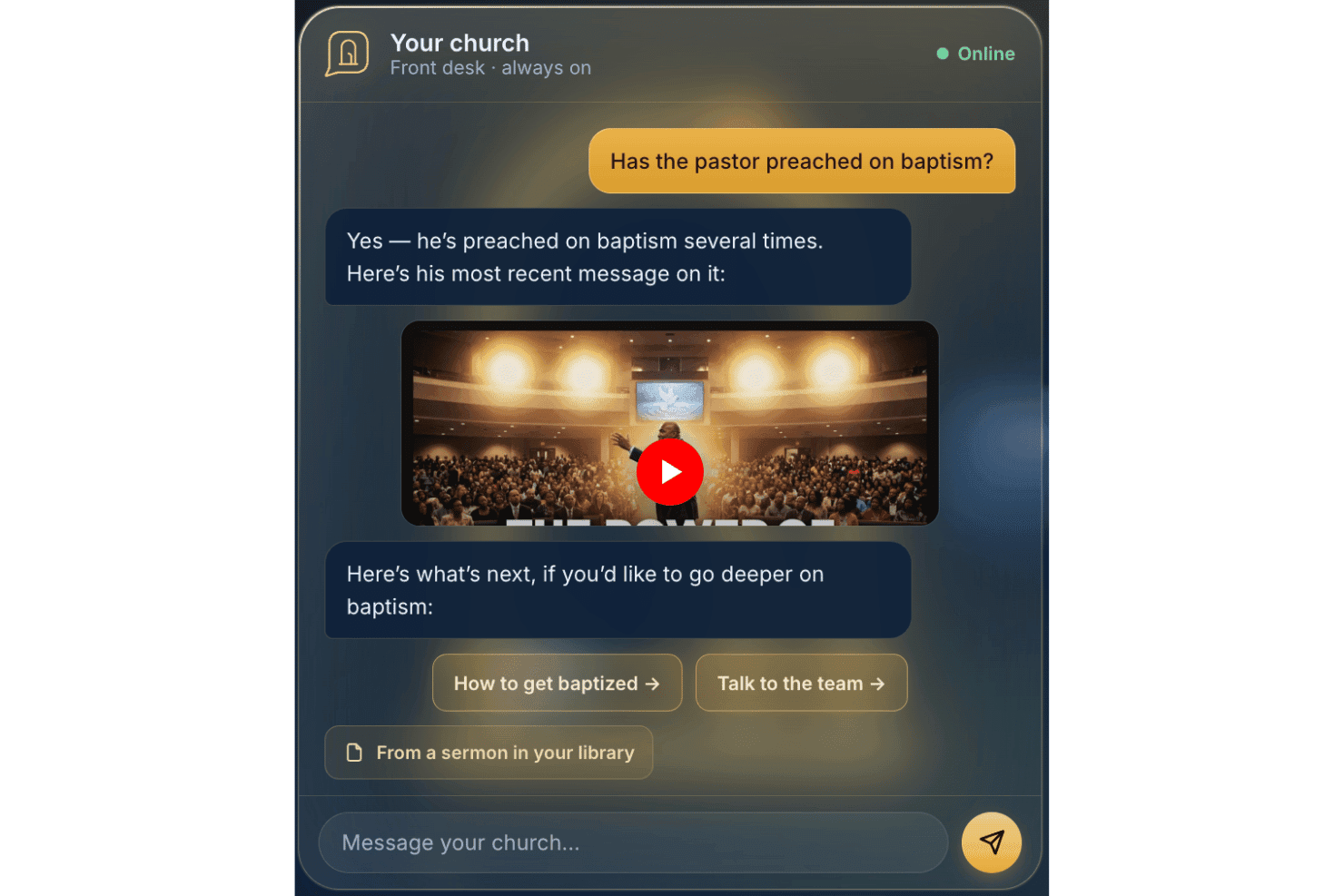
AskMyChurch offers a 24/7 AI-powered church answering service. AskMyChurch is an AI chatbot for church websites that answers visitor and member questions using the church's own published content, sermons, and videos, with built-in crisis routing, bilingual support, and anonymous-by-default privacy.
Who Is AskMyChurch Best For?
Churches of any size that want to answer visitor questions after hours without collecting personal data or requiring staff to monitor a chat inbox.
Why I Picked AskMyChurch
I picked AskMyChurch because its anonymous-by-default design genuinely stands out in church AI tools. Visitors can ask sensitive questions about grief, faith doubts, or mental health without creating accounts or being tracked. What I find particularly important is the hard crisis gate: when distress signals appear, it routes to 988 and the Crisis Text Line before any AI response is generated, which is a level of pastoral care responsibility I haven't seen built directly into other church chatbots.
AskMyChurch Key Features
- Canon (pastor's voice): Answers are sourced directly from the pastor’s sermons and cite the exact time the words were spoken.
- Dual-pass grounding check: Every response is verified twice against church content to prevent AI-generated hallucinations.
- Learning Loop: Weekly reports surface unanswered questions and recurring themes for church admins to review and address.
- Topic control: Admins can disable specific topics or redirect visitors using plain-English instructions in the dashboard.
AskMyChurch Integrations
Native integrations are not publicly documented. An API for custom integrations is not advertised.
Pros and Cons
Pros:
- AI highlights unanswered visitor topics
- Answers are grounded in pastor’s sermons
- Adapts responses to reflect church branding
Cons:
- Cannot manage donations or giving campaigns
- No member data or attendance management
Learn more about AskMyChurch: Best for automated church member management
- Free plan available
- From $12/month
Visit WebsiteCustomer Rating:4.6/5
ChMeetings event scheduler listing recurring weekly group meetings. ChMeetings offers a digital platform designed specifically for churches to manage members, events, and communication. It’s a practical choice for pastors and ministry leaders who want to centralize administrative tasks and keep track of church engagement. With features tailored for faith communities, ChMeetings helps streamline daily operations and support ministry growth.
Who Is ChMeetings Best For?
ChMeetings is a strong fit for church administrators and ministry leaders who need to manage member data, events, and communications in one place.
Why I Picked ChMeetings
I chose ChMeetings because it offers dedicated member management and event tracking tools designed for church contexts. The platform lets you organize member profiles, attendance, and group participation, making it easier to keep up with your congregation’s involvement. I also appreciate how event tracking is built in, so you can schedule, promote, and monitor church activities all in one place. These features help church leaders stay organized and responsive to the needs of their community.
ChMeetings Key Features
Some other features that make ChMeetings useful for church administration include:
- Mobile app access: Manage church data and communication from iOS and Android devices.
- Mass messaging: Send emails, SMS, or push notifications to individuals or groups.
- Donation tracking: Record, categorize, and report on giving and contributions.
- Custom forms: Create and distribute forms for registrations, surveys, or volunteer sign-ups.
ChMeetings Integrations
Integrations include Stripe, PayPal, Bluesnap, Paystack, Mailchimp, Twilio, SMS Global, Clickatell, Eazismspro, and more.
Pros and Cons
Pros:
- Built-in donation and pledge tracking
- Event check-in with QR code scanning
- Member directory supports custom fields and tags
Cons:
- No sermon or media library management
- No built-in worship planning tools
Learn more about ChMeetings: Best for digital church giving
- Free plan + 30-day trial + demo available
- From $72/month
Visit WebsiteCustomer Rating:4.8/5
Tithely app builder with sermon, events, and giving sections editor. If you’re looking for a digital giving and engagement platform built for churches, Tithely offers a focused solution. It’s designed for faith communities that want to simplify online giving, manage events, and connect with members from one dashboard. Tithely helps church leaders handle donations, communication, and administrative tasks in a way that fits modern ministry needs.
Who Is Tithely Best For?
Tithely suits small to mid-sized churches and ministries that want to centralize giving, communication, and member engagement.
Why I Picked Tithely
What drew me to Tithely is how it brings together giving, communication, and engagement tools in one platform designed specifically for churches. Its all-in-one approach means you can manage online and mobile giving, event registration, and member messaging without juggling multiple systems. I see real value in features like automated donation tracking and built-in text and email communication, which help streamline both financial and relational aspects of church administration. For ministries that want a unified solution to handle both donations and member engagement, Tithely stands out as a purpose-built choice.
Tithely Key Features
Some other features that make Tithely useful for church administration include:
- Custom church app builder: Create a branded mobile app for your church to share sermons, events, and announcements.
- Event management tools: Organize, promote, and track attendance for church events and activities.
- Volunteer management: Schedule, communicate with, and coordinate volunteers for various ministries and services.
- Digital check-in system: Track attendance and securely check in children or members for services and events.
Tithely Integrations
Integrations include QuickBooks, RockRMS, The StudioC, Engiven, Elvanto, Salesforce, MinistryPlatform, Shelby Systems, FellowshipOne, and more.
Pros and Cons
Pros:
- Digital check-in system for children’s ministry
- Event registration with attendee tracking included
- Custom church app builder for member engagement
Cons:
- Donation processing fees are higher than some
- No built-in accounting or payroll features
 Best for service and volunteer scheduling
- Free plan + 30-day free trial + free demo available
- From $15/month
Visit WebsiteCustomer Rating:4.2/5
Planning Center dashboard with scheduling, groups, registrants, and giving. If you’re looking for a flexible way to manage church operations, Planning Center offers a suite of modular tools designed for ministry teams of all sizes. It’s especially useful for churches that want to customize their workflows for events, volunteers, and communication. Planning Center helps you centralize scheduling, track attendance, and coordinate service planning in one place.
Who Is Planning Center Best For?
Planning Center suits churches of any size that need modular tools to manage events, volunteers, and member engagement.
Why I Picked Planning Center
What stands out to me about Planning Center is its modular approach, which lets you choose only the tools your church actually needs. I appreciate how you can add or remove modules for things like service planning, giving, check-ins, and groups, so your setup can grow or change as your ministry does. This flexibility means you’re not locked into a one-size-fits-all system, and you can tailor workflows for different teams or ministries. For churches that want to adapt their administration as needs shift, Planning Center’s modular design makes it a strong fit.
Planning Center Key Features
Some other features that make Planning Center useful for church administration include:
- People database: Manage detailed member profiles, track engagement, and organize households in one place.
- Automated workflows: Set up step-by-step processes for follow-ups, onboarding, or volunteer management.
- Resource booking: Reserve rooms, equipment, and facilities for events or meetings directly within the platform.
- Email and text messaging: Send targeted communications to individuals, groups, or your entire congregation.
Planning Center Integrations
Integrations include BoxCast, Checkr, Mailchimp, PraiseCharts, RehearsalMix, SongSelect, Clearstream, MinistrySafe, Protect My Ministry, and more.
Pros and Cons
Pros:
- Detailed member profiles with engagement tracking
- Automated workflows for follow-up and onboarding
- Built-in child check-in with security features
Cons:
- Reporting options are limited for custom needs
- No built-in accounting or donation management
Learn more about Planning Center: Best for digital giving and donor insights
- Free demo available
- Pricing upon request
Visit WebsiteCustomer Rating:4/5
Pushpay helps churches manage donations, giving statements, and donor engagement in one platform. Pushpay gives churches a way to manage digital giving and member engagement from one platform. If you’re looking for a solution that connects online donations, event registrations, and communication, Pushpay brings these tools together for your ministry. It’s designed for leaders who want to simplify administrative tasks and strengthen connections with their congregation.
Who Is Pushpay Best For?
Pushpay fits medium to large churches and ministries that need integrated digital giving and engagement tools.
Why I Picked Pushpay
I picked Pushpay because it brings digital giving and engagement into one unified platform, which is a core need for church administration today. The tool lets you manage online donations, recurring giving, and event registrations all in one place, so you don’t have to juggle multiple systems. I also appreciate how Pushpay’s communication tools help you reach your congregation through targeted messages and announcements. These features make it easier to keep your church connected and simplify the administrative side of ministry.
Pushpay Key Features
Some other features that make Pushpay useful for church administration include:
- Mobile app for members: Members can give, register for events, and receive updates directly from their phones.
- Donor management dashboard: Track giving history, manage donor profiles, and generate contribution statements in one place.
- Customizable forms: Create forms for prayer requests, volunteer sign-ups, or surveys tailored to your ministry’s needs.
- Automated receipt and thank-you messaging: Send personalized receipts and thank-you notes automatically after each donation.
Pushpay Integrations
Integrations include Planning Center, QuickBooks, Gusto, MortarStone, Engiven, StudioC, VisitorTap, Checkr, Mailchimp, and Resi.
Pros and Cons
Pros:
- Tracks donor engagement and giving trends
- Offers branded mobile app for congregations
- Supports recurring and one-time digital giving
Cons:
- Some integrations require additional fees
- Requires separate contract for live streaming
Learn more about Pushpay: Best for searchable church member databases
- Free demo available
- From $$73.32/month (billed annually)

Servant Keeper simplifies church administration with tools for giving, membership, and reporting. Servant Keeper offers church leaders a way to organize member data, track attendance, and manage contributions in one place. It’s designed for ministries that want to reduce manual data entry and improve record accuracy. If you’re looking for a solution that helps you keep up with growing administrative demands, Servant Keeper brings automation and clarity to your church office.
Who Is Servant Keeper Best For?
Servant Keeper suits churches and ministries of any size that need centralized member management and contribution tracking.
Why I Picked Servant Keeper
I chose Servant Keeper because it automates member management and reporting, which are central needs for church administration. The platform uses smart tools to track attendance, manage contributions, and generate detailed reports without manual effort. I appreciate how it lets you quickly search, filter, and update member records, making it easier to keep information accurate and up to date. These features help church leaders spend less time on paperwork and more time focusing on ministry.
Servant Keeper Key Features
Some other features that make Servant Keeper useful for church administration include:
- Custom group creation: Build and manage groups for ministries, classes, or events to organize communication and activities.
- Automated email and text messaging: Send targeted messages to individuals or groups directly from the platform.
- Volunteer scheduling: Assign, track, and communicate with volunteers for various church functions and events.
- Child check-in system: Provide a secure check-in and check-out process for children’s ministries and events.
Servant Keeper Integrations
Native integrations are not currently listed.
Pros and Cons
Pros:
- Automates group and volunteer management
- Offers secure child check-in functionality
- Tracks attendance and giving in one place
Cons:
- Lacks built-in online giving processing
- Initial setup can be time-consuming
Learn more about Servant Keeper: Best for AI-powered communication assistant
- Free demo available
- From $30/month

AI Church Now uses AI to simplify church administration, communication, and ministry workflows. If you’re looking for an AI-driven assistant to help manage church operations, Church AI Now offers a focused solution. This tool is designed for pastors and church leaders who want to automate communication, scheduling, and administrative tasks. It’s especially useful for ministries aiming to save time and reduce manual workload with AI-powered features.
Who Is Church AI Now Best For?
Church AI Now suits small to mid-sized churches and ministries that want to automate routine administration and communication tasks with AI.
Why I Picked Church AI Now
What drew me to Church AI Now is its focus on using AI to handle both church administration and communication in one platform. The tool’s AI-powered assistant can draft announcements, respond to member inquiries, and help schedule meetings or events, which directly supports busy church leaders. I also like that it automates repetitive tasks, freeing up time for more pastoral work. These features make it a strong fit for churches looking to modernize their administrative processes with AI-driven support.
Church AI Now Key Features
Some other features that make Church AI Now useful for church administration include:
- Volunteer management tools: Organize, schedule, and communicate with volunteers directly from the platform.
- Document storage and sharing: Upload, store, and share important church documents securely with staff and members.
- Event registration system: Manage sign-ups, RSVPs, and attendee lists for church events and programs.
- Customizable workflow automation: Set up automated processes for tasks like follow-ups, reminders, and approvals.
Church AI Now Integrations
Native integrations are not currently listed.
Pros and Cons
Pros:
- Centralizes document storage for staff access
- Handles volunteer scheduling and reminders
- AI drafts announcements and newsletters automatically
Cons:
- Lacks worship planning or music scheduling
- No built-in giving or donation tools
Learn more about Church AI Now: Best for integrated church member and giving management
- Free demo available
- Pricing upon request

FellowshipOne dashboard with attendance, giving, and interactions charts. If you’re searching for a church management system that prioritizes member engagement and ministry coordination, FellowshipOne is worth considering. It’s designed for churches that want to track attendance, manage groups, and communicate with members from a single platform. FellowshipOne helps address the challenge of keeping congregation data organized and accessible for both staff and volunteers.
Who Is FellowshipOne Best For?
FellowshipOne suits mid-sized to large churches that need advanced tools for managing member engagement and ministry operations.
Why I Picked FellowshipOne
What drew me to FellowshipOne is its focus on advanced member engagement tools, which are essential for churches looking to deepen relationships and track involvement. The platform offers detailed member profiles and group management features, making it easier to organize ministries and follow up with individuals. I also appreciate the built-in communication tools that let you send targeted messages to specific groups or members. These capabilities help churches stay connected with their congregation and ensure that no one falls through the cracks.
FellowshipOne Key Features
- Some other features that make FellowshipOne useful for church administration include:
- Attendance tracking: Monitor attendance for services, events, and small groups with detailed reporting.
- Volunteer management: Schedule, organize, and communicate with volunteers for various ministries and events.
- Contribution tracking: Record, manage, and report on donations and pledges from members.
- Event registration: Set up and manage online event sign-ups, including payment processing and attendee tracking.
FellowshipOne Integrations
Integrations include FellowshipOne Giving, FellowshipOne Financials, Protect My Ministry, High Ground Solutions, and more.
Pros and Cons
Pros:
- Includes built-in volunteer scheduling tools
- Offers automated workflows for ministry tasks
- Tracks detailed member and family profiles
Cons:
- Limited donor management and giving analytics
- No built-in worship planning functionality
Learn more about FellowshipOne: Best for AI -powered church administration
- Free plan + free demo available
- From $60/month

Church management dashboard setup for member stats and the giving totals tab display. Relius uses AI to help churches automate and personalize their administrative and engagement tasks. It’s designed for pastors, ministry leaders, and church staff who want to simplify communication, manage data, and improve member follow-up. If you’re looking for a modern platform that brings smart automation to church operations, Relius is worth a closer look.
Who Is Relius Best For?
Relius fits churches and ministry teams seeking AI -driven tools to automate administration and deepen member engagement.
Why I Picked Relius
What drew me to Relius is its focus on using AI to handle both church administration and member engagement in one platform. I see real value in its AI -powered communication tools, which help automate personalized follow-ups and reminders for members. Relius also offers smart data management features, letting you track attendance, giving, and member activity with minimal manual effort. For churches looking to modernize their operations and connect more intentionally with their congregation, Relius brings together automation and engagement in a way that’s hard to find elsewhere.
Relius Key Features
Some other features that make Relius useful for church administration include:
- Event management tools: Schedule, organize, and track church events with built-in RSVP and attendance tracking.
- Volunteer coordination: Assign roles, manage volunteer sign-ups, and communicate schedules directly within the platform.
- Donation tracking: Monitor giving patterns, generate contribution statements, and manage donor records securely.
- Document storage: Store, organize, and share important church documents and resources in a centralized digital library.
Relius Integrations
Native integrations are not currently listed.
Pros and Cons
Pros:
- Unlimited custom forms and fields
- Secure child check-in for events
- AI automates personalized member follow-ups
Cons:
- Volunteer scheduling lacks flexible options
- Mobile app features are basic
Learn more about Relius:

Gracely member profile with giving history, groups, and personal details. If you’re looking for an AI -driven platform to help your church communicate and engage more personally, Gracely is worth considering. It’s designed for pastors and ministry teams who want to automate outreach, follow-up, and member care. Gracely helps churches address the challenge of staying connected with congregants while managing busy ministry schedules.
Who Is Gracely Best For?
Gracely is a strong fit for pastors and church communication teams who want to automate personalized outreach and engagement.
Why I Picked Gracely
What drew me to Gracely is its focus on AI -powered church communication and engagement, which is a growing need for many ministries. The platform uses AI to help churches automate personalized messages, follow-ups, and reminders, so leaders can maintain meaningful connections without manual effort. I also like that Gracely offers tools for segmenting your congregation and scheduling outreach, making it easier to tailor communication to different groups. These features make Gracely a practical choice for churches that want to strengthen relationships and boost engagement through smart automation.
Gracely Key Features
Some other features that make Gracely useful for church administration include:
- AI -powered prayer request management: Collect, organize, and respond to prayer requests using automated workflows.
- Event and volunteer coordination: Schedule events and manage volunteer sign-ups directly within the platform.
- Analytics dashboard: Track engagement metrics and communication effectiveness with real-time reporting.
- Mobile app access: Manage communication and outreach from iOS and Android devices.
Gracely Integrations
Native integrations are not currently listed.
Pros and Cons
Pros:
- Event scheduling and volunteer sign-up tools
- Prayer request management with automated responses
- AI automates personalized member follow-up
Cons:
- Volunteer scheduling lacks advanced functionality
- No native integrations with other church tools
- Limited options for custom reporting
- Lacks sermon or media library management
- No built-in worship planning features
Learn more about Gracely:
Kilise Yönetimi için Diğer Yapay Zekâ Araçları
Kilise yönetimi için kısa listeme girmeyen ancak yine de göz atmaya değer bazı ek yapay zekâ aracı seçenekleri şunlardır:
- 11ChurchTracBest for all-in-one church management
- 12AplosBest for church accounting and fund tracking
- 13Church.techBest for AI -powered church operations
- 14ChurchSocial.AIBest for AI church community engagement
How I Evaluate AI Tools for Church Administration
Every tool on this list needs to deliver real AI value—not just a chatbot bolted onto a member database. I split my evaluation into core functionality every platform must have to qualify and differentiating factors that separate the best fit for your church from the rest of the pack.
Core Functionality (Table Stakes For This List)
When I'm selecting tools for my list, I rank each one on a scale from 0 (does not offer the functionality) to 5 (excels in this area) for each core functionality listed below. Then, I calculate the tool's total score into a percentage. Each tool needs to achieve a minimum total score of 55% to be considered for inclusion.
- AI-Powered Member Management: I look for tools that use AI to segment congregations, detect duplicate records, and enrich member profiles automatically rather than requiring manual data cleanup.
- Intelligent Donation Processing: The platform should track giving patterns and flag anomalies, like a sudden drop in recurring tithes, while automating year-end tax statements.
- AI Content Generation: I evaluate whether the tool can draft usable sermon outlines, weekly newsletters, or social media posts that feel relevant to the congregation's context.
- Smart Scheduling Automation: Volunteer coordination is a constant challenge, so I check how well AI assigns roles based on availability, skills, and past participation history.
- Predictive Engagement Analytics: I look for AI-driven dashboards that surface trends like declining attendance or at-risk members rather than just static headcount reports.
- Automated Communications: The tool should personalize outreach across email and SMS, such as sending targeted follow-ups to first-time visitors or lapsed members.
Once I have a list of tools that meet this criteria, I consider what sets each platform apart.
Differentiating Factors (What Sets Vendors Apart)
Here's how I compare and contrast different vendors:
Standout Features
AI pastoral care flags stand out to me because they help pastors catch members who may be slipping away before it's too late. I also evaluate sermon assistance tools—an AI that drafts outlines tied to your liturgical calendar or sermon series saves hours of weekly prep. For multicultural congregations, multilingual translation built into announcements and member communications removes a real barrier to inclusion.
Beyond Features
Data privacy matters more here than in most software categories—pastoral counseling notes and children's check-in records demand strict confidentiality, so I check how each vendor handles sensitive data and whether they use congregation information to train AI models. Integrations with tools like Planning Center, Pushpay, or ProPresenter also weigh heavily. And since many churches rely on part-time staff and rotating volunteers, I evaluate how quickly a non-technical user can get up and running without dedicated IT support.
Kilise Yönetimi için Yapay Zekâ Araçları Nasıl Seçilir?
Uzun özellik listeleri ve karmaşık fiyatlandırma yapılarına takılıp kalmak kolaydır. Kendinize özgü yazılım seçimi sürecinizi yürütürken odaklanmanıza yardımcı olmak için göz önünde bulundurmanız gereken faktörleri içeren bir kontrol listesi hazırladım:
| Faktör | Göz Önünde Bulundurulması Gerekenler |
|---|---|
| FaktörÖlçeklenebilirlik | Göz Önünde Bulundurulması GerekenlerAraç, kiliseniz büyüdükçe, hizmet alanlarınız veya konumlarınız arttıkça destek sağlayacak mı? Kullanıcı sınırlarını, veri kotalarını ve yükseltme seçeneklerini kontrol edin. |
| FaktörEntegrasyonlar | Göz Önünde Bulundurulması GerekenlerAraç, muhasebe, iletişim veya bağış toplama için mevcut sistemlerinize bağlanıyor mu? Yerel entegrasyonları doğrulayın ve manuel veri girişinden kaçının. |
| FaktörÖzelleştirilebilirlik | Göz Önünde Bulundurulması Gerekenlerİş akışlarını, alanları ve raporları kilisenizin kendine özgü süreçlerine ve terminolojisine uyacak şekilde uyarlayabilir misiniz? Sizi uyum sağlamaya zorlayan katı sistemlerden kaçının. |
| FaktörKullanım kolaylığı | Göz Önünde Bulundurulması GerekenlerFarklı teknoloji becerilerine sahip personel ve gönüllüler aracı güvenle kullanabilecek mi? Açık bir gezinme yapısı ve en az düzeyde eğitim gereksinimi sunan araçları arayın. |
| FaktörUygulama ve başlangıç süreci | Göz Önünde Bulundurulması GerekenlerKurulumun tamamlanıp kullanıma başlanması ne kadar sürecek? Kilisenizin büyüklüğüne uygun veri taşıma desteği, eğitim kaynakları ve tipik başlangıç süreçlerinin zaman çizelgeleri hakkında bilgi alın. |
| FaktörMaliyet | Göz Önünde Bulundurulması GerekenlerGerekli tüm özellikler bütçenize dâhil mi? Zaman içinde maliyetleri artırabilecek eklenti ücretlerine, zorunlu yükseltmelere veya kullanıcı başına fiyatlandırmaya dikkat edin. |
| FaktörGüvenlik önlemleri | Göz Önünde Bulundurulması GerekenlerAraç, hassas üye ve finansal verileri nasıl koruyor? Şifreleme, erişim denetimleri ve gizlilik standartlarına uygunluk gibi özellikleri arayın. |
| FaktörDestek erişilebilirliği | Göz Önünde Bulundurulması GerekenlerSorunlar ortaya çıktığında desteğe hızlı bir şekilde ulaşabiliyor musunuz? Özellikle aracı pazar günkü operasyonlarınız için kullanıyorsanız canlı sohbet, telefon veya hafta sonu desteği sunulup sunulmadığını kontrol edin. |
Kilise Yönetimi için Yapay Zekâ Araçları Nedir?
Kilise yönetimi için yapay zekâ araçları, kilise yönetimi görevlerini otomatikleştirmek, düzenlemek ve geliştirmek için yapay zekâ kullanan yazılım çözümleridir. Bu araçlar kiliselerin üye verilerini yönetmesine, gönüllüleri planlamasına, katılımı takip etmesine, bağışları işlemesine ve cemaatlerle iletişim kurmasına yardımcı olur. Kiliseler yapay zekâdan yararlanarak rutin operasyonları basitleştirebilir, verilerden içgörüler elde edebilir ve hizmet ile topluluk etkileşimine daha fazla odaklanabilir.
Kilise Yönetimi için Yapay Zekâ Araçlarının Özellikleri
Kilise yönetimi için yapay zekâ araçlarını seçerken aşağıdaki temel özelliklere dikkat edin:
- Üye yönetimi: Üye ve aile profillerini merkezileştirir, katılımı takip eder ve kolay takip ve iletişim için iletişim bilgilerini düzenler.
- Katılım takibi: İbadetler, etkinlikler ve küçük gruplardaki katılımı kaydederek katılım eğilimleri ve bağlılık düzeyleri hakkında içgörüler sunar.
- Gönüllü planlaması: Gönüllü kayıtlarını, vardiya görevlendirmelerini ve hatırlatıcıları otomatikleştirerek etkinlikler ve hizmet alanları için ekiplerin koordinasyonuna yardımcı olur.
- Bağış işlemleri: Düzenli bağışlar ve taahhüt takibi de dâhil olmak üzere çevrim içi ve çevrim dışı bağışları kabul eder, kaydeder ve raporlar.
- Etkinlik kaydı: Kilise etkinlikleri, dersleri ve programları için kayıtları, ödemeleri ve iletişimi yönetir.
- Otomatik iletişim: Etkinlik veya ihtiyaçlara dayalı olarak belirli gruplara ya da kişilere hedefli e-postalar, kısa mesajlar veya uygulama bildirimleri gönderir.
- Raporlama ve analiz: Katılım, bağış ve bağlılık hakkında özelleştirilebilir raporlar oluşturur; eğilimleri vurgulamak ve eylemler önermek için yapay zekâdan yararlanır.
- İş akışı otomasyonu: Takipler, onaylar ve hatırlatıcılar gibi rutin idari görevleri kolaylaştırarak manuel iş yükünü azaltır.
- Entegrasyon özellikleri: Verilerin sorunsuz şekilde aktarılmasını sağlamak için muhasebe sistemleri, web siteleri veya iletişim platformları gibi diğer kilise sistemlerine bağlanır.
- Güvenlik ve izinler: Kullanıcı erişim denetimleri, şifreleme ve gizlilik standartlarına uyumluluk ile hassas verileri korur.
Kilise Yönetimi için Yapay Zekâ Araçlarının Faydaları
Kilise yönetimi için yapay zekâ araçlarının uygulanması, ekibiniz ve kuruluşunuz için çeşitli faydalar sağlar. Yararlanabileceğiniz bazı faydalar şunlardır:
- Zamandan tasarruf: Katılım takibi ve gönüllü planlaması gibi rutin görevlerin otomatikleştirilmesi, personel ve gönüllülerin hizmet ve ilişki geliştirme için daha fazla zaman ayırmasını sağlar.
- Geliştirilmiş veri doğruluğu: Merkezî üye yönetimi ve otomatik veri girişi hataları azaltır ve kayıtların güncel tutulmasını sağlar.
- Daha güçlü bağlılık: Hedefli iletişim ve yapay zekâ destekli içgörüler, üyeler ve ziyaretçilerle daha anlamlı ve zamanında yollarla bağlantı kurmanıza yardımcı olur.
- Daha iyi karar verme: Raporlama ve analiz özellikleri, bağış, katılım ve bağlılık eğilimleri hakkında eyleme dönüştürülebilir bilgiler sağlar.
- Sadeleştirilmiş etkinlik yönetimi: Entegre etkinlik kaydı ve ödeme araçları, kilise etkinliklerinin hem personel hem de katılımcılar için düzenlenmesini ve takip edilmesini kolaylaştırır.
- Gelişmiş güvenlik: Yerleşik izinler ve veri koruma özellikleri, hassas üye ve finansal bilgileri güvence altına alır.
- Ölçeklenebilirlik: Esnek sistemler kilisenizle birlikte büyür; ihtiyaçlarınız geliştikçe ek hizmet alanlarını, kullanıcıları ve verileri destekler.
Kilise Yönetimi için Yapay Zekâ Araçlarının Maliyetleri ve Fiyatlandırması
Kilise yönetimi için yapay zekâ araçlarını seçmek, mevcut çeşitli fiyatlandırma modellerinin ve planların anlaşılmasını gerektirir. Maliyetler özelliklere, ekip büyüklüğüne, eklentilere ve diğer unsurlara göre değişir. Aşağıdaki tablo, kilise yönetimi çözümlerine yönelik yapay zekâ araçlarında yaygın planları, ortalama fiyatlarını ve genellikle sunulan özellikleri özetlemektedir:
Kilise Yönetimi için Yapay Zekâ Araçlarının Plan Karşılaştırma Tablosu
| Plan Türü | Ortalama Fiyat | Yaygın Özellikler |
|---|---|---|
| Plan TürüÜcretsiz Plan | Ortalama Fiyat$0 | Yaygın ÖzelliklerTemel üye yönetimi, sınırlı katılım takibi, basit etkinlik kaydı ve temel raporlama. |
| Plan TürüKişisel Plan | Ortalama Fiyat$10-$25/kullanıcı/ay | Yaygın ÖzelliklerÜye ve gönüllü yönetimi, katılım takibi, bağış işlemleri ve e-posta iletişimi. |
| Plan Türüİşletme Planı | Ortalama Fiyat$30-$60/kullanıcı/ay | Yaygın ÖzelliklerGelişmiş raporlama, iş akışı otomasyonu, entegrasyonlar, grup mesajlaşması ve gelişmiş güvenlik. |
| Plan TürüKurumsal Plan | Ortalama Fiyat$75-$150/kullanıcı/ay | Yaygın ÖzelliklerÖzel iş akışları, öncelikli destek, gelişmiş analiz, API erişimi ve özelleştirilmiş işe alıştırma. |
Kilise Yönetimi için AI Araçları SSS
Kilise yönetimi için AI araçları hakkında sık sorulan soruların bazı yanıtlarını burada bulabilirsiniz:
AI araçları kilise üyeleriyle etkileşime nasıl yardımcı olur?
AI araçları; takip edilmesi veya teşvik edilmesi gerekebilecek üyeleri belirlemek için katılımı, iletişim kalıplarını ve bağış eğilimlerini analiz ederek yardımcı olur. Bu, kilise liderlerinin daha kişisel bir şekilde iletişime geçmesini ve hiç kimsenin gözden kaçmamasını sağlar.
Kilise yönetimi için AI araçları mevcut yazılımlarımızla entegre olabilir mi?
Evet, kilise yönetimi için çoğu AI aracı popüler muhasebe, iletişim ve bağış platformlarıyla entegrasyon sunar. Bir karar vermeden önce mevcut sistemlerinizle uyumluluğu mutlaka doğrulayın.
Kilise yönetimi için AI araçları hassas veriler açısından güvenli mi?
Evet, güvenilir AI araçları üye ve finansal verileri korumak için şifreleme, erişim denetimleri ve uyumluluk önlemleri kullanır. Uygulamaya geçmeden önce bir sağlayıcının güvenlik politikalarını mutlaka inceleyin ve gizlilik standartlarını sorun.
Bu araçları kullanmak için ne kadar eğitim gerekir?
Kilise yönetimi için çoğu AI aracı; eğitim videoları, web seminerleri ve destek gibi işe alıştırma kaynaklarıyla kullanım kolaylığı sağlayacak şekilde tasarlanmıştır. Ancak bazı gelişmiş özellikler, personel veya gönüllüler için ek eğitim gerektirebilir.