

Gerir eventos na sua igreja pode ser avassalador — desde coordenar inscrições até tratar das comunicações, é fácil sentir-se sobrecarregado. É aqui que entra o software de registo de eventos adequado. Este alivia a carga, simplificando tudo, desde as inscrições até ao acompanhamento da assistência.
Com base na minha experiência, encontrar a ferramenta certa pode transformar a forma como a sua equipa gere o registo de eventos. Testei e analisei várias opções para lhe apresentar uma visão imparcial do que há de melhor no mercado.
Neste artigo, descobrirá soluções de software de registo de eventos que respondem aos seus desafios específicos. Abordarei as funcionalidades, as vantagens e desvantagens e os preços de cada uma, para que possa tomar uma decisão informada para a sua igreja.
Why Trust Our Software Recommendations
6,700+
Reviews
20
Industry experts
16+
Evaluation factors
14
Years
Our team has been testing and reviewing software since 2012. As church leaders ourselves, we know how difficult—and important—it is to choose the right software.
For this guide, we evaluated tools using hands-on testing and independent research, scoring tools using our selection criteria.
Our reviews reflect our human editorial judgment, not a sales pitch.
Tabela comparativa de software de registo de eventos
Esta tabela comparativa resume os detalhes de preços das minhas principais seleções de software de registo de eventos:
Score legend (out of 5)
- Excellent4.5–5
- Good4–4.4
- Average3–3.9
- Below average2–2.9
- Poor1–1.9
Sorted by: Default
| Tool | Starting Price | Website | ||||||||||||
|---|---|---|---|---|---|---|---|---|---|---|---|---|---|---|
Best for zero-fee nonprofit event ticketing | Not rated | 4 | 4 | 4 | 3 | 3 | 3 | Not rated | Not rated | Not rated | Not rated | Not rated | Pricing upon request Free plan available | Website |
Best for managing multiple service times | Not rated | Not rated | Not rated | Not rated | Not rated | Not rated | Not rated | 3 | 3 | 3 | 4 | 3 | $399/event Free trial + free demo available | Website |
Best for private events | Not rated | 4 | Not rated | Not rated | Not rated | Not rated | Not rated | 5 | 4 | 4 | 5 | 5 | $24/month Free plan + free demo available | Website |
Best for hybrid events | Not rated | 4 | Not rated | Not rated | Not rated | Not rated | Not rated | 5 | 4 | 5 | 5 | 5 | Pricing upon request Free demo available | Website |
Best for attendee engagement | Not rated | 4 | Not rated | Not rated | Not rated | Not rated | Not rated | 5 | 4 | 5 | 5 | 5 | Pricing upon request Free demo available | Website |
Best for flat-fee enterprise event programs | Not rated | 5 | Not rated | Not rated | Not rated | Not rated | Not rated | 5 | 5 | 4 | 5 | 5 | $11,800/year Free demo available | Website |
Best for onsite check-in and badge printing | Not rated | 5 | Not rated | Not rated | Not rated | Not rated | Not rated | 5 | 5 | 4 | 5 | 5 | $7,500/event Free demo available | Website |
Best for virtual event hosting | Not rated | 5 | Not rated | Not rated | Not rated | Not rated | Not rated | 5 | 5 | 5 | 5 | 5 | $499/user/month Free demo available | Website |
Best for virtual trade shows | Not rated | 5 | Not rated | Not rated | Not rated | Not rated | Not rated | 5 | 5 | 4 | 5 | 5 | Pricing upon request Free demo available | Website |
Best for data analytics | Not rated | 4 | Not rated | Not rated | Not rated | Not rated | Not rated | 5 | 5 | 5 | 5 | 5 | Pricing upon request Not available | Website |


Análises do melhor software de registo de eventos
Abaixo encontram-se os meus resumos detalhados do melhor software de registo de eventos que integrou a minha seleção. As minhas análises apresentam uma visão detalhada das principais funcionalidades, vantagens e desvantagens, integrações e casos de utilização ideais de cada ferramenta, para o ajudar a encontrar a melhor opção para si.
 Best for zero-fee nonprofit event ticketing
- Free plan available
- Pricing upon request
Visit WebsiteCustomer Rating:4.9/5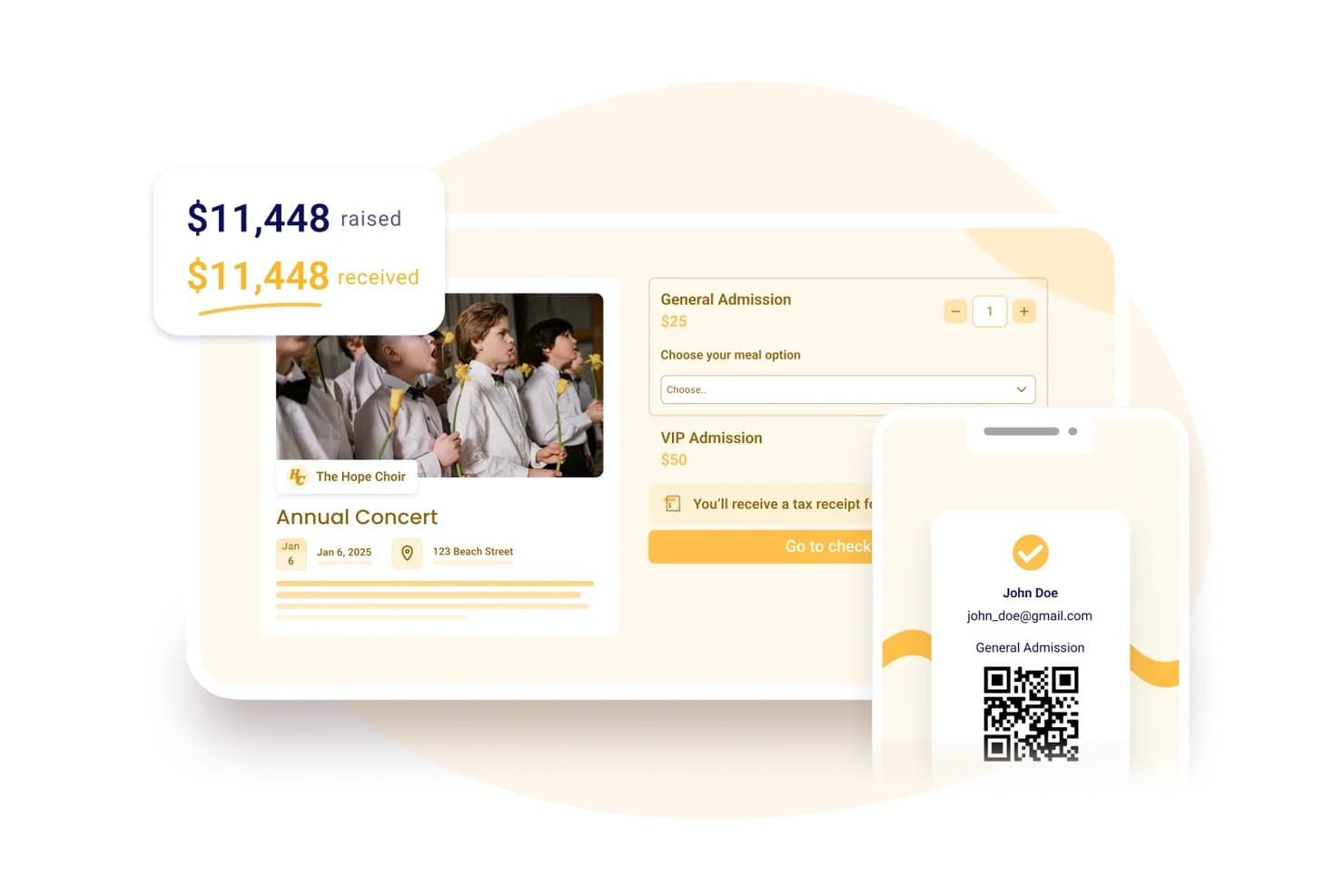
Zeffy lets users sell tickets and track funds raised in one place. Zeffy is a nonprofit-focused event registration and fundraising platform that combines ticketing, donor management, membership tools, and in-person payments in one system.
Who Is Zeffy Best For?
Zeffy is a strong fit for registered nonprofits in the US, Canada, UK, Ireland, Australia, and Germany that want to run ticketed events without paying platform or transaction fees.
Why I Picked Zeffy
I picked Zeffy as one of the best because it's the only platform on my list where nonprofits pay absolutely nothing in platform or transaction fees, ever. I love that you can sell group tickets, collect per-attendee custom questions like meal selections, and check guests in by QR scan, all without a single fee eating into your fundraising. For a church running its annual gala or a holiday benefit concert, that zero-fee model means every dollar from ticket sales goes directly to your ministry.
Zeffy Key Features
- Multi-date event scheduling: Set up recurring events on daily, weekly, or monthly schedules, with buyers selecting their date and time before choosing tickets.
- Donor and attendee CRM: Supporter profiles store giving history, event attendance, memberships, email engagement, notes, and tags in one place.
- Tap to Pay app: Accept card, Apple Pay, and Google Pay payments directly on a phone for in-person ticket sales, merchandise, and donations with no terminal needed.
- Embeddable event forms: Paste generated HTML into any website builder to embed a registration form directly on your church's site.
Zeffy Integrations
Zeffy offers native integrations with QuickBooks Online and WordPress. It also supports Salesforce, Mailchimp, and other connections through viaSocket, a public API, webhooks, and Zapier.
Pros and Cons
Pros:
- Ticketing and donor records share one workspace
- QR check-in keeps gala arrivals moving
- Reviewers praise clean, quick event setup
Cons:
- Limited form and email design frustrates organizers
- Buyers sometimes mistake checkout contributions for fees
Learn more about Zeffy: Best for managing multiple service times
- Free trial + free demo available
- From $399/event

Church RSVP displays an event occurrence management screen with seat type tracking. Church RSVP is an event management platform designed specifically for churches and ministries to organize everything from weekly services to multi-day conferences. It simplifies complex administrative tasks like volunteer recruitment and VBS registration while ensuring you never exceed the seating limit.
Who Is Church RSVP Best For?
Church RSVP is a good fit for churches and ministries that need a dedicated tool to manage event registrations, coordinate multiple services, and track attendance for faith-based gatherings.
Why I Picked Church RSVP
Managing multiple service times is a common challenge for churches, and that’s why I picked Church RSVP for this list. It allows congregants to select their preferred service time during registration, which automatically updates the live headcounts for each session. This is particularly useful for holiday services or special events where you need to balance attendance across multiple start times to avoid overcrowding. This focus on flexible scheduling makes Church RSVP especially useful for ministries with several gatherings each week.
Church RSVP Key Features
Some other features that make Church RSVP useful for event registration include:
- Customizable registration forms: Create forms with fields tailored to your event’s needs, such as attendee names, contact details, or special requests.
- Automated confirmation emails: Send instant confirmation messages to registrants, helping attendees know their spot is reserved.
- Attendance tracking dashboard: Monitor real-time attendance numbers and view historical data for each event or service.
- Volunteer sign-up management: Allow volunteers to register for specific roles or shifts, making it easier to coordinate event staffing.
Church RSVP Integrations
Integrations are not publicly listed.
Pros and Cons
Pros:
- Allows unlimited registrations without extra fees
- Offers automated confirmations and reminders
- Lets attendees choose in-person or online
Cons:
- No attendee messaging beyond email reminders
- No built-in payment processing for paid events
Learn more about Church RSVP: Best for private events
- Free plan + free demo available
- From $24/month (billed annually)
Visit WebsiteCustomer Rating:4.8/5
RSVPify coordinates guest management for private events. RSVPify is an event management tool well-suited for churches and faith-based organizations hosting private or invitation-only events. It’s ideal for managing RSVPs for gatherings such as church dinners, leadership meetings, retreats, weddings, baptisms, and special ministry events, with tools for guest lists, customization, and communication.
Why I picked RSVPify: RSVPify works well for church events that require guest list control and personal touches. Churches can create custom event pages, track RSVPs, and manage attendee details like meal preferences or seating needs. Automated reminders help reduce no-shows, while the platform’s customization options make it easy to create a welcoming, organized experience for congregants and invited guests.
Standout Features and Integrations:
Features include drag-and-drop seating charts, event reminders, and guest check-in capabilities. RSVPify makes it simple to manage meal preferences and create detailed guest profiles. The platform also allows for real-time updates to your event.
Integrations include Stripe, Mailchimp, Google Analytics, Zapier, PayPal, and more.
Pros and Cons
Pros:
- Simple guest list management
- Supports meal preferences
- Ideal for private events
Cons:
- Basic design customization
- Limited for large-scale events
Learn more about RSVPify:

Whova manages event registrations and attendee engagement. Whova is an event registration software designed for event organizers who manage hybrid events. It offers solutions for managing registrations, attendee engagement, and event marketing from conferences to workshops.
Why I picked Whova: Whova shines in managing hybrid events, offering features such as personalized registration, attendee networking opportunities, and on-demand, on-site badge printing. It provides tools for creating various ticket types and handling payments efficiently. The software also supports virtual event hosting, making it versatile for different event formats. Attendees can access event materials and participate in live polls to elevate their overall experience.
Standout Features and Integrations:
Features include networking capabilities, live polling, and virtual session hosting. Whova offers hassle-free customization for registration forms and ticket sales management. The platform allows for detailed reporting and analytics to track event success.
Integrations include Eventbrite, Constant Contact, Cvent, RegFox, and Zapier.
Pros and Cons
Pros:
- Supports virtual sessions
- Customizable registration forms
- Easy to manage hybrid events
Cons:
- Limited offline support
- Limited customization for branding
Learn more about Whova: Best for attendee engagement
- Free demo available
- Pricing upon request
Visit WebsiteCustomer Rating:4.6/5
EventMobi boosts attendee engagement for in-person and virtual events. EventMobi is an event management platform well-suited for churches and faith-based organizations that want to create engaging, interactive event experiences. It works for both in-person and virtual church events, such as conferences, leadership training, youth gatherings, and multi-session ministry events.
Why I picked EventMobi: EventMobi stands out for churches because of its strong focus on attendee engagement. Churches can use interactive agendas, live polls, and in-app announcements to keep attendees informed and involved throughout the event. Customizable event apps allow for personalized schedules, session content, and speaker information, while real-time feedback tools help church leaders understand what resonated most. Built-in analytics make it easier to measure engagement and improve future church events.
Standout Features and Integrations:
Features include customizable branding, audience response systems, and gamification elements. You can use EventMobi’s live Q&A and chat features to generate interaction. The platform also offers session tracking to monitor attendance.
Integrations include Salesforce Campaigns, Marketo, HubSpot, Mailchimp, and more.
Pros and Cons
Pros:
- Real-time feedback collection
- Supports personalized event experiences
- Effective for attendee interaction
Cons:
- May need additional resources for large events
- Limited mobile app customization
Learn more about EventMobi: Best for flat-fee enterprise event programs
- Free demo available
- From $11,800/year (billed annually)
Visit WebsiteCustomer Rating:4.8/5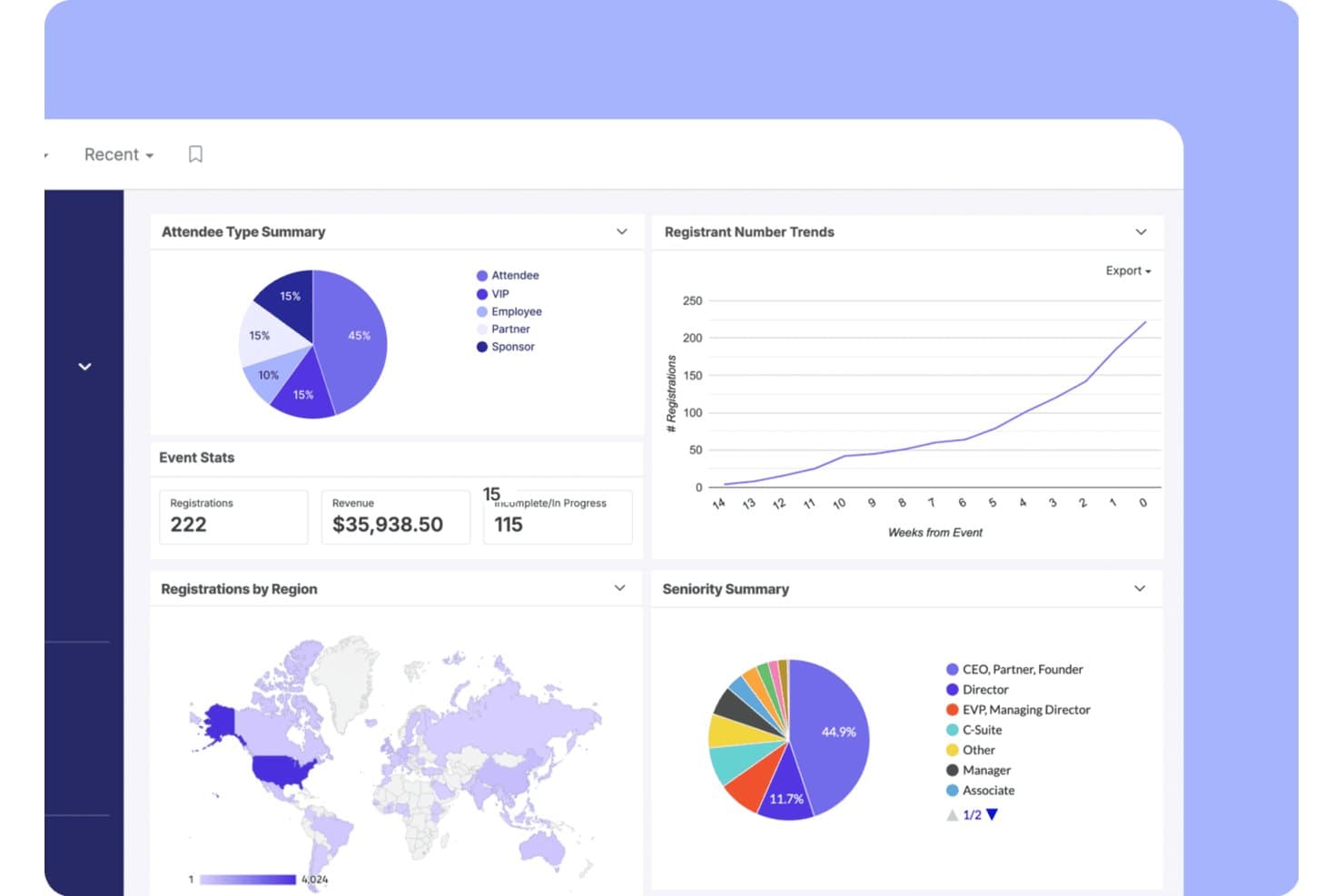
Swoogo tracks registrations, revenue, and attendee trends in one dashboard. Swoogo is an enterprise event registration platform built around flat-fee annual licensing, offering unlimited events, white-labeled event websites, conditional registration forms, on-site check-in, and deep CRM integrations.
Who Is Swoogo Best For?
Swoogo is a strong fit for large churches and denominational organizations that run professional-scale conferences and leadership summits with dedicated event staff.
Why I Picked Swoogo
Swoogo earns its spot on my shortlist because its flat-fee licensing model is genuinely built for organizations running events at scale. I love that unlimited events and unlimited registrations are included at one annual price, so a denominational body hosting a leadership summit, a regional conference, and a series of smaller gatherings pays the same rate regardless of volume. The conditional registration builder is best-in-class: unlimited registrant types, unlimited logic rules, and approval workflows let you create distinct registration paths for speakers, sponsors, and general attendees in a single form.
Swoogo Key Features
- Go Onsite check-in app: A mobile app for on-site check-in with QR code scanning, on-demand badge printing, self-serve kiosk mode, and real-time attendance tracking.
- Cross-event reporting: A customizable report builder with 15+ built-in reports, real-time dashboards, and cross-event trend comparisons that can be shared with non-Swoogo users.
- Automated email sequences: A drag-and-drop email builder that triggers pre- and post-event communications based on registrant type, behavior, and workflow rules.
- Native CRM sync: Two-way data integration with Salesforce, HubSpot, and Marketo that pushes registration and attendance data without manual CSV exports.
Swoogo Integrations
Swoogo offers 30+ integrations, including Salesforce, HubSpot, Marketo, Zoom, ON24, Stripe, Avalara, and Google Analytics. It also provides a REST API, webhooks, and Zapier for custom connectivity.
Pros and Cons
Pros:
- Cross-event reporting and dashboards
- Best-in-class conditional registration builder
- Unlimited registrations without extra fees
Cons:
- No child or family check-in workflows
- No church management system integrations
Learn more about Swoogo: Best for onsite check-in and badge printing
- Free demo available
- From $7,500/event
Visit WebsiteCustomer Rating:4.7/5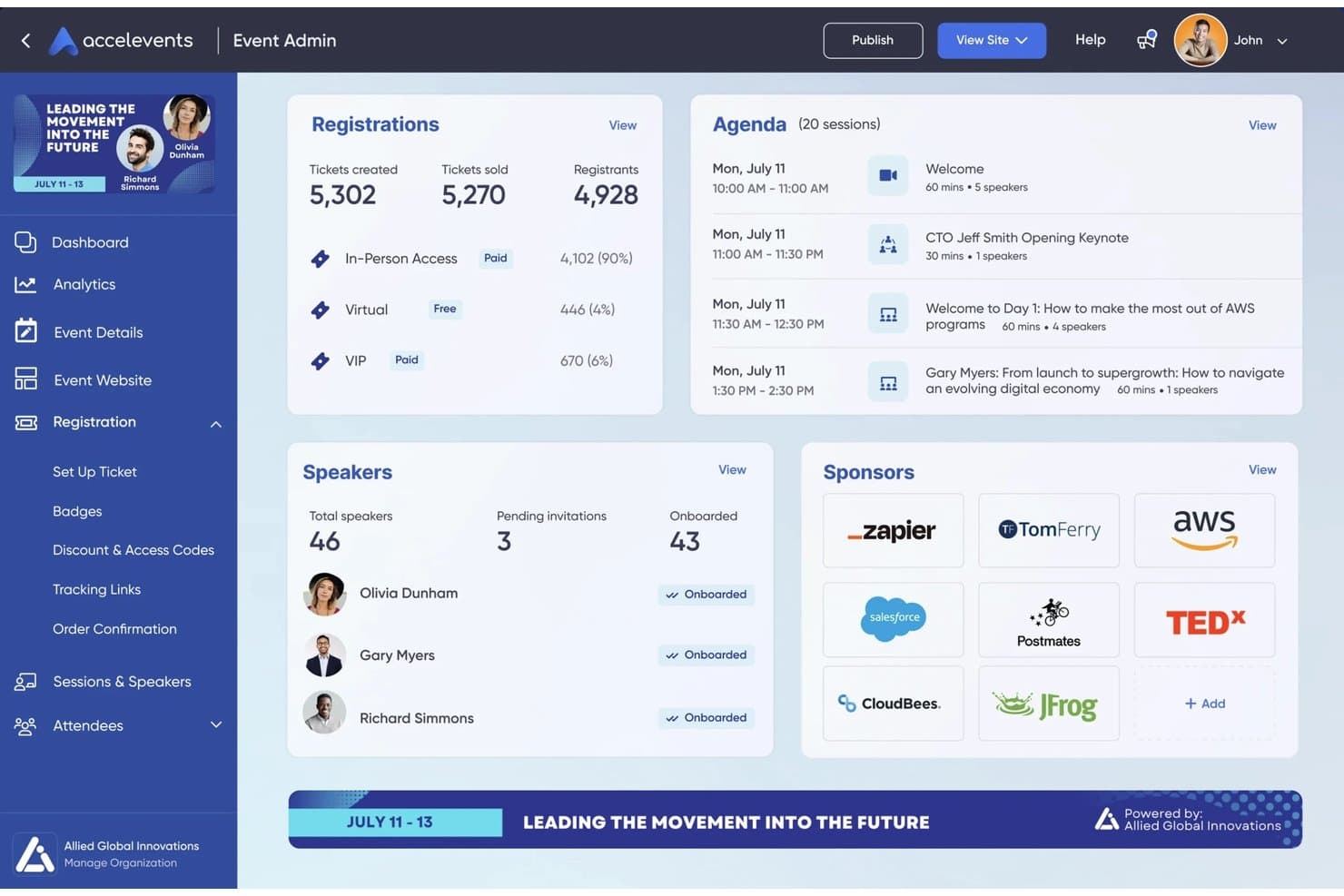
Accelevents centralizes event registrations, agenda, speakers, and sponsors in one dashboard. Accelevents is an event registration and management platform that combines ticketing, custom registration forms, payment processing, onsite check-in, badge printing, and attendee data reporting in one system.
Who Is Accelevents Best For?
Accelevents is a strong fit for professional event teams and nonprofits running large-scale conferences, trade shows, or fundraisers who need reliable onsite check-in and badge printing.
Why I Picked Accelevents
Accelevents earns its spot on my shortlist because of how well it handles the physical reality of a large event: getting hundreds of people through the door quickly and into the right sessions. I love that the iPad kiosk setup prints badges in about 3 seconds and runs in offline mode, so a spotty venue Wi-Fi connection won't stall your check-in line. The Badge Designer also lets you set conditional images and dynamic text based on registration responses, which means VIP attendees, exhibitors, and general admission can all get distinct, print-ready badges from a single workflow.
Accelevents Key Features
- Custom registration form builder: Create unlimited registration paths with conditional logic, routing rules, approval workflows, and ticket-level custom fields.
- Silent auction and donation tools: Run text-to-bid silent auctions and collect integrated donations directly within the event registration checkout flow.
- Native CRM sync: Connect bidirectionally with Salesforce, HubSpot, and Marketo to keep attendee data current across your marketing and sales systems.
- Session-level check-in: Track attendance and manage capacity at the individual session level, with support for continuing education credit tracking.
Accelevents Integrations
Accelevents offers native integrations with Salesforce, HubSpot, Marketo, Salesforce Pardot, NetForum AMS, Novi AMS, Protech, Zoom, Google Analytics, and Google Tag Manager. It also provides REST APIs, webhooks, and Zapier connectivity for custom connections.
Pros and Cons
Pros:
- Combined registration, auctions, and donations workflow
- Self-service check-in runs in offline mode
- Onsite badge printing in about three seconds
Cons:
- No family or child safety check-in features
- No native church management system integration
Learn more about Accelevents: Best for virtual event hosting
- Free demo available
- From $499/user/month (billed annually)
Visit WebsiteCustomer Rating:4.5/5
Bizzabo powers virtual events with engagement and analytics. Bizzabo is a versatile event management platform well-suited for churches and faith-based organizations hosting virtual, hybrid, or in-person events. It helps church teams plan and run online conferences, leadership summits, training sessions, and livestreamed gatherings, with tools for registration, engagement, and performance tracking.
Why I picked Bizzabo: Bizzabo works well for churches because it supports virtual, hybrid, and in-person events in one platform, making it easy to reach both local and remote congregations. Churches can host live streams, interactive worship sessions, panels, and workshops, while engaging attendees through polls and Q&A. Customizable event pages help maintain consistent branding, and detailed analytics allow church leaders to measure attendance, participation, and overall engagement across events of any size.
Standout Features and Integrations:
Features include customizable branding options, networking tools, and email campaign automation. You can use its real-time audience engagement features to keep participants involved. The platform also offers extensive reporting capabilities for post-event analysis.
Integrations include Salesforce Campaigns, Marketo, HubSpot, Google Analytics, and more.
Pros and Cons
Pros:
- Real-time audience engagement
- Detailed performance analytics
- Effective for large virtual events
Cons:
- Limited design flexibility
- Support quality can be inconsistent
Learn more about Bizzabo: Best for virtual trade shows
- Free demo available
- Pricing upon request
Visit WebsiteCustomer Rating:4.7/5
vFairs hosts immersive virtual trade shows. vFairs is a virtual event platform well suited for churches and faith-based organizations hosting online conferences, ministry expos, training events, and large virtual gatherings. It helps churches create immersive digital experiences with tools for networking, session hosting, and engaging attendees in a visually interactive environment.
Why I picked vFairs: vFairs works well for church events that benefit from a more immersive virtual format, such as ministry fairs, leadership conferences, or global gatherings. The platform supports interactive virtual booths, which churches can use for ministries, missions, sponsors, or resources, along with live webinars for sermons, workshops, and panel discussions. Networking lounges and chat features encourage connection and fellowship among attendees, while built-in analytics help church leaders measure engagement and evaluate the success of virtual events.
Standout Features and Integrations:
Features include customizable virtual lobbies, gamification elements, and live streaming capabilities. You can set up virtual booths with resource downloads and videos. The platform also supports multi-language options to reach a global audience.
Integrations include Salesforce CRM, Zoom, Marketo, HubSpot, and more.
Pros and Cons
Pros:
- Supports multi-language events
- Offers interactive booths for exhibitors
- Ideal for virtual trade shows
Cons:
- Multi-language setups can require guidance
- Complex configuration for 3D environments and booths
Learn more about vFairs:

RainFocus monitors event performance at scale. RainFocus is an event management platform well-suited for churches and faith-based organizations that host large conferences, conventions, or multi-day ministry events. It offers tools for registration, attendee engagement, and performance tracking, helping church teams manage complex events with multiple sessions, tracks, and activities.
Why I picked RainFocus: RainFocus is a good fit for church events that require detailed insights into attendance and engagement. The platform provides advanced analytics that help track attendee behavior and participation in real time. Churches can customize reports to evaluate session popularity, engagement levels, and overall event effectiveness. Its support for complex event structures and personalized attendee experiences allows church leaders to use data to improve future conferences and large-scale gatherings.
Standout Features and Integrations:
Features include customizable dashboards, real-time data visualization, and advanced reporting tools. You can manage multiple events from a single interface. The platform also supports personalized content delivery to increase attendee engagement.
Integrations include Salesforce CRM, Marketo, HubSpot, Slack, Zoom, and more.
Pros and Cons
Pros:
- Real-time engagement tracking
- Supports complex event structures
- Detailed data analytics available
Cons:
- Multi-event management can require support
- Complex data model and permission setup
Learn more about RainFocus:
Outro software de registo de eventos
Eis algumas opções adicionais de software de registo de eventos que não chegaram à minha seleção, mas que ainda vale a pena conhecer:
- 11CventBest for large-scale conferences
- 12RegFoxBest for budget-friendly pricing
- 13BrushfireBest for faith-based camps and retreat sign-ups
- 14EventbriteBest for small to medium events
- 15EventleafBest for professional development event check-in
- 16EventzillaBest for customizable registration
- 17Webex EventsBest for end-to-end conference management
- 18TicketbudBest for flexible ticketing
- 19Cvent SplashBest for branded event pages
- 20Planning Center RegistrationsBest for church suite registration workflows
- 21SplashBest for martech-integrated event programs
How I Evaluate Event Registration Software
I split my evaluation into two layers: baseline requirements every tool must meet—like family registration, ChMS sync, and payment processing—and the differentiators that set the best apart.
Core Functionality (Table Stakes For This List)
When I'm selecting tools for my list, I rank each one on a scale from 0 (does not offer the functionality) to 5 (excels in this area) for each core functionality listed below. Then, I calculate the tool's total score into a percentage. Each tool needs to achieve a minimum total score of 65% to be considered for inclusion.
- Event Registration Forms: I look for flexible form builders that handle the realities of church programming—things like session selection for VBS, capacity limits for retreats, and waitlists for popular small groups.
- Payment Processing: Each tool needs to support event fee collection, and I check for extras like installment plans for camp fees, optional donation add-ons, and discount or scholarship codes.
- ChMS Integration: Whether a platform syncs with Planning Center, Breeze, or another ChMS, I evaluate how well registrant data flows into existing member profiles without manual re-entry.
- Attendee & Family Management: A parent registering three kids for a weekend retreat needs household-level signups, guardian fields, medical info, and digital waivers—so I look for all of those.
- Automated Communications: I check whether confirmation emails, event reminders, and post-event follow-ups can be triggered automatically rather than requiring staff to send each one manually.
- Check-In & Attendance Tracking: Secure child check-in with matching pickup tags is a big one, along with digital roster tracking for classes, services, and midweek programs.
Once I have a list of tools that meet this criteria, I consider what sets each platform apart.
Differentiating Factors (What Sets Vendors Apart)
Here's how I compare and contrast different vendors:
Standout Features
Recurring event support matters a lot when your church runs weekly small groups or multi-week classes that need persistent rosters. I also look at volunteer scheduling—being able to assign and notify volunteers from the same place you manage registrations saves coordinators real time. Fundraising tools are worth evaluating too, especially for camps or mission trips where families may need "pay what you can" pricing or sponsorship options to make events accessible.
Beyond Features
Pricing model matters when you're working with a church budget—I check whether a platform offers nonprofit discounts, free tiers, or reasonable per-transaction fees that won't eat into camp or retreat revenue. Data security and child safety compliance also weigh heavily, especially PCI-DSS compliance and secure check-in protocols that protect minors' personal and medical information. I evaluate onboarding support too, since many church teams rely on volunteers with limited tech experience who need accessible training resources to get up and running.
Como escolher o melhor software de registo de eventos
É fácil perder-se em longas listas de funcionalidades e estruturas de preços complexas. Para o ajudar a manter-se concentrado enquanto trabalha no seu processo específico de seleção de software, eis uma lista de verificação dos fatores a ter em conta:
| Fator | O que deve considerar |
|---|---|
| FatorEscalabilidade | O que deve considerarO software acompanhará o crescimento dos seus eventos? Considere o número de participantes que espera ter agora e no futuro. Procure ferramentas capazes de lidar com um volume maior. |
| FatorIntegrações | O que deve considerarEstabelece ligação às suas ferramentas existentes? Verifique a compatibilidade com os sistemas de CRM, plataformas de marketing e gateways de pagamento que já utiliza. |
| FatorPersonalização | O que deve considerarPode adaptar o software às suas necessidades? Certifique-se de que permite personalizar formulários, elementos de marca e experiências de utilizador de acordo com os requisitos específicos do seu evento. |
| FatorFacilidade de utilização | O que deve considerarÉ fácil de utilizar pela sua equipa? Avalie a interface e a navegação. Teste-o com utilizadores sem conhecimentos técnicos para garantir que é acessível. |
| FatorImplementação e integração inicial | O que deve considerarCom que rapidez pode começar a utilizá-lo? Procure processos claros de integração inicial, recursos de formação e apoio ao cliente para o auxiliar durante a configuração. |
| FatorCusto | O que deve considerarEstá dentro do seu orçamento? Compare os planos de preços e considere quaisquer custos adicionais relativos a funcionalidades ou suporte. Avalie se o valor corresponde ao preço. |
| FatorMedidas de segurança | O que deve considerarProtege os seus dados? Certifique-se de que cumpre os regulamentos de proteção de dados e disponibiliza encriptação e processamento seguro de pagamentos. |
| FatorDisponibilidade do suporte | O que deve considerarObterá ajuda quando precisar? Verifique a disponibilidade do apoio ao cliente, incluindo chat em direto, suporte telefónico e tempos de resposta a pedidos de informação. |
O que é um software de inscrição em eventos?
As melhores soluções de software de inscrição em eventos são ferramentas que ajudam os organizadores a gerir inscrições em eventos, dados dos participantes e processamento de pagamentos. Os organizadores de eventos, profissionais de marketing e coordenadores utilizam normalmente estas ferramentas para simplificar a gestão de eventos e melhorar a experiência dos participantes. Os formulários de inscrição personalizáveis, os gateways de pagamento e as funcionalidades de elaboração de relatórios ajudam a planear eventos de forma eficiente, a gerir dados e a processar transações financeiras. Estas ferramentas oferecem valor ao poupar tempo, reduzir erros e melhorar a organização geral dos eventos.
Funcionalidades
Ao selecionar um software de inscrição em eventos, esteja atento às seguintes funcionalidades essenciais:
- Formulários de inscrição personalizáveis: Permitem adaptar o processo de inscrição do seu evento, melhorando a experiência do utilizador e a recolha de dados.
- Processamento de pagamentos: Facilita transações seguras, disponibilizando várias opções de pagamento para responder às diferentes preferências dos participantes.
- Relatórios e análise: Fornecem informações sobre o desempenho do evento, ajudando-o a tomar decisões baseadas em dados para eventos futuros.
- Gestão de participantes: Simplifica o acompanhamento e a organização das informações dos participantes, facilitando a gestão das comunicações e da logística.
- Capacidades de integração: Permitem ligar ferramentas como plataformas de CRM e de marketing para organizar fluxos de trabalho e melhorar a consistência dos dados.
- Acesso móvel: Permite a gestão e o registo de entrada dos participantes em qualquer lugar, aumentando a flexibilidade e a eficiência durante os eventos.
- Automatização de e-mails: Envia e-mails de confirmação e lembretes automáticos, garantindo que os participantes recebem informações atempadamente sem esforço manual.
- Suporte a eventos virtuais: Disponibiliza ferramentas para organizar eventos online, incluindo transmissão em direto e funcionalidades interativas, para aumentar o alcance do seu evento.
- Medidas de segurança: Asseguram a proteção dos dados e a conformidade com os regulamentos, protegendo as informações e as transações dos participantes.
- Ferramentas de contactos profissionais: Facilitam a interação entre participantes através de funcionalidades como conversas e fóruns, aumentando o envolvimento e o valor do evento.
Benefícios
A implementação do melhor software de inscrição em eventos proporciona vários benefícios à sua equipa e à sua empresa. Eis alguns dos benefícios que pode esperar:
- Poupança de tempo: Os processos automatizados de inscrição e pagamento podem libertar a sua equipa para se concentrar noutras tarefas de planeamento de eventos.
- Maior precisão: Reduz os erros de introdução manual de dados ao recolher diretamente as informações dos participantes através de formulários personalizáveis.
- Melhor experiência dos participantes: Oferece processos simples de inscrição e comunicação, aumentando a satisfação e o envolvimento.
- Informações baseadas em dados: Fornece análises e relatórios detalhados, ajudando-o a avaliar o sucesso do evento e a tomar decisões informadas.
- Escalabilidade: Suporta eventos de vários tamanhos, permitindo-lhe fazer crescer os seus eventos sem mudar de software.
- Maior segurança: Protege os dados sensíveis dos participantes através de gateways de pagamento seguros e da conformidade com as normas de proteção de dados.
- Melhor comunicação: A automatização de lembretes e atualizações por e-mail garante que os participantes recebem informações atempadamente e reduz a necessidade de acompanhamento manual.
Custos e preços
A seleção do melhor software de inscrição em eventos requer uma compreensão dos vários modelos de preços e planos disponíveis. Os custos variam consoante as funcionalidades, o tamanho da equipa, os complementos e outros fatores. A tabela abaixo resume os planos comuns, os respetivos preços médios e as funcionalidades normalmente incluídas nas melhores soluções de software de inscrição em eventos:
Tabela de comparação de planos para o melhor software de inscrição em eventos
| Tipo de plano | Preço médio | Funcionalidades comuns |
|---|---|---|
| Tipo de planoPlano gratuito | Preço médio$0 | Funcionalidades comunsFormulários de inscrição básicos, relatórios limitados e suporte básico por e-mail |
| Tipo de planoPlano pessoal | Preço médio$9-$30/utilizador/mês | Funcionalidades comunsFormulários personalizáveis, análise básica, suporte por e-mail e processamento de pagamentos |
| Tipo de planoPlano empresarial | Preço médio$50-$100/utilizador/mês | Funcionalidades comunsAnálise avançada, integrações com ferramentas de CRM, suporte prioritário e marca personalizável |
| Tipo de planoPlano empresarial de grande dimensão | Preço médio$150-$499/utilizador/mês | Funcionalidades comunsPersonalização completa, gestor de conta dedicado, análise detalhada e suporte para vários eventos. |
Perguntas frequentes sobre o melhor software de registo de eventos
\u003cspan style=\u0022font-weight: 400;\u0022\u003eAqui estão algumas respostas a perguntas comuns sobre \u003c/span\u003e\u003cspan style=\u0022font-weight: 400;\u0022\u003esoftware de registo de eventos\u003c/span\u003e\u003cspan style=\u0022font-weight: 400;\u0022\u003e:\u003c/span\u003e
Qual é a diferença entre o software de registo de eventos e o software de gestão de eventos?
\u003cspan style=\u0022font-weight: 400;\u0022\u003eAs ferramentas de registo de eventos concentram-se\u003c/span\u003e\u003cspan style=\u0022font-weight: 400;\u0022\u003e na gestão das inscrições e dos pagamentos dos participantes, enquanto o \u003c/span\u003e\u003cspan style=\u0022font-weight: 400;\u0022\u003esoftware de gestão de eventos\u003c/span\u003e\u003cspan style=\u0022font-weight: 400;\u0022\u003e inclui \u003c/span\u003e\u003cspan style=\u0022font-weight: 400;\u0022\u003efuncionalidades\u003c/span\u003e\u003cspan style=\u0022font-weight: 400;\u0022\u003e mais abrangentes, como o agendamento, a gestão do local e o marketing do evento. Se precisar de ferramentas de gestão completas, considere uma \u003c/span\u003e\u003cspan style=\u0022font-weight: 400;\u0022\u003eplataforma de gestão de eventos\u003c/span\u003e\u003cspan style=\u0022font-weight: 400;\u0022\u003e. Para necessidades simples de registo, uma ferramenta de registo poderá ser suficiente.\u003c/span\u003e
O software de registo de eventos consegue gerir eventos internacionais?
\u003cspan style=\u0022font-weight: 400;\u0022\u003eSim, muitas\u003c/span\u003e\u003cspan style=\u0022font-weight: 400;\u0022\u003e soluções suportam eventos internacionais, disponibilizando opções multilingues e permitindo gerir várias moedas. Verifique se o software que está a considerar disponibiliza estas funcionalidades, especialmente se planeia organizar eventos globais. Isto garante transações sem problemas e uma melhor experiência para os participantes internacionais.\u003c/span\u003e
Quão seguro é o software de registo de eventos?
\u003cspan style=\u0022font-weight: 400;\u0022\u003eA maioria dos \u003c/span\u003e\u003cspan style=\u0022font-weight: 400;\u0022\u003esoftwares de registo de eventos\u003c/span\u003e\u003cspan style=\u0022font-weight: 400;\u0022\u003einclui medidas de segurança, como a encriptação de dados e gateways de pagamento seguros. Verifique sempre se o software cumpre os regulamentos relevantes de proteção de dados, como o RGPD, para proteger as informações dos participantes e evitar potenciais problemas legais. Pergunte ao fornecedor quais são os seus protocolos de segurança específicos.\u003c/span\u003e
Posso personalizar o aspeto da página de registo do meu evento?
\u003cspan style=\u0022font-weight: 400;\u0022\u003eSim, a maioria das\u003c/span\u003e\u003cspan style=\u0022font-weight: 400;\u0022\u003e plataformas permite personalizar a \u003c/span\u003e\u003cspan style=\u0022font-weight: 400;\u0022\u003epágina de registo\u003c/span\u003e\u003cspan style=\u0022font-weight: 400;\u0022\u003e para corresponder à sua identidade visual. Normalmente, pode ajustar as cores, os logótipos e o esquema. Esta personalização ajuda a manter a consistência da marca e confere ao seu evento um aspeto profissional. Verifique o nível de personalização de que necessita antes de escolher uma plataforma.\u003c/span\u003e