

O software de comunicação para igrejas com IA utiliza inteligência artificial para ajudar as igrejas a gerir mensagens, divulgação e envolvimento em vários canais. Se procura formas de se ligar à sua congregação, automatizar a comunicação de rotina ou manter a sua equipa organizada, estas ferramentas de IA podem ajudá-lo a alcançar esses objetivos sem aumentar a sua carga de trabalho.
Com tantas opções disponíveis, é importante encontrar software que corresponda às necessidades do seu ministério, apoie a sua missão e o ajude a comunicar de forma clara — quer esteja a contactar visitantes, a coordenar voluntários ou a partilhar atualizações com a sua família da igreja. Este guia ajudá-lo-á a comparar as principais plataformas de comunicação para igrejas com IA, para que possa tomar uma decisão informada para o seu ministério.
Why Trust Our Software Recommendations
6,700+
Reviews
20
Industry experts
16+
Evaluation factors
14
Years
Our team has been testing and reviewing software since 2012. As church leaders ourselves, we know how difficult—and important—it is to choose the right software.
For this guide, we evaluated tools using hands-on testing and independent research, scoring tools using our selection criteria.
Our reviews reflect our human editorial judgment, not a sales pitch.
Tabela de comparação de software de comunicação para igrejas com IA
Esta tabela de comparação resume os detalhes de preços das minhas principais seleções de software de comunicação para igrejas com IA:
| Tool | Best For | Trial Info | Price | ||
|---|---|---|---|---|---|
| 1 | Best for member Q&A automation | 60-day free trial available | From $99/month | Website | |
| 2 | Best for live multilingual sermon translation | Free trial available | From $150/month | Website | |
| 3 | Best for campaign-based communications planning | Free trial available | From $32.50/month (billed annually) | Website | |
| 4 | Best for integrated text and email messaging | Free plan + 30-day free trial + free demo available | From $19/month | Website | |
| 5 | Best for small group connectivity | Free plan + 30-day free trial available | From $15/20 members/month | Website | |
| 6 | Best for newsfeed and chat features | Free demo available | Pricing upon request | Website | |
| 7 | Best for auto-generating sermon resources | Free trial available | From $39/month | Website | |
| 8 | Best with AI-powered sermon content tools | Free plan available | From $65/month | Website | |
| 9 | Best for social scheduling | Free trial + free demo available | From $15/month | Website | |
| 10 | Best for faith-aligned message generation | Free plan available | From $49/month | Website |


Avaliações de software de comunicação para igrejas com IA
\u003cspan style=\u0022font-weight: 400\u0022\u003eSeguem-se os meus resumos detalhados dos melhores softwares de comunicação para igrejas com IA que fizeram parte da minha lista restrita. As minhas avaliações apresentam uma análise detalhada das funcionalidades, dos melhores casos de utilização e das integrações de cada plataforma, para o ajudar a encontrar a melhor opção para si.\u003c/span\u003e

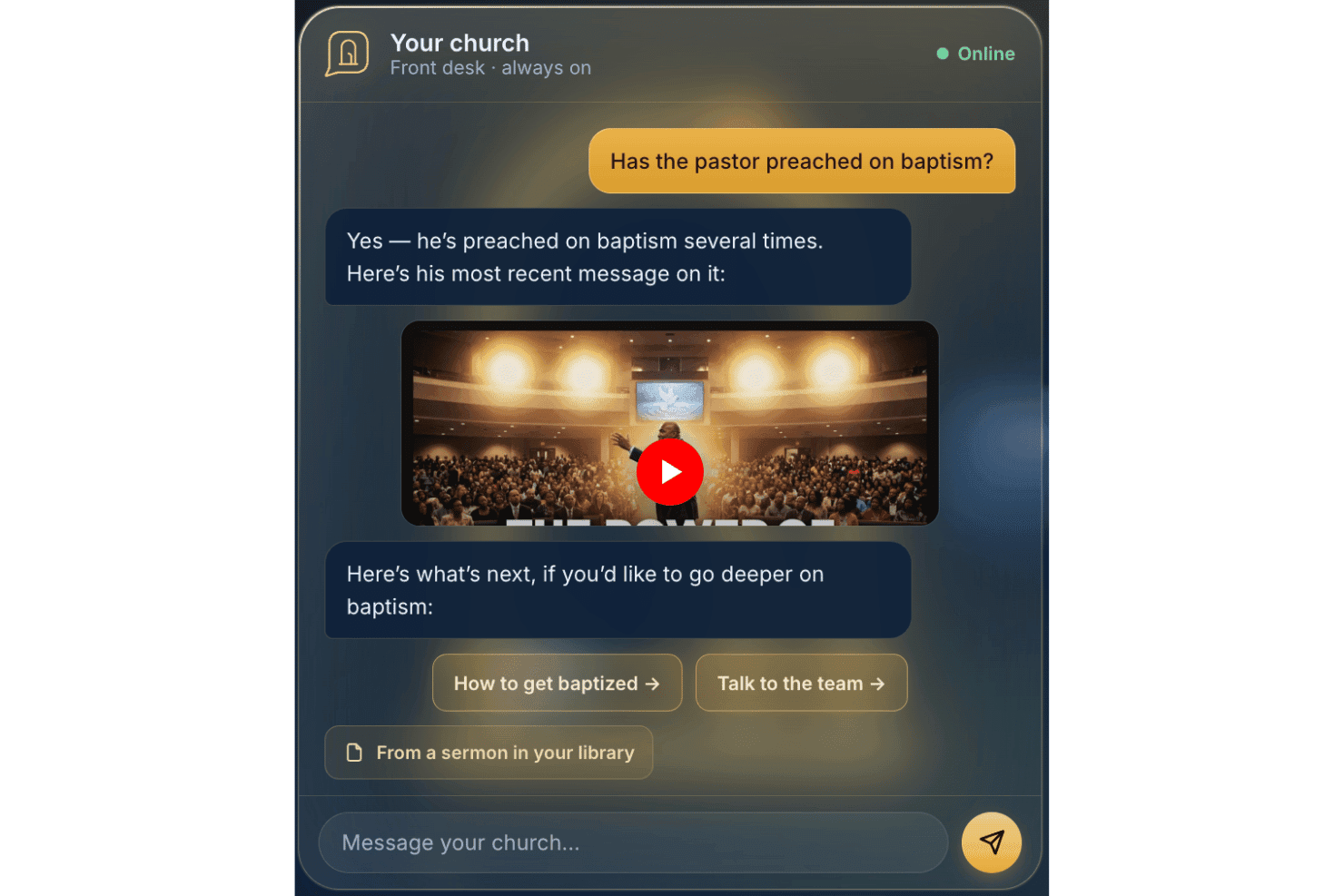
AskMyChurch offers a 24/7 AI-powered church answering service. AskMyChurch is an AI chatbot for church websites that answers member and visitor questions using the church's own published content, sermons, and videos, with built-in crisis routing and pastoral care handoff.
Who Is AskMyChurch Best For?
Churches with lean admin teams that spend significant staff time fielding the same visitor and member questions by phone or email will get the most from AskMyChurch.
Why I Picked AskMyChurch
AskMyChurch earns its spot on my shortlist because it solves a real daily drain on church staff: fielding the same questions about service times, parking, and baptism week after week. I love that its answers are grounded exclusively in the church's own website and sermons, with a source citation shown every time, so it never invents doctrine or speaks beyond what the church has published. The Crisis Gate also stands out to me: it routes messages flagging distress to the 988 lifeline and your pastoral team before the AI ever responds.
AskMyChurch Key Features
- Multilingual support: The assistant can respond to questions in both English and Spanish.
- Anonymous by default: Users do not need to create accounts or provide names to ask questions.
- Learning loop: Weekly insights about common themes and gaps are surfaced for staff review.
- Branded site widget: Every assistant is embedded directly on your church’s website and fully matches your branding.
AskMyChurch Integrations
Native integrations are not publicly documented.
Pros and Cons
Pros:
- Anonymous, no user registration required
- Built-in crisis and prayer escalation features
- Only answers questions from church-owned content
Cons:
- Lacks member segmentation and follow-up features
- No outbound communication or messaging tools
Learn more about AskMyChurch: Best for live multilingual sermon translation
- Free trial available
- From $150/month

One Accord Translation offers real-time multilingual translation for church meetings, enabling live multi-language interpretation via a mobile app. OneAccord is an AI church communication platform that provides real-time sermon translation, audio quality monitoring, and browser-based congregation access for live worship services.
Who Is OneAccord Best For?
Church leaders and tech teams who need AI-powered tools for multilingual communication and live worship service engagement.
Why I Picked OneAccord
I picked OneAccord as one of the best because I can deliver live multilingual sermon translation directly to congregants’ devices. My team uses its AI-powered audio and text translation to reach people in multiple languages at once. I like that listeners can follow along in real time, whether they’re in the sanctuary or joining remotely.
OneAccord Key Features
- Audio quality monitoring: Continuously checks and reports on live audio clarity during services.
- Browser-based congregation access: Lets attendees join and listen from any device with a web browser.
- Speaker identification: Distinguishes between multiple speakers for accurate translation and transcription.
- Session recording: Captures and stores audio sessions for later review or sharing.
OneAccord Integrations
Native integrations are not clearly documented. OneAccord provides an API for custom integrations.
Pros and Cons
Pros:
- Session recording for later playback or sharing
- Speaker identification for accurate transcripts
- Live audio quality monitoring during services
Cons:
- API setup may require technical expertise
- Limited public information on pricing tiers
Learn more about OneAccord: Best for campaign-based communications planning
- Free trial available
- From $32.50/month (billed annually)

Communicate tracks messaging campaigns in one central place. If you’re looking for a way to organize and manage church communications across multiple channels, Communicate offers a focused solution. This platform is designed for ministry teams that want to plan, schedule, and track messaging campaigns in one place. It’s especially useful for churches that need to coordinate outreach, announcements, and event promotions with clarity and consistency.
Who Is Communicate Best For?
Communicate is a good fit for church communication directors and ministry teams who need to coordinate multi-channel messaging campaigns.
Why I Picked Communicate
What stands out to me about Communicate is how it’s built specifically for campaign-based communications planning. I picked this tool because it lets church teams map out messaging strategies across email, SMS, and social channels, all from a single dashboard. I appreciate the campaign calendar and approval workflows, which help keep everyone aligned and ensure messages go out on schedule. These features make Communicate a strong choice for churches that need to coordinate complex outreach efforts and maintain consistency in their communications.
Communicate Key Features
Some other features I found useful for church communication teams include:
- AI-powered content suggestions: The platform offers automated recommendations for message content based on campaign goals and audience.
- Multi-channel message scheduling: Schedule communications to go out across email, SMS, and social media from one place.
- Audience segmentation tools: Create and manage targeted groups for more personalized outreach.
- Message performance analytics: Track open rates, engagement, and delivery metrics for each campaign for optimization purposes.
Communicate Integrations
Native integrations are not currently listed.
Pros and Cons
Pros:
- Centralizes cross-channel messaging
- Approval workflows for team collaboration
- Visual campaign calendar for message planning
Cons:
- No native mobile application available
- Lacks direct public API access
Learn more about Communicate: Best for integrated text and email messaging
- Free plan + 30-day free trial + free demo available
- From $19/month
Visit WebsiteCustomer Rating:4.8/5
Tithely simplifies church communication for texts and emails. If you’re looking for a way to unify your church’s digital communication, Tithely offers a platform designed for faith communities. This tool is built for churches that want to manage both text and email outreach from one place. It helps ministry teams keep members informed, engaged, and connected without juggling multiple systems.
Who Is Tithely Best For?
Tithely is a good fit for churches and ministry teams that want to centralize text and email communication with their congregations.
Why I Picked Tithely
What stands out about Tithely is how it brings both text and email messaging together in one platform, which is rare among church communication tools. I picked it because this integration means you can reach your congregation through their preferred channel without switching between different systems. Tithely lets you schedule messages, segment your audience, and track delivery for both texts and emails from a single dashboard. This unified approach helps churches keep communication organized and consistent, especially when coordinating events, reminders, or urgent updates.
Tithely Key Features
Some other features that make Tithely useful for church communication include:
- Message templates: Create and reuse pre-written messages for recurring updates or announcements.
- Two-way messaging: Allow recipients to reply directly to texts or emails for more interactive communication.
- Contact management: Organize, import, and segment your congregation’s contact information within the platform.
- Automated birthday and anniversary messages: Schedule personalized greetings to celebrate important dates with members.
Tithely Integrations
Integrations include QuickBooks Online, RockRMS, Engiven, Elvanto, Salesforce, MinistryPlatform, Shelby Systems, FellowshipOne, and more.
Pros and Cons
Pros:
- Provides automated birthday and anniversary messages
- Includes two-way messaging for member replies
- Combines text and email in one dashboard
Cons:
- Does not support SMS short codes
- Lacks advanced analytics for performance
 Best for small group connectivity
- Free plan + 30-day free trial available
- From $15/20 members/month

Planning Center Groups manages group communication and events. If you’re looking for a way to organize and support church small groups, Planning Center Groups offers a focused solution. This platform is designed for ministry leaders who want to manage group communication, events, and member engagement in one place. It helps churches keep group life connected and organized, especially as ministries grow or diversify.
Who Is Planning Center Best For?
Planning Center Groups is a good fit for church leaders and ministry teams who need to coordinate, communicate, and manage multiple small groups within their congregation.
Why I Picked Planning Center
What drew me to Planning Center Groups is how it brings small group connectivity to the forefront of church communication. The platform lets you create group directories, manage rosters, and send targeted messages to group members, all from a single dashboard. I appreciate how it supports event scheduling and attendance tracking, which helps leaders keep group life organized and engaged. These features make it a strong choice for churches that want to foster deeper relationships and consistent communication within their small groups.
Planning Center Key Features
Some other features that make Planning Center Groups useful for church communication include:
- Customizable group sign-up forms: Create and manage sign-up forms to help people join groups easily.
- Resource sharing: Upload and distribute study materials, documents, or announcements directly to group members.
- Automated reminders: Schedule and send reminders for upcoming meetings or events to keep everyone informed.
- Mobile app access: Allow leaders and members to manage groups, communicate, and access resources from their phones.
Planning Center Integrations
Integrations include BoxCast, Checkr, Mailchimp, PraiseCharts, RehearsalMix, SongSelect, Clearstream, and more.
Pros and Cons
Pros:
- Provides resource sharing for study materials
- Offers event scheduling with RSVP tracking
- Supports group messaging and announcements
Cons:
- Lacks advanced analytics for group engagement
- Limited automation for follow-up messaging
Learn more about Planning Center:

Realm facilitates messaging, updates, and community involvement. Realm is a church management platform designed for congregations that want to centralize communication and community engagement. If you’re looking for a solution that combines group messaging, event coordination, and member updates in one place, Realm is worth considering. It’s especially useful for churches aiming to keep members connected and informed through digital channels.
Who Is Realm Best For?
Realm is a good fit for church leaders and communication teams who want to foster ongoing engagement and conversation within their congregations.
Why I Picked Realm
What stands out to me about Realm is how it brings together newsfeed and chat features in a way that feels familiar to anyone who’s used social media. The platform lets you post announcements, share updates, and create group conversations, all within a secure church environment. I appreciate how members can comment, react, and interact directly on posts, which helps foster a sense of community and ongoing engagement. These features make Realm especially useful for churches that want to keep everyone connected and informed between services and events.
Realm Key Features
In addition to its newsfeed and chat capabilities, Realm offers several other features that support church communication and management:
- Event management tools: Schedule events, manage RSVPs, and communicate updates to attendees directly within the platform.
- Push notifications: Send real-time alerts to members’ mobile devices for urgent announcements or reminders.
- Document sharing: Upload and distribute files, such as newsletters or meeting notes, to specific groups or the entire congregation.
- Role-based permissions: Control access to communication tools and sensitive information based on user roles within the church.
Realm Integrations
Integrations include Constant Contact, Realm Connect mobile app, and more.
Pros and Cons
Pros:
- Role-based permissions protect sensitive information
- Event RSVPs integrate with communication tools
- Newsfeed keeps members updated in real time
Cons:
- Limited integrations with external tools
- No automated follow-up workflows for guests
Learn more about Realm:

Pulpit AI converts sermons into study guides, questions, and posts. If you’re looking for a way to turn sermons into a range of ministry resources, Pulpit AI offers a focused solution. This platform is designed for pastors and church leaders who want to repurpose sermon content for teaching, outreach, and discipleship. It helps you save time by automatically generating bible study guides, discussion questions, and social media posts from your sermon transcripts or audio.
Who Is Pulpit AI Best For?
Pulpit AI is a good fit for pastors and ministry teams who want to quickly create study materials, discussion guides, and digital content from weekly sermons.
Why I Picked Pulpit AI
What sets Pulpit AI apart is its ability to automatically generate a wide range of sermon-based resources with minimal effort. I picked it because it takes your sermon transcript or audio and creates study guides, small group questions, and social media content in just a few clicks. This is especially helpful for pastors who want to extend the impact of their weekly messages without spending hours on manual content creation. The platform’s focus on sermon repurposing makes it a strong fit for churches looking to multiply their discipleship efforts through the use of AI.
Pulpit AI Key Features
Some other features that make Pulpit AI useful for church communication include:
- Multi-format export options: Download generated resources as Word documents, PDFs, or text files for easy sharing.
- Content editing tools: Make quick adjustments to AI-generated materials before distribution.
- Resource library: Store and organize all past sermon resources in one searchable location.
- Team collaboration: Invite staff or volunteers to review, edit, and manage generated content together.
Pulpit AI Integrations
Integration includes Subsplash.
Pros and Cons
Pros:
- Stores all generated resources in a searchable library
- Offers editing tools for AI-generated content
- Converts sermons into multiple resource formats
Cons:
- No built-in sermon scheduling or calendar
- Limited native integrations with church platforms
Learn more about Pulpit AI:

Church.tech helps pastors generate and share sermons faster with AI. If you’re looking for AI-driven support in sermon preparation and church messaging, Church.tech offers a focused solution. This platform is designed for pastors and ministry leaders who want to generate, organize, and share content with less manual effort than a generic ChatGPT prompt might require. It’s especially useful for churches aiming to keep communication fresh and relevant while saving time on weekly content creation.
Who Is Church.tech Best For?
Church.tech is a good fit for pastors and ministry teams in churches of any size who want to streamline sermon creation and digital communication.
Why I Picked Church.tech
I picked Church.tech because its AI-powered sermon content tools address a real need for pastors who want to create meaningful messages without starting from scratch each week. The platform offers sermon idea generation and automated outline creation, which help leaders save time and stay inspired. I also appreciate that Church.tech includes tools for adapting a sermon series into newsletters and social posts, making it easier to keep your congregation engaged across channels. These features make it a strong choice for churches looking to modernize their communication with AI-driven content support.
Church.tech Key Features
Some other features that make Church.tech useful for church communication include:
- AI-powered prayer request management: Automatically organizes and categorizes incoming prayer requests for easier follow-up and tracking.
- Content scheduling: Lets you plan and schedule messages, devotionals, and announcements to go out at specific times.
- Volunteer communication tools: Provides targeted messaging options for coordinating with volunteer teams and ministry groups.
- Resource library: Stores and organizes past sermons, templates, and media assets for quick access and reuse.
Church.tech Integrations
Native integrations are not currently listed.
Pros and Cons
Pros:
- Produces accurate native language translations
- Generates multi-platform social media clips
- Automates sermon-to-devotional content conversion
Cons:
- Requires external video hosting services
- No built-in digital giving tools
Learn more about Church.tech:

ChurchSocial streamlines planning and scheduling church social posts. If you’re looking for a way to manage and automate your church’s online presence, ChurchSocial offers a focused solution. This platform is designed for ministry teams and communication leads who want to plan, schedule, and coordinate posts across multiple channels. It’s especially helpful for churches aiming to keep their messaging consistent and timely without adding extra manual work each week.
Who Is ChurchSocial Best For?
ChurchSocial is a good fit for church communication teams and social media coordinators who need to plan and automate posts across multiple platforms.
Why I Picked ChurchSocial
I chose ChurchSocial because its social scheduling tools are purpose-built for church communication needs. The platform lets you create, schedule, and manage posts across multiple social media channels from one dashboard, which is especially helpful for keeping your church’s messaging organized and consistent. I also appreciate that ChurchSocial includes a content calendar and approval workflows, so teams can plan campaigns and ensure posts align with ministry goals. These features make it a strong option for churches that want to stay active online without juggling multiple tools or manual posting.
ChurchSocial Key Features
Some other features that make ChurchSocial useful for church communication include:
- AI-powered content suggestions: The platform recommends post ideas and captions tailored to church events and themes.
- Image and media library: Store, organize, and reuse graphics, photos, and videos for future posts.
- Team collaboration tools: Assign roles, share drafts, and communicate within the platform to coordinate messaging.
- Analytics dashboard: Track engagement metrics and post performance across all connected social channels.
ChurchSocial Integrations
Integrations include Pushpay, Planning Center, Tithely, and more.
Pros and Cons
Pros:
- Media library stores reusable graphics and videos
- Centralized calendar for all scheduled content
- AI suggests content ideas for church posts
Cons:
- Lacks sermon or worship planning features
- No built-in email or SMS messaging
Learn more about ChurchSocial:

ChurchCopy generates sermons, devotionals, and announcements. If you’re looking for AI-powered writing tailored to church communication, ChurchCopy is designed for you. This tool helps pastors, ministry leaders, and church staff create messages that reflect faith-based values and language. It’s built to support anyone who wants to generate sermons, devotionals, announcements, or outreach content that resonates with a Christian audience.
Who Is ChurchCopy Best For?
ChurchCopy is a good fit for pastors, ministry teams, and church communicators who want to generate faith-centered written content quickly and consistently.
Why I Picked ChurchCopy
What drew me to ChurchCopy is its focus on generating messages that align with Christian values and language, which is something most generic AI writing tools can’t offer. I picked it because it’s built specifically for churches, with templates and prompts designed for sermons, devotionals, and ministry announcements. The platform’s AI is trained to understand faith-based context, so you get content that feels authentic and appropriate for your congregation. This makes it a strong choice for church leaders who want to maintain theological integrity while saving time on communication tasks.
ChurchCopy Key Features
Some other features that make ChurchCopy useful for church communication include:
- Content repurposing tools: Transform sermons or devotionals into social posts, emails, or newsletters with a few clicks.
- Tone and style adjustment: Select from various tone presets to match your church’s communication style or audience.
- Scripture integration: Insert relevant Bible verses automatically into generated content.
- Bulk content generation: Create multiple pieces of content at once for different channels or campaigns.
ChurchCopy Integrations
Native integrations are not currently listed.
Pros and Cons
Pros:
- Content repurposing tools for newsletters and posts
- Bulk content generation for multiple channels
- Scripture auto-insertion for generated content
Cons:
- No mobile app for on-the-go editing
- No built-in event or calendar features
Learn more about ChurchCopy:
Outros softwares de comunicação para igrejas com IA
Eis algumas opções adicionais de software de comunicação para igrejas com IA que não entraram na minha lista restrita, mas que vale a pena consultar:
- 11ClearstreamBest for large-scale church texting
- 12Church Central CloudBest for centralized church communication management
- 13Doctrinally AIBest for instant answers with source citations
- 14EZ TextingBest for custom SMS automation workflows
- 15Text In ChurchBest for automated guest follow-up workflows
- 16DonorboxBest for donation-triggered email updates
- 17PushpayBest for integrating giving with communications
- 18Faith TeamsBest for all-in-one church admin tools
- 19Online GivingBest for customizable donation messaging
- 20ChurchSpringBest for automated guest follow-up messages
- 21Ministry Brands AmplifyBest for multi-campus message coordination
- 22EchoTextingBest for scheduled group text campaigns
- 23MagaiBest for managing multi-model church content
How I Evaluate AI Church Communication Software
Every tool on this list needs to do more than slap an AI label on basic email blasts—I look for platforms where AI actually drafts sermon recaps, segments your congregation, and personalizes follow-ups without extra staff hours. I split my evaluation into core functionality every tool must deliver and differentiating factors that separate good options from great ones.
Core Functionality (Table Stakes For This List)
When I'm selecting tools for my list, I rank each one on a scale from 0 (does not offer the functionality) to 5 (excels in this area) for each core functionality listed below. Then, I calculate the tool's total score into a percentage. Each tool needs to achieve a minimum total score of 55% to be considered for inclusion.
- AI Content Generation: I check whether the AI can draft church-specific content like sermon recaps, weekly newsletters, and social posts—not just generic marketing copy.
- Multi-Channel Messaging: Each tool should unify at least three channels (email, SMS, social, push, or app) so teams aren't jumping between platforms to reach members.
- Congregation Segmentation: I look for AI-assisted grouping by ministry involvement, attendance patterns, or life stage—like auto-identifying first-time visitors for targeted welcome sequences.
- Personalization & Automation: Automated workflows matter here, such as triggering a follow-up message when a member misses several weeks or sending personalized devotionals by small group.
- Engagement Analytics: The platform should surface AI-driven insights on message performance and flag at-risk members, not just report open rates.
- Church Platform Integration: I evaluate how well each tool syncs with popular church management systems like Planning Center, Breeze, or Rock RMS for accurate member data.
Once I have a list of tools that meet this criteria, I consider what sets each platform apart.
Differentiating Factors (What Sets Vendors Apart)
Here's how I compare and contrast different vendors:
Standout Features
Sermon-to-content repurposing is a big one—I look for tools that can take a sermon recording and turn it into blog posts, social clips, and midweek devotionals without manual editing. Brand and voice training also matters because a generic AI tone feels off in ministry contexts. The best tools let you teach the AI your church's theological language and communication style. For multicultural congregations, I evaluate multilingual translation that adapts announcements and outreach across languages.
Beyond Features
Data privacy carries extra weight here—prayer requests and pastoral conversations are deeply sensitive, so I evaluate how each vendor handles congregant data and whether it's used to train third-party AI models. Denominational fit also matters. A tool built around evangelical workflows may feel foreign to a liturgical church. Finally, I consider onboarding support for volunteer-heavy teams, since most church communicators aren't full-time marketing professionals and need accessible training resources.
Como escolher software de comunicação para igrejas com IA
É fácil ficar atolado em longas listas de funcionalidades e estruturas de preços complexas. Para o ajudar a manter o foco enquanto percorre o seu processo único de seleção de software, nomeadamente a relevância da IA para as igrejas, eis uma lista de fatores a ter em conta:
| Fator | O que considerar |
|---|---|
| FatorEscalabilidade | O que considerarO software conseguirá acompanhar o crescimento da sua igreja, novos ministérios ou vários polos sem atualizações significativas ou custos adicionais? |
| FatorIntegrações | O que considerarA ferramenta liga-se nativamente aos seus sistemas existentes de gestão da igreja, donativos ou calendário, ou terá de recorrer a soluções alternativas? |
| FatorPersonalização | O que considerarPode adaptar modelos de comunicação, funções de utilizador e fluxos de trabalho à estrutura e às necessidades específicas do seu ministério? |
| FatorFacilidade de utilização | O que considerarOs funcionários e voluntários com diferentes níveis de à-vontade com a tecnologia conseguirão aprender a utilizar o sistema rapidamente, ou será necessária ajuda contínua? |
| FatorImplementação e integração inicial | O que considerarQuanto tempo demorará a começar a utilizar o sistema e que apoio ou recursos fornece o fornecedor para a migração de dados e a formação? |
| FatorCusto | O que considerarExistem taxas ocultas, limites de utilizadores ou suplementos obrigatórios que possam afetar o seu orçamento à medida que as suas necessidades mudam ao longo do tempo? |
| FatorMedidas de segurança | O que considerarO software oferece proteção de dados adequada, controlos de acesso dos utilizadores e conformidade com as normas de privacidade relevantes para o seu ministério? |
| FatorDisponibilidade do apoio | O que considerarQue canais de apoio são disponibilizados (chat, telefone, e-mail) e estão disponíveis durante os períodos de maior atividade da sua igreja ou apenas no horário normal? |
O que é um software de comunicação com igrejas baseado em IA?
Um software de comunicação com igrejas baseado em IA é uma plataforma digital que utiliza inteligência artificial para ajudar as igrejas a gerir, automatizar e personalizar as suas comunicações com membros e visitantes. Estas ferramentas apoiam tarefas como o envio de mensagens de grupo, o agendamento de anúncios e a análise do envolvimento, permitindo que os líderes da igreja alcancem a sua congregação de forma mais eficiente e relevante.
Funcionalidades do software de comunicação com igrejas baseado em IA
Ao selecionar um software de comunicação com igrejas baseado em IA, procure as seguintes funcionalidades principais:
- Mensagens automatizadas: Envie automaticamente e-mails, mensagens de texto ou notificações da aplicação a grupos ou indivíduos com base em horários, acionadores ou ações dos membros.
- Sugestões de conteúdo baseadas em IA: Crie rascunhos de mensagens, anúncios ou lembretes de eventos utilizando inteligência artificial para poupar tempo e melhorar a qualidade da comunicação.
- Agendamento de eventos e lembretes: Crie, gere e promova eventos da igreja, enviando simultaneamente lembretes automatizados aos participantes.
- Gestão do diretório de membros: Armazene, organize e atualize informações de contacto, membros de grupos e preferências de comunicação de todos os membros.
- Análise e acompanhamento do envolvimento: Monitorize as taxas de abertura das mensagens, as taxas de resposta e o envolvimento geral para ajudar a aperfeiçoar as estratégias de comunicação.
- Controlos de acesso baseados em funções: Atribua permissões a funcionários e voluntários, garantindo que as pessoas certas têm acesso às ferramentas e aos dados de comunicação adequados.
- Modelos personalizáveis: Utilize e adapte modelos pré-criados para mensagens comuns, boletins informativos ou convites para eventos, mantendo a consistência e poupando tempo.
- Comunicação multicanal: Alcance a sua congregação através de e-mail, SMS, notificações push ou mensagens na aplicação a partir de uma única plataforma.
- Integração com sistemas de gestão de igrejas: Ligue as ferramentas de comunicação à base de dados, ao calendário ou à plataforma de donativos da sua igreja para garantir um fluxo de dados contínuo.
- Acompanhamento automatizado de visitantes: Desencadeie mensagens de acompanhamento personalizadas para visitantes ou novos membros com base nas suas interações ou presenças.
Benefícios do software de comunicação com igrejas baseado em IA
A implementação de um software de comunicação com igrejas baseado em IA proporciona vários benefícios à sua equipa e à sua organização. Eis alguns dos benefícios que pode esperar:
- Gestão centralizada da comunicação: Mantenha todas as mensagens, anúncios e lembretes organizados num único local, reduzindo a confusão e as atualizações falhadas.
- Poupança de tempo: Automatize as mensagens e os acompanhamentos de rotina, reduzindo o tempo necessário por parte dos funcionários e voluntários.
- Contacto personalizado: Utilize sugestões de conteúdo baseadas em IA e o acompanhamento automatizado de visitantes para adaptar as mensagens a cada membro e visitante.
- Melhoria do acompanhamento do envolvimento: Monitorize as taxas de abertura, as respostas e a participação para compreender melhor o que tem impacto na sua congregação.
- Mensagens consistentes: Tire partido de modelos personalizáveis e ferramentas de agendamento para garantir que todas as comunicações estão alinhadas com a identidade e o calendário da sua igreja.
- Maior precisão dos dados: Integre o sistema de gestão da sua igreja para manter as informações dos membros atualizadas e reduzir os erros de introdução manual.
- Escalabilidade para o crescimento: Adapte-se facilmente à expansão da sua igreja, adicionando novos grupos, polos ou ministérios sem reformular o seu processo de comunicação.
Custos e preços do software de comunicação com igrejas baseado em IA
A seleção de um software de comunicação com igrejas baseado em IA exige uma compreensão dos vários modelos e planos de preços disponíveis. Os custos variam consoante as funcionalidades, o tamanho da equipa, os complementos e outros fatores. A tabela abaixo resume os planos comuns, os seus preços médios e as funcionalidades normalmente incluídas nas soluções de software de comunicação com igrejas baseado em IA:
Tabela de comparação de planos de software de comunicação com igrejas baseado em IA
| Tipo de plano | Preço médio | Funcionalidades comuns |
|---|---|---|
| Tipo de planoPlano gratuito | Preço médio$0 | Funcionalidades comunsMensagens de grupo básicas, contactos limitados, agendamento simples de eventos e análises básicas. |
| Tipo de planoPlano pessoal | Preço médio$5-$25/utilizador/mês | Funcionalidades comunsLimites de mensagens superiores, gestão do diretório de membros, modelos personalizáveis e apoio por e-mail. |
| Tipo de planoPlano empresarial | Preço médio$30-$75/utilizador/mês | Funcionalidades comunsMensagens multicanal, sugestões de conteúdo baseadas em IA, opções de integração e análises avançadas. |
| Tipo de planoPlano empresarial avançado | Preço médio$100-$250+/mês | Funcionalidades comunsUtilizadores ilimitados, suporte para vários campus, integração inicial dedicada, segurança avançada e apoio prioritário. |
Perguntas frequentes sobre software de comunicação para igrejas com IA
Eis algumas respostas a perguntas comuns sobre software de comunicação para igrejas com IA:
Como é que a IA melhora a comunicação da igreja?
A IA melhora a comunicação da igreja ao automatizar tarefas rotineiras, sugerir conteúdo personalizado e analisar dados de interação. Isto ajuda os líderes a enviar mensagens oportunas e relevantes, reduzindo o esforço manual necessário para manter os membros informados e ligados.
O software de comunicação para igrejas com IA pode integrar-se com o nosso sistema de gestão da igreja existente?
Sim, a maioria dos softwares de comunicação para igrejas com IA pode integrar-se com sistemas populares de gestão de igrejas. A integração permite sincronizar dados dos membros, automatizar atualizações e simplificar fluxos de trabalho, mas confirme sempre a compatibilidade com as ferramentas atuais antes de efetuar uma compra.
É difícil formar funcionários e voluntários para utilizarem software de comunicação para igrejas com IA?
Não, a maioria das plataformas foi concebida com interfaces fáceis de utilizar e disponibiliza recursos de integração inicial, como tutoriais, modelos e apoio. No entanto, alguns utilizadores podem precisar de mais tempo ou formação, especialmente se estiverem menos à vontade com a tecnologia.
Que medidas de segurança devo procurar num software de comunicação para igrejas com IA?
Procure funcionalidades como encriptação de dados, controlos de acesso dos utilizadores e conformidade com as normas de privacidade. Estas salvaguardas ajudam a proteger informações sensíveis dos membros e garantem que a sua igreja cumpre as responsabilidades legais e éticas.
Como sei se a minha igreja precisa de ferramentas de comunicação baseadas em IA?
Se a sua equipa passa muito tempo a enviar mensagens manualmente, tem dificuldades em manter os membros envolvidos ou pretende personalizar a comunicação em grande escala, as ferramentas baseadas em IA podem ajudar. Considere a dimensão da sua igreja, o volume de comunicação e os planos de crescimento ao tomar uma decisão.