

Gerir uma igreja envolve desafios únicos, desde a coordenação de eventos até à promoção do envolvimento da comunidade. Pode verificar que o Hivebrite não responde totalmente às suas necessidades. Talvez seja demasiado complexo, não disponha de funcionalidades específicas ou não esteja alinhado com os objetivos da sua igreja.
Tenho passado anos a testar e analisar software de gestão de igrejas e compreendo a frustração de não ter as ferramentas certas. Na minha experiência, encontrar o software adequado pode fazer uma enorme diferença nas suas operações quotidianas.
Neste artigo, partilharei as minhas principais escolhas de alternativas ao Hivebrite. Descobrirá ferramentas que podem ajudar a sua equipa a comunicar de forma mais eficaz e a gerir a sua comunidade com facilidade. Vamos encontrar juntos a solução perfeita para a sua igreja.
O que é o Hivebrite?
O Hivebrite é uma plataforma de comunicação para igrejas concebida para ajudar a gerir comunidades e a promover o seu envolvimento. É normalmente utilizada por líderes de igrejas, gestores de comunidades e coordenadores de eventos que pretendem melhorar a comunicação e a participação nos seus grupos. Funcionalidades como a gestão de eventos, os diretórios de membros e as ferramentas de comunicação ajudam a organizar atividades, a ligar os membros e a facilitar o envolvimento da comunidade. De um modo geral, o Hivebrite oferece uma solução centralizada para melhorar a forma como gere e interage com a comunidade da sua igreja.
Tabela de comparação das alternativas ao Hivebrite
Esta tabela de comparação resume os detalhes de preços das minhas principais escolhas de alternativas ao Hivebrite:
Score legend (out of 5)
- Excellent4.5–5
- Good4–4.4
- Average3–3.9
- Below average2–2.9
- Poor1–1.9
Sorted by: Default
| Tool | Starting Price | Website | |||||||
|---|---|---|---|---|---|---|---|---|---|
Best for mobile giving options | 2.5 out of 5 | 3 | 2 | 4 | 1 | 3 | 2 | $72/month Free plan + 30-day trial + demo available | Website |
Best for small group management | 2.8 out of 5 | 4 | 2 | 3 | 2 | 3 | 3 | $37/month 30-day free trial available | Website |
Best for modular setup | 3.2 out of 5 | 3 | 4 | 2 | 3 | 3 | 4 | $15/month Free plan + 30-day free trial + free demo available | Website |
Best for custom church apps | 2.8 out of 5 | 3 | 2 | 3 | 2 | 4 | 3 | $69.99/month Free plan + free demo available | Website |
Best for UK-based churches | 2.3 out of 5 | 3 | 2 | 3 | 2 | 2 | 2 | $15.50/month Not available | Website |
Best for nonprofits | Not rated | 3 | Not rated | 3 | 4 | 3 | 4 | $99/month Free demo available | Website |
Best for membership management | 3.0 out of 5 | 3 | 3 | 3 | 4 | 3 | 2 | $66/month 60-day free trial available | Website |
Best for biblical study resources | Not rated | 1 | 3 | 2 | 3 | 3 | Not rated | Pricing upon request Free plan + free trial available | Website |
Best for accounting features | Not rated | 3 | Not rated | 2 | 2 | 2 | 2 | $445 one-time Free demo available | Website |
Best for data migration | 2.3 out of 5 | 3 | 2 | 3 | 1 | 3 | 2 | Pricing upon request Free plan available | Website |


Why Trust Our Software Recommendations
6,700+
Reviews
20
Industry experts
16+
Evaluation factors
14
Years
Our team has been testing and reviewing software since 2012. As church leaders ourselves, we know how difficult—and important—it is to choose the right software.
For this guide, we evaluated tools using hands-on testing and independent research, scoring tools using our selection criteria.
Our reviews reflect our human editorial judgment, not a sales pitch.
Análises das melhores alternativas ao Hivebrite
Seguem-se os meus resumos detalhados das melhores alternativas ao Hivebrite que entraram na minha seleção. As minhas análises apresentam uma visão detalhada das principais funcionalidades, vantagens & desvantagens, integrações e casos de utilização ideais de cada ferramenta, para o ajudar a encontrar a melhor opção para si.
 Best for mobile giving options
- Free plan + 30-day trial + demo available
- From $72/month
Visit WebsiteCustomer Rating:4.8/5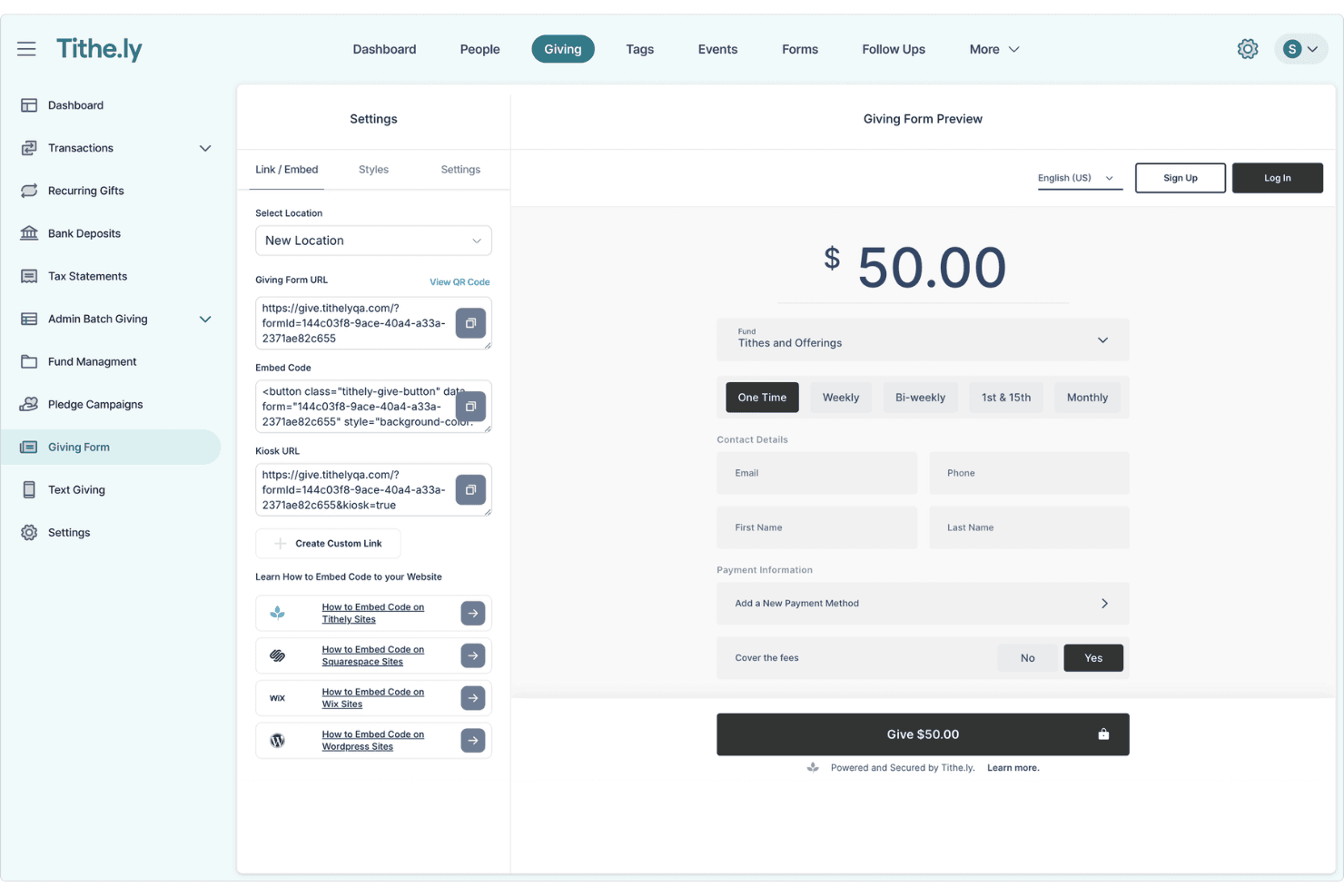
Tithe.ly lets users embed a giving form directly onto their website. Tithe.ly is a church management platform built for congregations that want to organize people, track giving, coordinate volunteers, and manage events in one place.
Who Is Tithe.ly Best For?
Tithe.ly is a strong fit for churches and faith-based congregations that want to manage giving, people records, and ministry coordination in one place.
Why I Picked Tithe.ly
I've included Tithe.ly in my top picks because its mobile giving tools are genuinely hard to beat for churches that want members to give from their phones. The platform supports credit, debit, ACH, Apple Pay, and Google Pay, so a congregation member can complete a gift in a few taps without creating an account. I also like that recurring giving and pledge campaigns are built into the same mobile experience, so members set it up once and it runs automatically.
Tithe.ly Key Features
- People database: Stores member profiles with contact details, custom fields, attendance records, and giving history in one place.
- Smart groups and tags: Organizes members into criteria-based groups with open, approval-based, or private joining options.
- Event registration: Supports registration types, custom fields, discount codes, and partial or full payment collection for church events.
- Automated follow-up workflows: Triggers birthday emails, group assignments, and follow-up sequences based on member actions or keyword responses.
Tithe.ly Integrations
Tithe.ly lists 10 native integrations, including Planning Center Online, Church Community Builder, Rock RMS, MinistryPlatform, QuickBooks Online, and MinistrySafe. An API is available by request for custom integrations.
Pros and Cons
Pros:
- Event sign-ups connect with congregation records
- Reviewers praise member records, tags, and directories
- Member profiles connect attendance and giving
Cons:
- Reviewers describe workflows and reporting as basic
- Group chat lacks moderation and community feeds
 Best for small group management
- 30-day free trial available
- From $37/month
Visit WebsiteCustomer Rating:4.7/5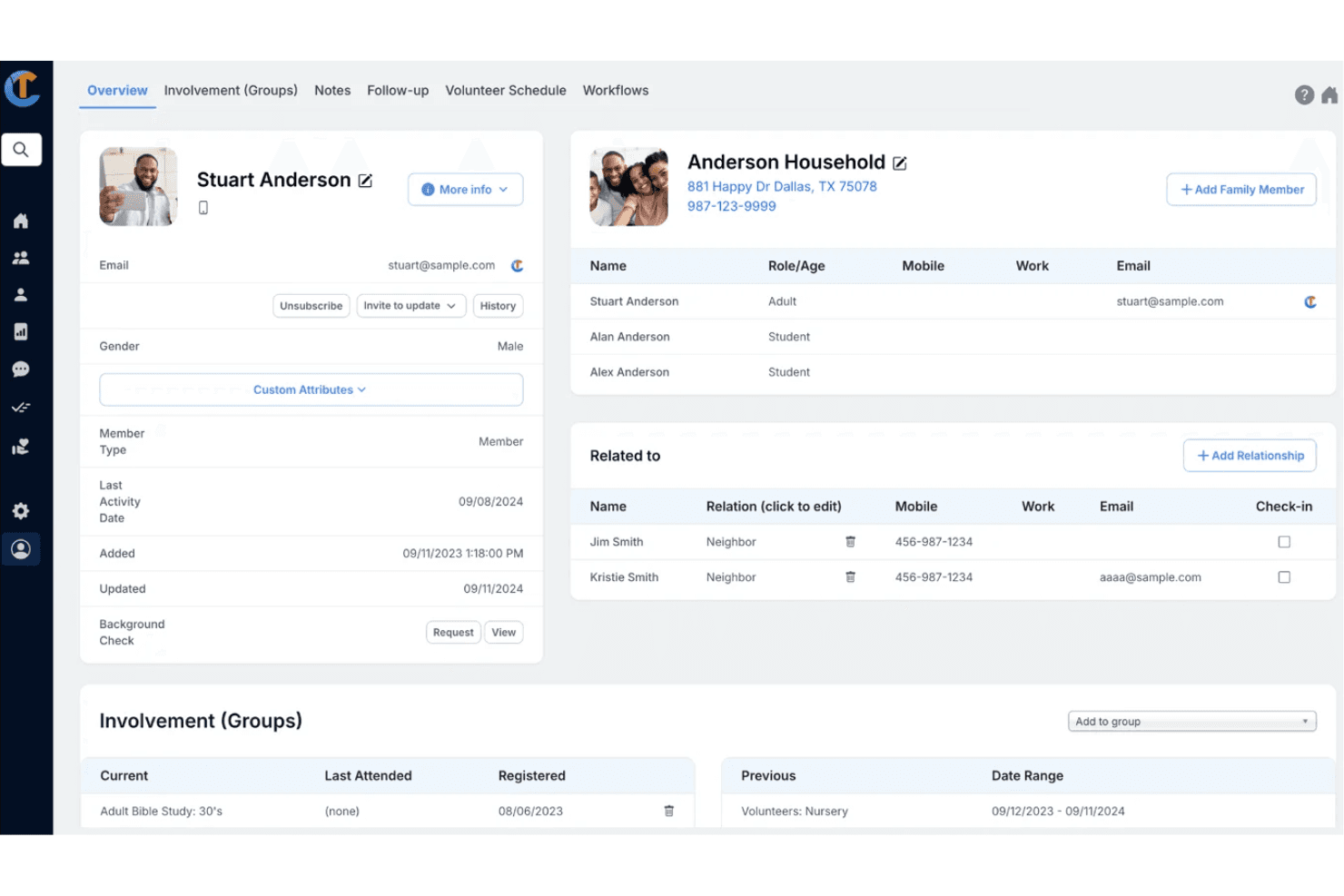
Churchteams displays member profiles with household and group details. Churchteams is a church management platform built for congregations that want to run groups, events, communication, giving, and check-in from one place—without juggling multiple tools.
Who Is Churchteams Best For?
Churchteams is a strong fit for churches that want to manage small groups, attendance, giving, and communications from a single platform without paying for separate tools.
Why I Picked Churchteams
I picked Churchteams as one of the best because its small group management tools are genuinely built around how churches actually run groups. Groupfinder lets members search, filter, and register for groups directly, while leaders can submit attendance and share prayer requests from the same flow. Monthly group health reports give leadership a clear picture of which groups are thriving and which need attention.
Churchteams Key Features
- Text-to-Chat: Staff can send and receive two-way text messages using the church's Text-to-Church number and assign incoming message notifications to specific team members.
- Automated workflows: Set up trigger-based email and text sequences for guest follow-up, volunteer training, and sermon-series communications without manual sending.
- Online giving: Built-in giving tools let donors contribute directly through the platform, with an option for donors to cover processing fees.
- 45+ report types: Generate, save, and schedule customizable reports across people, groups, attendance, and financial data with configurable filters.
Churchteams Integrations
Churchteams has a documented native integration with Protect My Ministry for requesting background checks. Other native integrations and API availability aren’t clearly documented.
Pros and Cons
Pros:
- Attendance reports help flag declining participation
- Paid event registration includes reminders and check-in
- Small-group discovery supports ministry coordination
Cons:
- Member app installs outside app stores
- No forums, feeds, or member discussions
Learn more about Churchteams: Best for modular setup
- Free plan + 30-day free trial + free demo available
- From $15/month
Visit WebsiteCustomer Rating:4.2/5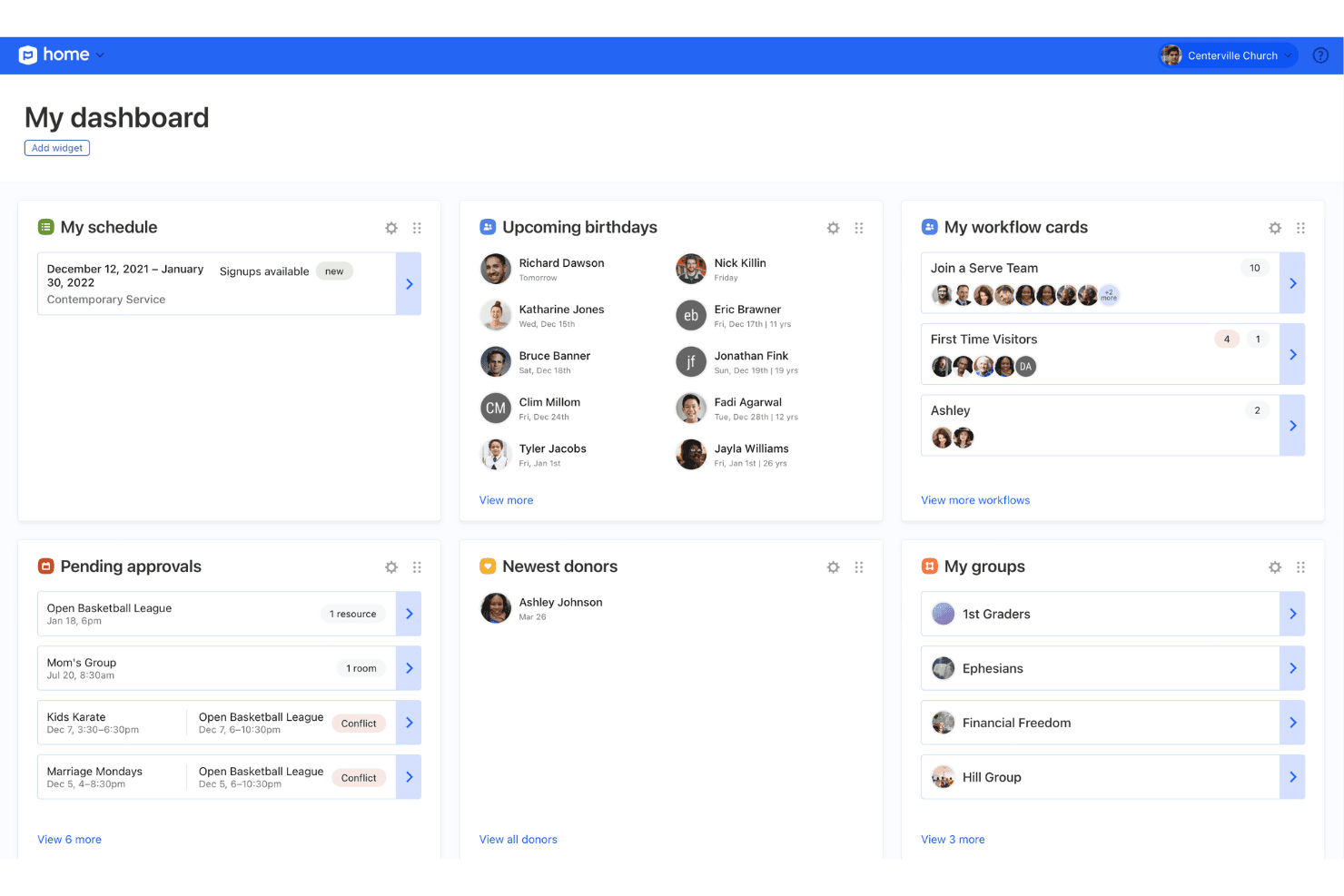
Planning Center displays a personalized dashboard with schedules, birthdays, and groups. Planning Center Groups is a church management platform built for faith communities that want to organize small groups, track member engagement, and keep congregations connected through a shared app and built-in communication tools.
Who Is Planning Center Best For?
Planning Center Groups is a strong fit for churches that want to build out small group ministries using a modular suite of tools they can adopt one piece at a time.
Why I Picked Planning Center
I picked Planning Center as one of the best because its modular setup lets churches adopt exactly what they need, one product at a time. I particularly appreciate how Groups connects directly to the broader Planning Center suite, so attendance data, member profiles, and group engagement all live in one shared system. That means I can track who's attending small groups, follow up with people who've dropped off, and view that activity alongside other church engagement without toggling between disconnected tools.
Planning Center Key Features
- Group discovery and open signup: Members can find and join groups directly through the Church Center app or website, including via QR code.
- Attendance tracking and reporting: Leaders and administrators can record attendance per session and view trends, turnover, and engagement over time.
- Chat safety controls: Administrators can configure conversation formats, enable moderation, and enforce age-based restrictions to protect group members.
- Multi-campus group management: Groups can be assigned to specific campuses, with administrator-level filtering and sorting across all locations.
Planning Center Integrations
Planning Center integrations include VOMO and Zapier. It also offers REST, JSON:API, and webhook APIs for custom connections, with access limited by existing Planning Center permissions.
Pros and Cons
Pros:
- Modular tools share church member records
- Reviewers value group chat over text chains
- Reviewers praise attendance tracking visibility
Cons:
- Church-specific branding limits broader communities
- No searchable cross-group member directory
Learn more about Planning Center: Best for custom church apps
- Free plan + free demo available
- From $69.99/month
Visit WebsiteCustomer Rating:4.8/5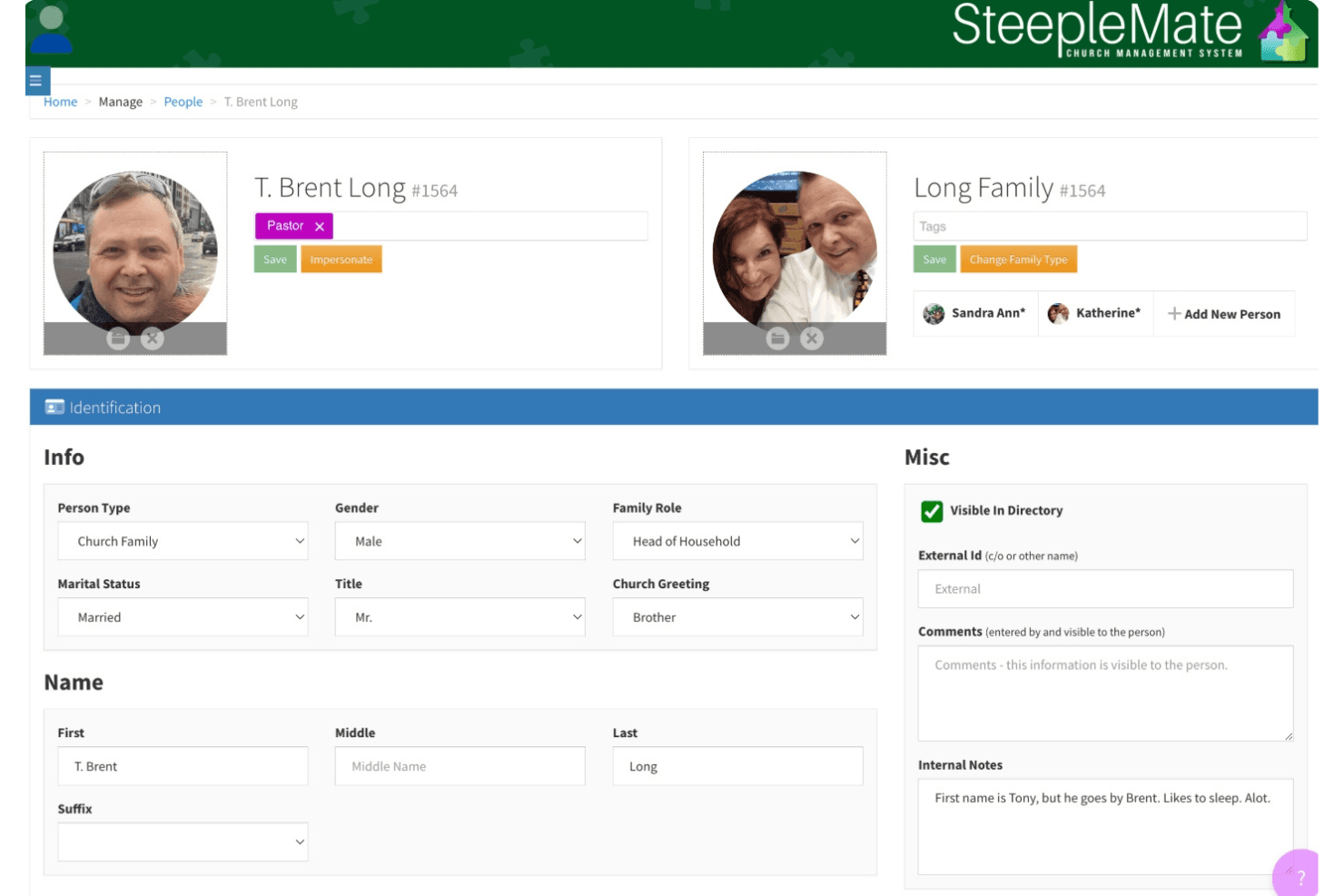
SteepleMate stores member profiles with family roles and internal notes. SteepleMate is an all-in-one church management platform built for congregations that want to handle member records, communication, giving, events, and sermon media without juggling multiple tools.
Who Is SteepleMate Best For?
SteepleMate is a strong fit for small to mid-sized churches that want to manage members, giving, and communications from a single, affordable platform.
Why I Picked SteepleMate
I picked SteepleMate because it's the only tool on this list built specifically around the idea of a custom, branded church app as the central hub for congregation life. Through the Reach module, churches can build a fully branded mobile experience where members register for events, access sermon media, submit prayer requests, and give, all under their church's logo and identity. CareTracks adds another layer I find genuinely useful, automatically triggering follow-up workflows when a guest attends a service or submits a form.
SteepleMate Key Features
- Member profile management: Store and customize member and guest profiles with engagement history, milestones, private notes, and form-collected data.
- CareTracks follow-up workflows: Automatically trigger multi-step follow-up sequences via text, email, or task when a member attends an event or submits a form.
- Mass email, SMS, and MMS messaging: Send scheduled or immediate messages to individual groups or the full congregation across multiple channels.
- QuickBooks Online integration: Automatically post online and in-person gifts to QuickBooks accounts with giving-category mapping and one-click corrections.
SteepleMate Integrations
SteepleMate integrates with QuickBooks Online through its marketplace and uses Google Translate for website translation. It also supports calendar subscriptions for Google Calendar, Apple Calendar, and Outlook.
Pros and Cons
Pros:
- Church records, attendance, and messaging share one hub
- CareTracks follows up after visits and form submissions
- Church-branded app combines giving, events, and prayer
Cons:
- Some admin tasks remain web-only, according to reviewers
- No forums or member-led discussion spaces
Learn more about SteepleMate:
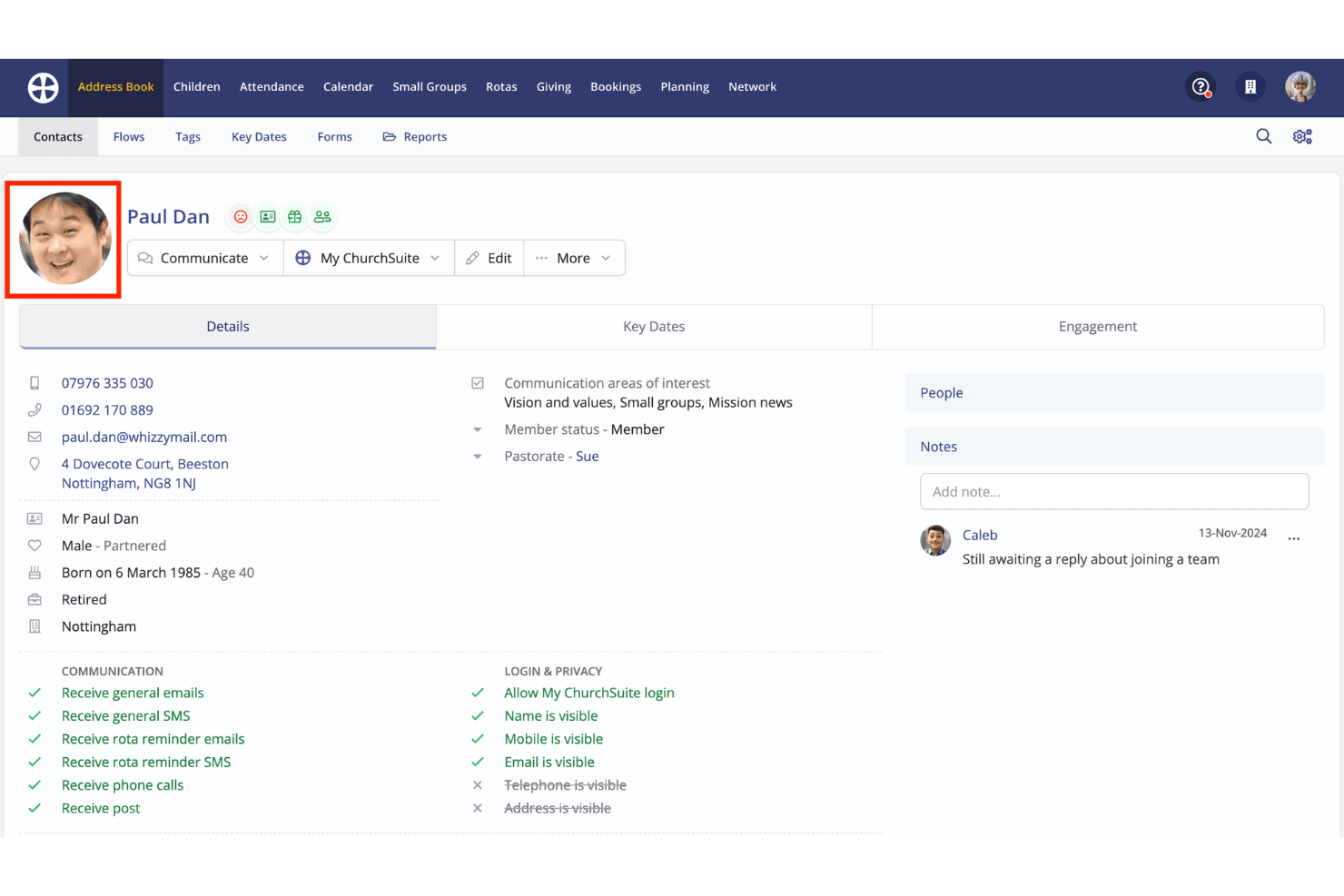
ChurchSuite stores detailed contact profiles for church members. ChurchSuite is a church management system that brings together member records, small groups, event planning, rotas, giving, and communications in one platform built specifically for churches.
Who Is ChurchSuite Best For?
ChurchSuite is a strong fit for UK-based churches looking to manage their congregation, rotas, events, and giving in one purpose-built system.
Why I Picked ChurchSuite
I picked ChurchSuite as one of the best because it's purpose-built for UK-based churches in a way that generalist platforms simply aren't. I particularly like how the Address Book and Small Groups modules work together, letting me manage congregation records, track group membership changes, and monitor engagement in one place. The My ChurchSuite member portal lets people join groups, update their own details, and view church communications without any admin overhead on my end.
ChurchSuite Key Features
- Rota scheduling: Build customizable team rotations, assign ministry roles, and notify members of serving assignments or clashes directly through the system.
- Event ticketing: Create events with free, paid online, or paid-on-arrival ticket options, plus capacity limits and custom sign-up questions.
- Multi-site management: Manage contacts, groups, rotas, calendars, giving, and bookings across multiple church sites from one account.
- Giving module: Accept one-off or recurring donations through online giving forms or the mobile app, with Gift Aid declaration management and bank statement reconciliation.
ChurchSuite Integrations
ChurchSuite has two documented native calendar integrations: Google Calendar and iCal feeds. Its Core API, Embed API, JSON feeds, OAuth 2.0, and OpenID Connect support custom integrations.
Pros and Cons
Pros:
- Reviewers value useful ministry activity reports
- Event planning and volunteer rotas work together
- Reviewers praise its centralized congregation records
Cons:
- Message history is limited to six months or 50 items
- No member forums or community feeds
Learn more about ChurchSuite:
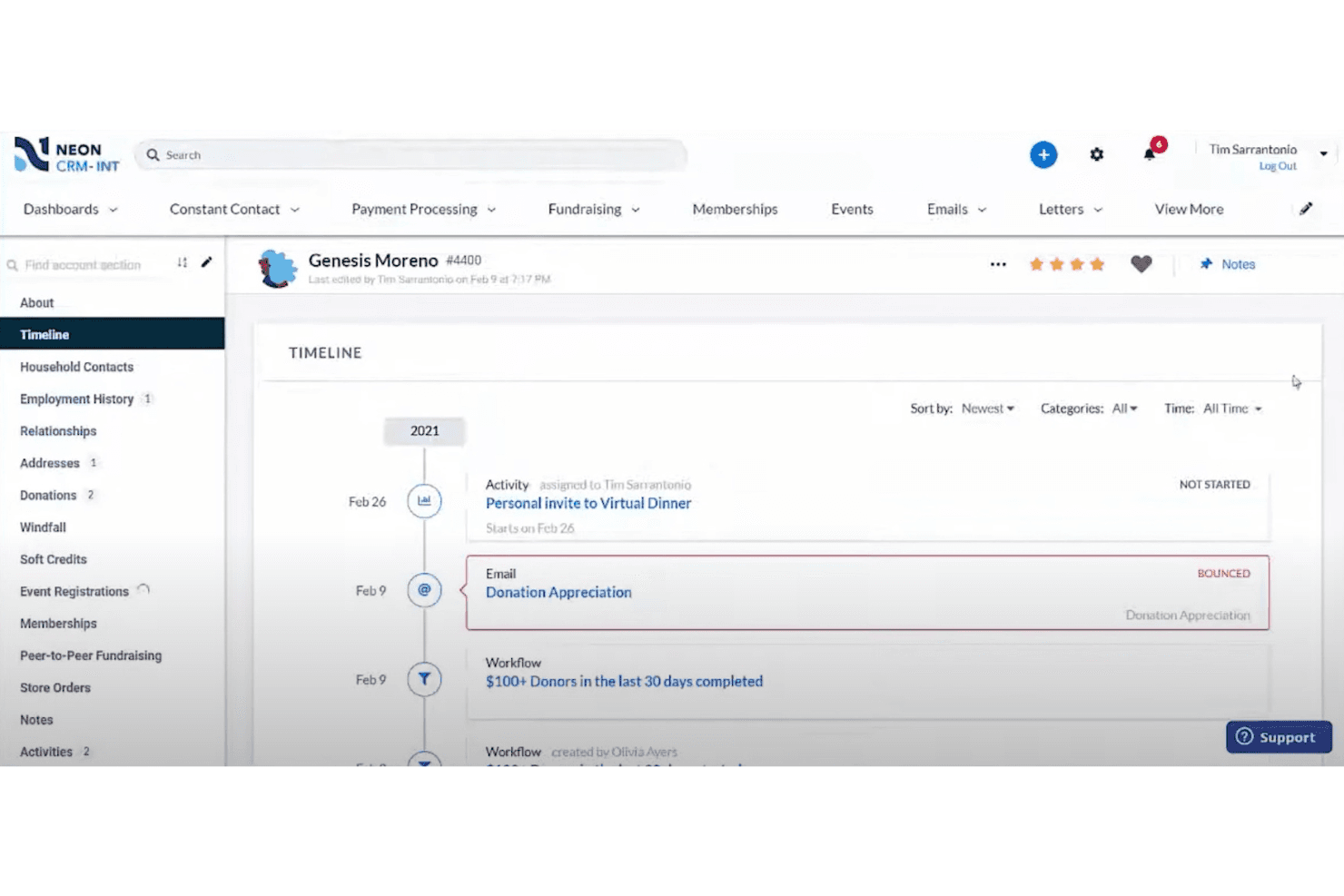
Neon One displays a donor's timeline with emails, workflows, and activities. Neon CRM is a nonprofit-focused constituent relationship management platform that helps membership organizations track donors, manage renewals, and run communications and events from a single system.
Who Is Neon One Best For?
Neon One is built for nonprofits and associations that need to manage donors, members, and fundraising campaigns in one place.
Why I Picked Neon One
I picked Neon One as one of the best because it's purpose-built for nonprofits in a way most CRMs simply aren't. I appreciate how the Memberships add-on connects donor records, renewal tracking, and member directories in one system, so nothing lives in a spreadsheet. When a member lapses, automated renewal reminders and lapsed-member workflows kick in without manual follow-up.
Neon One Key Features
- Donor and supporter profiles: Stores gifts, emails, event attendance, and volunteer hours in a single unified record for each constituent.
- Stewardship journey automation: Triggers personalized email or text sequences based on supporter activity, giving history, or membership status.
- Peer-to-peer fundraising pages: Lets supporters create personal and team fundraising pages linked to your campaigns.
- Custom report builder: Builds unlimited reports using a drag-and-drop interface, with options to schedule automated delivery for board or executive review.
Neon One Integrations
Neon CRM integrates with Mailchimp and QuickBooks Online, including general-ledger syncing for donations, payments, and refunds. It also supports a REST API and Zapier.
Pros and Cons
Pros:
- Fundraising, events, and communications share constituent records
- Engagement histories guide targeted retention outreach
- Membership records connect with renewal workflows
Cons:
- Complex reports can require manual cleanup
- No member forums or discussion spaces
Learn more about Neon One:
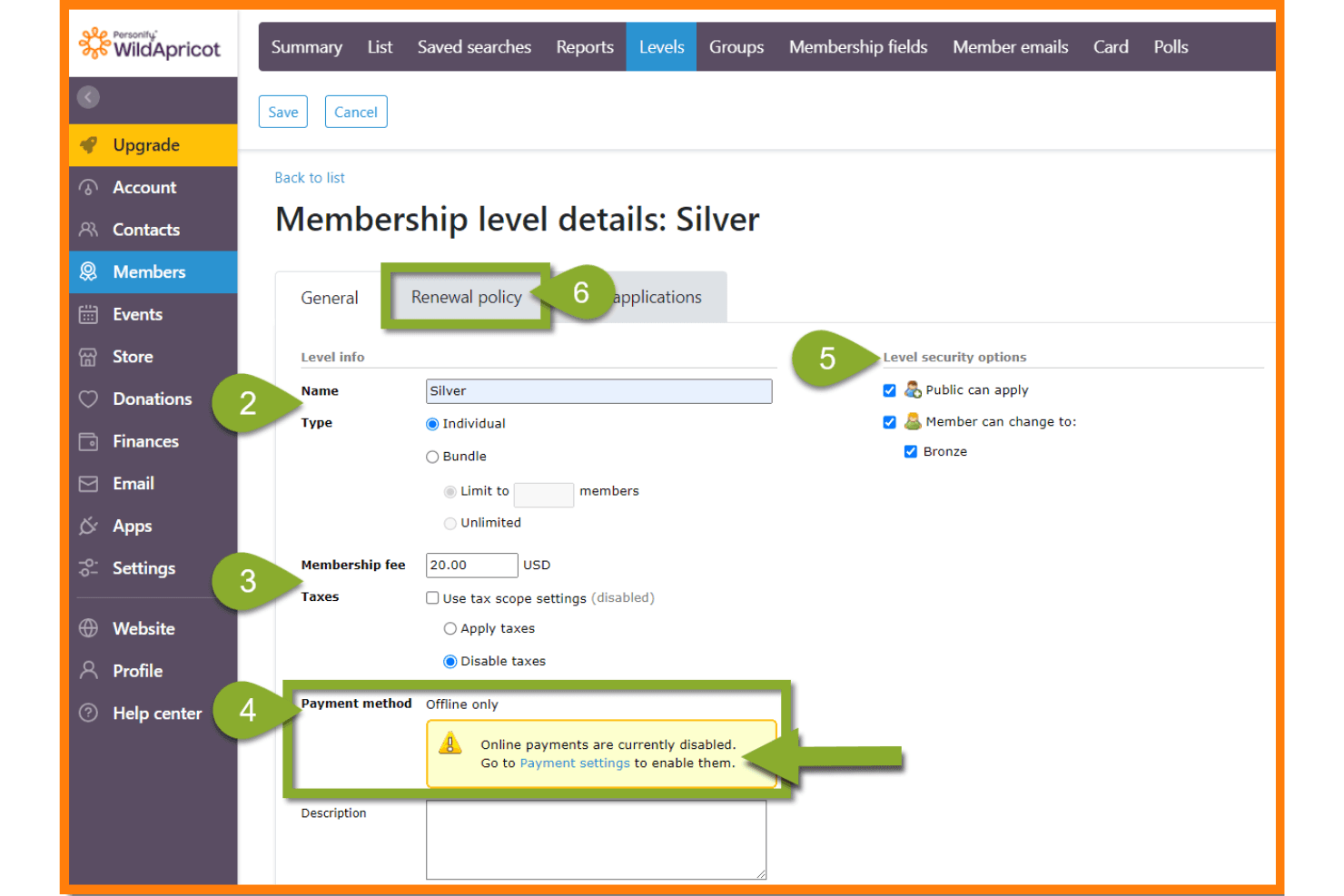
Wild Apricot lets users configure membership level details and fees. WildApricot is a membership management platform built for associations, nonprofits, and member-based organizations that need to centralize renewals, event registration, dues collection, and member communications in one place.
Who Is WildApricot Best For?
WildApricot is a strong fit for nonprofits, associations, and member-based organizations that need to manage dues, renewals, events, and communications without juggling multiple tools.
Why I Picked WildApricot
I picked WildApricot as one of the best because it handles the full membership lifecycle in a single system, which is exactly what a growing congregation needs. I love that you can automate renewal reminders across multiple membership levels, so no one slips through the cracks when their annual commitment is up. The member self-service portal is a genuine standout: members can update their own profiles, pay outstanding dues, and register for events without ever contacting your office.
WildApricot Key Features
- Discussion forums: Create multiple member forums with configurable read, reply, and post permissions per membership level or group.
- Drag-and-drop website builder: Build and customize a member-facing website using templates, without writing code.
- Ecommerce and online store: Sell physical or digital products directly through your organization's website, with inventory tracking and invoicing.
- Segmented email campaigns: Target and schedule email communications using filters like membership level, event attendance, or renewal status.
WildApricot Integrations
WildApricot offers native WordPress integration plus Google Calendar and Outlook Calendar connectivity through webhooks. It supports RESTful admin and member APIs, Make, and Zapier, with accounts syncing with 1,600+ apps.
Pros and Cons
Pros:
- Volunteers can manage routine member updates
- Event registrations and dues share records
- Automated renewals reduce membership administration
Cons:
- Reporting offers limited retention insights
- Forums offer fewer social engagement features
Learn more about Wild Apricot: Best for biblical study resources
- Free plan + free trial available
- Pricing upon request
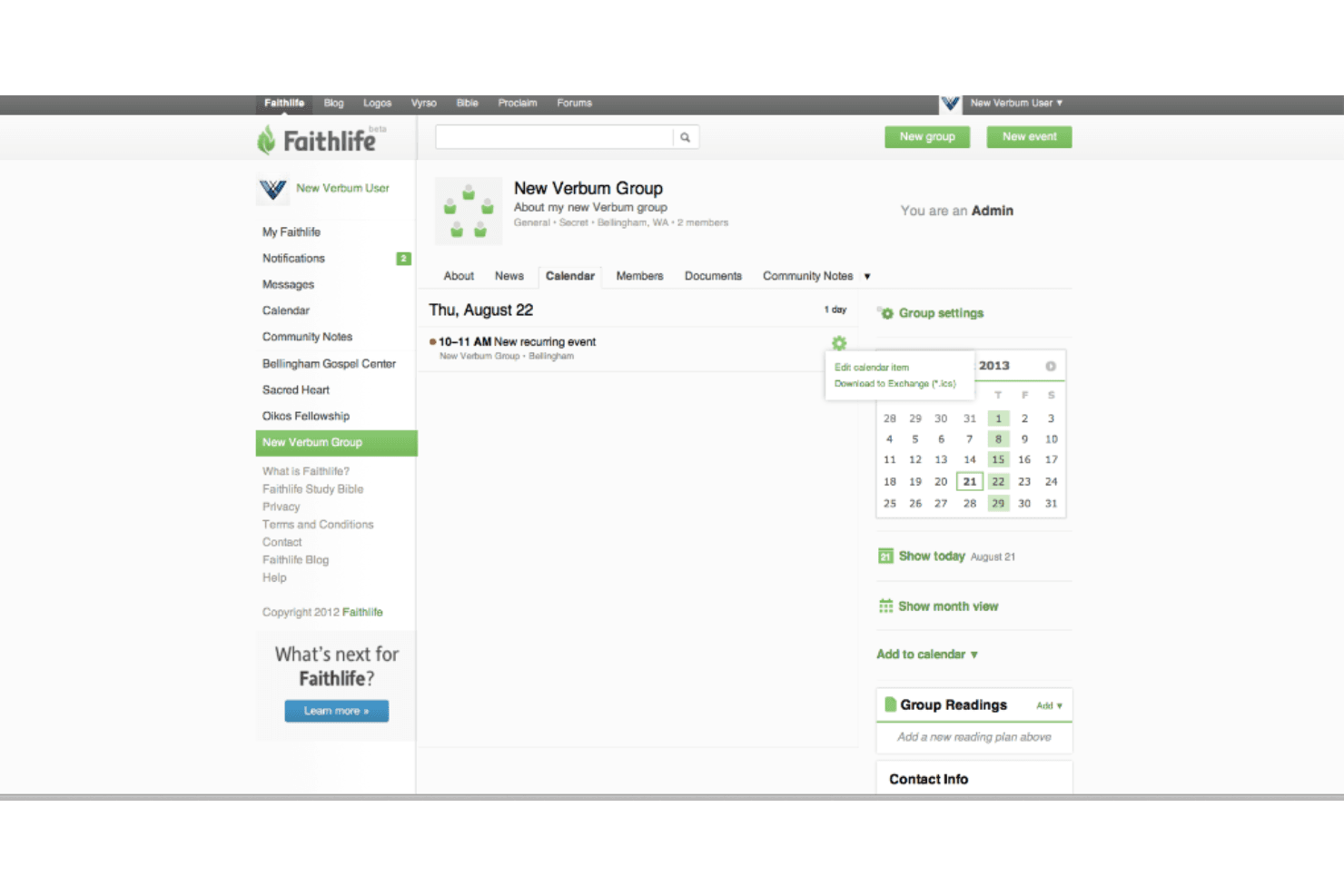
FaithLife lets users manage group events via a shared calendar. Logos is a Bible study platform from Faithlife that gives pastors and church leaders access to a vast digital library, sermon preparation tools, and group spaces for sharing study resources and communicating with their congregation.
Who Is Logos Best For?
Logos is a strong fit for pastors and ministry leaders who want a deep biblical study library at the center of their sermon prep and small group teaching.
Why I Picked Logos
I picked Logos as one of the best because its biblical study library is genuinely unmatched: over 250,000 digital books, commentaries, and original-language tools connect directly to scripture as you study. I love that the Sermon Builder and Bible Study Builder let me pull discussion questions and sermon material from across my entire library in one place, which makes small group prep and Sunday teaching feel like one connected workflow rather than separate tasks.
Logos Key Features
- Faithlife groups: Create dedicated group spaces for churches, parachurch organizations, leadership teams, and Sunday school classes, with subgroups for committees or smaller classes.
- Role-based permissions: Assign member, follower, admin, or moderator roles and configure who can view feeds, access files, or create documents.
- Group chat and private messaging: Send short messages to the whole group or privately message individuals and smaller groups within the platform.
- Group newsletters: Send newsletters directly to group members from within the Faithlife group interface.
FaithLife Integrations
Native integrations are not clearly documented. Faithlife provides Accounts and Community APIs for custom integrations, including users, groups, memberships, invitations, comments, newsfeeds, and notes.
Pros and Cons
Pros:
- Posts, chats, and newsletters support communication
- Role-based groups support private ministry teams
- Connected Bible-study library aids teaching
Cons:
- No engagement dashboards or event registration
- No searchable member directory for leaders
Learn more about FaithLife:
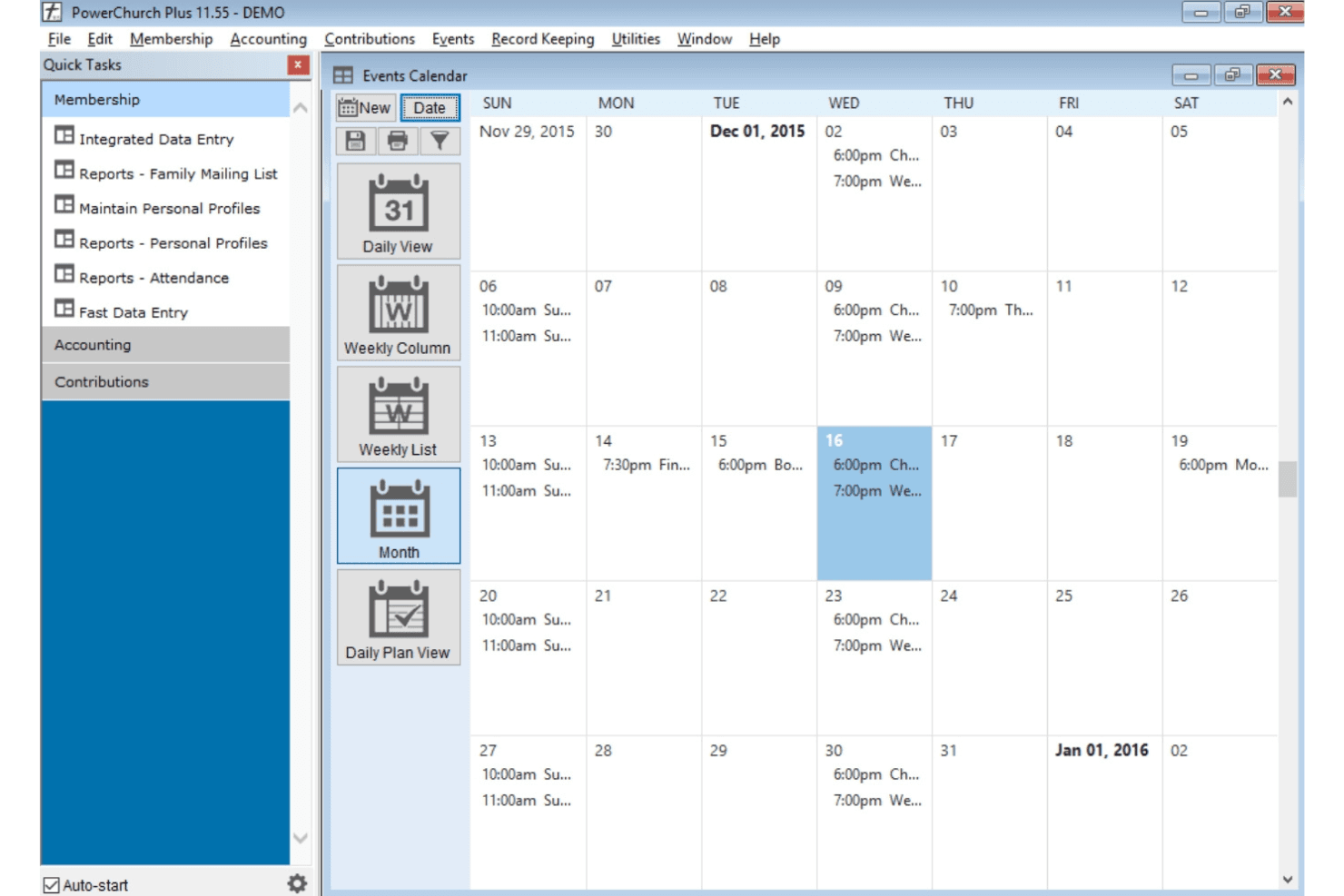
PowerChurch Plus displays church events on a monthly calendar view. PowerChurch Plus is church administration software built for congregations that need to manage membership records, contributions, and finances without juggling multiple disconnected tools.
Who Is PowerChurch Plus Best For?
PowerChurch Plus is a strong fit for churches that want to manage membership records, contributions, and finances in one Windows-based system without a recurring subscription.
Why I Picked PowerChurch Plus
I picked PowerChurch Plus as one of the best because its accounting features go deeper than most church administration tools I've seen. It runs a full double-entry general ledger with fund accounting, tracks restricted gifts to FASB 117 standards, and handles accounts payable, accounts receivable, and payroll in one system. I especially like that contribution records tie directly into the accounting module, so giving data and financial reporting stay in sync without manual reconciliation.
PowerChurch Plus Key Features
- Attendance tracking: Records attendance for services, Sunday school, committee meetings, and other activities, with built-in reports and graphs.
- Google Calendar sync: Syncs the Events module with Google Calendar so your church schedule stays current across platforms.
- Online giving import: Imports contribution data from online giving providers directly into the contributions module.
- Per-user access controls: Restricts access to contribution records and visitation notes on a user-by-user basis.
PowerChurch Plus Integrations
PowerChurch Plus has a native Google Calendar integration. It also imports contributions from online giving providers and records background checks through Protect My Ministry, though the vendor doesn’t specify the integration method.
Pros and Cons
Pros:
- Member records connect families and contributions
- Attendance reports track congregational participation
- Church accounting and giving share one system
Cons:
- Email tools offer limited formatting and spell-check
- No forums, groups, or member discussions
Learn more about PowerChurch Plus:
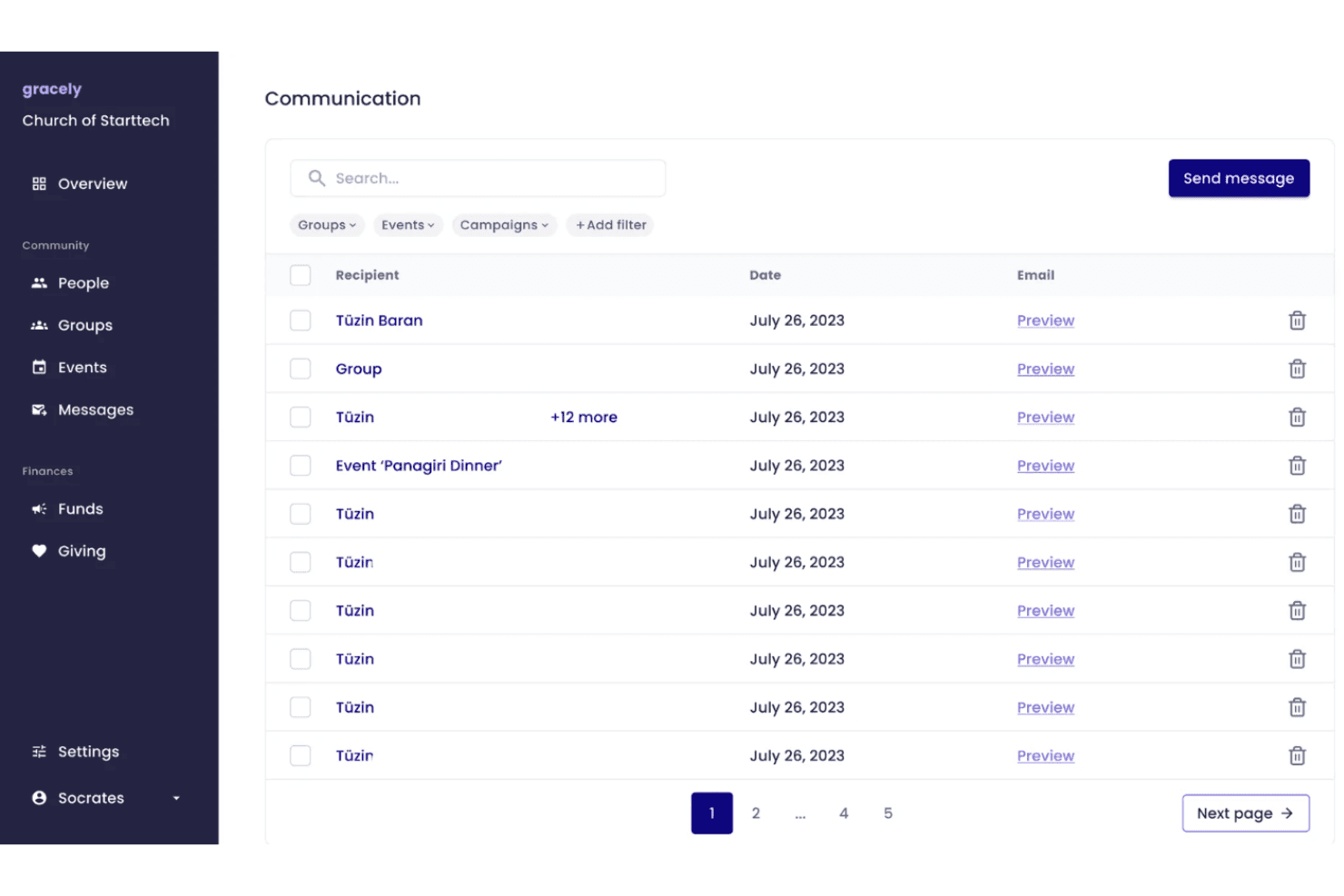
Gracely lets users track and manage church communications in one place. Gracely is cloud-based church management software that brings member records, groups, giving, events, and communication into one place for churches that want to simplify how they run day-to-day ministry.
Who Is Gracely Best For?
Gracely is a good fit for small to mid-sized churches that want an affordable, all-in-one church management system and need help moving their existing member data over from another platform.
Why I Picked Gracely
I've included Gracely in my top picks because it handles data migration better than almost any other church management tool I've seen at this price point. When switching from a previous system, Gracely's team migrates your people, families, groups, giving history, and events at no extra cost across all plans. I particularly appreciate that this isn't just a contact import: your donation records and attendance history come with you, so nothing gets left behind when you make the switch.
Gracely Key Features
- Member directory: Search and filter church member and family profiles by name, email, phone, and custom fields from a centralized, permission-controlled directory.
- In-app chat: Members can send messages, reply to specific messages, and join church-wide or group-specific chat rooms directly in the My Gracely app.
- Event check-in kiosk: Attendees self-check in at events using a registered phone number or QR code, with attendance automatically logged for reporting.
- Role-based permissions: Assign staff and volunteers to predefined roles or build custom roles with specific access levels across giving, groups, events, and settings.
Gracely Integrations
Gracely offers native integrations with PayPal and Stripe for donation processing. QuickBooks and Mailchimp integrations are planned, while a public API isn't documented.
Pros and Cons
Pros:
- Church tools unite events and messaging
- Member app supports profile self-service
- Migration carries giving histories and events
Cons:
- Attendance reports lack broader engagement analytics
- Group chat offers limited member discovery
Learn more about Gracely:
Outras alternativas ao Hivebrite
Eis algumas alternativas adicionais ao Hivebrite que não entraram na minha seleção, mas que vale a pena conhecer:
- 11ChMeetingsBest for multilingual support
- 12One Church SoftwareBest for communication tools
- 13ChurchTracBest for small churches
- 14Fellowship OneBest for volunteer management
- 15ACS RealmBest for large congregations
How I Evaluate Hivebrite Competitors
I evaluate each platform on two layers: whether it handles the basics—member profiles, group spaces, and event registration—and what sets it apart for a church's specific ministry needs.
Core Functionality (Table Stakes For This List)
When I'm selecting tools for my list, I rank each one on a scale from 0 (does not offer the functionality) to 5 (excels in this area) for each core functionality listed below. Then, I calculate the tool's total score into a percentage. Each tool needs to achieve a minimum total score of 65% to be considered for inclusion.
- Member Database & Profiles: I check whether a platform organizes people into households, supports custom fields for things like baptism dates or membership status, and lets you segment by campus or ministry involvement.
- Community Engagement Hub: A private, branded space where members can post, comment, and message each other matters here. I look for features like discussion feeds, sub-community spaces, and moderated content areas that replicate what Hivebrite offers.
- Events & Registration: From weekly service signups to retreat registrations with paid tickets, I evaluate how each tool handles recurring events, RSVPs, reminders, and check-in workflows.
- Group & Ministry Management: Small groups, Bible studies, and service teams each need their own rosters, communication threads, and leader tools. I look at how platforms let coordinators manage attendance and resources within dedicated group spaces.
- Multi-Channel Communications: Churches reach members through email newsletters, SMS prayer chains, and push notifications. I evaluate whether a platform supports targeted messaging to specific segments like new visitors or volunteer teams.
- Giving & Engagement Tracking: I look at whether giving is built in or requires a third-party integration, and whether the platform surfaces trends like attendance patterns, group participation, and giving history in a single dashboard.
Once I have a list of tools that meet this criteria, I consider what sets each platform apart.
Differentiating Factors (What Sets Vendors Apart)
Here's how I compare and contrast different vendors:
Standout Features
A branded mobile app gives your congregation a single place to watch sermons, register for events, and give—all under your church's name. Volunteer scheduling is another differentiator I evaluate closely, since coordinating worship team rotations or nursery shifts week to week is a real operational challenge. I also look at child check-in workflows, where secure guardian matching and printed name tags directly affect how safe families feel on a Sunday morning.
Beyond Features
Pricing structure matters a lot here—some platforms charge per member, which can get expensive fast for a growing congregation, while others offer flat-rate plans better suited to churches with tight budgets. I also evaluate how well a tool connects with the broader church tech stack, like ProPresenter, Planning Center, or QuickBooks. Migration support is worth considering too, especially if your church is moving years of giving records and member data out of spreadsheets or a legacy ChMS into a new platform.
Por que procurar uma alternativa ao Hivebrite?
Embora o Hivebrite seja uma boa opção para a comunicação das igrejas, há vários motivos pelos quais alguns utilizadores procuram soluções alternativas. Pode estar à procura de uma alternativa ao Hivebrite porque…
- Precisa de mais opções de personalização
- Procura maior flexibilidade nos preços
- Necessita de suporte multilingue
- A sua equipa precisa de uma integração inicial mais simples
- Pretende capacidades móveis mais robustas
Se alguma destas situações lhe parece familiar, veio ao sítio certo. A minha lista inclui várias opções de comunicação para igrejas mais adequadas a equipas que enfrentam estes desafios com o Hivebrite e procuram soluções alternativas.
Principais funcionalidades do Hivebrite
Eis algumas das principais funcionalidades do Hivebrite, para o ajudar a contrastar e comparar o que as soluções alternativas oferecem:
- Envolvimento dos membros: Ferramentas para melhorar a interação e promover o envolvimento da comunidade.
- Gestão de eventos: Funcionalidades para organizar e promover eventos virtuais e presenciais.
- Gestão de conteúdos: Opções para partilhar notícias e recursos, e criar conteúdos personalizados.
- Oportunidades para membros: Funcionalidades para ofertas de emprego, mentoria e projetos colaborativos.
- Ferramentas de comunicação: Boletins informativos automatizados e campanhas direcionadas para promover o envolvimento.
- Análise: Ferramentas para acompanhar o envolvimento dos membros e a utilização da plataforma.
- Personalização: Flexibilidade para adaptar a plataforma às necessidades específicas da comunidade.
- Integração: Compatibilidade com várias ferramentas para um funcionamento integrado.