

Online fondsenwervingsplatforms zijn digitale tools waarmee je donaties kunt inzamelen, beheren en volgen voor je kerk, non-profitorganisatie, gemeenschapscampagne of persoonlijke inzamelingsactie. Als je op zoek bent naar de beste fondsenwervingsoplossing, zoek je waarschijnlijk naar tools die aansluiten bij de behoeften van je bediening, je missie ondersteunen en geven eenvoudig maken voor je supporters. Met zoveel beschikbare fondsenwervingssites is het belangrijk om een platform te vinden dat past bij je doelstellingen, budget en technische vaardigheden. Deze lijst helpt je de beste opties voor 2026 te vergelijken, zodat je vol vertrouwen de juiste tool kunt kiezen om je inspanningen te ondersteunen en fondsenwervingssucces te behalen.
Waarom u onze softwareaanbevelingen kunt vertrouwen
6,700+
Reviews
20
Industry experts
16+
Evaluation factors
14
Years
Ons team test en beoordeelt software sinds 2012. Als kerkleiders weten we zelf hoe moeilijk — en belangrijk — het is om de juiste software te kiezen.
Voor deze gids hebben we tools geëvalueerd met behulp van praktijktests en onafhankelijk onderzoek, waarbij we tools beoordeelden aan de hand van onze selectiecriteria.
Onze reviews weerspiegelen ons menselijke redactionele oordeel, geen verkooppraatje.
Vergelijkingstabel online fondsenwervingsplatforms
Deze vergelijkingstabel geeft een overzicht van de prijsgegevens van mijn belangrijkste keuzes voor online fondsenwervingsplatforms:
| Tool | Best For | Trial Info | Price | ||
|---|---|---|---|---|---|
| 1 | Beste voor het beheer van terugkerende donaties | Gratis abonnement beschikbaar | Vanaf $150/maand | Website | |
| 2 | Ideaal voor kosteloze fondsenwerving door non-profitorganisaties | Gratis abonnement beschikbaar | Gratis te gebruiken | Website | |
| 3 | Het beste voor mobiele fondsenwerving via veilingen | Gratis demo beschikbaar | Prijzen op aanvraag | Website | |
| 4 | Beste voor door peers gedreven fondsenwervingscampagnes | Gratis abonnement beschikbaar | Vanaf 2.9% + $0.30 per transactie | Website | |
| 5 | Beste voor oplossingen voor evenementengericht geven | Gratis demo beschikbaar | Prijzen op aanvraag | Website | |
| 6 | Beste keuze voor gratis fondsenwervingshulpmiddelen | Gratis abonnement beschikbaar | Vanaf $0/maand | Website | |
| 7 | Ideaal voor aanpasbare campagnepagina's | Gratis abonnement beschikbaar | Vanaf $8.99/maand | Website | |
| 8 | Ideaal voor fondsenwervingsloterijen met meerdere prijzen | Gratis abonnement + gratis demo beschikbaar | Vanaf 2.9% platformkosten | Website | |
| 9 | Ideaal voor Salesforce-integratie | Gratis demo beschikbaar | Vanaf $59/maand (jaarlijks gefactureerd) | Website | |
| 10 | Beste voor fondsenwerving op basis van toezeggingen | Gratis abonnement beschikbaar | Vanaf $0/maand | Website |


Beoordelingen van online fondsenwervingsplatforms
Hieronder vind je mijn gedetailleerde samenvattingen van de online fondsenwervingsplatforms die mijn selectie hebben gehaald. In mijn beoordelingen bekijk ik de functies, beste toepassingsmogelijkheden en integraties van elk platform in detail, zodat je het beste platform voor jou kunt vinden.
 Beste voor het beheer van terugkerende donaties
- Gratis abonnement beschikbaar
- Vanaf $150/maand
Visit WebsiteCustomer Rating:4.8/5
Donorbox toont een rapport met een overzicht van donoren, met kolommen voor naam, e-mailadres en datum van de laatste donatie. Donorbox is ontworpen voor kerken, non-profitorganisaties en organisaties die afhankelijk zijn van stabiele, doorlopende steun. Dit platform onderscheidt zich door het beheer van terugkerende donaties, waardoor het gemakkelijker wordt om voorspelbare inkomstenstromen op te bouwen. Als je een hulpmiddel nodig hebt dat je helpt langdurige donorrelaties te onderhouden, is Donorbox voor jou gemaakt.
Waarom ik voor Donorbox heb gekozen
Het beheer van terugkerende donaties heeft voor veel bedieningen en non-profitorganisaties de hoogste prioriteit. Daarom heb ik voor Donorbox gekozen vanwege de gespecialiseerde hulpmiddelen op dit gebied. Met het platform kun je flexibele opties voor terugkerende donaties instellen, zodat donoren hun gewenste frequentie en bedrag kunnen kiezen. Ik waardeer ook de geautomatiseerde donateursbewijzen en herinneringen, die helpen om consistente steun te behouden zonder extra administratief werk. Deze functies maken Donorbox een sterke keuze als je regelmatig geven wilt laten groeien en in stand wilt houden via je online fondsenwervingsplatform.
Belangrijkste functies van Donorbox
Andere functies die Donorbox nuttig maken voor online fondsenwerving zijn onder meer:
- Insluiten van donatieformulieren: Voeg aanpasbare donatieformulieren rechtstreeks toe aan je website of landingspagina's.
- Tekst-om-te-geven: Stel donoren in staat om te geven door een eenvoudig sms-bericht te sturen, waardoor mobiel geven toegankelijk wordt.
- Donorbeheerdashboard: Houd donoractiviteiten bij, beheer contacten en bekijk de donatiegeschiedenis op één plek.
- Doelmeter: Toon een realtime voortgangsbalk voor fondsenwerving om donoren te motiveren en de voortgang van de campagne te laten zien.
Integraties van Donorbox
Integraties zijn onder andere Salesforce, Blackbaud Raiser's Edge NXT, Neon CRM, QuickBooks Online, Stripe en PayPal.
Pros and Cons
Pros:
- Uitstekende configuratie voor terugkerende donaties
- Eenvoudig in te sluiten op elke website
- Accepteert Apple Pay en Google Pay
Cons:
- Aanpassingsmogelijkheden zijn beperkt
- Ontbreekt aan uitgebreide CRM-functies
Learn more about Donorbox: Ideaal voor kosteloze fondsenwerving door non-profitorganisaties
- Gratis abonnement beschikbaar
- Gratis te gebruiken
Visit WebsiteCustomer Rating:4.9/5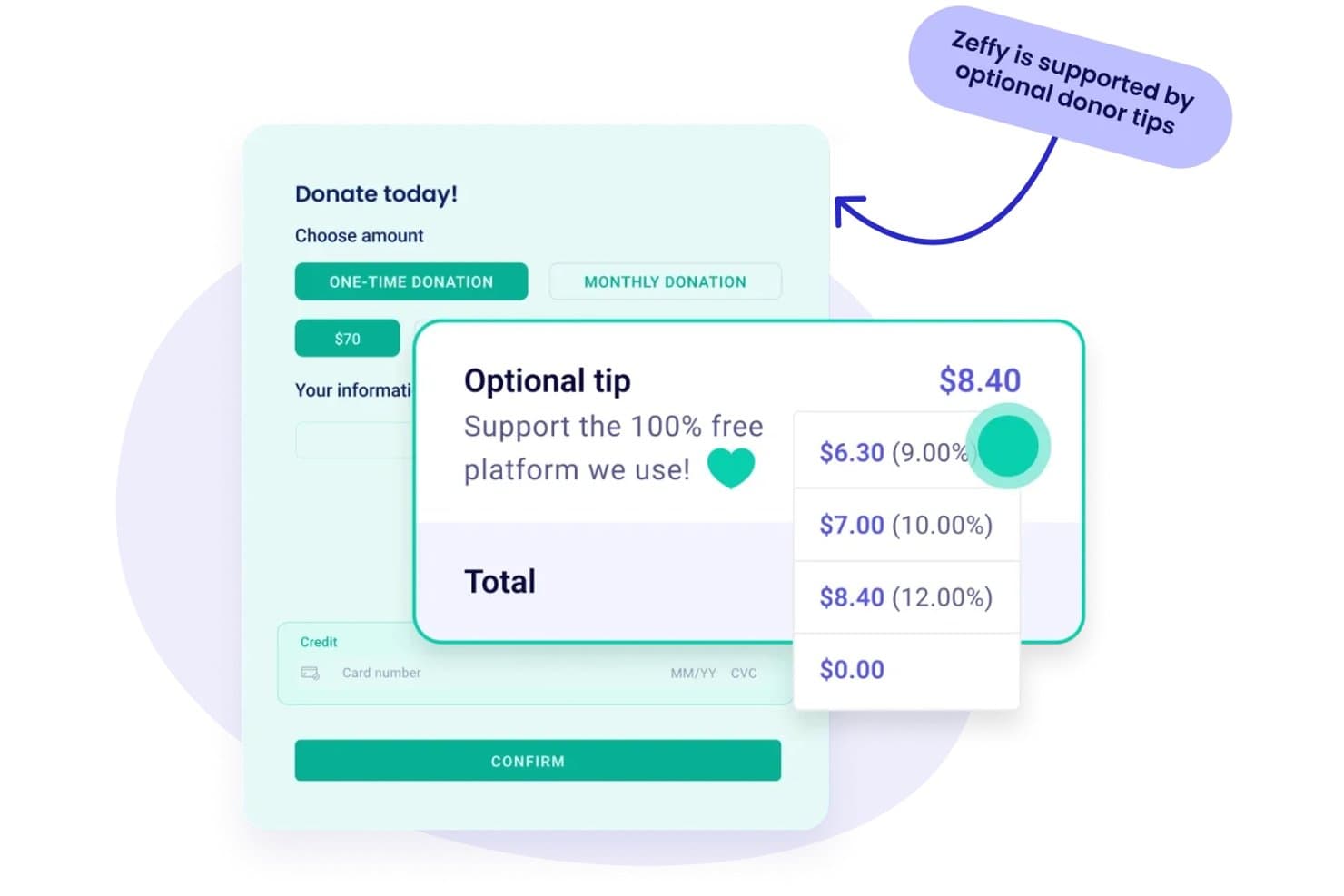
Met Zeffy kunnen donoren optionele fooien achterlaten om het gratis platform te financieren. Zeffy is een platform voor fondsenwerving voor non-profitorganisaties dat donatieformulieren, ticketverkoop, peer-to-peercampagnes, veilingen, loterijen, een CRM-systeem voor donoren en e-mailtools op één plek combineert.
Voor wie is Zeffy het meest geschikt?
Zeffy is zeer geschikt voor kleine non-profitorganisaties en organisaties die door vrijwilligers worden geleid en die donaties, evenementen en communicatie met donoren willen beheren zonder geld te verliezen aan platformkosten.
Waarom ik voor Zeffy heb gekozen
Zeffy staat op mijn shortlist omdat het het enige platform voor fondsenwerving is dat ik heb gevonden dat non-profitorganisaties echt niets in rekening brengt—geen platformkosten, geen transactiekosten en geen creditcardkosten. Ik vind het vooral goed dat het zichzelf financiert via optionele bijdragen van donoren bij het afrekenen, zodat je organisatie 100% van elke donatie behoudt. Combineer dat met ingebouwde peer-to-peercampagnes, een CRM-systeem voor donoren en ticketverkoop voor evenementen, en je beschikt over een complete toolkit voor fondsenwerving zonder prijskaartje.
Belangrijkste functies van Zeffy
- Donorpost: Maak gepersonaliseerde gedrukte brieven en oproepen met behulp van donorinformatie en de huisstijl van je organisatie, en volg vervolgens de bezorgstatus en scans van QR-codes vanuit het dashboard.
- Ticketverkoop voor evenementen: Maak ticketformulieren in de huisstijl met meerdere tickettypes, automatiseer de bezorging van elektronische tickets en beheer het inchecken en de kaartverkoop aan de deur vanaf je telefoon.
- E-mailtools: Ontwerp en plan gerichte e-mailcampagnes met een editor met slepen-en-neerzetten, segmenteer ontvangers op basis van hun geefgeschiedenis en volg openingen, klikken en donaties.
- App voor contactloos betalen: Accepteer persoonlijke betalingen met kaarten en digitale portemonnees op een iPhone of Android-apparaat zonder betaalterminal.
Integraties van Zeffy
Zeffy biedt rechtstreekse integraties met QuickBooks en WordPress, plus verbindingen met Salesforce, Mailchimp, Slack en Google Sheets via viaSocket. Het biedt ook een openbare API, webhooks en ondersteuning voor Zapier.
Pros and Cons
Pros:
- Combineert ticketverkoop voor evenementen, inchecken en geven via QR-code
- Koppelt donorhistorieken aan campagnes en communicatie
- Houdt de fondsenwerving van teams bij met gedeelde doelen en ranglijsten
Cons:
- Optionele bijdragen bij het afrekenen kunnen donoren in verwarring brengen
- De mogelijkheden voor het sorteren van contacten en rapportage leiden tot klachten
Learn more about Zeffy: Het beste voor mobiele fondsenwerving via veilingen
- Gratis demo beschikbaar
- Prijzen op aanvraag
Visit WebsiteCustomer Rating:4.7/5
Handbid toont een veilingdashboard met een samenvatting van de biedersactiviteit, biedingen per item en de belangrijkste inkomstenbijdragers. Als je bediening of non-profitorganisatie afhankelijk is van veilingen om geld in te zamelen, is Handbid ontwikkeld om mobiel bieden eenvoudig en toegankelijk te maken voor je supporters. Dit platform is vooral nuttig voor kerken en organisaties die stille of liveveilingen willen organiseren waarbij gasten vanaf hun telefoon kunnen deelnemen. Handbid helpt je bij het beheren van itemlijsten, biedingen en betalingen op één plek, waardoor fondsenwerving via veilingen interactiever en minder stressvol wordt voor je team.
Waarom ik voor Handbid heb gekozen
Mobiele fondsenwerving via veilingen brengt unieke uitdagingen met zich mee en Handbid is speciaal ontwikkeld om deze aan te pakken. Ik heb voor Handbid gekozen omdat het een speciale mobiele app voor bieden biedt, waarmee gasten overal tijdens je evenement aan stille en liveveilingen kunnen deelnemen. Het platform bevat ook realtime meldingen voor waarschuwingen wanneer iemand je heeft overboden en voor veilingupdates, zodat donateurs gedurende het hele proces betrokken blijven. Als je fondsenwervingsstrategie afhankelijk is van veilingen, biedt Handbid je de tools om biedingen, het volgen van items en betalingen te beheren in één mobielvriendelijke oplossing.
Belangrijkste functies van Handbid
Enkele andere functies die Handbid nuttig maken voor online fondsenwerving zijn:
- Evenementticketing: Verkoop en beheer evenementtickets rechtstreeks via het platform.
- Items importeren en in bulk bewerken: Upload veilingitems in bulk en breng in één keer wijzigingen aan in meerdere vermeldingen.
- Ranglijsten: Toon tijdens je evenement live biedactiviteit en de hoogste bieders op schermen.
- Geïntegreerde betalingsverwerking: Verwerk betalingen voor winnende biedingen en donaties binnen hetzelfde systeem.
Integraties van Handbid
Integraties zijn onder meer GiveChariot, Bloomerang, Salsa, Kindful, DonorPerfect en Salesforce.
Pros and Cons
Pros:
- Realtime pushmeldingen
- Gamificeert het biedproces
- Snel mobiel afrekeningssysteem
Cons:
- Voornamelijk gericht op veilingen
- Mist bredere CRM-functies
Learn more about Handbid: Beste voor door peers gedreven fondsenwervingscampagnes
- Gratis abonnement beschikbaar
- Vanaf 2.9% + $0.30 per transactie
Visit WebsiteCustomer Rating:3.2/5
GoFundMe Pro toont campagne- en supporterdashboards met het totale ingezamelde bedrag en transacties. Als je je gemeenschap wilt mobiliseren voor fondsenwerving, is GoFundMe ontwikkeld voor door peers gedreven campagnes die floreren dankzij delen op sociale media. Dit platform is vooral nuttig voor kerken, bedieningen en groepen die individuen willen in staat stellen om namens hen geld in te zamelen. GoFundMe maakt het supporters gemakkelijk om hun eigen campagnes op te zetten en hun netwerken voor jouw doel te mobiliseren.
Waarom ik voor GoFundMe koos
Door peers gedreven fondsenwervingscampagnes vormen de kern van het GoFundMe-platform. Daarom heb ik het voor deze lijst gekozen. Met GoFundMe kunnen individuen en groepen hun eigen fondsenwervingspagina's maken, waardoor supporters campagnes eenvoudig via sociale media kunnen delen en nieuwe donateurs kunnen bereiken. Ik waardeer hoe de ingebouwde deeltools en campagne-updates van het platform het momentum behouden en bredere deelname aanmoedigen. Als je je gemeenschap wilt activeren en supporters in staat wilt stellen om namens jou geld in te zamelen, is GoFundMe speciaal voor die aanpak ontwikkeld.
Belangrijkste functies van GoFundMe
Enkele andere functies die GoFundMe nuttig maken voor online fondsenwerving zijn:
- Opnamemogelijkheden voor geld: Organisatoren kunnen op elk moment geld rechtstreeks naar hun bankrekeningen opnemen.
- Reacties van donateurs: Supporters kunnen openbare berichten en aanmoedigende woorden achterlaten op campagnepagina's.
- Foto's en video's uploaden voor campagnes: Voeg meerdere afbeeldingen en video's toe om het verhaal van de campagne persoonlijker en sterker te maken.
- Automatische bedankberichten: Het platform stuurt donateurs na elke bijdrage bedankberichten.
Integraties van GoFundMe
Integraties omvatten Stripe, PayPal, Facebook, Instagram, X (Twitter) en YouTube.
Pros and Cons
Pros:
- Enorm ingebouwd vertrouwen van donateurs
- Opties zonder platformkosten
- Zeer eenvoudige campagne-instelling
Cons:
- Mist opties voor terugkerende giften
- Campagnes raken verloren in de massa
 Beste voor oplossingen voor evenementengericht geven
- Gratis demo beschikbaar
- Prijzen op aanvraag

OneCause biedt een dashboard met opbrengsten voor evenementen van non-profitorganisaties. Voor bedieningen en kerken die afhankelijk zijn van evenementen om donaties te stimuleren, biedt OneCause een platform dat speciaal is ontworpen voor evenementengerichte fondsenwerving. Het is een uitstekende keuze voor leiders die veilingen, gala’s of peer-to-peer-evenementen willen beheren en tegelijkertijd de betrokkenheid van donateurs centraal willen houden. OneCause helpt u om ticketverkoop, mobiel bieden en live fondsenwervingsmomenten allemaal op één plek te coördineren.
Waarom ik voor OneCause heb gekozen
Evenementengericht geven vereist hulpmiddelen die kunnen omgaan met de unieke eisen van live fondsenwerving, en daarin onderscheidt OneCause zich. Ik heb voor OneCause gekozen omdat het speciale functies biedt voor het beheren van veilingen, ticketverkoop en mobiel bieden tijdens evenementen. Het platform ondersteunt ook realtime fondsenwervingsactiviteiten, zoals paddle-rondes en live oproepen, die essentieel zijn om de betrokkenheid tijdens gala’s of benefietdiners te maximaliseren. Als uw fondsenwervingsstrategie draait om evenementen, biedt OneCause u de structuur en flexibiliteit om alles, van registratie tot het innen van donaties, op één plek te beheren.
Belangrijkste functies van OneCause
Enkele andere functies die OneCause waardevol maken voor online fondsenwerving zijn:
- Geven via sms: Donateurs kunnen bijdragen door vanaf hun mobiele apparaat een eenvoudig sms-bericht te sturen.
- Aanpasbare evenementpagina’s: Maak evenementpagina’s in uw eigen huisstijl met uw eigen afbeeldingen, boodschappen en logo’s van sponsors.
- Tafel- en zitplaatsbeheer: Organiseer gastenlijsten en wijs zitplaatsen toe voor fysieke evenementen, rechtstreeks binnen het platform.
- Donatiethermometers: Toon de realtime voortgang van de fondsenwerving om deelname tijdens evenementen aan te moedigen.
Integraties van OneCause
Integraties omvatten Salesforce, Microsoft Dynamics, DonorDock en Stripe.
Pros and Cons
Pros:
- Naadloos ticketsysteem
- Geweldige ondersteuning voor hybride evenementen
- Robuust rapportagedashboard
Cons:
- Mobiele app kan bugs bevatten
- Te uitgebreid voor eenvoudige campagnes
Learn more about OneCause: Beste keuze voor gratis fondsenwervingshulpmiddelen
- Gratis abonnement beschikbaar
- Vanaf $0/maand

Give Lively biedt een livestreamende donatiepagina met een realtime doeltracker. Give Lively biedt een reeks gratis fondsenwervingshulpmiddelen voor non-profitorganisaties die hun impact willen maximaliseren zonder geld uit te geven aan software. Dit platform is vooral aantrekkelijk voor organisaties met beperkte budgetten of organisaties die net beginnen met digitale fondsenwerving. Met Give Lively kunt u donatiepagina's, peer-to-peer-campagnes en evenementticketing starten zonder maandelijkse kosten of verborgen kosten.
Waarom ik voor Give Lively heb gekozen
Wat Give Lively onderscheidt, is de toewijding aan het aanbieden van echt gratis fondsenwervingshulpmiddelen voor non-profitorganisaties. Ik heb voor Give Lively gekozen omdat het onbeperkte toegang biedt tot donatiepagina's, peer-to-peer-fondsenwerving en evenementticketing zonder platformkosten in rekening te brengen. Het platform ondersteunt ook de functionaliteit om via sms te doneren, waarmee organisaties donateurs kunnen bereiken waar ze zich ook bevinden. Voor groepen die elke euro moeten benutten, maakt de kosteloze aanpak van Give Lively het een praktische keuze voor online fondsenwerving.
Belangrijkste functies van Give Lively
Andere functies die Give Lively nuttig maken, zijn onder meer:
- Opties voor terugkerende donaties: Laat donateurs automatische, doorlopende bijdragen aan uw organisatie instellen.
- Aanpasbare donatiewidgets: Integreer merkspecifieke donatieformulieren rechtstreeks op uw website.
- Dashboard voor supporterbeheer: Volg donoractiviteiten en beheer supporterinformatie op één plek.
- Integratie voor werkgeversbijdragen: Maak verbinding met Double the Donation om door werkgevers verdubbelde giften te stimuleren en te verwerken.
Integraties van Give Lively
Integraties omvatten Salesforce, Stripe, PayPal, Double the Donation en Mailchimp.
Pros and Cons
Pros:
- Functies voor doneren via sms inbegrepen
- Uitstekende peer-to-peer-opties
- Strakke moderne donatieformulieren
Cons:
- U moet een aanvraag indienen om het platform te gebruiken
- Ondersteuning verloopt voornamelijk via e-mail
Learn more about Give Lively: Ideaal voor aanpasbare campagnepagina's
- Gratis abonnement beschikbaar
- Vanaf $8.99/maand

Fundly biedt een visuele beheeromgeving voor fondsenwervingspagina's waarin gebruikers campagnedoelen kunnen bekijken. Voor ministeries en organisaties die elk detail van hun fondsenwervingscampagnes willen aanpassen, biedt Fundly flexibele aanpassingsmogelijkheden voor campagnepagina's. Dit platform is geschikt voor kerken, non-profitorganisaties en gemeenschapsgroepen die unieke verhalen, beelden en huisstijl voor elk project willen benadrukken. Met Fundly maakt u visueel aantrekkelijke pagina's die uw missie kunnen weerspiegelen en op een persoonlijke manier contact kunnen maken met supporters.
Waarom ik voor Fundly koos
Wanneer u campagnepagina's wilt maken die het verhaal en de visie van uw bediening echt weerspiegelen, onderscheidt Fundly zich met zijn aanpassingsmogelijkheden. Ik koos voor Fundly omdat u hiermee indelingen, kleuren, afbeeldingen en video's kunt aanpassen, zodat elke campagnepagina uniek is en de missie weerspiegelt. Het platform ondersteunt ook aangepaste donatieniveaus en secties voor verhalen, waarmee u specifieke behoeften of projecten onder de aandacht kunt brengen. Als u wilt dat uw fondsenwervingscampagnes eruitzien en aanvoelen als een verlengstuk van uw kerk of organisatie, geeft Fundly u de creatieve controle om dat te realiseren.
Belangrijkste functies van Fundly
Enkele andere functies die Fundly nuttig maken voor online fondsenwerving zijn:
- Tools voor delen op sociale media: Deel campagnes rechtstreeks vanuit Fundly op Facebook, Twitter en andere platforms.
- Voortgangsthermometer voor fondsenwerving: Toon de realtime voortgang van de fondsenwerving op elke campagnepagina.
- Prikbord voor reacties van supporters: Geef donateurs en supporters de mogelijkheid om openbare berichten op campagnepagina's achter te laten.
- Voor mobiele apparaten geschikt ontwerp: Zorg ervoor dat campagnepagina's correct worden weergegeven op smartphones en tablets.
Integraties van Fundly
Integraties omvatten Stripe, Facebook, Mailchimp en Eventbrite.
Pros and Cons
Pros:
- Eenvoudige Facebook-integratie
- Geweldig voor persoonlijk en organisatorisch gebruik
- Mobiele app voor campagnebeheer
Cons:
- Ontbreekt aan complexe ticketverkoop voor evenementen
- Aanpassingsmogelijkheden zijn vrij beperkt
Learn more about SignUpGenius: Ideaal voor fondsenwervingsloterijen met meerdere prijzen
- Gratis abonnement + gratis demo beschikbaar
- Vanaf 2.9% platformkosten

RallyUp biedt een aanpasbare campagnehub met donatieopties zoals veilingen, ticketverkoop en toezeggingen. Als je fondsenwervingsloterijen met meerdere prijzen (zoals een aangepast T-shirt of een geschenkmand) wilt organiseren, is RallyUp voor jou ontworpen. Dit platform is vooral nuttig voor non-profitorganisaties, scholen en communitygroepen die meerdere prijsopties in één campagne willen aanbieden. RallyUp helpt je complexe loterijstructuren te beheren en zorgt ervoor dat elke prijs en deelname nauwkeurig wordt bijgehouden.
Waarom ik voor RallyUp koos
RallyUp onderscheidt zich voor organisaties die loterijen met meerdere prijzen in één campagne willen organiseren. Ik koos voor RallyUp omdat je hiermee meerdere prijscategorieën kunt instellen en voor elke categorie verschillende deelnameopties kunt toewijzen, wat ideaal is om de betrokkenheid van donateurs te maximaliseren. Het platform automatiseert ook de willekeurige selectie van winnaars en biedt realtime tracking voor elke prijs en elk lot. Als je een oplossing nodig hebt die complexe loterijlogistiek zonder handmatig toezicht afhandelt, is RallyUp daarvoor ontworpen.
Belangrijkste functies van RallyUp
Naast de mogelijkheden voor loterijen met meerdere prijzen vond ik ook deze functies het vermelden waard:
- Aanpasbare campagnepagina's: Ontwerp merkgerichte fondsenwervingspagina's met de kleuren, logo's en boodschap van je organisatie.
- Doneren via sms: Geef donateurs de mogelijkheid om bij te dragen door een eenvoudig sms-bericht te sturen.
- Geïntegreerde betalingsverwerking: Accepteer betalingen via creditcard, ACH, Apple Pay en Google Pay.
- Dashboard voor donateursbeheer: Houd donoractiviteiten bij, beheer contacten en exporteer donorgegevens voor rapportages.
Integraties van RallyUp
Integraties omvatten Salesforce, Stripe, PayPal, MemberHub en Double the Donation.
Pros and Cons
Pros:
- Zeer aanpasbare campagnes
- Gratis prijsniveau beschikbaar
- Uitstekende mogelijkheden voor hybride evenementen
Cons:
- Verwerkingskosten kunnen verwarrend zijn
- Het kost tijd om campagnes op te bouwen
Learn more about RallyUp: Ideaal voor Salesforce-integratie
- Gratis demo beschikbaar
- Vanaf $59/maand (jaarlijks gefactureerd)

Soapbox Engage biedt een configuratiescherm voor het beheren van donatie- en evenementenpagina's. Als je bediening of non-profitorganisatie afhankelijk is van Salesforce voor het beheren van relaties en gegevens, is Soapbox Engage ontworpen om naadloos in je workflow te passen. Dit platform is vooral nuttig voor organisaties die online fondsenwerving, evenementregistratie en formulieren rechtstreeks willen koppelen aan hun Salesforce-database. Met Soapbox Engage kun je supporterinformatie actueel houden en gegevensinvoer automatiseren, waardoor handmatig werk en het risico op fouten worden verminderd.
Waarom ik voor Soapbox Engage heb gekozen
Voor bedieningen en non-profitorganisaties die afhankelijk zijn van Salesforce biedt Soapbox Engage een rechtstreekse verbinding tussen je fondsenwervingsactiviteiten en je CRM. Ik heb voor Soapbox Engage gekozen omdat het donaties, evenementregistraties en formulierinzendingen rechtstreeks naar Salesforce synchroniseert, zodat je gegevens niet handmatig hoeft over te zetten. Met het platform kun je formulieren en donatiepagina's bovendien aanpassen om precies de informatie te verzamelen die je voor je administratie nodig hebt. Dankzij dit integratieniveau kun je supportergegevens georganiseerd en bruikbaar houden zonder extra stappen.
Belangrijkste functies van Soapbox Engage
Enkele andere functies die Soapbox Engage nuttig maken voor online fondsenwerving zijn:
- Fondsenwervingstools voor peer-to-peeracties: Geef supporters de mogelijkheid om hun eigen fondsenwervingspagina's en campagnes te maken.
- Beheer van terugkerende donaties: Laat donateurs rechtstreeks vanaf je website doorlopende giften instellen en beheren.
- Formulieren voor evenementregistratie: Verzamel via aanpasbare formulieren deelnemersinformatie en betalingen voor evenementen.
- Aanpasbare e-mailkwitanties: Verstuur na elke transactie kwitanties en bevestigingen in je huisstijl automatisch naar donateurs.
Integraties van Soapbox Engage
Tot de integraties behoren Salesforce, Microsoft Dynamics, Authorize.net, Braintree, Stripe en PayPal.
Pros and Cons
Pros:
- Sterke tools voor advocacycampagnes
- Aanpasbare donatieverdubbelingen
- Geweldige uitbreiding voor e-commercewinkels
Cons:
- Hoge maandelijkse abonnementskosten
- De installatie kost aanzienlijk veel tijd
Learn more about SoapBox Engage: Beste voor fondsenwerving op basis van toezeggingen
- Gratis abonnement beschikbaar
- Vanaf $0/maand

99Pledges toont een individuele fondsenwervingspagina met een persoonlijk bericht. Als uw kerk, school of gemeenschapsgroep fondsenwervingsacties op basis van toezeggingen organiseert, is 99Pledges ontwikkeld om dat proces eenvoudig te maken. Dit platform is vooral handig voor teams en organisaties die individuele en groepstoezeggingen willen bijhouden voor evenementen zoals sponsorwandelingen of leesmarathons. Met 99Pledges kunt u snel campagnes opzetten en deelnemers online toezeggingen laten inzamelen zonder contant geld of cheques te hoeven verwerken.
Waarom ik voor 99Pledges heb gekozen
Als het gaat om fondsenwerving op basis van toezeggingen, onderscheidt 99Pledges zich door de focus op evenementgerichte campagnes, zoals sponsorwandelingen, sponsorloopwedstrijden en leesmarathons. Ik heb voor 99Pledges gekozen omdat iedere deelnemer of ieder team een eigen fondsenwervingspagina kan hebben, waardoor individuele en groepsvoortgang eenvoudig kan worden bijgehouden. Het platform automatiseert ook het innen van toezeggingen en het versturen van herinneringen, zodat u niet achter betalingen aan hoeft. Deze opzet is vooral handig voor organisaties die afhankelijk zijn van deelname vanuit de gemeenschap en fondsenwerving georganiseerd en transparant willen houden.
Belangrijkste functies van 99Pledges
Naast de hulpmiddelen voor campagnes op basis van toezeggingen vond ik ook de volgende functies nuttig:
- Mobielvriendelijke donatiepagina's: Supporters kunnen eenvoudig vanaf elk apparaat toezeggingen en donaties doen.
- Realtime voortgangsthermometers: Toon live totaalbedragen van de fondsenwerving op elke campagnepagina.
- Geautomatiseerde bedankmails: Verstuur na elke toezegging direct gepersonaliseerde bedankberichten naar donateurs.
- CSV-export van donorgegevens: Download gedetailleerde donor- en toezeggingsgegevens voor offline administratie of rapportage.
Integraties van 99Pledges
Integraties omvatten Google Analytics, PayPal, Stripe, Facebook, Twitter, Instagram, YouTube, Mailchimp, Salesforce en QuickBooks.
Pros and Cons
Pros:
- Individuele pagina's voor leerlingen
- Uiterst eenvoudig te beheren
- Eenvoudig vast betalingstarief
Cons:
- Geen terugkerende donaties
- Het ontwerp ziet er enigszins verouderd uit
Learn more about 99Pledges:
Andere online fondsenwervingsplatforms
Hier zijn enkele aanvullende opties voor crowdfundingplatforms die mijn selectie niet hebben gehaald, maar die toch de moeite waard zijn om te bekijken:
- 11GiveSendGoHet beste voor op geloof gebaseerde betrokkenheid van donateurs
- 12SchoolfundrBeste voor fondsenwerving in K-12-groepen
- 13Vertical RaiseBeste voor het bijhouden van donaties per team
- 14BloomerangIdeaal voor analyses van donateursbehoud
Hoe ik online fondsenwervingsplatforms beoordeel
Ik bekijk elk platform in twee rondes: eerst of het de basis goed beheerst, zoals terugkerende donaties en doneren via sms, en vervolgens waarin het zich onderscheidt op het gebied van integraties met ChMS en kostenstructuren.
Basisfunctionaliteit (basisvereisten voor deze lijst)
Wanneer ik tools voor mijn lijst selecteer, beoordeel ik elk exemplaar op een schaal van 0 (biedt de functionaliteit niet aan) tot 5 (blink uit op dit gebied) voor elke hieronder genoemde basisfunctionaliteit. Vervolgens zet ik de totaalscore van de tool om in een percentage. Elke tool moet een minimale totaalscore van 65% behalen om in aanmerking te komen voor opname.
- Online donatieverwerking: Ik controleer welke betaalmethoden elk platform ondersteunt—kaarten, ACH en digitale portemonnees zoals Apple Pay—en of PCI-DSS-naleving is geregeld.
- Beheer van terugkerende donaties: Donateurs moeten hun terugkerende tienden zelf kunnen instellen, pauzeren en bijwerken zonder het kerkelijk kantoor om hulp te hoeven bellen.
- Ondersteuning voor meerdere fondsen en campagnes: Ik let op de mogelijkheid om afzonderlijke fondsen aan te maken (algemene tienden, zendingen, bouwprojecten) en speciale campagnepagina's met doelbewaking.
- Doneren via sms en mobiel doneren: Of een gemeentelid tijdens een zondagsdienst via sms kan doneren, is belangrijk. Daarom beoordeel ik de beschikbaarheid van doneren via sms en mobiele apps naast elkaar.
- Donateursbeheer en overzichten: Jaaroverzichten van bijdragen zijn een terugkerende bron van hoofdpijn voor kerkelijke beheerders. Daarom beoordeel ik hoe elk platform de donatiegeschiedenis bijhoudt en fiscaal conforme ontvangstbewijzen automatiseert.
- Insluitbare donatieformulieren: Ik kijk hoe eenvoudig een donatieformulier in de huisstijl in een kerkwebsite kan worden opgenomen, inclusief aanpassingsopties voor kleuren, logo's en fondskeuze.
Zodra ik een lijst heb met tools die aan deze criteria voldoen, kijk ik naar wat elk platform onderscheidt.
Onderscheidende factoren (waarmee leveranciers zich onderscheiden)
Zo vergelijk ik verschillende leveranciers met elkaar:
Opvallende functies
Door donateurs betaalde kosten kunnen een echt verschil maken voor kerken met krappe budgetten. Daarom kijk ik of een platform donateurs de mogelijkheid biedt om bij het afrekenen vrijwillig de verwerkingskosten te betalen. Slimme kaartbijwerkfuncties zijn een andere functie die ik nauwkeurig beoordeel—automatische updates van verlopen kaarten bij terugkerende donaties verminderen mislukte transacties die kerkelijke beheerders anders handmatig zouden moeten opvolgen. Ik kijk ook naar analyses van geefgedrag, met name dashboards die waarschuwingen voor donateurs die niet meer geven en geeftrends tonen, zodat rentmeesterschapsteams op het juiste moment contact kunnen opnemen.
Meer dan functies
De structuren voor transactiekosten verschillen sterk. Daarom vergelijk ik de tarieven voor ACH en kaarten en controleer ik op verborgen platformkosten die de inkomsten uit donaties van een kerk na verloop van tijd ongemerkt kunnen aantasten. Integratie met kerkbeheersystemen zoals Planning Center of Breeze is net zo belangrijk—donateursgegevens die automatisch worden gesynchroniseerd, besparen elke week uren aan handmatige gegevensinvoer. Ik beoordeel ook de ondersteuning bij de ingebruikname, vooral of een platform begeleide migratie van bestaande terugkerende donaties biedt, zodat donateurs zich na een overstap niet opnieuw hoeven aan te melden.
Online fondsenwervingsplatforms kiezen
Het is gemakkelijk om te verzanden in lange functielijsten en ingewikkelde prijsstructuren. Om je te helpen gefocust te blijven terwijl je je unieke softwareselectieproces doorloopt, vind je hier een checklist met factoren om rekening mee te houden:
| Factor | Waar je op moet letten |
|---|---|
| FactorSchaalbaarheid | Waar je op moet lettenKan het platform je groei in campagnes, donateurs en fondsenwervingsdoelen in de loop der tijd ondersteunen? |
| FactorIntegraties | Waar je op moet lettenKan de tool rechtstreeks verbinding maken met je donateursdatabase, boekhoudsoftware of e-mailmarketing? |
| FactorAanpasbaarheid | Waar je op moet lettenKun je donatieformulieren, campagnepagina's en communicatie aanpassen aan de huisstijl van je bediening? |
| FactorGebruiksgemak | Waar je op moet lettenKunnen medewerkers en vrijwilligers met verschillende technische vaardigheden het platform vol vertrouwen gebruiken? |
| FactorImplementatie en introductie | Waar je op moet lettenHoe lang duurt het om aan de slag te gaan en welke training of ondersteuning bij de migratie wordt geboden? |
| FactorKosten | Waar je op moet lettenZijn alle kosten transparant, inclusief transactie-, platform- en add-onkosten? Kun je je totale uitgaven voorspellen? |
| FactorBeveiligingsmaatregelen | Waar je op moet lettenBiedt het platform veilige betalingsverwerking, gegevensversleuteling en naleving van privacywetten? |
| FactorBeschikbaarheid van ondersteuning | Waar je op moet lettenWelke ondersteuningskanalen worden aangeboden en zijn deze beschikbaar tijdens je drukste fondsenwervingsperiodes? |
Wat zijn online fondsenwervingsplatforms?
Online fondsenwervingsplatforms zijn digitale hulpmiddelen die organisaties helpen om via webgebaseerde campagnes donaties te verzamelen, te beheren en te volgen. Deze platforms ondersteunen verschillende fondsenwervingsactiviteiten, waaronder eenmalige giften, terugkerende donaties, peer-to-peer-campagnes en donaties in het kader van evenementen. Ze bieden veilige betalingsverwerking, donorbeheer en rapportagefuncties, waardoor het voor kerken en non-profitorganisaties eenvoudiger wordt om supporters te betrekken en hun fondsenwervingsdoelen te bereiken.
Functies
Dit zijn de belangrijkste functies die elk goed online fondsenwervingsplatform zou moeten hebben:
- Donatieverwerking: Hiermee kun je veilig donaties via verschillende betaalmethoden accepteren en verwerken, zodat donoren eenvoudig kunnen bijdragen.
- Terugkerende donaties: Hiermee kunnen donoren automatische, regelmatige bijdragen instellen, wat je organisatie een gestage stroom aan steun oplevert.
- Aanpasbare donatiepagina's: Hiermee kun je donatieformulieren afstemmen op je merk, waardoor de donorervaring en het vertrouwen worden verbeterd.
- Evenementticketing: Biedt hulpmiddelen om tickets voor fondsenwervende evenementen te beheren en te verkopen, waardoor de organisatie en deelname aan evenementen eenvoudiger worden.
- Peer-to-peer-fondsenwerving: Stelt supporters in staat om hun eigen fondsenwervingspagina's te maken, waardoor je bereik wordt vergroot en de betrokkenheid toeneemt.
- Doneren via sms: Hiermee kunnen donoren via een sms-bericht bijdragen, wat gemak biedt en meer donatiemogelijkheden creëert.
- Donorbeheer: Helpt je donorgegevens te volgen en te beheren, waardoor relatieopbouw en communicatie-inspanningen worden verbeterd.
- Realtime tracking: Biedt directe updates over de voortgang van fondsenwerving, zodat je campagnes kunt volgen en datagestuurde beslissingen kunt nemen.
- Integratie met sociale media: Verbindt je campagnes met sociale platforms, vergroot de zichtbaarheid en stimuleert het delen op sociale media.
- Beveiligingsmaatregelen: Zorgt ervoor dat donorgegevens worden beschermd met versleuteling en privacymaatregelen, waardoor vertrouwen en naleving van normen worden bevorderd.
Voordelen
Het implementeren van online fondsenwervingsplatforms biedt verschillende voordelen voor je team en je organisatie. Hier zijn enkele voordelen waar je naar kunt uitkijken:
- Groter donorbereik: Accepteer online donaties van supporters overal, met behulp van mobielvriendelijke formulieren en meerdere betaalmogelijkheden.
- Gecentraliseerd donorbeheer: Volg de geefgeschiedenis, segmenteer supporters en houd actuele gegevens bij op één veilige locatie.
- Gestroomlijnd campagnebeheer: Start, volg en pas meerdere fondsenwervingscampagnes aan vanuit één dashboard voor succesvolle fondsenwerving.
- Geautomatiseerde donorcommunicatie: Verstuur direct bedankberichten en fiscale ontvangstbewijzen, waardoor handmatige opvolging wordt verminderd en de donorervaring verbetert.
- Datagestuurde besluitvorming: Krijg toegang tot realtime rapporten en analyses om campagneprestaties te evalueren en toekomstige fondsenwervingsideeën en -strategieën te bepalen.
- Ondersteuning voor terugkerende giften: Stel donoren in staat om automatische bijdragen in te stellen, zodat je organisatie voorspelbare, doorlopende steun kan opbouwen.
- Vereenvoudigde fondsenwerving voor evenementen: Beheer ticketverkoop, registraties en aanwezigheid voor fondsenwervende evenementen binnen hetzelfde platform.
Kosten en prijzen
Bij het selecteren van online fondsenwervingsplatforms is inzicht in de verschillende beschikbare prijsmodellen en abonnementen vereist. De kosten variëren op basis van functies, teamgrootte, uitbreidingen en meer. De onderstaande tabel vat veelvoorkomende abonnementen, hun gemiddelde prijzen en de gebruikelijke functies van oplossingen voor online fondsenwervingsplatforms samen:
Vergelijkingstabel van abonnementen voor online fondsenwervingsplatforms
| Type abonnement | Gemiddelde prijs | Veelvoorkomende functies |
|---|---|---|
| Type abonnementGratis abonnement | Gemiddelde prijs$0–$25/maand | Veelvoorkomende functiesBasisdonatieformulieren, beperkt campagnebeheer, standaard betalingsverwerking en basisrapportage. |
| Type abonnementPersoonlijk abonnement | Gemiddelde prijs$0–$59/maand | Veelvoorkomende functiesAanpasbare formulieren, tools voor donorbeheer, eenvoudige analyses en e-mailbevestigingen. |
| Type abonnementZakelijk abonnement | Gemiddelde prijs$65–$139/maand | Veelvoorkomende functiesGeavanceerde rapportage, opties voor terugkerende giften, evenementenbeheer, integraties en campagnes in eigen huisstijl. |
| Type abonnementEnterprise-abonnement | Gemiddelde prijs$200–$800+/maand | Veelvoorkomende functiesAangepaste workflows, prioriteitsondersteuning, API-toegang, geavanceerde beveiliging en beheer voor meerdere gebruikers. |
Veelgestelde vragen
Hier vindt u antwoorden op veelgestelde vragen over online fondsenwervingsplatforms:
Kunnen online fondsenwervingsplatforms terugkerende donaties verwerken?
Ja, bij de meeste online fondsenwervingsplatforms kunnen donateurs terugkerende giften instellen. Deze functie helpt organisaties voorspelbare inkomstenstromen op te bouwen en maakt het voor supporters eenvoudiger om regelmatig te geven zonder dat ze dit iedere keer hoeven te onthouden.
Hoe houden online fondsenwervingsplatforms donateursgegevens veilig?
Online fondsenwervingsplatforms maken gebruik van versleuteling, veilige betalingsgateways en naleving van privacywetten zoals PCI DSS en de AVG. Controleer altijd of het door u gekozen platform voldoet aan de huidige beveiligingsnormen om gevoelige informatie van donateurs te beschermen.
Welke betaalmethoden ondersteunen deze platforms?
De meeste platforms accepteren creditcards en betaalpassen, ACH-bankoverschrijvingen en digitale portemonnees zoals PayPal of Apple Pay. Sommige ondersteunen ook doneren via sms en internationale betaalopties, waardoor het eenvoudiger wordt om een grotere groep donateurs te bereiken.
Kan ik een online fondsenwervingsplatform integreren met mijn kerkbeheersysteem of boekhoudsoftware?
Ja, veel platforms bieden integraties met populaire kerkbeheersystemen, CRM-systemen en boekhoudtools. Hierdoor kunt u donateursgegevens synchroniseren, giften bijhouden en handmatige gegevensinvoer in uw systemen verminderen.
Hoe snel kan ik na registratie donaties accepteren?
Meestal kunt u binnen enkele uren tot een paar dagen donaties gaan accepteren. De benodigde tijd hangt af van hoe snel u uw account instelt, uw formulieren aanpast en de vereiste verificatiestappen van de betalingsverwerker voltooit.