

Het beheren van een kerk kan overweldigend zijn, vooral wanneer je relaties met donateurs, evenementenplanning en de coördinatie van vrijwilligers tegelijkertijd moet regelen. CRM-software voor non-profitorganisaties kan een uitkomst zijn en helpt je deze taken efficiënt te organiseren en te beheren.
Uit mijn ervaring blijkt dat het juiste CRM-hulpmiddel je werklast kan verlichten en de productiviteit van je team kan verhogen. Ik deel mijn beste keuzes voor CRM-software voor non-profitorganisaties, zodat je een duidelijk beeld krijgt van wat elke oplossing te bieden heeft.
Je vindt onbevooroordeelde, grondig onderzochte beoordelingen die ingaan op jouw specifieke behoeften. Aan het einde van dit artikel weet je beter welke CRM-software de missie van jouw kerk het beste kan ondersteunen.
Waarom u onze softwareaanbevelingen kunt vertrouwen
6,700+
Reviews
20
Industry experts
16+
Evaluation factors
14
Years
Ons team test en beoordeelt software sinds 2012. Als kerkleiders weten we zelf hoe moeilijk — en belangrijk — het is om de juiste software te kiezen.
Voor deze gids hebben we tools geëvalueerd met behulp van praktijktests en onafhankelijk onderzoek, waarbij we tools beoordeelden aan de hand van onze selectiecriteria.
Onze reviews weerspiegelen ons menselijke redactionele oordeel, geen verkooppraatje.
Vergelijkingstabel voor CRM-software voor non-profitorganisaties
Deze vergelijkingstabel vat de prijsgegevens samen van mijn beste keuzes voor CRM-software voor non-profitorganisaties:
| Tool | Best For | Trial Info | Price | ||
|---|---|---|---|---|---|
| 1 | Beste voor fondsenwerving door non-profitorganisaties zonder kosten | Gratis abonnement beschikbaar | Gratis abonnement beschikbaar | Website | |
| 2 | Het beste voor scholen en kleine teams | Gratis proefperiode van 30 dagen | Vanaf $45/maand (jaarlijks gefactureerd) | Website | |
| 3 | Beste keuze voor aanpasbare non-profitmodules | Gratis demo beschikbaar | $9.10/month | Website | |
| 4 | Beste voor peer-to-peer-fondsenwerving | 30 dagen gratis uitproberen + gratis abonnement beschikbaar | Vanaf $29/maand (jaarlijks gefactureerd) | Website | |
| 5 | Beste voor kerken en geloofsgemeenschappen | Gratis proefperiode van 15 dagen | Vanaf $39.50/maand (jaarlijks gefactureerd) | Website | |
| 6 | Beste voor het bijhouden van donateurs en evenementen | Gratis demo beschikbaar | Vanaf $99/maand (jaarlijks gefactureerd) | Website | |
| 7 | Beste voor aanpassing van open source | Gratis abonnement beschikbaar | Vanaf $15/maand | Website | |
| 8 | Beste voor alles-in-één-donateursbeheer | Gratis demo beschikbaar | Prijzen op aanvraag | Website | |
| 9 | Ideaal voor ledenbeheer | Gratis abonnement beschikbaar | Vanaf $45/maand | Website | |
| 10 | Beste voor non-profitorganisaties in de kunst- en cultuursector | Gratis demo beschikbaar | Prijs op aanvraag | Website |


Beoordelingen van de beste CRM-software voor non-profitorganisaties
Hieronder vind je mijn uitgebreide samenvattingen van de beste CRM-software voor non-profitorganisaties die in mijn selectie staat. Mijn beoordelingen bieden een gedetailleerd overzicht van de belangrijkste functies, voor- en nadelen, integraties en ideale gebruikssituaties van elk hulpmiddel, zodat je de beste optie voor jou kunt vinden.
 Beste voor fondsenwerving door non-profitorganisaties zonder kosten
- Gratis abonnement beschikbaar
- Gratis abonnement beschikbaar
Visit WebsiteCustomer Rating:4.9/5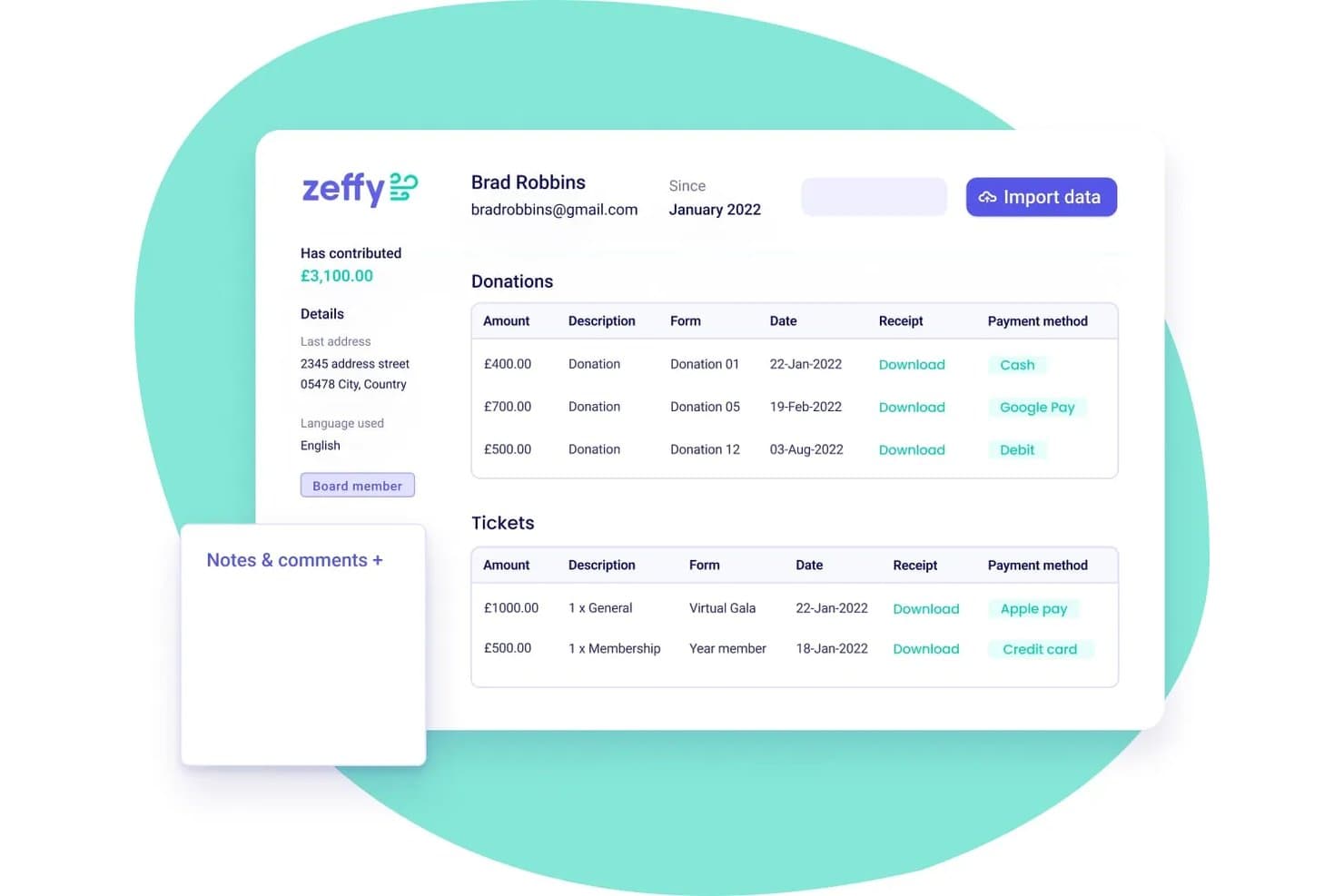
Zeffy houdt donorgeschiedenis, donaties en tickets bij in één profiel. Zeffy is een CRM- en fondsenwervingsplatform voor non-profitorganisaties dat donorbeheer, donatieformulieren, ticketverkoop, campagnes waarbij supporters fondsen werven, veilingen, lidmaatschappen en e-mailcommunicatie samenbrengt in één systeem zonder kosten.
Voor wie is Zeffy het meest geschikt?
Zeffy is zeer geschikt voor kleine tot middelgrote non-profitorganisaties en ministeries die fondsenwervingscampagnes willen uitvoeren, donorregistraties willen beheren en donaties willen verwerken zonder platform- of transactiekosten te betalen.
Waarom ik voor Zeffy heb gekozen
Ik heb Zeffy gekozen als een van de beste opties, omdat geen enkel ander platform op mijn lijst je ministerie in staat stelt om donatiecampagnes uit te voeren, evenementtickets te verkopen, fondsenwerving door supporters te beheren en donorregistraties bij te houden zonder ook maar één platform- of verwerkingsvergoeding te betalen. Ik vind het vooral prettig dat campagnes waarbij supporters fondsen werven individuele en teamfondsenwervingspagina's samenbrengen rond één gezamenlijk doel, met een actuele ranglijst waar je gemeente zich achter kan scharen. Donorregistraties bevatten automatisch de geefgeschiedenis, toezeggingen, lidmaatschappen en evenementregistraties, zodat je team op één plek het volledige overzicht heeft.
Belangrijkste functies van Zeffy
- Geünificeerde supportersregistraties: Elk contactprofiel brengt donaties, evenementtickets, lidmaatschappen, winkelbestellingen en activiteiten van supporters op één plek samen.
- Opgeslagen contactfilters: Segmenteer donoren op basis van geefgeschiedenis, campagne of aangepaste eigenschappen en sla filters op als lijsten die automatisch worden bijgewerkt zodra contacten aan de voorwaarden voldoen.
- Synchronisatie met QuickBooks Online: Zeffy stuurt elke uitbetaling naar QuickBooks met een uitsplitsing per regel per campagne of fonds, gekoppeld aan je inkomstenrekeningen.
- Mobiele app voor contactloos betalen: Accepteer kaartbetalingen, Apple Pay en Google Pay rechtstreeks op een smartphone tijdens evenementen, met ingebouwde check-in van deelnemers via QR-code.
Zeffy-integraties
Zeffy maakt verbinding met meer dan 1.000 tools via rechtstreekse integraties, Zapier en viaSocket, waaronder QuickBooks, WordPress, ChatGPT, Mailchimp, Slack, Google Sheets en Salesforce. De openbare API ondersteunt aangepaste integraties met toegang tot betalingen, contacten en campagnes; Zapier wordt ook ondersteund.
Pros and Cons
Pros:
- Teams van supporters werken samen aan gezamenlijke doelen
- Donorregistraties koppelen giften, evenementen en lidmaatschappen
- De configuratie van campagnes en evenementen krijgt lof van beoordelaars
Cons:
- Optionele bijdragen bij het afrekenen brengen sommige donoren in verwarring
- Aanmeldingen van vrijwilligers vereisen een omweg via een evenementformulier
Learn more about Zeffy: Het beste voor scholen en kleine teams
- Gratis proefperiode van 30 dagen
- Vanaf $45/maand (jaarlijks gefactureerd)
Visit WebsiteCustomer Rating:4.7/5
Little Green Light helpt bij het bijhouden van donoren en het beheren van fondsenwervingsinspanningen. Little Green Light is software voor donorbeheer, ontworpen voor non-profitorganisaties, met de nadruk op het beheren van donorinformatie en het bijhouden van interacties. Het dient organisaties van verschillende omvang en biedt tools om betrokkenheid te analyseren en fondsenwervingsinspanningen te stroomlijnen.
Waarom ik voor Little Green Light heb gekozen: Little Green Light blinkt uit in het efficiënt beheren van donorgegevens en biedt non-profitorganisaties de tools om interacties bij te houden en betrokkenheid te analyseren. De intuïtieve interface en aanpasbare tools van het platform zijn geschikt voor een breed scala aan non-profitsectoren. Gebruikers profiteren van de transparante prijzen en betaalbare abonnementsplannen. De beschikbaarheid van gratis webinars en ondersteuning vanuit de community vergroot de aantrekkingskracht voor non-profitorganisaties verder.
Opvallende functies & integraties:
Functies omvatten tools voor het bijhouden van donorinteracties en het analyseren van betrokkenheid, waarmee je team inzicht krijgt in het gedrag van donoren. De intuïtieve interface van het platform maakt het eenvoudig om donorgegevens te beheren en fondsenwerving te stroomlijnen. Het biedt ook aanpasbare tools die kunnen worden afgestemd op de specifieke behoeften van je organisatie.
Integraties omvatten Mailchimp, QuickBooks, Zapier, PayPal, Stripe, Google Sheets, Constant Contact, Eventbrite, WordPress en Salesforce.
Pros and Cons
Pros:
- Intuïtieve interface
- Aanpasbare tools
- Transparante prijzen
- Ondersteunt verschillende non-profitsectoren
- Gratis webinars beschikbaar
Cons:
- Beperkte geavanceerde functies
- Basismogelijkheden voor rapportage
- Complexe initiële installatie
- Incidentele problemen met gegevenssynchronisatie
- Vereist internettoegang
Learn more about Little Green Light: 3Beste keuze voor aanpasbare non-profitmodules
Odoo
- Gratis demo beschikbaar
- $9.10/month
Visit WebsiteCustomer Rating:4.2/5
Odoo biedt modulaire tools voor CRM, boekhouding en projectbeheer. De non-profitmodules van Odoo maken deel uit van een uitgebreide suite die is ontworpen om aan verschillende behoeften van non-profitorganisaties te voldoen, waaronder CRM, boekhouding en projectmanagement. Het is geschikt voor organisaties die op zoek zijn naar een aanpasbare en schaalbare oplossing om hun activiteiten efficiënt te beheren.
Waarom ik voor Odoo (non-profitmodules) heb gekozen: De kracht van Odoo ligt in de modulaire flexibiliteit, waardoor non-profitorganisaties het platform kunnen afstemmen op hun specifieke behoeften. Je kunt modules zoals CRM, boekhouding en projectmanagement toevoegen of verwijderen naarmate je organisatie groeit. De ingebouwde tools voor donorbeheer en fondsenwerving zijn veelzijdig en ondersteunen uiteenlopende activiteiten van non-profitorganisaties. Dankzij het open-sourcekarakter kun je functies uitgebreid aanpassen.
Opvallende functies & integraties:
Functies omvatten uitgebreide projectmanagementtools waarmee je team taken en deadlines kan organiseren. Het platform biedt ook boekhoudmodules om financiële activiteiten naadloos te beheren. Daarnaast kun je tools voor donorbeheer gebruiken om supporters effectief te volgen en bij hen betrokken te blijven.
Integraties omvatten PayPal, Stripe, QuickBooks, Google Drive, Microsoft Office 365, Slack, Mailchimp, Salesforce, WooCommerce en Zapier.
Pros and Cons
Pros:
- Modulaire flexibiliteit
- Uitgebreide aanpassingsmogelijkheden
- Schaalbaar voor groeiende organisaties
- Toegankelijke open-sourceoplossing
- Veelzijdig donorbeheer
Cons:
- Vereist technische expertise
- Leercurve voor nieuwe gebruikers
- Complexe initiële configuratie
- Af en toe compatibiliteitsproblemen tussen modules
- Vereist internettoegang
Learn more about Odoo: Beste voor peer-to-peer-fondsenwerving
- 30 dagen gratis uitproberen + gratis abonnement beschikbaar
- Vanaf $29/maand (jaarlijks gefactureerd)
Visit WebsiteCustomer Rating:4.7/5
Givebutter biedt functies voor fondsenwerving, donorbeheer, evenementen en betalingen. Givebutter is een non-profit-CRM met een gebruiksvriendelijk fondsenwervingsplatform voor organisaties die hun donorbeheer en betrokkenheid willen verbeteren. Het bedient non-profitorganisaties van alle groottes door tools te bieden voor marketing, evenementenbeheer en betalingsverwerking.
Waarom ik voor Givebutter heb gekozen: Givebutter blinkt uit met zijn moderne fondsenwervingstools, waaronder aanpasbare donatieformulieren en mogelijkheden voor evenementenbeheer. Het ondersteunt verschillende betaalmethoden, zoals Venmo en doneren via sms, die aansluiten bij uiteenlopende voorkeuren van donoren. De geavanceerde automatisering en donorinzichten van het platform stellen je team in staat om betrokkenheidsstrategieën effectief te personaliseren. Het ingebouwde CRM helpt donoractiviteiten bij te houden, waardoor Givebutter een uitgebreide oplossing is voor fondsenwervingsbehoeften.
Opvallende functies & integraties:
Functies omvatten geavanceerde automatisering voor het beheren van donorinteracties, aanpasbare donatieformulieren die fondsenwervingsinspanningen versterken en tools voor evenementenbeheer om succesvolle evenementen te organiseren en uit te voeren. Het platform ondersteunt meerdere betaalmethoden, waaronder Venmo en doneren via sms, om aan de voorkeuren van je donoren tegemoet te komen. Daarnaast biedt het donorinzichten waarmee je je supporters beter kunt begrijpen en bij hen betrokken kunt blijven.
Integraties omvatten Salesforce, Mailchimp, Zapier, QuickBooks, Google Sheets, PayPal, Stripe, Slack, Eventbrite en HubSpot.
Pros and Cons
Pros:
- Donatieformulieren met hoge conversie
- Ondersteunt donaties via Venmo
- Aanpasbare betrokkenheidsstrategieën
- Ingebouwd CRM voor het bijhouden van donoren
- Mobiele toegang tot functies
Cons:
- Beperkte geavanceerde analyses
- Incidentele integratieproblemen
- Leercurve voor nieuwe gebruikers
- Internettoegang vereist
- Sommige functies moeten verder worden verfijnd
Learn more about Givebutter: Beste voor kerken en geloofsgemeenschappen
- Gratis proefperiode van 15 dagen
- Vanaf $39.50/maand (jaarlijks gefactureerd)

Aplos Donor Management helpt kerken bij het bijhouden van fondsen en het betrekken van donateurs. Aplos Donor Management is cloudgebaseerde software voor non-profitorganisaties en kerken, met de nadruk op fondsenadministratie en donorbetrokkenheid. Het biedt tools voor het bijhouden van fondsen, het beheren van transacties en het genereren van aanpasbare rapporten.
Waarom ik voor Aplos Donor Management heb gekozen: Aplos valt op door de focus op fondsenadministratie en biedt non-profitorganisaties transparante tools voor financieel beheer. De aanpasbare rapportage en geautomatiseerde verwerking van donaties verbeteren de efficiëntie van je team. Met functies zoals gepersonaliseerde communicatie met donateurs en realtime inzicht in fondsenwerving vergroot Aplos de betrokkenheid van donateurs. De uitgebreide ondersteuning, waaronder webinars en een ondersteuningscentrum, zorgt ervoor dat je het maximale uit de software kunt halen.
Belangrijkste functies & integraties:
Functies omvatten geautomatiseerde verwerking van donaties om je financiële taken te stroomlijnen. Het platform biedt gepersonaliseerde communicatie met donateurs om de betrokkenheid te verbeteren. Dankzij realtime inzicht in fondsenwerving kan je team de voortgang bewaken en weloverwogen beslissingen nemen.
Integraties omvatten Keela, QuickBooks, PayPal, Stripe, Mailchimp, Constant Contact, Eventbrite, Salesforce, Google Analytics en Xero.
Pros and Cons
Pros:
- Sterke mogelijkheden voor fondsenadministratie
- Geautomatiseerde verwerking van donaties
- Realtime inzicht in fondsenwerving
- Gepersonaliseerde communicatie met donateurs
- Uitgebreide ondersteuningsbronnen
Cons:
- Complexe initiële installatie
- Beperkte geavanceerde functies
- Vereist internettoegang
- Enige leercurve
- Af en toe problemen met integraties
Learn more about Aplos Donor Management: Beste voor het bijhouden van donateurs en evenementen
- Gratis demo beschikbaar
- Vanaf $99/maand (jaarlijks gefactureerd)

Neon CRM helpt bij het bijhouden van supporters, donaties en evenementactiviteiten. Neon CRM is een cloudgebaseerde tool die organisaties helpt om fondsenwerving, communicatie en donateursgegevens op één plek te beheren. De tool is ontwikkeld voor teams die hulp nodig hebben bij het bijhouden van supporters, donaties en evenementen.
Waarom ik voor Neon CRM heb gekozen: Neon CRM helpt je team om donateurs- en evenementgegevens in één systeem te beheren. Je kunt online en offline giften bijhouden, aangepaste rapporten maken en e-mailcampagnes uitvoeren die aan je contactgegevens zijn gekoppeld. De tool bevat ook functies voor het beheren van evenementen met tickets, peer-to-peer-fondsenwerving en vrijwilligersactiviteiten. Deze functies werken samen om je te helpen elk onderdeel van de betrokkenheid van supporters bij te houden. Als je werk veel evenementenplanning en opvolging van donateurs omvat, houdt deze opzet alles georganiseerd.
Belangrijkste functies & integraties:
Functies omvatten een ingebouwde tool voor ledenbeheer waarmee je verlengingen en voordelen kunt afhandelen zonder het platform te verlaten. Je kunt online formulieren voor donaties, evenementen en enquêtes maken met een editor waarin je elementen kunt slepen en neerzetten. Het systeem registreert ook automatisch elke interactie met supporters, zodat je team altijd over de meest recente geschiedenis beschikt.
Integraties omvatten QuickBooks, Constant Contact, Mailchimp, Eventbrite, DonorSearch, Double the Donation, QuickBooks Online, Zapier, TrueGivers en Gmail.
Pros and Cons
Pros:
- Houdt zowel online als offline giften bij
- Ingebouwde tools voor vrijwilligersbeheer
- Peer-to-peer-campagnes zijn eenvoudig op te zetten
- Aangepaste rapporten worden in realtime bijgewerkt
- Beheert evenementen met en zonder tickets
Cons:
- Het kan tijd kosten om de workflows te leren
- Beperkte opties voor dashboardweergaven
- Sommige tools zijn moeilijk te vinden in menu's
- Het instellen duurt langer zonder ondersteuning
- Heeft betere mogelijkheden voor lay-outaanpassing nodig
Learn more about Neon CRM: Beste voor aanpassing van open source
- Gratis abonnement beschikbaar
- Vanaf $15/maand

CiviCRM helpt ngo's bij het beheren van donateurs en het automatiseren van administratieve taken. CiviCRM is een open-source CRM-systeem dat is ontworpen voor non-profitorganisaties, ngo's en belangenorganisaties. Het helpt bij het beheren van donateursinformatie en het automatiseren van administratieve taken voor een breed scala aan gebruikers.
Waarom ik voor CiviCRM koos: CiviCRM onderscheidt zich door zijn vermogen om efficiënt grote hoeveelheden donateursgegevens te beheren. Het integreert met platforms zoals WordPress en Drupal, waardoor uw team communicatie-inspanningen kan centraliseren. Dankzij het open-sourcekarakter kunt u het aanpassen aan uw specifieke behoeften. De flexibiliteit in hostingopties vergroot de aanpasbaarheid voor verschillende organisaties verder.
Opvallende functies & integraties:
Functies omvatten geautomatiseerde administratieve taken, gecentraliseerd communicatiebeheer en uitgebreide documentatie ter ondersteuning van gebruikers. Het biedt ook aanpasbare opties dankzij het open-sourcekarakter, waardoor het kan worden afgestemd op uw specifieke behoeften. Daarnaast biedt CiviCRM een partnernetwerk om u te helpen het maximale uit het systeem te halen.
Integraties omvatten WordPress, Drupal, Joomla, Backdrop, Mailchimp, QuickBooks, Constant Contact, Eventbrite, PayPal en Stripe.
Pros and Cons
Pros:
- Flexibiliteit van open source
- Grote gebruikerscommunity
- Uitgebreide documentatie
- Aanpasbare functies
- Integreert met populaire platforms
Cons:
- Technische expertise vereist
- Beperkte klantenondersteuning
- Complex installatieproces
- Steilere leercurve
- Regelmatige updates nodig
Learn more about CiviCRM: Beste voor alles-in-één-donateursbeheer
- Gratis demo beschikbaar
- Prijzen op aanvraag

CharityEngine biedt hulpmiddelen voor donorbeheer, evenementen en belangenbehartiging voor organisaties van elke omvang. CharityEngine is een alles-in-één-CRM voor non-profitorganisaties, ontworpen om organisaties van verschillende omvang te bedienen, waaronder onderwijsinstellingen, zorgorganisaties en groepen voor sociale rechtvaardigheid. Het biedt hulpmiddelen voor donorbeheer, belangenbehartiging, casemanagement, e-mailmarketing en evenementenbeheer, allemaal gericht op het verbeteren van fondsenwerving en operationele efficiëntie.
Waarom ik voor CharityEngine heb gekozen: CharityEngine blinkt uit in het bieden van een 360-gradenoverzicht van donorinteracties, wat cruciaal is voor strategische fondsenwerving. De geavanceerde marketingautomatisering en aangepaste donatieformulieren helpen campagnes af te stemmen op je doelgroep. De interne betalingsverwerking zorgt voor veilige transacties, terwijl de uitgebreide rapportagemogelijkheden inzichten bieden om je strategieën richting te geven. Het gecentraliseerde systeem van het platform vermindert de behoefte aan meerdere integraties, waardoor je tijd en middelen bespaart.
Opvallende functies & integraties:
Functies omvatten geavanceerde marketingautomatisering die je team helpt om outreachinspanningen te personaliseren. Het platform biedt aangepaste donatieformulieren om fondsenwervingscampagnes te verbeteren. Daarnaast zorgt de interne betalingsverwerking voor veilige en efficiënte transacties.
Integraties omvatten Salesforce, QuickBooks, Mailchimp, Constant Contact, PayPal, Stripe, Eventbrite, Google Analytics, Microsoft Dynamics en WordPress.
Pros and Cons
Pros:
- Uitgebreid donorbeheer
- Gecentraliseerd platform
- Geavanceerde marketingautomatisering
- Aanpasbare donatieformulieren
- Interne betalingsverwerking
Cons:
- Geen prijsinformatie bekendgemaakt
- Internettoegang vereist
- Leercurve voor complexe functies
- Beperkte aanpassingsmogelijkheden
- Af en toe problemen met integraties
Learn more about Charity Engine:

Springly helpt non-profitorganisaties bij het beheren van leden, evenementen en fondsenwerving. Springly is alles-in-één-software voor non-profitorganisaties, ontworpen om organisaties van elke omvang te helpen met efficiënt ledenbeheer, fondsenwerving en evenementencoördinatie. Het is gericht op non-profitorganisaties die hun activiteiten willen stroomlijnen en de betrokkenheid van leden willen vergroten met uitgebreide tools voor communicatie en gegevensorganisatie.
Waarom ik voor Springly heb gekozen: Springly blinkt uit in ledenbeheer met functies die het bijhouden van donateurs en vrijwilligers vereenvoudigen. De tools voor het organiseren van contacten en beheren van evenementen zijn afgestemd op non-profitorganisaties die de betrokkenheid van hun gemeenschappen willen vergroten. Dankzij de eenvoudige gegevensimport en automatische updates kan je team zonder problemen nauwkeurige gegevens bijhouden. Daarnaast helpen de communicatietools van Springly de betrokkenheid van leden te vergroten en fondsenwervingsinspanningen te ondersteunen.
Opvallende functies & integraties:
Functies omvatten het bijhouden van donateurs en vrijwilligers, waarmee je team georganiseerde contactlijsten kan bijhouden. Het platform biedt tools voor betalingsverwerking en communicatie om de betrokkenheid bij je gemeenschap te vergroten. Het omvat ook functies voor fondsenwerving en evenementbeheer ter ondersteuning van de activiteiten van je organisatie.
Integraties omvatten QuickBooks, PayPal, Stripe, Mailchimp, Google Analytics, Eventbrite, Zapier, Salesforce, Xero en Slack.
Pros and Cons
Pros:
- Eenvoudige gegevensimport
- Uitgebreid evenementbeheer
- Automatische updates
- Aanpasbare contactgegevens
- Hoge ledenbetrokkenheid
Cons:
- Beperkte geavanceerde analyses
- Internetverbinding vereist
- Sommige functies moeten verder worden verfijnd
- Leercurve voor nieuwe gebruikers
- Incidentele integratieproblemen
Learn more about Springly: Beste voor non-profitorganisaties in de kunst- en cultuursector
- Gratis demo beschikbaar
- Prijs op aanvraag

Tessitura is ontwikkeld voor ticketing en CRM bij kunst- en cultuurorganisaties. Tessitura is CRM- en ticketingsoftware voor kunst- en cultuurorganisaties, met de nadruk op ticketing, fondsenwerving en klantrelatiebeheer. Het bedient theaters, musea en andere culturele instellingen door tools te bieden die de betrokkenheid van bezoekers vergroten en activiteiten stroomlijnen.
Waarom ik Tessitura heb gekozen: Tessitura is speciaal ontworpen voor kunst- en cultuurorganisaties en biedt functies die ticketing en fondsenwerving in één platform integreren. De mogelijkheid om lidmaatschappen en abonnementen te beheren is essentieel voor organisaties die de loyaliteit van bezoekers willen vergroten. De uitgebreide rapportagetools van de software bieden inzicht in het gedrag van het publiek, zodat je je strategieën hierop kunt afstemmen. Het uniforme platform van Tessitura vermindert de behoefte aan meerdere systemen, waardoor je team tijd en moeite bespaart.
Opvallende functies & integraties:
Functies omvatten geïntegreerde ticketing- en fondsenwervingstools waarmee je team relaties met bezoekers kan beheren. De software biedt uitgebreide rapportagetools om inzicht te geven in het gedrag van het publiek. Ook zijn er functies voor het beheer van lidmaatschappen en abonnementen om de loyaliteit en betrokkenheid van bezoekers te vergroten.
Integraties omvatten Salesforce, Mailchimp, Google Analytics, QuickBooks, Eventbrite, PayPal, Stripe, Slack, Microsoft Dynamics en WordPress.
Pros and Cons
Pros:
- Geïntegreerde ticketing en fondsenwerving
- Uitgebreide rapportagetools
- Mogelijkheden voor ledenbeheer
- Mogelijkheden voor ledenbeheer
- Mogelijkheden voor ledenbeheer
Cons:
- Geen prijsinformatie bekendgemaakt
- Geen prijsinformatie bekendgemaakt
- Geen prijsinformatie bekendgemaakt
- Geen prijsinformatie bekendgemaakt
- Geen prijsinformatie bekendgemaakt
Learn more about Tessitura:
Andere CRM-software voor non-profitorganisaties
Hier zijn enkele aanvullende opties voor CRM-software voor non-profitorganisaties die mijn selectie niet hebben gehaald, maar die nog steeds het bekijken waard zijn:
- 11VirtuousBeste voor uitgebreide hulpmiddelen voor donorrelaties
- 12StratusLIVEBeste voor integratie met Microsoft 365
- 13KeelaIdeaal voor kleine non-profitorganisaties met een beperkt budget
- 14DonorPerfectIdeaal voor aanpasbare rapporten
Hoe ik CRM-software voor non-profitorganisaties beoordeel
Ik splits mijn beoordeling op in basisvereisten—zoals het bijhouden van ledenhuishoudens en donatieoverzichten—en onderscheidende factoren die platforms die geschikt zijn voor kerken onderscheiden van algemene hulpmiddelen voor non-profitorganisaties.
Kernfunctionaliteit (basisvereisten voor deze lijst)
Bij het selecteren van hulpmiddelen voor mijn lijst beoordeel ik elk hulpmiddel op een schaal van 0 (biedt de functionaliteit niet aan) tot 5 (blink hierin uit) voor elke hieronder vermelde kernfunctionaliteit. Vervolgens bereken ik de totaalscore van het hulpmiddel als percentage. Elk hulpmiddel moet een minimale totaalscore van 55% behalen om in aanmerking te komen voor opname.
- Leden- en huishoudbeheer: Ik zoek naar platforms die personen aan gezinseenheden koppelen, aanwezigheid bij diensten bijhouden en spirituele mijlpalen zoals doop of lidmaatschapscursussen registreren.
- Donatie- en bijdragebeheer: Elk hulpmiddel moet tienden, toezeggingen en giften aan aangewezen fondsen registreren en tegelijkertijd jaaroverzichten van giften genereren die leden kunnen gebruiken bij hun belastingaangifte.
- Groeps- en bedieningorganisatie: Ik controleer of je deelnemerslijsten voor kleine groepen kunt aanmaken, vrijwilligersrollen binnen bedieningsteams kunt toewijzen en groepsleiders toegang kunt geven om hun eigen leden te beheren.
- Communicatie via meerdere kanalen: Het is belangrijk om gemeenteleden via e-mail, sms en appmeldingen te bereiken. Daarom beoordeel ik opties voor doelgroepen, zoals filteren op groep, aanwezigheid of geefgeschiedenis.
- Evenementregistratie en inchecken: Van inschrijfformulieren voor VBS tot het inchecken van kinderen op zondagochtend met geprinte naamlabels: ik kijk hoe elk platform registratieprocessen en aankomsten op locatie afhandelt.
- Integratie voor online geven: Ik beoordeel of geefhulpmiddelen rechtstreeks met ledenprofielen worden verbonden, terugkerende giften en toewijzingen aan meerdere fondsen ondersteunen en mobielvriendelijke opties zoals geven via sms aanbieden.
Nadat ik een lijst heb samengesteld met hulpmiddelen die aan dit criterium voldoen, kijk ik naar wat elk platform onderscheidt.
Onderscheidende factoren (wat leveranciers van elkaar onderscheidt)
Zo vergelijk ik verschillende leveranciers met elkaar:
Onderscheidende functies
Een mobiele kerkapp met eigen huisstijl geeft leden één centrale plek voor preken, geven en RSVP's voor evenementen. Ik vergelijk hoe platforms omgaan met deze ervaring voor leden. Het inchecken van kinderen is een ander gebied dat ik nauwkeurig beoordeel—een veilige koppeling van ouder- en kindlabels met allergiemeldingen en geprinte labels maakt op zondagochtend een groot verschil. Het volgen van discipelschapstrajecten is ook belangrijk, omdat predikanten hiermee de reis van een gemeentelid door doop, lidmaatschapscursussen en deelname aan kleine groepen kunnen volgen.
Meer dan functies
De prijsstructuur is belangrijk voor kerken die op tienden draaien. Ik kijk of platforms niveaus op basis van aanwezigheid of gratis abonnementen aanbieden voor nieuwe kerkstichtingen met krappe budgetten. Integratie met boekhoudhulpmiddelen zoals QuickBooks of Aplos is een andere factor die ik in overweging neem, omdat het afstemmen van aangewezen fondsen tussen je CRM en je boekhouding voor de meeste financiële teams een wekelijkse taak is. Ik beoordeel ook de ondersteuning bij de implementatie—het migreren van jaren aan geefgeschiedenis en ledengegevens uit spreadsheets of een verouderd systeem kan bepalend zijn voor het succes van je eerste maand op een nieuw platform.
Hoe kies je CRM-software voor non-profitorganisaties?
Het is gemakkelijk om te verdwalen in lange lijsten met functies en ingewikkelde prijsstructuren. Om je te helpen gefocust te blijven tijdens je unieke selectieproces voor software, vind je hier een checklist met factoren om rekening mee te houden:
| Factor | Waar moet je op letten? |
|---|---|
| FactorSchaalbaarheid | Waar moet je op letten?Groeit de software mee met je organisatie? Houd rekening met toekomstige groei en zorg ervoor dat het hulpmiddel grotere hoeveelheden gegevens en meer gebruikers probleemloos aankan. |
| FactorIntegraties | Waar moet je op letten?Kan de software verbinding maken met je bestaande hulpmiddelen? Controleer de compatibiliteit met huidige systemen, zoals e-mail, betalingsverwerkers en platforms voor evenementenbeheer. |
| FactorAanpasbaarheid | Waar moet je op letten?Kun je de software afstemmen op jouw behoeften? Zoek naar mogelijkheden om werkstromen en interfaces aan te passen aan je processen. |
| FactorGebruiksgemak | Waar moet je op letten?Is de software intuïtief voor je team? Vermijd lange leercurves door een hulpmiddel te kiezen met een gebruiksvriendelijke interface en duidelijke navigatie. |
| FactorImplementatie en ingebruikname | Waar moet je op letten?Hoe snel kun je aan de slag? Houd rekening met de tijd en middelen die nodig zijn voor installatie, training en gegevensmigratie. |
| FactorKosten | Waar moet je op letten?Past de software binnen je budget? Beoordeel de prijsplannen, inclusief verborgen kosten of extra kosten voor aanvullende functies en ondersteuning. |
| FactorBeveiligingsmaatregelen | Waar moet je op letten?Hoe beschermt de software je gegevens? Zorg ervoor dat de software sterke versleuteling, regelmatige updates en naleving van normen voor gegevensbescherming biedt. |
| FactorBeschikbaarheid van ondersteuning | Waar moet je op letten?Kun je hulp krijgen wanneer dat nodig is? Zoek naar snelle klantenondersteuning via verschillende kanalen, zoals chat, e-mail en telefoon. |
Wat is CRM-software voor non-profitorganisaties?
CRM-software voor non-profitorganisaties is een hulpmiddel dat is ontworpen om organisaties te helpen bij het beheren van donorrelaties, fondsenwervingsinspanningen en communicatie. Professionals zoals ontwikkelingsmedewerkers, fondsenwervers en beheerders gebruiken deze hulpmiddelen doorgaans om de betrokkenheid te vergroten en de retentie van donoren te verbeteren. Functies zoals donorregistratie, evenementenbeheer en communicatiemiddelen helpen bij het organiseren van gegevens, het plannen van campagnes en het onderhouden van relaties. Over het algemeen zorgen deze hulpmiddelen voor efficiëntie en structuur ter ondersteuning van de missie van non-profitorganisaties.
Functies van CRM-software voor non-profitorganisaties
Let bij het selecteren van CRM-software voor non-profitorganisaties op de volgende belangrijke functies:
- Donorregistratie: Helpt je gedetailleerde gegevens bij te houden over interacties met donoren en bijdragen, wat helpt bij het opbouwen van sterke relaties.
- Evenementenbeheer: Ondersteunt het plannen en uitvoeren van evenementen, zodat je logistiek kunt beheren en aanwezigheid efficiënt kunt bijhouden.
- Communicatiemiddelen: Vergemakkelijken consistente betrokkenheid van donoren via e-mails, nieuwsbrieven en gepersonaliseerde berichten.
- Automatisering van fondsenwerving: Stroomlijnt het donatieproces en automatiseert taken zoals ontvangstbewijzen en bedankberichten, waardoor tijd en moeite worden bespaard.
- Rapportage en analyses: Bieden inzicht in je fondsenwervingsprestaties en donorgedrag, zodat je weloverwogen beslissingen kunt nemen.
- Aanpasbare dashboards: Stellen je in staat de interface af te stemmen op de specifieke behoeften en werkprocessen van je organisatie.
- Vrijwilligersbeheer: Helpt bij het organiseren, inplannen en communiceren met vrijwilligers om hun ervaring te verbeteren.
- Betalingsverwerking: Zorgt voor een veilige en efficiënte verwerking van donaties via verschillende betaalmethoden.
- Ledenbeheer: Helpt bij het bijhouden van de status, verlengingen en voordelen van leden, ter ondersteuning van betrokkenheid en behoud.
- Gegevensbeveiliging: Beschermt gevoelige donor- en organisatiegegevens door middel van versleuteling en naleving van normen voor gegevensbescherming.
Voordelen van CRM-software voor non-profitorganisaties
Het implementeren van CRM-software voor non-profitorganisaties biedt verschillende voordelen voor je team en je organisatie. Hier zijn enkele voordelen waar je naar kunt uitkijken:
- Verbeterde donorrelaties: Door interacties en bijdragen bij te houden, kun je sterkere banden met je supporters opbouwen.
- Efficiënte fondsenwervingsinspanningen: Automatiseringsfuncties besparen tijd bij taken zoals het verzenden van ontvangstbewijzen en het beheren van campagnes, zodat je je op strategie kunt richten.
- Verbeterde evenementenplanning: Hulpmiddelen voor evenementenbeheer helpen bij het organiseren en uitvoeren van succesvolle evenementen, waardoor deelname en betrokkenheid toenemen.
- Betere besluitvorming: Rapportage en analyses bieden inzicht in donorgedrag en fondsenwervingsprestaties en helpen je strategieën te bepalen.
- Verbeterde beveiliging: Functies voor gegevensbeveiliging beschermen gevoelige informatie en zorgen voor naleving van beschermingsnormen.
- Gestroomlijnde communicatie: Communicatiemiddelen houden donoren betrokken met gepersonaliseerde berichten en updates, wat loyaliteit bevordert.
Kosten en prijzen van CRM-software voor non-profitorganisaties
Voor het selecteren van CRM-software voor non-profitorganisaties is inzicht nodig in de verschillende beschikbare prijsmodellen en abonnementen. De kosten variëren op basis van functies, teamgrootte, aanvullingen en meer. De onderstaande tabel geeft een overzicht van veelvoorkomende abonnementen, hun gemiddelde prijzen en de gebruikelijke functies die zijn opgenomen in CRM-softwareoplossingen voor non-profitorganisaties:
Vergelijkingstabel van abonnementen voor CRM-software voor non-profitorganisaties
| Type abonnement | Gemiddelde prijs | Veelvoorkomende functies |
|---|---|---|
| Type abonnementGratis abonnement | Gemiddelde prijs$0 | Veelvoorkomende functiesBasisdonorregistratie, beperkte communicatiemiddelen en basisrapportage. |
| Type abonnementPersoonlijk abonnement | Gemiddelde prijs$10-$30 per gebruiker per maand | Veelvoorkomende functiesGeavanceerde donorregistratie, evenementenbeheer en standaardcommunicatiemiddelen. |
| Type abonnementZakelijk abonnement | Gemiddelde prijs$50-$100 per gebruiker per maand | Veelvoorkomende functiesUitgebreide rapportage, automatisering van fondsenwerving en aanpasbare dashboards. |
| Type abonnementOndernemingsabonnement | Gemiddelde prijs$150-$300 per gebruiker per maand | Veelvoorkomende functiesVolledig pakket aan functies, speciale ondersteuning en geavanceerde beveiligingsmaatregelen. |
Veelgestelde vragen over CRM-software voor non-profitorganisaties
Hier vind je antwoorden op veelgestelde vragen over CRM-software voor non-profitorganisaties:
Hoe weet ik of onze non-profitorganisatie klaar is om van CRM-systeem te wisselen?
Als je huidige donordatabase onhandig aanvoelt, medewerkers afhankelijk zijn van spreadsheets of rapporten moeilijk te genereren zijn, is het misschien tijd om nieuwe CRM-software te evalueren. Breng je behoeften in kaart en bepaal of optimaliseren of overstappen de juiste keuze is voor je organisatie.
Hoe ziet een selectie- of migratieproces voor een CRM eruit?
Het proces omvat het stellen van doelen, onderzoek naar software, het opschonen van gegevens, demonstraties door leveranciers en planning van de implementatie. Je krijgt in elke fase deskundige ondersteuning, zodat de overgang soepel verloopt zonder dat technologie overweldigend wordt.
Kunnen jullie ons helpen onze gegevens op te schonen en te organiseren?
Absoluut! We helpen non-profitorganisaties bij het controleren, opschonen en structureren van hun gegevens om segmentatie, rapportage en fondsenwervingsresultaten te verbeteren. Een goede gegevensorganisatie kan de effectiviteit van je CRM aanzienlijk vergroten.
Bieden jullie training aan voor teams van non-profitorganisaties?
Ja! We bieden aangepaste CRM-training voor medewerkers, bestuursleden en vrijwilligers, zodat je team vol vertrouwen je databank kan beheren. Er zijn ook cursussen op aanvraag beschikbaar die zijn ontworpen voor professionals van non-profitorganisaties.
Waar bieden jullie diensten aan? Werken jullie met non-profitorganisaties buiten Nashville?
We zijn gevestigd in Middle Tennessee, maar werken in het hele land met non-profitorganisaties—zowel virtueel als op locatie. Of je nu in Nashville bent of ergens anders in het land, we staan klaar om je te helpen met je CRM-behoeften.
Met welke CRM-software werken jullie?
We zijn gespecialiseerd in platforms zoals Little Green Light, EveryAction en Raiser's Edge. We ondersteunen echter ook verschillende andere CRM-systemen, zodat je het systeem kunt vinden dat het beste past bij de behoeften en het budget van je team.