

Styreprogramvare for ideelle organisasjoner er en digital plattform som hjelper styret med å organisere møter, dele dokumenter og håndtere styringsoppgaver på ett sted. Hvis du leter etter måter å holde styret tilkoblet, informert og fokusert på oppdraget deres – spesielt når tid og ressurser er begrenset – er det viktig å finne riktig programvare.
Denne listen hjelper deg med å sammenligne ledende alternativer, slik at du kan velge den riktige styreløsningen som passer organisasjonens behov, støtter ledelsen og styrker virksomhetens innvirkning.
Hvorfor du kan stole på våre programvareanbefalinger
6,700+
Reviews
20
Industry experts
16+
Evaluation factors
14
Years
Teamet vårt har testet og anmeldt programvare siden 2012. Vi er selv kirkeledere, så vi vet hvor vanskelig og hvor viktig det er å velge riktig programvare.
I denne guiden har vi vurdert verktøyene gjennom praktisk testing og uavhengig research og gitt dem poeng ut fra våre utvelgelseskriterier.
Anmeldelsene våre bygger på vår egen redaksjonelle vurdering. De er ikke et salgsargument.
Sammenligningstabell: Styreprogramvare for ideelle organisasjoner
Denne sammenligningstabellen oppsummerer prisdetaljene for mine beste utvalgte løsninger innen styreprogramvare for ideelle organisasjoner.
| Tool | Best For | Trial Info | Price | ||
|---|---|---|---|---|---|
| 1 | Best with real-time collaboration tools | Free trial + free demo available | Pricing upon request | Website | |
| 2 | Best for centralized document sharing | 14-day free trial available | From $20.99/user/month (billed annually) | Website | |
| 3 | Best for advanced analytics reporting | Free demo available | Pricing upon request | Website | |
| 4 | Best with AI-driven agenda and minutes creation | Free demo available | Pricing upon request | Website | |
| 5 | Best for secure virtual meetings | Free trial available | Pricing upon request | Website | |
| 6 | Best for automated meeting workflows | 30-day free trial + free demo available | From $165/board/month | Website | |
| 7 | Best for dedicated customer support | Free trial available | Pricing upon request | Website | |
| 8 | Best for global governance needs | Free demo available | Pricing upon request | Website | |
| 9 | Best for intuitive user interface | Free demo available | From $49/month | Website | |
| 10 | Best with unlimited user access | 30-day free trial + free demo available | From $9.99/user/month | Website |


Anmeldelser av den beste styreprogramvaren for ideelle organisasjoner
Nedenfor finner du mine detaljerte sammendrag av styreprogramvare for ideelle organisasjoner som kom med på kortlisten. Anmeldelsene mine gir en detaljert gjennomgang av funksjonene, de beste bruksområdene og prisene for hver plattform, slik at du kan finne den beste løsningen for organisasjonen din.
 Best with real-time collaboration tools
- Free trial + free demo available
- Pricing upon request
Visit WebsiteCustomer Rating:4.7/5
OnBoard helps boards prep, meet, and collaborate in one clean workspace. OnBoard stands out for nonprofits that want to boost real-time collaboration during board meetings and document reviews. The platform is built for organizations that need to keep board members engaged and working together, whether they’re in the same room or remote. OnBoard’s live annotation and discussion tools help teams make decisions quickly and keep everyone on the same page.
Why I Picked OnBoard
What drew me to OnBoard is its focus on real-time collaboration tools that help nonprofit boards work together more efficiently. The platform offers live document annotation, so board members can mark up agendas and reports together during meetings. I appreciate the built-in discussion threads, which let users comment and ask questions directly on documents without switching platforms. These features make OnBoard a strong choice for nonprofits that want to keep board engagement high and decision-making transparent.
OnBoard Key Features
Some other features in OnBoard that nonprofits may find valuable include:
- Board Book Builder: Lets you compile meeting materials into a single, organized digital board book.
- eSignatures: Allows board members to sign documents securely within the platform.
- Granular Permissions: Enables you to control access to sensitive documents and meeting materials for different users.
- Meeting Analytics: Provides insights into board engagement and meeting participation through built-in analytics tools.
OnBoard Integrations
Integrations include Microsoft 365, Docusign, Zoom, Microsoft Teams, and Google Workspace.
Pros and Cons
Pros:
- Board book builder for organized meeting prep
- Meeting analytics to track board engagement
- Granular user permissions for sensitive materials
Cons:
- Pricing is not transparent on the website
- Occasional sync delays with calendar
Learn more about OnBoard: Best for centralized document sharing
- 14-day free trial available
- From $20.99/user/month (billed annually)
Visit WebsiteCustomer Rating:4.8/5
Boardable keeps a small nonprofit board of directors aligned with agendas and tasks. If your nonprofit needs a central place to organize board documents and communications, Boardable is worth a look. This platform is designed for organizations that want to keep agendas, minutes, and files accessible to board members in one secure hub. Boardable helps simplify document sharing and meeting prep, especially for teams managing multiple committee meetings or remote participants.
Why I Picked Boardable
I chose Boardable because it offers a focused solution for nonprofits that need centralized document sharing. The platform lets you store, organize, and distribute board packets, agendas, and meeting minutes in a secure, searchable repository. I appreciate how Boardable’s document center allows board members to access the latest files from any device, reducing confusion over email attachments or outdated versions. Its permission controls also help you manage who can view or edit sensitive information, which is especially important for nonprofit boards handling confidential information.
Boardable Key Features
Some other features in Boardable that nonprofits may find useful include:
- Meeting Scheduler: Lets you coordinate meeting times by polling board members and automatically finding the best fit.
- E-signatures: Allows board members to sign documents securely within the platform, reducing paperwork delays.
- Task Management: Assigns action items to individuals or committees and tracks progress between meetings.
- Voting and Polls: Enables secure, in-platform voting on motions or decisions, with results recorded for future reference.
Boardable Integrations
Integrations include Zoom, Microsoft Teams, Google Drive, Microsoft OneDrive, Google Calendar, Outlook, and more.
Pros and Cons
Pros:
- Schedule meetings with calendar integrations
- In-platform voting and polling features
- Built-in e-signature for board approvals
Cons:
- No built-in fundraising or donor management
- Limited customization for agenda templates
Learn more about Boardable:

Diligent supports complex governance with security, analytics, and audit trails. Nonprofit leaders who want to dig deeper into board performance and governance trends may find Diligent especially useful. This platform stands out for its advanced analytics and reporting tools, which help boards track engagement, compliance, and decision-making patterns. Diligent is a fit for organizations that need to turn board data into actionable insights for better oversight and transparency.
Why I Picked Diligent
For nonprofit boards that want to move beyond basic reporting, Diligent offers advanced analytics that help leaders make data-driven decisions. The platform provides customizable dashboards and in-depth reporting tools, so you can track board engagement, attendance, and voting patterns over time. I picked Diligent because its analytics features allow you to visualize trends and identify areas for improvement in governance and compliance. These capabilities are especially valuable for organizations that need to demonstrate accountability and transparency to stakeholders.
Diligent Key Features
Some other features that make Diligent useful for nonprofit boards include:
- Secure Document Sharing: Lets you upload, organize, and distribute docs and other board materials with granular access controls.
- Meeting Agenda Builder: Allows you to create, edit, and share agendas directly within the platform.
- E-signature Collection: Enables board members to sign documents electronically for faster approvals.
- Mobile App Access: Provides a dedicated mobile app so board members can review materials and participate from anywhere.
Diligent Integrations
Integrations are not publicly available.
Pros and Cons
Pros:
- Offline access for document annotations
- Customizable dashboards for governance reporting
- Advanced analytics for board engagement tracking
Cons:
- Admin setup requires vendor assistance
- Complex document navigation
Learn more about Diligent: Best with AI-driven agenda and minutes creation
- Free demo available
- Pricing upon request
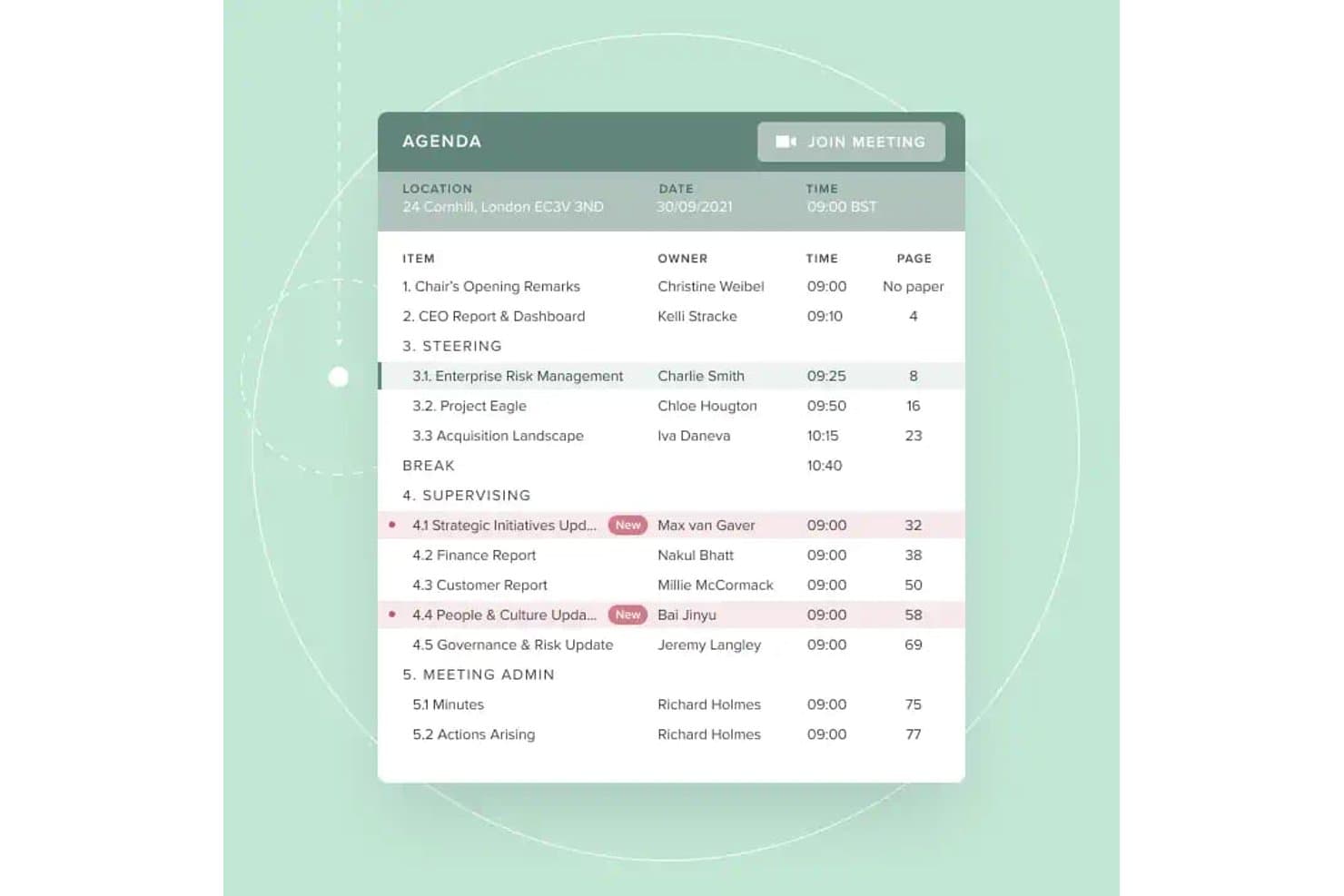
Board Intelligence offers a structured digital agenda view with item owners, timestamps, page references, and a direct 'Join Meeting' button for simplified board meetings. Board Intelligence is a board management platform that covers agenda planning, board pack creation, AI-assisted minutes, secure document distribution, and board performance analytics across the full governance cycle.
Who Is Board Intelligence Best For?
It's a strong fit for governance teams and company secretaries at mid-to-large nonprofits managing multiple boards or committees with complex reporting cycles.
Why I Picked Board Intelligence
Board Intelligence earns its spot on my shortlist because its AI-driven agenda and minutes tools genuinely cut the administrative load on governance teams. I love how the Minute Writer AI turns meeting transcripts into polished draft minutes, while the Agenda Planner links each agenda item directly to the organisation's strategic priorities. In practice, my team can produce a complete, structured board pack without rebuilding it from scratch every meeting cycle.
Board Intelligence Key Features
- Board portal: Securely distributes digital board packs and gives users instant access across devices.
- Report writer AI: Generates clear, board-ready reports from notes or documents right within Microsoft 365.
- Action tracker: Captures board action items and tracks progress between meetings for full accountability.
- Single sign-on: Allows users to log in with existing corporate credentials to simplify secure access.
Board Intelligence Integrations
Board Intelligence integrates natively with Microsoft 365, including Microsoft Word through its Report Writer AI add-in. It can send calendar invites to Outlook and other major calendar platforms.
Pros and Cons
Pros:
- Strong governance workflows for nonprofit boards
- Supports granular permission controls for documents
- Automated agenda and minute drafting with AI
Cons:
- Can be overwhelming for first-time users
- Lacks native mobile app for board members
Learn more about Board Intelligence:

Ideals Board supports global boards with secure access and multilingual tools. If your nonprofit needs to prioritize privacy and confidentiality in board meetings, Ideals Board is designed with secure virtual collaboration in mind. It’s especially useful for organizations handling sensitive discussions or documents, offering advanced security features that go beyond standard video conferencing. With Ideals Board, you can host virtual meetings, share files, and manage board activities while keeping your data protected.
Why I Picked Ideals Board
Security is often a top concern for nonprofit boards, especially when meetings involve confidential topics or sensitive documents. Ideals Board stands out for its focus on secure virtual meetings, offering features like encrypted video conferencing and granular access controls for participants. I picked Ideals Board because it allows you to manage who can join, view, or share materials during meetings, which is essential for organizations with strict privacy requirements. These security-focused tools help nonprofits maintain trust and compliance while collaborating remotely.
Ideals Board Key Features
Some other features that make Ideals Board useful for nonprofit boards include:
- Document Sharing: Lets you upload, organize, and distribute board packets and files securely.
- Meeting Agenda Builder: Allows you to create and share structured agendas for each meeting.
- Voting and Polls: Enables real-time voting and decision-making during virtual sessions.
- Audit Trail: Tracks all user actions and document changes for accountability.
Ideals Board Integrations
Integrations are not publicly available.
Pros and Cons
Pros:
- Automatic quorum tracking for voting
- Audit trail records every user action
- End-to-end encryption for all virtual meetings
Cons:
- Lacks advanced performance analytics
- Limited offline functionality for browsers
Learn more about Ideals Board: Best for automated meeting workflows
- 30-day free trial + free demo available
- From $165/board/month

BoardPro supports board meetings with voting, minutes, and action tracking. BoardPro is designed for nonprofits that want to automate workflows and move toward a paperless board meeting. It’s especially useful for organizations looking to reduce manual admin tasks like agenda creation, minute taking, and action tracking. With BoardPro, you can keep meetings organized and ensure follow-ups don’t fall through the cracks.
Why I Picked BoardPro
BoardPro stands out for nonprofits that want to automate repetitive meeting tasks and keep board operations running smoothly. The platform’s automated agenda builder and minute-taking tools help you prepare for meetings and capture decisions without manual effort. I like that BoardPro also tracks action items and sends reminders, so nothing gets lost between meetings. These workflow automations make it easier for nonprofit boards to stay organized and focused on their mission.
BoardPro Key Features
Some other features that BoardPro offers for nonprofit boards include:
- Document Repository: Stores board documents and meeting materials in a centralized, searchable location.
- Board Pack Builder: Compiles all meeting documents into a single, organized board pack for easy distribution.
- Decision Register: Records and tracks board decisions for future reference and accountability.
- Conflict of Interest Declarations: Allows board members to declare and manage conflicts of interest within the platform.
BoardPro Integrations
Integrations are not publicly available.
Pros and Cons
Pros:
- Conflict of interest declarations are built in
- Decision register tracks board resolutions
- Automates minute-taking documentation
Cons:
- No built-in video conferencing feature
- Limited document formatting options
Learn more about BoardPro.com:

Aprio strengthens governance with meeting controls and compliance tracking. Nonprofit boards that want hands-on support throughout their software journey may find Aprio a strong fit. The platform is designed for organizations that value responsive, personalized customer service alongside secure document management and meeting tools. Aprio helps teams navigate board governance with confidence, especially when technical guidance or onboarding assistance is a priority.
Why I Picked Aprio
For nonprofit leaders who want reliable help at every step, Aprio’s dedicated customer support stands out. The platform offers onboarding assistance and ongoing training, making it easier for teams to adopt new processes and features. I picked Aprio because its support team is available by phone, email, and live chat, so board members can get answers quickly when issues arise. This level of service is especially valuable for organizations with limited IT resources or those new to board management software.
Aprio Key Features
Some other features that make Aprio useful for nonprofit boards include:
- Board Packet Builder: Lets you compile and distribute meeting materials in a single, organized file.
- Voting and Surveys: Allows board members to vote on motions or complete surveys directly within the platform.
- Calendar Sync: Integrates meeting schedules with personal calendars for easier planning.
- Document Version Control: Tracks changes and maintains a history of document updates.
Aprio Integrations
Integrations are not publicly available.
Pros and Cons
Pros:
- Includes board member expense reporting
- Choice of international data residency locations
- Live support available by phone and chat
Cons:
- Lacks native board survey templates
- No public list of native integrations
Learn more about Aprio :

BoardWorks displays a meeting management dashboard with schedules and agendas. Nonprofits with international operations or complex governance needs may find Computershare’s BoardWorks especially relevant. This platform is designed to help organizations manage board activities across multiple countries and regulatory environments. It’s a strong choice for leaders who need to coordinate global compliance, secure document sharing, and multilingual board communication.
Why I Picked BoardWorks
When it comes to managing nonprofit boards with members or operations in multiple countries, Computershare BoardWorks stands out for its global governance capabilities. The platform supports multilingual interfaces and offers tools for handling region-specific compliance requirements, which is essential for organizations navigating different legal frameworks. I picked Computershare because it allows nonprofits to securely share documents and coordinate meetings across borders without sacrificing security or regulatory alignment. These features make it a strong fit for nonprofits that need to maintain oversight and communication on an international scale.
BoardWorks Key Features
Some other features that make Computershare BoardWorks useful for nonprofit boards include:
- Offline Access Mode: Lets board members view documents and meeting materials without an internet connection.
- Voting and Resolution Tools: Allows for secure digital voting and tracking of board resolutions.
- Annotation and Note-Taking: Enables users to add private or shared notes directly on board documents.
- Calendar Integration: Syncs board meetings and events with external calendar tools for easier scheduling.
BoardWorks Integrations
Integrations include Microsoft 365 and Docusign.
Pros and Cons
Pros:
- Biometric and two-factor authentication logins
- Offline access to board materials
- Multilingual support for international board members
Cons:
- Limited nonprofit-specific training resources
- Duplicate agenda entries during updates
Learn more about BoardWorks:

Easy Board launches board workflows quickly with secure meeting access. For nonprofit leaders who want a board portal software that’s easy for everyone to use, Easy Board puts simplicity at the center of its design. The platform is built for organizations that need to onboard board members quickly and keep meetings, documents, and communication accessible without technical hurdles. Its intuitive interface helps teams focus on collaboration and governance instead of navigating complex software.
Why I Picked Easy Board
When I look for board management software that nonprofits can adopt quickly, I pay close attention to how the interface supports users with varying tech skills. Easy Board stands out for its clean dashboard that organizes meetings, documents, and communications in a way that’s easy to navigate. I picked Easy Board because its drag-and-drop agenda builder and centralized document library help board members find what they need without confusion. These features make it a strong choice for organizations that want to minimize training time and keep everyone engaged.
Easy Board Key Features
Some other features that make Easy Board practical for nonprofit boards include:
- RSVP and Attendance Tracking: Lets you manage meeting invitations and monitor who plans to attend.
- E-signatures: Allows board members to sign documents electronically within the platform.
- Discussion Threads: Supports ongoing conversations tied to specific meetings or documents.
- Role-Based Permissions: Gives you control over board roles and what each user can view or edit.
Easy Board Integrations
Integrations are not publicly available.
Pros and Cons
Pros:
- Discussion threads linked to specific documents
- RSVP tracking for meeting attendance
- Drag-and-drop agenda builder for meetings
Cons:
- Manual PDF reorganization is often required
- No native iOS or Android apps
Learn more about Easy Board: Best with unlimited user access
- 30-day free trial + free demo available
- From $9.99/user/month

BoardCloud protects board files and speeds meetings with AI transcription. BoardCloud is a board management platform built for nonprofits that need to include large or growing teams in their governance process. It’s a strong fit for organizations that want unlimited user access without worrying about extra fees as their board or committees expand. BoardCloud helps you with meeting management and collaboration through its flexible board software interface.
Why I Picked BoardCloud
For nonprofits that need to bring many people into their board processes, BoardCloud’s unlimited user access is a major advantage. You can add as many board members, committee participants, or volunteers as you need without worrying about hitting a cap or incurring extra charges. I appreciate that BoardCloud supports this with features like group-based permissions and bulk user management, so you can organize large teams efficiently. This makes it a practical choice for organizations with evolving or complex governance structures.
BoardCloud Key Features
In addition to its unlimited user access, BoardCloud offers several other features for nonprofit boards:
- Agenda Builder: Lets you create, edit, and share meeting agendas with your board.
- Document Repository: Stores board packets, policies, and meeting materials in a centralized location.
- Voting and Resolutions: Provides tools for conducting secure online votes and tracking board decisions.
- Meeting Calendar: Displays upcoming meetings and deadlines for all board members.
BoardCloud Integrations
Integrations include Microsoft Teams, Zoom, and SharePoint.
Pros and Cons
Pros:
- Automated board pack PDF generation
- Real-time synced meeting agenda view
- Supports private on-premise server hosting
Cons:
- Mobile app lacks administrative functions
- Charges per-gigabyte for storage overages
Learn more about BoardCloud:
Annen styreprogramvare for ideelle organisasjoner
Her er noen flere alternativer innen styreprogramvare for ideelle organisasjoner som ikke kom med på kortlisten, men som likevel er verdt å undersøke:
- 11Nasdaq Directors DeskBest for compliance management
- 12My Board ViewBest for customizable agenda templates
- 13BoardlogicBest with granular access controls
- 14Stellar BoardBest for simple meeting pack creation
How I Evaluate Board Management Software for Nonprofits
I split my evaluation into baseline criteria—like whether a platform can actually manage board packets and digital voting—and differentiating factors that separate tools for church governance needs.
Core Functionality (Table Stakes For This List)
When I'm selecting tools for my list, I rank each one on a scale from 0 (does not offer the functionality) to 5 (excels in this area) for each core functionality listed below. Then, I calculate the tool's total score into a percentage. Each tool needs to achieve a minimum total score of 55% to be considered for inclusion.
- Board Meeting Management: I check whether a tool supports the full meeting lifecycle—agenda building, board packet assembly, minutes capture, and action item tracking—so volunteer clerks aren't piecing things together manually.
- Secure Document Repository: Bylaws, financial statements, and policy manuals need a permissioned home with version control, so I evaluate how each platform organizes, protects, and archives board records.
- Voting & Approvals: I look for digital motions, resolution workflows, and e-signature support that let boards pass decisions between meetings—like approving a building lease without calling a special session.
- Member & Committee Management: Each tool should track board member profiles, term dates, and committee assignments, so leadership transitions during annual elections don't create information gaps.
- Secure Messaging & Collaboration: I evaluate whether the platform offers board-only communication channels separate from general church email, giving elders a private space for sensitive pastoral discussions.
- Nonprofit Governance Compliance: Features like conflict-of-interest disclosures, policy attestation tracking, and audit-ready exports matter here, especially for boards accountable to denominational bodies or regulatory filings.
Once I have a list of tools that meet the criteria, I consider what sets each platform apart.
Differentiating Factors (What Sets Vendors Apart)
Here's how I compare and contrast different vendors:
Standout Features
I look for integration with church management systems like Planning Center or Breeze, which lets boards pull giving reports and membership data directly into meeting materials. Executive session tools also matter—elder boards regularly handle confidential pastoral reviews or personnel concerns, so a dedicated private workspace with restricted access is a real upgrade. A native mobile app rounds things out, since volunteer board members often review packets between services or on the go.
Beyond Features
Pricing matters here more than in most categories—church boards run on tight budgets, so I check whether vendors offer nonprofit discounts or flat-rate models that don't penalize you for adding volunteer members. Onboarding is another factor I weigh carefully, since board members rotate frequently and aren't always tech-savvy. A platform with guided setup and ready-made governance templates saves weeks of admin work during annual transitions. Security also deserves attention, particularly encryption and role-based access for protecting sensitive personnel and financial records.
Slik velger du styreprogramvare for ideelle organisasjoner
Det er lett å gå seg vill i lange funksjonslister og komplekse prismodeller. For å hjelpe deg med å holde fokus mens du arbeider deg gjennom den unike prosessen med å velge programvare, får du her en sjekkliste over faktorer du bør ha i tankene:
| Faktor | Hva du bør vurdere |
|---|---|
| FaktorSkalerbarhet | Hva du bør vurdereVil programvaren støtte styret etter hvert som det vokser eller endrer seg? Vurder brukerbegrensninger, lagringsplass og fremtidig utvidelse. |
| FaktorIntegrasjoner | Hva du bør vurdereKan den kobles til de eksisterende verktøyene dine, for eksempel e-post, kalendere eller dokumentlagring? Se etter innebygde integrasjoner, ikke bare API-alternativer. |
| FaktorTilpasningsmuligheter | Hva du bør vurdereKan du tilpasse arbeidsflyter, tillatelser eller maler slik at de passer styrets unike styringsbehov? |
| FaktorBrukervennlighet | Hva du bør vurdereVil styremedlemmer med alle nivåer av teknisk kompetanse kunne navigere i og bruke plattformen på en trygg måte? |
| FaktorImplementering og innføring | Hva du bør vurdereHvor lang tid vil det ta å komme i gang? Spør om støtte til migrering, opplæringsressurser og hjelp med innføringen. |
| FaktorKostnad | Hva du bør vurdereEr prisnivåene tydelige og forutsigbare? Se opp for skjulte gebyrer, kostnader per bruker eller ekstra kostnader for støtte eller lagring. |
| FaktorSikkerhetstiltak | Hva du bør vurdereTilbyr plattformen kryptering, tilgangskontroller og SOC-kompatible revisjonsspor for å beskytte sensitive styredata? |
| FaktorEtterlevelseskrav | Hva du bør vurdereVil programvaren hjelpe deg med å oppfylle krav til styring av ideelle organisasjoner, personvern for HIPAA-data eller standarder for arkivering som er relevante i regionen din? |
Hva er styreprogramvare for ideelle organisasjoner?
Styringsprogramvare for ideelle organisasjoner er en digital plattform utviklet for å hjelpe ideelle organisasjoner med å organisere, kommunisere om og dokumentere styreaktiviteter. Disse verktøyene sentraliserer møteplanlegging, dokumentdeling, sikre meldinger og journalføring, noe som gjør det enklere for styremedlemmer å samarbeide og oppfylle sitt styringsansvar. Ved å sentralisere administrative oppgaver støtter styringsprogramvare åpenhet, etterlevelse og effektiv beslutningstaking i ideelle organisasjoners styrer.
Funksjoner
Når du velger styringsprogramvare for ideelle organisasjoner, bør du se etter følgende viktige funksjoner:
- Møteplanlegging: Lar deg opprette og administrere møter samt varsle styremedlemmer om kommende møter, ofte med kalendersynkronisering og sporing av svar.
- Dokumenthåndtering: Tilbyr et sikkert sted for opplasting, organisering og deling av styrepakker, agendaer, møtereferater og støttemateriell.
- Sikre meldinger: Gjør det mulig for styremedlemmer å kommunisere konfidensielt i plattformen, slik at behovet for e-post reduseres.
- Avstemninger og vedtak: Tilrettelegger for digitale avstemninger over forslag og registrerer resultatene av vedtak for nøyaktig journalføring.
- Rollebaserte tillatelser: Lar deg kontrollere tilgangen til sensitive dokumenter og funksjoner basert på hver brukers rolle eller komitétilknytning.
- Referater og oppfølging av tiltak: Tilbyr verktøy for å føre møtereferater, tildele oppgaver og følge opp oppfølgingsaktiviteter.
- Revisjonsspor: Opprettholder en detaljert logg over brukeraktivitet, dokumentendringer og styrebeslutninger for å sikre åpenhet og samsvar med GDPR.
- Kalenderintegrasjon: Synkroniserer styremøter og frister med eksterne kalenderverktøy, slik at alle holder seg samkjørte.
- Frakoblet tilgang: Lar styremedlemmer se viktige dokumenter og møtemateriell selv uten internettilkobling.
- Støtte for elektroniske signaturer: Gjør det mulig for styremedlemmer å signere dokumenter elektronisk, noe som fremskynder godkjenninger og reduserer papirarbeidet.
Fordeler
Implementering av styringsprogramvare for ideelle organisasjoner gir flere fordeler for teamet og virksomheten din. Her er noen av fordelene du kan se frem til:
- Sentralisert informasjon: Alle styredokumenter, møtematerialer og all kommunikasjon lagres på ett sikkert sted for enkel tilgang.
- Bedre styring: Innebygd sporing av etterlevelse, revisjonsspor og digitale avstemninger hjelper styret med å oppfylle krav til regelverk og rapportering.
- Bedre samarbeid: Sikre meldinger, merknader i dokumenter og delte kalendere gjør det enklere for styremedlemmer å samarbeide mellom møtene.
- Tidsbesparelser: Automatisert planlegging, agendamalverk og verktøy for elektroniske signaturer reduserer manuelt administrativt arbeid for ansatte og frivillige.
- Større åpenhet: Rollebaserte tillatelser og detaljerte aktivitetslogger sikrer at styrets handlinger og beslutninger er synlige og etterprøvbare.
- Bedre datasikkerhet: Kryptering, tilgangskontroller og sikker dokumentdeling beskytter sensitiv styreinformasjon mot uautorisert tilgang.
- Større engasjement: Brukervennlige grensesnitt og mobiltilgang hjelper styremedlemmer med å holde seg informert og involvert, uavhengig av hvor de befinner seg.
Kostnader og priser
Ved valg av styringsprogramvare for ideelle organisasjoner er det nødvendig å forstå de ulike prismodellene og abonnementene som er tilgjengelige. Kostnadene varierer basert på funksjoner, teamstørrelse, tillegg og mer. Tabellen nedenfor oppsummerer vanlige abonnementer, gjennomsnittsprisene deres og typiske funksjoner som er inkludert i løsninger for styringsprogramvare for ideelle organisasjoner:
Sammenligningstabell for abonnementer
| Abonnementstype | Gjennomsnittspris | Vanlige funksjoner |
|---|---|---|
| AbonnementstypeGratisabonnement | Gjennomsnittspris$0 | Vanlige funksjonerGrunnleggende møteplanlegging, begrenset dokumentlagring, enkel brukeradministrasjon og e-postvarsler. |
| AbonnementstypePersonlig abonnement | Gjennomsnittspris$5-$15/bruker/måned | Vanlige funksjonerDokumentdeling, kalenderintegrasjon, sikre meldinger og grunnleggende avstemningsverktøy. |
| AbonnementstypeBedriftsabonnement | Gjennomsnittspris$20-$40/bruker/måned | Vanlige funksjonerAvanserte tillatelser, revisjonsspor, støtte for elektroniske signaturer, sporing av etterlevelse og mobiltilgang. |
| AbonnementstypeVirksomhetsabonnement | Gjennomsnittspris$50-$100/bruker/måned | Vanlige funksjonerTilpassede arbeidsflyter, dedikert kundestøtte, avansert sikkerhet, støtte for flere språk og integrasjon med eksterne systemer. |
Vanlige spørsmål om programvare for styrearbeid for ideelle organisasjoner
Her er noen svar på vanlige spørsmål om programvare for styrearbeid for ideelle organisasjoner:
Kan programvare for styrearbeid hjelpe ideelle organisasjoner med krav til etterlevelse?
Ja, mange løsninger for programvare for styrearbeid har funksjoner som revisjonsspor, digitale stemmegivningsregistre og sikker dokumentlagring som hjelper ideelle organisasjoner med å oppfylle krav til styring og etterlevelse. Disse verktøyene kan forenkle den årlige rapporteringen og sørge for at styrets handlinger er godt dokumentert.
Hvordan sørger ideelle organisasjoner for datasikkerhet når de bruker programvare for styrearbeid?
Ideelle organisasjoner bør se etter programvare som tilbyr kryptering, rollebasert tilgangskontroll og regelmessige sikkerhetsrevisjoner. Det er også viktig å gjennomgå leverandørens personvernregler og bekrefte at sensitiv styreinformasjon er beskyttet mot uautorisert tilgang.
Hva bør vi vurdere når vi introduserer nye styremedlemmer for programvaren?
Gi tilgang til opplæringsressurser som videoveiledninger, produktomvisninger og hjelpesentre. Velg programvare med et intuitivt grensesnitt og støtte ved introduksjonen, slik at nye medlemmer raskt blir fortrolige med løsningen, uavhengig av deres tekniske bakgrunn.
Er det mulig å integrere programvare for styrearbeid med andre verktøy for ideelle organisasjoner?
Ja, mange plattformer tilbyr integrasjoner med verktøy for e-post, kalender og dokumentlagring. Kontroller om programvaren kan kobles til de eksisterende systemene deres for å unngå dobbeltarbeid og holde styrets arbeidsflyt effektiv.
Hvordan velger vi riktig prisplan for organisasjonen vår?
Vurder størrelsen på styret, behovet for funksjoner og budsjettet. Start med en gratis prøveperiode eller demonstrasjon hvis det er tilgjengelig, og sammenlign hva som er inkludert på hvert prisnivå. Se etter rabatter for ideelle organisasjoner, og sørg for at det ikke finnes skjulte kostnader før dere forplikter dere.