

Nettbaserte innsamlingsplattformer er digitale verktøy som hjelper deg med å samle inn, administrere og følge med på donasjoner til kirken, den ideelle organisasjonen, lokalsamfunnskampanjen eller den personlige innsamlingen din. Hvis du leter etter den beste innsamlingsløsningen, ser du sannsynligvis etter verktøy som dekker behovene til tjenesten din, støtter oppdraget ditt og gjør det enkelt for støttespillerne dine å gi. Med så mange tilgjengelige innsamlingsnettsteder er det viktig å finne en plattform som passer med målene, budsjettet og det tekniske ferdighetsnivået ditt. Denne listen hjelper deg med å sammenligne de beste alternativene for 2026, slik at du trygt kan velge riktig verktøy for å støtte innsatsen din og oppnå suksess med innsamlingen.
Why Trust Our Software Recommendations
6,700+
Reviews
20
Industry experts
16+
Evaluation factors
14
Years
Our team has been testing and reviewing software since 2012. As church leaders ourselves, we know how difficult—and important—it is to choose the right software.
For this guide, we evaluated tools using hands-on testing and independent research, scoring tools using our selection criteria.
Our reviews reflect our human editorial judgment, not a sales pitch.
Sammenligningstabell for nettbaserte innsamlingsplattformer
Denne sammenligningstabellen oppsummerer prisopplysningene for mine beste utvalgte nettbaserte innsamlingsplattformer:
| Tool | Best For | Trial Info | Price | ||
|---|---|---|---|---|---|
| 1 | Best for recurring donation management | Free plan available | From $150/month | Website | |
| 2 | Best for fee-free nonprofit fundraising | Free plan available | Pricing upon request | Website | |
| 3 | Best for mobile auction fundraising | Free demo available | Pricing upon request | Website | |
| 4 | Best for peer-driven fundraising campaigns | Free plan available | From 2.9% + $0.30 per transaction | Website | |
| 5 | Best for event-based giving solutions | Free demo available | Pricing upon request | Website | |
| 6 | Best for free fundraising tools | Free plan available | From $0/month | Website | |
| 7 | Best for customizable campaign pages | Free plan available | From $8.99/month | Website | |
| 8 | Best for multi-prize fundraising raffles | Free plan + free demo available | From 2.9% platform fee | Website | |
| 9 | Best for Salesforce integration | Free demo available | From $59/month (billed annually) | Website | |
| 10 | Best for pledge-driven fundraising | Free plan available | From $0/month | Website |


Anmeldelser av nettbaserte innsamlingsplattformer
Nedenfor finner du mine detaljerte sammendrag av de nettbaserte innsamlingsplattformene som kom med på kortlisten min. Anmeldelsene mine gir en grundig gjennomgang av funksjonene, de beste bruksområdene og integrasjonene til hver plattform, slik at du kan finne den beste for deg.
 Best for recurring donation management
- Free plan available
- From $150/month
Visit WebsiteCustomer Rating:4.8/5
Donorbox displays a report listing donors with columns for name, email, and last donation date. Donorbox is designed for churches, nonprofits, and organizations that rely on steady, ongoing support. This platform stands out for its recurring donation management, making it easier to build predictable giving streams. If you need a tool that helps you nurture long-term donor relationships, Donorbox is built for you.
Why I Picked Donorbox
Recurring donation management is a top priority for many ministries and nonprofits, so I picked Donorbox for its specialized tools in this area. The platform lets you set up flexible recurring giving options, allowing donors to choose their preferred frequency and amount. I also appreciate the automated donor receipts and reminders, which help maintain consistent support without extra administrative work. These features make Donorbox a strong choice if you want to grow and sustain regular giving through your online fundraising platform.
Donorbox Key Features
Some other features that make Donorbox useful for online fundraising include:
- Donation Form Embedding: Add customizable donation forms directly to your website or landing pages.
- Text-to-Give: Enable donors to give by sending a simple text message, making mobile giving accessible.
- Donor Management Dashboard: Track donor activity, manage contacts, and view giving history in one place.
- Goal Meter: Display a real-time fundraising progress bar to motivate donors and show campaign momentum.
Donorbox Integrations
Integrations include Salesforce, Blackbaud Raiser's Edge NXT, Neon CRM, QuickBooks Online, Stripe, and PayPal.
Pros and Cons
Pros:
- Accepts Apple and Google Pay
- Embeds easily on any website
- Great recurring donation setup
Cons:
- Lacks deep CRM features
- Customization is restricted
Learn more about Donorbox: Best for fee-free nonprofit fundraising
- Free plan available
- Pricing upon request
Visit WebsiteCustomer Rating:4.9/5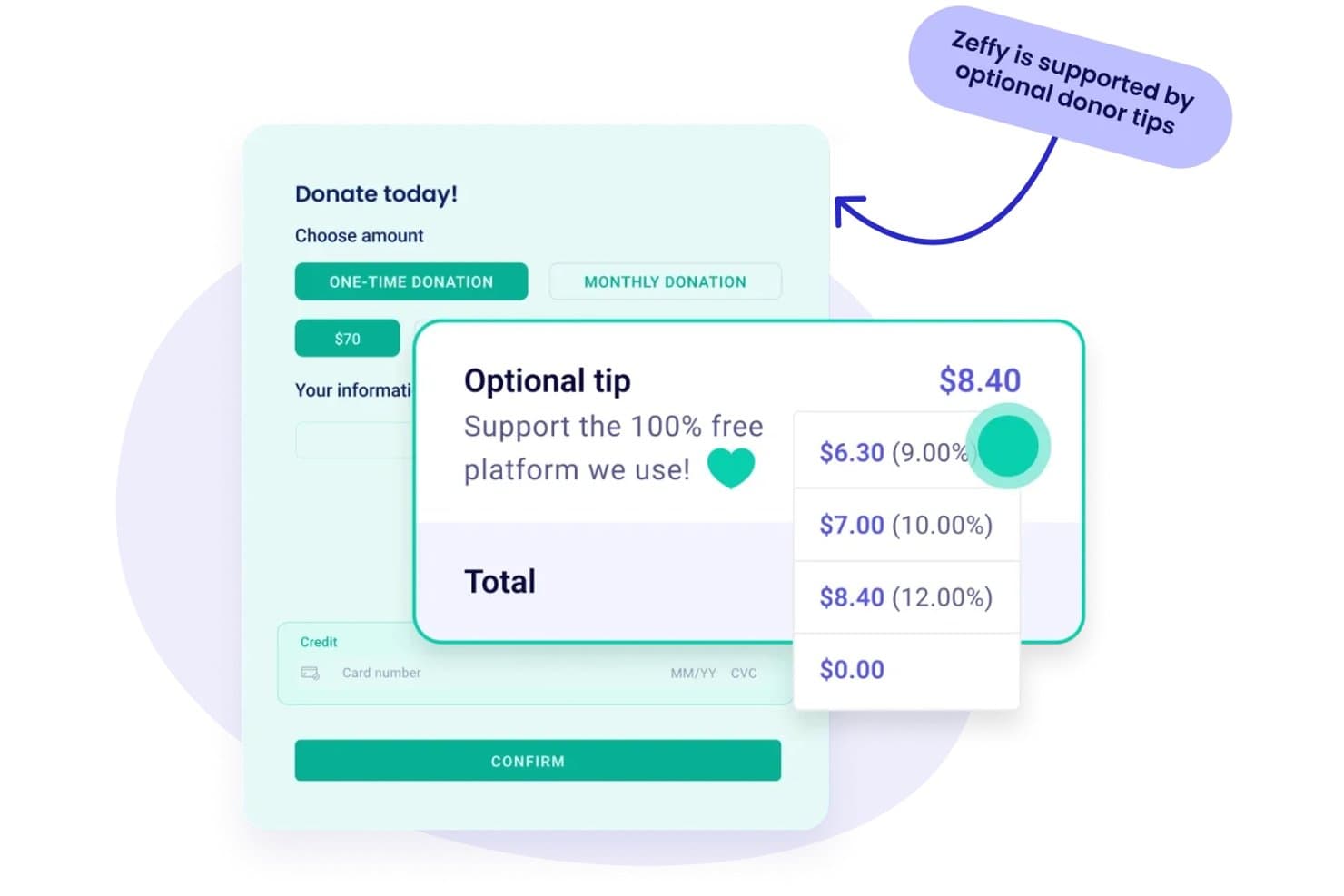
Zeffy lets donors leave optional tips to fund the free platform. Zeffy is a nonprofit fundraising platform that combines donation forms, ticketing, peer-to-peer campaigns, auctions, raffles, donor CRM, and email tools in one place.
Who Is Zeffy Best For?
Zeffy is a strong fit for small and volunteer-led nonprofits that want to run donations, events, and donor communications without losing any funds to platform fees.
Why I Picked Zeffy
Zeffy earns its spot on my shortlist because it's the only fundraising platform I've found that genuinely charges nonprofits nothing—no platform fees, no transaction fees, no credit card fees. I particularly like how it funds itself through optional donor contributions at checkout, so your organization keeps 100% of every donation. Pair that with built-in peer-to-peer campaigns, a donor CRM, and event ticketing, and you have a complete fundraising toolkit without a price tag attached.
Zeffy Key Features
- Donor mail: Create personalized printed letters and appeals using donor details and organization branding, then track delivery status and QR-code scans from the dashboard.
- Event ticketing: Build branded ticket forms with multiple ticket types, automate e-ticket delivery, and manage check-in and door sales from your phone.
- Email tools: Design and schedule targeted email campaigns using a drag-and-drop builder, segment recipients by giving history, and track opens, clicks, and donations.
- Tap to Pay app: Accept in-person card and digital wallet payments on an iPhone or Android device without a payment terminal.
Zeffy Integrations
Zeffy offers native integrations with QuickBooks and WordPress, plus connections to Salesforce, Mailchimp, Slack, and Google Sheets through viaSocket. It also provides a public API, webhooks, and Zapier support.
Pros and Cons
Pros:
- Tracks team fundraising with shared goals and leaderboards
- Links donor histories with campaigns and communications
- Combines event ticketing, check-in, and QR giving
Cons:
- Contact sorting and reporting depth draw complaints
- Optional checkout contributions can confuse donors
Learn more about Zeffy: Best for mobile auction fundraising
- Free demo available
- Pricing upon request
Visit WebsiteCustomer Rating:4.7/5
Handbid displays an auction dashboard summarizing bidder activity, bids per item, and top revenue contributors. If your ministry or nonprofit relies on auctions to raise funds, Handbid is built to make mobile bidding simple and accessible for your supporters. This platform is especially useful for churches and organizations that want to run silent or live auctions where guests can participate from their phones. Handbid helps you manage item listings, bidding, and payments all in one place, making auction fundraising more interactive and less stressful for your team.
Why I Picked Handbid
Mobile auction fundraising brings unique challenges, and Handbid is designed specifically to address them. I picked Handbid because it offers a dedicated mobile app for bidding, which allows guests to participate in silent and live auctions from anywhere during your event. The platform also includes real-time notifications for outbid alerts and auction updates, keeping donors engaged throughout the process. If your fundraising strategy relies on auctions, Handbid gives you the tools to manage bidding, item tracking, and payments all in one mobile-friendly solution.
Handbid Key Features
Some other features that make Handbid useful for online fundraising include:
- Event Ticketing: Sell and manage event tickets directly through the platform.
- Item Import and Bulk Editing: Upload auction items in bulk and make changes to multiple listings at once.
- Leaderboard Displays: Show live bidding activity and top bidders on screens during your event.
- Integrated Payment Processing: Collect payments for winning bids and donations within the same system.
Handbid Integrations
Integrations include GiveChariot, Bloomerang, Salsa, Kindful, DonorPerfect, and Salesforce.
Pros and Cons
Pros:
- Fast mobile checkout system
- Gamifies the bidding process
- Real-time push notifications
Cons:
- Lacks broader CRM features
- Focused mainly on auctions
Learn more about Handbid: Best for peer-driven fundraising campaigns
- Free plan available
- From 2.9% + $0.30 per transaction
Visit WebsiteCustomer Rating:3.2/5
GoFundMe Pro displays campaign and supporter dashboards showing total raised and transactions. If you’re looking to mobilize your community for fundraising, GoFundMe is built for peer-driven campaigns that thrive on social sharing. This platform is especially useful for churches, ministries, and groups that want to empower individuals to fundraise on their behalf. GoFundMe makes it easy for supporters to create their own campaigns and rally their networks for your cause.
Why I Picked GoFundMe
Peer-driven fundraising campaigns are at the heart of GoFundMe’s platform, which is why I picked it for this list. GoFundMe lets individuals and groups create their own fundraising pages, making it simple for supporters to share campaigns across social media and reach new donors. I appreciate how the platform’s built-in sharing tools and campaign updates keep momentum going and encourage wider participation. If you want to activate your community and empower supporters to fundraise on your behalf, GoFundMe is purpose-built for that approach.
GoFundMe Key Features
Some other features that make GoFundMe useful for online fundraising include:
- Fund Withdrawal Options: Organizers can withdraw funds directly to their bank accounts at any time.
- Donor Commenting: Supporters can leave public messages and words of encouragement on campaign pages.
- Campaign Photo and Video Uploads: Add multiple images and videos to personalize and strengthen campaign storytelling.
- Automatic Thank-You Notes: The platform sends thank-you messages to donors after each contribution.
GoFundMe Integrations
Integrations include Stripe, PayPal, Facebook, Instagram, X (Twitter), and YouTube.
Pros and Cons
Pros:
- Very easy campaign setup
- Zero platform fee options
- Huge built-in donor trust
Cons:
- Campaigns get lost in crowd
- Lacks recurring gift options


OneCause provides a proceeds dashboard for nonprofit events. For ministries and churches that rely on events to drive giving, OneCause offers a platform designed specifically for event-based fundraising. It’s a strong fit for leaders who want to manage auctions, galas, or peer-to-peer events while keeping donor engagement at the center. OneCause helps you coordinate ticketing, mobile bidding, and live fundraising moments all in one place.
Why I Picked OneCause
Event-based giving requires tools that can handle the unique demands of live fundraising, and that’s where OneCause stands out. I picked OneCause because it offers dedicated features for managing auctions, ticket sales, and mobile bidding during events. The platform also supports real-time fundraising activities, like paddle raises and live appeals, which are essential for maximizing engagement at galas or benefit dinners. If your fundraising strategy centers on events, OneCause gives you the structure and flexibility to run everything from registration to donation collection in one place.
OneCause Key Features
Some other features that make OneCause valuable for online fundraising include:
- Text-to-Give: Donors can contribute by sending a simple text message from their mobile devices.
- Customizable Event Pages: Create branded event pages with your own images, messaging, and sponsor logos.
- Table and Seating Management: Organize guest lists and assign seating for in-person events directly within the platform.
- Donation Thermometers: Display real-time fundraising progress to encourage participation during events.
OneCause Integrations
Integrations include Salesforce, Microsoft Dynamics, DonorDock, and Stripe.
Pros and Cons
Pros:
- Robust reporting dashboard
- Great hybrid event support
- Seamless ticketing system
Cons:
- Overkill for simple campaigns
- Mobile app can be buggy
Learn more about OneCause:

Give Lively features a live-streaming donation page with a real-time goal tracker. Give Lively offers a suite of free fundraising tools designed for nonprofits that want to maximize their impact without spending on software. This platform is especially appealing to organizations with limited budgets or those just starting out with digital fundraising. Give Lively helps you launch donation pages, peer-to-peer campaigns, and event ticketing without monthly fees or hidden costs.
Why I Picked Give Lively
What sets Give Lively apart is its commitment to offering genuinely free fundraising tools for nonprofits. I picked Give Lively because it provides unlimited access to donation pages, peer-to-peer fundraising, and event ticketing without charging platform fees. The platform also supports text-to-donate functionality, which helps organizations reach donors wherever they are. For groups that need to stretch every dollar, Give Lively’s no-cost approach makes it a practical choice for online fundraising.
Give Lively Key Features
Some other features that make Give Lively useful include:
- Recurring Donation Options: Let donors set up automatic, ongoing contributions to your organization.
- Customizable Donation Widgets: Embed branded donation forms directly on your website.
- Supporter Management Dashboard: Track donor activity and manage supporter information in one place.
- Matching Gift Integration: Connect with Double the Donation to encourage and process employer-matched gifts.
Give Lively Integrations
Integrations include Salesforce, Stripe, PayPal, Double the Donation, and Mailchimp.
Pros and Cons
Pros:
- Clean modern donation forms
- Great peer-to-peer options
- Text-to-give features included
Cons:
- Support is mostly via email
- Must apply to use platform
Learn more about Give Lively:

Fundly offers a visual fundraising page manager where users can view campaign goals. For ministries and organizations that want to tailor every detail of their fundraising campaigns, Fundly offers flexible campaign page customization. This platform is a good fit for churches, nonprofits, and community groups that need to highlight unique stories, visuals, and branding for each project. Fundly helps you create visually engaging pages that can reflect your mission and connect with supporters in a personal way.
Why I Picked Fundly
When you need to create campaign pages that truly reflect your ministry’s story and vision, Fundly stands out for its customization options. I picked Fundly because it lets you adjust layouts, colors, images, and videos so each campaign page feels unique and mission-driven. The platform also supports custom donation levels and storytelling sections, which help you highlight specific needs or projects. If you want your fundraising campaigns to look and feel like an extension of your church or organization, Fundly gives you the creative control to make that happen.
Fundly Key Features
Some other features that make Fundly useful for online fundraising include:
- Social Media Sharing Tools: Share campaigns directly to Facebook, Twitter, and other platforms from within Fundly.
- Fundraiser Progress Thermometer: Display real-time fundraising progress on each campaign page.
- Supporter Comment Wall: Allow donors and supporters to leave public messages on campaign pages.
- Mobile-Responsive Design: Ensure campaign pages display correctly on smartphones and tablets.
Fundly Integrations
Integrations include Stripe, Facebook, Mailchimp, and Eventbrite.
Pros and Cons
Pros:
- Mobile app for campaign admin
- Great for personal and org use
- Easy Facebook integration
Cons:
- Customization is quite basic
- Lacks complex event ticketing
Learn more about SignUpGenius: Best for multi-prize fundraising raffles
- Free plan + free demo available
- From 2.9% platform fee

RallyUp features a customizable campaign hub with donation options like auctions, ticket sales, and pledges. If you’re looking to run fundraising raffles with multiple prizes (like a custom t-shirt or gift basket), RallyUp is designed for you. This platform is especially useful for nonprofits, schools, and community groups that want to offer several prize options in a single campaign. RallyUp helps you manage complex raffle structures and ensures every prize and entry is tracked accurately.
Why I Picked RallyUp
RallyUp stands out for organizations that want to run raffles with multiple prizes in a single campaign. I picked RallyUp because it lets you set up several prize tiers and assign different entry options for each, which is ideal for maximizing donor engagement. The platform also automates random winner selection and provides real-time tracking for every prize and ticket. If you need a solution that handles complex raffle logistics without manual oversight, RallyUp is built for that purpose.
RallyUp Key Features
In addition to its multi-prize raffle capabilities, I also found these features worth noting:
- Customizable Campaign Pages: Design branded fundraising pages with your organization’s colors, logos, and messaging.
- Text-to-Give Functionality: Allow donors to contribute by sending a simple text message.
- Integrated Payment Processing: Accept payments through credit card, ACH, Apple Pay, and Google Pay.
- Donor Management Dashboard: Track donor activity, manage contacts, and export donor data for reporting.
RallyUp Integrations
Integrations include Salesforce, Stripe, PayPal, MemberHub, and Double the Donation.
Pros and Cons
Pros:
- Great hybrid event capability
- Free pricing tier available
- Highly customizable campaigns
Cons:
- Takes time to build campaigns
- Processing fees can be confusing
Learn more about RallyUp: Best for Salesforce integration
- Free demo available
- From $59/month (billed annually)

Soapbox Engage provides a control panel for managing donation and event pages. If your ministry or nonprofit relies on Salesforce to manage relationships and data, Soapbox Engage is designed to fit right into your workflow. This platform is especially useful for organizations that want to connect online fundraising, event registration, and forms directly with their Salesforce database. With Soapbox Engage, you can keep supporter information up to date and automate data entry, reducing manual work and the risk of errors.
Why I Picked Soapbox Engage
For ministries and nonprofits that depend on Salesforce, Soapbox Engage offers a direct connection between your fundraising activities and your CRM. I picked Soapbox Engage because it syncs donations, event registrations, and form submissions straight into Salesforce, so you don’t have to manually transfer data. The platform also lets you customize forms and donation pages to capture the exact information you need for your records. This level of integration helps you keep supporter data organized and actionable without extra steps.
Soapbox Engage Key Features
Some other features that make Soapbox Engage useful for online fundraising include:
- Peer-to-Peer Fundraising Tools: Enable supporters to create their own fundraising pages and campaigns.
- Recurring Donation Management: Allow donors to set up and manage ongoing gifts directly from your site.
- Event Registration Forms: Collect attendee information and payments for events through customizable forms.
- Customizable Email Receipts: Send branded, automated receipts and acknowledgments to donors after each transaction.
Soapbox Engage Integrations
Integrations include Salesforce, Microsoft Dynamics, Authorize.net, Braintree, Stripe, and PayPal.
Pros and Cons
Pros:
- Great e-commerce store add-on
- Customizable matching gifts
- Strong advocacy campaign tools
Cons:
- Setup takes significant time
- High monthly subscription cost
Learn more about SoapBox Engage:

99Pledges displays an individual fundraiser page showing a personalized message. If your church, school, or community group runs pledge-based fundraisers, 99Pledges is built to make that process simple. This platform is especially helpful for teams and organizations that want to track individual and group pledges for events like walk-a-thons or read-a-thons. With 99Pledges, you can set up campaigns quickly and let participants collect pledges online without handling cash or checks.
Why I Picked 99Pledges
When it comes to pledge-driven fundraising, 99Pledges stands out for its focus on event-based campaigns like walk-a-thons, fun runs, and read-a-thons. I picked 99Pledges because it lets each participant or team have their own fundraising page, making it easy to track individual and group progress. The platform also automates pledge collection and reminders, so you don’t have to chase down payments. This setup is especially helpful for organizations that rely on community participation and want to keep fundraising organized and transparent.
99Pledges Key Features
In addition to its pledge-driven campaign tools, I also found these features helpful:
- Mobile-Friendly Donation Pages: Supporters can make pledges and donations easily from any device.
- Real-Time Progress Thermometers: Display live fundraising totals on each campaign page.
- Automated Thank-You Emails: Send instant, personalized acknowledgments to donors after each pledge.
- CSV Export of Donor Data: Download detailed donor and pledge information for offline records or reporting.
99Pledges Integrations
Integrations include Google Analytics, PayPal, Stripe, Facebook, Twitter, Instagram, YouTube, Mailchimp, Salesforce, and QuickBooks.
Pros and Cons
Pros:
- Simple flat payment fee rate
- Extremely easy to manage
- Individual pages for students
Cons:
- Design looks slightly outdated
- Lacks recurring donations
Learn more about 99Pledges:
Andre nettbaserte innsamlingsplattformer
Her er noen flere alternativer for folkefinansieringsplattformer som ikke kom med på kortlisten min, men som likevel er verdt å se nærmere på:
- 11GiveSendGoBest for faith-based donor engagement
- 12SchoolfundrBest for K-12 group fundraising
- 13Vertical RaiseBest for team-based donation tracking
- 14BloomerangBest for donor retention analytics
- 15DonatelyBest for simple donation form setup
How I Evaluate Online Fundraising Platforms
I look at each platform in two passes: first whether it nails the basics like recurring giving and text-to-give, then how it stands apart on ChMS integrations and fee structures.
Core Functionality (Table Stakes For This List)
When I'm selecting tools for my list, I rank each one on a scale from 0 (does not offer the functionality) to 5 (excels in this area) for each core functionality listed below. Then, I calculate the tool's total score into a percentage. Each tool needs to achieve a minimum total score of 65% to be considered for inclusion.
- Online Donation Processing: I check which payment methods each platform supports—cards, ACH, and digital wallets like Apple Pay—and whether PCI-DSS compliance is in place.
- Recurring Giving Management: Donors should be able to set up, pause, and update their own recurring tithes without calling the church office for help.
- Multi-Fund & Campaign Support: I look for the ability to create separate funds (general tithe, missions, building projects) and dedicated campaign pages with goal tracking.
- Text-to-Give & Mobile Giving: Whether a congregant can give via text during a Sunday service matters, so I evaluate text-to-give and mobile app availability side by side.
- Donor Management & Statements: Year-end contribution statements are a recurring headache for church admins, so I evaluate how each platform tracks giving history and automates tax-compliant receipts.
- Embeddable Giving Forms: I look at how easily a branded donation form can be embedded into a church website, including customization options for colors, logos, and fund selection.
Once I have a list of tools that meet this criteria, I consider what sets each platform apart.
Differentiating Factors (What Sets Vendors Apart)
Here's how I compare and contrast different vendors:
Standout Features
Donor-covered fees can make a real difference for churches on tight budgets, so I look at whether a platform lets givers opt in to cover processing costs at checkout. Smart card updaters are another feature I evaluate closely—automatic updates to expired cards on recurring gifts reduce failed transactions that church admins would otherwise chase down manually. I also consider generosity analytics, especially dashboards that surface lapsed-giver alerts and giving trends to help stewardship teams follow up at the right time.
Beyond Features
Transaction fee structures vary widely, so I compare ACH vs. card rates and check for hidden platform fees that can quietly eat into a church's giving revenue over time. Integration with church management systems like Planning Center or Breeze matters just as much—donor records that sync automatically save hours of manual data entry each week. I also evaluate onboarding support, particularly whether a platform offers guided migration of existing recurring gifts so donors don't have to re-enroll after a switch.
Slik velger du nettbaserte innsamlingsplattformer
Det er lett å gå seg vill i lange lister over funksjoner og kompliserte prisstrukturer. For å hjelpe deg med å holde fokus mens du arbeider deg gjennom den unike prosessen din for valg av programvare, får du her en sjekkliste over faktorer du bør ha i tankene:
| Faktor | Hva du bør vurdere |
|---|---|
| FaktorSkalerbarhet | Hva du bør vurdereVil plattformen støtte veksten din når det gjelder kampanjer, givere og innsamlingsmål over tid? |
| FaktorIntegrasjoner | Hva du bør vurdereKan verktøyet kobles direkte til giverdatabasen, regnskapsprogrammet eller e-postmarkedsføringen din? |
| FaktorTilpasningsmuligheter | Hva du bør vurdereKan du tilpasse donasjonsskjemaer, kampanjesider og kommunikasjon slik at de passer til merkevaren for tjenesten din? |
| FaktorBrukervennlighet | Hva du bør vurdereVil ansatte og frivillige med ulikt teknisk ferdighetsnivå kunne bruke plattformen på en trygg måte? |
| FaktorImplementering og oppstart | Hva du bør vurdereHvor lang tid vil det ta å komme i gang, og hvilken opplæring eller støtte ved migrering tilbys? |
| FaktorKostnad | Hva du bør vurdereEr alle gebyrer tydelige, inkludert transaksjons-, plattform- og tilleggskostnader? Kan du forutse de totale utgiftene? |
| FaktorSikkerhetstiltak | Hva du bør vurdereTilbyr plattformen sikker betalingsbehandling, datakryptering og overholdelse av personvernlover? |
| FaktorTilgjengelig kundestøtte | Hva du bør vurdereHvilke støttekanaler tilbys, og er de tilgjengelige i de travleste innsamlingsperiodene dine? |
Hva er nettbaserte innsamlingsplattformer?
Nettbaserte innsamlingsplattformer er digitale verktøy som hjelper organisasjoner med å samle inn, administrere og spore donasjoner gjennom nettbaserte kampanjer. Disse plattformene støtter en rekke innsamlingsaktiviteter, inkludert engangsgaver, regelmessige donasjoner, innsamlingsaksjoner fra person til person og arrangementsbaserte bidrag. De tilbyr sikker betalingsbehandling, giveradministrasjon og rapporteringsfunksjoner, noe som gjør det enklere for kirker og ideelle organisasjoner å engasjere støttespillere og nå innsamlingsmålene sine.
Funksjoner
Her er de viktigste funksjonene enhver god nettbasert innsamlingsplattform bør ha:
- Behandling av donasjoner: Gjør det mulig å motta og behandle donasjoner på en sikker måte fra ulike betalingsmetoder, slik at det blir enkelt for givere å bidra.
- Regelmessige donasjoner: Gjør det mulig for givere å sette opp automatiske, regelmessige bidrag, noe som gir organisasjonen en jevn strøm av støtte.
- Tilpassbare donasjonssider: Gjør det mulig å tilpasse donasjonsskjemaer slik at de samsvarer med merkevaren, og dermed forbedre giveropplevelsen og tilliten.
- Billettsalg til arrangementer: Tilbyr verktøy for å administrere og selge billetter til innsamlingsarrangementer, noe som forenkler organiseringen og deltakelsen.
- Innsamling fra person til person: Gjør det mulig for støttespillere å opprette egne innsamlingssider, utvide rekkevidden og øke engasjementet.
- Donasjon via tekstmelding: Gjør det mulig for givere å bidra via tekstmelding, noe som gir økt bekvemmelighet og flere muligheter til å donere.
- Giveradministrasjon: Hjelper med å spore og administrere giveropplysninger, og forbedrer arbeidet med relasjonsbygging og kommunikasjon.
- Sporing i sanntid: Gir umiddelbare oppdateringer om fremdriften i innsamlingen, slik at du kan overvåke kampanjer og ta datadrevne beslutninger.
- Integrasjon med sosiale medier: Kobler kampanjene dine til sosiale plattformer, øker synligheten og oppmuntrer til deling i sosiale medier.
- Sikkerhetstiltak: Sørger for at giveropplysninger beskyttes med kryptering og personverntiltak, bygger tillit og sikrer samsvar med standarder.
Fordeler
Implementering av nettbaserte innsamlingsplattformer gir flere fordeler for teamet og virksomheten din. Her er noen av fordelene du kan se frem til:
- Større rekkevidde blant givere: Ta imot nettbaserte donasjoner fra støttespillere overalt ved hjelp av mobiltilpassede skjemaer og flere betalingsalternativer.
- Sentralisert giveradministrasjon: Spor historikk over bidrag, grupper støttespillere i segmenter og hold oppdaterte registre på ett sikkert sted.
- Forenklet kampanjeoversikt: Start, overvåk og juster flere innsamlingskampanjer fra ett enkelt kontrollpanel for vellykket innsamling.
- Automatisert giverkommunikasjon: Send umiddelbare takkebeskjeder og skattekvitteringer, reduser manuell oppfølging og forbedre giveropplevelsen.
- Datadrevet beslutningstaking: Få tilgang til rapporter og analyser i sanntid for å vurdere kampanjeresultater og utforme fremtidige innsamlingsideer og strategier.
- Støtte for regelmessige bidrag: Gjør det mulig for givere å sette opp automatiske bidrag, slik at organisasjonen kan bygge opp forutsigbar og løpende støtte.
- Forenklet innsamling ved arrangementer: Administrer billettsalg, påmeldinger og deltakelse på innsamlingsarrangementer i samme plattform.
Kostnader og priser
Ved valg av nettbaserte innsamlingsplattformer er det nødvendig å forstå de ulike prismodellene og abonnementene som er tilgjengelige. Kostnadene varierer basert på funksjoner, teamstørrelse, tillegg og mer. Tabellen nedenfor oppsummerer vanlige abonnementer, gjennomsnittsprisene deres og typiske funksjoner som inngår i nettbaserte innsamlingsplattformer:
Sammenligningstabell for nettbaserte innsamlingsplattformer
| Abonnementstype | Gjennomsnittspris | Vanlige funksjoner |
|---|---|---|
| AbonnementstypeGratisabonnement | Gjennomsnittspris$0–$25/måned | Vanlige funksjonerGrunnleggende donasjonsskjemaer, begrenset kampanjeadministrasjon, standard betalingsbehandling og grunnleggende rapportering. |
| AbonnementstypePersonlig abonnement | Gjennomsnittspris$0–$59/måned | Vanlige funksjonerTilpassbare skjemaer, verktøy for giveradministrasjon, enkel analyse og e-postbekreftelser. |
| AbonnementstypeBedriftsabonnement | Gjennomsnittspris$65–$139/måned | Vanlige funksjonerAvansert rapportering, alternativer for regelmessige bidrag, arrangementsadministrasjon, integrasjoner og merkevarede kampanjer. |
| AbonnementstypeEnterprise-abonnement | Gjennomsnittspris$200–$800+/måned | Vanlige funksjonerTilpassede arbeidsflyter, prioritert brukerstøtte, API-tilgang, avansert sikkerhet og administrasjon for flere brukere. |
Vanlige spørsmål
Her er noen svar på vanlige spørsmål om nettbaserte innsamlingsplattformer:
Kan nettbaserte innsamlingsplattformer håndtere gjentakende donasjoner?
Ja, de fleste nettbaserte innsamlingsplattformer lar givere opprette gjentakende gaver. Denne funksjonen hjelper organisasjoner med å bygge forutsigbare inntektsstrømmer og gjør det enklere for støttespillere å gi regelmessig uten å måtte huske det hver gang.
Hvordan holder nettbaserte innsamlingsplattformer giverdata sikre?
Nettbaserte innsamlingsplattformer bruker kryptering, sikre betalingsløsninger og overholder personvernlover som PCI DSS og GDPR. Kontroller alltid at plattformen du velger, oppfyller gjeldende sikkerhetsstandarder for å beskytte sensitive giveropplysninger.
Hvilke typer betalingsmetoder støtter disse plattformene?
De fleste plattformene godtar kreditt- og debetkort, ACH-bankoverføringer og digitale lommebøker som PayPal eller Apple Pay. Noen støtter også tekstbaserte donasjoner og internasjonale betalingsalternativer, noe som gjør det enklere å nå en bredere givergruppe.
Kan jeg integrere en nettbasert innsamlingsplattform med programvaren for menighetsadministrasjon eller regnskap?
Ja, mange plattformer tilbyr integrasjoner med populære verktøy for menighetsadministrasjon, CRM og regnskap. Dette hjelper deg med å synkronisere giverdata, følge med på gaver og redusere manuell dataregistrering på tvers av systemene dine.
Hvor raskt kan jeg begynne å motta donasjoner etter registrering?
Du kan vanligvis begynne å motta donasjoner innen noen timer til et par dager. Tidsrammen avhenger av hvor raskt du oppretter kontoen, tilpasser skjemaene og fullfører eventuelle nødvendige verifiseringstrinn hos betalingsformidleren.