

Recensione Botkeeper: Pro, Contro, Caratteristiche e Prezzi
Botkeeper si distingue offrendo funzioni automatizzate di contabilità e gestione finanziaria che semplificano l’amministrazione economica delle chiese, garantendo precisione ed efficienza.

Recensiamo gli strumenti in modo indipendente e le commissioni ci aiutano a finanziare i nostri test. Consulta la nostra politica sulla trasparenza, la nostra metodologia, oppure suggerisci uno strumento.
Botkeeper is a church accounting software built around AI-powered bookkeeping automation, backed by a team of human accountants who review and manage your financial records. It's a good fit for churches that want to move away from manual bookkeeping without hiring a full-time finance staff. Compared to something like Aplos, which requires your team to handle the bookkeeping themselves, Botkeeper takes that work off your plate entirely—making it a stronger option if your staff or volunteers don't have a financial background.
Botkeeper Evaluation Summary

4.4/5
- From $69/license/month
- Free plan available
Perché fidarsi dei nostri consigli sui software
6,700+
Reviews
20
Industry experts
16+
Evaluation factors
14
Years
Il nostro team testa e recensisce software dal 2012. In quanto leader ecclesiastici noi stessi, sappiamo quanto sia difficile — e importante — scegliere il software giusto.
Per questa guida, abbiamo valutato gli strumenti attraverso test pratici e ricerche indipendenti, assegnando un punteggio agli strumenti in base ai nostri criteri di selezione.
Le nostre recensioni riflettono il nostro giudizio editoriale umano, non un discorso di vendita.
Botkeeper Overview
In my opinion, Botkeeper is a solid choice for churches looking for reliable accounting software. Its automated features and ease of use make it a strong contender, especially for small to medium-sized churches with limited accounting resources. While the onboarding process might require some patience, the overall functionality and customer support are commendable. Compared to other options, Botkeeper offers competitive pricing and integrates well with existing systems, though some might find the lack of certain advanced features a drawback. If your team values automation and straightforward accounting processes, Botkeeper should be on your list.
Pros
- Automates repetitive bookkeeping tasks to save your team time.
- Offers accurate financial reports that help you make informed decisions.
- Easy-to-use interface makes it simple for your team to learn and use.
Cons
- Onboarding can be time-consuming for your team.
- Some advanced features might be missing from your toolkit.
- Customer support response times can be slower than expected.
Is Botkeeper Right For Your Needs?
Who Would be a Good Fit for Botkeeper?
Botkeeper is ideal for small to medium-sized churches and nonprofit organizations that prioritize accuracy in financial management. If your team struggles with manual bookkeeping tasks and needs automated solutions, Botkeeper's capabilities can streamline your accounting processes effectively. Its user-friendly interface ensures quick adoption, allowing your team to focus on core activities without getting bogged down by complex software.
- Small ChurchesBotkeeper automates bookkeeping, saving time and reducing errors for small churches with limited accounting resources.
- Nonprofit OrganizationsIts accurate financial reporting helps nonprofits track donations and expenses effectively, ensuring transparency and compliance.
- Volunteer AccountantsIf your team includes volunteers, Botkeeper's ease of use means they can quickly learn and manage accounting tasks.
- Religious InstitutionsBotkeeper supports religious institutions with varying financial needs by offering customizable and automated financial solutions.
- Finance TeamsFinance teams benefit from Botkeeper’s automated data entry and reporting, allowing them to focus on strategic planning.
- Community CentersCommunity centers with tight budgets can use Botkeeper to keep their accounting accurate and efficient without hiring extra staff.
Who Would be a Bad Fit for Botkeeper?
Botkeeper might not be suitable for large enterprises or organizations needing highly specialized accounting features. If your team requires advanced customization or specific industry-related accounting tools, Botkeeper's standard functionalities might not meet your expectations. Large organizations with complex financial structures may find Botkeeper lacking in the depth and sophistication needed for their accounting processes.
- Large CorporationsTheir complex financial needs may exceed Botkeeper's capabilities, requiring more advanced accounting solutions.
- Specialized IndustriesIndustries needing niche-specific accounting features might find Botkeeper lacking the necessary custom tools.
- International BusinessesIf your work involves multiple currencies and international regulations, Botkeeper might not offer the flexibility you need.
- High-Volume RetailersRetailers with high transaction volumes may require more robust accounting solutions than Botkeeper provides.
- Advanced Financial TeamsTeams requiring deep financial analysis tools might find Botkeeper's offerings too basic.
- Custom Software SeekersIf you need highly customizable accounting software, Botkeeper's standard setup may not suffice.
Come Testiamo e Valutiamo gli Strumenti
Abbiamo trascorso anni a costruire, perfezionare e migliorare il nostro sistema di test e valutazione dei software. Il nostro metodo è progettato per cogliere tutte le sfumature della selezione software e ciò che rende uno strumento efficace, concentrandosi sugli aspetti critici del processo decisionale. Qui sotto puoi vedere esattamente come funzionano i nostri test e valutazioni in base a sette criteri. Questo ci permette di offrire una valutazione imparziale dei software considerando funzionalità di base, caratteristiche distintive, facilità d’uso, onboarding, supporto clienti, integrazioni, recensioni dei clienti e rapporto qualità-prezzo.
Funzionalità di Base (25% del punteggio finale)
Il punto di partenza della nostra valutazione è sempre la funzionalità di base dello strumento. Dispone delle funzionalità e caratteristiche essenziali che un utente si aspetterebbe di trovare? Alcune di queste funzioni di base sono limitate a piani con prezzi superiori? In sostanza, ci aspettiamo che uno strumento sia all’altezza delle capacità minime offerte dai concorrenti.
Caratteristiche Distintive (25% del punteggio finale)
Successivamente analizziamo le caratteristiche distintive che vanno oltre la funzionalità base tipica degli strumenti di questa tipologia. Un punteggio alto riflette funzioni specializzate o uniche che rendono il prodotto più veloce, efficiente o offrono valore aggiunto all’utente. Valutiamo anche quanto sia semplice integrare altri strumenti comunemente presenti nello stack tecnologico per espandere la funzionalità e l’utilità del software. Gli strumenti che offrono numerose integrazioni native, connessioni di terze parti e accesso API per creare integrazioni personalizzate ottengono il punteggio migliore.
Facilità d’Uso (10% del punteggio finale)
Consideriamo quanto sia veloce e facile eseguire i compiti principali definiti usando lo strumento. I software con punteggi elevati sono ben progettati, intuitivi, offrono app mobili, mettono a disposizione modelli e rendono semplici anche i compiti più complessi.
Onboarding (10% del punteggio finale)
Sappiamo quanto sia importante adottare rapidamente una nuova piattaforma, quindi valutiamo quanto sia semplice imparare e utilizzare uno strumento con il minimo training. Esaminiamo quanto rapidamente un membro del team possa essere operativo senza esperienza precedente. Le soluzioni con punteggio alto richiedono poco o nessun supporto.
Supporto Clienti (10% del punteggio finale)
Valutiamo quanto sia rapido e semplice risolvere i problemi e ottenere assistenza tramite telefono, chat dal vivo o knowledge base. Gli strumenti e le aziende che forniscono supporto in tempo reale ottengono il punteggio migliore, mentre i chatbot ottengono la valutazione più bassa.
Recensioni dei Clienti (10% del punteggio finale)
Oltre ai nostri test e valutazioni, prendiamo in considerazione il net promoter score di clienti attuali e passati. Esaminiamo la loro propensione, data la scelta, a selezionare nuovamente lo strumento per le funzioni principali. Un software con punteggio alto riflette un net promoter score elevato da parte dei clienti attuali o precedenti.
Rapporto Qualità-Prezzo (10% del punteggio finale)
Infine, considerando tutti gli altri criteri, esaminiamo il prezzo medio dei piani base rispetto alle funzionalità principali e valutiamo il valore degli altri indicatori. I software che offrono di più, a meno, ottengono un punteggio superiore.
Core Features
Automated Bookkeeping: Botkeeper handles repetitive bookkeeping tasks like journal entries, reconciliations, and categorizing for you, ensuring accuracy without manual input. This saves your team time and reduces errors.
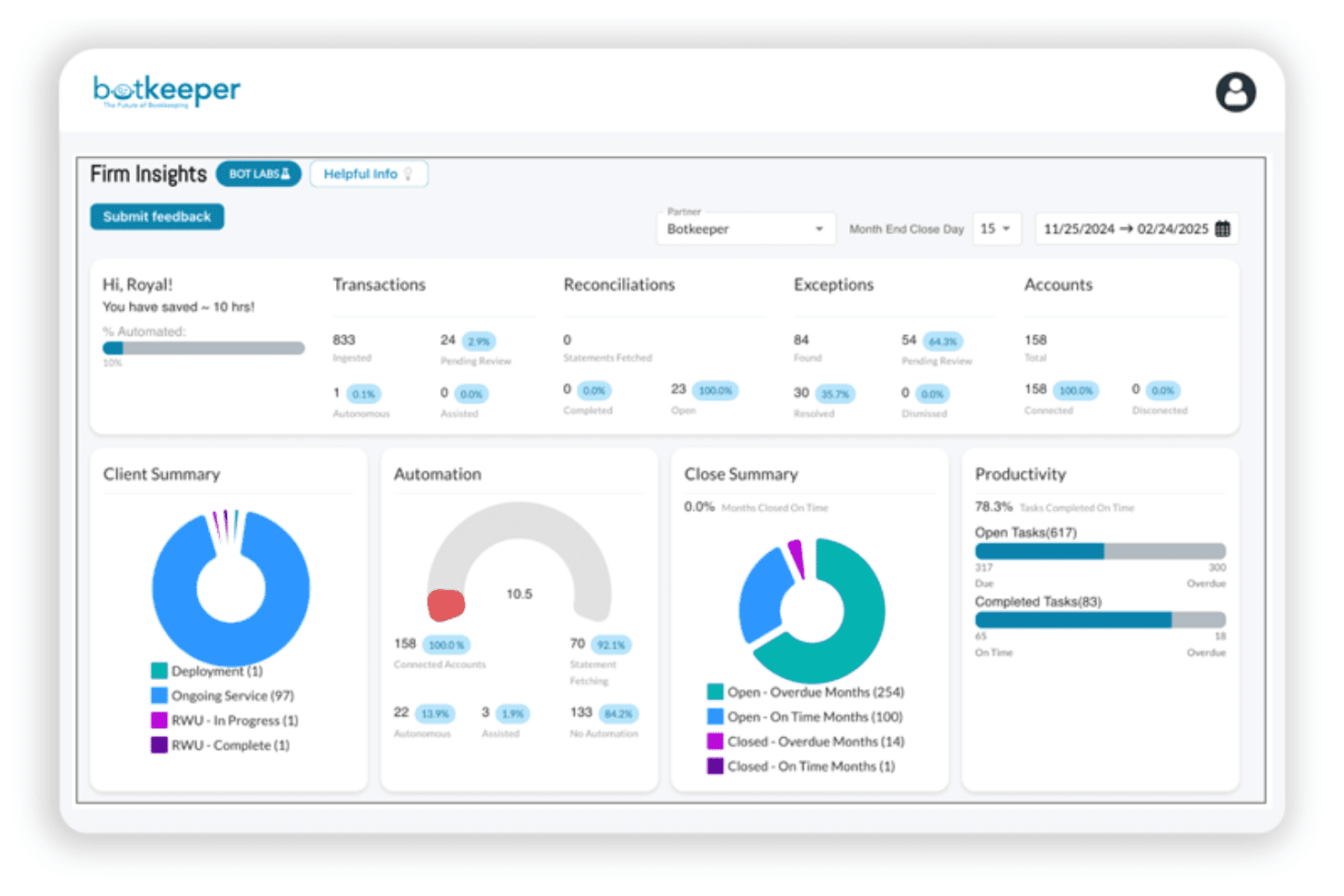
Financial Reporting: Generate detailed financial reports with ease and view insights through clear dashboards, allowing you to make informed decisions quickly. Reports are customizable to fit your church's specific needs.
Expense Tracking: Keep a close eye on your expenses, including credit card transactions, with Botkeeper's efficient tracking system. It helps your team manage budgets and control spending effectively.
Donation Management: Easily record and track donations, providing transparency and accountability for your church's contributions. This feature helps build trust with your donors.
Ease of Use
Botkeeper offers a user-friendly interface that's easy for your team to navigate, making it accessible for members with varying tech skills. The intuitive design helps reduce the learning curve, allowing you to get up and running quickly. Automated features like bookkeeping and payroll simplify complex tasks, enhancing usability. Compared to bookkeeping services, Botkeeper's straightforward setup and clear instructions make managing your church's finances less daunting and more efficient for everyone involved.

Integrations
Botkeeper integrates with QuickBooks Online and Xero. Botkeeper also provides an API and connects with third-party integration tools like Zapier.

Botkeeper Specs
- API: Yes
- Calendar Management: No
- Contact Management: No
- Dashboards: No
- Data Export: No
- Data Import: Yes
- Document Management: No
- External Integrations: Yes
- Multi-User: Yes
- Notifications: No
- Payment Gateway Integration: No
- Scheduling: No
- Workflow Management: No


