

Gestire gli eventi della tua chiesa può essere impegnativo: dal coordinamento delle registrazioni alla gestione delle comunicazioni, è facile sentirsi sopraffatti. È qui che entra in gioco il giusto software per la registrazione agli eventi. Alleggerisce il carico di lavoro e semplifica ogni attività, dalle iscrizioni al monitoraggio delle presenze.
In base alla mia esperienza, trovare lo strumento giusto può trasformare il modo in cui il tuo team gestisce le registrazioni agli eventi. Ho testato e recensito diverse opzioni per offrirti una panoramica imparziale delle migliori soluzioni sul mercato.
In questo articolo scoprirai soluzioni software per la registrazione agli eventi che rispondono alle tue esigenze specifiche. Illustrerò le funzionalità, i vantaggi e gli svantaggi e i prezzi di ciascuna soluzione, così potrai fare una scelta consapevole per la tua chiesa.
Perché fidarsi dei nostri consigli sui software
6,700+
Reviews
20
Industry experts
16+
Evaluation factors
14
Years
Il nostro team testa e recensisce software dal 2012. In quanto leader ecclesiastici noi stessi, sappiamo quanto sia difficile — e importante — scegliere il software giusto.
Per questa guida, abbiamo valutato gli strumenti attraverso test pratici e ricerche indipendenti, assegnando un punteggio agli strumenti in base ai nostri criteri di selezione.
Le nostre recensioni riflettono il nostro giudizio editoriale umano, non un discorso di vendita.
Tabella comparativa dei software per la registrazione agli eventi
Questa tabella comparativa riassume i dettagli sui prezzi delle mie migliori selezioni di strumenti per la registrazione agli eventi:
| Tool | Best For | Trial Info | Price | ||
|---|---|---|---|---|---|
| 1 | Ideale per la vendita di biglietti per eventi di organizzazioni non profit senza commissioni | Piano gratuito disponibile | Prezzi su richiesta | Website | |
| 2 | Ideale per la gestione di più orari di servizio | Prova gratuita + demo gratuita disponibili | Da $399/evento | Website | |
| 3 | Ideale per eventi privati | Piano gratuito + demo gratuita disponibili | Da $24/mese (fatturato annualmente) | Website | |
| 4 | Ideale per eventi ibridi | Demo gratuita disponibile | Prezzo su richiesta | Website | |
| 5 | Ideale per il coinvolgimento dei partecipanti | Demo gratuita disponibile | Prezzo su richiesta | Website | |
| 6 | Ideale per programmi aziendali di eventi con tariffa fissa | Demo gratuita disponibile | A partire da 11.800 $/anno (fatturati annualmente) | Website | |
| 7 | Ideale per la registrazione dei partecipanti in loco e la stampa dei badge | Prova gratuita disponibile | A partire da $7,500/evento | Website | |
| 8 | Ideale per l'hosting di eventi virtuali | Demo gratuita disponibile | Da $499/utente/mese (fatturazione annuale) | Website | |
| 9 | Ideale per fiere virtuali | Demo gratuita disponibile | Prezzi su richiesta | Website | |
| 10 | Ideale per l’analisi dei dati | Demo gratuita disponibile | Prezzo su richiesta | Website |


Recensioni dei migliori software per la registrazione agli eventi
Di seguito trovi le mie recensioni dettagliate dei migliori software per la registrazione agli eventi inclusi nella mia selezione. Le mie recensioni offrono un’analisi approfondita delle funzionalità principali, dei vantaggi e degli svantaggi, delle integrazioni e dei casi d’uso ideali di ogni strumento, per aiutarti a trovare quello più adatto a te.
 Ideale per la vendita di biglietti per eventi di organizzazioni non profit senza commissioni
- Piano gratuito disponibile
- Prezzi su richiesta
Visit WebsiteCustomer Rating:4.9/5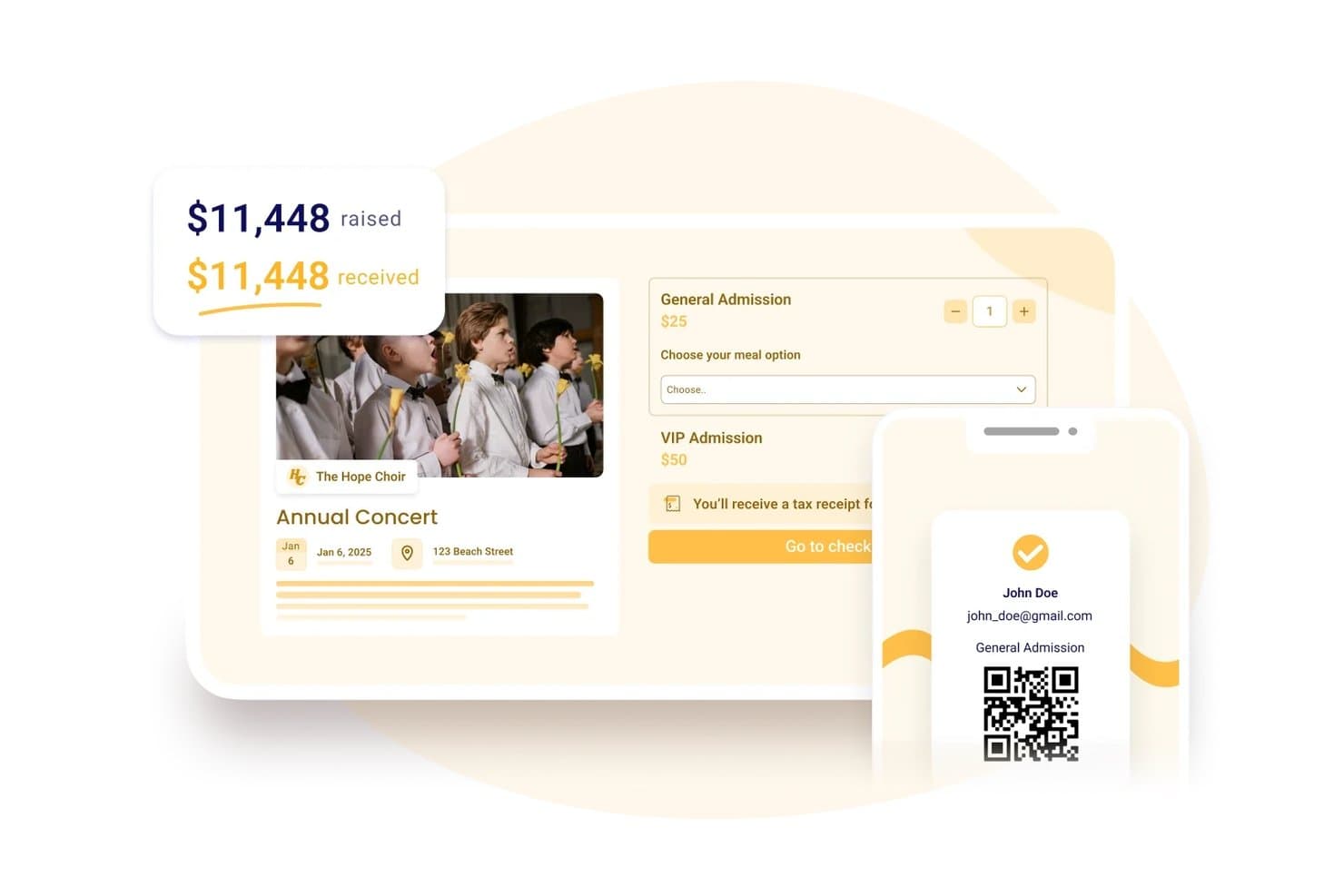
Zeffy consente agli utenti di vendere biglietti e monitorare i fondi raccolti in un unico posto. Zeffy è una piattaforma per la registrazione a eventi e la raccolta fondi, pensata per le organizzazioni non profit, che combina biglietteria, gestione dei donatori, strumenti per i soci e pagamenti di persona in un unico sistema.
Per chi è più adatto Zeffy?
Zeffy è una soluzione ideale per le organizzazioni non profit registrate negli Stati Uniti, in Canada, nel Regno Unito, in Irlanda, Australia e Germania che desiderano organizzare eventi a pagamento senza sostenere commissioni di piattaforma o di transazione.
Perché ho scelto Zeffy
Ho scelto Zeffy come una delle migliori piattaforme perché è l'unica della mia lista con cui le organizzazioni non profit non pagano assolutamente nulla in commissioni di piattaforma o di transazione, mai. Mi piace il fatto che si possano vendere biglietti di gruppo, raccogliere domande personalizzate per partecipante, come le preferenze per i pasti, e registrare l'ingresso degli ospiti tramite scansione del codice QR, il tutto senza una singola commissione che riduca i fondi raccolti. Per una chiesa che organizza il gala annuale o un concerto benefico durante le festività, questo modello senza commissioni significa che ogni euro ricavato dalla vendita dei biglietti va direttamente al ministero.
Funzionalità principali di Zeffy
- Pianificazione di eventi su più date: Configura eventi ricorrenti con cadenza giornaliera, settimanale o mensile, consentendo agli acquirenti di selezionare data e ora prima di scegliere i biglietti.
- CRM per donatori e partecipanti: I profili dei sostenitori raccolgono in un unico posto la cronologia delle donazioni, la partecipazione agli eventi, le iscrizioni, l'interazione con le email, le note e i tag.
- App per i pagamenti senza contatto: Accetta pagamenti con carta, Apple Pay e Google Pay direttamente da uno smartphone per la vendita di biglietti, prodotti e donazioni di persona, senza bisogno di un terminale.
- Moduli per eventi incorporabili: Incolla l'HTML generato in qualsiasi strumento per la creazione di siti web per incorporare un modulo di registrazione direttamente nel sito della tua chiesa.
Integrazioni di Zeffy
Zeffy offre integrazioni native con QuickBooks Online e WordPress. Supporta inoltre Salesforce, Mailchimp e altre connessioni tramite viaSocket, un'API pubblica, webhook e Zapier.
Pros and Cons
Pros:
- I recensori apprezzano la configurazione degli eventi, semplice e rapida
- La registrazione tramite codice QR rende più fluido l'arrivo degli ospiti al gala
- Biglietteria e schede dei donatori condividono lo stesso spazio di lavoro
Cons:
- A volte gli acquirenti scambiano i contributi al momento del pagamento per commissioni
- Le limitate possibilità di progettazione dei moduli e delle email frustrano gli organizzatori
Learn more about Zeffy: Ideale per la gestione di più orari di servizio
- Prova gratuita + demo gratuita disponibili
- Da $399/evento

Church RSVP mostra una schermata di gestione delle occorrenze dell'evento con monitoraggio dei tipi di posti. Church RSVP è una piattaforma di gestione eventi progettata specificamente per chiese e ministeri per organizzare tutto, dai servizi settimanali alle conferenze di più giorni. Semplifica attività amministrative complesse come il reclutamento dei volontari e la registrazione alla scuola biblica estiva (VBS), assicurandoti di non superare mai il limite di posti a sedere.
Per chi è migliore Church RSVP?
Church RSVP è ideale per chiese e ministeri che necessitano di uno strumento dedicato per gestire le iscrizioni agli eventi, coordinare più servizi e monitorare la partecipazione a incontri religiosi.
Perché ho scelto Church RSVP
Gestire più orari di servizio è una sfida comune per le chiese, ed è per questo che ho scelto Church RSVP per questa lista. Consente ai fedeli di selezionare l'orario di servizio preferito durante la registrazione, aggiornando automaticamente in tempo reale il numero dei partecipanti per ciascuna sessione. Questo è particolarmente utile per servizi festivi o eventi speciali in cui è necessario bilanciare la partecipazione tra diversi orari d'inizio per evitare il sovraffollamento. Questa attenzione alla programmazione flessibile rende Church RSVP particolarmente utile per i ministeri con diversi incontri ogni settimana.
Funzionalità principali di Church RSVP
Altre funzionalità che rendono Church RSVP utile per la registrazione agli eventi includono:
- Moduli di registrazione personalizzabili: Crea moduli con campi su misura per le esigenze del tuo evento, come nomi dei partecipanti, dettagli di contatto o richieste particolari.
- Email di conferma automatizzate: Invia messaggi di conferma istantanei agli iscritti, aiutando i partecipanti a sapere che il loro posto è riservato.
- Dashboard per il monitoraggio della partecipazione: Monitora in tempo reale i numeri dei partecipanti e visualizza i dati storici di ogni evento o servizio.
- Gestione dell'iscrizione dei volontari: Permetti ai volontari di registrarsi per ruoli o turni specifici, facilitando il coordinamento dello staff per l'evento.
Integrazioni di Church RSVP
Le integrazioni non sono elencate pubblicamente.
Pros and Cons
Pros:
- Permette ai partecipanti di scegliere tra presenza fisica o online
- Offre conferme e promemoria automatici
- Consente registrazioni illimitate senza costi aggiuntivi
Cons:
- Nessun sistema di pagamento integrato per eventi a pagamento
- Nessuna messaggistica ai partecipanti oltre ai promemoria via email
Learn more about Church RSVP: Ideale per eventi privati
- Piano gratuito + demo gratuita disponibili
- Da $24/mese (fatturato annualmente)
Visit WebsiteCustomer Rating:4.8/5
RSVPify coordina la gestione degli ospiti per eventi privati. RSVPify è uno strumento di gestione eventi particolarmente adatto a chiese e organizzazioni religiose che ospitano eventi privati o su invito. È l’ideale per gestire le risposte agli inviti per incontri come cene parrocchiali, riunioni di leadership, ritiri, matrimoni, battesimi ed eventi speciali del ministero, offrendo strumenti per liste degli ospiti, personalizzazione e comunicazione.
Perché ho scelto RSVPify: RSVPify è ottimo per gli eventi ecclesiastici che richiedono il controllo della lista degli ospiti e un tocco personale. Le chiese possono creare pagine evento personalizzate, tracciare le conferme di partecipazione e gestire dettagli degli ospiti come preferenze alimentari o esigenze di posti a sedere. I promemoria automatici aiutano a ridurre le assenze, mentre le opzioni di personalizzazione della piattaforma facilitano la creazione di un’esperienza accogliente e organizzata sia per i membri della congregazione che per gli ospiti invitati.
Funzionalità principali e integrazioni:
Le funzionalità includono schemi dei posti a sedere con drag-and-drop, promemoria per eventi e funzionalità di check-in degli ospiti. RSVPify semplifica la gestione delle preferenze alimentari e la creazione di profili dettagliati degli ospiti. La piattaforma consente inoltre aggiornamenti in tempo reale al tuo evento.
Le integrazioni includono Stripe, Mailchimp, Google Analytics, Zapier, PayPal e altri.
Pros and Cons
Pros:
- Ideale per eventi privati
- Supporta le preferenze alimentari
- Gestione semplice della lista ospiti
Cons:
- Limitato per eventi di grande scala
- Personalizzazione grafica essenziale
Learn more about RSVPify: Ideale per eventi ibridi
- Demo gratuita disponibile
- Prezzo su richiesta
Visit WebsiteCustomer Rating:4.8/5
Whova gestisce le registrazioni agli eventi e il coinvolgimento dei partecipanti. Whova è un software di registrazione eventi progettato per organizzatori che gestiscono eventi ibridi. Offre soluzioni per la gestione delle registrazioni, il coinvolgimento dei partecipanti e il marketing degli eventi, da conferenze a workshop.
Perché ho scelto Whova: Whova si distingue nella gestione degli eventi ibridi, offrendo funzionalità come la registrazione personalizzata, opportunità di networking per i partecipanti e stampa dei badge on-demand e in loco. Fornisce strumenti per creare vari tipi di biglietti e gestire i pagamenti in modo efficiente. Il software supporta anche l'organizzazione di eventi virtuali, rendendolo versatile per diversi formati di eventi. I partecipanti possono accedere ai materiali dell'evento e partecipare a sondaggi dal vivo per migliorare la loro esperienza complessiva.
Caratteristiche principali e integrazioni:
Caratteristiche includono funzionalità di networking, sondaggi dal vivo e sessioni virtuali. Whova offre una personalizzazione senza complicazioni per i moduli di registrazione e la gestione della vendita dei biglietti. La piattaforma consente inoltre una reportistica dettagliata e analisi per monitorare il successo dell'evento.
Integrazioni includono Eventbrite, Constant Contact, Cvent, RegFox e Zapier.
Pros and Cons
Pros:
- Gestione semplice di eventi ibridi
- Moduli di registrazione personalizzabili
- Supporta sessioni virtuali
Cons:
- Personalizzazione limitata per il branding
- Supporto offline limitato
Learn more about Whova: Ideale per il coinvolgimento dei partecipanti
- Demo gratuita disponibile
- Prezzo su richiesta
Visit WebsiteCustomer Rating:4.6/5
EventMobi aumenta il coinvolgimento dei partecipanti per eventi in presenza e virtuali. EventMobi è una piattaforma per la gestione di eventi particolarmente adatta a chiese e organizzazioni religiose che desiderano creare esperienze di evento coinvolgenti e interattive. Funziona sia per eventi in presenza che virtuali, come conferenze, corsi di formazione per leader, incontri giovanili ed eventi di ministero con più sessioni.
Perché ho scelto EventMobi: EventMobi si distingue per le chiese grazie al forte focus sul coinvolgimento dei partecipanti. Le chiese possono utilizzare agende interattive, sondaggi in tempo reale e annunci in-app per mantenere i partecipanti informati e coinvolti durante tutto l’evento. Le app evento personalizzabili permettono di creare programmi personalizzati, contenuti delle sessioni e informazioni sui relatori, mentre gli strumenti di feedback in tempo reale aiutano i responsabili a capire quali aspetti hanno riscosso maggiore interesse. Le analisi integrate facilitano la misurazione del coinvolgimento e il miglioramento degli eventi futuri della chiesa.
Funzionalità principali e integrazioni:
Le funzionalità includono branding personalizzabile, sistemi di risposta dell’audience ed elementi di gamification. Puoi utilizzare le funzionalità di Q&A dal vivo e di chat di EventMobi per generare interazione. La piattaforma offre anche il tracciamento delle sessioni per monitorare la partecipazione.
Le integrazioni includono Salesforce Campaigns, Marketo, HubSpot, Mailchimp e altro ancora.
Pros and Cons
Pros:
- Efficace per l’interazione dei partecipanti
- Supporta esperienze evento personalizzate
- Raccolta di feedback in tempo reale
Cons:
- Personalizzazione limitata dell’app mobile
- Potrebbero servire risorse aggiuntive per grandi eventi
Learn more about EventMobi: Ideale per programmi aziendali di eventi con tariffa fissa
- Demo gratuita disponibile
- A partire da 11.800 $/anno (fatturati annualmente)
Visit WebsiteCustomer Rating:4.8/5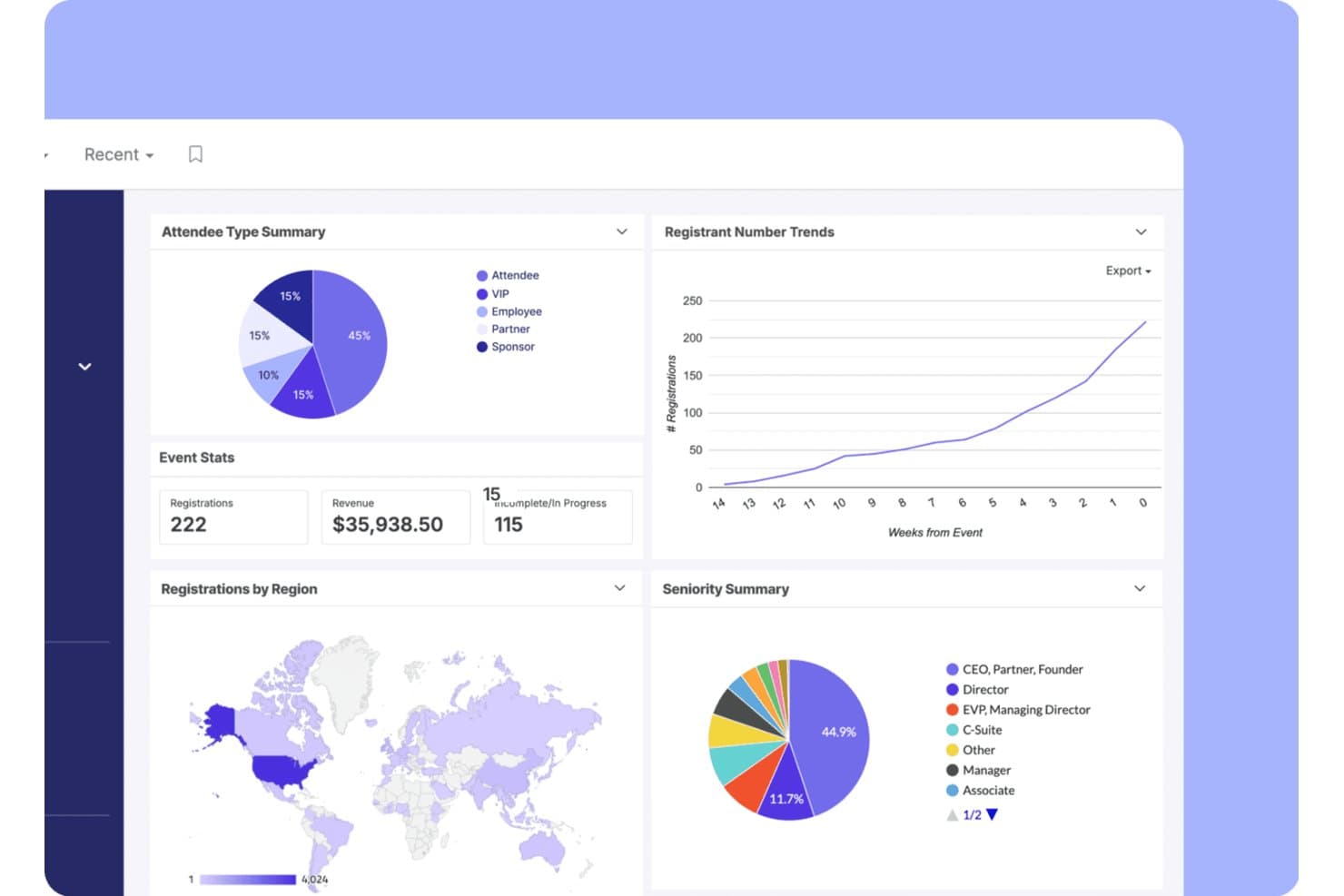
Swoogo monitora registrazioni, ricavi e tendenze dei partecipanti in un unico pannello di controllo. Swoogo è una piattaforma aziendale per la registrazione agli eventi basata su licenze annuali a tariffa fissa, che offre eventi illimitati, siti web per eventi con marchio personalizzato, moduli di registrazione condizionali, check-in in loco e integrazioni avanzate con i sistemi CRM.
Per chi è più adatto Swoogo?
Swoogo è una soluzione particolarmente adatta a grandi chiese e organizzazioni confessionali che organizzano conferenze e summit di leadership di livello professionale con personale dedicato agli eventi.
Perché ho scelto Swoogo
Swoogo si è guadagnato un posto nella mia selezione perché il suo modello di licenza a tariffa fissa è davvero pensato per le organizzazioni che gestiscono eventi su larga scala. Apprezzo molto il fatto che eventi illimitati e registrazioni illimitate siano inclusi in un unico prezzo annuale, così un'organizzazione confessionale che ospita un summit di leadership, una conferenza regionale e una serie di incontri più piccoli paga la stessa tariffa indipendentemente dal volume. Il generatore di registrazioni condizionali è il migliore della categoria: tipi di registranti illimitati, regole logiche illimitate e flussi di approvazione consentono di creare percorsi di registrazione distinti per relatori, sponsor e partecipanti generici all'interno di un unico modulo.
Funzionalità principali di Swoogo
- App Go Onsite per il check-in in loco: Un'app mobile per il check-in in loco con scansione dei codici QR, stampa dei badge su richiesta, modalità chiosco self-service e monitoraggio delle presenze in tempo reale.
- Reportistica tra eventi: Un generatore di report personalizzabile con oltre 15 report integrati, dashboard in tempo reale e confronti delle tendenze tra eventi, condivisibili con utenti che non utilizzano Swoogo.
- Sequenze e-mail automatizzate: Un generatore di e-mail con funzionalità di trascinamento che attiva comunicazioni prima e dopo l'evento in base al tipo di registrante, al comportamento e alle regole del flusso di lavoro.
- Sincronizzazione nativa con i CRM: Integrazione bidirezionale dei dati con Salesforce, HubSpot e Marketo, che trasferisce i dati di registrazione e partecipazione senza esportazioni CSV manuali.
Integrazioni di Swoogo
Swoogo offre oltre 30 integrazioni, tra cui Salesforce, HubSpot, Marketo, Zoom, ON24, Stripe, Avalara e Google Analytics. Offre inoltre un'API REST, webhook e Zapier per connessioni personalizzate.
Pros and Cons
Pros:
- Registrazioni illimitate senza costi aggiuntivi
- Generatore di registrazioni condizionali migliore della categoria
- Reportistica e pannelli di controllo tra eventi
Cons:
- Nessuna integrazione con sistemi di gestione delle chiese
- Nessun flusso di lavoro per il check-in di minori o famiglie
Learn more about Swoogo: Ideale per la registrazione dei partecipanti in loco e la stampa dei badge
- Prova gratuita disponibile
- A partire da $7,500/evento
Visit WebsiteCustomer Rating:4.7/5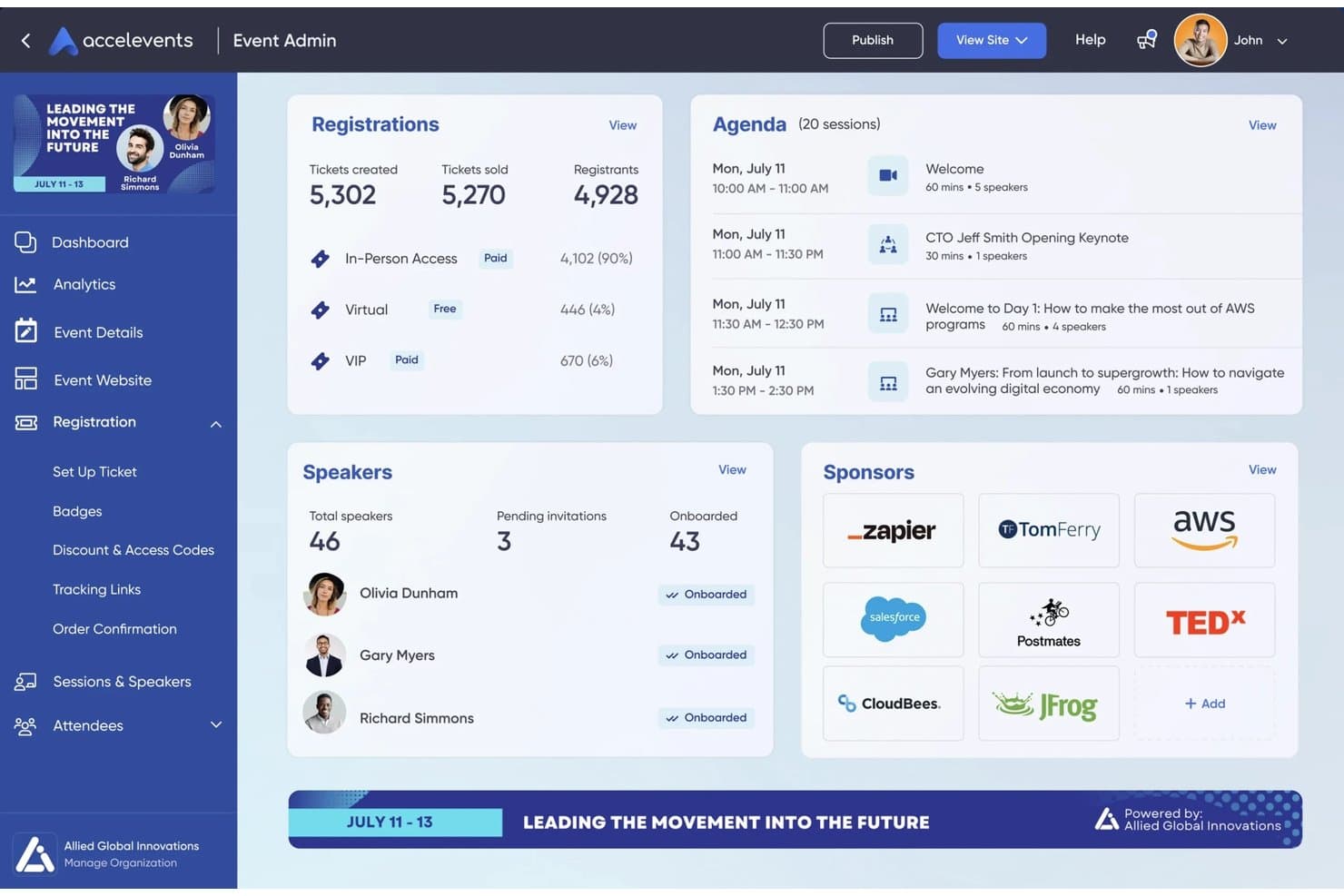
Accelevents centralizza le registrazioni agli eventi, l'agenda, i relatori e gli sponsor in un unico cruscotto. Accelevents è una piattaforma per la registrazione e la gestione degli eventi che combina biglietteria, moduli di registrazione personalizzati, elaborazione dei pagamenti, registrazione dei partecipanti in loco, stampa dei badge e report sui dati dei partecipanti in un unico sistema.
Per chi è più adatto Accelevents?
Accelevents è particolarmente adatto ai team di eventi professionali e alle organizzazioni non profit che gestiscono conferenze, fiere o raccolte fondi su larga scala e necessitano di una registrazione affidabile dei partecipanti in loco e della stampa dei badge.
Perché ho scelto Accelevents
Accelevents si è guadagnato un posto nella mia lista dei preferiti per la sua capacità di gestire efficacemente gli aspetti pratici di un grande evento: far entrare rapidamente centinaia di persone e indirizzarle verso le sessioni corrette. Apprezzo particolarmente il fatto che la configurazione del chiosco iPad stampi i badge in circa 3 secondi e funzioni in modalità offline, così una connessione Wi-Fi instabile nella sede non rallenta la fila per la registrazione. Il progettista dei badge consente inoltre di impostare immagini condizionali e testo dinamico in base alle risposte di registrazione, permettendo a partecipanti VIP, espositori e partecipanti con ingresso generale di ricevere badge distinti e pronti per la stampa da un unico flusso di lavoro.
Funzionalità principali di Accelevents
- Strumento per la creazione di moduli di registrazione personalizzati: Crea percorsi di registrazione illimitati con logica condizionale, regole di instradamento, flussi di approvazione e campi personalizzati a livello di biglietto.
- Strumenti per aste silenziose e donazioni: Organizza aste silenziose con offerte tramite messaggi di testo e raccogli donazioni integrate direttamente nel flusso di pagamento della registrazione all'evento.
- Sincronizzazione nativa con i sistemi CRM: Connettiti bidirezionalmente con Salesforce, HubSpot e Marketo per mantenere aggiornati i dati dei partecipanti nei sistemi di marketing e vendita.
- Registrazione a livello di sessione: Monitora la partecipazione e gestisci la capacità a livello di singola sessione, con supporto per il monitoraggio dei crediti di formazione continua.
Integrazioni di Accelevents
Accelevents offre integrazioni native con Salesforce, HubSpot, Marketo, Salesforce Pardot, NetForum AMS, Novi AMS, Protech, Zoom, Google Analytics e Google Tag Manager. Fornisce inoltre API REST, webhook e connettività Zapier per connessioni personalizzate.
Pros and Cons
Pros:
- Stampa dei badge in loco in circa tre secondi
- La registrazione autonoma dei partecipanti funziona in modalità offline
- Flusso di lavoro combinato per registrazioni, aste e donazioni
Cons:
- Nessuna integrazione nativa con i sistemi di gestione delle organizzazioni religiose
- Nessuna funzionalità di registrazione per la sicurezza di famiglie o bambini
Learn more about Accelevents: Ideale per l'hosting di eventi virtuali
- Demo gratuita disponibile
- Da $499/utente/mese (fatturazione annuale)
Visit WebsiteCustomer Rating:4.5/5
Bizzabo potenzia gli eventi virtuali con coinvolgimento e analisi dei dati. Bizzabo è una piattaforma versatile per la gestione di eventi, ideale per chiese e organizzazioni religiose che organizzano eventi virtuali, ibridi o in presenza. Aiuta i team delle chiese a pianificare e gestire conferenze online, summit di leadership, sessioni di formazione e incontri trasmessi in streaming, con strumenti per la registrazione, il coinvolgimento e il monitoraggio delle performance.
Perché ho scelto Bizzabo: Bizzabo è adatto alle chiese perché supporta eventi virtuali, ibridi e in presenza su un'unica piattaforma, facilitando il raggiungimento sia delle congregazioni locali che di quelle remote. Le chiese possono trasmettere in diretta streaming, svolgere sessioni di culto interattive, panel e workshop, coinvolgendo i partecipanti tramite sondaggi e domande e risposte. Le pagine evento personalizzabili aiutano a mantenere una coerenza nel branding e le analisi dettagliate permettono ai responsabili di monitorare presenze, partecipazione e coinvolgimento generale per eventi di qualsiasi dimensione.
Caratteristiche principali e integrazioni:
Le caratteristiche includono opzioni di branding personalizzabili, strumenti di networking e automazione delle campagne email. È possibile utilizzare funzioni di coinvolgimento del pubblico in tempo reale per mantenere i partecipanti attivi. La piattaforma offre inoltre ampie funzionalità di reportistica per l'analisi post-evento.
Le integrazioni includono Salesforce Campaigns, Marketo, HubSpot, Google Analytics e altre ancora.
Pros and Cons
Pros:
- Efficace per grandi eventi virtuali
- Analisi delle performance dettagliate
- Coinvolgimento del pubblico in tempo reale
Cons:
- Qualità dell'assistenza non sempre costante
- Flessibilità di design limitata
Learn more about Bizzabo: Ideale per fiere virtuali
- Demo gratuita disponibile
- Prezzi su richiesta
Visit WebsiteCustomer Rating:4.7/5
vFairs ospita fiere virtuali immersive. vFairs è una piattaforma per eventi virtuali particolarmente adatta a chiese e organizzazioni religiose che desiderano ospitare conferenze online, esposizioni ministeriali, eventi formativi e grandi raduni virtuali. Aiuta le chiese a creare esperienze digitali immersive con strumenti per il networking, la gestione delle sessioni e il coinvolgimento dei partecipanti in un ambiente visivamente interattivo.
Perché ho scelto vFairs: vFairs è ideale per eventi ecclesiastici che traggono vantaggio da un formato virtuale più immersivo, come fiere ministeriali, conferenze di leadership o incontri globali. La piattaforma supporta stand virtuali interattivi, che le chiese possono utilizzare per i ministeri, le missioni, gli sponsor o le risorse, insieme a webinar dal vivo per sermoni, workshop e tavole rotonde. Le lounge di networking e le funzioni di chat favoriscono la connessione e la comunione tra i partecipanti, mentre le analisi integrate aiutano i leader ecclesiastici a misurare il coinvolgimento e valutare il successo degli eventi virtuali.
Funzionalità e integrazioni principali:
Funzionalità includono lobby virtuali personalizzabili, elementi di gamification e capacità di live streaming. È possibile allestire stand virtuali con download di risorse e video. La piattaforma offre anche opzioni multilingue per raggiungere un pubblico globale.
Integrazioni includono Salesforce CRM, Zoom, Marketo, HubSpot e altri ancora.
Pros and Cons
Pros:
- Ideale per fiere virtuali
- Offre stand interattivi per espositori
- Supporta eventi multilingue
Cons:
- Configurazione complessa per ambienti e stand 3D
- Le impostazioni multilingue possono richiedere assistenza
Learn more about vFairs:

RainFocus monitora le prestazioni dell’evento su larga scala. RainFocus è una piattaforma di gestione eventi particolarmente adatta a chiese e organizzazioni religiose che organizzano grandi conferenze, congressi o eventi ministeriali di più giorni. Offre strumenti per la registrazione, il coinvolgimento dei partecipanti e il monitoraggio delle prestazioni, aiutando i team ecclesiastici a gestire eventi complessi con più sessioni, percorsi e attività.
Perché ho scelto RainFocus: RainFocus è una soluzione ideale per eventi ecclesiastici che richiedono analisi dettagliate su partecipazione e coinvolgimento. La piattaforma offre funzionalità analitiche avanzate che permettono di monitorare in tempo reale il comportamento e la partecipazione dei partecipanti. Le chiese possono personalizzare i report per valutare la popolarità delle sessioni, i livelli di coinvolgimento e l’efficacia complessiva dell’evento. Il suo supporto per strutture complesse e per esperienze personalizzate dei partecipanti permette ai responsabili di utilizzare i dati per migliorare conferenze e incontri su larga scala futuri.
Caratteristiche principali e integrazioni:
Caratteristiche includono dashboard personalizzabili, visualizzazione dei dati in tempo reale e strumenti avanzati di reportistica. È possibile gestire più eventi tramite un’unica interfaccia. La piattaforma supporta anche la consegna di contenuti personalizzati per aumentare il coinvolgimento dei partecipanti.
Integrazioni disponibili includono Salesforce CRM, Marketo, HubSpot, Slack, Zoom e altro ancora.
Pros and Cons
Pros:
- Analisi dei dati dettagliata disponibile
- Supporta strutture di eventi complesse
- Monitoraggio in tempo reale del coinvolgimento
Cons:
- Modello dati complesso e configurazione dei permessi
- La gestione di più eventi può richiedere supporto
Learn more about RainFocus:
Altri software per la registrazione agli eventi
Ecco alcune altre opzioni di software per la registrazione agli eventi che non sono entrate nella mia selezione, ma che vale comunque la pena prendere in considerazione:
- 11CventIdeale per conferenze su larga scala
- 12RegFoxIdeale per prezzi economici
- 13BrushfireIdeale per le iscrizioni a campi e ritiri di organizzazioni religiose
- 14EventbriteIdeale per eventi di piccole e medie dimensioni
- 15EventleafIdeale per il check-in agli eventi di sviluppo professionale
- 16EventzillaIdeale per registrazioni personalizzabili
- 17Webex EventsIdeale per la gestione end-to-end delle conferenze
- 18TicketbudIdeale per soluzioni di biglietteria flessibili
- 19Cvent SplashIdeale per pagine evento con marchio
- 20Planning Center RegistrationsIdeale per i flussi di lavoro di registrazione della suite per la gestione della chiesa
- 21SplashIdeale per programmi di eventi integrati con il martech
Come valuto il software di registrazione per eventi
Divido la mia valutazione in due livelli: i requisiti di base che ogni strumento deve soddisfare—come la registrazione familiare, la sincronizzazione con ChMS e l'elaborazione dei pagamenti—e gli elementi differenzianti che distinguono i migliori.
Funzionalità di base (Requisiti imprescindibili per questa lista)
Quando seleziono gli strumenti per la mia lista, valuto ciascuno su una scala da 0 (non offre la funzionalità) a 5 (eccelle in quest'area) per ciascuna funzione di base elencata di seguito. Successivamente, calcolo il punteggio totale dello strumento come percentuale. Ogni strumento deve raggiungere un punteggio totale minimo del 65% per essere considerato per l'inclusione.
- Moduli di registrazione agli eventi: Cerco editor di moduli flessibili che gestiscano le necessità specifiche dei programmi parrocchiali—come la selezione delle sessioni per il GREST, limiti di capienza per i ritiri e liste d'attesa per i gruppi piccoli più richiesti.
- Elaborazione dei pagamenti: Ogni strumento deve supportare la riscossione delle quote di partecipazione e verifico la presenza di extra come piani di pagamento rateali per quote di campeggio, la possibilità di aggiungere donazioni opzionali, e codici di sconto o borse di studio.
- Integrazione con ChMS: Che si tratti di sincronizzarsi con Planning Center, Breeze, o un altro ChMS, valuto quanto bene i dati dei partecipanti vengano trasferiti nei profili membri già esistenti senza necessità di reinserimento manuale.
- Gestione dei partecipanti e delle famiglie: Un genitore che iscrive tre figli a un ritiro di fine settimana ha bisogno di iscrizioni a livello familiare, campi per tutori, informazioni mediche e liberatorie digitali—li cerco tutti.
- Comunicazioni automatiche: Verifico se email di conferma, promemoria sull'evento e follow-up post-evento possono essere inviati automaticamente, senza l'intervento manuale dello staff per ogni messaggio.
- Check-in e monitoraggio delle presenze: Il check-in sicuro dei bambini con badge abbinati per il ritiro è fondamentale, oltre al monitoraggio digitale delle presenze per classi, celebrazioni e programmi settimanali.
Una volta individuati gli strumenti che soddisfano questi criteri, considero cosa distingue ciascuna piattaforma.
Fattori di differenziazione (Cosa distingue i fornitori)
Ecco come confronto e metto a confronto i vari fornitori:
Funzionalità eccezionali
Il supporto agli eventi ricorrenti è molto importante quando la parrocchia organizza gruppi piccoli settimanali o corsi di più settimane che richiedono liste di partecipanti persistenti. Guardo anche alla pianificazione dei volontari: poter assegnare e notificare i volontari da un unico luogo in cui si gestiscono le iscrizioni fa davvero risparmiare tempo ai coordinatori. Vale la pena valutare anche gli strumenti per la raccolta fondi, specialmente per campi e missioni dove le famiglie possono aver bisogno di tariffe "paga quanto puoi" o opzioni di sponsorizzazione per rendere accessibili gli eventi.
Oltre le funzionalità
Il modello di prezzo è importante quando si ha a che fare con il budget parrocchiale—verifico se una piattaforma offre sconti per enti non profit, versioni gratuite o commissioni per transazione ragionevoli che non intacchino le entrate di campi e ritiri. Anche la sicurezza dei dati e la conformità agli standard per la tutela dei minori pesano molto, specialmente la conformità PCI-DSS e i protocolli di check-in sicuri che proteggono le informazioni personali e mediche dei minori. Valuto anche il supporto all'avvio, poiché molti team parrocchiali fanno affidamento su volontari con scarsa esperienza tecnologica che hanno bisogno di risorse formative accessibili per iniziare a utilizzare il sistema.
Come scegliere il miglior software per la registrazione agli eventi
È facile perdersi in lunghi elenchi di funzionalità e strutture di prezzo complesse. Per aiutarti a rimanere concentrato mentre affronti il processo di selezione del software più adatto alle tue esigenze, ecco un elenco dei fattori da tenere a mente:
| Fattore | Cosa considerare |
|---|---|
| FattoreScalabilità | Cosa considerareIl software crescerà insieme ai tuoi eventi? Considera il numero di partecipanti che prevedi ora e in futuro. Cerca strumenti in grado di gestire un volume maggiore. |
| FattoreIntegrazioni | Cosa considerareSi collega agli strumenti che già utilizzi? Verifica la compatibilità con i sistemi CRM, le piattaforme di marketing e i gateway di pagamento che utilizzi già. |
| FattorePersonalizzazione | Cosa considerarePuoi adattare il software alle tue esigenze? Assicurati che consenta di personalizzare moduli, identità del marchio ed esperienze utente in base ai requisiti specifici del tuo evento. |
| FattoreFacilità d'uso | Cosa considerareÈ facile da usare per il tuo team? Valuta l'interfaccia e la navigazione. Provalo con utenti non tecnici per assicurarti che sia accessibile. |
| FattoreImplementazione e avviamento | Cosa considerareQuanto velocemente puoi iniziare a utilizzarlo? Cerca procedure di avviamento chiare, risorse per la formazione e assistenza clienti durante la configurazione. |
| FattoreCosto | Cosa considerareRientra nel tuo budget? Confronta i piani tariffari e considera eventuali costi aggiuntivi per funzionalità o assistenza. Valuta se il valore offerto è proporzionato al prezzo. |
| FattoreMisure di sicurezza | Cosa considerareProtegge i tuoi dati? Assicurati che sia conforme alle normative sulla protezione dei dati e che offra la crittografia e l'elaborazione sicura dei pagamenti. |
| FattoreDisponibilità dell'assistenza | Cosa considerareRiceverai aiuto quando ne avrai bisogno? Verifica la disponibilità dell'assistenza clienti, inclusi chat dal vivo, supporto telefonico e tempi di risposta alle richieste. |
Che cos'è il software per la registrazione agli eventi?
Le migliori soluzioni software per la registrazione agli eventi sono strumenti che aiutano gli organizzatori a gestire le iscrizioni agli eventi, i dati dei partecipanti e l'elaborazione dei pagamenti. Gli organizzatori di eventi, i professionisti del marketing e i coordinatori utilizzano generalmente questi strumenti per semplificare la gestione degli eventi e migliorare l'esperienza dei partecipanti. I moduli di registrazione personalizzabili, i gateway di pagamento e le funzionalità di reportistica aiutano a pianificare gli eventi in modo efficiente, a gestire i dati e a effettuare transazioni finanziarie. Questi strumenti offrono valore facendo risparmiare tempo, riducendo gli errori e migliorando l'organizzazione complessiva degli eventi.
Funzionalità
Quando scegli il software per la registrazione agli eventi, presta attenzione alle seguenti funzionalità chiave:
- Moduli di registrazione personalizzabili: consentono di adattare il flusso di registrazione dell'evento, migliorando l'esperienza dell'utente e la raccolta dei dati.
- Elaborazione dei pagamenti: facilita le transazioni sicure, offrendo diverse opzioni di pagamento per soddisfare le preferenze dei vari partecipanti.
- Reportistica e analisi: forniscono informazioni sulle prestazioni dell'evento, aiutandoti a prendere decisioni basate sui dati per gli eventi futuri.
- Gestione dei partecipanti: semplifica il monitoraggio e l'organizzazione delle informazioni sui partecipanti, facilitando la gestione delle comunicazioni e della logistica.
- Possibilità di integrazione: consente di collegarsi a strumenti come le piattaforme CRM e di marketing per organizzare i flussi di lavoro e migliorare la coerenza dei dati.
- Accesso da dispositivi mobili: consente la gestione in mobilità e la registrazione dei partecipanti all'arrivo, aumentando flessibilità ed efficienza durante gli eventi.
- Automazione delle email: invia email automatiche di conferma e promemoria, garantendo che i partecipanti ricevano informazioni tempestive senza interventi manuali.
- Supporto per eventi virtuali: offre strumenti per organizzare eventi online, tra cui streaming dal vivo e funzionalità interattive, per ampliare la portata dell'evento.
- Misure di sicurezza: garantiscono la protezione dei dati e la conformità alle normative, salvaguardando le informazioni e le transazioni dei partecipanti.
- Strumenti di networking: facilitano l'interazione tra i partecipanti attraverso funzionalità come chat e forum, aumentando il coinvolgimento e il valore dell'evento.
Vantaggi
L'implementazione del miglior software per la registrazione agli eventi offre diversi vantaggi al tuo team e alla tua azienda. Ecco alcuni dei vantaggi che puoi aspettarti:
- Risparmio di tempo: i processi automatizzati di registrazione e pagamento possono liberare il tuo team, consentendogli di concentrarsi su altre attività di pianificazione dell'evento.
- Maggiore accuratezza: riduce gli errori di inserimento manuale dei dati acquisendo le informazioni sui partecipanti direttamente attraverso moduli personalizzabili.
- Migliore esperienza dei partecipanti: offre una registrazione e comunicazioni semplici, aumentando la soddisfazione e il coinvolgimento.
- Informazioni basate sui dati: fornisce analisi e report dettagliati, aiutandoti a valutare il successo dell'evento e a prendere decisioni consapevoli.
- Scalabilità: supporta eventi di diverse dimensioni, permettendoti di far crescere i tuoi eventi senza cambiare software.
- Maggiore sicurezza: protegge i dati sensibili dei partecipanti attraverso gateway di pagamento sicuri e la conformità agli standard di protezione dei dati.
- Comunicazione migliore: l'automazione dei promemoria e degli aggiornamenti via email garantisce che i partecipanti ricevano informazioni tempestive e riduce la necessità di sollecitazioni manuali.
Costi e prezzi
La scelta del miglior software per la registrazione agli eventi richiede la comprensione dei vari modelli di prezzo e dei piani disponibili. I costi variano in base alle funzionalità, alle dimensioni del team, ai componenti aggiuntivi e ad altri fattori. La tabella seguente riassume i piani più comuni, i relativi prezzi medi e le funzionalità tipicamente incluse nelle migliori soluzioni software per la registrazione agli eventi:
Tabella comparativa dei piani per il miglior software per la registrazione agli eventi
| Tipo di piano | Prezzo medio | Funzionalità comuni |
|---|---|---|
| Tipo di pianoPiano gratuito | Prezzo medio$0 | Funzionalità comuniModuli di registrazione di base, reportistica limitata e supporto via email di base |
| Tipo di pianoPiano personale | Prezzo medio$9-$30/user/month | Funzionalità comuniModuli personalizzabili, analisi di base, supporto via email ed elaborazione dei pagamenti |
| Tipo di pianoPiano aziendale | Prezzo medio$50-$100/user/month | Funzionalità comuniAnalisi avanzate, integrazioni con strumenti CRM, supporto prioritario e identità del marchio personalizzabile |
| Tipo di pianoPiano aziendale avanzato | Prezzo medio$150-$499/user/month | Funzionalità comuniPersonalizzazione completa, account manager dedicato, analisi dettagliate e supporto per più eventi. |
Domande frequenti sul miglior software per la registrazione agli eventi
Ecco alcune risposte alle domande comuni sul software per la registrazione agli eventi:
Qual è la differenza tra il software per la registrazione agli eventi e il software per la gestione degli eventi?
Gli strumenti per la registrazione agli eventi si concentrano sulla gestione delle iscrizioni e dei pagamenti dei partecipanti, mentre il software per la gestione degli eventi include funzionalità più ampie come la programmazione, la gestione della sede e il marketing degli eventi. Se hai bisogno di strumenti di gestione tutto-in-uno, valuta una piattaforma per la gestione degli eventi. Per esigenze di registrazione semplici, può essere sufficiente uno strumento per la registrazione.
Il software per la registrazione agli eventi può gestire eventi internazionali?
Sì, molte soluzioni supportano gli eventi internazionali offrendo opzioni multilingue e gestendo più valute. Verifica se il software che stai valutando offre queste funzionalità, soprattutto se prevedi di organizzare eventi globali. Questo garantisce transazioni fluide e un’esperienza migliore per i partecipanti internazionali.
Quanto è sicuro il software per la registrazione agli eventi?
La maggior parte dei software per la registrazione agli eventi include misure di sicurezza come la crittografia dei dati e gateway di pagamento sicuri. Verifica sempre che il software sia conforme alle normative pertinenti sulla protezione dei dati, come il GDPR, per proteggere le informazioni dei partecipanti ed evitare potenziali problemi legali. Chiedi al fornitore informazioni sui suoi specifici protocolli di sicurezza.
Posso personalizzare l'aspetto della pagina di registrazione del mio evento?
Sì, la maggior parte delle piattaforme consente di personalizzare la pagina di registrazione in modo che corrisponda al tuo marchio. Di solito puoi modificare colori, loghi e layout. Questa personalizzazione contribuisce a mantenere la coerenza del marchio e conferisce al tuo evento un aspetto professionale. Verifica il livello di personalizzazione di cui hai bisogno prima di scegliere una piattaforma.