

Gestire una comunità ecclesiale comporta una serie di sfide specifiche. Devi occuparti dei registri dei membri, della pianificazione degli eventi e della gestione finanziaria, spesso con risorse limitate. Può essere davvero impegnativo.
È qui che entra in gioco il software per la gestione delle chiese. Ti aiuta a semplificare le attività amministrative, permettendoti di concentrarti maggiormente sulle esigenze spirituali della tua comunità.
In base alla mia esperienza, scegliere il software giusto può fare una differenza significativa. Testo e recensisco queste soluzioni in modo indipendente per offrirti una guida imparziale e basata su una ricerca approfondita.
In questo articolo condividerò le mie scelte principali tra i software per la gestione delle chiese. Troverai informazioni sulle funzionalità, sui vantaggi e su ciò che potrebbe funzionare meglio per il tuo team. Troviamo lo strumento più adatto alle tue esigenze.
Perché fidarsi dei nostri consigli sui software
6,700+
Reviews
20
Industry experts
16+
Evaluation factors
14
Years
Il nostro team testa e recensisce software dal 2012. In quanto leader ecclesiastici noi stessi, sappiamo quanto sia difficile — e importante — scegliere il software giusto.
Per questa guida, abbiamo valutato gli strumenti attraverso test pratici e ricerche indipendenti, assegnando un punteggio agli strumenti in base ai nostri criteri di selezione.
Le nostre recensioni riflettono il nostro giudizio editoriale umano, non un discorso di vendita.
Tabella comparativa dei software per la gestione delle chiese
Questa tabella comparativa riassume i dettagli sui prezzi delle mie principali selezioni di software per la gestione delle chiese:
| Tool | Best For | Trial Info | Price | ||
|---|---|---|---|---|---|
| 1 | Migliore con migrazione e onboarding dei dati gratuiti | Prova gratuita di 30 giorni + piano gratuito disponibile | Da $12/mese | Website | |
| 2 | Ideale per un design facile da usare | Piano gratuito disponibile | Da $19/mese | Website | |
| 3 | Ideale per la donazione online | Prova gratuita di 30 giorni disponibile | Da $72/mese | Website | |
| 4 | Ideale per la gestione dei gruppi | Prova gratuita di 30 giorni disponibile | A partire da $37/mese | Website | |
| 5 | Ideale per piccole chiese | Prova gratuita di 30 giorni + demo gratuita disponibile | Da $8/mese (fatturato annualmente) | Website | |
| 6 | Ideale per la gestione degli eventi | Piano gratuito + prova gratuita di 30 giorni disponibile | Da $15/20 membri/mese | Website | |
| 7 | Ideale per i registri dei membri | Demo gratuita disponibile | Da $73.32/mese (fatturato annualmente) | Website | |
| 8 | Ideale per l’accesso da dispositivi mobili | Demo gratuita disponibile | Da $6.000 (fatturati annualmente) | Website | |
| 9 | Ideale per grandi congregazioni | Demo gratuita disponibile | Prezzo su richiesta | Website | |
| 10 | Ideale per funzionalità contabili | Prova gratuita + demo gratuita disponibili | A partire da $19/mese | Website |


Recensioni dei migliori software per la gestione delle chiese
Di seguito trovi i miei riepiloghi dettagliati dei migliori software per la gestione delle chiese inclusi nella mia selezione. Le mie recensioni offrono un’analisi dettagliata delle funzionalità principali, dei pro e dei contro, delle integrazioni e dei casi d’uso ideali di ogni strumento, per aiutarti a trovare quello più adatto a te.
 Migliore con migrazione e onboarding dei dati gratuiti
- Prova gratuita di 30 giorni + piano gratuito disponibile
- Da $12/mese
Visit WebsiteCustomer Rating:4.9/5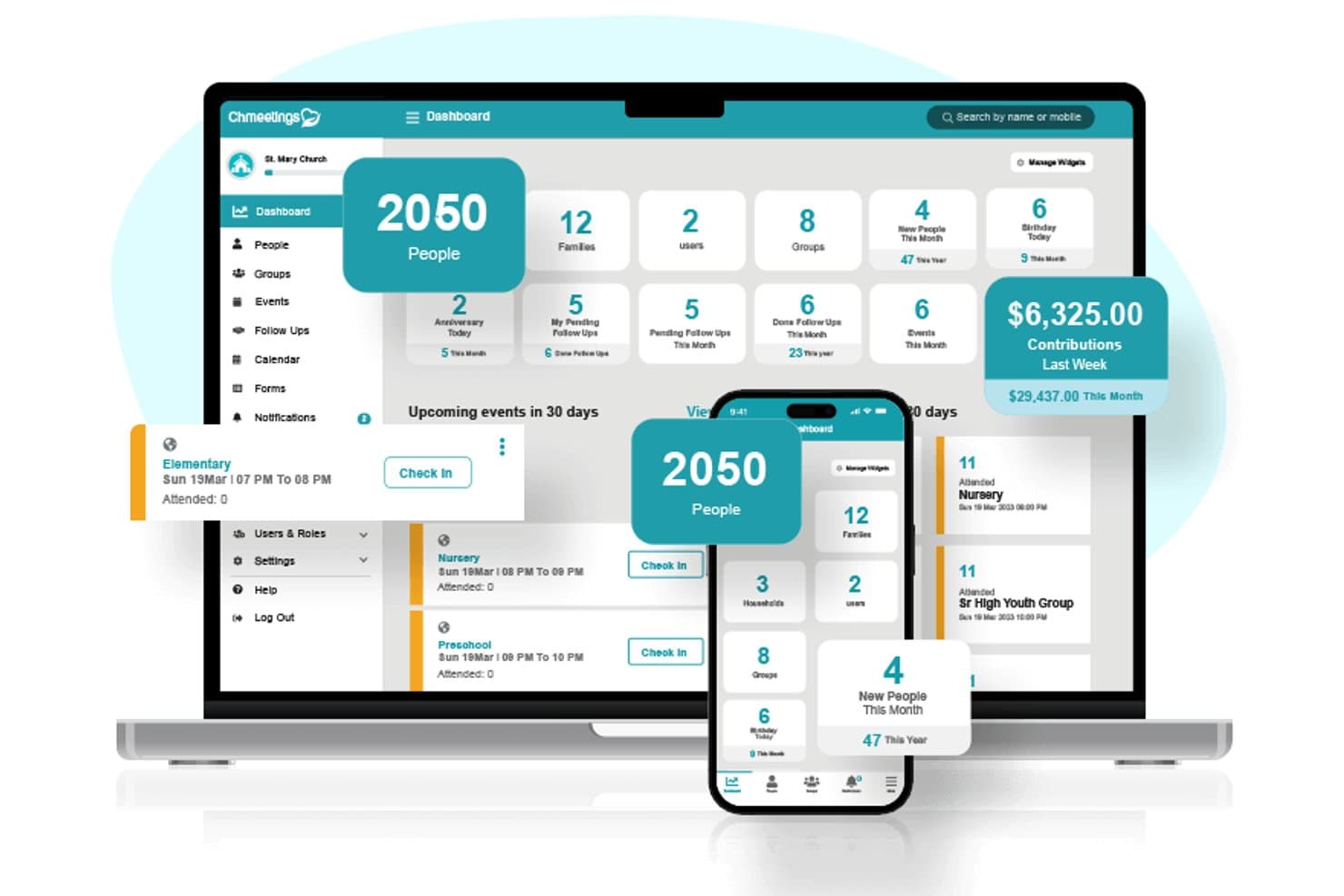
ChMeetings offre una dashboard di gestione per chiese tutto-in-uno che mostra il numero dei membri, le donazioni, gli eventi e i follow-up sia su dispositivi desktop che mobili. ChMeetings è una piattaforma di gestione per chiese che combina il monitoraggio dei membri, le donazioni online, la pianificazione dei volontari, la registrazione delle presenze e dei bambini, la comunicazione con la congregazione, la pianificazione del culto e la contabilità integrata in un unico sistema.
Per chi è più adatto ChMeetings?
ChMeetings è particolarmente adatto alle chiese di piccole e medie dimensioni che necessitano di una piattaforma di gestione completa senza i costi o la complessità di un software di livello enterprise.
Perché ho scelto ChMeetings
ChMeetings si è guadagnato un posto nella mia selezione perché cambiare piattaforma di gestione per chiese è notoriamente difficile, e la migrazione gratuita dei dati cambia completamente la situazione. L'ho scelto perché ChMeetings migra i dati delle persone, la cronologia delle donazioni, i gruppi, le presenze e i dati contabili da qualsiasi fonte, di solito entro 3-10 giorni lavorativi. Questo significa che la tua chiesa non perde anni di registrazioni delle donazioni o la cronologia dei membri durante il passaggio.
Funzionalità principali di ChMeetings
- Campi personalizzati e permessi basati sui ruoli: Personalizza i profili dei membri e controlla l'accesso degli utenti con campi configurabili e permessi dettagliati per responsabili, staff e volontari.
- Modulo di pianificazione del culto: Pianifica i servizi religiosi con librerie di brani, modelli di servizio e assegnazioni dei team in un'unica area integrata.
- Funzionalità contabili integrate: Tieni traccia delle finanze della chiesa, dei budget, delle riconciliazioni bancarie e genera report finanziari all'interno della stessa piattaforma.
- Supporto per diocesi e multi-campus: Gestisci più sedi, campus o raggruppamenti parrocchiali tramite una dashboard unificata.
Integrazioni di ChMeetings
ChMeetings offre integrazioni native con Stripe, PayPal e Twilio, Zapier, Mailchimp e altro ancora, e fornisce un'API per integrazioni personalizzate.
Pros and Cons
Pros:
- Migrazione dei dati e onboarding gratuiti inclusi
- Contabilità integrata che riduce la necessità di software separati
- Registrazione sicura dei bambini con etichette stampate
Cons:
- L'app mobile appare limitata rispetto ai concorrenti
- Gli strumenti di reportistica mancano di opzioni avanzate di personalizzazione
Learn more about ChMeetings: Ideale per un design facile da usare
- Piano gratuito disponibile
- Da $19/mese
Visit WebsiteCustomer Rating:4.8/5
Gracely semplifica la gestione di membri, eventi e contributi. Gracely è un software di gestione per chiese progettato per le realtà religiose che cercano un modo semplice e intuitivo per gestire membri, eventi, contributi e comunicazioni. Aiuta chiese di ogni dimensione a semplificare le attività amministrative mantenendo i membri coinvolti e informati.
Perché ho scelto Gracely: Gracely si distingue per la sua facilità d’uso, rendendolo accessibile a tutti i membri del team, inclusi i volontari che potrebbero non avere dimestichezza con la tecnologia. Offre un portale per i membri dove i fedeli possono aggiornare i profili, visualizzare la cronologia delle donazioni e rimanere connessi. La gestione di eventi e il monitoraggio delle offerte sono semplificati, riducendo il lavoro amministrativo e permettendo allo staff di concentrarsi sul ministero. Il suo design privilegia chiarezza e semplicità senza sacrificare le funzionalità essenziali di gestione parrocchiale.
Funzionalità e integrazioni eccezionali:
Funzionalità Gracely offre un portale personalizzato per i membri che consente ai fedeli di aggiornare i propri profili, iscriversi agli eventi e visualizzare lo storico delle donazioni. Gli strumenti di gestione finanziaria tengono traccia di contributi, entrate e spese, rendendo più semplici la pianificazione e la rendicontazione. Le funzionalità di gestione eventi aiutano a programmare attività, gestire le iscrizioni e comunicare in modo efficiente con i partecipanti.
Le integrazioni includono QuickBooks, Mailchimp, Google Calendar, Zoom, Stripe, PayPal, Planning Center, FellowshipOne, Rock RMS ed Elvanto.
Pros and Cons
Pros:
- Facile da usare per tutto lo staff
- Modifiche rapide ai dati
- Conveniente rispetto ai concorrenti
Cons:
- Funzionalità avanzate limitate
- Alcuni utenti potrebbero aver bisogno di una formazione iniziale
Learn more about Gracely: Ideale per la donazione online
- Prova gratuita di 30 giorni disponibile
- Da $72/mese
Visit WebsiteCustomer Rating:4.8/5
Tithely supporta la donazione online, le offerte e il coinvolgimento dei membri. Tithe.ly è una piattaforma di gestione per chiese che si rivolge a comunità di tutte le dimensioni, con una forte attenzione alla donazione online e alla gestione delle offerte. Aiuta le chiese a gestire i contributi, il coinvolgimento dei membri e la comunicazione in modo efficace.
Perché ho scelto Tithe.ly: È ideale per le donazioni online, offrendo strumenti come donazione da mobile e invio di offerte tramite SMS, che semplificano il processo di donazione. Puoi gestire le donazioni ricorrenti e monitorare i modelli di donazione per comprendere la generosità della tua congregazione. Tithe.ly offre anche un modulo di donazione personalizzabile da integrare nel sito web della chiesa. Il suo impegno nel rendere la donazione facile e accessibile la distingue da altre soluzioni di gestione delle chiese.
Funzionalità principali & integrazioni:
Funzionalità comprendono un'app per la chiesa che mantiene la comunità connessa e coinvolta. Lo strumento di gestione eventi consente di organizzare e promuovere le attività della chiesa in modo efficiente. Puoi anche utilizzare la funzione di contabilità per gestire le finanze e i bilanci della chiesa.
Integrazioni includono QuickBooks, Mailchimp, Planning Center, Elvanto, CCB, Breeze, Rock RMS, Pushpay, FellowshipOne e Google Calendar.
Pros and Cons
Pros:
- Configurazione semplice delle donazioni online
- Opzioni di donazione da mobile e tramite SMS
- Monitoraggio dettagliato delle donazioni
Cons:
- Capacità di reportistica limitate
- Occasionali malfunzionamenti dell'app
 Ideale per la gestione dei gruppi
- Prova gratuita di 30 giorni disponibile
- A partire da $37/mese
Visit WebsiteCustomer Rating:4.7/5
Churchteams aiuta a gestire gruppi, eventi e partecipazione dei membri in chiesa. Churchteams è una piattaforma di gestione e organizzazione per chiese progettata per aiutare a coordinare persone, gruppi, eventi e comunicazioni in un unico luogo. È pensata per le chiese che si affidano ai piccoli gruppi, ai volontari e agli eventi regolari e hanno bisogno di un modo semplice per restare organizzate senza dover usare più strumenti.
Perché ho scelto Churchteams: Churchteams eccelle nella gestione dell’aspetto relazionale della vita della chiesa. Rende facile organizzare i piccoli gruppi, monitorare la presenza e vedere chi è coinvolto—e chi potrebbe aver bisogno di essere ricontattato. Gli strumenti di comunicazione automatica aiutano i responsabili a informare velocemente i membri riguardo cambi di programma, eventi o passi successivi senza necessità di contatti manuali. Il suo sistema di check-in semplifica il tracciamento della partecipazione a servizi, programmi per bambini, corsi ed eventi, offrendo allo staff e ai responsabili una visione chiara del coinvolgimento.
Funzionalità e integrazioni principali:
Funzionalità comprendono la gestione di gruppi e volontari, i check-in di presenza, i flussi di lavoro automatizzati per i follow-up e una funzione di messaggistica che consente ai membri di interagire tramite SMS. Gli strumenti di pianificazione dei volontari aiutano ad assegnare ruoli e monitorare la partecipazione tra i vari ministeri.
Integrazioni includono QuickBooks, Mailchimp, Planning Center, Zoom, Google Calendar, WorshipPlanning, PayPal, Stripe, FellowshipOne e Rock RMS.
Pros and Cons
Pros:
- Strumenti efficaci per la comunicazione di gruppo
- Check-in di presenza semplici
- Funzioni di interazione via SMS con la chiesa
Cons:
- Il costo può aumentare con più componenti aggiuntivi o congregazioni più grandi
- Curva di apprendimento per volontari/nuovi utenti non familiari con il software parrocchiale
Learn more about Churchteams: Ideale per piccole chiese
- Prova gratuita di 30 giorni + demo gratuita disponibile
- Da $8/mese (fatturato annualmente)

ChurchTrac semplifica la gestione dei membri, degli eventi e delle donazioni. ChurchTrac è un software di gestione per chiese progettato per chiese di piccole e medie dimensioni. Si concentra sulla gestione dei membri, la pianificazione degli eventi e il monitoraggio delle finanze, offrendo strumenti essenziali per l'amministrazione della chiesa.
Perché ho scelto ChurchTrac: È ottimo per le piccole chiese grazie alla sua convenienza e al design intuitivo. ChurchTrac offre funzionalità come gli elenchi dei membri e le donazioni online, che sono una grande risorsa per le congregazioni più piccole. Il software include strumenti per la pianificazione del culto e attività amministrative automatizzate che semplificano le operazioni quotidiane. La sua accessibilità e l'assistenza completa lo rendono una scelta pratica per le chiese con risorse limitate.
Funzionalità e integrazioni principali:
Le funzionalità includono la gestione dei membri, che consente di tracciare e aggiornare facilmente le informazioni anagrafiche. Lo strumento di pianificazione degli eventi aiuta a coordinare le attività della chiesa, garantendo che tutto si svolga senza intoppi. Il monitoraggio delle finanze permette di gestire facilmente donazioni e budget.
Le integrazioni includono QuickBooks, Mailchimp, Zoom, Google Calendar, Stripe, PayPal, Planning Center, Rock RMS, FellowshipOne e Faithlife.
Pros and Cons
Pros:
- Conveniente per budget ridotti
- Include strumenti per la pianificazione del culto
- Accessibile anche a chi non ha competenze tecnologiche
Cons:
- Opzioni di personalizzazione limitate
- Potrebbe non avere funzionalità avanzate per chiese più grandi
Learn more about ChurchTrac: Ideale per la gestione degli eventi
- Piano gratuito + prova gratuita di 30 giorni disponibile
- Da $15/20 membri/mese

Planning Center gestisce servizi, volontari ed eventi della chiesa Planning Center è un software di gestione per chiese progettato per comunità di ogni dimensione, con particolare attenzione alla pianificazione e al coordinamento degli eventi. Aiuta i team a gestire i servizi, programmare i volontari e organizzare efficacemente le attività della chiesa.
Perché ho scelto Planning Center: È l'ideale per la gestione degli eventi, offrendo funzionalità come la pianificazione dei servizi e la programmazione dei volontari. Planning Center mette a disposizione strumenti per creare scalette dettagliate dei servizi e assegnare ruoli ai volontari, rendendo il coordinamento degli eventi semplice e impeccabile. La flessibilità del software consente di adattarlo a vari eventi parrocchiali, assicurando che tutto proceda senza intoppi. Il suo focus sulla pianificazione degli eventi aiuta il tuo team a rimanere organizzato ed efficiente.
Funzionalità principali e integrazioni:
Le funzionalità includono un'app mobile che permette di accedere agli strumenti di pianificazione ovunque. La funzione di check-in aiuta a gestire la presenza e garantisce la sicurezza dei bambini durante gli eventi. È possibile anche tracciare le donazioni e gestire le finanze della chiesa tramite il modulo per le offerte.
Le integrazioni includono Mailchimp, QuickBooks, Zoom, Google Calendar, Stripe, PayPal, ProPresenter, Rock RMS, Slack e WorshipPlanning.
Pros and Cons
Pros:
- Opzioni flessibili per la personalizzazione degli eventi
- Gestione dettagliata dei volontari
- App mobile accessibile
Cons:
- Potrebbe non essere così intuitivo per i principianti rispetto ad altri software
- Il prezzo modulare può crescere rapidamente
Learn more about Planning Center: Ideale per i registri dei membri
- Demo gratuita disponibile
- Da $73.32/mese (fatturato annualmente)

Servant Keeper aiuta a gestire i dati dei membri, la comunicazione e le donazioni. Servant Keeper è un software di gestione per chiese progettato per gestire in modo efficiente i registri dei membri e i dati della chiesa. È adatto a chiese di tutte le dimensioni, con un focus sulla gestione dei database, sulla comunicazione e sul monitoraggio delle donazioni.
Perché ho scelto Servant Keeper: È eccellente per la gestione dei registri dei membri, offrendo profili dettagliati e campi personalizzabili. Puoi monitorare la presenza, le donazioni e le informazioni personali, rendendo più facile servire la tua congregazione. Le funzionalità di reportistica del software forniscono approfondimenti sul coinvolgimento dei membri e sulle attività della chiesa. Il suo focus sulla gestione dettagliata dei dati aiuta a mantenere registri accurati e organizzati.
Caratteristiche e integrazioni principali:
Caratteristiche includono un sistema di monitoraggio delle donazioni facile da usare che semplifica la gestione finanziaria. Gli strumenti di comunicazione ti permettono di inviare email e SMS direttamente alla tua congregazione. Puoi anche personalizzare i report per adattarli alle esigenze specifiche della tua chiesa.
Le integrazioni includono QuickBooks, Mailchimp, Constant Contact, Vanco, PayPal, Google Calendar, Planning Center, Zoom, Slack e WorshipPlanning.
Pros and Cons
Pros:
- Profili dei membri dettagliati
- Campi del database personalizzabili
- Potenti funzionalità di comunicazione
Cons:
- Funzionalità moderne limitate rispetto ad altri software
- Meno adatto agli utenti Mac
Learn more about Servant Keeper: Ideale per l’accesso da dispositivi mobili
- Demo gratuita disponibile
- Da $6.000 (fatturati annualmente)

TouchPoint migliora il coinvolgimento, gli eventi e l’amministrazione delle chiese tramite dispositivi mobili. TouchPoint è un software di gestione parrocchiale pensato per le chiese che desiderano migliorare il coinvolgimento dei membri e l’efficienza amministrativa tramite l’accesso mobile. È adatto a chiese di tutte le dimensioni, offrendo strumenti per la comunicazione, la gestione degli eventi e il monitoraggio dei membri.
Perché ho scelto TouchPoint: Si distingue per l’accesso mobile, grazie a un’app mobile che consente di gestire le operazioni parrocchiali ovunque ci si trovi. Puoi comunicare con la congregazione e gestire gli eventi direttamente dallo smartphone. L’app permette di monitorare le presenze e interagire con i membri indipendentemente da dove sei. La sua attenzione alla funzionalità mobile ti consente di restare connesso ed efficiente anche fuori dall’ufficio.
Funzionalità e integrazioni principali:
Le funzionalità includono un solido sistema di reportistica che offre approfondimenti sul coinvolgimento dei membri e sulle attività della chiesa. Lo strumento di gestione dei volontari ti aiuta a organizzare e assegnare compiti in modo efficace. Puoi inoltre personalizzare i moduli per raccogliere informazioni da membri e visitatori.
Le integrazioni includono QuickBooks, Mailchimp, Vanco, Google Calendar, Zoom, Planning Center, FellowshipOne, Pushpay, Stripe e Constant Contact.
Pros and Cons
Pros:
- App mobile per gestire le attività della chiesa ovunque ti trovi
- Report e dashboard dettagliati per approfondimenti su coinvolgimento e presenze
- Gestione dei volontari per pianificazione, monitoraggio e assegnazione dei compiti
Cons:
- Personalizzare le email con immagini può risultare complicato e i layout non si adattano sempre automaticamente
- Curva di apprendimento significativa e formazione necessaria per padroneggiare tutte le funzionalità
Learn more about TouchPoint Software: Ideale per grandi congregazioni
- Demo gratuita disponibile
- Prezzo su richiesta

FellowshipOne supporta le grandi chiese con strumenti amministrativi e di coinvolgimento. FellowshipOne è un software di gestione parrocchiale progettato per supportare grandi congregazioni offrendo strumenti per l'amministrazione, la comunicazione e il coinvolgimento dei membri. Aiuta le chiese a gestire le proprie operazioni in modo efficiente grazie a funzionalità pensate per grandi comunità ecclesiastiche.
Perché ho scelto FellowshipOne: È particolarmente adatto alle grandi congregazioni, offrendo soluzioni scalabili che accompagnano la crescita e la complessità. Puoi gestire grandi elenchi di membri e monitorare facilmente la partecipazione. Gli strumenti di reportistica del software forniscono informazioni sulle attività della chiesa e sulla partecipazione dei membri. La sua attenzione alla scalabilità e alla gestione olistica lo rende ideale per ambienti ecclesiastici di grandi dimensioni.
Funzionalità principali & integrazioni:
Le funzionalità includono un sistema di gestione degli eventi che ti aiuta a organizzare e programmare facilmente le attività della chiesa. Il modulo di comunicazione consente di inviare messaggi mirati ai membri della congregazione. Puoi anche utilizzare la funzione di gestione dei volontari per coordinare e assegnare i compiti in modo efficiente.
Le integrazioni includono QuickBooks, Mailchimp, Planning Center, Vanco, Rock RMS, Pushpay, Church Community Builder, Zoom, Google Calendar ed Elvanto.
Pros and Cons
Pros:
- Scalabile per grandi congregazioni
- Gestione efficace dei volontari
- Potenti strumenti di programmazione eventi
Cons:
- Può risultare troppo complesso per gli amministratori parrocchiali
- Un aggiornamento dell'interfaccia utente sarebbe gradito
Learn more about FellowshipOne: Ideale per funzionalità contabili
- Prova gratuita + demo gratuita disponibili
- A partire da $19/mese

Church Windows gestisce le finanze, le donazioni e i membri della chiesa. Church Windows è un software di gestione per chiese pensato principalmente per chiese che necessitano di strumenti focalizzati sulla gestione finanziaria e dei membri. Offre funzionalità per la contabilità, la gestione delle donazioni e il monitoraggio dei membri, adattandosi a chiese di diverse dimensioni.
Perché ho scelto Church Windows: È particolarmente utile per le funzionalità contabili, fornendo strumenti dettagliati per la gestione finanziaria. Si può gestire il libro paga, monitorare le spese e amministrare le donazioni in modo efficiente. Le funzionalità di reporting del software offrono una panoramica sulla salute finanziaria e sui contributi dei membri. Il suo focus sulla gestione finanziaria lo rende una scelta ideale per le chiese che hanno bisogno di solide capacità contabili.
Funzionalità e integrazioni principali:
Funzionalità includono un modulo per la gestione dei membri che aiuta a monitorare e aggiornare i registri dei membri. Il software offre anche strumenti per la programmazione di eventi, facilitando l'organizzazione delle attività della chiesa. Si possono generare report dettagliati per analizzare diversi aspetti delle operazioni della chiesa.
Integrazioni includono QuickBooks, Vanco, PayPal, Stripe, Mailchimp, Planning Center, Constant Contact, Zoom, Google Calendar e WorshipPlanning.
Pros and Cons
Pros:
- Potenti strumenti di gestione finanziaria
- Elaborazione dettagliata delle buste paga
- Monitoraggio flessibile delle donazioni
Cons:
- La tariffazione modulare può aumentare i costi
- Soluzione principalmente desktop (Windows)
Learn more about Church Windows:
Altri software per la gestione delle chiese
Ecco alcune opzioni aggiuntive di software per la gestione delle chiese che non sono entrate nella mia selezione, ma che vale comunque la pena prendere in considerazione:
- 11One Church SoftwareIdeale per la programmazione dei volontari
- 12Join ItIdeale per il monitoraggio delle iscrizioni
- 13AplosIdeale per la contabilità dei fondi
- 14ElvantoIdeale per la pianificazione dei servizi
Come valuto i software per l'organizzazione della chiesa
Divido la mia valutazione in criteri di base, come i database dei membri, le donazioni online e il check-in dei bambini, e nei fattori distintivi che separano gli strumenti migliori dal resto.
Funzionalità fondamentali (requisiti essenziali per questo elenco)
Quando seleziono gli strumenti per il mio elenco, assegno a ciascuno un punteggio su una scala da 0 (non offre la funzionalità) a 5 (eccelle in quest'area) per ogni funzionalità fondamentale elencata di seguito. Poi converto il punteggio totale dello strumento in una percentuale. Ogni strumento deve raggiungere un punteggio totale minimo del 65% per essere preso in considerazione.
- Database dei membri e dei nuclei familiari: cerco profili dettagliati dei membri che colleghino le famiglie in nuclei familiari, tengano traccia di eventi importanti come i battesimi e conservino note sull'assistenza pastorale.
- Donazioni online e monitoraggio dei contributi: ogni strumento dovrebbe supportare le decime ricorrenti, le campagne di impegno di donazione e gli estratti conto automatici dei contributi di fine anno per i donatori.
- Gruppi e gestione dei volontari: valuto come ogni piattaforma gestisce gli elenchi dei piccoli gruppi, la programmazione dei team di servizio e l'assegnazione dei ruoli ai volontari con promemoria per i turni.
- Presenze e check-in dei bambini: il check-in sicuro dei bambini, con badge nominativi stampati e avvisi relativi alle allergie, è importante tanto quanto il monitoraggio del numero di partecipanti al culto domenicale settimana dopo settimana.
- Strumenti di comunicazione con la comunità: verifico se la piattaforma consente di inviare e-mail, messaggi di testo o notifiche push mirate a gruppi specifici, come i genitori dei giovani o i membri del team di culto.
- Pianificazione di eventi e servizi: dalla registrazione alla VBS alla programmazione settimanale del team di culto, osservo come ogni strumento gestisce le iscrizioni agli eventi, i calendari e la pianificazione della scaletta operativa del servizio.
Una volta ottenuto un elenco di strumenti che soddisfano questi criteri, valuto ciò che distingue ogni piattaforma.
Fattori distintivi (ciò che differenzia i fornitori)
Ecco come confronto i diversi fornitori:
Funzionalità di spicco
L'automazione dei flussi di lavoro è un importante fattore distintivo. Valuto se una piattaforma può attivare una sequenza di ricontatto quando un ospite alla sua prima visita compila una scheda di contatto o quando un nuovo membro completa un corso. È importante anche un'app mobile personalizzata per la chiesa, poiché offre ai membri un unico luogo per sermoni, donazioni e iscrizioni ai gruppi senza dover ricorrere a uno strumento di terze parti. Per le chiese con più sedi, valuto quanto bene ogni fornitore segmenti i dati, i report e i programmi dei volontari tra le diverse sedi.
Oltre le funzionalità
Valuto attentamente la trasparenza dei prezzi, poiché molte chiese operano con budget limitati e devono sapere esattamente quanto pagano per membro o per transazione relativa alle donazioni. Considero anche quanto ogni strumento sia adatto agli utenti non tecnici: i coordinatori dei volontari e i membri più anziani della comunità spesso gestiscono il check-in o gli aggiornamenti dei gruppi, quindi sono importanti le autorizzazioni basate sui ruoli e le interfacce semplici. Il supporto alle integrazioni è un altro fattore fondamentale, soprattutto per i collegamenti con strumenti come QuickBooks, ProPresenter o Mailchimp, dai quali le chiese già dipendono.
Come scegliere il software per la gestione delle chiese
È facile perdersi in lunghi elenchi di funzionalità e strutture di prezzo complesse. Per aiutarti a rimanere concentrato mentre affronti il tuo processo di selezione del software, ecco un elenco di fattori da tenere presenti:
| Fattore | Cosa considerare |
|---|---|
| FattoreScalabilità | Cosa considerareIl software può crescere insieme alla tua chiesa? Considera le esigenze future e l'espansione. Se la tua congregazione raddoppiasse, il software sarebbe in grado di gestire l'aumento dei dati e delle attività? |
| FattoreIntegrazioni | Cosa considerareFunziona con i sistemi che già utilizzi? Verifica la compatibilità con gli strumenti che usi già, come il software di contabilità o le piattaforme di comunicazione. |
| FattorePersonalizzazione | Cosa considerarePuoi adattare il software ai tuoi flussi di lavoro? Cerca opzioni per modificare impostazioni, campi e report in base ai processi specifici della tua chiesa. |
| FattoreFacilità d'uso | Cosa considerareIl tuo team lo troverà facile da usare? Valuta l'interfaccia in termini di intuitività e semplicità, per garantire una rapida adozione da parte del personale e dei volontari. |
| FattoreImplementazione e avvio | Cosa considerareQuanto sarà fluida la transizione? Considera il tempo e le risorse necessari per la configurazione, la formazione e il supporto durante la fase iniziale. |
| FattoreCosto | Cosa considerareIl prezzo è chiaro e rientra nel budget? Confronta i costi con le funzionalità incluse e fai attenzione a eventuali commissioni nascoste o costi aggiuntivi per moduli supplementari. |
| FattoreMisure di sicurezza | Cosa considerareIn che modo protegge i tuoi dati? Esamina la crittografia dei dati, i controlli degli accessi degli utenti e le informative sulla privacy per assicurarti che le informazioni della tua congregazione siano al sicuro. |
| FattoreDisponibilità dell'assistenza | Cosa considerareQuali opzioni di assistenza sono disponibili? Verifica la presenza di assistenza 24 ore su 24, 7 giorni su 7, chat dal vivo o supporto telefonico per risolvere rapidamente i problemi quando si presentano. |
Che cos'è il software per l'organizzazione della chiesa?
Il software per l'organizzazione della chiesa è uno strumento progettato per aiutare le chiese a gestire in modo efficiente le attività amministrative e comunitarie. I responsabili della chiesa, gli amministratori e i volontari utilizzano generalmente questi strumenti per migliorare la comunicazione, la pianificazione degli eventi e la gestione delle risorse. Le funzionalità per la gestione dei membri, il monitoraggio delle donazioni e la programmazione degli eventi aiutano a organizzare le attività della chiesa e a rafforzare il coinvolgimento della comunità. Nel complesso, questi strumenti semplificano le attività di gestione e sostengono la crescita e il senso di connessione delle comunità ecclesiali.
Funzionalità del software per l'organizzazione della chiesa
Quando scegli un software per l'organizzazione della chiesa, presta attenzione alle seguenti funzionalità principali:
- Gestione dei membri: monitora e organizza i dati dei membri della chiesa in un sistema centralizzato di gestione della chiesa, contribuendo a mantenere registri accurati e a sostenere il coinvolgimento continuo.
- Monitoraggio delle donazioni: registra le offerte finanziarie, comprese le donazioni con carta di credito e le donazioni tramite messaggio, semplificando la gestione della contabilità della chiesa e delle attività dei donatori.
- Programmazione degli eventi: supporta la pianificazione e il coordinamento dei servizi e degli eventi, con strumenti integrati per la registrazione agli eventi che migliorano la partecipazione e la comunicazione.
- Gestione dei volontari: organizza i ruoli, i programmi e la partecipazione dei volontari, aiutando le chiese ad assegnare le responsabilità e a mantenere il coordinamento.
- Strumenti di comunicazione: invia e-mail, messaggi di testo e notifiche per mantenere i membri della chiesa informati e connessi all'interno della comunità.
- Accesso da dispositivi mobili: offre un accesso basato sul cloud al CHMS dai dispositivi mobili, consentendo al personale e ai responsabili di gestire le attività della chiesa da qualsiasi luogo.
- Report personalizzabili: genera report finanziari e dati sul coinvolgimento che aiutano le chiese a comprendere la partecipazione, le tendenze delle offerte e i livelli di attività.
- Misure di sicurezza: protegge i dati sensibili della chiesa con crittografia e controlli degli accessi, favorendo la gestione sicura delle informazioni sui membri e dei dati finanziari.
- Integrazioni: si collega a strumenti come gli elenchi della chiesa, i sistemi di registrazione dei bambini e i controlli dei precedenti, creando un sistema completo di gestione della chiesa.
Vantaggi del software per l'organizzazione della chiesa
L'implementazione di un software per l'organizzazione della chiesa offre numerosi vantaggi al tuo team e alla tua attività. Eccone alcuni di cui potrai beneficiare:
- Comunicazione migliorata: mantiene la congregazione informata tramite e-mail e messaggi di testo, favorendo un maggiore coinvolgimento e una migliore connessione all'interno della comunità.
- Gestione efficiente degli eventi: semplifica la pianificazione e il coordinamento delle attività della chiesa, assicurando che gli eventi si svolgano senza intoppi e registrino una buona partecipazione.
- Coordinamento dei volontari ottimizzato: organizza i programmi e le attività dei volontari, rendendo più semplice gestire la partecipazione e i ruoli all'interno della chiesa.
- Monitoraggio finanziario accurato: controlla le donazioni e le spese, aiutandoti a mantenere registri finanziari chiari e organizzati.
- Maggiore accessibilità: offre l'accesso da dispositivi mobili agli strumenti di gestione della chiesa, consentendoti di gestire le attività in qualsiasi momento e luogo.
- Sicurezza dei dati: protegge le informazioni sensibili sui membri e sui dati finanziari con misure di sicurezza, assicurando che i dati della tua chiesa rimangano privati e protetti.
Costi e prezzi del software per l'organizzazione della chiesa
La scelta di un software per l'organizzazione della chiesa richiede la comprensione dei diversi modelli e piani tariffari disponibili. I costi variano in base alle funzionalità, alle dimensioni del team, agli strumenti aggiuntivi e ad altri fattori. La tabella seguente riassume i piani più comuni, i relativi prezzi medi e le funzionalità generalmente incluse nelle soluzioni software per l'organizzazione della chiesa:
Tabella comparativa dei piani per il software di organizzazione della chiesa
| Tipo di piano | Prezzo medio | Funzionalità comuni |
|---|---|---|
| Tipo di pianoPiano gratuito | Prezzo medio$0 | Funzionalità comuniStrumenti di base per programmare eventi, gestire piccoli gruppi e semplificare la comunicazione interna di base. Ideale per singoli individui, chiese di nuova fondazione o congregazioni molto piccole che organizzano le attività principali. |
| Tipo di pianoPiano per piccole chiese | Prezzo medio$5-$25/utente/mese | Funzionalità comuniProgrammazione ampliata, coordinamento dei volontari, monitoraggio di base delle presenze e strumenti di comunicazione standard. Progettato per piccole chiese che desiderano formalizzare le operazioni interne e la gestione dei volontari. |
| Tipo di pianoChiese di medie dimensioni | Prezzo medio$30-$75/utente/mese | Funzionalità comuniProgrammazione e flussi di lavoro avanzati, accesso mobile per il personale e i volontari, dashboard per i report e comunicazione migliorata tra i ministeri. Ideale per chiese di medie dimensioni che coordinano più team, programmi e attività ricorrenti. |
| Tipo di pianoChiese grandi | Prezzo medio$80-$150/utente/mese | Funzionalità comuniGestione di più campus, autorizzazioni avanzate e controlli di sicurezza, integrazioni di sistema, automazione su larga scala e assistenza prioritaria. Progettato per chiese grandi con strutture organizzative complesse e un elevato volume operativo. |
Domande frequenti sul software per l'organizzazione della chiesa
Ecco alcune risposte alle domande comuni sul software per l’organizzazione della chiesa:
Come dovremmo migrare i registri storici della chiesa?
Prima di migrare i registri storici, inizia verificando i database, i fogli di calcolo e i documenti cartacei esistenti, così saprai esattamente cosa trasferire. Elimina innanzitutto i duplicati evidenti, le voci obsolete e i formati incoerenti. Successivamente, esegui una piccola importazione di prova nel nuovo sistema per convalidare la mappatura dei campi e le autorizzazioni. Infine, programma la migrazione completa durante un periodo di scarsa attività, predisponendo backup chiari e piani di ripristino nel caso qualcosa vada storto. Documenta le decisioni per gli amministratori.
In che modo la tecnologia può supportare il ministero di una chiesa con più campus?
Le chiese con più campus traggono vantaggio da database condivisi che rispettano comunque il contesto locale. Cerca software che supporti campus o servizi separati come entità distinte, riunendo però presenze, donazioni e gruppi in dashboard centralizzate. Autorizzazioni solide consentono ai leader locali di gestire le proprie persone e i propri eventi senza visualizzare ogni elemento dell’intero sistema. Gli strumenti di comunicazione unificati aiutano inoltre a inviare messaggi specifici per campus, mantenendo al contempo un branding e standard di reportistica coerenti in tutta la rete della chiesa.
Come possono le chiese formare i volontari sull'uso di un nuovo software?
Inizia definendo quali attività i volontari devono effettivamente svolgere nel software, quindi progetta una formazione basata sui ruoli e incentrata su quei flussi di lavoro, invece di illustrare ogni funzionalità. Sessioni brevi e pratiche con scenari reali della chiesa sono generalmente più efficaci di lunghe presentazioni. Fornisci schede riassuntive semplici e brevi video che i volontari possano consultare nuovamente in seguito. Infine, nomina alcuni referenti esperti di tecnologia che possano rispondere alle domande la domenica e rafforzare le buone pratiche per diverse settimane, man mano che i volontari acquistano sicurezza.
In che modo il software gestisce la riservatezza pastorale?
La riservatezza pastorale dipende sia dalla progettazione del software sia dalle politiche interne. Scegli sistemi che supportino l’accesso basato sui ruoli, la crittografia dei dati inattivi e accessi sicuri come l’autenticazione a più fattori. Limita le note pastorali sensibili a campi e utenti specifici, evitando di archiviarle casualmente nei commenti generali. Stabilisci linee guida chiare su ciò che deve essere inserito nel sistema rispetto alle conversazioni private e verifica periodicamente i registri degli accessi, così da individuare tempestivamente eventuali visualizzazioni o esportazioni inappropriate di informazioni riservate.