

Il software di gestione dei consigli direttivi per organizzazioni non profit è una piattaforma digitale che aiuta il consiglio direttivo a organizzare le riunioni, condividere documenti e gestire le attività di governance in un unico luogo. Se stai cercando modi per mantenere il tuo consiglio direttivo connesso, informato e concentrato sulla propria missione, soprattutto con tempo e risorse limitati, trovare il software giusto è essenziale.
Questo elenco ti aiuterà a confrontare le principali opzioni, così potrai scegliere la soluzione per il consiglio direttivo più adatta alle esigenze della tua organizzazione, che sostenga la tua leadership e rafforzi l'impatto del tuo ministero.
Perché fidarsi dei nostri consigli sui software
6,700+
Reviews
20
Industry experts
16+
Evaluation factors
14
Years
Il nostro team testa e recensisce software dal 2012. In quanto leader ecclesiastici noi stessi, sappiamo quanto sia difficile — e importante — scegliere il software giusto.
Per questa guida, abbiamo valutato gli strumenti attraverso test pratici e ricerche indipendenti, assegnando un punteggio agli strumenti in base ai nostri criteri di selezione.
Le nostre recensioni riflettono il nostro giudizio editoriale umano, non un discorso di vendita.
Tabella comparativa: software di gestione dei consigli direttivi per organizzazioni non profit
Questa tabella comparativa riassume i dettagli dei prezzi delle mie migliori selezioni di software di gestione dei consigli direttivi per organizzazioni non profit.
| Tool | Best For | Trial Info | Price | ||
|---|---|---|---|---|---|
| 1 | Ideale per strumenti di collaborazione in tempo reale | Prova gratuita + demo gratuita disponibile | Prezzi su richiesta | Website | |
| 2 | Ideale per la condivisione centralizzata dei documenti | Prova gratuita di 14 giorni disponibile | Da $20,99/utente/mese (fatturazione annuale) | Website | |
| 3 | Ideale per reportistica con analisi avanzate | Demo gratuita disponibile | Prezzo su richiesta | Website | |
| 4 | Migliore per la creazione di ordine del giorno e verbali con l’ausilio dell’IA | Demo gratuita disponibile | Prezzo su richiesta | Website | |
| 5 | Ideale per riunioni virtuali sicure | Prova gratuita disponibile | Prezzo su richiesta | Website | |
| 6 | Ideale per flussi di lavoro automatizzati delle riunioni | Prova gratuita di 30 giorni + demo gratuita disponibile | A partire da $165/consiglio/mese | Website | |
| 7 | Ideale per un supporto clienti dedicato | Prova gratuita disponibile | Prezzo su richiesta | Website | |
| 8 | Ideale per esigenze di governance globale | Demo gratuita disponibile | Prezzo su richiesta | Website | |
| 9 | Ideale per interfaccia utente intuitiva | Demo gratuita disponibile | Da $49/mese | Website | |
| 10 | La migliore con accesso illimitato per gli utenti | Prova gratuita di 30 giorni + demo gratuita disponibile | Da $9.99/utente/mese | Website |


Recensioni dei migliori software di gestione dei consigli direttivi per organizzazioni non profit
Di seguito trovi i miei riepiloghi dettagliati dei software di gestione dei consigli direttivi per organizzazioni non profit inclusi nel mio elenco ristretto. Le mie recensioni offrono uno sguardo approfondito sulle funzionalità, sui casi d’uso migliori e sui prezzi di ciascuna piattaforma, per aiutarti a trovare quella più adatta alla tua organizzazione.
 Ideale per strumenti di collaborazione in tempo reale
- Prova gratuita + demo gratuita disponibile
- Prezzi su richiesta
Visit WebsiteCustomer Rating:4.7/5
OnBoard aiuta i consigli a prepararsi, riunirsi e collaborare in un unico spazio di lavoro ordinato. OnBoard si distingue per le organizzazioni non profit che desiderano migliorare la collaborazione in tempo reale durante le riunioni del consiglio e la revisione dei documenti. La piattaforma è progettata per organizzazioni che devono mantenere i membri del consiglio coinvolti e collaborativi, sia che si trovino nella stessa stanza sia che lavorino da remoto. Gli strumenti di annotazione dal vivo e discussione di OnBoard aiutano i team a prendere decisioni rapidamente e a mantenere tutti aggiornati.
Perché ho scelto OnBoard
Ciò che mi ha colpito di OnBoard è la sua attenzione agli strumenti di collaborazione in tempo reale che aiutano i consigli non profit a lavorare insieme in modo più efficiente. La piattaforma offre annotazione di documenti dal vivo, così i membri del consiglio possono contrassegnare agende e report insieme durante le riunioni. Apprezzo i thread di discussione integrati, che consentono agli utenti di commentare e porre domande direttamente sui documenti senza cambiare piattaforma. Queste funzionalità rendono OnBoard una scelta valida per le organizzazioni non profit che vogliono mantenere alto il coinvolgimento del consiglio e la trasparenza nelle decisioni.
Funzionalità principali di OnBoard
Altre funzionalità di OnBoard che le organizzazioni non profit possono trovare utili includono:
- Board Book Builder: consente di raccogliere i materiali della riunione in un unico, organizzato board book digitale.
- Firme elettroniche (eSignatures): permette ai membri del consiglio di firmare documenti in modo sicuro all'interno della piattaforma.
- Permessi granulari: consente di controllare l'accesso a documenti sensibili e materiali di riunione per diversi utenti.
- Analisi delle riunioni: fornisce approfondimenti sull'engagement dei membri del consiglio e sulla partecipazione alle riunioni tramite strumenti di analisi integrati.
Integrazioni di OnBoard
Le integrazioni includono Microsoft 365, Docusign, Zoom, Microsoft Teams e Google Workspace.
Pros and Cons
Pros:
- Permessi granulari per materiali sensibili
- Analytics delle riunioni per monitorare il coinvolgimento del consiglio
- Board book builder per una preparazione organizzata delle riunioni
Cons:
- Ritardi occasionali nella sincronizzazione con il calendario
- I prezzi non sono trasparenti sul sito web
Learn more about OnBoard: Ideale per la condivisione centralizzata dei documenti
- Prova gratuita di 14 giorni disponibile
- Da $20,99/utente/mese (fatturazione annuale)
Visit WebsiteCustomer Rating:4.8/5
Boardable mantiene allineato un piccolo consiglio direttivo di una non profit con ordini del giorno e compiti. Se la tua organizzazione non profit ha bisogno di un luogo centrale per organizzare documenti e comunicazioni del consiglio, Boardable merita una considerazione. Questa piattaforma è progettata per le organizzazioni che desiderano mantenere ordini del giorno, verbali e file accessibili ai membri del consiglio in un unico hub sicuro. Boardable aiuta a semplificare la condivisione dei documenti e la preparazione delle riunioni, soprattutto per team che gestiscono più incontri di commissione o partecipanti a distanza.
Perché ho scelto Boardable
Ho scelto Boardable perché offre una soluzione specifica per le organizzazioni non profit che necessitano di una condivisione centralizzata dei documenti. La piattaforma consente di archiviare, organizzare e distribuire pacchetti del consiglio, ordini del giorno e verbali in un archivio sicuro e ricercabile. Apprezzo come il centro documenti di Boardable permetta ai membri del consiglio di accedere ai file più recenti da qualsiasi dispositivo, riducendo confusione su allegati email o versioni obsolete. I controlli di autorizzazione permettono inoltre di gestire chi può visualizzare o modificare informazioni sensibili, aspetto particolarmente importante per i consigli non profit che gestiscono dati riservati.
Caratteristiche principali di Boardable
Altre funzionalità che potrebbero risultare utili alle organizzazioni non profit includono:
- Pianificatore di riunioni: permette di coordinare gli orari delle riunioni sondando i membri del consiglio e trovando automaticamente la soluzione migliore.
- Firme elettroniche: consente ai membri del consiglio di firmare documenti in modo sicuro all'interno della piattaforma, riducendo i ritardi dovuti alla burocrazia cartacea.
- Gestione dei compiti: assegna compiti e azioni a individui o commissioni e ne traccia il progresso tra una riunione e l'altra.
- Votazioni e sondaggi: consente votazioni sicure all'interno della piattaforma su mozioni o decisioni, con risultati archiviati per future consultazioni.
Integrazioni Boardable
Le integrazioni includono Zoom, Microsoft Teams, Google Drive, Microsoft OneDrive, Google Calendar, Outlook e altri.
Pros and Cons
Pros:
- Firma elettronica integrata per approvazioni del consiglio
- Funzionalità di votazione e sondaggi integrati
- Pianifica riunioni con integrazione ai calendari
Cons:
- Personalizzazione limitata per i modelli di ordine del giorno
- Nessuna funzione integrata per fundraising o gestione donatori
Learn more about Boardable: Ideale per reportistica con analisi avanzate
- Demo gratuita disponibile
- Prezzo su richiesta

Diligent supporta una governance complessa con sicurezza, analisi e tracciabilità degli audit. I leader del settore nonprofit che desiderano approfondire le prestazioni del consiglio e le tendenze di governance potrebbero trovare particolarmente utile Diligent. Questa piattaforma si distingue per i suoi strumenti avanzati di analisi e reportistica, che aiutano i consigli a monitorare il coinvolgimento, la conformità e le modalità decisionali. Diligent è adatto alle organizzazioni che hanno bisogno di trasformare i dati del consiglio in informazioni utili per una migliore supervisione e trasparenza.
Perché ho scelto Diligent
Per i consigli nonprofit che desiderano andare oltre la semplice reportistica, Diligent offre analisi avanzate che aiutano i responsabili a prendere decisioni basate sui dati. La piattaforma fornisce dashboard personalizzabili e strumenti di reportistica dettagliata, così da consentire il monitoraggio del coinvolgimento del consiglio, delle presenze e delle modalità di voto nel tempo. Ho scelto Diligent perché le sue funzionalità analitiche permettono di visualizzare tendenze e individuare aree di miglioramento nella governance e nella conformità. Queste capacità sono particolarmente preziose per le organizzazioni che devono dimostrare responsabilità e trasparenza agli stakeholder.
Caratteristiche principali di Diligent
Altre funzionalità che rendono Diligent utile per i consigli nonprofit includono:
- Condivisione sicura dei documenti: consente di caricare, organizzare e distribuire documenti e altri materiali del consiglio con controlli di accesso dettagliati.
- Costruttore di ordini del giorno delle riunioni: permette di creare, modificare e condividere gli ordini del giorno direttamente sulla piattaforma.
- Raccolta di firme elettroniche: consente ai membri del consiglio di firmare documenti in formato elettronico per approvazioni più rapide.
- Accesso tramite app mobile: offre un'app mobile dedicata così i membri del consiglio possono consultare materiali e partecipare da qualsiasi luogo.
Integrazioni di Diligent
Le integrazioni non sono pubblicamente disponibili.
Pros and Cons
Pros:
- Analisi avanzate per il monitoraggio del coinvolgimento del consiglio
- Dashboard personalizzabili per la reportistica sulla governance
- Accesso offline per annotazioni sui documenti
Cons:
- Navigazione complessa tra i documenti
- La configurazione amministrativa richiede assistenza dal fornitore
Learn more about Diligent: Migliore per la creazione di ordine del giorno e verbali con l’ausilio dell’IA
- Demo gratuita disponibile
- Prezzo su richiesta
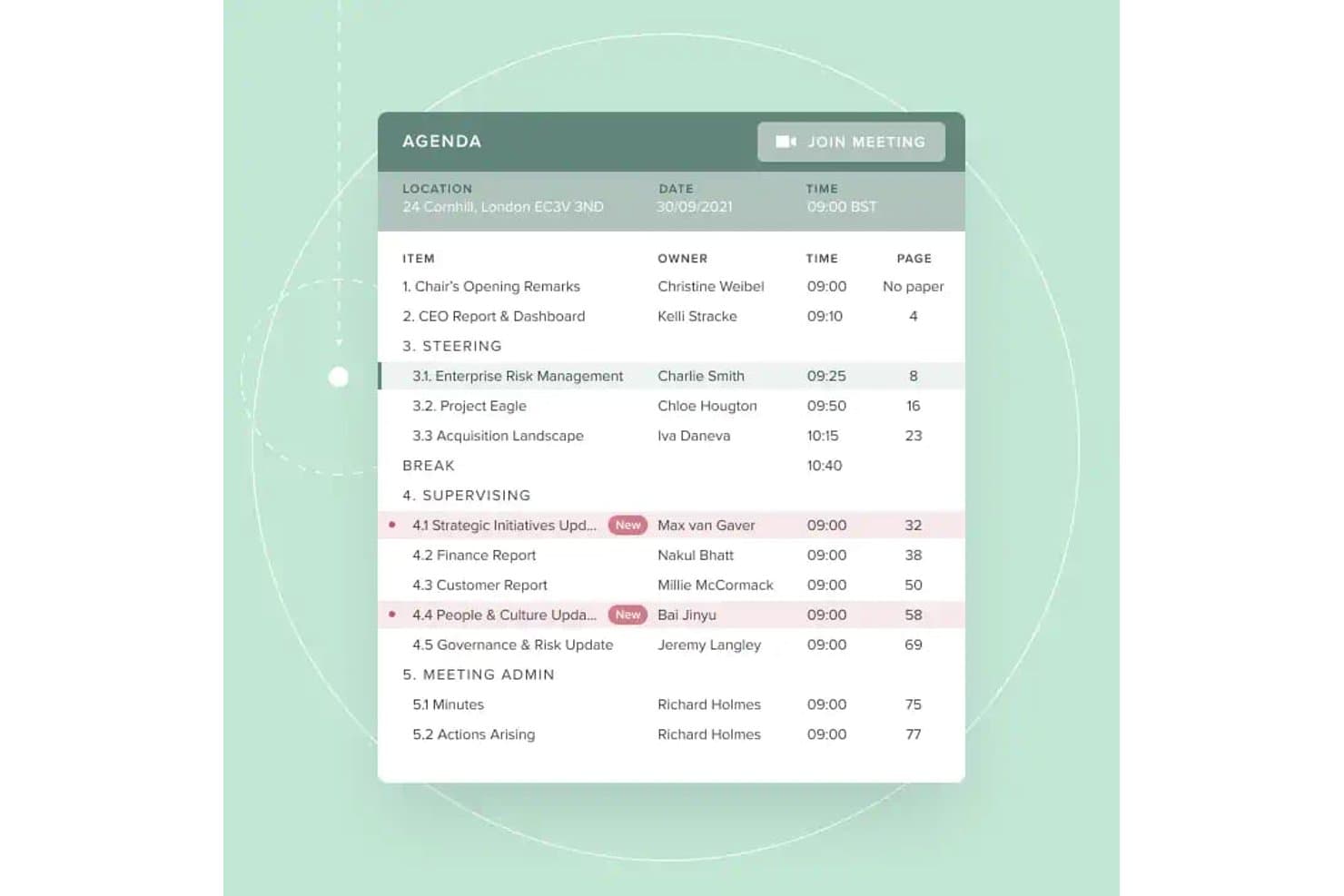
Board Intelligence offre una visualizzazione strutturata dell'ordine del giorno digitale con responsabili dei punti, orari, riferimenti di pagina e un pulsante diretto 'Partecipa alla riunione' per semplificare gli incontri del consiglio. Board Intelligence è una piattaforma per la gestione del consiglio di amministrazione che copre la pianificazione dell'ordine del giorno, la creazione del board pack, la redazione dei verbali assistita dall'IA, la distribuzione sicura dei documenti e l'analisi delle performance del consiglio durante tutto il ciclo di governance.
Per chi è consigliato Board Intelligence?
È particolarmente indicato per i team di governance e i segretari aziendali di organizzazioni nonprofit di medie e grandi dimensioni che gestiscono più consigli o comitati con cicli di reportistica complessi.
Perché ho scelto Board Intelligence
Board Intelligence si è guadagnato il suo posto nella mia lista perché i suoi strumenti per l'ordine del giorno e i verbali guidati dall'IA riducono realmente il carico amministrativo dei team di governance. Apprezzo molto come Minute Writer AI trasformi le trascrizioni delle riunioni in bozze di verbali ben strutturati, mentre Agenda Planner collega ogni punto all’ordine del giorno direttamente alle priorità strategiche dell'organizzazione. In pratica, il mio team può produrre un board pack completo e strutturato senza doverlo ricostruire da zero a ogni ciclo di riunione.
Funzionalità principali di Board Intelligence
- Portale del consiglio: Distribuisce in modo sicuro i board pack digitali e offre agli utenti accesso immediato da qualsiasi dispositivo.
- Report writer AI: Genera report chiari e pronti per il consiglio a partire da appunti o documenti direttamente da Microsoft 365.
- Action tracker: Rileva le azioni decise dal consiglio e ne monitora lo stato di avanzamento tra una riunione e l’altra per garantire la piena responsabilità.
- Single sign-on: Permette agli utenti di accedere utilizzando le credenziali aziendali esistenti semplificando l’accesso sicuro.
Integrazioni di Board Intelligence
Board Intelligence si integra nativamente con Microsoft 365, inclusa l’integrazione con Microsoft Word attraverso il componente aggiuntivo Report Writer AI. Può inviare inviti a calendario a Outlook e alle principali piattaforme di calendario.
Pros and Cons
Pros:
- Stesura automatica di ordini del giorno e verbali con l’IA
- Supporta controlli granulari dei permessi sui documenti
- Workflows solidi per la governance di consigli nonprofit
Cons:
- Manca un'app mobile nativa per i membri del consiglio
- Può risultare complesso per i nuovi utenti
Learn more about Board Intelligence: Ideale per riunioni virtuali sicure
- Prova gratuita disponibile
- Prezzo su richiesta

Ideals Board supporta consigli direttivi globali con accesso sicuro e strumenti multilingue. Se la tua organizzazione no-profit deve dare priorità alla privacy e alla riservatezza nelle riunioni del consiglio, Ideals Board è progettato per una collaborazione virtuale sicura. È particolarmente utile per le organizzazioni che gestiscono discussioni o documenti sensibili, offrendo funzionalità di sicurezza avanzate che vanno oltre le normali videoconferenze. Con Ideals Board puoi organizzare riunioni virtuali, condividere file e gestire le attività del consiglio mantenendo i tuoi dati protetti.
Perché ho scelto Ideals Board
La sicurezza è spesso una delle principali preoccupazioni per i consigli direttivi no-profit, soprattutto quando le riunioni trattano argomenti riservati o documenti sensibili. Ideals Board si distingue per la sua attenzione alle riunioni virtuali sicure, offrendo funzionalità come videoconferenze criptate e controlli di accesso dettagliati per i partecipanti. Ho scelto Ideals Board perché consente di gestire chi può partecipare, visualizzare o condividere materiali durante le riunioni, il che è essenziale per le organizzazioni con requisiti di privacy rigorosi. Questi strumenti orientati alla sicurezza aiutano le no-profit a mantenere fiducia e conformità collaborando a distanza.
Caratteristiche principali di Ideals Board
Altre funzionalità che rendono Ideals Board utile per i consigli direttivi no-profit includono:
- Condivisione di documenti: Consente di caricare, organizzare e distribuire pacchetti e file del consiglio in modo sicuro.
- Creazione dell'ordine del giorno: Permette di creare e condividere ordini del giorno strutturati per ogni riunione.
- Votazioni e sondaggi: Abilita votazioni in tempo reale e decisioni durante le sessioni virtuali.
- Registro delle attività: Traccia tutte le azioni degli utenti e le modifiche ai documenti per garantire la responsabilità.
Integrazioni Ideals Board
Le integrazioni non sono pubblicamente disponibili.
Pros and Cons
Pros:
- Crittografia end-to-end per tutte le riunioni virtuali
- Il registro delle attività registra ogni azione utente
- Monitoraggio automatico del quorum per le votazioni
Cons:
- Funzionalità offline limitate per i browser
- Mancano analisi avanzate delle prestazioni
Learn more about Ideals Board: Ideale per flussi di lavoro automatizzati delle riunioni
- Prova gratuita di 30 giorni + demo gratuita disponibile
- A partire da $165/consiglio/mese

BoardPro supporta le riunioni del consiglio con votazioni, verbali e monitoraggio delle azioni. BoardPro è progettato per le organizzazioni non profit che desiderano automatizzare i flussi di lavoro e passare a riunioni del consiglio senza carta. È particolarmente utile per le organizzazioni che vogliono ridurre le attività amministrative manuali come la creazione dell’ordine del giorno, la stesura dei verbali e il monitoraggio delle azioni. Con BoardPro, puoi mantenere le riunioni organizzate e assicurarti che i follow-up non vengano trascurati.
Perché ho scelto BoardPro
BoardPro si distingue per le organizzazioni non profit che desiderano automatizzare i compiti ripetitivi delle riunioni e mantenere fluide le operazioni del consiglio. Il generatore automatico di ordini del giorno e gli strumenti per la stesura dei verbali della piattaforma ti aiutano a prepararti alle riunioni e a registrare le decisioni senza sforzi manuali. Mi piace anche il fatto che BoardPro tenga traccia delle attività assegnate e invii promemoria, così nulla va perso tra una riunione e l’altra. Queste automazioni nei flussi di lavoro rendono più semplice per i consigli direttivi delle organizzazioni non profit rimanere organizzati e concentrati sulla loro missione.
Funzionalità principali di BoardPro
Altre funzionalità che BoardPro offre ai consigli direttivi delle organizzazioni non profit includono:
- Archivio documentale: Archivia i documenti del consiglio e i materiali delle riunioni in un'unica posizione centralizzata e ricercabile.
- Generatore di Board Pack: Raccoglie tutti i documenti della riunione in un unico pacchetto organizzato e facile da distribuire.
- Registro delle decisioni: Registra e traccia le decisioni del consiglio per future consultazioni e responsabilità.
- Dichiarazioni di conflitto di interessi: Consente ai membri del consiglio di dichiarare e gestire i conflitti di interesse all'interno della piattaforma.
Integrazioni di BoardPro
Le integrazioni non sono disponibili pubblicamente.
Pros and Cons
Pros:
- Automatizza la documentazione dei verbali
- Il registro delle decisioni traccia le delibere del consiglio
- Le dichiarazioni di conflitto di interessi sono integrate
Cons:
- Opzioni di formattazione dei documenti limitate
- Nessuna funzione integrata di videoconferenza
Learn more about BoardPro.com: Ideale per un supporto clienti dedicato
- Prova gratuita disponibile
- Prezzo su richiesta

Aprio rafforza la governance con controlli per le riunioni e monitoraggio della conformità. I consigli direttivi delle organizzazioni non profit che desiderano un supporto pratico durante tutto il percorso di utilizzo del software possono trovare Aprio una soluzione ideale. La piattaforma è pensata per le organizzazioni che danno valore a un servizio clienti reattivo e personalizzato, oltre a una gestione sicura dei documenti e strumenti per le riunioni. Aprio aiuta i team a muoversi con sicurezza nella governance del consiglio, soprattutto quando l’assistenza tecnica o il supporto per l’onboarding sono una priorità.
Perché ho scelto Aprio
Per i leader di associazioni non profit che desiderano un aiuto affidabile in ogni fase, il supporto clienti dedicato di Aprio si distingue. La piattaforma offre assistenza nell’onboarding e formazione continua, rendendo più semplice per i team adottare nuovi processi e funzionalità. Ho scelto Aprio perché il suo team di supporto è disponibile tramite telefono, email e chat dal vivo, così i membri del consiglio possono ottenere risposte rapide quando sorgono problemi. Questo livello di servizio è particolarmente prezioso per le organizzazioni con risorse IT limitate o per coloro che sono alle prime armi con i software di gestione dei consigli direttivi.
Funzionalità principali di Aprio
Altre funzionalità utili di Aprio per i consigli non profit includono:
- Board Packet Builder: consente di raccogliere e distribuire i materiali delle riunioni in un unico file organizzato.
- Votazioni e sondaggi: permette ai membri del consiglio di votare sulle mozioni o compilare questionari direttamente all’interno della piattaforma.
- Sincronizzazione calendario: integra gli appuntamenti delle riunioni con i calendari personali per una pianificazione più semplice.
- Controllo versione dei documenti: tiene traccia delle modifiche e conserva la cronologia degli aggiornamenti dei documenti.
Integrazioni Aprio
Le integrazioni non sono disponibili pubblicamente.
Pros and Cons
Pros:
- Supporto dal vivo disponibile tramite telefono e chat
- Possibilità di scegliere la residenza dei dati a livello internazionale
- Include rendicontazione delle spese per i membri del consiglio
Cons:
- Nessun elenco pubblico di integrazioni native
- Manca di modelli nativi di sondaggi per il consiglio
Learn more about Aprio : Ideale per esigenze di governance globale
- Demo gratuita disponibile
- Prezzo su richiesta

BoardWorks mostra una dashboard di gestione delle riunioni con pianificazioni e ordini del giorno. Le organizzazioni non profit con operazioni internazionali o esigenze di governance complesse possono trovare BoardWorks di Computershare particolarmente adatto. Questa piattaforma è progettata per aiutare le organizzazioni a gestire le attività del consiglio di amministrazione in più paesi e in contesti regolatori differenti. È una scelta solida per i dirigenti che devono coordinare la conformità globale, la condivisione sicura dei documenti e la comunicazione multilingue tra i membri del consiglio.
Perché ho scelto BoardWorks
Quando si tratta di gestire consigli direttivi di organizzazioni non profit con membri o attività in diversi paesi, Computershare BoardWorks si distingue per le sue capacità di governance globale. La piattaforma supporta interfacce multilingue e offre strumenti per gestire i requisiti di conformità specifici delle varie regioni, un aspetto essenziale per le organizzazioni che operano in diversi quadri giuridici. Ho scelto Computershare perché consente alle organizzazioni non profit di condividere documenti in modo sicuro e di coordinare riunioni oltre confine senza compromettere la sicurezza o la conformità. Queste funzionalità lo rendono un'ottima soluzione per le organizzazioni non profit che devono mantenere supervisione e comunicazione a livello internazionale.
Caratteristiche principali di BoardWorks
Altre caratteristiche che rendono BoardWorks di Computershare utile per i consigli direttivi delle organizzazioni non profit includono:
- Modalità accesso offline: Consente ai membri del consiglio di visualizzare documenti e materiali delle riunioni anche senza connessione internet.
- Strumenti di voto e gestione delle delibere: Permettono il voto digitale sicuro e il monitoraggio delle risoluzioni del consiglio.
- Annotazioni e note: Consente agli utenti di aggiungere annotazioni private o condivise direttamente sui documenti del consiglio.
- Integrazione calendario: Sincronizza riunioni ed eventi del consiglio con strumenti di calendario esterni per una pianificazione più semplice.
Integrazioni di BoardWorks
Le integrazioni includono Microsoft 365 e Docusign.
Pros and Cons
Pros:
- Supporto multilingue per i membri del consiglio internazionale
- Accesso offline ai materiali del consiglio
- Accesso sicuro tramite autenticazione biometrica e a due fattori
Cons:
- Voci duplicate nell'ordine del giorno durante gli aggiornamenti
- Risorse di formazione specifiche per il non profit limitate
Learn more about BoardWorks:

Easy Board avvia rapidamente i flussi di lavoro del consiglio con accesso sicuro alle riunioni. Per i dirigenti di organizzazioni non profit che desiderano un software per portali del consiglio facile da usare per tutti, Easy Board mette la semplicità al centro del suo design. La piattaforma è pensata per organizzazioni che devono integrare rapidamente i membri del consiglio e mantenere riunioni, documenti e comunicazioni accessibili senza ostacoli tecnici. La sua interfaccia intuitiva aiuta i team a concentrarsi sulla collaborazione e sulla governance invece che sulla navigazione in software complessi.
Perché ho scelto Easy Board
Quando cerco un software di gestione del consiglio che le organizzazioni non profit possano adottare rapidamente, presto molta attenzione a come l'interfaccia supporta utenti con diversi livelli di abilità tecnologica. Easy Board si distingue per la sua dashboard pulita che organizza riunioni, documenti e comunicazioni in modo facile da navigare. Ho scelto Easy Board perché il suo costruttore di agende drag-and-drop e la libreria documenti centralizzata aiutano i membri del consiglio a trovare ciò di cui hanno bisogno senza confusione. Queste caratteristiche lo rendono una scelta valida per le organizzazioni che vogliono ridurre al minimo i tempi di formazione e mantenere tutti coinvolti.
Funzionalità principali di Easy Board
Altre caratteristiche che rendono Easy Board pratico per i consigli delle organizzazioni non profit includono:
- RSVP e monitoraggio delle presenze: Consente di gestire gli inviti alle riunioni e monitorare chi prevede di partecipare.
- Firme elettroniche: Permette ai membri del consiglio di firmare documenti elettronicamente all'interno della piattaforma.
- Discussioni tematiche: Supporta conversazioni continue collegate a riunioni o documenti specifici.
- Permessi basati sui ruoli: Permette di controllare i ruoli del consiglio e ciò che ogni utente può visualizzare o modificare.
Integrazioni di Easy Board
Le integrazioni non sono disponibili pubblicamente.
Pros and Cons
Pros:
- Costruttore di agende drag-and-drop per le riunioni
- Monitoraggio delle presenze tramite RSVP alle riunioni
- Discussioni collegate a documenti specifici
Cons:
- Nessuna app nativa per iOS o Android
- Spesso è necessaria la riorganizzazione manuale dei PDF
Learn more about Easy Board: La migliore con accesso illimitato per gli utenti
- Prova gratuita di 30 giorni + demo gratuita disponibile
- Da $9.99/utente/mese

BoardCloud protegge i file del consiglio e velocizza le riunioni con trascrizione AI. BoardCloud è una piattaforma di gestione del consiglio progettata per le organizzazioni non profit che devono includere team numerosi o in crescita nei loro processi di governance. È particolarmente adatta per le organizzazioni che desiderano accesso illimitato per gli utenti senza preoccuparsi di costi aggiuntivi man mano che si espandono i membri del consiglio o i comitati. BoardCloud ti aiuta nella gestione e collaborazione delle riunioni grazie alla sua interfaccia flessibile per il software del consiglio.
Perché ho scelto BoardCloud
Per le organizzazioni non profit che necessitano di coinvolgere molte persone nei processi del consiglio, l'accesso utenti illimitato di BoardCloud è un grande vantaggio. Puoi aggiungere tutti i membri del consiglio, partecipanti ai comitati o volontari necessari senza preoccuparti di superare alcun limite o incorrere in costi extra. Apprezzo il fatto che BoardCloud supporti tutto questo con funzionalità come permessi basati su gruppi e gestione utenti in blocco, così da poter organizzare grandi team in modo efficiente. Questo lo rende una scelta pratica per organizzazioni con strutture di governance in evoluzione o complesse.
Funzionalità principali di BoardCloud
Oltre all'accesso illimitato per gli utenti, BoardCloud offre diverse altre funzionalità per i consigli non profit:
- Agenda Builder: ti permette di creare, modificare e condividere gli ordini del giorno delle riunioni con il tuo consiglio.
- Archivio Documenti: conserva i documenti del consiglio, le politiche e i materiali delle riunioni in un luogo centralizzato.
- Votazioni e Delibere: fornisce strumenti per condurre votazioni online sicure e monitorare le decisioni del consiglio.
- Calendario delle Riunioni: visualizza le prossime riunioni e le scadenze per tutti i membri del consiglio.
Integrazioni di BoardCloud
Le integrazioni includono Microsoft Teams, Zoom e SharePoint.
Pros and Cons
Pros:
- Supporta l'hosting su server privati on-premise
- Visualizzazione in tempo reale dell'ordine del giorno sincronizzato
- Generazione automatica di PDF dei materiali del consiglio
Cons:
- Addebiti aggiuntivi per lo storage oltre la quota per gigabyte
- L'app mobile non consente funzioni amministrative
Learn more about BoardCloud:
Altri software di gestione dei consigli direttivi per organizzazioni non profit
Ecco alcune opzioni aggiuntive di software di gestione dei consigli direttivi per organizzazioni non profit che non sono entrate nel mio elenco ristretto, ma che vale comunque la pena prendere in considerazione:
- 11Nasdaq Directors DeskIdeale per la gestione della conformità
- 12My Board ViewIdeale per modelli di agenda personalizzabili
- 13BoardlogicIl migliore con controlli di accesso granulari
Come valuto i software di gestione del consiglio per organizzazioni non profit
Divido la mia valutazione in criteri di base—ad esempio se una piattaforma sia effettivamente in grado di gestire i fascicoli del consiglio e le votazioni digitali—e fattori differenzianti che distinguono gli strumenti per le esigenze di governance delle chiese.
Funzionalità principali (requisiti fondamentali per questa lista)
Quando seleziono gli strumenti per la mia lista, valuto ciascuno su una scala da 0 (non offre la funzionalità) a 5 (eccelle in quest'area) per ognuna delle funzionalità principali elencate di seguito. Successivamente, calcolo il punteggio totale dello strumento in percentuale. Ogni strumento deve raggiungere un punteggio totale minimo del 55% per essere considerato per l'inclusione.
- Gestione delle riunioni del consiglio: Controllo se uno strumento supporta l'intero ciclo di vita della riunione—costruzione dell'ordine del giorno, composizione dei fascicoli del consiglio, registrazione dei verbali e monitoraggio degli elementi d'azione—così i segretari volontari non devono assemblare tutto manualmente.
- Archivio documenti sicuro: Statuti, bilanci e manuali delle politiche devono avere una sede protetta con controllo delle versioni, quindi valuto come ogni piattaforma organizza, protegge e archivia i registri del consiglio.
- Votazioni e approvazioni: Cerco mozioni digitali, flussi di lavoro per le risoluzioni e supporto alla firma elettronica che permettano ai consigli di prendere decisioni tra le riunioni—come approvare l'affitto di un edificio senza convocare una sessione straordinaria.
- Gestione dei membri e dei comitati: Ogni strumento dovrebbe tenere traccia dei profili dei membri del consiglio, delle date dei mandati e degli incarichi nei comitati, così le transizioni di leadership durante le elezioni annuali non generano vuoti informativi.
- Messaggistica sicura e collaborazione: Valuto se la piattaforma offre canali di comunicazione riservati solo al consiglio, separati dalle email generali della chiesa, offrendo agli anziani uno spazio privato per discussioni pastorali riservate.
- Conformità alla governance non profit: Qui sono importanti funzioni come dichiarazioni di conflitto di interessi, monitoraggio dell'attestazione delle politiche ed esportazioni pronte per la revisione, soprattutto per consigli responsabili verso organismi denominazionali o per adempimenti normativi.
Una volta ottenuta una lista di strumenti che soddisfano i criteri, considero cosa distingue ciascuna piattaforma.
Fattori differenzianti (cosa distingue i fornitori)
Ecco come confronto e metto a confronto i diversi fornitori:
Funzionalità distintive
Cerco integrazione con sistemi di gestione parrocchiale come Planning Center o Breeze, che permettono ai consigli di importare direttamente nei materiali delle riunioni i rapporti delle donazioni e i dati dei membri. Sono importanti anche gli strumenti per le sessioni esecutive—I consigli degli anziani spesso affrontano revisioni pastorali riservate o questioni di personale, quindi uno spazio di lavoro privato dedicato con accesso ristretto è davvero un valore aggiunto. Una app mobile nativa completa l’offerta, poiché i membri del consiglio volontari spesso esaminano i fascicoli tra una funzione e l’altra o mentre sono in movimento.
Oltre le funzionalità
Il prezzo qui conta più che in altre categorie—I consigli delle chiese hanno budget limitati, quindi verifico se i fornitori offrono sconti per non profit o modelli a tariffa fissa che non penalizzano per l'aggiunta di membri volontari. L’onboarding è un altro fattore che valuto attentamente, poiché i membri del consiglio ruotano spesso e non sono sempre esperti di tecnologia. Una piattaforma con configurazione guidata e modelli di governance pronti all'uso fa risparmiare settimane di lavoro amministrativo durante le transizioni annuali. Anche la sicurezza merita attenzione, in particolare la crittografia e l'accesso basato sui ruoli per proteggere documenti sensibili di personale e finanziari.
Come scegliere un software di gestione dei consigli direttivi per organizzazioni non profit
È facile perdersi in lunghi elenchi di funzionalità e strutture tariffarie complesse. Per aiutarti a rimanere concentrato mentre affronti il tuo particolare processo di selezione del software, ecco un elenco di fattori da tenere presenti:
| Fattore | Cosa considerare |
|---|---|
| FattoreScalabilità | Cosa considerareIl software supporterà il tuo consiglio direttivo man mano che cresce o cambia? Considera i limiti degli utenti, lo spazio di archiviazione e l'espansione futura. |
| FattoreIntegrazioni | Cosa considerareSi collega agli strumenti che già utilizzi, come e-mail, calendari o archiviazione dei documenti? Verifica la presenza di integrazioni native, non solo di opzioni API. |
| FattorePersonalizzazione | Cosa considerarePuoi adattare flussi di lavoro, autorizzazioni o modelli alle esigenze di governance specifiche del tuo consiglio direttivo? |
| FattoreSemplicità d'uso | Cosa considerareI membri del consiglio direttivo con qualsiasi livello di competenza tecnologica saranno in grado di navigare nella piattaforma e utilizzarla con sicurezza? |
| FattoreImplementazione e avviamento | Cosa considerareQuanto tempo servirà per essere operativi? Informati sul supporto alla migrazione, sulle risorse per la formazione e sull'assistenza durante l'avviamento. |
| FattoreCosto | Cosa considerareI livelli tariffari sono chiari e prevedibili? Fai attenzione ai costi nascosti, agli addebiti per utente o ai costi aggiuntivi per l'assistenza o lo spazio di archiviazione. |
| FattoreMisure di sicurezza | Cosa considerareLa piattaforma offre crittografia, controlli degli accessi e registri di controllo conformi agli standard SOC per proteggere i dati sensibili del consiglio direttivo? |
| FattoreRequisiti di conformità | Cosa considerareIl software ti aiuterà a rispettare gli standard di governance delle organizzazioni non profit, di privacy dei dati HIPAA o di conservazione dei documenti pertinenti alla tua regione? |
Che cos'è il software di gestione dei consigli direttivi per organizzazioni non profit?
Il software per la gestione dei consigli direttivi per organizzazioni non profit è una piattaforma digitale progettata per aiutare le organizzazioni non profit a organizzare, comunicare e documentare le attività del consiglio direttivo. Questi strumenti centralizzano la programmazione delle riunioni, la condivisione dei documenti, la messaggistica sicura e la conservazione dei registri, semplificando la collaborazione tra i membri del consiglio e l'adempimento delle responsabilità di governance. Centralizzando le attività amministrative, il software per la gestione dei consigli direttivi promuove la trasparenza, la conformità e un processo decisionale efficace all'interno dei consigli direttivi delle organizzazioni non profit.
Funzionalità
Quando selezioni un software per la gestione dei consigli direttivi per organizzazioni non profit, presta attenzione alle seguenti funzionalità chiave:
- Programmazione delle riunioni: consente di organizzare e gestire le riunioni imminenti e di informare i membri del consiglio, spesso con sincronizzazione del calendario e monitoraggio delle conferme di partecipazione.
- Gestione dei documenti: offre uno spazio sicuro per caricare, organizzare e condividere i fascicoli del consiglio, gli ordini del giorno, i verbali e i materiali di supporto.
- Messaggistica sicura: consente comunicazioni riservate tra i membri del consiglio all'interno della piattaforma, riducendo la dipendenza dalla posta elettronica.
- Votazioni e delibere: facilita le votazioni digitali sulle mozioni e tiene traccia degli esiti delle delibere per una conservazione accurata dei registri.
- Autorizzazioni basate sui ruoli: consente di controllare l'accesso ai documenti e alle funzionalità sensibili in base al ruolo di ciascun utente o all'assegnazione a un comitato.
- Monitoraggio dei verbali e delle azioni: offre strumenti per registrare i verbali delle riunioni, assegnare attività e monitorare le azioni successive.
- Registri di controllo: mantiene un registro dettagliato delle attività degli utenti, delle modifiche ai documenti e delle decisioni del consiglio per garantire trasparenza e conformità al GDPR.
- Integrazione del calendario: sincronizza le riunioni e le scadenze del consiglio con strumenti di calendario esterni per mantenere tutti allineati.
- Accesso offline: consente ai membri del consiglio di visualizzare documenti importanti e materiali delle riunioni anche senza una connessione Internet.
- Supporto per la firma elettronica: consente ai membri del consiglio di firmare i documenti elettronicamente, velocizzando le approvazioni e riducendo la documentazione cartacea.
Vantaggi
L'implementazione di un software per la gestione dei consigli direttivi per organizzazioni non profit offre diversi vantaggi al tuo team e alla tua organizzazione. Ecco alcuni dei vantaggi che puoi aspettarti:
- Informazioni centralizzate: tutti i documenti del consiglio, i materiali delle riunioni e le comunicazioni vengono archiviati in un'unica posizione sicura, facilmente accessibile.
- Governance migliorata: il monitoraggio integrato della conformità, i registri di controllo e le votazioni digitali aiutano il consiglio a soddisfare i requisiti normativi e di rendicontazione.
- Collaborazione potenziata: la messaggistica sicura, l'annotazione dei documenti e i calendari condivisi facilitano la collaborazione tra i membri del consiglio tra una riunione e l'altra.
- Risparmio di tempo: la programmazione automatizzata, i modelli per gli ordini del giorno e gli strumenti per la firma elettronica riducono il lavoro amministrativo manuale per il personale e i volontari.
- Maggiore trasparenza: le autorizzazioni basate sui ruoli e i registri dettagliati delle attività garantiscono che le azioni e le decisioni del consiglio siano visibili e soggette a responsabilità.
- Maggiore sicurezza dei dati: la crittografia, i controlli di accesso e la condivisione sicura dei documenti proteggono le informazioni sensibili del consiglio dagli accessi non autorizzati.
- Maggiore coinvolgimento: le interfacce intuitive e l'accesso da dispositivi mobili aiutano i membri del consiglio a rimanere informati e partecipi, indipendentemente dalla loro posizione.
Costi e prezzi
La scelta di un software per la gestione dei consigli direttivi per organizzazioni non profit richiede la comprensione dei vari modelli e piani tariffari disponibili. I costi variano in base alle funzionalità, alle dimensioni del team, agli extra e ad altri fattori. La tabella seguente riassume i piani più comuni, i relativi prezzi medi e le funzionalità tipicamente incluse nelle soluzioni software per la gestione dei consigli direttivi per organizzazioni non profit:
Tabella comparativa dei piani
| Tipo di piano | Prezzo medio | Funzionalità comuni |
|---|---|---|
| Tipo di pianoPiano gratuito | Prezzo medio$0 | Funzionalità comuniProgrammazione di base delle riunioni, spazio di archiviazione limitato per i documenti, gestione semplice degli utenti e notifiche via e-mail. |
| Tipo di pianoPiano personale | Prezzo medio$5-$15/user/month | Funzionalità comuniCondivisione dei documenti, integrazione del calendario, messaggistica sicura e strumenti di base per le votazioni. |
| Tipo di pianoPiano aziendale | Prezzo medio$20-$40/user/month | Funzionalità comuniAutorizzazioni avanzate, registri di controllo, supporto per la firma elettronica, monitoraggio della conformità e accesso da dispositivi mobili. |
| Tipo di pianoPiano per grandi aziende | Prezzo medio$50-$100/user/month | Funzionalità comuniFlussi di lavoro personalizzati, assistenza dedicata, sicurezza avanzata, supporto multilingue e integrazione con sistemi esterni. |
Domande frequenti sul software di gestione del consiglio direttivo per organizzazioni non profit
Ecco alcune risposte alle domande comuni sul software di gestione del consiglio direttivo per organizzazioni non profit:
Il software di gestione del consiglio direttivo può aiutare a soddisfare i requisiti di conformità delle organizzazioni non profit?
Sì, molte soluzioni software per la gestione del consiglio direttivo includono funzionalità come registri di controllo, registri digitali delle votazioni e archiviazione sicura dei documenti per aiutare le organizzazioni non profit a soddisfare gli standard di governance e conformità. Questi strumenti possono semplificare la rendicontazione annuale e garantire che le azioni del consiglio siano adeguatamente documentate.
Come possono le organizzazioni non profit garantire la sicurezza dei dati quando utilizzano un software di gestione del consiglio direttivo?
Le organizzazioni non profit dovrebbero cercare software che offrano crittografia, controlli degli accessi basati sui ruoli e audit di sicurezza regolari. È inoltre importante esaminare le informative sulla privacy dei dati del fornitore e verificare che le informazioni sensibili del consiglio siano protette dagli accessi non autorizzati.
Cosa dovremmo considerare quando inseriamo i nuovi membri del consiglio nel software?
Fornite l’accesso a risorse formative come video tutorial, visite guidate del prodotto e centri assistenza. Scegliete un software con un’interfaccia intuitiva e supporto per l’inserimento, per aiutare i nuovi membri a familiarizzare rapidamente, indipendentemente dal loro livello di competenza tecnica.
È possibile integrare il software di gestione del consiglio direttivo con altri strumenti per organizzazioni non profit?
Sì, molte piattaforme offrono integrazioni con strumenti per e-mail, calendari e archiviazione dei documenti. Verificate se il software si collega ai sistemi esistenti per evitare attività duplicate e mantenere efficiente il flusso di lavoro del consiglio.
Come scegliamo il piano tariffario più adatto alla nostra organizzazione non profit?
Valutate le dimensioni del consiglio, le funzionalità necessarie e il budget. Se disponibile, iniziate con una prova gratuita o una demo e confrontate ciò che è incluso in ogni livello tariffario. Cercate sconti per organizzazioni non profit e assicuratevi che non ci siano costi nascosti prima di procedere.