

Il software di comunicazione per chiese basato sull'intelligenza artificiale utilizza l'intelligenza artificiale per aiutare le chiese a gestire messaggi, attività di sensibilizzazione e coinvolgimento su più canali. Se cerchi modi per connetterti con la tua congregazione, automatizzare le comunicazioni di routine o mantenere organizzato il tuo team, questi strumenti di intelligenza artificiale possono aiutarti a raggiungere questi obiettivi senza aumentare il tuo carico di lavoro.
Con così tante opzioni disponibili, è importante trovare un software che si adatti alle esigenze del tuo ministero, sostenga la tua missione e ti aiuti a comunicare in modo chiaro, sia che tu stia contattando i visitatori, coordinando i volontari o condividendo aggiornamenti con la tua comunità ecclesiale. Questa guida ti aiuterà a confrontare le principali piattaforme di comunicazione per chiese basate sull'intelligenza artificiale, così potrai fare una scelta consapevole per il tuo ministero.
Perché fidarsi dei nostri consigli sui software
6,700+
Reviews
20
Industry experts
16+
Evaluation factors
14
Years
Il nostro team testa e recensisce software dal 2012. In quanto leader ecclesiastici noi stessi, sappiamo quanto sia difficile — e importante — scegliere il software giusto.
Per questa guida, abbiamo valutato gli strumenti attraverso test pratici e ricerche indipendenti, assegnando un punteggio agli strumenti in base ai nostri criteri di selezione.
Le nostre recensioni riflettono il nostro giudizio editoriale umano, non un discorso di vendita.
Tabella comparativa dei software di comunicazione per chiese basati sull'intelligenza artificiale
Questa tabella comparativa riassume i dettagli sui prezzi delle mie migliori selezioni di software di comunicazione per chiese basati sull’intelligenza artificiale:
| Tool | Best For | Trial Info | Price | ||
|---|---|---|---|---|---|
| 1 | Ideale per automatizzare le domande e risposte ai membri | Prova gratuita di 60 giorni disponibile | Da $99/mese | Website | |
| 2 | Ideale per la traduzione dal vivo di sermoni multilingue | Prova gratuita disponibile | Da $150/mese | Website | |
| 3 | Ideale per la pianificazione delle comunicazioni basate su campagne | Prova gratuita disponibile | Da $32.50/mese | Website | |
| 4 | Ideale per la messaggistica integrata di SMS ed email | Prova gratuita di 30 giorni disponibile | Da $72/mese | Website | |
| 5 | Ideale per la connettività nei piccoli gruppi | Piano gratuito + prova gratuita di 30 giorni disponibile | Da $15/20 membri/mese | Website | |
| 6 | Ideale per funzionalità di bacheca e chat | Demo gratuita disponibile | Prezzi su richiesta | Website | |
| 7 | Ideale per generare automaticamente risorse dai sermoni | Prova gratuita disponibile | Da $39/mese | Website | |
| 8 | Ideale per strumenti di creazione di contenuti per sermoni con IA | Piano gratuito disponibile | Da $65/mese | Website | |
| 9 | Ideale per la programmazione social | Prova gratuita + demo gratuita disponibili | Da $15/mese | Website | |
| 10 | Ideale per la generazione di messaggi in linea con la fede | Piano gratuito disponibile | Da $49/mese | Website |


Recensioni dei software di comunicazione per chiese basati sull'intelligenza artificiale
Di seguito sono riportati i miei riepiloghi dettagliati dei migliori software di comunicazione per chiese basati sull’intelligenza artificiale che sono entrati nella mia selezione. Le mie recensioni offrono un’analisi dettagliata delle funzionalità, dei casi d’uso migliori e delle integrazioni di ciascuna piattaforma, per aiutarti a trovare quella più adatta a te.
 Ideale per automatizzare le domande e risposte ai membri
- Prova gratuita di 60 giorni disponibile
- Da $99/mese
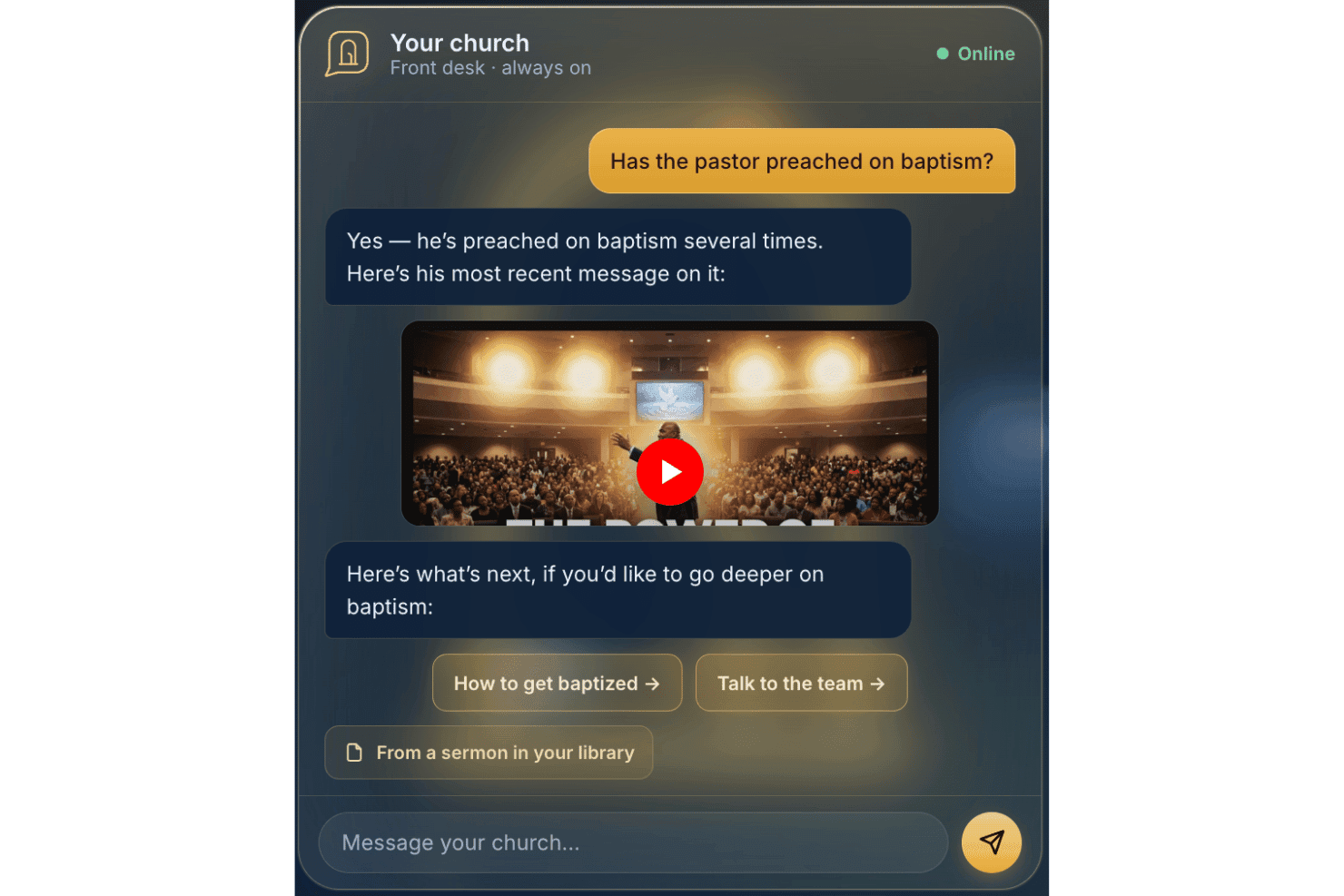
AskMyChurch offre un servizio di risposta per le chiese 24/7 potenziato dall’intelligenza artificiale. AskMyChurch è un chatbot AI per siti web delle chiese che risponde alle domande di membri e visitatori utilizzando i contenuti pubblicati dalla chiesa stessa, sermoni e video, con instradamento integrato per le crisi e passaggio all’assistenza pastorale.
Per chi è ideale AskMyChurch?
Le chiese con team amministrativi snelli che dedicano molto tempo a rispondere alle stesse domande di visitatori e membri via telefono o email trarranno il massimo beneficio da AskMyChurch.
Perché ho scelto AskMyChurch
AskMyChurch si guadagna il suo posto nella mia selezione perché risolve una reale routine giornaliera che grava sullo staff: rispondere ogni settimana alle stesse domande su orari delle funzioni, parcheggio e battesimi. Mi piace che le sue risposte siano basate esclusivamente sui contenuti e sui sermoni del sito web della chiesa, con una citazione della fonte mostrata ogni volta, così non inventa dottrina né parla oltre quanto pubblicato dalla chiesa. Spicca anche il Crisis Gate: instrada i messaggi che segnalano disagio alla linea di assistenza 988 e al team pastorale prima che l'AI risponda.
Funzionalità principali di AskMyChurch
- Supporto multilingue: L’assistente può rispondere alle domande sia in inglese che in spagnolo.
- Anonimato di default: Gli utenti non devono creare un account o fornire nomi per porre domande.
- Learning loop: Ogni settimana vengono segnalati allo staff approfondimenti su temi comuni e lacune.
- Widget brandizzato: Ogni assistente viene inserito direttamente nel sito della chiesa e si adatta completamente al branding.
Integrazioni di AskMyChurch
Le integrazioni native non sono pubblicamente documentate.
Pros and Cons
Pros:
- Risponde solo alle domande sui contenuti di proprietà della chiesa
- Funzioni integrate per escalation in caso di crisi e richieste di preghiera
- Anonimato, nessuna registrazione utente richiesta
Cons:
- Nessuno strumento per comunicazioni o messaggistica in uscita
- Mancano funzionalità di segmentazione e follow-up per i membri
Learn more about AskMyChurch: Ideale per la traduzione dal vivo di sermoni multilingue
- Prova gratuita disponibile
- Da $150/mese

One Accord Translation offre traduzione multilingue in tempo reale per incontri in chiesa, consentendo l'interpretazione dal vivo in più lingue tramite un'app mobile. OneAccord è una piattaforma di comunicazione per chiese basata sull'IA che offre traduzione in tempo reale dei sermoni, monitoraggio della qualità audio e accesso basato su browser per la congregazione durante i servizi di culto dal vivo.
Per chi è più adatto OneAccord?
Leader di chiesa e team tecnici che necessitano di strumenti alimentati dall'IA per la comunicazione multilingue e il coinvolgimento della congregazione durante il culto dal vivo.
Perché ho scelto OneAccord
Ho scelto OneAccord tra i migliori perché posso offrire la traduzione dal vivo dei sermoni in più lingue direttamente sui dispositivi dei partecipanti. Il mio team utilizza la traduzione audio e testuale potenziata dall'IA per raggiungere le persone in più lingue contemporaneamente. Mi piace che gli ascoltatori possano seguire in tempo reale, sia che si trovino nel santuario che da remoto.
Funzionalità principali di OneAccord
- Monitoraggio della qualità audio: Controlla e riporta continuamente la chiarezza dell'audio durante i servizi.
- Accesso della congregazione via browser: Permette ai partecipanti di unirsi e ascoltare da qualsiasi dispositivo con un browser web.
- Identificazione degli oratori: Distingue tra più oratori per una traduzione e trascrizione accurate.
- Registrazione delle sessioni: Registra e archivia le sessioni audio per una revisione o condivisione futura.
Integrazioni di OneAccord
Le integrazioni native non sono chiaramente documentate. OneAccord fornisce un'API per integrazioni personalizzate.
Pros and Cons
Pros:
- Monitoraggio della qualità audio in tempo reale durante i servizi
- Identificazione degli oratori per trascrizioni accurate
- Registrazione delle sessioni per la riproduzione o la condivisione in un secondo momento
Cons:
- Informazioni pubbliche limitate sui livelli di prezzo
- La configurazione dell'API può richiedere competenze tecniche
Learn more about OneAccord: Ideale per la pianificazione delle comunicazioni basate su campagne
- Prova gratuita disponibile
- Da $32.50/mese

Communicate tiene traccia delle campagne di messaggistica in un unico posto. Se stai cercando un modo per organizzare e gestire le comunicazioni della chiesa su più canali, Communicate offre una soluzione mirata. Questa piattaforma è progettata per i team ministeriali che desiderano pianificare, programmare e monitorare le campagne di messaggistica in un unico posto. È particolarmente utile per le chiese che devono coordinare attività di sensibilizzazione, annunci e promozione di eventi con chiarezza e coerenza.
Per chi è più indicato Communicate?
Communicate è adatto ai direttori delle comunicazioni della chiesa e ai team ministeriali che hanno bisogno di coordinare campagne di messaggistica su più canali.
Perché ho scelto Communicate
Ciò che mi colpisce di Communicate è che è progettato specificamente per la pianificazione di comunicazioni basate su campagne. Ho scelto questo strumento perché consente ai team della chiesa di pianificare strategie di messaggistica su email, SMS e canali social, tutto da una singola dashboard. Apprezzo il calendario delle campagne e i flussi di approvazione, che aiutano a mantenere tutti allineati e a garantire che i messaggi vengano inviati nei tempi previsti. Queste funzionalità rendono Communicate una scelta solida per le chiese che devono coordinare iniziative di sensibilizzazione complesse e mantenere coerenza nelle loro comunicazioni.
Funzionalità principali di Communicate
Altre funzionalità che ho trovato utili per i team di comunicazione della chiesa includono:
- Suggerimenti sui contenuti basati su intelligenza artificiale: La piattaforma offre raccomandazioni automatiche per i contenuti dei messaggi in base agli obiettivi della campagna e al pubblico.
- Programmazione dei messaggi su più canali: Pianifica le comunicazioni da inviare tramite email, SMS e social media da un unico luogo.
- Strumenti di segmentazione del pubblico: Crea e gestisci gruppi target per un coinvolgimento più personalizzato.
- Analisi delle performance dei messaggi: Monitora i tassi di apertura, il coinvolgimento e le metriche di consegna di ogni campagna a fini di ottimizzazione.
Integrazioni di Communicate
Le integrazioni native non sono attualmente elencate.
Pros and Cons
Pros:
- Calendario visivo delle campagne per la pianificazione dei messaggi
- Flussi di approvazione per la collaborazione del team
- Centralizza la messaggistica multicanale
Cons:
- Manca l'accesso diretto tramite API pubblica
- Nessuna applicazione mobile nativa disponibile
Learn more about Communicate: Ideale per la messaggistica integrata di SMS ed email
- Prova gratuita di 30 giorni disponibile
- Da $72/mese
Visit WebsiteCustomer Rating:4.7/5
Tithely semplifica la comunicazione in chiesa per SMS ed email. Se stai cercando un modo per unificare la comunicazione digitale della tua chiesa, Tithely offre una piattaforma pensata per le comunità religiose. Questo strumento è creato per le chiese che desiderano gestire sia l’invio di messaggi che di email da un unico luogo. Aiuta i team del ministero a tenere i membri informati, coinvolti e connessi senza dover gestire diversi sistemi.
Per chi è più adatto Tithely?
Tithely è adatto a chiese e team ministeriali che desiderano centralizzare la comunicazione tramite SMS ed email con i propri membri della congregazione.
Perché ho scelto Tithely
Quello che distingue Tithely è la possibilità di gestire sia i messaggi di testo che le email sulla stessa piattaforma, cosa rara tra gli strumenti di comunicazione per le chiese. L’ho scelto proprio perché questa integrazione consente di raggiungere la congregazione attraverso il canale preferito senza dover cambiare sistema. Tithely permette di programmare i messaggi, suddividere il pubblico in segmenti e monitorare la consegna sia di SMS che di email da un unico pannello di controllo. Questo approccio unificato aiuta le chiese a mantenere la comunicazione organizzata e coerente, soprattutto quando si coordinano eventi, promemoria o aggiornamenti urgenti.
Funzionalità principali di Tithely
Altre funzionalità che rendono Tithely utile per la comunicazione ecclesiastica includono:
- Modelli di messaggio: Crea e riutilizza messaggi predefiniti per aggiornamenti o annunci ricorrenti.
- Messaggistica bidirezionale: Consenti ai destinatari di rispondere direttamente a SMS o email per una comunicazione più interattiva.
- Gestione dei contatti: Organizza, importa e segmenta le informazioni di contatto della congregazione all'interno della piattaforma.
- Messaggi automatici di compleanno e anniversario: Programma auguri personalizzati per celebrare le ricorrenze più importanti con i membri.
Integrazioni di Tithely
Le integrazioni includono QuickBooks Online, RockRMS, Engiven, Elvanto, Salesforce, MinistryPlatform, Shelby Systems, FellowshipOne e altri.
Pros and Cons
Pros:
- Combina SMS ed email in un unico pannello
- Include la messaggistica bidirezionale per le risposte dei membri
- Fornisce messaggi automatici di compleanno e anniversario
Cons:
- Manca di analisi avanzate sulle prestazioni
- Non supporta i codici brevi SMS
 Ideale per la connettività nei piccoli gruppi
- Piano gratuito + prova gratuita di 30 giorni disponibile
- Da $15/20 membri/mese

Planning Center Groups gestisce la comunicazione e gli eventi dei gruppi. Se stai cercando un modo per organizzare e supportare i piccoli gruppi in chiesa, Planning Center Groups offre una soluzione mirata. Questa piattaforma è progettata per i responsabili dei ministeri che desiderano gestire la comunicazione dei gruppi, gli eventi e il coinvolgimento dei membri in un unico posto. Aiuta le chiese a mantenere la vita dei gruppi connessa e organizzata, soprattutto quando i ministeri crescono o si diversificano.
Per chi è Planning Center?
Planning Center Groups è adatto ai leader di chiesa e ai team ministeriali che hanno bisogno di coordinare, comunicare e gestire più piccoli gruppi all'interno della propria congregazione.
Perché ho scelto Planning Center
Ciò che mi ha attratto di Planning Center Groups è il modo in cui mette al centro la connettività tra i piccoli gruppi nella comunicazione della chiesa. La piattaforma consente di creare elenchi di gruppi, gestire le presenze e inviare messaggi mirati ai membri dei gruppi, tutto da una sola dashboard. Apprezzo il supporto nella programmazione degli eventi e nel monitoraggio delle presenze, che aiuta i leader a mantenere la vita di gruppo organizzata e coinvolta. Queste funzionalità la rendono una scelta solida per le chiese che vogliono favorire relazioni più profonde e una comunicazione costante nei propri piccoli gruppi.
Caratteristiche principali di Planning Center
Altre funzionalità che rendono Planning Center Groups utile per la comunicazione in chiesa includono:
- Moduli di iscrizione ai gruppi personalizzabili: Crea e gestisci moduli di iscrizione per aiutare le persone ad unirsi facilmente ai gruppi.
- Condivisione di risorse: Carica e distribuisci materiali di studio, documenti o comunicazioni direttamente ai membri dei gruppi.
- Promemoria automatici: Programma e invia promemoria per incontri o eventi imminenti per tenere tutti informati.
- Accesso tramite app mobile: Consenti ai leader e ai membri di gestire i gruppi, comunicare e accedere alle risorse dai loro telefoni.
Integrazioni di Planning Center
Le integrazioni includono BoxCast, Checkr, Mailchimp, PraiseCharts, RehearsalMix, SongSelect, Clearstream e altro.
Pros and Cons
Pros:
- Supporta la messaggistica di gruppo e gli avvisi
- Propone la programmazione di eventi con monitoraggio delle conferme di partecipazione
- Offre condivisione di risorse per i materiali di studio
Cons:
- Automazione limitata per i messaggi di follow-up
- Manca di analisi avanzate sull'engagement dei gruppi
Learn more about Planning Center: Ideale per funzionalità di bacheca e chat
- Demo gratuita disponibile
- Prezzi su richiesta

Realm facilita messaggistica, aggiornamenti e partecipazione della comunità. Realm è una piattaforma di gestione per chiese pensata per le congregazioni che desiderano centralizzare la comunicazione e il coinvolgimento della comunità. Se stai cercando una soluzione che combini messaggistica di gruppo, coordinamento degli eventi e aggiornamenti per i membri in un unico posto, Realm merita attenzione. È particolarmente utile per le chiese che mirano a mantenere i membri connessi e informati attraverso canali digitali.
Per chi è ideale Realm?
Realm è adatto a responsabili e team di comunicazione delle chiese che desiderano favorire un coinvolgimento costante e conversazioni all’interno delle loro congregazioni.
Perché ho scelto Realm
Quello che mi colpisce di Realm è il modo in cui unisce funzionalità di bacheca e chat in una modalità familiare per chiunque abbia utilizzato i social media. La piattaforma permette di pubblicare annunci, condividere aggiornamenti e creare conversazioni di gruppo, tutto all’interno di un ambiente sicuro dedicato alla chiesa. Apprezzo il fatto che i membri possano commentare, reagire e interagire direttamente sui post, contribuendo così a creare un senso di comunità e coinvolgimento continuo. Queste funzionalità rendono Realm particolarmente utile per le chiese che vogliono mantenere tutti informati e connessi anche tra un servizio e l’altro o durante eventi.
Funzionalità principali di Realm
Oltre alle funzionalità di bacheca e chat, Realm offre molte altre funzionalità che agevolano la comunicazione e la gestione delle chiese:
- Strumenti di gestione eventi: Pianifica eventi, gestisci le conferme di partecipazione (RSVP) e comunica aggiornamenti ai partecipanti direttamente sulla piattaforma.
- Notifiche push: Invia avvisi in tempo reale ai dispositivi mobili dei membri per annunci urgenti o promemoria.
- Condivisione di documenti: Carica e distribuisci file, come newsletter o verbali delle riunioni, a gruppi specifici o all’intera congregazione.
- Permessi basati sui ruoli: Controlla l’accesso agli strumenti di comunicazione e alle informazioni sensibili in base ai ruoli degli utenti nella chiesa.
Integrazioni di Realm
Le integrazioni includono Constant Contact, l’app mobile Realm Connect e altro ancora.
Pros and Cons
Pros:
- La bacheca mantiene i membri informati in tempo reale
- Le conferme degli eventi (RSVP) si integrano con gli strumenti di comunicazione
- I permessi basati sui ruoli proteggono le informazioni sensibili
Cons:
- Nessun workflow automatico di follow-up per ospiti
- Integrazioni limitate con strumenti esterni
Learn more about Realm: Ideale per generare automaticamente risorse dai sermoni
- Prova gratuita disponibile
- Da $39/mese

Pulpit AI converte i sermoni in guide allo studio, domande e post. Se cerchi un modo per trasformare i sermoni in una gamma di risorse per il ministero, Pulpit AI offre una soluzione mirata. Questa piattaforma è pensata per pastori e leader di chiesa che desiderano riutilizzare i contenuti dei sermoni per l'insegnamento, l'evangelizzazione e la formazione dei discepoli. Ti aiuta a risparmiare tempo generando automaticamente guide di studio biblico, domande per la discussione e post per i social media a partire dalle trascrizioni o dagli audio dei tuoi sermoni.
Per chi è ideale Pulpit AI?
Pulpit AI è adatto a pastori e team ministeriali che desiderano creare rapidamente materiali di studio, guide alla discussione e contenuti digitali dai sermoni settimanali.
Perché ho scelto Pulpit AI
Ciò che distingue Pulpit AI è la sua capacità di generare automaticamente una vasta gamma di risorse basate sui sermoni con il minimo sforzo. L'ho scelto perché prende la trascrizione o l'audio del tuo sermone e crea guide di studio, domande per piccoli gruppi e contenuti per i social media in pochi clic. Questo è particolarmente utile per i pastori che vogliono ampliare l'impatto dei loro messaggi settimanali senza passare ore a creare materiale manualmente. L'attenzione della piattaforma al riutilizzo dei sermoni la rende una soluzione ideale per le chiese che desiderano moltiplicare i loro sforzi di formazione attraverso l’uso dell’IA.
Caratteristiche principali di Pulpit AI
Altre funzionalità che rendono Pulpit AI utile per la comunicazione in chiesa includono:
- Opzioni di esportazione multi-formato: Scarica le risorse generate come documenti Word, PDF o file di testo per una facile condivisione.
- Strumenti di modifica dei contenuti: Apporta rapide modifiche ai materiali generati dall'IA prima della distribuzione.
- Libreria delle risorse: Archivia e organizza tutte le risorse dei sermoni passati in un unico luogo ricercabile.
- Collaborazione di squadra: Invita membri dello staff o volontari a revisionare, modificare e gestire insieme i contenuti generati.
Integrazioni di Pulpit AI
L'integrazione include Subsplash.
Pros and Cons
Pros:
- Converte i sermoni in diversi formati di risorse
- Offre strumenti di modifica per i contenuti generati dall'IA
- Archivia tutte le risorse generate in una libreria ricercabile
Cons:
- Integrazioni native limitate con le piattaforme per chiese
- Nessuna pianificazione o calendario dei sermoni integrato
Learn more about Pulpit AI: Ideale per strumenti di creazione di contenuti per sermoni con IA
- Piano gratuito disponibile
- Da $65/mese

Church.tech aiuta i pastori a generare e condividere sermoni più velocemente con l’IA. Se cerchi un supporto alimentato dall’IA per la preparazione dei sermoni e la comunicazione in chiesa, Church.tech offre una soluzione mirata. Questa piattaforma è pensata per pastori e responsabili di ministeri che desiderano generare, organizzare e condividere contenuti con meno sforzo manuale rispetto a quanto richiederebbe un prompt generico di ChatGPT. È particolarmente utile per le chiese che vogliono mantenere la comunicazione attuale e rilevante, risparmiando tempo nella creazione dei contenuti settimanali.
Per chi è ideale Church.tech?
Church.tech è adatto a pastori e team ministeriali di chiese di qualsiasi dimensione che desiderano semplificare la creazione di sermoni e la comunicazione digitale.
Perché ho scelto Church.tech
Ho scelto Church.tech perché i suoi strumenti per la creazione di contenuti per sermoni, alimentati dall’IA, rispondono a un’esigenza reale dei pastori che vogliono elaborare messaggi significativi senza partire da zero ogni settimana. La piattaforma offre generazione di idee per sermoni e creazione automatica di tracce, aiutando i leader a risparmiare tempo e ad essere ispirati. Apprezzo anche il fatto che Church.tech includa strumenti per adattare una serie di sermoni in newsletter e post social, rendendo più semplice coinvolgere la congregazione attraverso diversi canali. Queste funzioni lo rendono una scelta solida per le chiese che desiderano modernizzare la comunicazione grazie al supporto di contenuti generati dall’IA.
Funzionalità principali di Church.tech
Altre funzionalità che rendono Church.tech utile per la comunicazione nelle chiese includono:
- Gestione delle richieste di preghiera con IA: Organizza e categorizza automaticamente le richieste di preghiera ricevute, facilitando il follow-up e il monitoraggio.
- Pianificazione dei contenuti: Permette di pianificare e programmare messaggi, devozioni e annunci da inviare in orari specifici.
- Strumenti di comunicazione per volontari: Offre opzioni di messaggistica mirata per coordinarsi con i team di volontari e i gruppi ministeriali.
- Libreria di risorse: Archivia e organizza sermoni passati, modelli e materiali multimediali per un accesso e riutilizzo rapidi.
Integrazioni di Church.tech
Al momento non sono elencate integrazioni native.
Pros and Cons
Pros:
- Automatizza la conversione da sermone a contenuto devozionale
- Genera clip per social media su più piattaforme
- Produce traduzioni accurate nella lingua madre
Cons:
- Nessuno strumento integrato per offerte digitali
- Richiede servizi esterni di hosting video
Learn more about Church.tech: Ideale per la programmazione social
- Prova gratuita + demo gratuita disponibili
- Da $15/mese

ChurchSocial semplifica la pianificazione e la programmazione dei post social della chiesa. Se stai cercando un modo per gestire e automatizzare la presenza online della tua chiesa, ChurchSocial offre una soluzione mirata. Questa piattaforma è pensata per i team ministeriali e i responsabili della comunicazione che vogliono pianificare, programmare e coordinare i post su più canali. È particolarmente utile per le chiese che desiderano mantenere la coerenza e la tempestività dei loro messaggi senza dover aggiungere lavoro manuale ogni settimana.
Per chi è ideale ChurchSocial?
ChurchSocial è ideale per i team di comunicazione delle chiese e i coordinatori dei social media che hanno bisogno di pianificare e automatizzare i post su più piattaforme.
Perché ho scelto ChurchSocial
Ho scelto ChurchSocial perché i suoi strumenti di programmazione dei post sono progettati appositamente per le esigenze di comunicazione delle chiese. La piattaforma permette di creare, programmare e gestire post su diversi canali social da un'unica dashboard, il che è particolarmente utile per mantenere organizzati e coerenti i messaggi della chiesa. Apprezzo inoltre che ChurchSocial includa un calendario editoriale e flussi di approvazione, così i team possono pianificare le campagne e garantire che i post siano allineati agli obiettivi del ministero. Queste funzionalità la rendono una scelta solida per le chiese che vogliono restare attive online senza dover gestire più strumenti o pubblicare manualmente.
Funzionalità principali di ChurchSocial
Altre funzionalità che rendono ChurchSocial utile per la comunicazione della chiesa includono:
- Suggerimenti di contenuti basati su AI: La piattaforma consiglia idee per i post e didascalie personalizzate per eventi e temi della chiesa.
- Libreria di immagini e media: Archivia, organizza e riutilizza grafiche, foto e video per i post futuri.
- Strumenti di collaborazione per il team: Assegna ruoli, condividi bozze e comunica all'interno della piattaforma per coordinare i messaggi.
- Dashboard di analisi: Monitora i dati sull’engagement e le prestazioni dei post su tutti i canali social collegati.
Integrazioni ChurchSocial
Le integrazioni includono Pushpay, Planning Center, Tithely e altri.
Pros and Cons
Pros:
- L’AI suggerisce idee per i post della chiesa
- Calendario centralizzato per tutti i contenuti programmati
- La libreria multimediale archivia grafiche e video riutilizzabili
Cons:
- Nessun sistema integrato di email o SMS messaging
- Mancano funzionalità per la pianificazione di sermoni o culti
Learn more about ChurchSocial: Ideale per la generazione di messaggi in linea con la fede
- Piano gratuito disponibile
- Da $49/mese

ChurchCopy genera sermoni, devozionali e annunci. Se cerchi una scrittura supportata dall'IA pensata per la comunicazione in ambito ecclesiastico, ChurchCopy è progettato per te. Questo strumento aiuta pastori, leader di ministero e membri dello staff a creare messaggi che riflettono valori e linguaggio cristiani. È stato realizzato per sostenere chiunque desideri generare sermoni, devozionali, annunci o contenuti di evangelizzazione che risuonino con un pubblico cristiano.
Per chi è pensato ChurchCopy?
ChurchCopy è adatto a pastori, team ministeriali e comunicatori ecclesiastici che vogliono generare rapidamente e con coerenza contenuti scritti incentrati sulla fede.
Perché ho scelto ChurchCopy
Quello che mi ha attratto di ChurchCopy è il suo focus sulla creazione di messaggi in linea con valori e linguaggio cristiani, cosa che la maggior parte degli strumenti di scrittura IA generici non offre. L'ho scelto perché è realizzato specificamente per le chiese, con modelli e suggerimenti dedicati a sermoni, devozionali e annunci di ministero. L’IA della piattaforma è addestrata per comprendere il contesto di fede, così ottieni contenuti autentici e appropriati per la tua congregazione. Questo lo rende una scelta forte per i leader ecclesiastici che vogliono mantenere l’integrità teologica risparmiando tempo sulle attività di comunicazione.
Caratteristiche principali di ChurchCopy
Altre funzionalità che rendono ChurchCopy utile per la comunicazione ecclesiastica includono:
- Strumenti di riproposizione dei contenuti: Trasforma sermoni o devozionali in post per i social, email o newsletter con pochi clic.
- Regolazione del tono e dello stile: Scegli tra diversi preset di tono per adattarti allo stile comunicativo o al pubblico della tua chiesa.
- Integrazione delle Scritture: Inserisci automaticamente versetti biblici rilevanti nei contenuti generati.
- Generazione di contenuti in blocco: Crea più contenuti contemporaneamente per diversi canali o campagne.
Integrazioni di ChurchCopy
Attualmente non sono elencate integrazioni native.
Pros and Cons
Pros:
- Inserimento automatico delle Scritture nei contenuti generati
- Generazione di contenuti in blocco per più canali
- Strumenti di riproposizione dei contenuti per newsletter e post
Cons:
- Nessuna funzionalità integrata di eventi o calendario
- Nessuna app mobile per la modifica in movimento
Learn more about ChurchCopy:
Altri software di comunicazione per chiese basati sull'intelligenza artificiale
Ecco alcune opzioni aggiuntive di software di comunicazione per chiese basati sull’intelligenza artificiale che non sono entrate nella mia selezione, ma che vale comunque la pena prendere in considerazione:
- 11ClearstreamIdeale per l'invio di SMS su larga scala alle chiese
- 12Church Central CloudIdeale per la gestione centralizzata delle comunicazioni della chiesa
- 13Doctrinally AIIdeale per risposte istantanee con citazioni delle fonti
- 14EZ TextingIdeale per flussi di automazione SMS personalizzati
- 15Text In ChurchIdeale per flussi di lavoro automatizzati di follow-up degli ospiti
Come Valuto il Software di Comunicazione per Chiese con Intelligenza Artificiale
Ogni strumento in questo elenco deve offrire molto più che una semplice etichetta IA su comuni campagne email—cerco piattaforme in cui l'IA scrive effettivamente riepiloghi dei sermoni, segmenta la congregazione e personalizza i follow-up senza dover aggiungere ore di lavoro al personale. Suddivido la mia valutazione in funzionalità di base che ogni strumento deve garantire e fattori differenzianti che distinguono le opzioni buone da quelle eccellenti.
Funzionalità di Base (Requisiti Minimi per Questo Elenco)
Quando seleziono gli strumenti per il mio elenco, ne valuto ciascuno su una scala da 0 (non offre la funzionalità) a 5 (eccelle in quest'area) per ogni funzionalità di base elencata di seguito. Successivamente, calcolo il punteggio totale dello strumento come percentuale. Ogni strumento deve ottenere un punteggio totale minimo del 55% per essere incluso.
- Generazione di Contenuti con IA: Controllo se l'IA riesce a redigere contenuti specifici per la chiesa come riepiloghi dei sermoni, newsletter settimanali e post social—non solo testi promozionali generici.
- Messaggistica Multi-Canale: Ogni strumento dovrebbe unificare almeno tre canali (email, SMS, social, push o app) così i team non devono passare da una piattaforma all'altra per raggiungere i membri.
- Segmentazione della Congregazione: Cerco raggruppamenti assistiti dall'IA in base al coinvolgimento nei ministeri, alle abitudini di partecipazione o alla fase della vita—come l'identificazione automatica dei nuovi visitatori per sequenze di benvenuto mirate.
- Personalizzazione e Automazione: Qui contano i flussi di lavoro automatici, come l'invio di un messaggio di follow-up quando un membro manca per diverse settimane o la trasmissione di devozionali personalizzati per gruppo piccolo.
- Analisi dell’Engagement: La piattaforma dovrebbe fornire approfondimenti tramite IA sulle prestazioni dei messaggi e segnalare membri a rischio, non solo riportare i tassi di apertura.
- Integrazione con le Piattaforme della Chiesa: Valuto quanto bene ogni strumento si sincronizzi con i principali sistemi di gestione delle chiese come Planning Center, Breeze o Rock RMS per dati precisi sui membri.
Dopo aver stilato un elenco di strumenti che soddisfano questi criteri, considero cosa distingue ciascuna piattaforma.
Fattori Differenzianti (Cosa Distingue i Fornitori)
Ecco come confronto e metto a contrasto i vari fornitori:
Caratteristiche Distintive
La trasformazione di un sermone in altri contenuti è fondamentale—cerco strumenti in grado di prendere una registrazione del sermone e convertirla in post per blog, clip social e devozionali settimanali senza editing manuale. La personalizzazione della voce e dello stile comunicativo è altrettanto importante perché un tono IA generico non si adatta al contesto ministeriale. I migliori strumenti permettono di insegnare all’IA il linguaggio teologico e lo stile comunicativo della propria chiesa. Per le congregazioni multiculturali, valuto la traduzione multilingue che adatti annunci e attività di outreach a più lingue.
Oltre le Funzionalità
La privacy dei dati assume qui un'importanza particolare—le richieste di preghiera e le conversazioni pastorali sono estremamente sensibili, quindi valuto come ogni fornitore gestisce i dati dei membri e se questi vengano utilizzati per addestrare modelli IA di terze parti. Anche l'aderenza denominazionale conta. Uno strumento progettato per flussi di lavoro evangelici può risultare estraneo a una chiesa liturgica. Infine, considero il supporto durante l’onboarding per team composti da volontari, dato che la maggior parte dei comunicatori delle chiese non è composta da professionisti del marketing a tempo pieno e necessita di risorse formative accessibili.
Come scegliere un software di comunicazione per chiese basato sull'intelligenza artificiale
È facile perdersi in lunghi elenchi di funzionalità e strutture tariffarie complesse. Per aiutarti a rimanere concentrato mentre affronti il tuo processo di selezione del software, considerando anche la rilevanza dell'intelligenza artificiale per le chiese, ecco una lista di fattori da tenere presenti:
| Fattore | Cosa considerare |
|---|---|
| FattoreScalabilità | Cosa considerareIl software sarà in grado di gestire la crescita della tua chiesa, i nuovi ministeri o più sedi senza importanti aggiornamenti o costi aggiuntivi? |
| FattoreIntegrazioni | Cosa considerareLo strumento si collega nativamente ai sistemi esistenti di gestione della chiesa, donazioni o calendario, oppure dovrai ricorrere a soluzioni alternative? |
| FattorePersonalizzazione | Cosa considerarePuoi adattare i modelli di comunicazione, i ruoli degli utenti e i flussi di lavoro alla struttura e alle esigenze specifiche del tuo ministero? |
| FattoreFacilità d'uso | Cosa considerareIl personale e i volontari con diversi livelli di dimestichezza tecnologica riusciranno a imparare e utilizzare rapidamente il sistema, oppure sarà necessaria assistenza continua? |
| FattoreImplementazione e avviamento | Cosa considerareQuanto tempo servirà per essere operativi e quale assistenza o quali risorse fornirà il fornitore per la migrazione dei dati e la formazione? |
| FattoreCosto | Cosa considerareCi sono costi nascosti, limiti al numero di utenti o componenti aggiuntivi obbligatori che potrebbero incidere sul tuo budget al variare delle esigenze nel tempo? |
| FattoreMisure di sicurezza | Cosa considerareIl software offre una protezione adeguata dei dati, controlli sugli accessi degli utenti e conformità agli standard sulla privacy pertinenti al tuo ministero? |
| FattoreDisponibilità dell'assistenza | Cosa considerareQuali canali di assistenza sono disponibili (chat, telefono, e-mail) e sono accessibili negli orari di maggiore attività della tua chiesa o solo durante i normali orari lavorativi? |
Che cos'è il software di comunicazione ecclesiale basato sull'IA?
Il software di comunicazione ecclesiale basato sull'IA è una piattaforma digitale che utilizza l'intelligenza artificiale per aiutare le chiese a gestire, automatizzare e personalizzare le comunicazioni con membri e visitatori. Questi strumenti supportano attività come l'invio di messaggi di gruppo, la programmazione degli annunci e l'analisi del coinvolgimento, consentendo ai responsabili della chiesa di raggiungere la propria congregazione in modo più efficiente e pertinente.
Funzionalità del software di comunicazione ecclesiale basato sull'IA
Quando scegli un software di comunicazione ecclesiale basato sull'IA, presta attenzione alle seguenti funzionalità principali:
- Messaggistica automatizzata: invia automaticamente e-mail, SMS o notifiche dell'app a gruppi o singoli individui in base a pianificazioni, attivatori o azioni dei membri.
- Suggerimenti di contenuti basati sull'IA: genera bozze di messaggi, annunci o promemoria per eventi utilizzando l'intelligenza artificiale, così da risparmiare tempo e migliorare la qualità della comunicazione.
- Programmazione di eventi e promemoria: crea, gestisci e promuovi gli eventi della chiesa inviando al contempo promemoria automatici ai partecipanti.
- Gestione dell'elenco dei membri: archivia, organizza e aggiorna le informazioni di contatto, le appartenenze ai gruppi e le preferenze di comunicazione di tutti i membri.
- Analisi e monitoraggio del coinvolgimento: monitora i tassi di apertura dei messaggi, i tassi di risposta e il coinvolgimento complessivo per contribuire a perfezionare le strategie di comunicazione.
- Controlli degli accessi basati sui ruoli: assegna autorizzazioni al personale e ai volontari, garantendo che le persone giuste abbiano accesso agli strumenti e ai dati di comunicazione appropriati.
- Modelli personalizzabili: utilizza e adatta modelli predefiniti per messaggi comuni, newsletter o inviti a eventi, mantenendo la coerenza e risparmiando tempo.
- Comunicazione multicanale: raggiungi la tua congregazione tramite e-mail, SMS, notifiche push o messaggi nell'app da un'unica piattaforma.
- Integrazione con i sistemi di gestione della chiesa: collega gli strumenti di comunicazione al database, al calendario o alla piattaforma per le donazioni della tua chiesa, garantendo un flusso di dati senza interruzioni.
- Ricontatto automatico degli ospiti: attiva messaggi di ricontatto personalizzati per i visitatori o i nuovi membri in base alle loro interazioni o presenze.
Vantaggi del software di comunicazione ecclesiale basato sull'IA
L'implementazione di un software di comunicazione ecclesiale basato sull'IA offre diversi vantaggi al tuo team e alla tua organizzazione. Ecco alcuni dei benefici che puoi aspettarti:
- Gestione centralizzata delle comunicazioni: mantieni tutti i messaggi, gli annunci e i promemoria organizzati in un unico luogo, riducendo la confusione e gli aggiornamenti persi.
- Risparmio di tempo: automatizza la messaggistica e i ricontatti di routine, riducendo il tempo richiesto al personale e ai volontari.
- Coinvolgimento personalizzato: utilizza i suggerimenti di contenuti basati sull'IA e il ricontatto automatico degli ospiti per personalizzare i messaggi rivolti ai singoli membri e visitatori.
- Miglioramento del monitoraggio del coinvolgimento: monitora i tassi di apertura, le risposte e la partecipazione per capire meglio ciò che coinvolge la tua congregazione.
- Messaggistica coerente: sfrutta i modelli personalizzabili e gli strumenti di pianificazione per garantire che ogni comunicazione sia in linea con lo stile e i tempi della tua chiesa.
- Maggiore accuratezza dei dati: integra il sistema di gestione della tua chiesa per mantenere aggiornate le informazioni sui membri e ridurre gli errori di inserimento manuale.
- Scalabilità per la crescita: adattati facilmente all'espansione della tua chiesa, aggiungendo nuovi gruppi, sedi o ministeri senza dover rivedere completamente il processo di comunicazione.
Costi e prezzi del software di comunicazione ecclesiale basato sull'IA
La scelta di un software di comunicazione ecclesiale basato sull'IA richiede la comprensione dei diversi modelli e piani tariffari disponibili. I costi variano in base alle funzionalità, alle dimensioni del team, agli extra e ad altri fattori. La tabella seguente riassume i piani più comuni, i relativi prezzi medi e le funzionalità tipicamente incluse nelle soluzioni software di comunicazione ecclesiale basate sull'IA:
Tabella comparativa dei piani per il software di comunicazione ecclesiale basato sull'IA
| Tipo di piano | Prezzo medio | Funzionalità comuni |
|---|---|---|
| Tipo di pianoPiano gratuito | Prezzo medio$0 | Funzionalità comuniMessaggistica di gruppo di base, contatti limitati, semplice programmazione degli eventi e analisi di base. |
| Tipo di pianoPiano personale | Prezzo medio$5-$25/utente/mese | Funzionalità comuniLimiti di messaggistica ampliati, gestione della directory dei membri, modelli personalizzabili e supporto via e-mail. |
| Tipo di pianoPiano aziendale | Prezzo medio$30-$75/utente/mese | Funzionalità comuniMessaggistica multicanale, suggerimenti di contenuti basati sull'IA, opzioni di integrazione e analisi avanzate. |
| Tipo di pianoPiano per aziende | Prezzo medio$100-$250+/mese | Funzionalità comuniUtenti illimitati, supporto per più campus, onboarding dedicato, sicurezza avanzata e assistenza prioritaria. |
Domande frequenti sul software di comunicazione della chiesa basato sull'IA
Ecco alcune risposte alle domande comuni sul software di comunicazione della chiesa basato sull’IA:
In che modo l'IA migliora la comunicazione della chiesa?
L’IA migliora la comunicazione della chiesa automatizzando le attività di routine, suggerendo contenuti personalizzati e analizzando i dati sul coinvolgimento. Questo aiuta i responsabili a inviare messaggi tempestivi e pertinenti e riduce lo sforzo manuale necessario per mantenere i membri informati e connessi.
Il software di comunicazione della chiesa basato sull'IA può integrarsi con il nostro sistema di gestione della chiesa esistente?
Sì, la maggior parte dei software di comunicazione della chiesa basati sull’IA può integrarsi con i sistemi di gestione della chiesa più diffusi. L’integrazione consente di sincronizzare i dati dei membri, automatizzare gli aggiornamenti e semplificare i flussi di lavoro, ma è sempre opportuno verificare la compatibilità con gli strumenti attuali prima dell’acquisto.
È difficile formare il personale e i volontari all'uso del software di comunicazione della chiesa basato sull'IA?
No, la maggior parte delle piattaforme è progettata con interfacce intuitive e offre risorse per l’avvio, come tutorial, modelli e assistenza. Tuttavia, alcuni utenti potrebbero aver bisogno di più tempo o formazione, soprattutto se hanno meno dimestichezza con la tecnologia.
Quali misure di sicurezza dovrei cercare nel software di comunicazione della chiesa basato sull'IA?
Cerca funzionalità come la crittografia dei dati, i controlli di accesso degli utenti e la conformità agli standard sulla privacy. Queste misure di protezione aiutano a salvaguardare le informazioni sensibili dei membri e garantiscono che la tua chiesa rispetti le responsabilità legali ed etiche.
Come posso sapere se la mia chiesa ha bisogno di strumenti di comunicazione basati sull'IA?
Se il tuo team dedica molto tempo alla messaggistica manuale, fatica a mantenere coinvolti i membri o desidera personalizzare le attività di sensibilizzazione su larga scala, gli strumenti basati sull’IA possono essere d’aiuto. Nel decidere, considera le dimensioni della tua chiesa, il volume delle comunicazioni e i piani di crescita.