

Un’ottima app per la comunicazione della chiesa può fare la differenza, ma trovare quella giusta non è facile. Con così tante opzioni, ognuna delle quali promette di risolvere i tuoi problemi, è difficile capire quale funzionerà davvero per la tua chiesa. Senza lo strumento giusto, potresti dover affrontare:
- Messaggi importanti che si perdono nel rumore, causando confusione.
- Basso coinvolgimento perché le persone non ricevono gli aggiornamenti o dimenticano gli eventi.
- Tempo sprecato a gestire più piattaforme per raggiungere gruppi diversi.
Ci sono passato anch’io: è frustrante ed estenuante. Queste difficoltà si presentano quando le chiese non dispongono di un modo centralizzato ed efficace per comunicare con i propri team e la propria congregazione. Per questo ho raccolto questo elenco delle migliori app per la comunicazione della chiesa. Questa panoramica ti aiuterà a confrontare, valutare e trovare lo strumento migliore per le esigenze della tua chiesa.
Perché fidarsi dei nostri consigli sui software
6,700+
Reviews
20
Industry experts
16+
Evaluation factors
14
Years
Il nostro team testa e recensisce software dal 2012. In quanto leader ecclesiastici noi stessi, sappiamo quanto sia difficile — e importante — scegliere il software giusto.
Per questa guida, abbiamo valutato gli strumenti attraverso test pratici e ricerche indipendenti, assegnando un punteggio agli strumenti in base ai nostri criteri di selezione.
Le nostre recensioni riflettono il nostro giudizio editoriale umano, non un discorso di vendita.
Tabella comparativa delle app per la comunicazione della chiesa
La tabella seguente confronta i dettagli dei prezzi delle mie migliori selezioni di app per la comunicazione della chiesa.
| Tool | Best For | Trial Info | Price | ||
|---|---|---|---|---|---|
| 1 | Ideale per la comunicazione multicanale della chiesa | Demo gratuita disponibile | I prezzi sono disponibili su richiesta | Website | |
| 2 | Ideale per la traduzione dal vivo dei sermoni potenziata dall'IA | Prova gratuita disponibile | Da $150/mese | Website | |
| 3 | Ideale per una comunicazione unificata della chiesa | Piano gratuito disponibile | Da $12/mese (fatturato mensilmente) | Website | |
| 4 | Ideale per SMS di gruppo 1-a-1 personalizzati | Prova gratuita di 3 giorni disponibile | Da $9.99/mese | Website | |
| 5 | Ideale per SMS personalizzati e bidirezionali | Prova gratuita di 30 giorni disponibile | A partire da $37/mese | Website | |
| 6 | Ideale per organizzare gruppi parrocchiali | Piano gratuito disponibile | Da $19/mese | Website | |
| 7 | Ideale per le comunicazioni con i donatori della chiesa | Demo gratuita disponibile | Da $67/mese/account | Website | |
| 8 | Ideale per comunicazioni email e SMS personalizzate | Prova gratuita di 30 giorni disponibile | A partire da $72/mese | Website | |
| 9 | Ideale per connettere l'intera comunità della chiesa | Non disponibile | Prezzo su richiesta | Website | |
| 10 | Ideale per messaggi personalizzati | Prova gratuita disponibile | Da $69.99/mese | Website |


Recensioni delle 10 migliori app per la comunicazione della chiesa
Ecco una breve descrizione di ciascuna app per la comunicazione della chiesa, per illustrare il caso d’uso migliore di ogni strumento, alcune funzionalità degne di nota e schermate che offrono una panoramica dell’interfaccia utente.
 Ideale per la comunicazione multicanale della chiesa
- Demo gratuita disponibile
- I prezzi sono disponibili su richiesta
Visit WebsiteCustomer Rating:4.5/5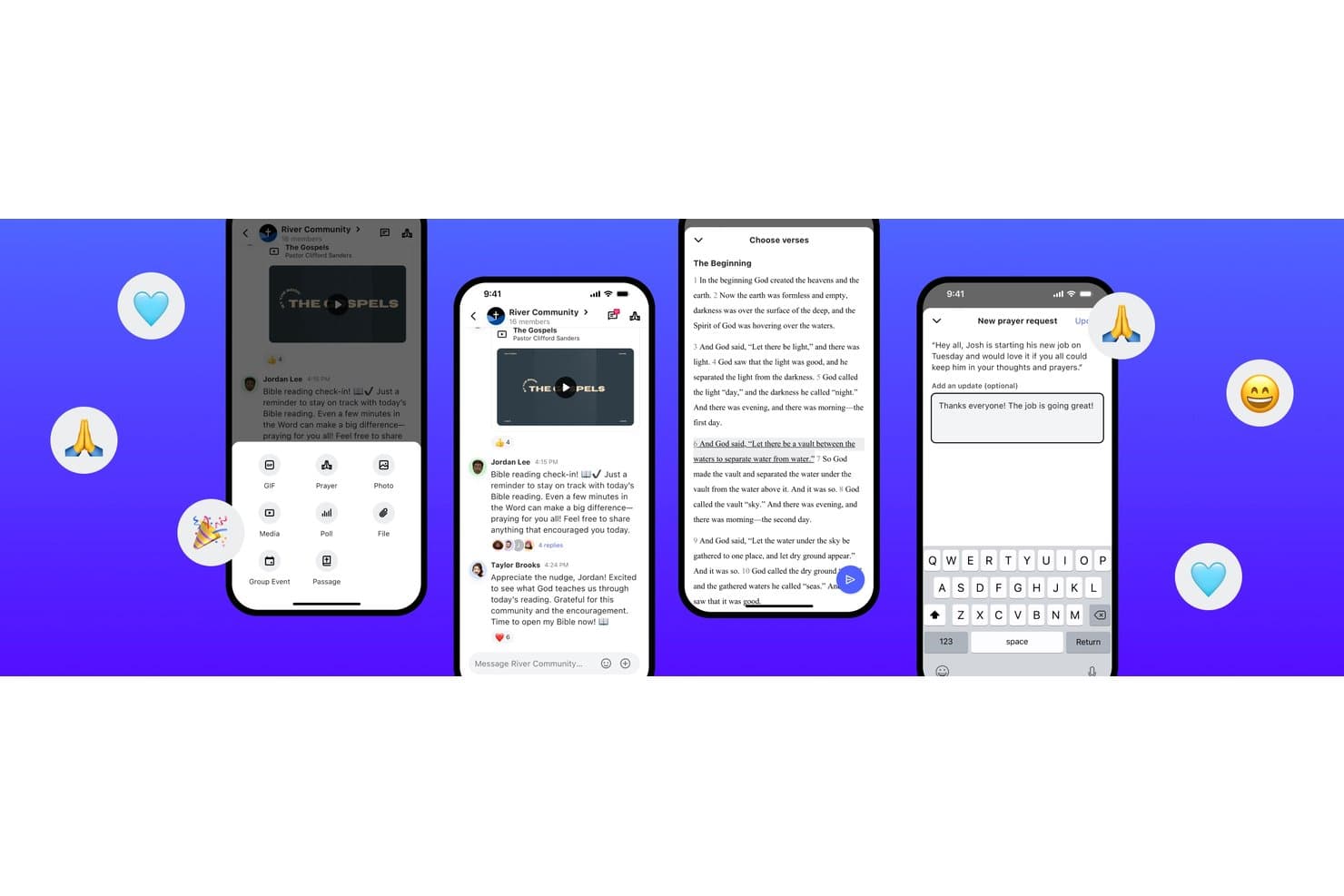
Subsplash offre una piattaforma di messaggistica pensata per le chiese con chat di gruppo, condivisione di passi biblici, richieste di preghiera e strumenti multimediali per la comunicazione nella comunità. Subsplash è una piattaforma tutto-in-uno per le chiese che combina un'app mobile personalizzata con il proprio marchio, email e messaggistica SMS, dirette streaming, donazioni e un sistema nativo di gestione delle chiese in un'unica soluzione connessa.
Per chi è ideale Subsplash?
Subsplash è particolarmente adatto a chiese di medie e grandi dimensioni che desiderano integrare app, comunicazioni, donazioni e gestione dei membri in un'unica piattaforma.
Perché ho scelto Subsplash
Ho scelto Subsplash perché le sue comunicazioni via email e SMS sono integrate direttamente nella stessa piattaforma che gestisce i contatti, i gruppi e la cronologia delle donazioni della tua congregazione. Quando invio un messaggio a nuovi visitatori o a un gruppo ministeriale specifico, attingo a un database unico e aggiornato invece di una lista importata manualmente. La funzione Workflows mi permette anche di automatizzare le sequenze di follow-up, così i nuovi ospiti ricevono un messaggio di benvenuto senza alcuno sforzo manuale da parte mia.
Caratteristiche principali di Subsplash
- Integrazione delle donazioni digitali: I membri possono versare decime o donazioni direttamente tramite l'app o il sito grazie all'elaborazione dei pagamenti integrata.
- Hub di sermoni e media: Carica, organizza e condividi contenuti audio e video dei sermoni che i membri possono consultare on demand tramite l'app.
- Pianificazione dei volontari: Coordina e gestisci i ruoli dei volontari, i turni e le richieste per eventi o servizi regolari.
- Registrazione agli eventi e check-in: Monitora le presenze, gestisci le iscrizioni agli eventi e offri funzionalità di check-in sicuro per i bambini delle famiglie.
Integrazioni di Subsplash
Subsplash offre integrazioni native con Planning Center, Zapier, Breeze, MortarStone e altro ancora, e mette a disposizione un'API per integrazioni personalizzate.
Pros and Cons
Pros:
- App, donazioni e media unificati in un'unica piattaforma
- Potenti strumenti per donazioni mobili e ricorrenti
- Libreria di sermoni integrata nell'app con contenuti personalizzati
Cons:
- Il supporto clienti può essere lento nel rispondere
- Le funzionalità di gestione dei membri sono limitate
 Ideale per la traduzione dal vivo dei sermoni potenziata dall'IA
- Prova gratuita disponibile
- Da $150/mese

OneAccord aiuta le chiese a comunicare chiaramente oltre le barriere linguistiche con traduzione dal vivo, chat multilingue e accesso semplice alle sessioni da qualsiasi dispositivo mobile. OneAccord è un'app di comunicazione per chiese che offre traduzione dal vivo potenziata dall'intelligenza artificiale per sermoni ed eventi, fornendo traduzione audio e testuale in tempo reale in oltre 50 lingue.
Per chi è più adatto OneAccord?
OneAccord è adatto per chiese e ministeri che devono comunicare con congregazioni multilingue durante servizi ed eventi dal vivo.
Perché ho scelto OneAccord
Ho scelto OneAccord come uno dei migliori perché posso fornire la traduzione dei sermoni in tempo reale, potenziata dall'IA, direttamente sui dispositivi dei partecipanti durante i servizi. Il mio team utilizza la traduzione audio e testuale in tempo reale per raggiungere persone che parlano lingue diverse senza hardware aggiuntivo. Mi piace poter gestire le traduzioni per sermoni, preghiere e annunci da un'unica dashboard.
Funzionalità principali di OneAccord
- Due modalità di traduzione: Modalità broadcast per la traduzione in tempo reale in un'unica direzione verso la congregazione durante i servizi domenicali e modalità conversazione per la traduzione multi-direzionale nelle discussioni di piccoli gruppi.
- Dashboard per il relatore: Visualizza lo stato delle traduzioni, il coinvolgimento del pubblico e le metriche sulla consegna dei messaggi in tempo reale.
- Gestione vocabolario personalizzato: Aggiungi termini e nomi specifici della chiesa per migliorare l'accuratezza delle traduzioni.
- Nessun download richiesto: I membri della congregazione possono accedere alla traduzione dal vivo semplicemente scansionando un codice QR, senza dover installare alcuna app.
Integrazioni OneAccord
Le integrazioni native non sono chiaramente documentate. È disponibile un'API per integrazioni personalizzate.
Pros and Cons
Pros:
- I partecipanti possono accedere alle traduzioni dai dispositivi mobili
- Personalizzazione del brand con URL e interfaccia specifici della chiesa
- Supporto multi-sede per la traduzione simultanea tra diversi campus
Cons:
- Documentazione limitata per la configurazione avanzata
- Il dashboard di analisi non consente l'esportazione dei dati
Learn more about OneAccord: Ideale per una comunicazione unificata della chiesa
- Piano gratuito disponibile
- Da $12/mese (fatturato mensilmente)
Visit WebsiteCustomer Rating:4.9/5
ChMeetings dispone di un modulo completo per la gestione delle persone, utile per organizzare i dati dei membri e le comunicazioni. ChMeetings è una piattaforma di comunicazione e gestione per chiese che riunisce messaggistica, pianificazione eventi, elenchi dei membri e coordinamento dei volontari in un unico posto.
Per chi è più adatto ChMeetings?
ChMeetings è adatto a chiese di piccole e medie dimensioni che desiderano gestire la comunicazione con i membri, i gruppi e gli eventi da una sola piattaforma senza dover usare più strumenti.
Perché ho scelto ChMeetings
ChMeetings è nella mia lista dei preferiti perché gestisce tutti i canali di comunicazione di cui la tua chiesa ha bisogno in un'unica piattaforma. Mi piace che sia possibile inviare email, SMS, messaggi vocali e notifiche push senza uscire dall'app. Puoi raggiungere singoli membri, gruppi specifici o tutti gli iscritti a un evento, tutto dalla stessa interfaccia. Il designer di email drag-and-drop consente al mio team di creare newsletter e annunci dall'aspetto professionale, mentre la funzione di chat di gruppo supporta conversazioni fino a 200 partecipanti direttamente nell'app mobile. Permette inoltre di collegare WhatsApp, Facebook Messenger, Viber e Telegram dal profilo di un membro, così puoi raggiungere le persone sui canali che già utilizzano.
Funzionalità principali di ChMeetings
- Strumenti di follow-up delle presenze: Segnala automaticamente i membri che mancano a più incontri, così puoi contattarli prima che si allontanino silenziosamente.
- Builder di moduli personalizzati: Crea moduli di iscrizione ad eventi, sondaggi e moduli di feedback direttamente nella piattaforma senza strumenti di terze parti.
- Pianificazione dei volontari: Assegna volontari a ruoli specifici, imposta promemoria e dai a tutti una visione chiara di dove sono necessari ogni settimana.
- Portale membri: Consenti ai membri di aggiornare i propri dati di contatto, iscriversi agli eventi e donare online tramite un'interfaccia self-service.
Integrazioni di ChMeetings
ChMeetings offre integrazioni native con WhatsApp, Facebook Messenger, Viber e Telegram per comunicazioni dirette dai profili dei membri. È disponibile un'API per integrazioni personalizzate.
Pros and Cons
Pros:
- Notifiche push istantanee
- Supporto per la comunicazione su più campus
- Messaggistica di gruppo semplice
Cons:
- Versione desktop meno intuitiva
- Nessun live streaming integrato
Learn more about ChMeetings: 4Ideale per SMS di gruppo 1-a-1 personalizzati
Fext
- Prova gratuita di 3 giorni disponibile
- Da $9.99/mese

Organizza i contatti in gruppi intelligenti per inviare messaggi mirati e personalizzati—tutto gestito dalla semplice dashboard mobile di Fext. Fext è un'app di comunicazione per chiese pensata per l'invio di SMS di gruppo e individuali, la gestione dei contatti e la programmazione dei messaggi.
Per Chi è Meglio Fext?
Fext è adatto a pastori e responsabili di chiesa che desiderano raggiungere i membri della congregazione direttamente tramite messaggi personalizzati.
Perché Ho Scelto Fext
Ho scelto Fext perché unisce la comunicazione di massa al contatto personale. Quando invio un messaggio alla mia congregazione, ognuno lo riceve come messaggio privato e personale dal mio numero: non è una chat di gruppo né una conversazione con risposta a tutti. Utilizzo il tag
@firstper inserire automaticamente il nome di ciascun contatto, così anche un promemoria domenicale inviato a 300 membri sembra scritto apposta per ognuno. Le risposte arrivano solo a me, mantenendo le conversazioni pastorali private e rendendo naturale il seguito dei messaggi.Caratteristiche Principali di Fext
- Modelli di messaggi: Salva e riutilizza messaggi preimpostati con un solo tocco, così annunci ricorrenti come i promemoria settimanali non devono essere riscritti ogni volta.
- Allegati multimediali: Allega immagini, video e note vocali direttamente dal tuo iPhone per aggiungere contesto ai messaggi inviati.
- Importazione contatti da CSV: Carica un file di contatti e trasformali in gruppi organizzati senza inserimento dati manuale.
- Combinazione gruppi e singoli: Seleziona una combinazione di gruppi e contatti individuali in un unico invio per raggiungere contemporaneamente sottogruppi specifici della congregazione.
Integrazioni di Fext
Le integrazioni native non sono chiaramente documentate. È disponibile un'API per integrazioni personalizzate.
Pros and Cons
Pros:
- Gli allegati rendono i messaggi più coinvolgenti
- Configurazione e importazione contatti semplici
- I modelli riutilizzabili fanno risparmiare tempo ogni settimana
Cons:
- Nessuna integrazione con altri strumenti
- Nessuna analisi o report di coinvolgimento
Learn more about Fext: Ideale per SMS personalizzati e bidirezionali
- Prova gratuita di 30 giorni disponibile
- A partire da $37/mese
Visit WebsiteCustomer Rating:4.6/5
Interfaccia mobile di Text In Church che mostra la messaggistica bidirezionale per la comunicazione e il coinvolgimento dei membri della chiesa Text In Church è una piattaforma di comunicazione per chiese pensata per le comunità che vogliono gestire SMS, email, follow-up con gli ospiti e annunci ai gruppi in un unico posto.
Per Chi è Ideale Text In Church?
Text In Church è adatto a chiese di piccole e medie dimensioni che desiderano uno strumento dedicato per seguire gli ospiti e mantenere costante il contatto con la propria congregazione.
Perché Ho Scelto Text In Church
Text In Church si è guadagnato un posto nella mia selezione per la sua efficacia nel gestire lo scambio continuo che rende la comunicazione in chiesa più personale. Quando un nuovo ospite compila una scheda di contatto digitale, la piattaforma può avviare automaticamente una sequenza di follow-up. Se l’ospite risponde, si apre una conversazione privata uno a uno anziché una chat di gruppo. Apprezzo anche la personalizzazione dei nomi incorporata nei messaggi in uscita, in modo che gli SMS non sembrino semplici comunicazioni di massa. Per un pastore che deve gestire la preparazione della domenica e il ministero durante la settimana, questa combinazione tra automazione e autentica conversazione a doppio senso è difficile da ottenere con uno strumento di messaggistica generica.
Caratteristiche Principali di Text In Church
- Schede di contatto digitali: Raccogli informazioni di contatto degli ospiti tramite schede digitali illimitate e personalizzabili che possono essere integrate nel sito web della chiesa.
- Gruppi illimitati: Organizza i contatti in segmenti—come gruppi di vita, volontari o genitori—per inviare messaggi mirati a specifici destinatari.
- Messaggi programmati: Scrivi e metti in coda SMS o email in anticipo, così che follow-up e annunci vengano inviati al momento giusto senza bisogno di invio manuale.
- Analisi avanzata: Tieni traccia delle prestazioni dei messaggi e dell'attività di comunicazione attraverso dashboard di reportistica integrati.
Integrazioni di Text In Church
Text In Church offre integrazioni native con Planning Center, Church Community Builder, Mailchimp, Rock RMS, Tithely Church Management, Elvanto e MinistrySafe. Si collega anche con Zapier e offre un'API aperta per integrazioni personalizzate.
Pros and Cons
Pros:
- I flussi di lavoro automatizzati semplificano i processi di comunicazione
- Messaggistica bidirezionale aumenta il coinvolgimento dei membri
- Ampie integrazioni migliorano la versatilità della piattaforma
Cons:
- Disponibilità limitata di informazioni sull'interfaccia visiva
- Il prezzo di partenza annuale è relativamente alto
Learn more about Text In Church: Ideale per organizzare gruppi parrocchiali
- Piano gratuito disponibile
- Da $19/mese
Visit WebsiteCustomer Rating:4.8/5
Gracely offre email e messaggi SMS personalizzati per la promozione degli eventi e la creazione di comunità collaborative. Gracely è un software tutto-in-uno per la gestione delle chiese, progettato per aiutarti a gestire i membri, organizzare eventi, monitorare le donazioni e comunicare con la comunità della tua chiesa. È stato creato per supportare il tuo ministero offrendo una piattaforma per coinvolgere la congregazione.
Perché ho scelto Gracely
Gracely permette di organizzare facilmente persone e gruppi, fornendo accesso ai dettagli personali e alle affiliazioni. Questa funzione facilita la comunicazione tramite email o SMS personalizzati, aiutando a coinvolgere i membri e a favorire un senso di appartenenza. Unita alle capacità di gestione eventi e monitoraggio delle presenze di Gracely, puoi pianificare e gestire eventi con facilità, mantenendo i partecipanti aggiornati tramite messaggi di testo ed email.
Caratteristiche distintive di Gracely
Le funzioni di comunicazione di Gracely includono una gestione modulare dei moduli personalizzabile, che ottimizza i flussi di lavoro per registrazioni, sondaggi e iscrizioni, risparmiando tempo e riducendo la burocrazia. Il software offre anche un portale per i membri che consente di aggiornare i profili, visualizzare la cronologia delle donazioni e iscriversi agli eventi, aumentando il coinvolgimento e il senso di appartenenza.
Integrazioni di Gracely
Le integrazioni includono Stripe, SendGrid, PayPal, Google Pay, Apple Pay e Google Calendar.
Pros and Cons
Pros:
- Efficace per organizzare eventi e monitorare la presenza
- Favorisce la comunicazione personalizzata
- Migliora il monitoraggio dei visitatori e gli sforzi di coinvolgimento
Cons:
- Funzionalità offline limitate
- Manca di analisi avanzate per approfondimenti più dettagliati
Learn more about Gracely: Ideale per le comunicazioni con i donatori della chiesa
- Demo gratuita disponibile
- Da $67/mese/account
Visit WebsiteCustomer Rating:4.8/5
Usa Breeze per stampare dichiarazioni di donazione di fine anno e ringraziare i donatori per il loro sostegno alla chiesa. Breeze ChMS è un software di gestione per chiese che unisce strumenti di comunicazione, tracciamento delle donazioni, pianificazione degli eventi e funzionalità di gestione della directory dei membri, ideale per le chiese che desiderano centralizzare le proprie attività di outreach e amministrazione.
Per chi è pensato Breeze ChMS?
Breeze ChMS è adatto a chiese di piccole e medie dimensioni che necessitano di un sistema tutto-in-uno per gestire congregazione, registri delle donazioni e comunicazioni in un unico posto.
Perché ho scelto Breeze ChMS
Breeze ChMS merita un posto nella mia shortlist per l’ottima integrazione tra la gestione dei donatori e gli strumenti di comunicazione diretta. Mi piace il fatto che le dichiarazioni delle donazioni possano essere personalizzate e inviate direttamente ai donatori dalla piattaforma—così, durante la stagione fiscale di fine anno, il mio team non deve esportare dati e passare da uno strumento all’altro per inviare le dichiarazioni. Anche il monitoraggio delle campagne di impegno è integrato, il che significa che posso seguire i donatori in base al loro stato di avanzamento nell’impegno di donazione. L’editor email drag-and-drop e gli strumenti di invio sms mi consentono di raggiungere gruppi specifici di persone, quindi l’attività di outreach ai donatori non è ridotta a un invio generico a tutti.
Caratteristiche principali di Breeze ChMS
- Profili delle persone: Archivia e gestisci record dettagliati dei membri, compresi i dati di contatto, le relazioni familiari e campi personalizzati definiti dall’utente.
- Registrazione agli eventi: Consenti ai membri della congregazione di iscriversi agli eventi direttamente tramite Breeze, con monitoraggio delle presenze integrato.
- Check-in per bambini: Stampa badge per bambini e genitori in fase di check-in, con supporto per lettori di codici a barre per una procedura più rapida.
- Gestione dei volontari: Organizza e pianifica i volontari per i diversi ministeri, con la possibilità di monitorare i ruoli e le assegnazioni.
Integrazioni Breeze ChMS
Breeze ChMS offre integrazioni native con Tithely, Mailchimp e Google Calendar. Breeze ChMS offre anche un’API per integrazioni personalizzate.
Pros and Cons
Pros:
- Sistema di gestione dei donatori facile da usare
- Tracciamento e report delle contribuzioni automatici
- Email e sms integrati per i donatori
Cons:
- Nessuna gestione nativa di eventi o volontari
- Automazione limitata per i follow-up con i donatori
Learn more about Breeze ChMS: Ideale per comunicazioni email e SMS personalizzate
- Prova gratuita di 30 giorni disponibile
- A partire da $72/mese
Visit WebsiteCustomer Rating:4.7/5
Tithe.ly permette ad amministratori e responsabili di chiesa di mantenere un registro accurato dei donatori, le loro informazioni di contatto e la cronologia delle donazioni. Tithely è una piattaforma di comunicazione e gestione per chiese che unisce messaggistica email e SMS, elenchi dei membri, coordinamento degli eventi e strumenti per le donazioni in un unico sistema.
Per Chi È Ideale Tithely?
Tithely è adatto a chiese di qualsiasi dimensione che desiderano una piattaforma unica per gestire sia la comunicazione con la congregazione che le operazioni ministeriali quotidiane.
Perché Ho Scelto Tithely
Ho scelto Tithely tra i migliori per la sua capacità di collegare direttamente gli strumenti di messaggistica ai dati dei membri. L'editor drag-and-drop delle email permette di creare rapidamente email professionali e coerenti con il marchio, e i campi per l'unione delle lettere facilitano la personalizzazione di ogni messaggio con il nome o il gruppo del membro. Mi piace anche la possibilità di inviare SMS o email mirati a ruoli specifici, piccoli gruppi o volontari senza dover esportare liste o cambiare applicazione. Ogni account include 250 SMS gratuiti al mese e si possono programmare i messaggi in anticipo—così promemoria della domenica o follow-up sugli eventi vengono inviati esattamente quando necessario.
Caratteristiche Principali di Tithely
- Tag personalizzabili: Organizza i membri in gruppi come volontari, piccoli gruppi o partecipanti ad eventi per indirizzare il messaggio giusto alle persone giuste.
- Flussi di lavoro automatizzati: Imposta trigger per inviare email di compleanno, assegnare membri a gruppi o gestire i follow-up senza input manuale.
- Check-in bambini: Stampa etichette nome per genitore e bambino, monitora la presenza e genera codici di sicurezza unici per servizi e eventi domenicali.
- Moduli pubblici: Crea moduli di iscrizione e registrazione che collegano automaticamente le risposte ai profili dei membri già esistenti.
Integrazioni di Tithely
Tithely offre integrazioni native con QuickBooks, Elvanto e Breeze ChMS. Tithely offre anche una API per integrazioni personalizzate.
Pros and Cons
Pros:
- Facile rendicontazione finanziaria e trasparenza
- Strumenti dettagliati di gestione dei donatori
- Supporta le donazioni via SMS per offerte semplici
Cons:
- Opzioni di personalizzazione sito web limitate
- Opzioni di design limitate per il branding
 Ideale per connettere l'intera comunità della chiesa
- Non disponibile
- Prezzo su richiesta
Visit WebsiteCustomer Rating:4.1/5
Realm offre vari metodi, come i gruppi di messaggistica, per connettersi con altri membri della comunità parrocchiale. Realm è una piattaforma di gestione per chiese che unisce messaggistica, pianificazione di eventi, comunicazione di gruppo e directory dei membri per le chiese che desiderano centralizzare la loro comunicazione.
Per chi è più indicato Realm?
Realm è adatto a chiese di ogni dimensione che vogliono una piattaforma unica per gestire comunicazione, membri e coinvolgimento della comunità tra personale, volontari e fedeli.
Perché ho scelto Realm
Realm merita un posto nella mia lista perché è stato realizzato specificamente per connettere ogni livello della comunità parrocchiale—personale, responsabili di piccoli gruppi e fedeli—tramite un’unica piattaforma condivisa. Mi piace in particolare la funzione newsfeed, dove i responsabili dei gruppi possono pubblicare richieste di preghiera, annunci o foto direttamente nei loro gruppi, e i membri possono commentare e rispondere. Questo tipo di interazione mantiene viva la comunità tra una domenica e l’altra. Uso anche la casella di posta unificata, che raccoglie email, SMS e messaggi in-app, così nulla si perde tra diversi canali.
Funzionalità principali di Realm
- Profili e directory dei membri: Conserva e accedi a dettagliati profili dei membri, inclusi dati di contatto, rapporti familiari e note personali, tutto ricercabile da un unico luogo.
- Pianificazione dei volontari: Assegna i volontari a team e ruoli in base alle loro competenze e interessi, poi crea e gestisci i calendari direttamente nella piattaforma.
- Gestione dei gruppi: Organizza la congregazione in aree ministeriali e piccoli gruppi, con strumenti per aggiungere membri, assegnare responsabili e monitorare l’attività dei gruppi.
- Report personalizzati: Esegui report predefiniti o crea query personalizzate per cercare, filtrare ed esportare i dati dei membri per follow-up, mailing list o pianificazione delle attività ministeriali.
Integrazioni di Realm
Realm offre integrazioni native con Vanco per le donazioni online, Givelify e Mailchimp, e fornisce una API per integrazioni personalizzate.
Pros and Cons
Pros:
- Rete sociale sicura e privata per i membri
- Si adatta bene a chiese di ogni dimensione
- Piattaforma completa per comunicazione e gestione
Cons:
- Personalizzazione limitata per la messaggistica di gruppo
- Curva di apprendimento per i nuovi utenti
 Ideale per messaggi personalizzati
- Prova gratuita disponibile
- Da $69.99/mese
Visit WebsiteCustomer Rating:4.8/5
SteepleMate offre opzioni per inviare messaggi personalizzati o di gruppo tramite email, SMS o chat nell'app, inclusi avvisi di testo massivi. SteepleMate è un sistema di gestione parrocchiale progettato per aiutarti a supervisionare vari aspetti delle attività della tua chiesa. Offre strumenti per gestire presenze, finanze e informazioni sui membri, tutto in un unico luogo. L'app eccelle nella gestione delle persone, offrendo strumenti come la gestione avanzata dei gruppi, il monitoraggio degli ospiti e i report sull'attività di comunicazione. In generale, queste funzionalità ti consentono di tenere traccia della partecipazione e degli sforzi di coinvolgimento della tua comunità in modo efficiente.
Inoltre, il sistema di messaggistica di SteepleMate permette di inviare messaggi personalizzati tramite email, SMS o chat nell'app, fondamentale per mantenere tutti aggiornati sulle attività della chiesa. La funzione di check-in per le preghiere semplifica anche il processo di invio delle richieste di preghiera e di monitoraggio della partecipazione, favorendo un senso di comunità e supporto tra i membri.
Learn more about SteepleMate:
Altre app per la comunicazione della chiesa
Ecco alcune altre app che non sono rientrate nell’elenco principale.
- 11AplosIdeale per un contatto personalizzato con i membri
- 12Neon OneIdeale per l’attività di sensibilizzazione nella comunità
- 13Planning CenterIdeale per comunicare con i volontari della chiesa
- 14ElexioIdeale per comunicare su progetti e attività della chiesa
- 15Servant KeeperIdeale per la gestione dei membri della chiesa
- 16Church WindowsIdeale per analisi del coinvolgimento dei membri
- 17ChurchTracIdeale per email e SMS di massa
- 18SlackIdeale per il coinvolgimento online della chiesa in tempo reale
- 19TextmagicIdeale per comunicazioni bidirezionali
- 20One Church SoftwareIdeale per automatizzare le comunicazioni
- 21MinistryPlatformIdeale per grandi chiese
- 22CommunicateIdeale per la pianificazione centralizzata dei messaggi
Come valuto le app di comunicazione per le chiese
Valuto queste piattaforme su due livelli: le caratteristiche indispensabili di base, come la messaggistica di massa e le app dedicate ai membri, e gli elementi differenzianti che distinguono i migliori strumenti in base alla dimensione della chiesa e al modello ministeriale.
Funzionalità principali (requisiti indispensabili per questa lista)
Quando seleziono gli strumenti per la mia lista, valuto ciascuno su una scala da 0 (non offre la funzionalità) a 5 (eccelle in quest'area) per ogni funzionalità principale elencata di seguito. Poi, calcolo il punteggio totale dello strumento in percentuale. Ogni strumento deve raggiungere un punteggio minimo totale del 65% per essere considerato per l'inclusione.
- Canali di messaggistica di massa: Verifico se una piattaforma supporta SMS bulk, email e notifiche push, così le chiese possono contattare i membri attraverso i canali che utilizzano quotidianamente.
- Segmentazione della congregazione: Inviare lo stesso messaggio a tutti diventa subito caotico. Cerco strumenti per gruppi e liste che permettono di segmentare per ministero, campus o attributi dei membri.
- Comunicazione bidirezionale: Valuto se il personale può instaurare vere conversazioni con i membri, ad esempio ricevere richieste di preghiera o seguire i nuovi visitatori direttamente tramite l'app.
- Integrazione con la gestione della chiesa: La piattaforma dovrebbe sincronizzarsi con strumenti ChMS popolari come Planning Center, Breeze o Rock RMS, così i dati dei membri restano aggiornati senza importazioni manuali.
- Coordinamento volontari e gruppi: Cerco funzionalità che permettano di inviare messaggi ai team ministeriali, confermare i turni dei volontari e coordinare i responsabili dei piccoli gruppi senza ricorrere a strumenti separati.
- Esperienza mobile per i membri: La congregazione ha bisogno di un luogo chiaro e personalizzato per ricevere aggiornamenti, guardare sermoni e vedere informazioni sugli eventi. Valuto la qualità dell'app o dell'interfaccia dedicata ai membri.
Una volta che ho una lista di strumenti che soddisfano i criteri, considero cosa distingue ogni piattaforma.
Fattori differenzianti (cosa distingue i fornitori)
Ecco come metto a confronto i diversi fornitori:
Funzionalità distintive
I flussi di lavoro per le richieste di preghiera sono un elemento fortemente distintivo. Cerco piattaforme dove i membri possono inviare richieste in modo privato e lo staff può assegnare i follow-up per mantenere la cura pastorale organizzata. Anche l'integrazione delle donazioni digitali distingue gli strumenti: quando i membri possono donare dall'app in cui leggono gli avvisi, la partecipazione resta concentrata in un solo luogo. Considero inoltre se una piattaforma include una libreria di sermoni e media, così i membri possono riascoltare il messaggio della domenica o accedere alle devozioni infrasettimanali senza uscire dall'app.
Oltre le funzionalità
Il costo totale di possesso conta molto, dato che le chiese vivono di decime e donazioni. Verifico se il prezzo è proporzionato alla dimensione della congregazione e se esistono sconti per no-profit o piani gratuiti per chiese piccole. La privacy dei dati è un altro fattore chiave—soprattutto riguardo ai minori. Valuto se le piattaforme offrono permessi basati sui ruoli e strumenti di consenso parentale per la comunicazione nei ministeri dell'infanzia. Prendo in considerazione anche il supporto all'avvio, dato che molti amministratori di chiesa non sono tecnici a tempo pieno e beneficiano di risorse formative specifiche e supporto nell'implementazione.
Come scegliere un’app per la comunicazione della chiesa
Mentre segui il tuo personale e specifico processo di selezione del software, tieni a mente i seguenti aspetti:
- Facilità d'uso: un'app di comunicazione per chiese dovrebbe essere abbastanza semplice da poter essere utilizzata sia dagli utenti esperti di tecnologia sia da quelli meno portati. Se volontari e membri del personale fanno fatica a usarla, la comunicazione non migliorerà: creerà soltanto frustrazione. Cerca un'app dal design intuitivo, con una configurazione iniziale semplice e che richieda una formazione minima.
- Comunicazione multicanale: le chiese devono raggiungere le persone in modi diversi: alcuni preferiscono i messaggi di testo, altri le e-mail e alcuni interagiscono meglio tramite le notifiche dell'app. L'app giusta dovrebbe consentire di inviare messaggi attraverso più canali da un'unica piattaforma. Ad esempio, un'app che permetta di programmare un promemoria domenicale via e-mail, una richiesta di preghiera tramite messaggio di testo e un aggiornamento su un evento tramite notifica push aiuterà tutti a rimanere informati.
- Integrazione con il software di gestione della chiesa: la tua app di comunicazione non dovrebbe aggiungere un altro strumento scollegato al tuo flusso di lavoro. Se si integra con il sistema di gestione della chiesa (ChMS), puoi sincronizzare i dati dei membri, automatizzare i promemoria e mantenere i registri organizzati. Ad esempio, quando una nuova famiglia si unisce alla chiesa, un'app integrata può aggiungerla automaticamente alla mailing list della chiesa e alle notifiche dei piccoli gruppi.
- Scalabilità e costi: molte chiese iniziano con un team ristretto, ma crescono nel tempo. La tua app dovrebbe essere in grado di crescere insieme a te, offrendo prezzi flessibili e funzionalità che si adattino alla crescita. Alcune piattaforme applicano un costo per utente, mentre altre offrono messaggi illimitati. Valuta quale soluzione sia più adatta al tuo budget attuale e futuro.
- Monitoraggio del coinvolgimento e analisi: non puoi migliorare la comunicazione se non sai cosa funziona. Le app migliori forniscono metriche sul coinvolgimento, mostrando quante persone aprono i messaggi, fanno clic sui link o confermano la partecipazione agli eventi. Se pochi membri aprono la tua e-mail settimanale, ma la maggior parte risponde ai messaggi di testo, saprai su cosa concentrare i tuoi sforzi.
Tenendo presenti questi fattori, riuscirai a trovare un'app di comunicazione per chiese che supporti davvero le esigenze del tuo ministero, senza aggiungere ulteriore stress ai tuoi impegni.
Tendenze nelle app di comunicazione per chiese nel 2025
Nel 2025, le app di comunicazione per chiese hanno compiuto notevoli progressi, concentrandosi sul miglioramento del coinvolgimento, sulla semplificazione delle operazioni e sull'integrazione di tecnologie innovative per soddisfare le esigenze in continua evoluzione delle congregazioni.
Maggiore coinvolgimento dei membri
- Comunicazione personalizzata: le app moderne offrono ora funzionalità di messaggistica personalizzata, consentendo alle chiese di inviare contenuti su misura a diversi gruppi all'interno della congregazione. In questo modo, i membri ricevono informazioni pertinenti, aumentando il coinvolgimento e la partecipazione.
- Funzionalità interattive: l'integrazione di sondaggi in tempo reale, sessioni di domande e risposte e moduli di feedback nelle app consente l'interazione in tempo reale durante i servizi e gli eventi, favorendo un'esperienza comunitaria più inclusiva.
Automazione avanzata e integrazione dell'IA
- Flussi di lavoro automatizzati: l'intelligenza artificiale (IA) e l'automazione si sono ormai affermate nei software di gestione delle chiese. I chatbot basati sull'IA possono gestire le richieste di routine, mentre i flussi di lavoro automatizzati semplificano le attività amministrative ripetitive, consentendo al personale della chiesa di concentrarsi maggiormente sul ministero.
- Analisi predittiva: alcune app utilizzano ora l'IA per analizzare i dati relativi alla partecipazione e al coinvolgimento, aiutando i responsabili ad anticipare le tendenze e a prendere decisioni consapevoli sui programmi futuri e sulle attività di evangelizzazione.
Gestione completa di eventi e volontari
- Programmazione integrata degli eventi: le funzionalità avanzate di gestione degli eventi, tra cui registrazione, promemoria e assegnazione delle risorse, sono diventate uno standard, semplificando il processo di pianificazione e garantendo lo svolgimento senza intoppi delle attività della chiesa.
- Strumenti di coordinamento dei volontari: strumenti più avanzati per il reclutamento, la programmazione e la comunicazione con i volontari aiutano a semplificare le operazioni, garantendo che tutti i ruoli siano coperti e che i volontari siano adeguatamente informati.
Maggiore attenzione alla sicurezza e alla privacy dei dati
- Solide misure di sicurezza: con la crescente preoccupazione per la privacy dei dati, le app stanno implementando protocolli di sicurezza avanzati, come la crittografia e l'autenticazione a più fattori, per proteggere le informazioni sensibili dei membri.
- Conformità alle normative: garantire il rispetto delle normative sulla protezione dei dati è diventato una priorità, con funzionalità che consentono alle chiese di gestire efficacemente il consenso e la conservazione dei dati.
Queste tendenze riflettono l'impegno a sfruttare la tecnologia per migliorare il coinvolgimento della comunità, semplificare le attività amministrative e preservare la fiducia delle congregazioni attraverso solide misure di sicurezza dei dati.
Che cos'è un'app di comunicazione per chiese?
Una app di comunicazione per chiese è uno strumento che aiuta i pastori e i responsabili della chiesa a connettersi con la propria congregazione in un unico luogo. Sostituisce le email sparse, i messaggi di gruppo e i bollettini stampati con un'unica piattaforma per inviare aggiornamenti, organizzare eventi e gestire i gruppi. Pensala come una bacheca digitale, una chat di gruppo e un organizzatore di eventi riuniti in uno: rende più facile tenere tutti aggiornati senza complicazioni.
Funzionalità
Una buona app di comunicazione per chiese dovrebbe alleggerire il lavoro amministrativo, così posso concentrarmi su ciò che conta: predicare, insegnare e prendermi cura delle persone. L'app giusta mantiene fluida la comunicazione senza che io debba gestirla costantemente. Ecco le funzionalità che lo rendono possibile:
- Messaggistica automatizzata: Posso programmare in anticipo messaggi di testo, email e notifiche push, così non devo affrettarmi a inviare promemoria all'ultimo minuto.
- Comunicazione bidirezionale: Le persone hanno bisogno di un modo semplice per fare domande, condividere richieste di preghiera o confermare la partecipazione senza chiamare l'ufficio della chiesa. Una buona app lo rende semplice.
- Gestione degli eventi: Invece di monitorare manualmente le presenze, posso inviare inviti, raccogliere conferme di partecipazione e inviare aggiornamenti tutto in un unico luogo.
- Coordinamento dei volontari: Organizzare i volontari richiede troppi scambi di messaggi. Un'app dovrebbe aiutarmi ad assegnare i ruoli, inviare promemoria e confermare la presenza.
- Messaggistica multicanale: Alcune persone controllano le email, altre rispondono ai messaggi di testo e alcune fanno affidamento sulle notifiche dell'app. Un buon strumento mi permette di raggiungere tutti nel modo che preferiscono.
- Database dei contatti: Ho bisogno di un elenco aggiornato di membri, visitatori e volontari. Una directory integrata mantiene tutto organizzato.
- Messaggistica di gruppo: I piccoli gruppi, le squadre dei ministeri e i responsabili hanno bisogno di canali propri per comunicare. Una buona app lo rende semplice.
- Notifiche personalizzabili: Se posso controllare chi riceve quali messaggi, non invierò informazioni non necessarie a tutta la chiesa.
- Integrazione con il software per la gestione della chiesa: Quando il mio strumento di comunicazione funziona con il sistema di gestione della chiesa, non perdo tempo ad aggiornare i dati in due luoghi diversi.
- Analisi dei messaggi: Se so quante persone aprono i messaggi o fanno clic sui link, posso capire cosa funziona e cosa no.
Quando la comunicazione funziona senza intoppi, non passo la settimana sommerso dalle email o a cercare i volontari. Posso dedicare più tempo alla preghiera, all'insegnamento e a guidare bene le persone. Ecco perché la giusta app di comunicazione per chiese non è solo utile da avere: è necessaria.
Vantaggi
Un'app di comunicazione per chiese rende più facile mantenere la congregazione informata, coinvolta e connessa senza aggiungere ulteriore lavoro amministrativo. Centralizzando la comunicazione, automatizzando le attività di routine e migliorando il coinvolgimento, l'app giusta permette ai pastori e ai responsabili della chiesa di dedicare più tempo al ministero e meno tempo alla gestione della logistica. Ecco i principali vantaggi:
- Semplifica la comunicazione: Invece di gestire email, messaggi di testo e telefonate, tutto viene gestito da un'unica piattaforma, assicurando che i messaggi raggiungano le persone giuste al momento giusto.
- Aumenta il coinvolgimento dei membri: La messaggistica personalizzata, i promemoria degli eventi e le funzionalità interattive aiutano a mantenere i membri coinvolti e connessi alla vita della chiesa durante tutta la settimana.
- Automatizza le attività amministrative: I messaggi programmati, i promemoria per i volontari e le conferme di partecipazione agli eventi riducono il lavoro manuale, lasciando a personale e volontari più tempo per un ministero significativo.
- Migliora il coinvolgimento e il ricontatto: Che si tratti di dare il benvenuto ai visitatori per la prima volta o di riallacciare i rapporti con i membri inattivi, gli strumenti di ricontatto automatizzato assicurano che nessuno venga trascurato.
- Migliora il coordinamento degli eventi e dei volontari: Grazie alle funzionalità integrate per la programmazione, i promemoria e le iscrizioni, organizzare le attività della chiesa diventa più semplice, evitando la confusione dell'ultimo minuto.
Una valida app di comunicazione per chiese non si limita a semplificare le attività: rafforza le relazioni all'interno della chiesa. Eliminando le barriere alla comunicazione e ottimizzando le attività quotidiane, pastori e responsabili possono concentrarsi su ciò che conta di più: prendersi cura delle proprie persone.
Costi e prezzi delle app di comunicazione per chiese
Quando si valutano le app di comunicazione per chiese, è importante comprendere i vari piani tariffari e le funzionalità disponibili per determinare quale soddisfi meglio le esigenze della propria congregazione. Di seguito è riportato un confronto tra i tipi di piano più comuni, i relativi prezzi medi, le funzionalità incluse e i casi d'uso ideali:
| Tipo di piano | Prezzo medio | Funzionalità comuni | Ideale per... |
|---|---|---|---|
| Tipo di pianoPiano gratuito | Prezzo medio$0/mese | Funzionalità comuniStrumenti di comunicazione di base, capacità limitata di membri, funzionalità essenziali per la gestione degli eventi. | Ideale per...Chiese di piccole dimensioni o che si avvicinano per la prima volta alle app di comunicazione e desiderano esplorare le funzionalità di base senza impegno finanziario. |
| Tipo di pianoPiano base | Prezzo medio$29–$50/mese | Funzionalità comuniFunzionalità di comunicazione avanzate, elenco dei membri, programmazione degli eventi, opzioni di personalizzazione limitate. | Ideale per...Comunità che cercano strumenti fondamentali con un certo livello di personalizzazione per migliorare il coinvolgimento dei membri. |
| Tipo di pianoPiano standard | Prezzo medio$69–$100/mese | Funzionalità comuniStrumenti di comunicazione avanzati, condivisione di contenuti multimediali, gestione dei volontari, integrazione con altri sistemi di gestione della chiesa. | Ideale per...Chiese di medie dimensioni che desiderano un equilibrio tra funzionalità e costi e necessitano di funzionalità più avanzate. |
| Tipo di pianoPiano premium | Prezzo medio$100–$150/mese | Funzionalità comuniSet completo di funzionalità, tra cui trasmissione in diretta, analisi avanzate, ampia personalizzazione e assistenza prioritaria. | Ideale per...Comunità più grandi che necessitano di strumenti solidi per gestire in modo efficiente numerose attività e comunicazioni. |
| Tipo di pianoPiano aziendale personalizzato | Prezzo medioVaria (in genere $150+/mese) | Funzionalità comuniSoluzioni su misura con personalizzazione completa, assistenza dedicata, funzionalità di sicurezza avanzate e opzioni scalabili per accogliere un numero elevato di membri. | Ideale per...Megachiese o organizzazioni con esigenze specifiche che richiedono soluzioni personalizzate e assistenza dedicata. |
Quando scegli un piano, considera le dimensioni della tua chiesa, le specifiche esigenze di comunicazione e i vincoli di budget, per assicurarti che l'app scelta sia in linea con gli obiettivi del tuo ministero.
Domande frequenti sulle app di comunicazione per chiese
Come posso assicurarmi che la mia comunità utilizzi effettivamente l'app?
L'adozione è fondamentale affinché qualsiasi app di comunicazione per chiese sia efficace. L'approccio migliore consiste in una combinazione di comunicazione chiara, sostegno da parte della leadership e facilità d'uso. Inizia presentando l'app durante una funzione domenicale, spiegandone i vantaggi e fornendo istruzioni semplici per scaricarla e utilizzarla. Incoraggia i responsabili dei piccoli gruppi e i coordinatori dei ministeri a dare il buon esempio nell'uso dell'app. Alcune app offrono strumenti integrati per l'introduzione degli utenti, come messaggi di benvenuto o finestre tutorial, che aiutano i nuovi utenti a familiarizzare rapidamente con le funzionalità. Ricordare regolarmente ai membri l'esistenza dell'app, tramite annunci, social media o e-mail, ne rafforza il valore e aumenta il coinvolgimento.
Che tipo di formazione è necessaria per consentire al personale e ai volontari di utilizzare efficacemente l'app?
La maggior parte delle app di comunicazione per chiese è progettata per essere facile da usare, ma una formazione di base può essere molto utile. Il personale e i volontari dovrebbero almeno sapere come inviare messaggi, programmare eventi, gestire gruppi e accedere agli elenchi dei membri. Molte app forniscono materiali formativi come video tutorial, webinar o guide interattive. Organizzare una breve sessione di formazione o assegnare a un volontario esperto di tecnologia il ruolo di referente per le domande può facilitare la transizione. L'obiettivo è mantenere la formazione minima ma efficace, affinché tutti possano utilizzare l'app con sicurezza e senza frustrazione.
Posso inviare promemoria automatici per piccoli gruppi, riunioni di preghiera e turni dei volontari?
Sì, la maggior parte delle app di comunicazione per chiese include funzionalità di messaggistica automatizzata. Queste consentono di programmare in anticipo promemoria per le riunioni dei piccoli gruppi, gli incontri di preghiera e gli impegni dei volontari. Alcune piattaforme si integrano persino con i calendari, così i membri ricevono automaticamente notifiche sugli eventi imminenti. I promemoria automatici riducono le assenze e i problemi di comunicazione, assicurando che le persone siano informate senza richiedere un follow-up manuale costante da parte del personale.
Un'app di comunicazione per chiese sostituisce la necessità di utilizzare i social media o l'e-mail?
Non necessariamente. Un'app di comunicazione per chiese integra, anziché sostituire, gli altri canali di comunicazione. Sebbene un'app centralizzi il coinvolgimento dei membri e la messaggistica interna, i social media rimangono utili per la divulgazione e il coinvolgimento della comunità al di fuori della chiesa. L'e-mail continua a essere preziosa per comunicazioni più formali o articolate. L'approccio migliore consiste in una strategia multicanale: usa l'app per gli aggiornamenti interni e la comunicazione nei gruppi, i social media per la divulgazione e il coinvolgimento e l'e-mail per i messaggi dettagliati o le newsletter.
Ci sono svantaggi nell'utilizzo di un'app di comunicazione per chiese di cui dovrei essere consapevole?
Sebbene le app di comunicazione per chiese offrano molti vantaggi, non sono prive di difficoltà.
- L'adozione può essere lenta, soprattutto tra i membri più anziani o quelli restii alle nuove tecnologie.
- Alcune app comportano costi continuativi che potrebbero non rientrare nel bilancio di ogni chiesa.
- Esiste inoltre il rischio di sovraccaricare i membri con le notifiche, il che può portare al disimpegno.
- La sicurezza dei dati è un altro aspetto da considerare: scegliere una piattaforma con solide misure di tutela della privacy è fondamentale.
Per ridurre al minimo questi svantaggi, le chiese dovrebbero introdurre gradualmente l'app, utilizzare con criterio le funzionalità di comunicazione e assicurarsi che i dati dei membri siano gestiti in modo sicuro.